Author: user

  • Zoho News Catch-up: New Ask Zia interface in CRM, Books gets a refresh, Sprints redesigns its mobile app, Recruit updates its Candidate Portal, and webinars on Zoho IoT, Creator, and Agentic AI

    Welcome to our catch-up, where you’ll be in the know of all the latest Zoho updates in one place!

    The new generation of Ask Zia is now available in Zoho CRM

    Your AI assistant, now more intuitive and conversational
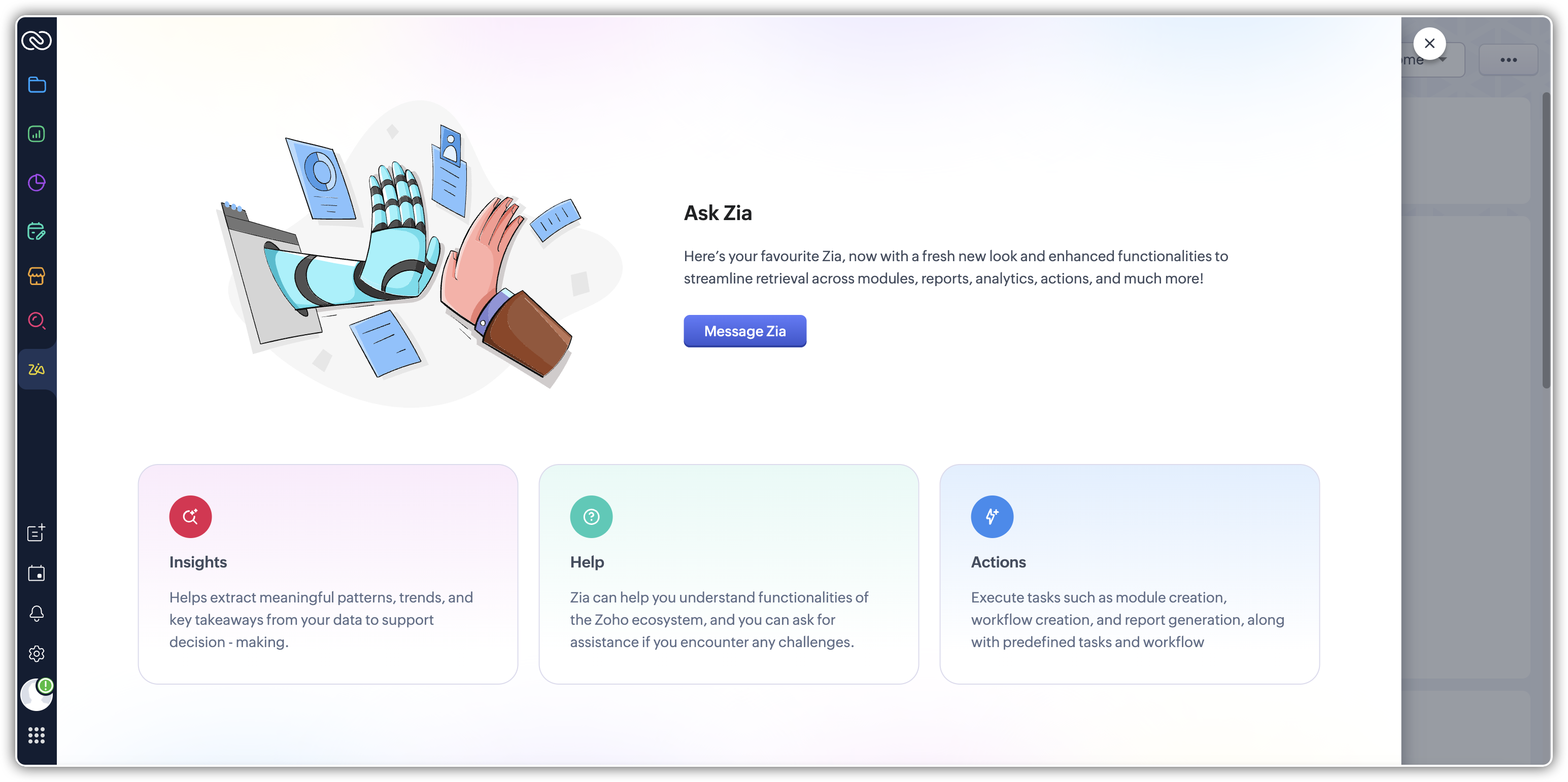
    (image via Zoho)

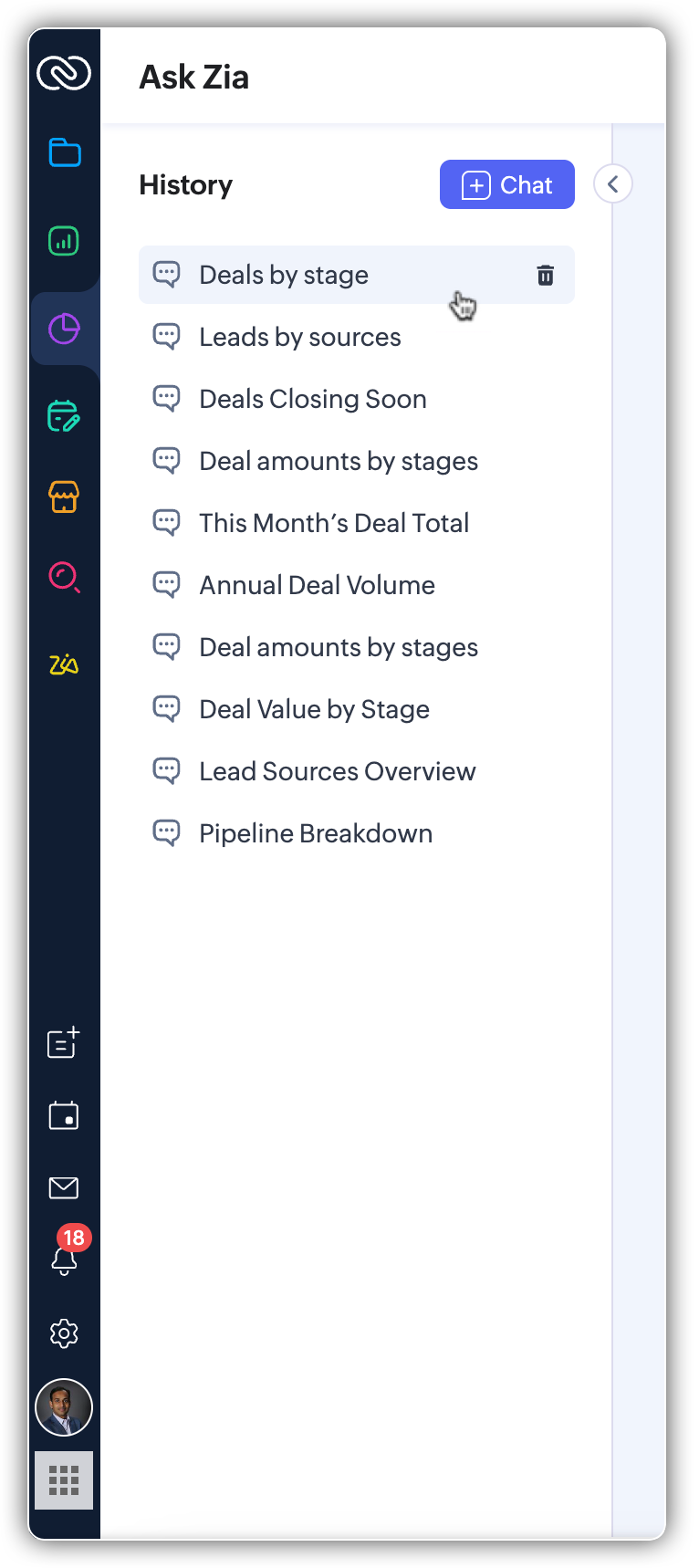
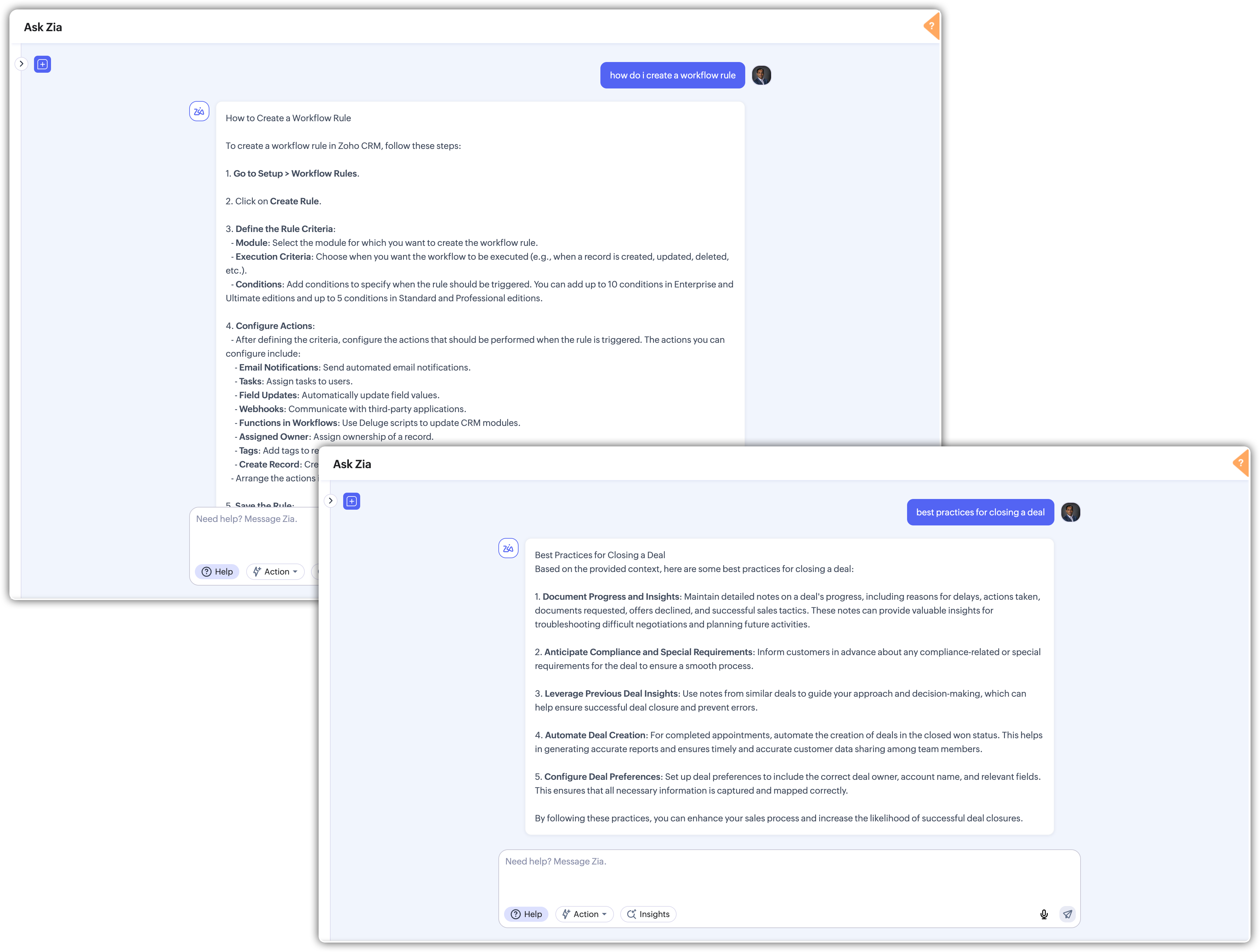
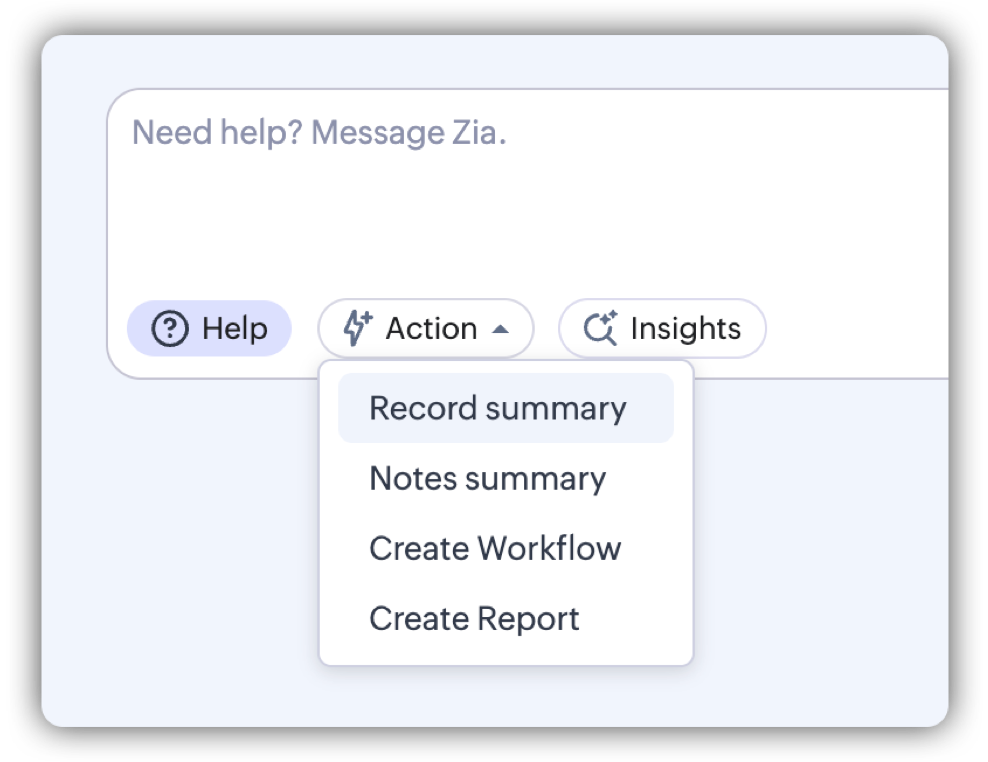
    Zoho has completely redesigned the Ask Zia experience in Zoho CRM, taking your database interaction to the next level. This update turns your AI assistant into a more precise, helpful, and proactive conversational tool. The interface now organizes responses into three key dimensions: Insights, Help, and Action.

    Insights that speak in context

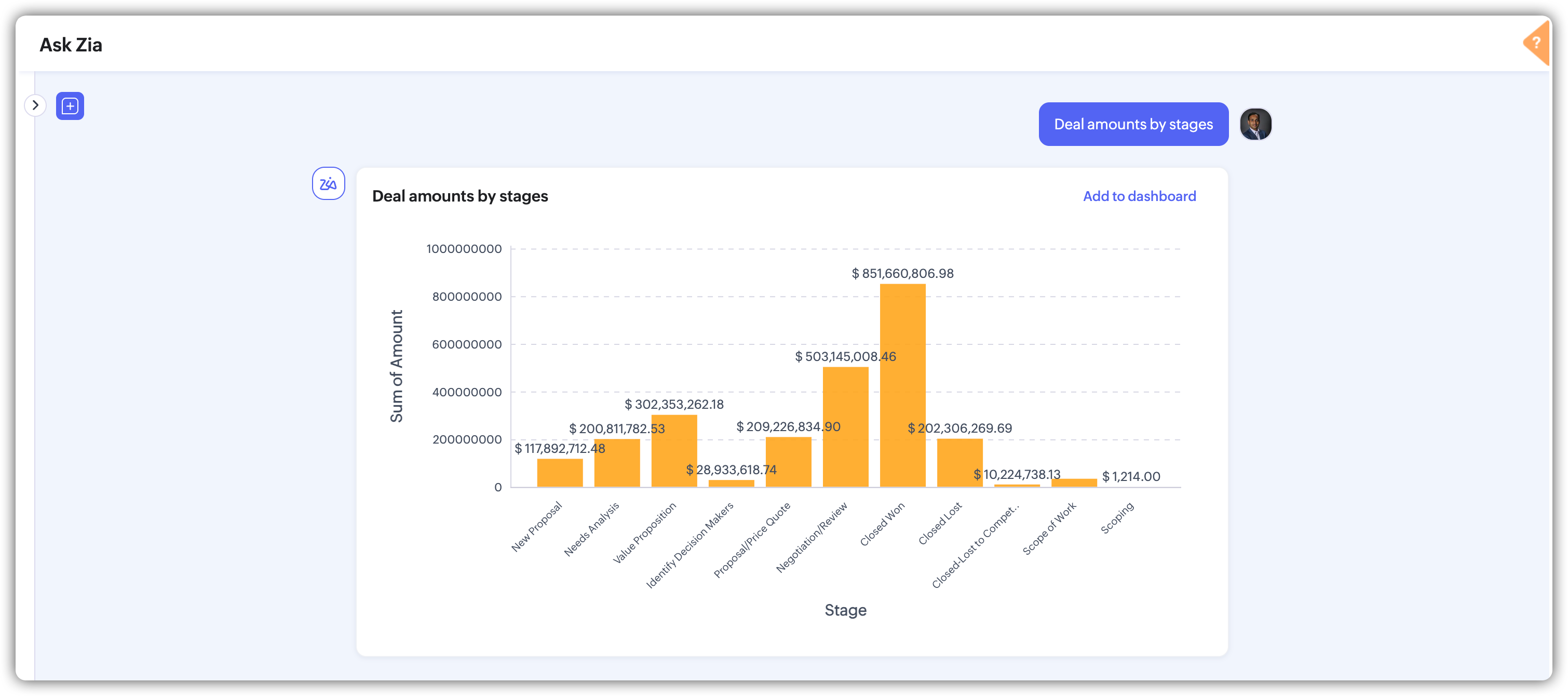
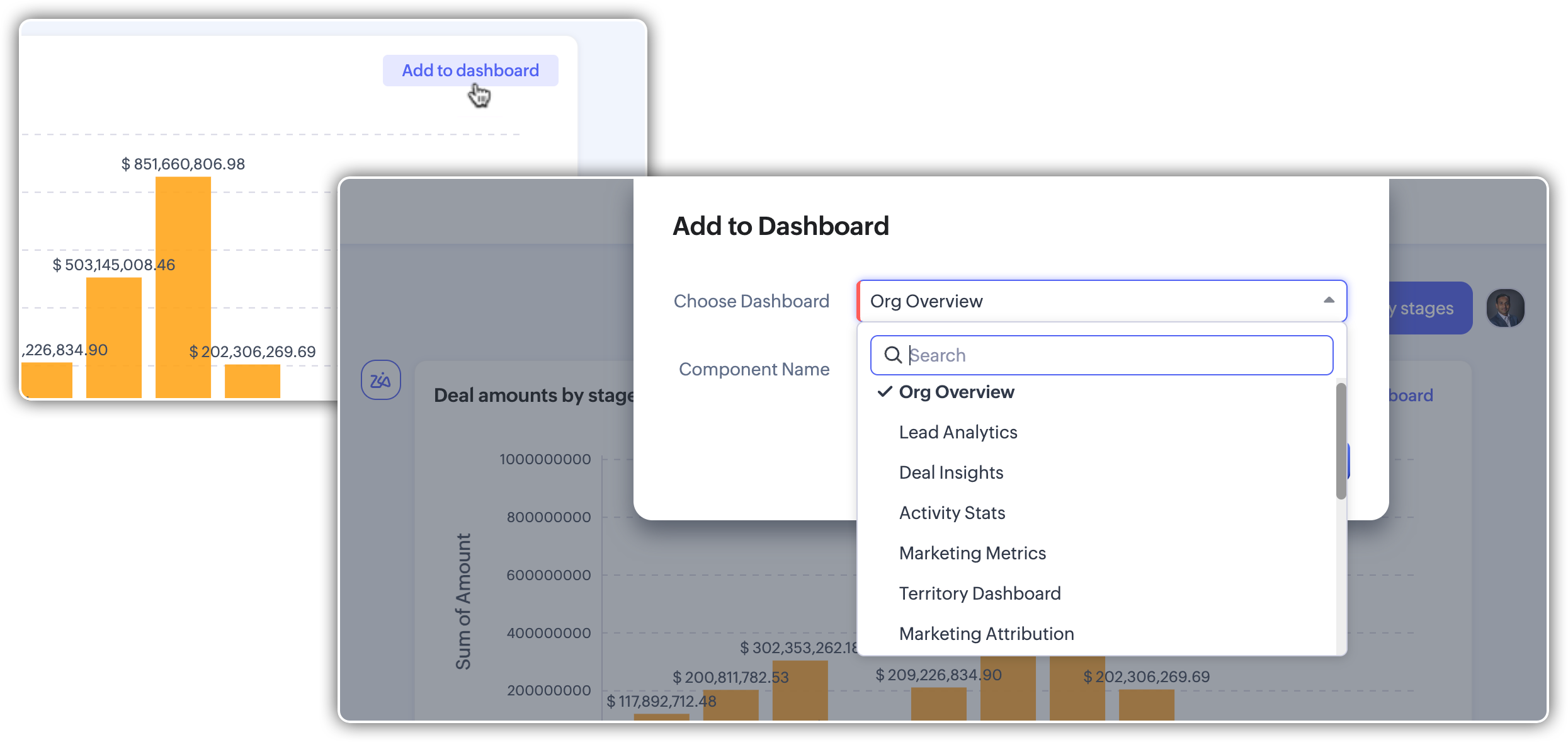
    You can now get automated analysis and KPIs just by asking a question. Ask Zia interprets complex queries and responds with visual, easy-to-understand insights, highlighting trends, comparisons, or key figures. For example: “How did monthly sales evolve last quarter?”
    (image via Zoho)
    (image via Zoho)
    (image via Zoho)

    Help that guides your next step

    Beyond just showing data, Ask Zia provides contextual help, offering useful suggestions based on what you’re asking: create a report, apply additional filters, or save the query as a custom view.
    (image via Zoho)

    Take action directly from the chat

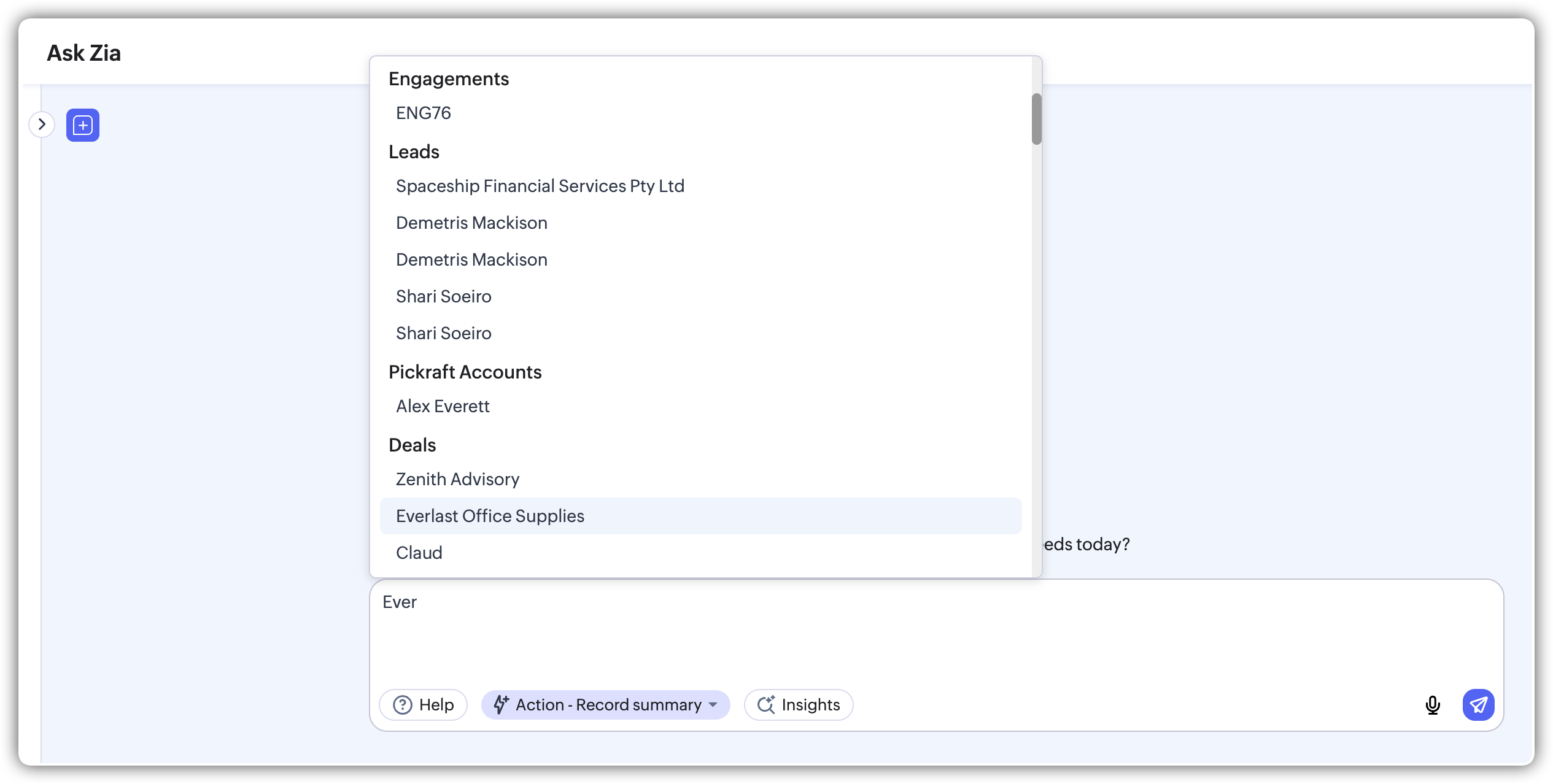
    One of the biggest highlights: you can now take action immediately within the conversation. Need to update a deal, create a task, or send an email? Ask Zia allows it without switching screens. This speeds up processes and improves the efficiency of your sales team.
    (image via Zoho)
    (image via Zoho)

    With this new version, Ask Zia becomes a key ally to transform how you query, understand, and manage information in your CRM.

    If you haven’t tried it yet, now is the time to discover how Ask Zia can help you act faster and with more clarity.

    Zoho Books gets a revamp: discover the May updates

    This month, Zoho Books introduces new tools that enhance accounting, logistics, and reporting management. You can now further customize your workflows, automate controls, better organize your documents, and carry out more precise tracking. Here are the most relevant features:

    Module-level approval
    A new option allows you to trigger approval workflows directly from the module, without complex rules. This enables teams to validate documents faster and in a more controlled way within specific processes.
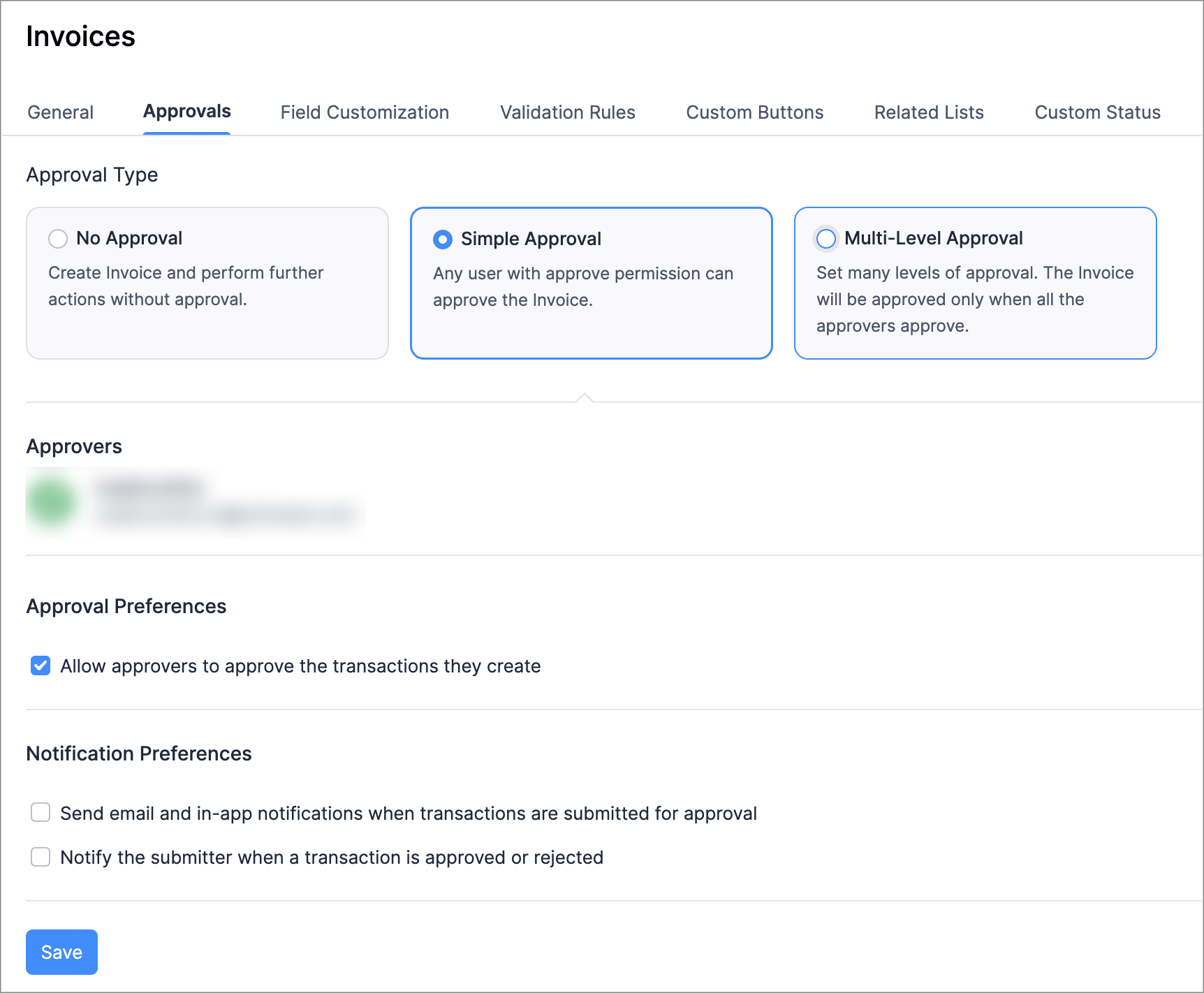
    (image via Zoho)

    Custom field support for recurring journals
    You can now add custom fields to recurring journals, allowing you to tailor entries to your operation’s needs—like tax references, internal codes, or project data.

    Filter and add report tags as columns
    You can now include columns based on custom tags and apply filters to see only records that match a category, project, or transaction type. This facilitates more segmented and in-depth analysis.
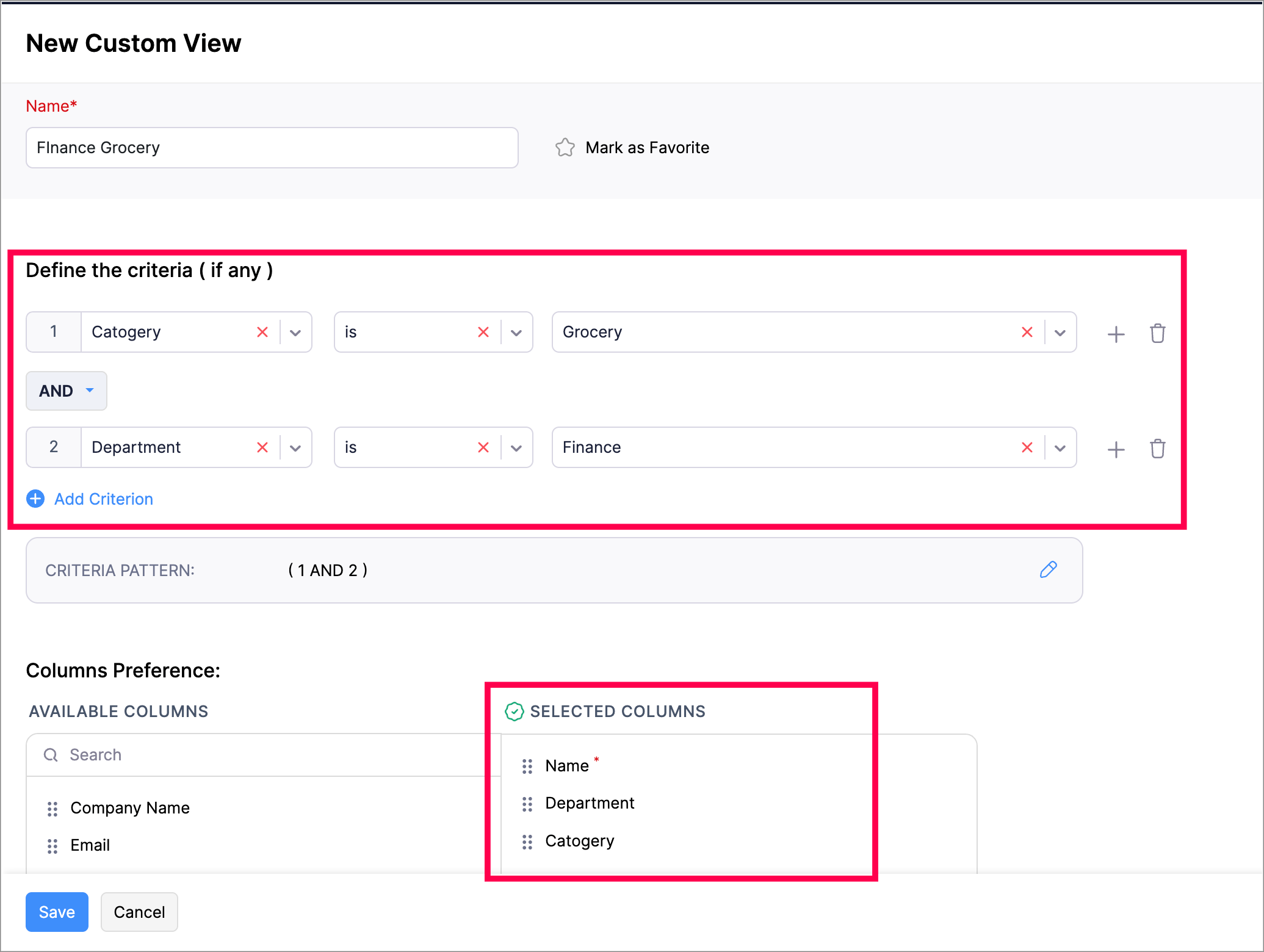
    (image via Zoho)

    Filter and view unsent sales orders
    From the sales orders module, you can now apply a filter to view only orders that haven’t been shipped yet. This speeds up logistics management and improves tracking of pending deliveries.

    New column for retainer withdrawal status
    A column has been added to show the retainer withdrawal status in the corresponding module, providing clearer monitoring of retentions and their progress in the compliance process.

    Allocate landing cost to multiple invoices
    If a shipment includes multiple documents, you can now distribute the landing cost across several invoices. This improves the accuracy of real product cost calculations, especially in import or international purchase processes.
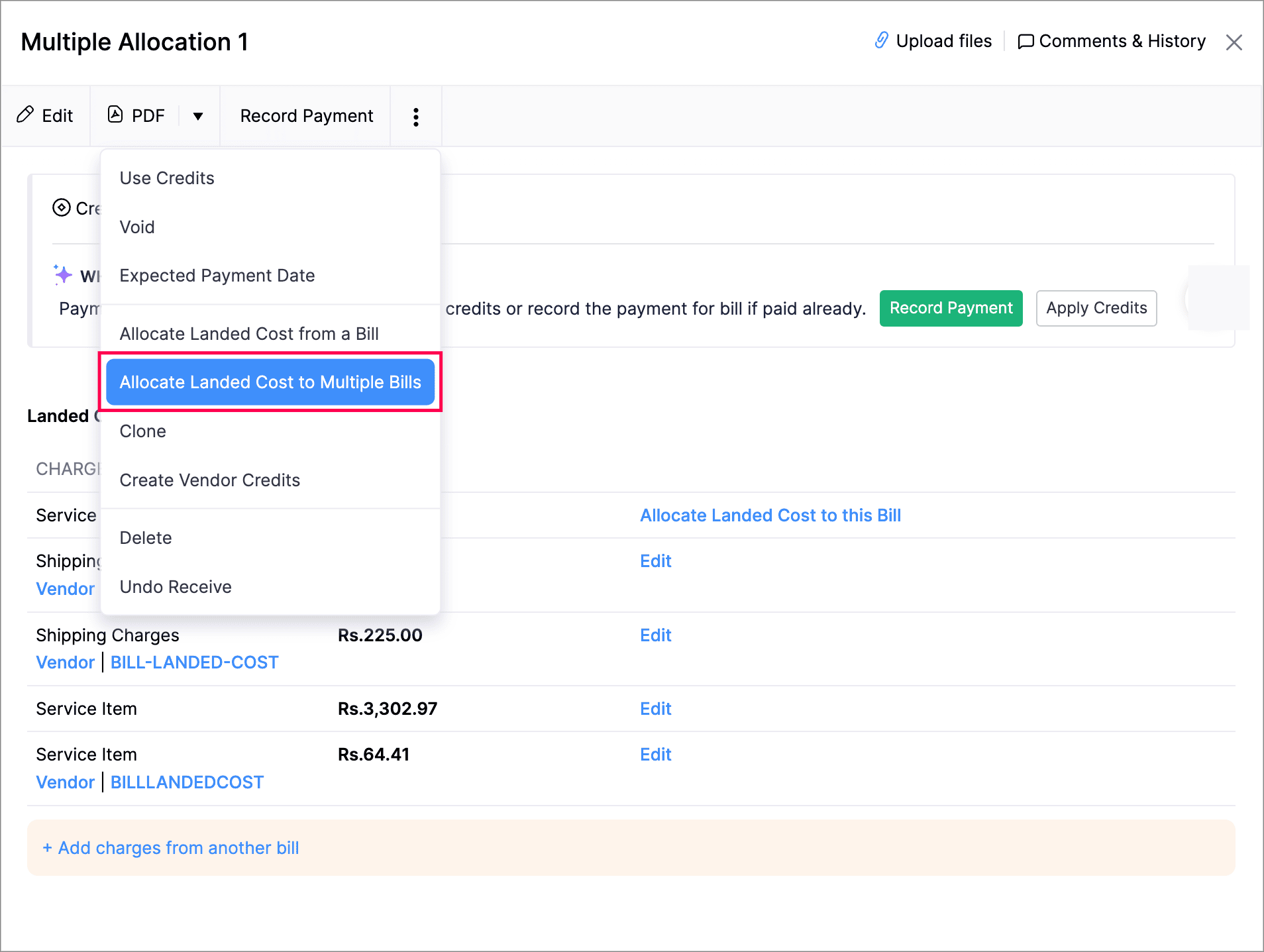
    (image via Zoho)

    Zoho Inventory plugin updates
    If you use Zoho Inventory integrated with Zoho Books, you now have improved synchronization for inventory, billing, and purchase orders, optimizing traceability between accounting and logistics modules.
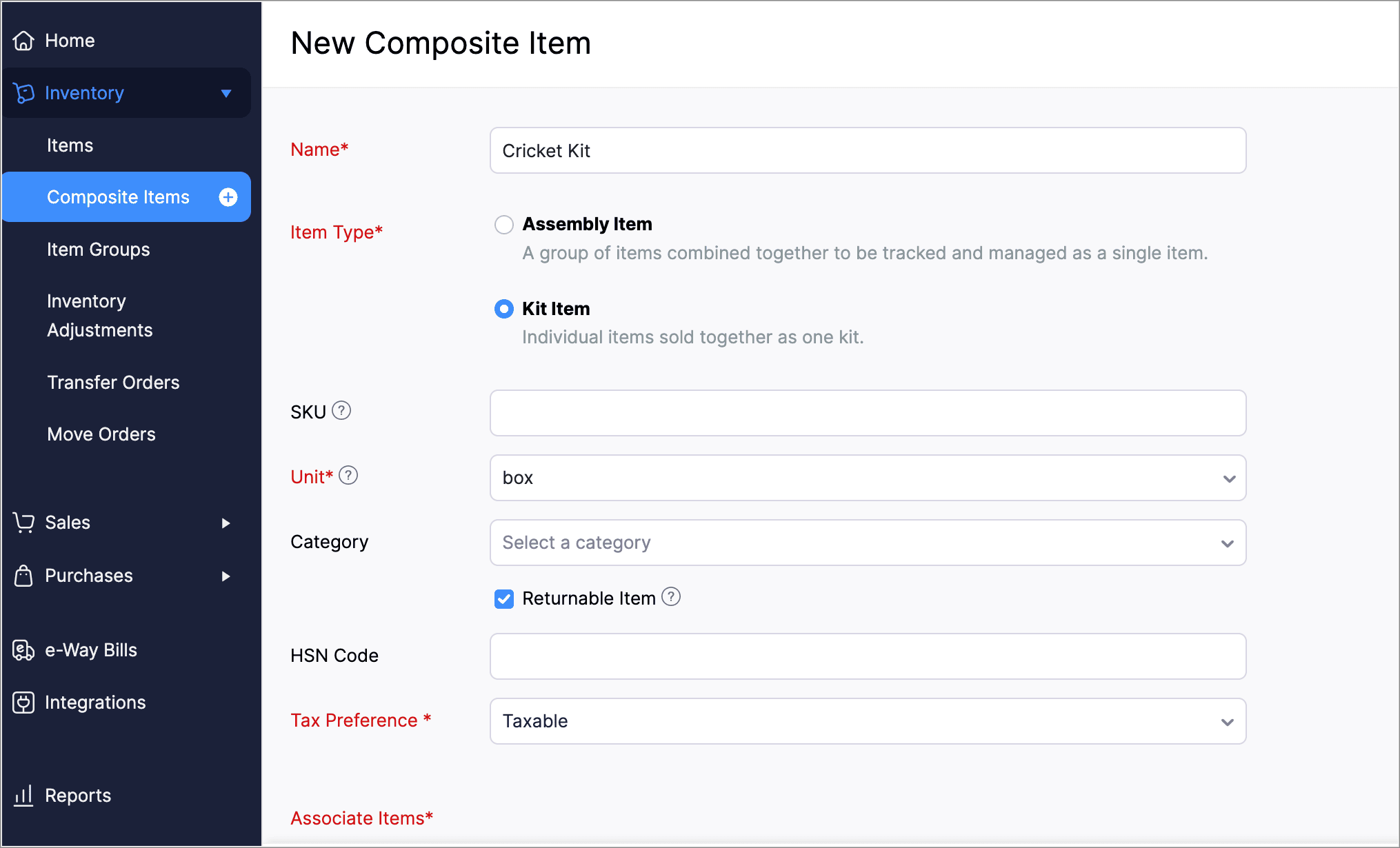
    (image via Zoho)

    These updates are now available in your Zoho Books account. If you need help setting them up or want to tailor them to your tax and operational structure, InterConnecta can guide you through the process.

    Zoho Sprints Mobile 2.0: agility in your pocket, redesigned

    Zoho introduces version 2.0 of its mobile app for Zoho Sprints, completely redesigned to support work on the go. This update enhances the user experience and adds key features for teams using agile methodologies from anywhere.

    A brand new user interface
    The mobile app has been fully redesigned with a more modern and fluid interface. You can now easily navigate through your boards, tasks, and sprints. The design is optimized for efficient project management even outside the office.

    (image via Zoho)

    Revamped boards with Swimlanes
    The task boards have been fully upgraded. You can now use Swimlanes—a highly requested feature that lets you organize work by users, priority, or tags directly on your mobile device.

    (image via Zoho)

    Scrollable sheet view
    With the new scrollable sheet view, you can explore work items like a continuous sheet, scrolling vertically between tasks without switching screens. This view is ideal to get a complete snapshot of the sprint or backlog without interruptions.

    A global feed to keep you informed
    The new app includes a global feed where all relevant activity is displayed in one place. Task updates, comments, status changes, or mentions appear chronologically so you don’t miss anything important, even when managing multiple projects.

    (image via Zoho)

    Custom workflows in the palm of your hand
    You can now view and use custom workflows directly from your mobile. This means adapting your processes with custom statuses, validations, and transitions without needing to access the web version. Zoho Sprints Mobile 2.0 fully reflects your business logic—wherever you are.

    (image via Zoho)

    The new version offers faster load times and a more stable experience. The development team has optimized performance so you can check updates, log time, or move tasks between columns without delays or interruptions.

    Update your app
    If you’re already using Zoho Sprints, you can update to version 2.0 via the Google Play Store or Apple App Store. And if you haven’t installed the app yet, now is a great time to explore how it can help your team stay aligned no matter where they work from.

    Zoho Recruit enhances candidate portal security and experience

    Zoho Recruit introduces new features aimed at simplifying applicant access and strengthening admin security. This update blends convenience and control with three key improvements.

    Passwordless login via OTP
    Candidates can now access the portal without needing to create or remember a password. They simply enter their email address to receive a one-time password (OTP), enabling quick and secure login. This feature simplifies access and lowers entry barriers for applicants.
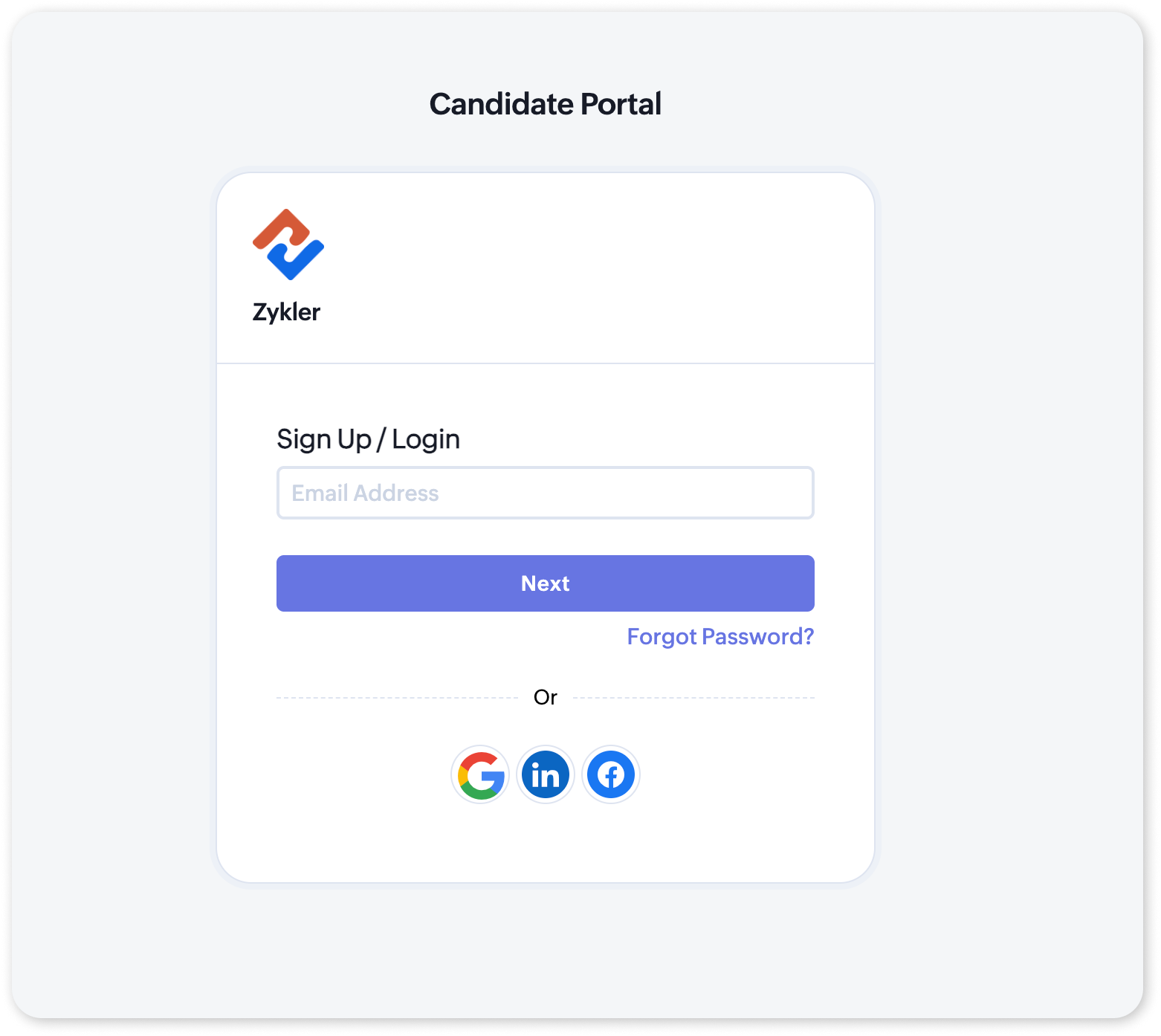
    (image via Zoho)

    Federated login for the Candidate Portal
    The portal now allows candidates to log in using their existing Google, Facebook, or LinkedIn accounts. This federated login (SSO) integration provides a smoother experience and removes the need to manage new credentials for each application.
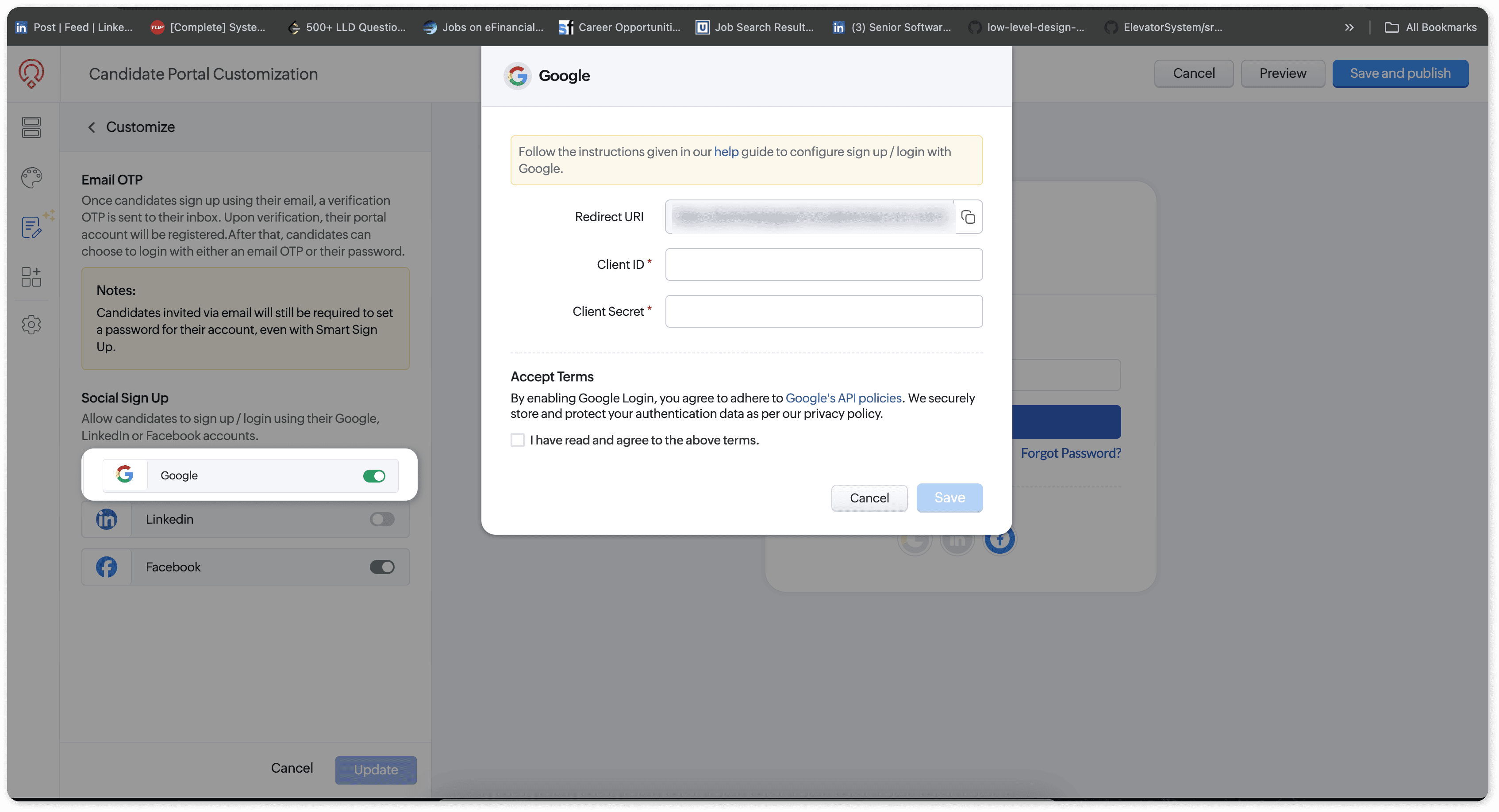
    (image via Zoho)

    Multi-factor authentication (MFA) for admins
    Additionally, multi-factor authentication (MFA) has been added for Zoho Recruit admin users. This feature requires a second verification step during login, adding an extra layer of security to protect system settings and candidate data.
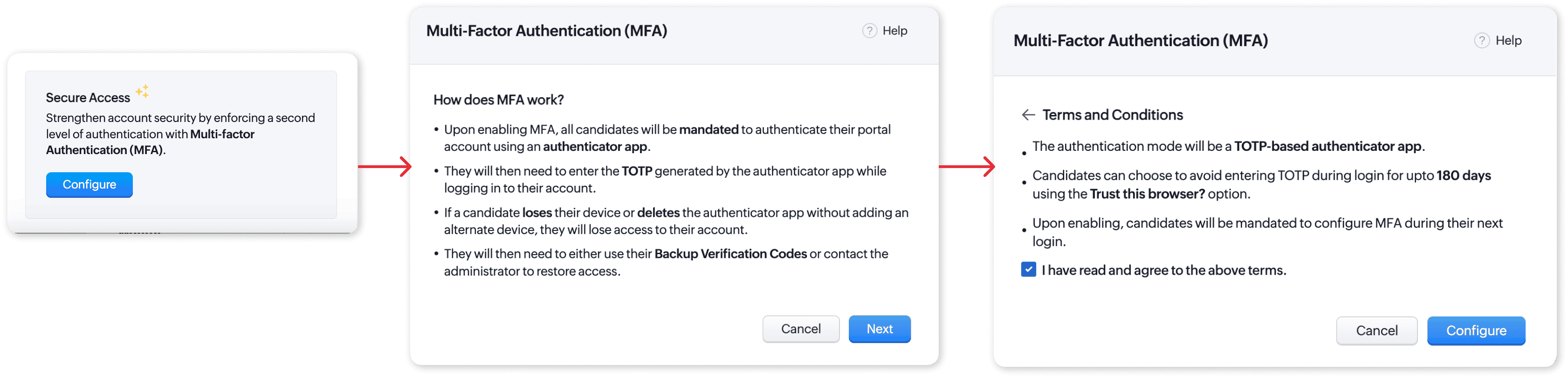
    (image via Zoho)

    These new options are now available and can be activated from the Zoho Recruit settings. If you want to improve the candidate experience and strengthen your hiring environment’s security, you can now enable these features in your account.

    Webinars on Zoho IOT Creator and Agentic AI

    Zoho IoT: Data-driven intelligence for connected operations and business excellence
    New launches in Zoho Creator: AI, security, and smart integrations
    Agentic AI in Zoho

    Want to add these new features to your Zoho system? Let’s work together!

    Learn more about our Zoho consulting services and contact us for a free consultation.


  • From call to click: How an AI Agent can reduce manual inquiries by 70% in the Solar Industry

    The challenge of maintaining the customer connection from contract signing to post-installation.

    Solar companies face a constant challenge: providing an efficient and modern post-sales experience that allows customers to feel supported even after installation. In this case, the need was identified to provide end users with a simple tool to quickly resolve questions without fully relying on the support team.

    One of the main sources of inquiries to the support team is related to the status of the installation or basic system settings. This volume of requests creates operational overload, forcing valuable resources to be allocated to resolving repetitive questions. Reducing dependency on the human team for this type of query becomes essential for scaling.

    Intelligent Agent focused on customer autonomy:

    InterConnecta developed a new mobile app designed for end customers, which connects directly with Zoho CRM and Zoho Desk. The differentiator? The app includes an integrated intelligent agent that answers frequently asked questions, shows installation progress, notifies about upcoming technical visits, displays status, and allows ticket creation, only escalating to the support team when necessary.

    The intelligent agent connected to the CRM is one of the most outstanding features of this implementation and was specially designed for solar companies with a high volume of repetitive inquiries.

    This agent allows customers to:

    • Check the current status of their installation in real-time
    • Verify scheduled dates for technical visits
    • Access details of their open tickets, including internal notes, recent updates, and the ability to create new tickets

    Additionally, it has been trained with battery catalogs from multiple manufacturers and with technical guides aimed at the end user, detailing how to solve common issues. This knowledge base, combined with CRM integration, allows it to offer specific support based on the type of system each customer has registered.

    When a more complex need is detected, the conversation is automatically escalated to the human team, optimizing time and resources.

    💬 “Our customers call too much and overwhelm the team.”


    A recurring concern that this tool aims to resolve.

    Concrete results that transform the post-sales experience

    This translates into:

    Greater customer autonomy to follow their project
    Users can check the status of their installation, dates of upcoming visits, and other relevant data from the app without relying on the support team.

    Reduced response time from the support area
    The intelligent agent automatically resolves frequent questions, allowing the team to intervene only when truly necessary.

    CRM-connected support
    Being integrated with Zoho CRM, the agent can provide responses based on real customer data, improving the accuracy and personalization of each interaction.

    Improved post-sales satisfaction
    The combination of self-service, immediate responses, and real-time tracking results in a smoother and more positive experience for the end customer.

    Effective reduction of agent workload
    The same team can handle a much larger volume without hiring new staff. Alternatively, those agents can be reassigned to higher value-added tasks such as specialized technical support, customer loyalty, or proactive post-sales.
     

    If your solar company is looking to optimize the post-sales experience and provide a more agile and intelligent service to your customers, our team can help.
     

    ✉️ Contact us and schedule a personalized consultation to learn how to implement this solution in your business.

  • Case Study: Integration of Zoho CRM, Zoho Analytics and QuickBooks for advanced financial management

    A client with active business operations needed to optimize access to and analysis of their financial information, especially related to invoices generated and stored in QuickBooks. The goal was to consolidate this data into their CRM system and obtain detailed reports for decision-making.

    Challenge
    The company managed its business processes in Zoho CRM, but financial tracking of customers (such as payments, outstanding invoices, and itemized details) was in QuickBooks, making it difficult to have comprehensive visibility from a single system. Additionally, they needed to present the information clearly and visually for different profiles within the organization.

    Implemented Solution
    Through a custom integration between Zoho Analytics, Zoho CRM, and QuickBooks, a solution was developed that enables:

    • Viewing all invoices associated with a customer directly from their record in the CRM.
    • Creating a link within the Deals module in Zoho CRM that connects to a specially designed Zoho Analytics dashboard.
    • Displaying detailed information such as:
      • The total amount payable by the customer.
      • Monthly payment history and the evolution of billed amounts.
      • Status of each invoice: paid, pending, and payment dates.
      • Items included in each invoice, with their respective description and value.

    Results

    • 360° financial visibility from the CRM, without needing to access QuickBooks directly.
    • Time savings in searching for and analyzing invoices.
    • Better business decision-making thanks to the availability of up-to-date financial data.
    • Increased collaboration between sales and finance teams, with unified access to information.

    This integration represents a key advancement for companies using Zoho and QuickBooks in parallel. The solution allows financial and commercial data to be centralized, strengthens customer tracking, and generates dynamic reports with business intelligence tools like Zoho Analytics.

    If your company is interested in implementing a similar solution, integrating Zoho tools, or optimizing your financial and commercial systems, we invite you to contact us. Our team is ready to analyze your needs and create a personalized strategy to boost your efficiency, visibility, and growth. Let’s work together.

  • Zoholics USA 2025: Zoho shapes the future with collaborative intelligence, automation, and integrated platforms

    From May 13 to 15, the city of Houston became the stage for one of the most anticipated events in the tech ecosystem: Zoholics USA 2025. Over three days, executives, partners, developers, and users from around the world gathered at the George R. Brown Convention Center to discover Zoho Corporation’s latest launches, strategic direction, and future vision. We were present with the InterConnecta team, joining the global Zoho community to experience first-hand the innovations and conversations shaping the future of business technology. The event delivered a clear message: artificial intelligence, cross-functional collaboration, and a unified customer experience are the pillars on which Zoho is building the future of enterprise software.

    Below, we share the most important highlights and announcements that defined this year’s edition of Zoholics.

    Zia Agents: A new era of enterprise AI

    Another major announcement was the launch of Zia Agents—intelligent, autonomous agents designed to operate across the Zoho ecosystem. These agents can automate complex tasks, collaborate with one another, establish hierarchies, and adapt to diverse business contexts.

    Zoho also introduced:

    • Agent Studio, a low-code/no-code environment to build custom agents
    • Agent Marketplace, where teams can deploy ready-made agents or share their own with the community

    Zia Agents are already available for areas like customer service, HR, inventory, sales, marketing, and data management. Integration with third-party apps is also on the roadmap.
     Tony Thomas, Co-founder and Zoho USA CEO

    Beyond CRM: AI across the Zoho ecosystem

    During the event, Zoho unveiled new Zia capabilities across various apps, including:

    • Zoho Writer: PDF/document analysis, contract summary, date extraction
    • WorkDrive: Folder and media content analysis, voice and video search
    • Zoho Projects: Auto-task generation based on file content
    • Zoho Mail: Smart email summaries, contextual thread search by customer or deal, inbox prioritization
    • Zoho CRM: Chat-based workflow creation, field suggestions in new modules, time zone-sensitive automations

    Generative and conversational AI is now deeply embedded into the user experience, making it easier than ever to create, customize, and analyze business data.

    CRM for Everyone: Democratizing the Customer Experience

    One of the most notable announcements was the general availability of Zoho CRM for Everyone, now enhanced with advanced AI-powered capabilities. This evolution expands access and customization of CRM across all departments—sales, marketing, operations, finance, legal, HR, support, and more—making it a truly cross-functional platform for managing the customer experience.

    With features like Team Modules, Connected Records, and Connected Workflows, Zoho aims to break down departmental silos. Each team can tailor their CRM view, collaborate through integrated processes, and maintain full customer context throughout the entire journey.

    The key differentiator: the integration of Zia, Zoho’s AI engine, which enables users to:

    • Build modules and workflows using natural language
    • Design custom interfaces from uploaded images (Canvas Builder)
    • Configure permissions and generate reports through simple text prompts

    All of this is available starting at $9 per user/month, with AI included at no extra cost (excluding the free edition).

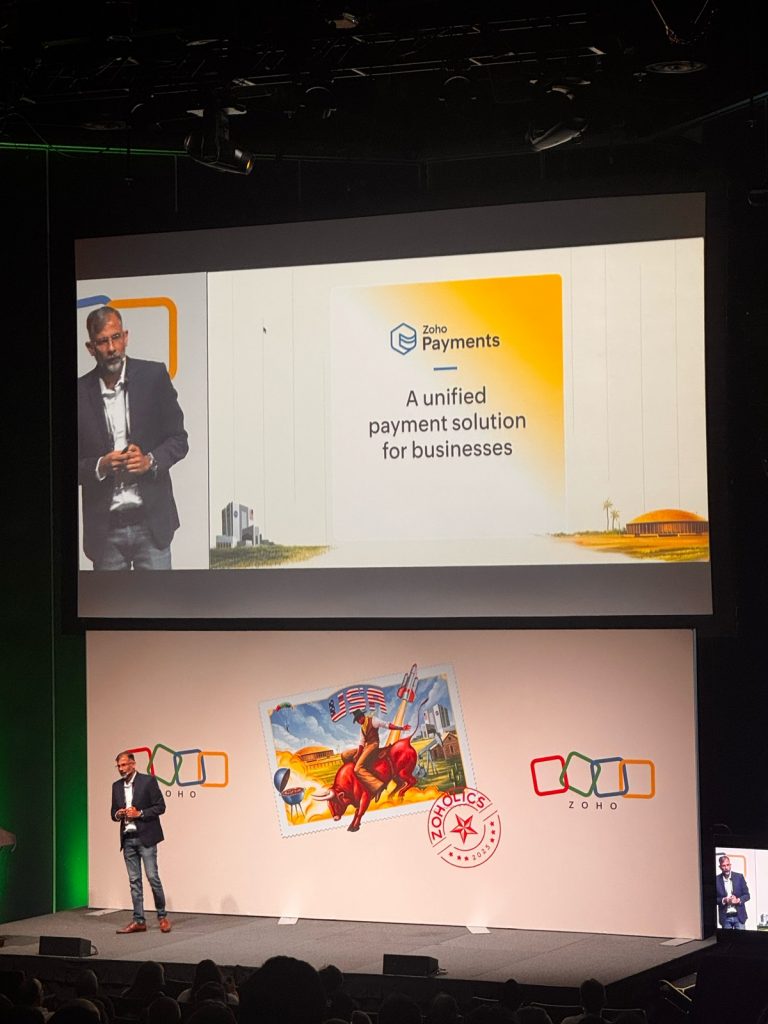
    Zoho Payments: A unified payment solution arrives in the U.S.

    Zoho announced the U.S. launch of Zoho Payments, a native solution that allows businesses to accept online payments via credit cards (over 135 currencies) and ACH transfers.

    Fully integrated with Zoho’s finance, sales, marketing, low-code, and collaboration apps—and also compatible with third-party systems via API—Zoho Payments simplifies cash flow management with features like automated reconciliation, hosted checkout pages, and detailed transaction visibility.

    Pricing is competitive: 2.9% + $0.30 for domestic cards, plus 1.5% for international cards.

    Ulaa Enterprise: Privacy, productivity, and security in a corporate browser

    The new enterprise version of Ulaa, Zoho’s privacy-first browser, strengthens its commitment to security. This edition includes:

    • Built-in Data Loss Prevention (DLP)
    • Centralized policy and user behavior controls
    • Phishing protection and unsafe content blocking
    • Zia-powered productivity features such as smart tab organization and website categorization

    Based on Chromium, Ulaa Enterprise supports mobile devices and gives IT teams centralized control over the browsing experience.

    Rajú Vegesna, Zoho Chief Evangelist

    Vani: Visual collaboration at the core of modern work

    Zoho also highlighted Vani, its new visual collaboration platform. With an infinite canvas, smart templates, built-in video conferencing, voice notes, and prebuilt kits for departments like marketing, design, and product, Vani brings communication and ideation into a single shared space.

    It’s a bold move to replace fragmented tools like Slack, Zoom, whiteboards, and email—offering a more visual, fluid, and context-aware collaboration experience.

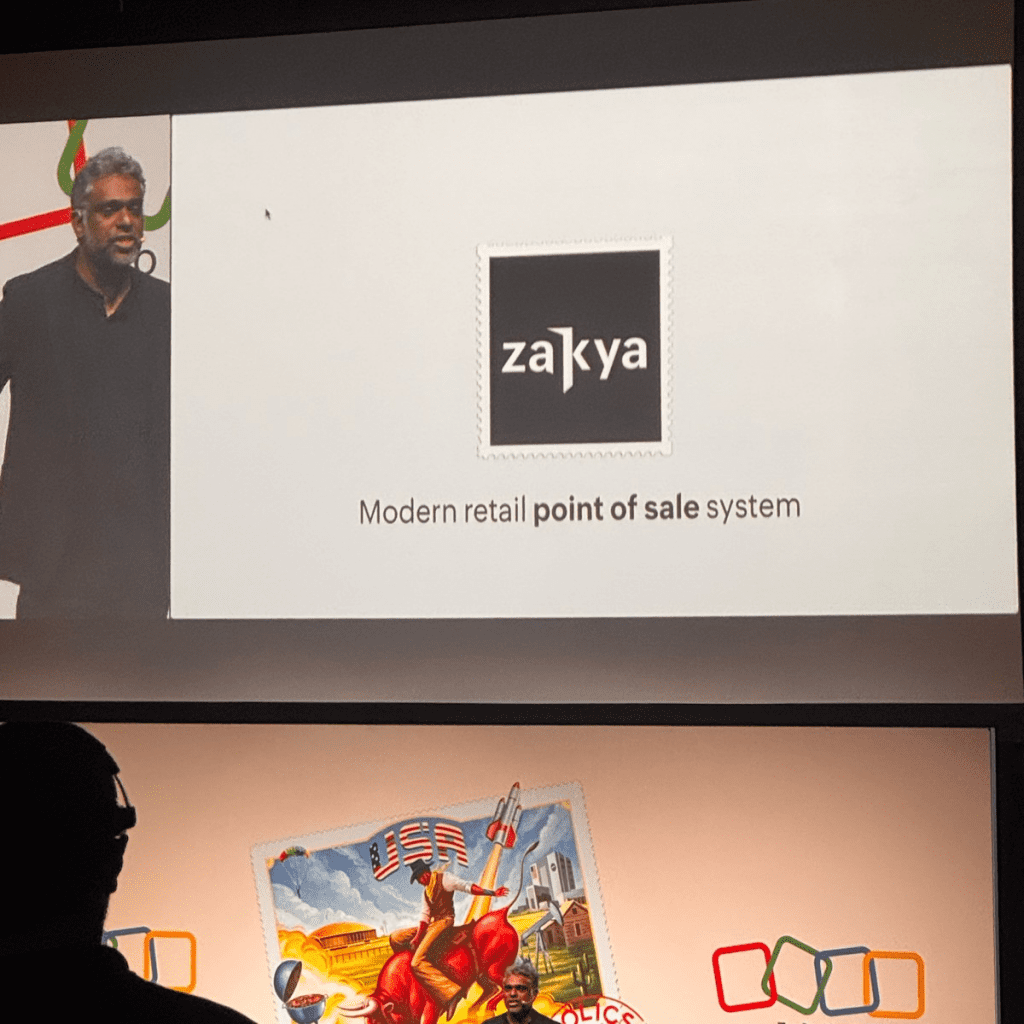
    Zakya: PoS Solution for emerging retail

    Continuing its global expansion, Zoho introduced Zakya, a point-of-sale (PoS) solution designed for small and mid-sized retail stores. Available in 10 Indian languages, Zakya offers:

    • Inventory management
    • Offline and mobile billing
    • Integration with payment gateways (Razorpay, Pine Labs, PhonePe) and logistics platforms (AfterShip, EasyPost)
    • A unified web dashboard for customers, transactions, and vendors

    Conclusion: An integrated, accessible, and future-ready vision

    Zoholics USA 2025 made it clear: Zoho is not just competing with traditional enterprise suites—it is creating a new category altogether: a complete operating system for business, rooted in collaboration, automation, and intelligence.

    With its ethical, cost-efficient approach to AI, proprietary infrastructure, and growing ecosystem (over 55 apps and 100+ million users), Zoho is positioning itself as one of the most coherent, accessible, and forward-thinking players in the global enterprise software landscape.

    If your company is exploring new ways to leverage Zoho to transform its processes, enhance customer experience, or implement intelligent AI-driven solutions, our team would be happy to help.

    We have extensive experience in custom implementations, workflow automation, app integrations, and strategic support across the entire Zoho ecosystem.

    👉 Want to talk with us?
    Get in touch and discover how we can work together to optimize your processes, empower your team, and make the most of everything Zoho has to offer.

  • IC Assistants: the New Generation of Artificial Intelligence Applied to Zoho

    The New Frontier of Productivity with Zoho and AI
    For years, at InterConnecta we’ve helped hundreds of companies automate and optimize processes with Zoho. But now we’ve taken a step further: we are developing our own intelligent virtual assistants, trained to interact with the real processes of our clients.

    This suite of assistants, called IC•Assistants, was designed to integrate natively with the Zoho ecosystem and also with tools like Notion, Zoom, and internal knowledge sources, delivering quick, precise, and actionable responses for key processes in sales, support, and project management. Each assistant solves specific tasks with a practical and results-oriented approach.
    Throughout May, we started testing them internally within our sales, projects, and support teams. And the results are promising.

    What is IC•Assistants?
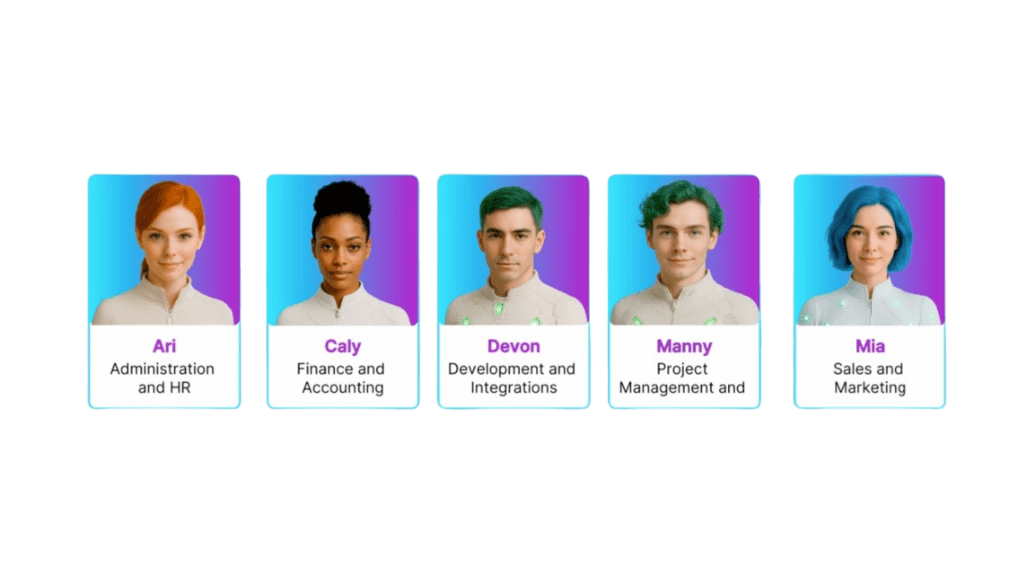
    IC•Assistants is a suite made up of various virtual assistants, each with its own name, personality, and specific functions. Unlike typical generic bots, these agents are designed to act as true specialists in their area:

    How to Access the Assistants
    The IC•Assistants suite is designed to scale according to each company’s needs and digital maturity. That’s why we’ve defined three access levels:

    Level 1 – Free Access via the Customer Portal
    All InterConnecta clients will be able to use basic query assistants directly from their support portal, without any prior configuration. Ideal for answering common questions, consulting documentation, or checking the status of their tickets.

    Level 2 – Connection with Your Own Data
    This level allows the assistants to access specific information from your company, such as CRM records, tickets, meetings, and documents. It requires personalized integration and enables contextualized responses that understand your operations and customers.

    Level 3 – Assistants That Perform Tasks
    At this level, assistants not only respond—they act. They can send emails, log data in Zoho CRM, assign project tasks, or trigger automated flows, all autonomously. It’s intended for companies seeking real automation with immediate operational impact.

    Which Assistants Are Included in the Base Mode?
    From the beginning, IC•Assistants will offer a set of functionalities available in the Base Model, accessible to all users from the Customer Portal. These five assistants are enabled at this first level:

    • MIA – Sales Summary Assistant
      Organizes sales information, structures sales tasks, and recommends best practices in CRM and Zoho Desk.
    • MIA – Meeting Analyzer
      Summarizes key meetings, identifies opportunities and pending tasks, and suggests immediate actions to move forward.
    • DEVON – Desk Assistant
      Centralizes ticket, document, and process information. Ideal for support or post-sales teams handling multiple workflows.
    • ARI – Training Model
      Guides the selection and use of IC Academy courses, explaining formats, certifications, and options by role or industry.
    • TRIAGENT – Triage Assistant
      Analyzes the context of the query and automatically selects the most suitable assistant to respond accurately.

    Each of these assistants can be used immediately with basic functionalities and is designed to solve common needs quickly.

    Tested Within InterConnecta
    This month, we began a controlled internal use phase, where various InterConnecta teams interact with the assistants in real tasks:

    • The sales team used MIA to analyze ongoing opportunities and adjust follow-up messages.
    • In projects, MANNY helped centralize data from open tickets, pending tasks, and customer questions without needing to review multiple sources.
    • And the support team tested TRIAGENT’s effectiveness in channeling incoming queries and activating the most suitable agent in each case.

    In all cases, feedback has been measured and recorded, helping us fine-tune the assistants before their official release.

    Initial Metrics: Real Impact
    Even during testing, we’re already seeing concrete benefits:
    🔹 +50% conversion in leads when using MIA for personalized follow-ups.
    🔹 –25% operational time reported by PMs using MANNY to centralize their information.
    🔹 +37% improvement in strategic decisions when using TRIAGENT to automatically assign the most suitable assistant in critical situations.

    Why Is This Implementation Important?
    Because it represents a new step in our value proposition: we not only implement Zoho—we now enhance Zoho’s use with personalized artificial intelligence. And, as always, we test it in-house first.

    IC•Assistants will be available to our clients very soon. If you’d like to be among the first to try it, contact us.

  • Zoho Sheet + AI: the new intelligent copilot for your spreadsheets

    Zoho Sheet continues its evolution as a productivity tool by integrating innovative artificial intelligence (AI) features, designed to optimize data management and facilitate global collaboration.

    1. Data from Picture: digitize data from images

    The Data from Picture feature allows you to convert images of printed tables or screenshots into editable spreadsheet data. This tool uses AI to recognize text and numbers, eliminating the need for manual data entry and reducing human errors.

    (image via zoho)

    2. Pattern Fill: automate data entry with patterns

    With Pattern Fill, Zoho Sheet detects patterns in the data and automatically fills in the remaining cells. Whether it’s splitting names, reformatting dates, or extracting key information, this feature speeds up repetitive tasks without complex formulas.

    (image via zoho)

    3. Built-in Translation: remove language barriers

    The new Translation feature allows you to translate text within the spreadsheet into more than 70 languages directly, without using external tools. This facilitates collaboration in multilingual teams and global data management.

    (image via zoho)

    4. Zia: your smart assistant for data analysis

    Zia, Zoho’s AI assistant, offers automated analysis, generates charts and pivot tables, and answers data-related questions. With OpenAI integration, Zia can also generate formulas and macros, providing a deeper and more personalized data analysis experience.

    (image via zoho)

    5. Data connection and dynamic templates

    The Data Connection feature allows you to sync contextual data from external services like Zoho CRM, Books, or Projects. Meanwhile, Merge Template simplifies working with bulk dynamic data records, allowing you to link source files and customize data presentation.

    6. Interface and mobile experience enhancements

    Zoho Sheet has revamped its font library, introduced customizable themes, and added Data Bars for more effective data visualization. Additionally, the Android and iPad apps have been updated to provide a smoother and more functional experience on mobile devices.

    What does this mean for your organization?

    AI capabilities in Zoho Sheet reinforce a trend seen across the Zoho ecosystem: smart automation as a competitive differentiator. If your team handles large volumes of data or needs to speed up decision-making, these tools can make a significant difference in your workflow.

    Learn more about AI in Zoho

    If you’re exploring how AI enhances Zoho, here are more articles that might interest you:

    🚀 Zoho Creator + AI: the fastest and smartest development team ever

    🔍 How to gain AI insights on users in Sprints using a Zoho Sheet view

    💡 Form creation optimization with AI in Zoho Forms
    🌍 Zoho Connect & Zia: A smarter and more connected workspace
    📢 AI in Zoho Cliq: The new era of business communication
    📊 Zoho Analytics 6.0: The future of AI-powered data analysis
    🎯 Agile customer support with AI in Zoho Desk

    At InterConnecta, as a Zoho Premium Partner, we support companies of all sizes in implementing smart solutions that fully leverage the AI capabilities of the Zoho ecosystem. If you’d like to talk about how to adapt these tools to your organization, we’re here to help.

  • Zoho News Catch-up: Zoho News Catch-up: Zoho CRM 2025 Updates, New Assemblies & Kits in Inventory, Desk Community Revamp, Projects Enhancements, New Zoho LeadChain App, and Webinars for Cliq, CRM Plus & Books

    Welcome to our catch-up, where you’ll be in the know of all the latest Zoho updates in one place!

    Smarter automation and a renewed experience: What’s new in Zoho CRM for 2025

    Zoho CRM started 2025 with a series of enhancements that optimize user experience, boost automation, and enrich data analysis. Below are the 10 most relevant updates:

    Advanced WhatsApp Business integration
    Create and approve message templates, link them to automated actions, and benefit from features such as threaded replies and audio message previews.

    (image via Zoho)

    Line integration
    Manage conversations, share files, and associate contacts directly from Zoho CRM with the popular Line messaging platform.

    ABM (Account-Based Marketing) for Zoho CRM
    Identify and segment your most valuable accounts, enrich profiles, and create personalized campaigns to maximize upselling and cross-selling opportunities.

    (image via Zoho)

    CPQ (Configure, Price, Quote) enhancements
    The guided selling functionality now supports custom modules, simplifying the creation of sales flows tailored to your processes.

    (image via Zoho)

    New in Kiosk Studio
    Enjoy a smoother experience with new actions, table views of records, and interface improvements for building more efficient kiosks.

    Blocking unwanted calls
    Manage blocklists of numbers directly from the call history to avoid distractions and improve your sales team’s productivity.

    Microsoft Teams integration
    Connect with clients and prospects via Teams calls and online meetings directly from Zoho CRM, with automatic logging of interactions.

    Subform enhancements
    You can now define specific permissions (view, create, edit, delete) for subforms, simplifying access management both internally and externally.

    (image via Zoho)

    (image via Zoho)

    Formula field optimization
    Formulas using the Now() function now update automatically in real-time, and you can set criteria to stop execution based on record status.

    (image via Zoho)

    Team selling and revenue splitting
    Recognize contributions from multiple members in a sale by assigning proportional revenue based on their involvement, direct or indirect.

    (image via Zoho)

    New ways to visualize key business metrics
    Access dynamic reports with widgets and clearer visual comparisons. Now you can view commercial and operational performance from a single integrated view.

    (image via Zoho)

    Forecasting improvements
    The new Forecast panel is more intuitive, allowing breakdowns by funnel stages and adjustment of projections as each pipeline evolves.

    Smarter Zia
    Zia now improves its accuracy by analyzing historical and current data to predict conversions, recommend actions, and detect anomalies before they become issues.

    Deeper customizations
    Add new validations, create complex conditional rules, and customize modules even further to reflect your actual business process.

    Revamped Canvas
    Design record views with greater visual freedom: new graphic elements, more flexible access controls, and tools for creating more engaging user experiences.

    (image via Zoho)

    This is just a part of what Zoho CRM brings this quarter: the ecosystem keeps evolving with more features to sell better, automate more, and make decisions with real data.

    Zoho Inventory now lets you create composite products with the new Assemblies and Kits feature

    Zoho Inventory has added key tools for businesses that manage assembled or bundled products, improving inventory control and system navigation.

    1. Assemblies for internally manufactured products
      You can now create products from inventory components, define assembly processes, and automatically update the final product’s availability based on the stock of each part.
    2. Kits for predefined and packaged products
      Use Kits to sell bundled products like combos or sets. Zoho Inventory automatically adjusts component inventory when a kit order is created.
    3. Clear component view in composite products
      Each assembled product now displays its components, required quantities, and availability, giving you greater control over production, restocking, and sales.
    4. Visual assembly panel
      A new graphical view helps you review the assembly process, check stock levels, and identify which parts need reordering before production.
    5. Improved system navigation
      The interface has been reorganized to simplify access to key modules like orders, inventory, warehouses, and products—everything is clearer and easier to find.

    These enhancements make Zoho Inventory even more powerful for businesses that sell bundled products or manage complex logistics processes.
    And this is just a part of what’s coming.

    Zoho Desk revamps its Community module with a more intuitive design and better customization options

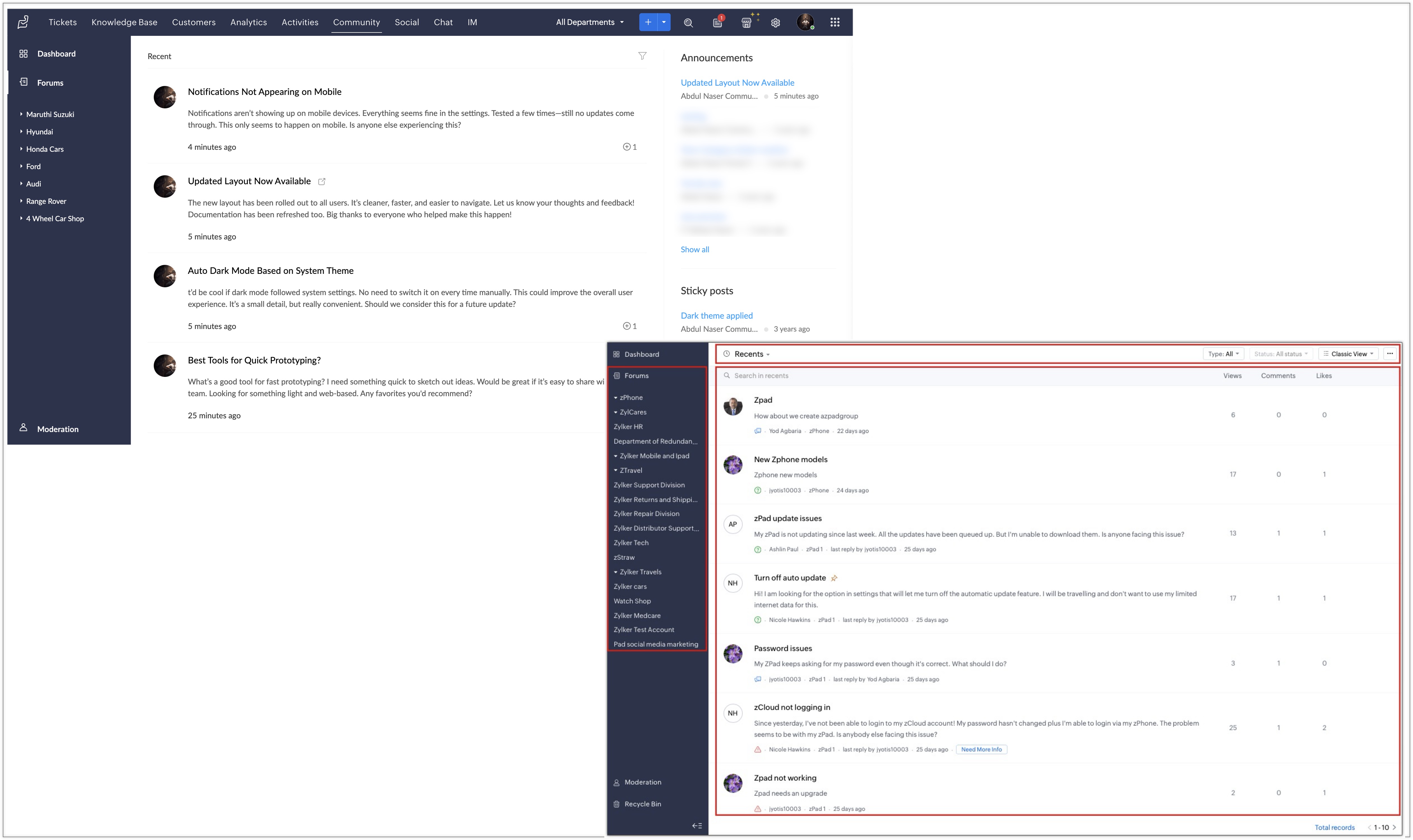
    Zoho has launched a full redesign of the Community module in Zoho Desk, with design improvements and new features that make navigation easier, boost interaction, and simplify post management.

    Improved user interface

    The redesign aims to make the Community more accessible and attractive for both agents and users:

    • Optimized accessibility for easier navigation.
    • Redesigned controls and menus to find functions more easily.
    • Engagement-focused design that encourages exploration and participation.

    New homepage and detailed view

    • The homepage now shows more relevant info per post: title, category, author, recent comments, views, likes, and update date.
    • Clicking a post reveals a detailed view with all interactions, additional information, and shortcuts to edit, follow, or move the post.
    • If a post was converted into a ticket, the corresponding ID is also shown.

    (image via Zoho)

    Bulk approval and simplified moderation

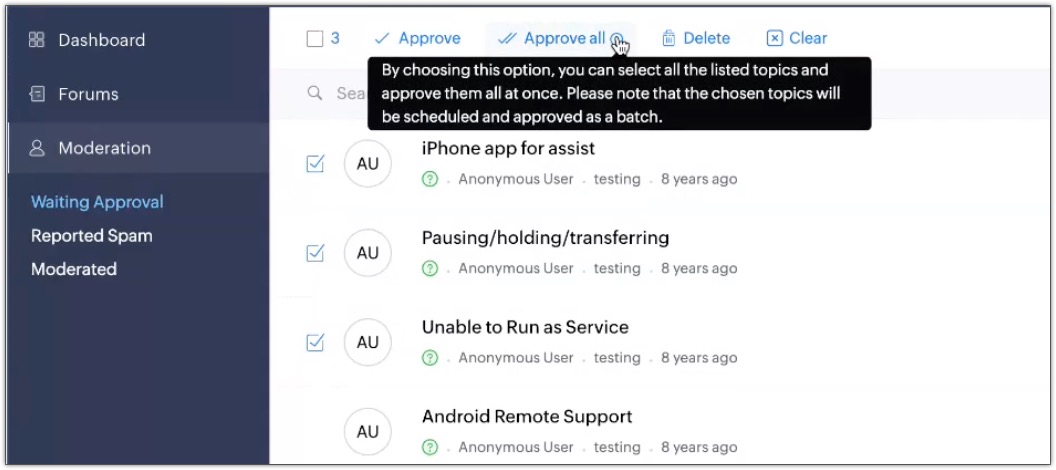
    • Posts requiring moderation or marked as spam can now be reviewed in a quick view.
    • Moderators can use the “Approve All” option to validate multiple posts with one click, streamlining management.

    (image via Zoho)

    With this update, Zoho Desk Community becomes an even more powerful tool for self-service, collaboration, and user engagement.
    Ideal for companies offering participative support with greater control and clarity.

    Zoho LeadChain: A new solution to capture, distribute, and track paid leads from multiple platforms

    Zoho launches LeadChain, an app designed to simplify the capture, distribution, and tracking of leads coming from paid campaigns across multiple platforms.

    Designed for marketing and sales teams, LeadChain centralizes all lead acquisition activity from digital channels, offering traceability, control, and real-time visibility.

    What can you do with LeadChain?

    • Automatically sync leads from platforms like Meta Ads (Facebook and Instagram), Google Ads, LinkedIn, and TikTok.
    • Distribute leads smartly to your sales team using customizable rules.
    • Connect with Zoho CRM and Bigin without external integrations or additional development.
    • Activate alerts and notifications to ensure no lead is left unattended.
    • Configure filters and assignments based on source, campaign, region, team, or any other criteria.
    • Visualize performance per source with integrated reports showing conversions and response times.
    • Use Meta’s Conversion API to improve tracking quality and optimize your campaigns.
    • Work from a simple interface designed for teams that need speed and clarity.
    • Access flexible pricing, ideal for agencies or businesses with variable lead volumes.
    • Ensure complete traceability from source to deal closure.

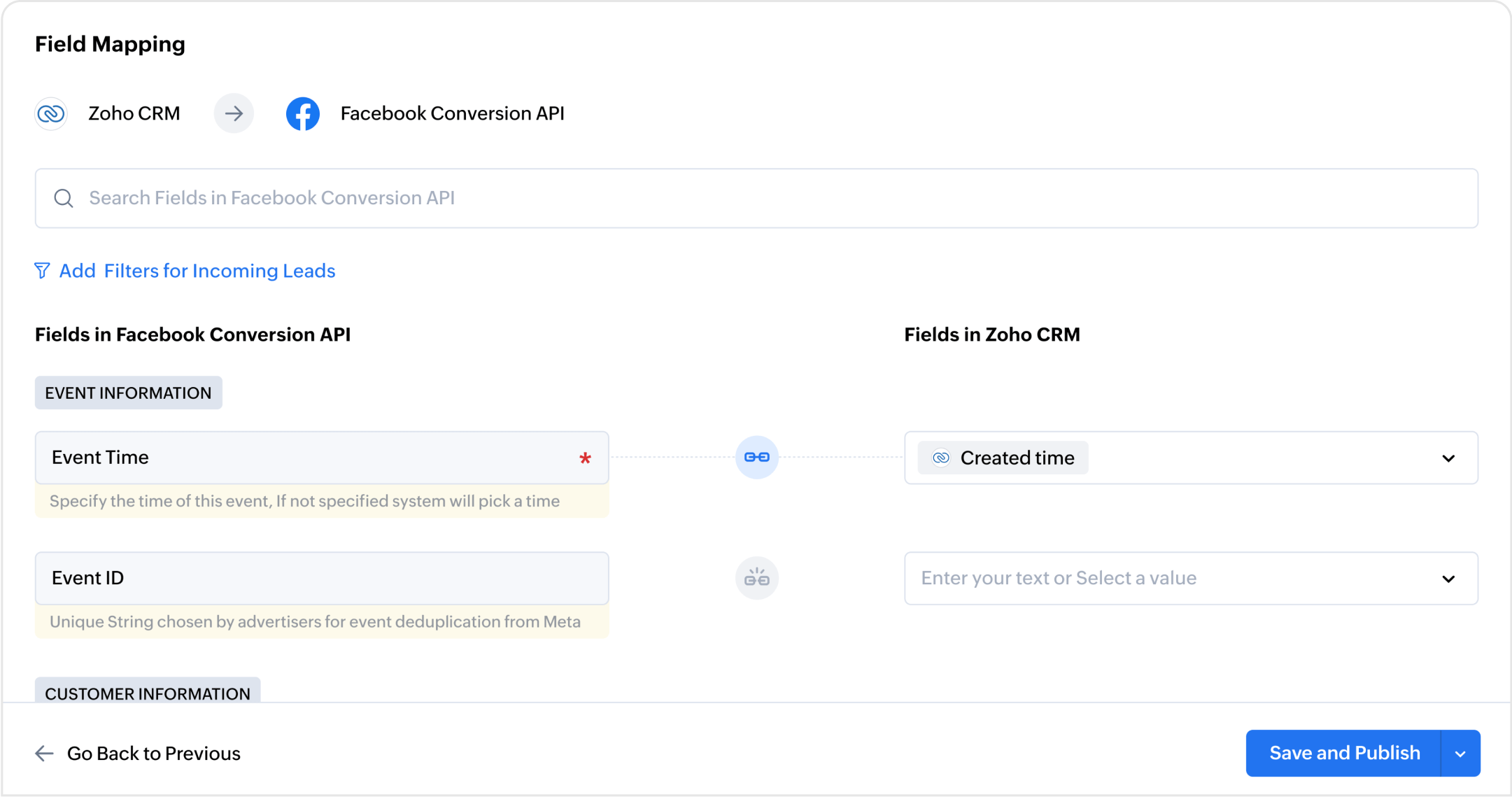
    (image via Zoho)

    (image via Zoho)

    LeadChain is available as a standalone app, but it becomes most powerful when connected with Zoho CRM or Bigin—turning your investment into results.

    Want to start using it or need a guided demo? We’re here to help.

    Webinars from Cliq, CRM Plus, and Books

    Zoho Cliq Development with Zoho Cliq
    Unify your teams with Zoho CRM Plus
    Zoho Books: Innovative Features for 2024

    Want to add these new features to your Zoho system? Let’s work together!

    Learn more about our Zoho consulting services and contact us for a free consultation.


  • Why pay more? Save up to 75% on CRM with Zoho

    In the CRM platform universe, it’s not just about pricing or isolated features. The true distinction lies in how well a tool can adapt to market changes, respond to user needs, and remain competitive against industry giants. Zoho CRM not only meets these expectations—it exceeds them.


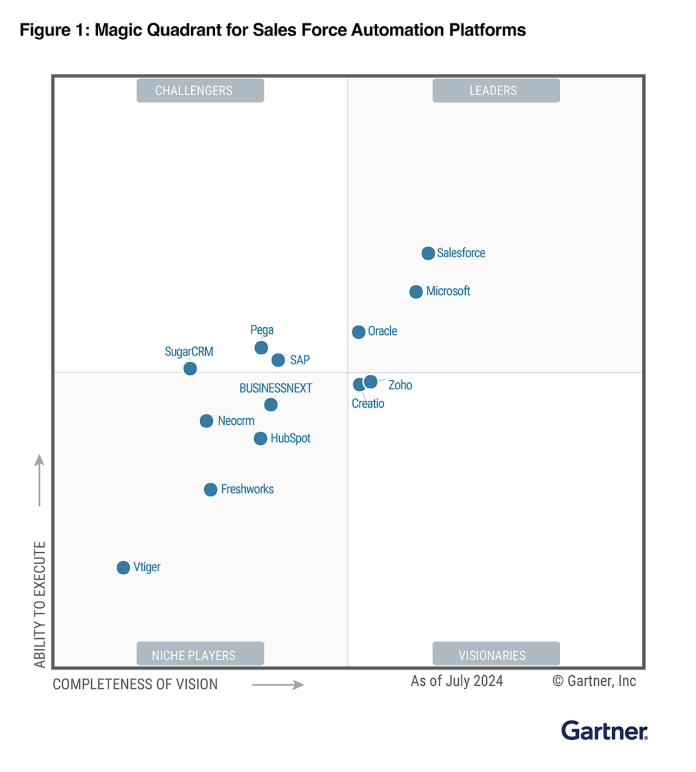
    In the recent Gartner® report (July 2024), Zoho was named a Visionary in the Magic Quadrant for Sales Force Automation Platforms, positioning itself as a key player challenging big names like Salesforce, Microsoft, and Oracle. This recognition marks the 14th consecutive year that Zoho has appeared in the Quadrant, and the third time it has been named a Visionary.

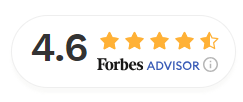
    Additionally, Forbes ranked Zoho CRM among the top 10 CRM software platforms of 2025, highlighting its user experience, scalability, integrations, and cost-effectiveness.

    This market strength, backed by respected technology and business sources, shows that Zoho CRM is not simply a budget-friendly alternative—it’s a mature, innovative, and competitive platform, ready to support businesses of all sizes.

    As we mentioned earlier, Zoho CRM is a platform that has gained ground against competitors like Salesforce, Microsoft Dynamics 365, and SugarCRM, offering advanced tools at a significantly lower price.


    In this article, we’ll explore the real cost of maintaining a CRM and how Zoho can help you reduce expenses without compromising efficiency.

    Price Comparison: Value Beyond Cost

    The cost of a CRM is not limited to the monthly subscription fee; it’s also essential to consider additional costs that may arise from using advanced features, integrating with other platforms, additional storage, premium support, and customizing the system according to business needs. These elements can substantially increase the final price, making a solution that initially seems affordable end up being much more expensive.

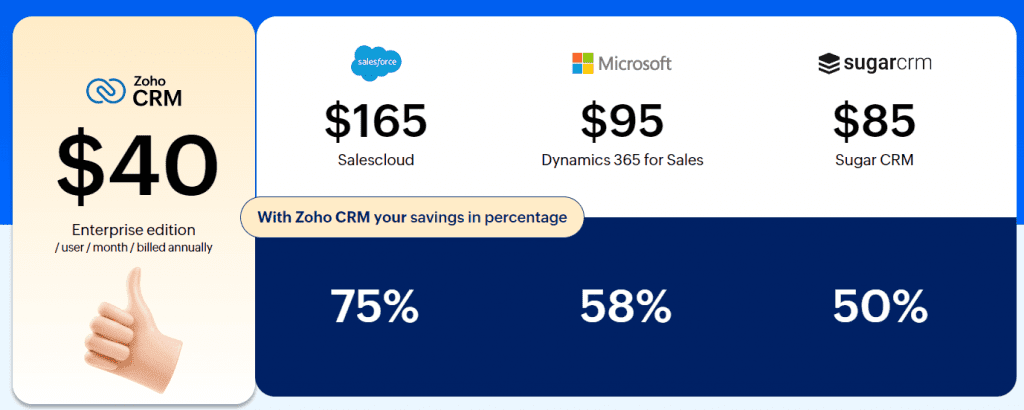
    Therefore, when evaluating different CRM options, it’s key to look beyond the base price and examine what features are actually included and which require extra payments. Below, we present a price comparison based on the Enterprise versions of each software:

    (image via Zoho)


    Zoho CRM offers a significantly lower price without sacrificing capabilities. This translates into cost reductions of up to 75% compared to Salesforce, 58% compared to Microsoft Dynamics 365, and 50% compared to Sugar.

    Potential Savings with Zoho CRM


    According to Zoho Zwitch data, companies that migrate to Zoho CRM can save up to 70% on licenses compared to other market solutions. These savings are not only reflected in the monthly fee but extend throughout the entire software usage experience.


    One of the main reasons for these savings is the simplicity of implementation. Zoho CRM is an intuitive, ready-to-use platform, eliminating the need for investments in consulting or prolonged development. This significantly reduces the initial adoption costs.


    Furthermore, many features that other platforms charge as extras—such as workflow automation, artificial intelligence, or integrated telephony—are already included in Zoho’s Enterprise package. This prevents budget surprises in the medium and long term.


    Additionally, Zoho CRM natively integrates with over 50 apps from the Zoho ecosystem, as well as hundreds of third-party tools, allowing businesses to easily connect their processes without incurring additional fees or relying on external developers.


    Together, this comprehensive approach allows companies to operate more efficiently, with a lower total cost of ownership (TCO), making Zoho CRM not only an affordable option but also a strategically profitable one.

    Zoho CRM Features vs. Competitors


    Price isn’t everything. A cheap software solution with limitations may not be a good investment, as it could create bottlenecks in the long run, require multiple paid extensions, or demand costly integrations to reach acceptable performance.

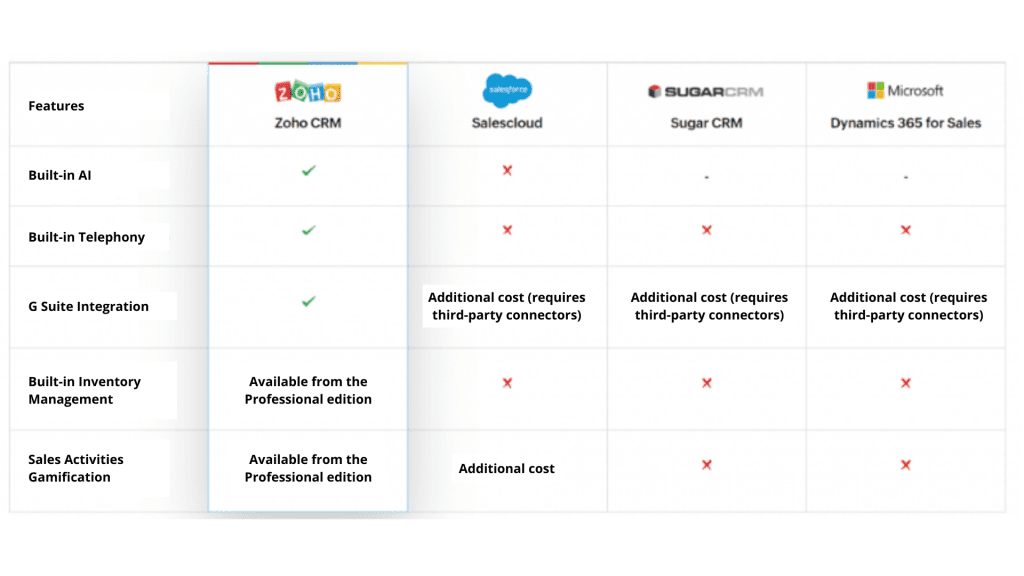
    This is where Zoho CRM shines, combining an affordable rate with a very complete set of ready-to-use features from day one. Instead of charging for each additional module, Zoho offers capabilities like process automation, sales AI, key tool integrations, integrated telephony, and advanced reporting within the same package. This value proposition eliminates friction in adopting the system and enables sales, marketing, and support teams to work collaboratively and without tech restrictions from the start.

    (image via zoho)


    As you can see, Zoho CRM includes a number of features that in other CRMs require additional payments or third-party integrations.


    Hidden Costs in Other CRMs

    Many CRM providers have hidden costs that companies often overlook when choosing a solution:

    • Salesforce: Although it’s a market leader, its costs increase significantly with add-ons like sales AI (Einstein), advanced automation, and data analysis tools.

    • Microsoft Dynamics 365: It has a lower base subscription cost than Salesforce, but its integration and customization costs can be high.

    • SugarCRM: While more affordable than Salesforce and Microsoft, many of its advanced features require paid add-on modules.


    Zoho CRM Testimonials and Success Stories

    Zoho has proven to be a reliable option for companies across various industries. Many companies have migrated from platforms like Salesforce to Zoho CRM and have experienced improvements in operational efficiency and cost reductions.


    Some success stories report:

    • 70% savings in licensing costs

    • 50% reduction in implementation time

    • Increased CRM adoption thanks to its intuitive interface

    You can read more about successful migrations on the official Zoho CRM page.


    Global Recognition and Awards

    Zoho CRM is not only one of the most affordable and comprehensive options on the market, but it has also been widely recognized by industry experts. Over the years, it has received numerous awards and distinctions for its performance, ease of use, and customer satisfaction.


    We invite you to explore the full list of awards on its official awards page.


    While there are many CRM options on the market, Zoho CRM stands out for its combination of advanced features and affordable cost.


    Choosing Zoho CRM allows companies to save up to 75% in licensing costs, access advanced tools without hidden fees, and improve operational efficiency with a flexible and scalable solution.


    If you’re looking for a robust, affordable, and easy-to-implement CRM, Zoho CRM is the best option for your business.

    Ready to discover everything Zoho CRM can do for your business?


    Get free trial

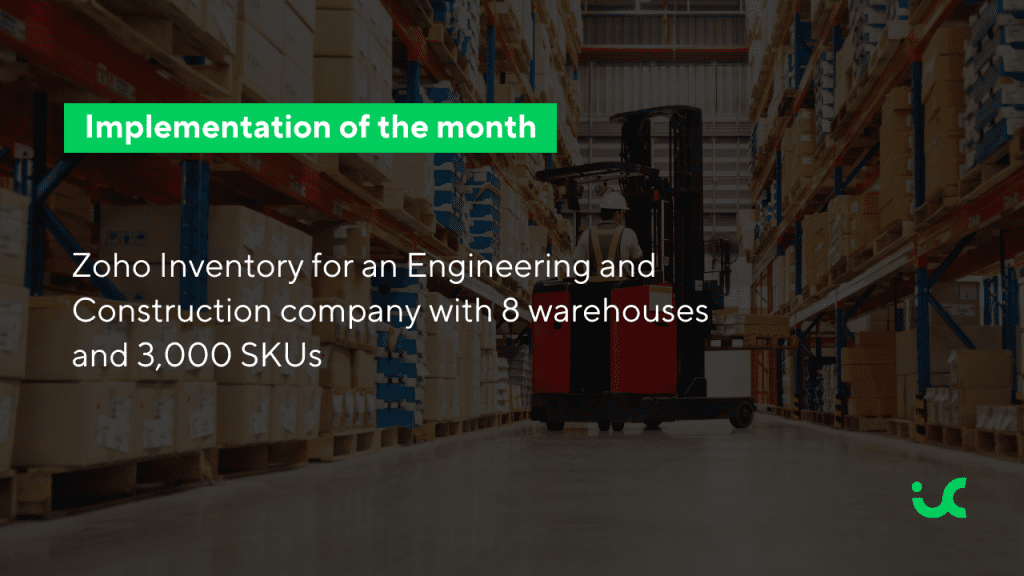
  • Implementation of the month: Zoho Inventory for an Engineering and Construction company with 8 warehouses and 3,000 SKUs

    In this edition, we highlight one of the most challenging and rewarding implementations of the year: the rollout of Zoho Inventory for a company in the Engineering Procurement and Construction (EPC) sector with operational presence in multiple regions and eight distributed warehouses.

    With a catalog of more than 3,000 SKUs or products—including advanced inventory management with serial number tracking—this company required a robust solution that would not only record inventory but also organize it physically in a strategic manner.

    EPC and materials management: an operation that demands precision

    Inventory management is one of the most complex and critical challenges for Engineering, Procurement, and Construction (EPC) companies. Unlike traditional commerce or manufacturing models, EPC companies operate in highly dynamic environments with large-scale, geographically distributed projects. These require coordination of thousands of SKUs with different specifications, suppliers, and lead times. Having each material available at the right moment is key to avoiding costly delays and ensuring continuous on-site operations.

    Managing inventories across multiple job sites, warehouses, and supply channels—while maintaining visibility, cost control, and timely delivery—is a demanding task. Without an integrated and flexible system, delays, excess inventory, stockouts, and cost overruns become frequent risks that directly impact project timelines and profitability.

    This article explores the main challenges EPC companies face in inventory management and how digital tools like Zoho Inventory can bring visibility, automation, and control to optimize purchasing, materials tracking, and overall supply chain efficiency.

    “Zoho Inventory has allowed us to obtain real-time inventory valuation, which is key to maintaining a precise and well-controlled financial operation.” CFO

    From chaos to control: how operational transformation was structured

    The company was looking for a system that would not only record entries and exits but completely transform how they managed their physical and accounting inventory.

    The Zoho Inventory implementation project was designed to comprehensively meet the operational and strategic needs of its network of 8 warehouses, optimizing the management of over 3,000 SKUs and laying the foundation for future integrations with other Zoho ecosystem apps.

    The entire project was executed in 3 months, with a progressive rollout that allowed validation of each phase before scaling. This approach not only resolved the physical stock management but also aligned finance, logistics, and procurement areas on a single platform with real-time visibility.

    Keys to success: what to consider before implementing an inventory management system

    An implementation of this scale requires meticulous preliminary work. Here are some of the key considerations that ensured the success of this implementation:

    • Warehouse design and organized physical structure: Before starting, it’s essential to have a warehouse segmented by aisles, sections, and location zones. Using warehouse maps or blueprints helps correctly configure Bin Locations, enabling real traceability within the system.
    • Accounting decision: physical stock vs accounting stock: It’s crucial to define whether inventory will be accounted for and integrated with Zoho Books. In that case, collaboration with the finance department is needed to align accounting (accounting stock) with operational physical stock.
    • Definition of roles and user profiles: A well-managed inventory system needs clear responsibilities. Identify which profiles will have access, editing permissions, movement validations, and report visibility.
    • Complete inventory list and expected locations: For proper initial setup, a full inventory of all warehouses is required, along with the specific locations where products will be stored.
    • Definition of initial stock cut-off (Opening Stock): A cut-off date must be established to load initial inventory balances, which will mark the official start of system use.
    • Identification of serialized products: If there are products with serial numbers, they must be configured in the system from the beginning to maintain traceability.
    • Use of scanners for incoming and outgoing items: Decide whether barcode scanners will be integrated to speed up product receiving, dispatching, and transfer processes.
    • Availability of printers for labeling: A barcode printer allows labeling of shelves, racks, and products, facilitating visual order and immediate identification.
    • Definition of operational processes: Documenting how each process will be carried out—receiving, dispatching, returns, and warehouse transfers—is key for a smooth implementation.
    • Controlled testing (progressive rollout): Start implementation in a pilot warehouse to validate processes and fix issues before full deployment.
    • Monitoring and post-implementation adjustments: Provide support during the first weeks of real operations to make fine-tuning adjustments, measure results, and scale to the rest of the warehouses.
    “From the procurement area, we now have a global view of acquisitions, which allowed us to optimize processes and decentralize material deliveries. Thanks to this, we can coordinate efficient shipments from suppliers directly to each of our warehouses.” Procurement Manager

    This implementation demonstrates how a well-planned technological solution can completely transform the operations of companies with complex logistics structures. In just three months, this EPC sector company transitioned from manual, fragmented management to an integrated, efficient, and scalable system. Zoho Inventory not only addressed immediate challenges related to traceability and stock control but also enabled a solid foundation for future growth, integrating finance, procurement, and logistics teams on a single platform.
    Cases like this reaffirm the importance of choosing the right tools and having strategic support to ensure successful adoption.

    Want to transform your inventory management with Zoho Inventory?

    At InterConnecta, we are a Zoho Premium Partner and support companies in industries such as engineering, construction, energy, and logistics at every stage of the process.

    Contact us to learn more about our implementations.

  • Solution Design: The key to a successful and sustainable Digital Transformation

    Why do some companies successfully transform their operations while others remain stuck in inefficient processes? The answer lies not only in the technology they adopt but in how they structure their processes to effectively integrate these tools.


    Today, many organizations embark on their digital transformation journey with the idea that implementing new software will solve their operational problems. However, without prior assessment and proper solution design, the risk of creating more complexities than benefits is high.


    This is where Solution Design comes into play. More than just a technical stage, it is a strategic approach that allows companies to analyze, redesign, and optimize processes before adopting new tools. This methodology not only improves efficiency and reduces unnecessary costs but also ensures that digitalization truly drives the business forward.

    Solution Design as the foundation of Digital Transformation

    Digital transformation begins with a fundamental question: How can processes be optimized so that technology drives the business and not the other way around? Many organizations implement software without analyzing whether their operational structure is ready for change, leading to inefficiencies, high costs, and internal resistance that can jeopardize the project’s success.


    Solution Design enables the alignment of technology with the company’s strategic objectives. This approach not only focuses on implementing new tools but also identifies opportunities to improve workflows, eliminate redundancies, and establish clear criteria for adopting new platforms.

    1. Analysis and Diagnosis of Existing Processes

    Before implementing any digital solution, conducting a detailed diagnosis of current processes is essential. This phase assesses key aspects such as:


    • Bottlenecks and redundancies: Are there unnecessarily repetitive processes slowing down operations?
    • Interdepartmental dependencies: How do different departments interact, and what impact does this have on overall efficiency?
    • Workflow gaps: Where do friction points arise that affect productivity?


    By conducting interviews with key leaders and users, analyzing data, and mapping processes, businesses gain a clear understanding of their needs and areas for improvement.

    2. Process Design and Enterprise Architecture

    Once the current state of processes has been identified, the next step is designing solutions to optimize operations and prepare them for technology implementation. This phase focuses on:


    • Developing scalable workflows: Designing processes that not only solve immediate problems but also support future growth.
    • Defining acceptance criteria: Establishing clear indicators to evaluate whether end users are correctly adopting the proposed improvements.
    • Optimizing security and information access: Adjusting roles and permissions to ensure the protection of sensitive data without compromising operational efficiency.


    This structured approach minimizes risks and ensures that digital transformation does not disrupt critical operations.

    3. Phased Implementation and Performance Monitoring

    Effective digital transformation does not happen overnight. To prevent disruptions, it is crucial to develop a phased action plan, prioritizing high-impact implementations with lower complexity.


    • Implementation stages: Divided into manageable phases to allow for gradual adjustments without affecting operational continuity.
    • Detailed budget: A financial breakdown with return on investment (ROI) projections ensures that each improvement has a measurable impact.
    • Ongoing evaluation: Periodic assessments help adjust the strategy based on process evolution and team adoption.

    Benefits of a Solution Design-Based Approach


    Companies that adopt a structured approach to digital transformation maximize operational efficiency and reduce unnecessary costs before making significant technology investments.


    Some key benefits include:

    Operational efficiency: Increased productivity and better resource allocation.
    Cost reduction: Identifying and eliminating inefficiencies before investing in software or infrastructure.
    Risk minimization: Gradual implementations prevent operational disruptions.
    Scalable growth: A digital infrastructure adaptable to business evolution.

    Preparing Processes for Artificial Intelligence

    One of the key differentiators of Solution Design is that it not only optimizes current processes but also prepares them for the future, especially for the adoption of Artificial Intelligence (AI)-based solutions.


    💡AI-ready solutions: we design business processes that are ready to integrate AI tools, whether within the Zoho ecosystem, third-party applications, or any other business platform.


    This involves structuring workflows that can be automated, identifying areas with potential for predictive analytics or data-driven decision-making, and ensuring that current systems can scale with emerging technologies.


    In other words, solution design is not just a preliminary step before implementing a CRM or ERP: it is the foundation that enables your company to leverage AI effectively and sustainably.


    (You may also be interested in: “Adopting AI: The Key to Modernizing Business Operations”)

    Digital transformation is not just about technology; it’s about strategy. Solution Design and process optimization enable companies to make more informed decisions and build a solid foundation for digitalization. Adopting a data-driven approach, defining clear objectives, and designing efficient workflows is the key to a successful and sustainable technology implementation.

    The future of companies lies not in simply adopting software but in their ability to redesign processes and leverage technology intelligently.

    Ready to optimize your processes and accelerate your digital transformation? Download our brochure to learn in detail how Solution Design can help your company structure efficient and scalable processes.


    📥 Download the brochure

    Additionally, discover in this video how our solutions adapt to your business needs and facilitate the strategic implementation of technology.

    🎥 Watch the video below:

This site is registered on wpml.org as a development site. Switch to a production site key to remove this banner.