Blog

  • Lead Generation on Twitter – 10 Steps to Grow Your Business

    Twitter is where conversations happen. With a mammoth 336 million monthly active users, Twitter reigns as one of the most popular platforms for microblogging. Twitter is a busy place, where opinions, humor, news, and stories are shared by the minute. How can your business be a part of the conversation?

    Why use Twitter for business?

    What makes Twitter especially great for business is that, unlike Facebook and Instagram, the platform is less personal. Twitter is not a place where friends and families connect—it’s a place where celebrities, music artists, journalists, athletes, politicians, and of course, businesses connect with their respective audiences. In essence, people use Twitter to discover things that are new and interesting. Statistics show that companies that use Twitter average 2x more leads per month than those that don’t.

    In this article, you’ll find 10 ways to generate leads for your business and create new opportunities for your sales team, using Twitter. There’s only one requirement: use a CRM software that can hyper-manage your Twitter account, and seamlessly funnel leads into your system. We suggest Zoho CRM, but it ultimately depends on what you expect from your CRM software. If you’re interested to know whether Zoho CRM would be a good fit, go ahead and do your research!

    1) Build your profile

    Perhaps one of the most overlooked aspects of social selling is creating a profile that actually sells. Many businesses put significant time and resources into selling online while using an incomplete and incompetent profile. Your profile sends a strong message about who you are, what your mission is, and what you stand for.

    When Twitter users find you on their timeline, they should be able to look into your profile and get a feel for what they need to know from a glimpse. Your profile should also include a way to contact you, in case a lead wants to do business. Therefore, either your office address, phone number, email address, or your website should be prominently displayed on your profile.

    Twitter name & handle

    You should use your business name as your Twitter name, and there’s no debate about that. Your Twitter name is your identity. You can be a little creative with your Twitter handle, but make sure that your Twitter handle can be easily associated with your brand, otherwise, people might get confused when they are trying to tweet to you.

    Twitter profile image & banner

    Along with your name, your profile image is how people identify you on their news feed. Use your logo as your profile image, or if you don’t have a logo, use a picture of your shop (now might be a good time to invest in a graphic designer). Your image will be cropped and displayed inside a circle, which narrows down your choice of design. Ideally, you’ll use either a circular logo, or a sized down logo with a solid color background.
    For your Twitter banner, use an image that showcases your goals, your ideals, or your slogan. You can change your banner occasionally to mark a milestone, an update, or a significant moment. Make sure your official images are high-def, original and to scale.

    Twitter bio

    Your bio section is where you can really strike a chord with visitors. Write a short, straightforward, and rich description of your business, add a link to your website, and update where your business is located. This is also where you’ll display your contact information. When your profile looks solid, leads are more likely to reach out to you or visit your website for more details.

    2) Create a Twitter landing page

    Once you have your profile set up and ready to make waves, you need to do one more thing before you begin—a Twitter landing page. This is an essential step, which can often be forgotten about. Your goal with redirecting your leads from your Twitter profile to another site is to collect their information i.e fill in a form. For this purpose, we don’t recommend you use your website’s homepage.

    Make sure this page is designed to convince the visitor to enter their email address so that you can start a conversation outside of Twitter. You can add new leads into your CRM software easily, monitor the traffic that Twitter brings in, and measure how your social selling strategy is working out for you.

    List the landing page link on your bio, and add it to any tweet that’s relevant. You can track the number of clicks that a link receives using Bitly, a URL shortener, customizer, and tracker. Every time you make a tweet with a link, you can compare the numbers with the site traffic to see how the tweet is performing.

    3) Tweet!

    Twitter is primarily a social media platform, rather than a sales and marketing channel. Therefore, tweeting to socialize should be a priority over tweeting for sales and promotion. Your followers, even the most loyal fans, would not put up with an account that only tweets to sell or promote all the time.

    Twitter is not about you, it’s about your relationship with the world. You have to build relationships, be helpful and wholesome. Make it a habit to write tweets that your followers would gain from, not the other way around. Here are a few approaches to tweeting to keep in mind:

    Keep a 30/60/10 balance

    Lead Forensics reports that businesses need to balance the content of their tweets to optimize the viewing experience of their followers. Therefore,

    • 30% should be content you own, such as blogs or videos.
    • 60% should be curated content, which is just about any media that you don’t own but is worth sharing.
    • 10% should be promotional content.

    Patience and persistence are essential for social selling. However, if you think your sales would be hurt if only 10% of your tweets are promotional, you’d be wrong. Your followers become leads based on how informative, engaging, and exciting your content is, which is a much better place to start a professional relationship with.

    Find the right time to tweet

    The key to generating leads isn’t just about posting the right content but posting at the right time. You need most your target audience to be online when your tweet goes out for maximum impact. Depending on the type of business, your target audience, and the industry you’re in, the optimal time, or day of the week to post may vary.

    CoSchedule aggregated the findings of 23 studies to conclude that between 12-3 p.m., as well as another peak at 5 p.m, are the best times of the day to send a tweet out, while Wednesday is the overall best day to tweet on. For increased retweets and clickthroughs, tweeting specifically at noon and between 5-6 p.m has shown to be effective.

    Using #HashTags

    Twitter is about what’s trending! Hashtags play a major role in making sure your tweets reach the right audience. Twitter users who are looking for something specific online generally use hashtags to find it on the platform. Use this as your trump card for generating leads.

    You can find what’s trending on hashtags.org, compare different keywords, and tweet with the most popular one. Generally, tweets with 1-2 hashtags tend to perform better than tweets with 3-4 hashtags, so keep it minimal! This makes sure your tweet reaches the right audience, who are likely to follow you.

    Image & text

    Twitter allows you to insert images and videos with your text tweets. Here are two statistics from Buffer that you need to keep in mind when tweeting:

    • Tweets with images get 2x times the engagement than those without.
    • Tweets with less than 100 characters get 17% more engagement.

    Ideally, a tweet with 1-2 short sentences, an image, and 1-2 hashtags is the perfect balance you should be aiming for. However, that’s up to you! Try and experiment with different types of tweets to see how they fare and plan your next tweet accordingly.

    4) Search for potential customers

    Having a solid Twitter game brings you leads, but a big part of social selling involves looking for leads scattered across the platform. Zoho CRM’s social media space is your gateway to discover the users who are reaching out to you. You can follow keywords that are related to your industry or the solution you offer and get notified every time someone tweets about it.

    1. If a Twitter user tags you directly in their tweet, you’ll get notified immediately to respond. However, many people might still tweet about you without tagging you, which is where searching comes into play. If your brand is already a part of the conversation, making a statement and a sale will be easy—they’ve already shown interest in your company so they could be one nudge away from doing business.

    For example, if a user named Linda tweets asking, “Hello Twitter! What do you think about Dunder Mifflin Paper Company?”, chime in with a tweet saying, “Hey Linda! Take a look at our customer testimonials to know about us: www.dmpc.com/testimonials”. addressed directly at you are microscopic compared to tweets looking for something or someone like you. People know what they want, but they don’t know how to articulate it. Sometimes, people don’t know that the product or the service you provide even exists! Hence, looking for tweets from users looking for a solution can be a challenge. Explaining how you can help them is something else.

    For example, if a user named Brandon tweets asking, “How do you people send a reply email as soon as you get one? I can’t make my customers wait!”, it’s clear that he’s unaware that there are tools that can automate the response. So chime in with a tweet saying, “Hi Brandon. We’ve created a tool that can do just what you wanted. Click here for a demo!”.

    5) Search for tweets about competitors

    Your competitors’ Twitter accounts can also serve as a great source of leads. When you set up your account, make sure to follow your competitors in the market, no matter how big or small they are. If you closely monitor their activity on Twitter, you can win their leads and customers for yourself with the right moves.

    1. If you find an angry tweet fired at them from a dissatisfied customer, swoop in and do a bit of marketing for your product/service.
    2. If you find one of their users looking for an alternative to them, suggest yourself in a tweet!
    3. If your competitor was able to reach out to a lead who was looking for a solution before you could, don’t hesitate to tweet to them nevertheless! You can still win their business as long as they haven’t made a decision.
    4. If a competitor’s lead has doubts with whom to do business with, draw a comparison chart and tweet it to them.

    It’s worth noting that although you’re trying to make a sale to one of your competitor’s dissatisfied customers or undecided leads, they might still consider it poaching. Healthy competition between businesses is important but we all have to draw a line somewhere, and that can be different for each company. Keep that in mind when you attempt anything mentioned in this step. Maintain a polite, civil, and helpful persona when you show up in a twitter exchange uninvited.

    6) Engage in Twitter conversations

    On the topic of uninvited twitter exchanges, here’s another gold mine to dig out leads on Twitter: conversations. Every social media platform is riddled with memes, hate, cat videos, and trolls, but underneath all of that, people still do have meaningful, productive conversations. Take part in them, or initiate one. Be more than just a facade for marketing by adding to the human moments.

    Find industry influencers

    Industry influencers are popular spokespeople, journalists, and prominent leaders who are actively engaged with their community. Whenever there’s a discussion going on, take part in it without an intent to do marketing. You need to build a reputation among people for being knowledgeable, helpful, and rational. At the end of the day, word of mouth will be your strongest source of leads.

    If you can catch the eye of these influencers, you could end up with an endorsement. Influencer marketing can be powerful, and showcasing your strengths, beliefs, and passion through these conversations can be your way to win them over. Buzzsumo is a great place to start with, if you’re looking for influencers.

    Tell a story

    Everyone loves a good story and Twitter is a popular microblogging platform. How convenient! Tell the world about your customers, your partners, your employees, your milestones, or your office events, which can generate conversations online. You need to give your business a personality on Twitter, a humanizing aspect that draws the attention of leads.

    Talk about what’s trending

    …As long as you have something relevant to say. Tweeting your opinion on just any current event can make you look stupid, and you don’t want that! Although this advice bodes well for every one of us, businesses need to take this more seriously. If you’re a local dairy supplier, tweet about the goodness of milk, the plight of hybrid cows, or maybe the recent flood in your town. That’s pretty much what your audience expect from you!

    Twitter chat

    Every week or so, popular Twitter accounts related to your industry tweet to discuss a topic. You can find them by their dedicated hashtag, and they usually follow a schedule. This can be a great place to showcase your knowledge on the topic, engage with like-minded people, and of course, find leads. If you are confident with your followers, you can even start your own Twitter chat session!

    7) Provide customer support

    Every business needs to provide customer support over social media channels. Customers are more comfortable to reach out to you in the channel they prefer, and if it’s Twitter, then so be it! In case you haven’t, you need to start providing customer support over Twitter, primarily for customer convenience, but also for marketing optics.

    Happy customers talk about their experiences with others. When you do customer support on Twitter, you draw attention—everyone’s watching you, which can be good or bad, depending on how you wish to capitalize on it. When you show commitment towards helping out a customer, it shows the world that you care. Make sure you respond promptly, be gentle and understanding in your responses, and take responsive actions to turn a bad customer experience into a good one.

    8) Host a contest

    Another proven method to gain attention, followers, and start trending on Twitter is to host a contest. Online contests have a special place in the book of marketing. You can experiment with several types of contests, with different prizes depending on what you’re planning to do with the buzz you generate.

    One of the most popular types of contests involves asking followers to retweet one of your tweets to be eligible for the prize. When your tweet is shared across a huge chunk of your followers, you’ll get free exposure to uninformed users, who will be curious to check your business out. You can also urge users to tweet with a particular hashtag, preferably with your business name in it. Contests could involve asking users to write a caption for your new product, to suggest a new flavor to the menu, or participate in your branding in some constructive way.

    As you can tell, the whole point of organizing a Twitter contest is to generate buzz through tweets and retweets from your followers. You can deliberate over which idea to go with, the scale of the contest, the prize involved, and the rules, but make sure your plan exposes you to new leads.

    9) Talk about yourself

    Now comes the time to talk about the 10 in the 60/30/10 rule that was mentioned earlier—promoting your products and services. Twitter is a social media platform, but once you’re social enough, you can use it as a marketing platform. That’s what you’re ultimately there for, right?

    Twitter is effective for building hype, due to how hashtags work. Tweets about an upcoming release, update, webinar, or meet up can do wonders for your brand. You can also announce offers, discounts, bundles and other promotional stunts on Twitter, as they tend to reach a wide audience faster than an email.

    Twitter can also be used to discuss your products, post promotional videos, share customer stories, and release public statements. The only catch is to make sure your tweets generate interest. This involves producing quality promotional content and having enough of an audience to reach (which shouldn’t be hard if you follow everything mentioned so far).

    10) Advertisement

    Once the size of your business grows, so should the scale of your marketing. Your followers, influencers, and partners provide you with free marketing, but if you want to go big, you need to spend some money. You can grow your business by promoting certain tweets, or your entire profile. Twitter has a comprehensive guide on how to do advertisements on their platform, which is worth checking out.

    You can use Twitter Cards to promote tweets that you think deserve a larger than usual audience. There are several cards which can be used, depending on what you’re trying to promote. App cards are best suited for promoting apps, since the ad appears with a download button. The player card is best suited for embedding a video or an audio track with player tools. You can learn more about cards here.

    You can promote an individual tweet, or your entire profile, in order to reach a wide audience and increase your followers, CTR, and sign-ups. You can also create campaigns with a specific budget and schedule in mind. These campaigns run until the last date you specify, or until the budget runs out, whichever happens first. You can learn more about campaigns here.

    Grow your business on Twitter now!

    There is no one-step solution for generating leads on Twitter. Create a solid profile, socialize before you sell, be a part of the conversation, always be on the lookout for leads, and build a strong campaign. Twitter is more professional than Facebook, yet more personal than LinkedIn, which makes it the perfect platform for businesses to discover new leads and business opportunities.

    Throughout the process of building up your Twitter, one thing to always keep in mind is to follow up with your leads. What’s the point of finding them if you can’t keep them? Every time you take a user to your Twitter landing page, you’re bringing in someone excited to know about you. Time is of the essence here, and it’s important to make hay while the sun shines. Make sure they’re added into your CRM and a salesperson is assigned to them instantly. Send them a friendly email, and get ready to sell!

    Do you have anything to add to this list? Please send us an email, and we’ll get back to you.

    This post can also be found on Medium.

  • Is my Zoho Account Infected? No. And here is why!

    We have recently seen an increasing number of articles that discuss the topic of phishing attacks perpetrated using Zoho accounts. Unfortunately we feel that these articles have not done a very good job at informing the public. In fact, most of them seem to lack the understanding of what is really going on behind the scenes. Luckily, we’re here to help! Learn why your Zoho Account can’t be infected and what you need to know as a Zoho user given the recent reports.

    I had not heard about these attacks. What’s going on?

    Fake Zoho Mail accounts, created on purpose by attackers, have been used to send out mass email phishing campaigns across the globe. These campaigns are not different from other malware campaigns that we all already avoid on a daily basis.

    A phishing email’s objective is to obtain data from a user by masquerading itself as a trusted entity. This can range anywhere from a statement email from your bank, to a greeting card from your long lost cousin.

    Once these emails are opened, you will likely be asked to click on a link, or install a piece of software. Once that happens, a keylogger, a software designed to record everything you type, will send all the information you enter in your computer back to its creator. This can include logins, passwords, or credit card information.

    We use Zoho. Has our data been compromised?

    No. It’s important to understand that these campaigns are not infecting Zoho servers and are not compromising user information owned by Zoho. Unlike security breaches where user information is stolen directly from the company servers, these campaigns can target any email user in the world, and you will only be affected if you’re not careful with the emails you receive.

    You are not at risk just for using Zoho’s services but as a responsible internet user, you need to be careful with the emails you open.

    What’s being done about it?

    Zoho has already increased their basic requirements in order to reduce the number of bots and fake accounts. Here are some of the requirements already in place:

    • Review of existing free accounts, where most of the campaigns come from.
    • Requirement of mobile number verification
    • Blocking of accounts that present suspicious login patterns
  • Zoho Taken Offline after Registrar Blocks Domain

    On Monday, Zoho’s business entire suite was taken offline after TierraNet, their domain registrar, overstepped its attributes and took Zoho.com offline after a series of banale phishing complaints.

    Zoho counts Columbia University, Netflix, Citrix, Air Canada and the Los Angeles Times as customers. The downtime resulted in nearly 30 million Zoho users being unable to access Zoho’s suite for their operations including: email, documents and files, and other business-critical software during the day.

    Sridhar Vembu, Zoho CEO, said in an email to TechCrunch that TierraNet “took our domain down without any notice to us” after receiving complaints about phishing emails from Zoho-hosted email accounts.

    “They kept pointing us back to their legal, even when I tried to call their senior management,”

    — Sridhar Vembu, Zoho CEO

    This is no surprise as most email providers, large and small, are abused on a daily basis. But in all cases, these issues are left to abuse departments of email providers. Domain registrars are rarely called upon to intervene, and usually in the case of domains associated with smaller sites, not for Forbes 100 companies.

    After the issue was resolved with TierraNet, many users still experienced connectivity issues due to slow nature of domain name resolving. Zoho recommended their users to use Google’s DNS Server to bypass this issue.

    For customers who’re still experiencing issues, please try modifying your DNS settings to 8.8.8.8 (Google DNS) or 1.1.1.1 (Cloudflare DNS). This should resolve these issues.

    For instructions on modifying your DNS settings, please refer to this: https://t.co/3oiGRTFJEB

    — Zoho (@zoho) September 24, 2018

  • Salesforce and Apple partner up!

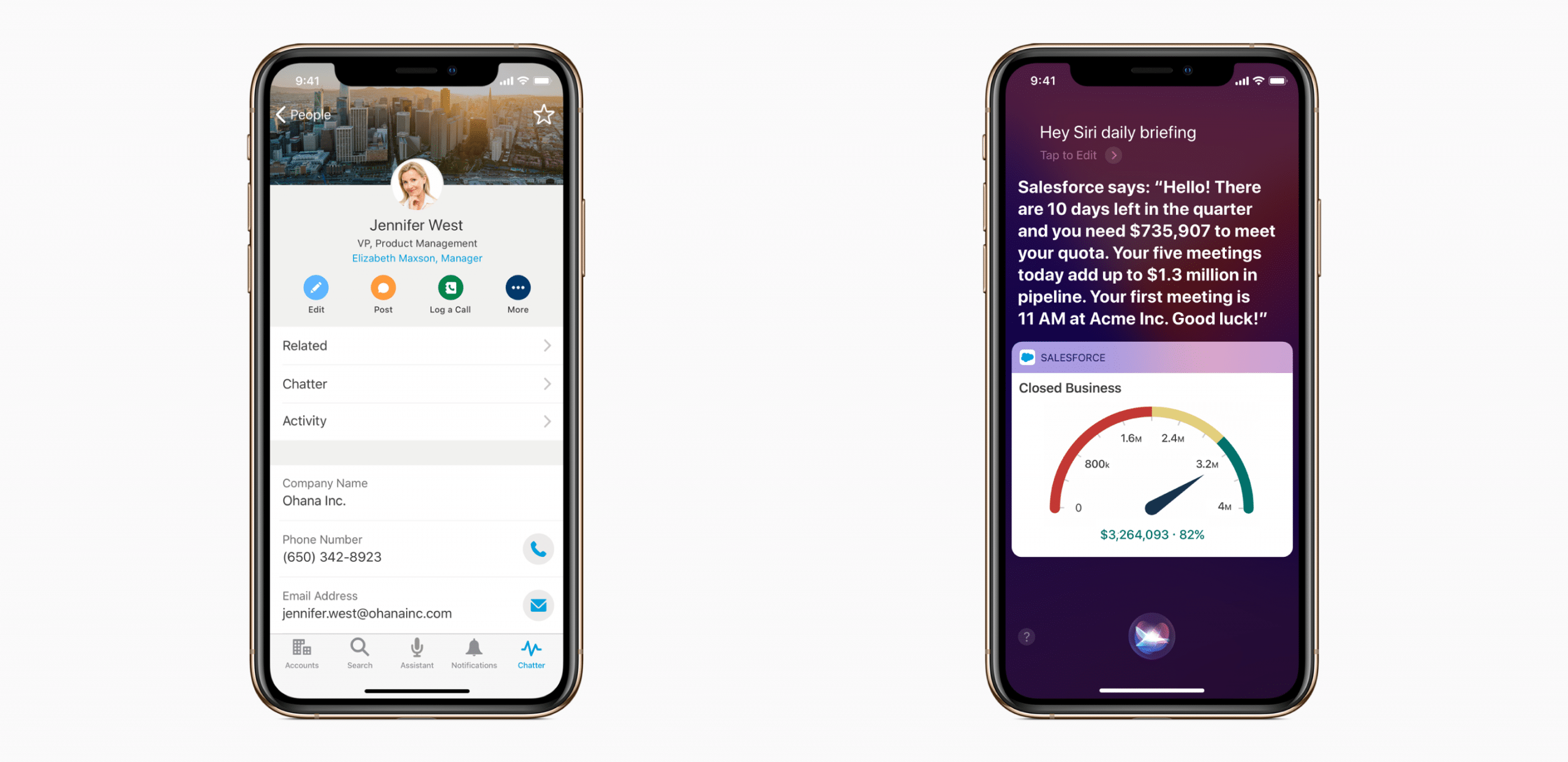
    The collaboration is expected to streamline mobile development for customers to bring:

    • A fully native iOS app that will add key features such as Shortcuts and integration with Apple’s Business Chat.
    • A Salesforce Mobile SDK optimized for Swift. Which will allow to build and deploy apps on Salesforce’s Lightning platform.
    • Salesforce’s education platform, Trailhead, as a mobile app. Which will include Swift education courses to help drive adoption of the mobile SDK.

    Take a look at the screenshots provided by Apple’s Newsroom:

    “We’re forming a strategic partnership with Salesforce to change the way people work and to empower developers of all abilities to build world-class mobile apps.”

    — Susan Prescott, vice president of markets, apps and services at Apple

    This is only one more of the many partnerships Apple has made in recent years after becoming more focused on companies and their use of mobile devices. Other well known enterprise brands include:

    • IBM
    • Cisco
    • SAP
    • GE

    Along with systems integrators Accenture and Deloitte.This collaboration gives Salesforce another growth opportunity. Just las Bret Taylor, president and chief product officer at Salesforce, adds:

    Every single one of our customers is on mobile. They all want world-class mobile experiences, and this enables us when we’re talking to a customer about their mobile strategy, that we can be in that conversation together

    The partnership will be revealed at Salesforce’s conference, Dreamforce, this week.

    Source: TechCrunch

  • The Top Reasons for CRM Software Implementation Failures

    Chuck Schaeffer, Vantive Media´s CEO and Blogger, published an article about Why CRM Fails. He names the top reasons why CRM project implementation fails. Below, we have summarized The Top Reasons CRM Software Fails according to his article:

    1. Poor Objectives: A lack of clear and measurable goals, questionable completion and fictitious ROI. It’s also helpful to recognize software features and functions are not business objectives.
    2. Poor CRM Strategy: CRM isn’t a software application, it’s a business strategy. You need to understand where you are starting from, where you want to go and the shortest route to get there.
    3. Scope Creep: certain scope items were completely missed in the planning and estimating process. So we must actively manage scope in a disciplined way and at a detailed level.
    4. User Adoption: resistance to change is a given in most CRM implementations. When that resistance fails to be quickly and properly addressed, and spreads from a few challengers to defiance by groups, you can quickly pass a tipping point whereby recovery is lost and the CRM system is destined for failure.
    5. Poor Business Process Design: Without business process improvement, you’re just creating another place to enter data. Automation replaces manual activities, speeds business process cycles and incurs fewer errors. Business process automation is the #1 contributing factor to increased employee productivity.
    6. Missing Executive Sponsorship: Missing, inactive or inadequate executive sponsorship closely correlates to CRM failure. Staff and management take their queues from the executive team so it is imperative the executives deliver visible, vocal and active project sponsorship.
    7. Lack of Systemic, Predictable Project Execution: Agile and Scrum have replaced waterfall implementation methods and become the de facto CRM deployment methodology for good reasons. However, it’s been my experience few organizations do Scrum correctly. Instead, they use pieces and parts largely based on convenience, ignore some of the more challenging rules and then wonder why things didn’t work out.
    8. Lack of Continuous Process Improvement: Your company’s quest to acquire more customers, increase customer share and improve customer retention never ends, so neither should your enabling technology.

    Additionally, here at InterConnecta, with more than 650 implementations for different verticals in different regions, we have identified a few tips that increases the success of your CRM Implementation project:

    1. Find a Champion: for all our CRM implementation projects, we request our customers to assign a Project Manager to work with our Project Manager to work together in the implementation. Typically, he/she is the champion but in some cases, we are able to identify a key user that is willing to help test the different processes implemented and act as an ambassador with his/her team to get requests not covered under the scope. This helps in the user adoption significantly.
    2. Training and Documentation: training is normally performed at the end of each implementation, but in order to get users involved in the process of implementation, we recommend to have progress updates that includes a user guide up to that point of implementation. This user guide, combined with a training session, helps the user identify pain points not covered thus far and would need to be considered before continuing with the implementation.
    3. After-Implementation Support: providing different channels for the CRM users to connect with a CRM specialist after the implementation is complete, is crucial for CRM project success. From chat boxes, phone support or email communication, users need to be able to get all their questions answered and get the support needed in a timely manner.

    If you have any other tips you want to share, feel free to shoot us and email and we will make sure we add it to the discussion. We wish you success in your CRM implementation project!

  • Minimize these 3 Hidden CRM Costs while Planning your Next Budget

    Salesbox tells us that:

    Often, it’s not so much to do with forgetting hidden costs – there’s enough information out there on what to include in a software budget – but not drilling down into them enough. Things like overtime, add up and whilst you’re spending significant amounts of time implementing a new system, customizing it and training users, productivity can take a hit.

    Checkout these 3 hidden CRM costs and find out how you can minimize them:

    Customization & Integration

    Don’t forget to consider indirect costs. As well as the obvious expense of hiring an expert to coordinate all this, or paying your vendor for customization services (if it’s not included in the subscription fee), you’ll need to factor in loss of productivity throughout the process and potential staff overtime.

    Minimize this by making a good range of integration options a key requirement for your CRM. Having a CRM specifically designed to click with other software your business uses will save you significant amounts of time and money.

    Requirements in this area will vary from business to business, but integration with your email provider and whatever calendar your team uses is an absolute must. This makes things significantly easier and will increase user engagement with the new system right off the bat.

    User Training

    Plan for training new users by training a number of ‘superusers’ during CRM implementation. You can then train new hires in-house without having to pay for instructor-led training (if it’s not included in the subscription fee).

    E-learning modules are also a good option – check with potential vendors whether they are offered, and whether they can be included in license price. If each user has perpetual access to these without the need for any extra cost this can be a great way of shaving pennies off your training budget.

    Support

    Depending on your needs, a basic package can be a valuable support tool. Equally, you don’t want to find out, three months into ownership of a new CRM, that the personalized, 24-7 support you thought was included doesn’t exist, and that to get the level of support you want you’ll need to shell out an unexpected amount of cash.

    Avoid surprise support costs by asking potential vendors to outline their support offerings in detail. Getting the right level of support for your business is absolutely essential. Support and maintenance is a bad area to cut costs for the sake of it, but by making sure you’re fully informed of what you’re getting for your money, you can budget accordingly.

    View the full article at SalesBox.

  • Re-imagine the Sales Funnel

    Things change fast… and with the advent of mobile access to information our audiences and potential customers can easily choose our competition instead of us at the click of a link.

    That’s why we at InterConnecta always suggest at looking at the “sales funnel” as a cycle in which Retention, Referral, and Repurchase are just as important as Awareness, Acquisition, and Activation.

    The traditional sales funnel is represented as: Awareness → Interest → Consideration→ Conversion. In contrast, we should focus on a model that more closely resembles the entire customer journey, where the stages that follow Conversion are weighted equally to those that come before. The customer life cycle is actually something more universal, where Repurchase leads back to Experience, which leads again to Retention and Referral, which leads to Repurchase, and so on. And the longer the cycle perpetuates itself, the greater the customer’s lifetime value.

    The success of our customer engagements at InterConnecta rely on proving increases and sales pipline and clear ROMI reporting. We have found that many times our customers marketing team is missing out on when they consider their job done at the “conversion” stage. Its amazing how many customers are lost because their post-purchase experience fails to recognize them as existing customers? This is particularly important as businesses shift from transactional to subscription models—

    Talk to us about your Sales Funnel; what are some of the specific sales stages unique to your industry?

  • Frugal Marketing : How SMEs can use social media for sales

    Having a strong social media presence and fostering an active community of followers is imperative for sustainable success. However, one does not achieve fame overnight; businesses must work hard, sponsor content, and use advertisements to accumulate followers during their first few days. From there, they stay relevant by posting quality material, hosting events, and sharing news.

    SMEs and startups are full of ideas but often short on budget, which means paid content might be a luxury for you. This doesn’t mean that small businesses can’t prevail on social media without paying for it; you can still get the job done at little to no expense. Here are a few ideas to get you started:

    1. Create a necessity and a goal.

    Before you create a social media account, ask yourself a few questions. Why should anyone follow my page? What will they gain from it? What’s my goal here? These are important because, once your page is up, you need followers to get your content trending. Since you can’t pay for advertisements at this juncture, you’ll have to send an email to your contact list about the page you’ve just created. You might have to ask your employees to follow your page and share it with their peers. This way, your page will be exposed to a small set of audience, who are likely to give you honest feedback and promotion. This is determinantal for how your page will grow from there.

    Will you be announcing new products, features, or updates on the page? Will you be sharing blogs related to the product? Will you service queries through the page? Make a list of reasons that’ll convince your existing customers to follow you on social media.

    2. Sign up as a business account.

    Most popular social media channels support business accounts and provide key features and metrics that help businesses run their channel more efficiently. You can find analytics about things like post performance and page growth, which can help you see what you’re doing right and what you need to change. Business accounts also allow customers to call, email, or visit your website through your page, which is all the more reason to use it. Once you’ve found enough success with your business account, you can get yourself verified, which will enable your audience to discover you more easily.

    3. Create a referral program.

    Once you have an audience, it’s time to leverage them to bring in even more followers. Create a referral program that incentivizes them to share your page among their circle. Don’t use pushy or use annoying campaign tricks, as this will only lead to you losing the followers you already have. Sketch a clean, simple referral plan that doesn’t take away your current followers’ experience with your page or product. Make sure you, your current followers, and your invitees all benefit in some way.

    4. Create quality content.

    Whether there’s a referral program in place or not, your followers will not talk about your page unless you host quality content there. Since you’re not promoting your posts, you’re solely relying on the quality of the content and the interest of your followers to get it going. Talk about features, offers, updates, help, and news — anything that’s exciting and informative to your customers. Get them talking about it and the more they do, the more your page grows. Keep in mind that no matter what, content will always be king.

    5. Use social media buttons.

    If you have an active blog or a website, include social media buttons that make it easy for customers to find your page. Social media buttons are small, unobtrusive, and can blend in with your page easily — make sure to list them at the end of every article you write. This can help generate followers every time a new piece is uploaded. And don’t forget to link these pieces on your social media page, too!

    6. Use relevant hashtags.

    Tagging your posts is important, as these tags contribute to the algorithm that determines the rank of your posts. Whenever there’s an ongoing trend, share your opinion or news related to it, and tag it with a relevant hashtag. Non-followers who follow the hashtag will then see your posts and, hopefully, follow your page to see more. Hashtags are very effective for reaching out to a wide spectrum of people.

    7. Host a contest or an event.

    One of the oldest tricks in the book is to host an event for your audience, with a raffle or contest that rewards the winners in some way. This reward doesn’t have to be expensive but should match the amount of work the contestants have to put into it. You can create events like webinars or Q&A sessions, or any engaging activity, and set aside a date for it. Once you announce it, start promoting it every day and generating hype. This will lead to a spike in followers leading up to the date of the event and, depending on how successful and buzz-worthy it is, this spike can be huge.

    8. Use curated content.

    One of the most overlooked marketing techniques is the use of curated content on your social media pages. Find content created by experts and celebrities in your industry and link them on your page, with relevant hashtags. This can give you a lot of exposure online if the author has a huge following. Using curated content also saves you the pain of writing and reviewing original content every day.

    9. Engage with your audience and influential people.

    Social media isn’t just about posting news, offers, and events; they are, by definition, a medium for being social. Engaging with your followers, influential bloggers, and popular brands is a powerful way to generate buzz on social media. When you sound more like a person and less like an enterprise, people will feel comfortable having a conversation with you and are more likely to trust you. Develop some meaningful, yet professional, relationships with your followers to get valuable feedback and testimonials, which can boost your social media profile even higher.

    10. Use the free version of a CRM.

    Some of the most successful social media business pages have one thing in common; they engage with data and not just their followers. Customer Relationship Management (CRM) tools have become popular among SMEs and have quickly become a norm for running their businesses. Among the plethora of features they provide, social integrations are one of the most useful. Try Zoho CRM’s trial version, integrated with Facebook, Twitter, and Google+, which provides you with insights and alerts about your followers that can help you handle social media pages better. If you wish to unlock the paid features, Zoho CRM also offers you irresistible, but affordable packages that are worth checking out.

    As your business grows, the marketing techniques listed above will cease to be particularly effective. Investing in creating original content, sponsoring content, buying digital advertisements, and hosting bigger events will eventually become more of a necessity rather than a choice. Embrace the fact that your business is small enough to be frugal, but be prepared to go big.

    By Akilan S via Zoho Blog.

  • Algorithms, Data, and New Workflows: Three Key Concepts Behind AI and Your Future Success

    We are in the midst of the Fourth Industrial Revolution where one of the main driving factors is artificial intelligence (AI). AI will unleash another step-change increase in productivity and reshape our workforce, similar to the industrial revolution.

    In one estimate, Accenture forecasts that AI could double the economic growth rates of 12 major countries by 2035. These gains will come from computers doing what they have always been good at — freeing us to make better use of our time.

    For instance, AI makes it possible to automate routine tasks such as responding to simple customer questions. It can also be used to spot changes in customer preferences, identify visual problems in manufacturing, further automate agriculture, identify fraud, and better inform business decision-making. But what is AI and how is it going to transform your business?

    While those are complex questions with no simple answer, you can get a long way toward answering them in the context of your organization by focusing on three concepts: recent advances in computer programming, the importance of quality data, and how AI will change organizational workflows.

    Understanding algorithms and deep learning

    Computer programmers create algorithms to tell computers how to complete tasks and solve problems. The difference between AI systems and earlier generations of computing is that they can learn as they go, then devise their own solutions to problems. This is made possible by deep-learning algorithms, which review large amounts of information and can better handle messy or “unstructured” data, including human language.

    These capabilities make AI systems useful for completing tasks that would have been impossible even a few years ago. For example, computers couldn’t distinguish between a cat and a dog until 2012, when they had been taught enough about the differences between the two species and programmers came up with better algorithms.

    Another example is using AI to analyze sentiment, such as what your customers think based on their social media posts. Sentiment analysis searches language to pinpoint the opinions of your customers on, say, Twitter and estimates the emotional reactions shown toward a product. This could allow you to see if a marketing campaign was working in real time.

    However, this analysis is hard to perfect due to language changing all the time. If we all used clean, plain English with no accents, we could get AI working relatively well, and soon. But teenagers say things like “YOLO,” which AI algorithms must try to understand. In practice, people will keep making stuff up and AI will have to continuously adapt.

    Another problem to keep in mind with algorithms is bias. The way algorithms solve problems can reflect the biases of the programmers or organizations that wrote them. In the era of AI, the effects of these biases can compound as the algorithms themselves continue to learn and develop their own approaches. This has already been seen in examples such as social media bots that turn racist over time.

    The message here is that if you’re going to build your company’s future on AI, you will be building it on algorithms with certain ways of solving problems and learning. In turn, you need a good understanding of how the machine is operating — and who made it.

    The importance of data and new workflows

    Another key point to understand about AI is that it is only as good as the data — specifically, the “training data” — you give it. Like any computing system, if you put garbage in, you will get garbage out. And just because a system is artificially intelligent, it doesn’t mean it will be self-healing if it is given the wrong information to work with.

    One of AI’s most powerful capabilities is being able to identify items or patterns and then apply that understanding to future activities. To enable an AI solution to do this, you need to feed it a large amount of data describing past events and teach it the attributes of those events. This requires the labor-intensive process of establishing a large body of high-quality data, then typically labeling items as positive, negative, or neutral. Teaching computers to recognize cats, as above, involved labeling lots of images of cats as positive.

    To get AI to take over a business process, you will typically need to feed it about two years’ worth of training data. This can be made easier by using services such as Amazon Mechanical Turk, paying it to get people to label data to teach your AI system.

    An example might be having a machine take over the task of replying to customer queries. To achieve this, you would collate years’ worth of common queries and the replies your organization sent. The AI will become able to select — or even construct — replies to queries based on past patterns. And it will be able to do this more flexibly than a traditional computing system because it can better cope with natural language and novel situations.

    The better you train your AI, the more reliable and responsible it will be. To maintain customers’ trust in your new AI-powered processes, you should also make sure their data is being held very securely on your premises or in the cloud.

    Your next move

    AI is a complex field and I am the first to say that we computer scientists have not progressed as far as many people believe. For instance, we currently have no credible research path to any kind of conscious AI algorithm and there are no robots that are truly autonomous or able to make their own decisions — so don’t worry about walking terminators.

    However, it’s also clear that AI is a very significant evolution in computing and that it will underpin many of the future advances — and leaps — in business productivity. For this reason, I would strongly urge all business and government leaders to actively explore AI. Learn what it is, how it works, what it can do, what it can’t do, and where it’s headed. Then ask what all of that means for your organization, your use of technology, and your business model.

    Like early PCs and the Internet, it might not look like much now, but there is no doubt that AI has the potential to create enormous change not only in business but also society.

    By Richard Socher via Salesforce Blog

  • 6 Practical Ways to Improve Sales By Automating Your CRM Workflows

    This is a guest post by Neha Batra, Senior Manager of Digital Marketing at Ozonetel Communications.

    The question: Why automate? The answer: To maximize results and minimize effort. Is there scope for such effective automation within your sales team? Yes, there is. This article outlines six tried and tested ideas for automation that are guaranteed to produce better results while reducing your workload.

    Automation Idea 1: Ensure that new web leads are contacted in minutes.

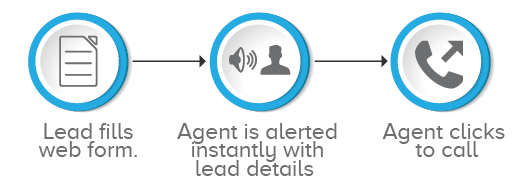
    Web leads are precious. You must ensure they are contacted within minutes. In fact, according to an MIT study, if you make first contact within 5 minutes, the lead is 22 times more likely to convert. But how do you ensure that your sales team follows up on every lead so promptly? The answer is automation:

    1. As soon as the web form is filled, it gets registered in your CRM
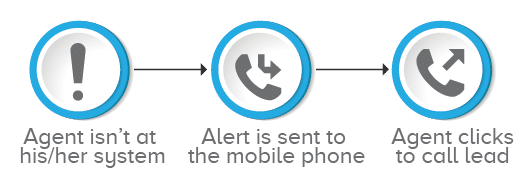
    2. Your CRM taps into your telephony software, and prompts your sales representative on their system and mobile phones.
    3. In case the rep is busy, the system automatically forwards the call to the next, and so on, until a free sales agent makes a call to the given number.
    4. The rep gets all the relevant customer details on their system/phone. They just need to click to call.

    And as simple as that, you ensure that every web lead is contacted when they are white hot. In under 5 minutes? No sweat.

    Automation Idea 2: Automate follow-up calls on email campaigns.

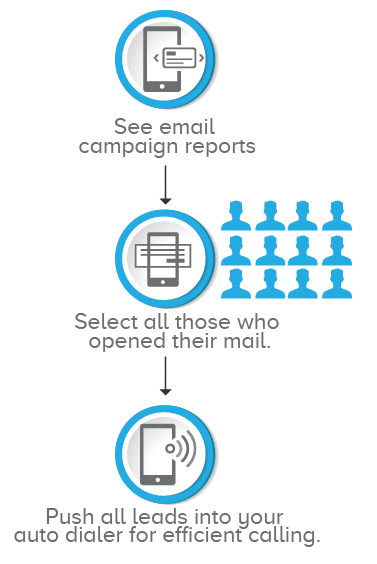
    Whether your email campaign is about a new product launch, a demo, or a meet up—it’s tough getting leads to open your emails. So when they do, doesn’t it make sense to follow up? I’ve seen successful sales teams who ensure follow up calls to every client/lead who opens their email. Here’s how they manage it: with just three clicks.

    1. They see email campaign reports in their CRM. (Click 1 )
    2. With a single click, they select all contacts that opened their mail. (Click 2)
    3. Then with another click they push all the contacts into their dialer. (Click 3)

    From here on, they leave their dialers to do the job. Dialers have a great advantage. They persist, automatically. They ensure every lead is dialed, and connected to a representative. (Who is then free to work their charm on the prospect)

    Automation Idea 3: Ensure that abandoned and missed calls don’t become missed leads.

    Capture incoming leads 24/7. You can miss calls after work hours, during holidays, or when lines are busy. But missing a call shouldn’t mean missing a lead. Here’s the easy workflow you can setup to ensure that you never miss following up on a missed call:

    1. Your telephony system can compare any number that goes unanswered with CRM data.
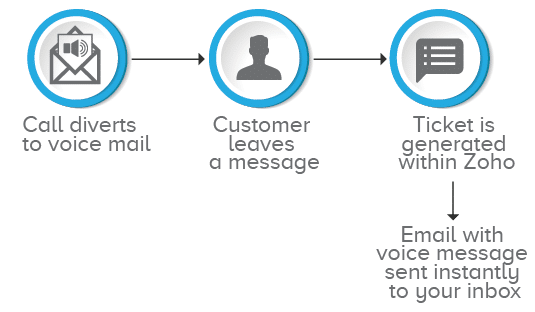
    2. If the call is from a new lead, you can set up your system to ensure that a new ticket is automatically generated.
    3. An alert on the missed call can be sent to your inbox. If there is a voice message, this will get attached and sent to your inbox too.

    Automation Idea 4: Keep your rep connected.

    Sales reps are often on the go. But successful sales teams always stay connected. Their mobile phones are configured to tap into their CRM, make and take calls, and get alerts, at any time.

    Automation Idea 5: Send voice message, greetings and notifications to entire contact lists in one go.

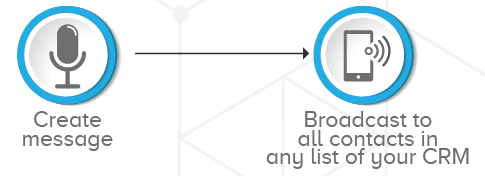
    Do you need to remind qualified leads about an approaching last date, a payment due date, or a subscription renewal? You should use a configurable IVR to create a message, and create a workflow that lets you broadcast it to any or all of the contact lists within your CRM with a single click.

    Automation Idea 6: Create personal connections using sticky agents.

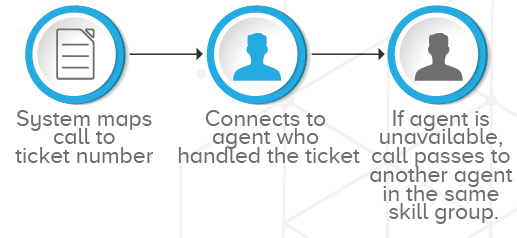
    You can contact your leads whenever they want, but what if they would prefer to call back? Do your sales reps need to hand out personal numbers, so their lead can reach them? You can create a simple workflow, so that whenever a lead calls in, they automatically connect to their assigned sales representative.

    Essentially every single one of these ideas depends upon a deep, smooth integration between the two systems your sales team depends upon most: Your CRM and their telephone systems.

    By Neha Batra via Zoho Blog.

This site is registered on wpml.org as a development site. Switch to a production site key to remove this banner.