Welcome to WordPress. This is your first post. Edit or delete it, then start writing!
Category: Uncategorized
-
How we turned a chatbot into a generator of business opportunities
TAMI’s redesign: from answering questions to capturing qualified leads and connecting conversation with the CRM.
Many companies already have a chatbot.
The problem: it’s disconnected from the CRM. It doesn’t capture structured data. It doesn’t understand full context. And every time you need a change, you depend on a developer.
The result is a chat that answers questions but doesn’t impact sales or service.
The difference between an isolated bot and an assistant that generates opportunities comes down to five questions:
1. Does it understand the full context of the conversation?2. Does it capture leads with name, email, phone, and context — directly in the CRM?3. Does it work equally well on web and WhatsApp?4. Can it escalate to a human without losing information?5. Can your team manage it without depending on developers?That’s what we built with TAMI — a conversational assistant designed for companies that need to:
- Answer frequent inquiries
- Provide status updates for orders, services, or projects
- Capture qualified leads
- Schedule appointments or meetings
- Route conversations to the right team
Without making the solution hard to maintain.
The Shift: Simplicity and Control
We migrated to a more stable architecture that leverages the platform’s native capabilities.
What changed:
- Conversational context is managed automatically
- Flows are easier to modify
- The team regained control over changes and improvements
- Less technical dependency for day-to-day operations
Less technical complexity. More operational control. Much easier to govern.
Where the Real Value Is: Conversation That Generates Pipeline
An isolated chatbot has limited impact.
The real leap happens when the conversation generates qualified leads in your CRM.
That’s why we added the “Talk to a specialist” flow.
When the assistant detects the conversation requires attention:Asks for nameAsks for emailRequests phone numberCollects a description of the requestThe result:- Your team receives leads with full context
- The conversation history is available
- The conversation can continue on WhatsApp or web without friction
- The assistant moved from an experiment to a pipeline generator
That information is automatically saved as a Lead in the CRM.
No external forms. No copy and paste. No losing the context of what the customer explained.What Changed in Practice
For the business:
- Less technical dependency — The team can make adjustments without developers
- Better lead quality — Each lead arrives with full conversational context
- Greater continuity — Conversations flow across channels without losing information
- Scalable operations — The architecture grows without becoming ungovernable
For your team:
- They receive better-qualified leads
- With the full conversation history
- They can follow up with context from the first touchpoint
- The assistant does the upfront qualification work
Why This Matters for Your Company
Most bots fail in three critical areas:
- They don’t understand full context — Each interaction is independent
- They don’t capture structured data — Information gets lost
- They aren’t integrated with the CRM — They don’t generate real opportunities
The result: a chat that entertains but doesn’t convert.
A well-designed assistant, on the other hand:
- Provides status updates for orders, services, or projects
- Guides the customer to the right solution
- Captures opportunities with full context
- Schedules appointments or meetings
- Routes to the right team without losing information
- And does it on web and WhatsApp under the same logic.
Start Small. Build on Solid Foundations.
We didn’t start by automating everything.
We began with a clear flow, a specific intent, and a targeted integration.
We tested. Adjusted. Simplified.
Then we expanded.Scaling is much easier when the foundation is well designed.
The Key Learning
When you build on solid foundations — instead of accumulating technical complexity — AI stops being a project and becomes an operational capability.
Conversation is not the end.
It’s the gateway to:- Structured data
- Leads with context
- Better-informed teams
- More efficient processes
Technology wasn’t the most important part.
The decision to simplify was.Would This Solution Be Useful for You?
If your company:
- Receives constant inquiries via web or WhatsApp
- Needs to capture leads with real context
- Wants its assistant connected to the CRM
- Is looking to reduce technical dependency in daily operations
- Or needs to automatically provide order or service status updates
This model is replicable.
Start small.
Connect conversation and CRM.
Scale once the value is proven.If you’d like to explore how to apply this pattern in your operation, let’s talk.
-
Zoho News Catch-up: CRM simplifies exports, Analytics enhances visualizations, Forms adds reCAPTCHA v3, Books introduces billing improvements, and webinars on CRM, Desk, and Cliq
Welcome to our update, where you’ll stay up to date with the latest Zoho news in one place!
- Exporting data is now easier and more flexible: discover the new options in Zoho CRM
- Zoho Analytics gets a revamp with more powerful visualizations and key improvements this September
- Say goodbye to spam in your forms with the arrival of reCAPTCHA v3 in Zoho Forms
- Zoho Books gets updated with new features in billing, reports, and more – September 2025
- Webinars on CRM, Desk, and Cliq
Exporting data is now easier and more flexible: discover the new options in Zoho CRM
Zoho CRM introduces improvements to the Export feature, giving you more control and simplicity when working with your data.
What’s new in exports:
- XLSX format: In addition to the classic CSV, you can now export in XLSX, making it easier to analyze data directly in Excel. While CSV supports up to 200,000 records, the new format allows you to export up to 50,000 with greater compatibility for spreadsheet users.

(image via zoho)
- Field selection: If you don’t need certain data, such as the record ID, you can now easily exclude them when generating the file. This results in a cleaner output tailored to what you actually want to share or analyze.
(image via zoho)
- CSV character set: When exporting in CSV, you can choose the character set to ensure all information — including names or texts in other languages — is properly encoded.
(image via zoho)
- Direct export: No need to go to Settings → Data Administration. Now you can export from the same module, in a pop-up window that lets you choose format and options without interrupting your workflow.
(image via zoho)
- Selected records: From list view, you can select up to 500 specific records and export them immediately. Ideal for working with filters or specific customer segments without exporting the entire module.
(image via zoho)
These improvements make information management faster, more practical, and tailored to your business needs.
Zoho Analytics gets a revamp with more powerful visualizations and key improvements this September
The latest Zoho Analytics update brings improvements that make working with data more visual, flexible, and secure. From project management to dashboard customization, you now have more tools to gain valuable insights and align them with your brand.
Main new features:
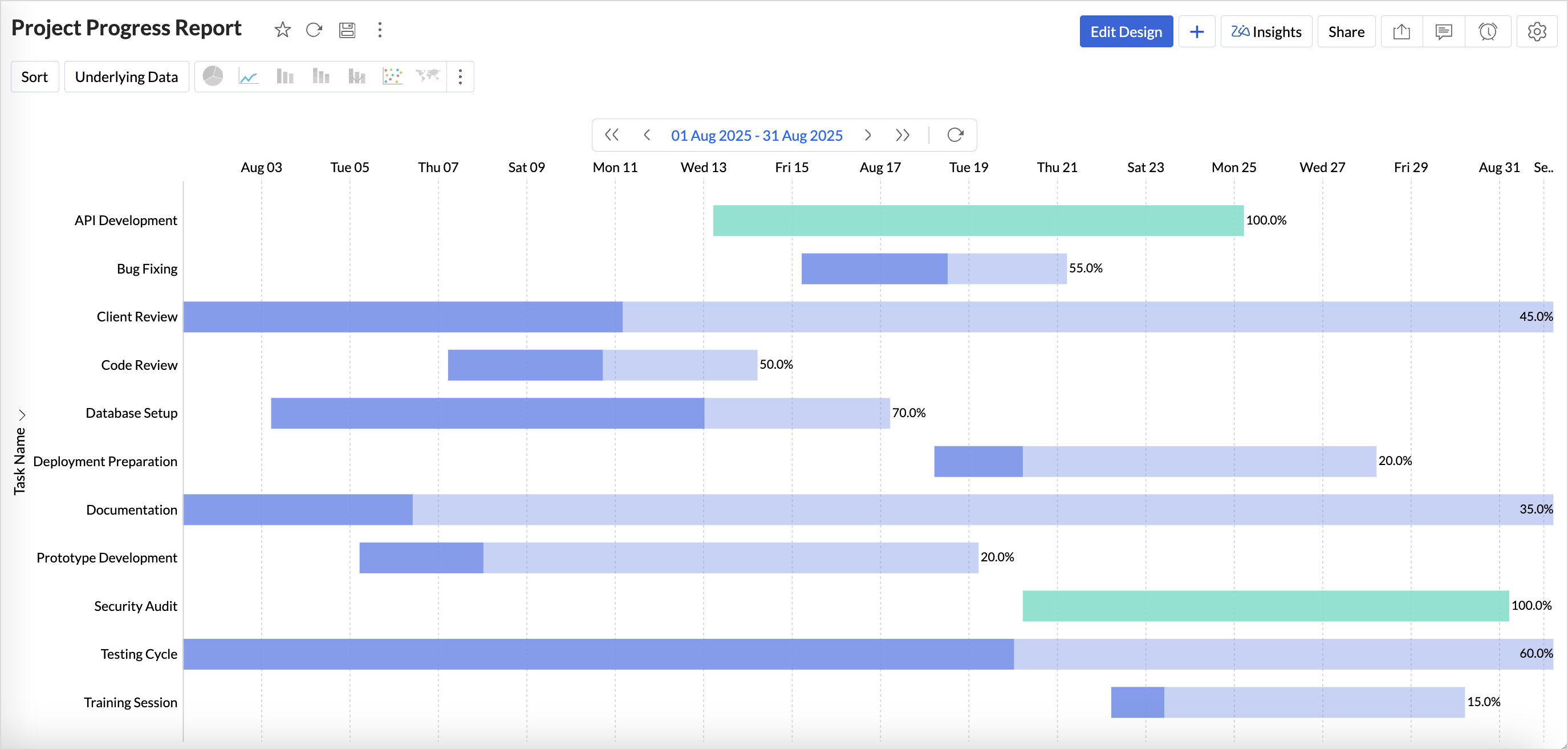
New Gantt chart
Visualize tasks and deadlines in real time, identify delays, and customize views with styles, colors, and flexible date ranges.(image via zoho)
More supported databases
- Cassandra: import data from this large-scale NoSQL database.
- SAP HANA and ClickHouse in the cloud: connect directly without the need for local servers.
- Snowflake: new authentication options with OAuth and private key for greater security.
- Sync alerts: receive automatic notifications when table imports fail, preventing critical errors.
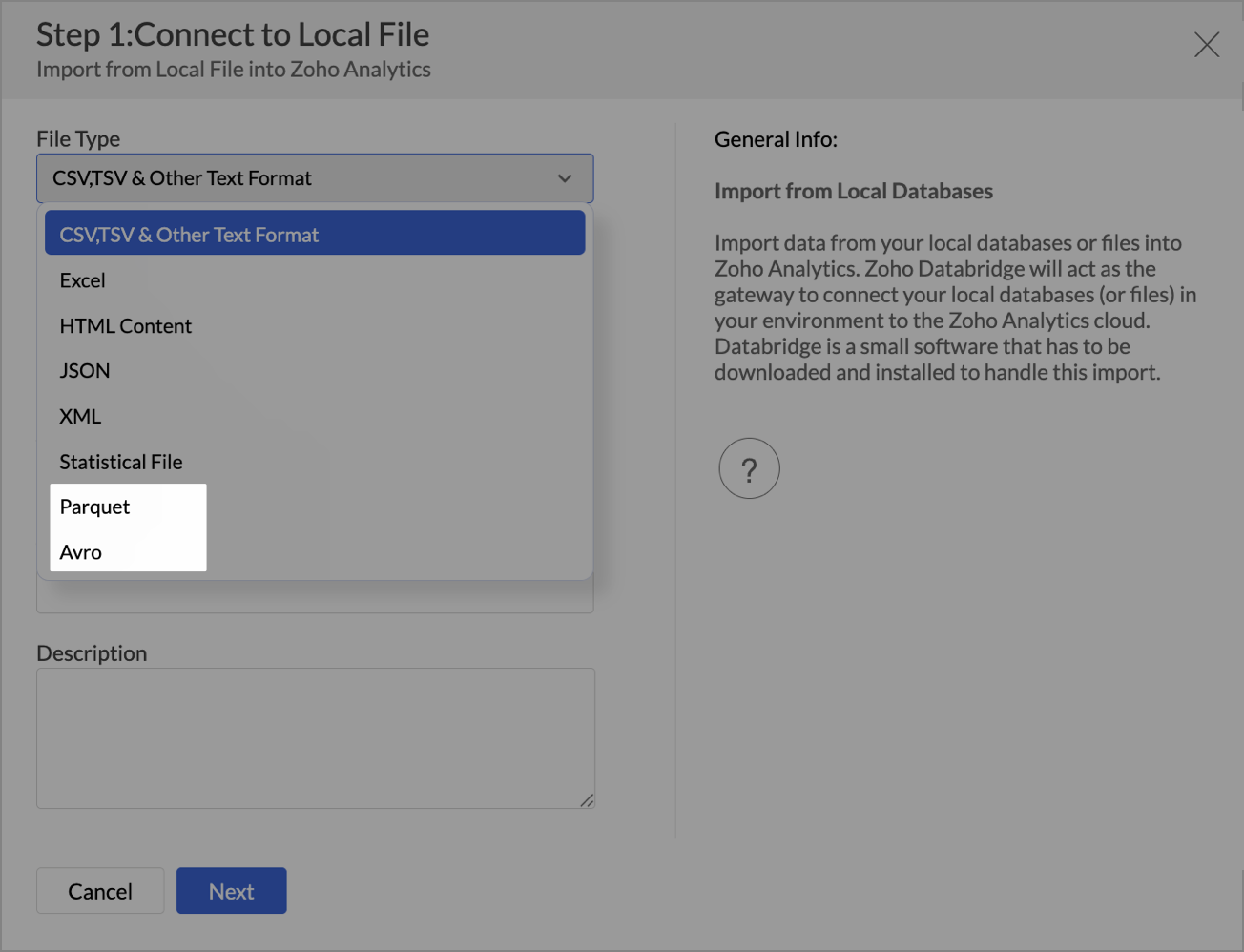
Support for new file formats
You can now import Parquet and Avro, optimized for big data. Large file uploads (over 100 MB) have also been expanded for formats like Excel, JSON, XML, HTML, and statistical files.(image via zoho)
Improved user management
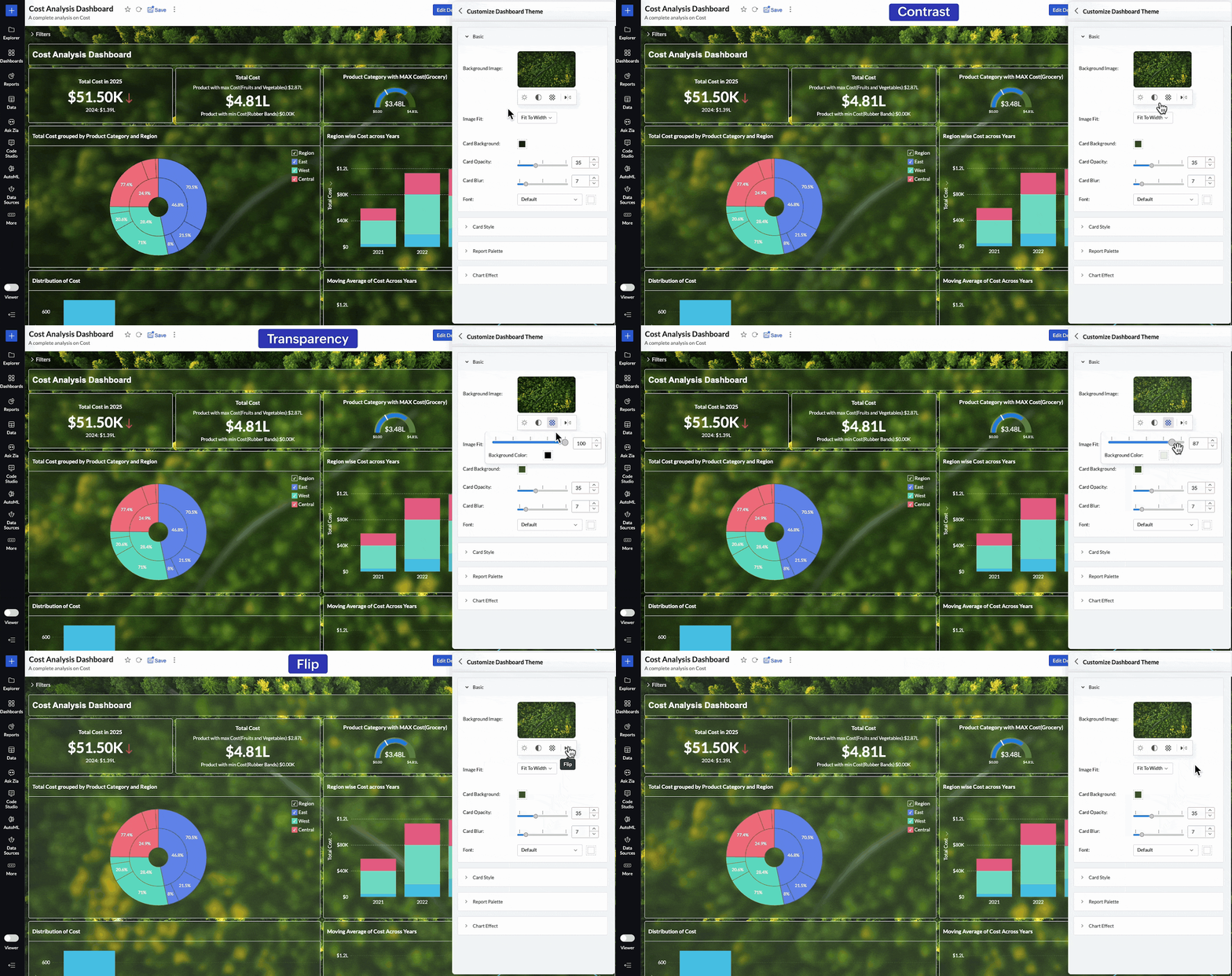
A new invite-based system has been introduced, providing more control over who accesses your reports and dashboards.Advanced dashboard customization
Adjust brightness, contrast, transparency, or even flip background images to create visually impactful dashboards aligned with your brand.(image via zoho)
Smart relationships between tables
New automatic suggestions simplify data modeling by recommending connections based on metadata.Updated white label experience
- More modern and consistent UI for White Label implementations.
- New white label guide with best practices and examples for maximum customization.
Greater control on mobile devices
Admins can now view access logs in the Mobile BI app, offering more visibility into how reports are consumed on smartphones.These updates make Zoho Analytics more connected, customizable, and intelligent, allowing you not only to analyze data, but also to deliver safer, more engaging analytics experiences aligned with your organization.
Say goodbye to spam in your forms with the arrival of reCAPTCHA v3 in Zoho Forms
Unlike traditional CAPTCHAs, reCAPTCHA v3 works invisibly, with no checkboxes or challenges that interrupt the user.
- It analyzes the behavior of the person filling out the form and assigns a score between 0.0 and 1.0.
- A score close to 1.0 suggests it’s likely a human; closer to 0.0, likely a bot.
- You define the minimum acceptable threshold (e.g., 0.5) and decide what to do with submissions that don’t meet it.
Control options for suspicious submissions:
- Block the response and show a custom error message.
- Add a second verification using Zoho Forms’ built-in CAPTCHA.
(image via zoho)
Key benefits:
- Fewer spam entries without friction for real users.
- Greater control by defining your own security criteria.
- Smoother and more professional form experience.
With this update, you get an ideal balance between protection and usability, adjusting the security level according to the volume and sensitivity of your forms.
Zoho Books gets updated with new features in billing, reports, and more – September 2025
Zoho Books continues to evolve to offer a more connected and efficient accounting experience. This month brings new integrations, specialized reports, and key improvements that simplify financial and inventory management.
EmaraTax (UAE & USA): file VAT directly from Zoho Books.
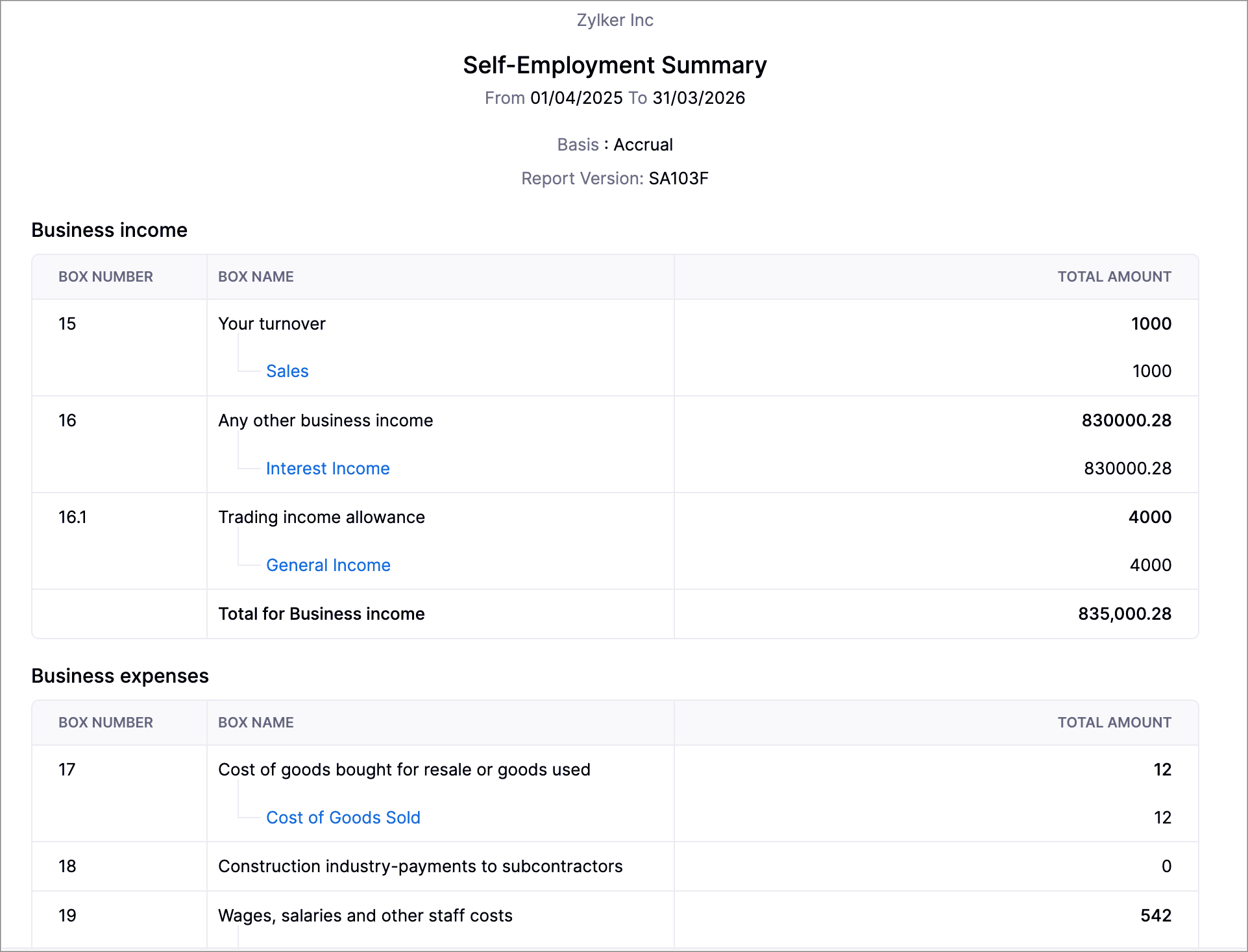
Self-employed report (UK): generate SA103F/SA103S formats for HMRC.
(image via zoho)
New PayNow method (Singapore): fast payments with QR via Stripe.
Journal credits: apply credits to invoices and receipts in different locations.
Inventory reports: summaries and adjustment details, with advanced filters.
Zoho Inventory: automated workflows, pick list reports, and more customization options in shipments and packages.
(image via zoho)
Additional improvements: new statuses, columns, and notifications (including WhatsApp for purchase orders).
Webinars on CRM, Desk, and Cliq
AI in Zoho CRM – Generative AI
AI in Zoho Desk – Using AI to predict and detect problems
From metrics to meaningful communication in Zoho Cliq
Want to add these new features to your Zoho system? Let’s work together! Learn more about our Zoho consulting services and contact us for a free consultation.
-
Zoho Writer Introduces Workflows to Streamline Document Processes
Zoho Writer has introduced an easier and quicker way to share and collaborate documents for review: the multi-stage document workflows. This new function lets you streamline and standardize business processes, as well as the processes of creating, reviewing, and approving documents across an organization.
To make it happen, just start the workflow to notify all designated actors (reviewers, assigners, and approvers) who can either suggest changes or approve the document.
Zoho Writer’s approval workflows were created with many useful capabilities to streamline your organization’s document lifecycle management and approval processes. Let’s take a look at each workflow:
Purpose-Built Workflows
(image via Zoho) Zoho Writer includes four workflows that are ready to use with the option to indicate a due date. Once in place, reviewers or approvers will receive email reminders to act on the documents before the deadline is up. This gets rid of the trouble of sending multiple reminders and follow-ups to have your documents reviewed or approved. Please note that you can use one or more of these four workflows for your document management needs.
- Review Workflow: Get your team members, co-authors, peers, or subject experts to review your document and recommend suggestions. This will help achieve writer-expert synergy for white papers, case studies, and more.
- Approval Workflow: Receive formal document approval from your manager or process owners. This workflow enables timely approvals for any document type.
- Editorial Review Workflow: Send documents to the editorial team for review. Include a due date so they can prioritize and delegate it to the right editors, and complete the approval process on time.
- Review and Approval Workflow: This one allows articles to be reviewed by your group of experts or collaborators, and then approved by your manager or assigned DRIs in a sequence.
Custom Workflow Triggers and Post-Workflow Actions
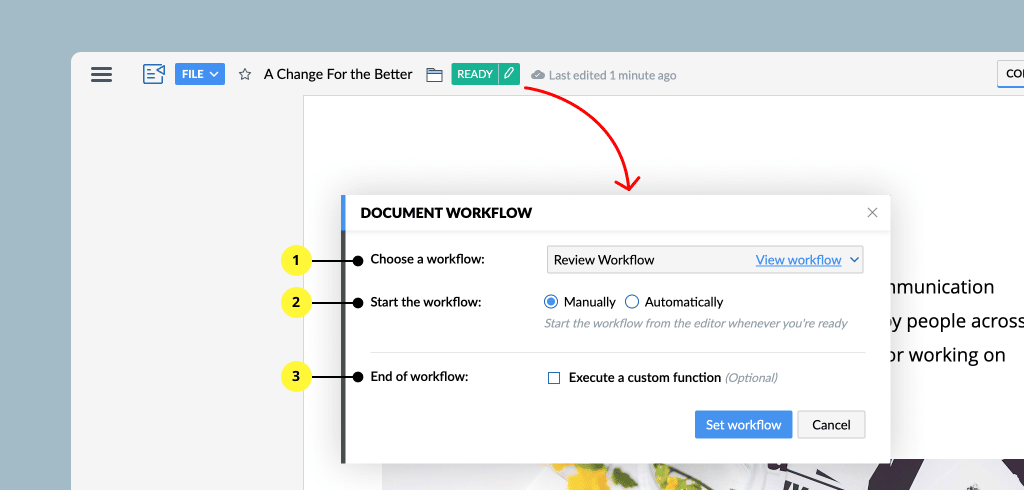
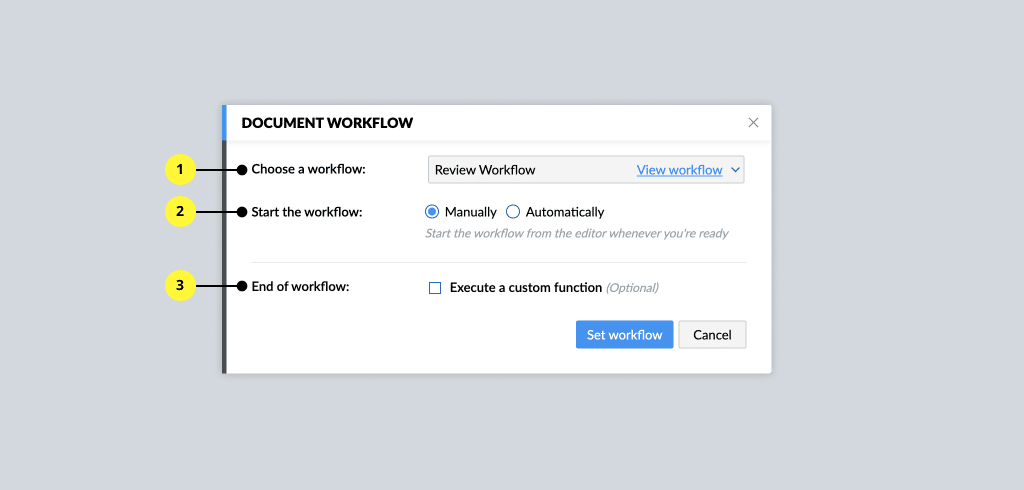
(Image via Zoho) Workflows can be triggered automatically or manually, as required. For example, you can set the workflow to automatically begin when the document owner marks it as “Ready.”
When the workflow is completed, you can use the prebuilt actions library to add a watermark to the final document, move it to a specific folder, rename it, publish it on a platform, among other options. Also, you can configure your own post-workflow action.
Controlled Collaboration
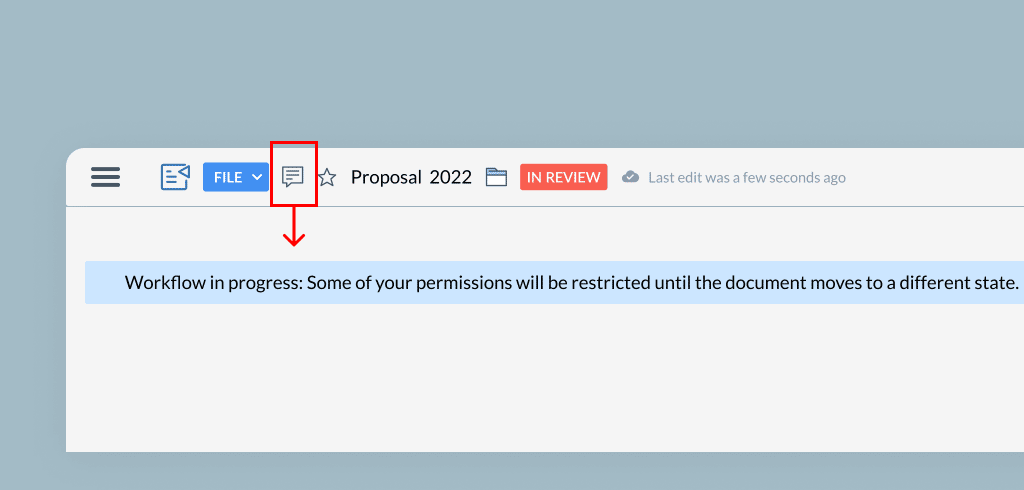
(Image via Zoho) Control who can do what action and when. At every stage of the workflow, only authorized collaborators can work on the document. This means that, for example, once a document is submitted for review, only the reviewers are allowed to make changes, while others can only add comments.
Real-Time Document Status and Email Notifications
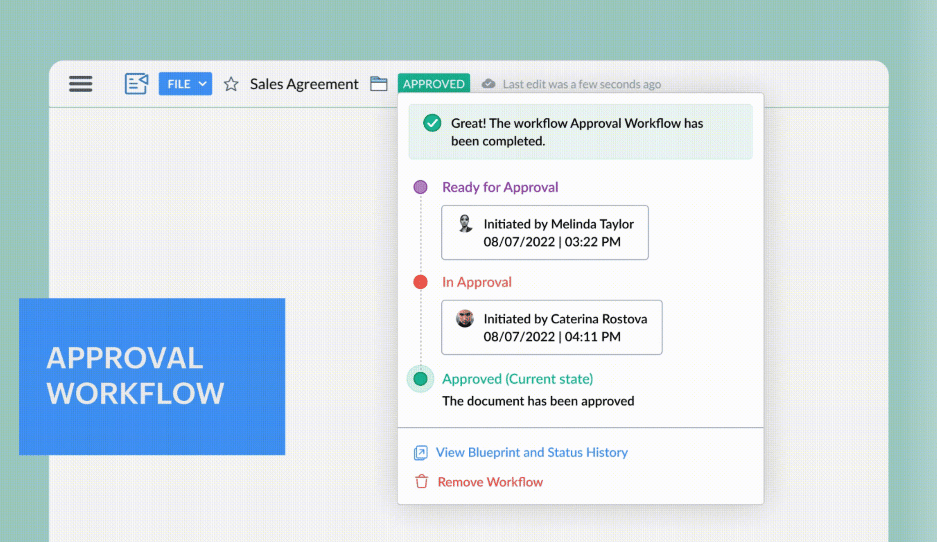
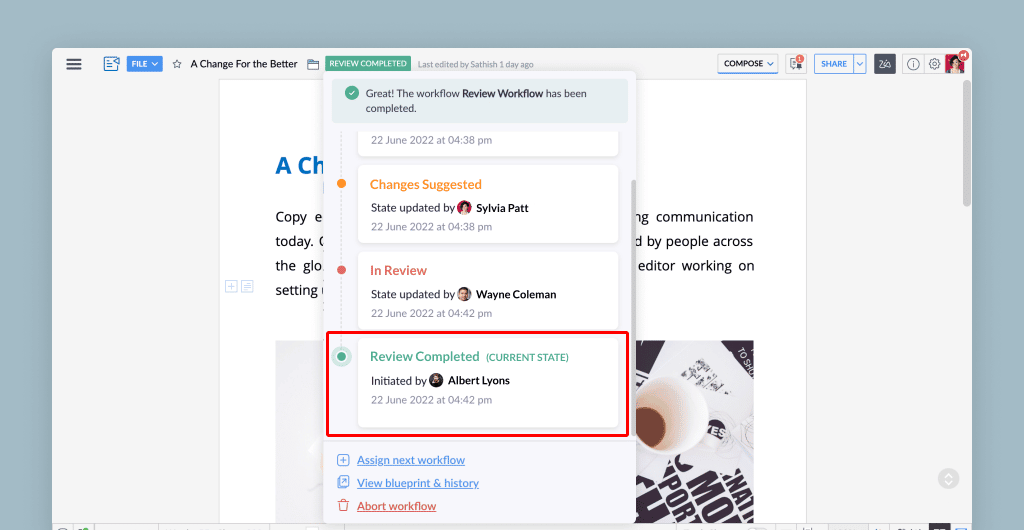
(Image via Zoho) The status and notifications allow you to easily identify your document’s stage in the process with the in-product status notifier. As your document progresses through the workflow, you can see its stage at the top of the document. The status are: Ready for Review, In Review, Changes Suggested, In Approval, and Approved. Zoho Writer also informs all stakeholders about the document’s status with real-time email notifications.
Visual Workflow Status Tracker
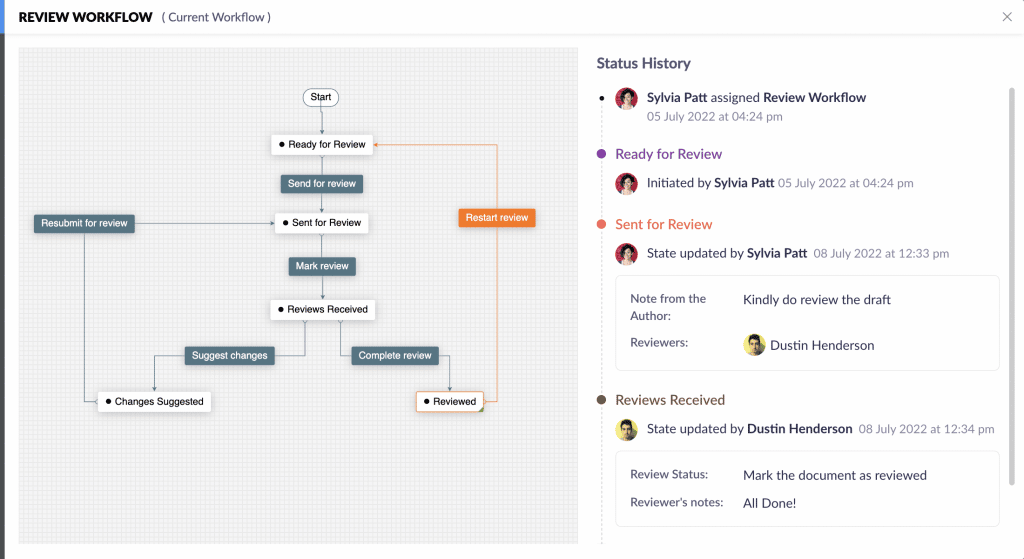
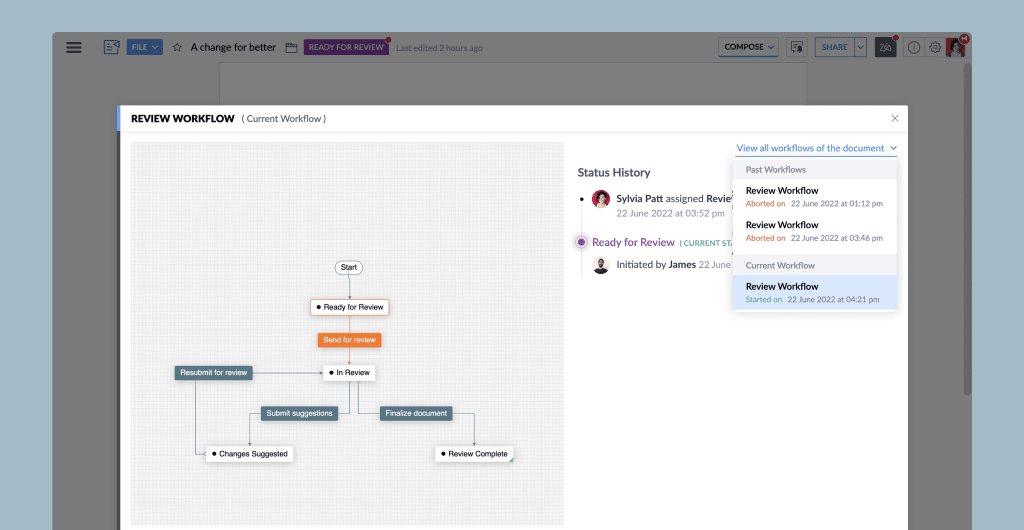
(Image via Zoho) See your document’s journey through the workflow to view its status and act accordingly.
Document Review Dashboard
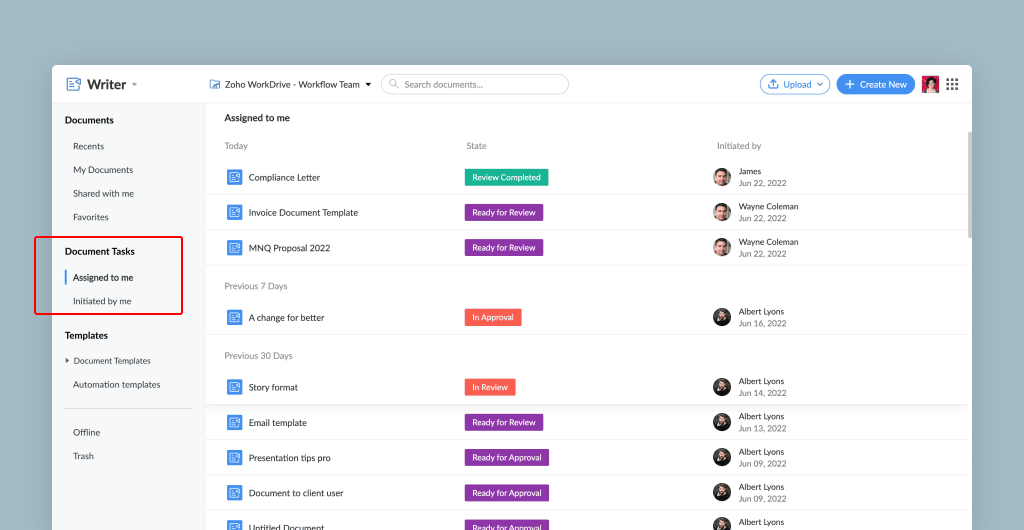
(Image via Zoho) Quickly view in Zoho Writer’s dashboard the status of all documents that you’ve submitted for review, as well as the ones that are pending your action. Therefore, you won’t have to navigate through different documents or pages to check any status.
Detailed Workflow History and Audit Trails
(Image via Zoho) View a thorough history and audit trail for all workflows to fulfill compliance regulations with answers to these three important Ws: who performed what action and when. Click the Time link in the workflow history to see versions of the document at each stage.
In addition, workflow history helps you learn which stage of the workflow is consuming the most time, so you can detect ways to improve your workflow or processes.
How to Activate Document Workflows for Your Organization
1. On the right-hand side, go to your Profile > Admin Panel > Configuration > Workflow Settings.
2. Check if you have sufficient permission to access the workflow feature. If not, contact your super admin to enable this feature for your organization or team.
How to Assign Workflows to Your Documents
Assigning workflows can only be done to Zoho WorkDrive documents. To assign a workflow, follow these steps:
1. Go to WorkDrive > Team or Organization’s Folder > Document.
2. Click File > Assign Workflow.
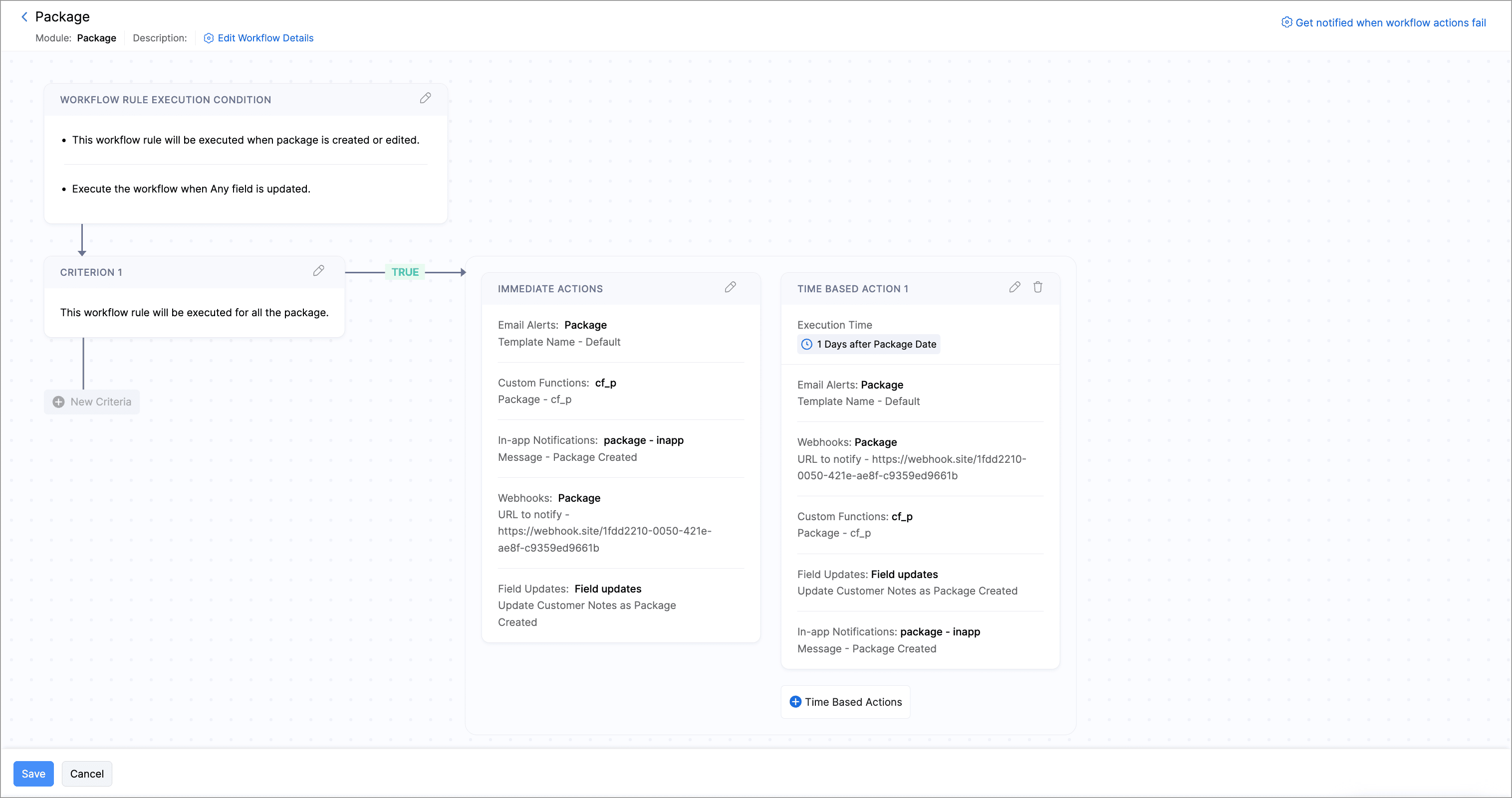
3. Choose a workflow.
4. Select when to start the Workflow (manually or automatically).
5. Optionally, configure what action to perform after Workflow.
(Image via Zoho) How to Start a Workflow?
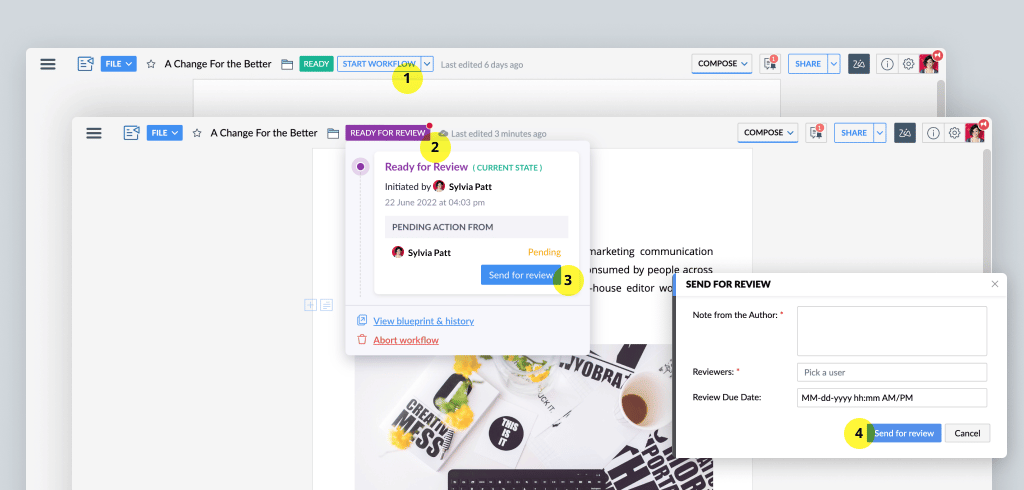
1. Assign a workflow with the help of the mentioned steps above.
2. When the document is ready, click Start Workflow.
3. Based on the workflow you have chosen, pick an assigner or a reviewer/approver to start the workflow.
(Image via Zoho) To read the full article, click here.
Need help with the implementation or optimization of Zoho Writer, or your other Zoho apps? Then you’re in the right place! Learn more about our Zoho Consulting Services and ask us for a free consultation.
-
Tim Cook Calls for GDPR Style Privacy Laws in the U.S.
Engadget reports: Apple CEO and long-time data privacy advocate Tim Cook has made an impassioned speech calling for new digital privacy laws in the US. At a privacy conference in Brussels, Cook said that modern technology has resulted in a “data-industrial complex” where personal information is “weaponized against us with military efficiency,” and in a way that doesn’t just affect individuals but whole sections of society.
“We are optimistic about technology’s awesome potential for good. But we know that it won’t happen on its own. Every day, we work to infuse the devices we make with the humanity that makes us.”
Follow EU’s Lead
Cook praised Europe’s “successful implementation” of privacy law GDPR, and said that “It is time for the rest of the world… to follow your lead. We at Apple are in full support of a comprehensive federal privacy law in the United States.” He outlined four key areas that he believes should be turned into legislation: the right to have personal data minimized; the right for users to know what data is collected on them; the right to access that data; and the right for that data to be kept securely.
Cook has been outspoken about privacy rights before, and has repeatedly called for tougher regulations in the past — something which has jarred with critics claiming such regulations would be an obstacle for innovation. However, he pre-empted this take during his Brussels speech. “This notion isn’t just wrong, it’s destructive,” he said. “Technology’s potential is and always must be rooted in the faith people have in it.” He then followed up his speech with a tweet that asked:
“It all boils down to a fundamental question: What kind of world do we want to live in?”
Changes are already in the making in the U.S. Earlier this year, California passed a sweeping privacy law that “gives consumers the right to demand that their data be deleted and to bar companies from selling their data without them losing access to services or being charged a higher price.” The question is what will these laws look in other states and countries, and what will they mean to us all, people and businesses alike.
Read the full article in Engadget.
-
IBM is acquiring Red Hat for $34 Billion
IBM has struck a deal to acquire the cloud software company Red Hat for $34 billion.
Here are the key points from the deal announcement:
- IBM will acquire all of the issued and outstanding common shares of Red Hat for $190.00 per share in cash, representing a total enterprise value of approximately $34 billion.
- JPMorgan advised IBM on the deal and provided most of the financing. Lazard also advised IBM. Guggenheim Partners represented Red Hat on the deal.
- IBM will remain committed to Red Hat’s open governance, open source contributions, participation in the open source community and development model, and fostering its widespread developer ecosystem.
- IBM and Red Hat also will continue to build and enhance Red Hat partnerships, including those with major cloud providers, such as Amazon Web Services, Microsoft Azure, Google Cloud, Alibaba and more, in addition to the IBM Cloud.
- Red Hat will join IBM’s Hybrid Cloud team as a distinct unit, preserving the independence and neutrality of Red Hat’s open source development heritage and commitment, current product portfolio and go-to-market strategy, and unique development culture.
- Red Hat will continue to be led by Jim Whitehurst and Red Hat’s current management team. Jim Whitehurst also will join IBM’s senior management team and report to Ginni Rometty. IBM intends to maintain Red Hat’s headquarters, facilities, brands and practices.
- “IBM will become the world’s #1 hybrid cloud provider, offering companies the only open cloud solution that will unlock the full value of the cloud for their businesses,” Ginni Rometty, IBM chairman and CEO, said.
- “Joining forces with IBM will provide us with a greater level of scale, resources and capabilities to accelerate the impact of open source as the basis for digital transformation and bring Red Hat to an even wider audience – all while preserving our unique culture and unwavering commitment to open source innovation,” Jim Whitehurst, president and CEO of Red Hat, said.
Source: Business Insider (View full article)
-
What’s in your Sales Stack?
SMB teams are finally able to leverage the same level of technology as large enterprise sized company’s. Amazing Software-as-a-Service (SaaS) sales apps are coming to market at a rapid pace and they’re affordable. These focused apps are leveling the playing field between the enterprise sales engines and the little startup, and unlike your traditional sales tools, these light-weight sales apps possess enough features to get the job done without becoming bloated and hard to use.
The problem arises when you try to use a number of these focused sales apps together to create an integrated sales workflow — a.k.a. your sales stack.
The problem with the disconnected sales stack
Unlike the software large corporations use, each piece of your startup’s sales stack is usually made by a different company, does a very specific job, and doesn’t necessarily play well (synch) with the rest of your sales stack. This makes for an unstable sales stack that is just waiting to break / disconnect.
Worse, when your sales tools don’t play nice together, manual data entry is required to keep your entire sales stack in sync.
If your sales team is wasting time with manual data entry – they aren’t spending time closing their sales activity and revenue quotas.
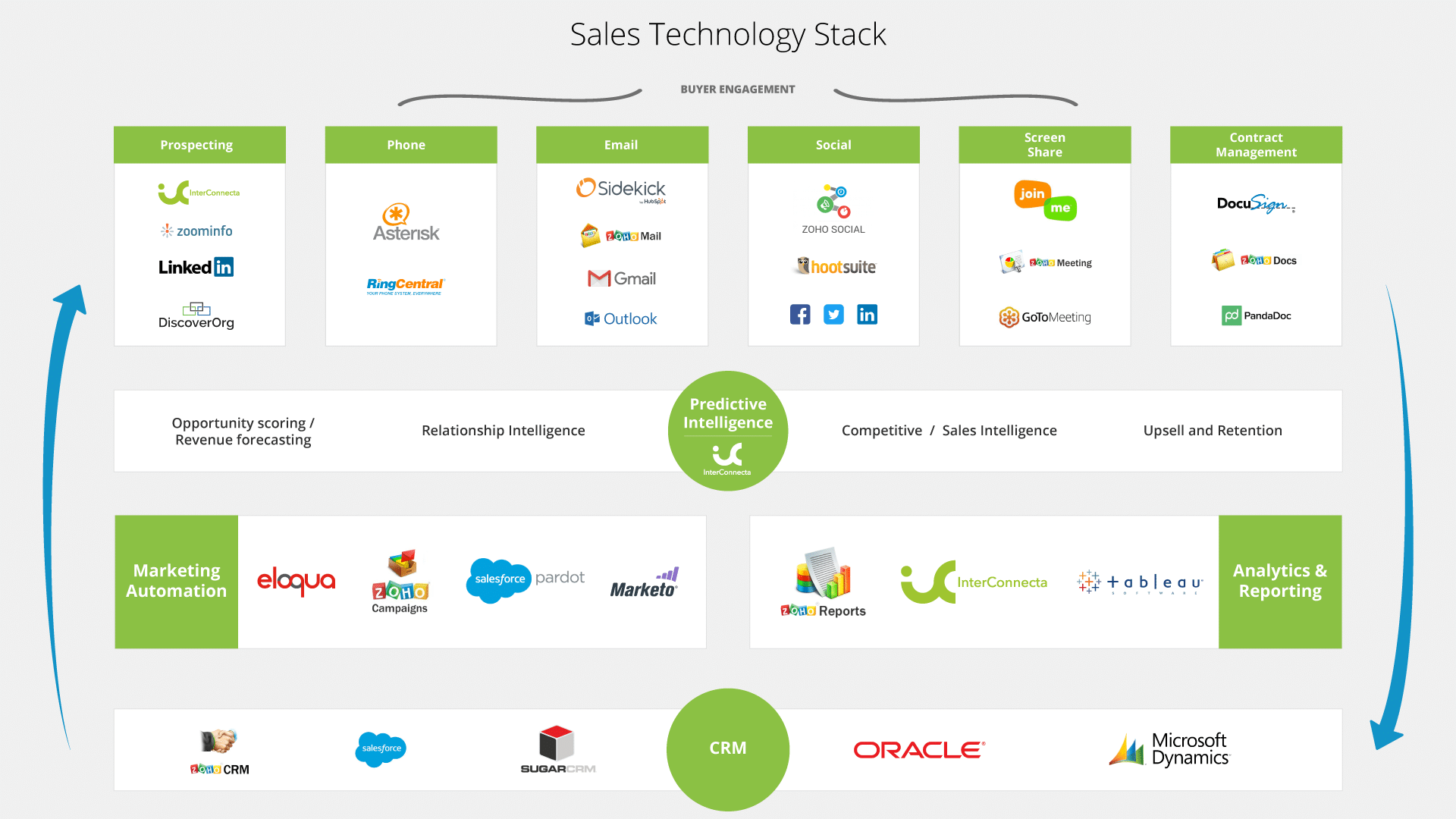
Below is an example of an SMB sales stack, that covers most sales activities across all levels of the sales funnel.
Contacts
- List Building – data.com / discovery.org /
- Contact Info – SalesLoft / LinkedIn/ google
- Lead Research – InsideView/GageIn/LinkedIn
- Segmenting – Zoho CRM
- Email Tracking – Zoho Campaigns / Pardot / Vertical Response
Qualified
- Pre-call Research – InterConnecta / Linked-in /
- CRM – Salesforce/Zoho CRM/SugarCRM
- Note Taking – Evernote
- Dialer – InsideSales
Demo
- Demo Software – Join.me
- CRM updating – Cirrus Insights / InterConnecta
- Content management – Zoho Documents / Dropbox/Box
Proposal
- Proposal creation – Zoho Invoice / CRM
- E-signature – Echosign/PandaDoc
Closed
- Contract management – Zoho CRM / Zoho Invoice
- Referral – Influitive
Each of these tools does their small piece of the sales process extremely well, but creating a complete sales workflow by getting them to work with each other, to send data between each other automatically, and to stay in sync without manual data entry is important. It requires leveraging API’s (application program interface) to build data “pipelines” between each app. If this sounds highly technical, that’s because it is. This is work for software engineers.
Like many of you, we are a startup ourselves. So, I know that your engineering talent is already giving 110% just trying to develop your own product and address your own bugs. They don’t have time to fumble API’s.
That’s where InterConnecta attacks.InterConnecta’s mission is to integrate your sales stack and fill the holes in your process either with people or technology.
At InterConnecta, we want to empower startups and SMB sales team by helping them identify and integrate their own sales stack made up of the best SaaS tools.Just simple point ‘n’ clicks and drag ‘n’ drops to get the job done.
We code and develop all of those API’s for you so that the complicated stuff hums along in the background without you having to worry about it. Just tell InterConnecta where you want your data to go and when, and then watch it go there automatically, without having to scratch your head. We add our own telephone based sales reps and launch multi-channel marketing campaigns on your sales stack so that we experience real life sales development scenarios “with you” during the setup of your sales stack; giving us real time insights into your operational sales flow and help adjust the automation on your sales stack accordingly. Just consider us your sales “pit crew” right out there on the track with you.And here’s why you should care:
- Real live veteran sales representatives working hand in hand with your sales teams to help architect the most useful and adoptable sales stack configuration.
- Real time analysis on your messaging and how its being receivedReal time analysis of the Lists you are using and if the contacts are any good or outdated.
- More automation / Less copy/paste to keep your sales stack in sync means more time for sales activities like generating leads, calling leads, doing demos, and closing deals.
- You reduce the human error that occurs when you get your talented team to do mundane manual data entry instead of what they were hired to do.
- Leaving your team to build and maintain product means bringing better products to market faster.
Results?
- CRM is always up to date with detailed sales lead information.
- Real time insight into your “pitch” and the lists your working on.
- New signups are added to you Email subscriber and CRM lists automatically.
- Lead scoring helps determine the level of sales follow-up requiredSales activites are auto-created and assigned to proper sales rep for follow up based on territory or special rules.
- All of this happened the moment a prospect hit the “Submit ” button on our InterConnecta forms and surveys, all branded with your company logo and theme; and it all happens without you needing to learn code or hassle your team.
And this is just the very beginning…
We have some exciting things on the horizon, such as:
- Automated Analytics – for that mobile executive who needs data at a glance.
- Real time auto campaign suggestions / based on historical marketing results.
We truly believe it’s possible to have the same power an enterprise sales team possesses by modifying light-weight open source sales apps combined with the integration and automation your current proven sales process requires.
-
Announcing Zoho CRM 2018: Get Ready To Sell Smarter, Better, Faster.
Introducing Zia Voice
The first conversational AI for sales teams
An interactive CRM is all you need to make your business smarter. The first conversational AI for sales teams, Zia Voice lets you talk to your CRM through voice or chat. Get access to CRM information that’s timely, contextual, and available, right when you need it.The Even Smarter Zia
An assistant you can always count on
An assistant is someone you can always count on. Your CRM assistant should be no different. Zia can now predict your lead or deal closures, read email sentiments, and alert you to use the best time to contact a prospect, which she has suggested. What’s smarter? She also intelligently analyzes the performance of your workflow automation, provides a dashboard that has intelligent components, helps you map your current trends as compared to expected results, along with auto-populating lead information in your CRM, so you spend less time on data entry.Blueprint: Sell On Time. Every Time
With SLA and Checklist enhancements
Time is money, especially when you’re making a sale. Blueprint in Zoho CRM helps you build and automate your sales process just like you designed it. Blueprint’s newest functionality? The ability to mark all tasks complete before salespeople move to the next stage along with specifying the time a record should be in a particular state for.Analytics
A smarter dashboard for your business
Zoho CRM’s user dashboard gets a brand new interface, with the addition of 5 new analytical widgets that will redefine how sales teams draw business insights. Get your own customizable dashboard that will help you track sales metrics and visualize key performance indicators. Stay on top of sales trends by detecting anomalies in your sales cycle, or compare peer-to-peer performance or deal closure cycles with the help of the Spot Comparator.Portals
A true self-service platform for CRM
Keep your sales team close, and your customers closer. With access to all past purchases, cases, and invoices, Portals allows your customers, vendors, and partners to make more informed buying decisions.Catalyst
A hyper-customization platform for businesses of all types
One of our biggest releases this year for Developers, CRM administrators, and IT implementors. Catalyst, a hyper-customization platform, allows you to build custom applications on your CRM platform and replicate your unique business needs and processes.Canvas
Paint your own CRM view
Your traditional data arrangement with CRM gets a twist. Customize the List View of your Zoho CRM account with the industry’s first-of-its-kind view. Add images for easy identification, use custom buttons to create fields of your choice, and get your view completely customized based on your business needs.Subforms
View related CRM data from a single place
Simplify the way you view CRM information with Subforms in Zoho CRM. View the entire order history of a single customer, in one single place.Translations
Make CRM speak the language you do
With Translations, your CRM information is available to your team in the language they’re most comfortable with, keeping that local flavor of every business intact.Validation Rules
Ensure the right data flows into your CRM
Frame different rules for different modules and fields, along with error messages that should show up when invalid data tries to enter your CRM.Data Encryption
Your data is safe with us
Zoho CRM uses one of the strongest encryption standards, AES-256, to encrypt your data. This means your data is protected from outside access, and can be read only if decrypted. By encrypting your data that’s stored in Zoho CRM, we prevent any possible security leaks or breaches to your data.Zoho Meeting And GoToMeeting
For effective virtual meetings
Set up web conferences to follow up with clients inside CRM. Every new event, or meeting, contains a details page in Zoho CRM, where your team can access the audio-video recording of the conference and relevant documents shared during the meeting.Note: These features will be rolled out in a phased manner.
Via Zoho CRM. -
3 CRM Features Ignored by Small Businesses
Having a CRM means a lot more than just signing up for a free account and dumping your data on the cloud. There are ways to make the best of your new system and Brent Leary, cofounder of CRM Essentials, knows this well. In this guest post for Destination CRM, Brent discusses the most important CRM features that small businesses don’t take advantage of. Here we’ve highlighted our top 3.
Automating Important Processes
Look for options that enable users to be more effective at engaging customers and prospects by unifying contacts into a single system of record; enriching those records with company and business insights; and empowering them to engage everywhere they work.
At InterConnecta we are thrilled every time we’re able to find ways to save our users some time in their daily workflow because we know this can add up to hours saved of time and a much smoother user experience. From automating incoming leads while preventing duplicates to keeping users on top of their game with notifications; if you’ve been running a CRM without automations, you’ve been doing it wrong.
Managing Relationships. Not Data
Insightly chief marketing officer Tony Kavanaugh notes that SMBs need to focus more on the “R” part of CRM. “CRM deployments should treat sales force automation as table stakes and focus on what it takes to make the buyer journey as frictionless and as fruitful as possible. Relationship scoring and intelligence, sentiment and signal analytics, next-best-action recommendations, project delivery, and AI-based advice at every step of the buying journey are all key to this new imperative.”
One key feature of CRMs is the ability to shape your data by creating relationships across modules. This may be a difficult concept to grasp at first but it is very important if you want to ensure that your database can grow. Companies nowadays not only manage customers but a broad range of relationships from the Account they belong to, Deals closed, Emails sent, and even custom data that are specific to the company’s workflow. Every item needs to be captured and accessible. Maintaining these relationships and understanding how they add value to your sales process will help you make strategic decisions.
Connect All your Systems
SugarCRM CEO Larry Augustin also thinks integrated data can help more SMBs succeed. “We find it surprising that a lot of CRM users are not yet leveraging third-party data sources and services to augment the data in their systems. CRM has seen some adoption issues, specifically because users don’t want to put data into the system. And using data services does the heavily lifting for users, driving adoption in addition to enhanced productivity.”
Taking things one step further, you can connect not only the data inside your CRM but to the data in other systems. Whether it is your marketing hub, books, ads, or business intelligence system; integrating other systems with your CRM will give you greater insight into the performance of your business while making your users more efficient.
Brent Leary is cofounder of CRM Essentials, an Atlanta-based advisory firm focused on small and midsize businesses. He is also the author of Barack 2.0: Social Media Lessons for Small Businesses.
-
Is my Zoho Account Infected? No. And here is why!
We have recently seen an increasing number of articles that discuss the topic of phishing attacks perpetrated using Zoho accounts. Unfortunately we feel that these articles have not done a very good job at informing the public. In fact, most of them seem to lack the understanding of what is really going on behind the scenes. Luckily, we’re here to help! Learn why your Zoho Account can’t be infected and what you need to know as a Zoho user given the recent reports.
I had not heard about these attacks. What’s going on?
Fake Zoho Mail accounts, created on purpose by attackers, have been used to send out mass email phishing campaigns across the globe. These campaigns are not different from other malware campaigns that we all already avoid on a daily basis.
A phishing email’s objective is to obtain data from a user by masquerading itself as a trusted entity. This can range anywhere from a statement email from your bank, to a greeting card from your long lost cousin.
Once these emails are opened, you will likely be asked to click on a link, or install a piece of software. Once that happens, a keylogger, a software designed to record everything you type, will send all the information you enter in your computer back to its creator. This can include logins, passwords, or credit card information.
We use Zoho. Has our data been compromised?
No. It’s important to understand that these campaigns are not infecting Zoho servers and are not compromising user information owned by Zoho. Unlike security breaches where user information is stolen directly from the company servers, these campaigns can target any email user in the world, and you will only be affected if you’re not careful with the emails you receive.
You are not at risk just for using Zoho’s services but as a responsible internet user, you need to be careful with the emails you open.
What’s being done about it?
Zoho has already increased their basic requirements in order to reduce the number of bots and fake accounts. Here are some of the requirements already in place:
- Review of existing free accounts, where most of the campaigns come from.
- Requirement of mobile number verification
- Blocking of accounts that present suspicious login patterns