Category: News

  • Zoho News Catch-Up: Zoho Campaigns’ 10th Anniversary, Zoho Writer’s Document Workflows, Zoho SalesIQ’s Smart Suggestions, and New Integrations for Zoho Social

    Welcome to our catch-up, where you’ll be in the know of all the latest Zoho updates in one place!

    • Zoho Campaigns delivers new updates for SMS, eCommerce, and more to celebrate their 10th anniversary
    • Zoho Writer includes document workflow feature to optimize review and approval processes
    • Zoho SalesIQ introduces Smart Suggestions to autogenerate reply recommendations based on resources section
    • Zoho Meeting included in Constellation ShortList Virtual Events: Webcasts and Meetings

    Zoho Campaigns Celebrates 10 Years in the Market with New Features

    Since its inception in 2012, Zoho Campaigns has become one of the most coveted email marketing software platforms. It has been offering the latest in advanced email automation, analytics, personalization, and template designs.

    To keep the platform and the celebration going, Zoho Campaigns announced a series of product updates:

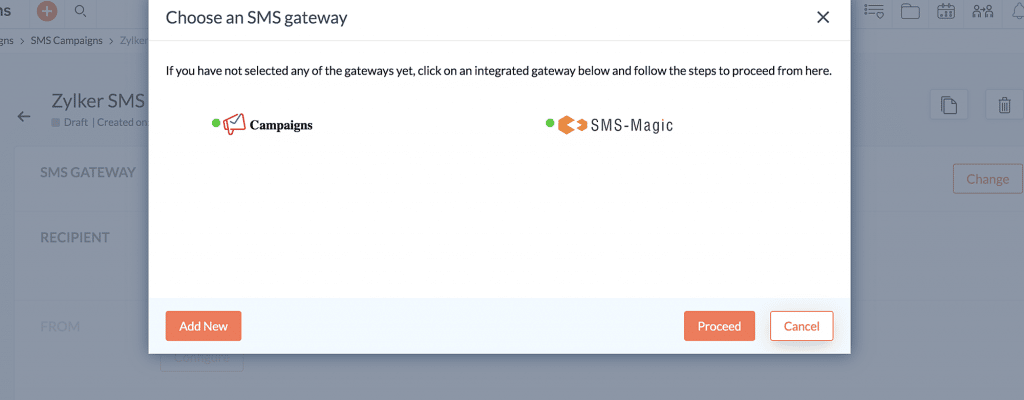
    Zoho Campaigns’ SMS Gateway

    Customers in the United States and Canada can now send SMS campaigns without difficulty. This simplifies the SMS creation process and the identification of duplicate phone numbers. Also, data processing time will be reduced and ensure organized data storage.
    (Image by Zoho)

    Optimization of AI for eCommerce

    Zoho Campaigns now has an automated product recommendation system, which is powered by data collated after analyzing shoppers’ buying habits. These recommendations will be basic and advanced. Basic Recommendations include Top Selling and Recently Added options, while Advanced Recommendations include the following options: Similar Products, Frequently Bought, and People Who Also Bought This.
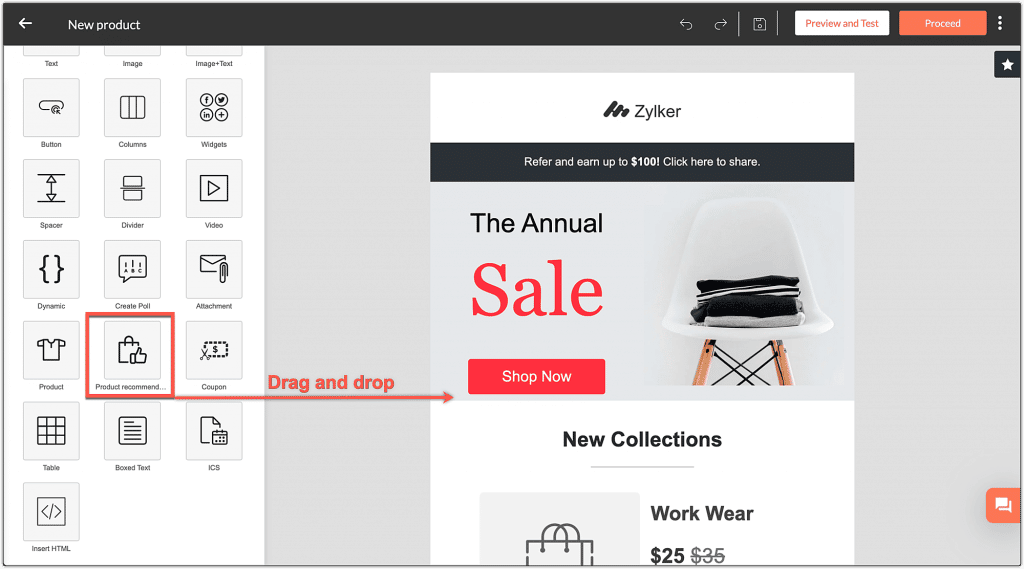
    (Image by Zoho)

    But it doesn’t end there: you’ll get recommendation reports to track and compare the revenue generated from Zoho Campaigns (both via regular and automated emails) with the store’s overall revenue. You’ll see an additional section as well that helps you understand the conversions via the recommendations.
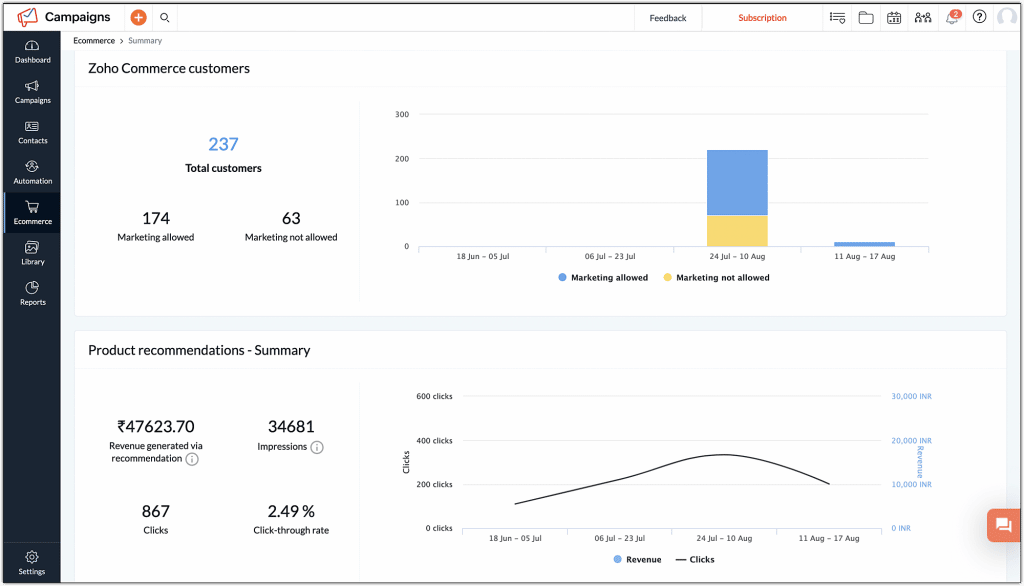
    (Image by Zoho)

    Custom Return Paths

    Excessive bounce rates can have an adverse effect on a domain’s reputation. However,  a return path helps the sender determine the reasons behind email bounces. Zoho Campaigns now enables email marketers to create a custom return path address for themselves. Users can customize their return path and align it with their domain name. This will help to easily pass the SPF alignment in DMARC validation and ensure that the emails that are sent are received in the desired inbox.

    Edit Workflows with Ease

    Users can edit their live workflows without any changes in the flow. Back in the day, if a user edited an active workflow, a new version of the same workflow was created. This has been fixed, so no additional versions of the workflow will be created after a user makes any changes to a live workflow.
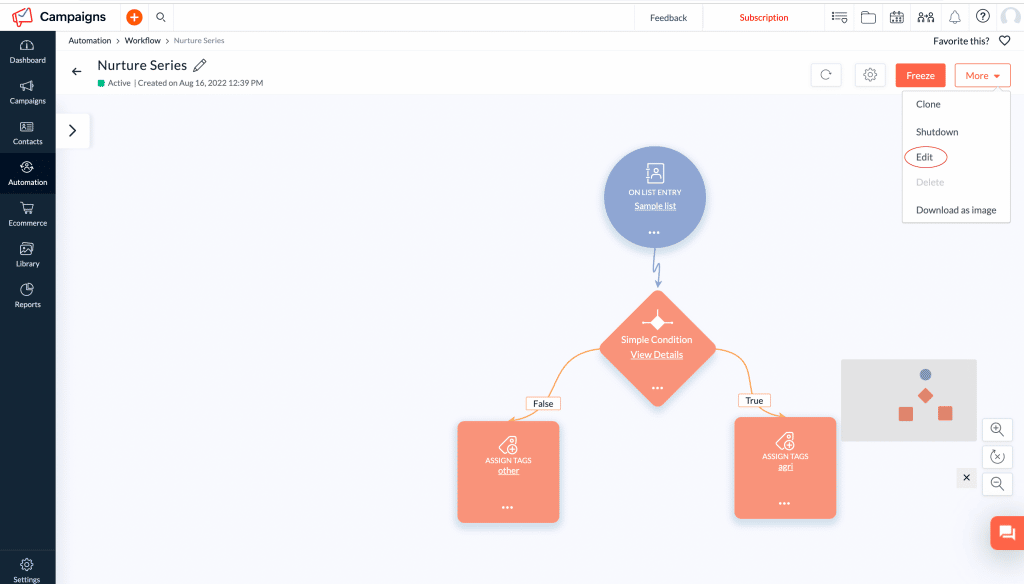
    (Image by Zoho)

    Zoho Writer Introduces Workflows to Streamline Document Processes
    (Image by Zoho)

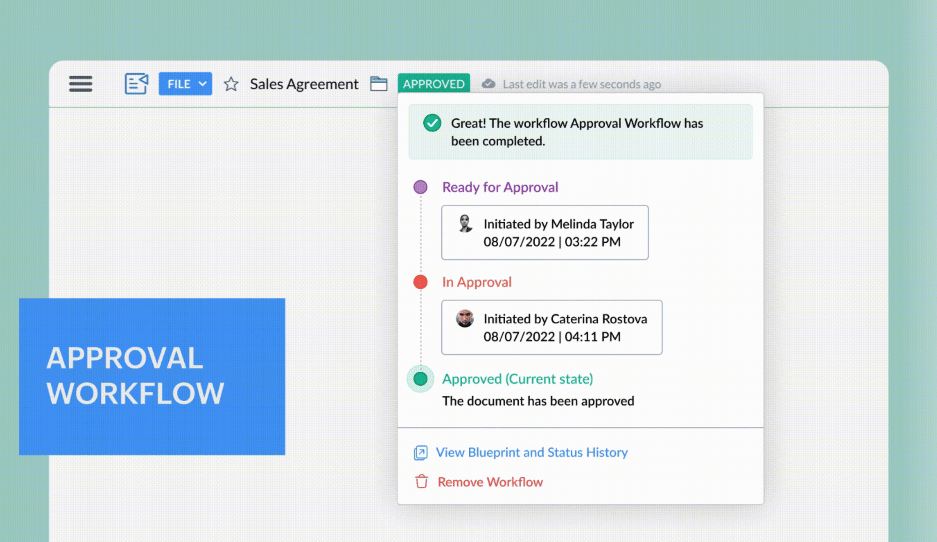
    This new function was created for an easier and quicker way to share and collaborate on documents for review with multi-stage document workflows. You can streamline and standardize business processes and the processes of creating, reviewing, and approving documents across an organization.

    Zoho Writer’s document workflows include the following features:

    • Purpose-Built Workflows: These include four workflows that are ready to use with the option to specify a due date. You can use one or more of these for your document: Review Workflow, Approval Workflow, Editorial Review Workflow, and Review and Approval Workflow.
    • Custom Workflow Triggers and Post-Workflow Actions
    • Controlled Collaboration
    • Real-Time Document Status and Email Notifications
    • Visual Workflow Status Tracker
    • Detailed Workflow History and Audit Trails
    • Document Review Dashboard  

    To go more into depth of these features, and to learn how to assign workflows to your documents and start workflows, take a look at our blog post.

    Zoho SalesIQ’s Smart Suggestions

    Smart Suggestions are reply recommendations that are automatically generated by using the resource section. It helps the chat operators by suggesting appropriate responses while chatting with the visitors. The suggestions are mostly from articles, FAQs, and the small talks package of choice. The objective of this feature is to decrease the amount of time that the resource search might require. It will instantly generate relevant answers to respond the visitor’s queries in a more prompt and efficient manner.    

    How to Enable Smart Suggestions to Your Portal

    Go to Settings > Global settings > Operator Interface > Smart Suggestions and toggle the Enable button.
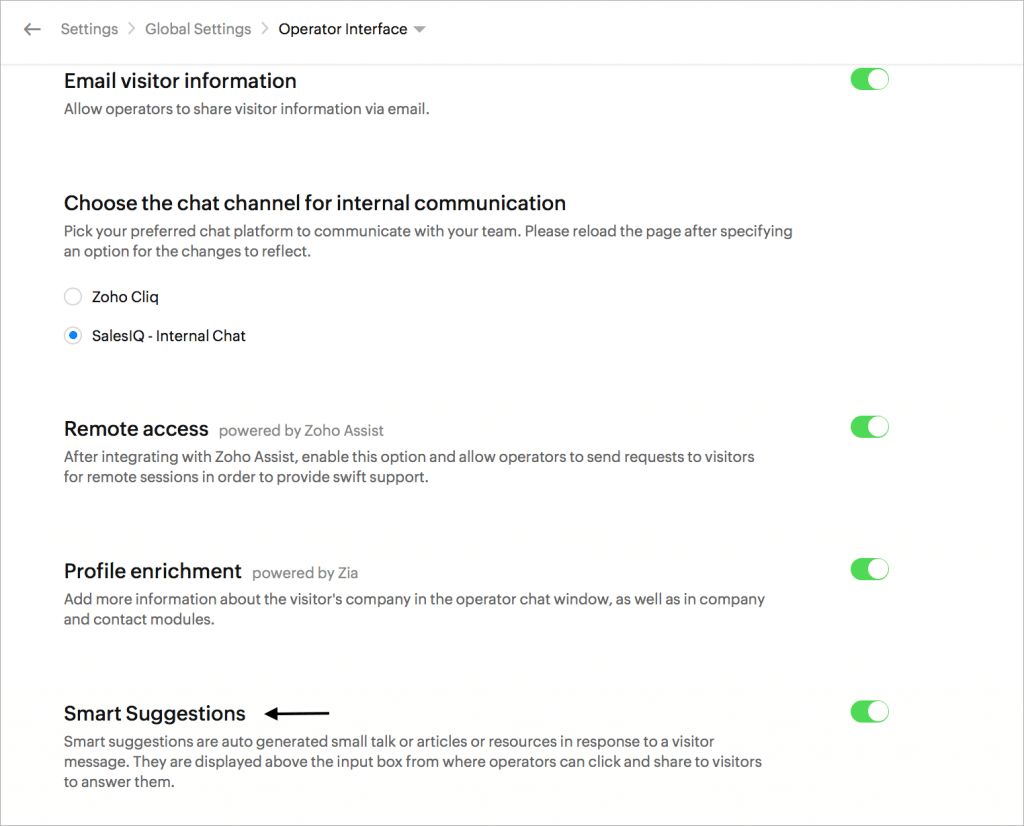
    (Image by Zoho)

    Configuring Smart Suggestions as an Operator

    Go to Settings > My Profile > Smart Suggestions. Here, they can enable/disable the resources they’d like to be included in the suggestions.
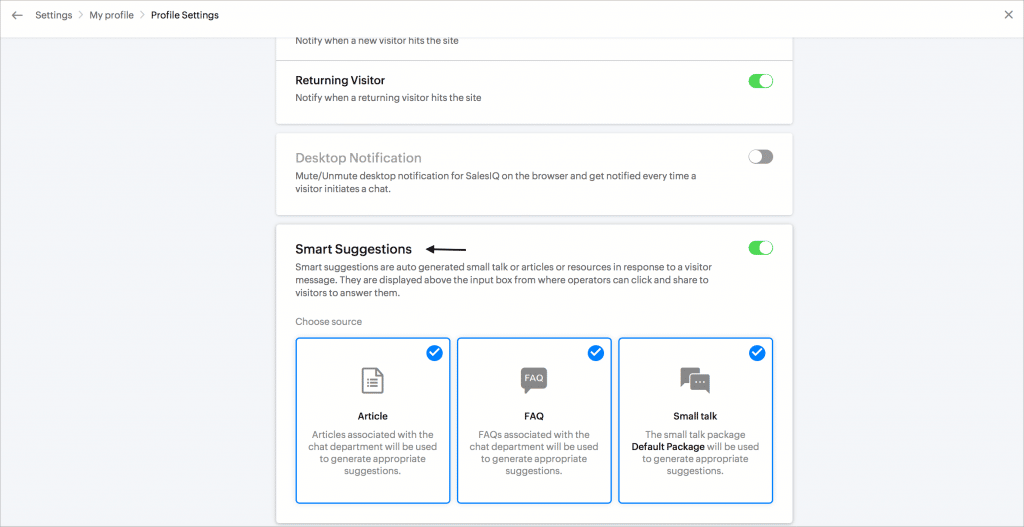
    (Image by Zoho)

    Smart Suggestions in the Operator Chat Window

    The operators will get suggestions based on the questions they get from the visitor. Operators can click on the suggestion to preview the answers. Then, they can click on Share to send the article/FAQ to your visitor and Expand to view them on full screen.

    The Smart Suggestions will only work if there is a match to the visitor’s questions in your resources section.
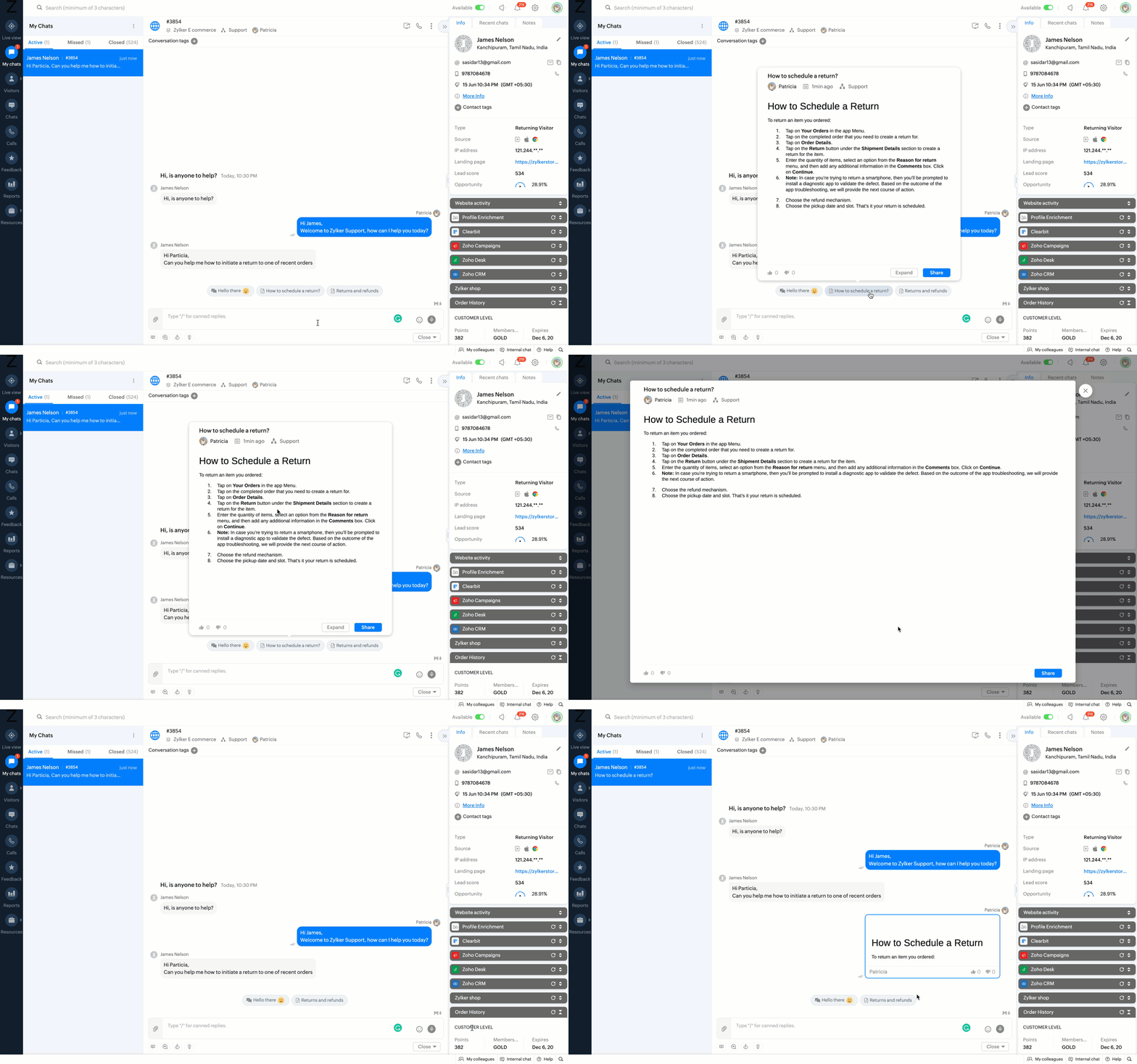
    (Video by Zoho)

    You can temporarily enable or disable the suggestions from the operator chat window by clicking on the Smart Suggestions bulb icon under the compose box area.
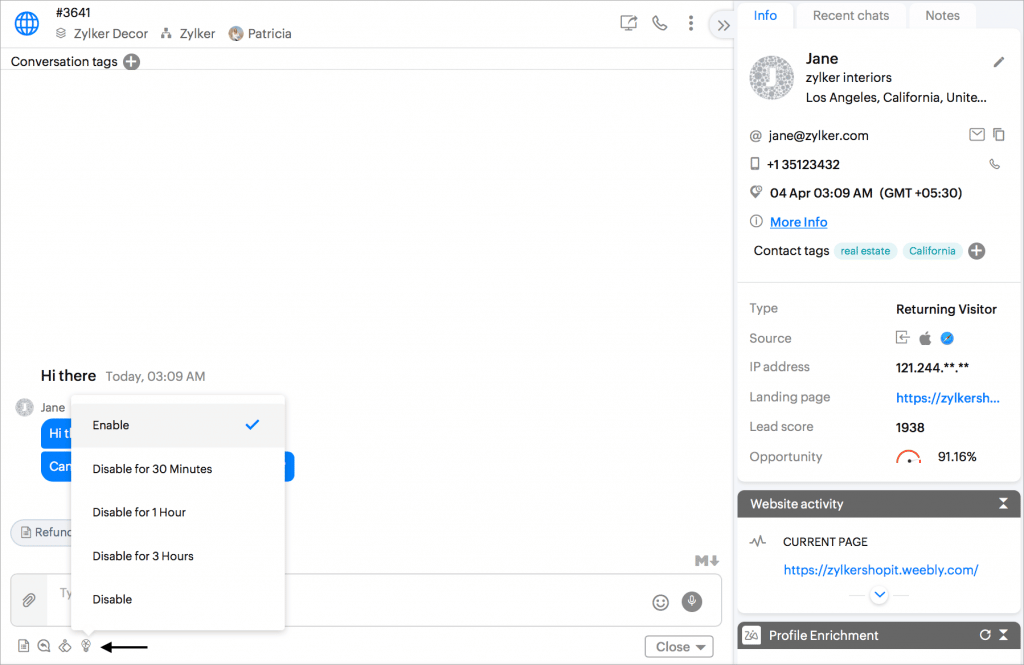
    (Video by Zoho)

    Currently, Smart Suggestions are only supported in English and in the enterprise plan of Zoho SalesIQ.

    Zoho Meeting and Zoho Flow Integration Now Automates Meeting Workflows

    Zoho Meeting comes with a total of 13 triggers and 6 actions that can be used to automate your business workflows on Zoho Flow.

    Here are some of the uses of this integration:

    • Zoho Meeting and Zoho Cliq: Scheduling an online meeting or webinar in Zoho Meeting instantly sends out meeting invitations with the joining link in a specific Zoho Cliq channel.
    • Zoho Meeting and Google Calendar: When scheduling new meetings or webinars, the events can be automatically added to Google Calendar.
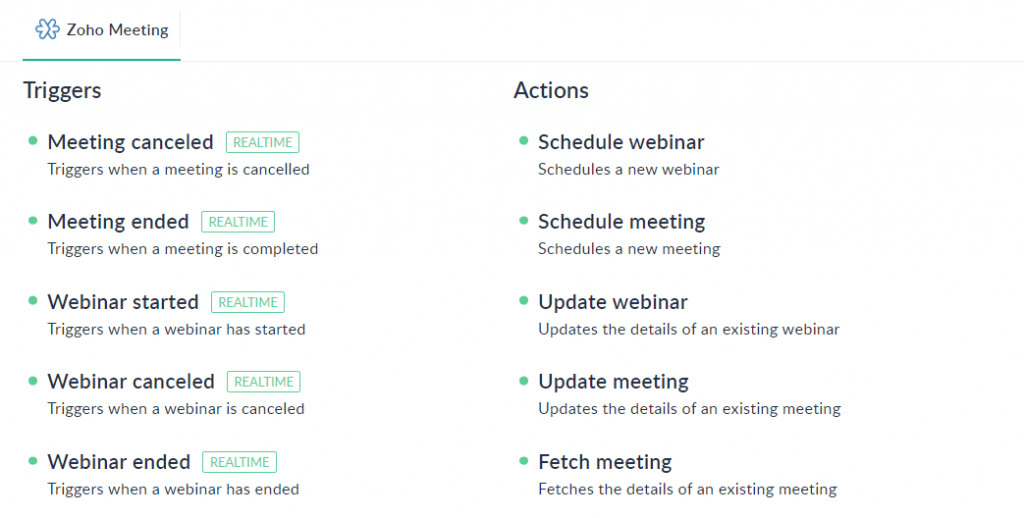
    Zoho Meeting has 13 triggers and 6 actions that can be used to automate your business workflows on Zoho Flow. (Image via Zoho)

    How to Enable the Zoho Meeting and Zoho Flow integration

    1. Create your meeting workflow by entering its name.

    2. Choose the app-based trigger to create the workflow.

    3. Select Zoho Meeting from the list of apps and choose a Zoho Meeting trigger.

    4. Create a new connection or select an existing one to be used for workflows in your account.

    5. Choose an app and drag a specific action to the builder that gets triggered when an event happens in Zoho Meeting.

    6. Turn on the workflow to complete the automation.

    Zoho Flow’s builder shows a clear workflow arranged between applications without the need for coding. Furthermore, you can monitor the history of your workflow and check for any issues, if necessary.

    TikTok, Instagram Reels and Stories, and YouTube Shorts on Zoho Social

    TikTok

    You can now plan, post, and collaborate on videos for TikTok from Zoho Social. Plan a post for later with a custom schedule feature or post it right away from the publish window. Publishing trending videos on Zoho Social’s desktop platform and via their mobile app can help you engage with your community and attract new followers. You can also add a catchy description for your video and include emojis from the emoji tray. In addition, you can group and add trending and relevant hashtags to include them in your post in one go.
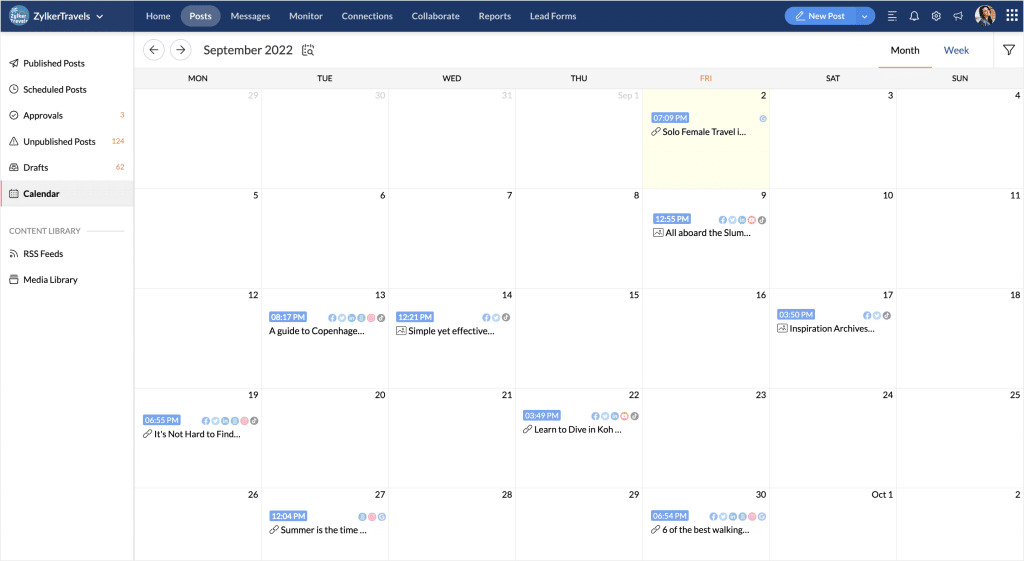
    Zoho Social’s content calendar for Tik Tok. (Image by Zoho)

    Zoho Social’s centralized content calendar helps you organize all your videos in a single view and determine your planned TikTok content strategy and marketing, while keeping track of content plans across platforms. View the weekly and monthly posts from each of your connected channels at once.

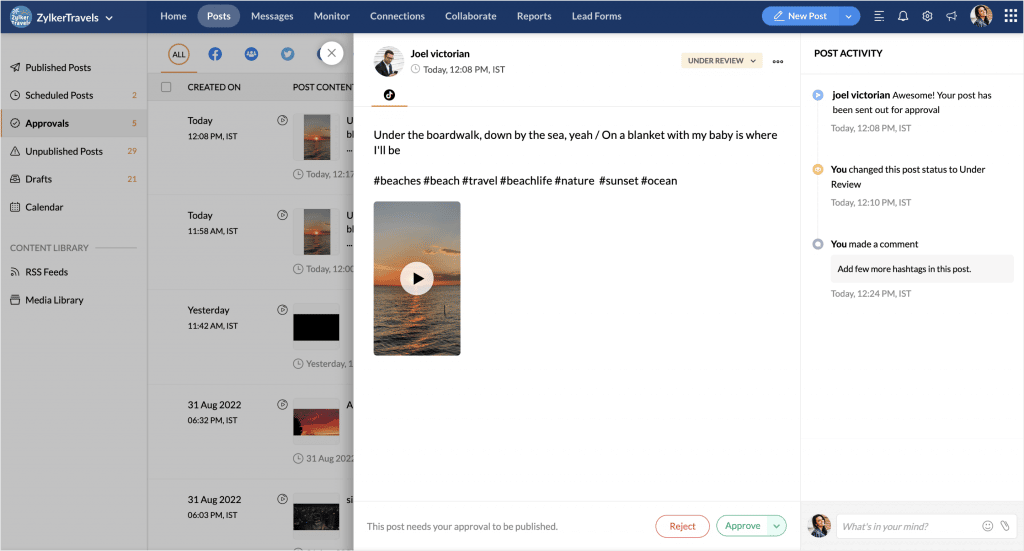
    Easily move material around a structured pipeline thanks to the Workflow and Content Approvals features. Create your own approval system and streamline your publication process for social media. With the approvals dashboard, you can designate specific team members as approvers who will review and publish drafts, as well as contributors or publishers who will be able to generate and submit drafts for review. Now teams can have more editorial control over the distributed content.
    (Image by Zoho)

    Instagram Reels

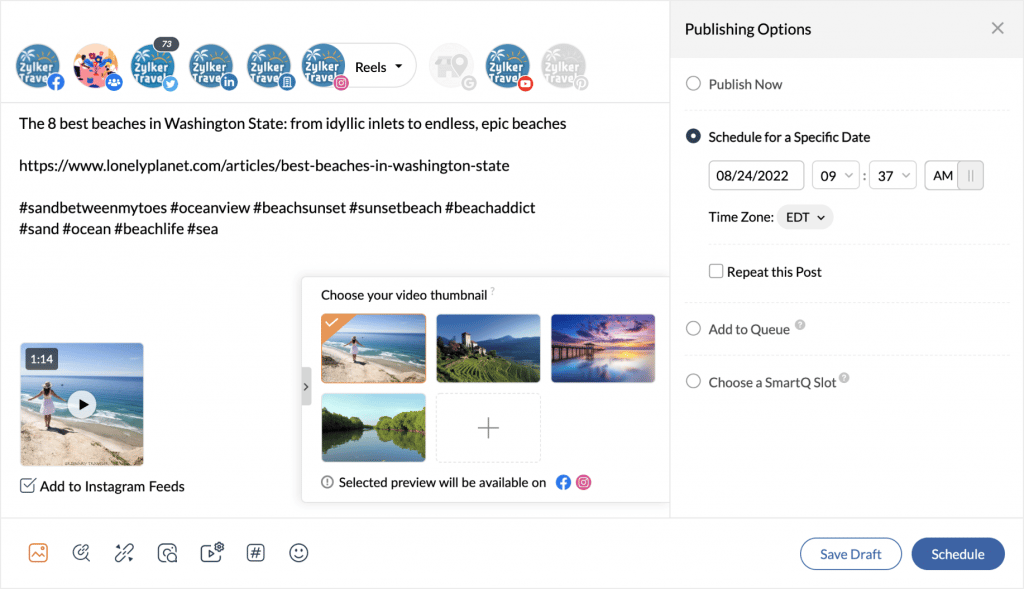
    Plan and publish Instagram Reels; view and reply to incoming mentions and comments; and see the number of likes, views, and plays your reel has received. Choose to auto publish your Instagram Reels, schedule them for a specific date, or choose to publish on the best day/time using Smart Q.

    Also, you can select the thumbnail you want to use as a cover image for your reel from the suggested options, or choose your own frame from the video and have the option to post it both on your grid and the Reels tab.
    (Image by Zoho)

    Instagram Stories

    Plan and create your Instagram Stories in advance. Publish immediately or schedule for later, preview to see how the story will appear on your profile, and add captions to each story.

    Access a variety of unique custom stickers in Zoho Social, and apply filters to customize the look of your story and build it from scratch. The Zoho Social mobile app allows users to manually post the stories you’ve created using the web app. You’ll receive a Publishing Notification at the selected time and date based on the publishing option you chose. Also view story stats for each story: number of impressions, reach, replies, exits, and taps forward and backward.
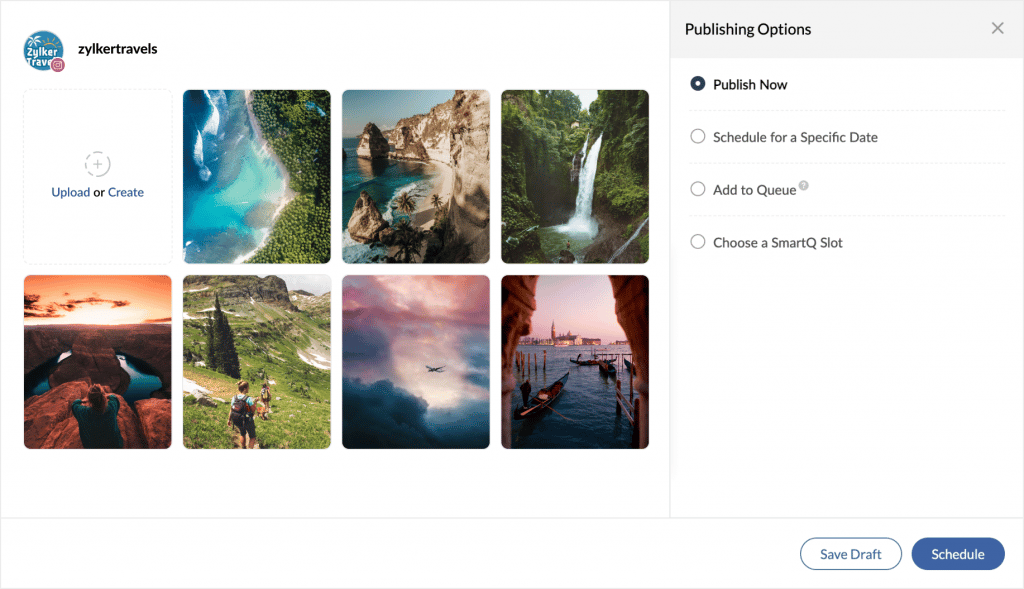
    Moreover, you can identify top stories, analyze how your story has performed based on engagements received over a period of time, assess the completion rate of your story, and much more from the Reports tab.

    YouTube Shorts

    Create a quick teaser for a longer video and upload it as a Short from Zoho Social’s publishing window. Additionally, you can use interesting captions, modify the thumbnail, add relevant hashtags, and control visibility.
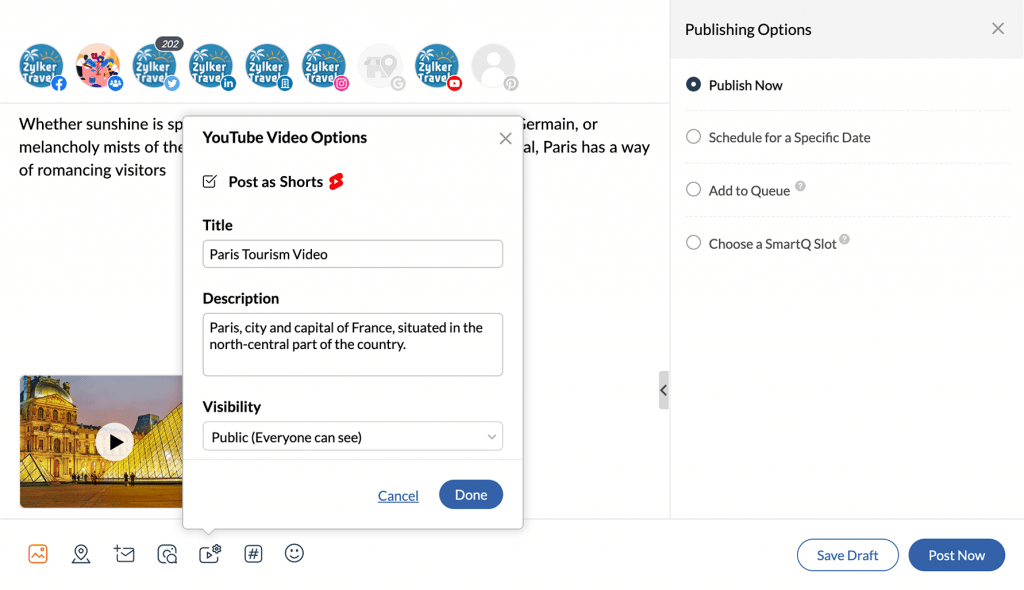
    (Image by Zoho)

    New Zoho Tutorials

    Migrate from Dropbox to WorkDrive

    https://youtu.be/NXBEaTSxnGs

    Zoho Notebook and Microsoft Teams Integration

    Zoho Meeting Included in Constellation ShortList Virtual Events: Webcasts and Meetings
    (Image via Constellation ShortList.)

    The Constellation Shortlist evaluates more than 30 categorized webcast and meeting solutions. This Constellation ShortList is determined by client inquiries, partner conversations, customer references, vendor selection projects, market share, and internal research.

    The criteria that made Zoho Meeting a recipient of this recognition are:

    • Capacity to host live audio (audio and slide/content), play video and prerecorded sessions
    • Registration with flexible form fields for lead capture, including organizing an event series
    • Customized branding and console configuration
    • Quick, stable, reliable connectivity with toll-free, international calling and access
    • Multihost, scalable speaker and producer interface
    • Pre- and post-event communications, alerts, calendar invitations and reminders
    • Multibrowser responsive user experience, installed app for Mac and Windows, native mobile apps
    • Live audience engagement tools, polls, voting, chat, comments, screen mark-up, Q&A
    • Integration into key engagement systems including social, mobile messaging and marketing automation
    • Integration into customer and employee data repositories including CDP, CRM, and HCM tools
    • Recording and rapid on-demand availability, commerce-ready gateways and monetization
    • Integration with digital asset management solutions for rapid video aggregation and editing capabilities
    • Security, role-based access and authorization; customer viewer controls
    • Analytics and robust reporting, viewers (live versus on-demand), attention, downloads
    • Support, training, and community for customers
    • Accessibility features, including real-time voice transcription and translation

    That’s all for now, IC readers! See you soon for more Zoho updates from InterConnecta!

    Need help with the implementation or optimization of any of your Zoho apps? Then you’re in the right place! Learn more about our Zoho Consulting Services and ask us for a free consultation.

  • Zoho News Catch-Up: Zoho CRM Updates, Zoho SalesIQ and Telegram Integration, Zoho Sign SMS Delivery

    Welcome to our catch-up, where you’ll be in the know of all the latest Zoho updates in one place!

    • Send documents for signature via SMS with Zoho Sign
    • Zoho Social now includes hashtag groups and carousel posts for Instagram
    • Zoho hits 80 million global users mark, 38% in growth

    Zoho CRM Updates

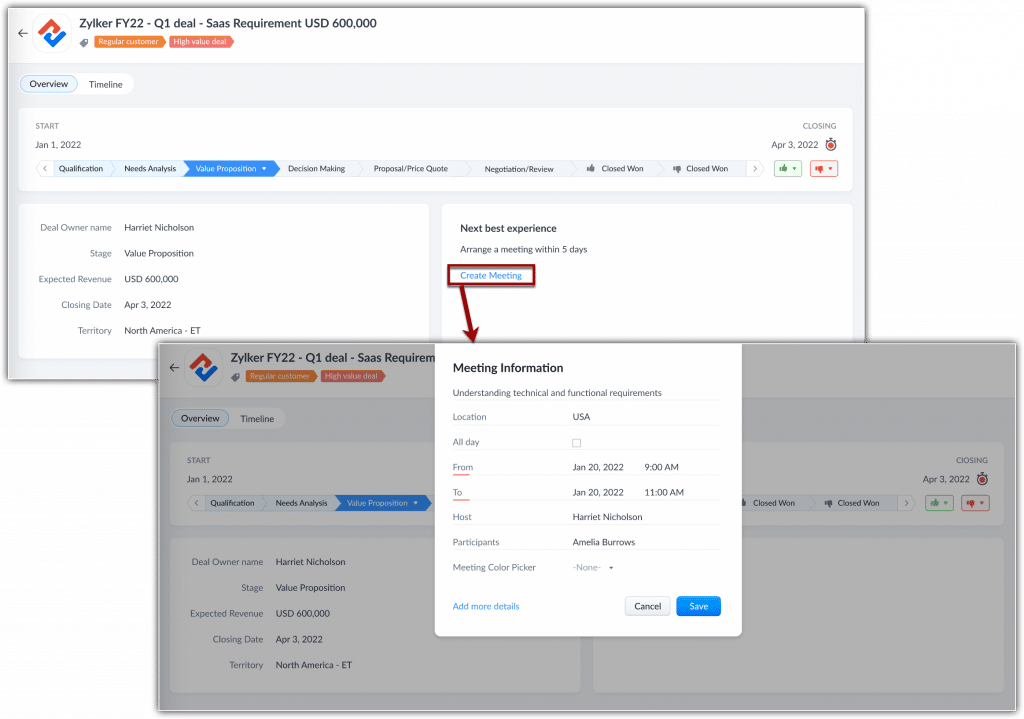
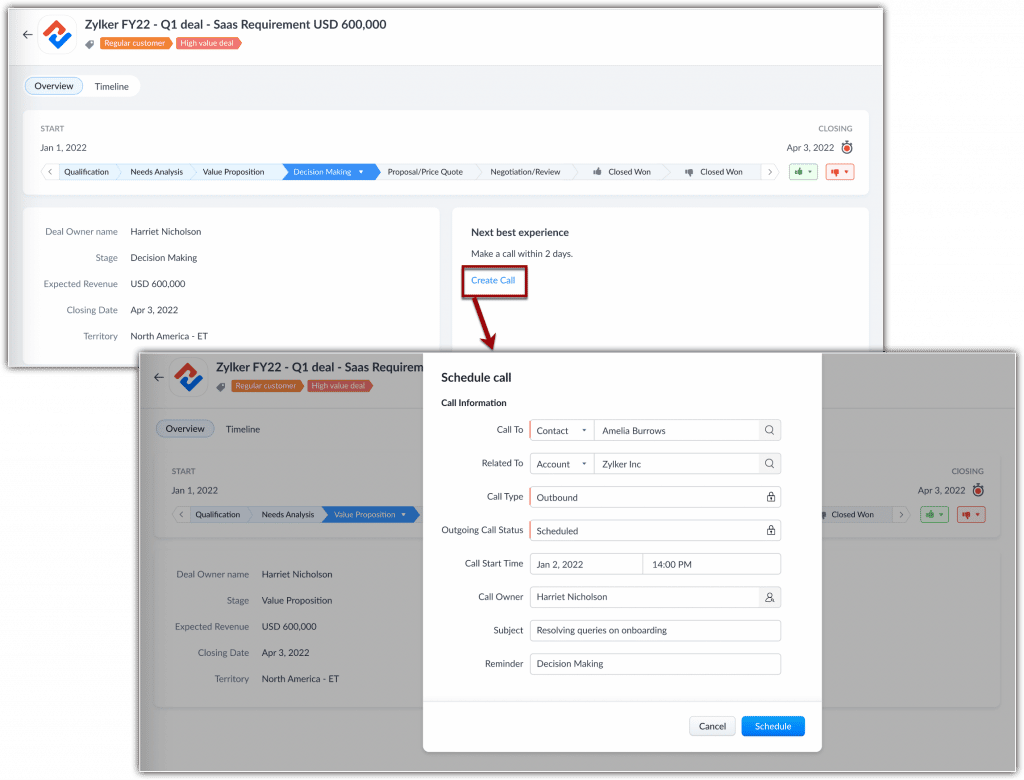
    Zia Next Best Experience

    When this feature is enabled, Zia monitors all currently open and active deals in your organization. It will analyze the deal stage and identify the next best experience that you can provide and prompts you to take action.

    These suggestions are computed when Zia studies closed deals and analyzes how long it took for similar deals to progress from one stage to another. After gathering the required information, Zia correlates patterns and behaviors, like deal type, repeat customers, industry, and more to suggest your next steps.

    How to View and Act Upon Suggestions

    Zia’s Next Best Experience suggestions are shown as a widget inside the deal. Depending on the deal’s stage, Zia gives you three types of calls to action:

    Arrange a meeting

    Image via Zoho.

    Schedule a call

    Image via Zoho.

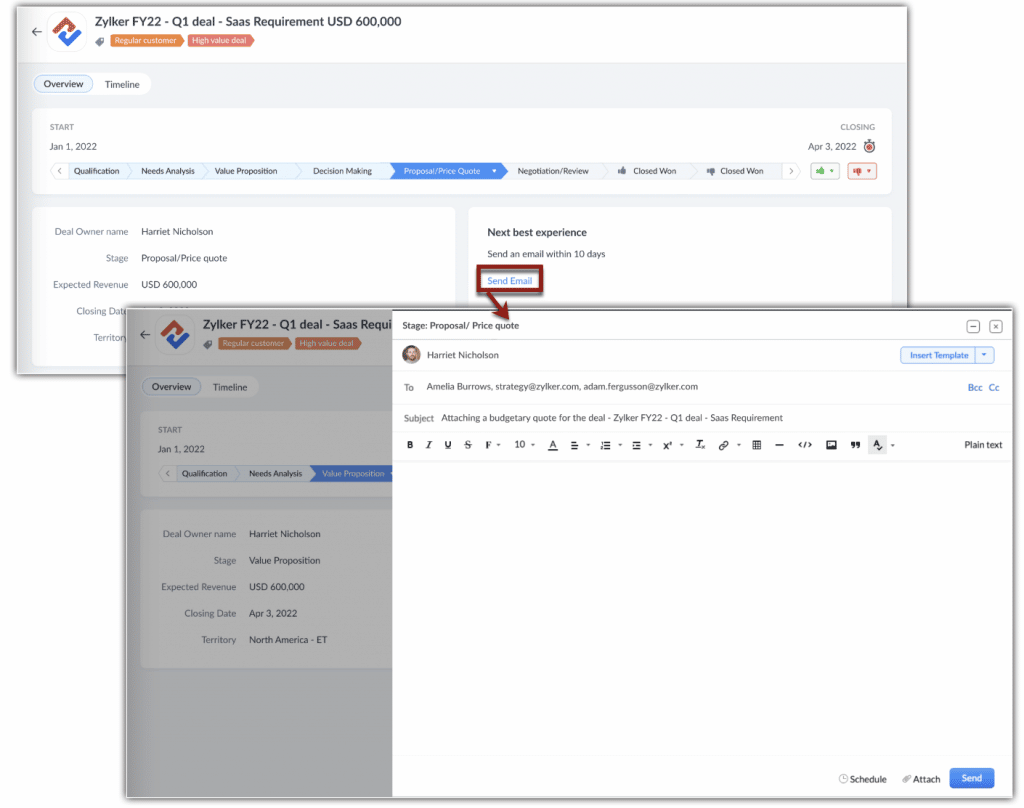
    Send an email

    Image via Zoho.

    When you click on these call-to-action prompts, you can directly schedule a meeting, make a call, or compose an email.

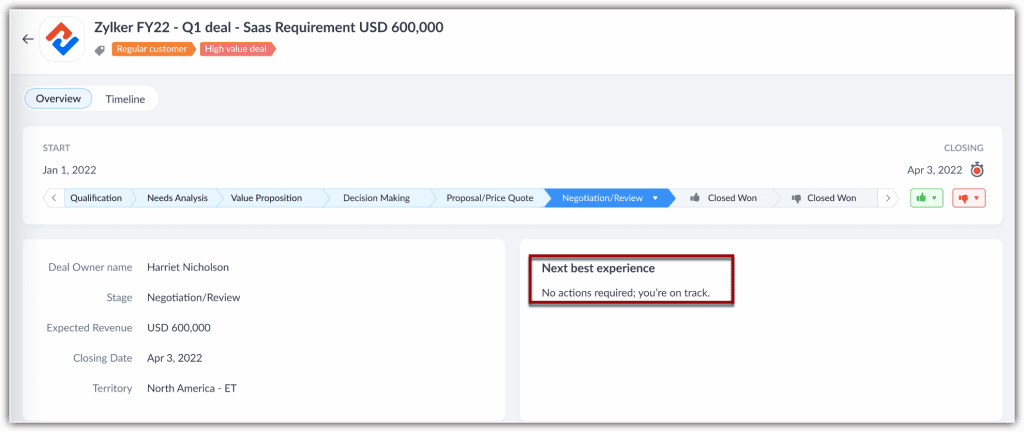
    If deal correspondences are already going at the right pace and Zia predicts no action at that moment, the widget will display the following message: No actions required; you’re on track.

    Image via Zoho.

    How to Enable Zia Next Best Experience

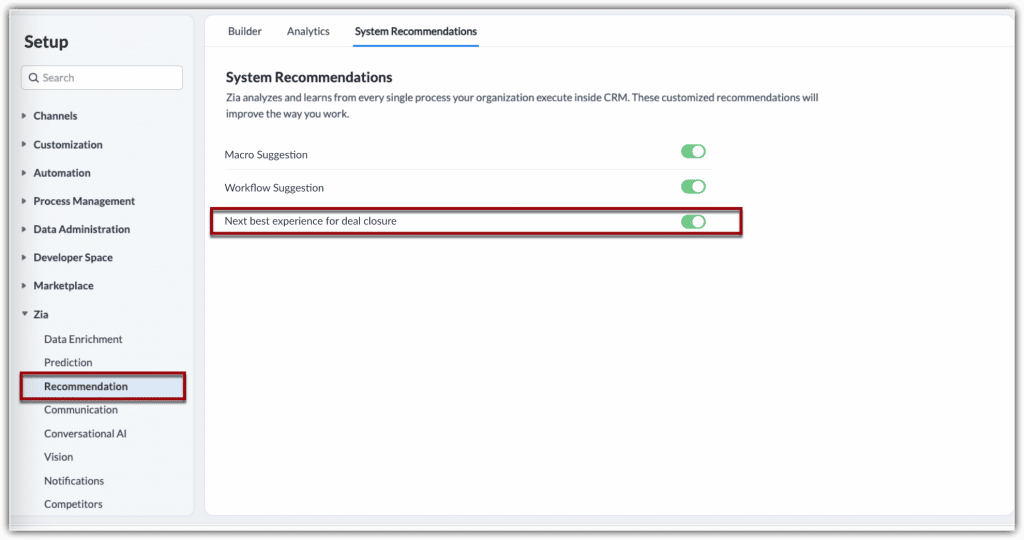
    1. In your Zoho CRM, go to Setup > Zia > Recommendation > System Recommendation.

    2. In the System Recommendations page, click on the botton alongside Next best experience for deal closure. Once it’s green, it means the function has been enabled.

    Image via Zoho.

    Availability

    All users can view this recommendation. Users with administrative privileges can enable it for the organization.

    Currently, Zia’s Next Best Experience feature is available only for:

    • Organizations with 20 or more user licenses.
    • Organizations in US, EU, IN, CN and AU DCs.

    Notes:

    • Suggestions are available only in the Deals module and they will be displayed only for the open deals that are active. Deals that remain dormant and inactive before this feature is enabled will not receive suggestions.
    • It takes 24 hours for Zia to learn and suggest the actions for your ongoing deals.
    • A minimum of 500 deals that are Closed Won, each with activities (calls, emails, meetings or tasks) are required for Zia to learn and show suggestions.
    • Zia suggests the actions you should take and the timeline within which you should take them based on historical data, which you can’t modify.
    • If you miss the timeline suggested by Zia, or if you receive an incoming correspondence from the prospects before you take an action, Zia recalibrates its findings and provides a new suggestion.
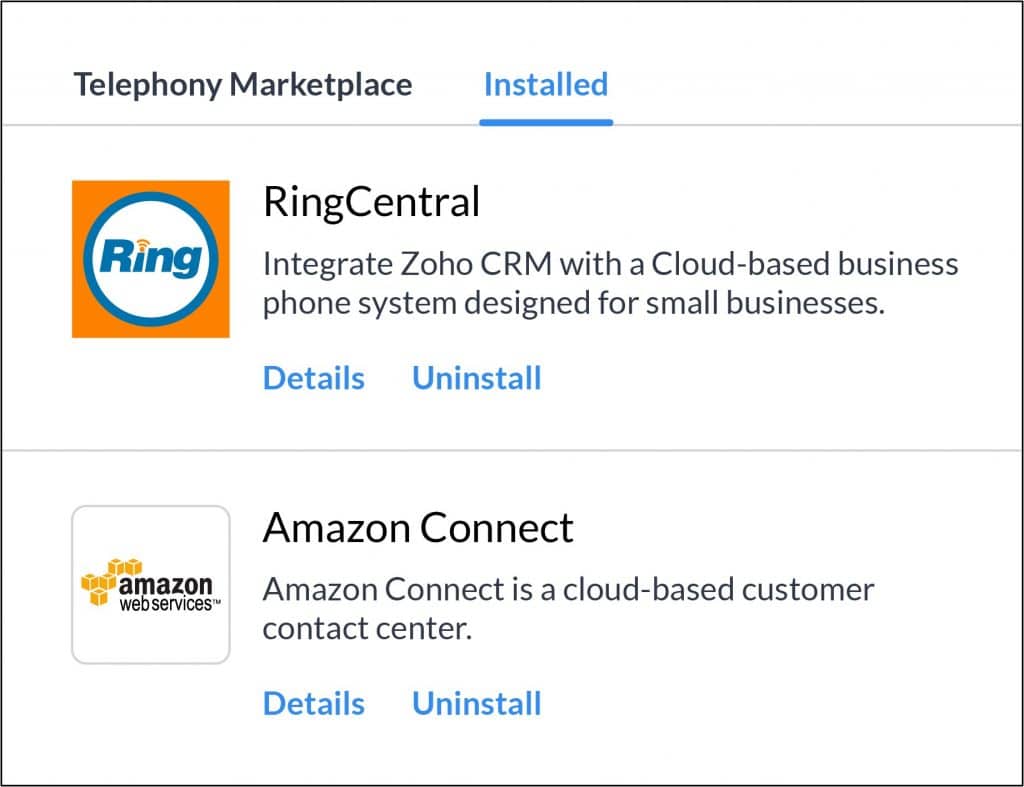
    • To make calls, your CRM organization must have a telephony service integrated.
    • To send an email from your CRM organization, you must have the new email configuration integrated.

    Campaign Monitor Extension for Zoho CRM

    Campaign Monitor is an email marketing software that has automation tools to build emails and run campaigns. The Campaign Monitor extension for Zoho CRM lets you synchronize all your campaigns from your Campaign Monitor account to Zoho CRM. You can access synchronized campaigns from the Campaigns module and contact details from the Contacts and Leads modules in Zoho CRM. Get the extension here.

    Zoho CRM Integration with Zoho Lens

    • Remote Assistance Sessions: Now you can assist your prospects and contacts remotely and efficiently.
    • Using Zoho Lens, you can save time by recording your remote assistance sessions and sharing them with your contacts in a few clicks. Additionally, you can conduct internal audits and analyze your support efficiency by generating comprehensive session reports. Administrators can effectively monitor technician activity through the Action Log Viewer in Zoho Lens.
    • Live Camera Streaming: View a live stream of your contact’s smartphone camera and provide remote assistance directly from your computer.
    • AR Annotations: Highlight 3D objects in real-time using Zoho Lens’s ubiquitous virtual annotation technology. Annotate and point out 3D objects, and offer helpful context.
    • Image Freeze: Instantly freeze your incoming camera stream and capture screenshots to analyze the situation more comprehensively. Document and organize your screenshots to instantly highlight specific events during the remote assistance session.
    • Customization: Personalize your augmented reality-based remote assistance sessions using Zoho Lens’ rebranding options. Add your logos, names, and favicons to your Zoho Lens portal. Also, you can customize the portal URL to each of your organization’s prospects.

    Note: This integration is available for free. Just install Zoho Lens from Zoho CRM’s Marketplace.

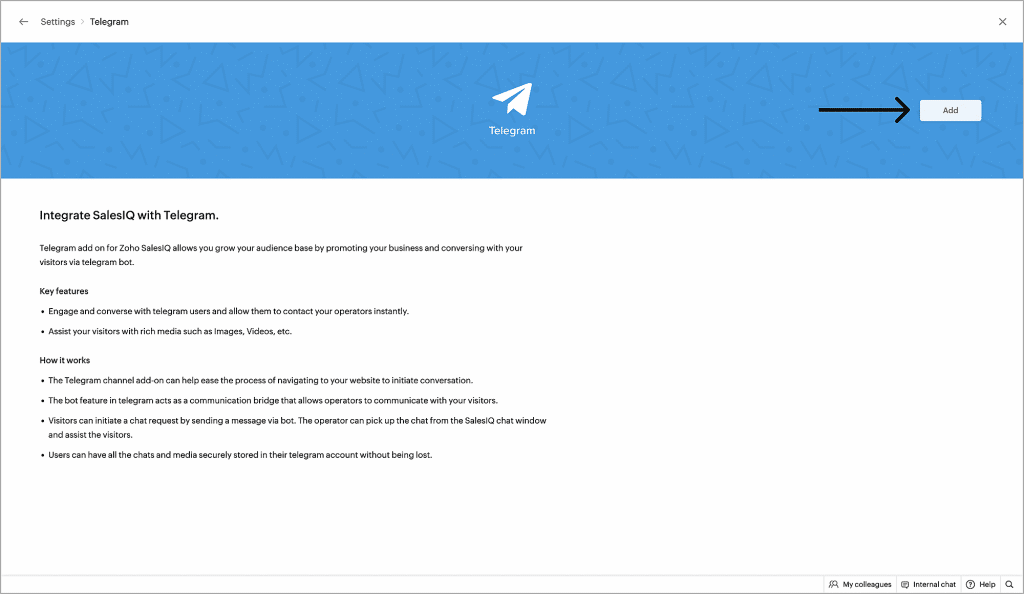
    Zoho SalesIQ Integration with Telegram

    This integration will allow you to grow your audience by promoting your business and chatting with your visitors via the Telegram bot. Also, engage and chat with Telegram users and allow them to contact your operators immediately, and assist your visitors with media (images, videos, among others).

    How it Works

    • The Telegram channel add-on can help ease the process of navigating to your website to initiate conversations.
    • The bot feature in Telegram acts as a communication bridge that allows operators to communicate with your visitors.
    • Visitors can initiate a chat request by sending a message via bot. The operator can pick up the chat from the SalesIQ chat window and assist the visitors.
    • Users can have all the chats and media securely stored in their Telegram account without losing any of the data.

    How to Enable the Telegram with Zoho SalesIQ Integration

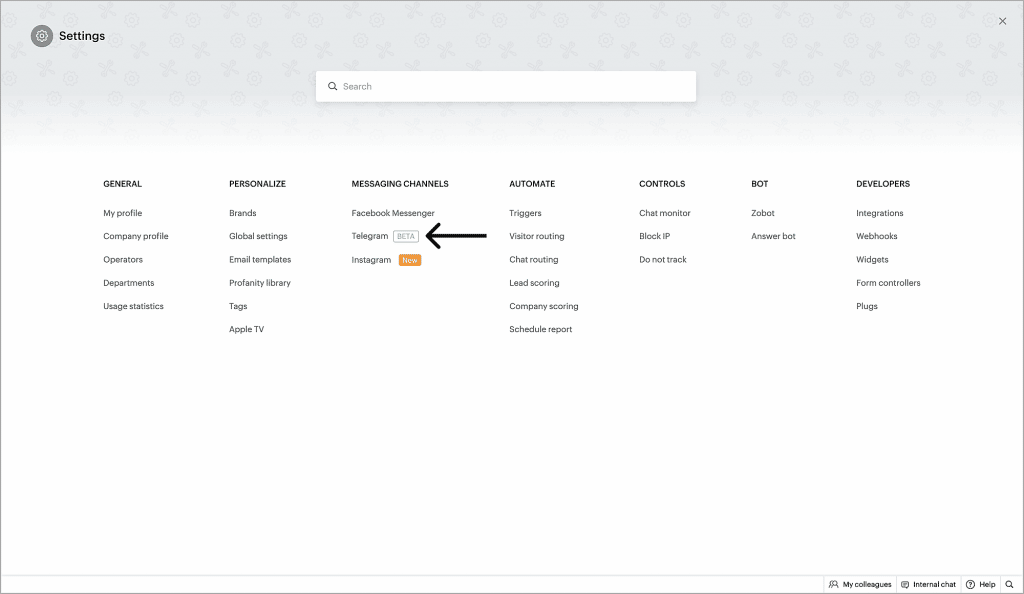
    1. Go to SalesIQ > Settings and click Telegram under Messaging Channels.

    2. Click Add on the upper right corner.

    Image via Zoho.

    Connect your Telegram account with Zoho SalesIQ

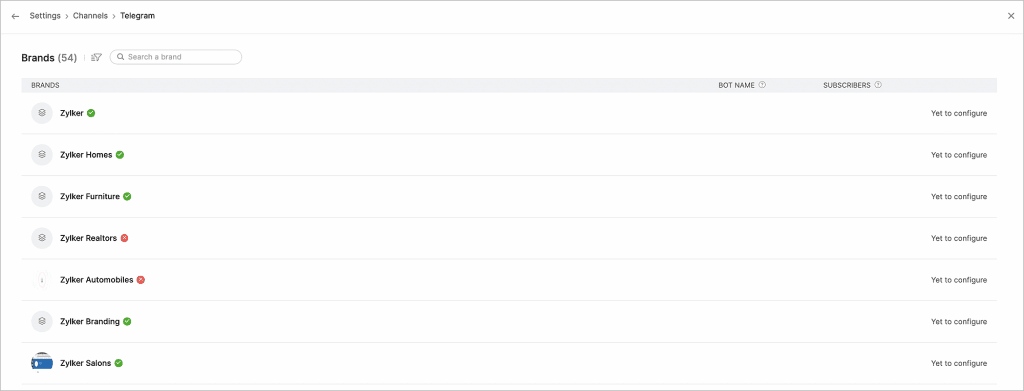
    1. Click on the brand for which you want to enable Telegram.

    Image via Zoho.

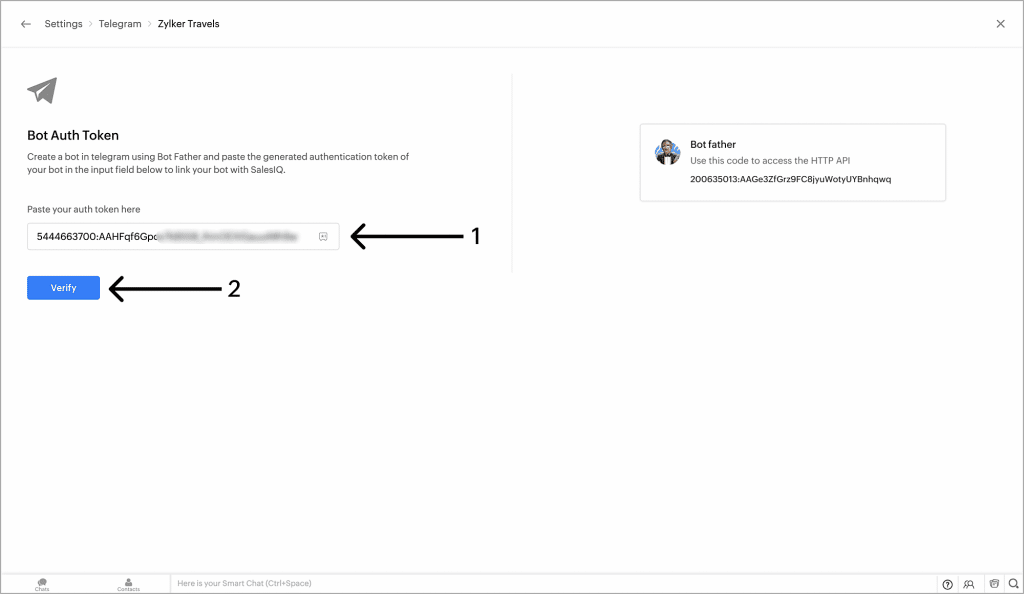
    2. Paste the API key that you have generated using Bot Father for the created bot here, and click on Verify.

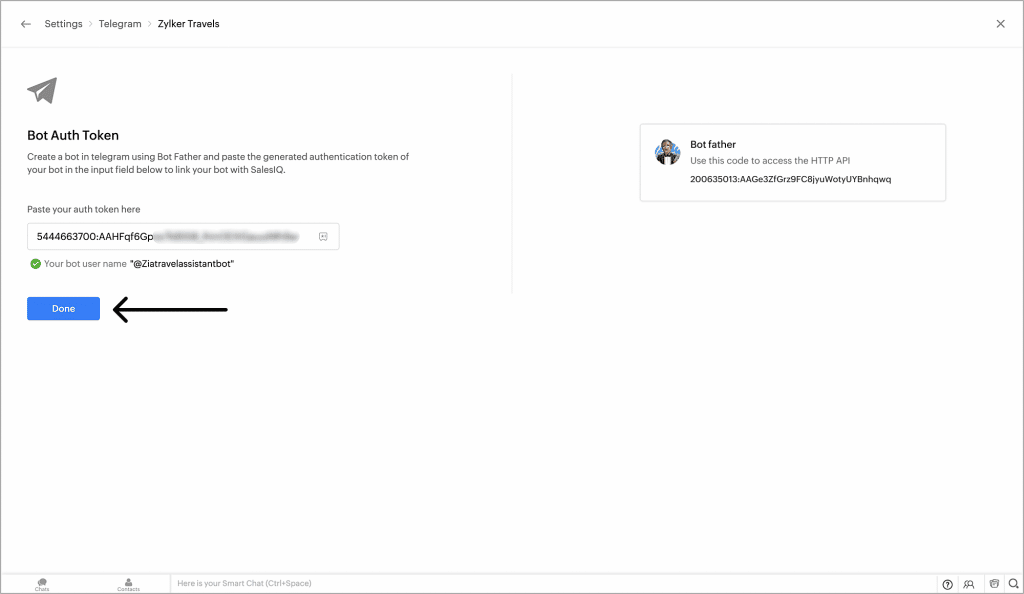
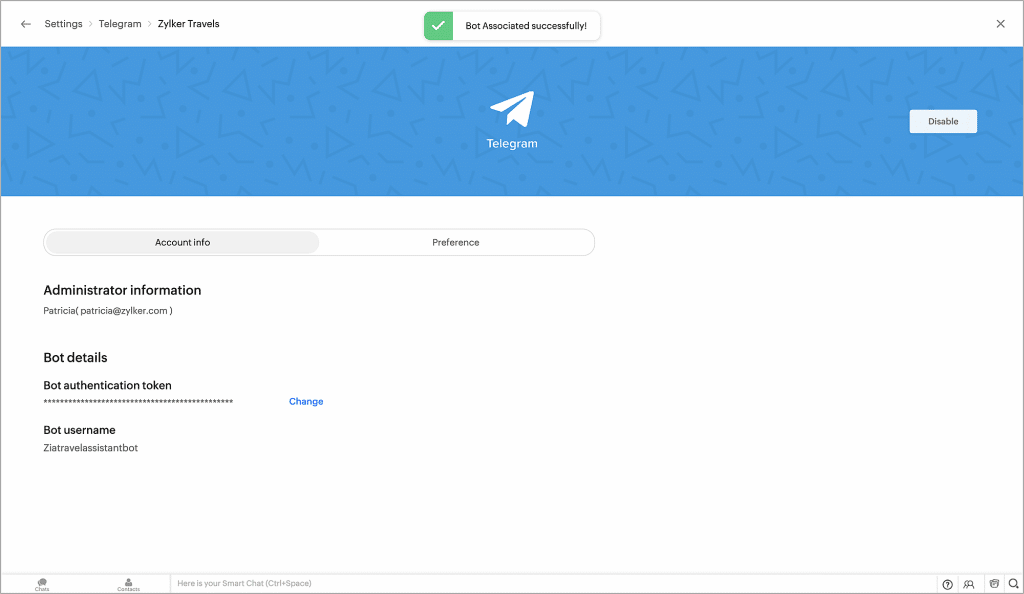
    3. Check if the bot information is correct. Then, click Done to proceed. A new screen will confirm that you’ve successfully linked your Zoho SalesIQ brand with your Telegram.

    Images via Zoho.

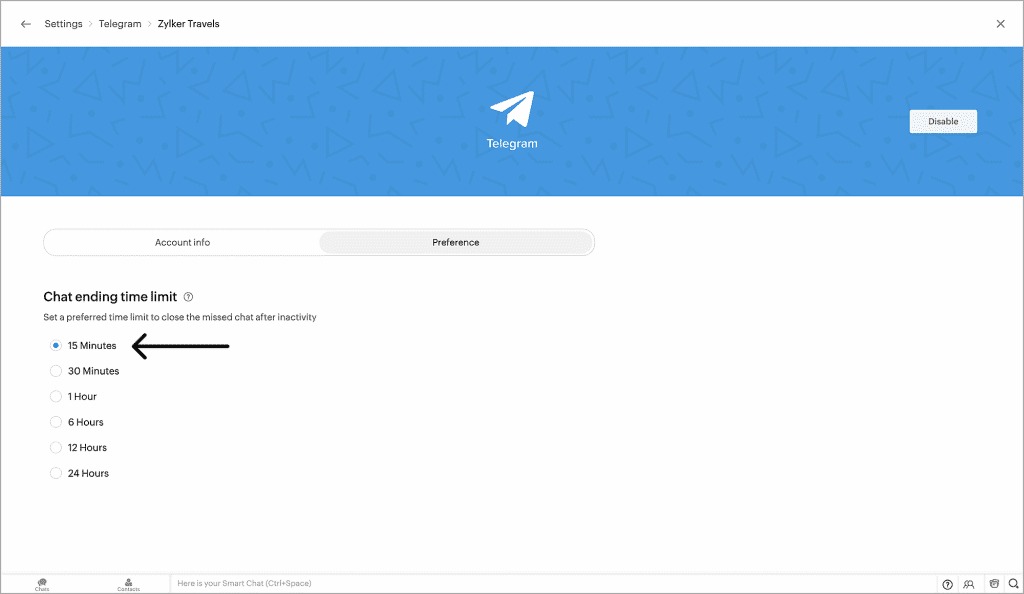
    Set the Chat Ending Time Limit

    Under Preference, you can set the Chat ending time limit (the time after which a missed chat will be closed after inactivity).

    Image via Zoho.

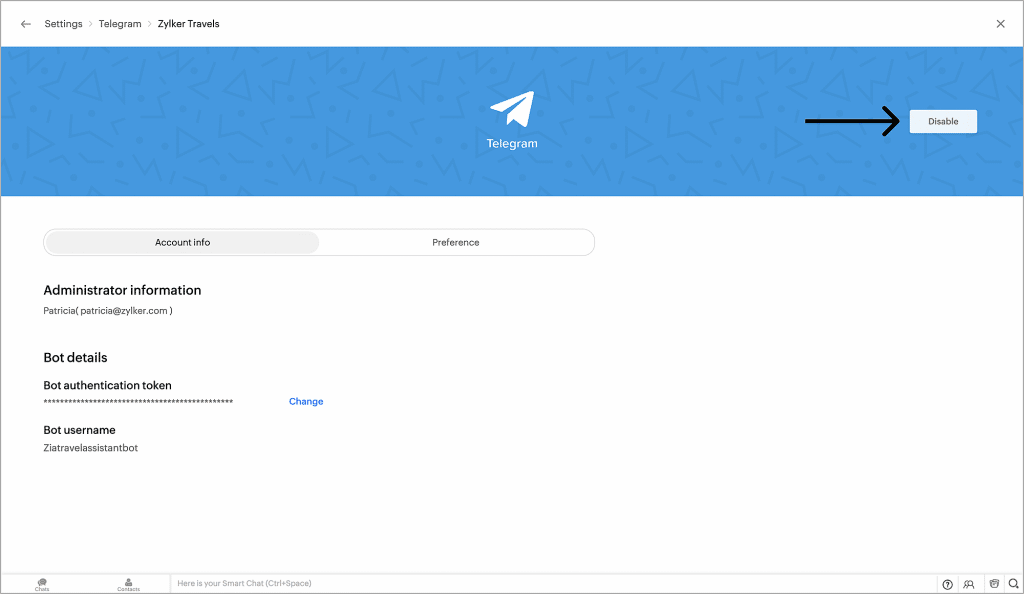
    Enable/Disable the Telegram Channel

    To disable the integration, click the Disable button on the upper right corner of the dashboard.

    Image via Zoho.

    Zoho Sign: Send Documents for Signature Via SMS

    Zoho Sign now offers delivery via SMS to reach signers faster, besides the option for standard email delivery. Some key benefits of this feature are reaching signers who prefer SMS over email, faster document turnaround time, and high success rates.

    The pre-requisites are a paid Zoho Sign account and adequate Zoho Sign credits (0.5/SMS).

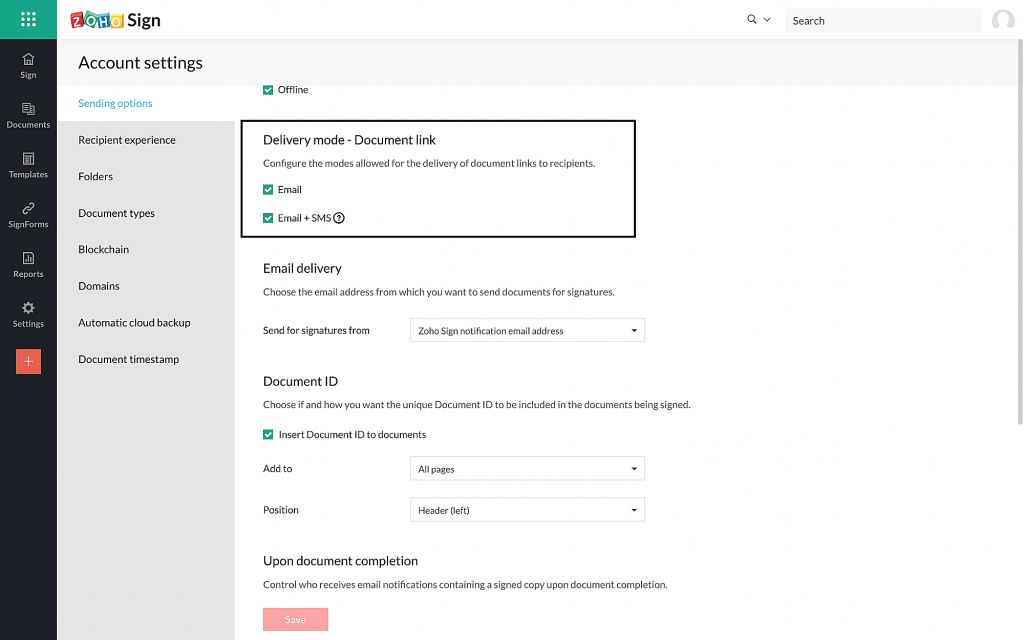
    By default, both modes (Email and Email+SMS) will be enabled, but you can also follow these steps to change the delivery modes:

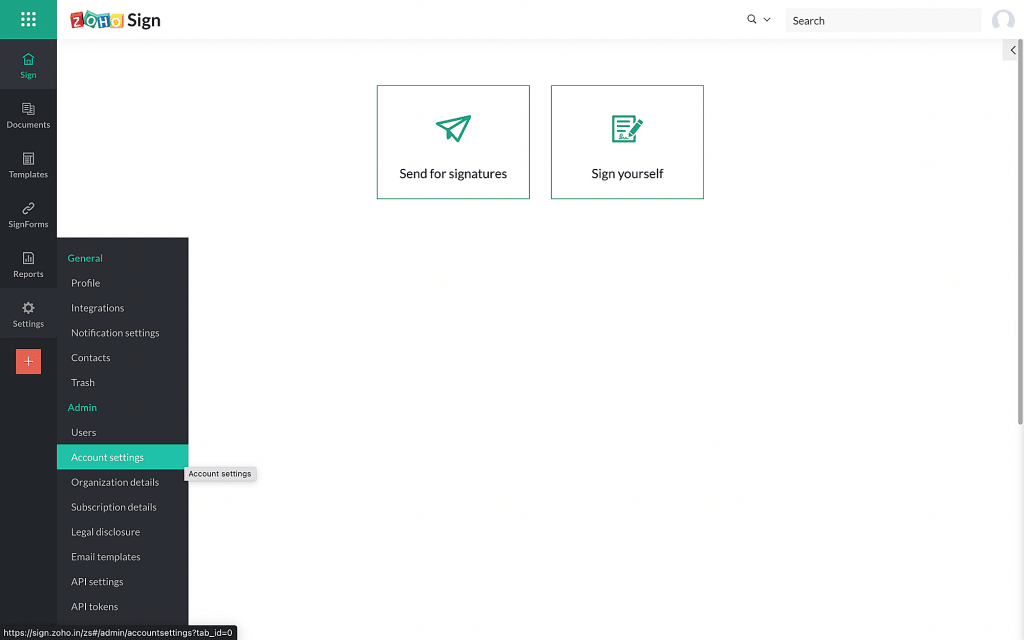
    1. From the left navigation pane, click Settings > Account Settings.

    Image via Zoho.

    2. To configure the document’s link delivery mode, check the desired modes allowed for the delivery of document links to recipients. Then, click Save.

    Image by Zoho.

    How to Choose SMS Delivery for a Recipient

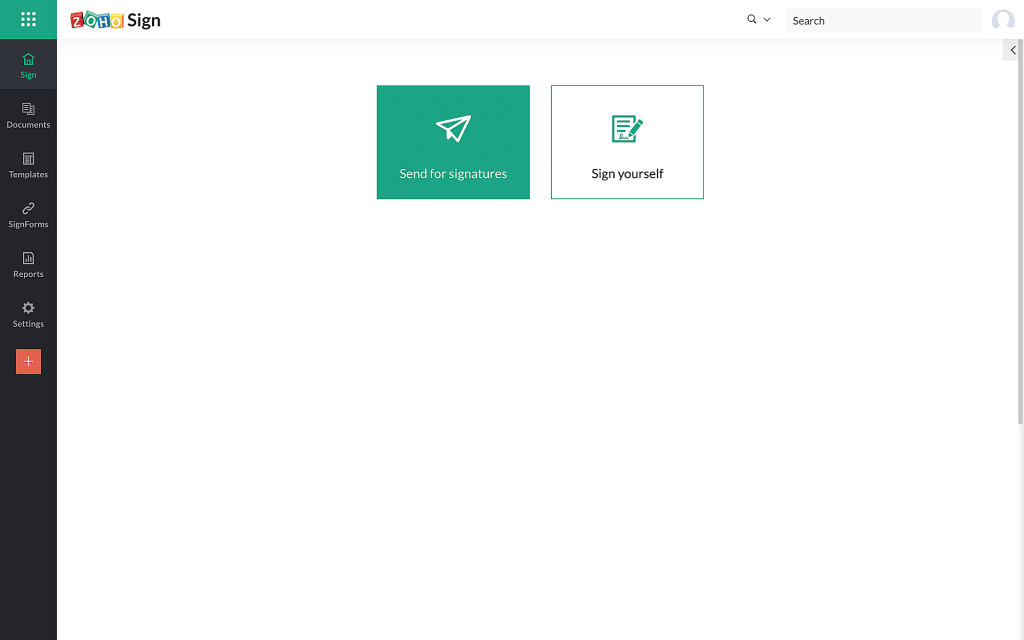
    1. Click the Send for signatures button on your dashboard to upload the document.

    Image via Zoho.

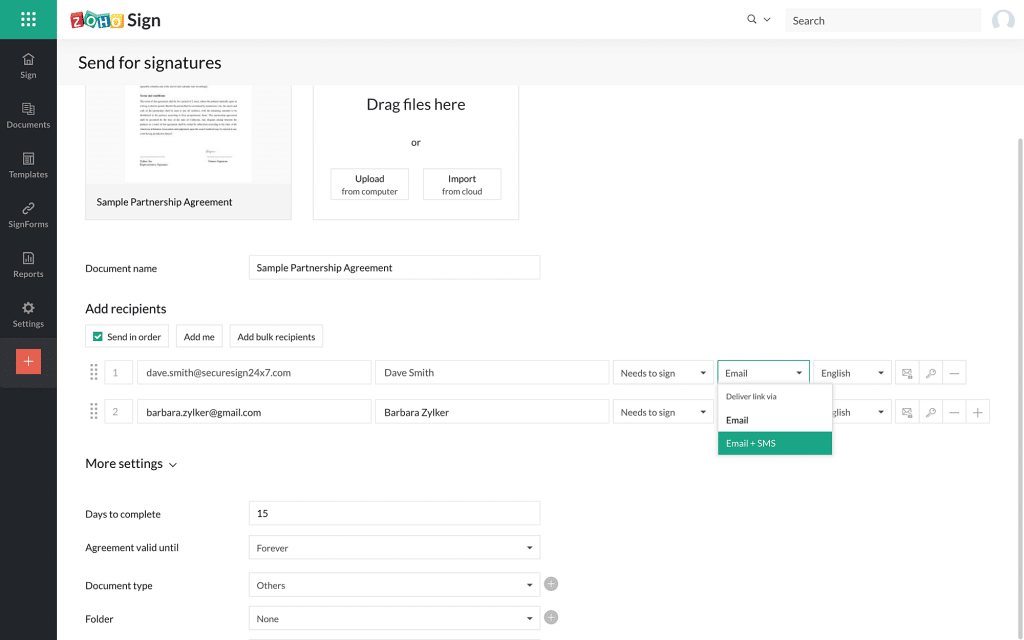
    2. After all the recipient details have been entered, select the delivery mode from the dropdown menu.

    Image via Zoho.

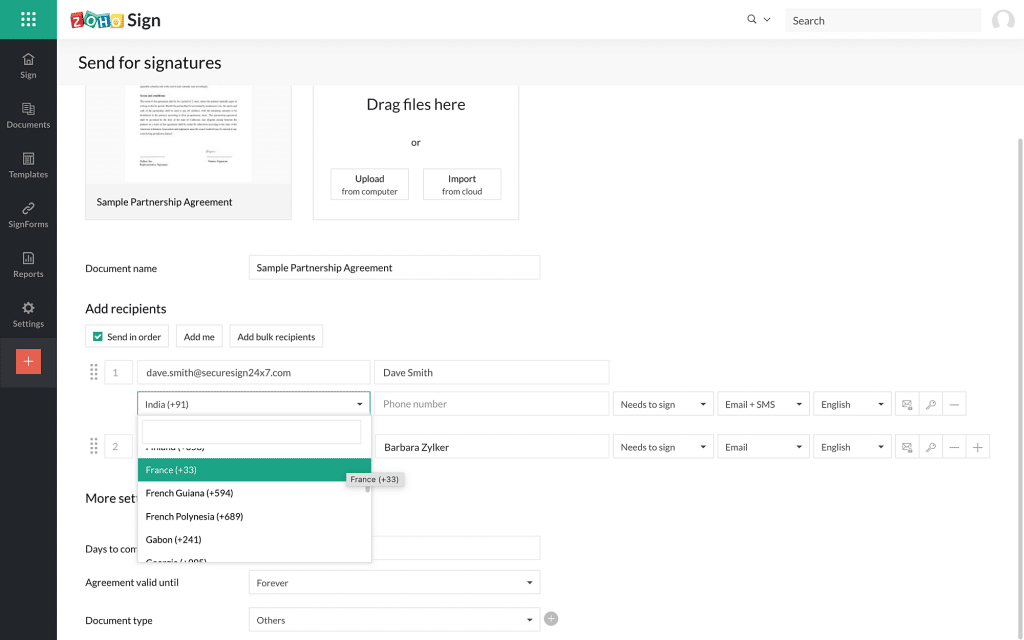
    3. If the sender selects the option Email+SMS, the sender has to enter the recipient’s phone number.

    Note: If the recipient is not in your Zoho Sign contacts or if the recipient phone number is not present in their contact details, you will have to select the appropriate country code and enter their number in the field provided.

    4. Fill in all the necessary fields and send the document out for signature.

    Image via Zoho.

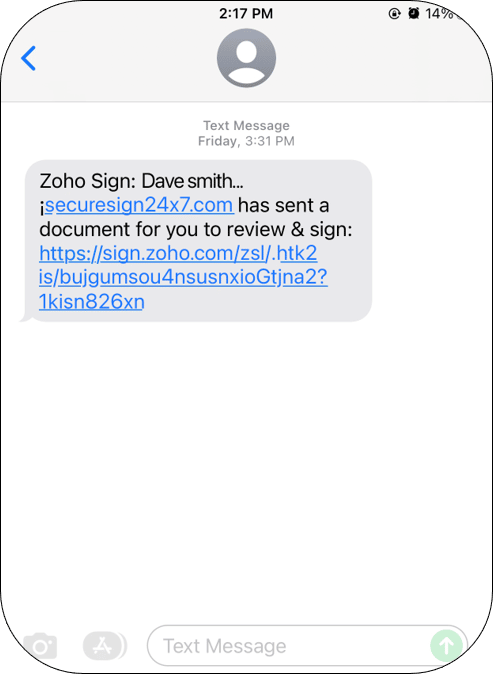
    5. Your recipient(s) will receive an SMS similar to the one below.

    Image via Zoho.

    Moreover, you can check the delivery mode details used, as well as other details like the date and time when the SMS/Email was delivered from the signed document’s completion certificate. To do so:

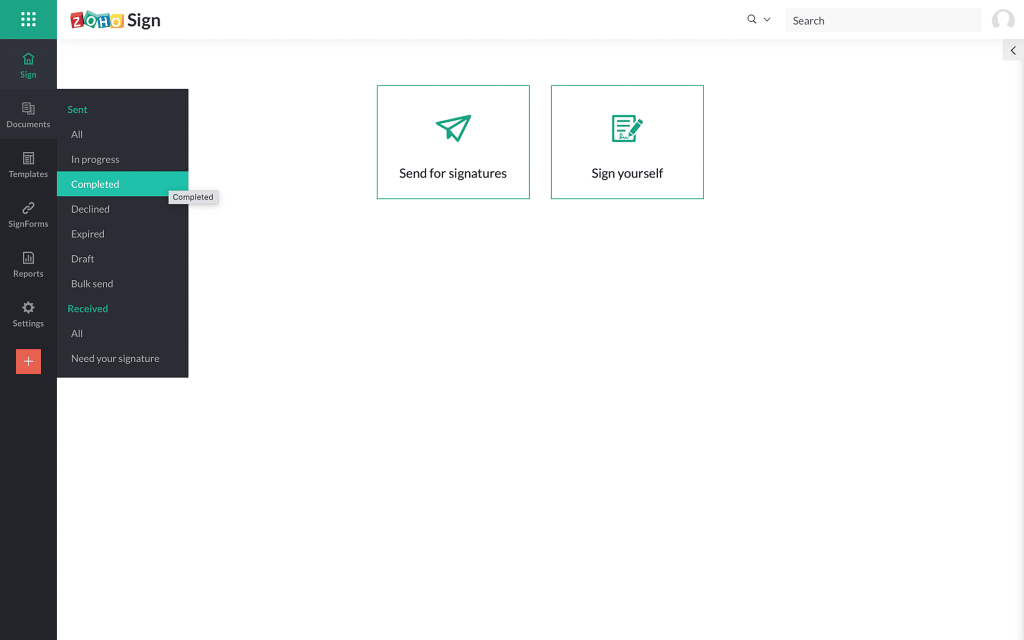
    6. From the left navigation panel, click Document > Completed.

    Image via Zoho.

    7. Select the document and click Completion Certificate to download.

    Image via Zoho.

    8. In the downloaded certificate, you can find similar details as the ones shown below:

    Image via Zoho.

    Notes:

    • SMS delivery is available in Send for Signature, Templates, and SignForms.
    • This feature is unavailable for bulk send and in-person signing.
    • You cannot disable Email delivery mode.
    • In lack of credits, the document link will be delivered only via email and the sender will be notified about the reason via email.
    • Currently, regardless of the recipient’s language, the SMS can only be sent in English due to carrier restrictions.

    Improvements in Zoho Commerce

    • Savings badge on checkout page: The checkout page on your Zoho Commerce store will now show the money your customers have saved each time they buy a product at a low selling price.
    • Mark up or discount shipping rates: Zoho Commerce users can change the shipping rates to mark up or discount the shipping cost displayed on the checkout page. You can adjust the price by a certain percentage based on the weight of the package or the value of the shopping cart.

    Zoho Social: Hashtag Groups and Supporting Carousel Posts for Instagram

    Hashtag Groups

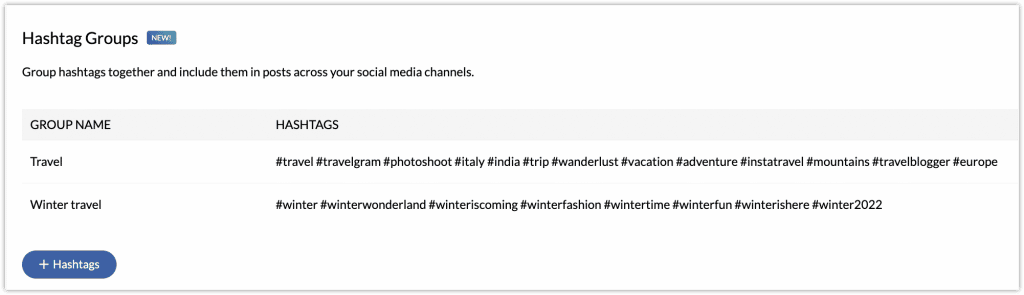
    These let you group all the hashtags and include them in your post in one go. You can create the groups in Settings > Publishing > Hashtag Groups and add up to 30 hashtags to a group.

    Image via Zoho.

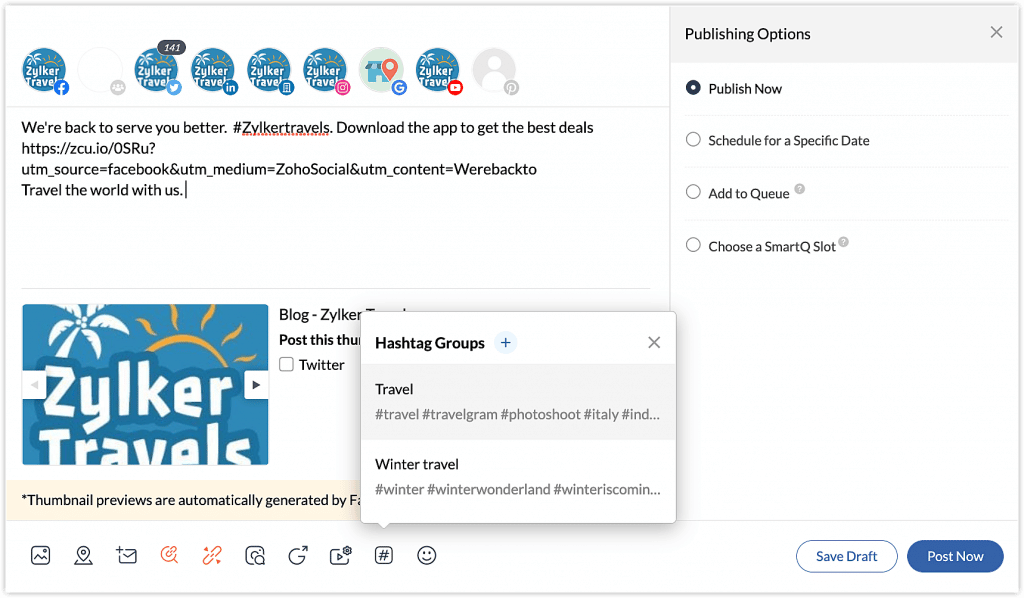
    You can add hashtag groups while creating a new post in Zoho Social. You can select multiple hashtag groups for a post.

    Image via Zoho.

    Carousel Posts on Instagram

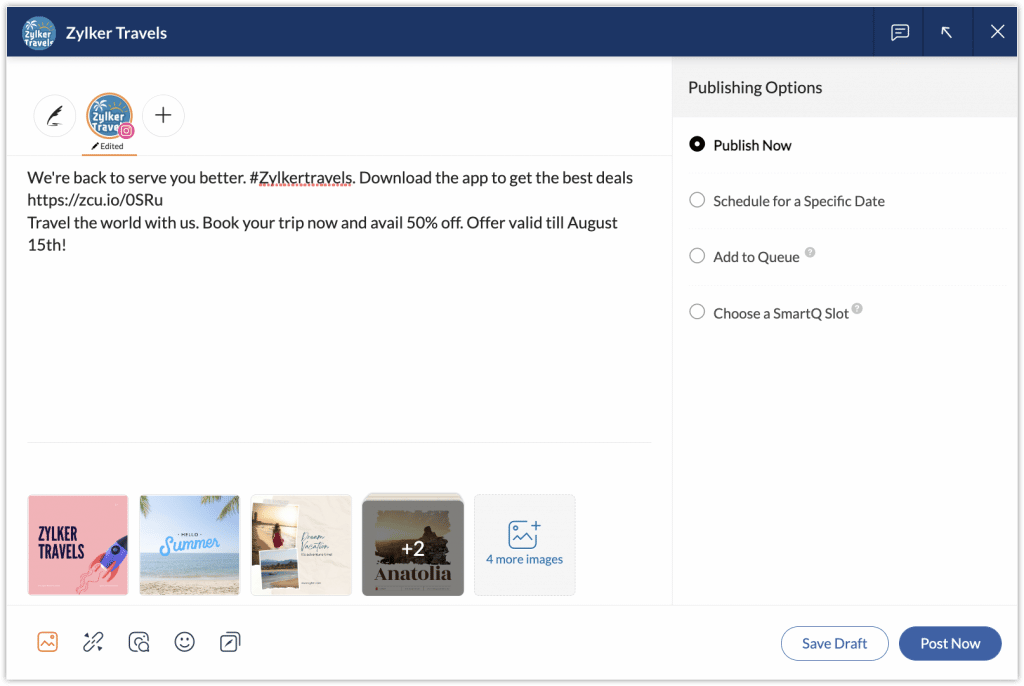
    A carousel post can be created by uploading multiple images. You can add up to four images from the compose window or add 10 images using the Customize Content option. 

    Image via Zoho.

    Zoho Projects Offers Live Webinars

    Image via Zoho.

    Zoho experts on the project management app will conduct a series of live webinars with flexible schedules. Register and pick the date that is the most convenient for you by clicking here. The webinars are the following:

    • Getting Started with Zoho Projects
    • Task Automation & Workflow Rules
    • Setting up Your Project Budget
    • Exploring the Potential of Web Tabs

    Zoho Reaches 80 Million Global Users Mark and 38% in Growth

    During their recent annual analyst summit, Zoho Corporation announced their two latest achievements: a rate of 38% year-over-year growth and exceeding the 80 million users mark. Besides their continuing global expansion, Zoho keeps increasing their product portfolio, as well as making investments in other technologies like automotive, robotics, and health care. Learn more details in our blog article.

    Forbes Names Zoho Bookings as One of the Best Scheduling Apps in 2022

    Image via Forbes.

    Rated with 4.4 out of 5 stars, Forbes chose Zoho Bookings because of the following benefits and features:

    • Three scheduling plans: Free Forever (for one user), Basic, and Premium.
    • Competitively-priced and feature-rich premium plans.
    • Hands-off bookings.
    • Appointment qualification.
    • Two-way calendar synchronization with Zoho, Google, Microsoft 365, and Outlook.
    • It allows users to access online meetings in Zoom or Zoho Meeting directly.

    That’s all for now, IC readers! See you soon for more Zoho updates from InterConnecta!

    Need help with the implementation or optimization of any of your Zoho apps? Then you’re in the right place! Learn more about our Zoho Consulting Services and ask us for a free consultation.

  • Zoho Reaches 80 Million Global Users Mark and 38% in Growth

    Zoho Corporation recently announced during their annual analyst summit their two latest achievements: a rate of 38% year-over-year growth and exceeding the 80 million users mark. Besides their continuing global expansion, Zoho keeps increasing their product portfolio, as well as making investments in other technologies like automotive, robotics, and health care.

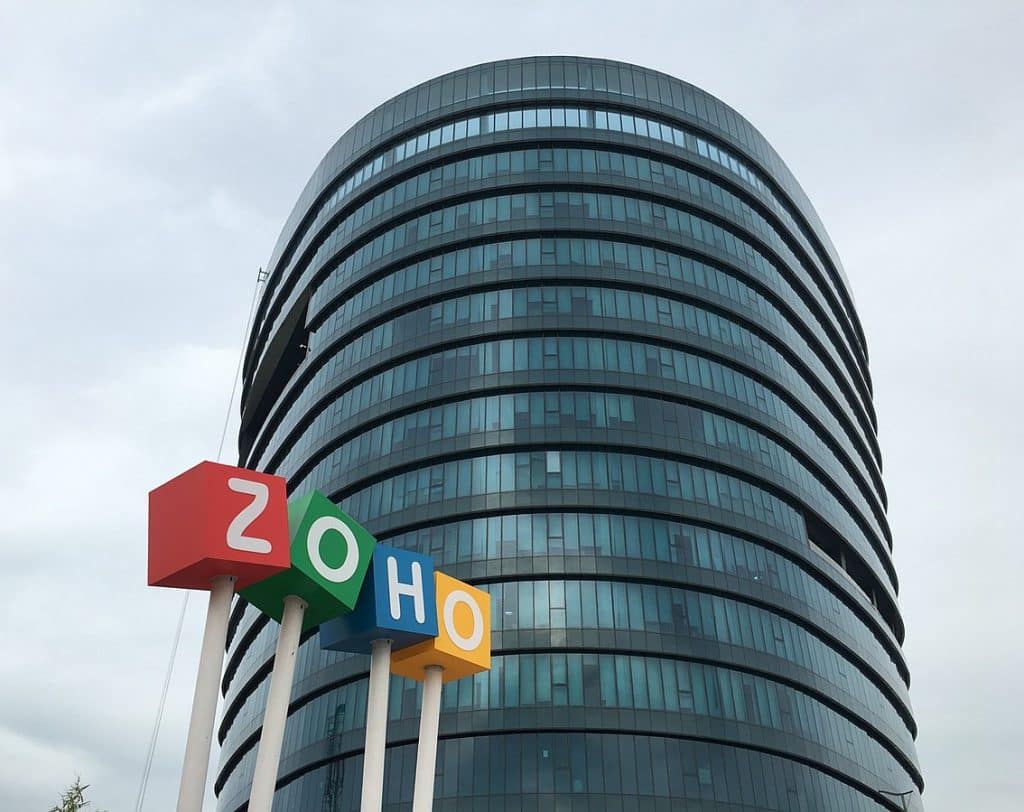
    Image by Samueljjohn via Wikimedia Commons.

    These milestones affirm the company’s commitment to the development of robust solutions that support all businesses, many of which have been negatively impacted by recent economic disruption. As part of their growth, Zoho also celebrated the opening of 59 new global hub-and-spoke offices in rural areas and small cities throughout the last two years. This has the purpose of expanding into new markets and it’s also part of their continuous effort to support local communities.

    Regarding their latest milestones, Sridhar Vembu, CEO of Zoho Corporation, stated the following:

    “We’ve long felt that we have a responsibility to the communities and world around us, whether that be through providing job opportunities to those with less access or by delivering products that help business grow to their potential. Our approach from the start of Zoho —now 26 years ago— still rings true today: nurture people and businesses, and lower the barrier of entry. Cost effective, yet built-for-scale products and regionally located offices aside, Zoho has built its business by being a partner that helps people thrive. Our success is their success and vice versa.”

    Zoho’s Strategic Investments and a Consortium of Local Technology

    Meanwhile, the reasons for the strategic investments that Zoho has made in other industries are the development of advanced solutions and giving access to them by people in need. The investments were made in the following companies: Boson (a Silicon Valley-based smart electric utility vehicles and powertrains manufacturer); a partnership between the electric motorcycle company Ultraviolette Automotive with TVS Motor Company; and a $5 million investment in Voxelgrids (an Indian startup that builds MRI scanners).

    Zoho also has formed a consortium of local technology companies based in the Kongu region of India. In it, Zoho will make a capital investment to set up centers in the region that focus on the research and development of critical technologies for capital goods manufacturing (industrial automation software, machine tools, and production process know-how).

    In addition, Genrobotics —an Indian startup building robotics and AI-powered solutions for social issues like hazardous working conditions— has obtained a $2.5 million investment from Zoho. This will help Genrobotics in their mission to eradicate manual scavenging in India, while delivering safety and dignity to workers in the sanitation, oil, and gas industries.

    The Aggressive Global Expansion Continues

    In regard to Zoho’s global expansion through their Transnational Localism effort (which started in early 2020 to create self-reliant local communities and economies), they have opened 59 new global offices with local employees. Also, Zoho started partnerships with local organizations and government bodies to decrease the technology adoption barrier for businesses through different educational initiatives.

    In addition to their aggressive expansion into new territories and markets like Canada, Latin America, the Middle East, Africa, and Southeast Asia, Zoho has revealed plans to open 100 new small-scale offices in rural districts across India in the next few years.

    To read the full article, click here.

    Need help with the implementation or optimization of any of your Zoho apps? Then you’re in the right place! Learn more about our Zoho Consulting Services and ask us for a free consultation.

  • Zoho News Catch-Up: Zoho Analytics is HIPAA Compliant; Product Updates from Zoho Inventory, Bookings, Social; New Zoho Webinars

    Welcome to our catch-up, where you’ll be in the know of all the latest Zoho updates in one place!

    • Zoho Inventory updates: Shipments module, usage stats, autoscan expenses, custom fields in picklists, mobile apps
    • Zoho Bookings unveils new features for service availability and booking page themes
    • Zoho Social: Advanced statistics for all posts in Facebook, Twitter, Instagram, LinkedIn, and YouTube
    • Zoho Sign gets Leader recognition in Software Reviews’ Electronic Signature Data Quadrant       

    Zoho Analytics Becomes HIPAA Compliant

    Although Zoho does not collect, use, store or maintain health information protected by HIPAA for its own purposes, Zoho Analytics provides the following features to help customers use Zoho Analytics in a HIPAA compliant manner:

    Handling Electronic Protected Health Information (ePHI) with Care

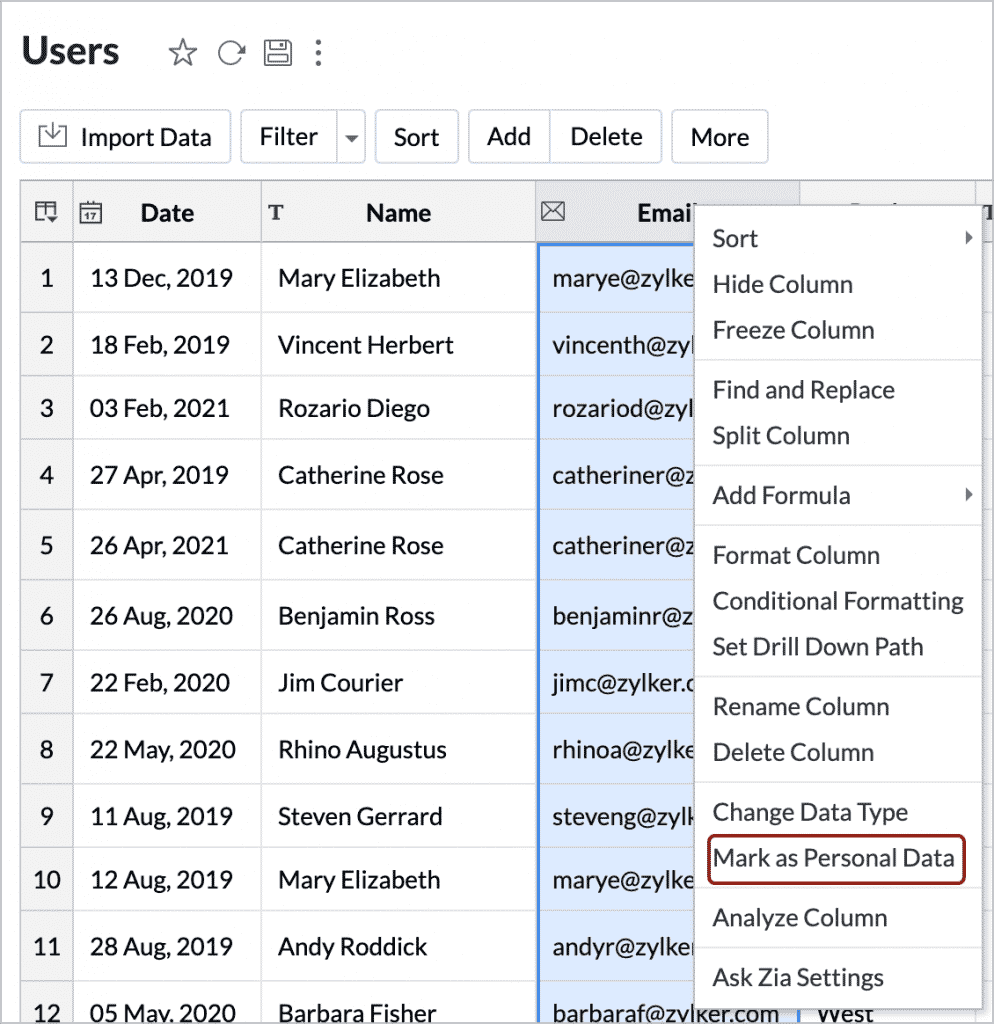
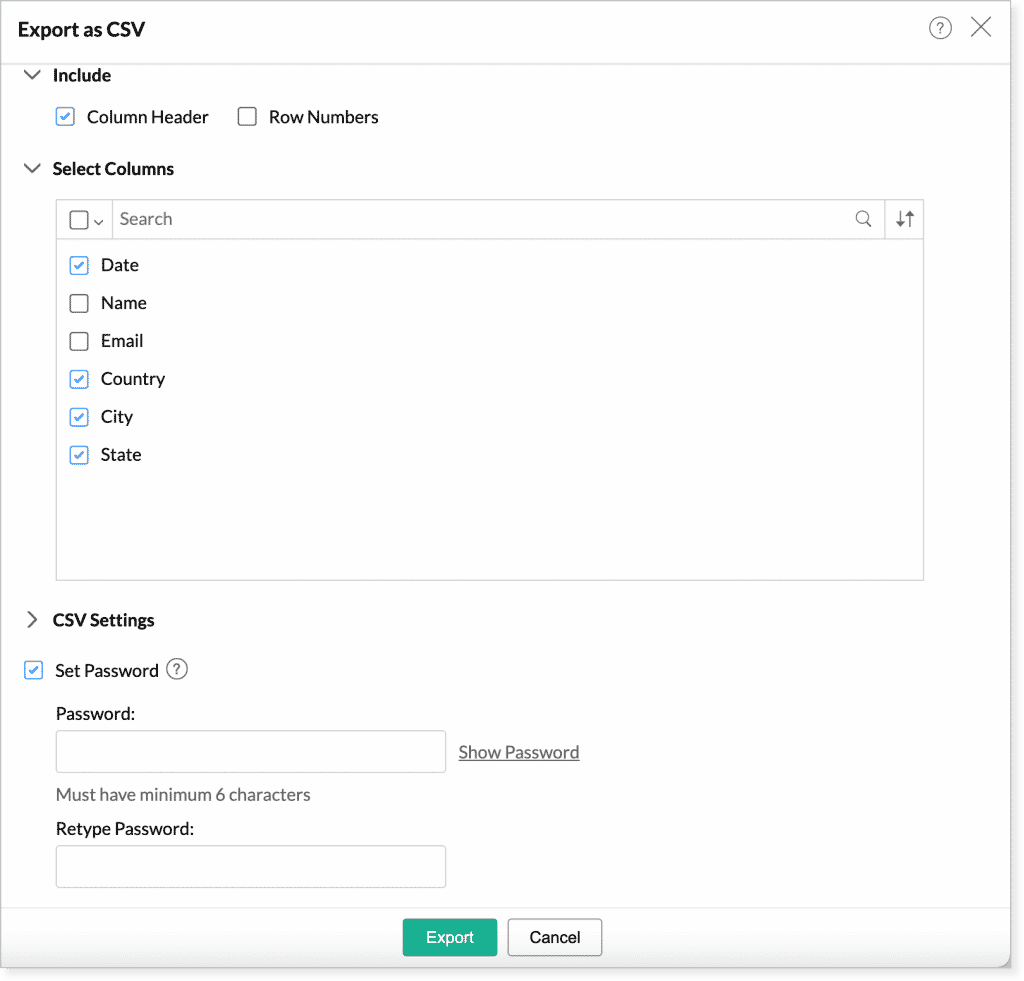
    To secure the ePHI column, right click the column and select Mark as Personal Data. The data will be encrypted and saved in Zoho Analytics’ servers. While exporting views containing these data, the columns marked as personal data will not be included by default to prevent accidental sharing.

    (Image via Zoho)

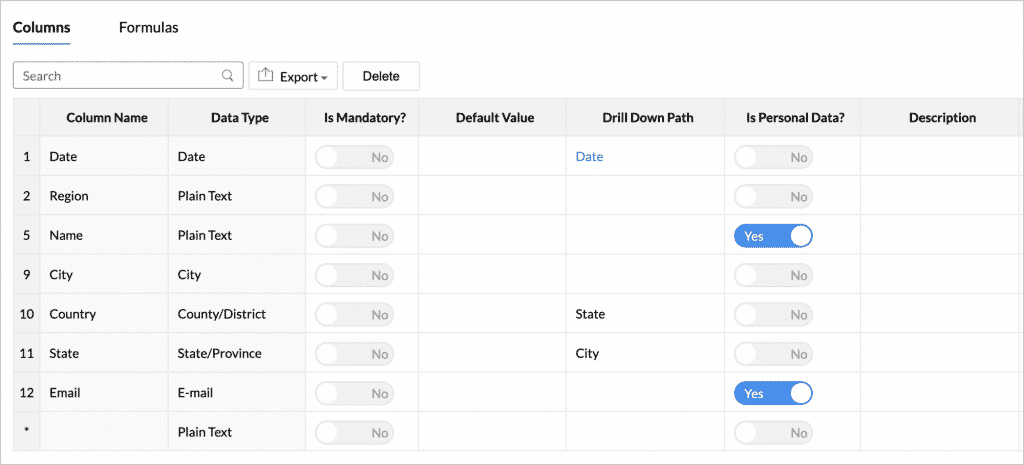
    Also, you can also click the Edit Design button in the toolbar and change the value of Is Personal Data? to Yes for the ePHI column.

    (Image via Zoho)

    Protecting Data with Data Encryption  

    Zoho Analytics encrypts all personal information in their servers for increased security. Zoho has handled data encryption at various levels.Any field marked as Personal Data will be encrypted and stored in Zoho’s servers.

    • Any field marked as Personal Data will be encrypted and stored in Zoho’s servers.
    • Any private information provided for authenticating third-party applications will automatically be identified with due diligence and stored in Zoho’s databases in an encrypted form.

    Offering Data Privacy and Security  

    Zoho Analytics has taken extra measures to secure data and keep it private.

    • Password protection for exported files: You can choose to protect them using a password, so you will be able to restrict unauthorized access.
    (Image via Zoho)
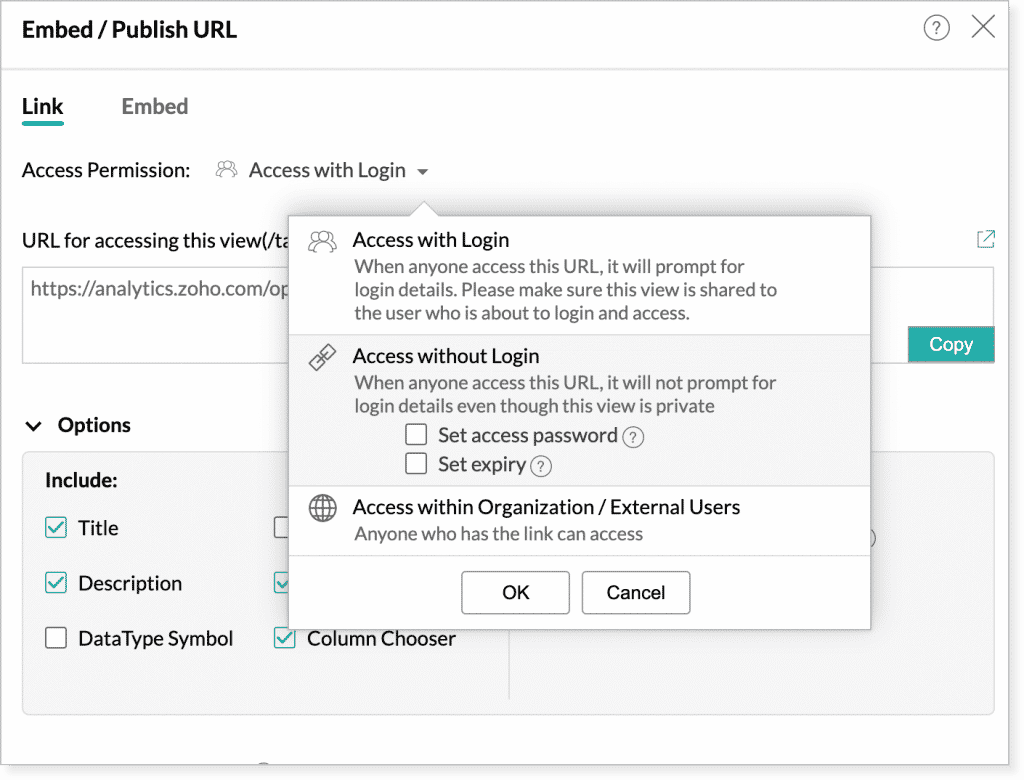
    • Password protection for embed and permalink: When granting Access without Login permission for your embedded views or permalinks, you can set the password protection for the views.
    • Expiry date for embed and permalink: You can also set an expiry date for published views with Access without Login permission, so that the published view will not be accessible after a specific period of time.
    (Image via Zoho)

    Port Data Enabling

    Zoho Analytics provides different options to transfer ePHI data anytime. Zoho Analytics allows you to obtain your data at 3 levels:

    • Data backup: Workspace Backup option will back up the data from tables and SQL queries from query tables, and make it available for download. The backed up data can be downloaded at any moment as CSV files.
    • Exporting data: Exporting views allows to export data anytime in common file formats likes CSV, Excel, HTML, PDF, or image files. You can password-protect your exported document as well.

    Granting Secured Account Access

    Zoho Analytics provides a set of security options that lets you control and manage access to your account, like IP restriction and controlling the options for sharing and collaboration. These ensure that only trusted users have access to your data.

    • IP restriction: Restrict access to the views in your organization account from a set of select IP ranges alone.
    • Restriction to share within trusted domains: Restrict sharing of data or views in Zoho Analytics only to users from trusted domains.
    • Restriction to create Private or Public Links: Specify whether Embed Snippet or Permalink can be created for views with either private or public access. 
    • Restriction to publish within trusted domains: Restrict that your published views (private or public) can be accessed only to users from the trusted domains.
    • Restriction for exporting and emailing views: Specify whether views can be exported or emailed. Additionally, you can also restrict emailing of views only to users from trusted domains.

    Auditing All Activities 

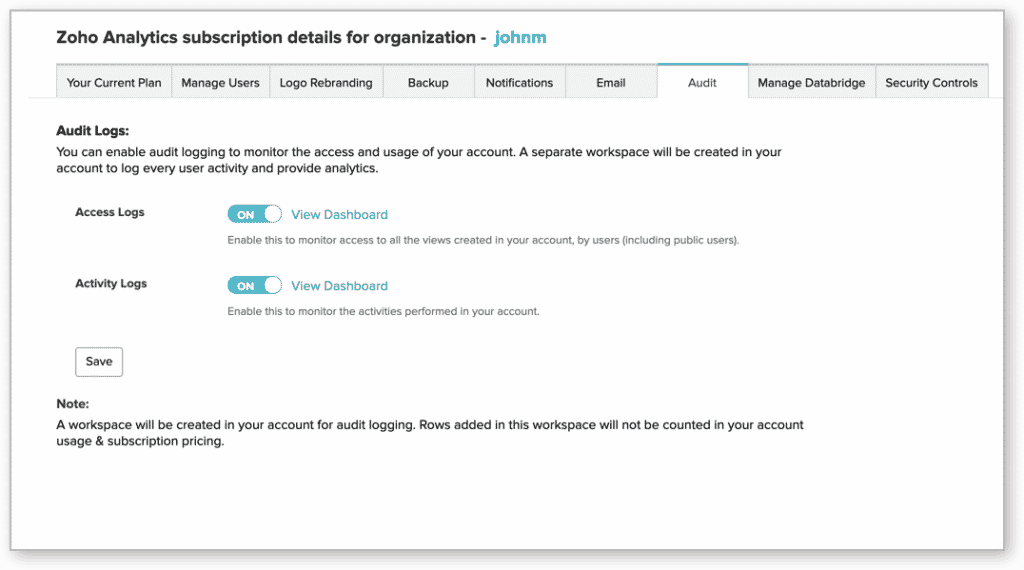
    Keep track of the user accesses and activities performed in Zoho Analytics. This lets you monitor who has accessed the data, and if it has been modified, shared, or exported.

    • Access Logs: This option enables administrators to monitor the application access information.
    • Activity Logs: It enables the administrators to monitor all the activities performed by Zoho Analytics users.
    (Image via Zoho)

    The activity logs data will be saved in a workspace for a year. You can export the older data for your use.

    Zoho Inventory Updates

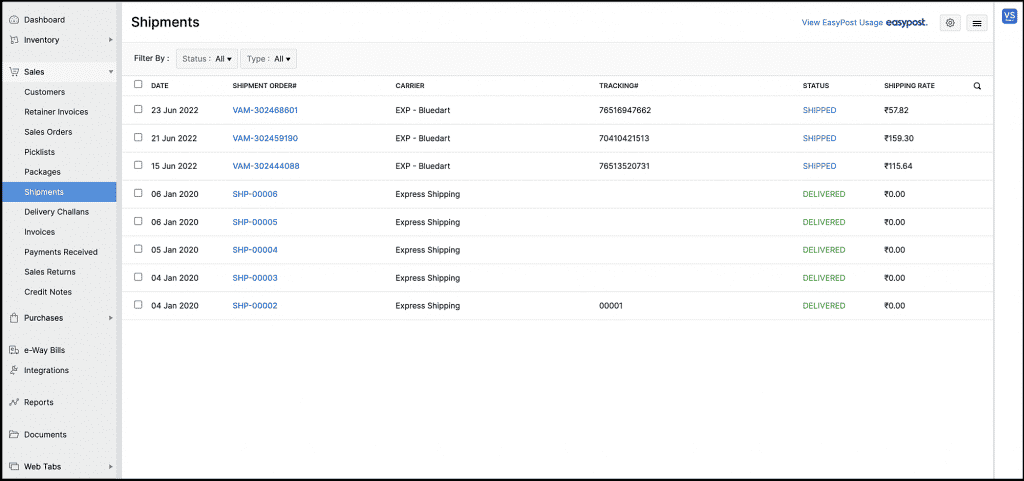
    Shipments Module

    All shipments that were in the Packages module will now be listed in the new Shipments module on the left sidebar. Deleting and printing can be done using this module.

    Image via Zoho

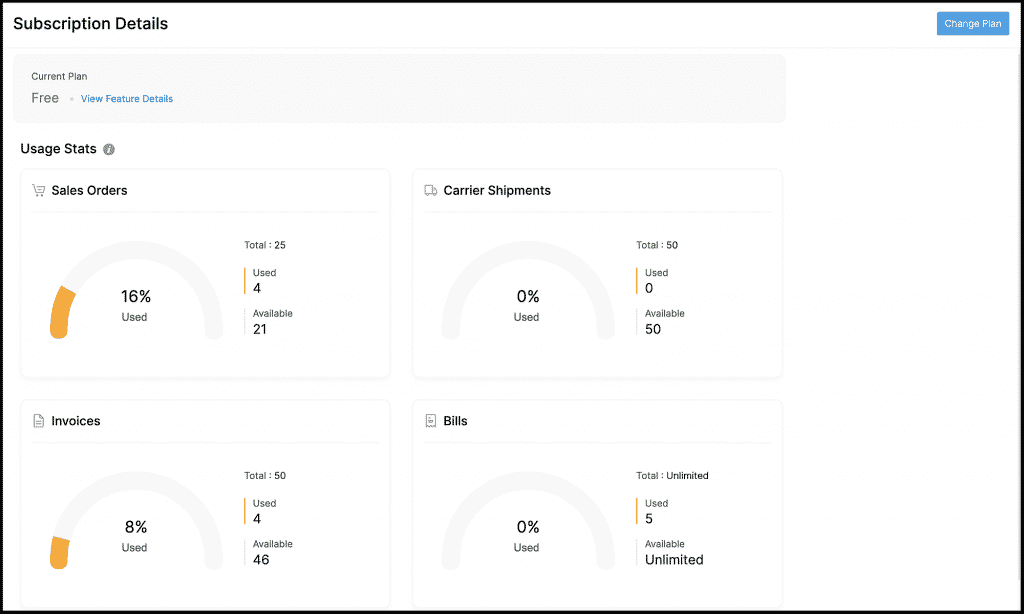
    Usage Stats

    This section in Zoho Inventory will help you keep track of your plan’s transaction usage limits. It shows the number of transactions that you’ve created and the number you have left in these modules:

    • Sales Orders
    • Carrier Shipments
    • Invoices
    • Bills
    (Image via Zoho)

    To verify your plan’s usage limits, go to Settings > Subscriptions.

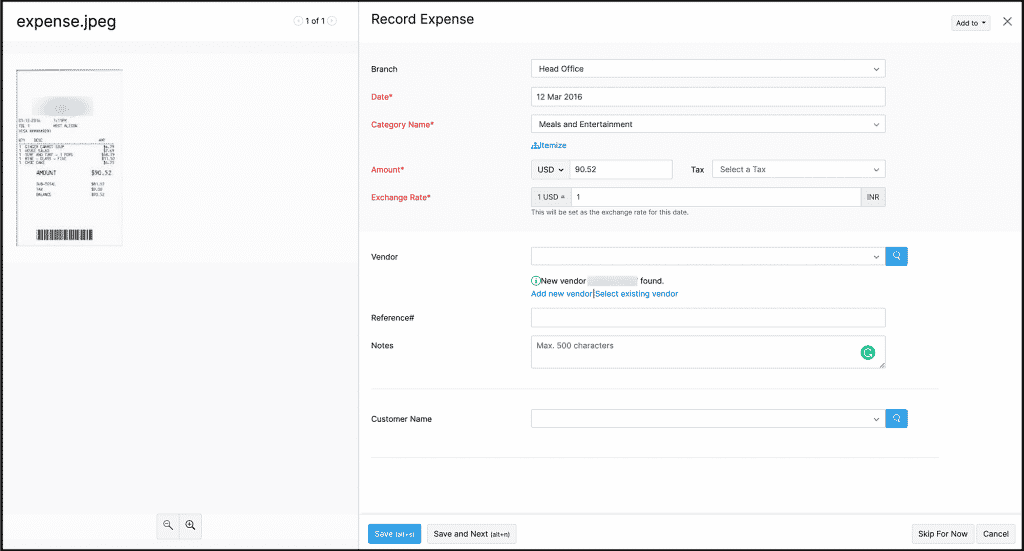
    Autoscan Expenses

    Zoho Inventory now lets you create an expense using the information extracted from a physical receipt. The receipts you upload in the Documents tab will be automatically scanned, while information like the amount and vendor name will be extracted. The extracted data can be utilized to auto-populate the relevant fields when you create an expense.

    (Image via Zoho)

    To use it, go to the Documents module and upload a receipt.

    Custom Fields in Picklists

    Add additional information like the status and location of an item in picklists by adding them as custom fields.

    Create a custom field for a picklist by going to Settings > Preferences > Picklists.

    Updates in Zoho Inventory’s Mobile Apps

    Android

    • Download your contact’s statement from a contact’s details page.
    • Interact with other users in your organization by adding comments to transactions.
    • Print transactions right from the app.
    • Clone existing transactions to create similar transactions quickly.
    • Customize your invoices by changing their template.

    iOS

    AR Quick Look has been added, which is a new feature that lets you visualize your items in the real world using augmented reality.

    Zoho Bookings: New Features for Service Availability and Booking Page Themes

    (Note: Service availability is possible with one-on-one services only. All references to “services” —in this article— will be on similar lines.)

    Better Scheduling

    Now you can decide the availability of appointments based on your staff or your services with the following features:

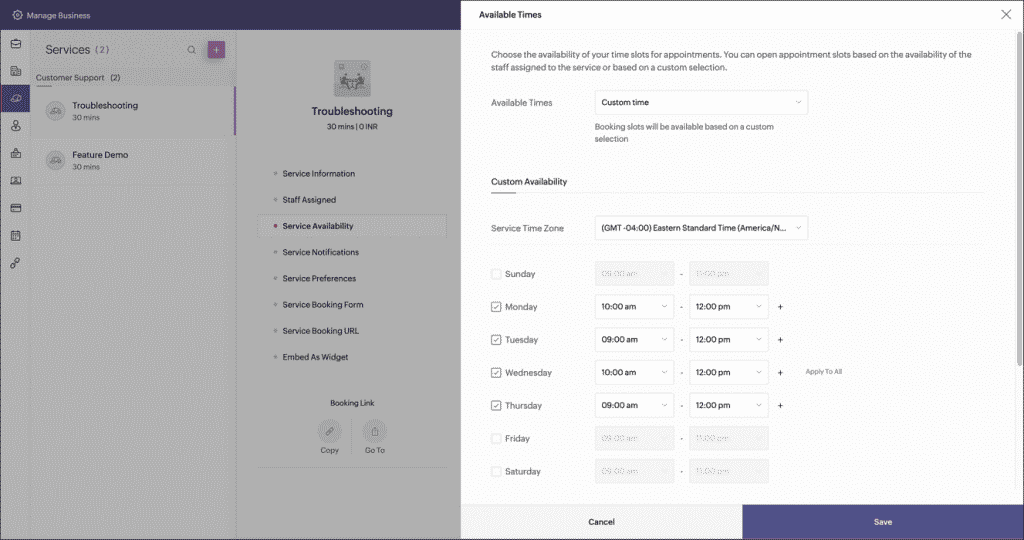
    • Staff availability across services: For example, set up service availability for the first service between 9 a.m. and 12 p.m., then set it up for the second one between 1 p.m. and 5 p.m. The staff assigned to these services will be exclusively available during the assigned time groups.
    • Service date range: Define a date range to be available and accept appointments only during that period.
    • Time-off: If you need to make the service unavailable for a time, set a time-off and the service won’t receive appointments during the specified period.

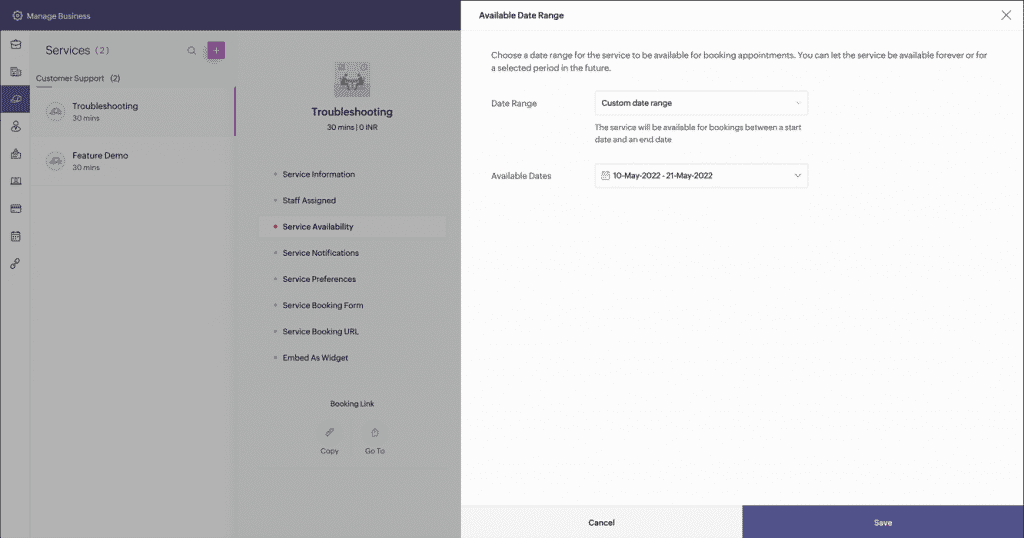
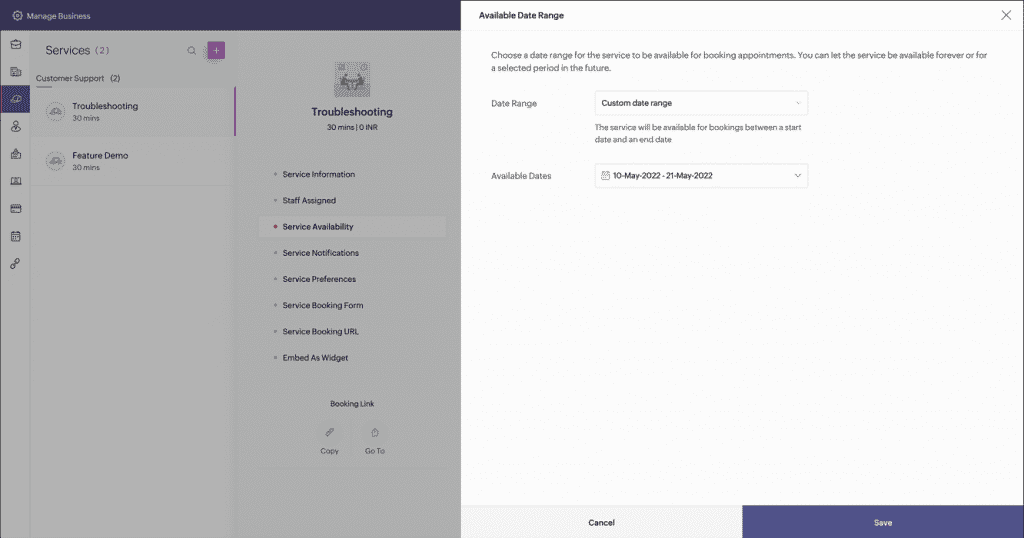
    How to Configure Service Availability:

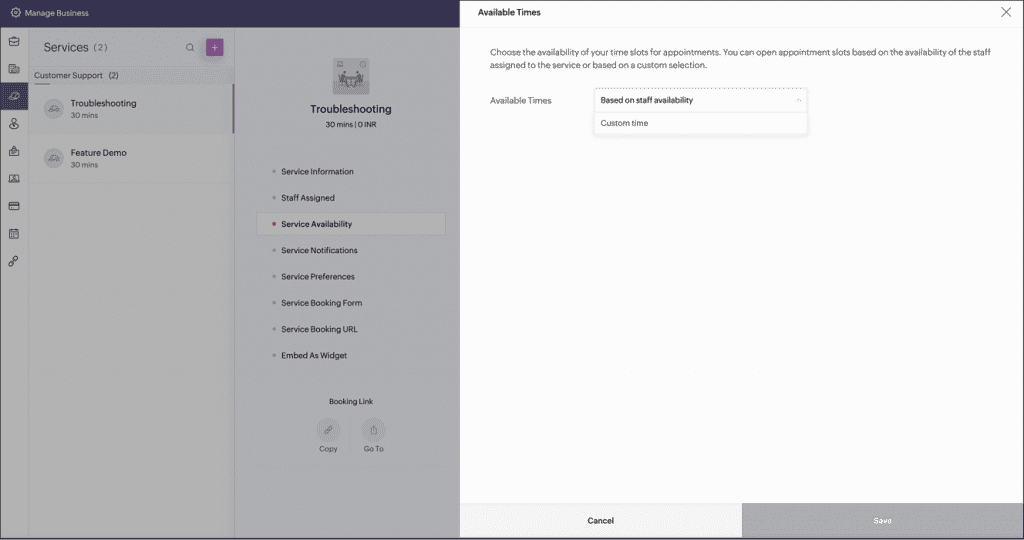
    1. Click Manage Business > Services and select the required one-on-one service.

    2. Click Service Availability and customize availability.

    3. One-on-one services can now be available indefinitely or for a certain period.

    (Images via Zoho)

    4. Availability during the day can be based on the staff availability or the custom time selected for the service.

    (Images via Zoho)

    New Themes for Booking Page

    Get a more professional touch to appeal to your clients with two new themes: Sleek and Basic.

    • Sleek Theme: The new theme displays staff details on the booking page’s side, with ten colors to choose from.
    • Basic Theme: The default theme got an upgrade with the staff card appearing on top, plus nine additional colors to choose from.

    Moreover, Zoho Bookings has given a heads-up about future updates, like improvements to calendar integrations and making their integration with Zoho CRM deeper and more robust, as well as other features. Stay tuned to our blog to learn about them as soon as they’re launched!

    Zoho Bookings Webinar

    Whether you’re new to Zoho Bookings or want to learn more about how the scheduler works, Zoho will host the webinar Zoho Bookings: Master your Scheduler on Fridays at 12:00 p.m. EST.

    Zoho Social: Advanced Statistics for all Posts in Main Social Media Channels

    The latest feature in Zoho Social allows you to get thorough reports to understand performance across all social media channels. You can also view statistics for individual posts from the Post Stats tab.

    Here’s is the list of all the data that’s available for your posts:

    Facebook

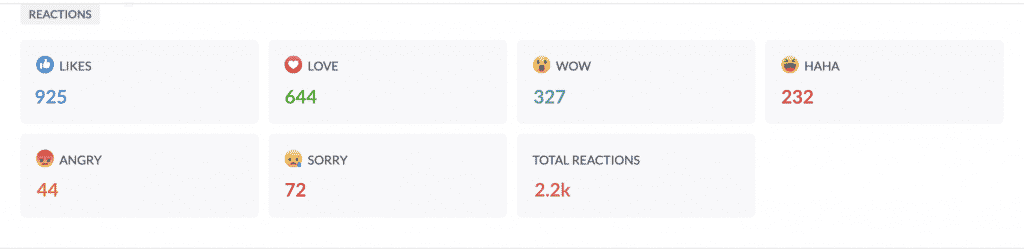
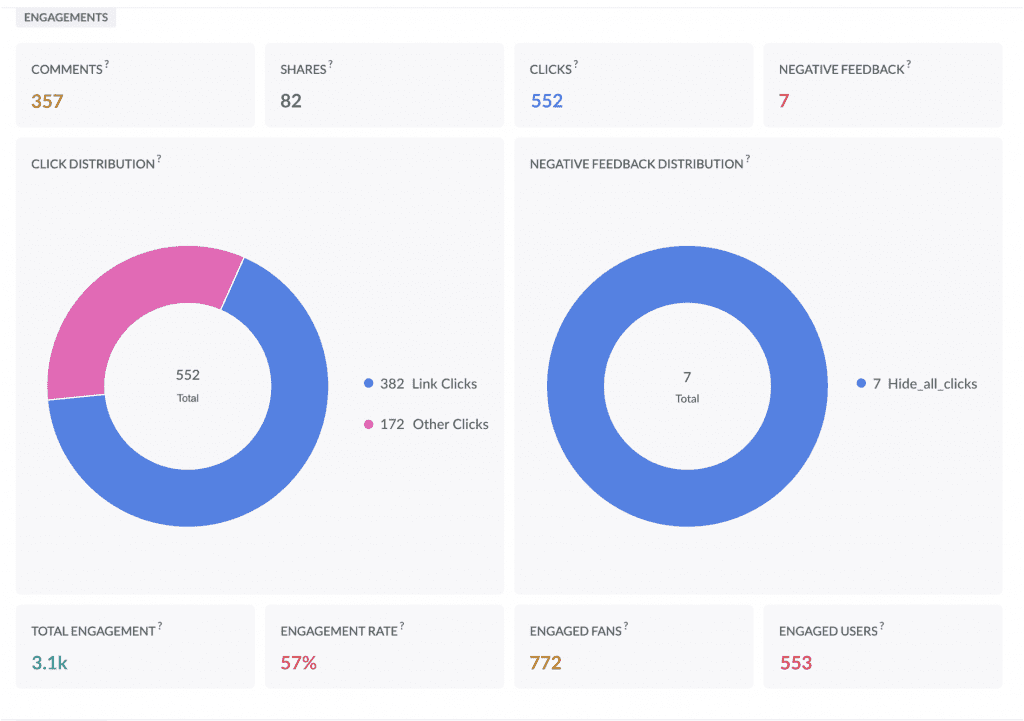
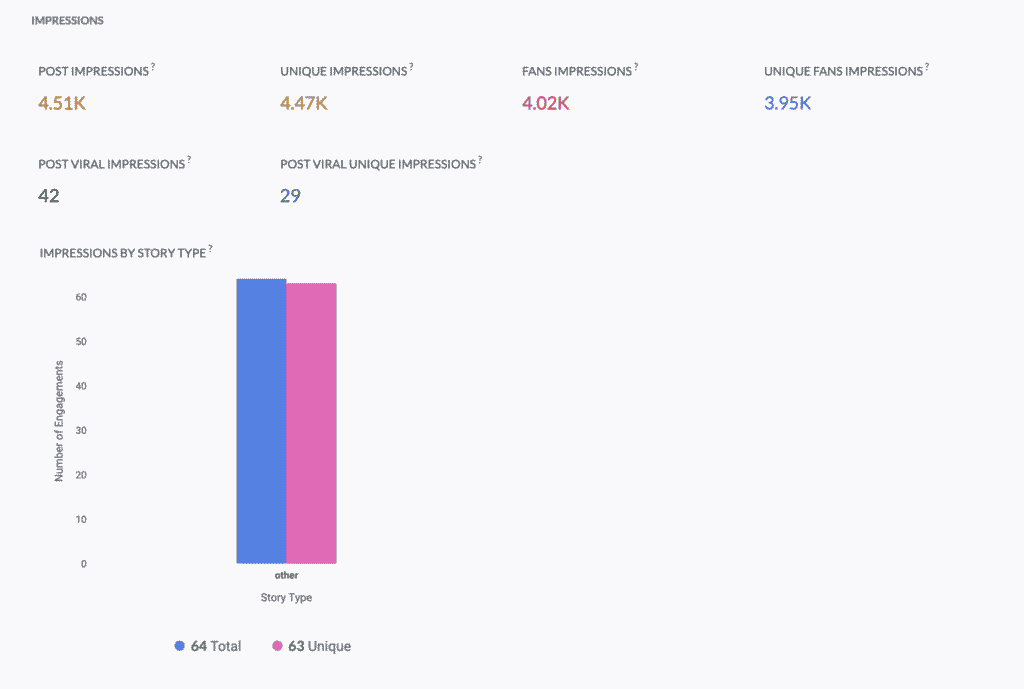
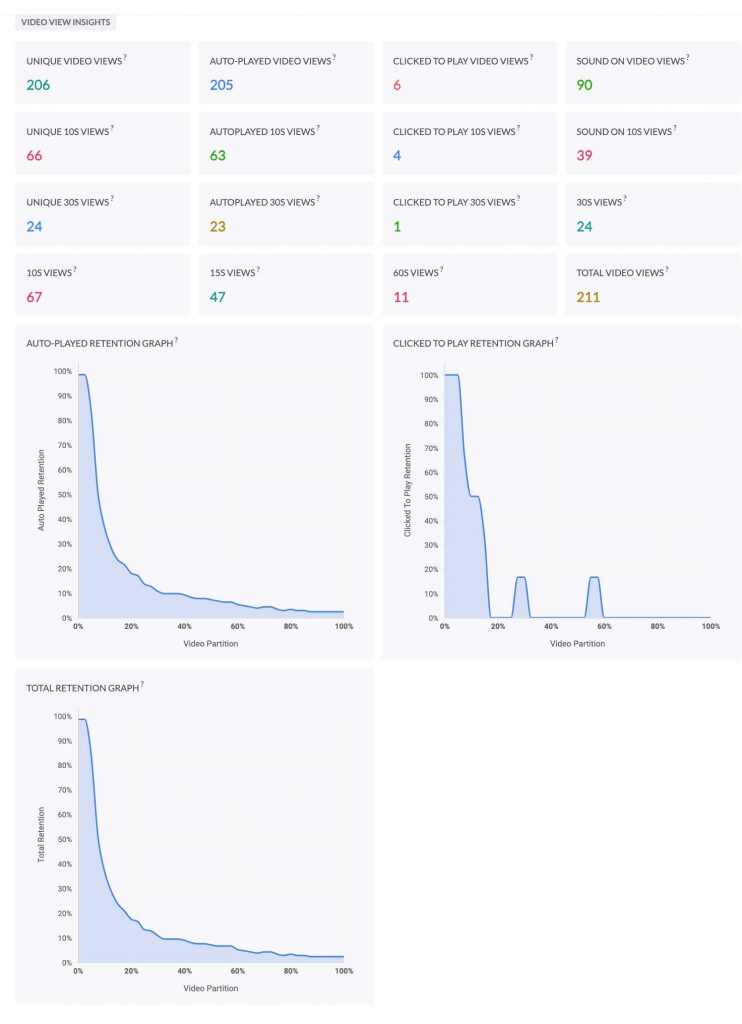
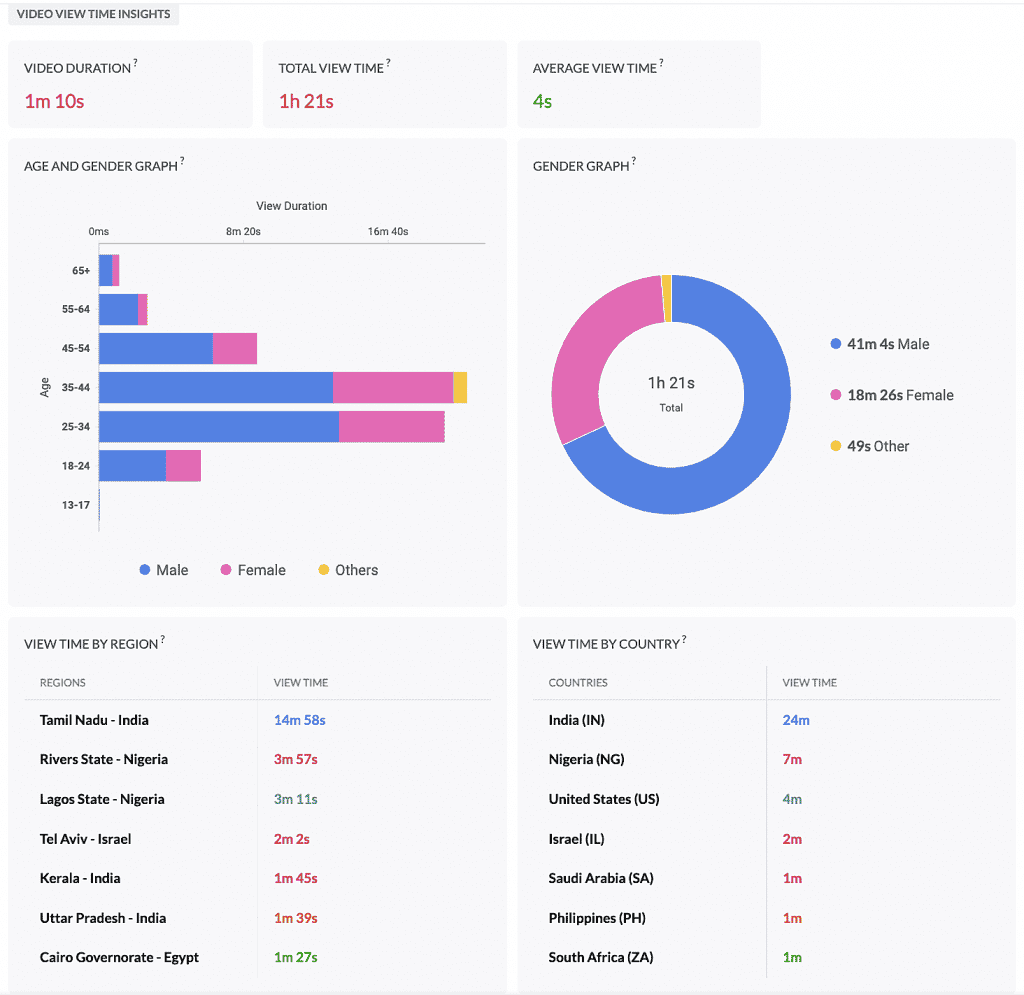
    Facebook statistics are grouped into categories like Reactions, Engagements, and Impressions. If the post includes a video, you can see the stats for Video View and Video View Time. This helps you get an idea about the audience retention, age and gender, country with maximum view time, among other details.

    Reactions

    (Image via Zoho)

    Engagements

    (Image via Zoho)

    Impressions

    (Image via Zoho)

    Video View

    (Image via Zoho)

    Video View Time

    (Image via Zoho)

    Twitter

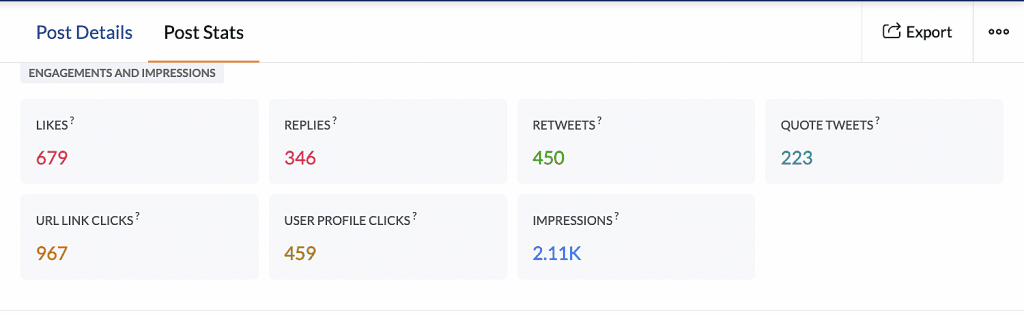
    All engagement and impressions for a tweet can be viewed from the Post Stats tab. View the total number of likes, replies, retweets, quote tweets, number of clicks on the URL, impressions, and the total number of clicks on the user’s profile name or the image.

    (Image via Zoho)

    LinkedIn

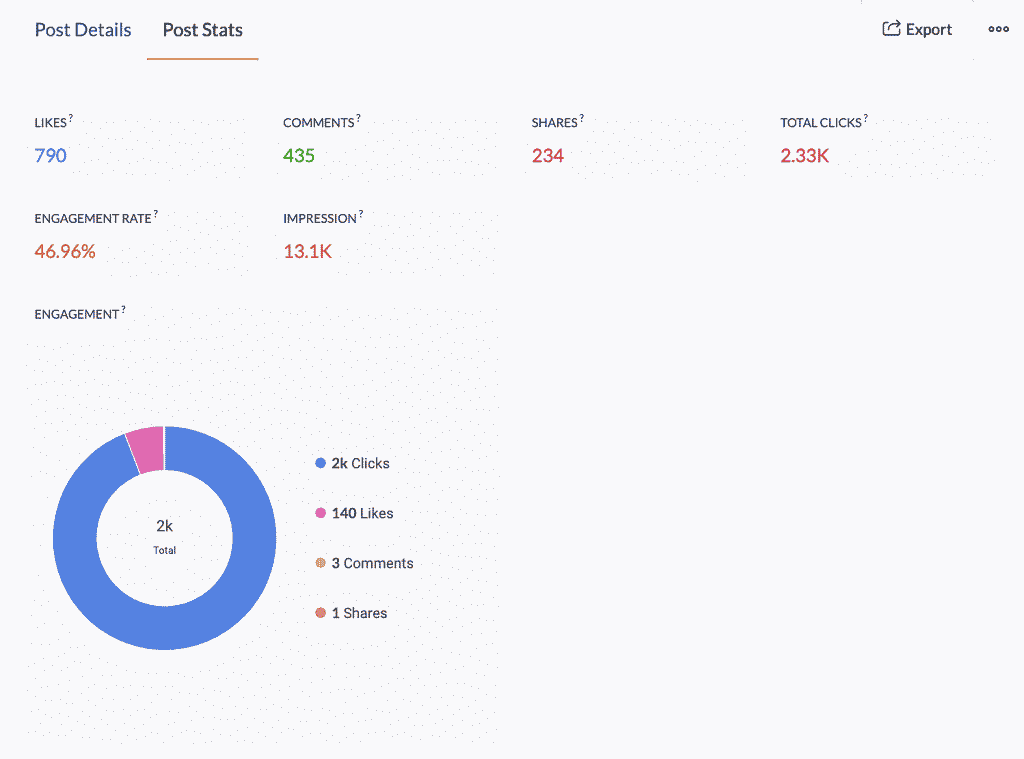
    The total number of likes, comments, and shares are displayed on each post. You can also view the total number of clicks on the post, company name, or logo, analyze different types of engagement, the engagement rate, and impressions.

    (Image via Zoho)

    Instagram

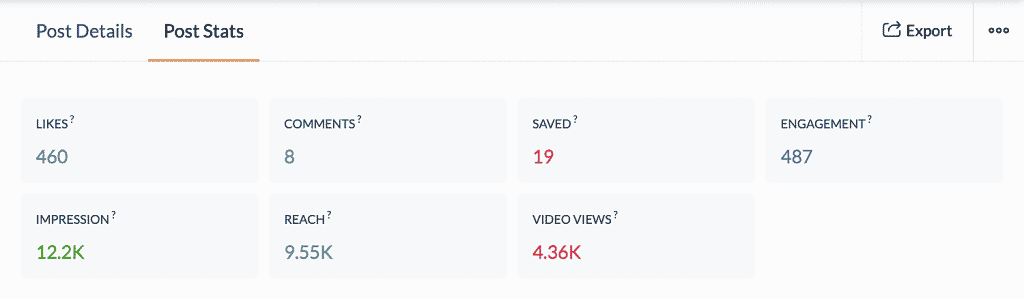
    View the total number of likes, comments, engagement, impressions, and the number of times the post has been saved. You can also identify how the post has reached the audience. If the post is a video, you can also view the number of times the video has been played.

    (Image via Zoho)

    YouTube

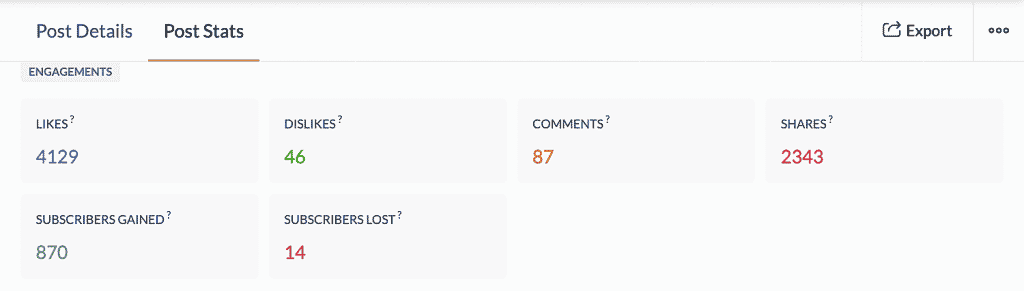
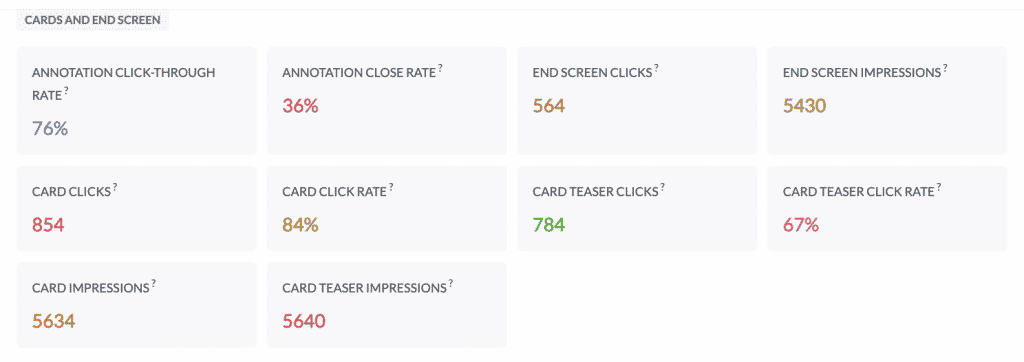
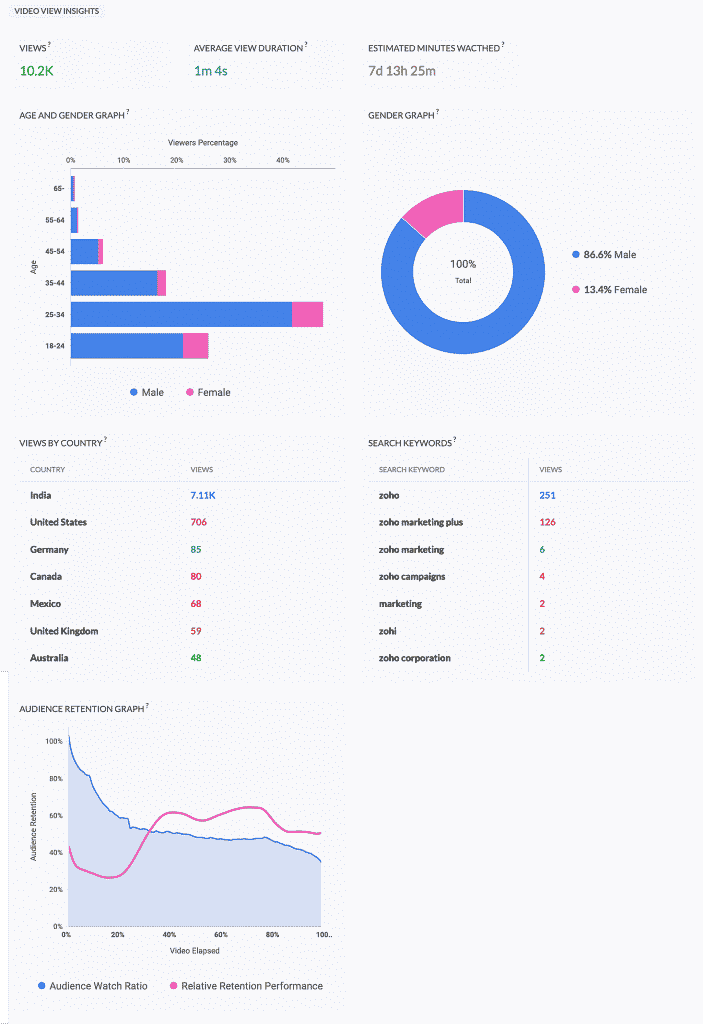
    YouTube statistics are grouped into categories like Engagements, Cards and End Screen, and Video View Insights. These sections help monitor in-depth metrics: audience retention, subscribers gained, card clicks, end screen clicks, annotation click-through rate, and total number of views sorted by country.

    Engagements

    (Image via Zoho)

    Cards and End Screen

    (Image via Zoho)

    Video View Insights

    (Image via Zoho)

    New Webinars from Zoho: Zoho CRM and Zoho Analytics

    Understanding and Working with Reports 2.0 in Zoho CRM (you can also learn more about the updates in our Zoho CRM Reports article)

    Integrating Zoho Analytics with Zoho CRM

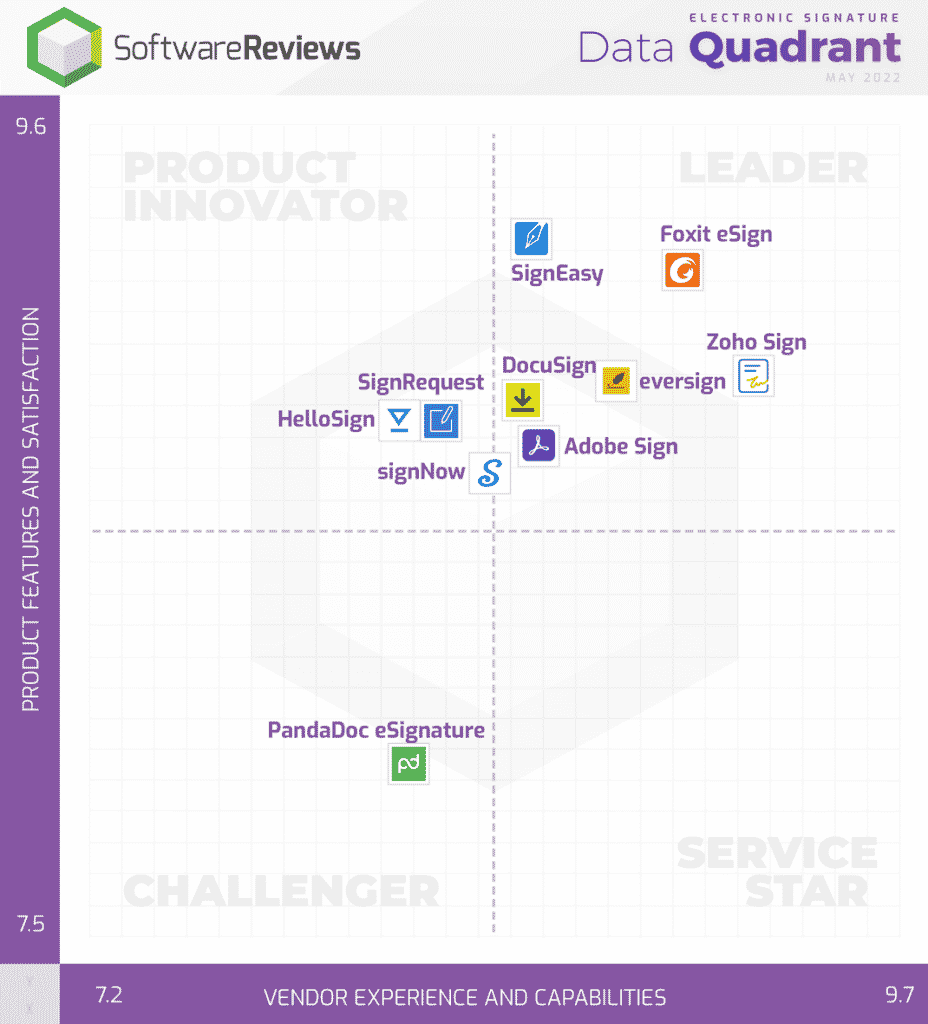
    Zoho Sign Recognized as Leader in Software Reviews’ Electronic Signature Data Quadrant

    (Image via Software Reviews)

    According to Software Reviews, their Data Quadrant evaluates and ranks products based in IT and business professionals’ feedback. Because Zoho Sign was featured as a top product in most categories and it has a composite score of 9.1/10, it was named as a Leader in the Electronic Signature Data Quadrant. The categories are:

    • Vendor Capability Satisfaction (Business Value Created; Breadth of Features; Quality of Features; Product Strategy and Rate of Improvement; Usability and Intuitiveness; Vendor Support; Ease of Data Integration; Ease of Administration; Ease of Customization; Ease of Implementation)
    • Product Feature Satisfaction (Audit Trail, E-Signatures, Mobility, Security, Third-Party Integration, User-Friendly, Workflow, Cloud/On-Prem/Hybrid Deployment, Customizable Branding, Digital Signature, Notifications, Regulatory Compliance, Templates)

    That’s all for now, IC readers! See you soon for more Zoho updates from InterConnecta!

    Need help with the implementation or optimization of any of your Zoho apps? Then you’re in the right place! Learn more about our Zoho Consulting Services and ask us for a free consultation.
  • Zoho News Catch-Up: Enhancements to Zoho CRM and Zoho Analytics, Plus New Zoho WorkDrive 3.0 and Zoho Campaigns Agency Edition

    Welcome to our catch-up, where you’ll be in the know of all the latest Zoho updates in one place!

    • Zoho CRM updates: Improved forecast capabilities, email templates are now automatically responsive in mobile devices, meetings can now be cancelled on Zoho CRM Android app.
    • Zoho Analytics has added enhancements for Business Application Connectors and integrations.
    • Zoho Campaigns launches Zoho Campaigns Agency Edition for marketing agencies.

    Zoho CRM Revamps Forecasting

    Image via Zoho

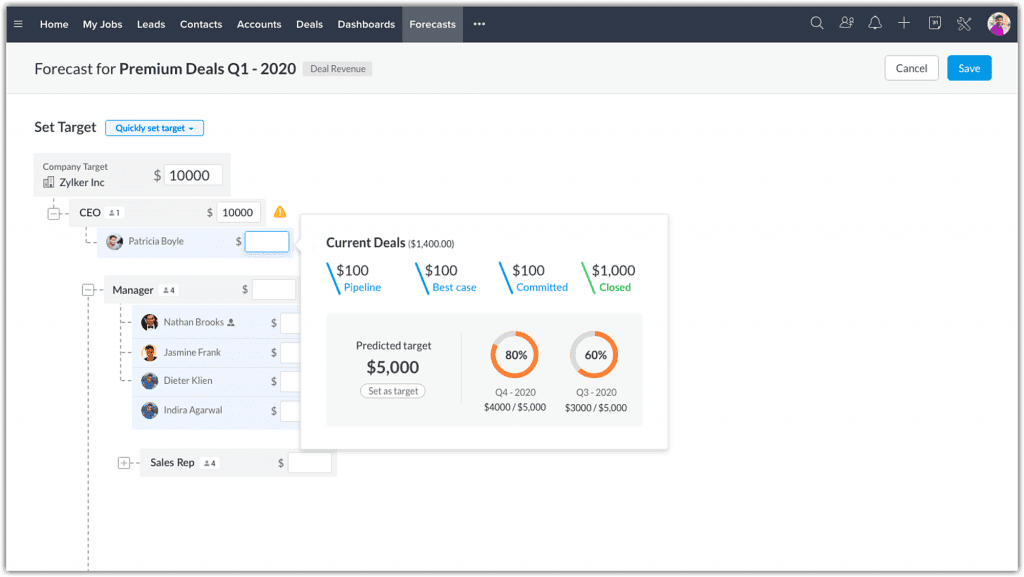
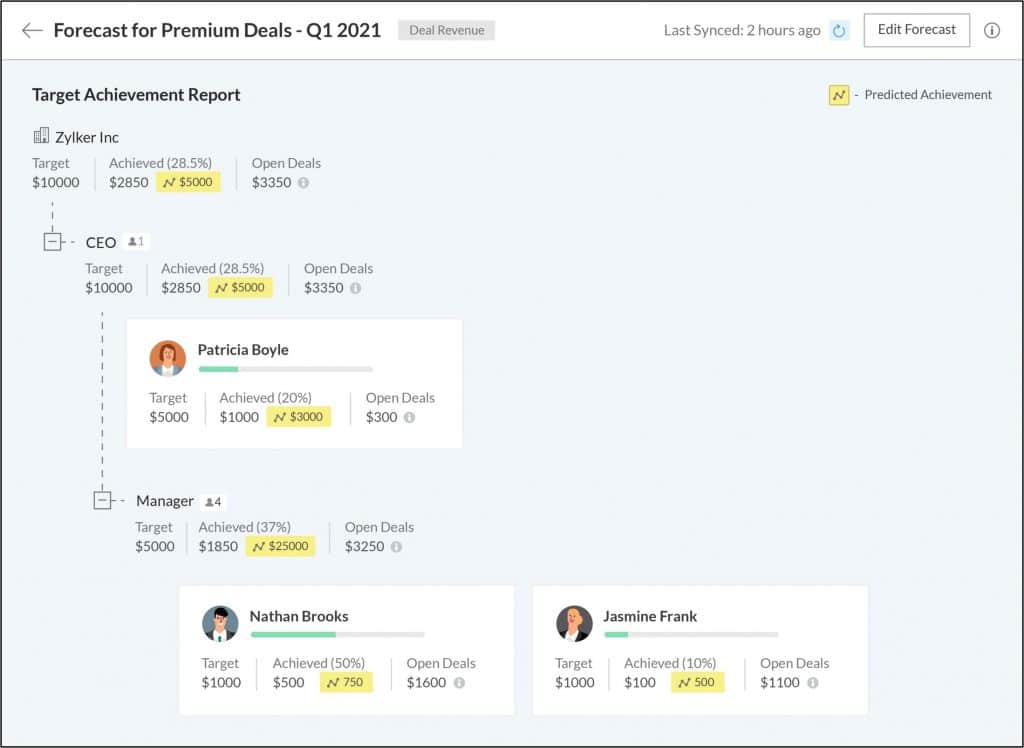
    Forecasting capabilities have been enhanced to help businesses understand their pipeline better, make accurate forecasts, set realistic targets, and help sales teams achieve them. These enhancements include:

    • Condition-based and multiple forecasts across different periods
    • Forecast types based on deal revenue and deal quantity
    • Best Case and Committed Deals options under Forecast Category
    • Clear split of deals in pipeline for ideal targets
    • Zia proposes Target Suggestions and Target Achievement predictions
    • Comparison of your performance throughout different forecast periods
    • Archived forecasts

    For a complete walkthrough, check our blog post Zoho CRM Revamps Forecasting Feature.

    Email Templates in Zoho CRM Are Now Responsive on Desktop and Mobile Devices

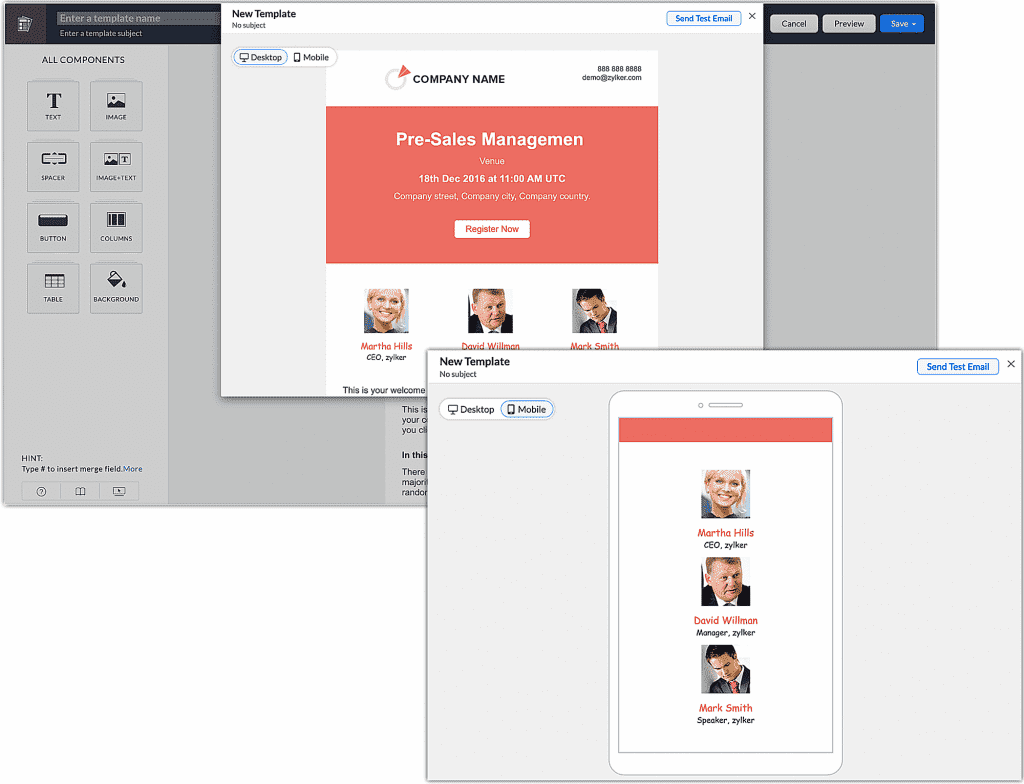
    The CRM templates you create are now automatically optimized for your customers every time they open the business emails you send them, regardless if they’re on mobile or desktop. This means that the email messages you send will be seen as intended without having to switch to desktop.

    Image via Zoho

    For existing templates, the responsive feature will be effective once you edit and save them again. In line with the responsive template, Zoho CRM has introduced two new options for template preview —Mobile and Desktop— to quickly verify the responsive functionality of your emails.

    You’ll have the option to switch between the template’s preview from mobile to desktop and vice versa in the following places:

    • The template preview on the Template Builder page.
    • The template preview page on the Template List page.
    • The template preview on the Template Selection page.

    Improvements for Test Emails

    • The Send Test Email button has been relocated to the top-right corner of the pop-up.
    • You can now add up to five of your CRM users on the Send Test Email pop-up screen.

    New Meeting Cancellation Feature on the Zoho CRM Android App

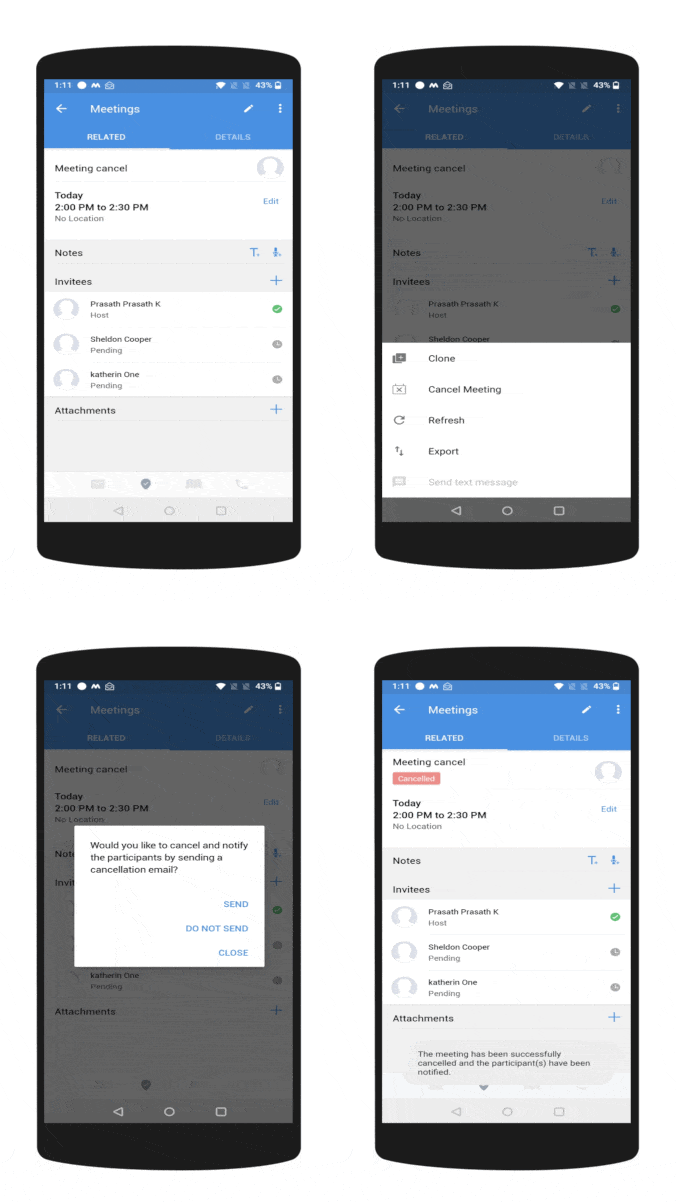
    For cancelling a meeting from within the Zoho CRM mobile app, the meeting should be an ongoing activity. Also, the meeting record should have the participants added to it. The meeting invitations should be sent out to the participants of that respective meeting. Only then the meeting will have the Cancel Meeting option.

    Video via Zoho

    Upon cancelling a meeting, the user will receive a message whether to inform the participants about it with these three options:

    • Send: Sends out email notifications to the participants about the cancellation of the meeting.
    • Do not send: The meeting will be cancelled but the participants won’t be informed about the cancellation.
    • Close: Closes the prompt message.

    The meeting cancellation feature is also available on the Zoho CRM iOS app.

    New Zoho Analytics Integrations

    Integrations with SurveyMonkey, LinkedIn Pages, and LinkedIn Ads have been added. Learn more by clicking the previous hyperlinks.

    Zoho Analytics: Improvements for Business Application Connectors

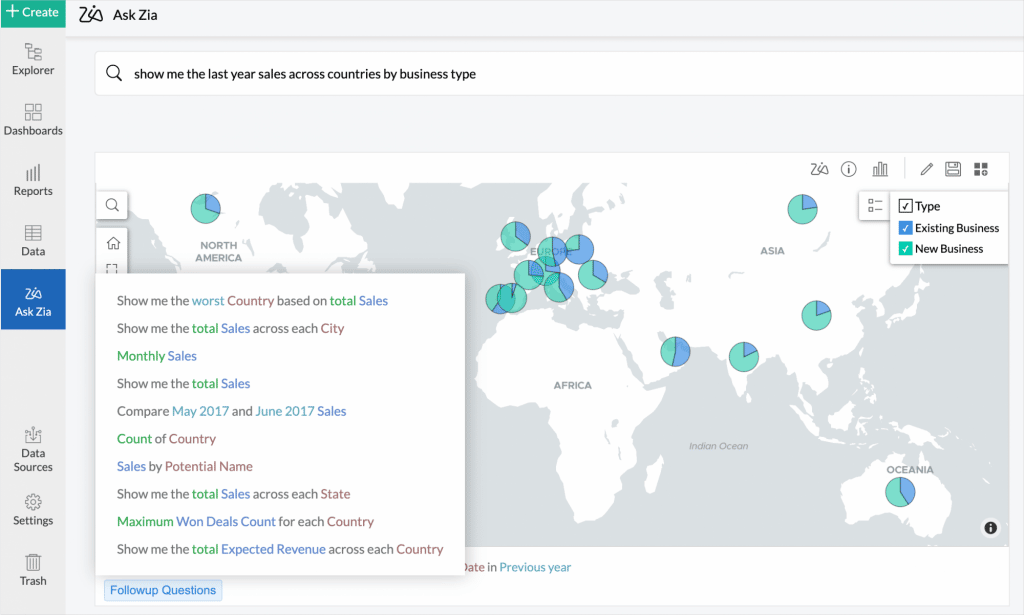
    Ask Zia now auto suggests follow-up questions based on your current question. (Image via Zoho)
    • Advanced Analytics Connector for Zoho Forms: Advanced Analytics for Zoho Forms enables you to proactively research, engage, and obtain analytical insights over the data you collect using Zoho Forms. You will be able to import the forms’ data into Zoho Analytics as a table. Each of the forms and sub forms will be imported as a table in Zoho Analytics with all sub forms tables joined using lookup columns.
    • Sync data every hour: Users in Enterprise plan will be able to sync data using their business application connectors every hour.
    • Sync history: Zoho Analytics provides an option to view the history of the data that was synced for your Business Application Connectors. Data sync history of the last 45 days will be available.
    • Notifying sync failures: Zoho has refined the procedure to notify in case of sync failures. When a data sync fails, you will be notified through in-app notification. In case the sync fails continuously for more than 24 hours, an email will be sent to you with the reason and appropriate solution for them once in every 24 hours.
    • Direct organization URL: Previously, when having multiple organizations, you needed to select the organization to view workspaces on a specific organization. Now you and your users can access the organization easily using the direct link.
    • Follow-up questions in Ask Zia enhancement: Ask Zia now auto suggests follow-up questions based on your current question. This is supported in the normal and conversation modes. This lets you to easily build questions to instantly get reports over your data.
    • Undo and redo in Reports
    • View Share Details from Settings

    Zoho Campaigns Launches Exclusive Edition for Marketing Agencies

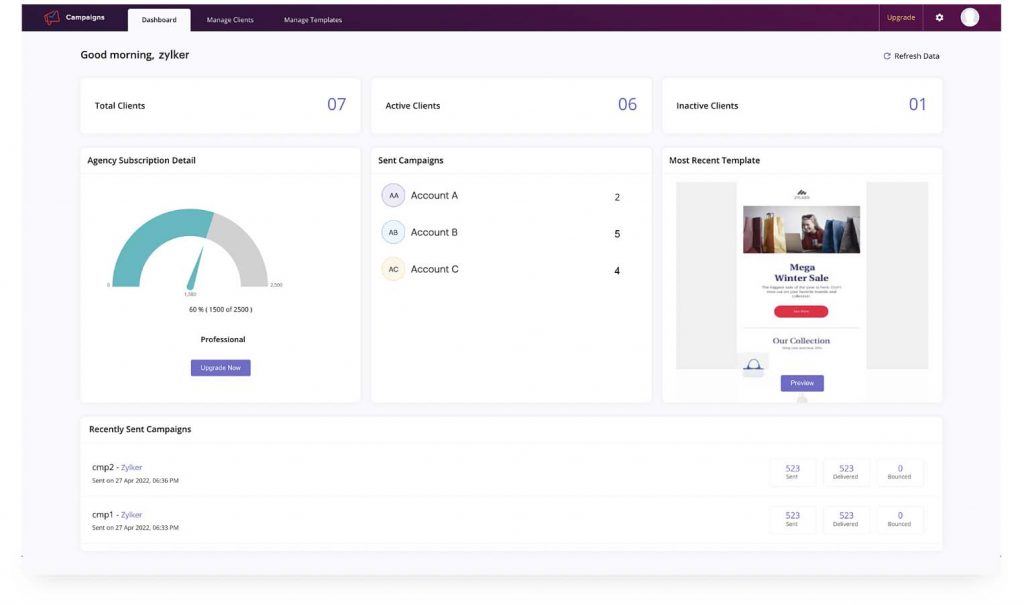
    The Zoho Campaigns Agency Edition allows you to use one parent account to manage all your different clients from the Agency console. (Image via Zoho)

    The Zoho Campaigns Agency Edition has been specially designed to save digital marketing agencies effort, time, and money with the following features:

    • Use one parent account to manage all your different clients from the Agency console. From there, you can add, remove, manage, and send campaigns on behalf of clients. See each client’s details, including their subscriptions, active/inactive contacts, number of campaigns, and more.
    • Zoho Campaigns Agency Edition enables digital marketing agencies to purchase licenses in bulk and then distribute them among clients, based on their needs.
    • Push a template style to multiple clients. Design a template in your parent account and save it in your Templates Library. Using the Push button, send the template to your desired clients.
    • Share the content you have created directly with your clients so they can give the final approval. You can also add a user from the client’s team to this portal, so they can be updated about all developments.

    Zoho WorkDrive: 3.0 Version is Released with New Features

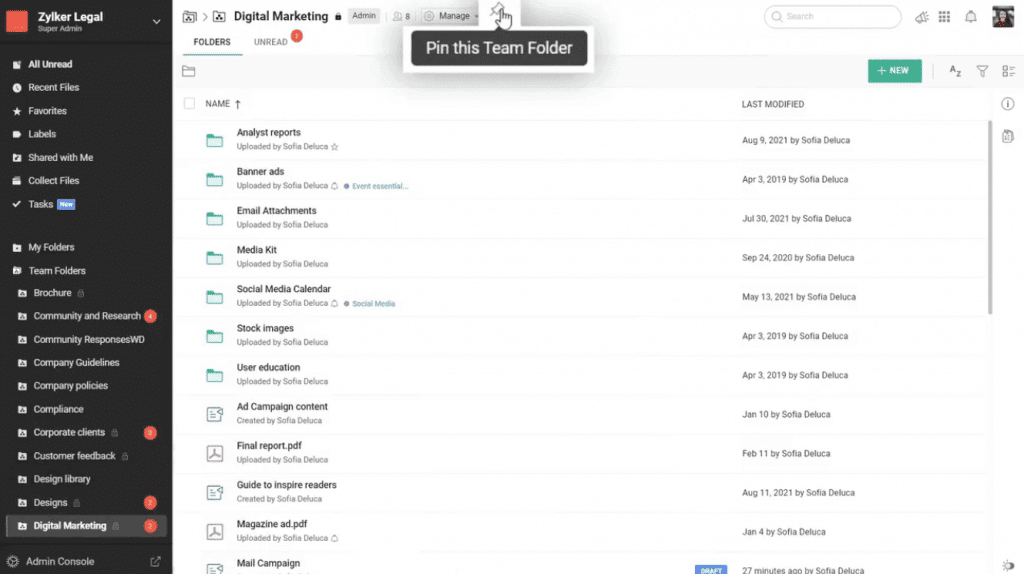
    In Zoho Workdrive 3.0 you can pin important folders with the Pin feature. (Image via Zoho)

    Here’s a summary of what’s new:

    • You can now integrate WorkDrive with your Zoho and third-party business applications, and streamline data flow across your company, through the WorkDrive API platform.
    • Pin important folders with the Pin feature. Now you can locate important Team Folders faster by pinning them to the top of your Team Folder’s list.
    • An improved interface with a detailed view of Team Folders to help you find the right data at the right time. You can also determine which Team Folders should be displayed on the left panel. You can choose to display all Team Folders, only pinned Team Folders, or none.
    • Duplicate Team Folders by copying them to share and collaborate with a different set of members.
    • Use the compact view to see more items in a folder for amplified visibility.
    • Access folders offline by manually enabling them.
    • Use Zoho WorkDrive’s intuitive widgets to upload photos and search WorkDrive documents right from your mobile phone’s home screen.
    • Beta version for WorkDrive Genie for Mac is now in place. Now both Windows and Mac users can edit any file stored in WorkDrive with the compatible native application from their desktop.
    • In Templates, create files with consistent document settings (such as style, design, and formatting). Also, you can now categorize your templates within your gallery. A built-in search bar has been added to search for specific templates: search by name, author, or a keyword in the content.
    • Preview improvements: Preview PDFs and images in a variety of sizes (in percentage), zoom in or out on images, reset zoom to fit the window’s size, and quickly jump to any page.

    To learn more details about Zoho WorkDrive 3.0, click here.

    Zoho SalesIQ Integrates with Instagram

    Manage your Instagram DMs directly from SalesIQ. This integration can help you reduce the friction of sharing your account credentials and logging into your Instagram account for all your operators.

    Industry Awards and Recognitions for Zoho

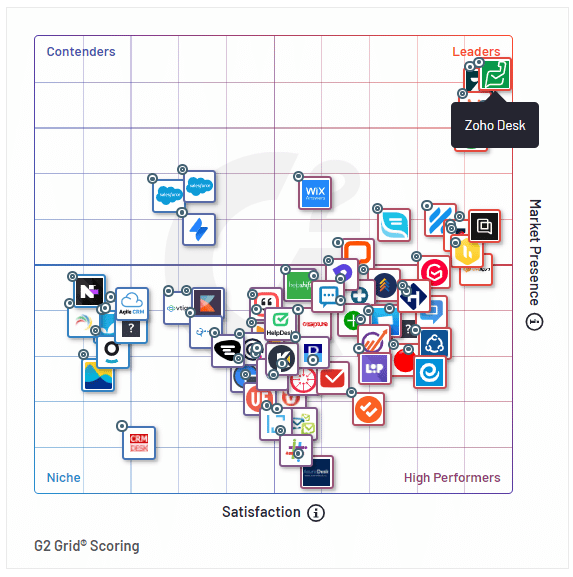
    G2 Grid Scoring from G2’s Spring 2022 Report. (Image via Zoho)
    • Zoho wins the 2022 CRM Watchlist award with the highest overall score. Zoho CRM emerged with the highest overall score among strong competitors like Salesforce, Oracle, SAP, and others.
    • Zoho Desk named as Leader in G2’s Spring 2022 Reports. Zoho Desk has received a total of 55 badges across four categories of the report, based on 3,700+ user reviews. Among these, Zoho Desk have been ranked as a #1 Leader for a whopping 14 times.
    • Zoho Analytics rated as overall Leader for both Customer Experience and Vendor Credibility by Dresner Advisory Services. Howard Dresner, Founder and Chief Research Officer at Dresner Advisory Services, said the following about the BI and advanced analytics platform: “For 2022, Zoho’s scores are generally above the overall sample, with key improvements in overall value, product, and technical support. It is an overall leader in both Customer Experience and Vendor Credibility Models and has a perfect recommend score.”

    That’s all for now, IC readers! See you soon for more Zoho updates from InterConnecta!

    Need help with the implementation or optimization of any of your Zoho apps? Then you’re in the right place! Learn more about our Zoho Consulting Services and ask for a free consultation.
  • Zoho News Catch-Up: Redesigned Zoho Campaigns Mobile App; Zoho CRM and Zoho Creator Updates; Forbes Recognizes Zoho Recruit

    Welcome to our weekly catch-up, where you’ll be in the know of all the latest Zoho updates in one place!

    • Zoho Campaigns mobile app is now fully operational: allows contact imports, sending campaigns, tracking metrics, among others.

    Zoho Campaigns Relaunches Redesigned Mobile App

    Recognizing the needs that marketers have to access and manage campaigns from anywhere, the team behind Zoho Campaigns has redesigned from A to Z their mobile app for Android and iOS. This means that the Zoho Campaigns mobile app is now fully operational and will let you do the following:

    • Creating Emails with Predesigned Email Templates: Use either simple or advanced professionally designed templates and customize them by using the rich text editor toolbar.
    • Import Contacts in Many Ways: Import your contacts straight from your mobile device to your Zoho Campaigns account. Also, if you’re an Android user, you can use the business card-scanning option to add new contacts.
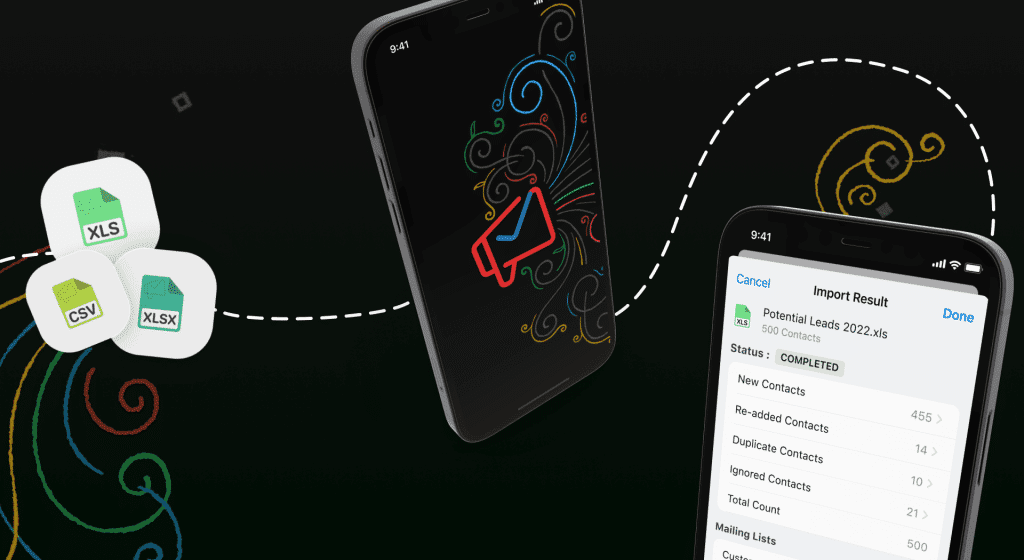
    The revamped Zoho Campaigns mobile app lets you upload contacts straight from your mobile phone in XLS, XLSX, and CSV formats.
    The revamped Zoho Campaigns mobile app lets you upload contacts straight from your mobile phone in XLS, XLSX, and CSV formats. (Image via Zoho)
    • Schedule Email Campaigns: Immediately schedule a campaign after it’s reviewed or pause it while it’s still being sent.  
    • Comprehensive Dashboard: View results and key metrics (such as open, click, and bounce rates).
    • iPad and Tablet Friendly: The Zoho Campaigns mobile app is also fully functional in iPads and tablets, which lets you view two reports side by side on the flush split-screen view of your iPad. You can also carry out tasks at the same time between Campaigns and other apps without compromising the usability of either one. Moreover, the slide over feature lets you have the Campaigns app waiting in the wings while you work in another app, and drag and drop can be used to move items back and forth. Text input is now possible with the Apple Pencil. Watch how it works.
    • Email Accessibility Options: Ensure a user-friendly experience for all Zoho users with the added features of voiceover, dynamic font size, and color filters.
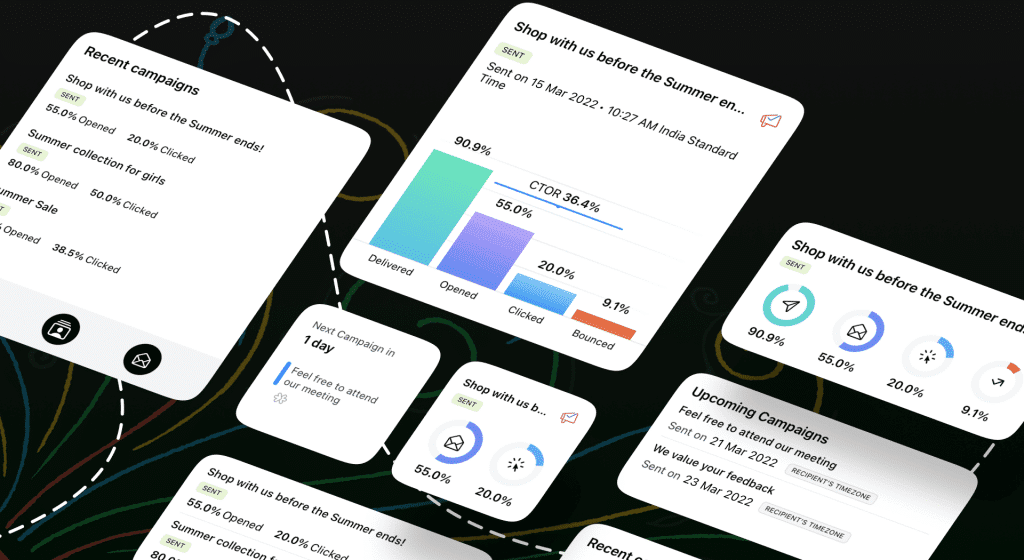
    • Informative Widgets: Place in them all the information you need to know about current and upcoming campaigns. Get quick and full visibility without opening the app.
    The new widgets from Zoho Campaigns mobile app. (Image via Zoho)
    • Spotlight Search and Siri Shortcuts: Create custom phrases to call up specific campaign reports using Siri. These reports are also accessible directly from the lock screen. Use Spotlight Search and In-app search to quickly find information about email campaigns or lists.
    • Easy Navigation: Comfortably use your touchscreen to perform complex marketing tasks on the app.
    • Customize Your App: Switch between light and dark modes, change the app icon’s color theme, and assign custom Quick Actions for your home screen icon.
    • Privacy Protection with Data Access Control: Secure functions like setting up a unique passcode for the Campaigns app. Plus, you can go to your App Settings and take full control of your data by enabling and disabling what details to share with others.

    Zoho CRM Reports Module Gets Updates

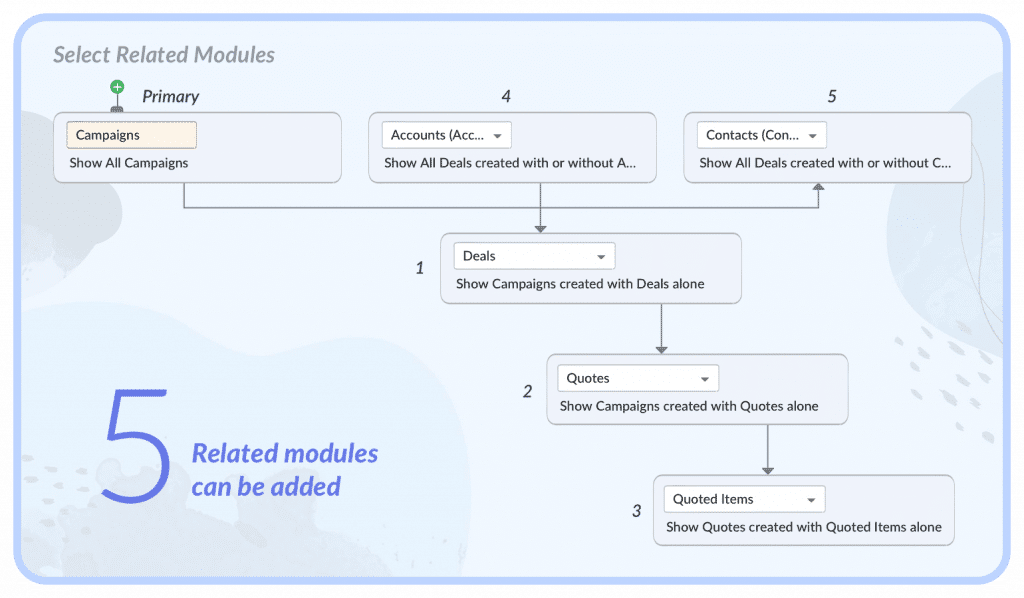
    • Add up to five related modules to a report. In earlier versions, only two modules could be added.
    (Image via Zoho)
    • Reports can now be extended to related lists. Any related list (Stage History, Pick List Field History) can be seen as a report from the base module, from which it is been created.
    • Matrix report: The row grouping and column grouping is supported for 2×2 columns. Earlier it was supported for 1×1.
    • Grand total can be shown for all the existing rows. This is regardless of the number of records. Sub-group total can also be shown for all sets of rows.
    • Grouping dates by sub-groups is possible. In previous versions, it was supported only in a matrix report, for a default of 3 sub-groups.
    • Export is now available in CSV & XLSl formats for a record count of 50K. This goes up from 20K records that could be exported in CSV format in past versions.
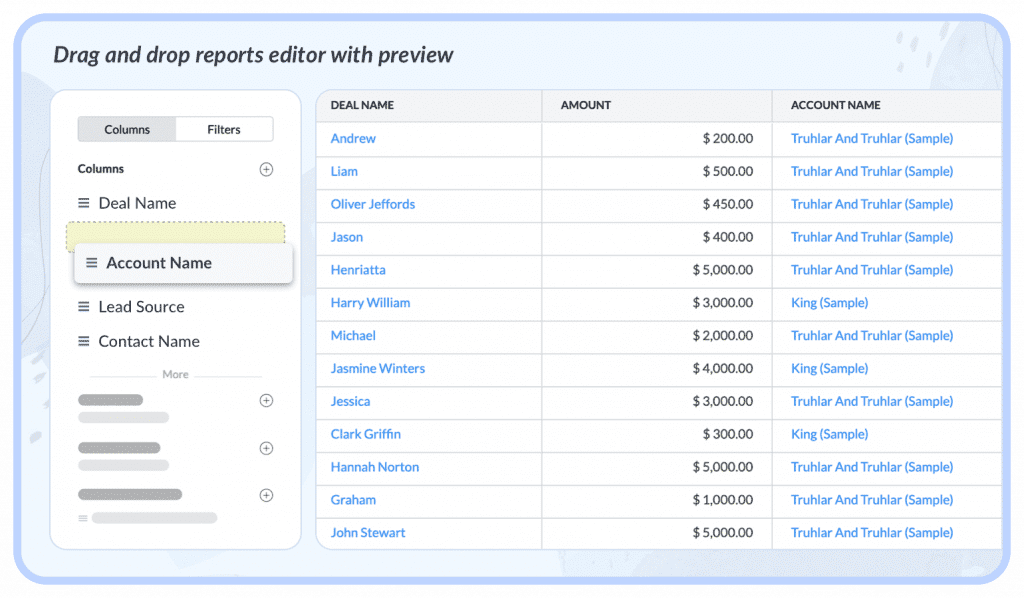
    • Refined UI/UX with a drag and drop reports editor with preview.
    (Image via Zoho)

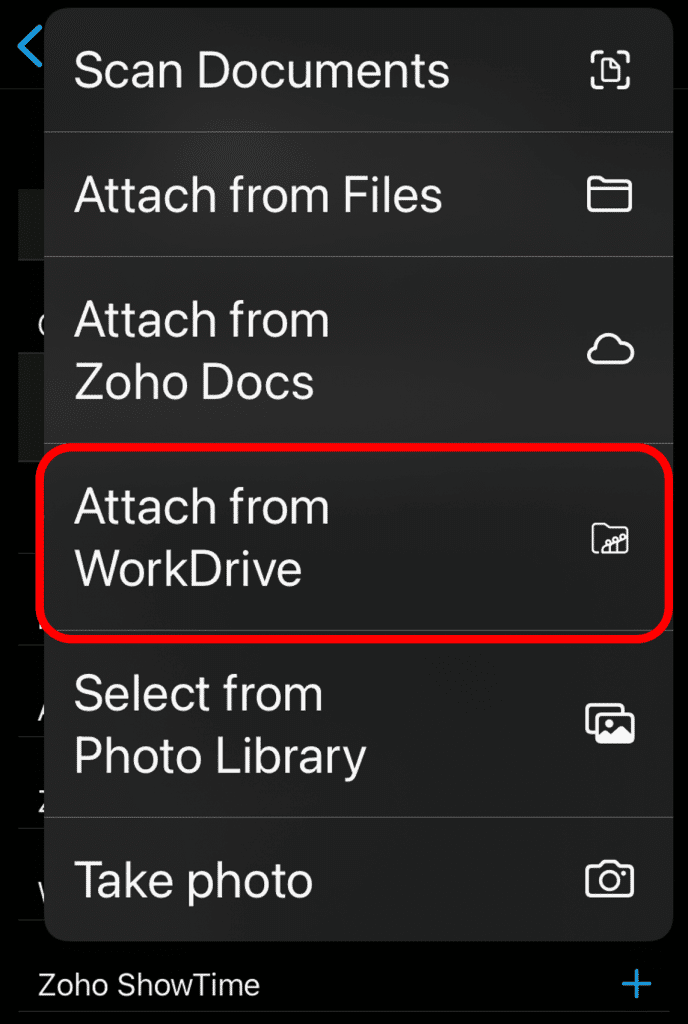
    Zoho CRM iOS Mobile App: Attach Files from Zoho WorkDrive to a CRM Record

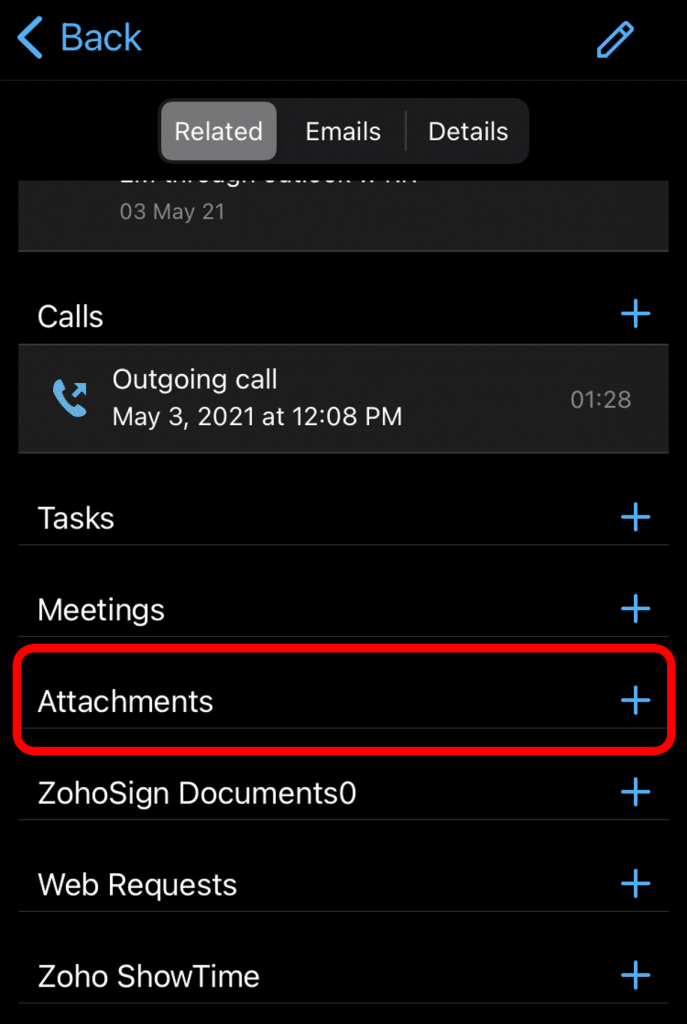
    To access this latest update, go to a CRM record in your iOS app, then click on Attachments > Attach from WorkDrive.

    Zoho CRM iOS mobile app: attach WorkDrive files to CRM records.
    (Screenshots from Zoho CRM iOS app.)
    Zoho CRM iOS mobile app: attach WorkDrive files to CRM records.

    Zoho Creator Limits Number of Scopes

    Zoho is now implementing a limit of 50 scopes per connection. You will encounter an error when you try to create a Zoho OAuth Connection with more than 50 scopes. If you have already configured a connection with more than 50 scopes, then you’ll find an error while updating the scope. Read more here.

    Forbes Advisor Recognizes Zoho Recruit

    The recruitment platform has been named as the Best Recruitment Software of 2022 for staffing agencies because it is “an affordable and highly customizable option capable of seamless integration with other Zoho apps.” Forbes highlighted Zoho Recruit’s features of software integrations; resume management tools; interview tools; background screening; career page; referrals and social posting; and reports and analytics. Read the news here.

    That’s all for now, IC readers! See you next week for more Zoho updates from InterConnecta!

    Need help with the implementation or optimization of your Zoho Campaigns, Zoho CRM, Zoho Creator, Zoho Recruit or any other Zoho apps? Then you’re in the right place! Contact us now for a consultation.
  • Zoho News Catch-Up: Recognitions from Nucleus Research and Gartner, Lots of Zoho Analytics and Other Apps’ Updates

    Welcome to our weekly catch-up, where you’ll be in the know of all the latest Zoho updates in one place. Let’s go!

    • New functions for Zoho CRM, Zoho Analytics, and Zoho Social

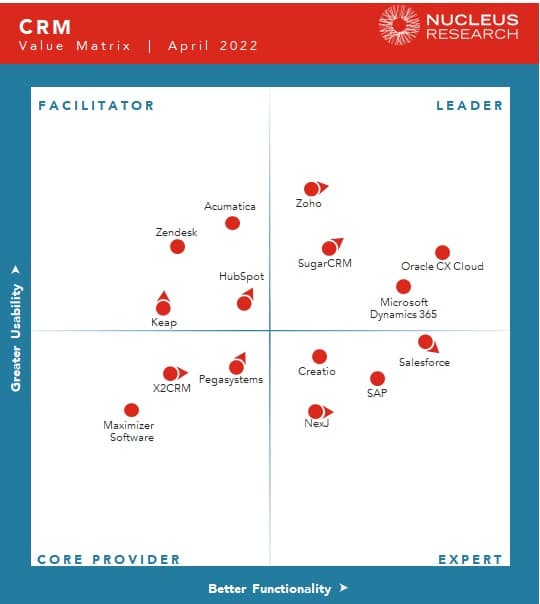
    Zoho is Named as Leader in Nucleus Research CRM Technology Value Matrix 2022

    (Image via Nucleus Research)

    For the second year in a row, Zoho has been included in the Leader category, demonstrating once again Zoho CRM’s high functionality and flexibility in customizations. Plus, it has been a constantly reliable CRM platform for customers worldwide. And these are just some of the key characteristics that have made some usual competitors fall outside the Value Matrix. Read the Nucleus Research report.

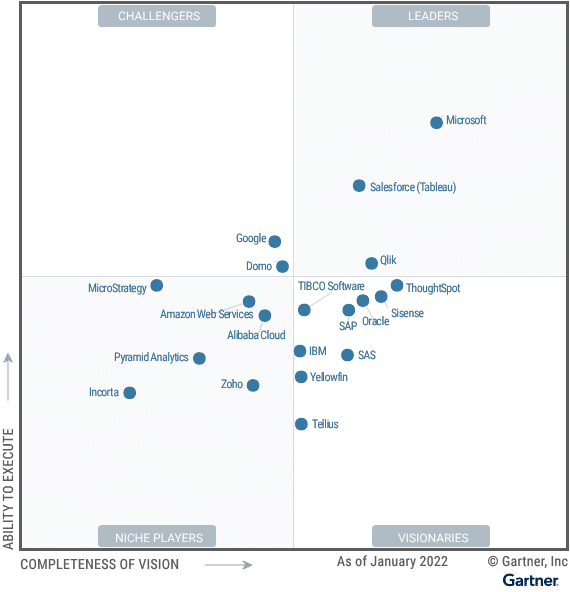
    Zoho Recognized as a Niche Player in 2022 Gartner® Magic Quadrant™ for Analytics and Business Intelligence Platforms

    (Image via Gartner)

    Zoho Analytics makes its Gartner debut thanks to its CX: Gartner Peer Insight reviewers found that the overall experience with the vendor is above average in comparison to other Magic Quadrant vendors. Gartner also praised Zoho Analytics’ natural language query: the AI Ask Zia functionality lets users to ask questions about their data in natural language. It also supports complex analytical questions by using words like “rank,” “compare,” “predict” or “convert,” as well as automatically handling time reasoning. Read the Gartner report.

    Other Zoho Analytics Updates

    New Features

    • Zoho Analytics now seamlessly integrates with Shopify to provide detailed analytics of your e-commerce information. 
    • Webhooks can now be leveraged to trigger alert notifications or custom workflows when data alert conditions are met. 

    Enhancements

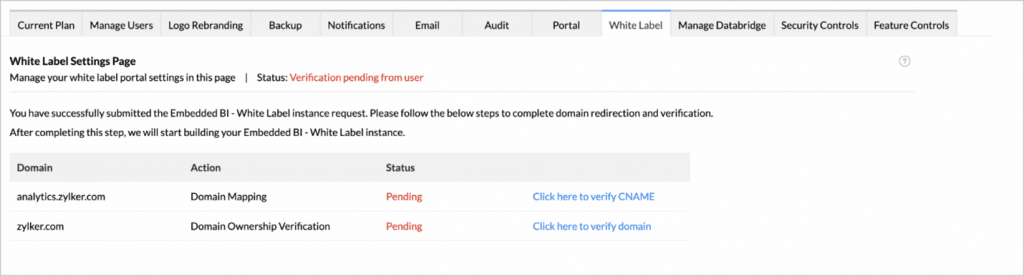
    White Label users can now do the domain mapping and domain verification from Zoho Analytics’ user interface. (Image via Zoho)
    • Email views from organization email addresses (besides to the default notifications@zohoanalytics.com). You’ll be able to add multiple email addresses as Organization email address, and email reports and dashboards using these addresses.  
    • The Zoho Analytics’ Dependency Details option for the views has been improved
    • Views now include the Dashboards where the view is embedded. 
    • Table includes immediate child table.
    • Query Table now has multiple level parent tables and child tables. 
    • Dependency details can be invoked from Explorer and Model Diagram
    • Zoho Analytics now supports importing Keyhole Markup Language (KML) files as spatial data file to create Geo visualization. 
    • DataPrep functionalities are now available while importing from another Zoho Analytics workspace. 
    • Data Snapshot History: it will be now maintained only for 45 days.
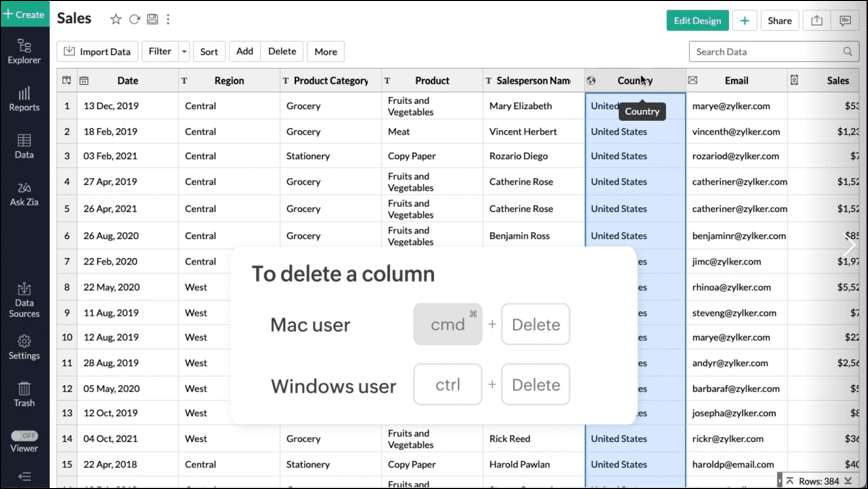
    • Delete rows and columns from tables using the keyboard delete option.
    (Image via Zoho)

    Zoho CRM

    Translation options are now available for modules, subforms, and related lists. Learn more.

    Zoho Social

    The multichannel social media management platform now has the photo editor option. This allows to customize an image to fit the size requirements for each social channel. Learn more and watch the tutorial.
    That’s all for now, IC readers! See you next week for more Zoho updates from InterConnecta!

  • Zoho CRM Winter Update: Multi-Organization Support, Improved Forecasting and Reporting Among New Features

    Zoho Corporation has recently released a number of updates in their Zoho CRM platform. These will continue help users to seamlessly run their business operations with the latest technologies. Without further ado, here’s our summary of their winter update.

    Client Scripting

    Its purpose is to empower developers to use JavaScript codes to extend the capabilities of the Zoho CRM system to deal with niche business needs. Because scripts are executed entirely on the client side, teams can address an extensive variety of requirements through these low-latency scripts that perform actions like field validation, computations, auto-population, UI actions, along with trigger widgets, flyouts, and functions while working with Zoho CRM data.

    Omnichannel Communication

    To build on the strong omnichannel communication platform that’s already in place, Zoho CRM has introduced enhancements across their email and telephony systems to help sales teams to be more effective.

    Email Permissions

    This allows to make emails available to every user in your CRM or just to a small group of key decision makers for confidentiality purposes. You can define your email sharing policy at the organizational level for each role and mass update the policy for users, so you can quickly set email sharing permissions for new employees or update them when users move to different roles in your CRM.

    The option of multiple telephony vendors allows to move users between different providers based on your business needs. (Image via Zoho)

    Multiple Telephony Vendors

    This gives your business the flexibility to assign individuals or groups of users to different telephony systems and move users between different providers based on your business needs.

    Built-In Telephony

    Purchase local or toll-free numbers for your organization’s users and assign them unique outgoing numbers to help your sales representatives build a personal connection with customers.

    More Automations

    These are multiple scoring rules for prioritizing your prospects, which lets you set up unique scoring models for different requirements. Therefore, each model can have its own set of attributes and engagements that contribute to the score. This allows your sales, marketing, and service teams to identify and prioritize the right leads or customers.

    The other automation helps understand the underlying causes of workflow failures. Get in-depth information regarding when and where your workflows fail, and all the records that are affected. Your team can use this data to resolve the underlying issues so your workflows can run properly.

    Artificial Intelligence

    Zia, Zoho CRM’s artificial intelligence assistant, now provides recommendations to new customers based on the purchase patterns of existing customers with similar profiles and provide appropriate reasoning for each recommendation. Zia will also collect information and send automatic notifications to your sales reps when a recommendation is ready.
    In addition, you can now build workflows that can automatically send the right communication to your customers based on Zia’s recommendations.

    The completely renovated forecasting system allows to drill down into the data to compare in a detailed manner your current performance with previous fiscal years. (Image via Zoho)

    Forecasts, Performance, and Reports

    The existing forecasting system has been revamped in its entirety to make it more robust and give more control to your business. Build multiple forecasts for different periods, leverage predictive AI to track where you’ll be at the end of your forecasting period, and drill down into the data to compare in a detailed manner your current performance with previous fiscal years.

    Regarding reports, Zoho CRM now allows you to analyze, monitor, and track your business health while providing what you need for important decision-making. An easy-to-use visual builder makes easier to generate complex and precise reports. Obtain more granular access to your CRM data by viewing shared entries or unique entries in two or more related modules with the new inclusive/exclusive relationship tool. Plus, discover deeper insights into your CRM data by joining multiple reports into one.

    Multiple CRM Accounts Access with a Common Set of Credentials

    Associate a user with multiple CRM accounts to allow business owners, upper management, and decision makers to effortlessly manage multiple businesses or business units. Users are able to switch between accounts instantly for easier access of key business data to understand growth and gain insights for preparing reports, agendas, and ideas for future planning.

    Other Zoho CRM winter updates include:

    • Personalization of emails and email signatures

    • Sales calls management

    • Setting apart sales data into zones

    • Webform analytics

    • User experience

    • Color tags

    • Administrator central

    To read the full article, click here.

    Are you considering to implement or improve Zoho CRM Workflow Automation in your business? Then click here for more information.

This site is registered on wpml.org as a development site. Switch to a production site key to remove this banner.