Category: Insights

  • Zoho News Catch-up: Zoho announces ZIA Agents, CRM improvements, 2025 projection for Creator, new Screening Bot for Recruit, and webinars on SalesIQ, One, and Bookings

    Welcome to our catch-up, where you’ll be in the know of all the latest Zoho updates in one place!

    Zoho announces the new ZIA Agents, digital employees that work for you and boost your productivity.


    Zoho has expanded its artificial intelligence platform with the launch of Zia Agents, an innovative solution that enables companies to create and deploy intelligent, autonomous digital assistants across their organization. These agents are designed to automate complex tasks, enhance productivity, and provide accurate responses in various business scenarios.


    Key Components of Zia Agents:

    • Agent Studio: A no-code or low-code development tool that simplifies the creation of custom agents tailored to each company’s specific needs. Users can access a wide range of pre-existing skills, Zoho ecosystem tools, and language models to build their agents.
    • Agent Marketplace: A marketplace where Zoho developers and partners can share and distribute their created agents, fostering collaboration and allowing businesses to efficiently implement customized solutions.

    Zia Agents aren't limited to Zoho apps

    (image via zoho)


    Zia Agent Studio helps

    (image via zoho)


    Practical Use Cases for Zia Agents:

    • Project Management: An agent that monitors project progress, sends deadline reminders, and suggests resource reassignments to ensure timely delivery.
    • Competitor Analysis: An agent that gathers and analyzes competitor information, providing regular reports on their activities and market positioning.
    • Marketing Campaign Optimization: An agent that evaluates campaign performance in real time and suggests adjustments to maximize ROI.
    • Regulatory Compliance Assistant: An agent that monitors industry regulations, ensuring that all company operations comply with current legal requirements.
    • Training Coordinator: An agent that identifies employee training needs and organizes appropriate training sessions.


    Tips for Maximizing Zia Agents:

    • Define Clear Objectives: Before implementing an agent, establish the specific tasks to be automated and the expected outcomes.
    • Integration with Existing Applications: Ensure seamless integration of agents with your company’s current tools and systems for a smooth transition.
    • Continuous Monitoring and Improvement: Regularly assess agent performance and make necessary adjustments to optimize their efficiency.


    At InterConnecta, we are developing our own custom agents designed to address specific challenges and enhance the operational efficiency of our clients. These agents will be available soon, offering tailored solutions to meet the unique needs of each organization!


    CRM introduces improvements in the product configurator and guided CPQ sales.


    Zoho CRM has enhanced its CPQ module with new features to improve product configuration and the guided selling process. Here are the key updates:


    • Multi-selection in actions: You can now select multiple records at once in the actions panel, making configuration easier.
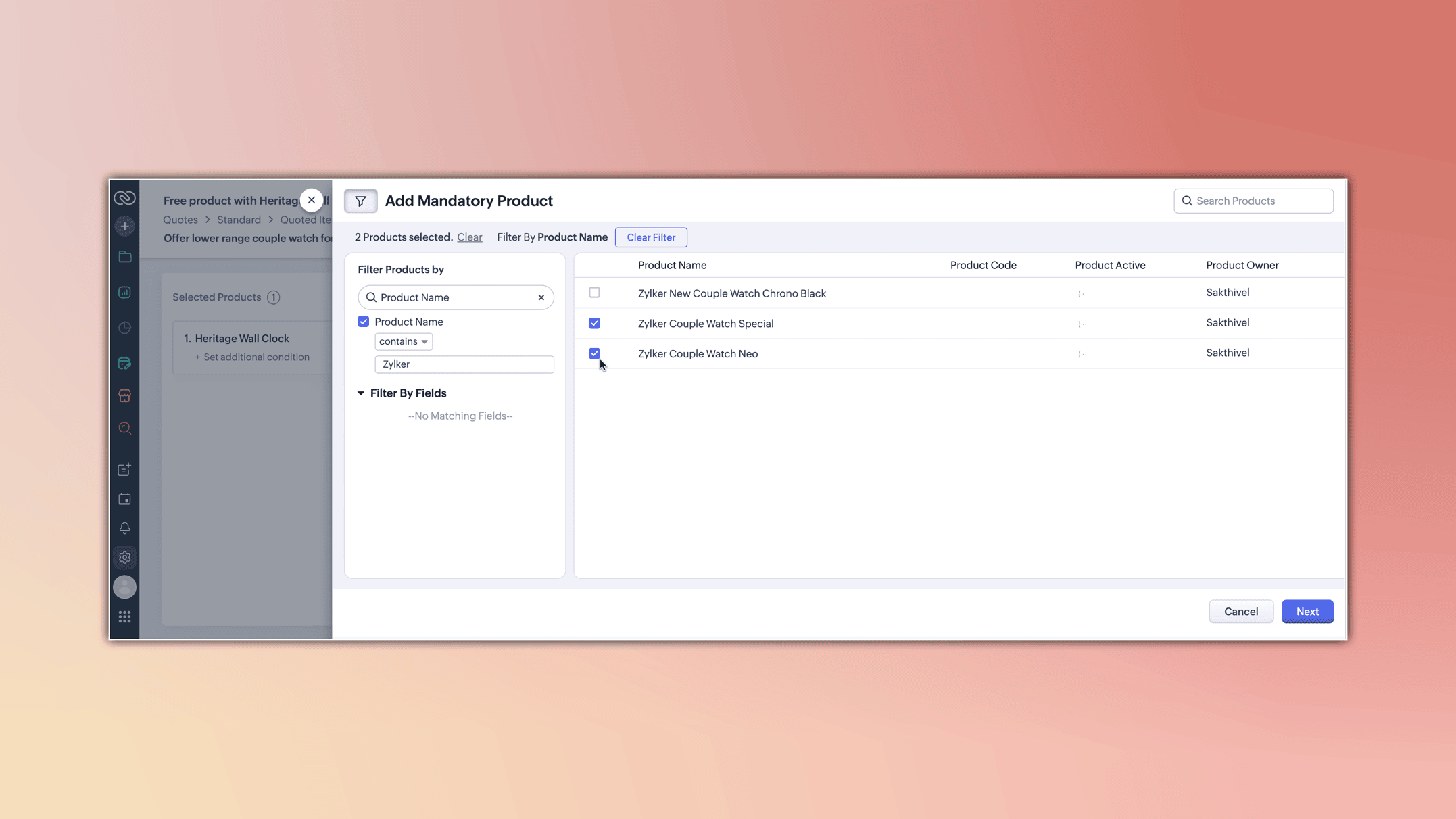
    (image via zoho)

    • Duplicate check: A new option has been added to prevent the duplication of mandatory or suggested products in quotes.
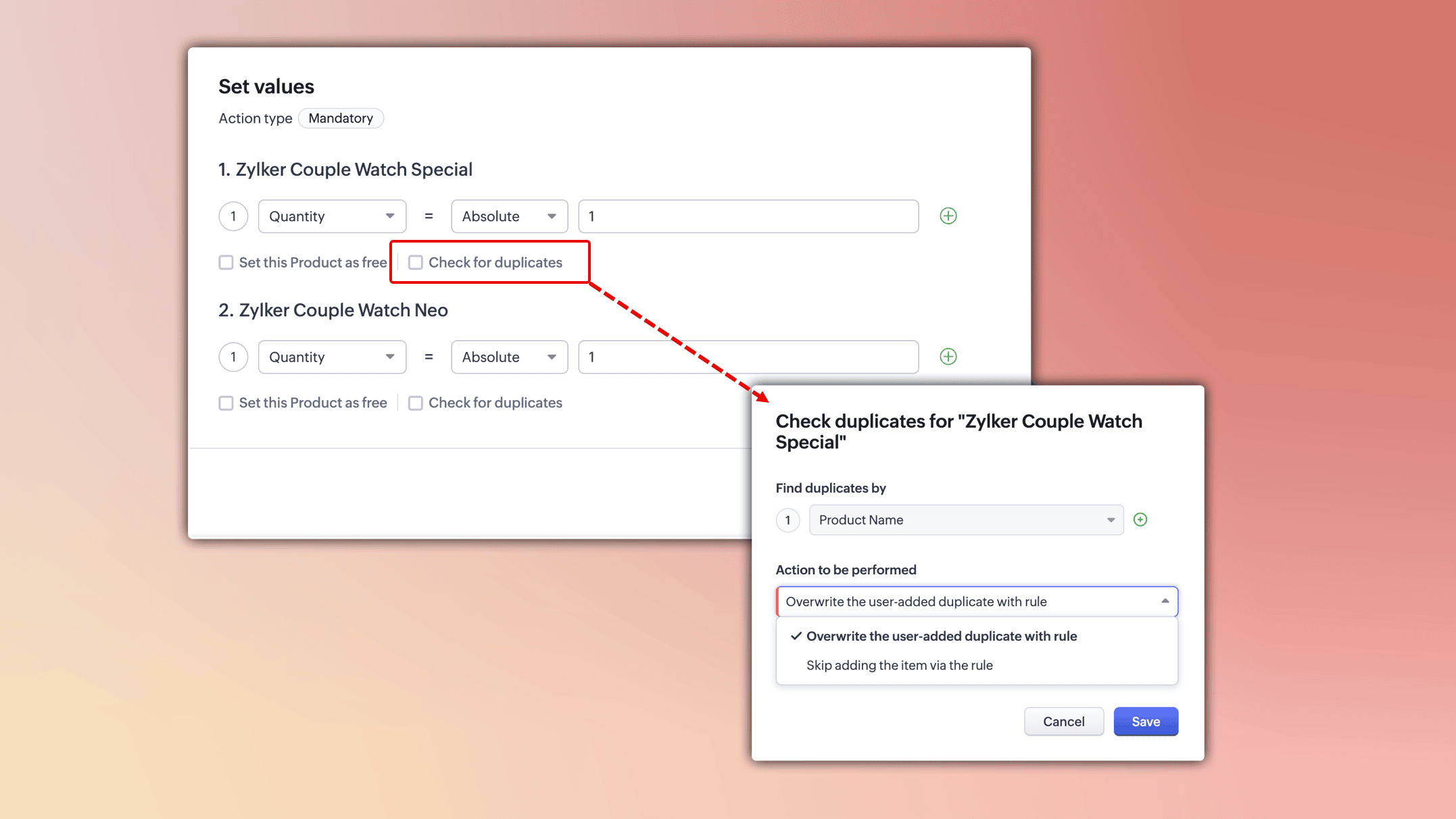
    (image via zoho)

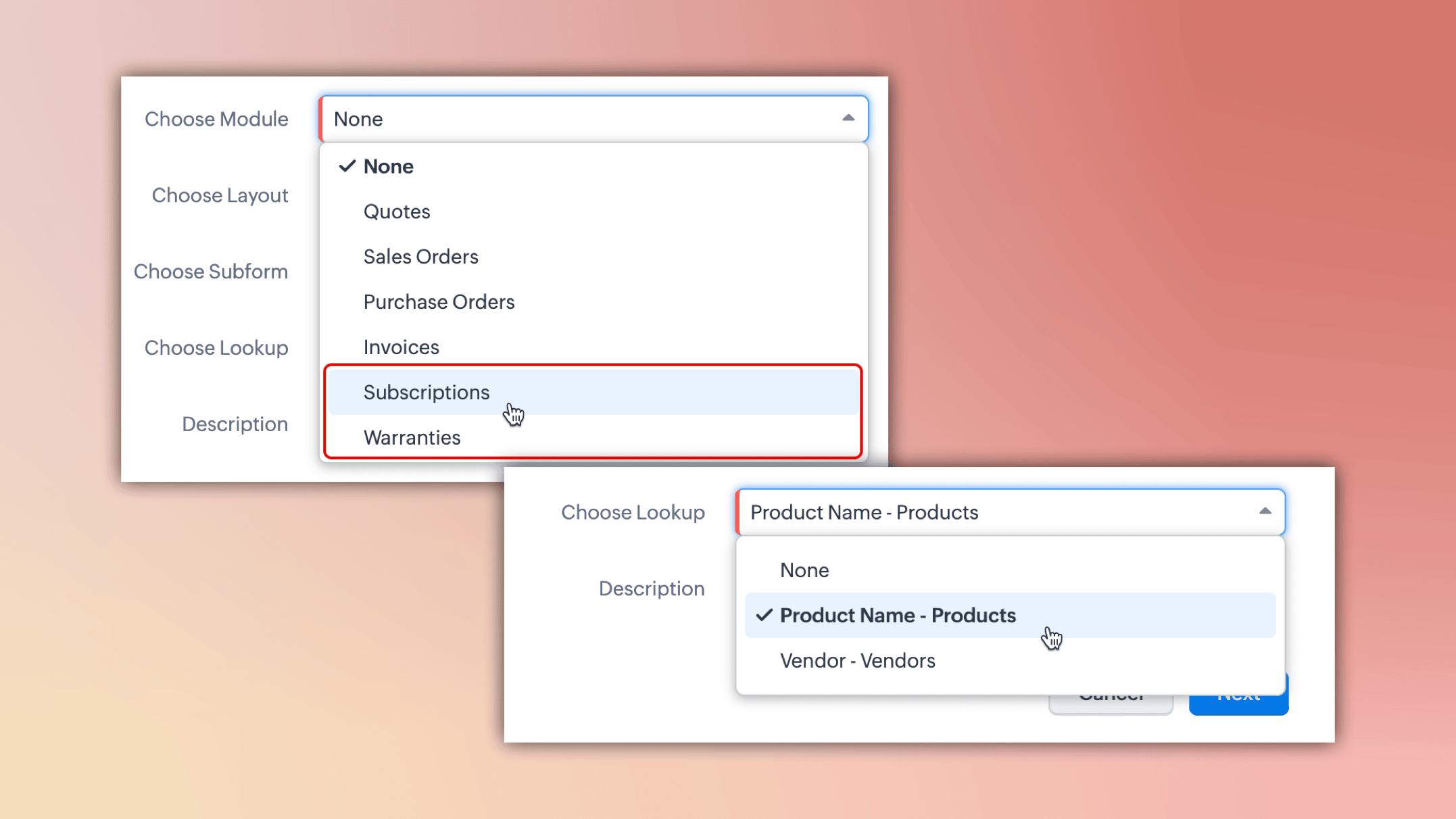
    • Guided selling in custom modules: You can now include custom modules alongside inventory modules in guided selling flows.
    (image via zoho)

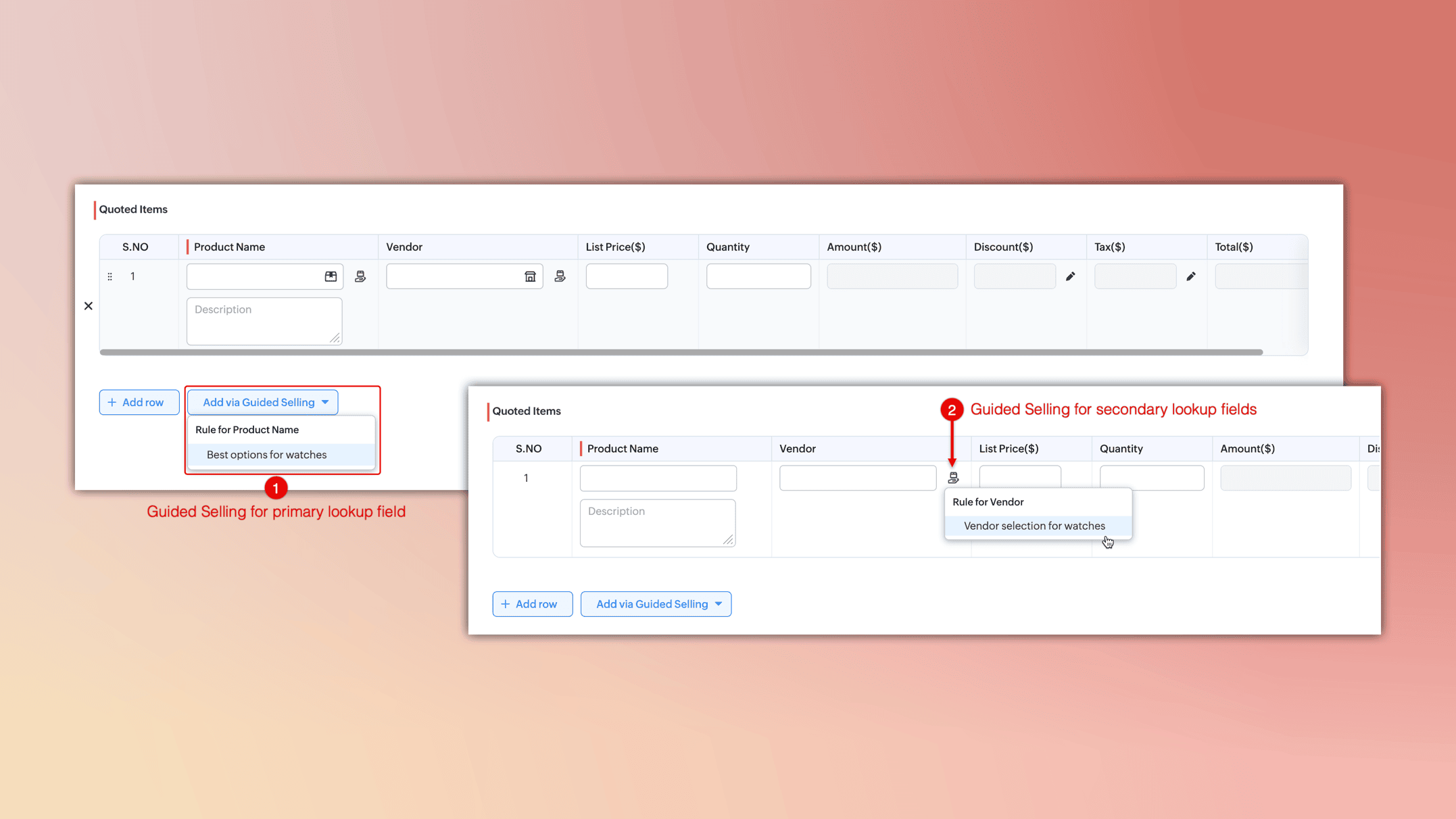
    • Better management of lookup fields: If multiple lookup fields exist in a subform, each will display its own access to guided selling.
    (image via zoho)


    These improvements are already available in data centers in Australia, Japan, and China and will be rolled out to other centers in the coming days.


    Learn about the projected launch of Zoho Creator for 2025.

    Zoho Creator has outlined its roadmap for the first half of 2025, introducing a series of features designed to enhance user experience and anticipate future needs. Here are some of the upcoming updates:

    • Dashboards in pages: Integrate visually appealing dashboards into your pages for better information presentation.
    • Visual workflow builder: A new drag-and-drop workflow builder simplifies process automation.
    • Mobile app metrics: Gain detailed insights into user engagement and performance in your mobile applications.
    • Enhanced audit logging: Track all user actions comprehensively for better governance.
    • Improvements in payment gateways: Manage payment gateways and their authorizations from a centralized space.
    • Environment support for custom APIs: Thoroughly test your custom APIs before live deployment.
    • And much more.


    Additionally, the Zoho Creator Launchpad page has been launched, allowing you to experience firsthand the AI-powered capabilities integrated into the platform.


    These initiatives highlight Zoho Creator’s commitment to providing advanced tools that drive efficiency and innovation in application development.


    Screening Bot for automating candidate pre-selection in Recruit.

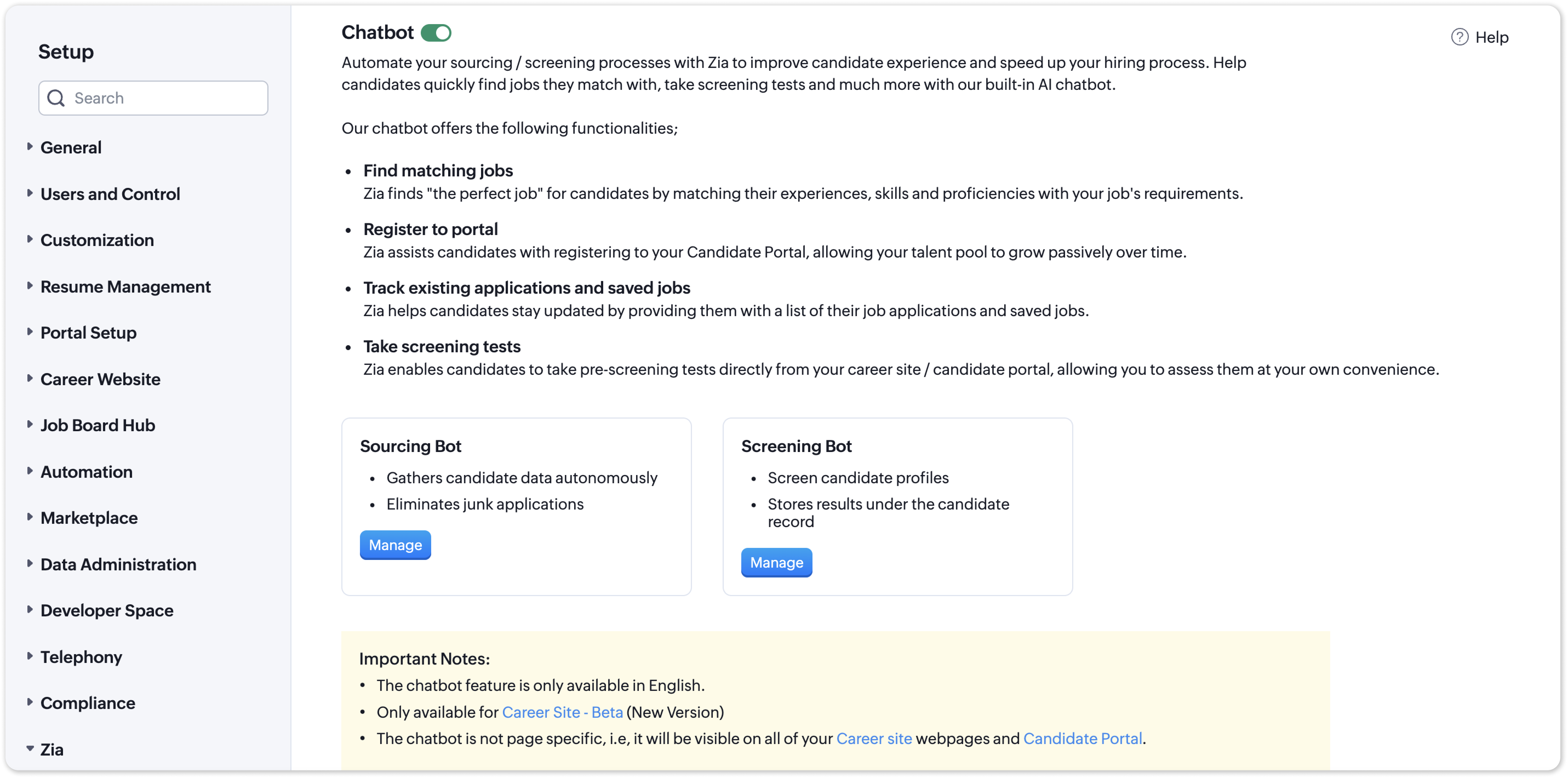
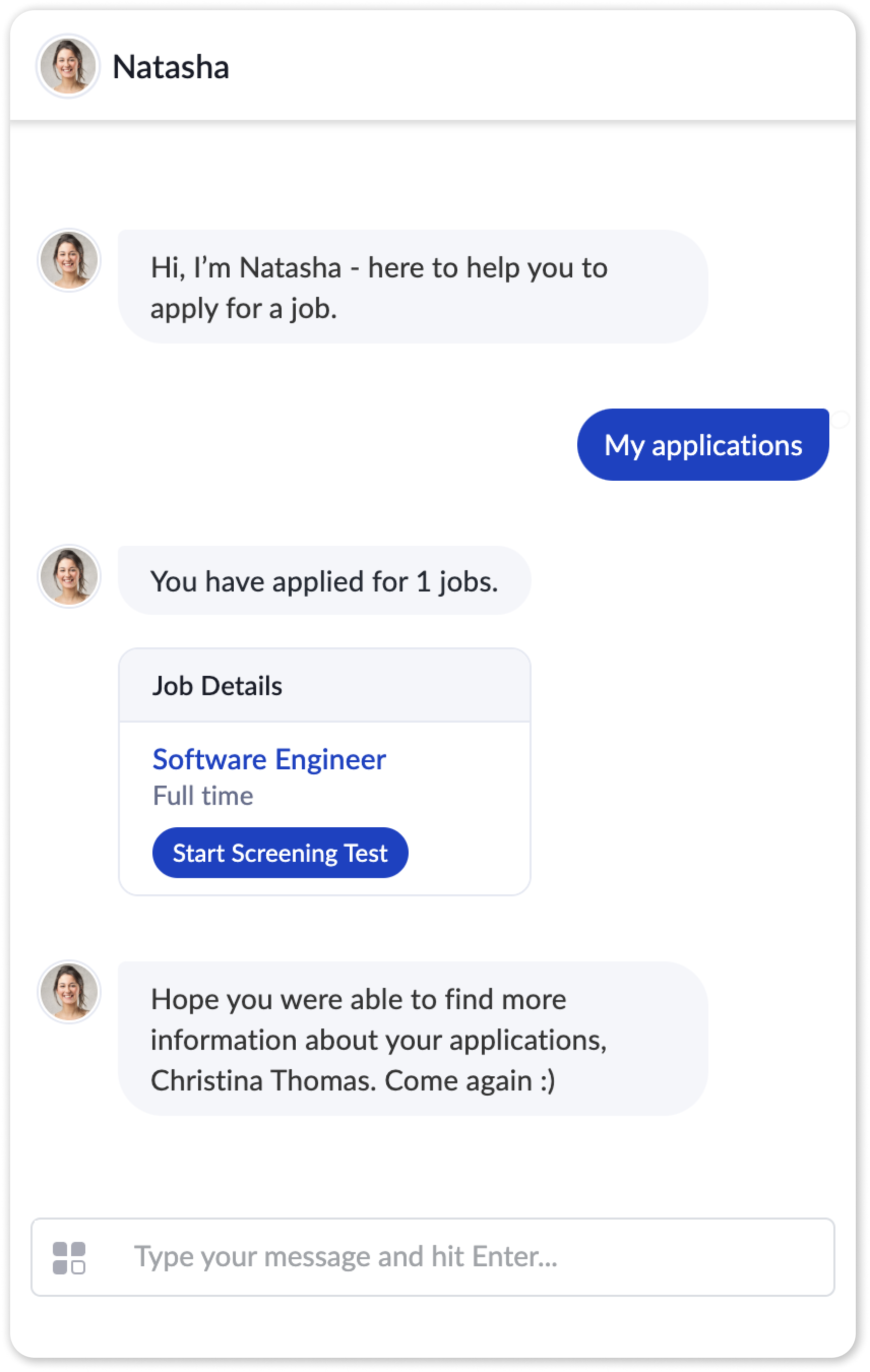
    Zoho Recruit has introduced the Screening Bot, a tool designed to streamline candidate selection by automating the pre-screening process.
     

    (image via zoho)
     

    (image via zoho)


    Key Benefits:

    • Automated evaluations: Candidates can now complete assessments directly from the job portal after applying.
    • Smart filtering: Set key questions to automatically qualify or discard candidates based on their responses.
    • Customizable process: Configure welcome messages, adjust result visibility, and allow candidates to add notes.
    • Email integration: Send assessments via email using predefined templates for easier management.
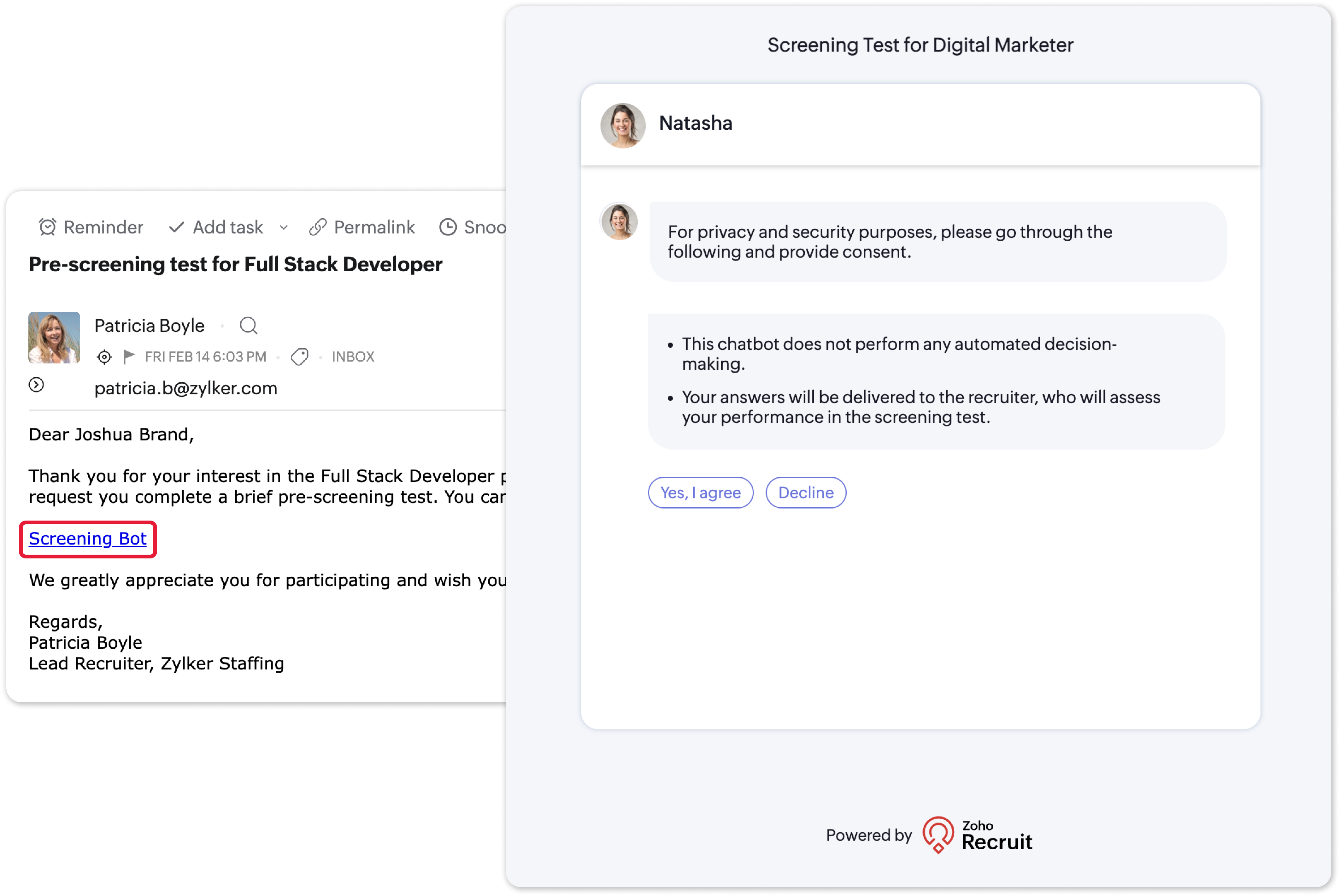
     

    (image via zoho)


    This new feature speeds up the hiring process, helping recruiters focus on the most suitable candidates from the very first interaction.


    Webinars on Sales IQ, One, and Bookings.

    Sell Smarter with Zoho SalesIQ

    Redefining business communication with Zoho Cliq in Zoho One

    Zoho Bookings & Zoho Contracts for Financial services

    Do you want to add these new features to your Zoho system? Let’s work together! Learn more about our Zoho consulting services and contact us for a free consultation.
  • Zoho News Catch-up: New ‘Queries’ feature in CRM and improvements in WhatsApp Business integration, News in Desk, Social Toolkit in Zoho Social, updates in Analytics and Creator, CRM, Desk, and FSM Webinars

    Welcome to our catch-up, where you’ll be in the know of all the latest Zoho updates in one place!


    CRM improves access to dynamic data with ‘Queries’ and updates in the integration with WhatsApp Business


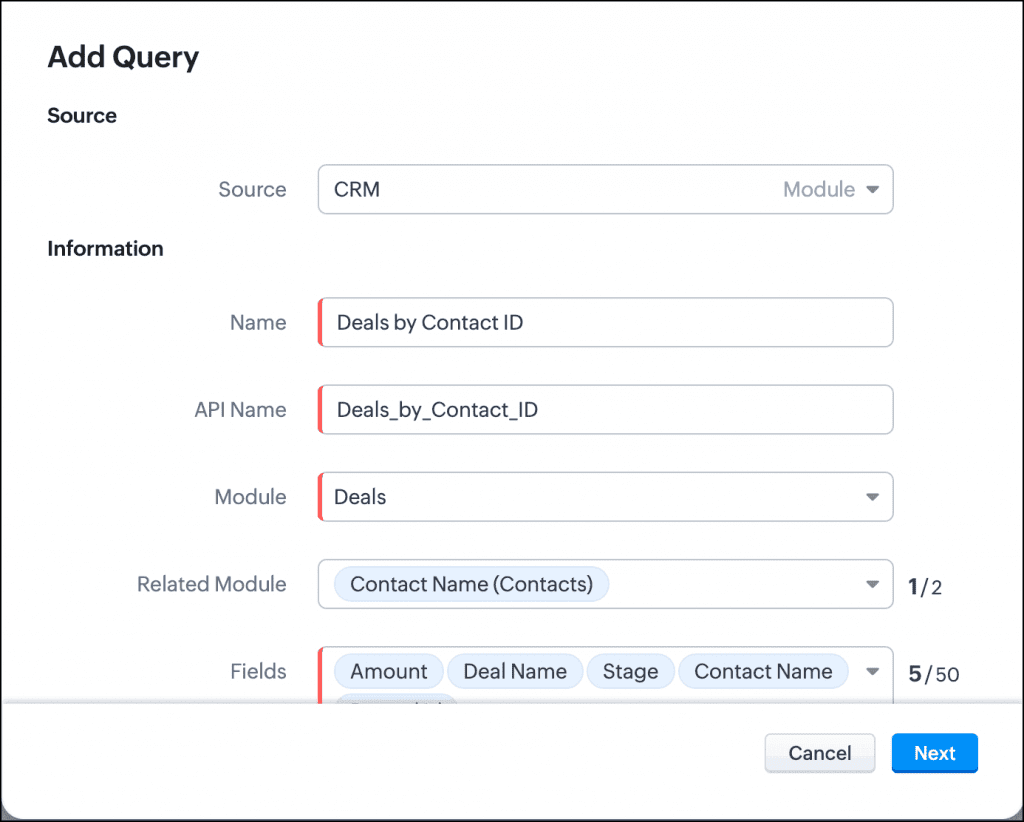
    Now you can dynamically access relevant data directly from Zoho CRM and third-party services. With “Queries,” you get the information you need without complications. Here are some of its key features:

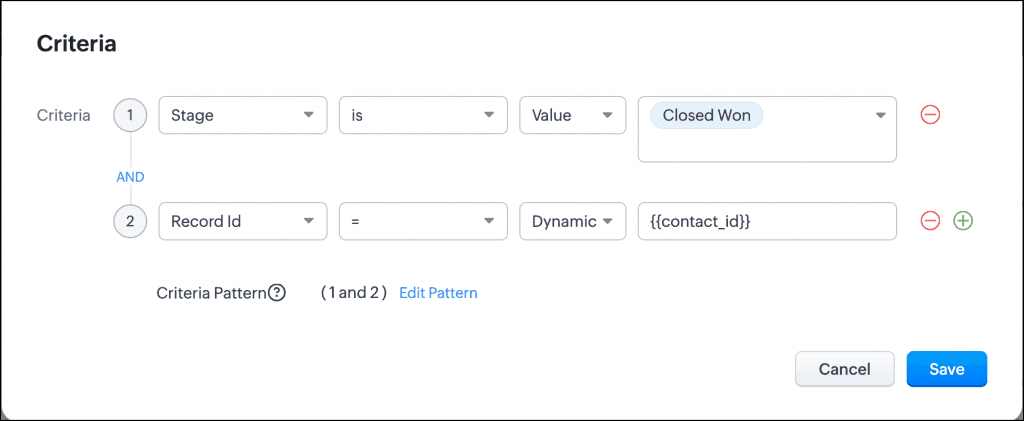
      • Dynamically query data: Retrieve information from CRM or external services and present it your way. For example, display only the closed deals of a contact on a canvas.
      • Easy configuration: Write queries tailored to your business needs and associate them with relevant CRM functions like Canvas or Kiosk.
      • Advanced integration: Use COQL, REST API, and more to build your queries. Soon, sources like GraphQL and cloud databases will be added.
      • Variables and serializers: Customize your responses using dynamic variables and JavaScript to efficiently process data.


    Query components:

    Query: This is the core of the function, where you define what data is needed and how it should be retrieved. Queries allow you to specify criteria and conditions to filter the desired information.

    (image vía zoho)


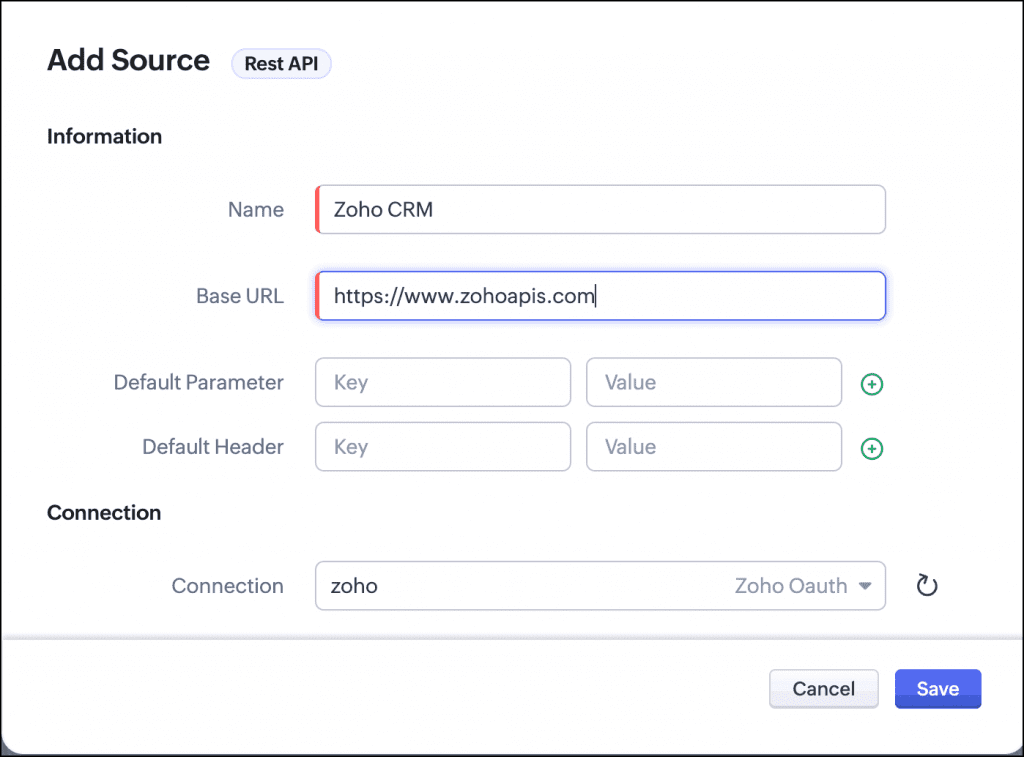
    Source: Refers to the origin of the data being queried. It can be Zoho CRM or third-party services, providing flexibility in data integration.

    (image vía zoho)


    Variables: These are dynamic elements within a query that allow searches to be customized and adapted according to different parameters or specific conditions.

    (image vía zoho)


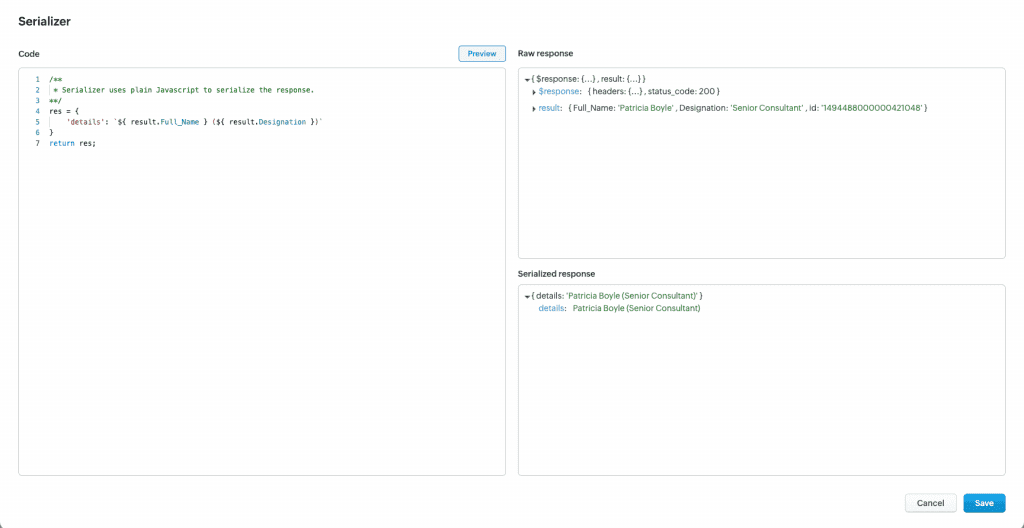
    Serializer: This component transforms retrieved data into a structured and readable format, making it easier to use and present in different applications or interfaces.

    (image via Zoho)


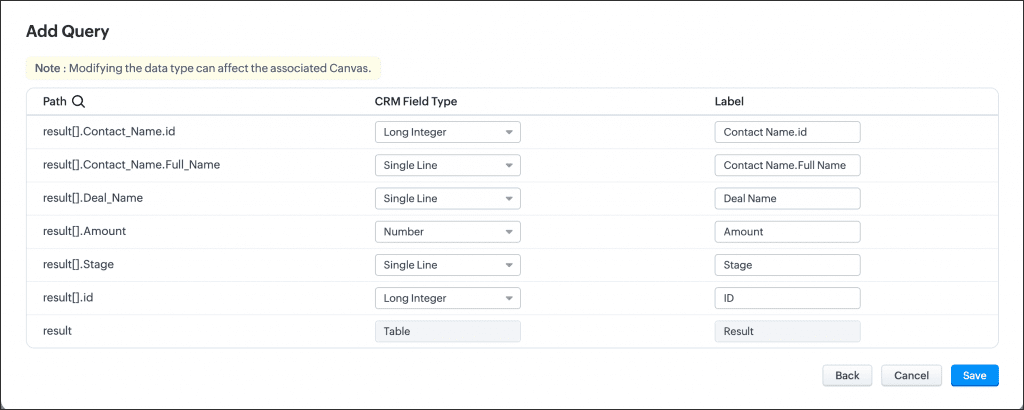
    Schema: Defines the structure and organization of the data within the query, ensuring that the information is presented in a coherent and understandable manner.

    (image via Zoho)


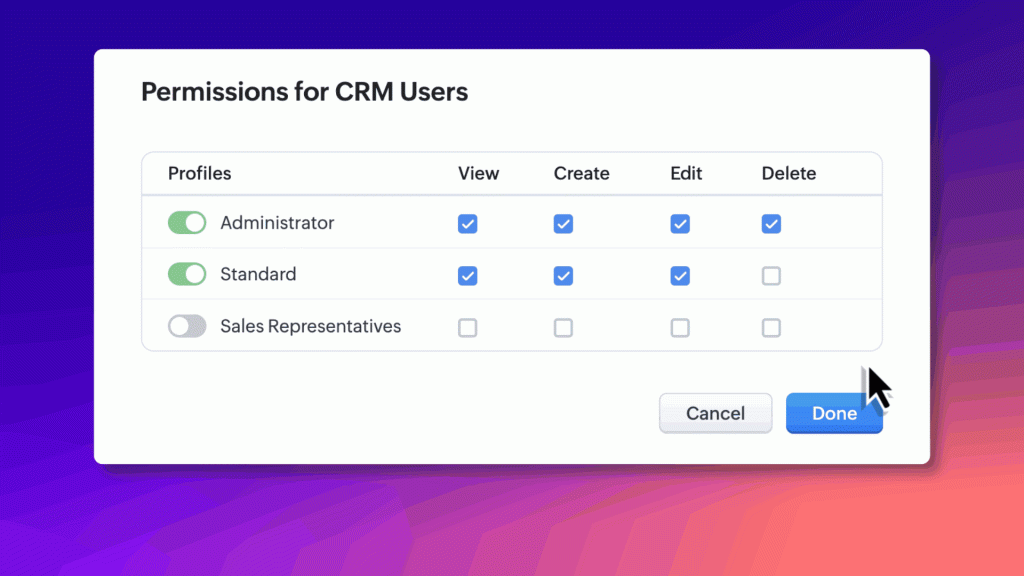
    Queries allow users to access their data directly in Zoho CRM. They can be associated with Canvas to display responses such as “field name and value” or lists. In Kiosk Studio, queries are used in screens or criteria components, improving data visibility and control.


    Availability

    The “Queries” feature is available in the Enterprise/Zoho One and Ultimate/CRM Plus editions, and will soon be available in the Professional edition. Try it out and save time!

    Zoho has introduced updates to the WhatsApp for Business integration in CRM, designed to provide more context and clarity to your business communications.


    Here are the improvements:

      • Manual chat initiation: You can now start conversations with your leads and customers directly from Zoho CRM. This new feature allows you to send message templates manually, giving you more control over your interactions.

    (image via Zoho)


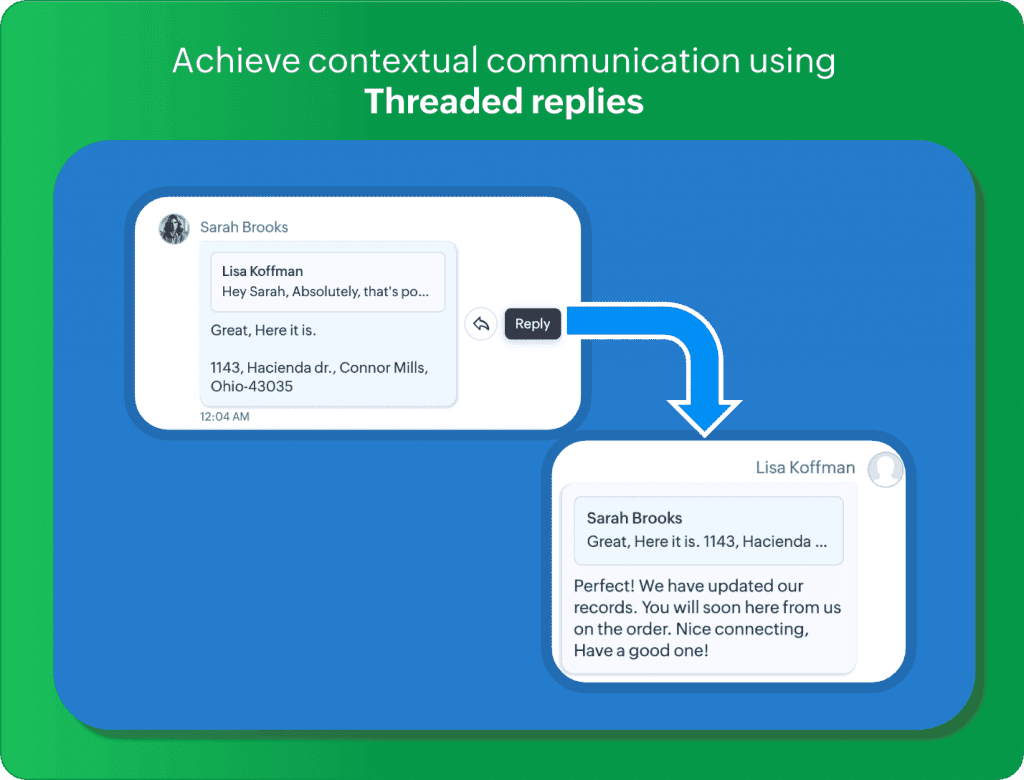
      • Threaded replies: Keep your conversations organized with threaded replies. This feature lets you respond to specific messages, ensuring clear and contextual communication with your customers.

    (image via Zoho)


      • Audio preview: No need to download audio files to listen to them. With the new audio preview feature, you can play voice messages directly within Zoho CRM, saving time and maintaining privacy.


    These updates are designed to enhance the convenience and efficiency of your business messaging. We’d love to hear your feedback on these features!


    Calculate costs and metrics with formula fields in Desk

    You can now calculate service costs, ticket age, and other metrics in Zoho Desk with Formula Fields, available in early access.

    (image via Zoho)


    What are Formula Fields?

    They are custom fields that allow automatic calculations by combining functions, operators, and system data. You can use them for:

    • Numerical calculations: service costs, refunds, expenses.
    • Dates: time elapsed since a ticket was created, SLA expirations.
    • Dynamic text: personalized messages based on values from other fields.


    Benefits for your support team

    • Fewer manual errors: automate cost or key date calculations.
    • Time savings: avoid repetitive calculations.
    • Real-time data: automatic updates for quick decision-making.


    Use cases

    • Calculate production costs in manufacturing.
    • Determine the total price of a product with taxes and discounts.
    • Set the expiration date of a warranty.

    This new field helps you optimize processes and improve accuracy in Zoho Desk.


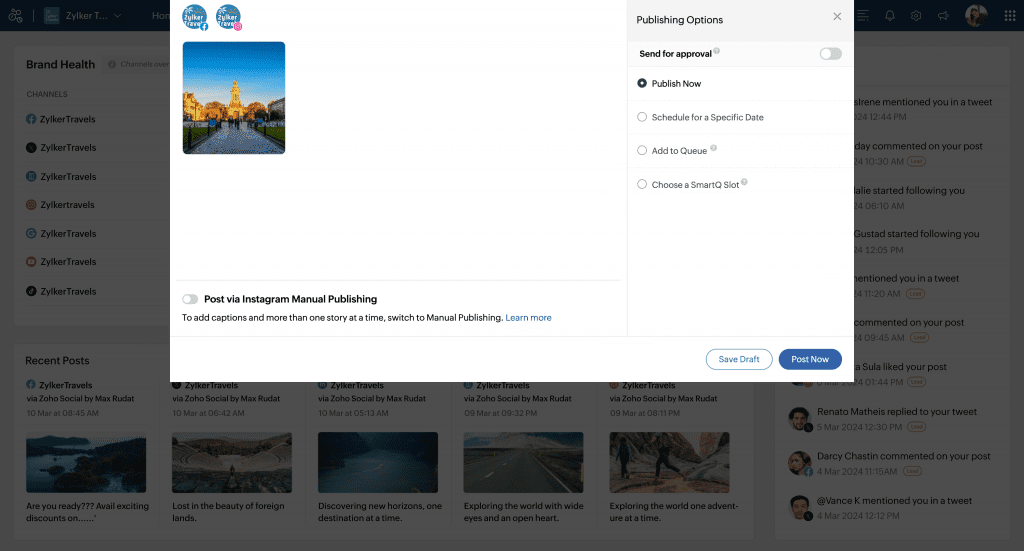
    Zoho Social introduces the new Social Toolkit to enhance your presence on Social Media


    Zoho has launched the Social Toolkit, a comprehensive dashboard designed to enhance social media presence. This tool allows users to create engaging profiles and share content that captures their audience’s attention. Available to everyone online, the Social Toolkit offers key features such as:

      • Instagram Grid Builder: Plan your Instagram grid by splitting images into sections for a visually appealing design.

    (image via Zoho)


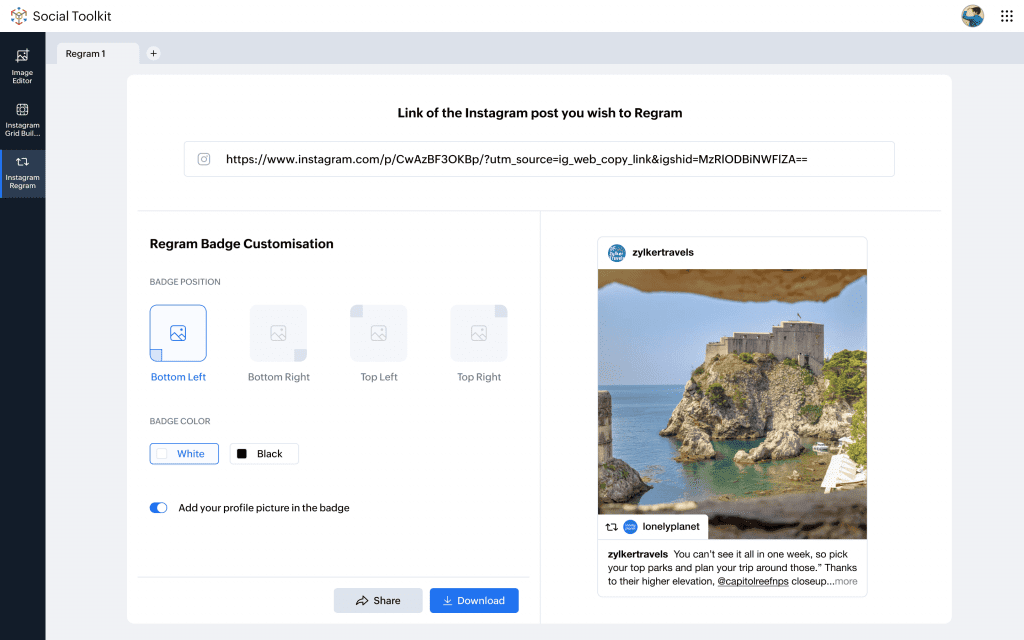
      • Instagram Regram: Easily repost content from other users, giving proper credit, to expand your reach.

    (image via Zoho)


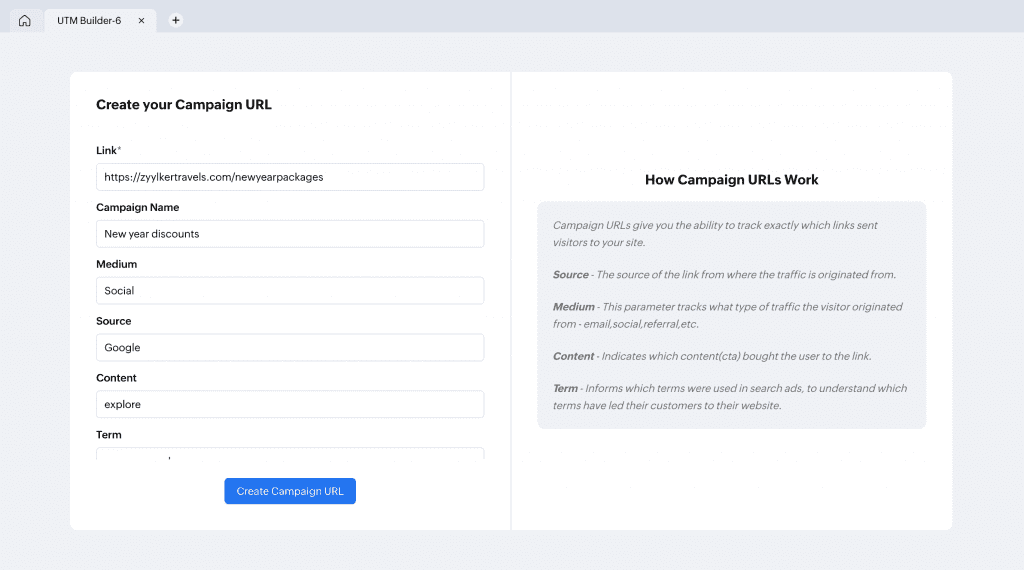
      • Campaign URL Builder: Create customized URLs for marketing campaigns, enabling effective performance tracking.

    (image via Zoho)


    The Social Toolkit is designed for content creators, marketers, and anyone looking to improve their Instagram feed—and it’s completely free!


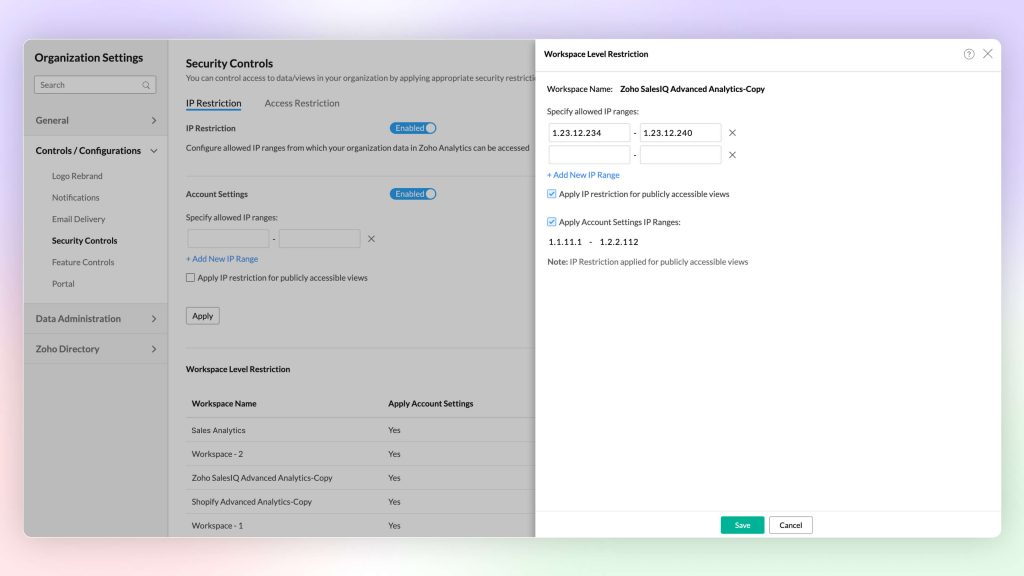
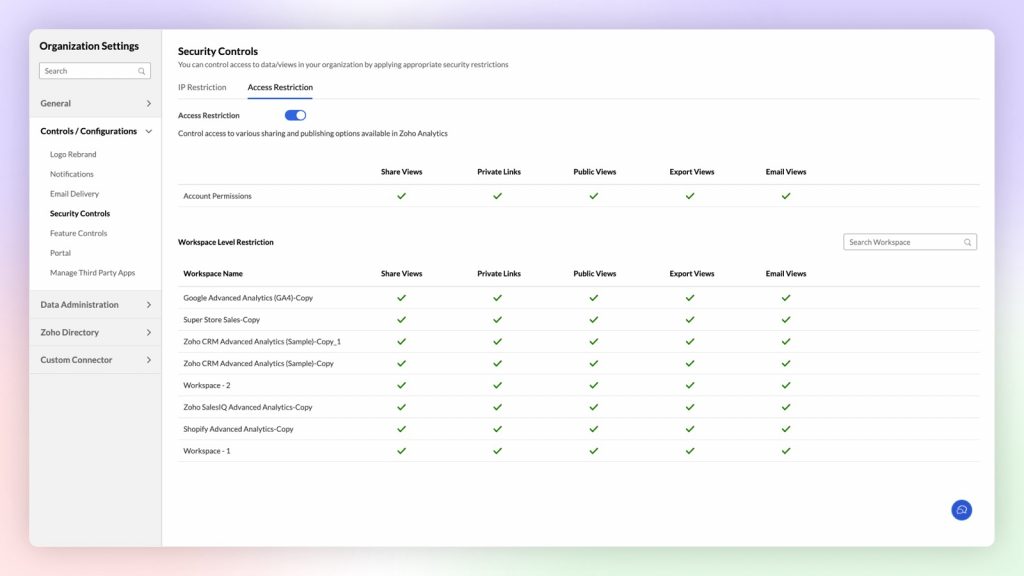
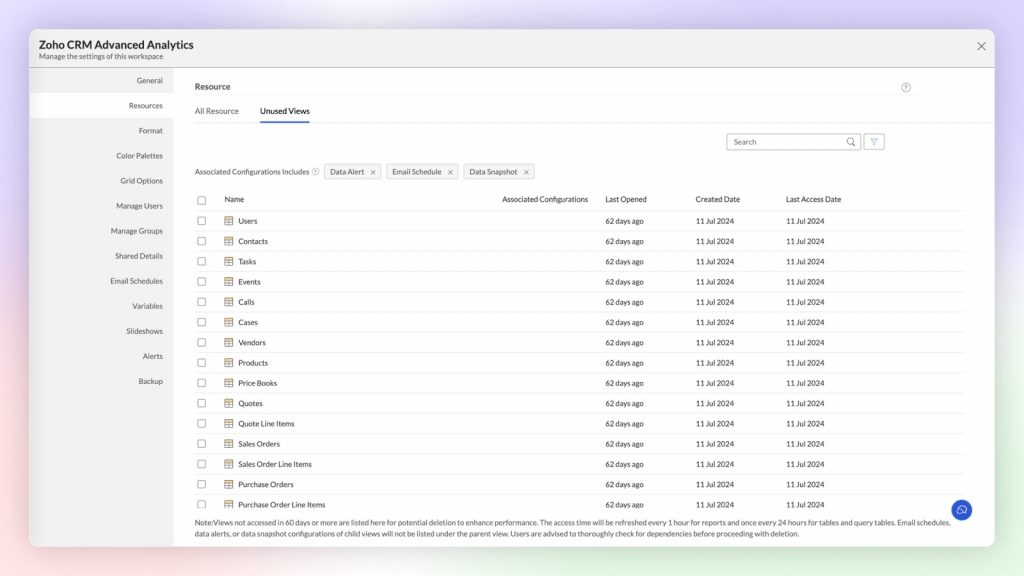
    Latest features and improvements in Zoho Analytics

    Zoho Analytics has introduced a series of updates that enhance data analysis, making it more powerful and interactive. Key new features include:


      • Expanded Database Support: Four new databases—MS Access, OLEDB, Presto, and Trino—are now integrated, enabling real-time connectivity for actionable insights.
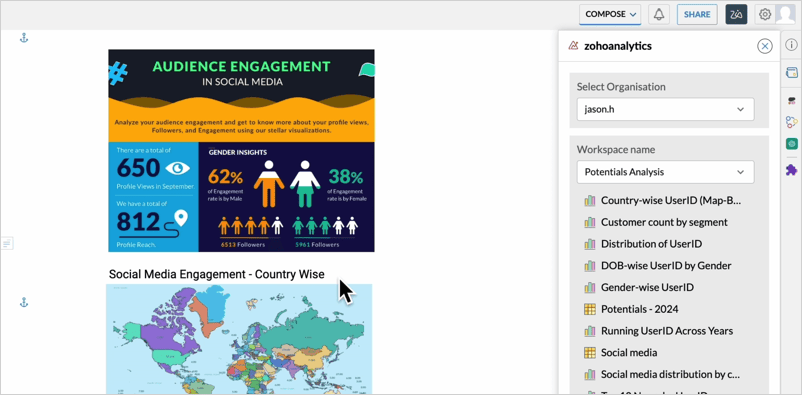
      • Integration with Zoho Writer: Turn your data into stunning visuals with the Zoho Analytics extension for Zoho Writer, making it easy to create impactful infographics directly within your documents.

    (image via Zoho)


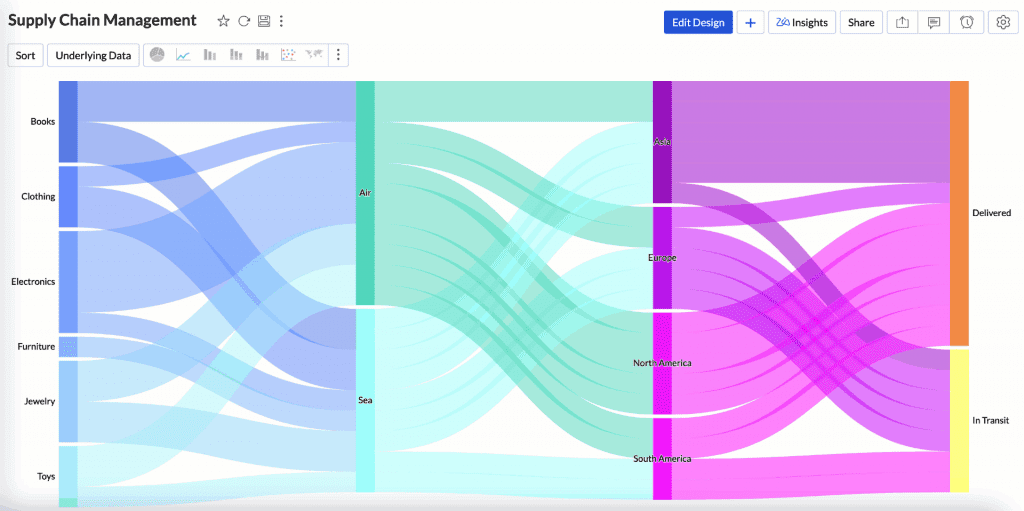
      • Enhanced Sankey Chart Interaction: Click on any data point to track the entire flow, improving data navigation and understanding.

    (image via Zoho)


      • New Modules/Fields: Added fields include Account Contact Roles and Opportunity Splits in Salesforce, as well as MRR in Zoho Books.
      • Improvements in Code Studio: Admins now have access to Code Studio, providing greater control and customization.
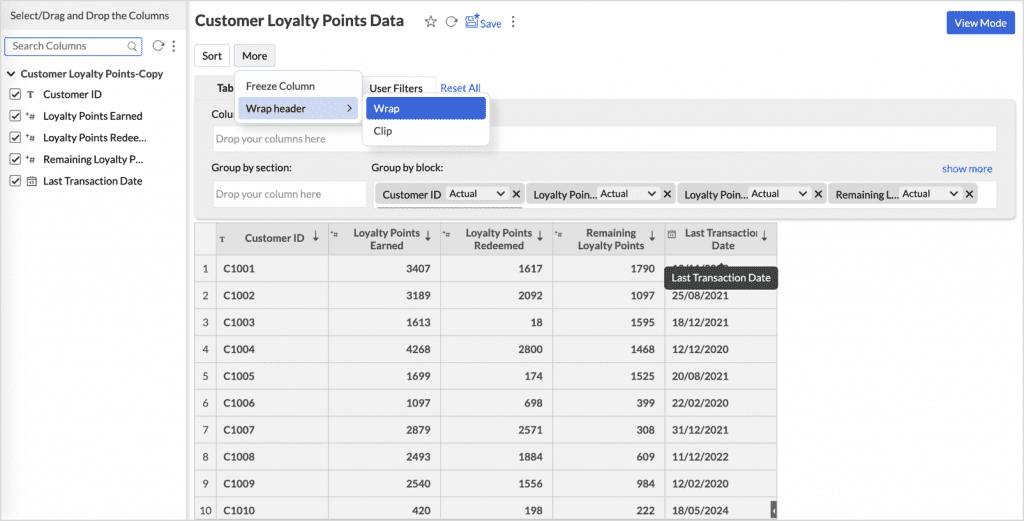
      • Tabular View: Wrap & Clip Text: Manage long headers with options to improve readability or maintain a compact layout.

    (image via Zoho)


    These updates are designed to boost efficiency and clarity in data management.


    Zoho Creator: Mandatory verification of custom domains in the portal

    Starting February 10, 2025, Zoho will require verification of all custom domains used in portals. This change aims to enhance security and ensure a safe user experience. Unverified domains will have restricted access, preventing users from logging in.


    What you need to do:

    Verify your custom domains as soon as possible to avoid disruptions.
    ✔ Emails with detailed instructions will be sent to affected users, including super admins and customer portal admins.
    ✔ Follow the guidelines in the emails or visit the “Verify Custom Portal Domain” help page for assistance.


    Zoho encourages users to verify all unverified domains to ensure smooth operations. For further support, users are advised to contact Zoho support.


    Webinars on CRM, Desk and FSM

    Setup assistants in CRM for simplified record creation

    Master Ticket Management with Blueprint

    Zoho FSM Product Demo Webinar

    Do you want to add these new features to your Zoho system? Let’s work together! Learn more about our Zoho consulting services and contact us for a free consultation.
  • Zoho News Catch-up: ZIA Answer Bot introduces improvements, CRM prioritizes profitable deals, PDF customization in Invoice, Updates in Creator, Webinars on Expense, Marketing Automation, and Creator.

    Welcome to our catch-up, where you’ll be in the know of all the latest Zoho updates in one place!


    Enhancement of self-service capabilities with AI-based Zia Answer Bot


    Zia Answer Bot now offers greater accuracy that enhances self-service, allowing users to resolve queries independently. By utilizing the knowledge base (KB), it provides quick and accurate responses to agents and customers, thanks to its self-learning with available articles. It supports 13 languages, ensuring fast and effective assistance worldwide.


    Zia Answer Bot for Customers

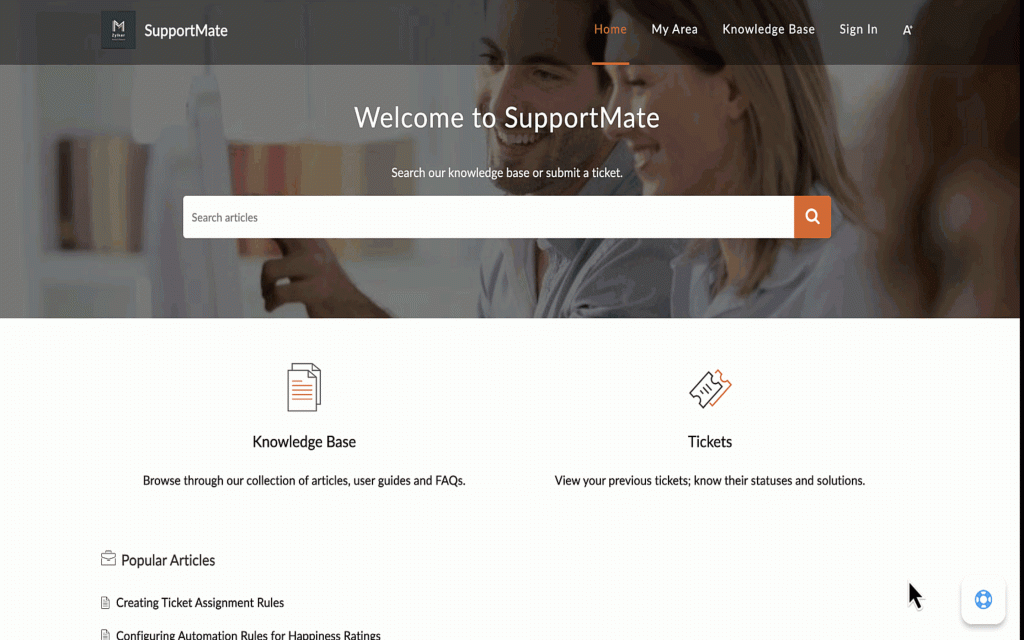
    Now you can resolve your queries by accessing the resources available in the help center. With Zia Answer Bot, you will receive quick assistance and access relevant information without having to search through multiple articles.

    (image vía zoho)


    Zia Answer Bot for Agents

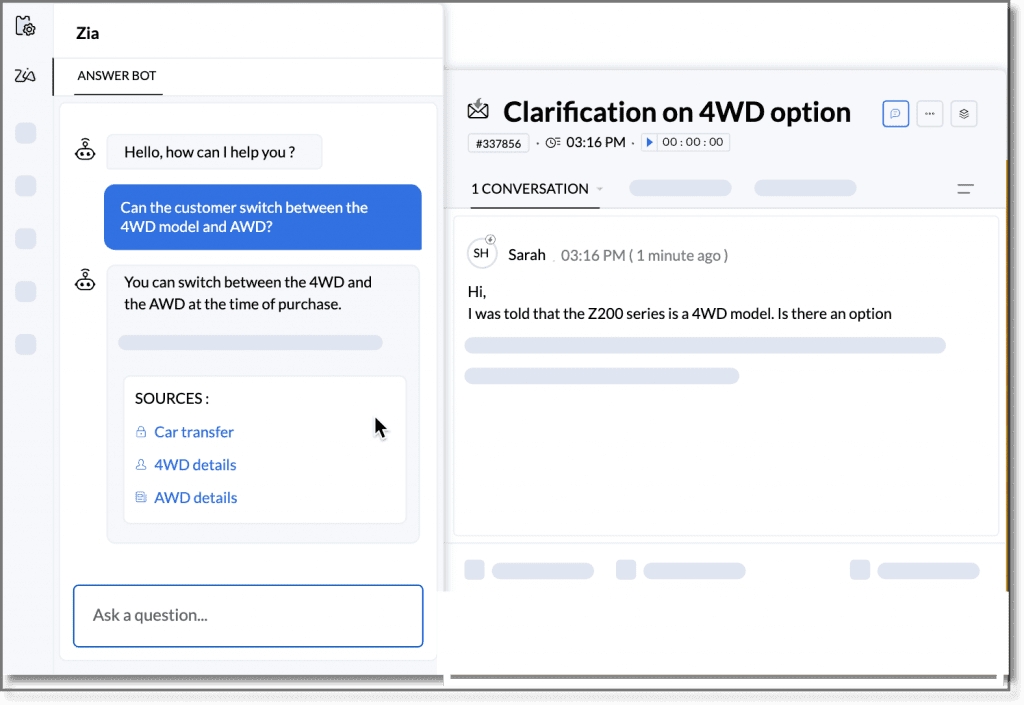
    If you are a support agent handling multiple interactions, you can now use Zia Answer Bot to quickly access relevant knowledge base articles and learn the key steps to resolve queries without leaving the detailed view of the ticket.

    (image vía zoho)


    Training Zia Answer Bot

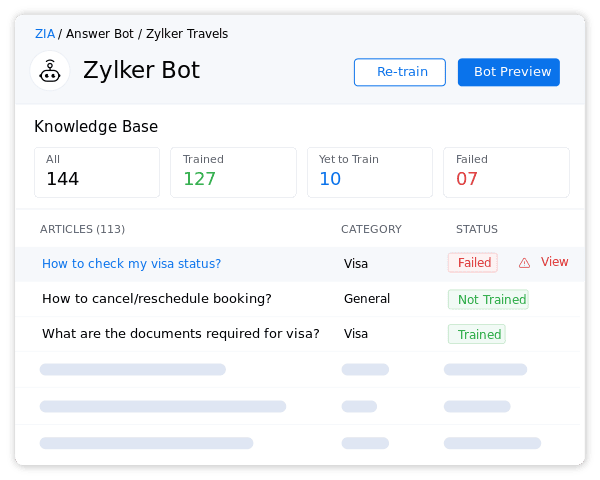
    Once created and saved, Zia Answer Bot begins to train automatically with the available articles in the knowledge base. After the first training round, you can view the status, including how many articles it has trained, how many are pending, and if there were any failures in the process. Each time an article is created or updated, you have the option to manually retrain the bot, although the scheduler is set to do so every thirty minutes.

    (image vía zoho)


    Best Practices for Optimal Results

    To achieve the best results with Zia Answer Bot, it is recommended to use clear and simple language, explaining technical terms when necessary. It’s important that the article is in one of the 13 languages supported by the bot and contains between 100 and 100,000 characters; ideally, each paragraph should not exceed 1,000 characters. Additionally, structuring the content with clear and concise titles and subtitles facilitates the bot’s comprehension. Keep articles updated and consider including frequently asked questions in help articles to effectively address the most common inquiries.


    This feature is available for users in the U.S., AU, EU, and IN data centers.


    Identify and prioritize profitable deals in Zoho CRM

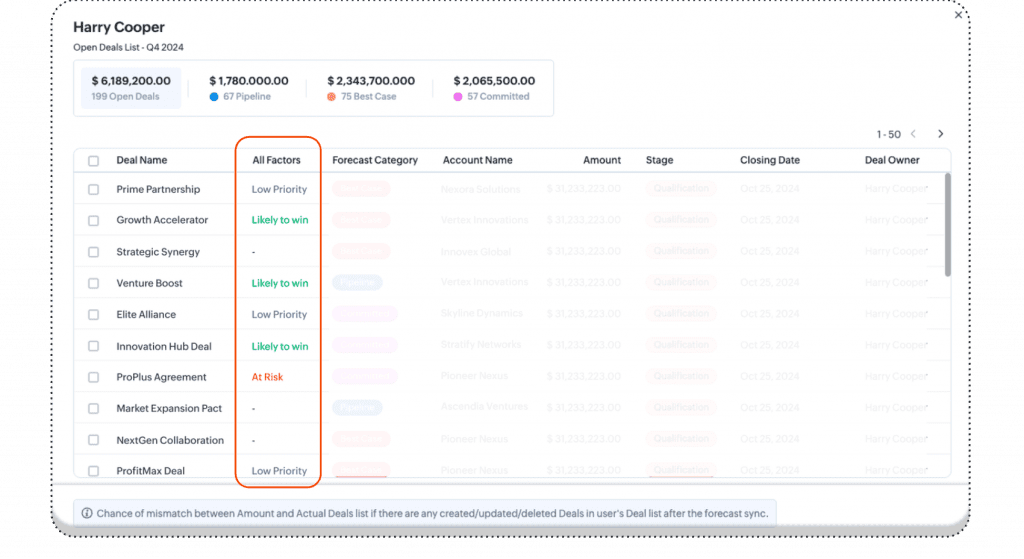
    You can now view deals with success probability tags, such as “likely to win,” “at risk,” or “low priority.” This feature allows prioritization of deals with a higher chance of closing within the forecasted period, optimizing the sales strategy.


    (image vía zoho)


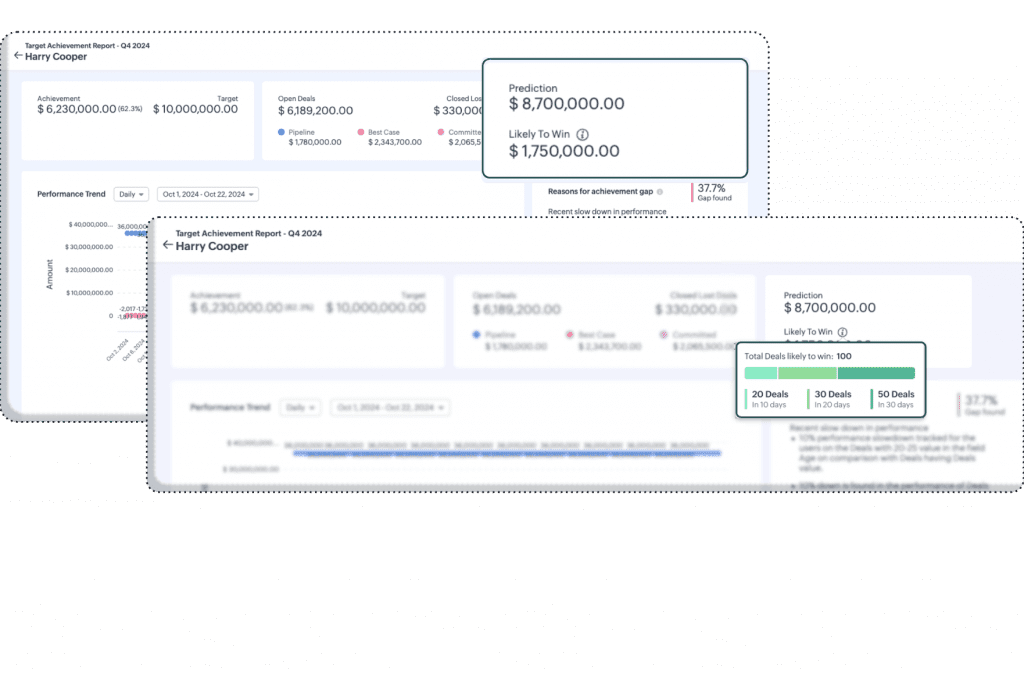
    (image vía zoho)


    Expected Revenue Summary

    Zoho CRM now provides a summary of potential revenue based on “likely to win” deals. Additionally, you can see how many deals are projected to close in the next 10, 20, or 30 days, giving a clearer view to anticipate income flows and make strategic adjustments.


    These improvements are available for users of the Enterprise and Ultimate editions in all data centers, except the IN data center.


    New PDF template customization features in Zoho Invoice

    Zoho Invoice has added features that allow you to further customize the appearance and functionality of your invoices, optimizing the presentation of your documents and adapting to the specific needs of your business. Here are the main improvements:


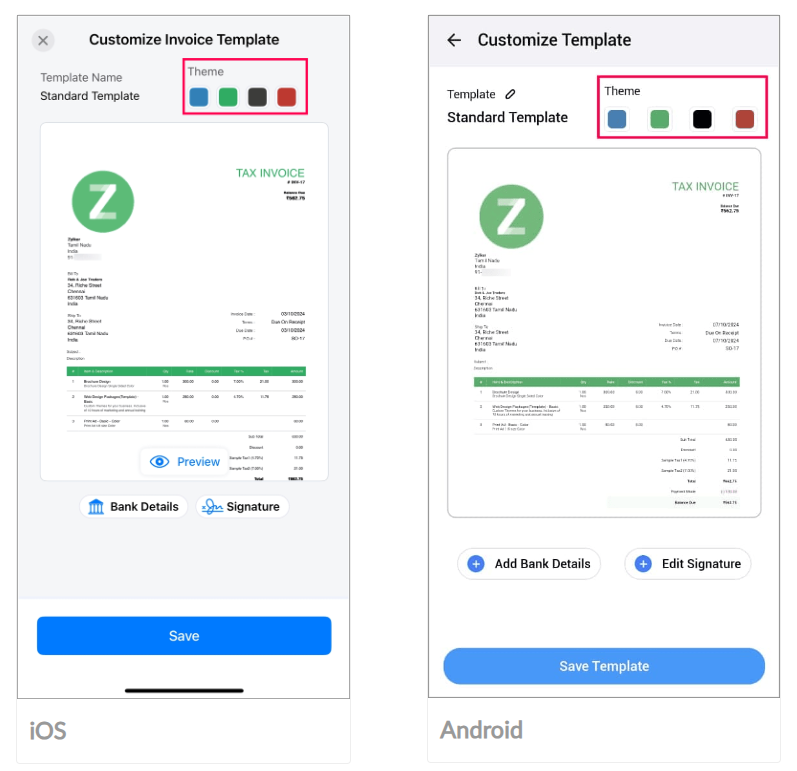
    Change the Template Theme
    You can now modify the color of your invoice templates, choosing from four options that match your preferences. This allows your invoices to look more professional and distinctive.


    (image vía zoho)


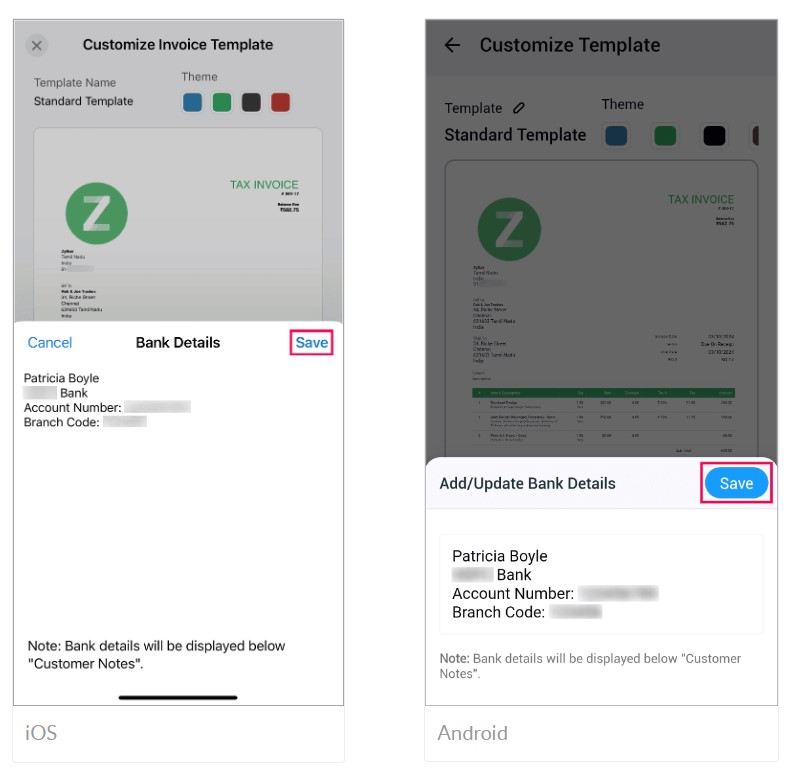
    Add Bank Details
    You can include your bank details on invoices, making it easier for your customers to make payments and streamlining the collection process. These details will appear below the customer notes on the invoice.


    (image vía zoho)


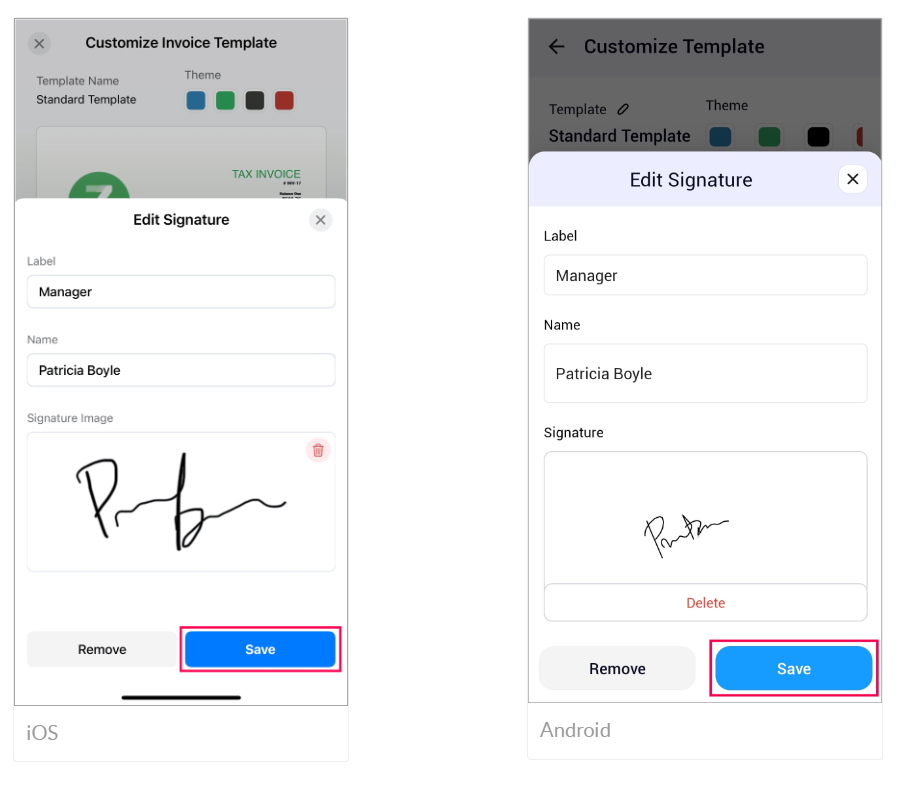
    Add Your Signature
    You can now add your signature to transactions, enhancing document security and ensuring they are authorized by you. You can draw it or upload it from your device.

    (image vía zoho)


    Enable Modules According to Your Needs
    You have the option to activate the modules you will use in your business and deactivate those that are not necessary, increasing efficiency and optimizing operations by focusing only on what you need.


    These improvements are available in the Zoho Invoice app for iOS and Android platforms. For more details, check the help documentation.


    Field updates and improvements in Zoho Creator

    Zoho Creator has implemented new functionalities to enhance the user experience and optimize application development. The main updates are detailed below:


    JS Widgets API 2.1

    You can now develop more powerful widgets with version 2.1 of the JavaScript API. This update includes support for Zoho Creator APIs v2 and v2.1, as well as the inclusion of meta and publishing APIs. It also allows the use of custom APIs in widgets, facilitating the creation of dynamic and responsive components.


    Multiple Field Update in Deluge

    A new task has been introduced in Deluge that allows multiple fields in a record to be updated with a single statement. This improves efficiency and reduces execution time by minimizing multiple calls in Deluge, optimizing application performance.


    Improvements in Pages

    Pages now offer advanced customization options for charts:

    • Date Grouping: You can group X-axis values by time ranges such as month, year, quarter, among others.
    • Y-axis Interval: It is possible to set specific intervals for Y-axis marks, improving data clarity.
    • Data Labels: You can now enable labels that permanently display Y-axis metrics on each section of the chart.
    • Theme Color: A custom theme color option has been added for charts via a color picker.
    • Drill Down: By clicking on the charts, you can configure the opening of detailed reports, providing deeper data analysis.
    • Filters: Admins can configure filters to allow users to adjust data visualization according to their specific needs.


    Backup Improvements

    Enhancements have been implemented for handling backups of large applications:

    • Backup File Structure: Data and files are now split into 256 MB zip files, making it easier to manage and download large volumes of information.
    • Backup Download: You can now download backups of up to 4 GB, surpassing the previous 1 GB limit, which improves scalability and reliability in data protection.


    Enhanced Search in the Staging Environment Page

    The search function in the Staging Environment page has been optimized, allowing you to filter and publish specific changes more efficiently. This update facilitates the management of components and modifications in the development environment.


    These updates are available for versions C5 and C6 of Zoho Creator in all data centers. For more information, consult the help documentation.


    Webinars on Expense, Marketing Automation, and Creator

    Transform your expense and travel management with Zoho Expense

    Personalize Customer Experiences with Zoho Marketing Automation

    Domains, controls, and security in Zoho Creator using Zoho Directory

    Do you want to add these new features to your Zoho system? Let’s work together! Learn more about our Zoho consulting services and contact us for a free consultation.
  • Zoho News Catch-up: New Analytics 6.0 and DataPrep 2.0, CRM integrates with Workdrive, Zoho launches PDF Editor, Improvements in Zia Presentation, Zoho Webinars on Apple, CRM

    Welcome to our catch-up, where you’ll be in the know of all the latest Zoho updates in one place


    New Zoho Analytics 6.0 improves data analysis and visualization experience

    Zoho Analytics 6.0 is here! The update brings AI-powered tools that enable any team member to analyze data and make decisions quickly without constantly relying on technical support.

    Both business users, analysts, and data scientists will be able to collaborate on a single platform, facilitating data visualization, predictive analysis, and much more. A powerful and accessible solution for everyone looking to make the most of their data! Here are the main updates and improvements in this new version.


    Data Connectors and Data Management

    • New connectors like Greenplum and Vertica.
    • Support for Google Analytics 4.
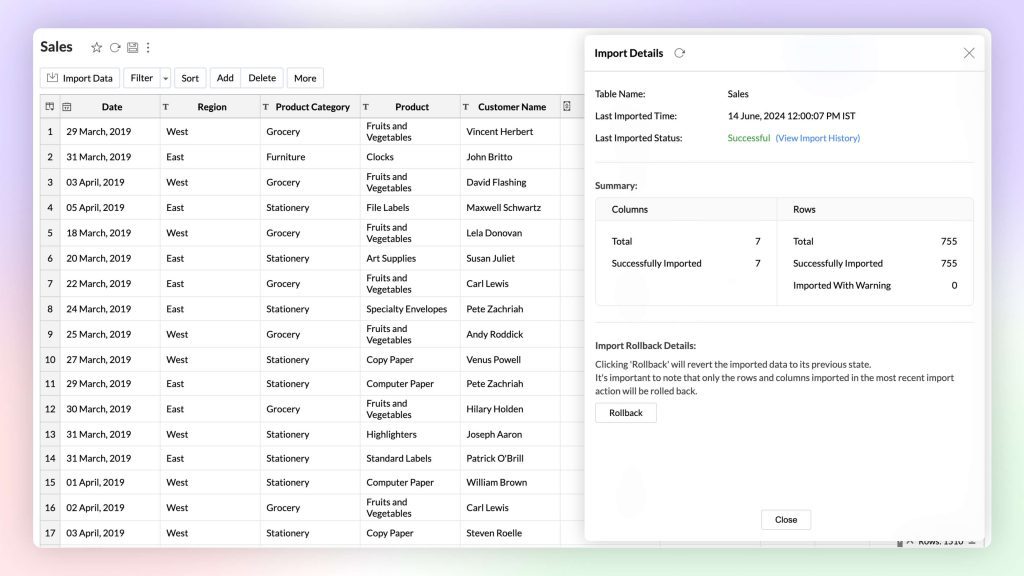
    • Import of compressed files to speed up data loading.
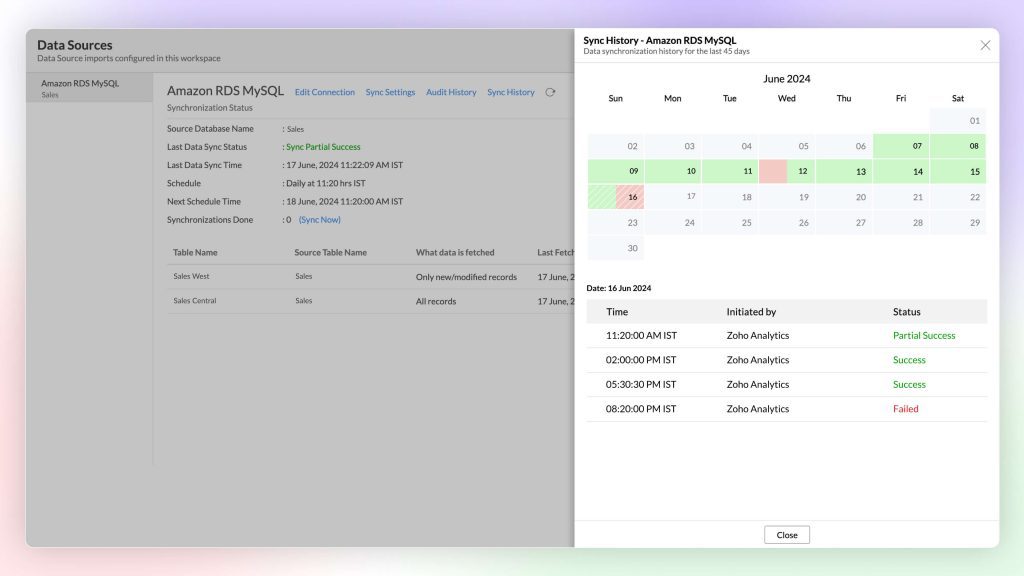
    • Enhanced synchronization of enterprise data.
    • New functions to automate data source setup.

    (image vía zoho)


    (image vía zoho)


    Visual Analytics

    • Support for treemaps.
    • Custom geographic maps.
    • Improvements in element layout on dashboards.
    • New options to modify and rearrange components.
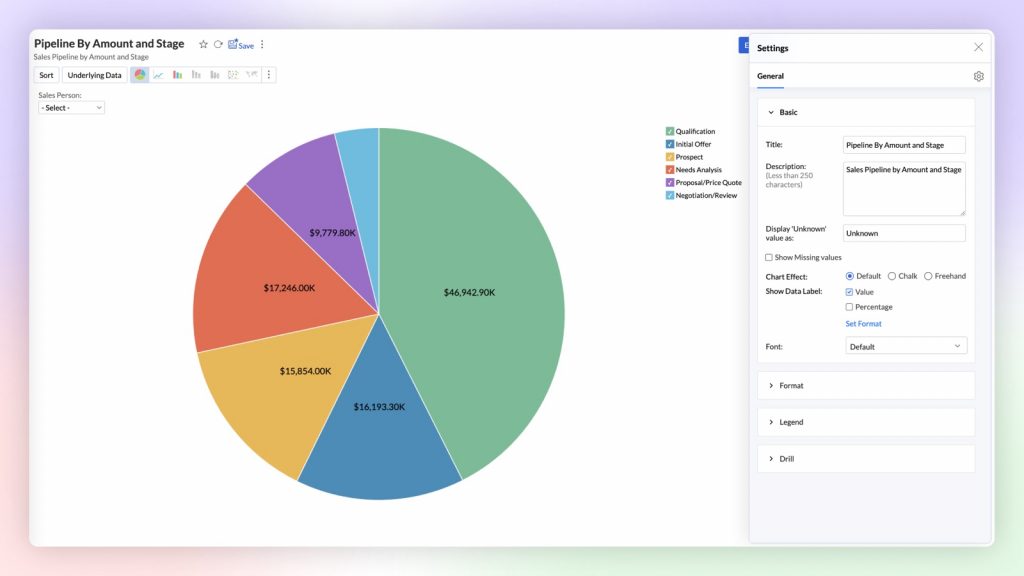
    • Enhanced visualization for representing complex data.

    (image vía zoho)


    Generative Analysis with Built-in AI

    • Zia now responds in multiple languages, including Spanish.
    • Automatic generation of predictive analyses.
    • Suggestions for complementary questions.
    • Improved result visualization with graphical narratives.
    • Conversational questions for complex analysis.

    (image vía zoho)


    (image vía zoho)


    Predictive AI

    • Real-time anomaly detection.
    • Improved prediction algorithms.
    • Options to predict based on external factors.
    • Configurable alerts to detect data changes.
    • Clear visualization of predictions on dashboards.

    (image vía zoho)


    (image vía zoho)


    Data Science and Machine Learning Studio

    • AutoML with no programming needed.
    • New tools to create and validate machine learning models.
    • Integration with Python Code Studio for custom development.
    • Pre-configured models to facilitate analysis.
    • Greater flexibility in creating AI models.

    (imagen vía zoho)


    (imagen vía zoho)


    Platform Extensibility

    • Linked Workspaces to share reports across workspaces.
    • No-code custom connector creation.
    • Ability to publish connectors in Zoho Marketplace.
    • Support for advanced integrations.
    • Tools to extend the platform’s functionality.

    (image vía zoho)


    (image vía zoho)


    Security Improvements

    • HIPAA compliance.
    • Enhanced multi-factor authentication.
    • API auditing for greater control and transparency.
    • Data encryption during import and export.
    • Advanced options for managing access to sensitive data.

    (image vía zoho)


    (image via zoho)


    Other Updates

    • Improved report processing speed.
    • More intuitive interface for creating dashboards.
    • New options for managing and organizing report views.
    • Ability to easily export and share dashboards.
    • General improvements to user experience and performance.

    (image vía zoho)


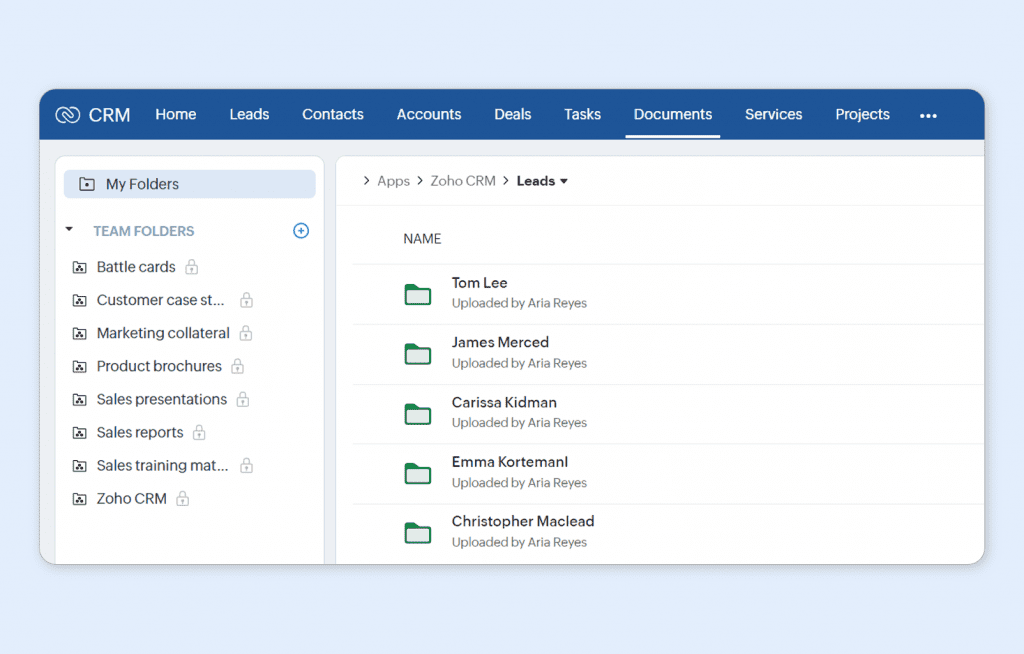
    Zoho CRM integrates with Workdrive for more efficient file management and collaboration

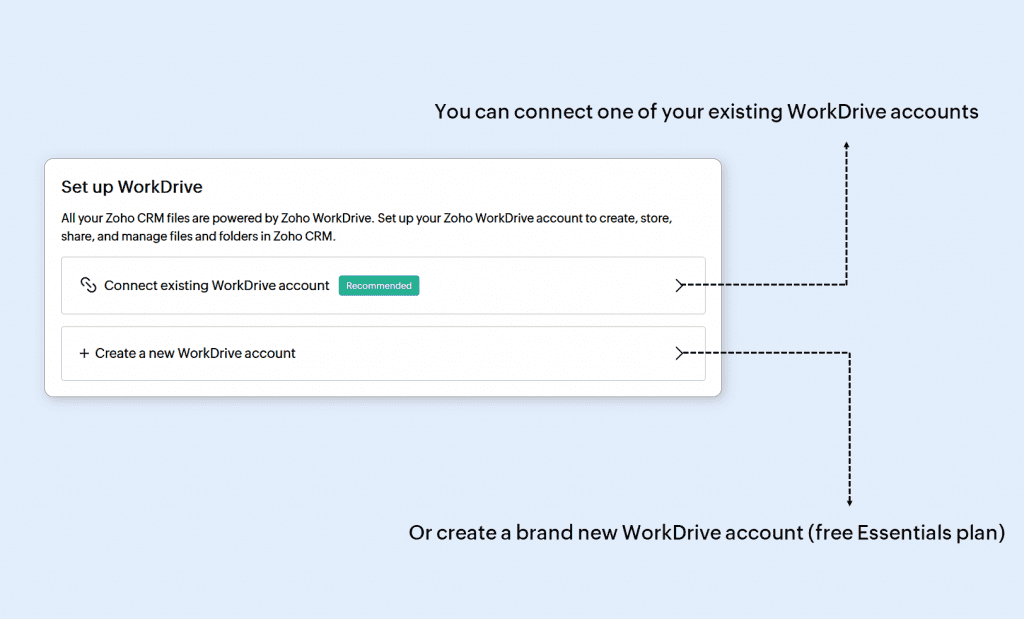
    WorkDrive is now the default platform for file storage in Zoho CRM for new users!

    (image vía zoho)


    Key updates include:

    • You can connect your CRM account to an existing WorkDrive organization or create a new one.
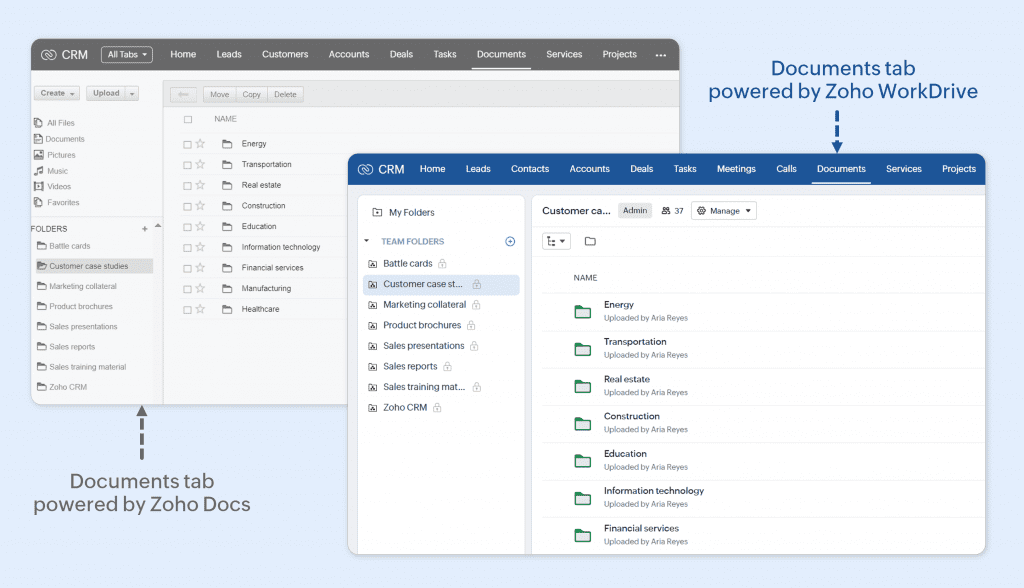
    • The integration with WorkDrive is done through the Documents tab, which previously used Zoho Docs.
    • Attachments in CRM records are automatically saved in default folders within “My Folders” of the record owner.


    Steps to set up WorkDrive integration in Zoho CRM:

    1. When you log in to your CRM account for the first time, the setup process will begin.
    2. If you don’t have a WorkDrive account, one will be automatically created and linked to your CRM.
    3. If you already have a WorkDrive account, a pop-up will appear giving you the option to: Assign an existing account.
    4. Create a new account.
    5. Once linked, you cannot unlink the WorkDrive account from the CRM.

    (image vía zoho)


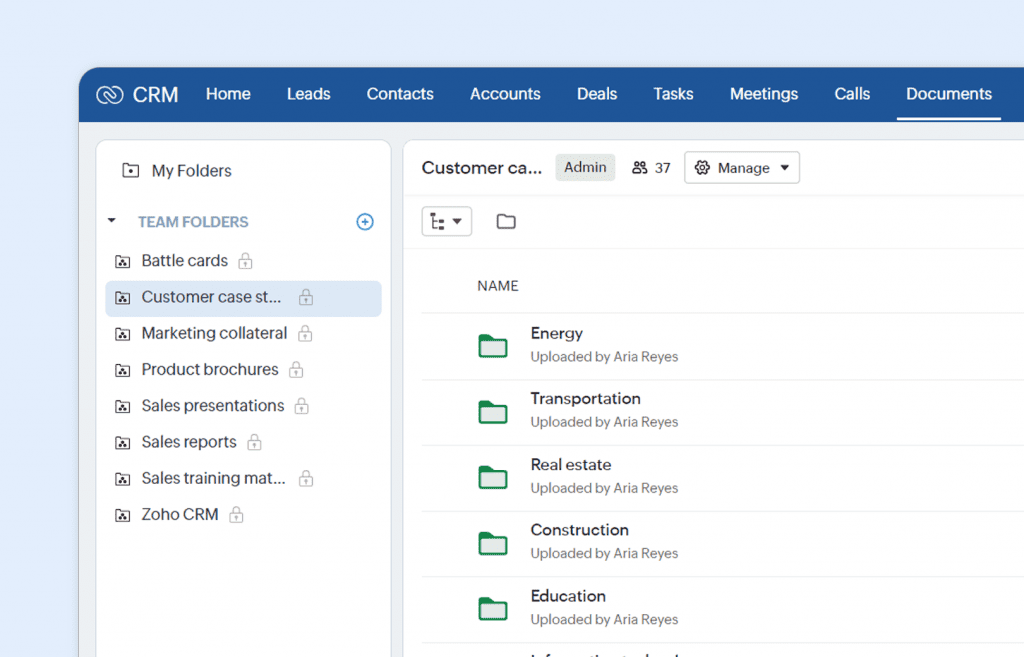
    • The Documents tab in Zoho CRM is now linked to WorkDrive, making it easier to manage and store business documents such as contracts and presentations. New users will have access to “My Folders” for personal files and “Team Folders” for group collaboration.

    (image vía zoho)


    • Attachments from CRM records are automatically stored in “My Folders,” following a default structure. Only record owners can access these files.

    (image vía zoho)


    • “Team Folders” allow collaborative sharing and document management, along with tracking CRM activities.
    • Admins control access to the Documents tab and assign specific roles to users, groups, and teams, determining their permissions within WorkDrive.


    Available in all editions and all DCs. It has been rolled out for new registrations in all DCs and will be gradually enabled for existing users over the coming months.


    Zoho launches DataPrep 2.0: advanced AI-powered data management platform

    Zoho DataPrep 2.0 is a tool that allows businesses to automate data preparation, simplifying repetitive tasks and improving data quality. With this platform, you can now integrate multiple data sources and efficiently transform large datasets, all thanks to its advanced artificial intelligence.

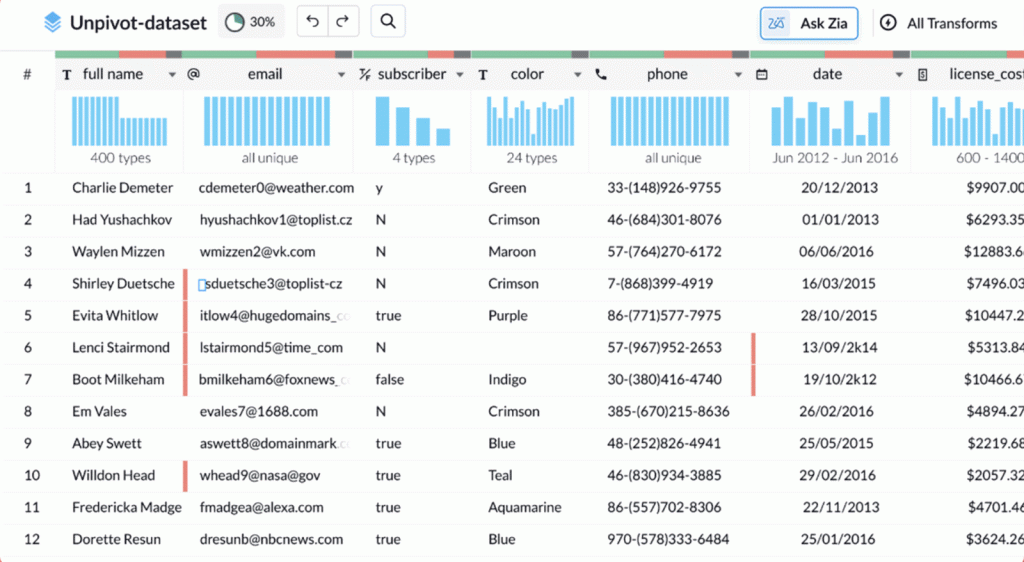
    • You can now build complex data workflows easily with the Visual Pipeline Builder, which lets you drag and drop elements to create advanced pipelines without complications.


    • Zia, Zoho’s AI assistant, is integrated into Zoho DataPrep 2.0 to help with smart recommendations on how to clean and transform your data. Just ask Zia for optimized suggestions.

    (image vía zoho)


    • Zoho DataPrep 2.0 saves time by allowing you to reuse previously created pipelines and leverage a library of pre-designed templates, streamlining the data processing.
    • With the new real-time monitoring dashboard, you can now track all your workflows and the status of your data in real time, allowing you to quickly respond to any issues.

    (image vía zoho)


    • Zoho DataPrep 2.0 also integrates with Zoho Flow and Webhooks, making it easier to automate and organize data workflows seamlessly across different applications.

    Zoho DataPrep 2.0 makes data preparation faster and more efficient with its new AI-driven features. Whether optimizing complex workflows or improving control over data, it offers everything needed to manage data effectively.


    Zoho PDF Editor: new free tool for editing PDFs online

    Zoho has launched a new free online PDF editing tool, allowing users to modify their PDF files without hassle or additional costs.


    Make simple PDF edits online, for free
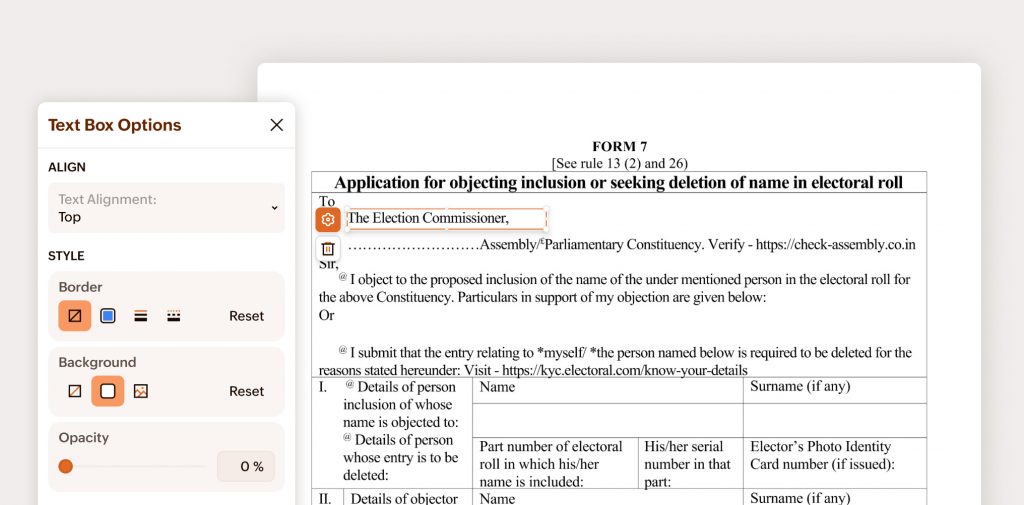
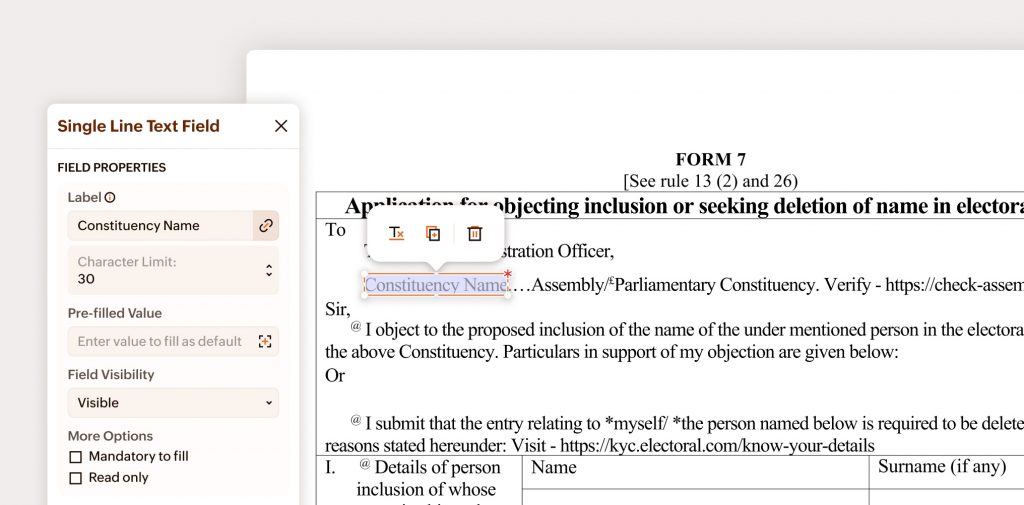
    Now you can make basic edits to your PDF files from anywhere, at any time, without needing to install additional software. With Zoho’s free tool, you can add, delete, or modify text in PDF files effortlessly.

    (image vía zoho)


    Add or remove images and links

    The new tool allows you to easily add and remove images in PDF files, as well as insert links anywhere in the document to enhance navigation and improve functionality.


    Text alignment and adjustment: enhance your PDF’s visual layout

    Zoho PDF Editor includes options for aligning and adjusting text within the document, ensuring a clean and professional presentation at all times.


    Annotate and comment with ease

    If you need to share comments or annotations on a PDF file, you can now do so directly with this tool. Add notes, comments, or highlights to share feedback without hassle.

    (image vía zoho)


    Password-protect your PDF
    Zoho also offers the option to password-protect your PDF documents, ensuring that only authorized individuals can access the information.


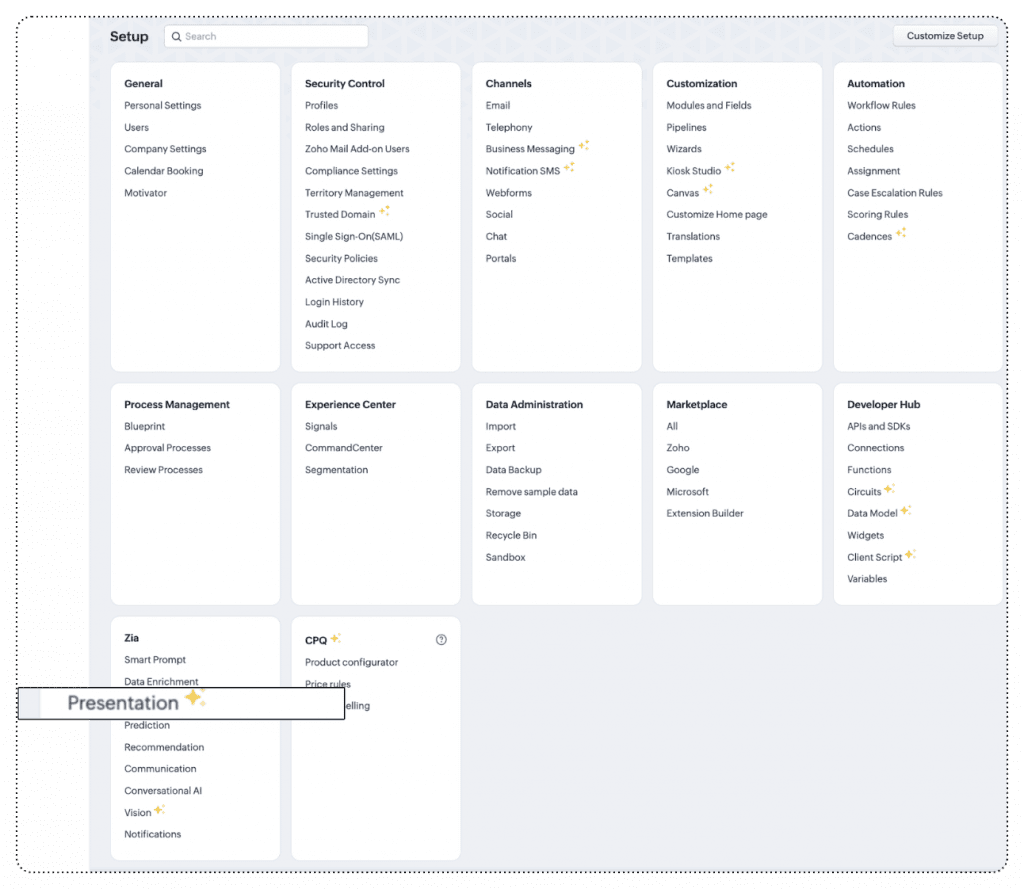
    Improvements to Zia Presentation to customize sales presentations

    Zoho has released a major update for Zia Presentation, its AI assistant that helps create personalized sales presentations.

    (image vía zoho)


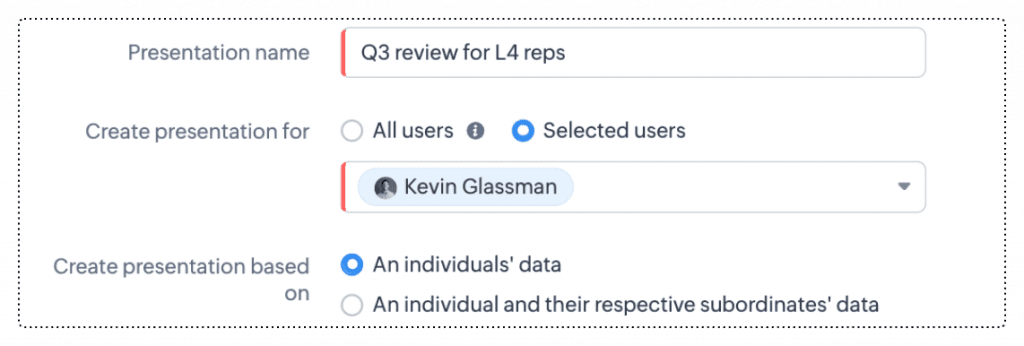
    • With this new update, you can now customize each slide of your sales presentation with content tailored to the specific needs of your audience. Zia analyzes sales data and automatically adjusts presentations to include only the most relevant information.
    • It also includes new options for more effective presentation distribution. You can now easily share your presentations with different audience groups, ensuring that each receives a personalized version reflecting their interests and needs.

    (image vía zoho)


    • You can save time by automatically generating presentations based on your CRM data. Just select the key points, and Zia will create a visually appealing presentation with accurate content.
    • Zia also gives you greater control over your presentation design, allowing you to adjust the format to align with your brand image, without sacrificing consistency in style and content.

    Available for Enterprise or Ultimate editions with more than 10 user licenses.
    DC: US, EU, IN, CN, JP, and AU.

    Webinars on CRM and Zoho for Apple

    Zoho update playlist for Apple

    How to get the best out of Zoho CRM for your ecommerce business

    Automate sequential actions through Cadences

    Do you want to add these new features to your Zoho system? Let’s work together! Learn more about our Zoho consulting services and contact us for a free consultation.
  • Zoho News Catch-up: Updates in CRM and Desk, New Zoho E-Protect app, Analytics Update August 2024, Webinars for Books, Projects, and Campaigns

    Welcome to our catch-up, where you’ll be in the know of all the latest Zoho updates in one place!

    Services and Appointments Modules in CRM Sandbox, License Pricing Update, and More API Credits

    Zoho CRM has implemented significant updates to optimize the user experience. Here’s a summary of these enhancements so you can make the most of your CRM. Let’s take a look!
    New Service and Appointments Modules in CRM Sandbox Environments
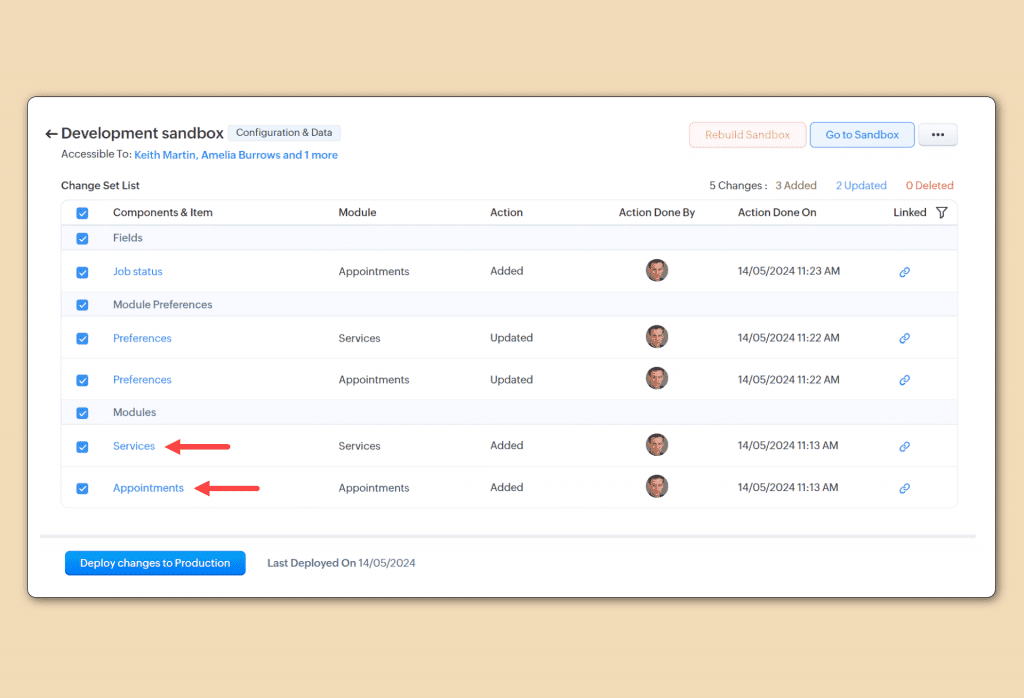
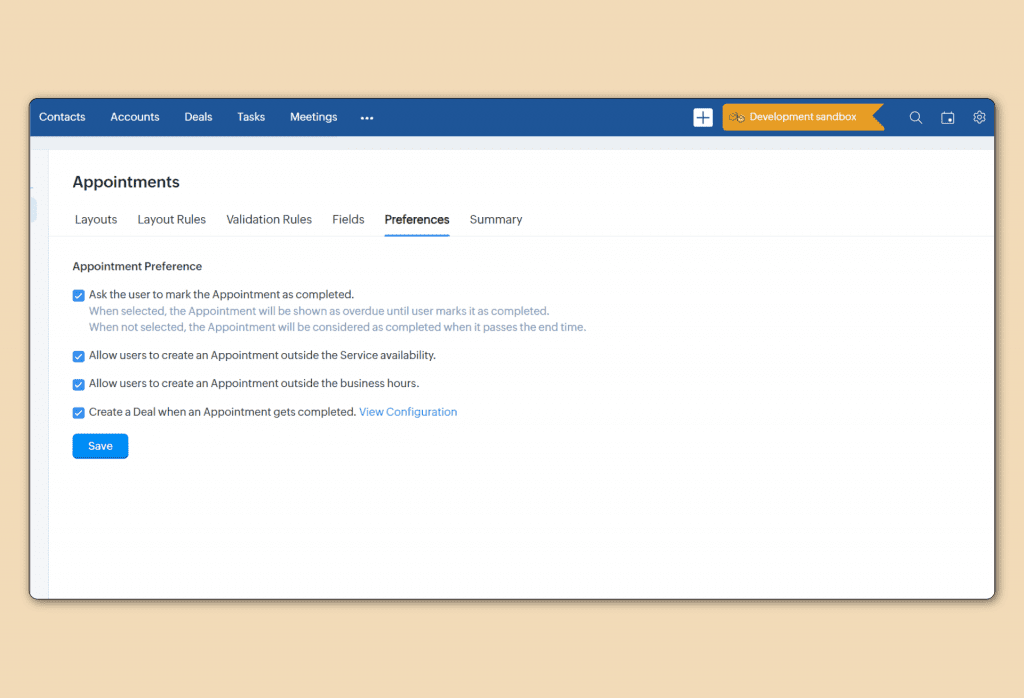
    Now, Zoho CRM Sandboxes offer support for Service and Appointments modules, allowing for:
    More Comprehensive Testing: Conduct detailed tests of configurations and workflows related to services and appointments before implementing them in your production environment.Optimized Deployments: Identify and fix potential issues without affecting your live CRM.

    (image via Zoho)

    (image via Zoho)
    Improvement available for Enterprise Edition and above, in all distribution centers.
    User License Price Updates in CRM
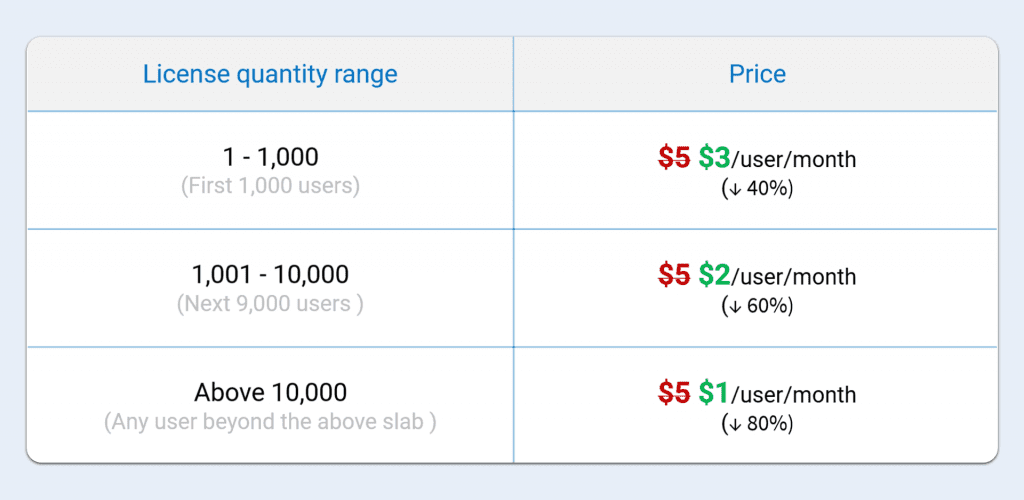
    Zoho has updated its pricing model for CRM portal user licenses. Now, instead of a fixed cost of $5 per user per month, a tiered pricing model is being implemented. This means that as the number of users in the portal increases, the cost per user decreases, making it easier for businesses to scale.
    Additionally, in an upcoming update, up to 1,000 users will be able to be invited to the portal for free, offering greater flexibility in user management.

    (image via Zoho)
    Available for Enterprise and Ultimate editions, for all distribution centers.
    Release Plan: This block-based pricing is updated for CRM, CRMPlus, and Zoho One users.
    Increase in API Credits
    Zoho has increased the number of API credits available to its users, allowing companies to perform more integrations and automations.

    (image via Zoho)
    This measure responds to the growth in customer needs and the demand for more data-intensive operations. With this adjustment, users will have greater flexibility to handle large volumes of data without worrying about exceeding their API limits.
    Available for Professional, Enterprise, Zoho One editions.

    Desk Updates its Settings with Function Reorganization and Categorization, and Ticket Module with Send and Update Status

    New Grouping and Categorization of Features in Desk Settings
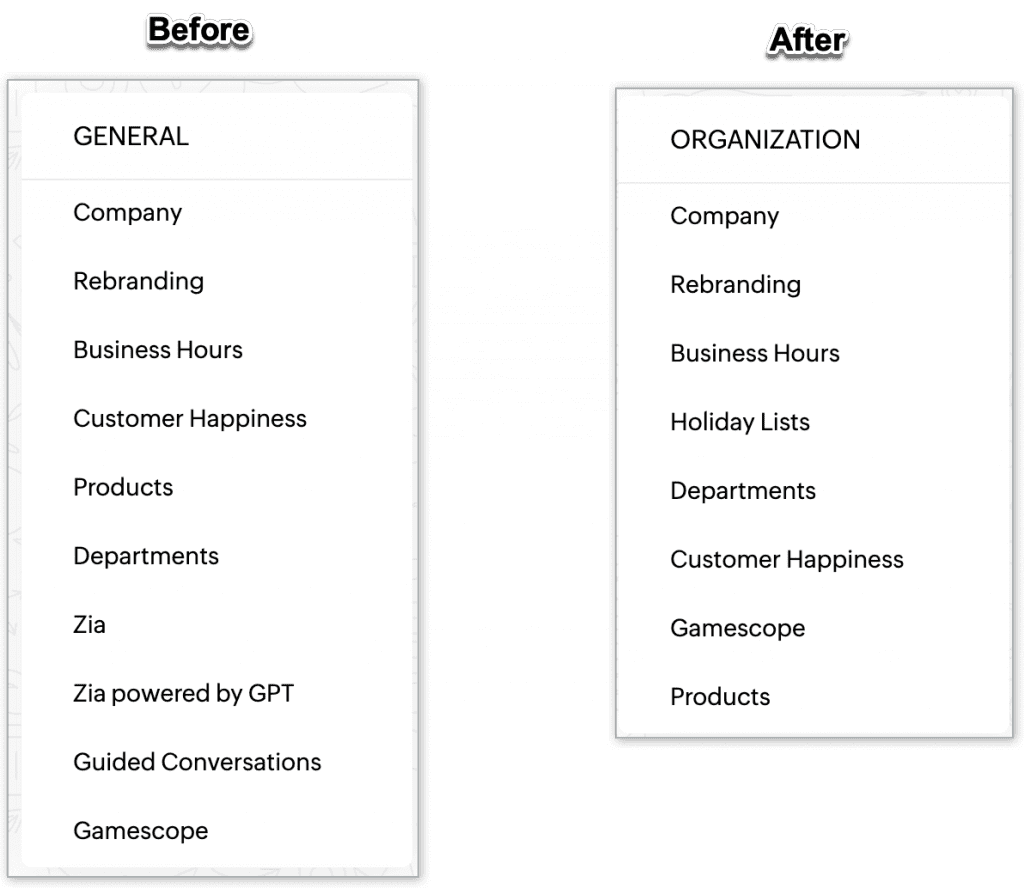
    Zoho has reorganized and categorized features on the CRM settings page to improve usability. Now, functions are grouped more logically, making it easier to navigate and find the necessary tools. This redesign focuses on making the user experience more intuitive and efficient, allowing quicker access to key settings.
    A summary of the changes:

    • General is now called Organization; some functions have been moved to specific categories.
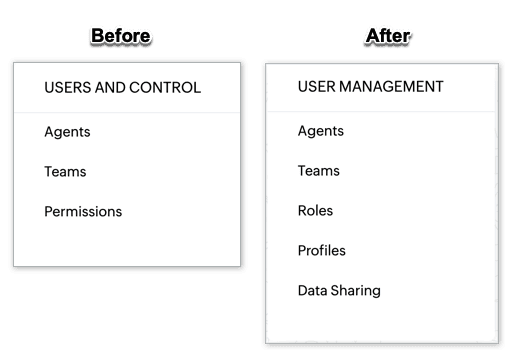
    • Users and Controls has been renamed User Management.
    • Channels have reorganized their tools.
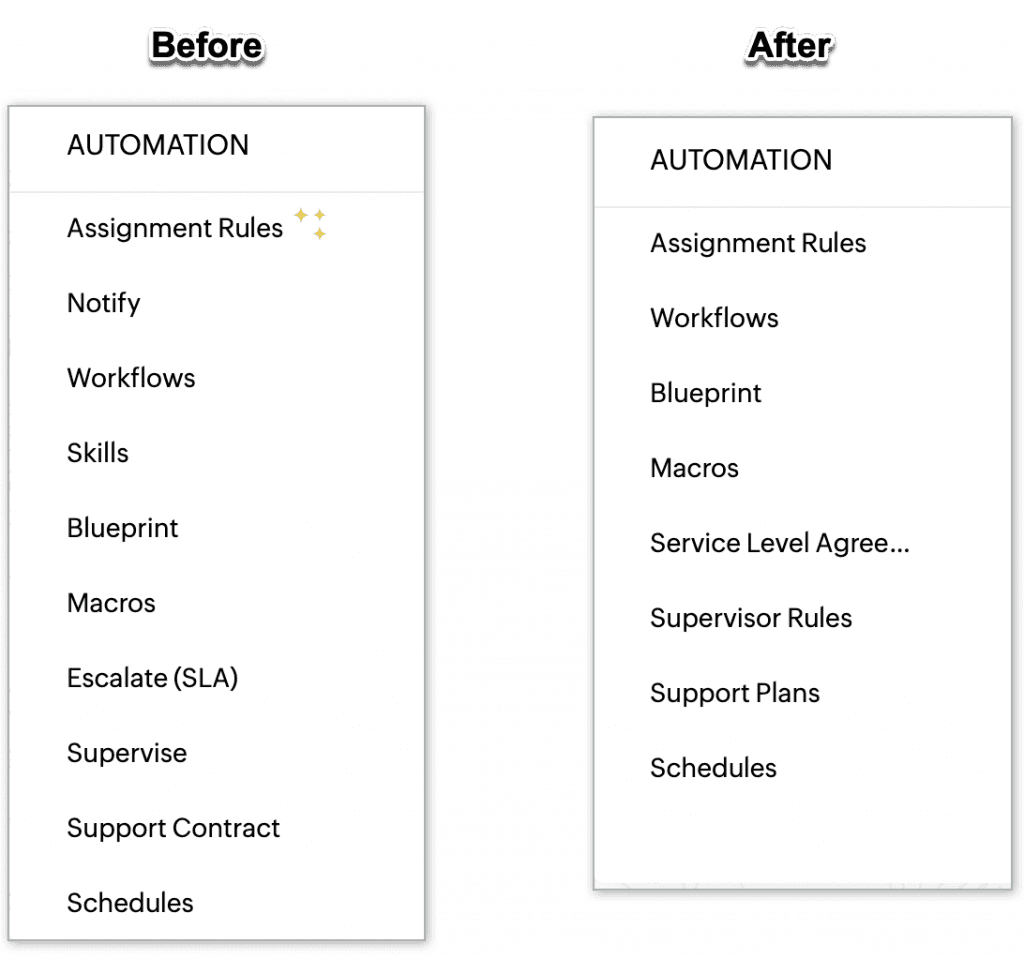
    • Customization and Automation have relocated and renamed various functions, such as Notification and Supervisor Rules.
    • New sections have been added, like Self-Service, ZIA, and Privacy & Security.
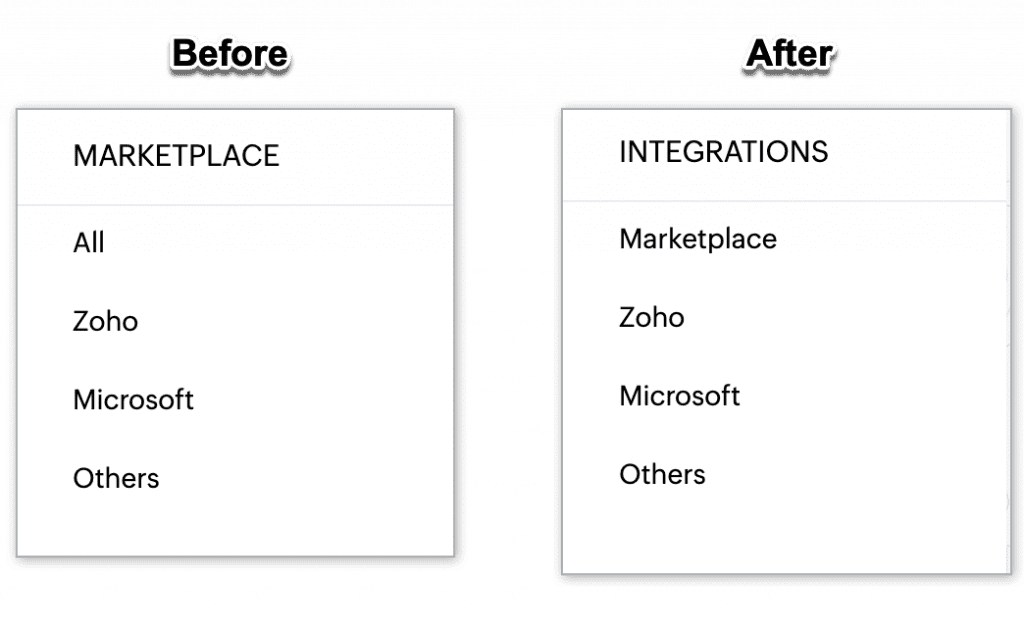
    • Marketplace is now called Integrations.


    (image via zoho)

    (image via zoho)

    (image via zoho)

    (image via zoho)
    The update reflects Zoho’s commitment to continuously improving the customer experience.
    New “Send and Update Status” Option in the Tickets Module
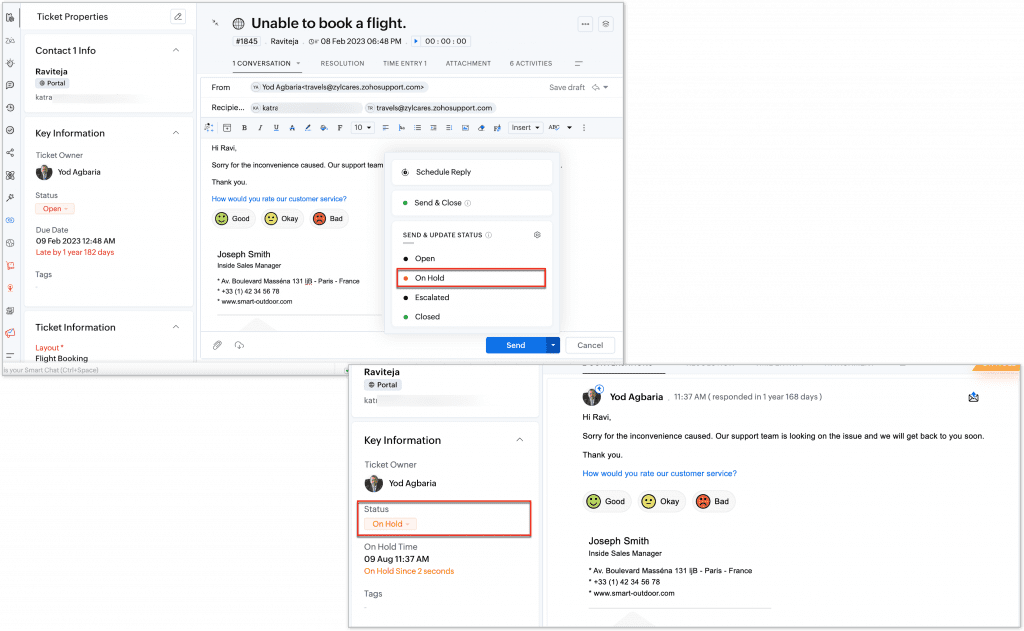
    Zoho has introduced a new feature in the Tickets module that allows you to send and update the status of tickets directly from the list view.
    Now, users can change the status of a ticket with a single click and send emails from the same interface, streamlining ticket management and follow-up. This update is designed to improve efficiency in handling requests and communication with customers.

    (image via zoho)
    Available to all users across all data centers.

    New Zoho E-Protect app to protect email from cyber threats.

    Zoho has launched Zoho eProtect, a comprehensive phishing protection solution designed to defend business email accounts.

    This service identifies and blocks phishing attempts, ensuring that fraudulent emails do not reach users’ inboxes. Additionally, eProtect provides detailed reports and customization options to better manage email security. The tool is ideal for organizations looking to strengthen their cybersecurity and protect sensitive information.

    (image via zoho)
    eProtect can be configured to enhance security and archiving alongside your email provider. However, if you already use Zoho Mail, there is no need to sign up for eProtect, as these features are already integrated into the Zoho Mail service.

    Zoho Analytics Updates: August 2024

    Zoho Analytics introduced several key enhancements to optimize the user experience and data management:
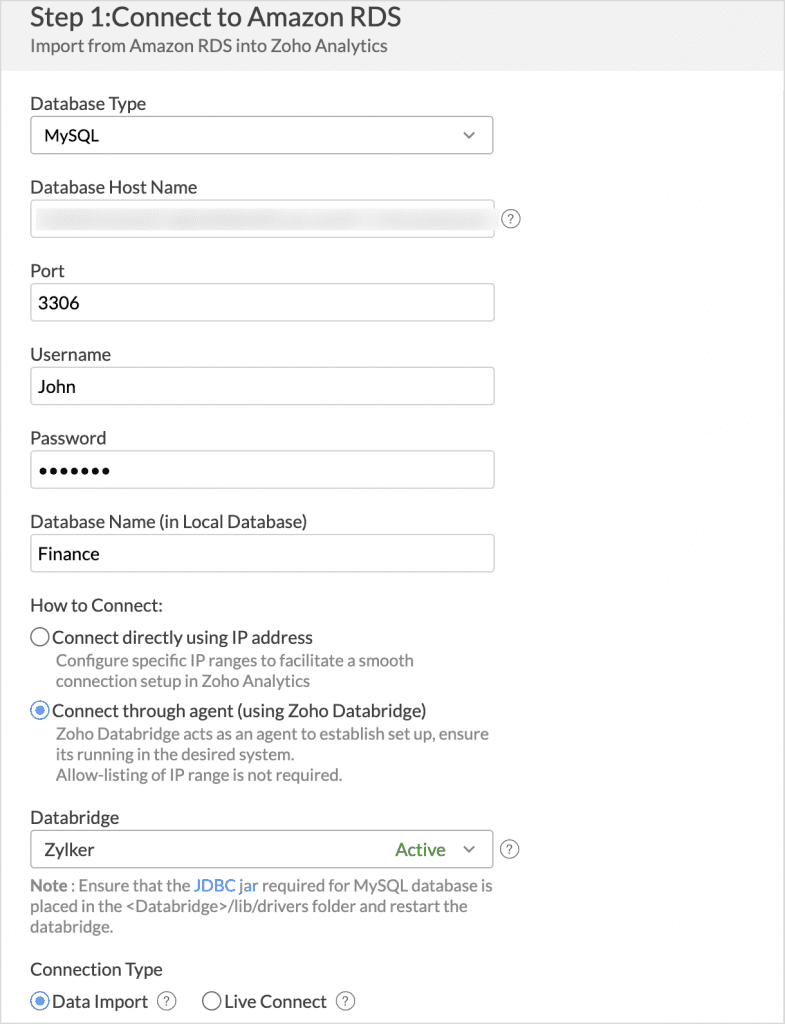
    Improved Connection with Zoho Databridge
    Zoho Databridge now allows cloud data connections without the need to configure IP whitelisting, simplifying security setup and improving accessibility.

    (image via zoho)
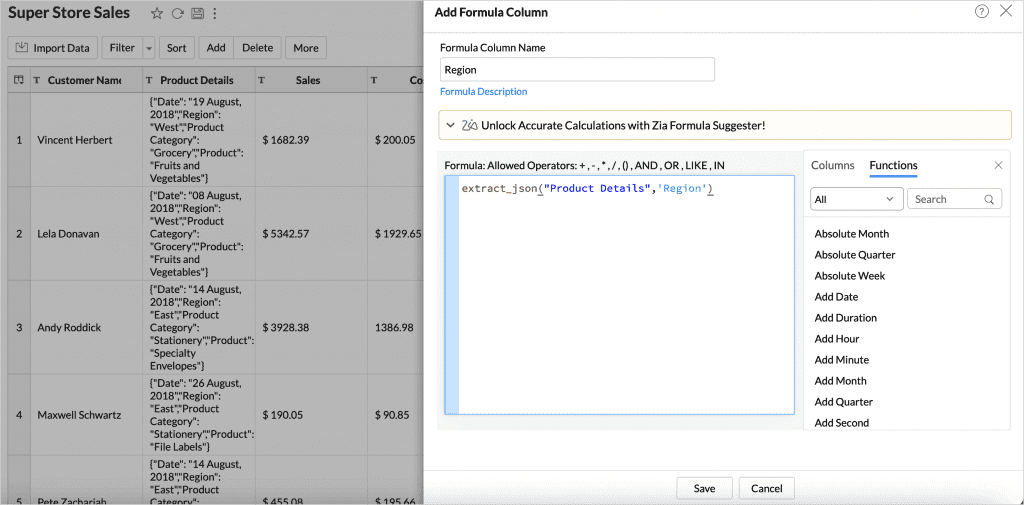
    extract_json() Function
    The extract_json() function is introduced, enabling efficient extraction of data from JSON columns. This facilitates the manipulation and analysis of complex data directly within Zoho Analytics.

    (image via zoho)
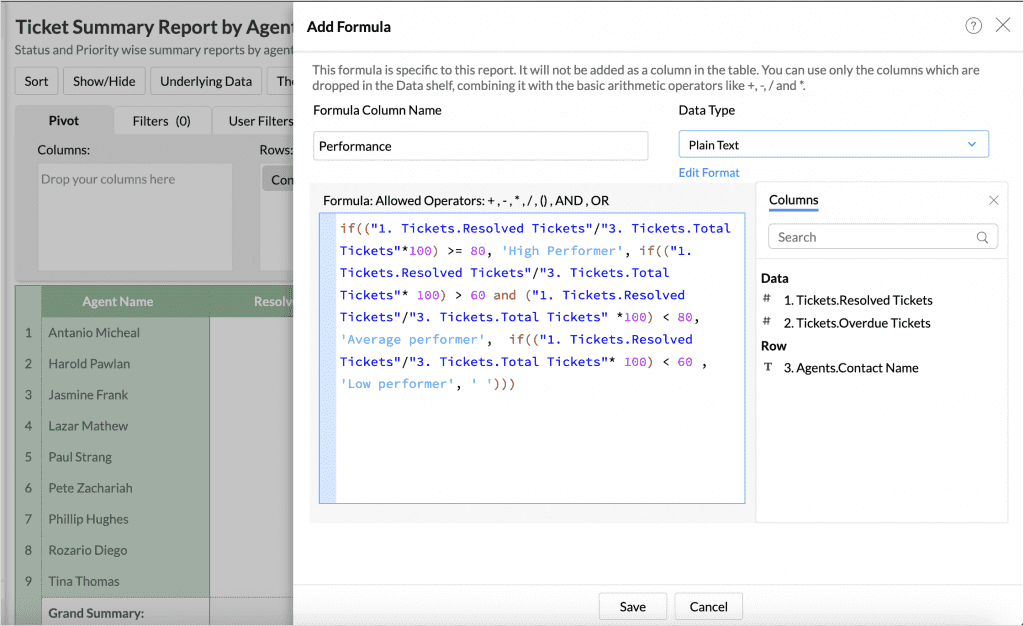
    Text Formula Improvements
    You can now incorporate text into your report formulas, allowing for more precise data categorization and segmentation. This is useful for creating labels or classifications based on text, enriching analytical capabilities.

    (image via zoho)
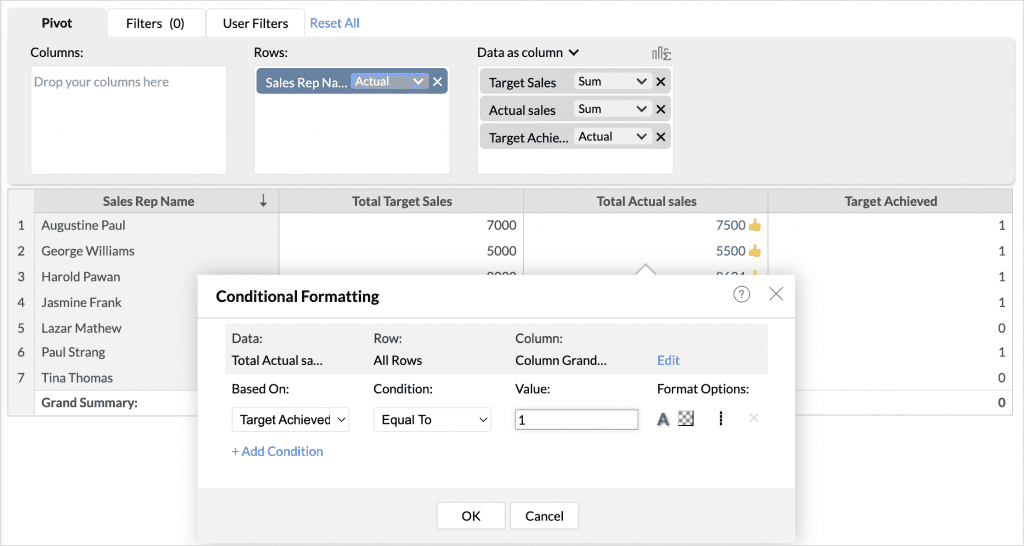
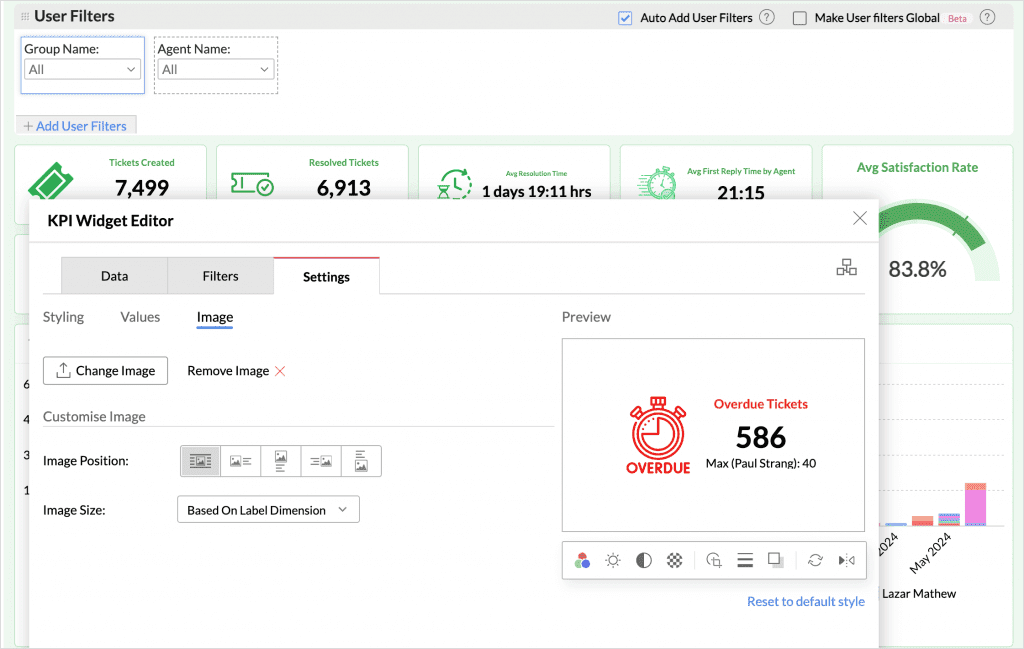
    Customizable KPI Widgets
    KPI widgets now offer more customization options, including the ability to add static images and custom icons. This enhances the visual presentation and interpretation of key data in dashboards.

    (image via zoho)
    Copy and Paste Reports
    The new copy and paste reports feature within dashboards streamlines the creation and management of custom dashboards, allowing for quick replication of similar reports and maintaining visual consistency.

    (image via zoho)
    Enhanced View Sharing
    The ability to share views has been expanded, now allowing users to share their views with administrators. This facilitates collaboration and oversight, ensuring teams have access to the same insights and data.

    (image via zoho)
    Users on the Ultimate plan of Zoho CRM, Zoho Books, and Zoho Inventory can purchase additional rows and users in the online store.

    Webinars on Books, Projects, and Campaigns

    Zoho Books Basics – Finance ZUG Virtual meetup

    Introduction to Zoho Projects

    Master Email Marketing with Zoho Campaigns and Zoho CRM Integration

    Do you want to add these new features to your Zoho system? Let’s work together! Learn more about our Zoho consulting services and contact us for a free consultation.

  • Zoho News Catch-Up: New Data Art in Show, Optional fields in CRM Blueprints and Record Assignment by Role, July Books Updates, Global Calendar in the iOS version of the Projects mobile app, Data Segmentation in Sheet

    Welcome to our catch-up, where you’ll be in the know of all the latest Zoho updates in one place!

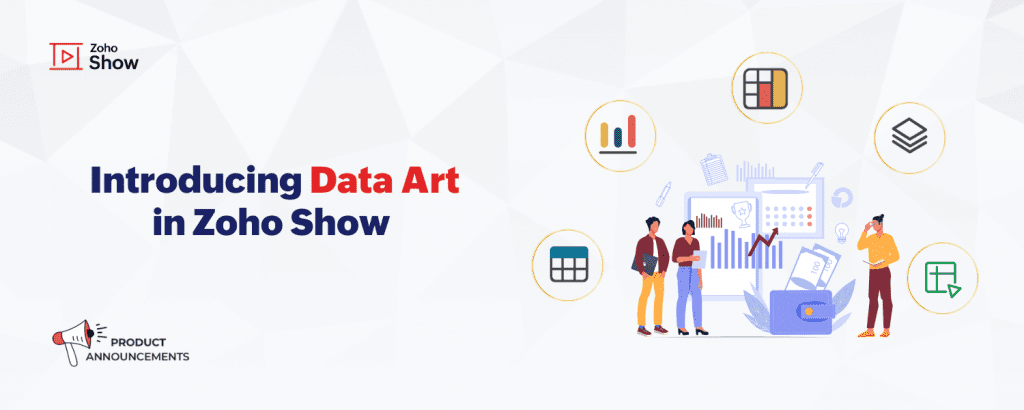
    Zoho introduced Data Art in Zoho Show

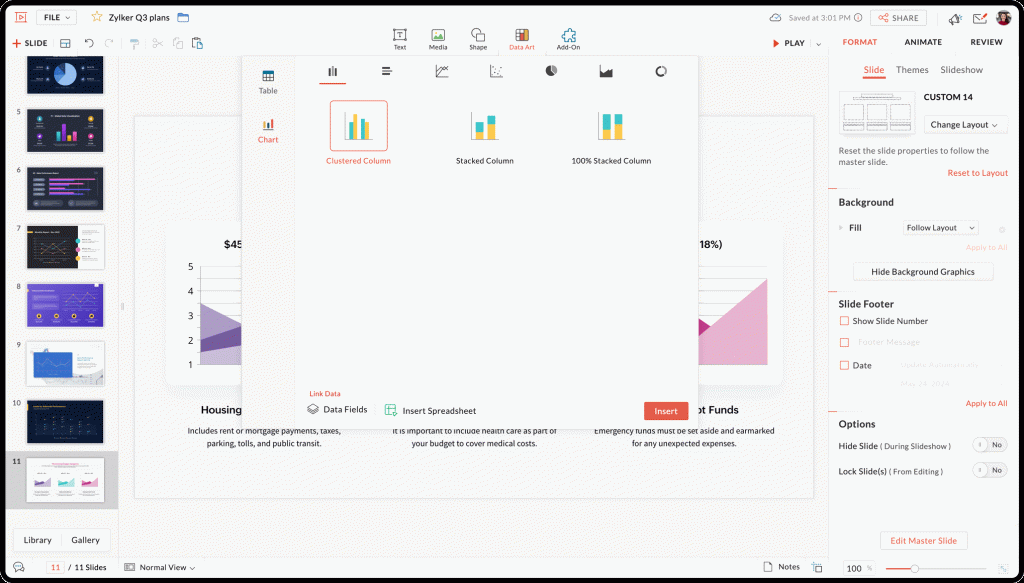
    Zoho Show has launched the new Data Art feature, designed to simplify data visualization in your presentations. Now you can create tables and charts directly from your spreadsheets.

    (image via zoho)

    Features include:
    Organization with Tables: Now you can create and customize tables, including the ability to link data directly from Zoho Sheet. This facilitates the organization and presentation of structured information.

    Analysis with Charts: Data Art includes a wide variety of charts, such as columns, bars, and lines. These charts allow for clear and effective data visualization and can be automatically updated when data changes in the spreadsheets.

    (image via zoho)

    Data Fields: Use predefined data fields to insert updatable information into your presentations. This ensures that data remains accurate and up-to-date without the need to manually edit slides.

    Explore Data Art and enhance your presentations with Zoho Show!

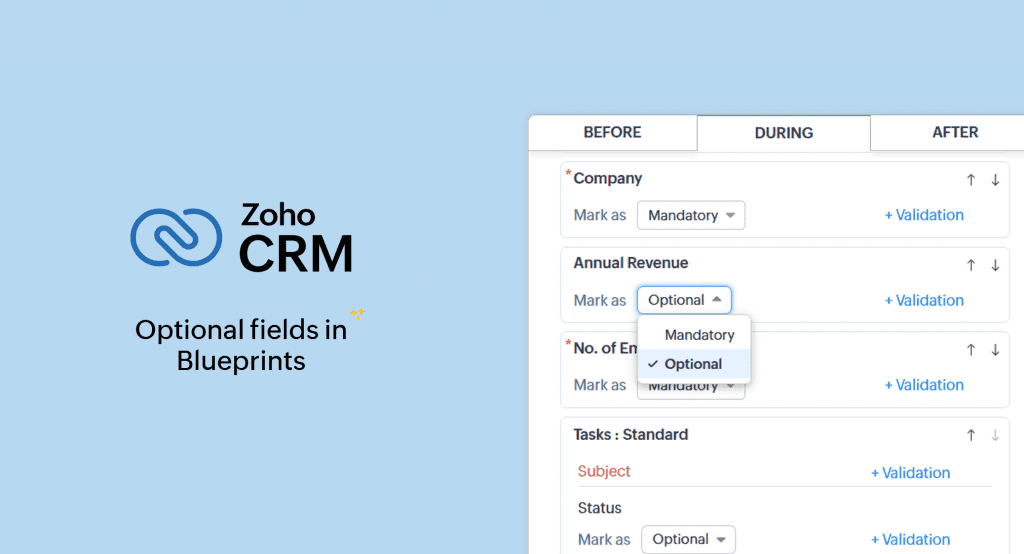
    Optional fields in Blueprint transitions for CRM

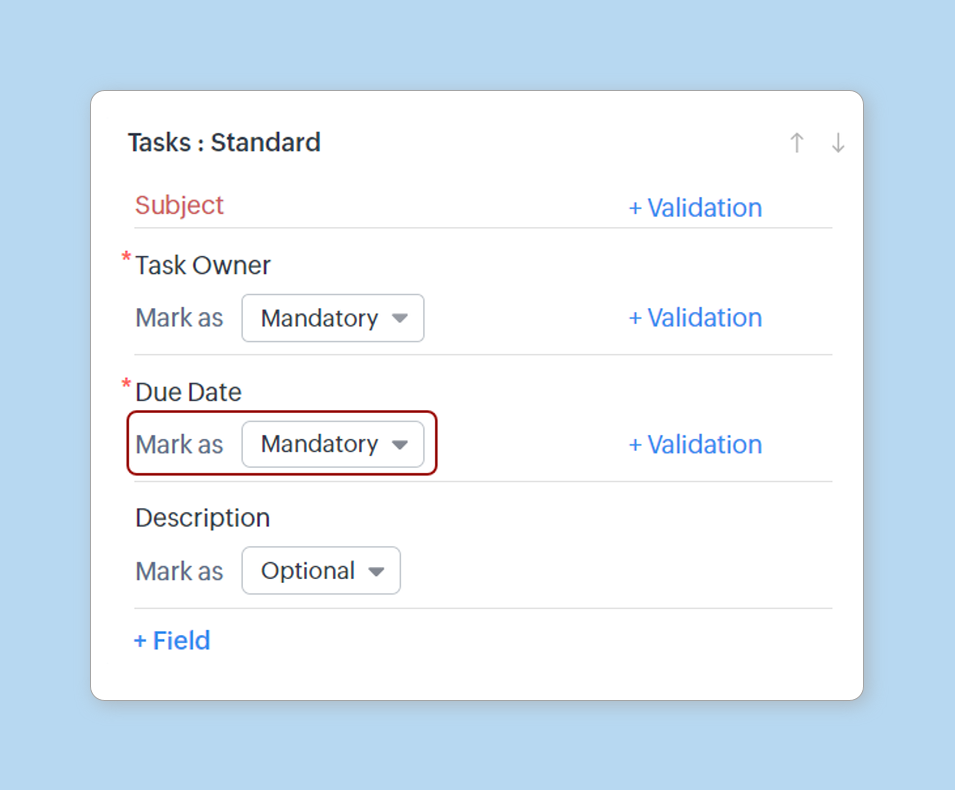
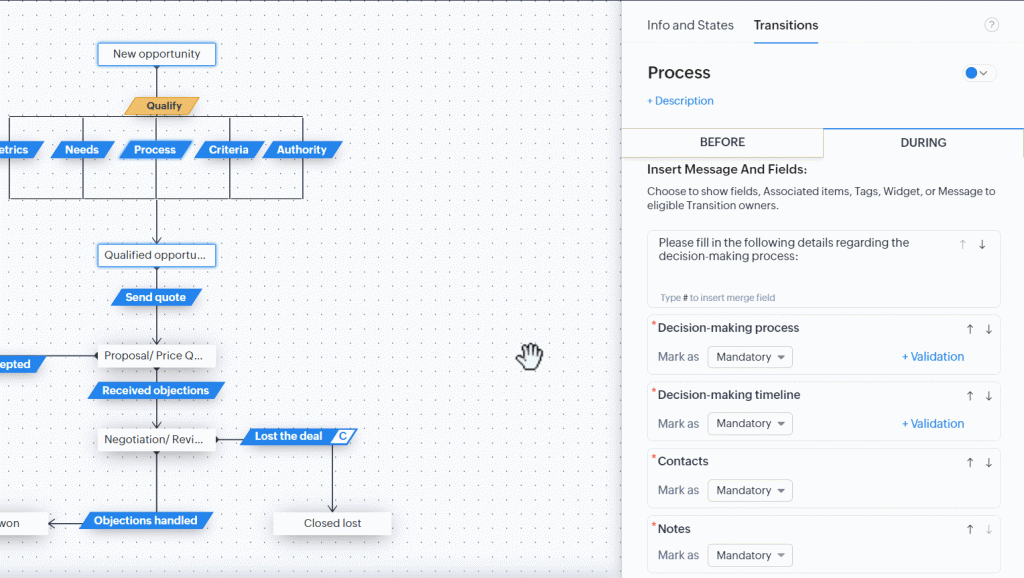
    Zoho CRM has enhanced its Blueprints functionality by allowing the inclusion of optional fields in stage transitions, offering greater flexibility in process management. This new feature enables users to customize transitions according to their specific needs without overloading teams with unnecessary information.

    (image via zoho)

    Key Features:

    • Flexibility in Feedback: In ticket resolution processes, agents can add additional comments and specific details only when necessary, improving efficiency and accuracy in ticket management.
    • Improved Task Management: Teams can add additional information, such as estimated time and task priority, only when relevant, facilitating more dynamic and project-adapted management.
    • Optimization of Registration Processes: During registration processes, users can include additional preferences and requirements that are not mandatory for all records, making the process smoother and less tedious.

    Optional Elements:
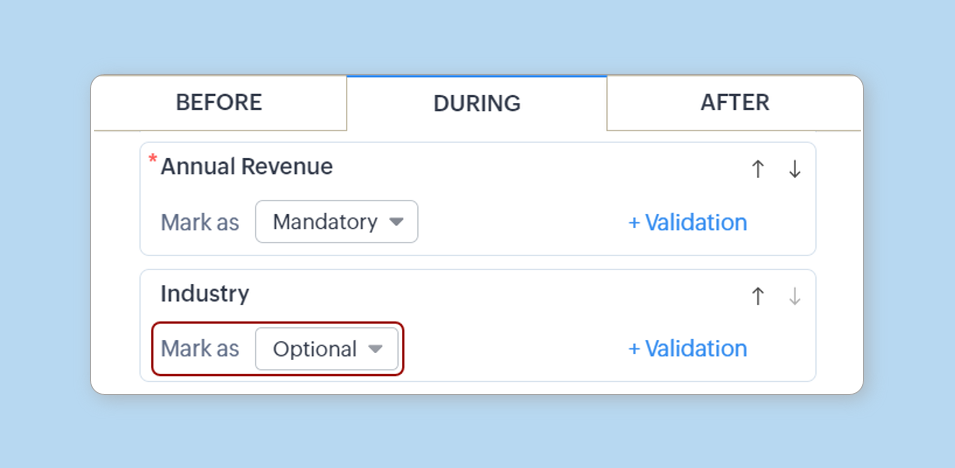
    The following elements can be marked as optional in the Blueprint transition form:

    Fields from the main module and related modules

    (image via zoho)

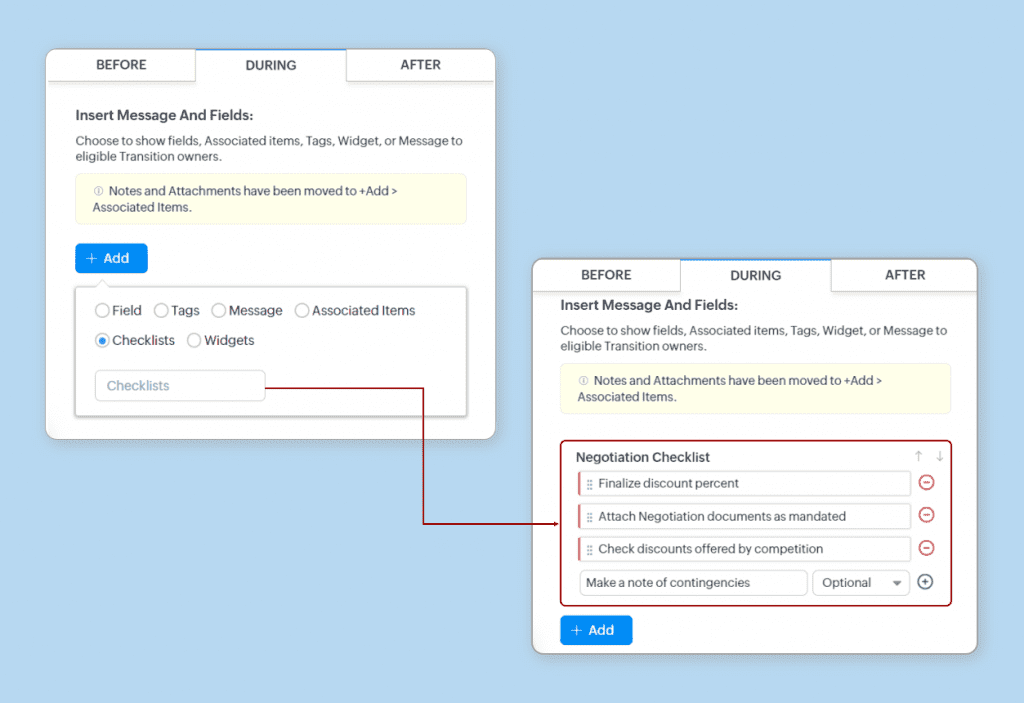
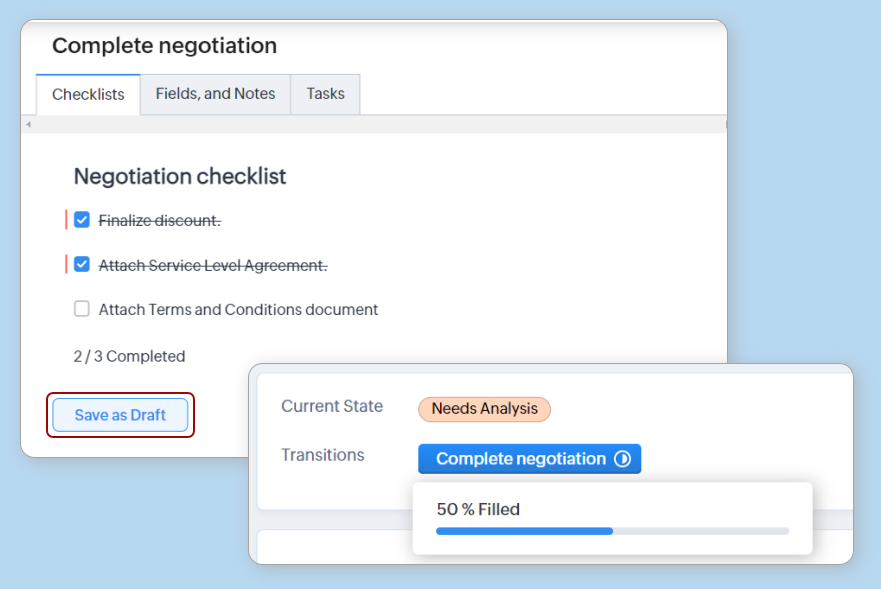
    Checklist items

    (image via zoho)

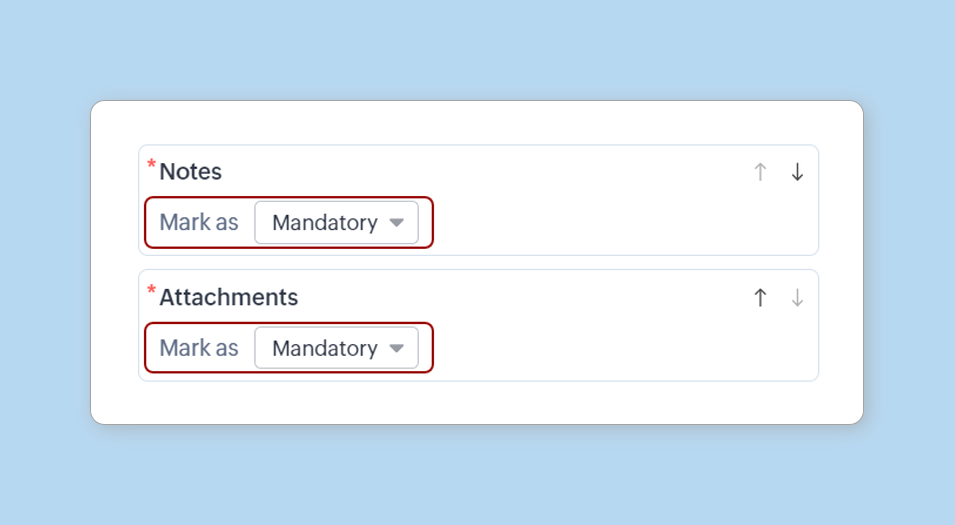
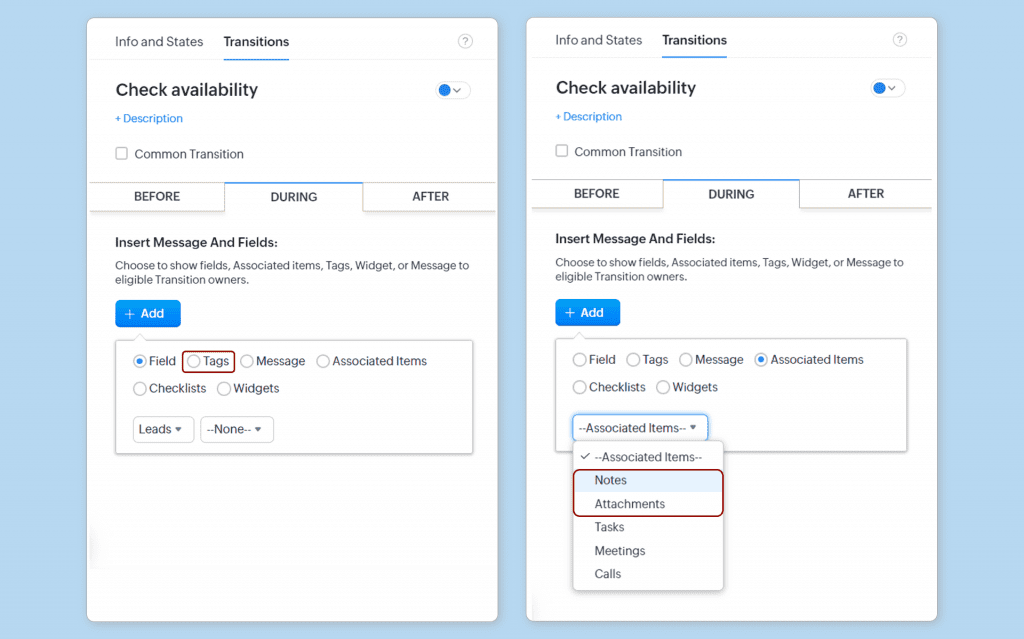
    Notes, tags, and attachments

    (image via zoho)

    Other fields added in Associated Items, such as tasks, meetings, etc.

    (image via zoho)

    Save as Draft Button: Allows you to save completed fields and continue later.

    (image via zoho)

    Move notes, tags, and attachments

    • Tags will be available when you click the + Add button.
    • Notes and attachments will be available in + Add > Associated Items.

    (image via zoho)

    How to implement it:
    To use this feature, Zoho CRM administrators must mark the fields as optional in the Blueprint transition form. This configuration is easily done from the administration interface, allowing each transition to be tailored to the specific needs of the workflow.

    (image via zoho)

    This improvement is designed to simplify processes within Zoho CRM, reducing complexity and enabling deeper customization of Blueprints without losing the essential workflow structure.

    Zoho Books News: July 2024

    Zoho Books has introduced new features and enhancements to optimize the accounting experience. Below is a summary of the most important updates:

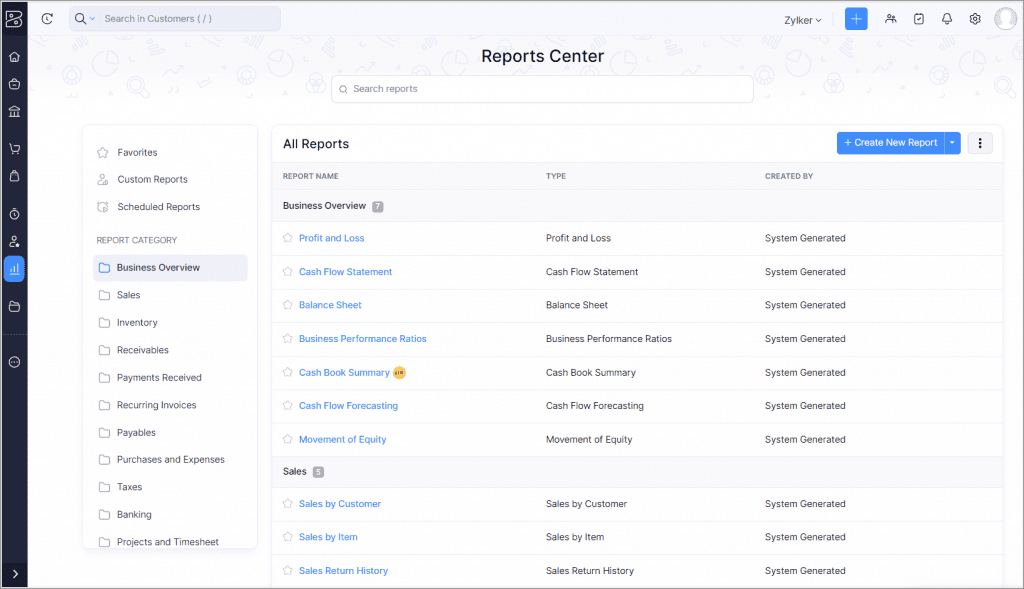
    Enhanced Reports Module

    The reports page now features a new list view, sidebar, and search options for easier navigation. This update is available in all editions and regions.

    (image via zoho)

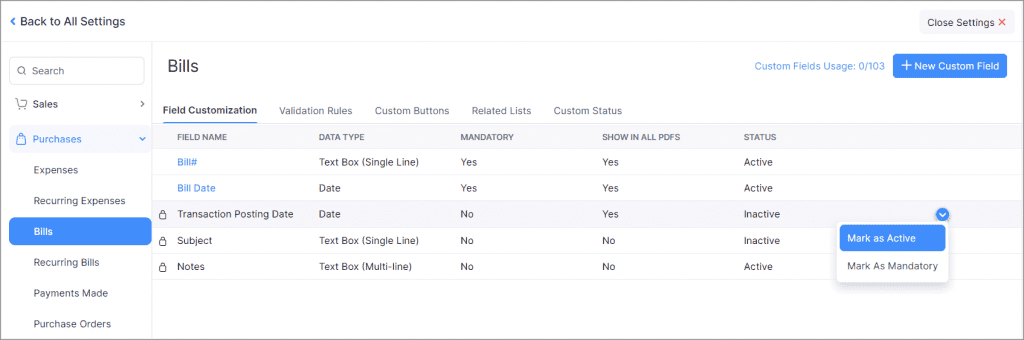
    Transaction Posting Date for Invoices

    Available in the India, Canada, and Global editions, this feature allows you to record and view the posting date of an invoice, ensuring greater accuracy in transaction tracking.

    To enable the feature: Settings > Purchases > Invoices. In the Field Customization tab, click the dropdown menu next to the Transaction Posting Date field and select Mark as Active.

    (image via zoho)

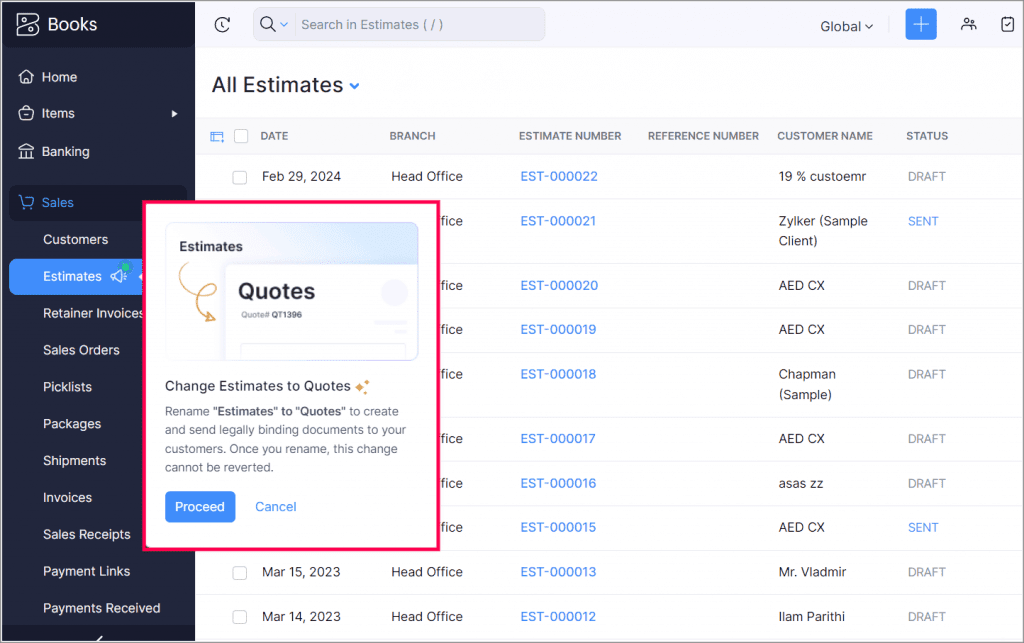
    Estimates to Quotes

    You can now change the term “Estimates” to “Quotes” to reflect fixed prices and legally binding documents. Only the module name changes; actions remain the same.

    (image via zoho)

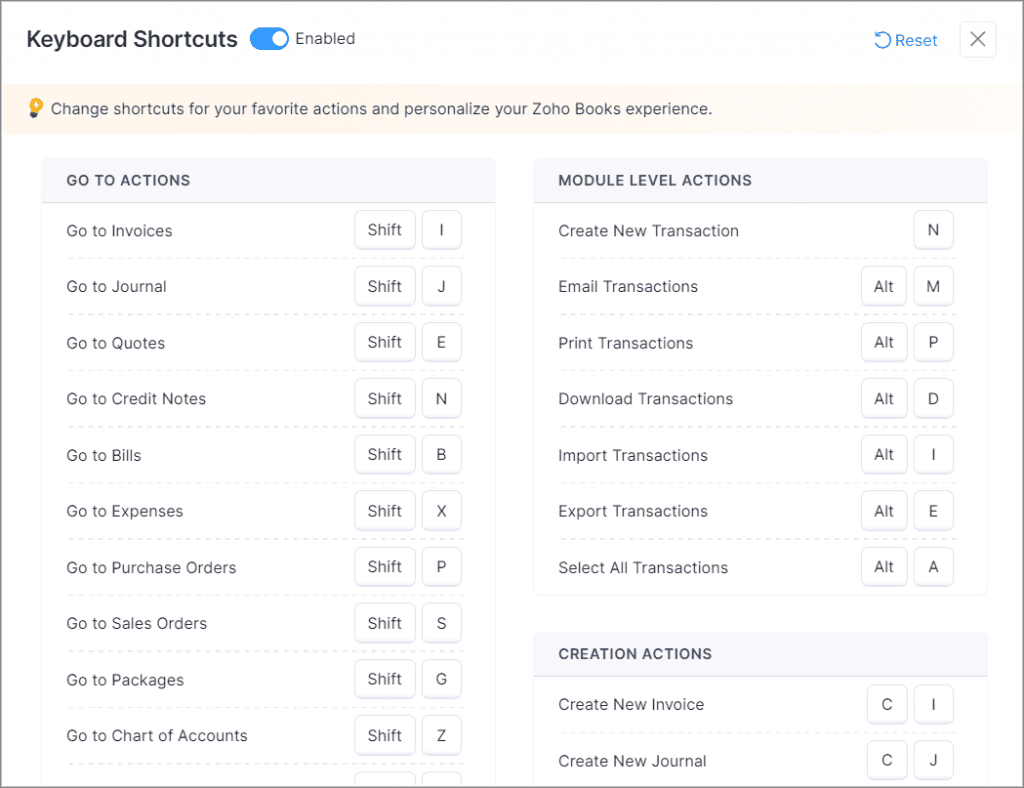
    Improved Keyboard Shortcuts

    Customize, disable, and reset shortcut keys with an enhanced interface. Customizations do not apply to other users in your organization.

    (image via zoho)

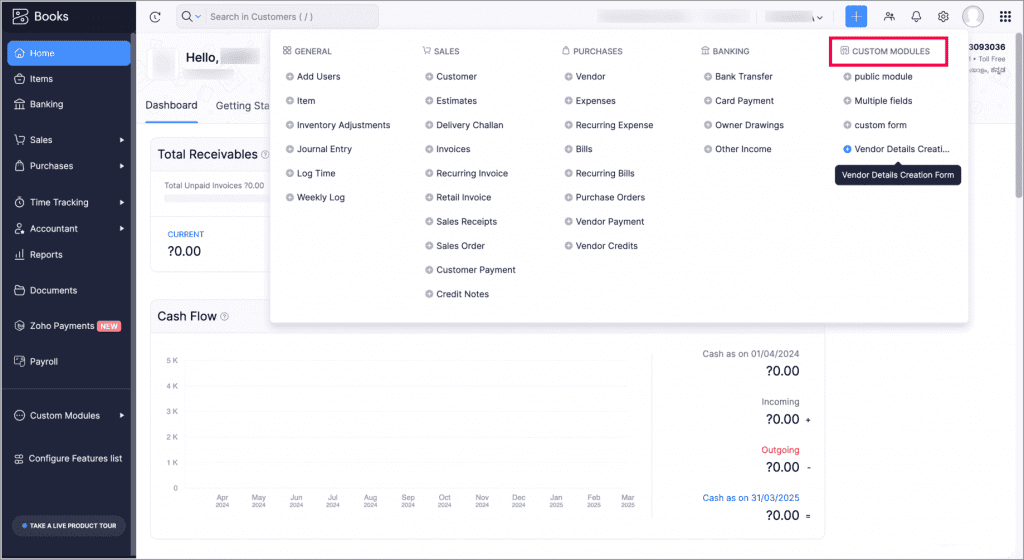
    Quick Create Menu for Custom Modules

    Create records in custom modules from any page using the Quick Create menu in the top band.

    To create a new record for a custom module, click the Quick Create icon in the top band. In the Custom Modules group, click the Add icon next to the custom module for which you want to create a record. This will redirect you to the corresponding creation page where you can enter and save the new record details.

    (image via zoho)

    Overwrite Imported Data Based on Custom Fields

    You can now overwrite details of imported files based on custom fields, available for items, customers, vendors, and custom modules.

    Global Calendar for Projects available in the iOS version

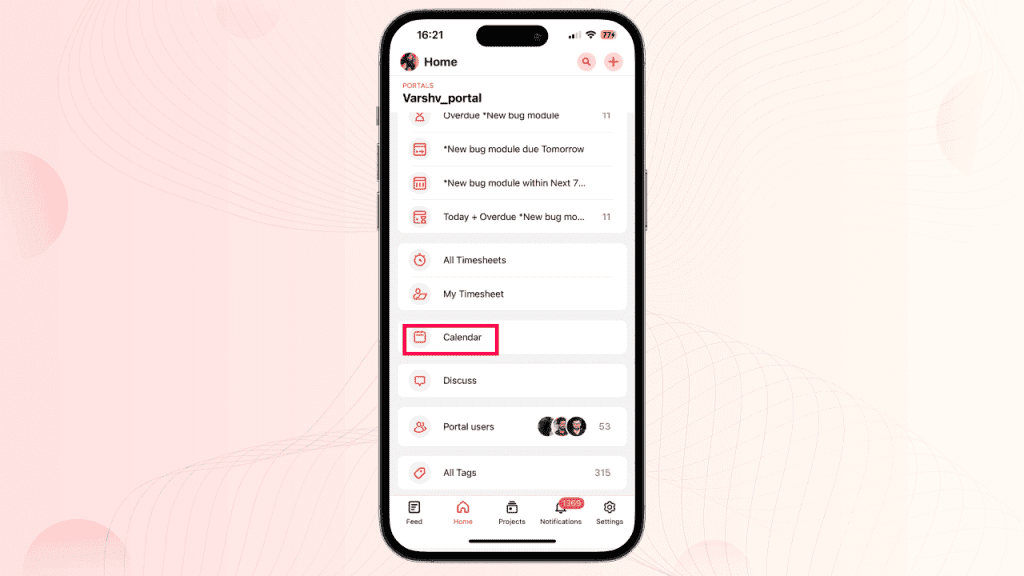
    Zoho Projects has launched version 3.8 of its mobile app for iOS, including a highly anticipated feature: the Global Calendar. Here are the details:

    This new feature displays tasks, bugs, milestones, and events from all your projects, providing a comprehensive view of your schedule and project timelines. The Calendar module is located in the ‘Home’ module of the Projects mobile app.

    (image via zoho)

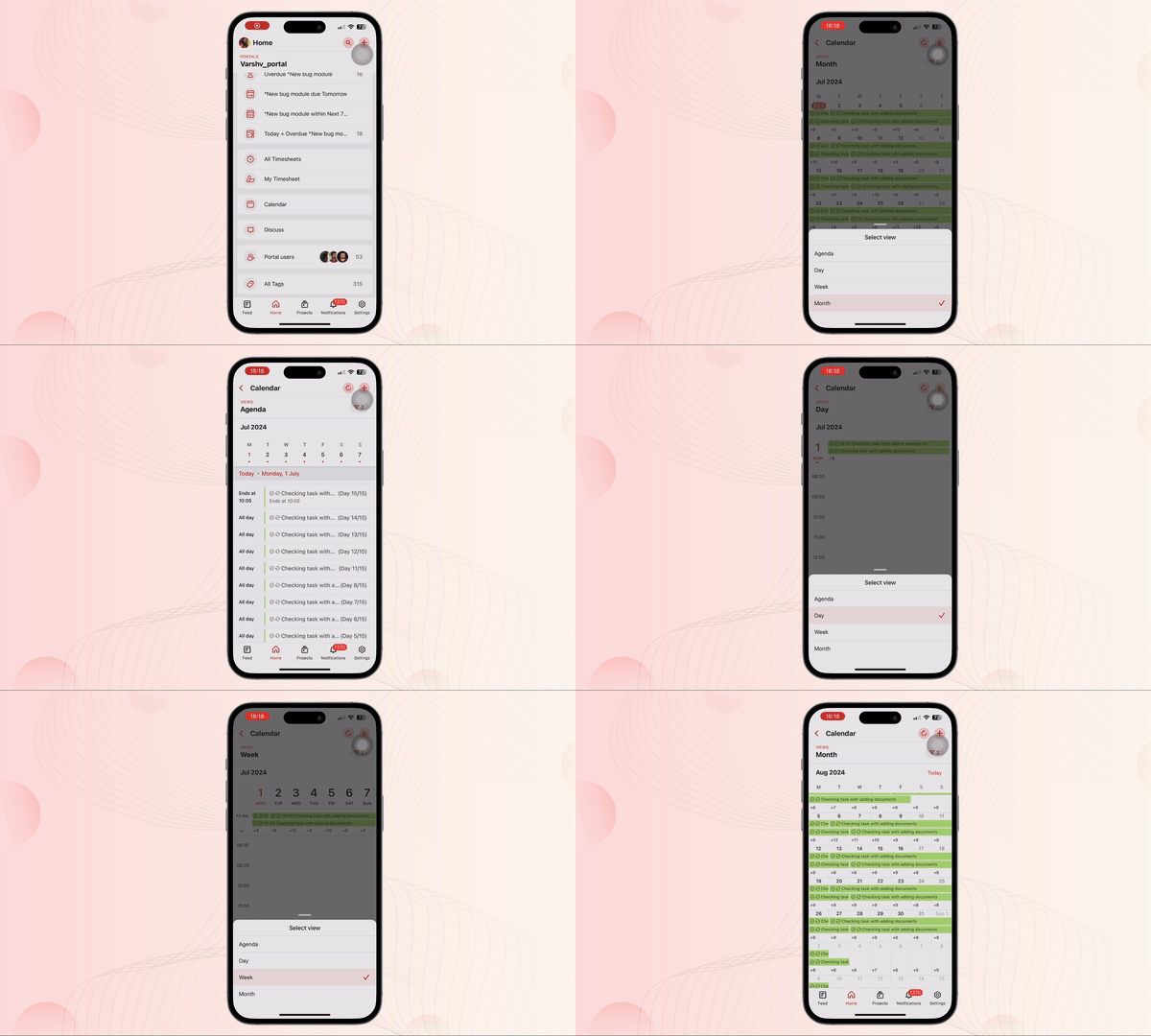
    (image via zoho)

    The Calendar module offers four different views:

    • Agenda: Consolidated list of tasks, bugs, milestones, and events over several days.
    • Day: List of tasks, bugs, milestones, and events for the respective day.
    • Week: List of tasks, bugs, milestones, and events for a week.
    • Month: List of tasks, bugs, milestones, and events for the entire month.

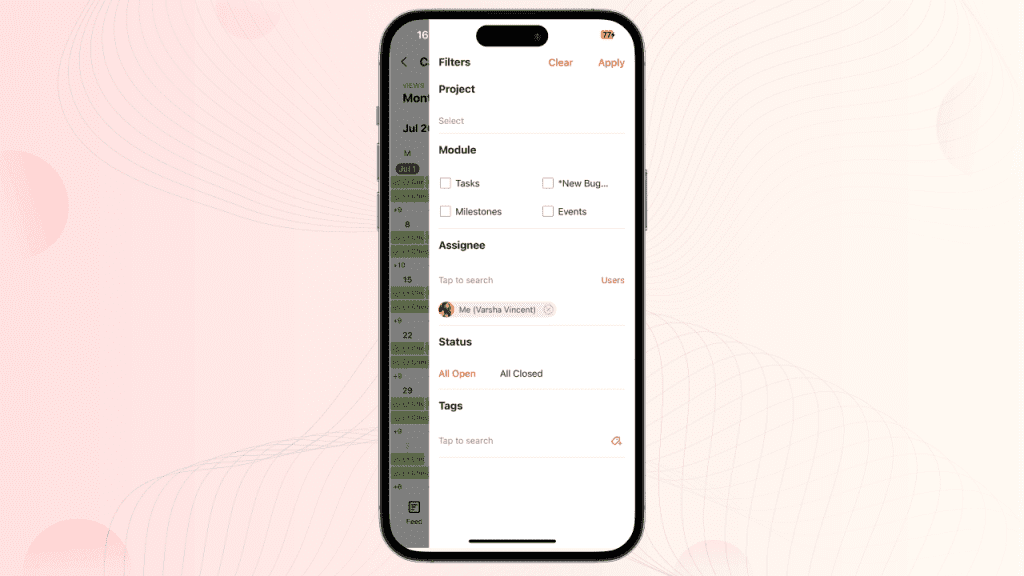
    It also includes multiple filters for more precise results, allowing you to sort and view specific items according to your preferences.

    (image via zoho)

    To use this feature, update the app to its latest version from the App Store or access the provided link.

    New record assignment by user roles in CRM Zoho

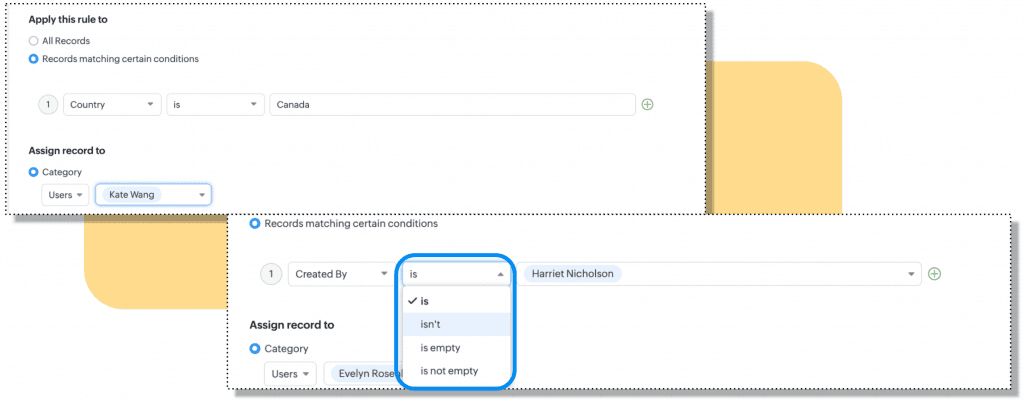
    Until now, when defining assignment criteria based on the user, the available criteria qualifiers have been: is, is not, is empty, and is not empty.

    (image via zoho)

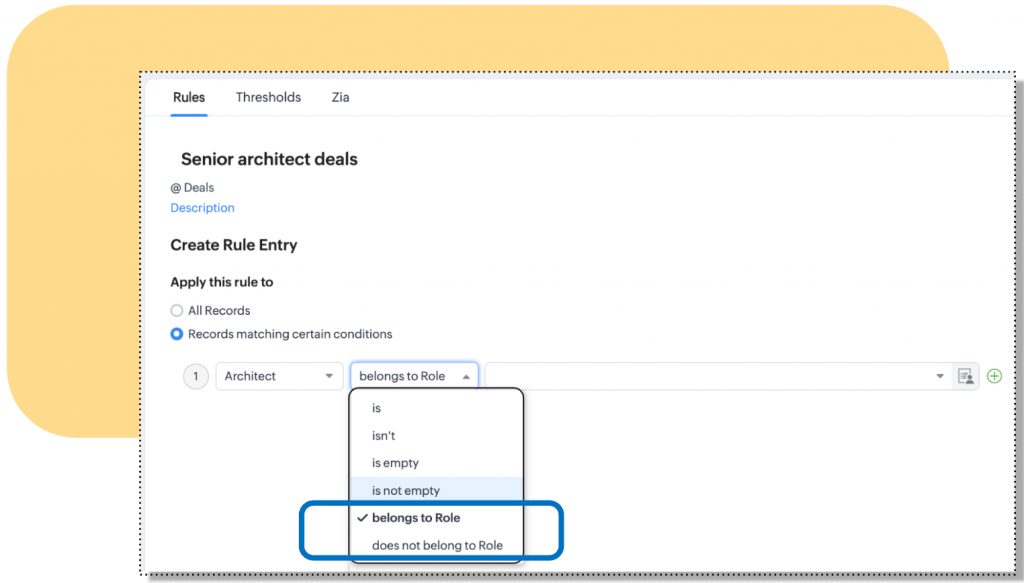
    In addition to the existing criteria, administrators can now use the “belongs to role” and “does not belong to role” criteria to assign records. This enhances the accuracy of automatic record assignment.

    For example, an architecture firm can automatically assign luxury projects to senior architects using this new role-based criterion.

    (image via zoho)

    Available for all editions and in all data centers.

    Sheet launches new data segmentations

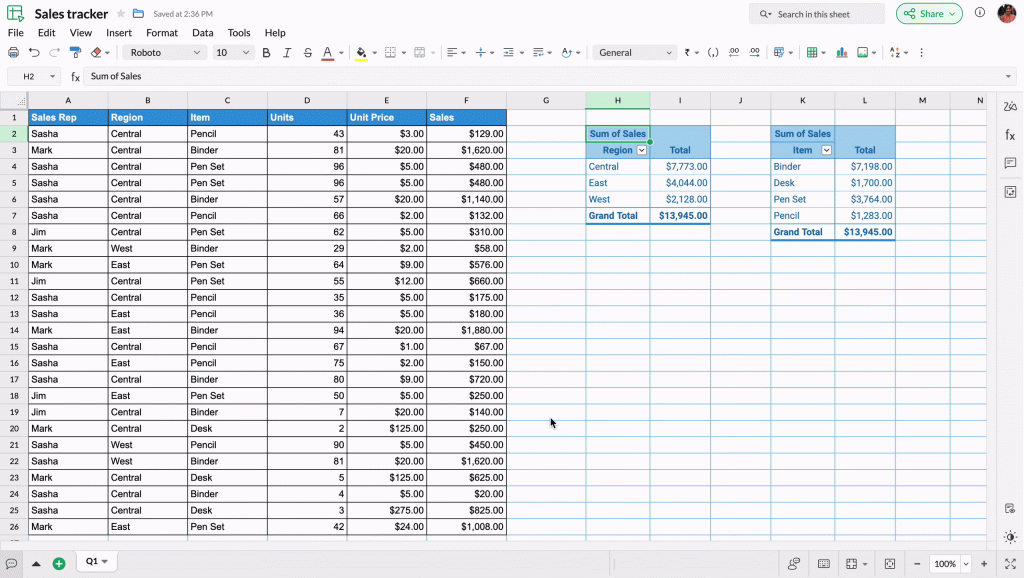
    Zoho Sheet has launched Slicers, interactive visual filters that enhance data management in pivot tables and charts, with options to add, edit, customize, and delete. Differences with Traditional Filters Slicers are prominent graphic elements that can be placed anywhere on the sheet, unlike traditional filters that are applied as dropdown menus within the table.

    (image via zoho)

    Connections Between Pivot Tables

    Slicers allow you to establish connections between multiple pivot tables that share the same data source, facilitating simultaneous filtering and analysis.

    Customization of Slicers

    You can customize the appearance of Slicers and their buttons, adjusting the layout, height, weight, and font to align them with other objects on your sheet.

    Webinars for Campaigns and CRM

    New feature enhancements in Zoho CRM Q2 2024

    Engage Customers with Integrated Email Marketing

    Digital signatures for digital contract management with Zoho CRM

    Do you want to add these new features to your Zoho system? Let’s work together! Learn more about our Zoho consulting services and contact us for a free consultation.
  • Zoho News Catch-Up: See you at Zoholics Austin, News in CRM, TeamInbox, Creator and Social, Instant summaries with ZIA, Sign for Developers

    Welcome to our catch-up, where you’ll be in the know of all the latest Zoho updates in one place!


    See you at Zoholics Austin, Texas on June 5th and 6th


    In just two days, the highly anticipated Zoholics Austin, Texas. This event will take place on June 5 and 6 at the Austin Convention Center. If you don’t have your tickets yet, remember that you can request a 25% discount 👇🏻


    • The event will feature Sridhar Vembu, CEO and co-founder of Zoho, who will open the event with a keynote session and conclude it with an open Q&A session.
    • Additionally, Raju Vegesna, Chief Evangelist, will present product announcements and Zoho’s roadmap. Check de agenda.
    • The event starts at 7:30 am and will offer 12 tracks and over 100 sessions to choose from. 
    • Both breakfast and lunch are included, courtesy of Zoholics!


    Don’t miss this unique opportunity! Reserve your space with our team by sending an email to kim@interconnecta.com

    See you there!


    Zoho CRM introduces enhancements in its integration with Projects and in the Accounts and Deals Module

    Zoho CRM continues to enhance its functionality with new updates that optimize integration with Zoho Projects and improve the Accounts and Deals Module. These improvements will facilitate project management and email communication. Discover them below:

    Enhanced CRM integration with Projects
    You can now enjoy a smoother integration between Zoho CRM and Zoho Projects. Here are the main new features:

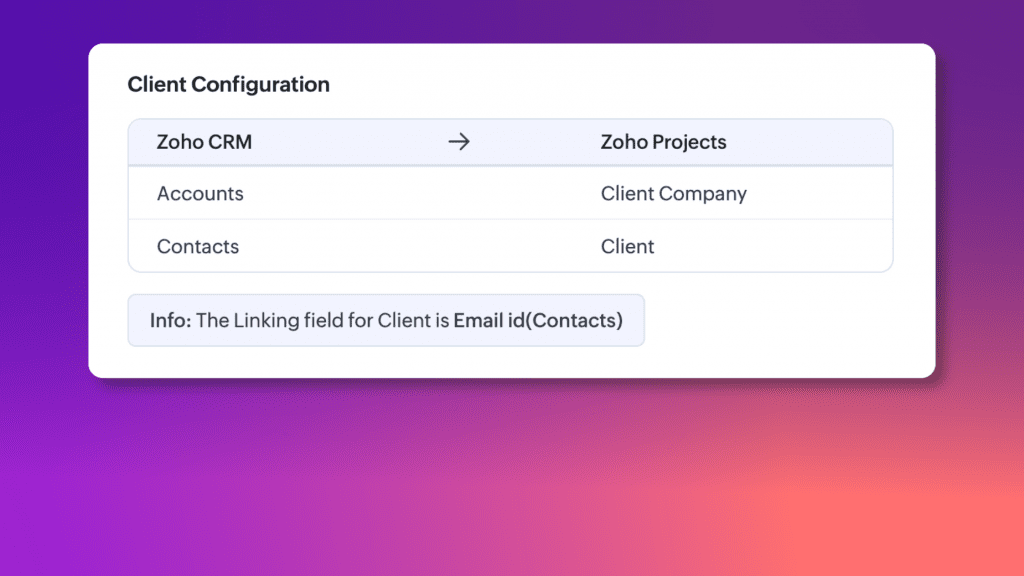
    • Client configuration: improved visibility of client information by adding a specific Client Configuration section. You can now clearly see how Zoho Projects clients are assigned to CRM contacts and accounts, making the process more straightforward and transparent.


    (image via zoho)

    • Expanded module integration: You can now link projects to Contacts, Deals, and other critical Zoho CRM modules such as Products, Cases, Quotes, Sales Orders, Purchase Orders, Invoices, and Campaigns.
      • Enhanced visibility: With projects linked across multiple modules, you can now see a comprehensive overview of all connections and activities related to a specific project. This includes centralized access to quotes, purchase orders, sales orders, invoices, and more within Zoho CRM.
      • Efficient data entry: Automatic field mapping facilitates project creation from each module, reducing manual data entry and ensuring consistency throughout the CRM system.
    • Simplified permission management:
      Setting up and managing access to project details is now easier with a simplified interface. You can quickly assign view or edit permissions, ensuring that everyone on your team has the appropriate level of access to project data.


    (image via zoho)

    Improvements in the Accounts and Deals Module

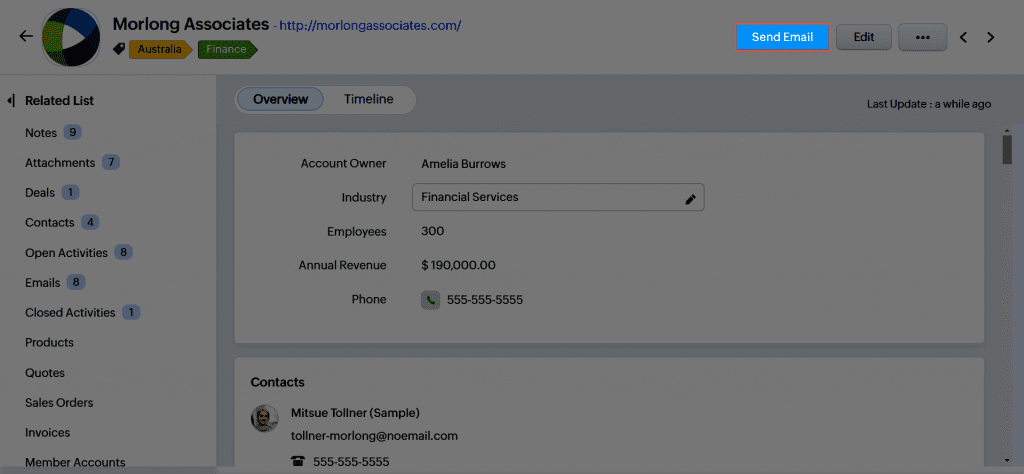
    Zoho CRM has implemented enhancements in email management within the Accounts and Deals modules, facilitating more effective and contextualized communication.


    (image via zoho)

    In the Accounts Module

    • A button has been added to send emails directly from the Accounts module.
    • The email composer offers quick suggestions for email addresses of related contacts.
    • Users can create and use attachments and templates specific to the Accounts module.
    • Although this new functionality could replace the use of attachments and templates specific to contacts in the Accounts module, the option to access these elements through the related emails list has been maintained.

    In the Deals Module

    • A similar button has been added in the Deals module.
    • The email composer offers quick suggestions for email addresses of related contact roles.

    These improvements aim to optimize the user experience in managing emails within Zoho CRM, ensuring efficiency and proper context in business communication.

    (Not currently available in mobile applications)

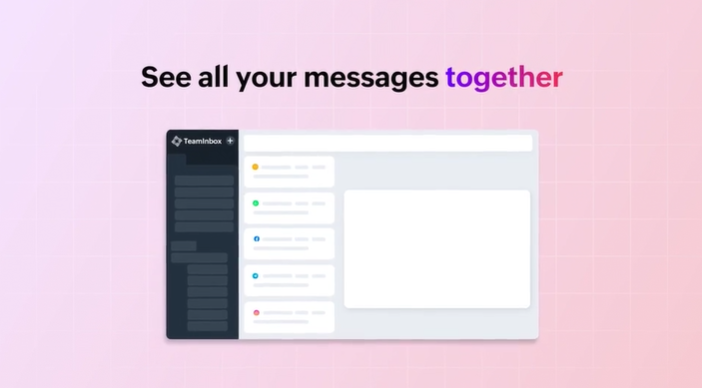
    New unified multichannel inboxes in Zoho TeamInbox

    Zoho TeamInbox introduces unified multichannel inboxes, centralizing all communication channels on a single platform. This new feature aims to:

    • Improve collaboration and transparency within teams.
    • Efficiently organize the inbox.
    • Eliminate the need to switch between multiple applications, simplifying and streamlining message management.

    (image via zoho)

    Unified Inboxes:

    • Consolidation of email messages, WhatsApp, Telegram, Facebook, and Instagram into a single inbox.
    • Ability to associate multiple channels or create specific inboxes for different types of messages.
    • Instagram and Facebook Messenger are added to the supported channels, enabling centralized management of messages from these platforms.

    (image via zoho)

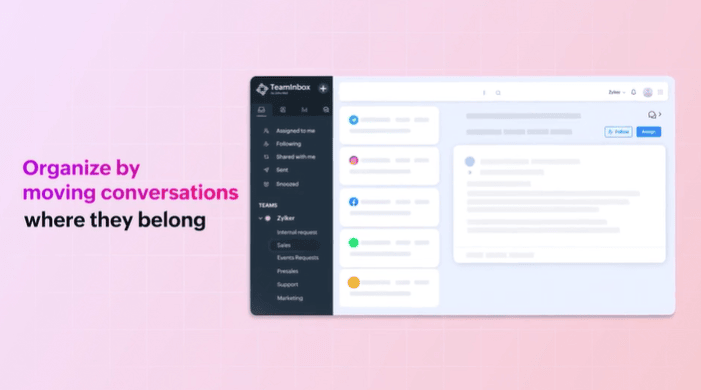
    Moving threads between inboxes: Easy transfer of messages between inboxes as needed by the team.

    Internal Discussions: Dedicated spaces for debates and comments within the inboxes.

    (image via zoho)

    Response time goals: Setting maximum response times with automatic actions if not met.

    Marking duplicate threads: Automatic elimination of repeated threads to keep the inbox organized.

    Multiplatform accessibility: Available on smartphones and desktops, adapting to each device.

    These features aim to simplify communication management, improving team efficiency and collaboration.

    Instant summaries of your notes with Zia

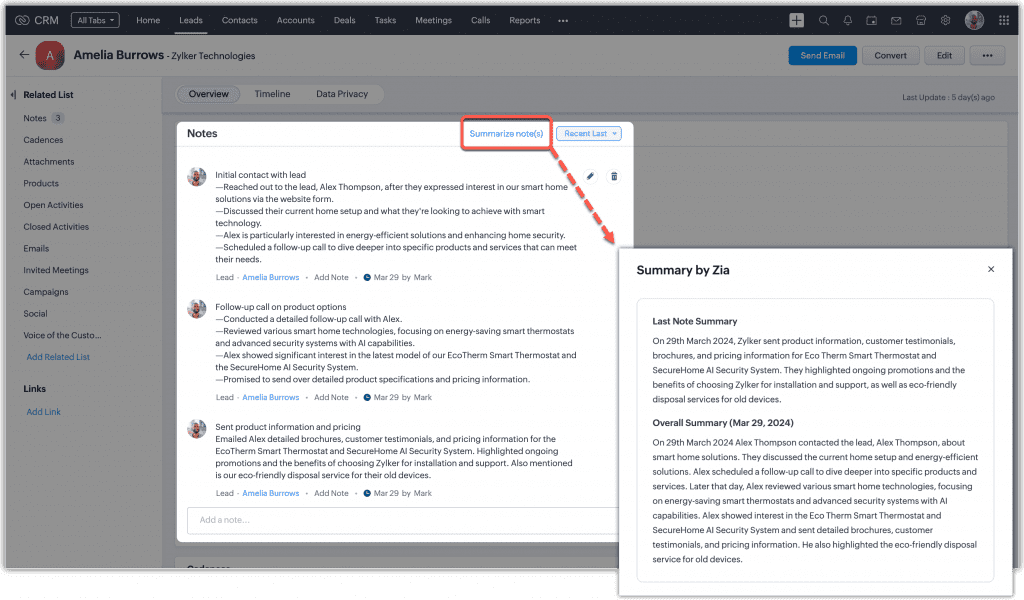
    Zoho CRM has launched the “Zia Notes Summary” feature, designed to offer quick and organized summaries of CRM notes.

    Why Zia Notes Summary?
    It helps you quickly catch up with customer interactions, saving time and keeping you informed. It organizes and makes your CRM records more accessible, including leads, contacts, accounts, and deals. It facilitates decision-making with clearly summarized information.


    (image via Zoho)

    It works with a click on “Summarize note(s),” providing an “Overview” of all notes in a record and a “Latest Note Summary” for the most recent update.

    (Available for the Enterprise edition with more than 20 licenses or in the Ultimate edition of Zoho CRM, in English and currently in the US and EU)

    Zoho Creator announces updates – May 2024

    New features highlighted for Zoho Creator:

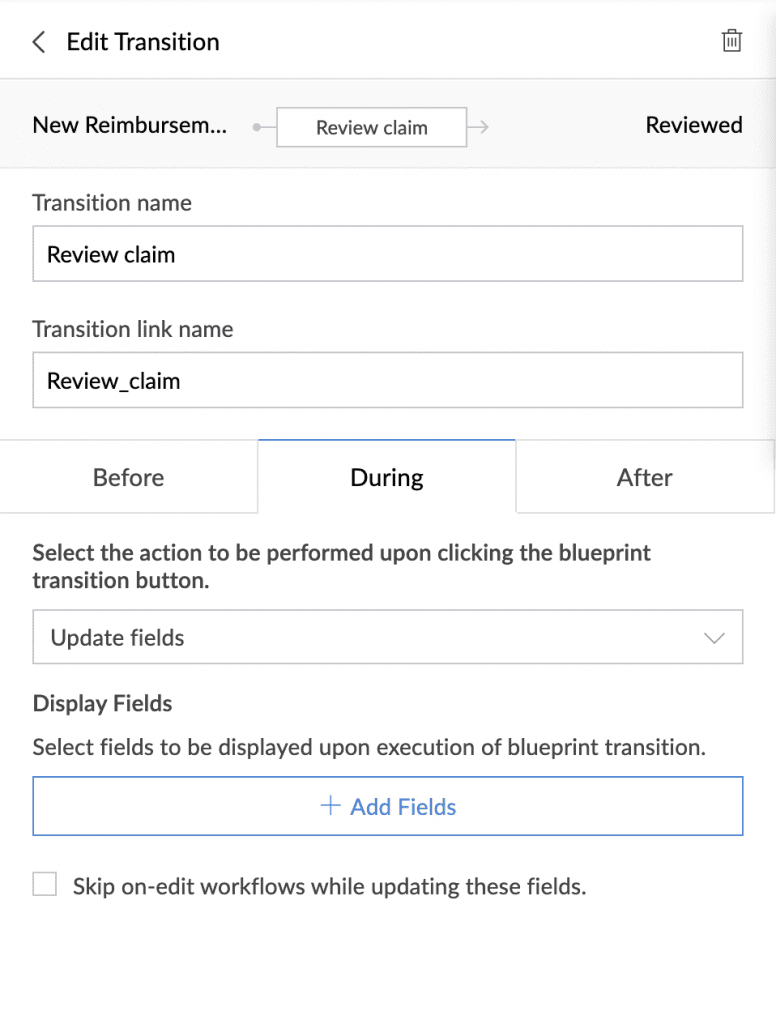
    During Blueprint actions: New section that allows data collection during transitions, with options to update fields or open specific forms.

    You will be able to require data to be collected from a transition owner while making a transition, and this data entry can also be used to trigger workflows.

    Applicable for: C5, C6 / Availability: All DCs


    (image via zoho)

    Widget Configuration: Improvements in widget customization, allowing full control over specific components of an application, and configuring dynamic fields in the manifest.json file for use in multiple applications.

    Operation:

    • Edit the configuration section in the manifest.json file to name fields and specify components.
    • When adding the widget to a page, a menu with configurable fields will be displayed.

    Offers customization and reuse of widgets in multiple applications.

    Applicable for: C5, C6 / Availability: All DCs

    Freeze subform column: Improvement to facilitate editing in subforms with many fields, freezing the first columns to avoid disorienting scrolling.

    Note: This feature will only be available in forms, embedded forms, and published forms, not in PWAs or mobile devices.

    Improves data entry processes, minimizes errors, and increases productivity.

    Applicable for: C5, C6 / Availability: All DCs

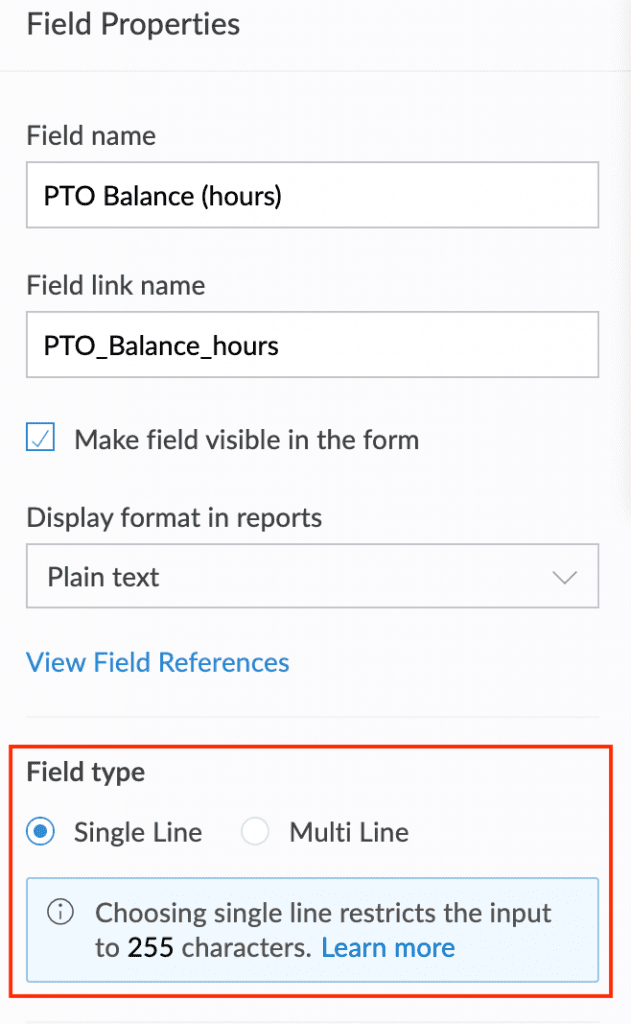
    Data types in formula fields: New field type property with single line (up to 255 characters) and multiline (more than 255 characters) options, improving data management and display.

    Makes it easier to handle and display data, particularly for larger values, expanding the range of use cases.

    Applicable for: C5, C6 / Availability: All DCs

    Maximum character limits in fields: Setting limits of up to 64 KB (65,535 characters) for Rich Text and Multiline fields, with implementation in June 2024.

    Applicable for: C5, C6 / Availability: All DCs

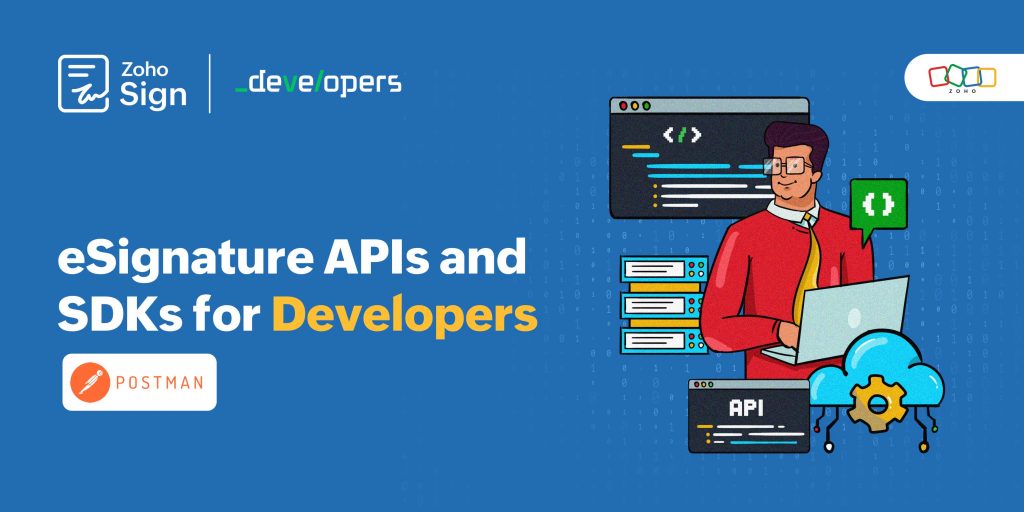
    Zoho Sign for Developers: Plug and Play with eSign APIs and SDKs

    (image via zoho)

    Zoho Sign now offers APIs and SDKs for developers to quickly and easily integrate electronic signature functionality into their applications, websites, or mobile apps.

    Key Features:

    • Create reusable documents and templates: Generate legally binding envelopes and turn frequent documents into templates.
    • Document storage: Offers unlimited storage or allows backups to cloud service providers.
    • Seamless integration: Integrates with over 30 applications, making it easy to send and collect signatures without switching websites.
    • Brand customization: Allows adding the company logo and customizing email templates and post-signing pages.
    •  

    More than 25,000 envelopes are sent daily for signing through Zoho Sign APIs!

    New features for Zoho Social

    Attention marketers! Here are the new features that Zoho Social launched in April:

    Post stories on Facebook: Now you can post stories directly from Zoho Social using multimedia files or creating content with Canva or Zoho’s image editor. Available for Standard plans and above.


    (image via zoho)

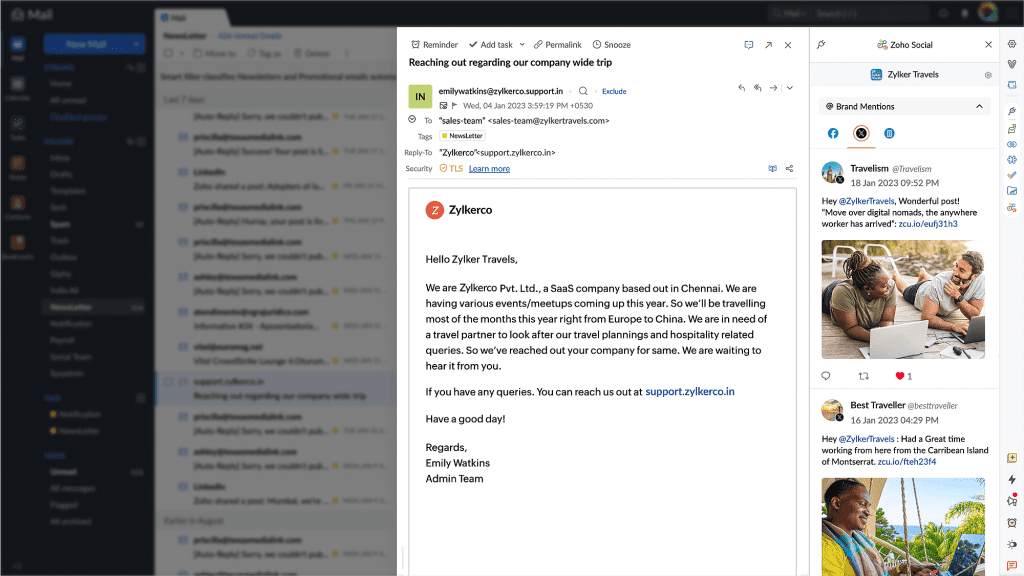
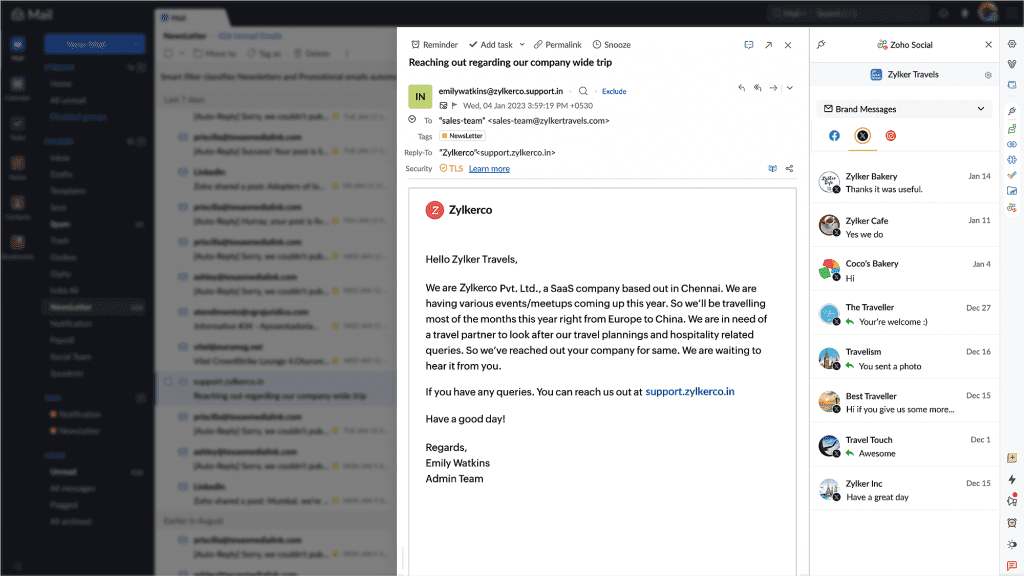
    Zoho Social eWidget for Zoho Mail: Access brand mentions and messages received on Facebook, LinkedIn, and Instagram from Zoho Mail. You can interact with mentions and messages directly from the eWidget extension.


    (image via zoho)


    (image via zoho)

    Changes in Instagram video posting: Individual videos will be automatically posted as reels on Instagram, with no option to post as a regular post. On Facebook, the option to choose between a reel or a post is still available.


    (image via zoho)

    Webinars on Zoho Creator, Cliq, and Desk

    Rebranding mobile applications in Zoho Creator

    Zoho Cliq for your enterprise

    How to create a custom module in Zoho Desk

    Do you want to add these new features to your Zoho system? Let’s work together! Learn more about our Zoho consulting services and contact us for a free consultation.

  • Consult your projects in real time with an AI Virtual Assistant integrated into Zoho Projects

    In today’s digital age, efficiency and innovation are key to staying ahead in Project Management. At Interconnecta, we understand the importance of integrating the most advanced technological solutions into our business practices. That’s why we are excited to introduce a revolutionary tool for all Zoho Projects users: an integrated and pre-configured virtual assistant with Artificial Intelligence that will instantly answer all your queries about your company’s projects.

    AI Integration in Zoho Projects
    Zoho Projects has always been a formidable tool for project management, offering detailed tracking and effective planning. Now, with the integration of artificial intelligence, Zoho Projects becomes an even more powerful platform. This AI assistant, fully integrated into Zoho Projects, not only improves the way you interact with your data but also allows you to inquire about the status of projects, responsible parties, deadlines, and much more, all in real time.

    How Does It Work?
    The AI assistant of Zoho Projects uses advanced algorithms to analyze your project data. You can ask the assistant about different aspects of your projects, such as current progress, who is in charge of a specific task, and the resources used. This is done through simple voice or text commands, making management easier even on the go.

    To further delve into the advantages this innovation can offer and explore practical cases and effective strategies, we invite you to download our exclusive material: 

    “Maximize Efficiency in Project Management with AI Integration”

    This downloadable document is designed to provide you with a detailed understanding of how artificial intelligence can transform your project management operations, allowing you to reach a new level of efficiency and effectiveness.


    Cliq here to Download

    Don’t miss the opportunity to get ahead in project management and ensure your company is equipped with the most advanced tools on the market. Download now the material and start experiencing the benefits of AI integration in Zoho Projects.D

  • Does your company really need Project Management? Find out now

    In today’s dynamic business environment, companies face the constant challenge of improving their efficiency and effectiveness. While some companies excel and thrive even under pressure, others may be struggling without even realizing it. Have you ever wondered if your company could benefit from implementing a more robust project management structure?

    Project Management is not just a passing trend, it’s a crucial tool that can transform the way your company approaches its most critical objectives. From improving communication to ensuring timely project delivery, the right project management techniques can make the difference between stagnation and accelerated success.

    However, not all companies are aware of the telltale signs that indicate the need for this discipline. That’s why we’ve created an indispensable resource that identifies the 10 Key Indicators to recognize when your company could greatly benefit from implementing project management practices.

    This resource will not only help you identify these signs but will also provide practical solutions and expert advice on how to address each specific challenge.

    If you’re ready to discover if project management is what your company needs to scale new heights, don’t wait any longer. Download our free eBook and take the first step towards a business transformation that could change the game for your organization.


    10 Indicators your company could benefit from Project Management

    Don’t let unrecognized challenges hinder your company’s potential. ¡Start transforming your business approach today!

  • Zoho News Catch-Up: AI at the service of your business, News in Sites, CRM, and Books, Integration of Sales IQ to Telegram, Zoholics Texas, Webinars on Landing Page, Survey and Cliq

    Welcome to our catch-up, where you’ll be in the know of all the latest Zoho updates in one place!


    Launch: Artificial Intelligence at the service of your business

    We are excited to announce the launch of our new service: Artificial Intelligence solutions specifically designed to empower and transform your business.

    Artificial intelligence (AI) is redefining the boundaries of what is possible in all industries, offering everything from advanced data analysis to automation and personalization on a scale never seen before. Our new service promises not only to adapt to the specific structure and needs of your company but also to drive unprecedented efficiency and open new growth opportunities.


    Are you ready to take the leap into digital transformation with the help of AI?

    Learn more here


    I want to integrate AI into my company

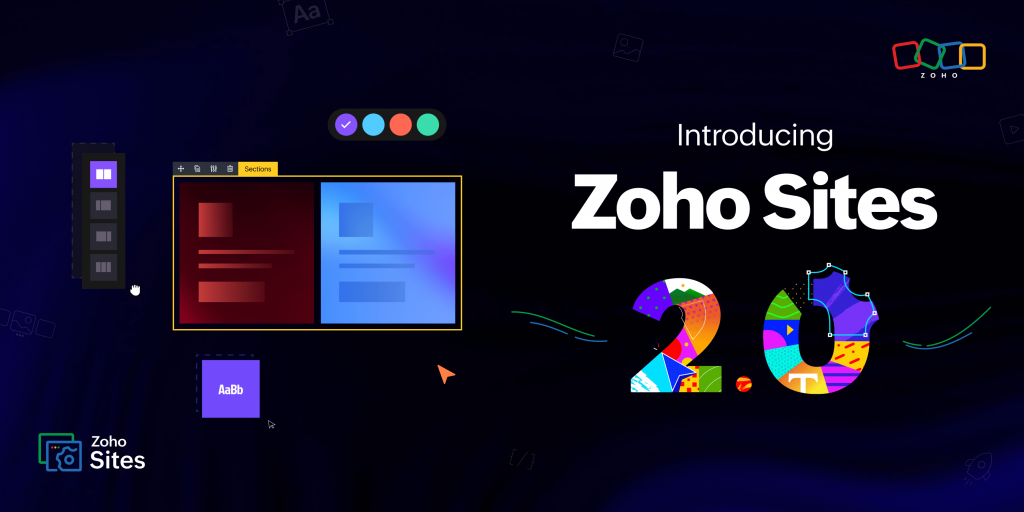
    Zoho Sites redefines website building in its version 2.0

    (image via zoho)

    New user interface: Now you can enjoy more intuitive navigation with a completely redesigned user interface and advanced customization options.

    Subsites: Create microsites targeted at specific audiences, facilitating segmentation and improving interaction.

    Multilingualism and RTL support: Expand your global reach with support for multiple languages and right-to-left scripts, all integrated without the need for additional plugins.

    Enhanced navigation: Implement mega menus and visual icons for a superior user experience.

    SEO and advanced schemas: Take advantage of new SEO tools and the schema builder to increase your online visibility.

    Reusable sections and social profiles: Update your site efficiently and maintain a consistent image across all your platforms.

    Individual page publishing: Publish pages instantly and ensure the quality of your content before it goes public.

    Zoho Sites 2.0 gives you all the tools to make your online presence more powerful and accessible. Don’t miss out on experiencing these new features!

    Improvements in Zoho CRM Sandbox for conflict-free deployment

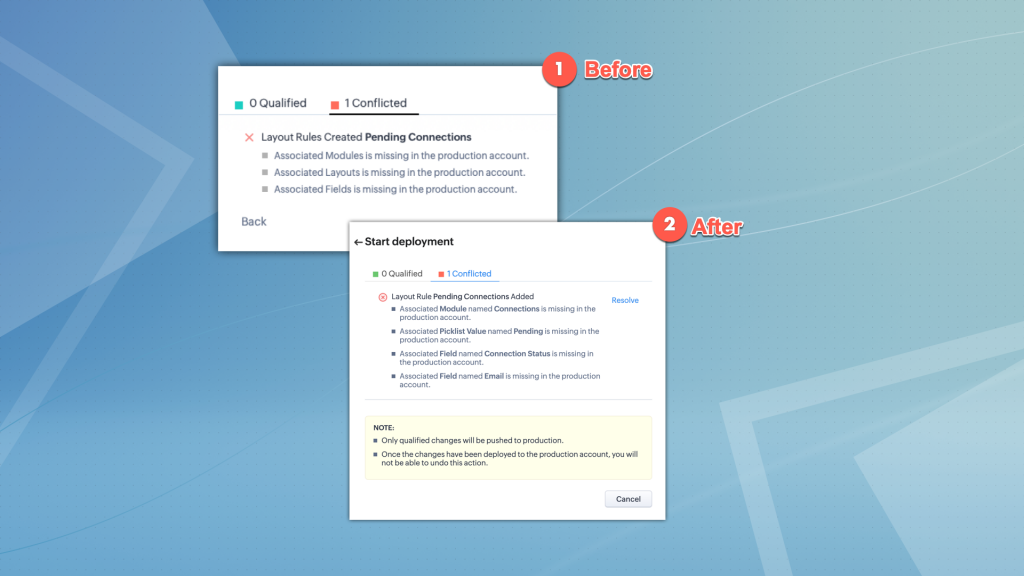
    Optimize deployment in Zoho CRM with the new Sandbox improvements! Now you can directly resolve conflict cases, in addition to some improvements in the user interface. Don’t miss them!

    Enhanced visualization of conflicts and dependencies: Now you will see detailed information about the items involved in conflicts, such as module names and fields, which facilitates the identification and resolution of issues.

    (image via zoho)

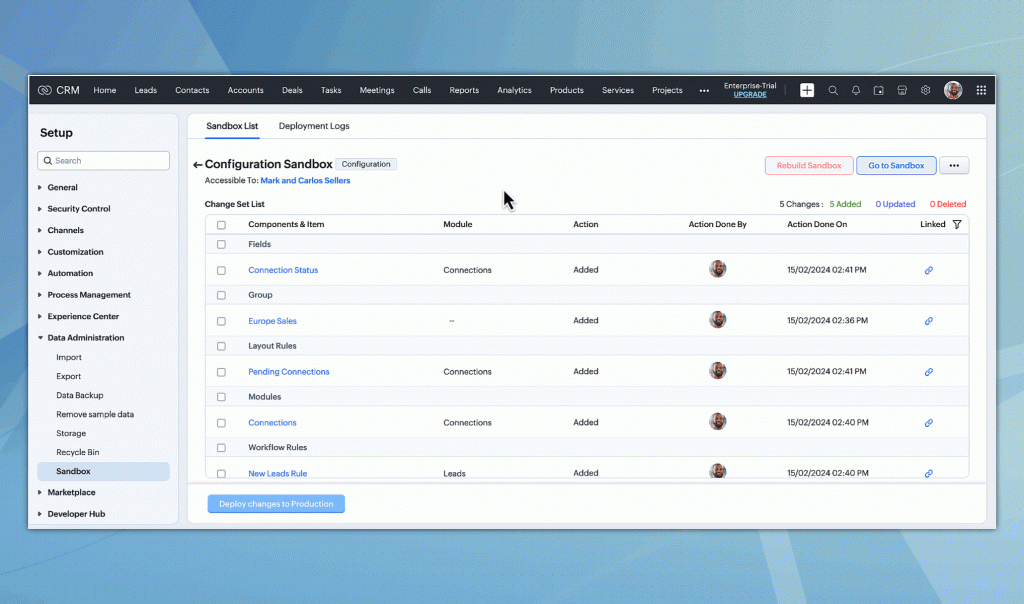
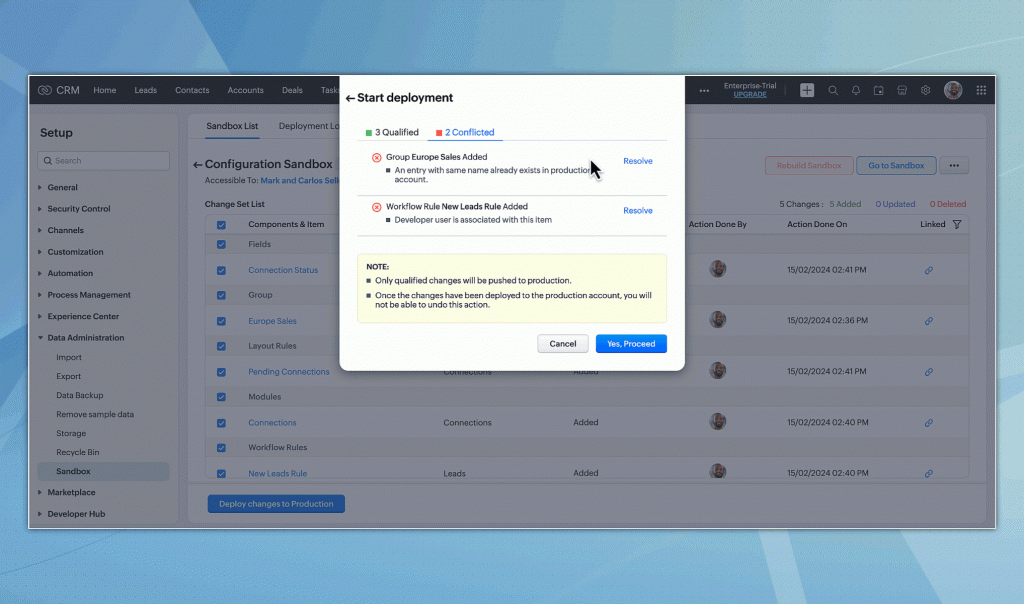
    Direct conflict resolution: Resolve conflicts directly from the “Check Dependency” page. Among the available options, you can select dependent items for deployment, rename elements with duplicate names, or change the developer assigned to a configuration, directly from the user interface.

    (image via zoho)

    (image via zoho)

    User interface improvements: Enjoy a more intuitive experience with improvements to the interface, designed to make the testing and deployment process more efficient.

    These updates make managing and deploying configurations in Zoho CRM easier and less prone to errors, ensuring a smooth transition to the production environment.

    New features in Zoho Books – April 2024

    Explore the latest improvements in Zoho Books for more efficient accounting management:

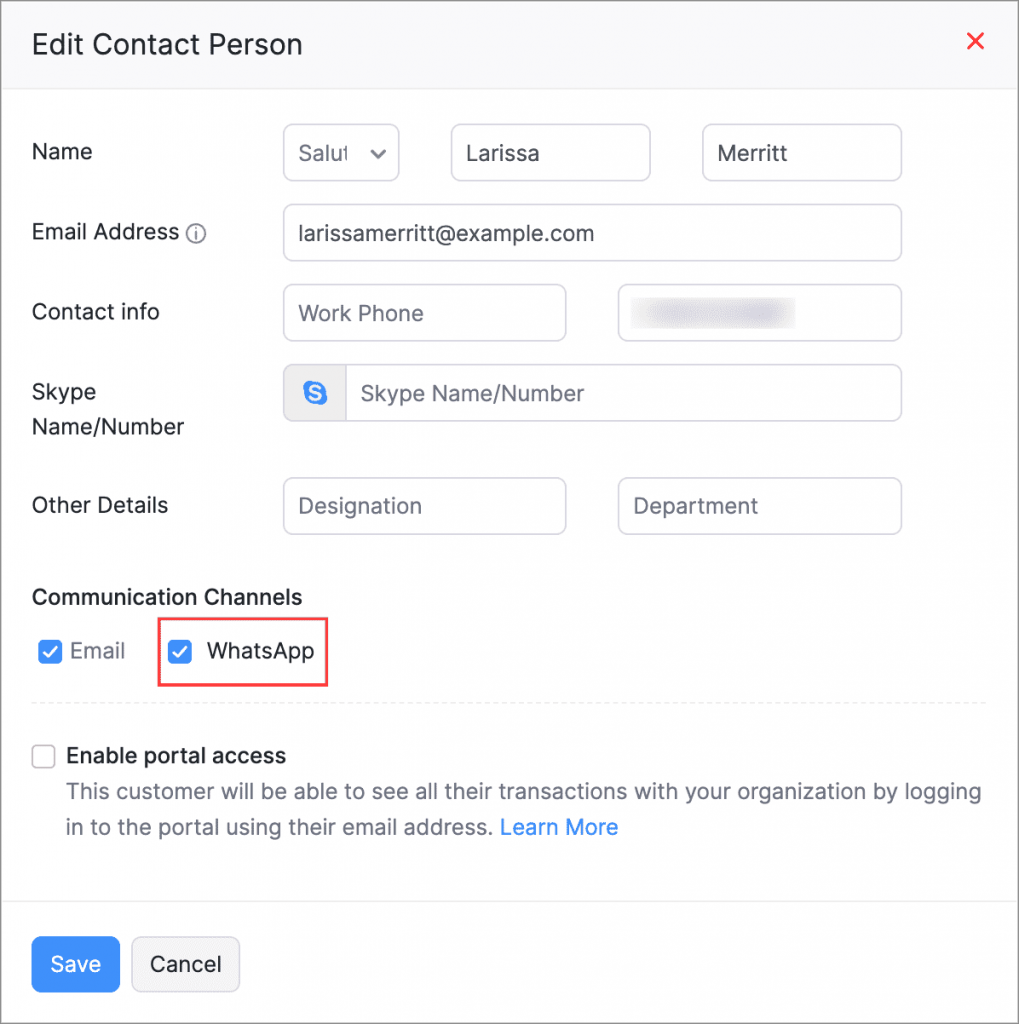
    Integration with WhatsApp: Automatically send notifications and transaction details to your clients via WhatsApp, improving communication and efficiency.

    Enable the function by following these steps: Sales > Customers, select a customer and edit their main contact or contact person details on the overview page. Then, enable WhatsApp as a communication channel.

    (image via zoho)

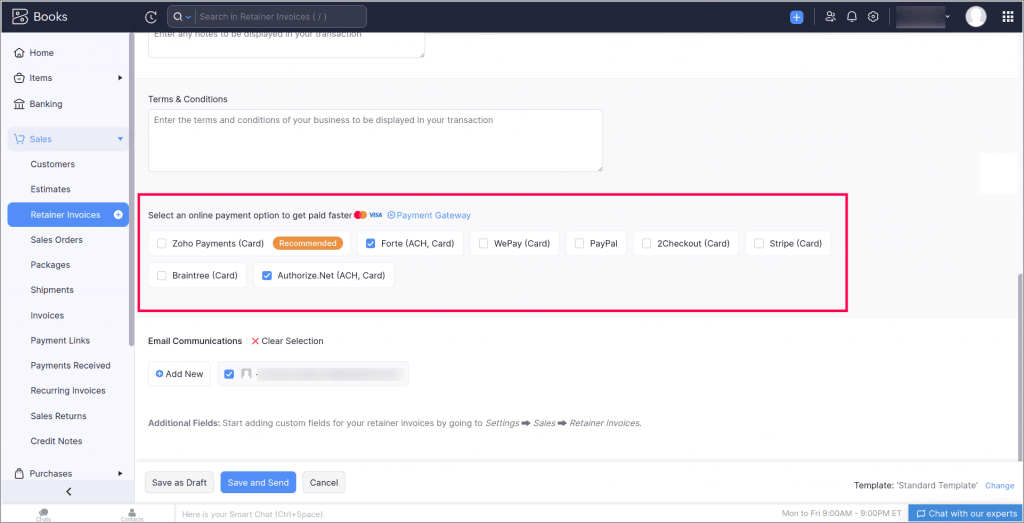
    ACH Payments for Retainer Invoices: Make it easier for your clients to pay retainer invoices through ACH payment links, simplifying the collection process.

    To record ACH payments, go to Sales > Advance Invoices. Select your preferred ACH payment gateway when creating or editing an invoice.

    (image via zoho)

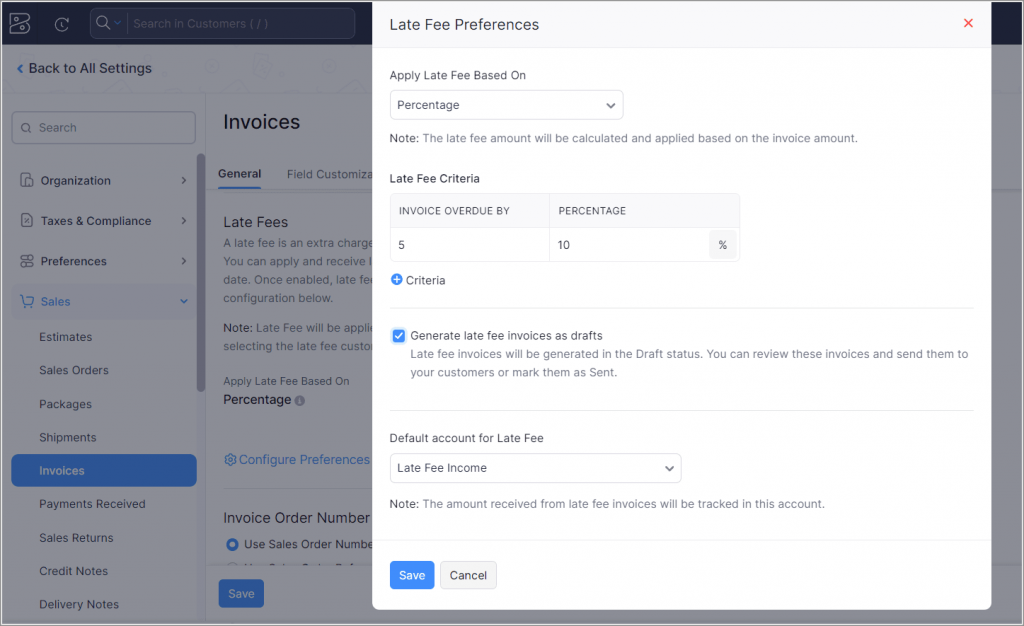
    Late Fee Application [U.S. Edition]: Implement automatic late fees on payments by setting custom conditions for each invoice. (Available only in the Premium, Elite, and Ultimate plans of Zoho Books)

    To enable this feature, go to Settings > Preferences > Invoices and activate the Late Payment Fee preference.

    (image via zoho)

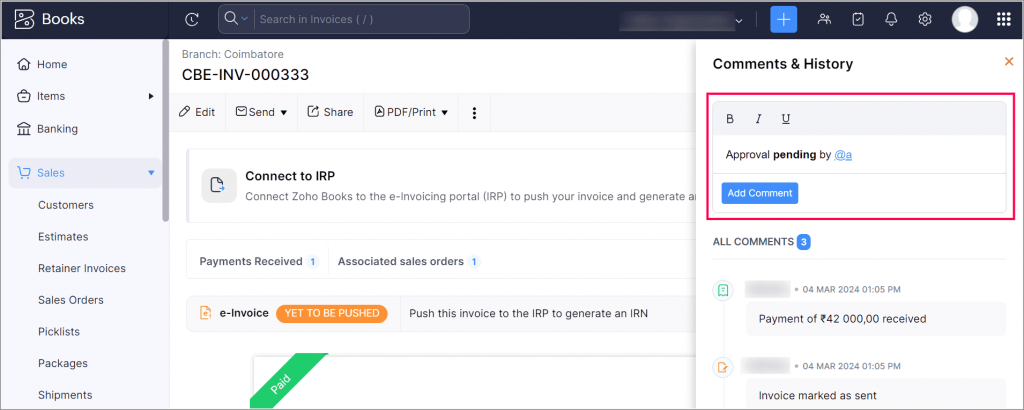
    Improvements in the Comments and History section: Take advantage of new features to interact and highlight important information in transaction comments.

    (image via zoho)

    Get ready to take your business to the next level with Zoho Books!

    SalesIQ extends its integration with Telegram for Chatbots

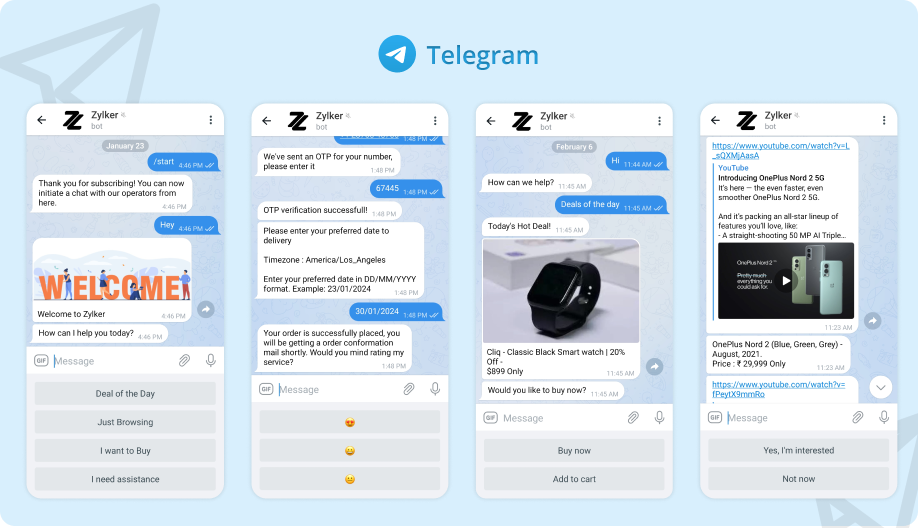
    Now you can relax and let your SalesIQ bots manage interactions on Telegram, improving customer service and reducing response times. This automation allows your operators to focus on handling more complex queries, thus optimizing resources and team efficiency.

    (image via zoho)

    • Automated Management: SalesIQ chatbots can now handle conversations on Telegram, allowing you to automate responses and improve customer service efficiency.
    • Multilingual Support: Implement chatbots in various languages, offering a personalized experience for each Telegram user.
    • Transfer to Operators: When necessary, chatbots can transfer conversations to human operators to ensure high-quality customer support.
    • Custom Flows: Use the no-code bot builder to create specific flows for Telegram users, optimizing interaction according to the needs of your audience.
    • Function Versatility: Telegram chatbots can perform tasks from lead generation to order tracking and answering frequently asked questions.

    So, everything you plan for your website can now also be implemented for your Telegram users:

    • Lead generation
    • Appointment scheduling
    • Support ticket creation
    • E-commerce order tracking
    • Responses to frequently asked questions and routine inquiries

    SalesIQ and Telegram together enhance your business’s ability to interact efficiently with customers, increasing satisfaction and retention.

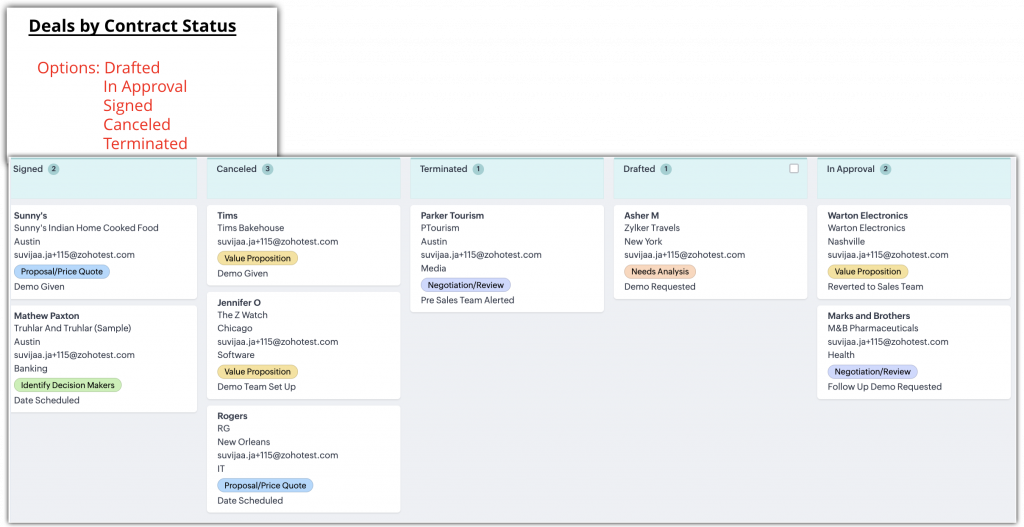
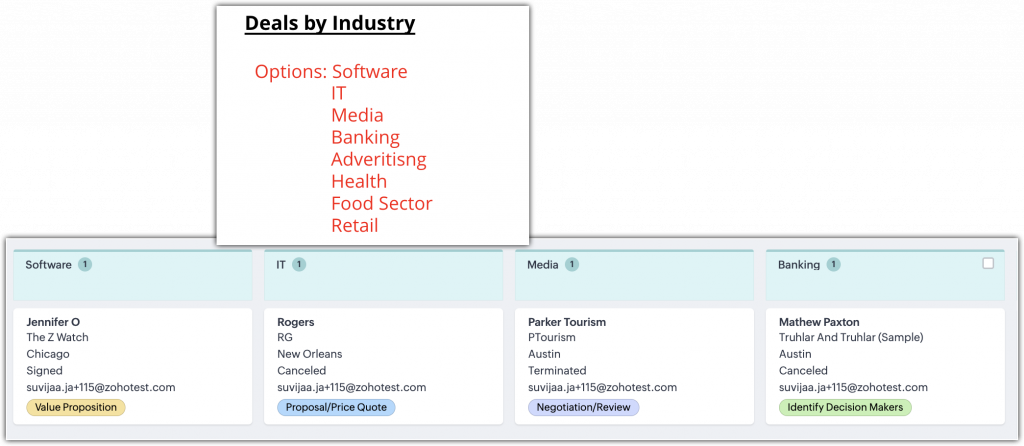
    New Kanban views in Zoho CRM: Multi-level record prioritization

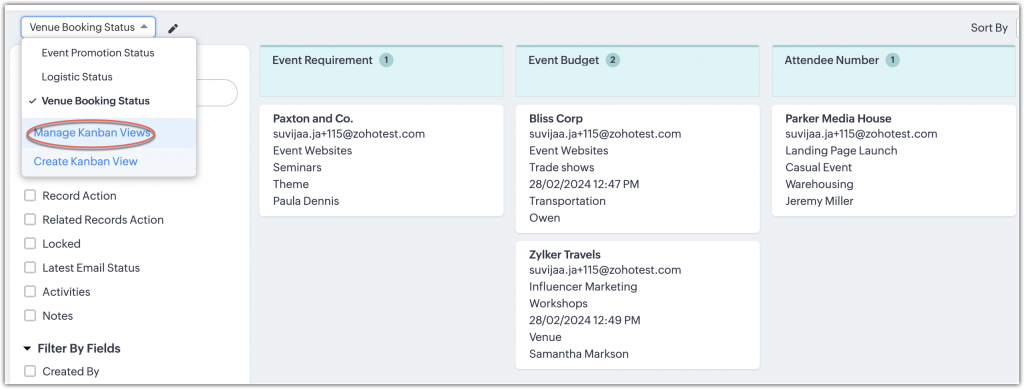
    Now you can maximize your record management with multiple Kanban views in Zoho CRM. See how it works:

    Multiple views per module: You can now create various Kanban views within the same module, allowing you to prioritize and organize records according to different criteria without needing to modify existing views.

    Flexible setup: Set up and customize each Kanban view to categorize records by the fields you need, such as contract status or industry, thus facilitating the visual management of multiple processes or projects.

    (image via zoho)

    (image via zoho)

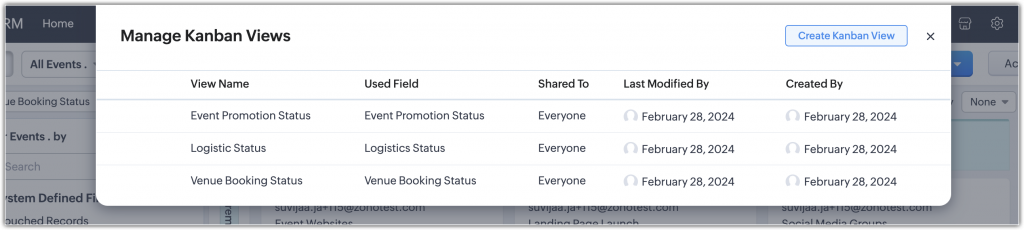
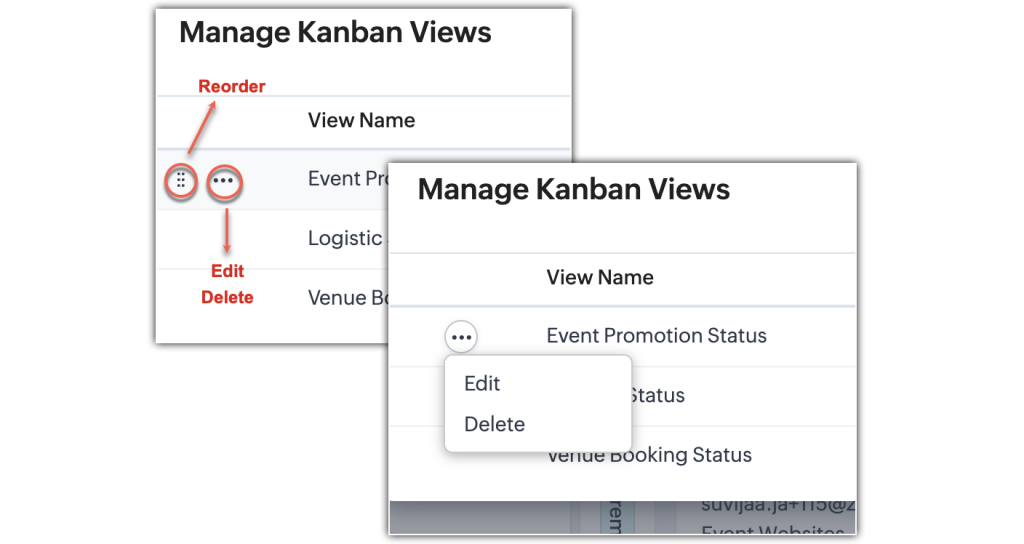
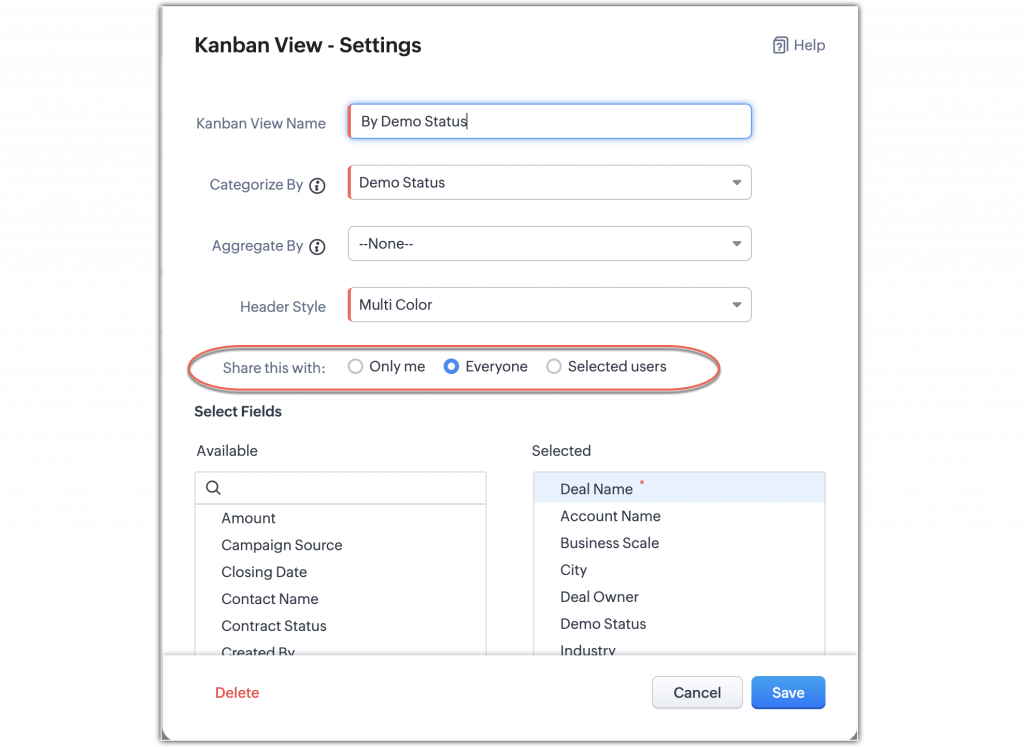
    Management and customization of views: Manage and customize your Kanban views to suit your specific needs. Rearrange views according to your preferences and manage access permissions for different users.

    (image via zoho)

    (image via zoho)

    (image via zoho)

    (image via zoho)

    These new features make viewing and handling records in Zoho CRM more dynamic and tailored to the specific needs of your company.

    See you on June 5 and 6 at Zoholics Austin, Texas

    We are pleased to invite you to Zoholics 2024 in Austin, Texas! This event is a unique opportunity to immerse yourself in the latest industry trends and discover how Zoho can transform your business.

    Why attend?

    Inspirational conferences from industry experts.
    Hands-on workshops to maximize Zoho’s potential.
    Networking opportunities with leading market professionals.
    Discover new features and innovative solutions.

    Interested?


    Do not hesitate to reserve some time with our team who will be present at the event. We are eager to meet you and discuss how Zoho can drive the success of your business.

    Don’t miss this unique opportunity! Reserve your space with our team by sending an email to kim@interconnecta.com


    Buy my tickets


    I want to see the schedule

    Don’t miss the opportunity to explore the latest innovations from Zoho, enhance your skills, and expand your network. We look forward to seeing you there!

    Webinars on Zoho Landing Page, Survey, and Cliq

    How to create successful event Landing Pages | Zoho Landing Page

    Integration of Zoho Survey with Zoho Campaigns

    Improve your marketing game with Zoho Cliq

    Do you want to add these new features to your Zoho system? Let’s work together! Learn more about our Zoho consulting services and contact us for a free consultation.

This site is registered on wpml.org as a development site. Switch to a production site key to remove this banner.