Category: Blog

  • AI for recruiters: turning interviews into useful and comparable information

    In the daily work of HR and recruitment teams, where multiple interviews are conducted and numerous profiles are
    evaluated, having clear and actionable information from each conversation significantly improves the quality of
    decision-making.

    From recorded interviews to structured information

    In many hiring processes, interviews are recorded as audio files, personal notes, or subjective impressions that
    are difficult to share. This often leads to information loss, inconsistent evaluation criteria among interviewers,
    and greater effort when reviewing candidates.

    With Zoho’s AI Interview Insights, recorded interviews are automatically transformed into accurate transcriptions
    and clear summaries, enabling a more objective and consistent review of each profile. As a result, teams can reduce
    time spent on administrative tasks and focus on what truly matters: skills, experience, and organizational fit.

    How it works with the support of ZIA

    This functionality is powered by ZIA, Zoho’s artificial intelligence, which analyzes interviews and presents the
    information in a clear and structured way to support the daily work of HR teams.

    1. ZIA processes the interview recording

    Once a one-way (recorded) interview is submitted, ZIA automatically starts the analysis:

    • Converts audio into text using speech-to-text processing
    • Splits the transcription into question-and-answer segments
    • Generates a concise summary for each response
    • Highlights key talking points for faster review

    No additional action is required: the analysis begins as soon as the recording is available.

    2. Activating AI Interview Insights

    From Configuration > ZIA > AI Interview Insights, the team can enable the feature and select the preferred
    language for transcriptions and AI-generated summaries.
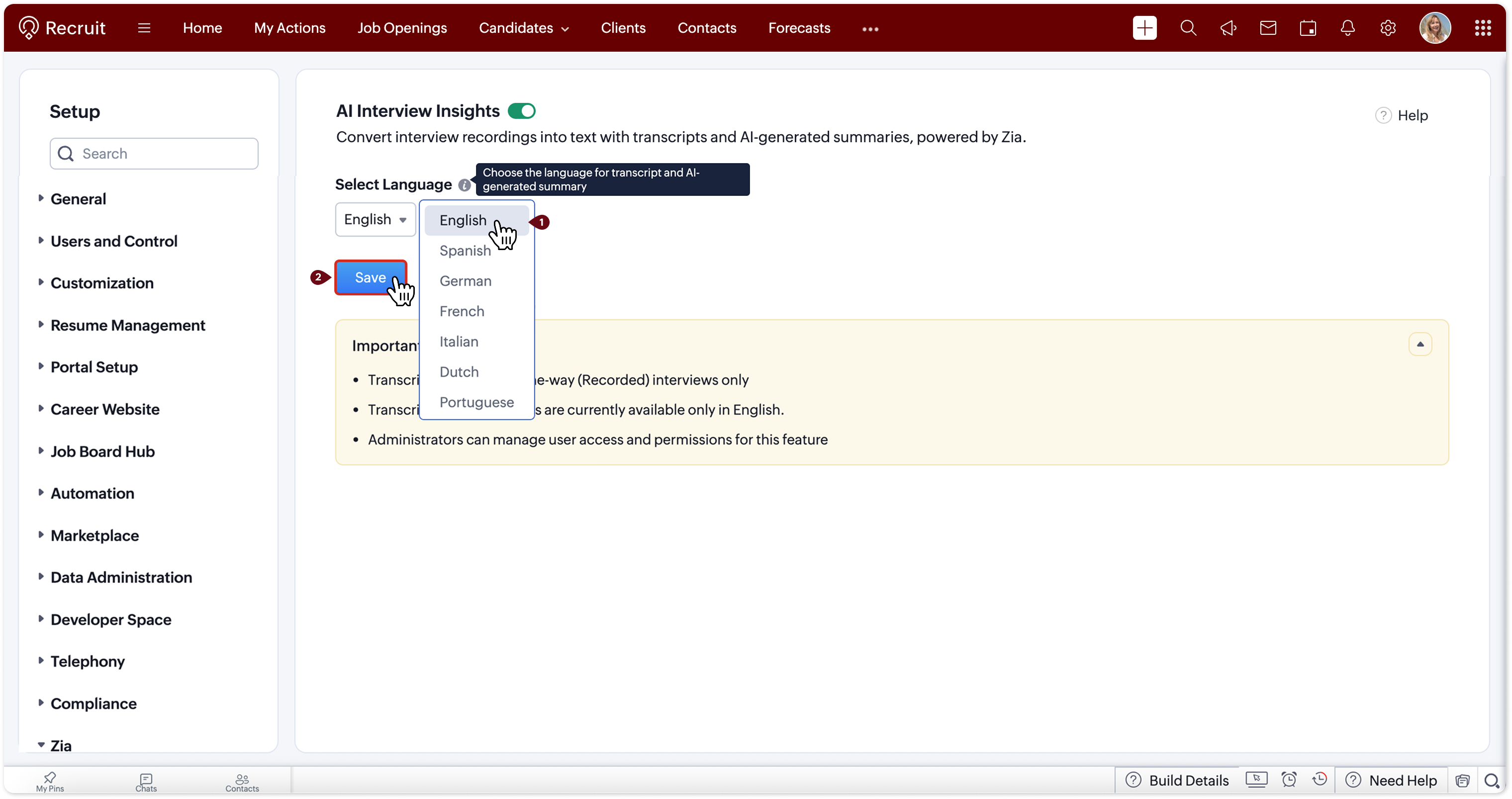
    Configuration of AI Interview Insights in Zoho

    Image via Zoho

    3. All the information in one place

    Within the Interviews module, when opening an interview and accessing the Evaluation tab, recruiters find:

    • The full transcription
    • AI-generated summaries for each response
    • An optimized view that keeps the transcription visible as a reference
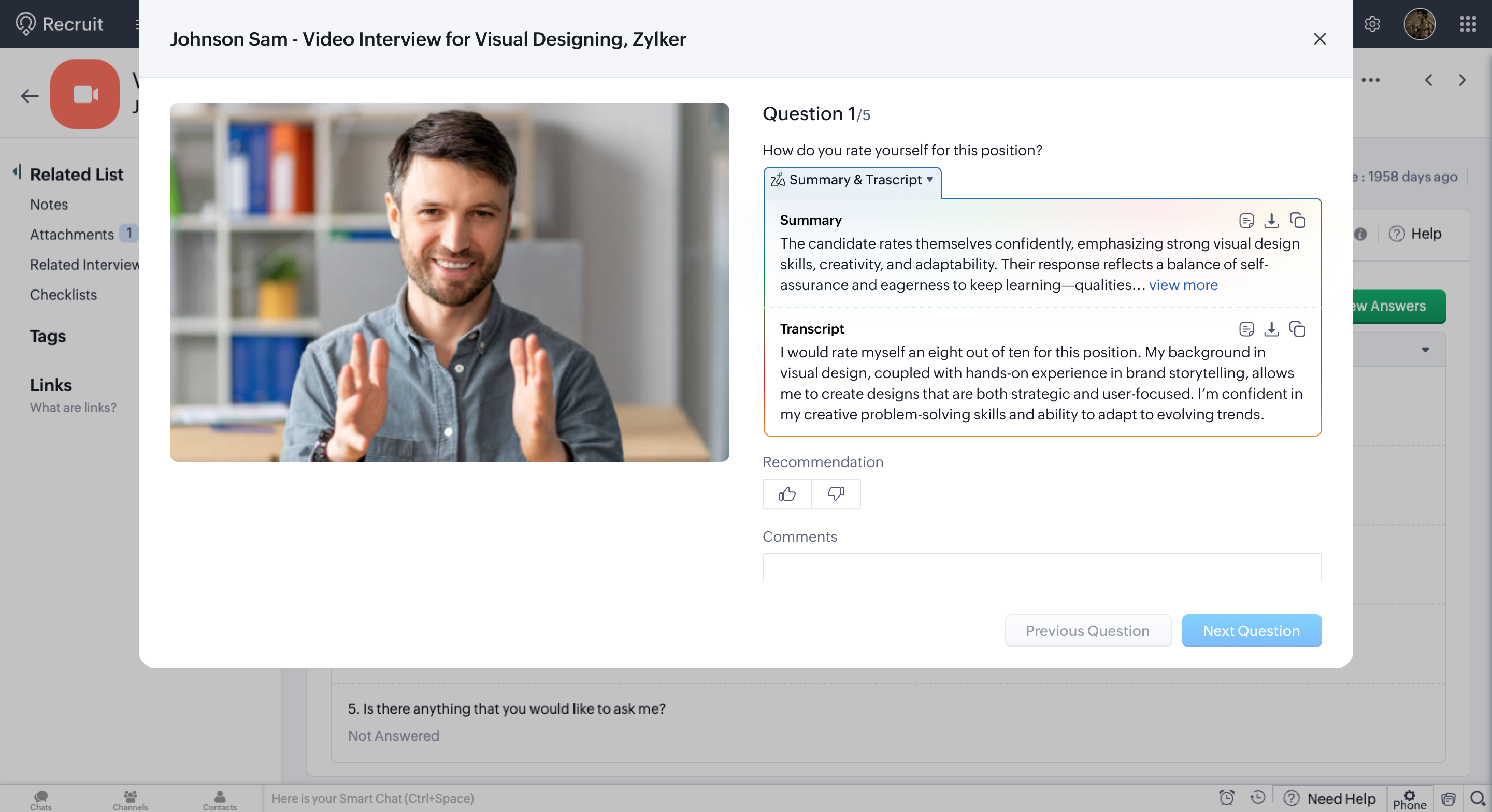
    Interview evaluation with AI in Zoho

    Image via Zoho

    This makes it possible to quickly review strengths, areas for improvement, or follow-up points without having to
    replay the recording, saving time and improving the quality of the analysis.

    Comparing profiles with greater clarity and less bias

    One of the main challenges in recruitment is maintaining consistent criteria across interviews and interviewers.
    With structured and comparable information, teams can:

    • Evaluate candidates using the same parameters
    • Identify patterns, strengths, and opportunities for improvement
    • Reduce reliance on individual perceptions or scattered notes

    The result is a more objective, traceable, and business-aligned selection process.

    Greater efficiency for HR teams

    Automating interview transcription and analysis enables efficiency gains, especially in high-volume recruitment
    processes. This translates into:

    • Fewer manual tasks
    • Faster decision-making
    • Improved collaboration between recruiters and hiring managers

    Information remains clearly organized and accessible for everyone involved in the process.

    Would you like to apply this capability to your recruitment process?
    Discover how ZIA and Zoho solutions can help you optimize interviews and make better hiring decisions.

    Contact us here

  • Artificial Intelligence applied to analytics: the new dashboard generator from Zoho Analytics

    The adoption of more agile analytics models has become a decisive factor for organizations looking to strengthen their forecasting capabilities and support decisions with reliable information. In this context, Zoho Analytics introduces a new AI-powered dashboard generator, designed to simplify the creation of executive panels and expand access to analytics within business teams.

    The solution reduces technical complexity, speeds up the reading of indicators, and improves the availability of visual insights, allowing different departments to work with structured information without relying on extensive analytical processes.

    A generation model focused on analytical efficiency

    The generator integrates a flow designed to transform data into strategic visualizations quickly and consistently. The process is structured in four stages:

    • Direct data upload by dragging and dropping files like CSVs without additional configurations.
    • Automatic content analysis, identifying relevant metrics, relationships, and patterns.
    • Smart visualization selection aligned with the nature of the dataset.
    • Dashboard customization and operational use, with options to download, adjust, or integrate into existing workflows.

    This approach minimizes preparation time, ensures consistency, and enables functional executive dashboards from the start.

    Main differentiators of the tool

    The generator includes features that promote analytical adoption in organizations of all sizes:

    • Full accessibility: available for free and without usage restrictions.
    • Operational speed: dashboards generated in under a minute.
    • Technical independence: no need for advanced data preparation or BI expertise.
    • Smart assistance powered by Zia: prioritizes metrics and structures visualizations automatically.

    These features enable analytics to become a natural part of daily operations, eliminating common frictions found in more complex tools.

    AI embedded in the Zoho Analytics platform

    The new generator is integrated into an ecosystem with advanced Artificial Intelligence capabilities that enhance analytical depth and usage scenarios:

    Automated narrative insights that synthesize key findings and provide immediate context.
    Integrated predictive models to anticipate changes in commercial, financial, or operational indicators.
    Anomaly detection that alerts on unusual behavior or data deviations.
    Natural language conversational assistant to query data and generate visualizations through direct questions.
    Smart recommendation of metrics and charts tailored to the dataset and user behavior.

    These functions consolidate a coherent, flexible platform ready to support organizations in their evolution toward more accessible and strategic analytics.

    A significant contribution to business decision-making

    The new generator enhances organizations’ ability to work with data in an agile, performance-oriented way. It facilitates the monitoring of key indicators, reduces operational frictions, and enables strategic decisions based on clear and consistent visualizations.

    With these features, Zoho Analytics strengthens an analytical ecosystem that not only simplifies data access but also helps build a more informed and resilient organizational culture.

    Try the dashboard generator

    Experience firsthand how the new AI-powered dashboard generator works.

  • Zoho CRM: More than an affordable option, a secure and reliable platform for Businesses looking to optimize their investment

    We live in an era where data has become one of the most valuable assets for any company. That’s why choosing a technological tool no longer depends solely on its features, but also on the trust it provides when handling information.

    Zoho logo

    Zoho CRM
    combines both qualities: efficiency and security, in a solution that optimizes investment without sacrificing quality.

    More than 130 million users worldwide trust Zoho CRM to manage their businesses, strengthen customer relationships, and make strategic decisions based on real data. With a focus on reliability, transparency, and information control, Zoho CRM has established itself as a solid option for organizations seeking to grow sustainably while protecting their data.

    Beyond price: real and sustainable value

    Although many associate Zoho CRM with its excellent cost-benefit ratio, its value goes far beyond price.

    The platform integrates powerful automation, analytics, and customer management tools within an intuitive interface that easily adapts to each company’s growth pace. But one of the most distinguishing factors — and often overlooked — is its ongoing commitment to business data security and privacy.

    Security with international backing

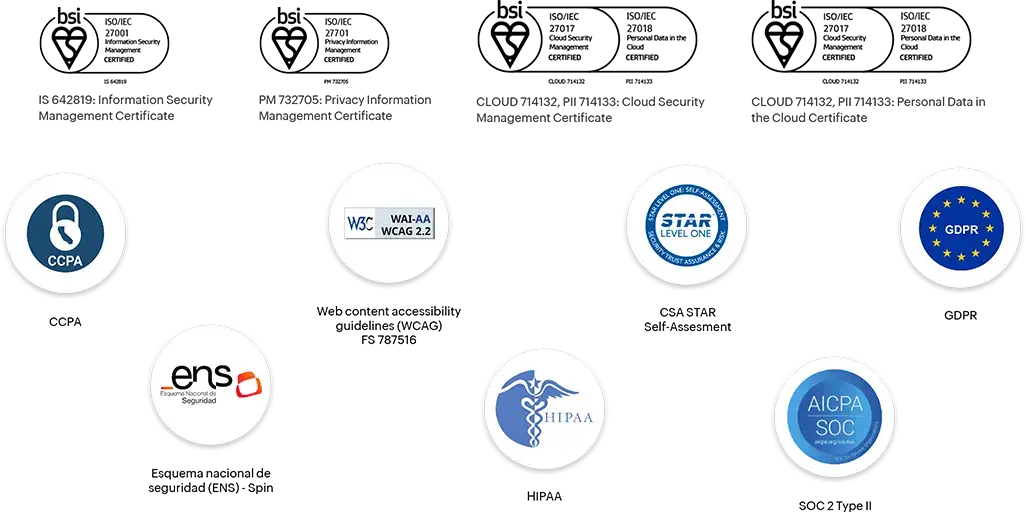
    Zoho CRM has been globally recognized for its high standards in data protection. Here are its most important certifications and compliances:

    • ISO 27001 – Information security.
    • ISO 27017 – Cloud service security.
    • ISO 27018 – Personal data protection in public cloud.
    • ISO 27701 – Privacy management system (PIMS).
    • SOC 2 Type I and II – System reliability and integrity.
    • PCI DSS – Payment information security.
    • CSA STAR Level 2 – Best practices in cloud security.
    • HIPAA Compliance – Compliance for the healthcare sector.
    • GDPR Compliance – EU data protection.
    • CCPA Compliance – Consumer privacy (California).

    Zoho CRM security certifications and accreditations

    Zoho CRM security certifications and accreditations

    Sources:
    Zoho Compliance |
    Zoho CRM Data Security |
    Zoho GDPR Compliance

    Privacy as a principle, not a business strategy

    One of the biggest differences between Zoho CRM and other platforms is its firm stance on privacy: it does not sell, share, or monetize user data.

    This means no ads, trackers, or intermediaries. Just transparent management focused on protection and ethical use of information.

    Thanks to this policy, Zoho CRM becomes an ideal solution for companies that value confidentiality and want to maintain full control over their data, especially in sensitive sectors like finance, healthcare, or technology.

    Smart investment with real impact

    Choosing Zoho CRM is not just about reducing costs, but about strategic investment.

    With competitive pricing, secure architecture, and seamless integration with other business applications, companies achieve efficiency and digitalization levels comparable to much more expensive solutions. The result is clear: higher productivity, fewer risks, and a more profitable tech investment.

    Conclusion

    Zoho CRM proves that a tool can be affordable, powerful, and secure at the same time. For organizations seeking to optimize their investment without sacrificing quality or trust, Zoho CRM is not just an affordable alternative: it’s a smart and sustainable decision.

    Results that speak for themselves

    27%

    more productivity

    Do more in less time

    50%

    faster implementation

    Get started really fast

    71%

    savings on license fees

    Huge savings that last a lifetime

    *Growth metrics reported by customers in Zoho internal surveys.

  • Your bot no longer just responds: it understands

    SalesIQ adds AI filters to transform your customers’ experience

    Have you ever wondered if your bot can read between the lines? That is, tell the difference between someone just asking for business hours, someone ready to buy, or a customer on the verge of frustration? With most bots, the answer is no. Everyone gets the same automated reply, regardless of context. But that’s changing.

    At InterConnecta, we’re sharing one of the most powerful new features in Zoho SalesIQ: the new routing system with artificial intelligence filters. Thanks to this update, bots can now detect sentiments, intentions, and key topics in real time. The result? More human interactions, more accurate responses, and most importantly, an experience that makes a lasting impression.

    The power behind the change: AI-based routing

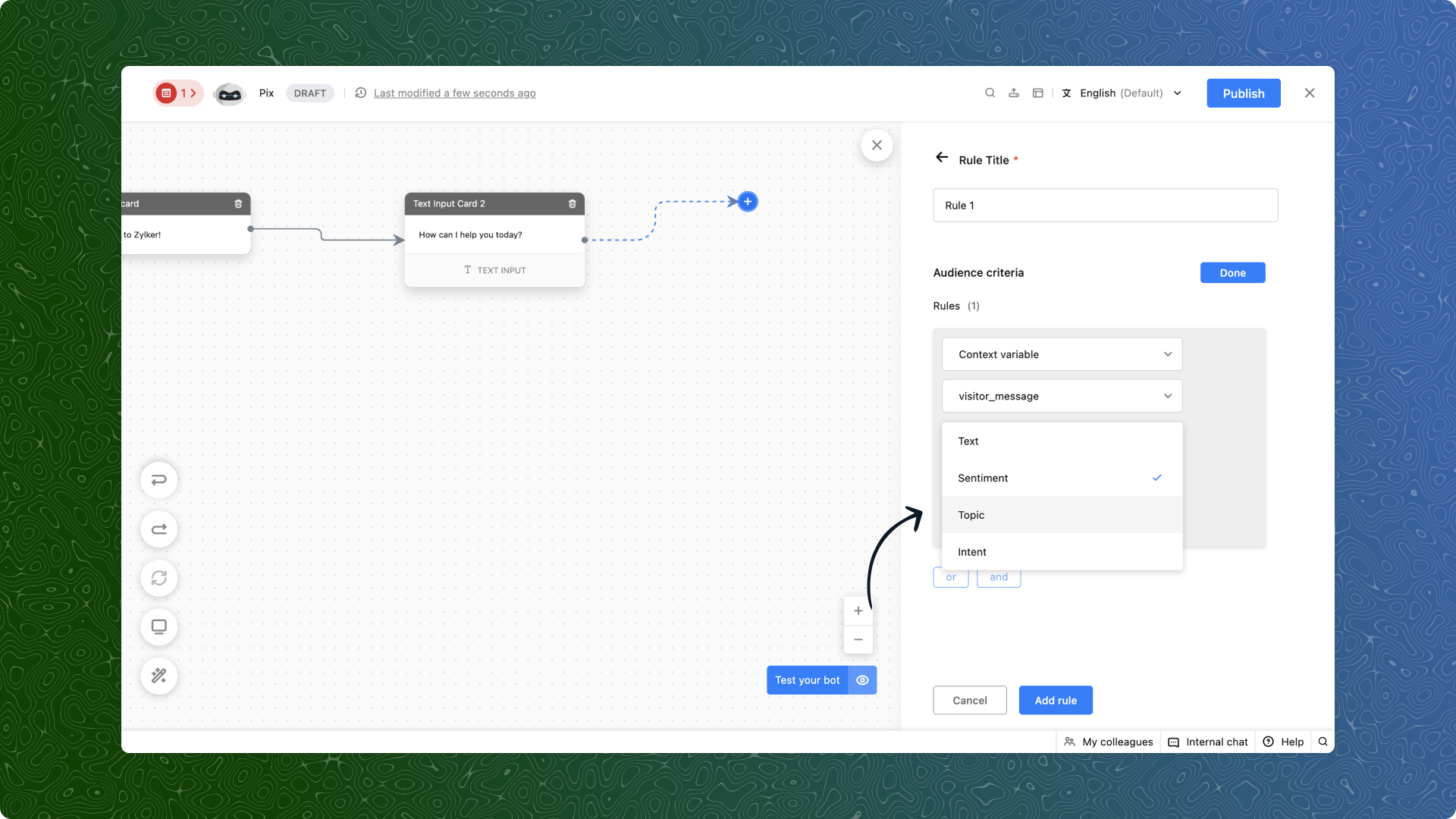
    SalesIQ already offered the ability to route chats based on user-defined criteria. But now, that capability is enhanced with AI filters that enable smarter decisions, such as:

    • Sentiment: Is the customer upset, satisfied, or just curious? Now you can detect it automatically and respond accordingly.
    • Intention: Are they trying to buy, cancel, or report an issue? AI picks it up and directs the chat to the right team.
    • Topic: Define keywords like products or locations, and your bot will know how to steer the conversation properly.

    (image via Zoho)

    What does this look like in action?

    E-commerce

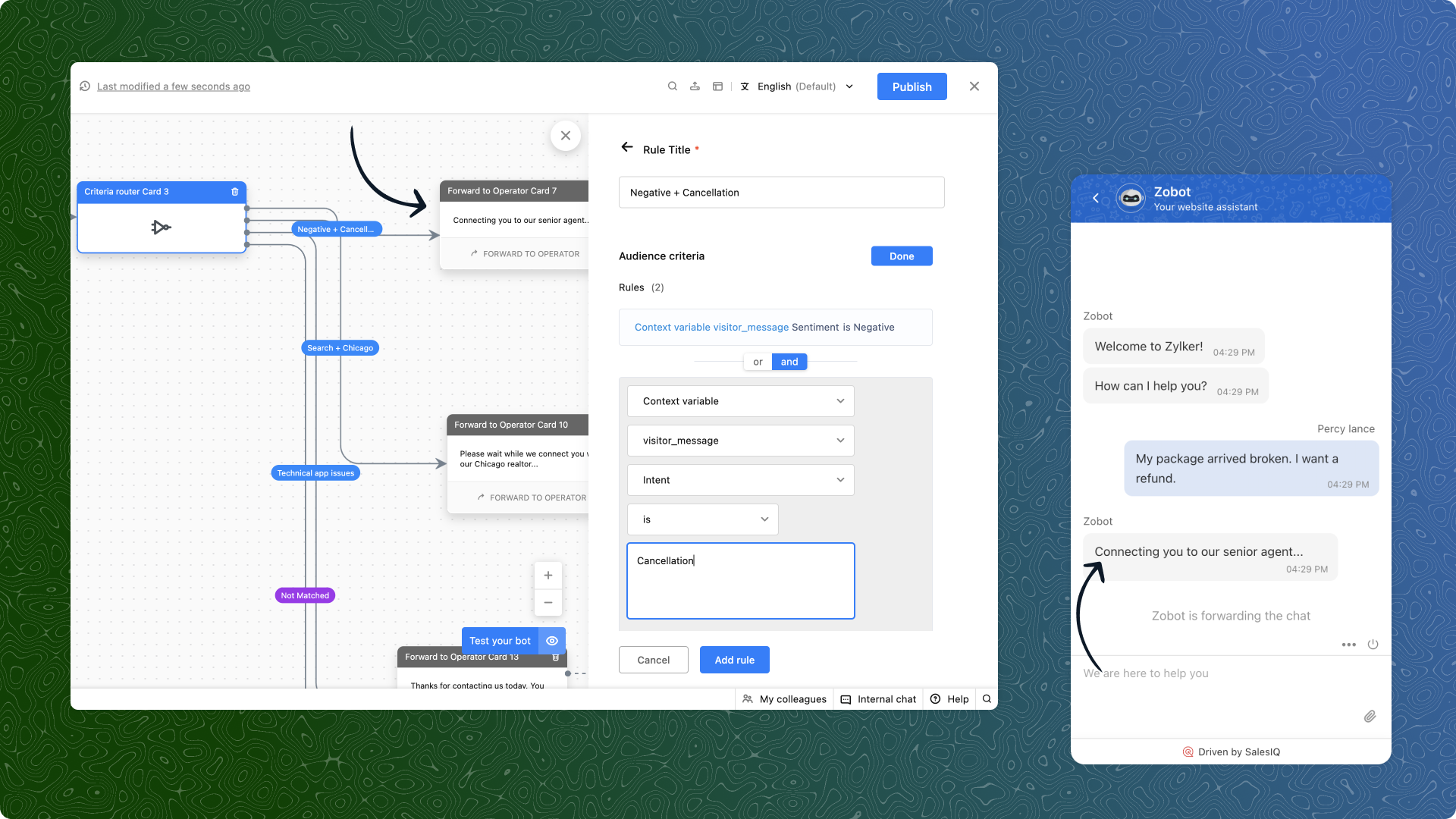
    “My order arrived broken. I demand a refund.”
    AI detects a negative sentiment and a refund intention. The bot avoids generic responses and immediately routes the chat to the advanced support team.

    (image via Zoho)

    Real estate

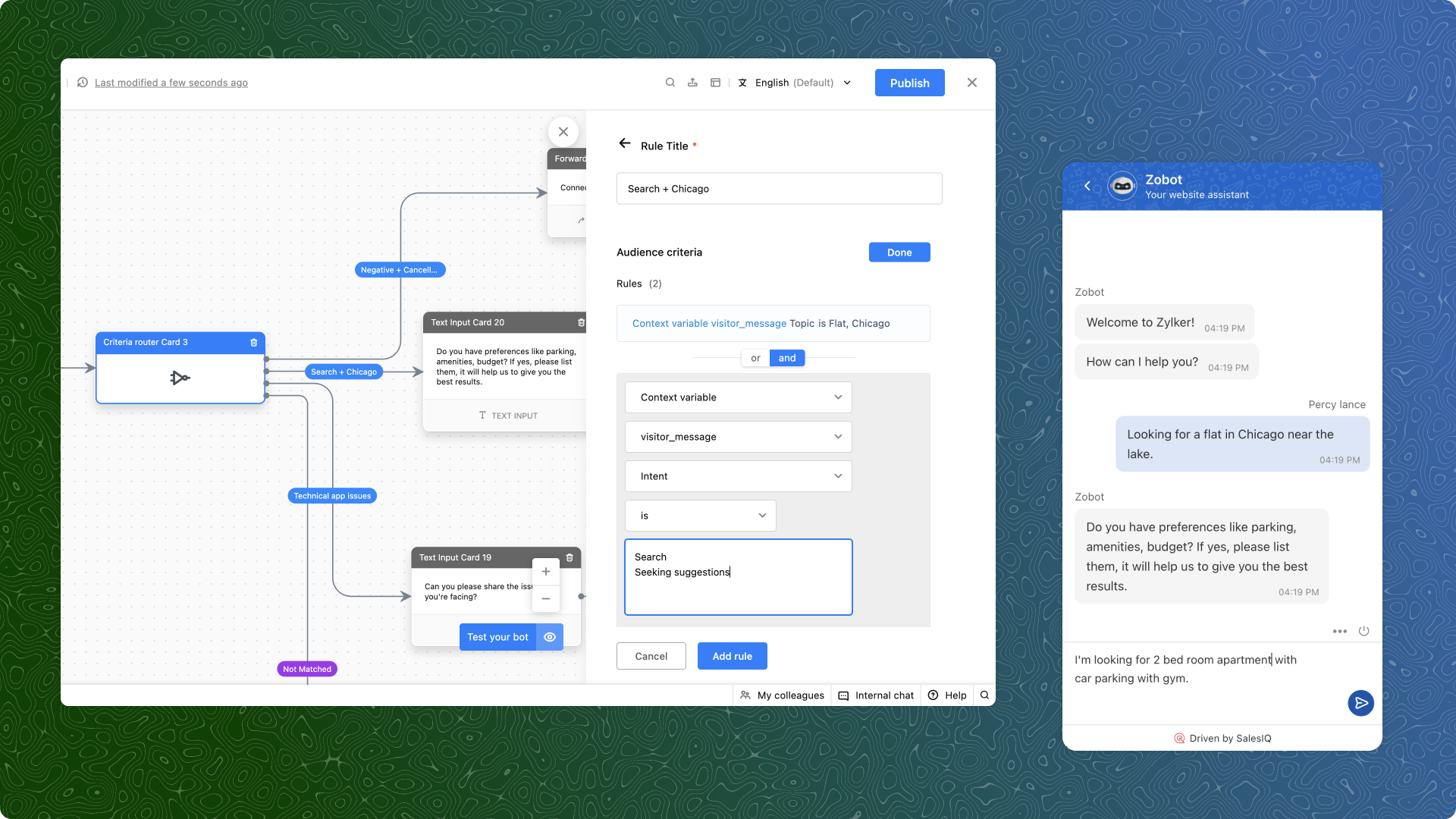
    “I’m looking for a two-bedroom apartment in Chicago.”
    Topics and search intent are detected. The user is directly connected to an advisor who handles properties in that area.

    (image via Zoho)

    Technical support

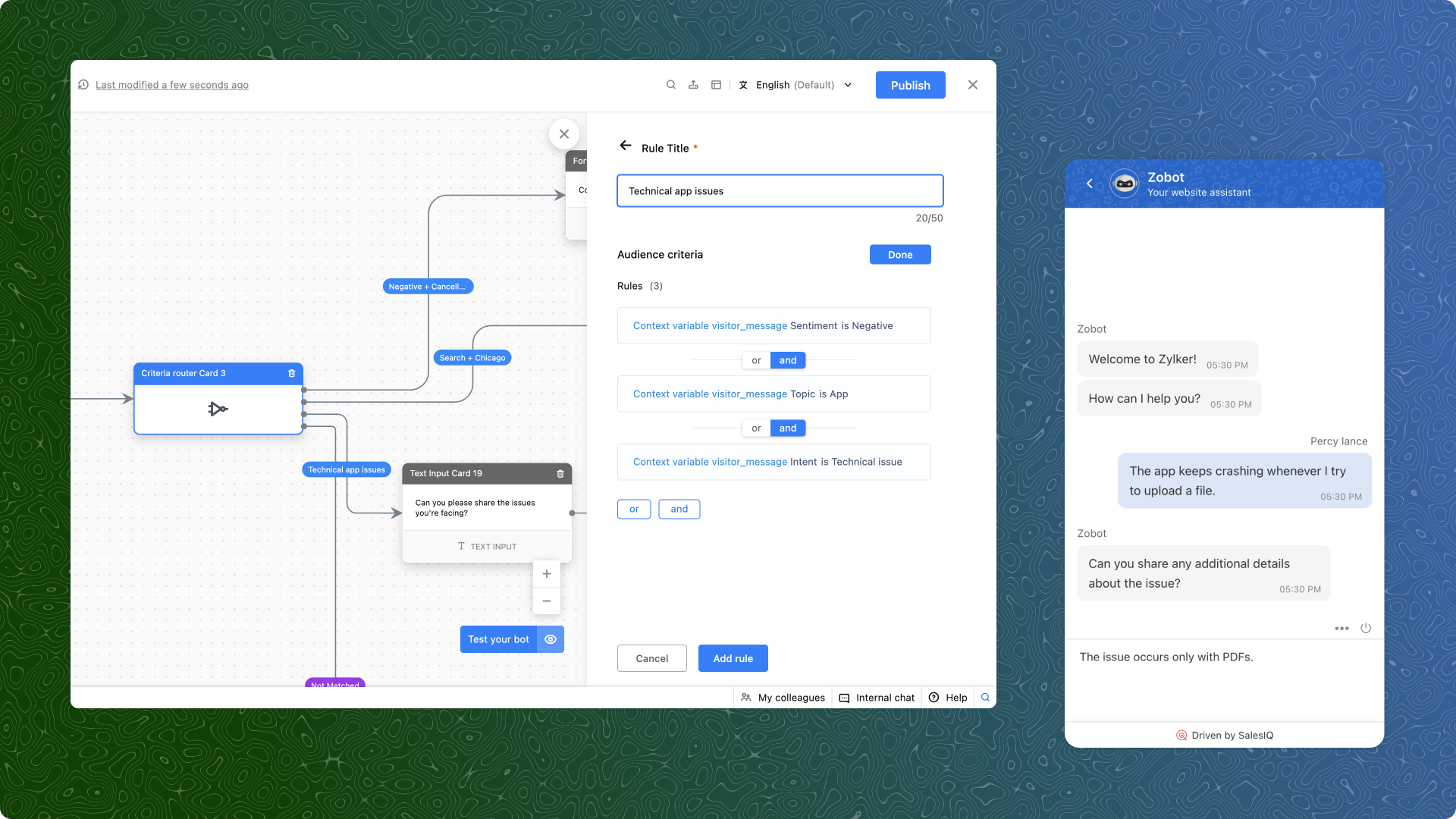
    “The app crashes every time I try to upload a file.”
    Here, a negative sentiment, a technical intention, and the app topic all come into play. The bot bypasses general support and redirects to the specialized support team.

    (image via Zoho)

    What do you need to get started?

    1. Use context variables: Capture the user’s message, store it as a variable in the bot, and use it for criteria-based routing.
    2. Prioritize your rules: If multiple rules are met, the first one applies. So order your criteria from highest to lowest priority.
    3. Test and refine: Start with common scenarios in your business, analyze the results, and optimize as needed.

    Available only on the Enterprise plan

    An important note: this feature is only available for SalesIQ Enterprise plan users. And yes, it also works in multiple languages.

    Ready to try it? At InterConnecta we can help you set it up and customize it for your industry.

  • How to save up to 50% on licenses by migrating from Salesforce to Zoho CRM

    The recent price increase in Salesforce has left many companies with a key question: is it still worth paying so much for a CRM? For organizations looking to optimize resources without sacrificing productivity, this increase becomes a burden that directly impacts profitability.

    The good news is that there is a more affordable, comprehensive, and internationally recognized alternative: Zoho CRM. With this platform, companies can save up to 50% in licensing costs, gain operational simplicity, and access an ecosystem of applications covering sales, marketing, support, finance, and operations.

    The real impact of Salesforce’s price increase  

    When an essential tool like a CRM increases its fees, the consequences are felt at different levels of the organization:

    • Operating budget: more resources allocated to maintaining the platform, less investment in new initiatives.
    • Limited growth: high costs make it difficult to add users, modules, or integrations.
    • Internal motivation: teams feel restricted when technology becomes a financial burden instead of a productivity enabler.

    In this context, more and more companies are looking for alternatives that combine innovation, security, and competitive pricing.

    Zoho CRM: award-winning innovation and transparent costs  

    Zoho CRM is not only more affordable, it is also backed by international awards that recognize it as a leader in its category:

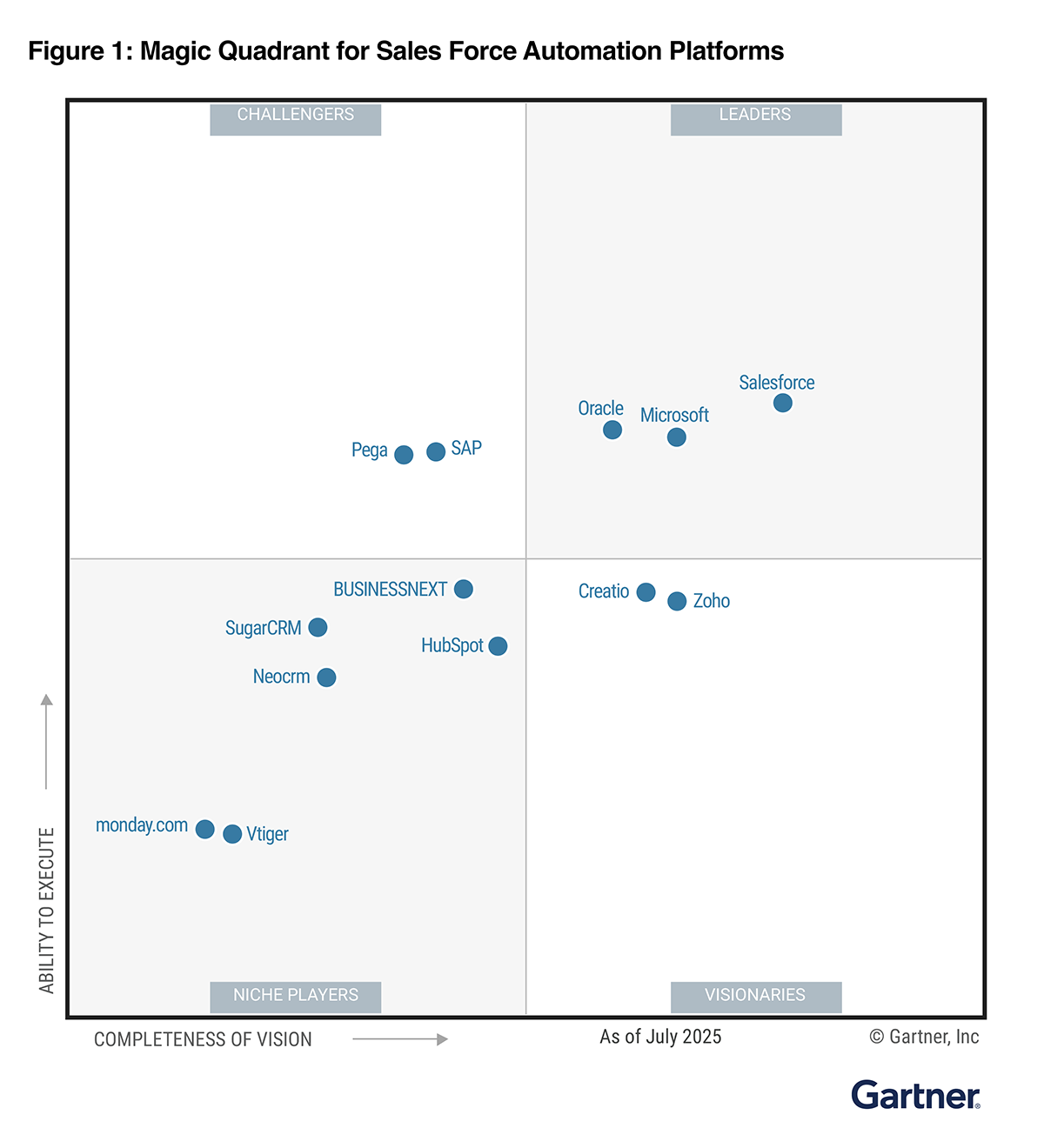
    • Visionary in Gartner’s 2024 Magic Quadrant™ for sales force automation platforms.
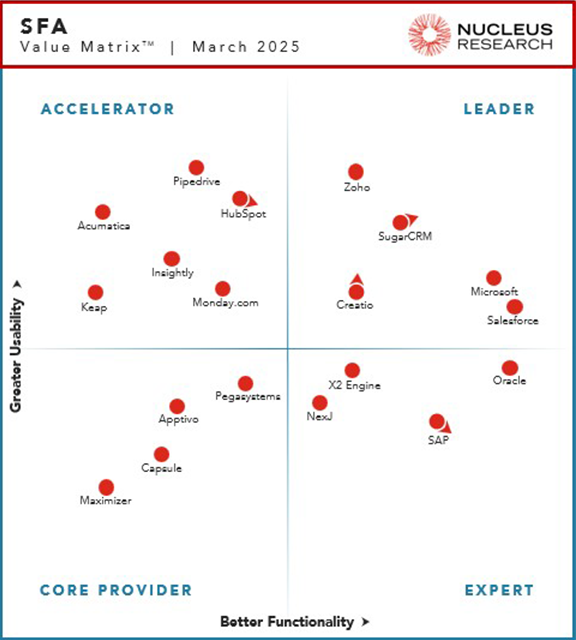
    • Nucleus Research 2024 – Leader in the SFA Technology Value Matrix.
    • Gartner Peer Insights Customers’ Choice 2023 in lead management.
    • TrustRadius Top Rated CRM 2023, based on customer satisfaction.

    These recognitions confirm that Zoho CRM offers a far better cost-benefit ratio than Salesforce, without sacrificing innovation or scalability.

    Security and privacy as core pillars  

    Zoho has made security and privacy a priority from the beginning. The platform is backed by international certifications such as:

    • ISO/IEC 27001 – Information security management.
    • ISO/IEC 27701 – Information privacy.
    • ISO/IEC 27017 and 27018 – Cloud security and personal data protection.
    • SOC 2 Type II, GDPR, and HIPAA – Global compliance standards.

    This ensures that companies not only gain access to a more affordable CRM, but also a reliable solution to protect sensitive information.

    How to migrate from Salesforce to Zoho CRM: a practical guide  

    Migrating a CRM doesn’t have to be traumatic. With the right plan, the transition is secure, agile, and can become the perfect opportunity to optimize data and processes.

    1. Initial audit and planning  

    • Modules used in Salesforce (Accounts, Contacts, Opportunities, Cases, etc.) are analyzed.
    • Dependencies such as workflows, triggers, or external integrations are identified.
    • A mapping document is created to define how each element will be transferred to Zoho CRM.

    💡 Example: a company with more than 200 fields in Salesforce reduced that number to less than 120 during migration, eliminating obsolete data and simplifying processes.

    2. Data cleanup and preparation  

    • Duplicate records are removed.
    • Unused fields are cleaned up.
    • Date, currency, and text formats are standardized.

    This ensures that the data migrated to Zoho is consistent and easy to use from day one.

    3. Zoho CRM setup  

    • Modules and fields are customized according to business needs.
    • Picklists, module relationships, and user permissions are configured.
    • The flexibility of Zoho is leveraged to optimize processes that were more rigid in Salesforce.

    4. Data migration  

    • A test migration (e.g., 50 records) is conducted to validate correct data import.
    • Then a full migration is carried out in logical order: Accounts → Contacts → Opportunities → Activities → Attachments.
    • Relationship preservation is ensured (e.g., an account linked to its contacts and opportunities).

    5. Rebuilding automations and integrations  

    • Approval flows, alerts, and lead assignments are recreated in Zoho Blueprints and workflow rules.
    • Costly external integrations are replaced by native Zoho One apps (e.g., Zoho Desk for support, Zoho Sign for digital signatures).
    • Custom functions in Apex are translated into Deluge, Zoho’s scripting language, reducing complexity.

    6. Validation and testing  

    • Record counts between Salesforce and Zoho are compared.
    • Real-case tests are conducted to confirm that automations work correctly.
    • Key users test the system before the full rollout.

    7. Training and ongoing support  

    • Teams are trained on using Zoho CRM.
    • Close support is provided during the first weeks, ensuring a smooth transition.

    Conclusion: turning the price increase into an opportunity  

    The increase in Salesforce licenses doesn’t have to be an unavoidable burden. Zoho CRM is a more affordable, award-winning, and secure alternative that allows you to maintain — and even boost — productivity while significantly reducing costs.

    At InterConnecta, we help organizations migrate from Salesforce to Zoho CRM strategically, ensuring continuity, security, and alignment with their business goals.

    Are you paying too much for Salesforce or another CRM?
    Schedule a consultation with our experts and discover how easy it can be to migrate to Zoho CRM and take a step toward a more profitable and efficient future.

  • Construction analytics powered by Zia and AI: What’s new in Zoho Projects Plus

    What happens when a construction project is delayed or goes over budget? The consequences can be serious. That’s why solid planning is not enough—you need real-time information and predictive analytics. With the latest features in Zoho Projects Plus, you can now harness the full power of artificial intelligence and Zia to make faster, smarter, data-driven decisions.
    Make better decisions with AI

    The new analytics capabilities in Zoho Projects Plus allow you to:

    • Predictive analytics: anticipate delays and obstacles by analyzing historical data to forecast your projects’ behavior.
    • What-if analysis: evaluate how changes in conditions—like weather, workforce, or costs—could impact your project results.
    • Automated analytics: use generative AI, machine learning, and natural language processing to turn large volumes of raw data into actionable insights.
    • Anomaly detection: identify deviations in time, resources, or budget and understand their root causes.

    (image via Zoho)

    What is Zoho Projects Plus?

    Zoho Projects Plus is a unified solution that combines project management tools with advanced analytics and artificial intelligence capabilities. This edition includes key applications such as:

    Zoho Projects: for task planning, milestone tracking, team collaboration, and budget control.

    Zoho Analytics: to create dashboards, visualize metrics, run predictive analysis, and use conversational AI with Ask Zia.

    Zoho WorkDrive: to store, share, and collaborate on project documents in a secure, centralized environment.

    This integration allows data to flow automatically between tools, providing a complete view of each project’s status and speeding up decision-making.

    A platform that combines management and analytics

    Zoho Projects Plus merges project planning with advanced analytics in a single platform. You can import data, generate interactive dashboards, and visualize key metrics. Plus, with Ask Zia, the conversational AI assistant, you can get answers and reports instantly—just by asking.

    And if you’re using other project management tools, Zoho offers a fast and seamless migration process so you can start benefiting from these capabilities right away.

  • Organize and access key information in your files with the help of Zia Hubs

    Every day, companies generate massive amounts of information: emails, documents, spreadsheets, meeting recordings, presentations… and often, all this content ends up scattered across different folders and platforms. The result? Valuable data goes unused, and decisions are made with incomplete information.

    According to IDC, 80% of business data is unstructured, meaning it’s not organized in a way that can be easily analyzed. And most of it is text-based: from a client email to the transcript of a corporate video.

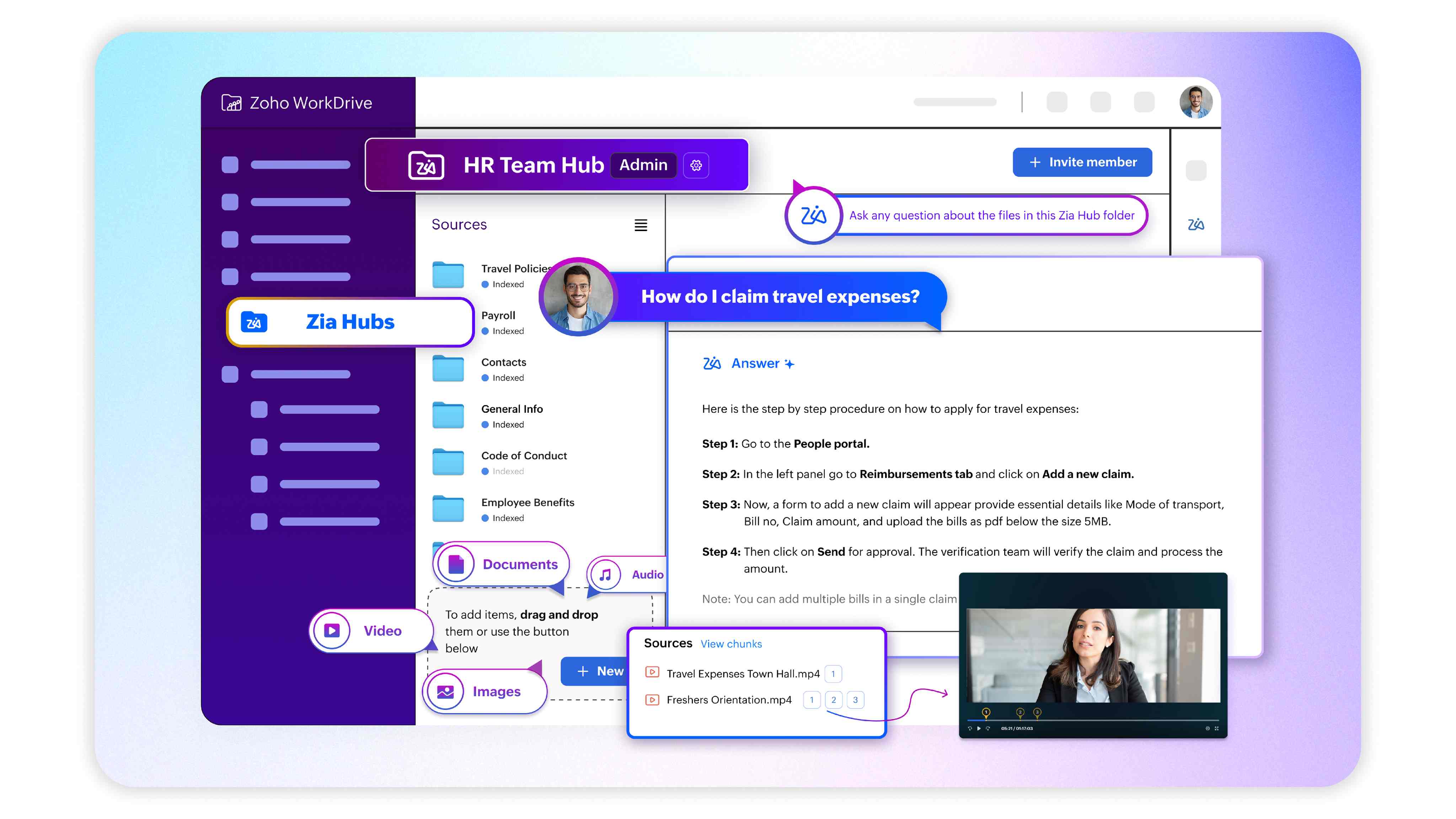
    To tackle this challenge, Zoho has launched Zia Hubs in WorkDrive, an AI-powered solution that unifies, organizes, and analyzes your company’s content so you can find what you need in seconds and make better-informed decisions.

    (imagen via zoho)

    What is Zia Hubs and how does It work?

    Zia Hubs creates smart spaces within WorkDrive that group and organize content related to each project or work area. But its value goes far beyond simple file organization:

    • Integrates scattered information from different apps and platforms into a single dashboard.
    • Keeps your files in their original locations, avoiding workflow disruptions.
    • Analyzes unstructured content (text, audio, video) to find and connect key information.
    • Provides unified and accurate searches to locate documents, data, or relevant conversations.

    With Zia Hubs, it doesn’t matter if the information is in a Word document, an email thread, or a meeting recording—the AI will find it for you.

    Practical use cases across departments

    • Sales: retrieve historical sales figures, comparisons with targets, or competitor data without digging through multiple folders.
    • Support: access technical documentation, past meeting recordings, or any related resource during a call—all in one place.
    • Internal Meetings: instantly find details discussed months ago by automatically searching through audio and video transcripts.

    More than a tool—a new approach

    Zia Hubs doesn’t just save time: it creates a living knowledge ecosystem within your company. This means every query, every search, and every analysis becomes an opportunity to uncover connections that previously went unnoticed.

    And this is only the beginning. Zoho is already working on new features that will further enhance Zia Hubs’ capabilities, taking intelligent content management to the next level.

    In short: if your company wants to fully leverage its unstructured data and reduce the time lost searching for information, Zia Hubs is the answer.

  • Create impactful presentations in Zoho Show with Artificial Intelligence

    Artificial intelligence has arrived in Zoho Show to help you create presentations faster and more effectively. With Zia, you can now generate slides, content, and images in seconds, enhance text, and summarize information without losing the focus of your message. It doesn’t replace your work—it enhances it.

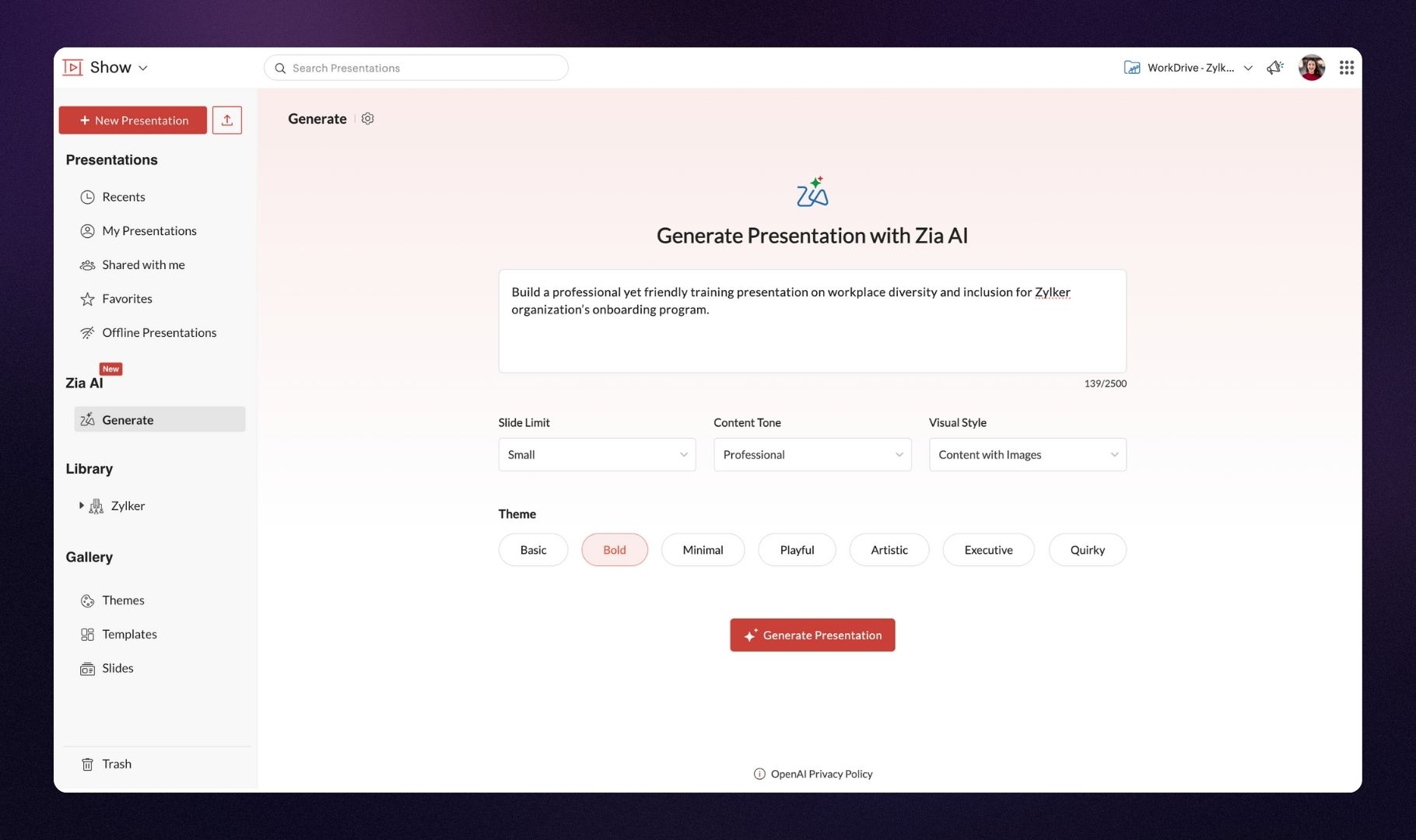
    Generate presentations in seconds

    Zia can create complete presentations from scratch based on your visual style and the tone of the content you choose. You’ll get a solid foundation to build upon.

    (image via Zoho)

    Easily add new slides

    Already have a presentation in progress? You can ask Zia to generate new slides that integrate perfectly with your existing content.

    (image via Zoho)

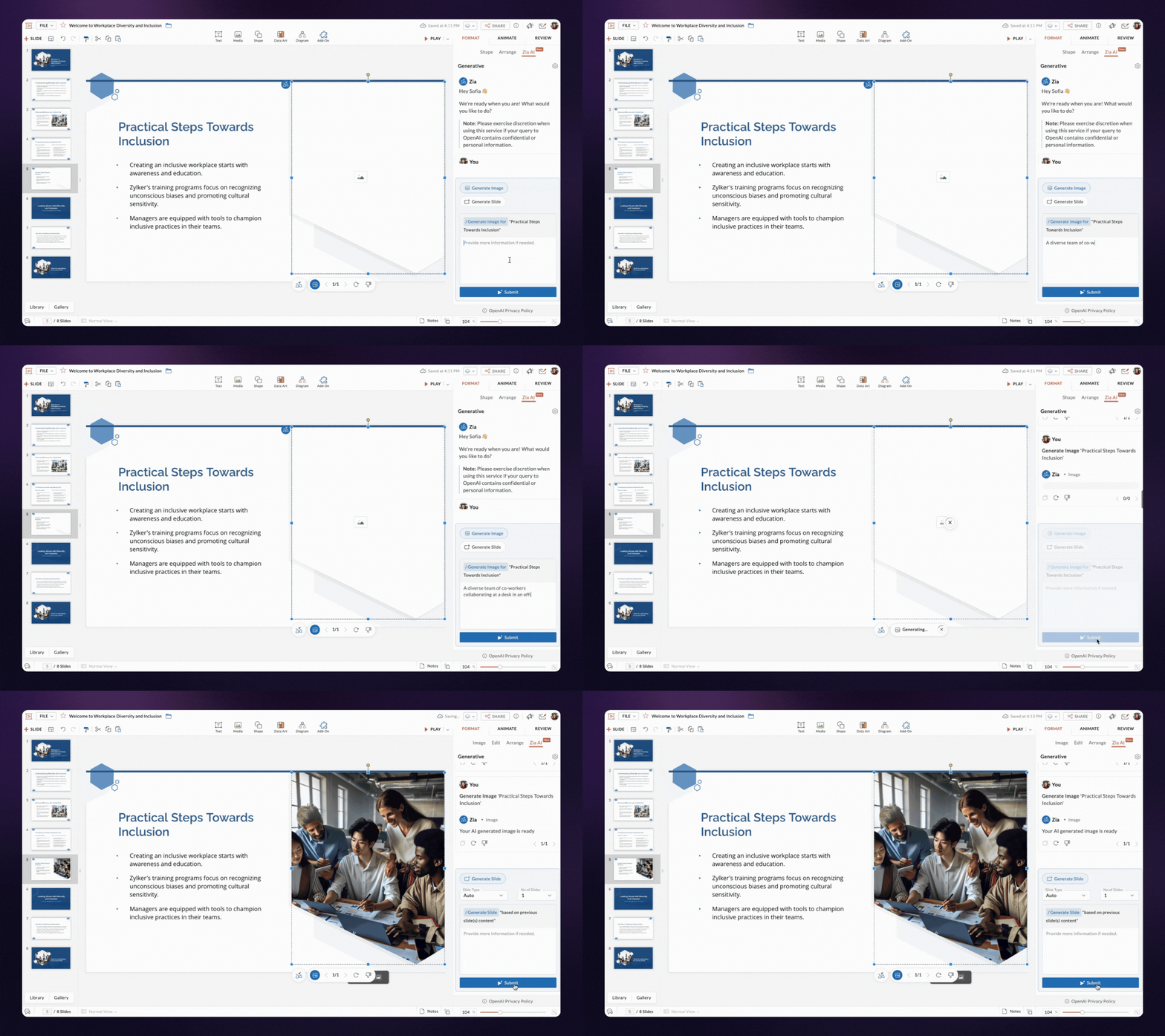
    Automatically create content and images

    Zia generates text and images for each slide based only on the title. All content automatically adapts to your presentation’s design, reducing manual work.

    (image via Zoho)

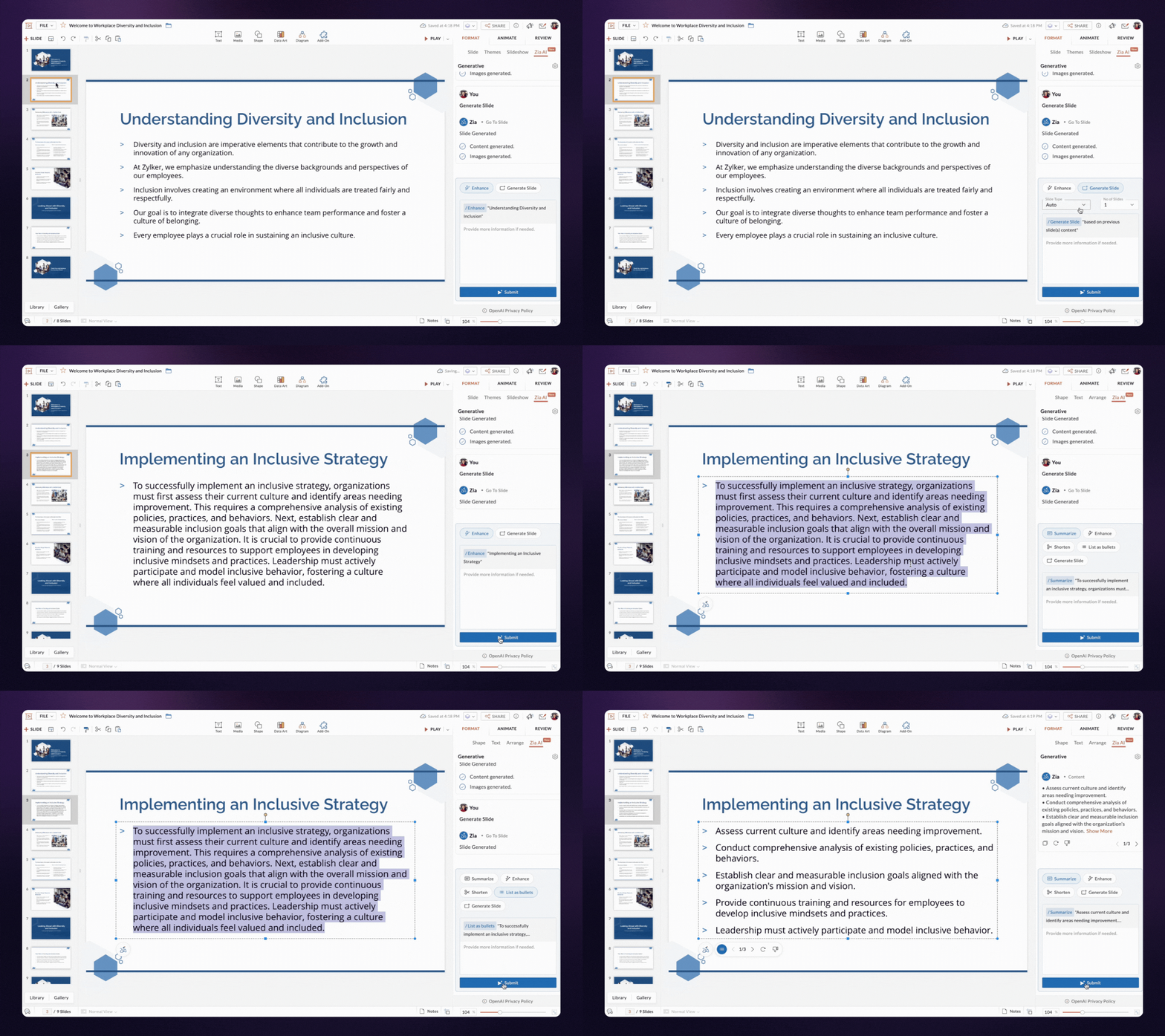
    Enhance, summarize, and organize your content

    Is your text unclear or too long? Zia can refine it, summarize it, or turn it into bullet points to make it easier to read and visualize.

    More features on the way

    Zia’s capabilities will continue to grow, and will soon also be available in the Zoho Show mobile app for Android and iOS.

    Start creating more effective presentations today with the help of artificial intelligence!

  • Ready to make AI work in your business with MCP?  

    By Rocío Caillava – Digital Marketing Manager, InterConnecta

    Over the past year, I spoke with companies looking to implement Artificial Intelligence in their operations. Some were already using Zoho. Others were looking for a tool to centralize their business. But they all shared the same concern:

    This article was born from those conversations. It’s not meant to be a product catalog. It’s a roadmap based on real experience, to help you make strategic decisions about AI in your company.

    The goal is not to “have AI.” It’s to make it work.

    Most companies that fail to implement AI do so for one simple reason: they start with the tool and not with the structure.

    Adding a conversational assistant, automating a specific task, or using prompts with ChatGPT doesn’t transform the operation.

    AI without context is just another app.

    Think of AI as infrastructure, not an accessory

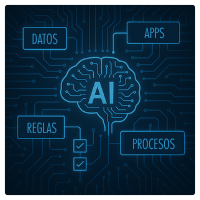
    My first suggestion is this: don’t think of AI as a layer on top of what you have, but as part of the system.
    And that requires answering uncomfortable questions:

    • How is your data organized?
    • How integrated are your apps?
    • Do your processes have clear, traceable rules?
    • Who defines what actions an AI can take at each stage?

    These are the questions that enable real implementation.
    And they’re the ones we solve at InterConnecta with something called MCP.

    How we implement it (if you’re already using Zoho or about to)

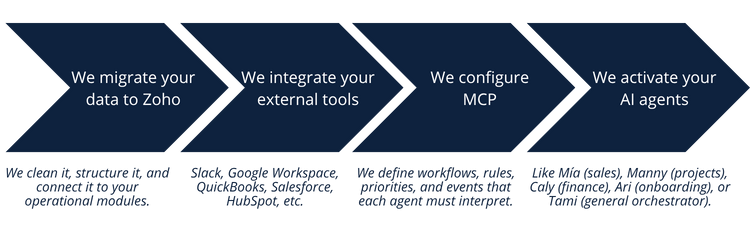
    Here’s the full process, which we’ve validated with companies across multiple industries:

    And what if I still don’t know if I’m ready?  

    That’s an excellent starting point.

    My recommendation is this:
    Don’t start with a demo. Start by understanding your own ecosystem.
    I suggest a free evaluation where we analyze:

    • Current state of your digital environment
    • Automation potential by areas
    • Opportunities to activate AI progressively

    🔗 Talk to Tami and schedule your evaluation

    Thanks for reading!
    I’m convinced that artificial intelligence is not about tools, but about systems that think and act with purpose. That’s what we’re building at InterConnecta.

    And if you’d like to explore how to apply it to your specific case, I’m available.

    Rocío Caillava
    Digital Marketing Manager, InterConnecta

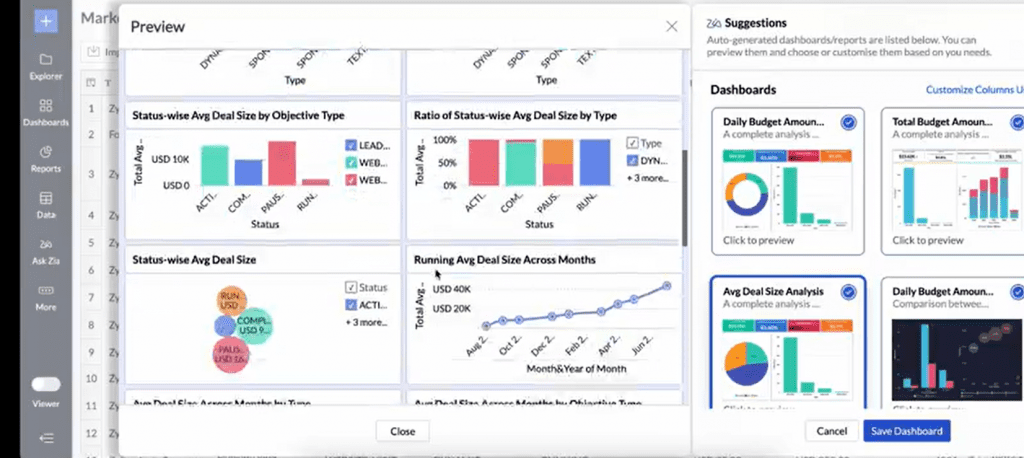
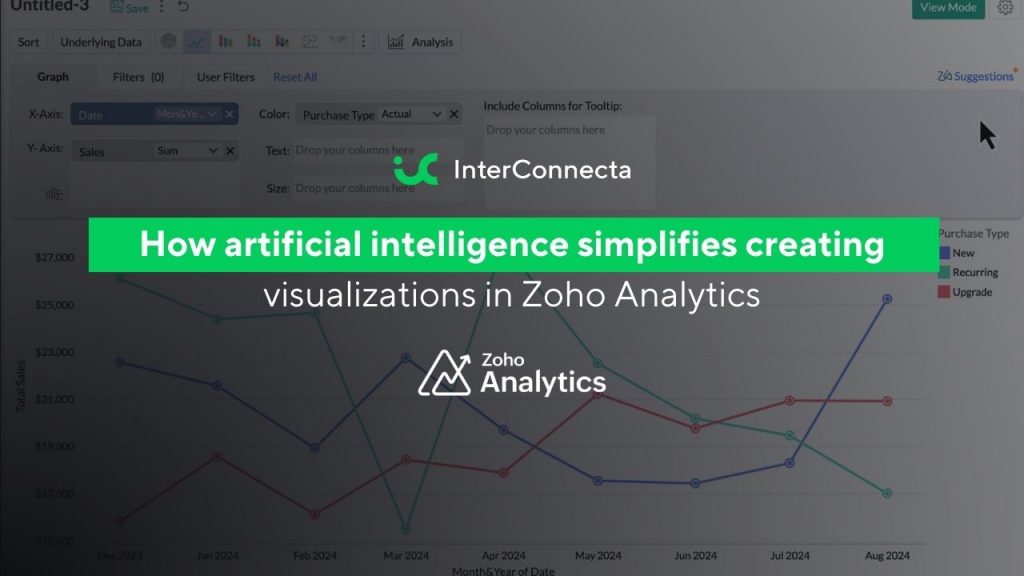
  • How artificial intelligence simplifies creating visualizations in Zoho Analytics

    Has it ever happened to you that you want to generate charts and reports, but the process turns out to be too complex or takes more time than you have available? Whether you’ve never created data visualizations or you already have experience but are looking for a faster way, this article is for you.

    Here we explore some of the artificial intelligence-based tools offered by Zoho Analytics, designed so you can create data visualizations simply and quickly.

    Generate reports by chatting with Zia  

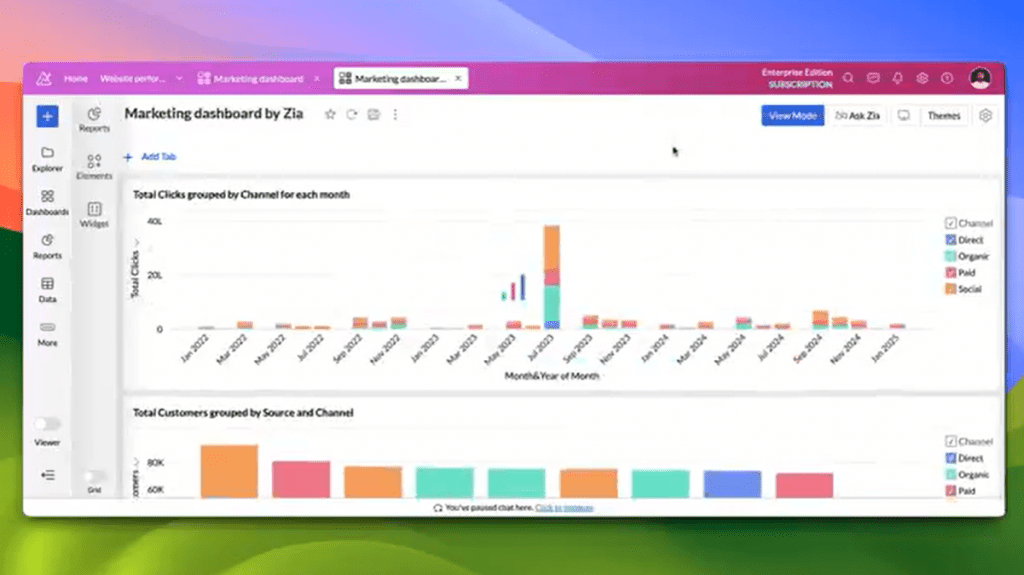
    Imagine you need a report for an urgent meeting and you don’t have time to build it from scratch. With Ask Zia, you don’t need to be a data expert: just type or say in plain language what information you’re looking for. Zia understands your questions and creates charts, tables, or dashboards in a matter of seconds.

    Companies around the world are already leveraging this feature to save hours of work and achieve impactful presentations. It’s an easy way to transform simple questions into visualizations that impress clients, partners, or colleagues.

    (image via zoho)

    Zia recommends the ideal chart based on your data 

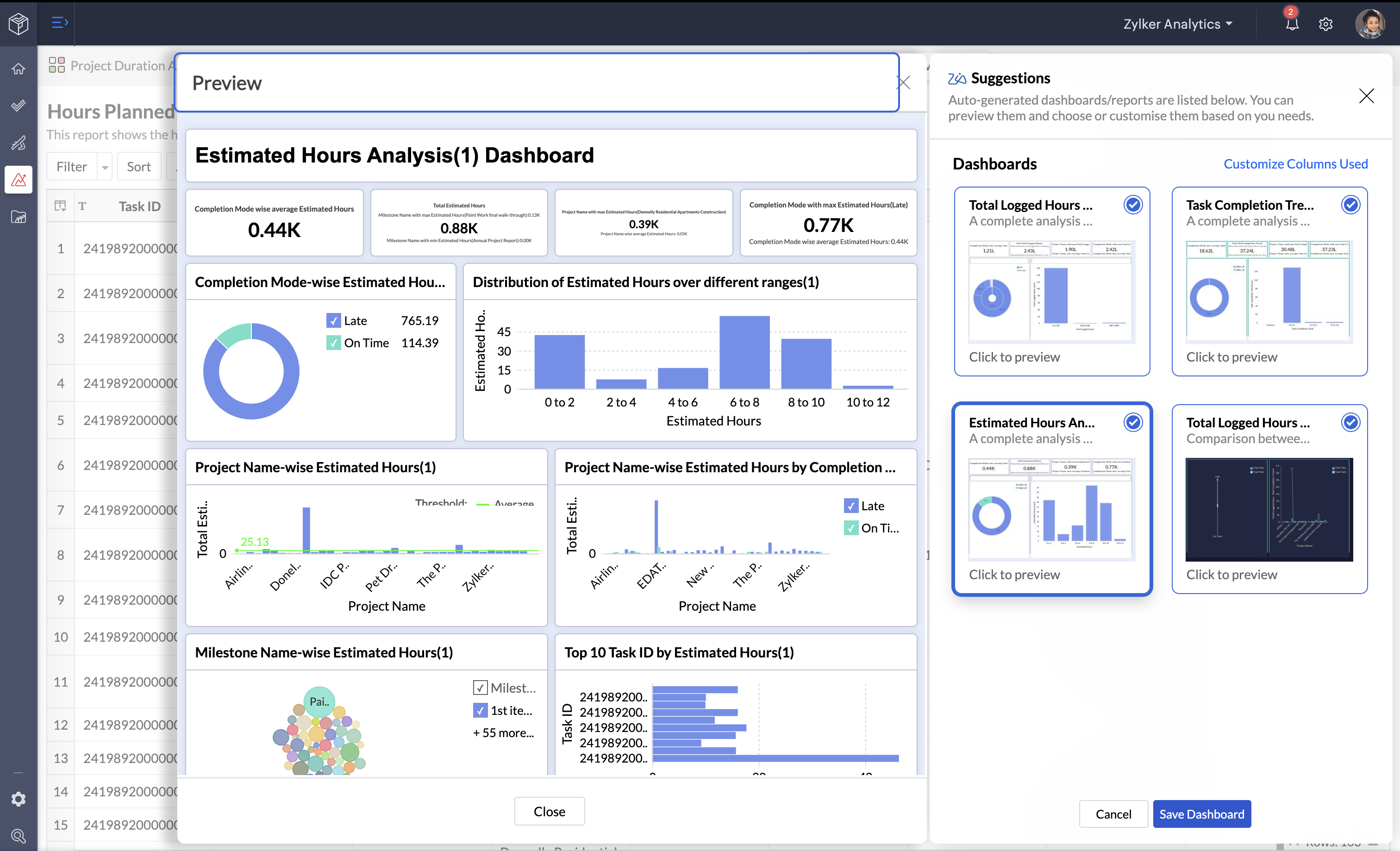
    Often, one of the challenges in creating reports is choosing the right type of chart. Not all data looks good in any format. This is where Zia Suggestions makes the difference.

    Zia analyzes the structure and nature of your data to suggest the best type of visualization: bars, lines, pie, maps, among many other options. Additionally, it tells you how to arrange columns and metrics so the information is displayed clearly and effectively. This reduces the margin of error and ensures your reports are more precise and attractive.

    (image via zoho)

    Discover key insights instantly  

    Building charts is just the first step. What’s truly valuable is understanding what the data means. With Zia Insights, you can access automatic analyses that highlight patterns, trends, and important relationships.

    Instead of spending hours reviewing tables or searching for conclusions, Zia provides you with summaries in clear text and complementary visualizations. This makes it easier to share findings with colleagues or executives and make informed decisions faster. It also includes diagnostic features that explain why certain key indicators have changed, so you can act on the real causes.

    Let Zia analyze your data for you  

    You might have a dataset but not know where to start. Or perhaps you’re not even sure what reports you need to generate. For those cases, Zoho Analytics offers automatic analysis.

    You just have to upload your data file and, if you want, select specific columns. Zia analyzes the information, detects patterns, and automatically creates interactive reports and dashboards in less than a minute. It’s a perfect solution for those without technical experience, but also for experts who want to speed up their work.

    (image vía zoho)

    Use ready-made reports for more than 100 cloud apps  

    If you work with tools like CRM, digital marketing, finance, or sales, you know your data is often scattered across different platforms. Zoho Analytics offers pre-built reports and dashboards for more than 100 business cloud applications.

    You only need to connect your app — like Zoho CRM, Google Ads, Shopify, QuickBooks, among many others — and Zoho Analytics will automatically generate ready-to-use dashboards. This saves you the time of creating reports from scratch and lets you start analyzing your data as soon as you connect your sources.

    Stay ahead with AI predictions  

    Today, businesses can’t settle for just looking at the past: they need to foresee the future. Zoho Analytics’ AI-powered predictions allow you to anticipate trends and make strategic decisions.
    By simply defining the period you want to forecast, Zia applies the most suitable statistical model to your data. You can forecast, for example, sales for the coming months, your website traffic, or cost trends. For more technical users, there are advanced models like ARIMA, ETS, or regression techniques, offering flexibility for those who want to dive deeper into the analysis.

    Clean and transform data with Zoho DataPrep  

    One of the biggest challenges in analytics is working with messy or scattered data. Zoho DataPrep, integrated into Zoho Analytics (available in Premium and Enterprise plans), makes this task easier thanks to over 250 transformations and artificial intelligence algorithms.

    With this tool, you can fix errors, unify formats, merge data from different sources, and prepare all your information for advanced analyses. This saves you hours of manual work and ensures your data is reliable and consistent.

    Zoho Analytics and its artificial intelligence, Zia, simplify data analysis and the creation of visualizations, helping you save time and make decisions with greater confidence.

    Try it free for 15 days and discover how it can transform the way you work with data.

    Discover more about AI in Zoho

    If you’re exploring how AI enhances Zoho, here are more articles that might interest you:

    👥 Smarter hiring: How Artificial Intelligence works in Zoho Recruit

    🚀 Zoho Creator + AI: the fastest and smartest development team ever

    🔍 How to gain AI insights on users in Sprints using a Zoho Sheet view

    💡 Form creation optimization with AI in Zoho Forms
    🌍 Zoho Connect & Zia: A smarter and more connected workspace

This site is registered on wpml.org as a development site. Switch to a production site key to remove this banner.