Author: user

  • Exploring the Future of AI Infrastructure: Vector Databases vs. Lakehouse Architecture

    In the ever-evolving landscape of artificial intelligence (AI), selecting the optimal data architecture is crucial for organizations aiming to harness the full potential of their AI initiatives. At Interconnecta, we are committed to pioneering innovative solutions that empower midsized and enterprise-level organizations to thrive in this dynamic environment. To this end, we have been meticulously researching and comparing two prominent architectures: vector databases and lakehouse architecture. Our goal is to identify the best practices and industry needs that will guide us in integrating Zoho’s capabilities into these frameworks.


    Vector Databases: Precision and Performance

    Vector databases are designed to handle high-dimensional data efficiently, making them a prime candidate for AI applications that require rapid retrieval and processing of large datasets. These databases use vectors to represent data points, which allows for faster similarity searches and machine learning model training.

    Key Benefits of Vector Databases:

    1. Speed and Efficiency: Vector databases excel in delivering high-speed query responses, which is essential for real-time AI applications.
    2. Scalability: They offer robust scalability, accommodating the growing data needs of enterprises without compromising performance.
    3. Enhanced Accuracy: By leveraging advanced indexing techniques, vector databases can improve the accuracy of AI models, particularly in tasks like image recognition and natural language processing.

    However, implementing a vector database architecture requires a significant upfront investment in specialized infrastructure and expertise. Organizations must evaluate whether the performance gains justify these costs.


    Lakehouse Architecture: Flexibility and Integration

    Lakehouse architecture represents a hybrid approach that combines the best features of data lakes and data warehouses. This architecture allows organizations to store vast amounts of raw data in a cost-effective manner while providing structured access for analytics and AI.

    Key Benefits of Lakehouse Architecture:

    1. Unified Data Platform: Lakehouse architecture offers a single platform for all data types, facilitating easier data management and integration.
    2. Cost-Effectiveness: It reduces the need for multiple data silos and can be more cost-effective in terms of storage and maintenance.
    3. Versatility: By supporting both batch and real-time data processing, lakehouse architecture is versatile enough to handle a wide range of AI and analytics use cases.

    Despite its advantages, the lakehouse model can introduce complexity in data governance and quality control. Organizations need to ensure robust policies and practices are in place to maintain data integrity and compliance.


    Integrating Zoho into AI Architectures

    Zoho’s suite of tools can play a pivotal role in enhancing both vector database and lakehouse architectures. For midsized and enterprise-level organizations, Zoho offers a range of solutions that can streamline data management, analytics, and AI deployment.

    Zoho’s Role in Vector Database Architecture

    This tool can integrate seamlessly with vector databases, providing powerful analytics capabilities and real-time insights.
    Creator-logotype

    With its low-code platform, organizations can develop custom AI applications that leverage the speed and precision of vector databases.

    2

    Zoho’s AI capabilities can be embedded into existing workflows, enhancing decision-making and operational efficiency.

    Zoho’s Role in Lakehouse Architecture:

    This tool helps organizations clean, transform, and prepare data for analysis, ensuring high data quality in the lakehouse.

    It enables seamless data integration across various platforms, facilitating smooth data movement within the lakehouse architecture.

    This solution allows organizations to harness the power of big data analytics, driving deeper insights and more informed decision-making.

    Conclusion: Charting a Path Forward

    As we continue to explore the nuances of vector databases and lakehouse architecture, our focus remains on identifying the optimal solutions that align with industry needs and best practices. At Interconnecta, we are committed to leveraging Zoho’s versatile suite of tools to empower organizations in their AI journey. By providing scalable, efficient, and cost-effective AI infrastructure, we aim to drive innovation and operational excellence for midsized and enterprise-level businesses.

    Our research is ongoing, and we invite our partners and clients to join us in this exploration. Together, we can navigate the complexities of AI infrastructure and unlock new opportunities for growth and success.

    By embracing the right architecture and leveraging Zoho’s capabilities, Interconnecta is poised to lead the way in delivering cutting-edge AI solutions. Our commitment to excellence and innovation ensures that our clients remain at the forefront of technological advancements, equipped to meet the demands of an increasingly AI-driven world.

    Contact us to discover how AI infrastructure can transform your business. Our team of experts is ready to help you implement innovative solutions that will drive your growth.
  • Empower your business with Zoho CRM and AI Technology

    Have you wondered how you can optimize customer relationship management? Or how to anticipate their needs to offer exceptional service? Integrating Zoho CRM with Artificial Intelligence (AI) features offers a wide range of benefits that can transform customer relationship management and optimize various business operations. Below, we explore how these AI features can maximize your business potential.


    • Customer Behavior Predictions
      Zoho CRM uses predictive analytics to anticipate customer behavior. This allows businesses to foresee customer needs and behaviors, improving personalization and customer satisfaction.
    • Automated Email Responses
      Natural language processing (NLP) automates email responses, streamlining communication and ensuring quick and accurate replies to customer inquiries.
    • Lead Scoring
      Using machine learning algorithms, Zoho CRM can assign scores to leads based on their likelihood of conversion, helping to prioritize efforts and resources efficiently.
    • Customer Support with Chatbots
      Integrated chatbots in Zoho CRM provide 24/7 customer support, answering common queries and resolving basic issues without human intervention.
    • Voice Notes and Commands
      Voice recognition allows users to dictate notes and commands, enhancing efficiency and facilitating information management on the go.
    • Business Card Scanning
      Image recognition technology allows business cards to be scanned and contact data automatically imported into the CRM, saving time and reducing errors.
    • Product Recommendations
      Recommendation engines suggest products based on purchase history and previous customer interactions, increasing cross-sell and up-sell opportunities.
    • Customer Feedback Analysis
      Sentiment analysis evaluates customer feedback, providing insights into their satisfaction levels and areas needing improvement.
    • Fraud Detection
      Anomaly detection helps identify and prevent fraudulent activities, protecting the business from potential losses and legal issues.
    • Task Automation
      Workflow automation reduces the time spent on repetitive tasks, allowing employees to focus on strategic and higher-value activities.
    • Dynamic Customer Segmentation
      Zoho CRM uses dynamic segmentation to group customers with similar characteristics, facilitating more effective and targeted marketing campaigns.
    • Churn Prediction
      Churn prediction identifies customers at risk of discontinuing services, enabling the implementation of proactive retention strategies.
    • Meeting Transcription
      Automatic meeting transcription captures and stores all relevant information, improving documentation and follow-up on agreements.
    • Sales Analysis
      Advanced analysis provides deep insights into sales performance, identifying trends and areas for improvement.
    • Business Insights
      AI-driven insights offer detailed analysis on business opportunities, helping to make informed and strategic decisions.


    Integrating Zoho CRM with these advanced AI features not only enhances operational efficiency but also drives growth and customer satisfaction. Are you ready to take your business to the next level? Entrepreneurs who leverage these technologies will be better positioned to lead in their respective markets. What are you waiting for to integrate AI into your CRM and transform the way you manage your customer relationships?

    Contact us today and discover how we can help you achieve success!

  • Adopting AI: The Key to Modernizing Business Operations

    Artificial Intelligence (AI) has become a strategic imperative for companies seeking not only to survive in the digital age but to thrive and lead the market. This revolutionary technology acts as a transformation engine, driving companies to develop a sustainable competitive advantage and redefine their business operations at all levels. The transition to AI-driven operations requires meticulous planning and strategic execution. Various recent studies and research in the field corroborate this, highlighting the importance of adopting a comprehensive and well-structured approach to fully harness AI’s potential.


    Breaking Data Silos: How Real-Time Data Sharing Boosts Efficiency and Decision-Making

    A significant challenge for contemporary companies is the persistence of fragmented data silos. Research indicates that organizations must establish robust systems to facilitate live data sharing across platforms. This approach not only breaks data barriers but also enhances real-time data transmission capabilities, ensuring that actionable insights are easily accessible to all employees.

    An example of this is a retail company implementing an AI-driven platform that integrates sales data from online and offline channels. This provides real-time inventory updates and customer insights, enabling store managers to make informed decisions about restocking and marketing strategies. This, in turn, improves operational efficiency and customer satisfaction.

    At InterConnecta, we leverage Zoho’s robust suite of tools to facilitate such integrations, ensuring seamless data flow and accessibility.


    Unified Data Governance: The Key to Unlocking AI’s Power in the Multicloud Era

    Achieving effective AI integration requires a unified approach to data and AI governance. Studies reveal that fragmented strategies in this area can hinder effective AI utilization. A cohesive governance framework is essential for securely managing data and AI assets, thus optimizing their use. This framework also enables organizations to scale their AI initiatives in complex multicloud environments, providing the necessary flexibility when working with multiple cloud providers.

    For example, a financial services firm could adopt a unified data governance strategy to ensure compliance with regulatory requirements while allowing seamless data sharing between different departments and cloud platforms. This approach not only enhances data security but also improves the accuracy and efficiency of AI-driven risk assessments and fraud detection.

    InterConnecta employs Zoho’s data management solutions to support these governance frameworks, ensuring data integrity and compliance.


    Tailored AI: Adapting to Each Industry’s Unique Needs

    Generative AI does not represent a one-size-fits-all solution. Each industry requires customized strategies to fully leverage AI’s potential. A personalized approach, as demonstrated by various analyses, is crucial to addressing the unique needs of each sector. Investing in building solid data and AI foundations is essential to driving long-term growth and innovation.

    For example, in the healthcare industry, AI can be used to analyze large amounts of patient data to identify patterns and predict disease outbreaks. Hospitals and clinics can implement AI systems that integrate electronic health records (EHR) with real-time patient monitoring data, enabling personalized treatment plans and early intervention. Such a personalized approach ensures that AI solutions align with the specific requirements and challenges of the healthcare sector.

    At InterConnecta, thanks to Zoho’s flexible architecture, we have been able to provide healthcare organizations with customized AI solutions that address their unique challenges.


    Data Architecture Modernization

    True organizational transformation is impossible to achieve with outdated technology. Data consolidation and system modernization are essential. Various studies emphasize the relevance of simplifying data management and enabling rapid and scalable deployment of AI solutions. Democratizing data access allows companies to create extensive data ecosystems that integrate both internal and external sources through multiple APIs. This holistic approach ensures resilience as data sources evolve, maintaining robust connections and facilitating seamless integration.

    For example, a logistics company could modernize its data architecture by consolidating various data sources, such as GPS tracking, warehouse management systems, and customer orders, into a unified AI-driven platform. This integration allows for real-time route optimization and demand forecasting, improving delivery efficiency and customer satisfaction.

    At InterConnecta, thanks to Zoho’s flexible architecture, we have been able to provide healthcare organizations with customized AI solutions that address their unique challenges.

    Data Architecture Modernization

    True organizational transformation is impossible to achieve with outdated technology. Data consolidation and system modernization are essential. Various studies emphasize the relevance of simplifying data management and enabling rapid and scalable deployment of AI solutions. Democratizing data access allows companies to create extensive data ecosystems that integrate both internal and external sources through multiple APIs. This holistic approach ensures resilience as data sources evolve, maintaining robust connections and facilitating seamless integration.

    For example, a logistics company could modernize its data architecture by consolidating various data sources, such as GPS tracking, warehouse management systems, and customer orders, into a unified AI-driven platform. This integration allows for real-time route optimization and demand forecasting, improving delivery efficiency and customer satisfaction.

    InterConnecta leverages Zoho to democratize data across the organization, ensuring that all employees have access to the information they need to drive innovation and efficiency.


    Building the Future of Business Operations: A Modern and Resilient Approach

    Modernizing and simplifying the technological foundations are critical to preparing business operations for the future. This involves creating robust infrastructures that facilitate real-time data analysis, secure information sharing, and the integration of emerging technologies such as artificial intelligence (AI). Consolidating disparate data and AI systems is fundamental to optimizing business operations. Unifying data governance frameworks ensures consistency, security, and accessibility of information, allowing companies to fully leverage their data assets.

    The main goal should be to build adaptable and resilient environments. These environments must be capable of evolving and adapting to rapid technological advancements, ensuring that business operations do not fall behind.

    For example, a manufacturing company could invest in AI-driven predictive maintenance systems that analyze data from sensors embedded in machinery. By predicting equipment failures before they occur, the company can minimize downtime and reduce maintenance costs, ultimately improving productivity and overall profitability.

    Zoho’s advanced analytics and AI tools play a vital role in creating these resilient data ecosystems, supporting real-time data analysis and the integration of new technologies.

    In conclusion, a strategic and research-based approach to AI integration is vital for modern business operations. By addressing the challenges of data silos, advocating for unified governance, and emphasizing the need for industry-specific strategies, organizations can navigate the complexities of AI implementation. Modernizing data architecture and democratizing data access, facilitated by tools like Zoho, will empower companies to innovate and thrive in the digital age.

    This reflection underscores the importance of continuous investment in technology and infrastructure to achieve sustainable growth and a competitive edge. As companies continue to evolve, AI’s role will undoubtedly become more integral, driving efficiencies and fostering innovation across all sectors.


    Artificial intelligence is revolutionizing business operations. Don’t get left behind. Discover how our customized AI solutions can optimize your processes and improve your productivity.

    Contact us today for a free consultation and start modernizing your operations with Zoho’s advanced tools.


  • Zoho News Catch-Up: Analytics 6.0 BETA, ZOHO CRM for Everyone, New Zoho Apptics App, Updates in Recruit and CRM, Webinars for Apptics, Rajú Vegesna at Zoholics, and Desk

    Zoho Analytics 6.0 BETA News: More powerful and flexible analysis

    Zoho Analytics 6.0 BETA comes with a host of new features that expand its data analysis capabilities. The most notable new features include:

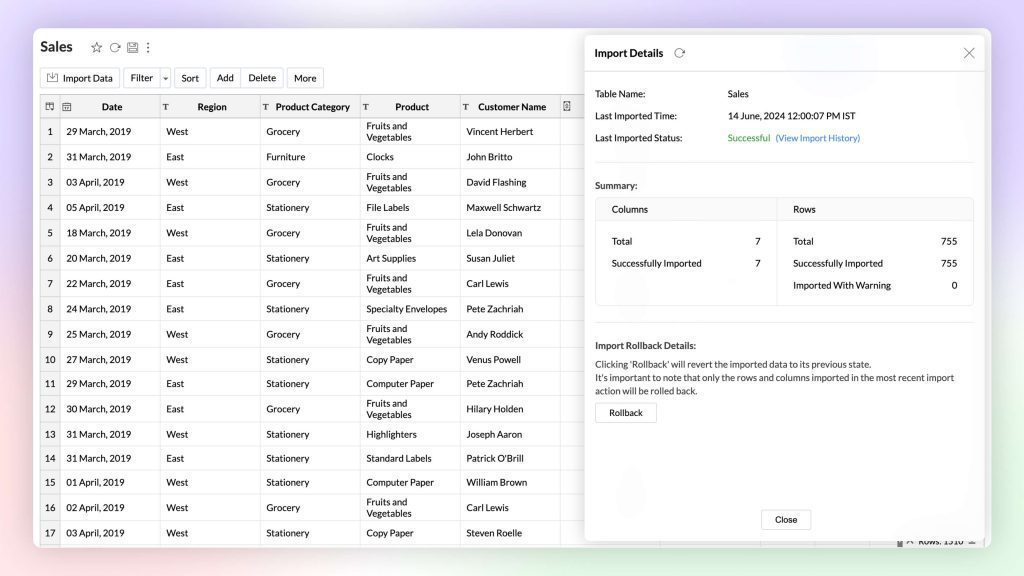
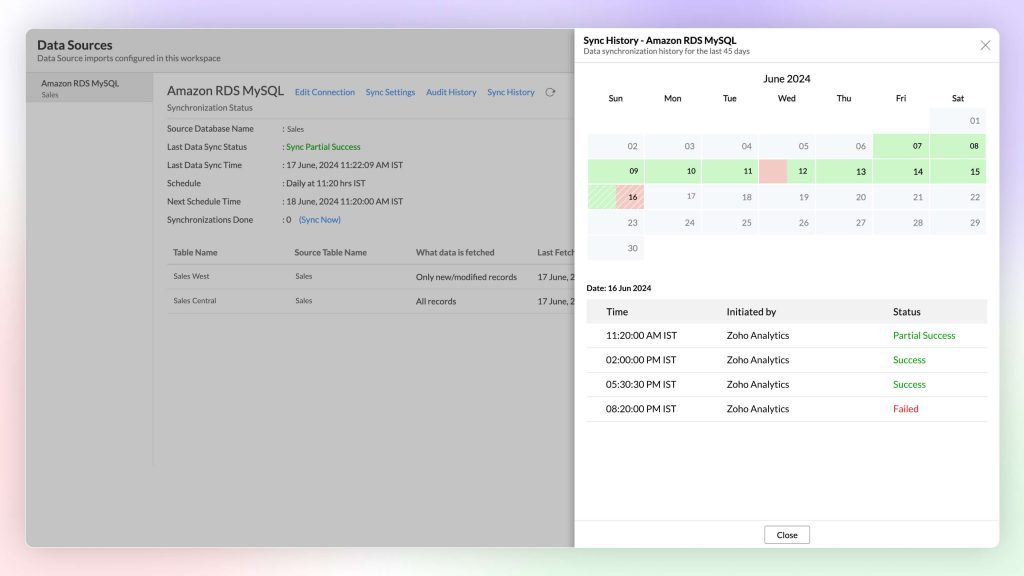
    New connectors and data management: Analytics added more than 25 new connectors such as Yellowbricks, ClickHouse, Dremio, Zoho Connect, and more, audit history and synchronization, import rollback to previous versions, unified metrics, easy data point categorization with Bucket Columns options.

    (image via zoho)


    (image via zoho)

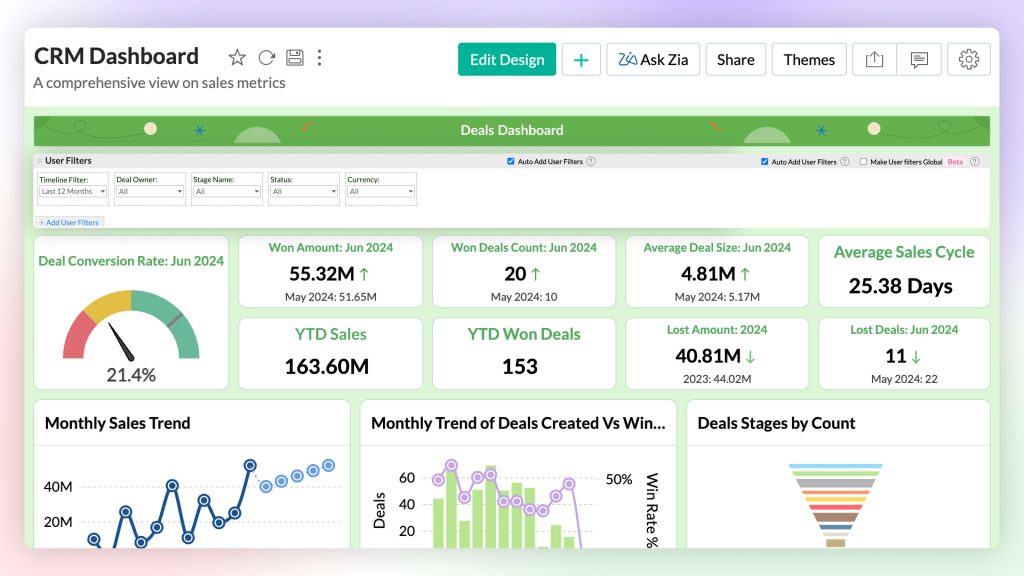
    Visual analysis: More than 7 new chart types to improve data presentation and interpretation, Zia suggestions to select the right chart for your data in one click, and global user filters.

    (image via zoho)

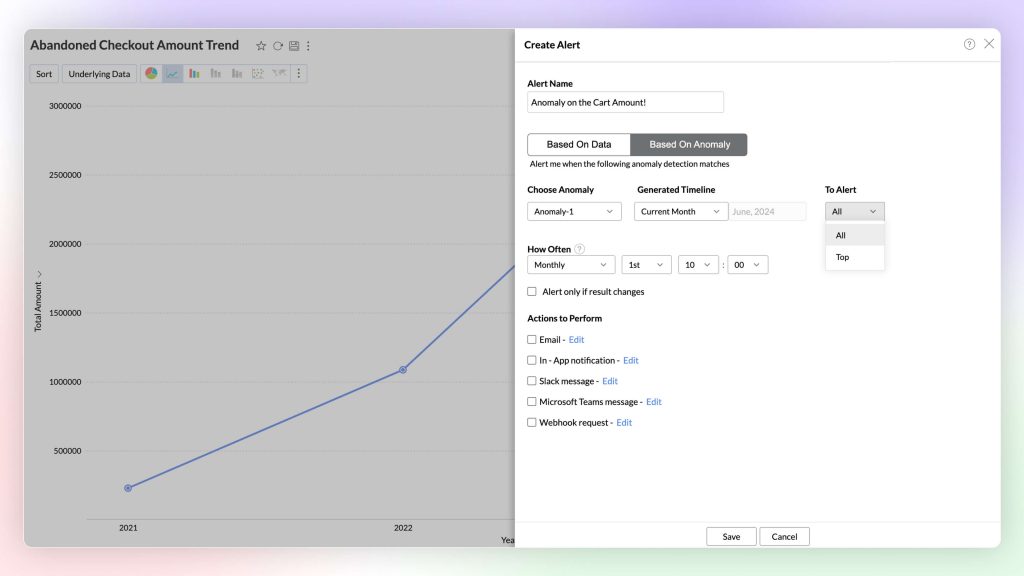
    Advanced data analysis: anomaly detection, cluster analysis, threshold- and anomaly-based alerts.

    (image via zoho)

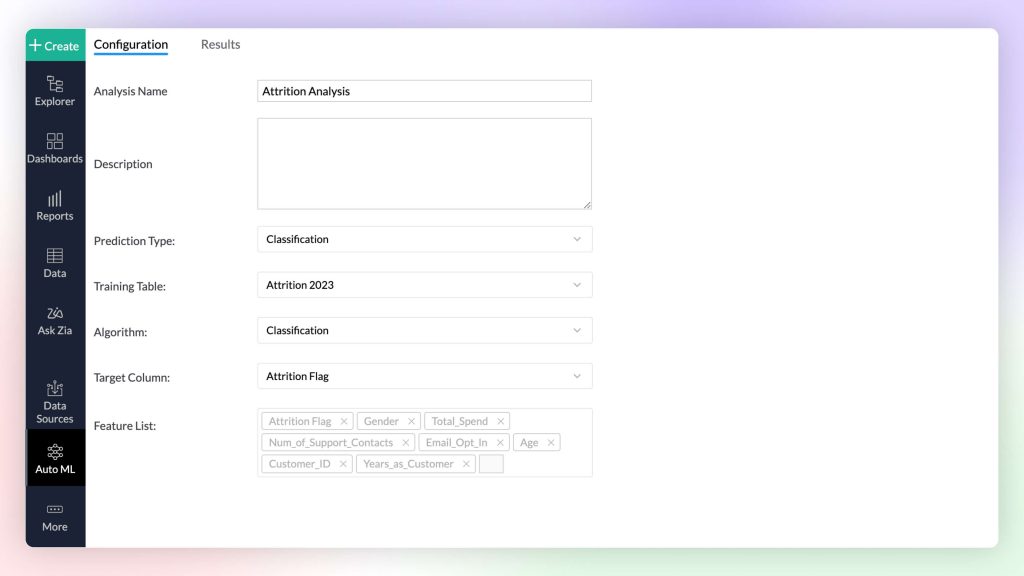
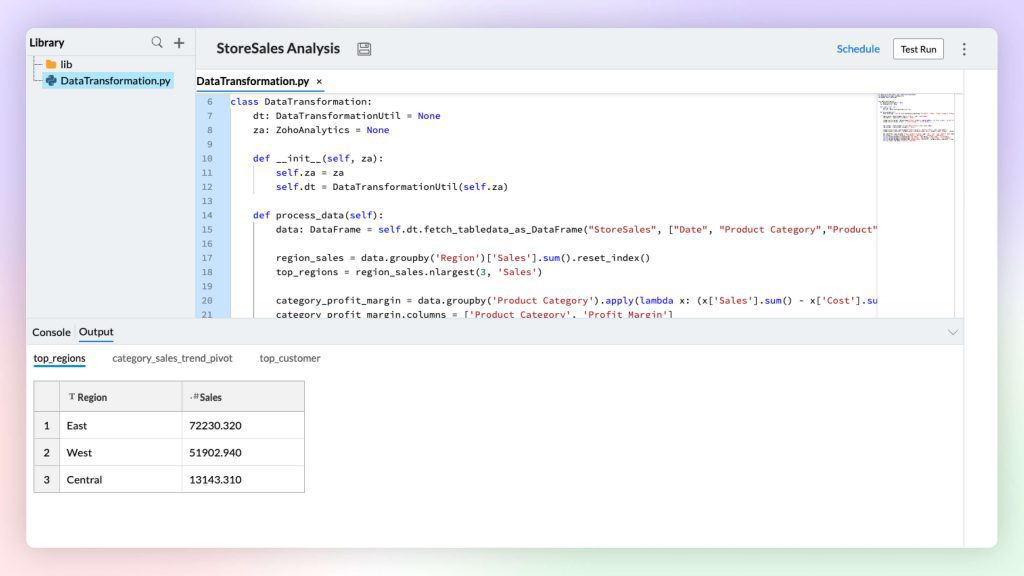
    Creating custom ML models with AutoML and Code Studio: AutoML: Create custom machine learning models without coding. Code Studio: Develop logical, custom machine learning models with Python Code Studio.


    (image via zoho)

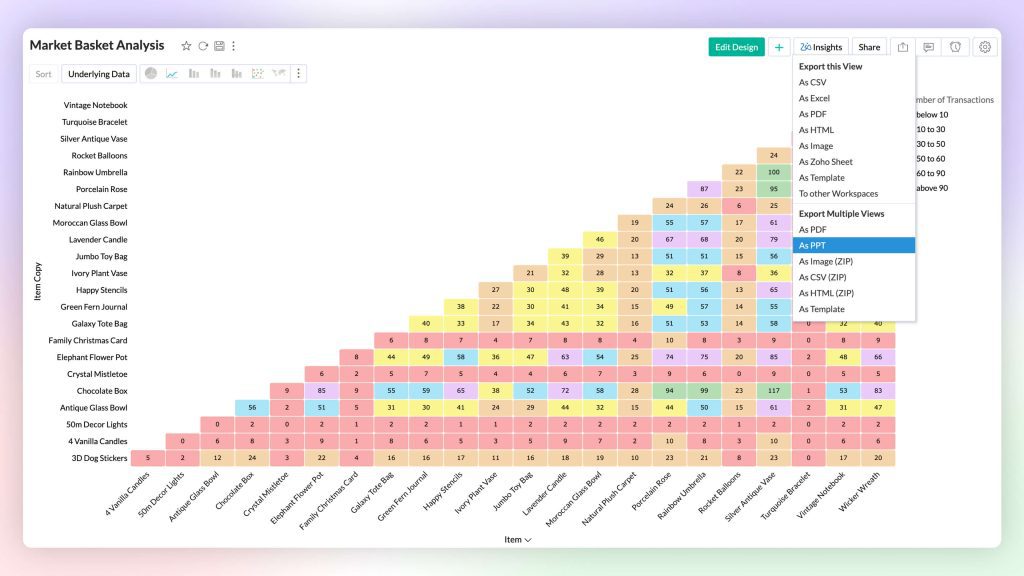
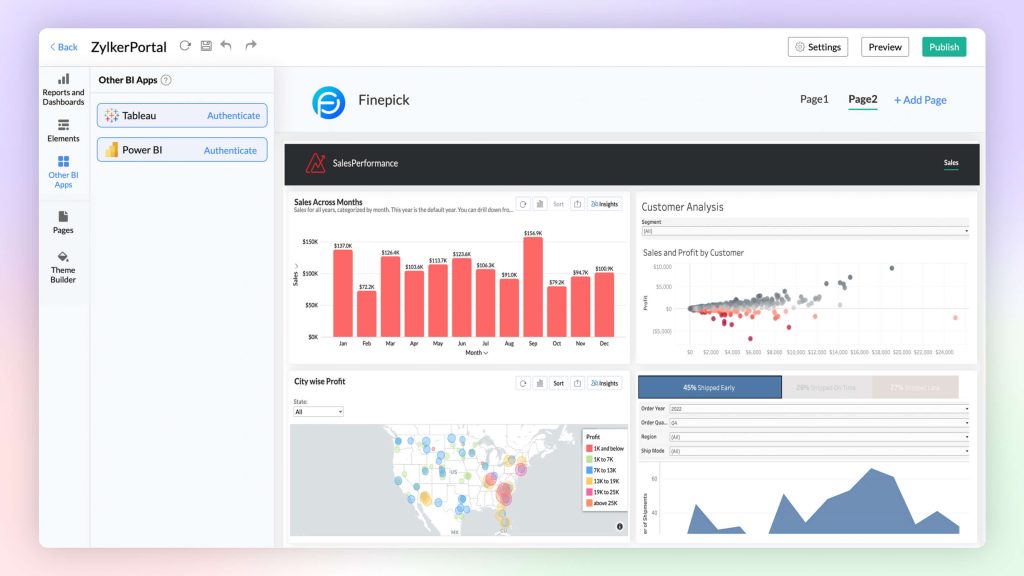
    Compelling data storytelling for effective communication: Create unified BI portals with BI Fabric to centralize reports and enhance collaboration, quick insights through visualizations that facilitate multidimensional interpretation with Visual Zia Insights, Zia Insights multilingual support, and export views as password-protected PowerPoint presentations.


    (image via zoho)


    (image via zoho)

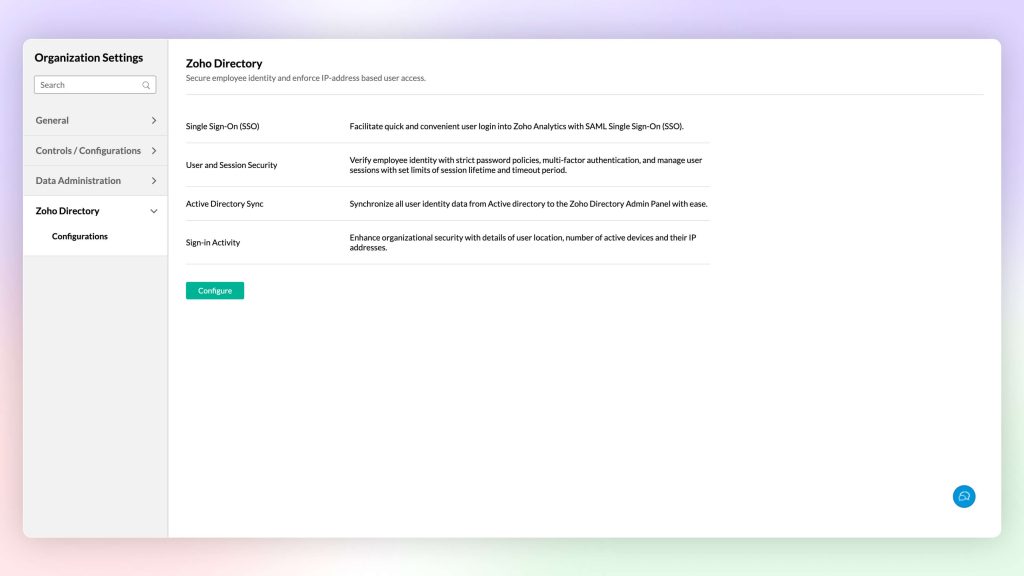
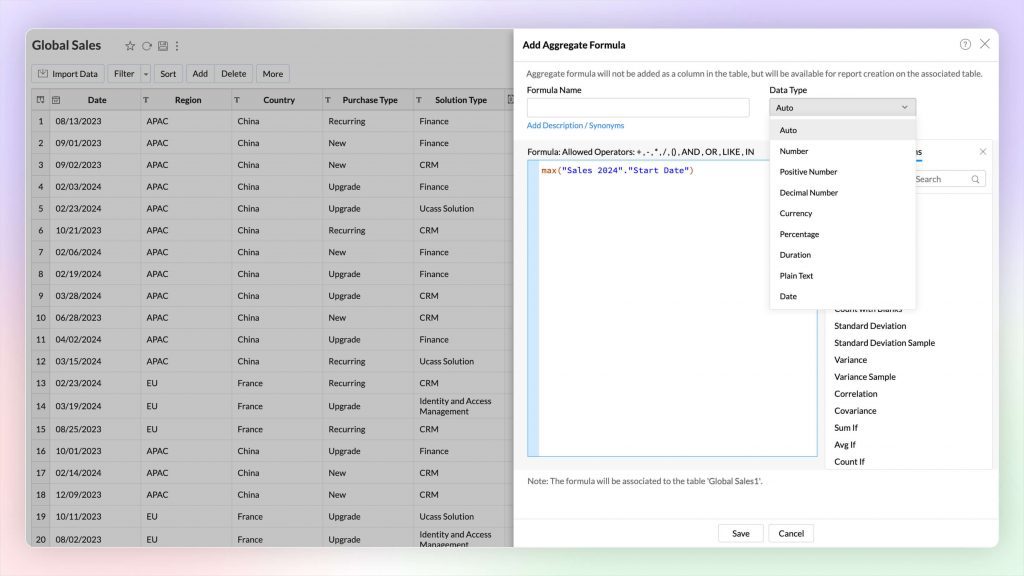
    Additional improvements: In-data sorting, date and string data types in aggregated formula, white-label CSS customization, right-to-left language user interface, Zoho Directory, workspace-level IP restriction, native Zoho Analytics mobile app, email scheduling API.


    (image via zoho)


    (image via zoho)

    Zoho announced the new CRM for Everyone

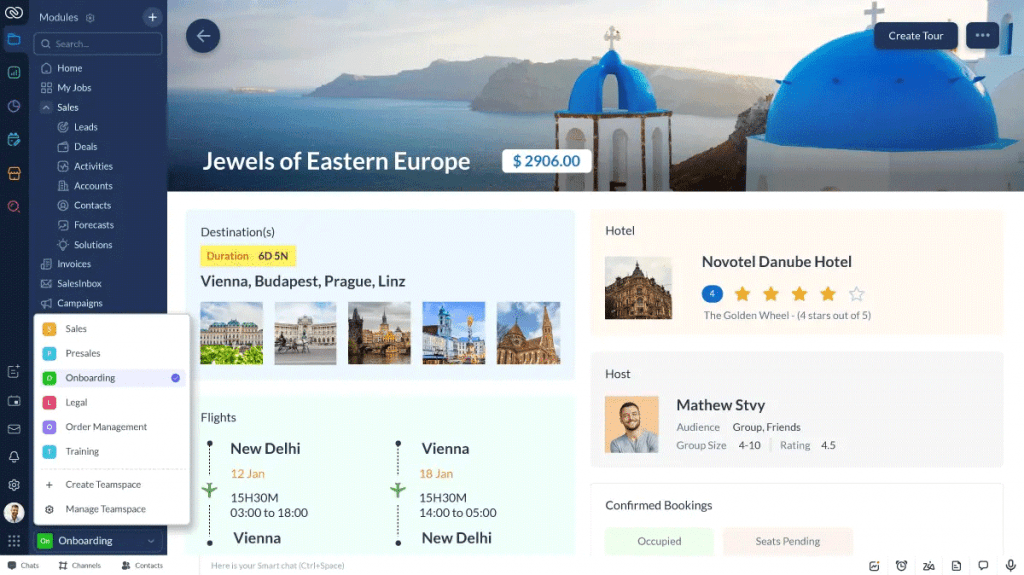
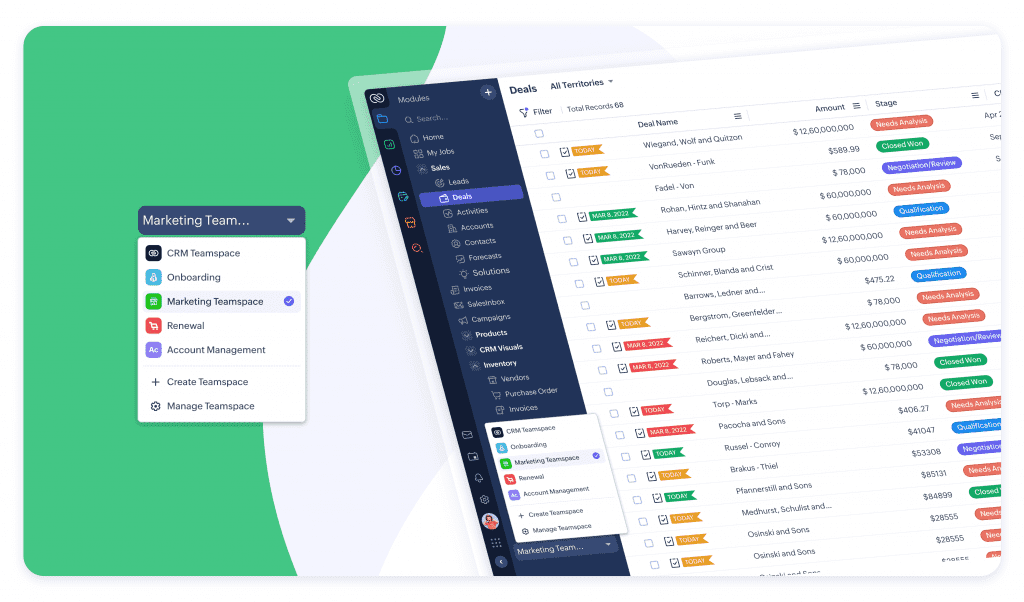
    Zoho CRM for Everyone introduces a disruptive future where all teams collaborate for a unified customer experience. It features a new user interface and team spaces to facilitate collaboration, and is currently in early access.

    (image via zoho)

    Highlighted Features

    • Team Modules Customization: Each business area can create and manage its own data modules at the team level. These modules can include specific fields, permissions, and workflow automations tailored to the group’s needs.
    • IT Control: Although teams have autonomy, the modules are overseen by the IT team to ensure security and consistency.
    • Dedicated Space: Each team has a dedicated space that centralizes all customer-oriented processes, enriched with complete customer context.

    Aplicant Profile

    • Efficient Collaboration: Team members can request help or deliveries from other teams through the corresponding module, being able to track the status of their requests in real time.
    • Transparency: This feature eliminates guesswork and ensures smooth and efficient collaboration.
    • Renewed User Experience Improved Usability: The Zoho CRM interface has been redesigned to enhance the user experience across all roles and functions.
    • Simplified Data Management: Teams can organize their data within specific modules and switch between them quickly.
    • Workflow Adoption: Without needing advanced IT skills, users can manage workflows through no-code or low-code experiences.


    (image via zoho)

    Zoho CRM for Everyone not only democratizes access and use of CRM, but also allows each team to manage their own workflows autonomously within the corporate IT framework. This platform promotes a true transformation of the customer experience (CX), making CRM the core of all customer operations.

    New Zoho Apptics App for application analysis

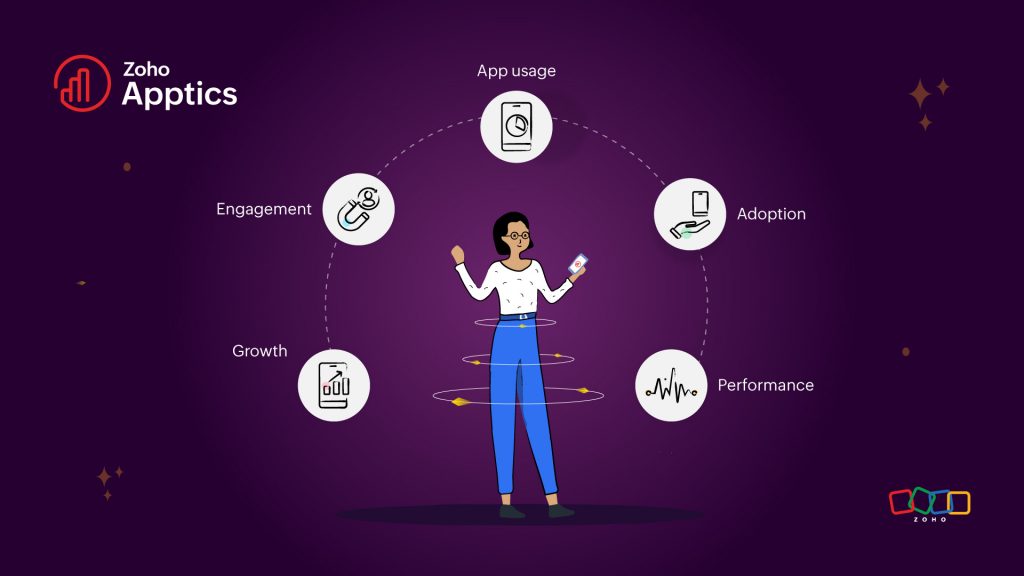
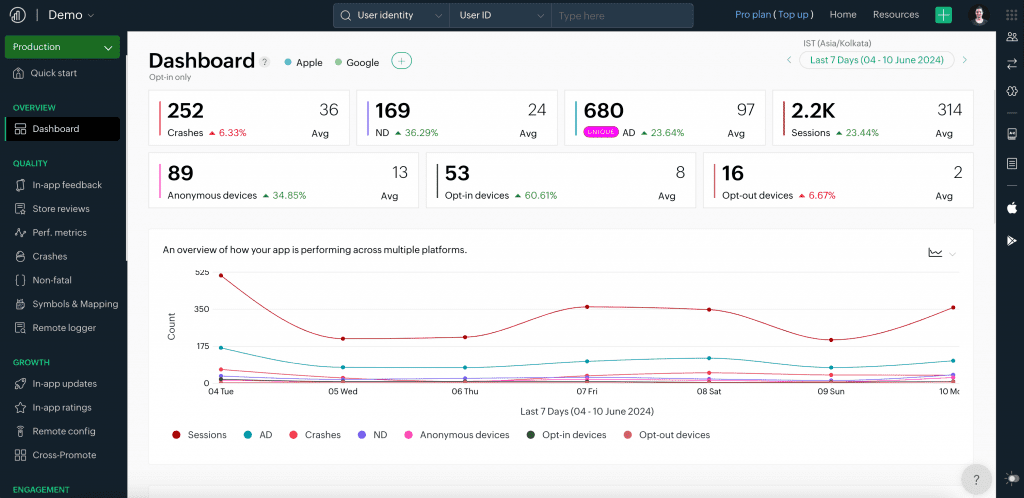
    Zoho Apptics is a comprehensive tool for performance monitoring and application usage analysis. It offers a holistic view of your application, helping to make data-driven decisions at every stage of the app’s lifecycle. With accurate information on adoption, status, performance, usage, engagement, and growth, everything is managed from a single console.


    (image via Zoho)

    Features of Zoho Apptics:

    • Focus on user privacy.
    • Insights on adoption, usage, and performance.
    • Management of multiple projects from a single platform.
    • Easy to implement and use.
    • Intuitive UI for easy navigation.
    • More than 20 modules for customization. Role-based access for different teams.

    (image via Zoho)


    (image via Zoho)

    Evaluations in the candidate application form in Recruit

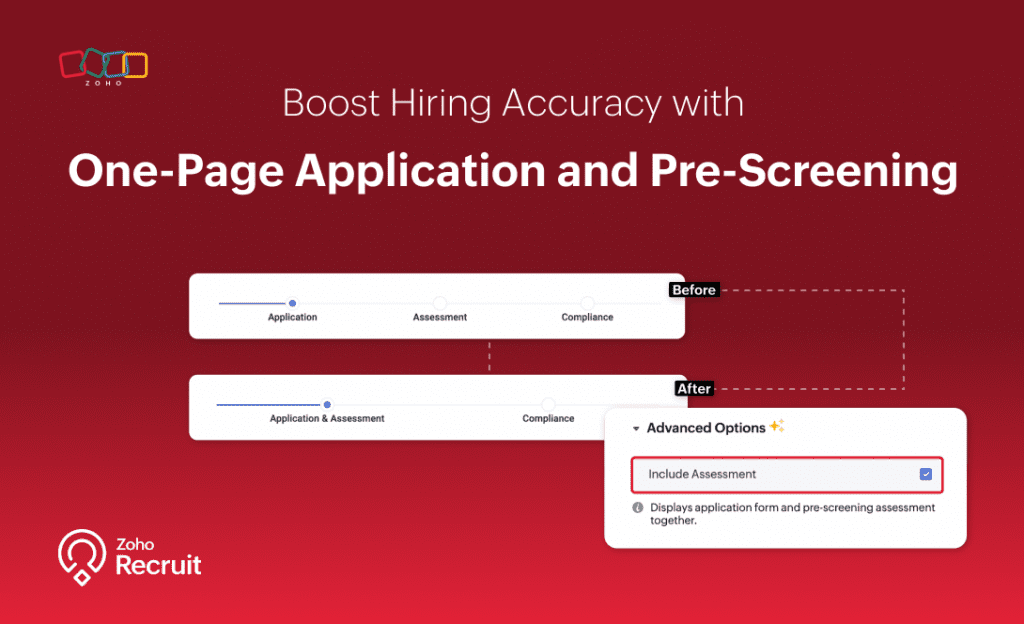
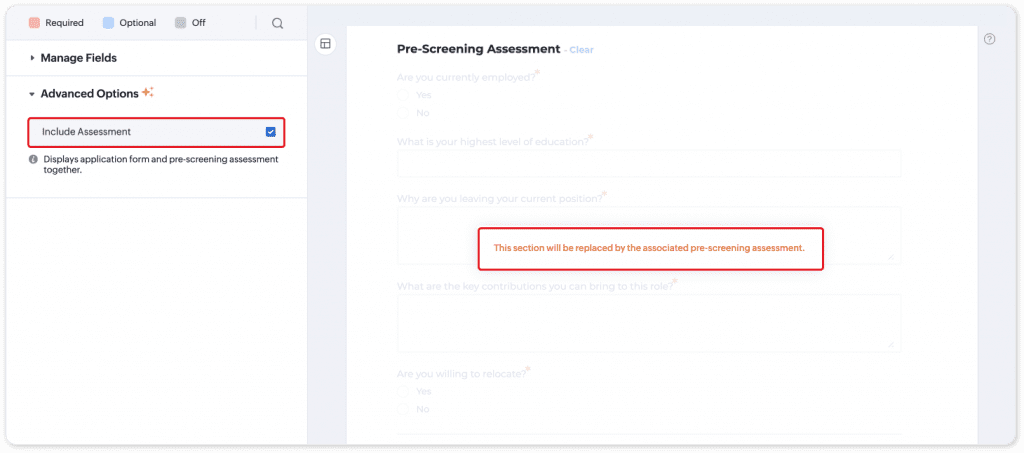
    Zoho Recruit now allows you to include a pre-screening assessment in the candidate application form. This means that candidates must complete the assessment before they can submit their application.

    What is it used for?

    • To ensure that all candidates complete the pre-screening assessment.
    • To avoid incomplete applications.
    • To improve the quality of candidates.
    • To save recruiters time.

    (image vía zoho)

    Some of the benefits of this update are: all candidates are evaluated based on the same pre-screening assessment, each candidate’s record includes the assessment results and recruiters do not have to follow up on incomplete assessments.

    How to enable:

    • Go to Setup > Career Website > Career Site > Candidate Application Form.
    • In Advanced Options, select Include Assessment.
    • Make sure that the assessment is correctly related to the job opening.


    (image vía zoho)

    This feature can help to improve the quality of candidates who move on to the next stages of the hiring process.

    New features for Zoho CRM

    Dashboard updates:

    Zoho CRM dashboards provide a quick and comprehensive view of your organization’s performance, facilitating faster and more efficient decision-making. These new enhancements will increase the security and ease of use of the dashboards.

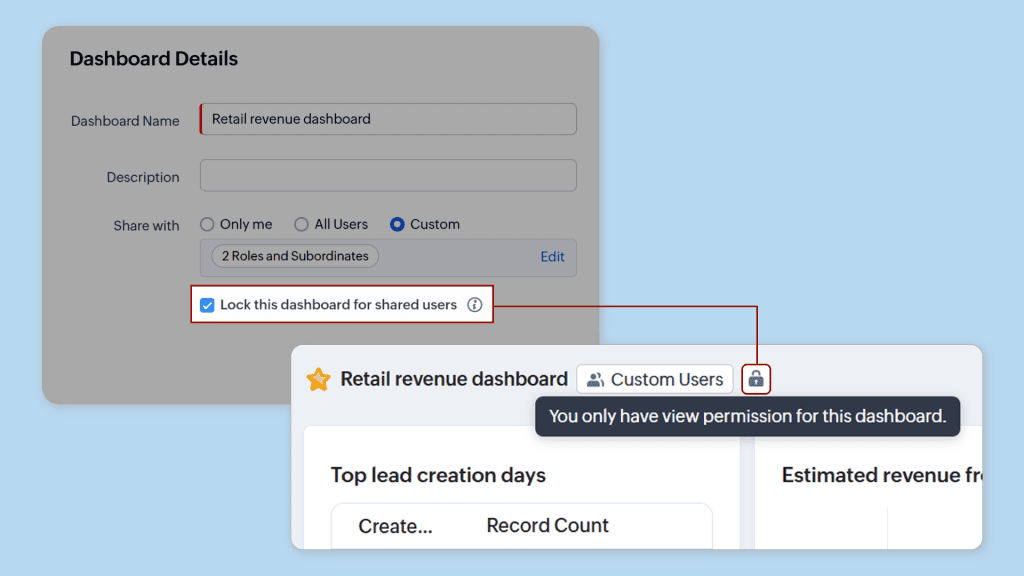
    • Shared dashboard locking: Shared dashboards can now be locked, allowing only the creator and the CRM administrator to make changes. This is useful for sharing dashboards without granting editing capabilities.


    (image via zoho)

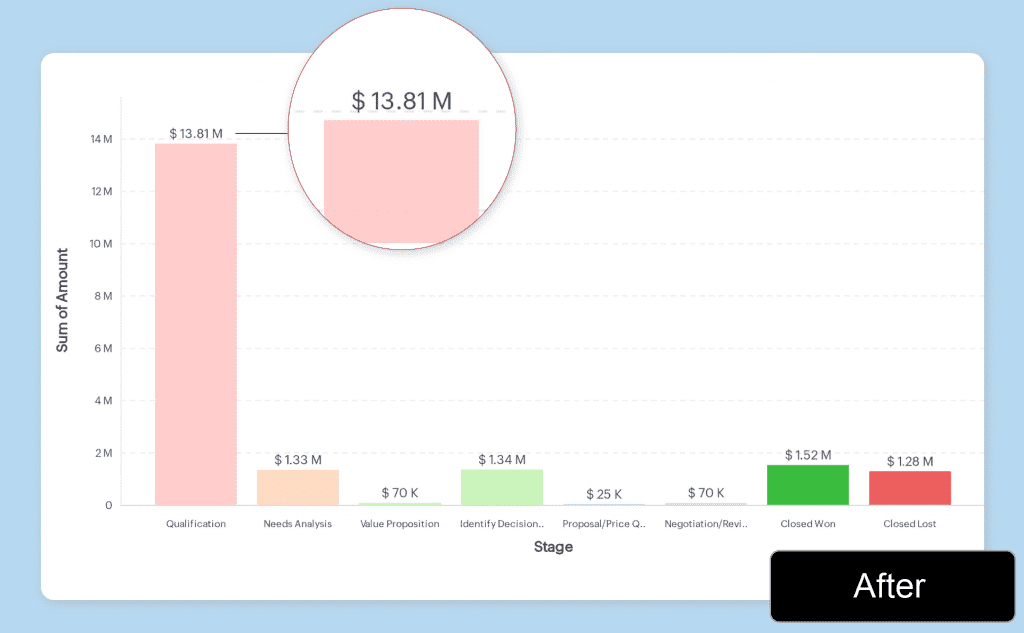
    • Visualization of large numbers in abbreviated form: You can display large numbers in shorter formats (K, M, B, L, C) for easier understanding and comparison.


    (image via zoho)

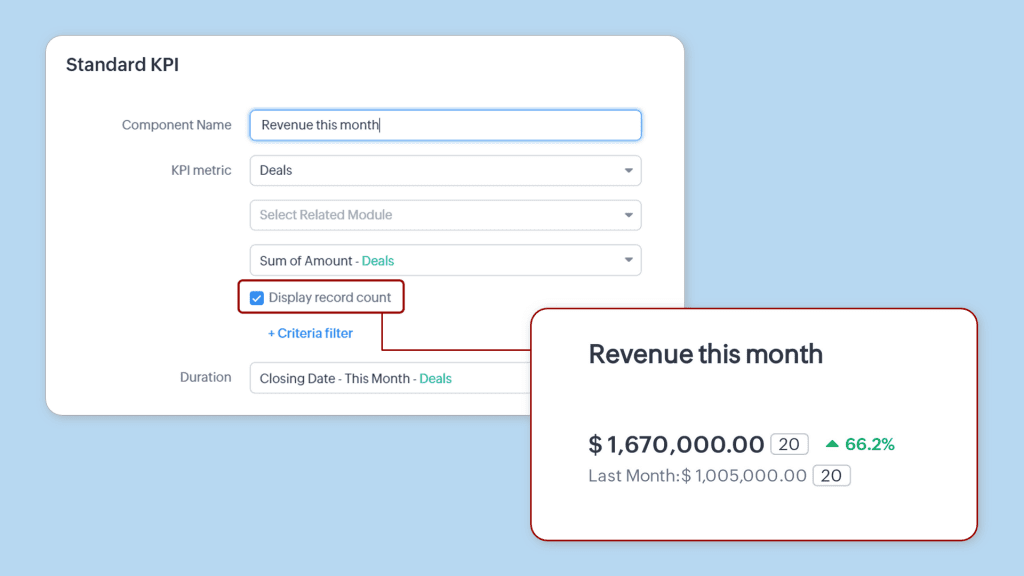
    • Record count in KPIs: You can now display the record count along with metrics in KPI components, allowing better understanding of revenue increases and other key indicators.


    (image via zoho)

    • Availability: New records: Standard and above editions in all data centers. Existing organizations: Standard and Professional editions in all data centers; Enterprise edition in AU, JP, and CN. Phased release for all organizations in Standard and above editions.

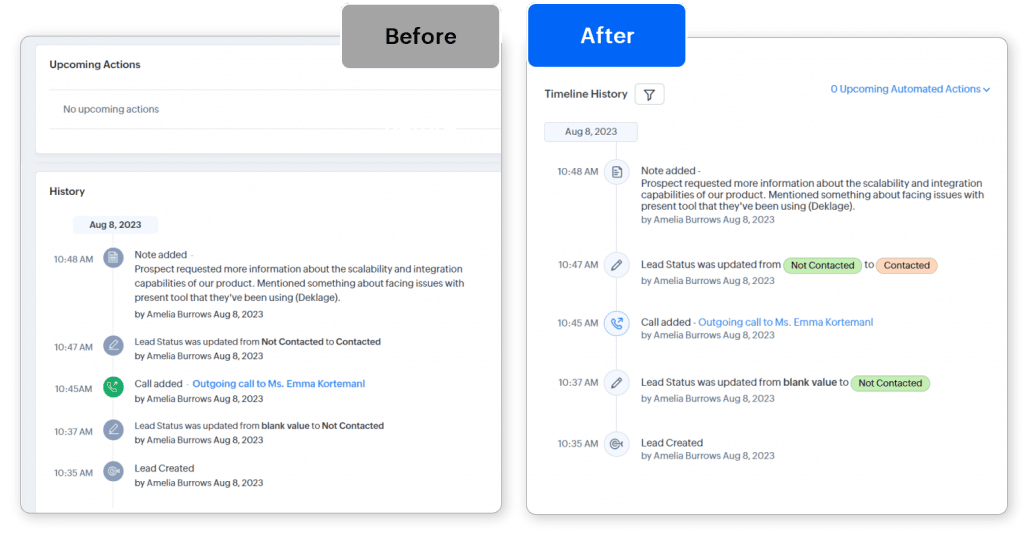
    Updated Timeline View:


    (image via zoho)

    Zoho CRM’s timeline view has been updated with a new interface and several new features.

    You can now:

    • Use the timeline for events up to 3 years (previously only 6 months).
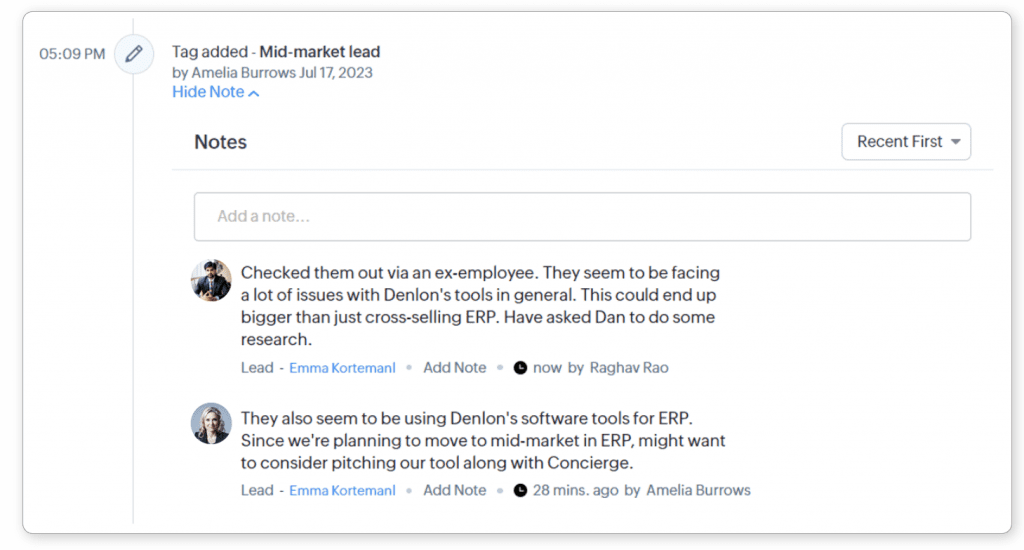
    • Add notes in response to timeline events.

    (image via zoho)

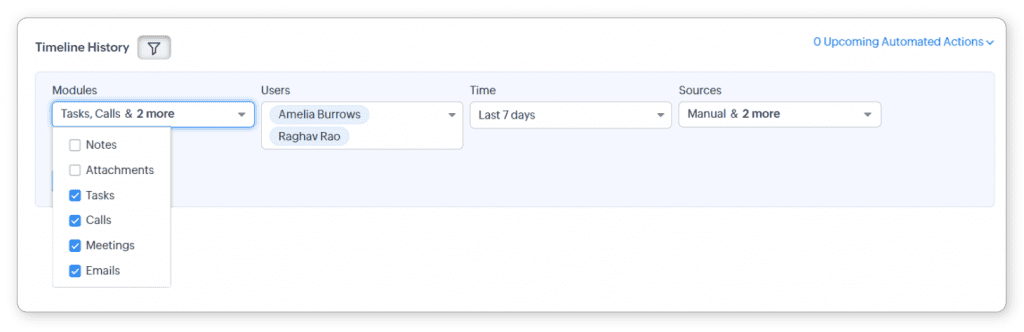
    • Filter timeline events by module, user, time, and change origin.


    (image via zoho)

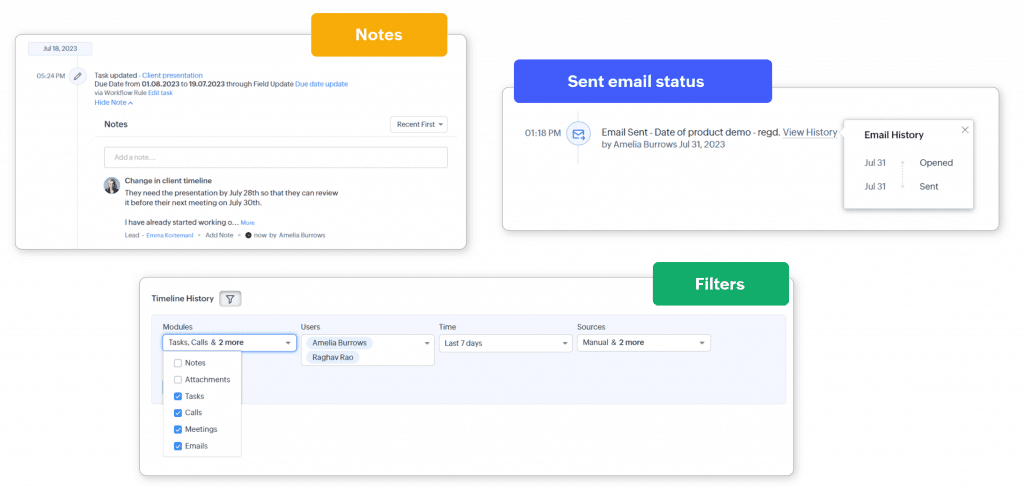
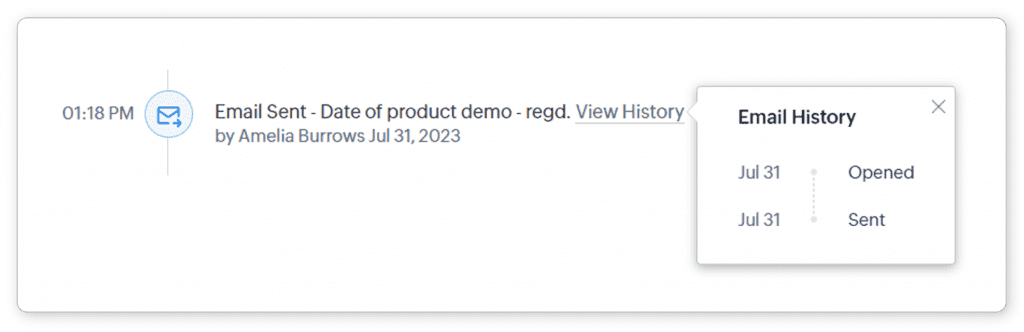
    • View the status of emails directly from the timeline.

    (image via zoho)


    (image via zoho)

    Editions: All – DC: All – Release plan: These enhancements are being rolled out gradually and are available for most organizations since the end of May. For organizations with large volumes of data, they will be available by the end of June.

    Enhanced duplicate check for Leads

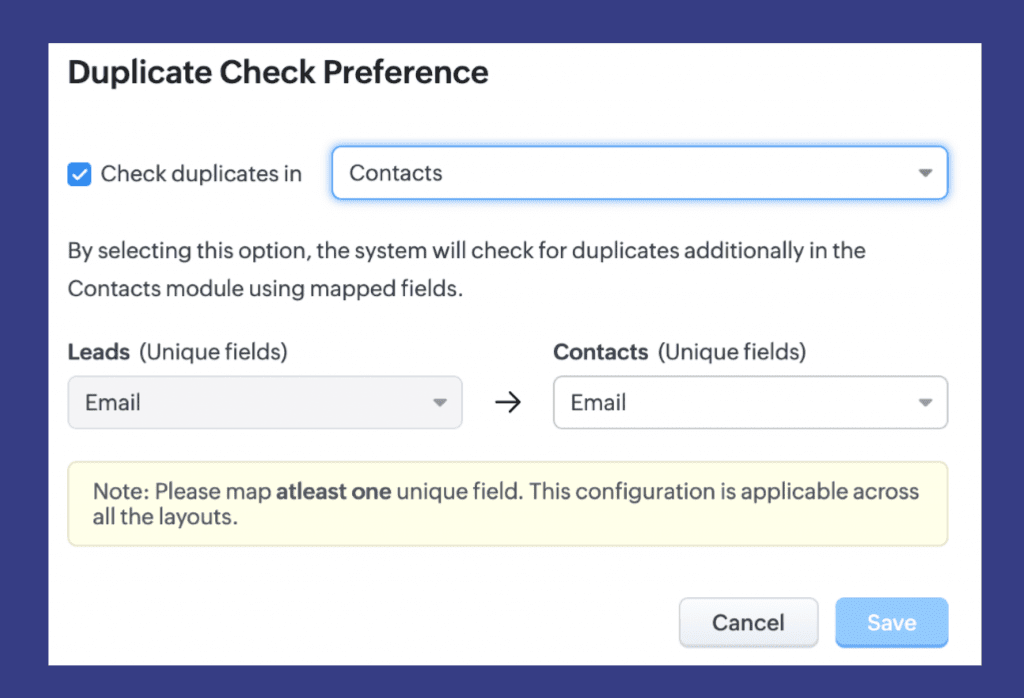
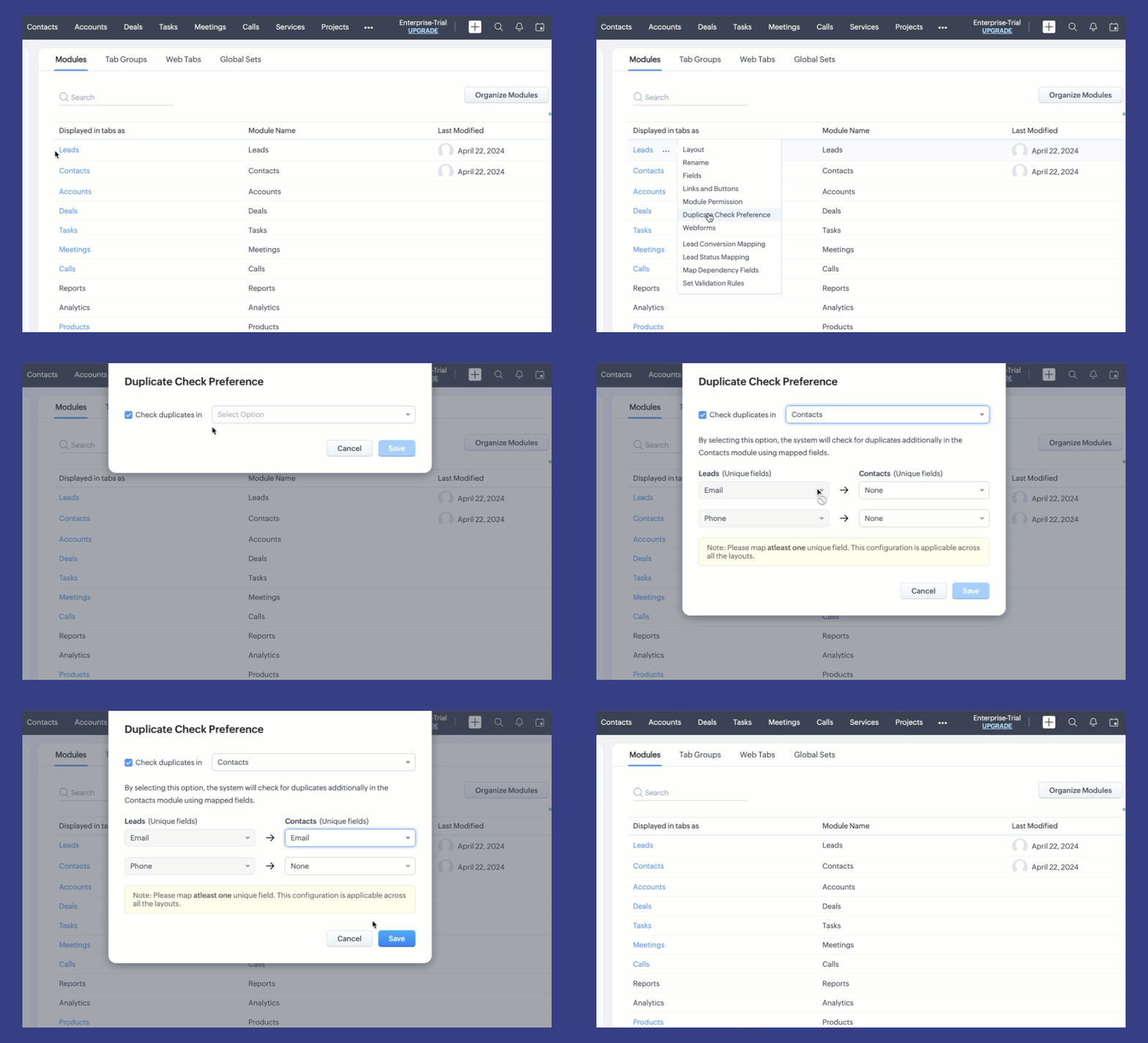
    With this update, CRM users can now check for duplicates directly in the Contacts module by selecting “Contacts” from the duplicate check preferences dropdown menu and specifying the unique field for comparison.


    (image via zoho)


    (image via zoho)

    This enhancement significantly reduces the risk of duplicate records and ensures data integrity within the Leads and Contacts modules. Available editions: The feature is available to all users in all distribution centers.

    Webinars for Zoho Apptics, Rajú Vegesna at Zoholics and Desk

    Introduction to Apptics

    Product Announcements & Roadmap – Raju Vegesna – Zoholics Austin

    Start with… Zoho Desk and create an omnichannel customer support

    Do you want to add these new features to your Zoho system? Let’s work together! Learn more about our Zoho consulting services and contact us for a free consultation.

  • Implementation of the month: Project Management Optimization: Integration of ChatGPT and Zoho Creator

    This month, we highlight an implementation carried out by our team for a world-renowned leader in public art and architectural design solutions.

    Challenge

    The client needed a solution that could automate the synthesis of detailed project information, as the manual process was inefficient and prone to errors. The task was clear: to improve both efficiency and accuracy in project management.

    Solution

    We proposed the implementation of artificial intelligence, specifically ChatGPT integrated with Zoho Creator, to automate the creation of project summaries from detailed forms. By leveraging the powerful APIs of OpenAI and Zoho Creator, we designed a system that automatically generated and sent project summaries on demand. This solution involved simply pressing the “AI Summary” button in the Zoho Creator Quotation Form, which activated the processing of the form fields to produce complete HTML email summaries.

    Benefits

    The implementation brought numerous benefits:

    • Efficiency: Automation eliminated the manual process, saving significant time in creating summaries.
    • Accuracy: Standardization in data analysis reduced human errors, ensuring the accuracy of information.
    • On-demand availability: Summaries could be generated instantly with the most recent data, facilitating timely updates and agile decisions.

    The integration of ChatGPT with Zoho Creator not only saved time but also improved the flow of information between departments, fostering more informed decision-making and efficient project oversight.

    Thanks to this collaboration, our client was able to successfully leverage artificial intelligence to enhance their project management efficiency, demonstrating a firm commitment to innovation and excellence in their architectural design and public art solutions.


    This is just one of many examples of how Interconnecta is transforming project management through innovative and customized solutions! For more information on how we can help you implement innovative technological solutions in your company, contact us.


    Contact Us Here

  • Zoho News Catch-Up: See you at Zoholics Austin, News in CRM, TeamInbox, Creator and Social, Instant summaries with ZIA, Sign for Developers

    Welcome to our catch-up, where you’ll be in the know of all the latest Zoho updates in one place!


    See you at Zoholics Austin, Texas on June 5th and 6th


    In just two days, the highly anticipated Zoholics Austin, Texas. This event will take place on June 5 and 6 at the Austin Convention Center. If you don’t have your tickets yet, remember that you can request a 25% discount 👇🏻


    • The event will feature Sridhar Vembu, CEO and co-founder of Zoho, who will open the event with a keynote session and conclude it with an open Q&A session.
    • Additionally, Raju Vegesna, Chief Evangelist, will present product announcements and Zoho’s roadmap. Check de agenda.
    • The event starts at 7:30 am and will offer 12 tracks and over 100 sessions to choose from. 
    • Both breakfast and lunch are included, courtesy of Zoholics!


    Don’t miss this unique opportunity! Reserve your space with our team by sending an email to kim@interconnecta.com

    See you there!


    Zoho CRM introduces enhancements in its integration with Projects and in the Accounts and Deals Module

    Zoho CRM continues to enhance its functionality with new updates that optimize integration with Zoho Projects and improve the Accounts and Deals Module. These improvements will facilitate project management and email communication. Discover them below:

    Enhanced CRM integration with Projects
    You can now enjoy a smoother integration between Zoho CRM and Zoho Projects. Here are the main new features:

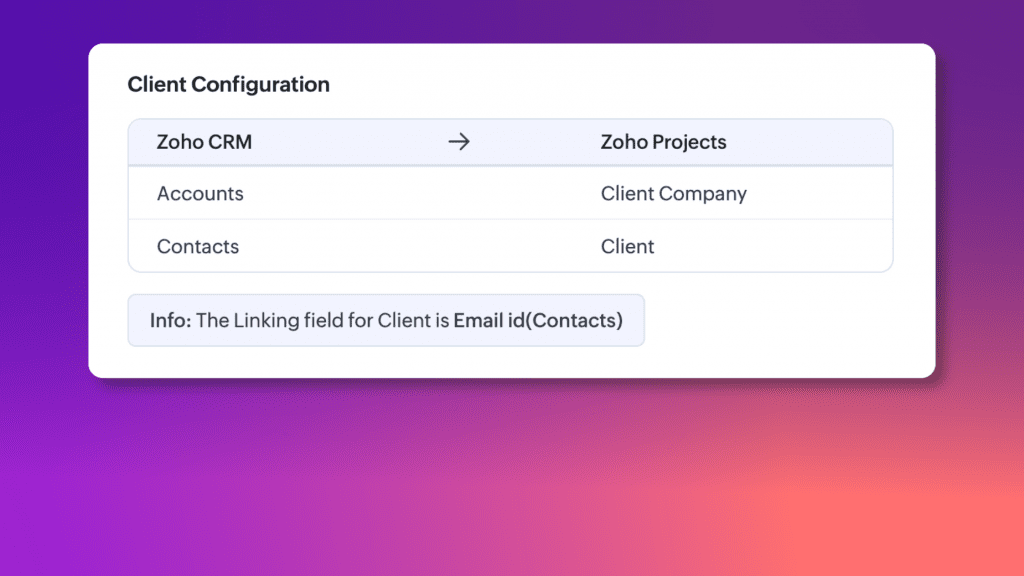
    • Client configuration: improved visibility of client information by adding a specific Client Configuration section. You can now clearly see how Zoho Projects clients are assigned to CRM contacts and accounts, making the process more straightforward and transparent.


    (image via zoho)

    • Expanded module integration: You can now link projects to Contacts, Deals, and other critical Zoho CRM modules such as Products, Cases, Quotes, Sales Orders, Purchase Orders, Invoices, and Campaigns.
      • Enhanced visibility: With projects linked across multiple modules, you can now see a comprehensive overview of all connections and activities related to a specific project. This includes centralized access to quotes, purchase orders, sales orders, invoices, and more within Zoho CRM.
      • Efficient data entry: Automatic field mapping facilitates project creation from each module, reducing manual data entry and ensuring consistency throughout the CRM system.
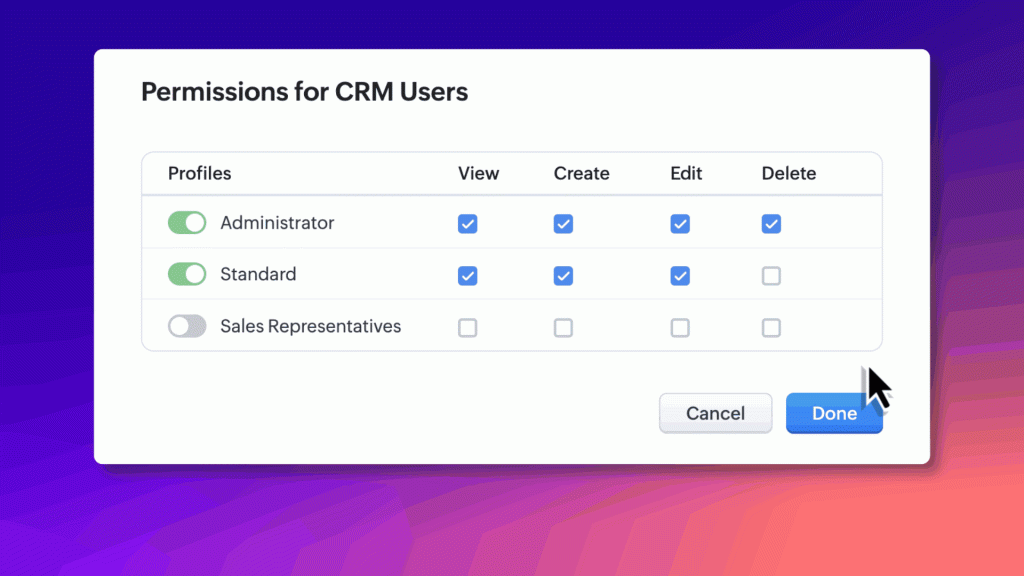
    • Simplified permission management:
      Setting up and managing access to project details is now easier with a simplified interface. You can quickly assign view or edit permissions, ensuring that everyone on your team has the appropriate level of access to project data.


    (image via zoho)

    Improvements in the Accounts and Deals Module

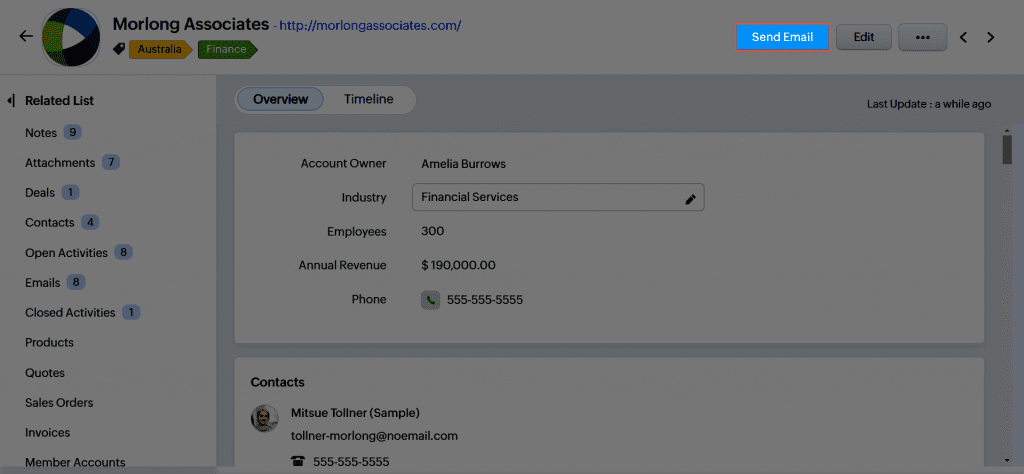
    Zoho CRM has implemented enhancements in email management within the Accounts and Deals modules, facilitating more effective and contextualized communication.


    (image via zoho)

    In the Accounts Module

    • A button has been added to send emails directly from the Accounts module.
    • The email composer offers quick suggestions for email addresses of related contacts.
    • Users can create and use attachments and templates specific to the Accounts module.
    • Although this new functionality could replace the use of attachments and templates specific to contacts in the Accounts module, the option to access these elements through the related emails list has been maintained.

    In the Deals Module

    • A similar button has been added in the Deals module.
    • The email composer offers quick suggestions for email addresses of related contact roles.

    These improvements aim to optimize the user experience in managing emails within Zoho CRM, ensuring efficiency and proper context in business communication.

    (Not currently available in mobile applications)

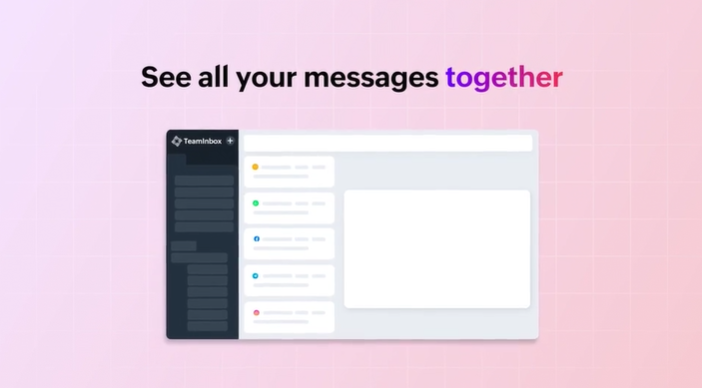
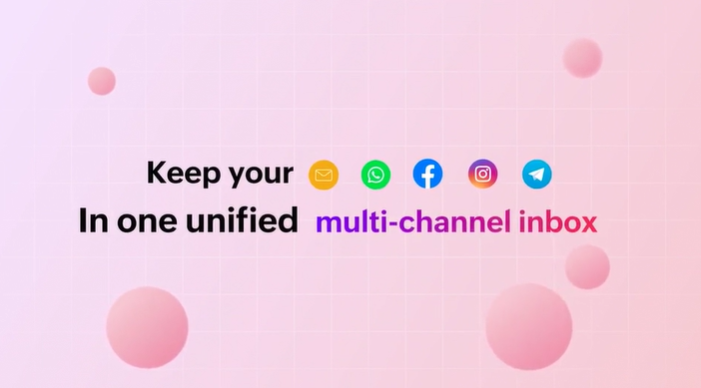
    New unified multichannel inboxes in Zoho TeamInbox

    Zoho TeamInbox introduces unified multichannel inboxes, centralizing all communication channels on a single platform. This new feature aims to:

    • Improve collaboration and transparency within teams.
    • Efficiently organize the inbox.
    • Eliminate the need to switch between multiple applications, simplifying and streamlining message management.

    (image via zoho)

    Unified Inboxes:

    • Consolidation of email messages, WhatsApp, Telegram, Facebook, and Instagram into a single inbox.
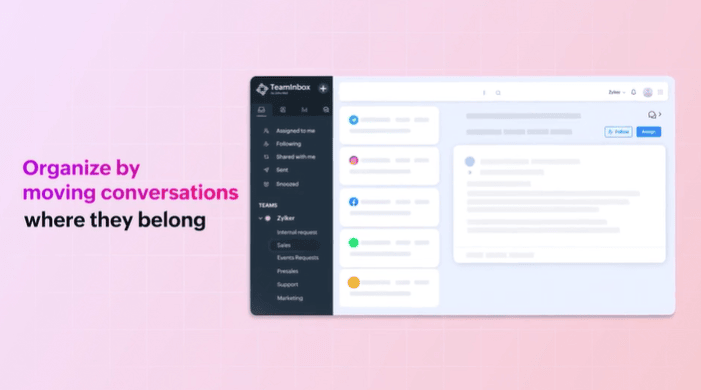
    • Ability to associate multiple channels or create specific inboxes for different types of messages.
    • Instagram and Facebook Messenger are added to the supported channels, enabling centralized management of messages from these platforms.

    (image via zoho)

    Moving threads between inboxes: Easy transfer of messages between inboxes as needed by the team.

    Internal Discussions: Dedicated spaces for debates and comments within the inboxes.

    (image via zoho)

    Response time goals: Setting maximum response times with automatic actions if not met.

    Marking duplicate threads: Automatic elimination of repeated threads to keep the inbox organized.

    Multiplatform accessibility: Available on smartphones and desktops, adapting to each device.

    These features aim to simplify communication management, improving team efficiency and collaboration.

    Instant summaries of your notes with Zia

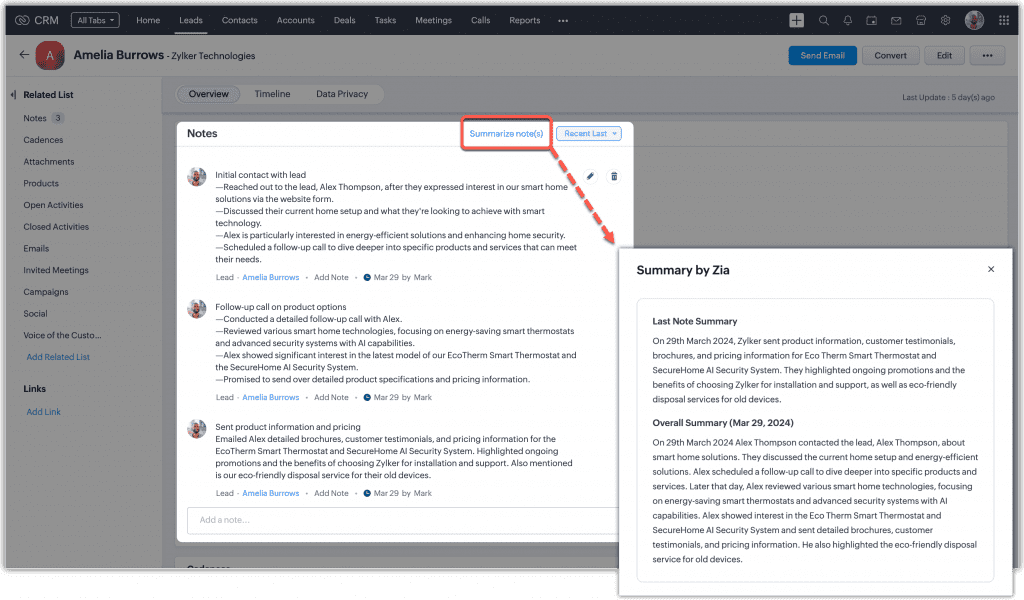
    Zoho CRM has launched the “Zia Notes Summary” feature, designed to offer quick and organized summaries of CRM notes.

    Why Zia Notes Summary?
    It helps you quickly catch up with customer interactions, saving time and keeping you informed. It organizes and makes your CRM records more accessible, including leads, contacts, accounts, and deals. It facilitates decision-making with clearly summarized information.


    (image via Zoho)

    It works with a click on “Summarize note(s),” providing an “Overview” of all notes in a record and a “Latest Note Summary” for the most recent update.

    (Available for the Enterprise edition with more than 20 licenses or in the Ultimate edition of Zoho CRM, in English and currently in the US and EU)

    Zoho Creator announces updates – May 2024

    New features highlighted for Zoho Creator:

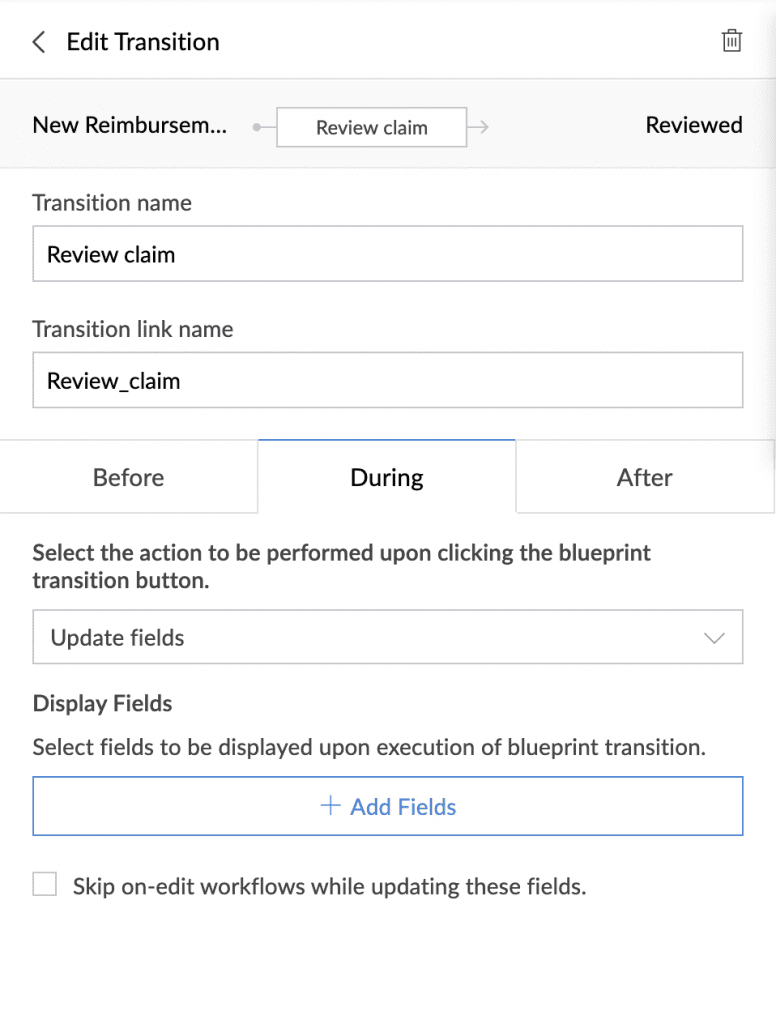
    During Blueprint actions: New section that allows data collection during transitions, with options to update fields or open specific forms.

    You will be able to require data to be collected from a transition owner while making a transition, and this data entry can also be used to trigger workflows.

    Applicable for: C5, C6 / Availability: All DCs


    (image via zoho)

    Widget Configuration: Improvements in widget customization, allowing full control over specific components of an application, and configuring dynamic fields in the manifest.json file for use in multiple applications.

    Operation:

    • Edit the configuration section in the manifest.json file to name fields and specify components.
    • When adding the widget to a page, a menu with configurable fields will be displayed.

    Offers customization and reuse of widgets in multiple applications.

    Applicable for: C5, C6 / Availability: All DCs

    Freeze subform column: Improvement to facilitate editing in subforms with many fields, freezing the first columns to avoid disorienting scrolling.

    Note: This feature will only be available in forms, embedded forms, and published forms, not in PWAs or mobile devices.

    Improves data entry processes, minimizes errors, and increases productivity.

    Applicable for: C5, C6 / Availability: All DCs

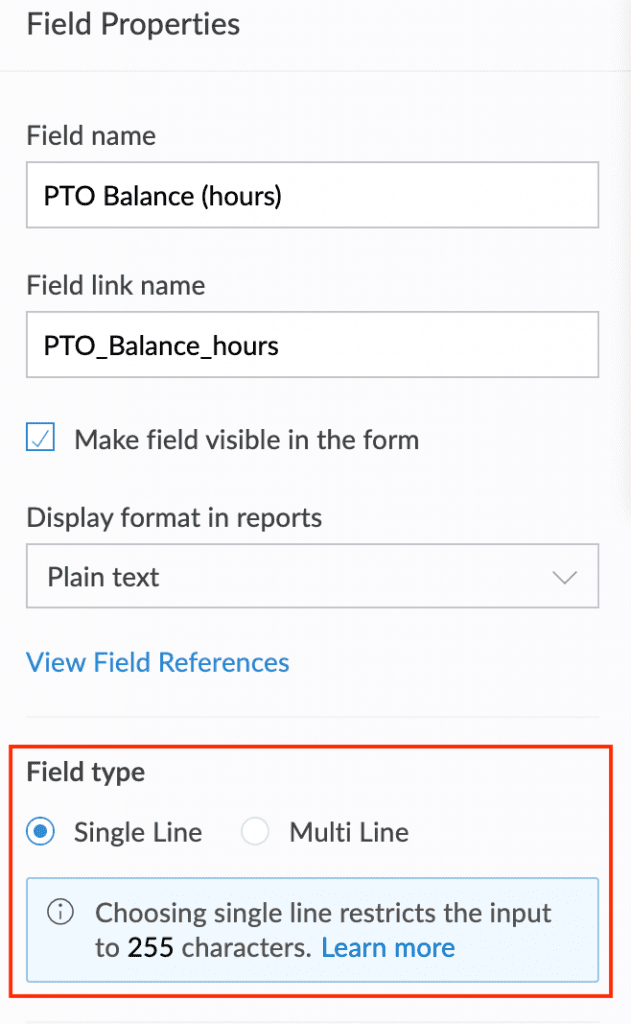
    Data types in formula fields: New field type property with single line (up to 255 characters) and multiline (more than 255 characters) options, improving data management and display.

    Makes it easier to handle and display data, particularly for larger values, expanding the range of use cases.

    Applicable for: C5, C6 / Availability: All DCs

    Maximum character limits in fields: Setting limits of up to 64 KB (65,535 characters) for Rich Text and Multiline fields, with implementation in June 2024.

    Applicable for: C5, C6 / Availability: All DCs

    Zoho Sign for Developers: Plug and Play with eSign APIs and SDKs

    (image via zoho)

    Zoho Sign now offers APIs and SDKs for developers to quickly and easily integrate electronic signature functionality into their applications, websites, or mobile apps.

    Key Features:

    • Create reusable documents and templates: Generate legally binding envelopes and turn frequent documents into templates.
    • Document storage: Offers unlimited storage or allows backups to cloud service providers.
    • Seamless integration: Integrates with over 30 applications, making it easy to send and collect signatures without switching websites.
    • Brand customization: Allows adding the company logo and customizing email templates and post-signing pages.
    •  

    More than 25,000 envelopes are sent daily for signing through Zoho Sign APIs!

    New features for Zoho Social

    Attention marketers! Here are the new features that Zoho Social launched in April:

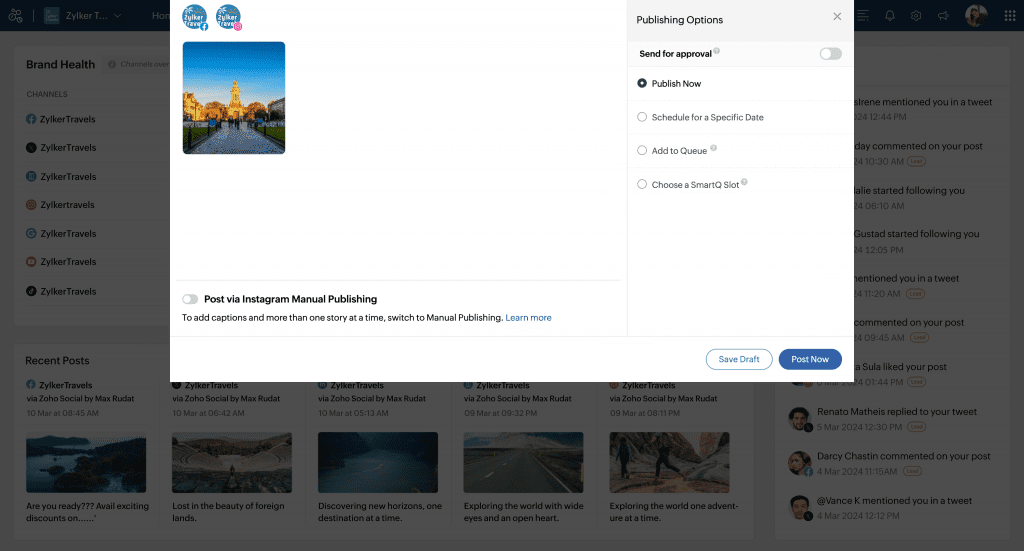
    Post stories on Facebook: Now you can post stories directly from Zoho Social using multimedia files or creating content with Canva or Zoho’s image editor. Available for Standard plans and above.


    (image via zoho)

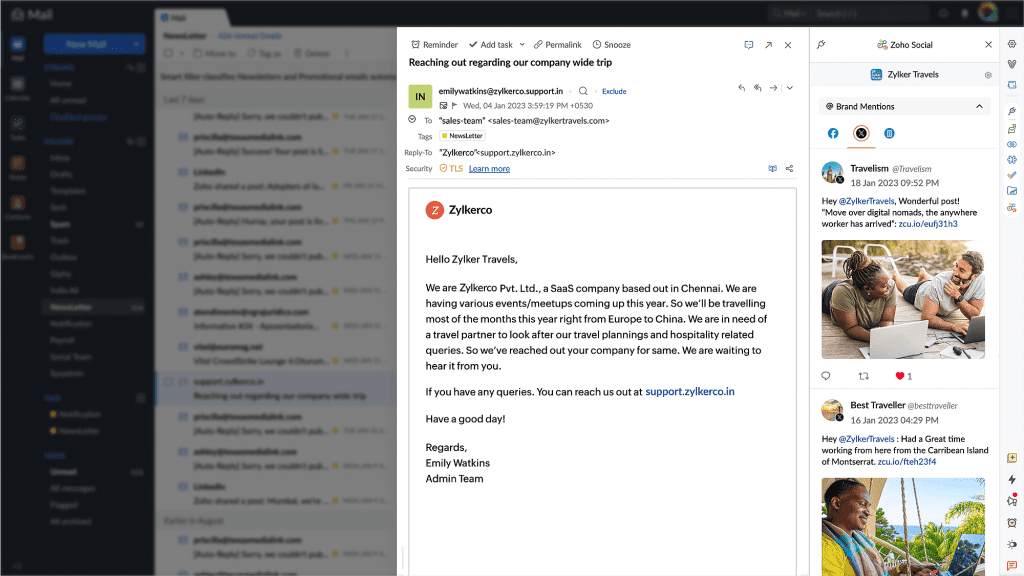
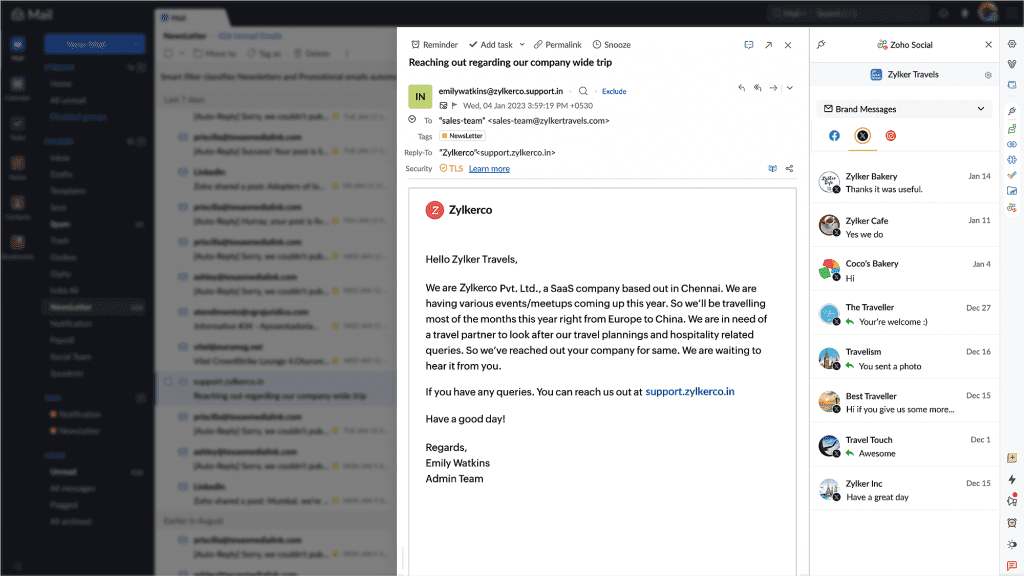
    Zoho Social eWidget for Zoho Mail: Access brand mentions and messages received on Facebook, LinkedIn, and Instagram from Zoho Mail. You can interact with mentions and messages directly from the eWidget extension.


    (image via zoho)


    (image via zoho)

    Changes in Instagram video posting: Individual videos will be automatically posted as reels on Instagram, with no option to post as a regular post. On Facebook, the option to choose between a reel or a post is still available.


    (image via zoho)

    Webinars on Zoho Creator, Cliq, and Desk

    Rebranding mobile applications in Zoho Creator

    Zoho Cliq for your enterprise

    How to create a custom module in Zoho Desk

    Do you want to add these new features to your Zoho system? Let’s work together! Learn more about our Zoho consulting services and contact us for a free consultation.

  • Consult your projects in real time with an AI Virtual Assistant integrated into Zoho Projects

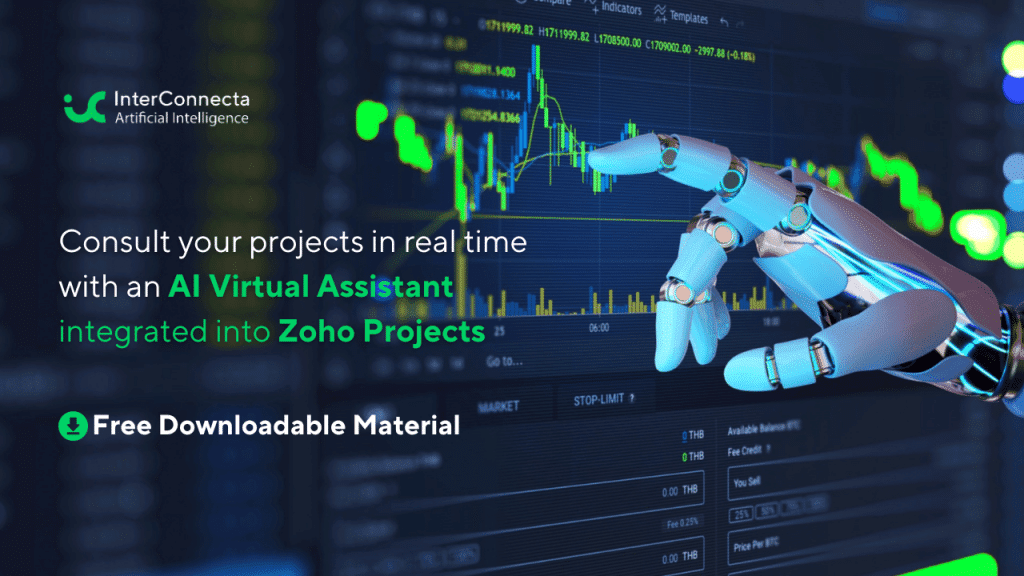
    In today’s digital age, efficiency and innovation are key to staying ahead in Project Management. At Interconnecta, we understand the importance of integrating the most advanced technological solutions into our business practices. That’s why we are excited to introduce a revolutionary tool for all Zoho Projects users: an integrated and pre-configured virtual assistant with Artificial Intelligence that will instantly answer all your queries about your company’s projects.

    AI Integration in Zoho Projects
    Zoho Projects has always been a formidable tool for project management, offering detailed tracking and effective planning. Now, with the integration of artificial intelligence, Zoho Projects becomes an even more powerful platform. This AI assistant, fully integrated into Zoho Projects, not only improves the way you interact with your data but also allows you to inquire about the status of projects, responsible parties, deadlines, and much more, all in real time.

    How Does It Work?
    The AI assistant of Zoho Projects uses advanced algorithms to analyze your project data. You can ask the assistant about different aspects of your projects, such as current progress, who is in charge of a specific task, and the resources used. This is done through simple voice or text commands, making management easier even on the go.

    To further delve into the advantages this innovation can offer and explore practical cases and effective strategies, we invite you to download our exclusive material: 

    “Maximize Efficiency in Project Management with AI Integration”

    This downloadable document is designed to provide you with a detailed understanding of how artificial intelligence can transform your project management operations, allowing you to reach a new level of efficiency and effectiveness.


    Cliq here to Download

    Don’t miss the opportunity to get ahead in project management and ensure your company is equipped with the most advanced tools on the market. Download now the material and start experiencing the benefits of AI integration in Zoho Projects.D

  • Does your company really need Project Management? Find out now

    In today’s dynamic business environment, companies face the constant challenge of improving their efficiency and effectiveness. While some companies excel and thrive even under pressure, others may be struggling without even realizing it. Have you ever wondered if your company could benefit from implementing a more robust project management structure?

    Project Management is not just a passing trend, it’s a crucial tool that can transform the way your company approaches its most critical objectives. From improving communication to ensuring timely project delivery, the right project management techniques can make the difference between stagnation and accelerated success.

    However, not all companies are aware of the telltale signs that indicate the need for this discipline. That’s why we’ve created an indispensable resource that identifies the 10 Key Indicators to recognize when your company could greatly benefit from implementing project management practices.

    This resource will not only help you identify these signs but will also provide practical solutions and expert advice on how to address each specific challenge.

    If you’re ready to discover if project management is what your company needs to scale new heights, don’t wait any longer. Download our free eBook and take the first step towards a business transformation that could change the game for your organization.


    10 Indicators your company could benefit from Project Management

    Don’t let unrecognized challenges hinder your company’s potential. ¡Start transforming your business approach today!

  • Zoho News Catch-Up: AI at the service of your business, News in Sites, CRM, and Books, Integration of Sales IQ to Telegram, Zoholics Texas, Webinars on Landing Page, Survey and Cliq

    Welcome to our catch-up, where you’ll be in the know of all the latest Zoho updates in one place!


    Launch: Artificial Intelligence at the service of your business

    We are excited to announce the launch of our new service: Artificial Intelligence solutions specifically designed to empower and transform your business.

    Artificial intelligence (AI) is redefining the boundaries of what is possible in all industries, offering everything from advanced data analysis to automation and personalization on a scale never seen before. Our new service promises not only to adapt to the specific structure and needs of your company but also to drive unprecedented efficiency and open new growth opportunities.


    Are you ready to take the leap into digital transformation with the help of AI?

    Learn more here


    I want to integrate AI into my company

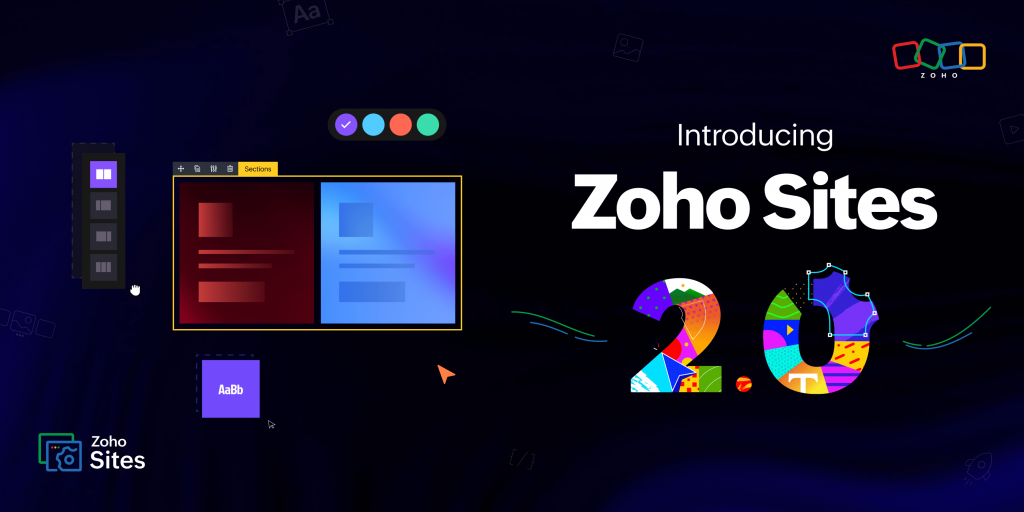
    Zoho Sites redefines website building in its version 2.0

    (image via zoho)

    New user interface: Now you can enjoy more intuitive navigation with a completely redesigned user interface and advanced customization options.

    Subsites: Create microsites targeted at specific audiences, facilitating segmentation and improving interaction.

    Multilingualism and RTL support: Expand your global reach with support for multiple languages and right-to-left scripts, all integrated without the need for additional plugins.

    Enhanced navigation: Implement mega menus and visual icons for a superior user experience.

    SEO and advanced schemas: Take advantage of new SEO tools and the schema builder to increase your online visibility.

    Reusable sections and social profiles: Update your site efficiently and maintain a consistent image across all your platforms.

    Individual page publishing: Publish pages instantly and ensure the quality of your content before it goes public.

    Zoho Sites 2.0 gives you all the tools to make your online presence more powerful and accessible. Don’t miss out on experiencing these new features!

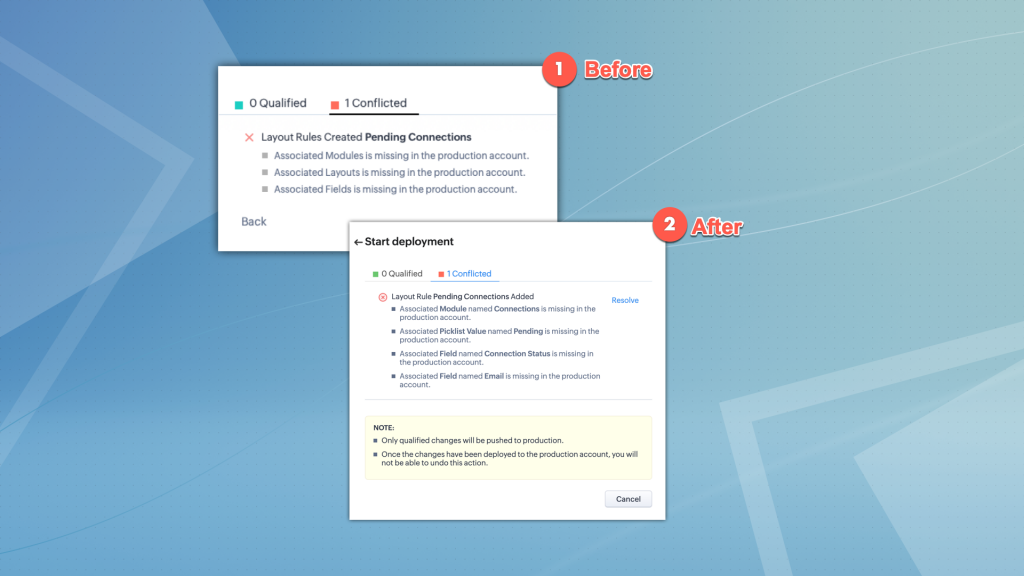
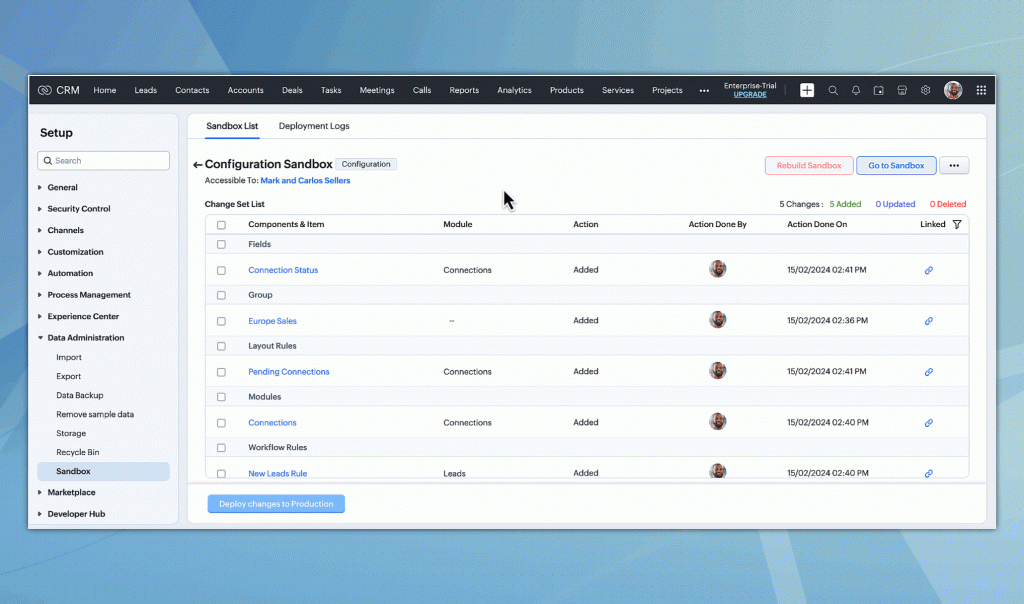
    Improvements in Zoho CRM Sandbox for conflict-free deployment

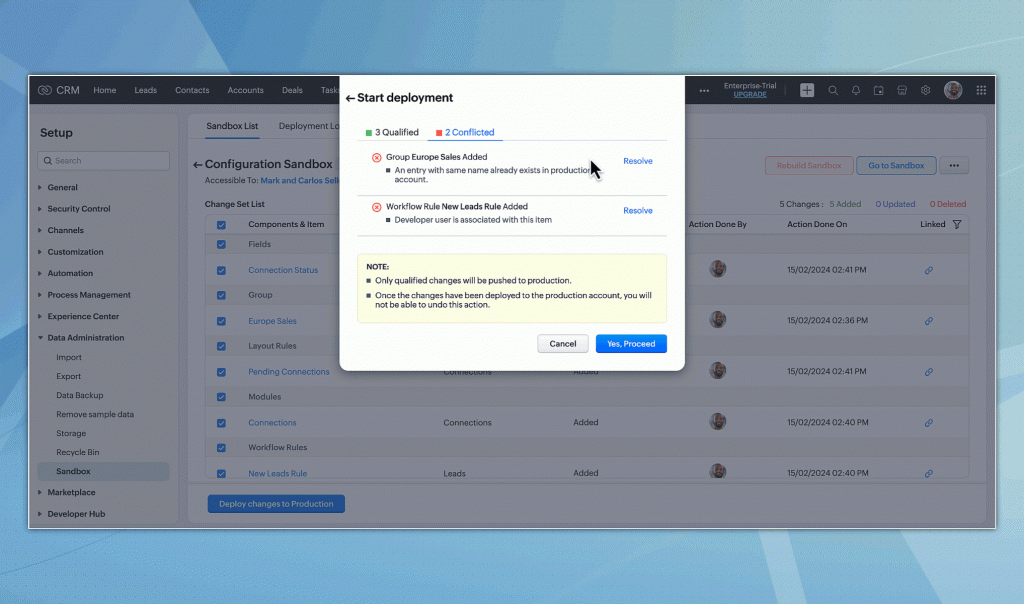
    Optimize deployment in Zoho CRM with the new Sandbox improvements! Now you can directly resolve conflict cases, in addition to some improvements in the user interface. Don’t miss them!

    Enhanced visualization of conflicts and dependencies: Now you will see detailed information about the items involved in conflicts, such as module names and fields, which facilitates the identification and resolution of issues.

    (image via zoho)

    Direct conflict resolution: Resolve conflicts directly from the “Check Dependency” page. Among the available options, you can select dependent items for deployment, rename elements with duplicate names, or change the developer assigned to a configuration, directly from the user interface.

    (image via zoho)

    (image via zoho)

    User interface improvements: Enjoy a more intuitive experience with improvements to the interface, designed to make the testing and deployment process more efficient.

    These updates make managing and deploying configurations in Zoho CRM easier and less prone to errors, ensuring a smooth transition to the production environment.

    New features in Zoho Books – April 2024

    Explore the latest improvements in Zoho Books for more efficient accounting management:

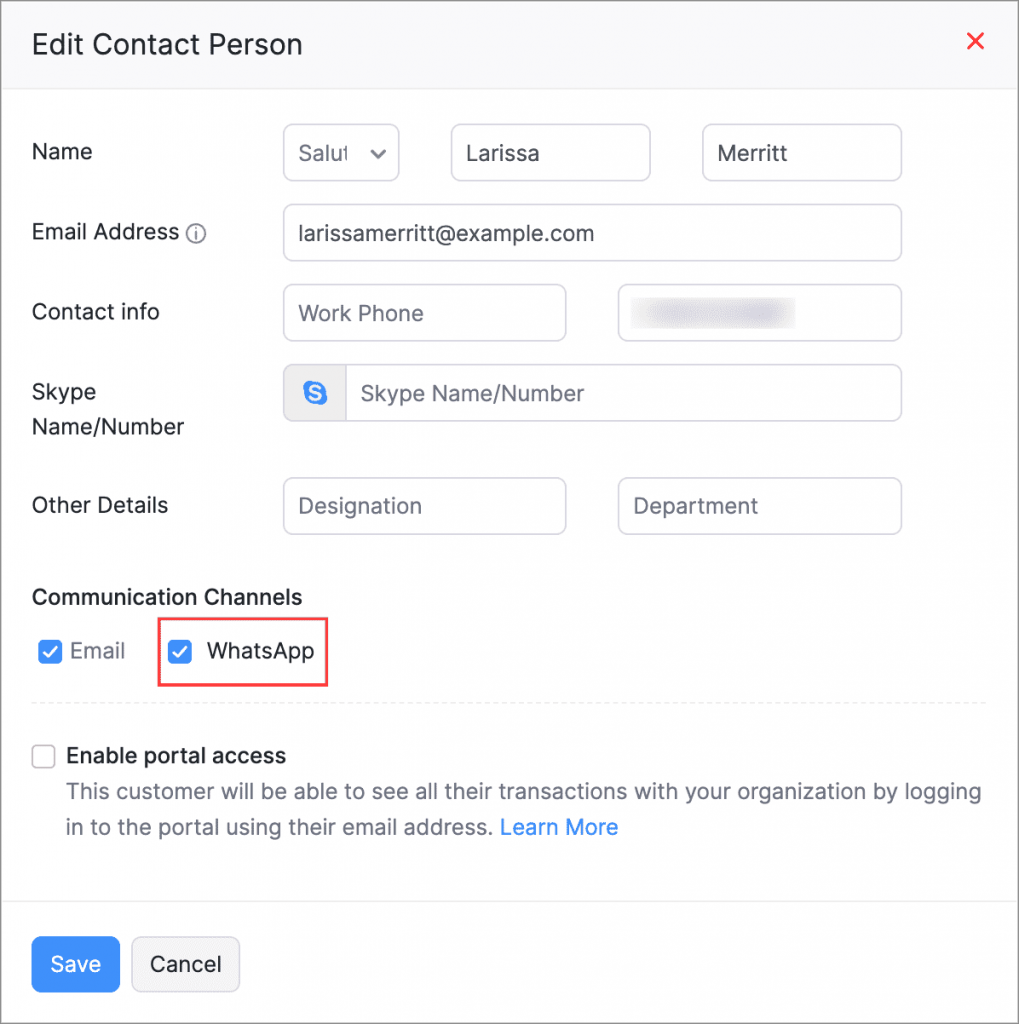
    Integration with WhatsApp: Automatically send notifications and transaction details to your clients via WhatsApp, improving communication and efficiency.

    Enable the function by following these steps: Sales > Customers, select a customer and edit their main contact or contact person details on the overview page. Then, enable WhatsApp as a communication channel.

    (image via zoho)

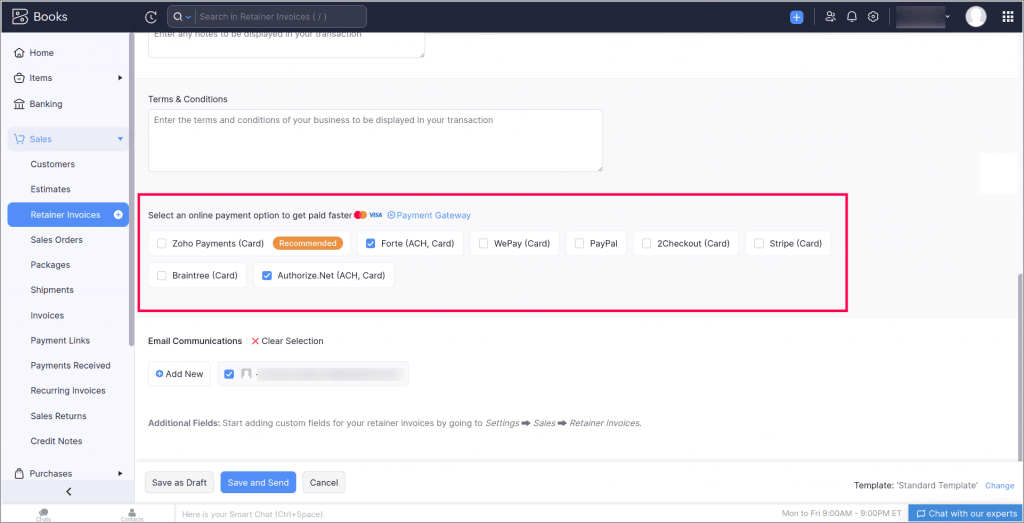
    ACH Payments for Retainer Invoices: Make it easier for your clients to pay retainer invoices through ACH payment links, simplifying the collection process.

    To record ACH payments, go to Sales > Advance Invoices. Select your preferred ACH payment gateway when creating or editing an invoice.

    (image via zoho)

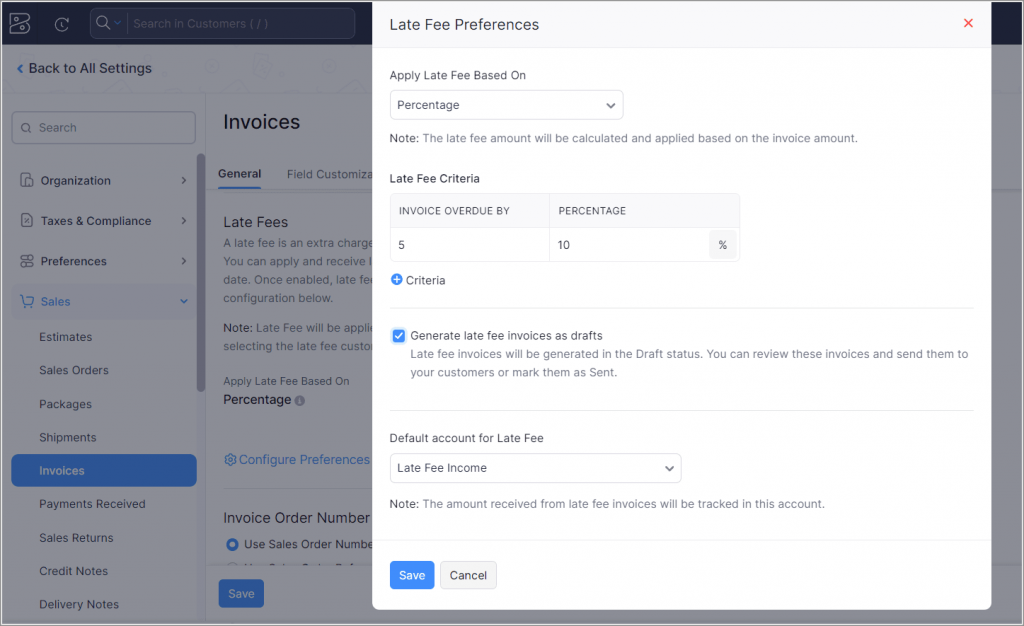
    Late Fee Application [U.S. Edition]: Implement automatic late fees on payments by setting custom conditions for each invoice. (Available only in the Premium, Elite, and Ultimate plans of Zoho Books)

    To enable this feature, go to Settings > Preferences > Invoices and activate the Late Payment Fee preference.

    (image via zoho)

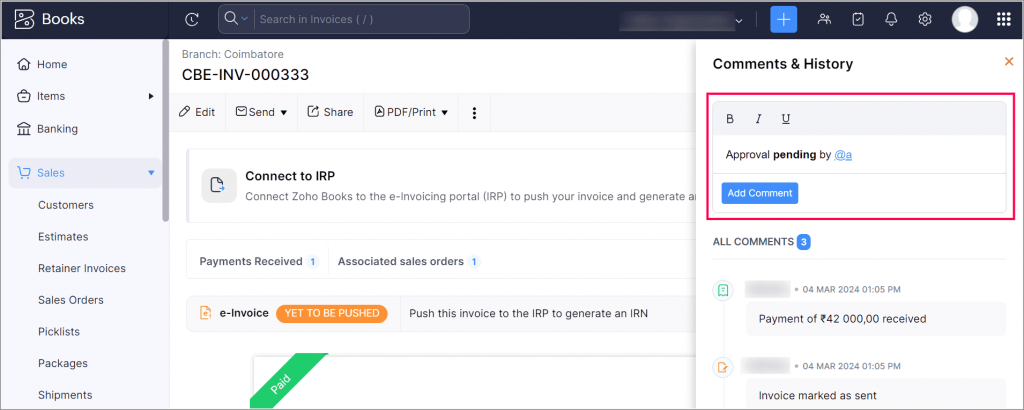
    Improvements in the Comments and History section: Take advantage of new features to interact and highlight important information in transaction comments.

    (image via zoho)

    Get ready to take your business to the next level with Zoho Books!

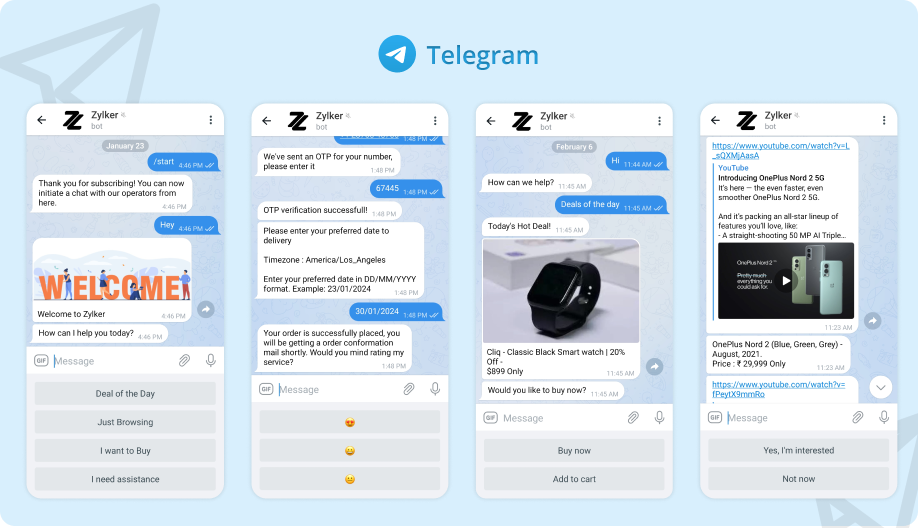
    SalesIQ extends its integration with Telegram for Chatbots

    Now you can relax and let your SalesIQ bots manage interactions on Telegram, improving customer service and reducing response times. This automation allows your operators to focus on handling more complex queries, thus optimizing resources and team efficiency.

    (image via zoho)

    • Automated Management: SalesIQ chatbots can now handle conversations on Telegram, allowing you to automate responses and improve customer service efficiency.
    • Multilingual Support: Implement chatbots in various languages, offering a personalized experience for each Telegram user.
    • Transfer to Operators: When necessary, chatbots can transfer conversations to human operators to ensure high-quality customer support.
    • Custom Flows: Use the no-code bot builder to create specific flows for Telegram users, optimizing interaction according to the needs of your audience.
    • Function Versatility: Telegram chatbots can perform tasks from lead generation to order tracking and answering frequently asked questions.

    So, everything you plan for your website can now also be implemented for your Telegram users:

    • Lead generation
    • Appointment scheduling
    • Support ticket creation
    • E-commerce order tracking
    • Responses to frequently asked questions and routine inquiries

    SalesIQ and Telegram together enhance your business’s ability to interact efficiently with customers, increasing satisfaction and retention.

    New Kanban views in Zoho CRM: Multi-level record prioritization

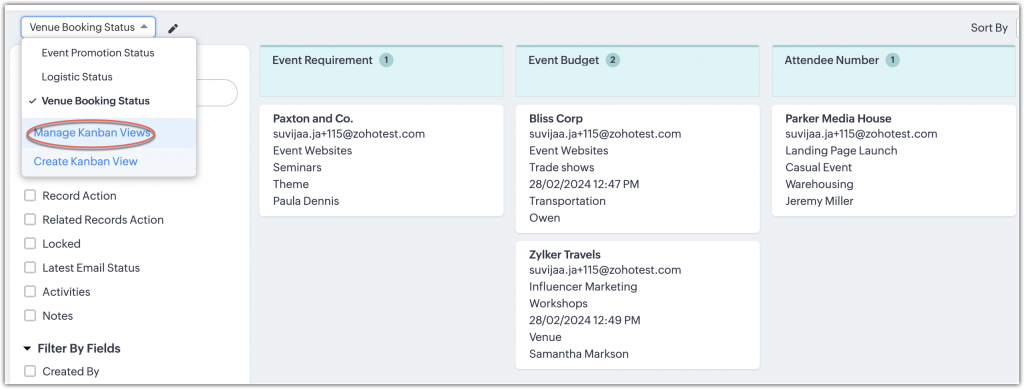
    Now you can maximize your record management with multiple Kanban views in Zoho CRM. See how it works:

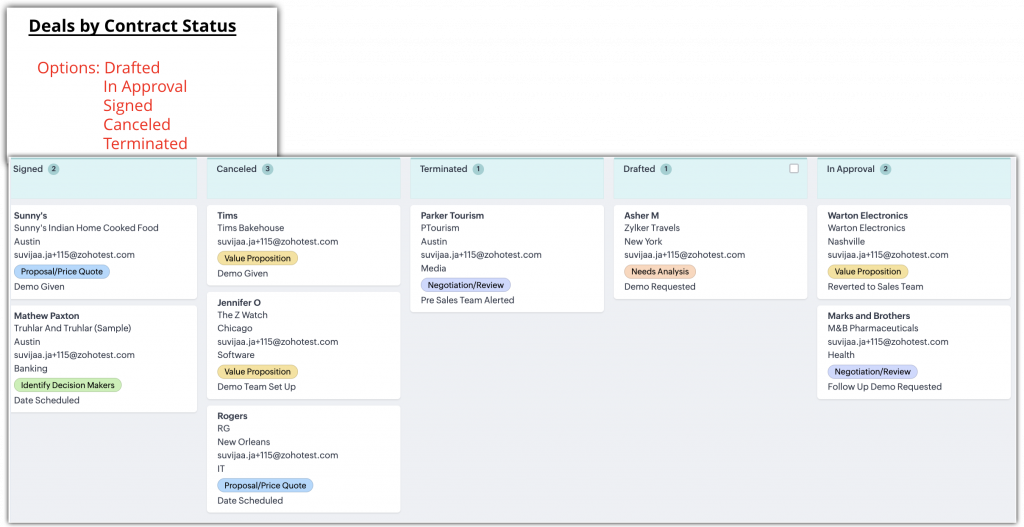
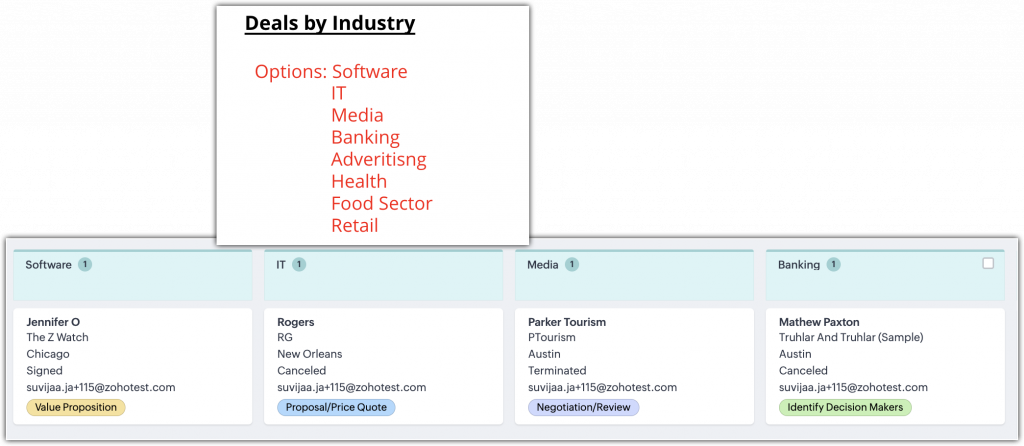
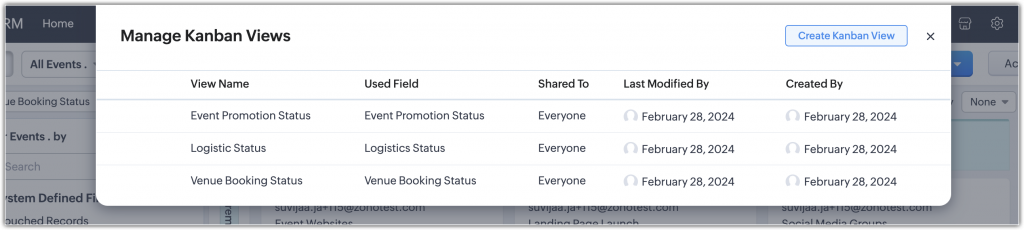
    Multiple views per module: You can now create various Kanban views within the same module, allowing you to prioritize and organize records according to different criteria without needing to modify existing views.

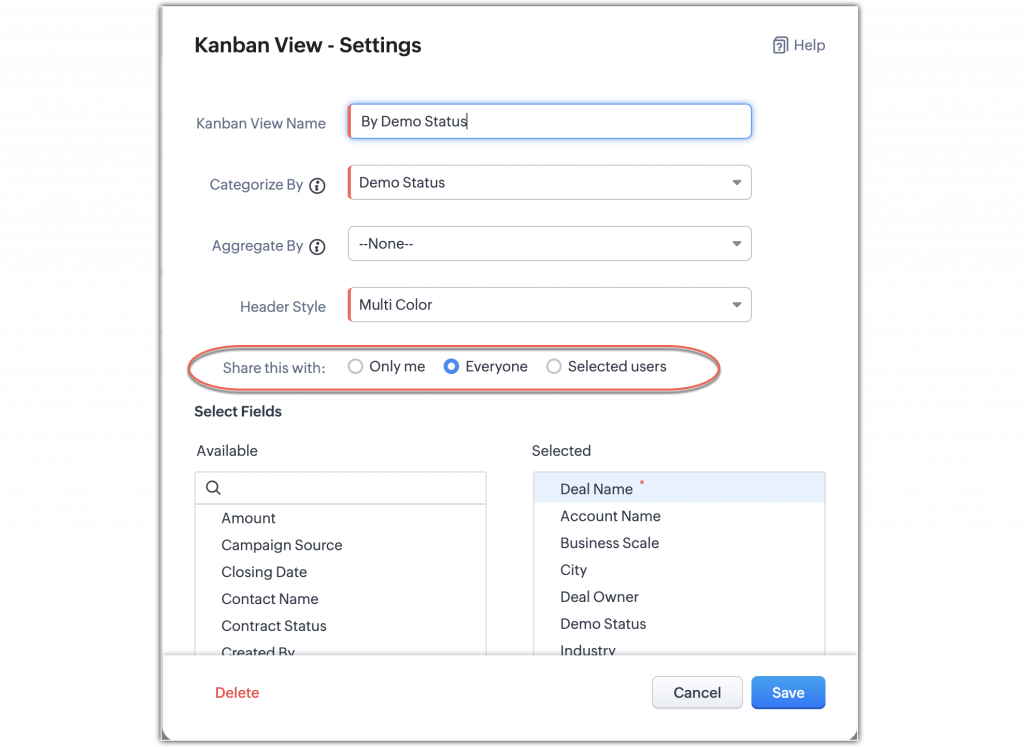
    Flexible setup: Set up and customize each Kanban view to categorize records by the fields you need, such as contract status or industry, thus facilitating the visual management of multiple processes or projects.

    (image via zoho)

    (image via zoho)

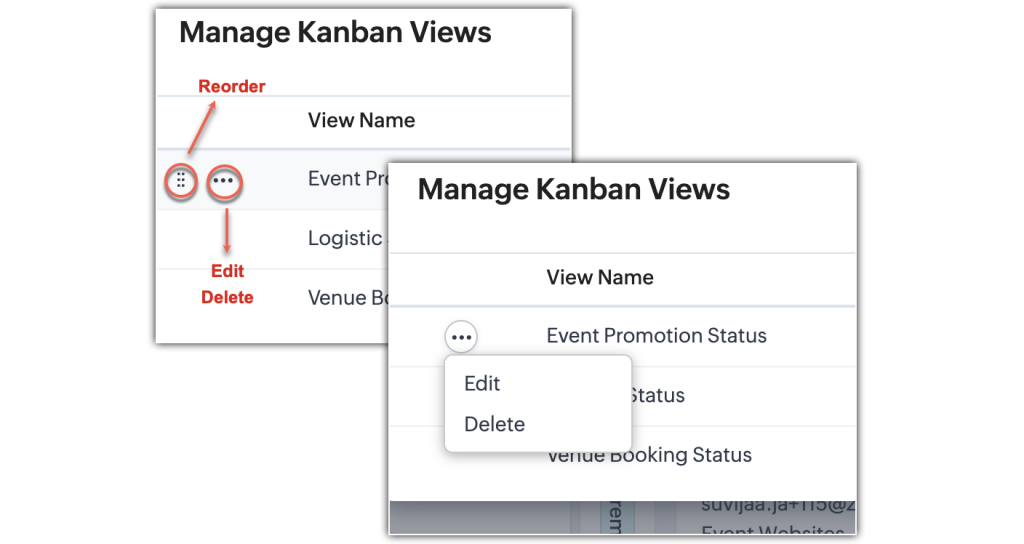
    Management and customization of views: Manage and customize your Kanban views to suit your specific needs. Rearrange views according to your preferences and manage access permissions for different users.

    (image via zoho)

    (image via zoho)

    (image via zoho)

    (image via zoho)

    These new features make viewing and handling records in Zoho CRM more dynamic and tailored to the specific needs of your company.

    See you on June 5 and 6 at Zoholics Austin, Texas

    We are pleased to invite you to Zoholics 2024 in Austin, Texas! This event is a unique opportunity to immerse yourself in the latest industry trends and discover how Zoho can transform your business.

    Why attend?

    Inspirational conferences from industry experts.
    Hands-on workshops to maximize Zoho’s potential.
    Networking opportunities with leading market professionals.
    Discover new features and innovative solutions.

    Interested?


    Do not hesitate to reserve some time with our team who will be present at the event. We are eager to meet you and discuss how Zoho can drive the success of your business.

    Don’t miss this unique opportunity! Reserve your space with our team by sending an email to kim@interconnecta.com


    Buy my tickets


    I want to see the schedule

    Don’t miss the opportunity to explore the latest innovations from Zoho, enhance your skills, and expand your network. We look forward to seeing you there!

    Webinars on Zoho Landing Page, Survey, and Cliq

    How to create successful event Landing Pages | Zoho Landing Page

    Integration of Zoho Survey with Zoho Campaigns

    Improve your marketing game with Zoho Cliq

    Do you want to add these new features to your Zoho system? Let’s work together! Learn more about our Zoho consulting services and contact us for a free consultation.

  • Guide for CEOs – How to select the ideal Zoho Technology Partner for your company?

    Let’s start this article by highlighting an inescapable truth: if you are integrating Zoho into your daily operations, having a Partner becomes not just an advantage, but a fundamental necessity.


    Imagine unlocking the full potential of Zoho in your company, maximizing every opportunity and optimizing every process. However, navigating this vast ecosystem alone can result in only partial use of its capabilities, leading to implementations that do not perform at their best and the possible loss of valuable resources and business opportunities.


    In this context, the figure of the Zoho Technology Partner emerges as a key pillar for companies looking to fully exploit the rich Zoho ecosystem. These are companies certified and recognized by Zoho, specialized in the implementation, customization, and support of Zoho solutions. These partners bring their expertise and technical knowledge to ensure that companies make the most of the Zoho ecosystem, tailoring tools to the specific needs of each business and offering a tailored strategy for their growth.

     

    For CEOs and business leaders looking to maximize performance, efficiency, and innovation in their operations, choosing the ideal Zoho Technology Partner is an essential step. But, how can you make sure to make the right decision?
     

    Choosing a technology partner is a decision that goes beyond the mere functionality of the software. It involves understanding cultural alignment, the capacity for innovation, and the long-term commitment to your company’s success. With a wide range of options available, this process can seem overwhelming. However, armed with the right knowledge and the right questions, it can become an opportunity to propel your business forward. The question then is not just who can offer you the best software, but who can become a true ally in your growth and digital transformation.

    To guide you through this critical process, we have developed the:

    “CEO´s Guide: How to select the ideal Zoho Technology Partner for your company?”

    You will find essential selection criteria, key questions to ask, and how to evaluate the long-term potential of a partnership. Review based on the final content of the downloadable.


    Free Download

    Download our complete guide now and take the first step towards a collaboration that not only meets your current technological needs but also drives the growth and innovation of your company.


This site is registered on wpml.org as a development site. Switch to a production site key to remove this banner.