Author: user

  • Maximize your ROI with the Zoho Ecosystem: Advanced technological strategies to drive business growth

    By Alonso Vazquez, CTO of InterConnecta, in collaboration with the InterConnecta Marketing Team

    Maximizing Return on Investment (ROI) is essential to ensure not only the survival of businesses but also sustained growth. In an environment where technology plays a decisive role, leaders know that every investment, whether in technology or enterprise software, must be aimed at generating revenue and transforming operations. Leveraging integrated solutions like the Zoho ecosystem can make a difference. Zoho offers a comprehensive technological ecosystem that covers all of an organization’s operational needs, from sales and marketing to finance and human resources. In this article, we present 14 strategies to maximize your ROI using the Zoho ecosystem, designed to address the most critical challenges faced by enterprise companies.

    Data Centralization and Optimization with Zoho CRM

    • Contacts and Opportunities Module: Manage all your customer and sales opportunity information comprehensively, eliminating data silos.
    • Cases Module: Optimize customer service by ensuring quick responses and efficient solutions.

    Technological Challenge Addressed: Data fragmentation limits visibility and leads to incorrect decisions. Zoho CRM centralizes and optimizes data management, enhancing strategic decision-making.

    Automation and Efficiency with Zoho Creator

    • Custom Applications: Develop solutions that automate and scale internal processes with ease.
    • Integration with the Zoho Ecosystem: Connect your custom applications with other Zoho tools to maximize operational efficiency.

    Technological Challenge Addressed: Manual operations are riddled with inefficiencies and errors. Zoho Creator transforms how your business operates, automating processes to increase productivity.

    Artificial Intelligence with Zia: Smarter, Faster Decisions

    • Sales Predictions in Zoho CRM: Zia identifies patterns and predicts which leads are most likely to convert into customers.
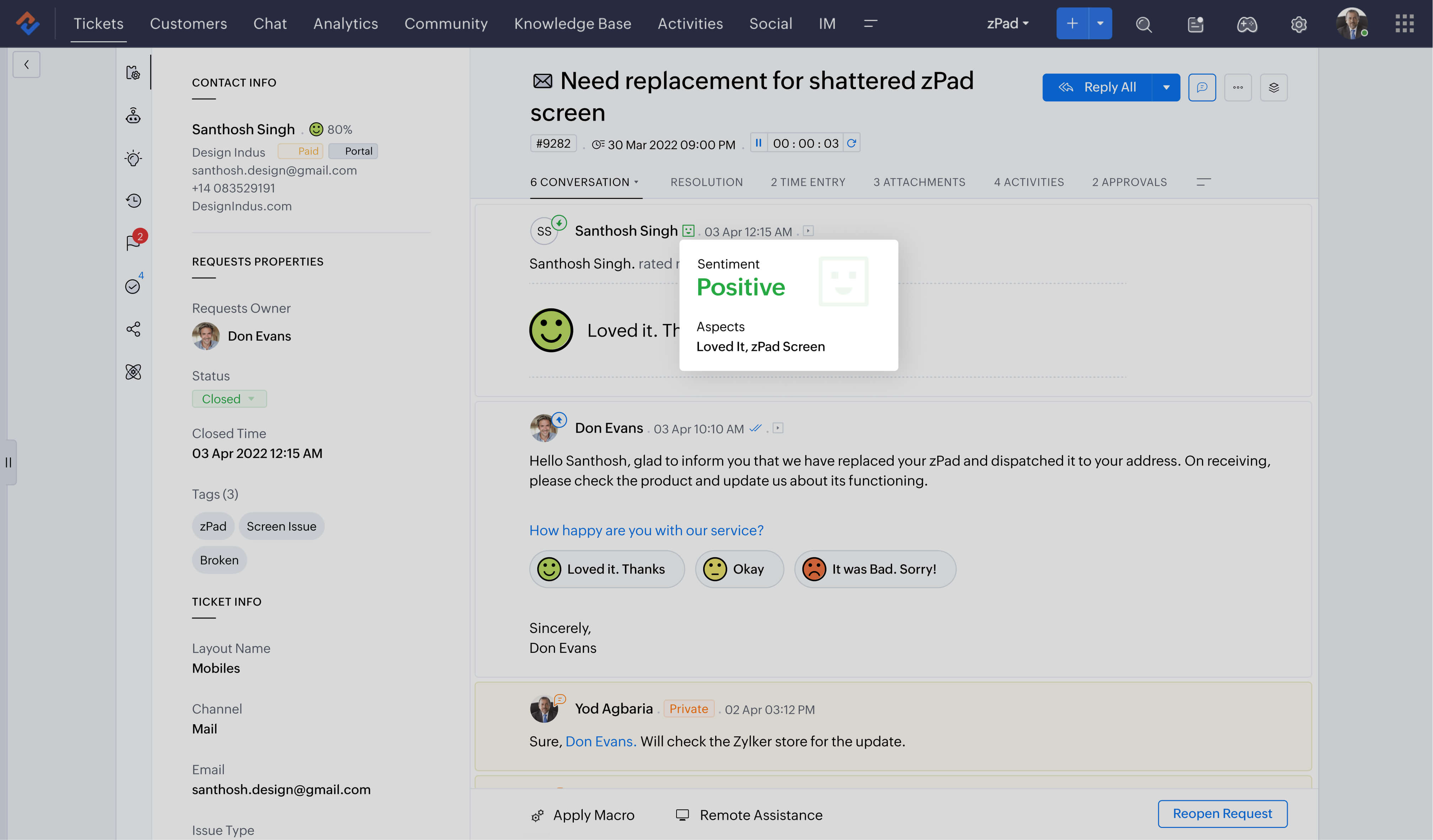
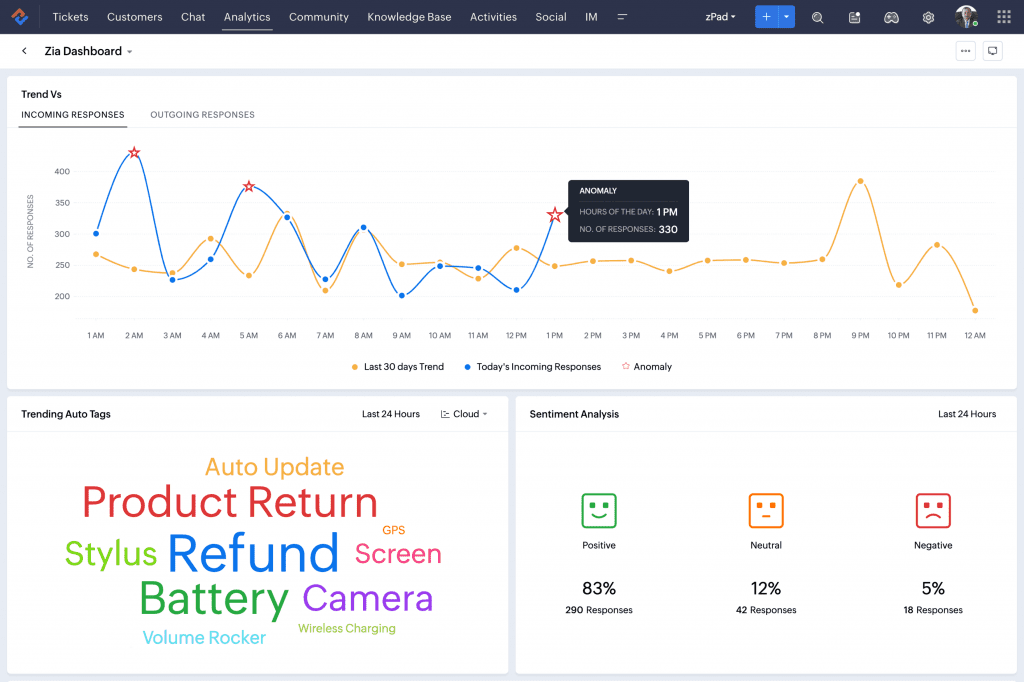
    • Sentiment Analysis in Zoho Desk: Optimize customer support by evaluating the emotional tone of interactions.
    • Proactive Suggestions in Zoho Mail: Receive smart recommendations on when to contact clients to maximize effectiveness.

    Technological Challenge Addressed: Lack of foresight in decision-making can limit growth. Zia introduces a level of artificial intelligence that allows businesses to operate more strategically and effectively.

    Advanced Reporting and Analytics with Zoho Analytics

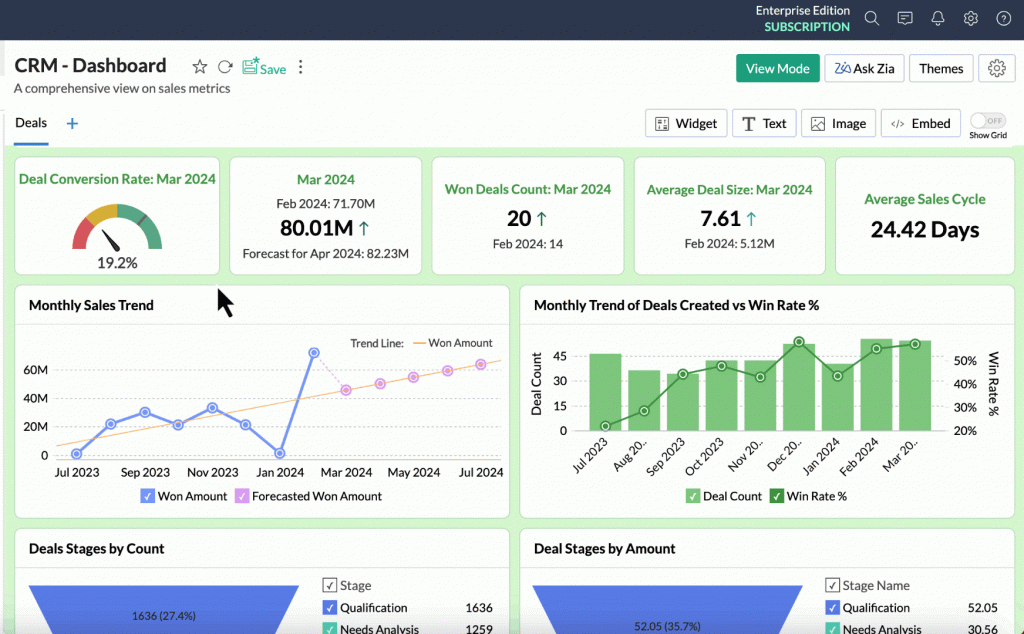
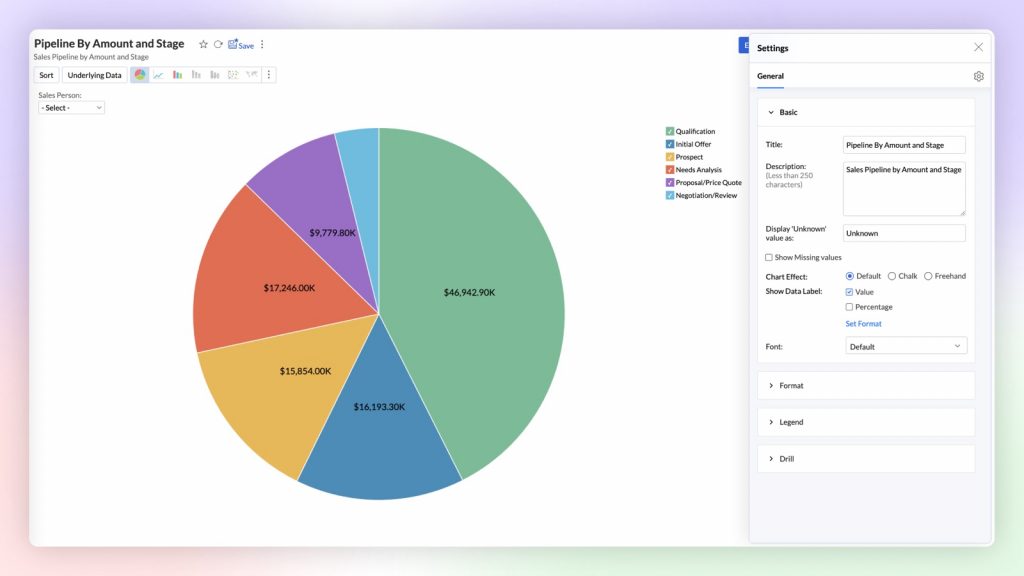
    • Custom Dashboards: Design dashboards that reflect critical KPIs and provide real-time insights into business performance.
    • Predictive Analytics: Use advanced analytics techniques to anticipate market changes and adjust your strategies proactively.

    Technological Challenge Addressed: Lack of deep analysis can cause businesses to miss opportunities. Zoho Analytics enhances analytical capabilities, enabling more informed and strategic decisions.

    Efficient Financial Management with Zoho Books and Zoho Expense

    • Zoho Books: Centralize financial management, from billing to bank reconciliation, on an integrated platform.
    • Zoho Expense: Optimize expense control with automated tools that ensure efficient resource management.

    Technological Challenge Addressed: Lack of financial visibility and control can erode profit margins. Zoho Books and Zoho Expense offer advanced financial management that protects and enhances profitability.

    Collaboration and Productivity with Zoho Projects and Zoho Cliq

    • Zoho Projects: Enhance planning, execution, and project tracking, ensuring that all team members are aligned with objectives.
    • Zoho Cliq: Facilitate real-time communication, improving coordination and speeding up decision-making.

    Technological Challenge Addressed: Lack of coordination and effective communication can lead to delays and errors. Zoho Projects and Zoho Cliq ensure that teams are synchronized and work more efficiently.

    Smart Marketing with Zoho Campaigns and Zoho Social: Lists, Segmentation, and Relevance

    • Zoho Campaigns: Not only automates your email marketing campaigns but also allows for advanced segmentation of your contact lists. This ensures that messages reach the right people at the right time, improving open and conversion rates.
    • Zoho Social: Manage all your social media accounts from a centralized platform, optimizing strategy in real-time and segmenting campaigns based on follower behavior and interactions.
    • Keys to Success:
      • Precisely Segmented Lists: Segmentation is the most powerful tool in marketing. By dividing your audience into groups based on behaviors, interests, and demographics, you can personalize messages to resonate more and generate a better response.
      • Message Relevance: Sending the right message to the right person at the right time is essential. With Zoho Campaigns, you can create highly personalized campaigns that meet the needs and expectations of each segment.

    Technological Challenge Addressed: Uncoordinated and poorly segmented marketing can waste resources and reduce impact. Zoho Campaigns and Zoho Social optimize the reach and effectiveness of your marketing efforts, ensuring that each campaign is relevant and effective.

    Customer Support with Zoho Desk

    • Zoho Desk: Centralize and efficiently manage all support requests, improving service speed and quality.
    • Integration with Zia: Enhance support with artificial intelligence, anticipating issues and offering proactive solutions.

    Technological Challenge Addressed: Poor customer service can damage reputation and reduce retention. Zoho Desk ensures that every interaction is efficient and satisfactory, increasing customer loyalty.

    SalesIQ Integration with ChatGPT: AI-Powered Customer Support

    • Automated Chat Assistant: ChatGPT automatically responds to common queries, improving speed and accuracy in customer service.
    • 24/7 Support: Provides continuous assistance without the need for human intervention, increasing customer satisfaction.
    • Conversation Analysis: Utilize insights derived from ChatGPT to continuously improve the quality of customer service.

    Technological Challenge Addressed: Lack of availability and slow response times can frustrate customers. The integration of SalesIQ with ChatGPT ensures efficient and continuous service, improving the customer experience.

    Scalability with Zoho One: A Complete Ecosystem

    • Additional Modules and Applications: Add functionality as your business needs evolve, from HR to advanced analytics.
    • Effortless Scalability: Increase your system’s capacity with minimal impact on daily operations.

    Technological Challenge Addressed: Rapid growth can overload systems not designed to scale. Zoho One grows with you, ensuring that your technology infrastructure remains robust and agile.

    Data Security: Protect Your Information with Zoho Vault

    • Zoho Vault: Securely manage all your passwords, ensuring that only authorized personnel have access to critical information.
    • Data Encryption: Protect your data with advanced encryption, ensuring it is safe from internal and external threats.

    Technological Challenge Addressed: Security breaches can be devastating. Zoho Vault ensures that your company maintains a high level of security in all its digital operations.

    Continuous Training and Adoption: Maximize the Potential of the Zoho Ecosystem

    • Customized Training: Designed to address the specific needs of your team, ensuring quick and effective adoption.
    • Structured Onboarding: Ensures that your team is ready to use Zoho applications from day one.

    Technological Challenge Addressed: Lack of training can result in system underutilization. Continuous training ensures that your team is always up to date and maximizes the use of the Zoho ecosystem.

    Continuous Improvement and Proactive Support: Ensure Long-Term Success

    • 24/7 Support: Ensures that any technical issue is resolved immediately, minimizing downtime.
    • Preventive Maintenance: Implement proactive strategies to identify and resolve issues before they affect your business.

    Technological Challenge Addressed: Interruptions and technical issues can reduce ROI. Proactive support ensures that the Zoho ecosystem operates smoothly and efficiently.

    E-book Download: Guide: Marketing Attribution in CRM
    How to Optimize Your Strategies and Maximize ROI

    • E-book Content:
      • Practical guide on the different marketing attribution models available in Zoho CRM
      • Available attribution models
      • How to set up and visualize attribution reports


    In a world where technology is central to business success, maximizing ROI is more than a priority—it is an essential strategy to ensure sustainable growth. The Zoho ecosystem, when implemented with the support and expertise of InterConnecta, offers a comprehensive technological framework that not only optimizes operations but also drives innovation and scalability. With a strategic approach and the right support, your investment in technology becomes a growth catalyst, ensuring that every technological decision translates into tangible value for your company.


    Ready to transform your company’s ROI with Zoho technology? With InterConnecta, we don’t just implement solutions; we guide you every step of the way, ensuring that every technology investment maximizes its potential and brings you closer to your business goals.
    Contact Us Here

  • Zoho News Catch-up: New Analytics 6.0 and DataPrep 2.0, CRM integrates with Workdrive, Zoho launches PDF Editor, Improvements in Zia Presentation, Zoho Webinars on Apple, CRM

    Welcome to our catch-up, where you’ll be in the know of all the latest Zoho updates in one place


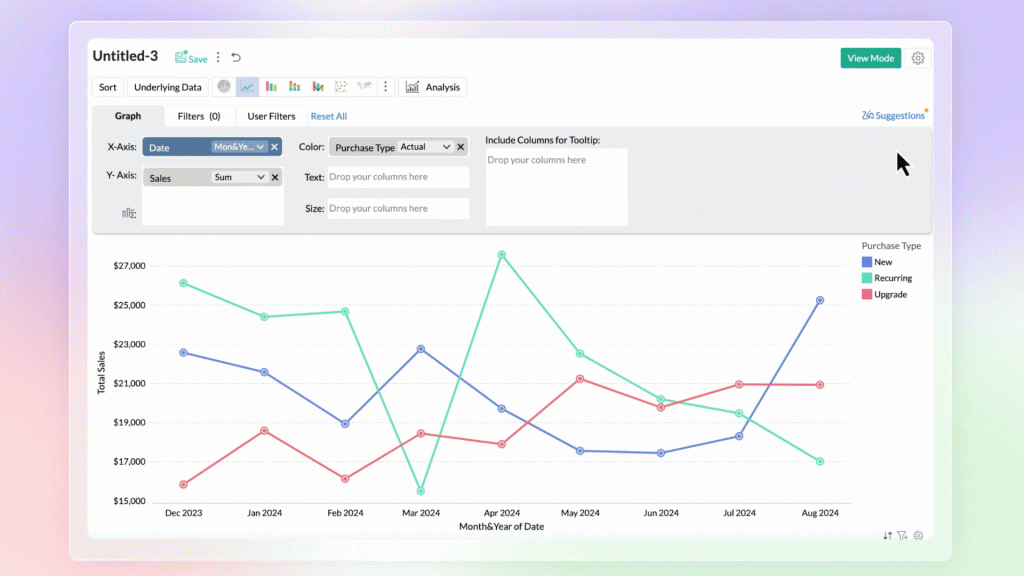
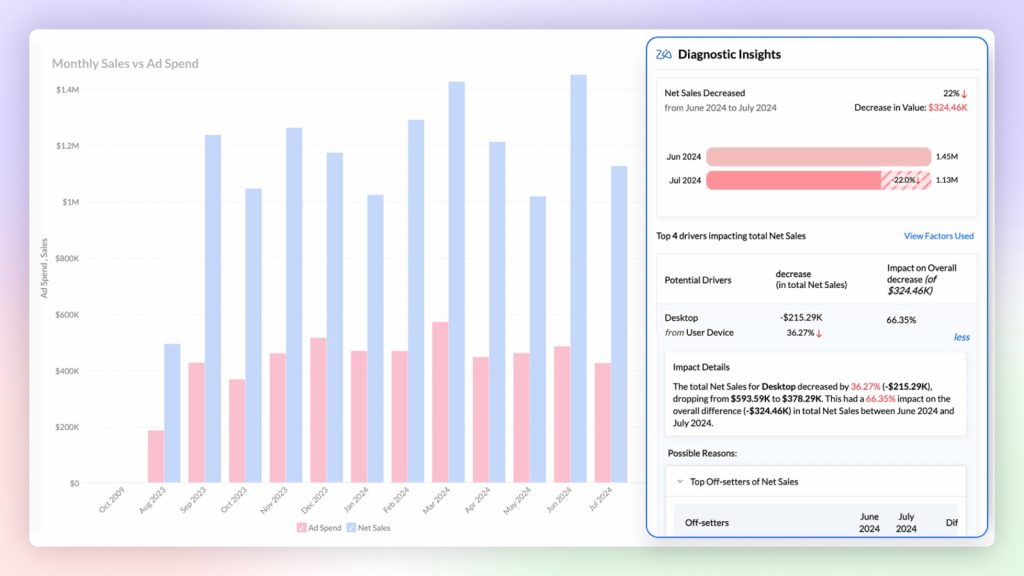
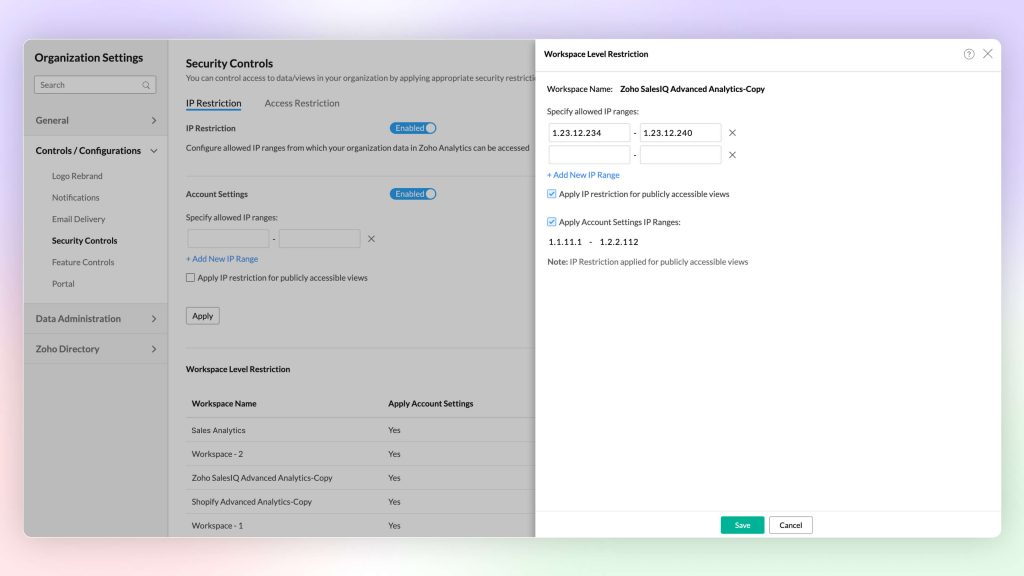
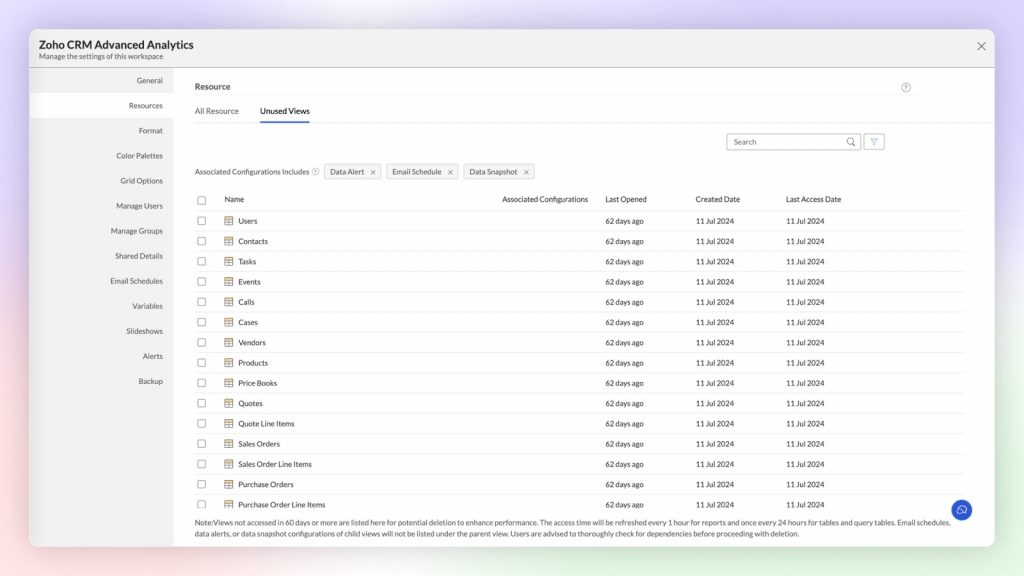
    New Zoho Analytics 6.0 improves data analysis and visualization experience

    Zoho Analytics 6.0 is here! The update brings AI-powered tools that enable any team member to analyze data and make decisions quickly without constantly relying on technical support.

    Both business users, analysts, and data scientists will be able to collaborate on a single platform, facilitating data visualization, predictive analysis, and much more. A powerful and accessible solution for everyone looking to make the most of their data! Here are the main updates and improvements in this new version.


    Data Connectors and Data Management

    • New connectors like Greenplum and Vertica.
    • Support for Google Analytics 4.
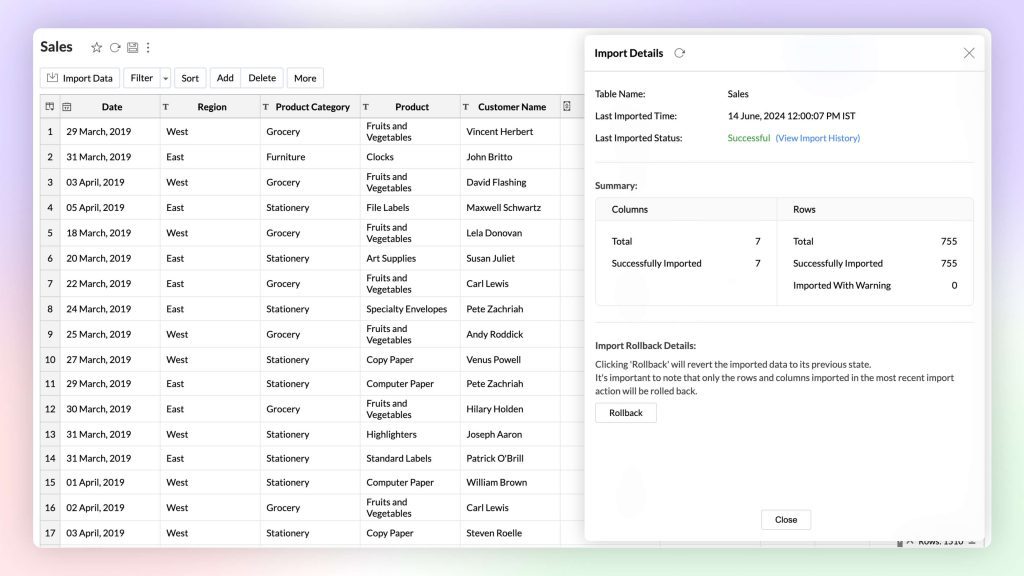
    • Import of compressed files to speed up data loading.
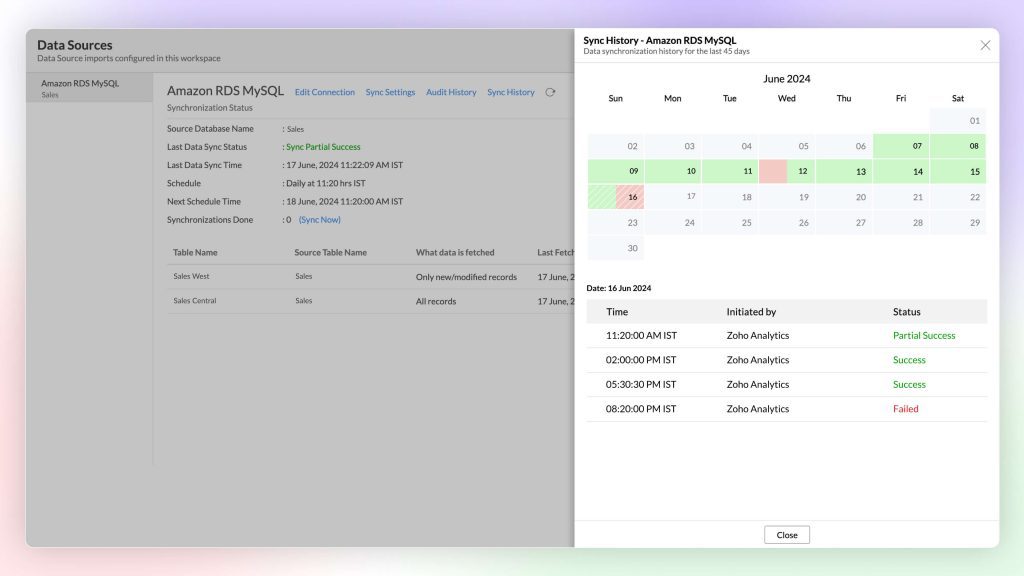
    • Enhanced synchronization of enterprise data.
    • New functions to automate data source setup.

    (image vía zoho)


    (image vía zoho)


    Visual Analytics

    • Support for treemaps.
    • Custom geographic maps.
    • Improvements in element layout on dashboards.
    • New options to modify and rearrange components.
    • Enhanced visualization for representing complex data.

    (image vía zoho)


    Generative Analysis with Built-in AI

    • Zia now responds in multiple languages, including Spanish.
    • Automatic generation of predictive analyses.
    • Suggestions for complementary questions.
    • Improved result visualization with graphical narratives.
    • Conversational questions for complex analysis.

    (image vía zoho)


    (image vía zoho)


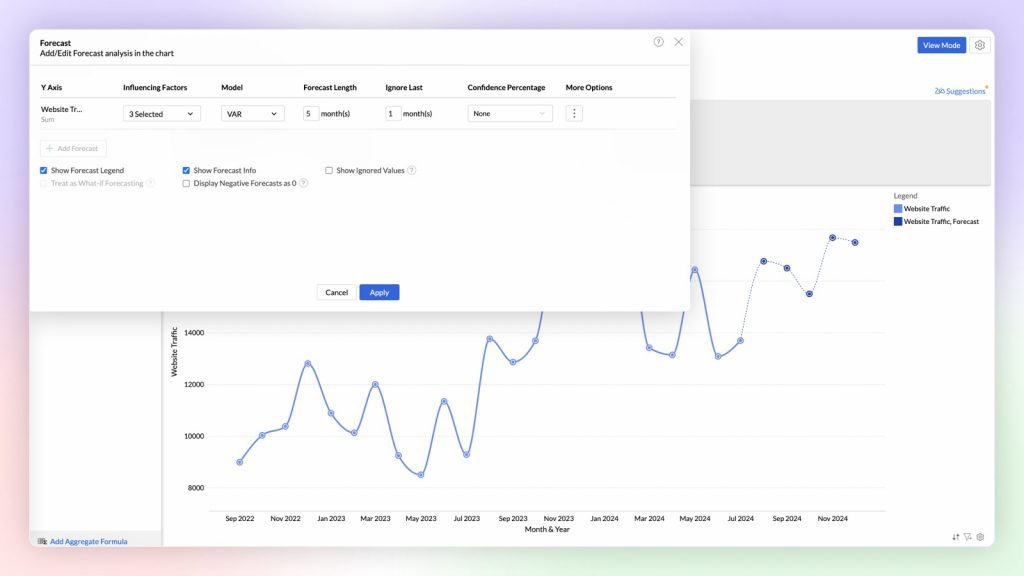
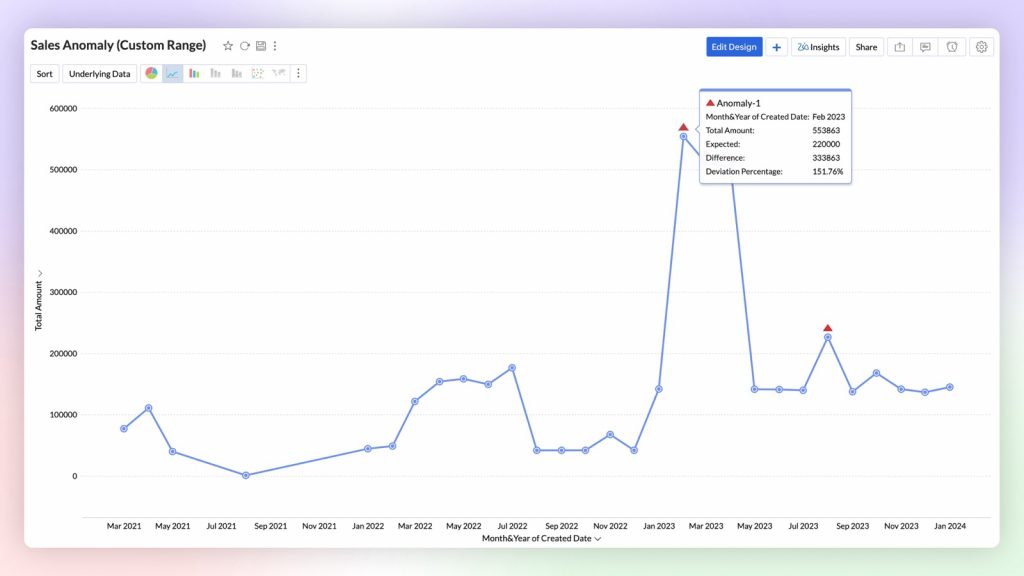
    Predictive AI

    • Real-time anomaly detection.
    • Improved prediction algorithms.
    • Options to predict based on external factors.
    • Configurable alerts to detect data changes.
    • Clear visualization of predictions on dashboards.

    (image vía zoho)


    (image vía zoho)


    Data Science and Machine Learning Studio

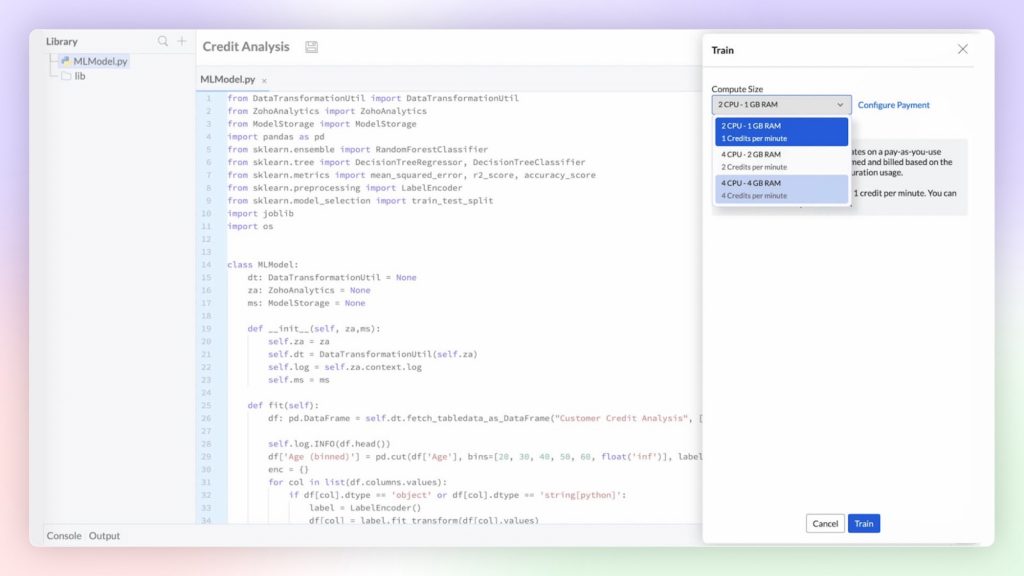
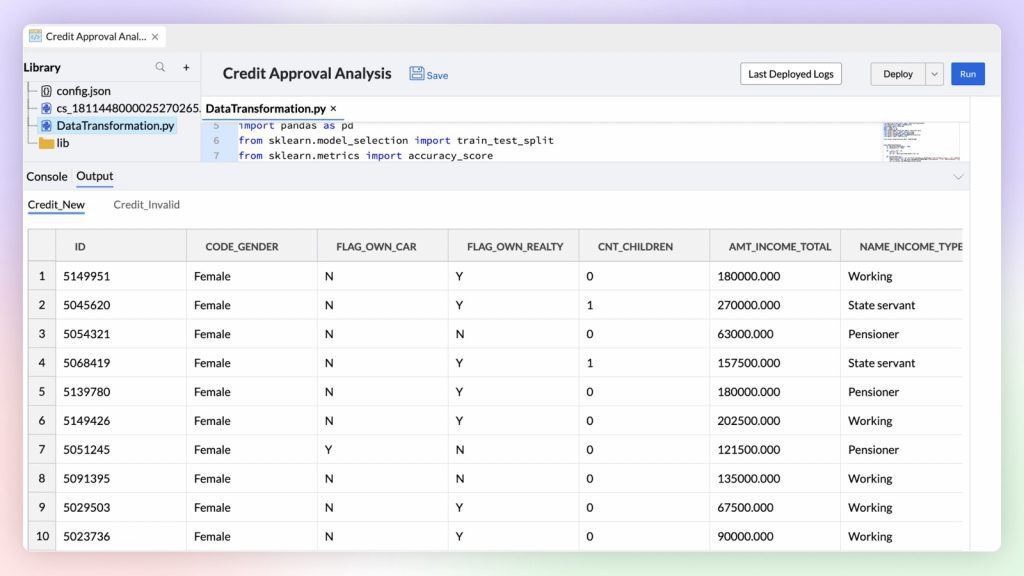
    • AutoML with no programming needed.
    • New tools to create and validate machine learning models.
    • Integration with Python Code Studio for custom development.
    • Pre-configured models to facilitate analysis.
    • Greater flexibility in creating AI models.
    (imagen vía zoho)


    (imagen vía zoho)


    Platform Extensibility

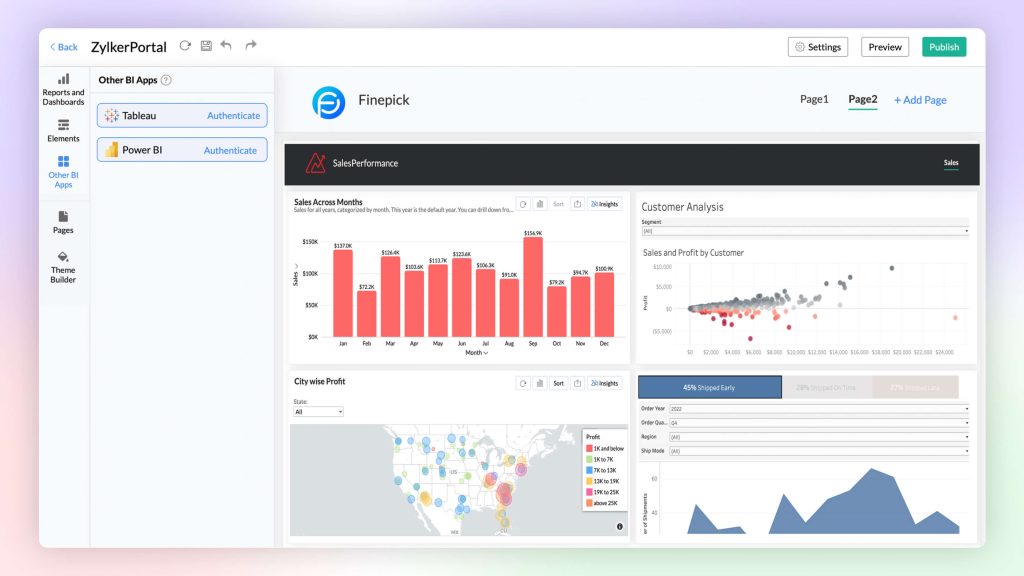
    • Linked Workspaces to share reports across workspaces.
    • No-code custom connector creation.
    • Ability to publish connectors in Zoho Marketplace.
    • Support for advanced integrations.
    • Tools to extend the platform’s functionality.

    (image vía zoho)


    (image vía zoho)


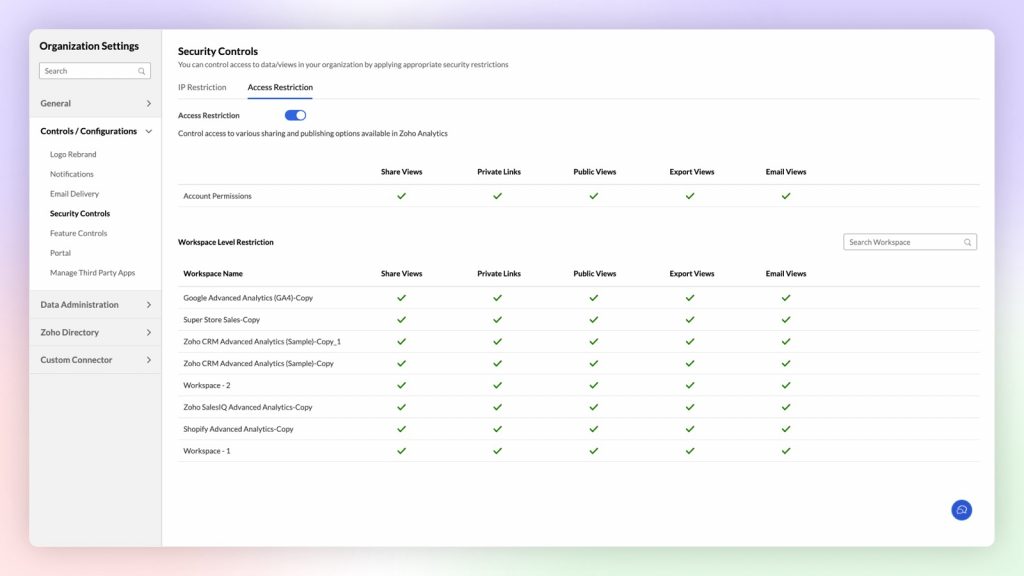
    Security Improvements

    • HIPAA compliance.
    • Enhanced multi-factor authentication.
    • API auditing for greater control and transparency.
    • Data encryption during import and export.
    • Advanced options for managing access to sensitive data.

    (image vía zoho)


    (image via zoho)


    Other Updates

    • Improved report processing speed.
    • More intuitive interface for creating dashboards.
    • New options for managing and organizing report views.
    • Ability to easily export and share dashboards.
    • General improvements to user experience and performance.

    (image vía zoho)


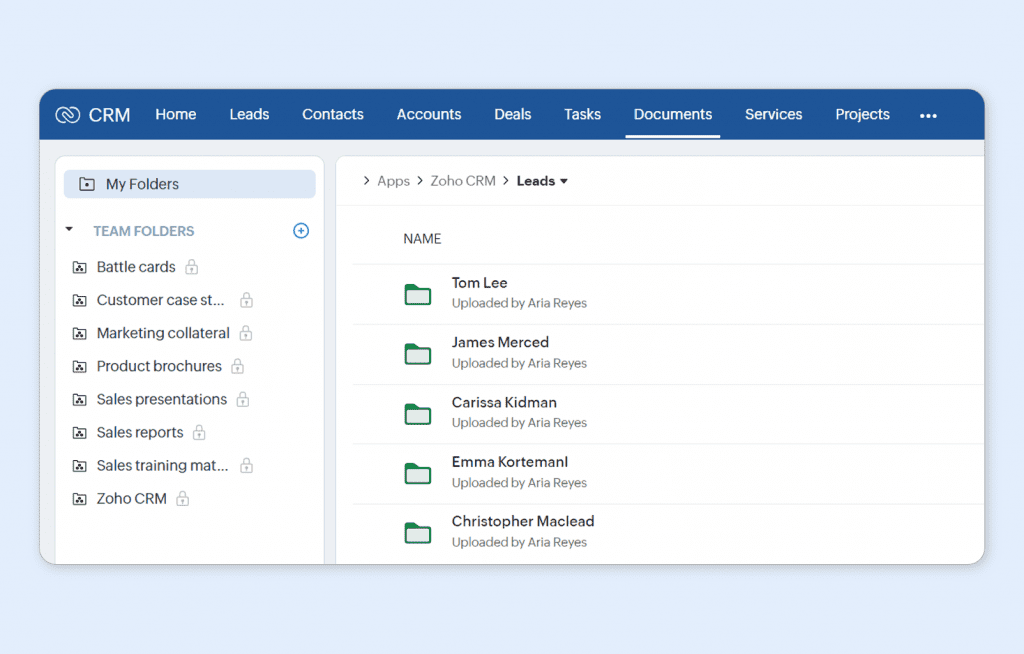
    Zoho CRM integrates with Workdrive for more efficient file management and collaboration

    WorkDrive is now the default platform for file storage in Zoho CRM for new users!

    (image vía zoho)


    Key updates include:

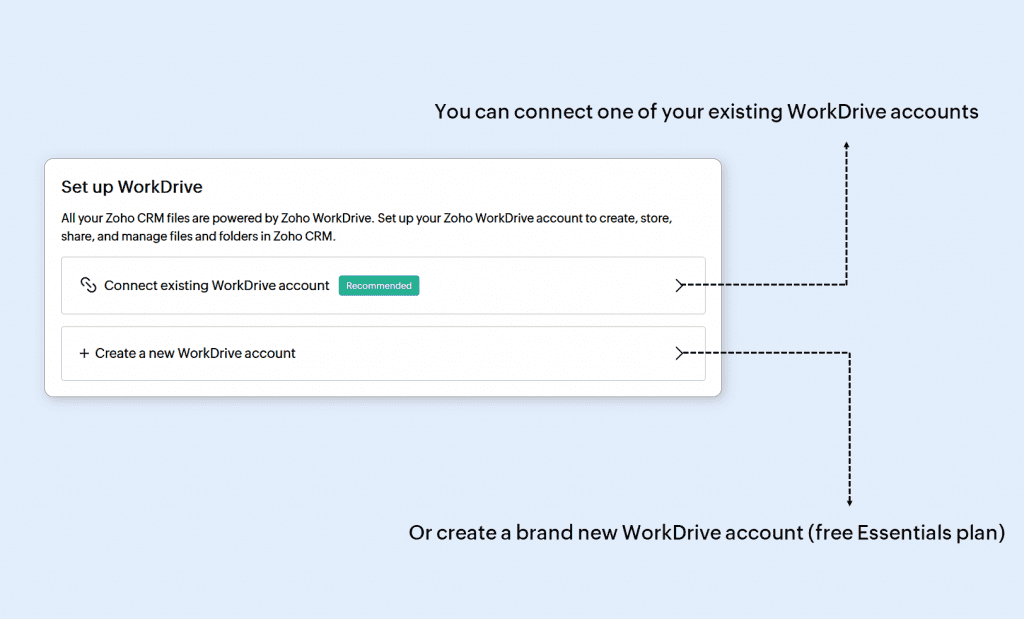
    • You can connect your CRM account to an existing WorkDrive organization or create a new one.
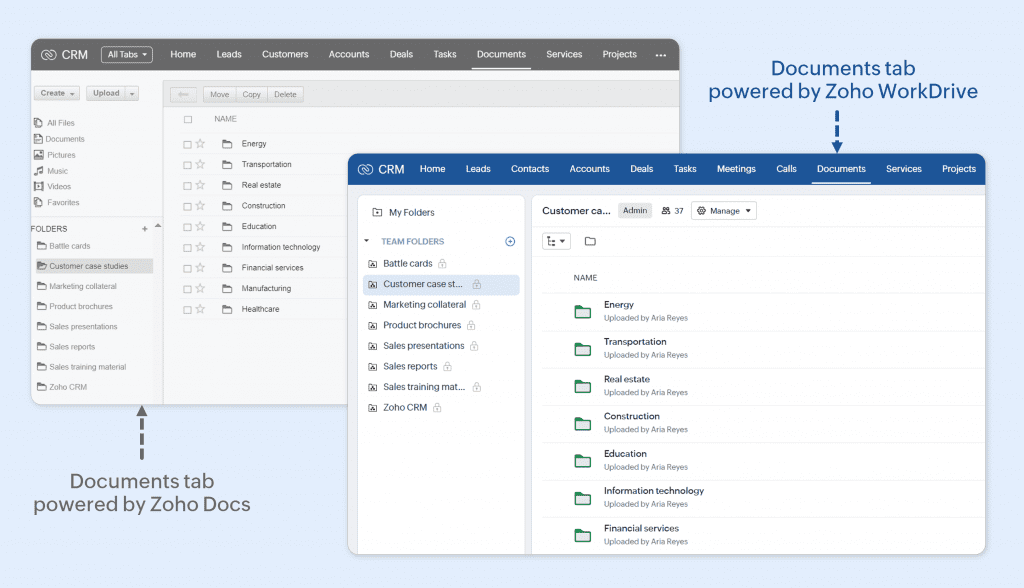
    • The integration with WorkDrive is done through the Documents tab, which previously used Zoho Docs.
    • Attachments in CRM records are automatically saved in default folders within “My Folders” of the record owner.


    Steps to set up WorkDrive integration in Zoho CRM:

    1. When you log in to your CRM account for the first time, the setup process will begin.
    2. If you don’t have a WorkDrive account, one will be automatically created and linked to your CRM.
    3. If you already have a WorkDrive account, a pop-up will appear giving you the option to: Assign an existing account.
    4. Create a new account.
    5. Once linked, you cannot unlink the WorkDrive account from the CRM.

    (image vía zoho)


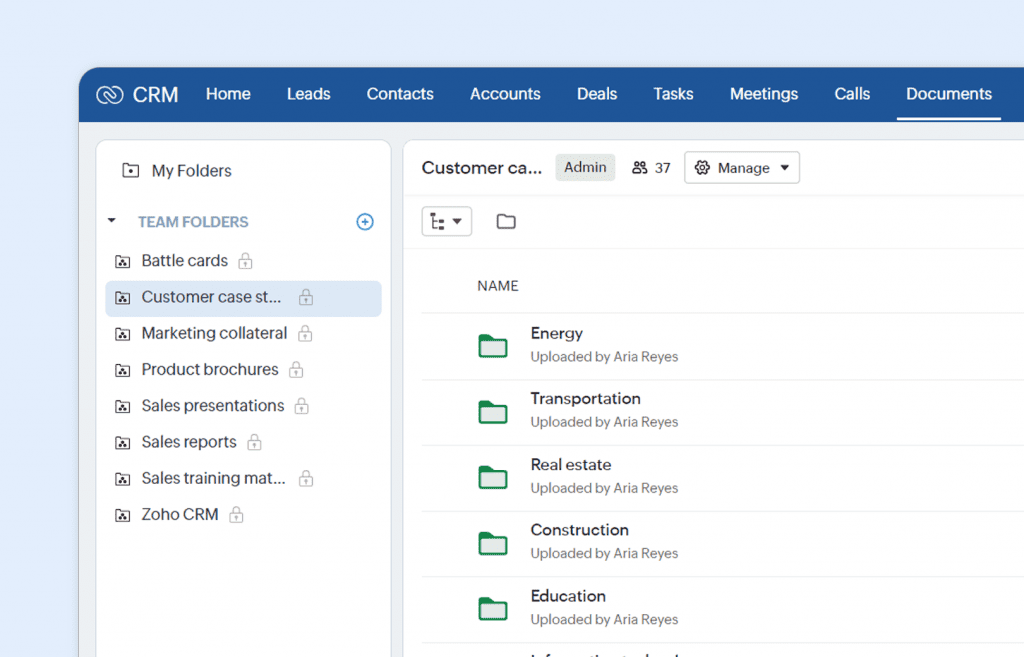
    • The Documents tab in Zoho CRM is now linked to WorkDrive, making it easier to manage and store business documents such as contracts and presentations. New users will have access to “My Folders” for personal files and “Team Folders” for group collaboration.

    (image vía zoho)


    • Attachments from CRM records are automatically stored in “My Folders,” following a default structure. Only record owners can access these files.

    (image vía zoho)


    • “Team Folders” allow collaborative sharing and document management, along with tracking CRM activities.
    • Admins control access to the Documents tab and assign specific roles to users, groups, and teams, determining their permissions within WorkDrive.


    Available in all editions and all DCs. It has been rolled out for new registrations in all DCs and will be gradually enabled for existing users over the coming months.


    Zoho launches DataPrep 2.0: advanced AI-powered data management platform

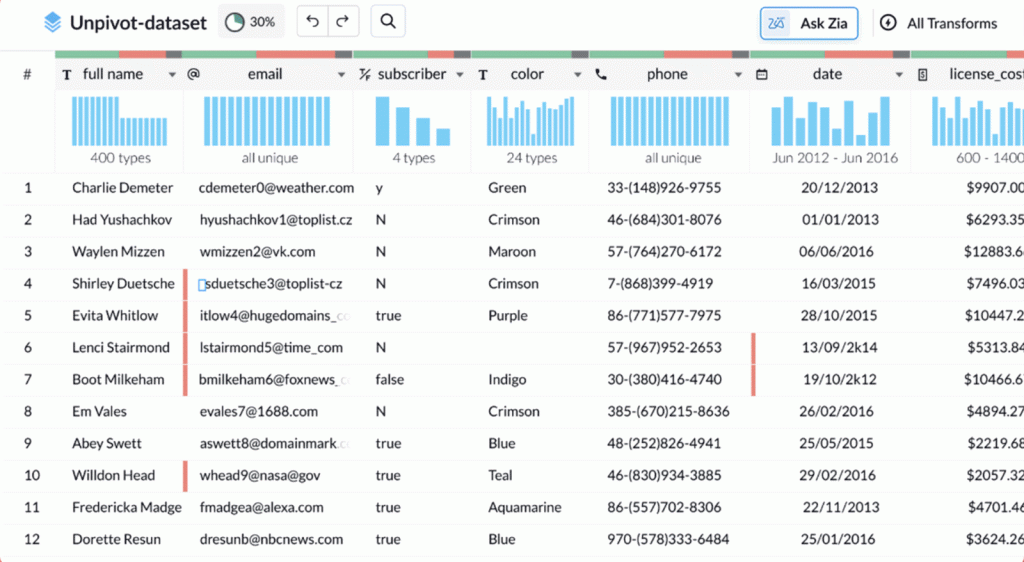
    Zoho DataPrep 2.0 is a tool that allows businesses to automate data preparation, simplifying repetitive tasks and improving data quality. With this platform, you can now integrate multiple data sources and efficiently transform large datasets, all thanks to its advanced artificial intelligence.

    • You can now build complex data workflows easily with the Visual Pipeline Builder, which lets you drag and drop elements to create advanced pipelines without complications.


    • Zia, Zoho’s AI assistant, is integrated into Zoho DataPrep 2.0 to help with smart recommendations on how to clean and transform your data. Just ask Zia for optimized suggestions.

    (image vía zoho)


    • Zoho DataPrep 2.0 saves time by allowing you to reuse previously created pipelines and leverage a library of pre-designed templates, streamlining the data processing.
    • With the new real-time monitoring dashboard, you can now track all your workflows and the status of your data in real time, allowing you to quickly respond to any issues.

    (image vía zoho)


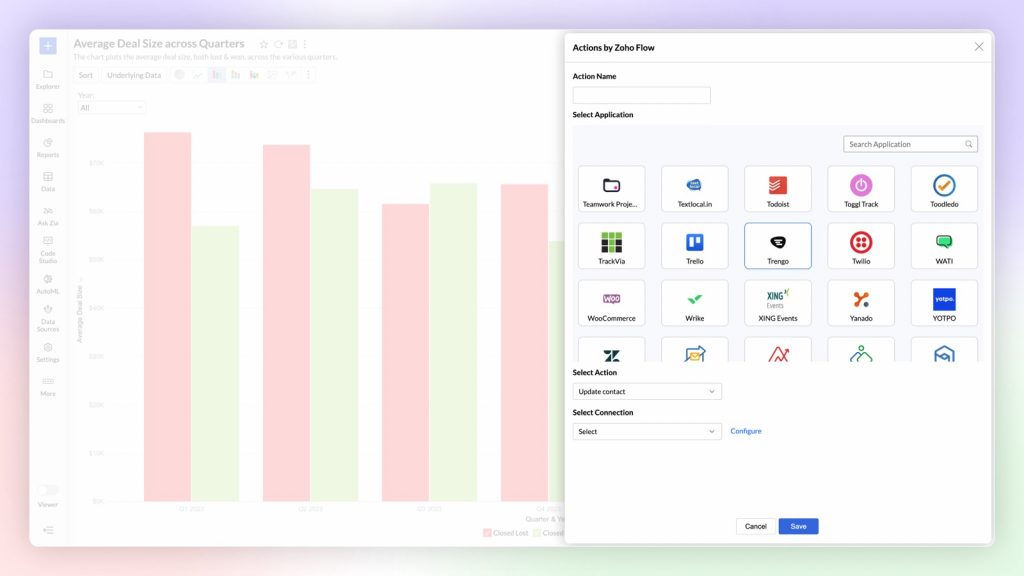
    • Zoho DataPrep 2.0 also integrates with Zoho Flow and Webhooks, making it easier to automate and organize data workflows seamlessly across different applications.

    Zoho DataPrep 2.0 makes data preparation faster and more efficient with its new AI-driven features. Whether optimizing complex workflows or improving control over data, it offers everything needed to manage data effectively.


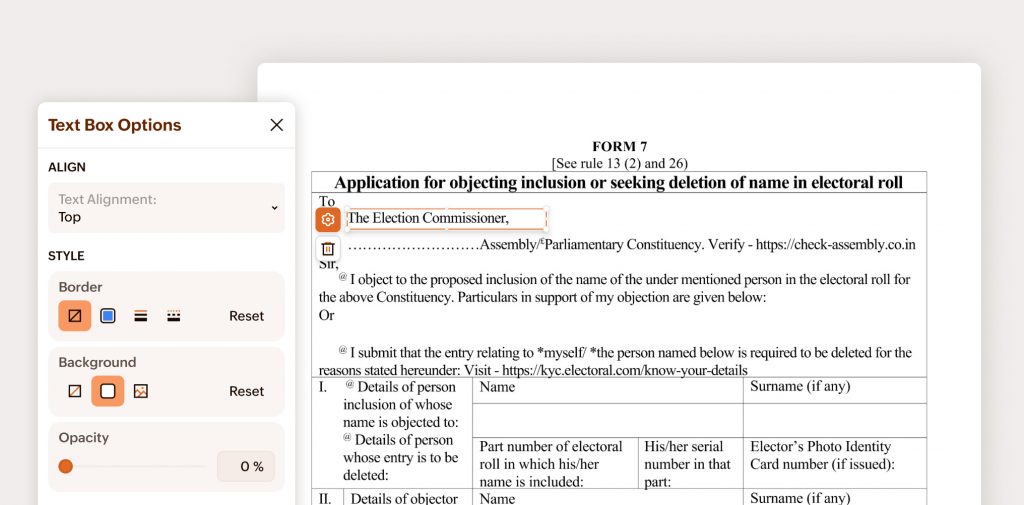
    Zoho PDF Editor: new free tool for editing PDFs online

    Zoho has launched a new free online PDF editing tool, allowing users to modify their PDF files without hassle or additional costs.


    Make simple PDF edits online, for free
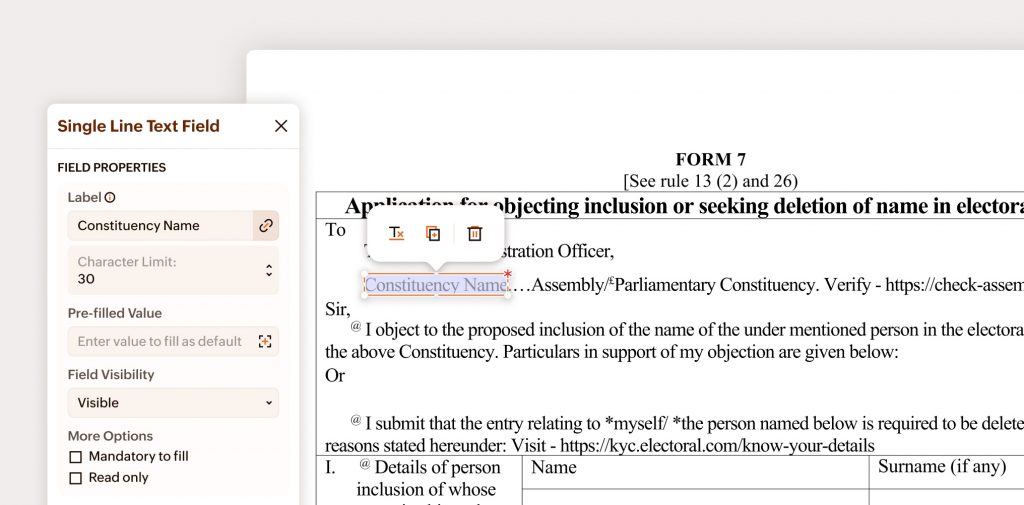
    Now you can make basic edits to your PDF files from anywhere, at any time, without needing to install additional software. With Zoho’s free tool, you can add, delete, or modify text in PDF files effortlessly.

    (image vía zoho)


    Add or remove images and links

    The new tool allows you to easily add and remove images in PDF files, as well as insert links anywhere in the document to enhance navigation and improve functionality.


    Text alignment and adjustment: enhance your PDF’s visual layout

    Zoho PDF Editor includes options for aligning and adjusting text within the document, ensuring a clean and professional presentation at all times.


    Annotate and comment with ease

    If you need to share comments or annotations on a PDF file, you can now do so directly with this tool. Add notes, comments, or highlights to share feedback without hassle.

    (image vía zoho)


    Password-protect your PDF
    Zoho also offers the option to password-protect your PDF documents, ensuring that only authorized individuals can access the information.


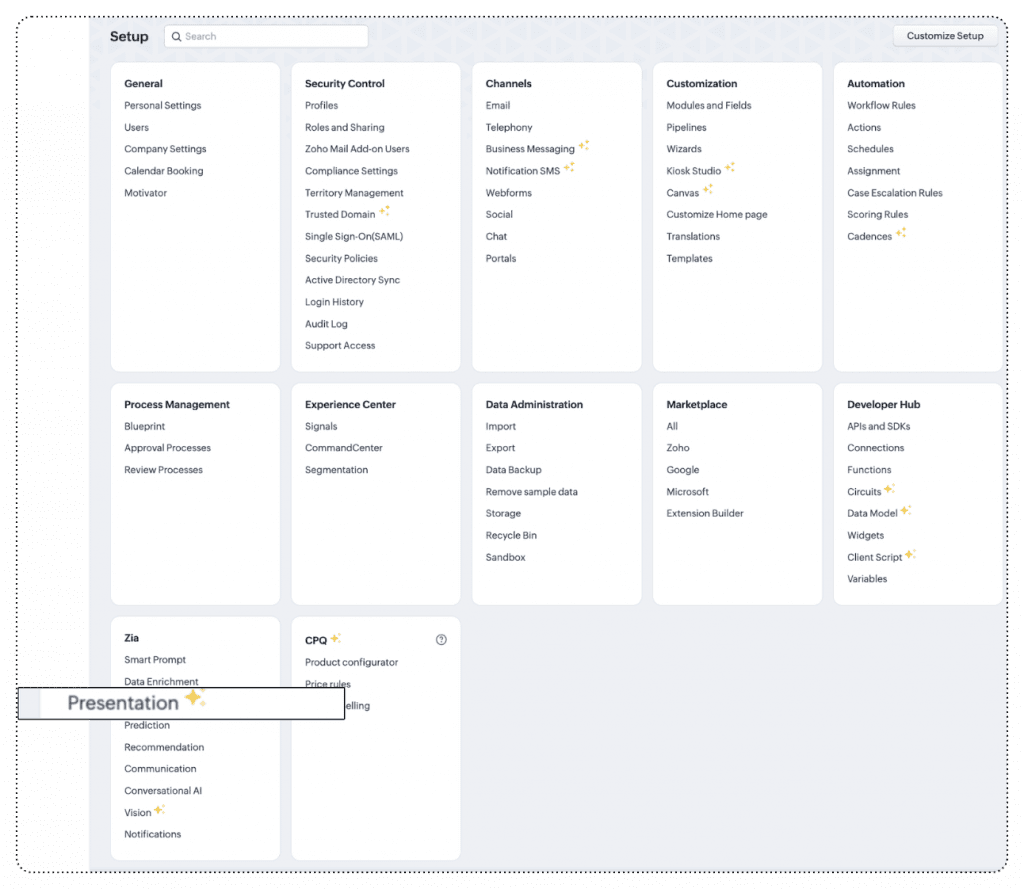
    Improvements to Zia Presentation to customize sales presentations

    Zoho has released a major update for Zia Presentation, its AI assistant that helps create personalized sales presentations.

    (image vía zoho)


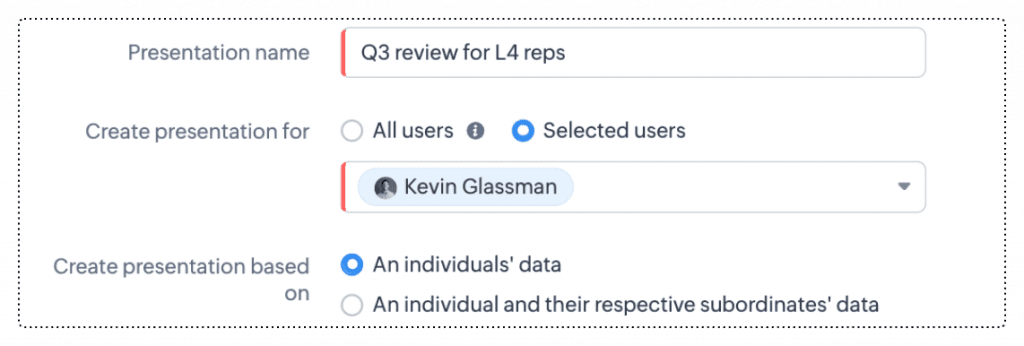
    • With this new update, you can now customize each slide of your sales presentation with content tailored to the specific needs of your audience. Zia analyzes sales data and automatically adjusts presentations to include only the most relevant information.
    • It also includes new options for more effective presentation distribution. You can now easily share your presentations with different audience groups, ensuring that each receives a personalized version reflecting their interests and needs.

    (image vía zoho)


    • You can save time by automatically generating presentations based on your CRM data. Just select the key points, and Zia will create a visually appealing presentation with accurate content.
    • Zia also gives you greater control over your presentation design, allowing you to adjust the format to align with your brand image, without sacrificing consistency in style and content.

    Available for Enterprise or Ultimate editions with more than 10 user licenses.
    DC: US, EU, IN, CN, JP, and AU.

    Webinars on CRM and Zoho for Apple

    Zoho update playlist for Apple

    How to get the best out of Zoho CRM for your ecommerce business

    Automate sequential actions through Cadences

    Do you want to add these new features to your Zoho system? Let’s work together! Learn more about our Zoho consulting services and contact us for a free consultation.

  • Implementation of the month: Optimization of Zoho Inventory Integration with Shopify

    In this new edition of Implementation of the Month, we highlight a custom integration solution we developed for a client in the high-value hobby e-commerce industry. Through this implementation, we addressed challenges that arose from the limitations of the native integration between Zoho Inventory and Shopify.


    Challenge:

    Our client managed most of their internal operations through Zoho One applications while using Shopify as their e-commerce platform. Although the native integration between Shopify and Zoho Inventory allowed for the automatic creation of Sales Orders, it presented several key challenges:


    • Manual intervention in invoice creation and payment assignment: After a sales order was created in Zoho Inventory, manual intervention was required to complete invoice creation and assign the corresponding payments.
    • Lack of automation in cancellation management: Order cancellations required manual processes to return products to inventory and void the corresponding transactions.
    • Inefficiencies in delivery management: The Service team managed deliveries outside of the automated flow, causing delays in scheduling and execution.


    Solution:


    As a Premium Partner of Zoho, InterConnecta designed a custom integration using Zoho Inventory and Shopify APIs. This solution focused on optimizing two key areas that were not fully covered by the standard integration: cancellation management and automated delivery order creation.


    1. Automatic Cancellation Management in Shopify

    One of the main limitations was the sales cancellation process. The custom integration solved this challenge by creating an automated workflow that, upon detecting a cancellation in Shopify, would void the corresponding invoice and payment in Zoho Inventory. The stock of canceled products was updated in real time, making the items available for future sales.


    1. Optimized Delivery Management with Delivery Charges

    The second challenge was integrating delivery charges into the automated sales and delivery flow. To achieve this, we created an item called “Delivery” within Zoho Inventory. When a Shopify order included this charge, the system would automatically add the item to the Sales Order, which in turn generated a delivery ticket in Zoho Desk. This way, the service team would immediately receive an assigned task to manage the delivery, optimizing response time without waiting for daily reconciliations.


    Benefits:

    The implemented solution provided several key benefits:

    • Complete automation: Centralizing processes in Zoho Inventory eliminated manual tasks, reducing response times.
    • Real-time inventory: Canceled products were put back on sale immediately, improving inventory management and sales opportunities.
    • Delivery efficiency: Automated tickets sped up the delivery process, optimizing coordination of the service team.
    • Improved customer experience: Quick management of cancellations and deliveries enhanced customer satisfaction.


    The custom integration developed by our team allowed the client to overcome the limitations of the standard integration between Zoho Inventory and Shopify.

    This case is an example of how, through customization and strategic use of Zoho tools, we help our clients optimize their operations and resources.


    Is your company facing a challenge that seeks to be overcome through the implementation of custom solutions? We’re here to help you turn those challenges into opportunities. Contact us today!


    Contact Us Here

    En esta nueva de edición de Implementación del Mes, destacamos una solución de integración personalizada que desarrollamos para un cliente en la industria de e-commerce de hobbies de alto valor. A través de esta implementación, resolvimos desafíos que surgieron de las limitaciones de la integración nativa entre Zoho Inventory y Shopify.


    Desafío:


    Nuestro cliente gestionaba la mayor parte de sus operaciones internas a través de las aplicaciones de Zoho One, mientras utilizaba Shopify como su plataforma de e-commerce. Aunque la integración nativa entre Shopify y Zoho Inventory permitía la creación automática de Sales Orders (órdenes de venta), presentaba varios desafíos clave:

    • Intervención manual en la creación de facturas y asignación de pagos: Después de que se creaba una orden de venta en Zoho Inventory, era necesario intervenir manualmente para completar la creación de facturas y asignar los pagos correspondientes.
    • Falta de automatización en la gestión de cancelaciones: La cancelación de órdenes requería procesos manuales para devolver productos al inventario y anular las transacciones correspondientes.
    • Ineficiencias en la gestión de entregas: El área de Servicio gestionaba las entregas fuera del flujo automatizado, lo que generaba retrasos en la programación y ejecución de las mismas.


    Solución:


    InterConnecta, como Partner Premium de Zoho, diseñó una integración personalizada utilizando las APIs de Zoho Inventory y Shopify. Esta solución se enfocó en optimizar dos áreas clave que no estaban completamente cubiertas por la integración estándar: la gestión de cancelaciones y la creación automatizada de órdenes de entrega.


    1. Gestión automática de Cancelaciones en Shopify

    Una de las limitaciones principales era el proceso de cancelación de ventas. La integración personalizada resolvió este desafío creando un flujo automatizado que, al detectarse una cancelación en Shopify, se encargaba de anular la factura y el pago correspondiente en Zoho Inventory. El stock de los productos cancelados se actualizaba en tiempo real, liberando los artículos y volviéndolos a poner a disposición para futuras ventas.


    2. Optimización de la Gestión de Entregas con Cargos de Delivery

    El segundo reto fue integrar el cobro por delivery en el flujo automatizado de ventas y entregas. Para lograrlo, creamos un ítem llamado “Entrega” dentro de Zoho Inventory. Cuando una orden de Shopify incluía este cargo, el sistema añadía automáticamente dicho ítem al Sales Order, lo que a su vez generaba un ticket de entrega en Zoho Desk. De esta manera, el equipo de servicio técnico recibía inmediatamente una tarea asignada para gestionar la entrega, optimizando así el tiempo de respuesta sin tener que esperar las conciliaciones diarias.


    Beneficios:


    La solución implementada brindó varios beneficios clave:

    • Automatización completa: La centralización de procesos en Zoho Inventory eliminó tareas manuales, reduciendo los tiempos de respuesta.
    • Inventario en tiempo real: Los productos cancelados se volvieron a poner en venta inmediatamente, mejorando la gestión del inventario y las oportunidades de venta.
    • Eficiencia en entregas: Los tickets automáticos aceleraron el proceso de entrega, optimizando la coordinación del equipo de servicio técnico.
    • Mejor experiencia del cliente: La rápida gestión de cancelaciones y entregas mejoró la satisfacción de los clientes.


    La integración personalizada desarrollada por nuestro equipo permitió al cliente superar las limitaciones de la integración estándar entre Zoho Inventory y Shopify. 

    Este caso es un ejemplo de cómo, mediante la personalización y el uso estratégico de las herramientas de Zoho, ayudamos a nuestros clientes a optimizar sus operaciones y sus recursos.


    ¿Está tu empresa enfrentando un desafío que busca superar mediante la implementación de soluciones personalizadas? Estamos aquí para ayudarte a transformar esos retos en oportunidades. Contáctanos hoy!


    Contáctanos aquí

  • Agile support and happy customers with the power of AI in Zoho Desk

    Nowadays, customers demand quick and personalized responses, which presents challenges when the volume of inquiries increases and issues become more complex. Many companies face difficulties with prolonged response times, overburdened agents, and a lack of personalization in interactions, which affects service quality and customer satisfaction.


    According to a recent report by Gartner, 60% of customer service leaders will apply generative AI technologies to improve customer experience by 2025. This adoption will not only reduce costs but also allow companies to anticipate issues and improve service through greater automation and AI-optimized human assistance. (Source: Customer Service Leadership Predictions in 2024, Gartner)


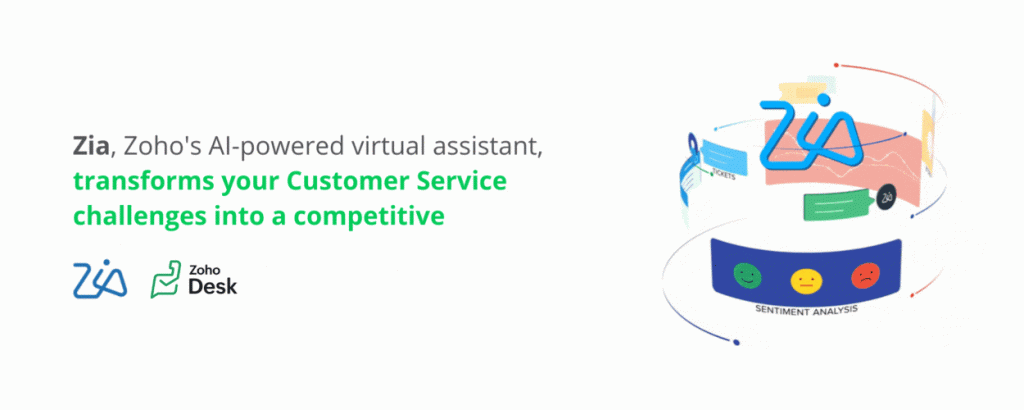
    This is where Zoho Desk’s Artificial Intelligence comes into play, designed to enhance every aspect of customer service, from automatic ticket classification to generating data-driven responses. With Zia, Zoho’s AI-powered virtual assistant, you can turn these challenges into a competitive advantage.

    Customer Service as a Competitive Advantage

    Excellent customer service is no longer just a differentiator, but a necessity to remain competitive. By automating routine tasks and providing faster, more accurate responses, AI not only optimizes agents’ workloads but also improves the customer experience. When customers receive efficient and personalized attention, they are not only more likely to be satisfied but also to become loyal advocates for your brand.


    AI Solutions with Zia in Zoho Desk


    1. Sentiment Analysis

    Zia analyzes the tone of each incoming message, helping agents understand the emotional state of customers before responding. This allows them to adjust the tone of their replies based on the situation, which can be key to defusing tense interactions or improving deteriorating relationships. The ability to identify whether a conversation is getting worse or improving can make the difference between losing or retaining a customer.

    ZIA - Zia puede identificar el sentimiento

    (image vía zoho)


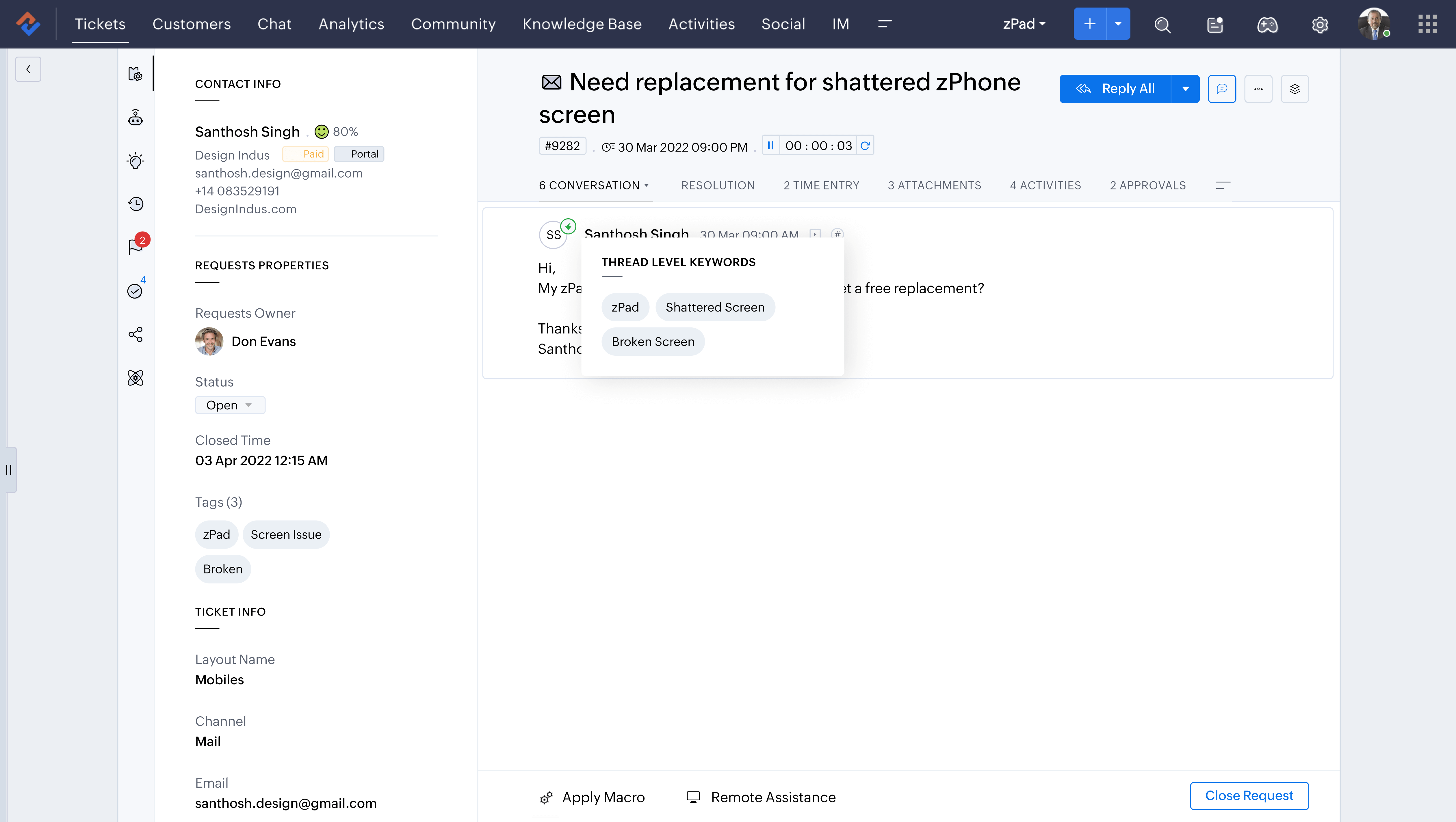
    2. Automatic Ticket Classification

    Instead of agents having to manually read and classify each ticket, Zia automatically identifies keywords and assigns tags, organizing tickets efficiently. This makes it easier for agents to prioritize their work and for managers to have a clear view of the topics that concern customers the most.

    autotags

    (image vía zoho)


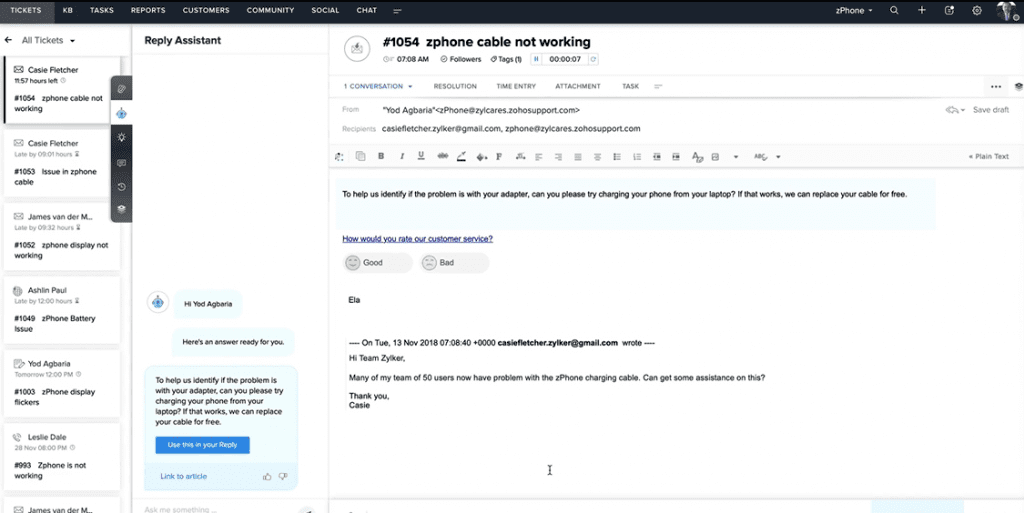
    3. Smart Response Assistant

    With the assisted response feature, Zia suggests replies based on ticket history and knowledge base articles. This means agents can resolve issues faster without having to manually research each case. They can even chat with Zia for clarifications on specific policies or conditions, eliminating the need for lengthy internal discussions.


    (image vía zoho)


    4. Automatic Summary Generation

    Zia also provides automatic ticket summaries that allow agents to quickly view the key points of conversations, helping them make more informed decisions without having to read through the entire message history.

    (image vía zoho)


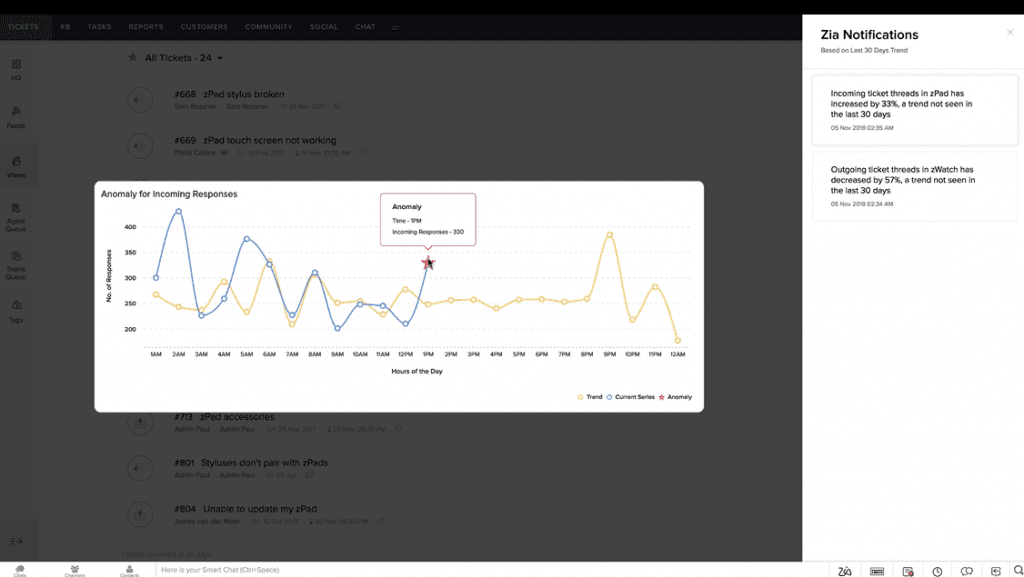
    5. Predictions

    Zia’s AI not only reacts but also predicts potential problems. By monitoring interaction patterns and analyzing large amounts of historical data, Zia can foresee potential service issues and suggest actions before problems escalate.

    (image vía zoho)


    Ready to Put AI to Work for You?

    With Zoho Desk and Zia’s advanced AI capabilities, you can offer faster, more efficient, and personalized service to your customers. Don’t miss the opportunity to experience how artificial intelligence can revolutionize your business.


    Start your free trial of Zoho Desk today and discover the future of customer service. Start making a difference!

    Hoy en día, los clientes demandan respuestas rápidas y personalizadas, lo que presenta desafíos cuando el volumen de consultas aumenta y los problemas se vuelven más complejos. Muchas empresas enfrentan dificultades con tiempos de respuesta prolongados, agentes sobrecargados y una falta de personalización en las interacciones, lo que afecta la calidad del servicio y la satisfacción del cliente.


    Según un informe reciente de Gartner, el 60% de los líderes de servicio al cliente aplicarán tecnologías de IA generativa para mejorar la experiencia del cliente para 2025. Esta adopción no solo reducirá costos, sino que también permitirá anticipar problemas y mejorar el servicio mediante una mayor automatización y asistencia humana optimizada por IA. (Fuente: Customer Service Leadership Predictions in 2024, Gartner).


    Aquí es donde entra en juego la Inteligencia Artificial de Zoho Desk, diseñada para mejorar cada aspecto del servicio al cliente, desde la clasificación automática de tickets hasta la generación de respuestas basadas en datos. Con Zia, el asistente virtual de Zoho impulsado por IA, puedes transformar estos desafíos en una ventaja competitiva.

    Un Servicio al Cliente como ventaja competitiva

    Un excelente servicio al cliente ya no es solo un diferenciador, sino una necesidad para mantenerse competitivo. Al automatizar tareas rutinarias y ofrecer respuestas más rápidas y precisas, la IA no solo optimiza la carga de trabajo de los agentes, sino que también mejora la experiencia del cliente. Cuando los clientes reciben atención eficiente y personalizada, no solo es más probable que queden satisfechos, sino que se convierten en defensores leales de tu marca.


    Soluciones de IA con Zia en Zoho Desk

    1. Análisis de sentimientos 

    Zia analiza el tono de cada mensaje que llega, ayudando a los agentes a entender el estado emocional de los clientes antes de responder. Esto permite ajustar el tono de las respuestas según la situación, lo que puede ser clave para desactivar interacciones tensas o mejorar relaciones deterioradas. La capacidad de identificar si una conversación está empeorando o mejorando puede marcar la diferencia entre perder un cliente o retenerlo.

    ZIA - Zia puede identificar el sentimiento

    (imagen vía zoho)


    2. Clasificación automática de Tickets
    En lugar de que los agentes tengan que leer y clasificar manualmente cada ticket, Zia automáticamente identifica palabras clave y asigna etiquetas, organizando los tickets de manera eficiente. Esto facilita que los agentes prioricen su trabajo y que los gerentes tengan una visión clara de los temas que más preocupan a los clientes.

    autotags

    (imagen vía zoho)


    3. Asistente de respuestas inteligentes
    Con la función de respuesta asistida, Zia sugiere respuestas basadas en el historial de tickets y los artículos de la base de conocimiento. Esto significa que los agentes pueden resolver problemas más rápido sin tener que investigar manualmente cada caso. Incluso pueden chatear con Zia para obtener aclaraciones sobre políticas o condiciones específicas, lo que elimina la necesidad de largas discusiones internas.


    (video vía zoho)


    4. Generación automática de resúmenes
    Zia también ofrece resúmenes automáticos de tickets que permiten a los agentes ver de un vistazo los puntos clave de las conversaciones, ayudándolos a tomar decisiones más informadas sin tener que leer todo el historial de mensajes.

    (video vía zoho)


    5. Predicciones 
    La IA de Zia no solo reacciona, sino que también predice posibles problemas. Al monitorear patrones de interacción y analizar grandes cantidades de datos históricos, Zia puede predecir posibles problemas en el servicio y sugerir acciones antes de que los problemas se escalen.

    (imagen vía zoho)


    Listo para hacer que la IA trabaje por tí?

    Con Zoho Desk y las capacidades avanzadas de IA de Zia, podrás ofrecer un servicio a tus clientes más rápido, eficiente y personalizado. No pierdas la oportunidad de experimentar cómo la inteligencia artificial puede revolucionar tu negocio.

    Inicia hoy tu prueba gratuita de Zoho Desk y descubre el futuro de la atención al cliente. ¡Empieza a marcar la diferencia!

  • Implementation of the month: Custom application development for Zoho Inventory that speeds up the dispatching process.

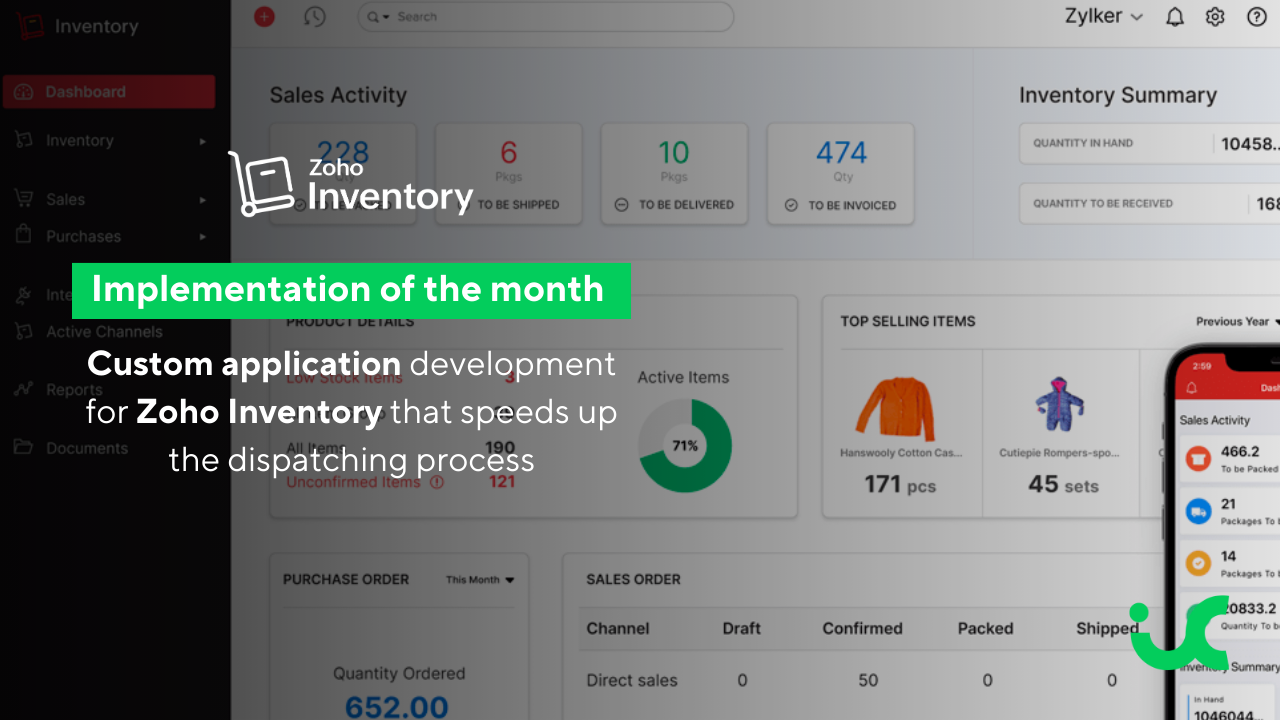
    This month, we highlight an implementation carried out by our team for a leading company in the sale of high-value products with serial numbers, which needed to optimize its processes within Zoho Inventory.


    Challenge:

    The company relied on a manual process that required multiple steps:

    • Registering customers one by one
    • Creating sales orders
    • Scanning product serial numbers
    • Managing shipments and income
    • This process took between 5 and 10 minutes per transaction.
    • The prolonged time, combined with the risk of human errors, reduced operational efficiency and affected customer satisfaction.


    Solution:

    To address these challenges, we developed a custom application specifically designed to automate and streamline manual processes within Zoho Inventory.


    The application allows for:

    • Customer Registration Automation: The application requests the customer’s phone number and automatically searches the database. If not registered, it quickly collects the necessary information to complete their profile.
    • Sales Management Optimization: Depending on the type of delivery, the application allows scanning of serial numbers and automatically lists the products in Zoho Inventory. For immediate deliveries, the entire process is managed in an automated flow.
    • Future Delivery Management: Customers can choose the date and place of pick-up and designate the responsible person. The application automates the creation of sales orders, manages payments, and completes the process at the time of delivery.
    • Payment and Digital Signature Integration: The application facilitates payment, including available credits, and allows for a digital signature, reducing the need for manual intervention.
    • Instant Communication: Upon completion, the customer receives an SMS and an email with the purchase receipt, warranty documents, and delivery confirmation.


    Benefits:

    The implementation of the custom application by InterConnecta generated a series of significant improvements:

    • Time Reduction: The InterConnecta application reduced the transaction time from 5-10 minutes to less than 1 minute.
    • Error Reduction: Automation significantly reduced human errors.
    • Customer Satisfaction Improvement: Speed and accuracy improved the customer experience and increased loyalty.
    • Operational Efficiency: The company was able to handle more transactions without increasing staff, optimizing its resources.

    The implementation of this custom application in Zoho Inventory, developed by InterConnecta, not only solved the client’s key operational issues but also enhanced efficiency and accuracy in inventory and sales management. This solution reinforces InterConnecta’s position as a leader in developing advanced solutions within the Zoho environment, capable of adapting to each client’s specific needs and taking their operations to the next level.

    This is another example of how our solutions can transform and optimize a company’s operations. If you are interested in discovering how we can help you implement innovative technological solutions in your business, don’t hesitate to contact us.


    Contact Us Here

  • Zoho News Catch-up: Updates in CRM and Desk, New Zoho E-Protect app, Analytics Update August 2024, Webinars for Books, Projects, and Campaigns

    Welcome to our catch-up, where you’ll be in the know of all the latest Zoho updates in one place!

    Services and Appointments Modules in CRM Sandbox, License Pricing Update, and More API Credits

    Zoho CRM has implemented significant updates to optimize the user experience. Here’s a summary of these enhancements so you can make the most of your CRM. Let’s take a look!
    New Service and Appointments Modules in CRM Sandbox Environments
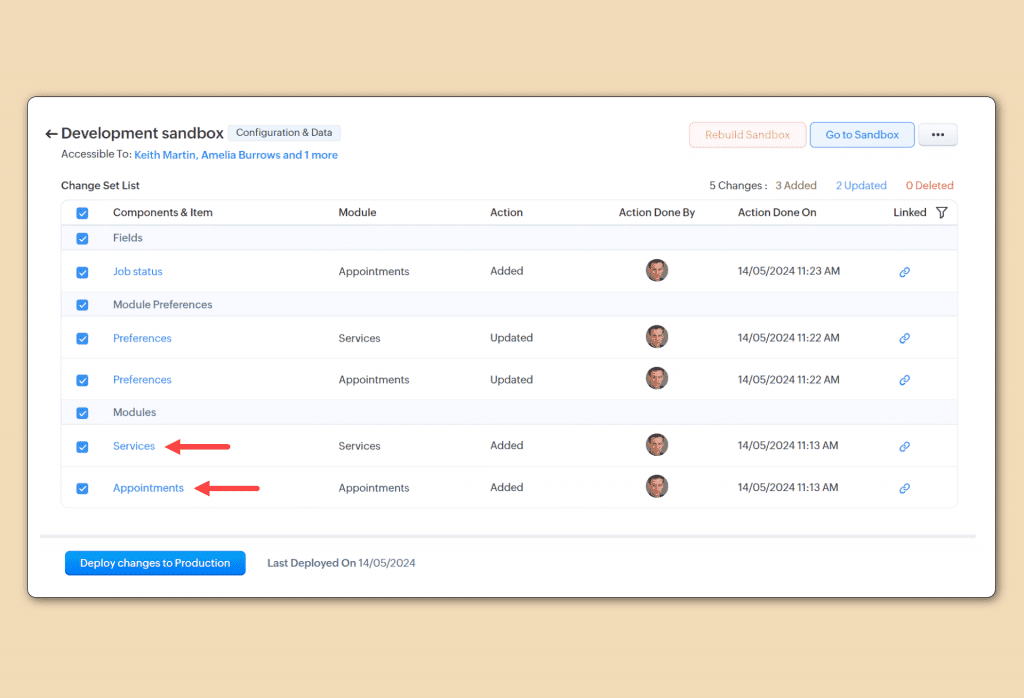
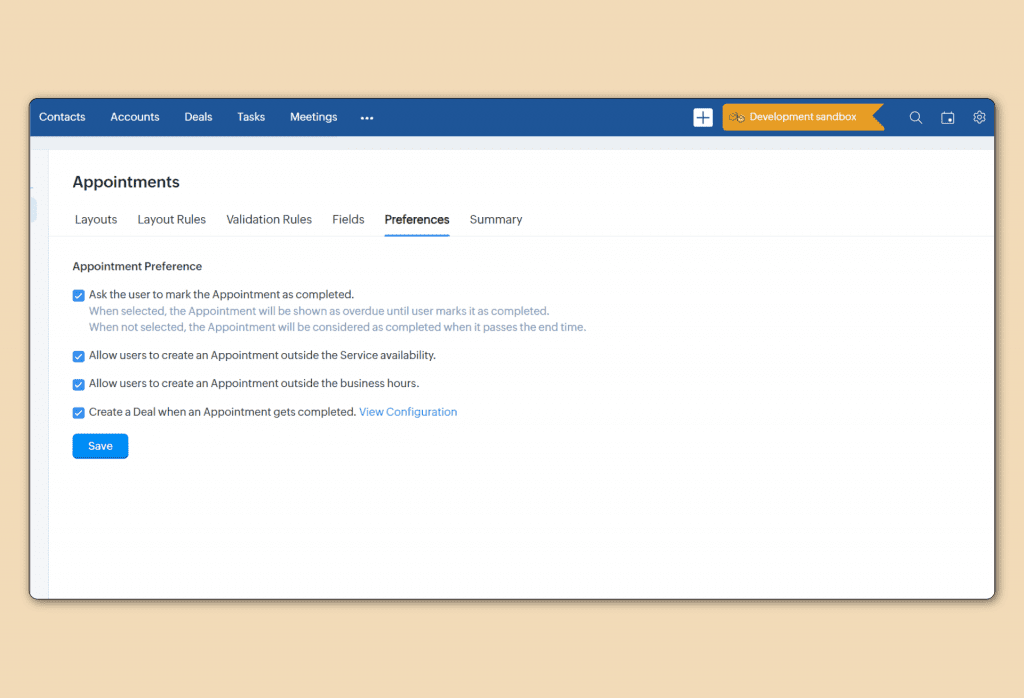
    Now, Zoho CRM Sandboxes offer support for Service and Appointments modules, allowing for:
    More Comprehensive Testing: Conduct detailed tests of configurations and workflows related to services and appointments before implementing them in your production environment.Optimized Deployments: Identify and fix potential issues without affecting your live CRM.

    (image via Zoho)

    (image via Zoho)
    Improvement available for Enterprise Edition and above, in all distribution centers.
    User License Price Updates in CRM
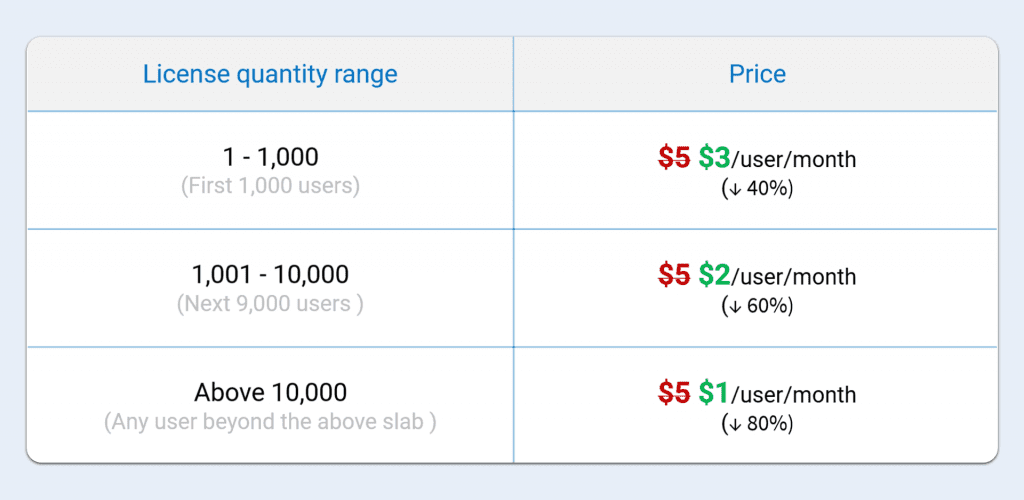
    Zoho has updated its pricing model for CRM portal user licenses. Now, instead of a fixed cost of $5 per user per month, a tiered pricing model is being implemented. This means that as the number of users in the portal increases, the cost per user decreases, making it easier for businesses to scale.
    Additionally, in an upcoming update, up to 1,000 users will be able to be invited to the portal for free, offering greater flexibility in user management.

    (image via Zoho)
    Available for Enterprise and Ultimate editions, for all distribution centers.
    Release Plan: This block-based pricing is updated for CRM, CRMPlus, and Zoho One users.
    Increase in API Credits
    Zoho has increased the number of API credits available to its users, allowing companies to perform more integrations and automations.

    (image via Zoho)
    This measure responds to the growth in customer needs and the demand for more data-intensive operations. With this adjustment, users will have greater flexibility to handle large volumes of data without worrying about exceeding their API limits.
    Available for Professional, Enterprise, Zoho One editions.

    Desk Updates its Settings with Function Reorganization and Categorization, and Ticket Module with Send and Update Status

    New Grouping and Categorization of Features in Desk Settings
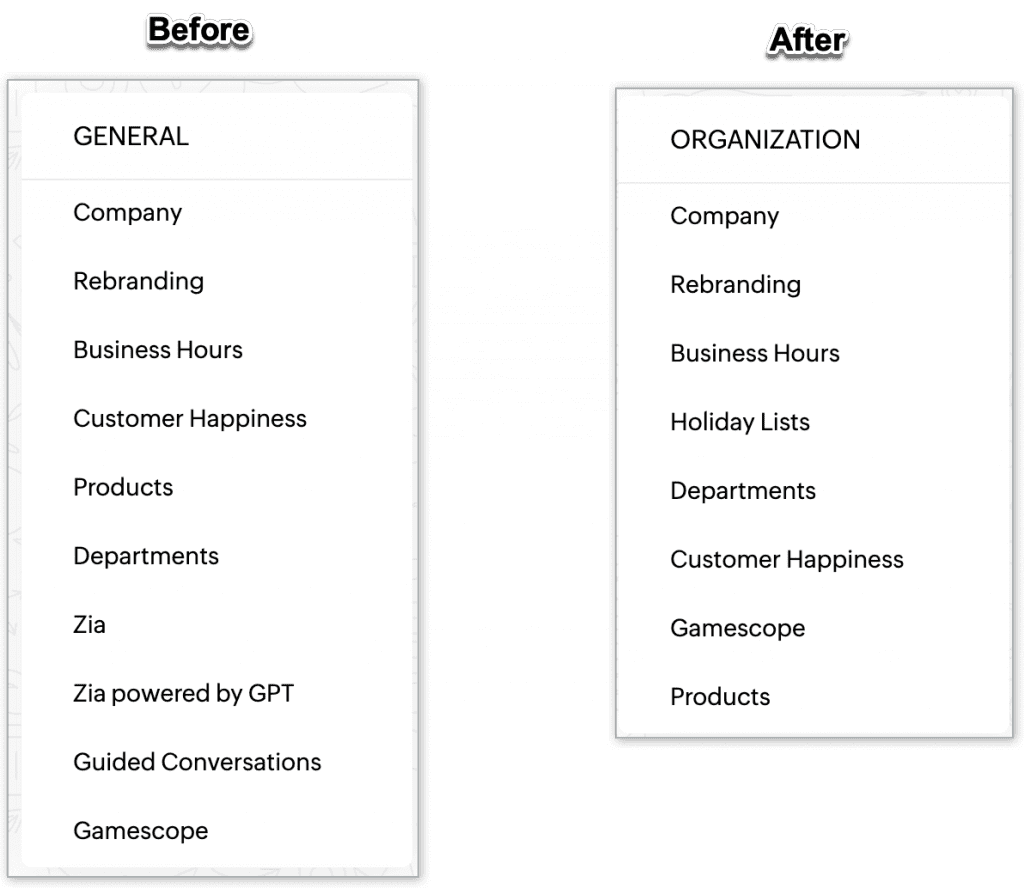
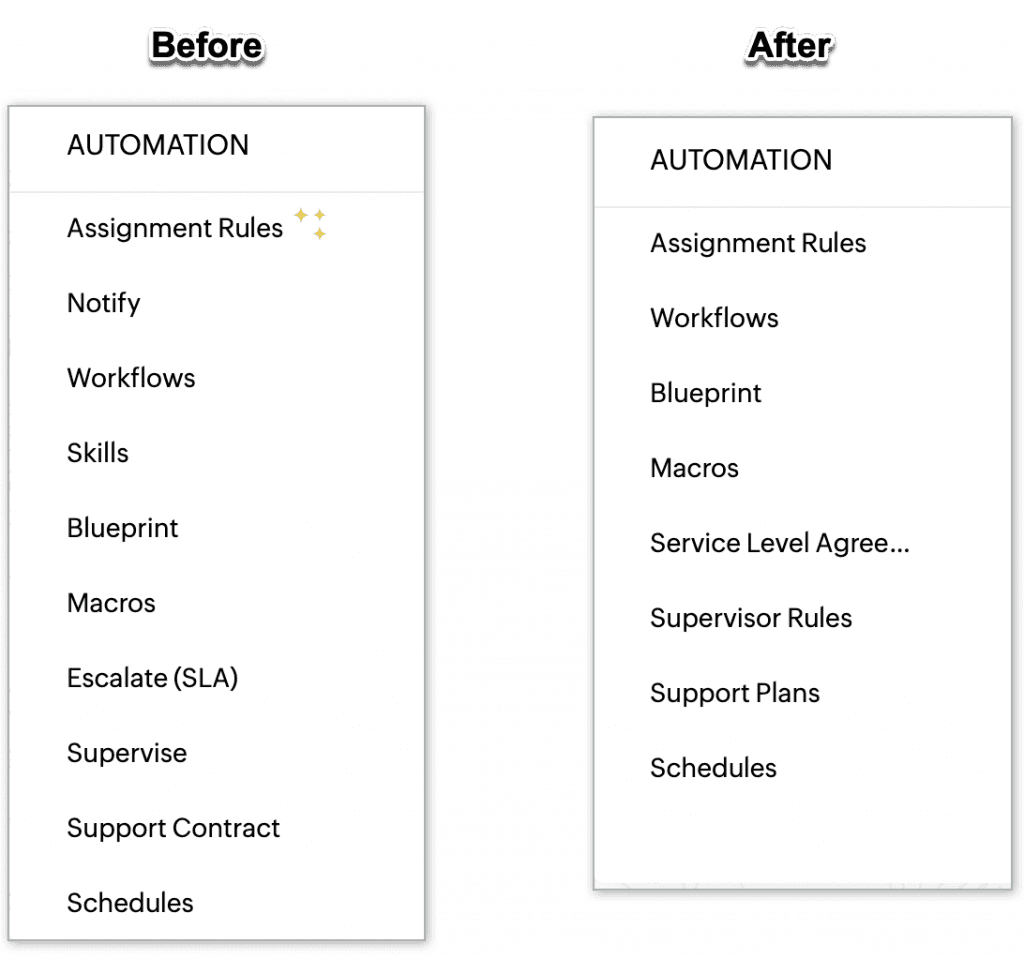
    Zoho has reorganized and categorized features on the CRM settings page to improve usability. Now, functions are grouped more logically, making it easier to navigate and find the necessary tools. This redesign focuses on making the user experience more intuitive and efficient, allowing quicker access to key settings.
    A summary of the changes:

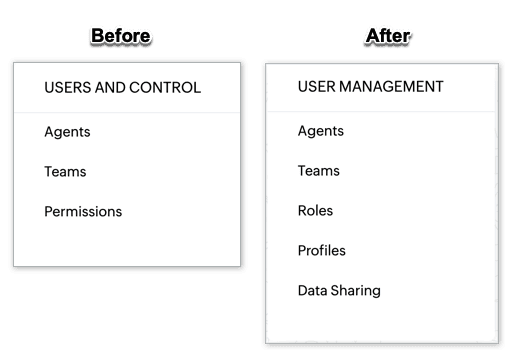
    • General is now called Organization; some functions have been moved to specific categories.
    • Users and Controls has been renamed User Management.
    • Channels have reorganized their tools.
    • Customization and Automation have relocated and renamed various functions, such as Notification and Supervisor Rules.
    • New sections have been added, like Self-Service, ZIA, and Privacy & Security.
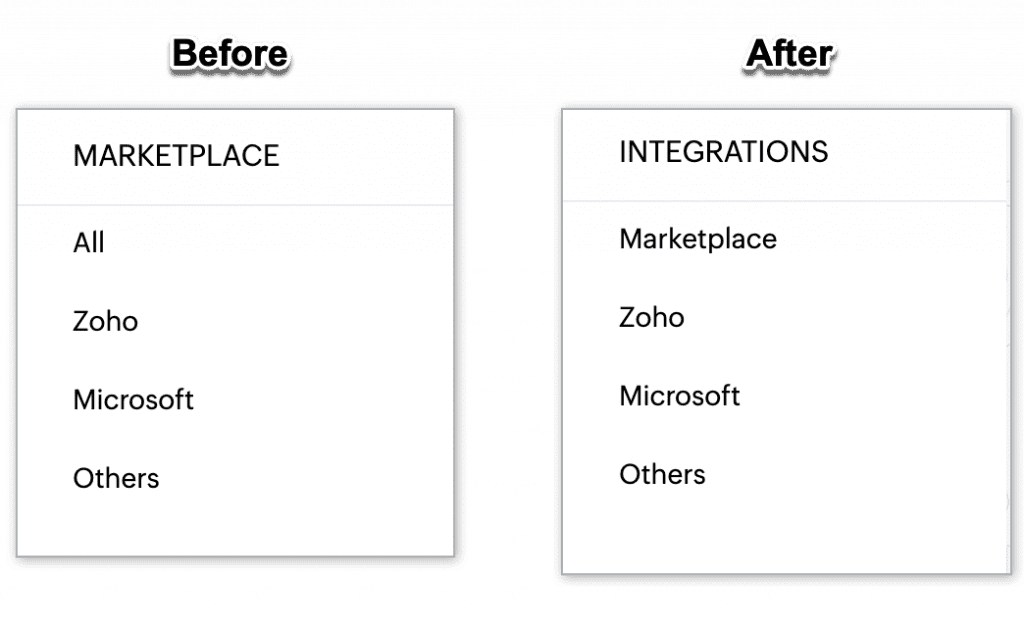
    • Marketplace is now called Integrations.


    (image via zoho)

    (image via zoho)

    (image via zoho)

    (image via zoho)
    The update reflects Zoho’s commitment to continuously improving the customer experience.
    New “Send and Update Status” Option in the Tickets Module
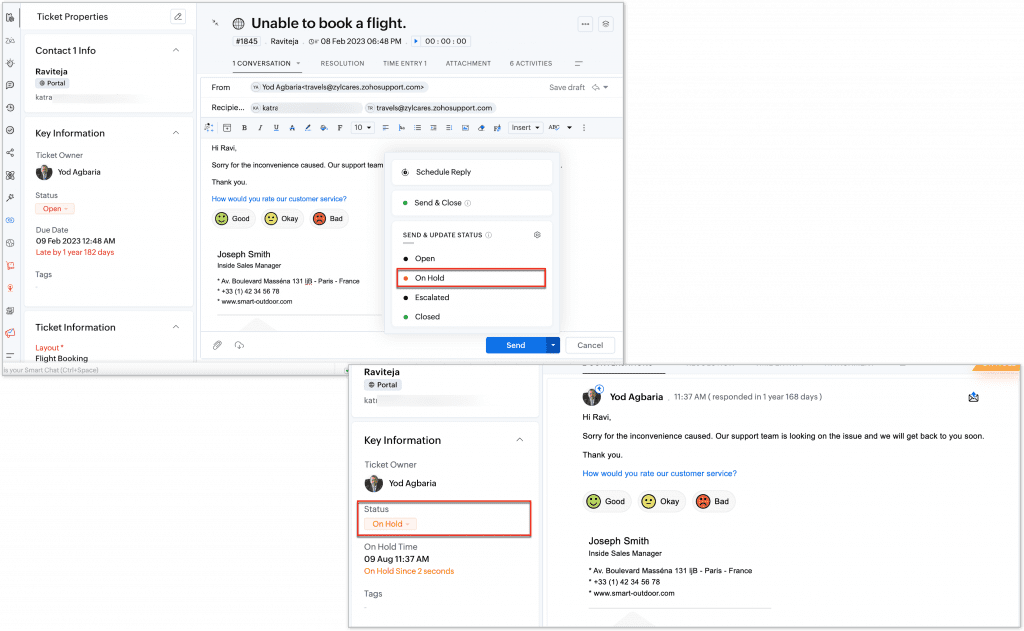
    Zoho has introduced a new feature in the Tickets module that allows you to send and update the status of tickets directly from the list view.
    Now, users can change the status of a ticket with a single click and send emails from the same interface, streamlining ticket management and follow-up. This update is designed to improve efficiency in handling requests and communication with customers.

    (image via zoho)
    Available to all users across all data centers.

    New Zoho E-Protect app to protect email from cyber threats.

    Zoho has launched Zoho eProtect, a comprehensive phishing protection solution designed to defend business email accounts.

    This service identifies and blocks phishing attempts, ensuring that fraudulent emails do not reach users’ inboxes. Additionally, eProtect provides detailed reports and customization options to better manage email security. The tool is ideal for organizations looking to strengthen their cybersecurity and protect sensitive information.

    (image via zoho)
    eProtect can be configured to enhance security and archiving alongside your email provider. However, if you already use Zoho Mail, there is no need to sign up for eProtect, as these features are already integrated into the Zoho Mail service.

    Zoho Analytics Updates: August 2024

    Zoho Analytics introduced several key enhancements to optimize the user experience and data management:
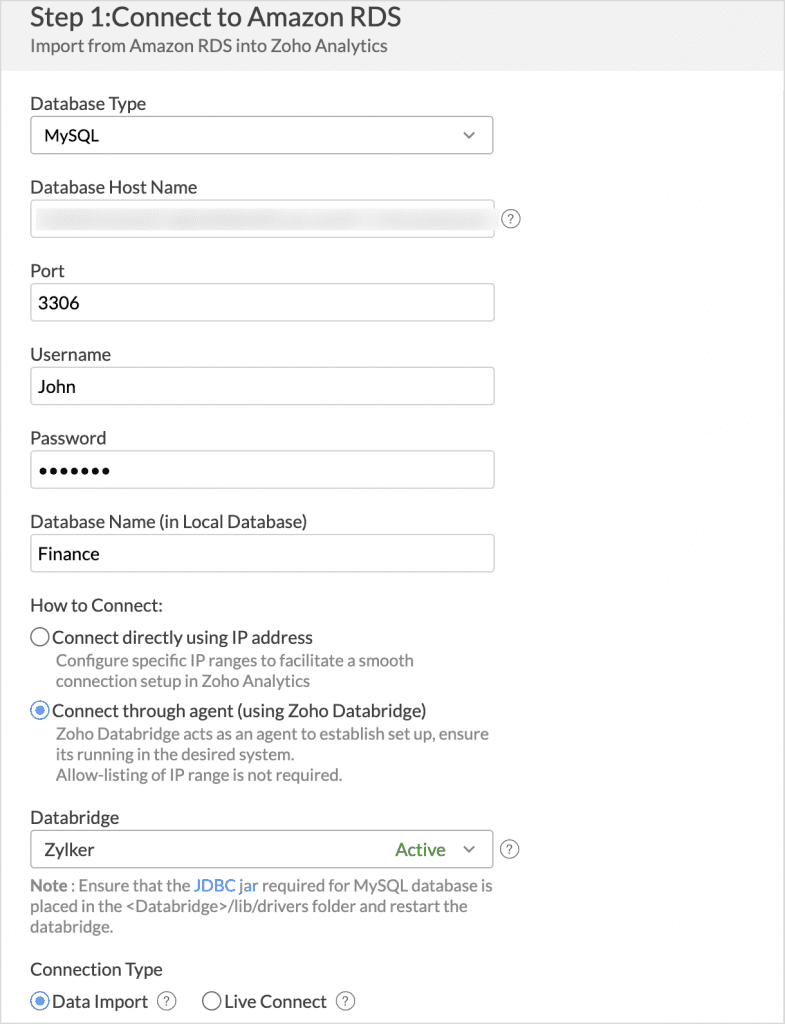
    Improved Connection with Zoho Databridge
    Zoho Databridge now allows cloud data connections without the need to configure IP whitelisting, simplifying security setup and improving accessibility.

    (image via zoho)
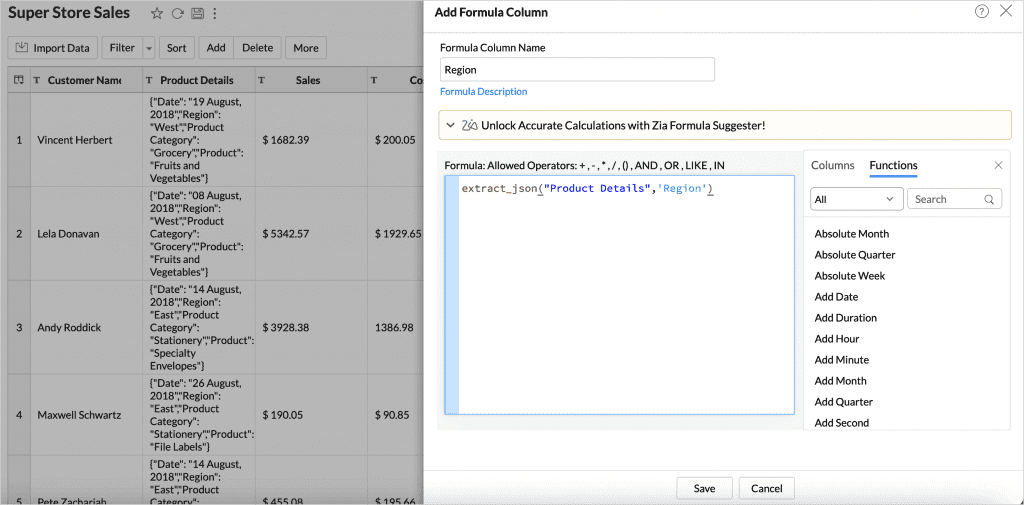
    extract_json() Function
    The extract_json() function is introduced, enabling efficient extraction of data from JSON columns. This facilitates the manipulation and analysis of complex data directly within Zoho Analytics.

    (image via zoho)
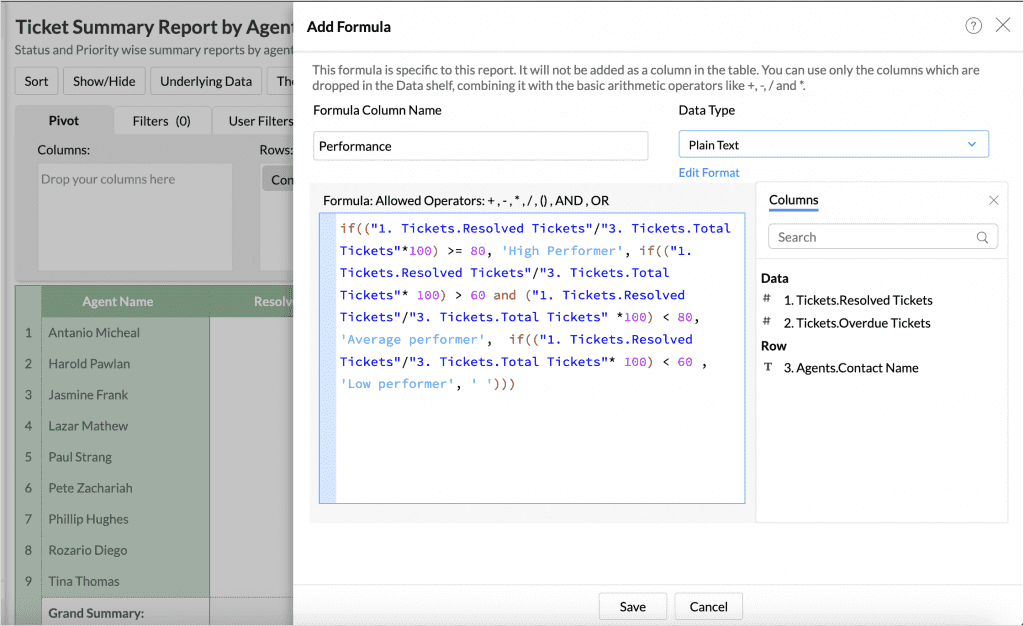
    Text Formula Improvements
    You can now incorporate text into your report formulas, allowing for more precise data categorization and segmentation. This is useful for creating labels or classifications based on text, enriching analytical capabilities.

    (image via zoho)
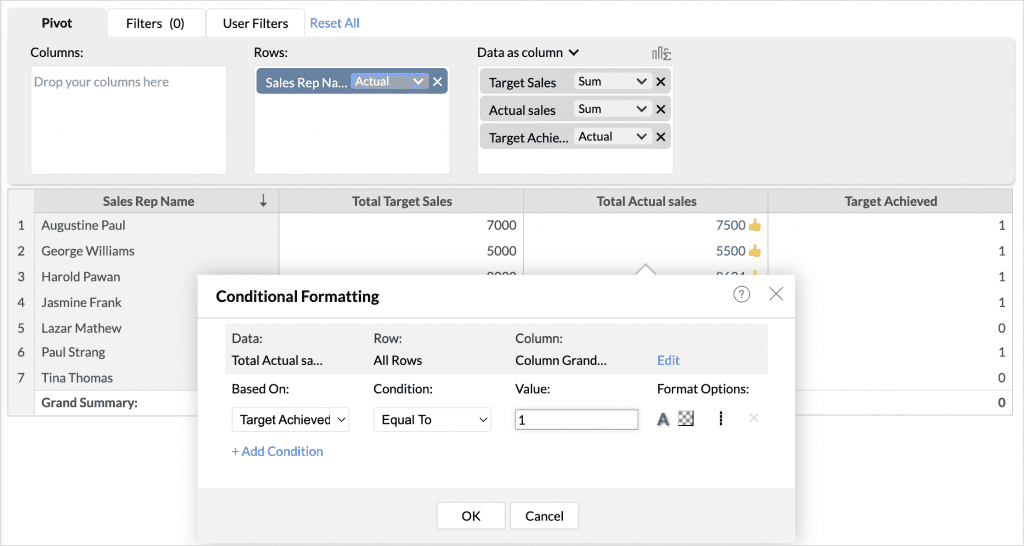
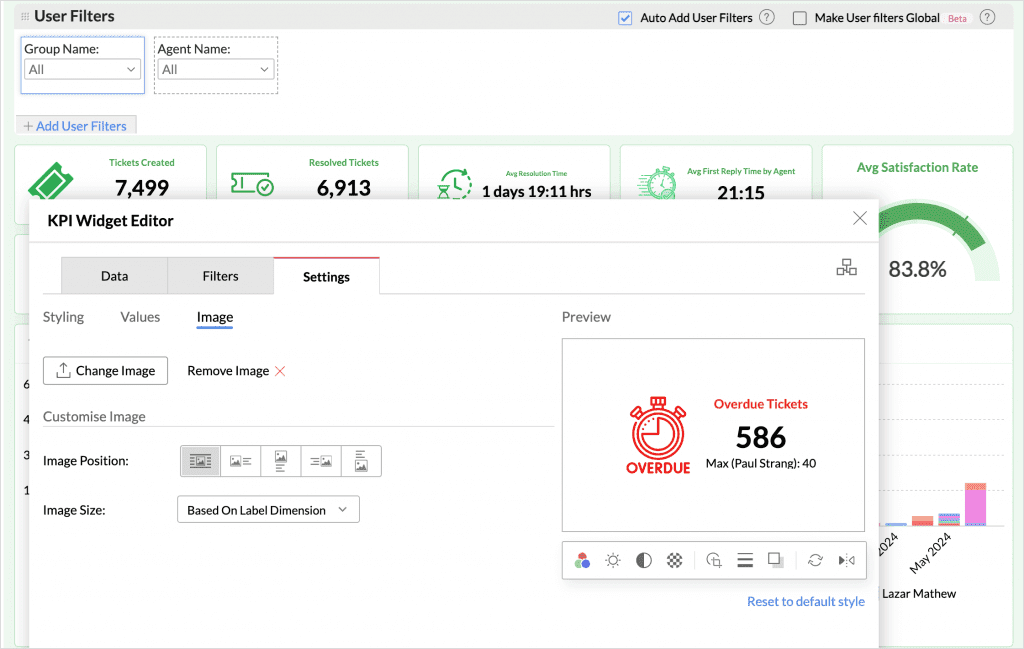
    Customizable KPI Widgets
    KPI widgets now offer more customization options, including the ability to add static images and custom icons. This enhances the visual presentation and interpretation of key data in dashboards.

    (image via zoho)
    Copy and Paste Reports
    The new copy and paste reports feature within dashboards streamlines the creation and management of custom dashboards, allowing for quick replication of similar reports and maintaining visual consistency.

    (image via zoho)
    Enhanced View Sharing
    The ability to share views has been expanded, now allowing users to share their views with administrators. This facilitates collaboration and oversight, ensuring teams have access to the same insights and data.

    (image via zoho)
    Users on the Ultimate plan of Zoho CRM, Zoho Books, and Zoho Inventory can purchase additional rows and users in the online store.

    Webinars on Books, Projects, and Campaigns

    Zoho Books Basics – Finance ZUG Virtual meetup

    Introduction to Zoho Projects

    Master Email Marketing with Zoho Campaigns and Zoho CRM Integration

    Do you want to add these new features to your Zoho system? Let’s work together! Learn more about our Zoho consulting services and contact us for a free consultation.

  • Enhance Your Project Management with Zia, Zoho’s AI

    With advanced artificial intelligence integration, Zoho once again demonstrates its industry leadership by offering tools that not only simplify task management but also boost your entire team’s efficiency and productivity.

    That’s why we’re excited to share with you the features of Zia, the intelligent assistant in Zoho Projects, which is revolutionizing the way you handle your projects.


    Zia Bot: Your Ally for Hassle-Free Project

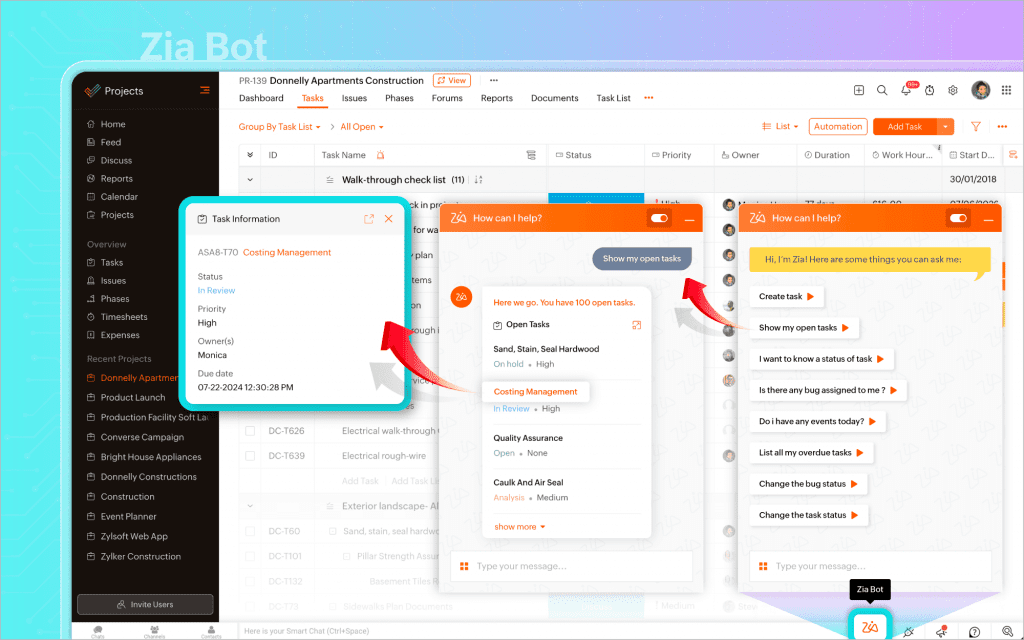
    Management Zia Bot is your personal assistant in Zoho Projects, designed to streamline every aspect of project management. Whether you need to create a new project, assign tasks, or simply update progress, Zia does it with natural language commands, eliminating the need to navigate complex menus. Imagine being able to check the status of a task or reassign resources with just a few words. This is Zia’s promise: efficiency and simplicity in every interaction.

    (image via zoho)


    Find What You Need with Zia Search

    Finding information has never been easier. With Zia Search, you can quickly access your project data using conversational language, as if you were talking to a colleague. This not only saves time but also allows you to focus on what really matters: driving your projects to success without distractions.


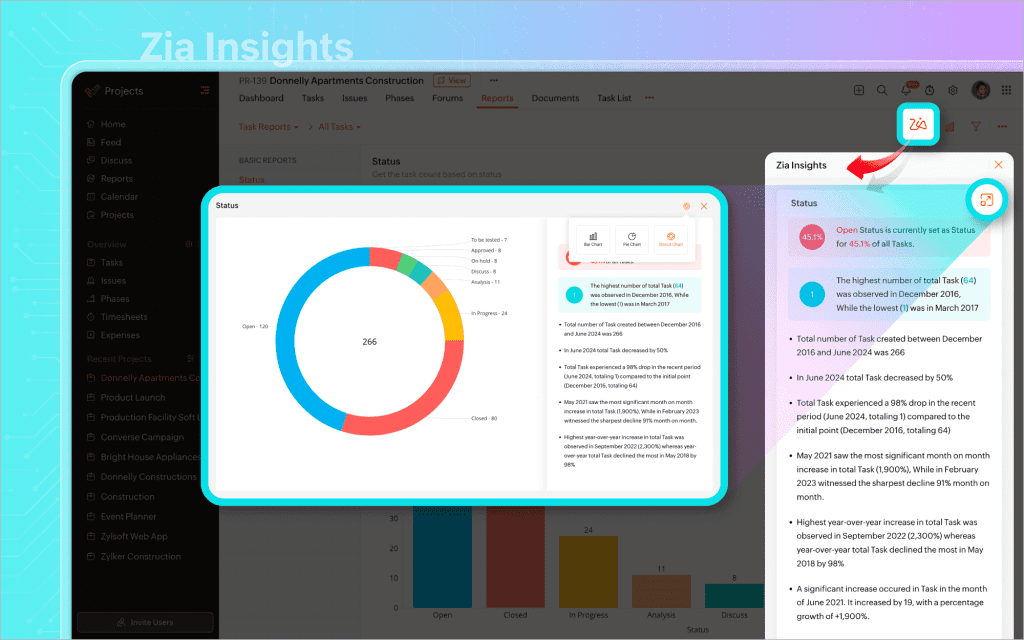
    Make Informed Decisions with Zia Insights

    With Zia Insights, you have in-depth and detailed analysis of your projects at your fingertips. This tool uses AI to interpret complex data and turn it into useful information that you can use to optimize resources, identify bottlenecks, and improve efficiency. Data-driven decision-making has never been so accessible.

    (image vía zoho)


    Global Collaboration with Zia Translate

    Effective communication is key in any project, especially in global teams. With Zia Translate, language barriers disappear. This tool allows for automatic translation of over 70 languages, ensuring that all your team members are aligned, no matter their native language.


    Unlock New Possibilities with Generative AI in Zoho Projects

    Zoho Projects now includes generative AI capabilities powered by ChatGPT. This integration allows you to create and refine content directly on the platform, from project descriptions to summaries, optimizing your management processes. Activating this feature is simple and opens up a world of possibilities for improving the clarity, tone, and accuracy of your communication.


    With these advanced features, Zoho Projects not only simplifies daily management but also empowers you to reach new levels of success. At InterConnecta, we invite you to embrace these innovations and transform the way you manage your projects. The future of project management is now, and with Zia and Zoho, the possibilities are limitless.


    Ready to experience these cutting-edge tools? Try Zoho Projects for free and discover how it can revolutionize your team’s productivity. And if you need personalized advice or help getting started, don’t hesitate to contact us. We’re here to support you every step of the way.

  • The Urgency of Modernizing Legacy Systems: How Zoho and AI Can Save Companies from Obsolescence

    The need to modernize Legacy Systems in companies is more urgent than ever. Businesses looking to stay competitive must ensure that their technological infrastructure is up to new challenges and leverages the most advanced technologies. At InterConnecta, we understand the complexities of this process and offer tailored solutions to help companies transform their outdated systems into agile, efficient, and future-ready operations.

    Why Modernize Legacy Applications?

    A legacy system is outdated technology that remains essential to a company’s daily operations but can no longer easily adapt to new needs or integrate with modern technologies. While often reliable, they can become a barrier to innovation. They lack the flexibility, scalability, and integration capacity that companies need today. Additionally, maintaining and updating these systems can be costly and time-consuming.

    Using AI to Evaluate Legacy Systems

    The first step in modernizing legacy systems is to conduct a thorough analysis using advanced AI tools. This analysis helps us identify performance issues, integration challenges, and potential security risks, allowing for the development of a strategic roadmap for modernization.

    Zoho: Key Tools for Successful Modernization

    Zoho applications are essential for bridging the gap between legacy systems and current business needs. With Zoho, we can integrate new tools with existing systems, improving functionality and efficiency. Here are some of the solutions offered:

    creator.svg

    • Zoho Creator: Allows for the rapid and easy development of custom applications. Integrating it with legacy systems adds new functions without major coding efforts, ensuring a smooth transition.

    crm.svg

    • Zoho CRM: Zoho CRM provides robust features for managing customer data, automating sales processes, and enhancing customer engagement. Integrating Zoho CRM with legacy databases ensures a unified view of customer interactions.

    analytics.svg

    • Zoho Analytics: Data-driven decision-making is essential. Zoho Analytics extracts valuable insights from your legacy data, facilitating strategic planning and improving operational efficiency.

    Flow-logo-lockup

    • Zoho Flow: This integration platform as a service (iPaaS) tool allows businesses to automate workflows and integrate various applications. By using Zoho Flow, companies can create seamless workflows between legacy systems and modern applications, enhancing overall productivity.

    Modernizing with Zoho not only improves functionality but also significantly reduces costs. Zoho’s cloud solutions eliminate the need for expensive on-premises infrastructure and maintenance. Additionally, its automation capabilities optimize operations, reducing manual intervention and minimizing errors.

    In conclusion, transforming legacy systems into modern applications is a complex but essential challenge to remain competitive in today’s environment. With the right tools and expertise, this process can be smooth and extremely beneficial.

    InterConnecta: Your Strategic Partner in Technological Modernization

    At InterConnecta, we combine our expertise in Zoho implementation with our advanced AI capabilities to effectively modernize your legacy systems. We work closely with our clients to develop a tailored strategy, ensuring a smooth transition to more agile and future-ready operations.

    Let us help you unlock the full potential of your technological infrastructure and pave the way to a more efficient and competitive future. Contact us today!

  • Zoho News Catch-Up: New Data Art in Show, Optional fields in CRM Blueprints and Record Assignment by Role, July Books Updates, Global Calendar in the iOS version of the Projects mobile app, Data Segmentation in Sheet

    Welcome to our catch-up, where you’ll be in the know of all the latest Zoho updates in one place!

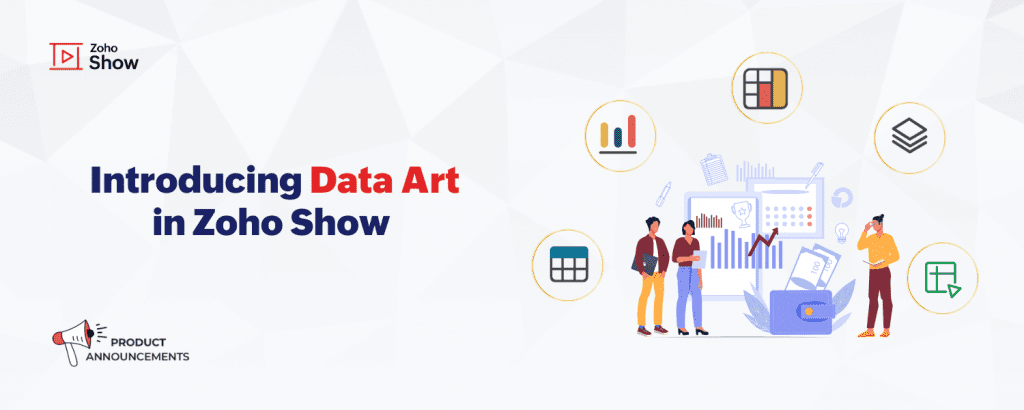
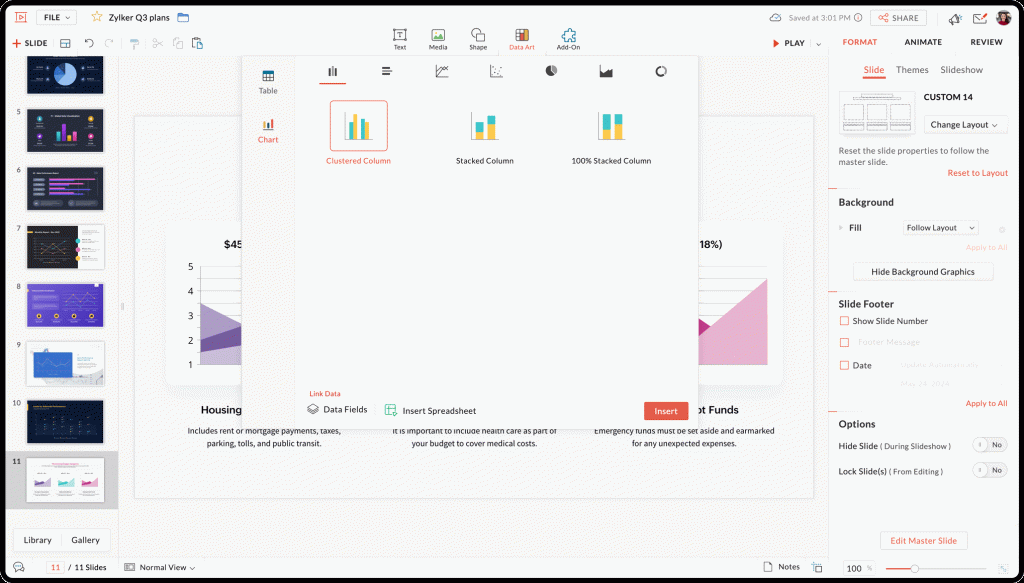
    Zoho introduced Data Art in Zoho Show

    Zoho Show has launched the new Data Art feature, designed to simplify data visualization in your presentations. Now you can create tables and charts directly from your spreadsheets.

    (image via zoho)

    Features include:
    Organization with Tables: Now you can create and customize tables, including the ability to link data directly from Zoho Sheet. This facilitates the organization and presentation of structured information.

    Analysis with Charts: Data Art includes a wide variety of charts, such as columns, bars, and lines. These charts allow for clear and effective data visualization and can be automatically updated when data changes in the spreadsheets.

    (image via zoho)

    Data Fields: Use predefined data fields to insert updatable information into your presentations. This ensures that data remains accurate and up-to-date without the need to manually edit slides.

    Explore Data Art and enhance your presentations with Zoho Show!

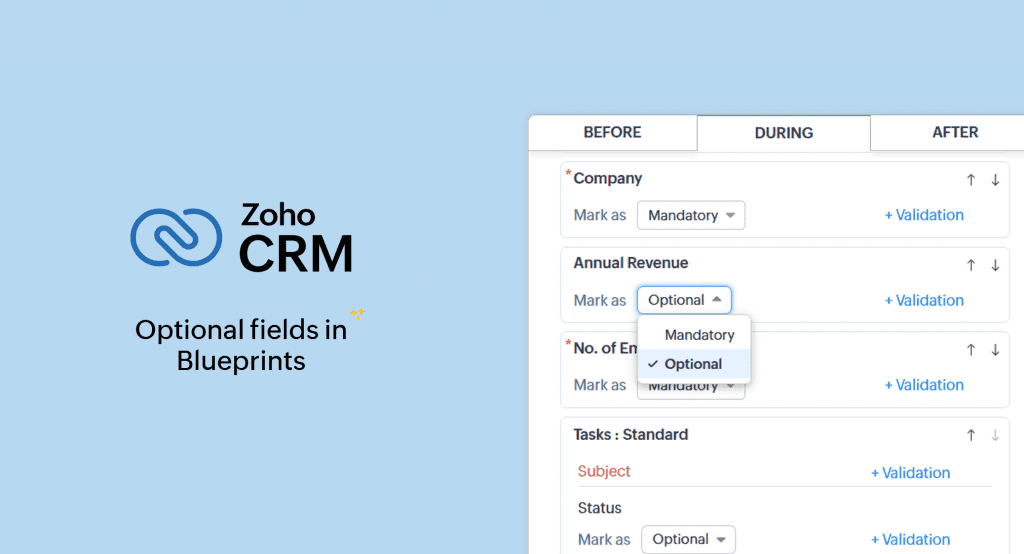
    Optional fields in Blueprint transitions for CRM

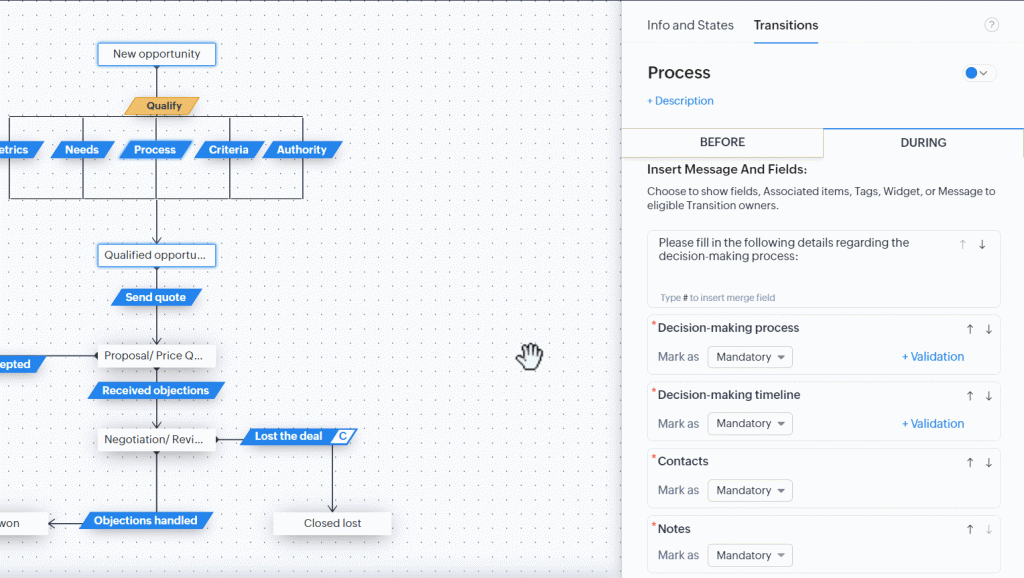
    Zoho CRM has enhanced its Blueprints functionality by allowing the inclusion of optional fields in stage transitions, offering greater flexibility in process management. This new feature enables users to customize transitions according to their specific needs without overloading teams with unnecessary information.

    (image via zoho)

    Key Features:

    • Flexibility in Feedback: In ticket resolution processes, agents can add additional comments and specific details only when necessary, improving efficiency and accuracy in ticket management.
    • Improved Task Management: Teams can add additional information, such as estimated time and task priority, only when relevant, facilitating more dynamic and project-adapted management.
    • Optimization of Registration Processes: During registration processes, users can include additional preferences and requirements that are not mandatory for all records, making the process smoother and less tedious.

    Optional Elements:
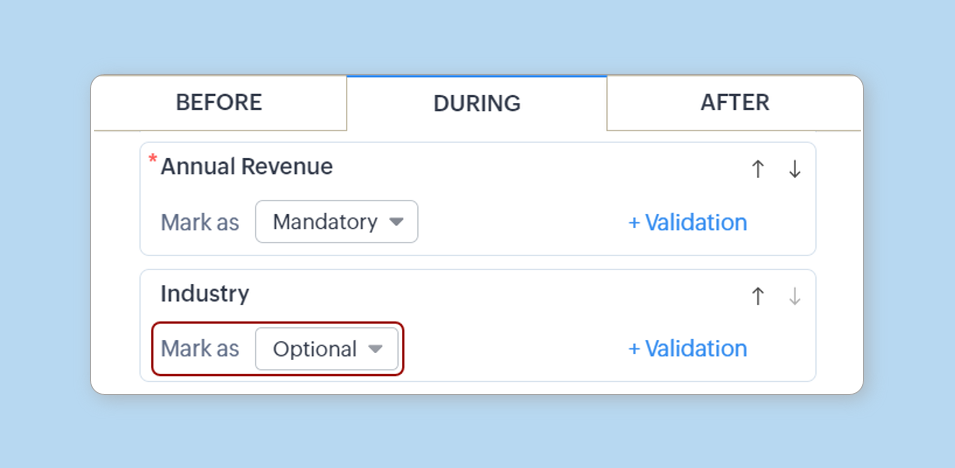
    The following elements can be marked as optional in the Blueprint transition form:

    Fields from the main module and related modules

    (image via zoho)

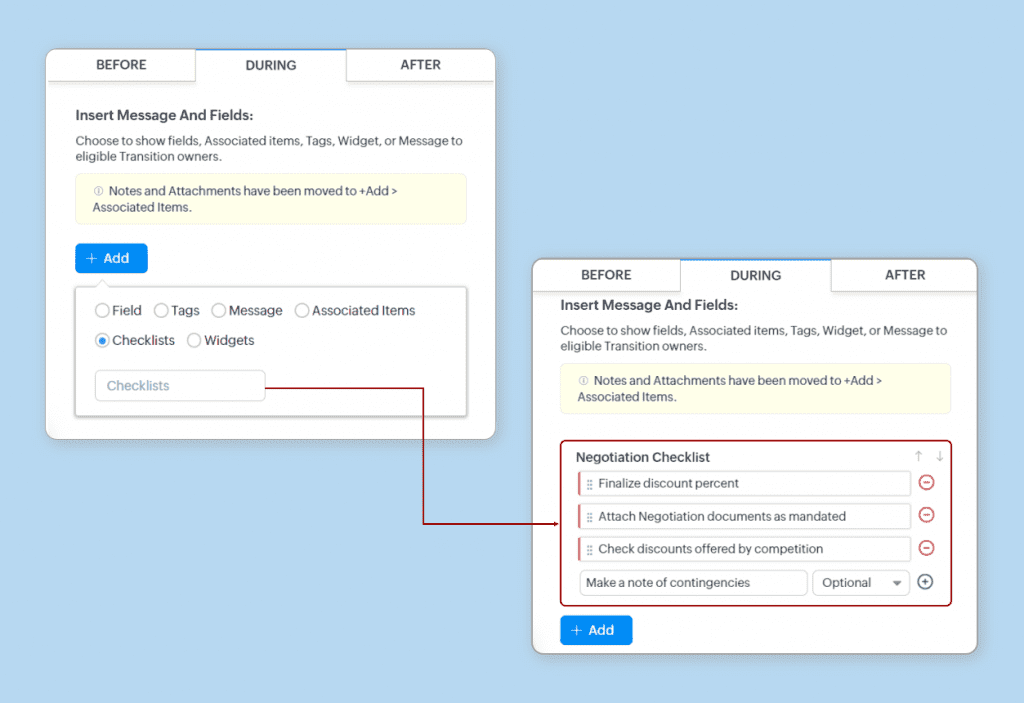
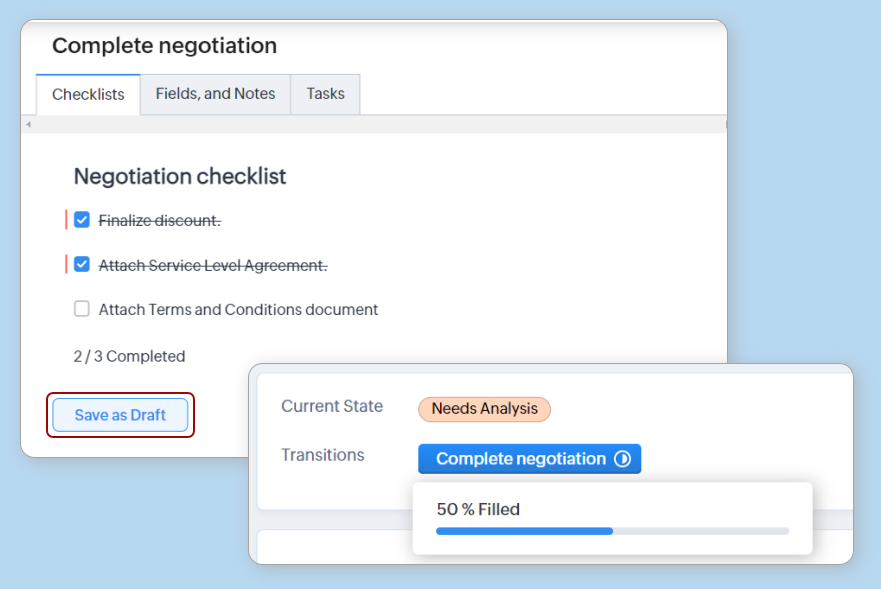
    Checklist items

    (image via zoho)

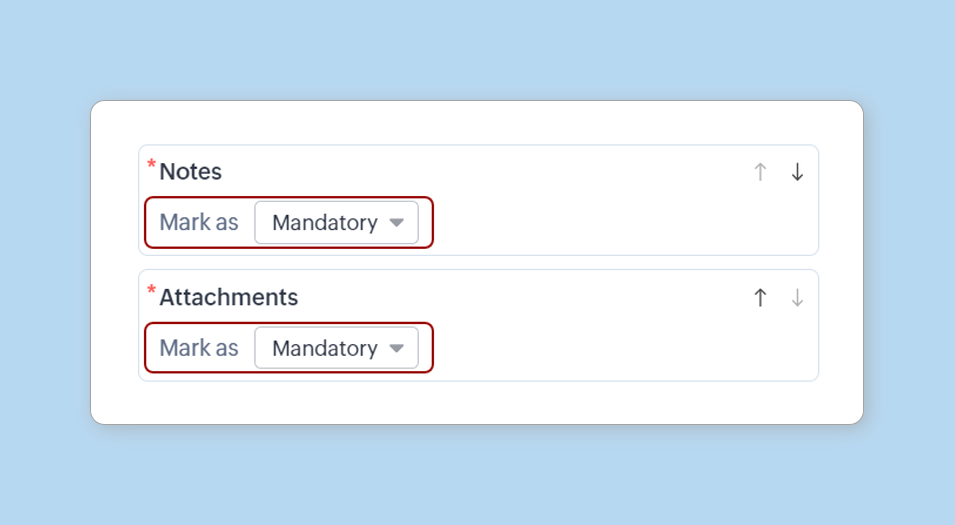
    Notes, tags, and attachments

    (image via zoho)

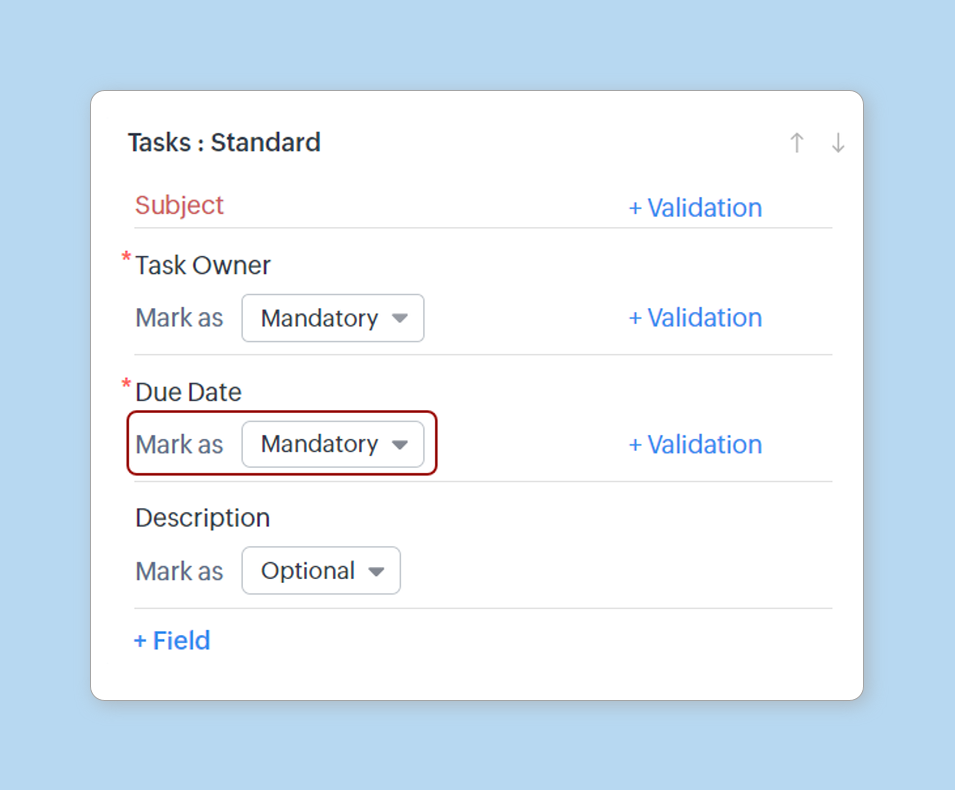
    Other fields added in Associated Items, such as tasks, meetings, etc.

    (image via zoho)

    Save as Draft Button: Allows you to save completed fields and continue later.

    (image via zoho)

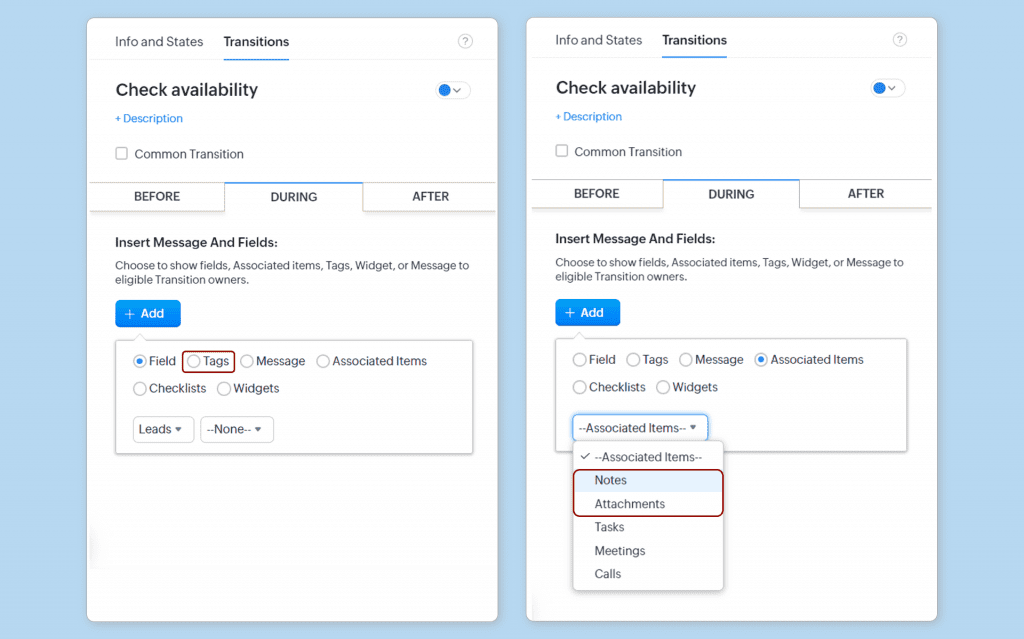
    Move notes, tags, and attachments

    • Tags will be available when you click the + Add button.
    • Notes and attachments will be available in + Add > Associated Items.

    (image via zoho)

    How to implement it:
    To use this feature, Zoho CRM administrators must mark the fields as optional in the Blueprint transition form. This configuration is easily done from the administration interface, allowing each transition to be tailored to the specific needs of the workflow.

    (image via zoho)

    This improvement is designed to simplify processes within Zoho CRM, reducing complexity and enabling deeper customization of Blueprints without losing the essential workflow structure.

    Zoho Books News: July 2024

    Zoho Books has introduced new features and enhancements to optimize the accounting experience. Below is a summary of the most important updates:

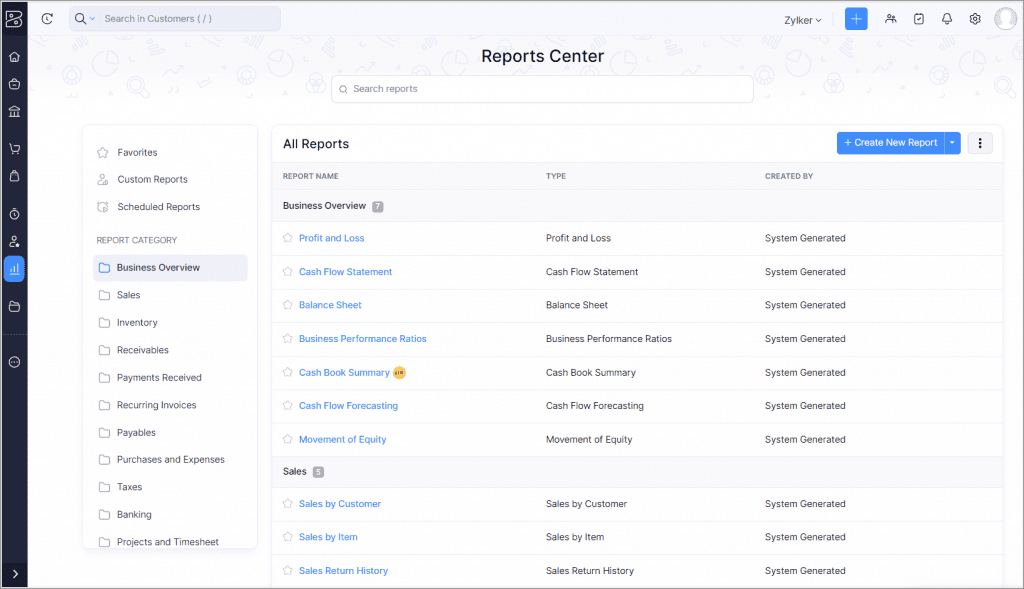
    Enhanced Reports Module

    The reports page now features a new list view, sidebar, and search options for easier navigation. This update is available in all editions and regions.

    (image via zoho)

    Transaction Posting Date for Invoices

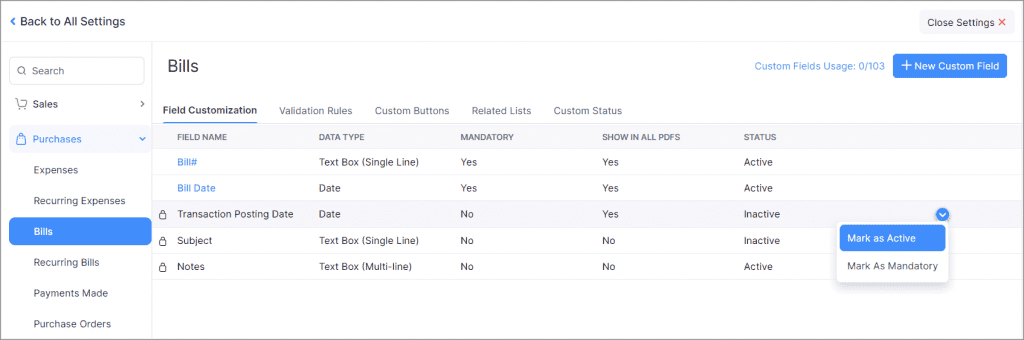
    Available in the India, Canada, and Global editions, this feature allows you to record and view the posting date of an invoice, ensuring greater accuracy in transaction tracking.

    To enable the feature: Settings > Purchases > Invoices. In the Field Customization tab, click the dropdown menu next to the Transaction Posting Date field and select Mark as Active.

    (image via zoho)

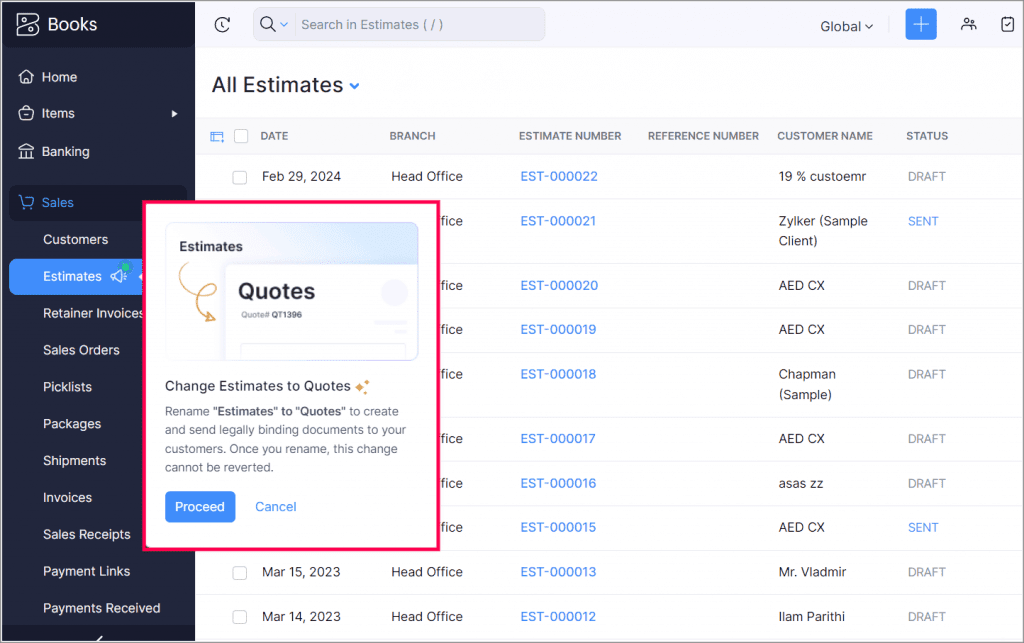
    Estimates to Quotes

    You can now change the term “Estimates” to “Quotes” to reflect fixed prices and legally binding documents. Only the module name changes; actions remain the same.

    (image via zoho)

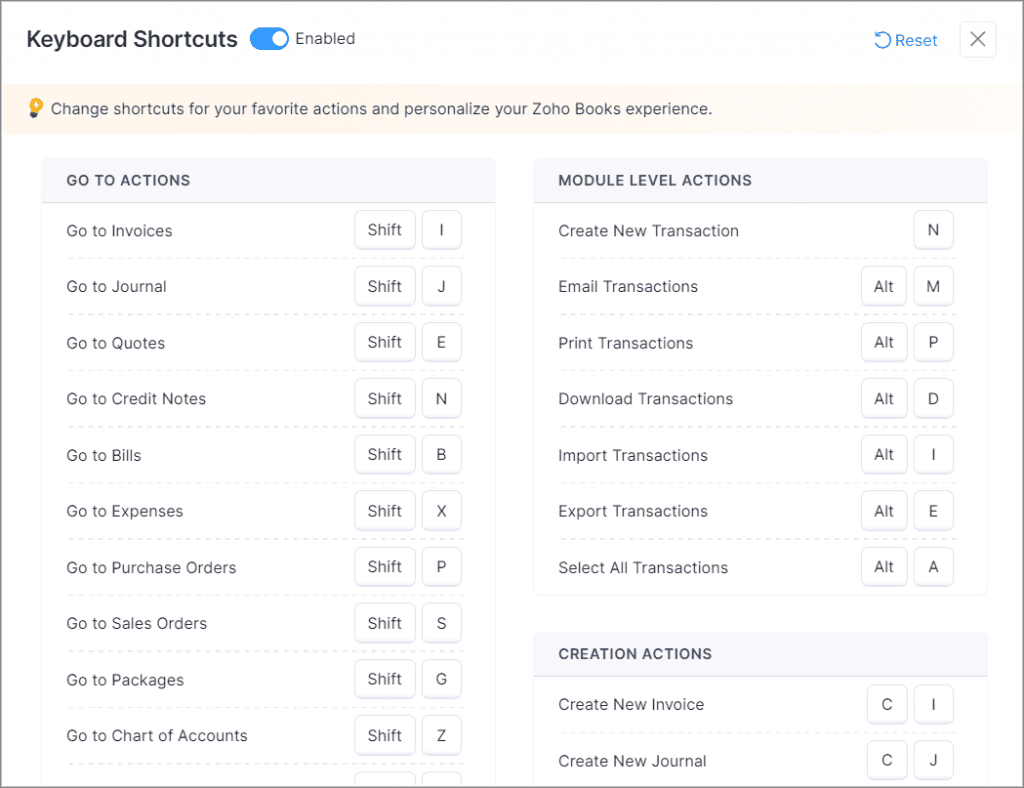
    Improved Keyboard Shortcuts

    Customize, disable, and reset shortcut keys with an enhanced interface. Customizations do not apply to other users in your organization.

    (image via zoho)

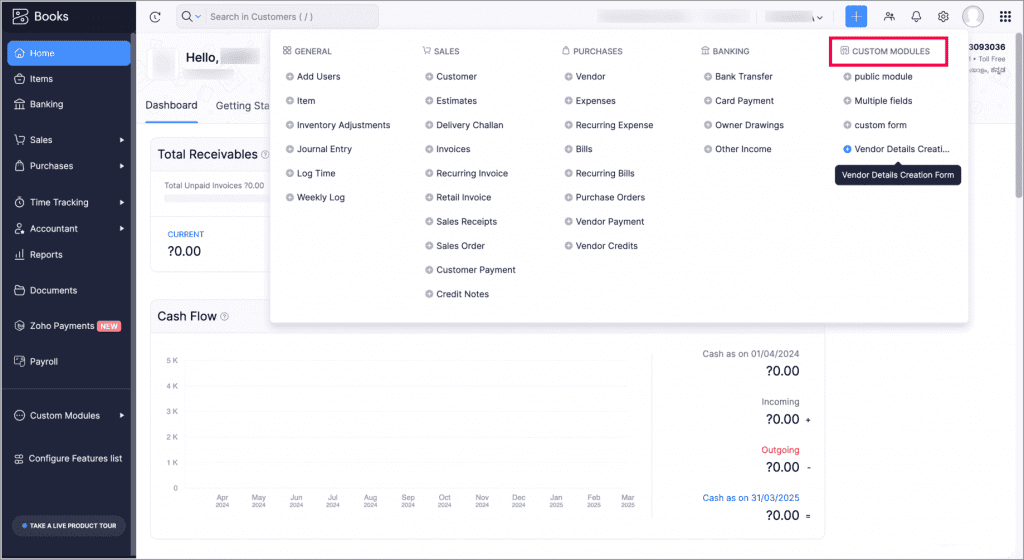
    Quick Create Menu for Custom Modules

    Create records in custom modules from any page using the Quick Create menu in the top band.

    To create a new record for a custom module, click the Quick Create icon in the top band. In the Custom Modules group, click the Add icon next to the custom module for which you want to create a record. This will redirect you to the corresponding creation page where you can enter and save the new record details.

    (image via zoho)

    Overwrite Imported Data Based on Custom Fields

    You can now overwrite details of imported files based on custom fields, available for items, customers, vendors, and custom modules.

    Global Calendar for Projects available in the iOS version

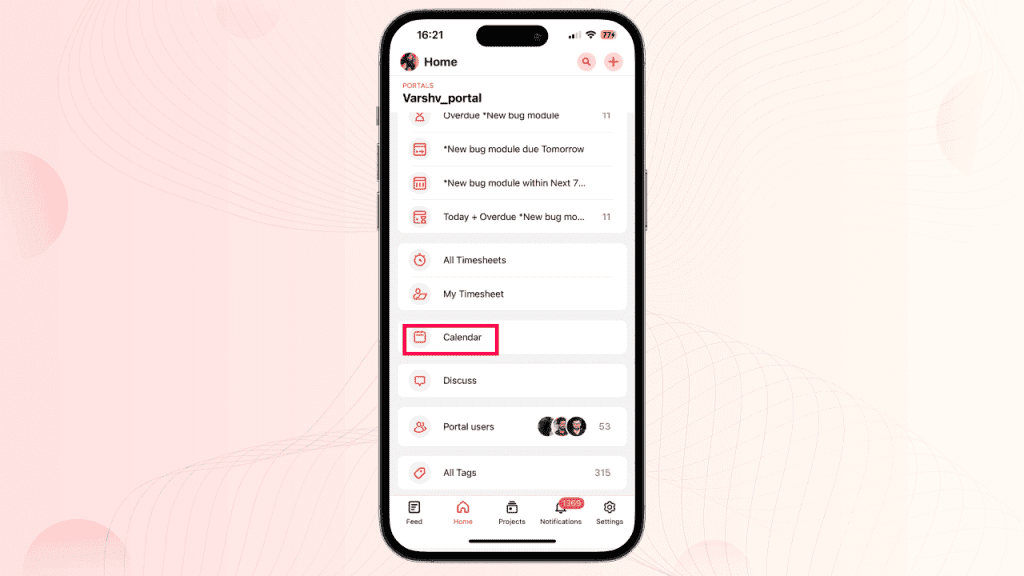
    Zoho Projects has launched version 3.8 of its mobile app for iOS, including a highly anticipated feature: the Global Calendar. Here are the details:

    This new feature displays tasks, bugs, milestones, and events from all your projects, providing a comprehensive view of your schedule and project timelines. The Calendar module is located in the ‘Home’ module of the Projects mobile app.

    (image via zoho)

    (image via zoho)

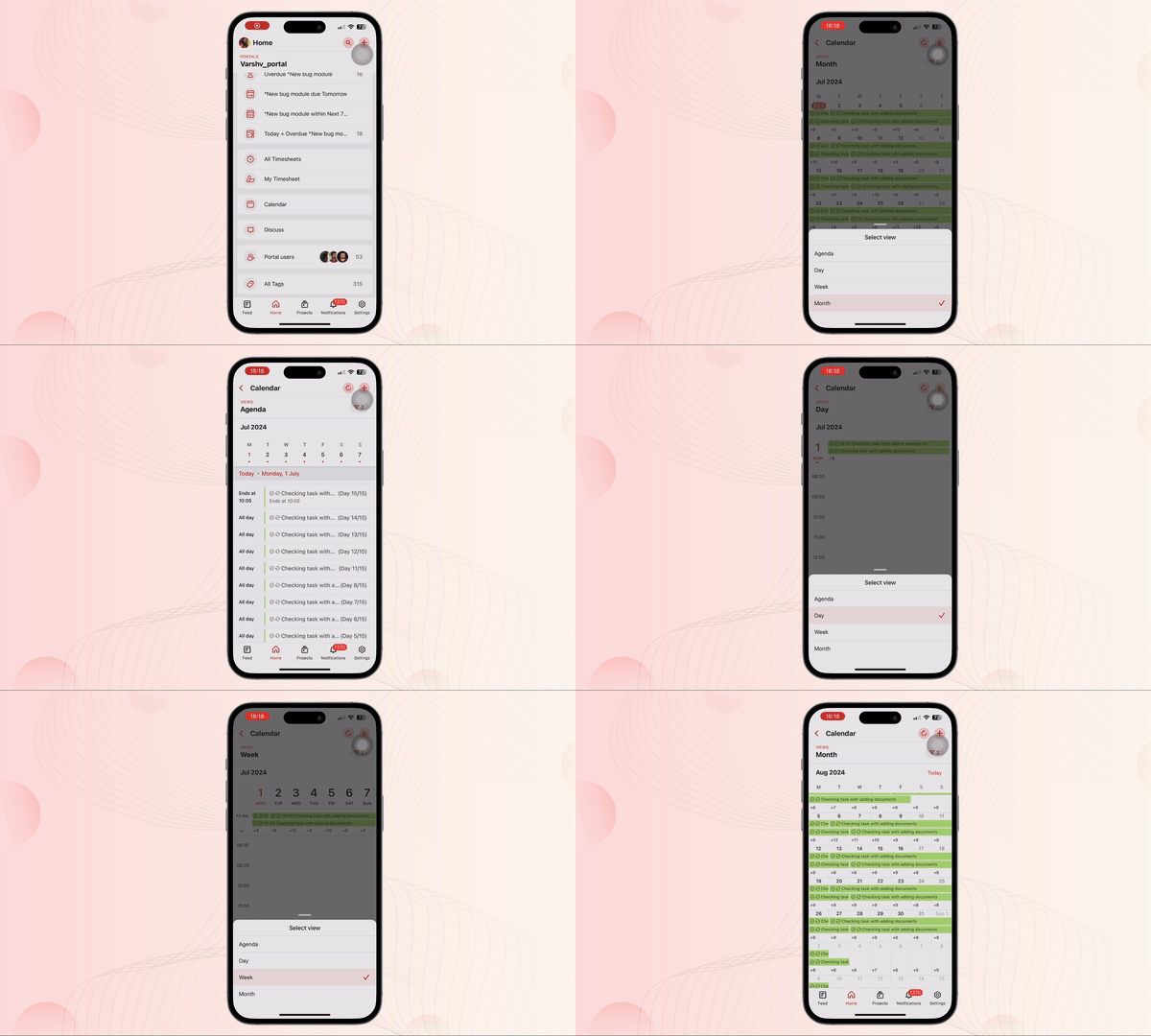
    The Calendar module offers four different views:

    • Agenda: Consolidated list of tasks, bugs, milestones, and events over several days.
    • Day: List of tasks, bugs, milestones, and events for the respective day.
    • Week: List of tasks, bugs, milestones, and events for a week.
    • Month: List of tasks, bugs, milestones, and events for the entire month.

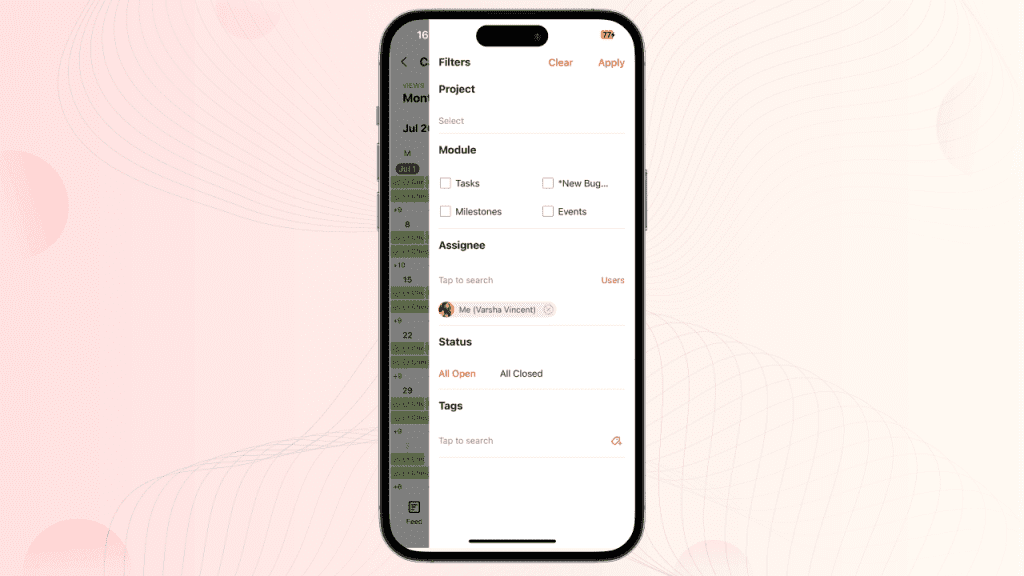
    It also includes multiple filters for more precise results, allowing you to sort and view specific items according to your preferences.

    (image via zoho)

    To use this feature, update the app to its latest version from the App Store or access the provided link.

    New record assignment by user roles in CRM Zoho

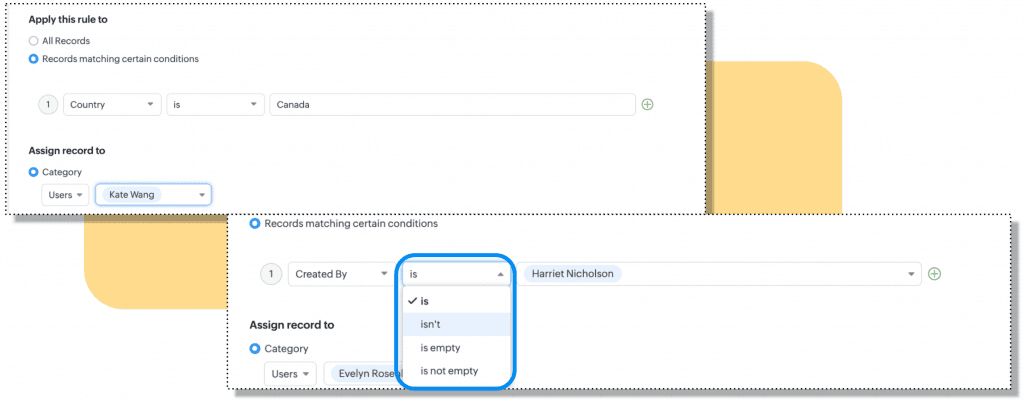
    Until now, when defining assignment criteria based on the user, the available criteria qualifiers have been: is, is not, is empty, and is not empty.

    (image via zoho)

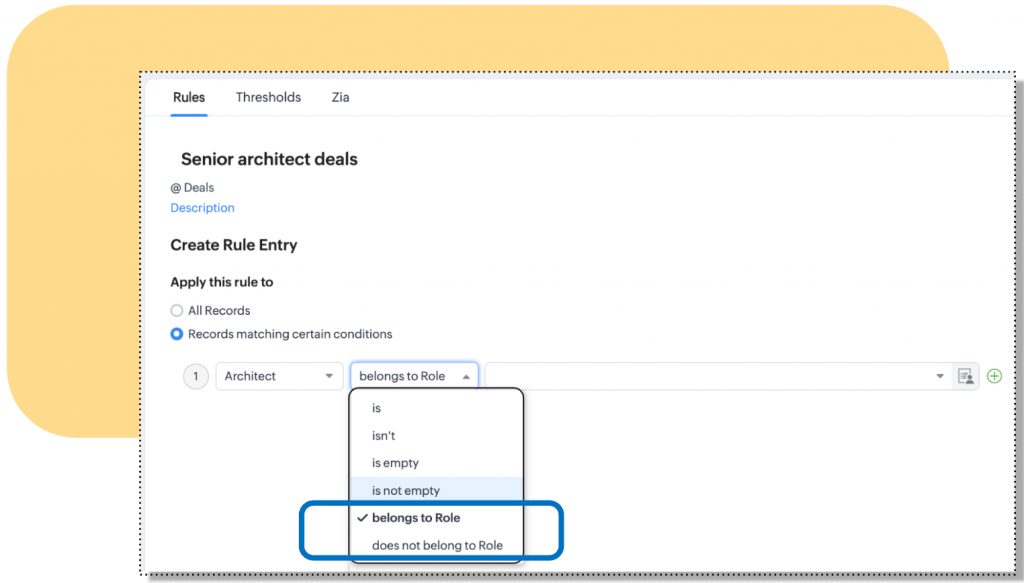
    In addition to the existing criteria, administrators can now use the “belongs to role” and “does not belong to role” criteria to assign records. This enhances the accuracy of automatic record assignment.

    For example, an architecture firm can automatically assign luxury projects to senior architects using this new role-based criterion.

    (image via zoho)

    Available for all editions and in all data centers.

    Sheet launches new data segmentations

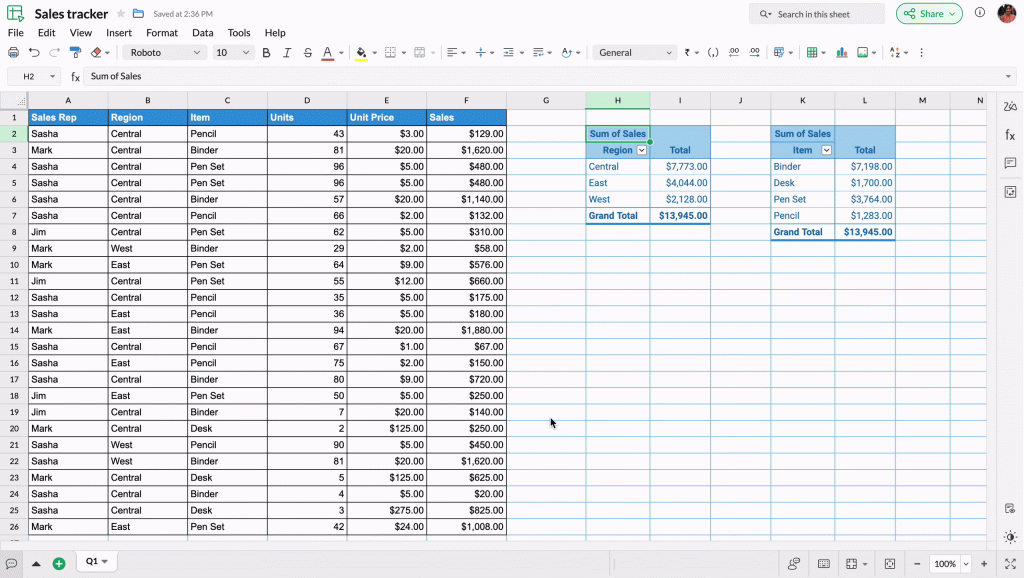
    Zoho Sheet has launched Slicers, interactive visual filters that enhance data management in pivot tables and charts, with options to add, edit, customize, and delete. Differences with Traditional Filters Slicers are prominent graphic elements that can be placed anywhere on the sheet, unlike traditional filters that are applied as dropdown menus within the table.

    (image via zoho)

    Connections Between Pivot Tables

    Slicers allow you to establish connections between multiple pivot tables that share the same data source, facilitating simultaneous filtering and analysis.

    Customization of Slicers

    You can customize the appearance of Slicers and their buttons, adjusting the layout, height, weight, and font to align them with other objects on your sheet.

    Webinars for Campaigns and CRM

    New feature enhancements in Zoho CRM Q2 2024

    Engage Customers with Integrated Email Marketing

    Digital signatures for digital contract management with Zoho CRM

    Do you want to add these new features to your Zoho system? Let’s work together! Learn more about our Zoho consulting services and contact us for a free consultation.

  • Implementation of the month: Transformation of Solar Energy Operations with Zoho One

    This month, we highlight an implementation carried out by our team for a leading solar energy company in Puerto Rico. 

    Challenge

    The company faced several operational challenges:

    • Dispersed customer data and ineffective lead tracking.
    • Manual and lengthy sales processes.
    • Inefficient campaign management and lack of ROI tracking.
    • Complex project planning and scheduling.
    • Laborious financial management and inaccurate project cost tracking.
    • Inefficient inventory management and lack of visibility in the supply chain.
    • Inefficient handling of customer support tickets and coordination of field service work.

    Solution

    To address these challenges, we proposed a comprehensive solution using Zoho. The project began in September 2019 with the implementation of Zoho CRM for a small team of 4 users, which allowed for the centralization of customer data and improved relationship management. In January 2022, the company expanded its use to Zoho One, increasing the user base to 745 employees and over 300 external subcontractors. This complete suite included Zoho CRM, Zoho Sign, Zoho Social, Zoho Analytics, Zoho Books, Zoho Inventory, Zoho Desk, and Zoho Creator, all integrated to support their complex operations.


    Benefits

    The implementation of the Zoho Suite and the services offered by InterConnecta brought several key benefits:

    • Automation: Numerous manual processes were eliminated, significantly reducing the time spent on administrative tasks.
    • Integration: The integration of various applications allowed for a holistic view of operations, improving coordination between departments.
    • Continuous Training: We provided ongoing online and in-person training, ensuring that staff were well-prepared to use the new tools and processes.
    • Support and Maintenance: Our team provided daily support and ongoing maintenance, ensuring that any issues were addressed quickly, keeping operations running smoothly.

    The adoption of Zoho One not only allowed for greater operational efficiency but also improved customer satisfaction by providing faster and more accurate service.


    Conclusion

    Our client was able to significantly transform their operations thanks to the implementation of Zoho, demonstrating a commitment to innovation and excellence in the solar energy sector. The collaboration with our team not only optimized their processes but also positioned the company for continuous growth and success in a competitive market.


    This is just one of many examples of how our solutions can transform and improve the way businesses operate. If you would like to learn more about how we can help you implement innovative technological solutions in your company, please do not hesitate to contact us.


    Contact Us Here

This site is registered on wpml.org as a development site. Switch to a production site key to remove this banner.