A leading company in the renewable energy industry faced significant challenges in managing its external sales teams. With a business model involving multiple agencies and external teams, they lacked a centralized solution to manage leads, opportunities, and sales orders. This situation resulted in inefficiencies, errors, and disorganization, negatively impacting their commercial performance.
To address these issues, the company implemented Sales Portal, a solution developed by InterConnecta designed to optimize external sales management and synchronize in real time with Zoho CRM.
Challenge
The company encountered several key obstacles in its external sales process:
Lack of a centralized system: External teams lacked a robust tool to record and follow up on leads, leading to scattered and duplicated information.
Disconnect between internal and external teams: The lack of real-time visibility caused delays in data updates and hindered strategic decision-making.
Manual and inefficient processes: The absence of proper tools made it difficult to progress in the sales cycle, delaying the conversion of leads into clients.
High operational costs: Providing Zoho CRM licenses to all external users was financially unsustainable.
Solution
InterConnecta implemented Sales Portal, a platform specifically designed for external users without Zoho CRM licenses. The solution included the following key features:
Controlled access: Users access the portal via a personalized URL with specific credentials.
Real-time synchronization: All data is automatically synchronized with Zoho CRM, ensuring consistency and accuracy.
Customizable roles: Roles such as Agency Admin and Agency User were assigned to manage permissions based on levels of responsibility.
Integrated task management: Tools to create tasks, schedule meetings, and attach documents directly within the portal.
Process automation: Direct generation of sales orders that are seamlessly reflected in Zoho CRM.
Benefits
The implementation of Sales Portal had a significant impact on the company’s processes and results:
Greater operational efficiency: Centralizing sales activities reduced time spent on administrative tasks, allowing teams to focus on client relationships.
Improved customer experience: An optimized workflow enabled faster responses to customer needs, increasing satisfaction.
Error reduction: Automation eliminated manual errors, ensuring accuracy in managing leads, contacts, and sales orders.
Increased transparency and control: Agency Admins gained full visibility over their teams’ activities, while Agency Users efficiently managed their own records.
Cost reduction: By eliminating the need for additional Zoho CRM licenses, the company optimized its financial resources.
Sales Portal enabled the renewable energy company to transform the management of its external teams, achieving efficiency, transparency, and cost reduction. This solution not only optimized every stage of the sales cycle but also strengthened collaboration between internal and external teams, ensuring sustainable results in the long term.
InterConnecta remains a leader in implementing innovative solutions like Sales Portal, adapting to the specific needs of diverse industries to maximize team and process performance.
Looking for customized solutions to optimize your business? We’re ready to help. Contact us!
Artificial intelligence (AI) is revolutionizing the employee experience within companies, improving internal communication and fostering a more efficient and connected work environment. Zoho Connect has integrated Zia, its AI assistant, to optimize various aspects of employee interactions.
Enhancements in communication with AI assistance Zia facilitates the drafting of clear and effective messages, assisting employees in creating more precise and engaging communications. This promotes more active participation and ensures that ideas and opinions are effectively shared across the organization.
Real-Time sentiment monitoring Understanding the emotions behind messages is essential. Zia analyzes the tone of comments and reactions, identifying whether they are positive, neutral, or negative. This information enables leaders to take timely actions to address concerns, reinforce positive aspects, and make necessary improvements, creating a work environment where employees feel valued and heard.
Executive summaries In dynamic work environments, there isn’t always time to read lengthy posts. Zia provides concise summaries of updates and important announcements, enabling employees to stay informed without feeling overwhelmed, fostering a shared understanding across the company.
Highlight capture in important meetings General meetings are vital for organizational alignment. Zia summarizes the key points of these discussions, ensuring all employees are aware of decisions and new initiatives, even if they couldn’t attend, promoting transparency and consistency in internal communication.
Benefits of integrating Zia into the workplace
Improved organizational communication: Zia simplifies message creation, ensuring clearer and more effective communications across the company.
Increased employee engagement: Real-time sentiment tracking allows leaders to respond quickly to employee feedback, ensuring they feel supported and heard.
Time savings and productivity boost: Zia’s quick summaries keep employees informed without consuming excessive time, allowing them to focus on priority tasks.
Organizational alignment: Zia ensures everyone is informed about key conversations and decisions, promoting a culture of transparency and collaboration.
The integration of Zia into Zoho Connect represents a significant advancement in enhancing the employee experience, adapting to communication needs in the era of remote and hybrid work. By leveraging AI capabilities, companies can create a more connected, efficient, and satisfying workplace for all team members.
Start your free trial of Zoho Connect today and discover how artificial intelligence can transform your workplace. Take the first step toward a more connected and efficient way of working!
Every day, businesses rely more on technology to sustain their operations, yet few stop to assess the economic impact of maintaining traditional, unsustainable systems. Inefficient data centers, uncontrolled energy consumption, and outdated infrastructures not only harm the environment but also represent significant hidden costs.
A technology infrastructure that does not prioritize sustainability generates unnecessary expenses in electricity consumption, maintenance, and equipment replacement. Additionally, in a context where environmental regulations are increasingly strict, the risk of penalties and losing sustainability-conscious customers directly affects a company’s financial results.
What is Green Computing and why is it the solution?
Green computing, or sustainable computing, is a way of leveraging technology to minimize its environmental impact while optimizing efficiency. This includes using more efficient data centers, designing infrastructures that harness renewable energy, and migrating to sustainable cloud solutions.
Unlike traditional systems, green computing not only reduces energy and operational costs but also enhances business performance by enabling greater flexibility, scalability, and process efficiency. Companies that have implemented these solutions report significant savings, along with a positive impact on their reputation.
The hidden costs of not adopting sustainable technology
Operating with traditional technologies means not only high operational costs but also:
Higher energy consumption: Inefficient data centers and servers are among the largest sources of energy expenses for businesses.
Brand reputation impact: More and more customers value companies committed to sustainability. Ignoring this trend can result in a loss of competitiveness.
Risk of penalties: Environmental regulations are becoming stricter, and companies that fail to meet sustainable standards may face fines.
Scalability limitations: Unsustainable infrastructures are often less flexible and require frequent investments to keep up with market demands.
How Green Computing can save you thousands
Adopting sustainable technology is not just an ethical decision but also a strategic one that can generate considerable savings. Here are some concrete examples:
Energy cost reduction: Green cloud data centers can save up to 40% in energy consumption thanks to the use of renewable energy and efficient designs.
Lower maintenance expenses: By operating in the cloud, businesses eliminate the need to maintain costly physical infrastructures.
Resource optimization: Green computing solutions often offer pay-as-you-go models, allowing businesses to spend only on what they need.
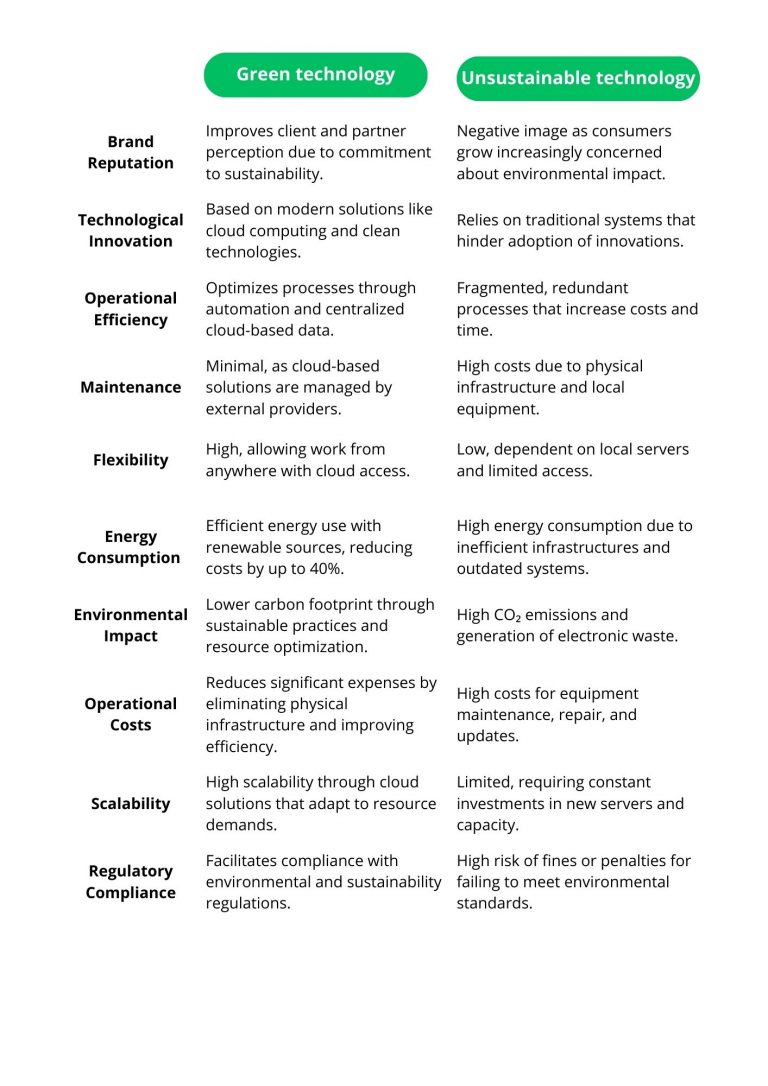
This comparison chart illustrates how green technology can transform your business compared to the limitations of unsustainable technology. Factors like energy consumption, operational costs, and regulatory compliance show how opting for sustainable solutions not only reduces environmental impact but also optimizes resources and improves business competitiveness.
Where to start?
Adopting sustainable technology doesn’t have to be complicated. These steps can help you transition to more responsible and efficient practices:
Evaluate your technological footprint: Conduct an audit to identify the areas with the highest energy consumption or waste generation. Use tools like carbon footprint calculators to detect inefficiencies and hidden costs you can optimize.
Migrate to green cloud solutions: Choose cloud service providers that use renewable energy and have sustainability certifications. This will not only reduce your environmental footprint but also optimize operational costs and improve scalability.
Train your team: Ensure your team understands the importance of technological sustainability. Provide practical training and guides to adopt best practices, fostering a culture aligned with your environmental goals.
Monitor and adjust your processes continuously: Implement systems to measure the impact of your new technologies and seek continuous improvements. Regularly evaluate energy consumption and optimize configurations to maximize efficiency.
Engage your customers and partners: Share your sustainability progress with clients and partners. This will not only strengthen your reputation but can also inspire others to adopt responsible practices.
Save money while protecting the planet
Unsustainable technology may be costing your business thousands without you even noticing. Adopting solutions like green computing will not only help you reduce costs and comply with environmental regulations but also enhance your ability to compete in a market that increasingly values responsible practices.
Want to learn how your business can start saving while contributing to a greener future? Contact us to explore personalized solutions that boost both your sustainability and profitability.
Zoho One: An All-in-One Solution for Technological Sustainability
One of the most effective ways to integrate sustainability into your business is through all-in-one platforms like Zoho One. This business suite not only centralizes all your company’s operations in the cloud—eliminating the need for multiple on-premises systems—but also optimizes resources and significantly reduces energy consumption.
By enabling businesses to operate more efficiently with interconnected tools for sales, marketing, finance, and more, Zoho One facilitates sustainable growth while reducing operational costs. Additionally, as a cloud-based solution, it leverages the benefits of green computing, helping you meet your sustainability goals while improving your business performance.
Track individual and team performance with essential KPI metrics in Desk
Now you can keep detailed track of individual and team performance using KPI metrics on Zoho Desk Dashboards. These tools are key to identifying areas for improvement, optimizing processes, and keeping your team aligned with goals. Tracking your metrics has never been easier!
Some of its benefits:
Individual and team tracking: monitor specific results and make strategic adjustments to achieve goals.
Customizable dashboards: tailor reports to clearly visualize the most relevant information.
Real-time alerts: receive notifications to continuously monitor progress and avoid deviations.
Historical analysis: identify trends and patterns to make data-driven decisions.
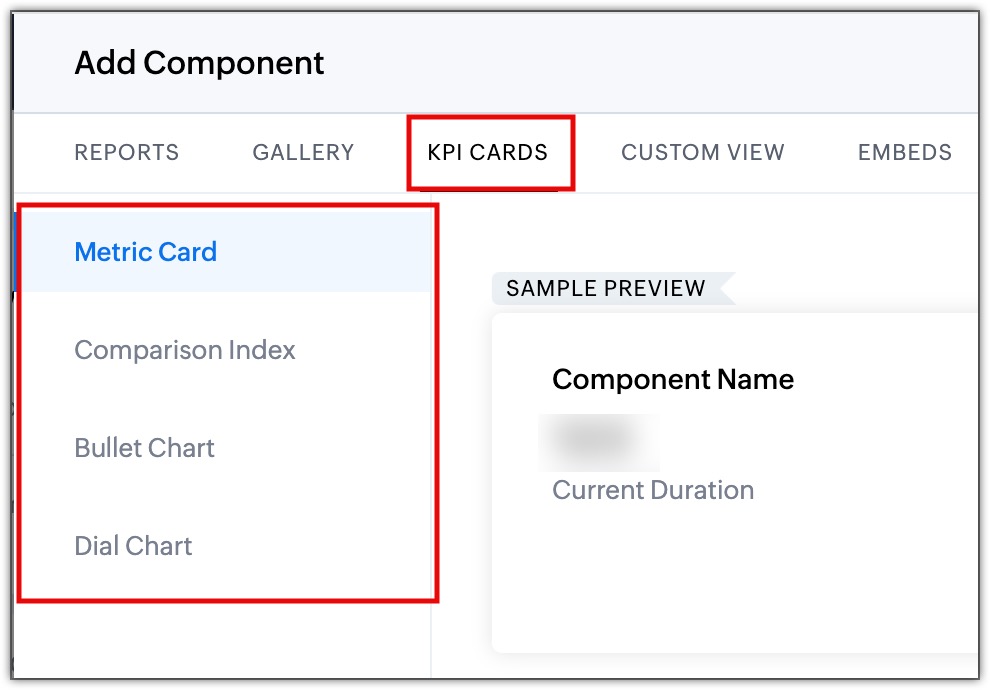
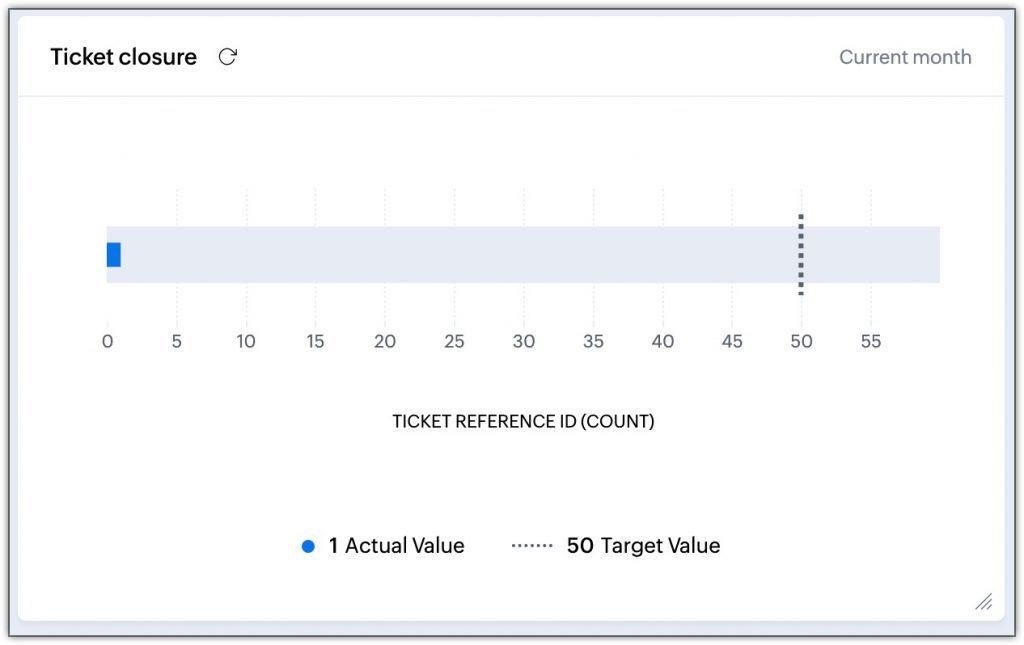
The new KPI cards include Metric Cards, Comparison Index, Bullet Chart, and Quadrant Diagram.
(image via Zoho)
They can be used for various scenarios:
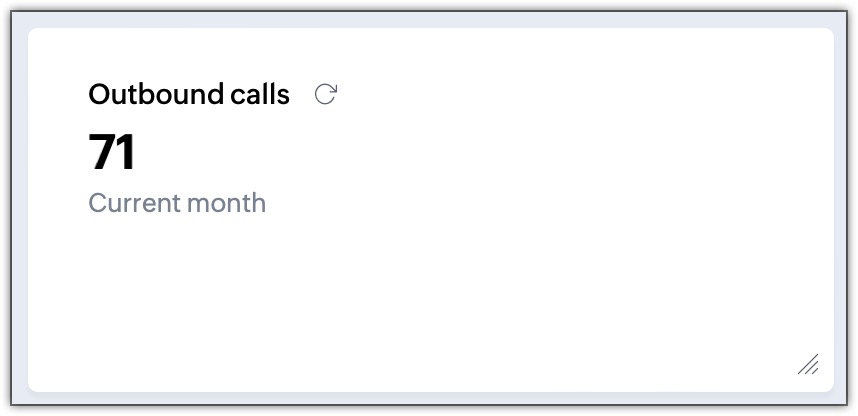
Tracking call productivity and efficiency
(image via Zoho)
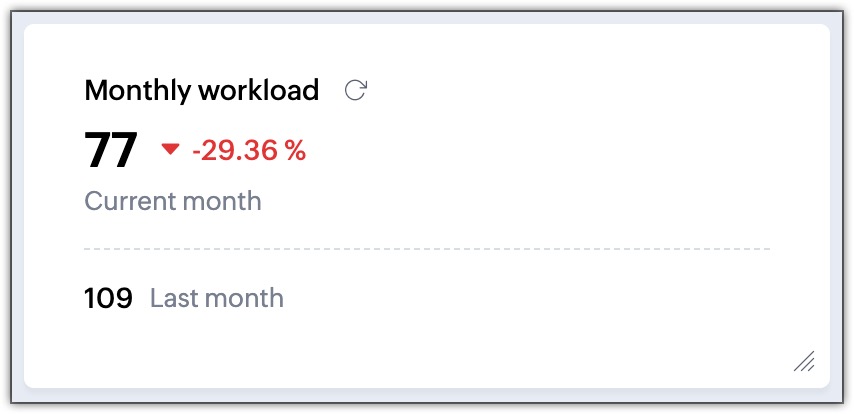
Identifying and comparing monthly workload
(image via Zoho)
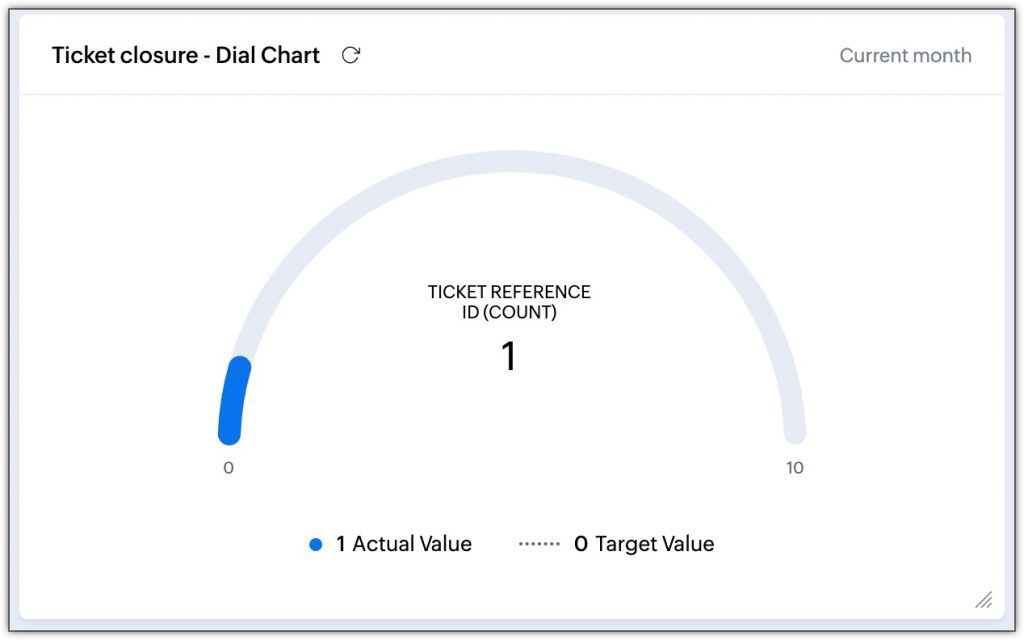
Monitoring ticket closure targets
(image via Zoho)
(image via Zoho)
Available to all users across all data centers.
New features and enhancements in Desk integration with Zia powered by GPT
Zoho announced new updates to the integration, and here are the details:
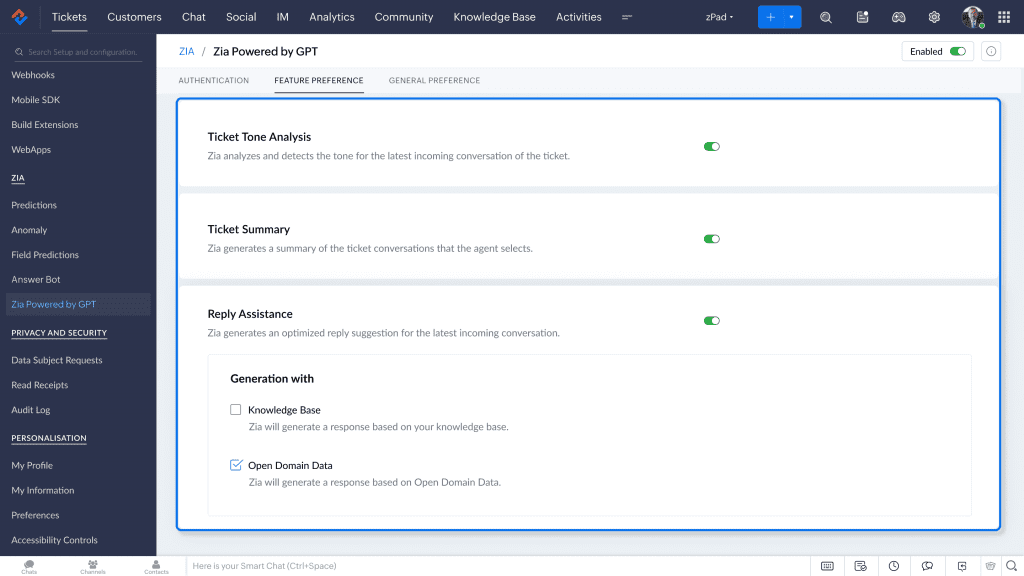
Response generation with Zia and ChatGPT
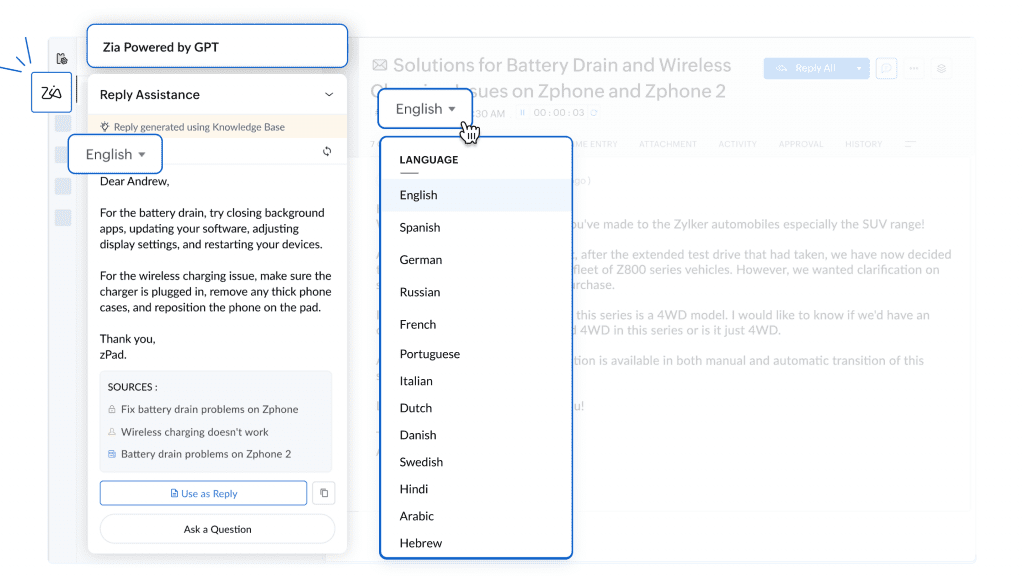
Zia can now craft responses for your agents using open-domain data and ChatGPT, your knowledge base, or a combination of both. This means that if a customer inquires about a specific product and the information is not in your knowledge base, Zia will turn to ChatGPT to provide an informed response.
(image via zoho)
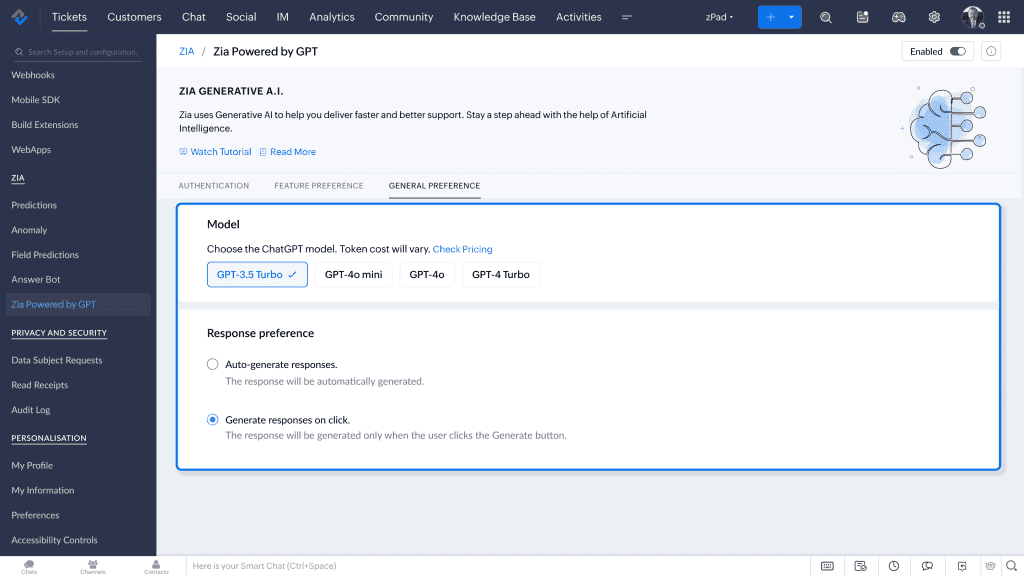
GPT Model selection
You can choose the GPT model Zia will use to generate responses, including GPT-3.5 Turbo, GPT-4o, GPT-4 Turbo, and GPT-4o Mini. This allows you to balance performance and cost-efficiency based on your support team’s needs.
(image via zoho)
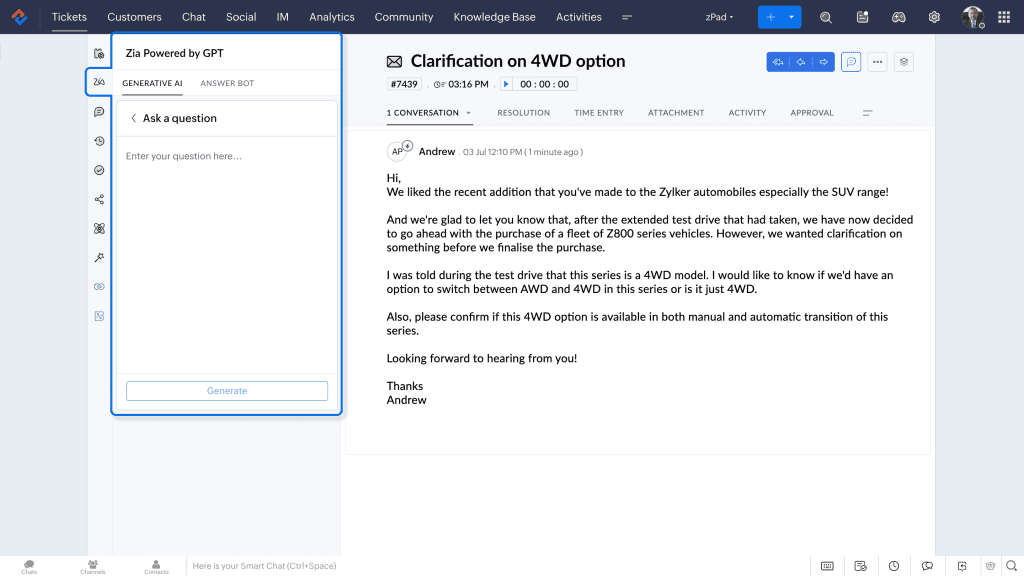
“Ask a Question” feature
With the new “Ask a Question” feature, agents have the freedom to ask Zia about specific doubts. Depending on the configuration you select, responses can come directly from your knowledge base or include GPT information. This ensures that the best possible answer is always offered, even if the data is not previously recorded.
(image via zoho)
Responses in more languages
Zia expands its capabilities by offering support in 13 different languages, including Spanish, English, German, Portuguese, and more. This means your customers can receive assistance in their native language, enhancing their experience with your brand.
(image via zoho)
Tone and response length customization
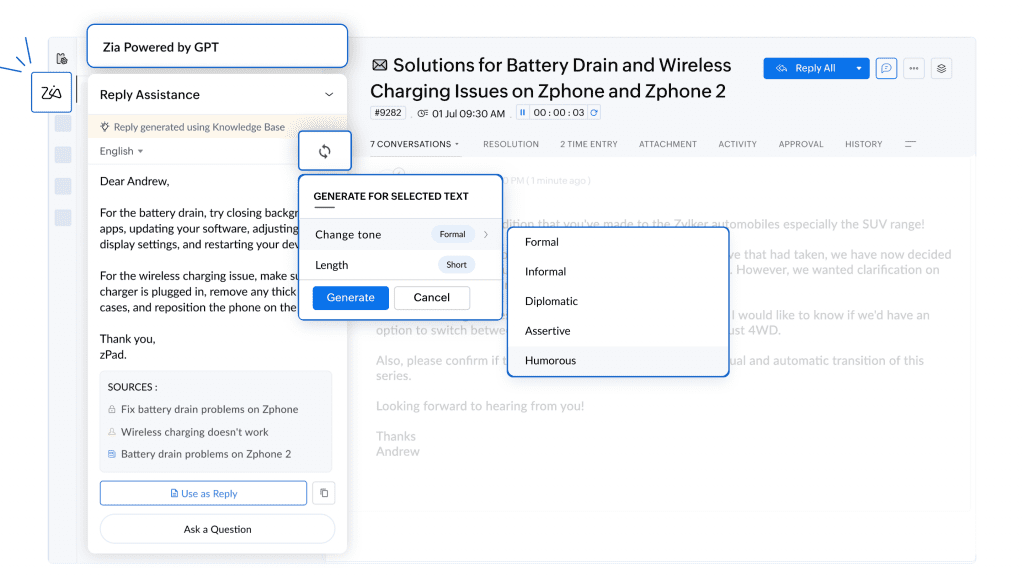
Configure Zia so its responses reflect your business style. Whether you prefer a more formal tone, a relaxed one, or even a touch of humor, Zia will adjust to maintain consistency with your brand image. Additionally, you can decide if the responses should be short and concise or more detailed, depending on the situation.
(image via zoho)
These improvements are now available to users in the EU, AU, US, and IN data centers.
Multiple WhatsApp Business accounts compatible with Sales IQ
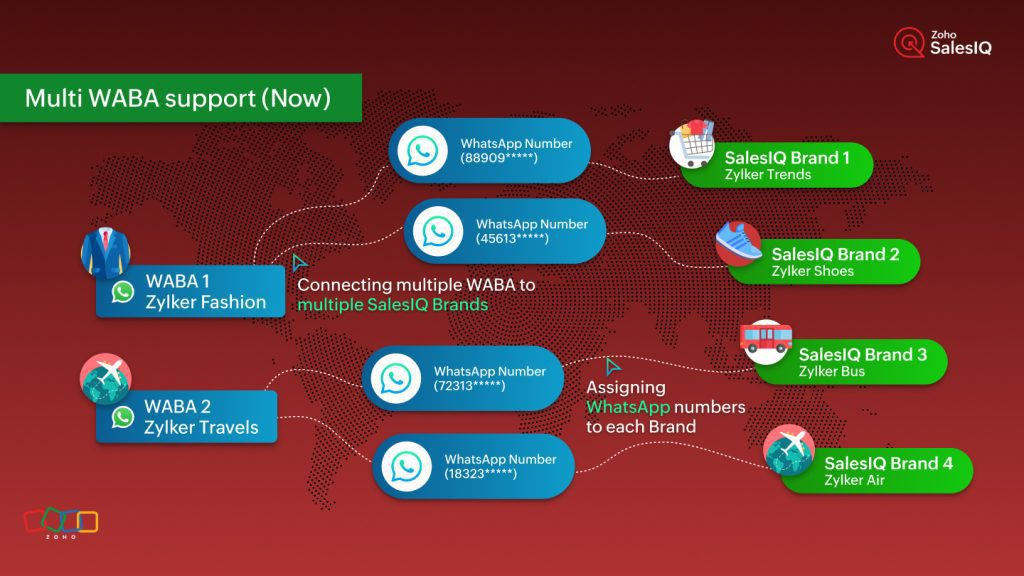
You can now connect and manage multiple WhatsApp Business (WABA) accounts within SalesIQ, enabling you to handle various brands more effectively, each with its own WhatsApp Business account.
Features:
Simplified Management of Multiple Brands
With this new functionality, you can assign a different WhatsApp Business account to each of your brands within SalesIQ. This streamlines communication management and ensures that each brand maintains its unique identity and customer support channel.
Seamless Integration with SalesIQ
Integrating multiple WhatsApp Business accounts into SalesIQ centralizes all incoming messages from your different brands into a single dashboard. This improves operational efficiency and enhances the customer experience by ensuring quick and consistent responses.
(image via zoho)
Key Benefits
Operational Efficiency: By centralizing the management of multiple WhatsApp Business accounts, you eliminate the need to switch between platforms, saving time and resources.
Improved Customer Support: Assigning specific accounts to each brand ensures customers receive more personalized responses aligned with each brand’s identity.
Scalability: This feature is ideal for businesses managing multiple brands or product lines, allowing for seamless expansion in WhatsApp Business account management.
To take advantage of this update, simply go to the messaging channels configuration section in Zoho SalesIQ and add the different WhatsApp Business accounts you want to integrate. Once configured, you can manage each brand’s interactions independently but in a centralized manner.
This enhancement is now available for all Zoho SalesIQ users.
Zoho Cliq 6.0: simpler, faster work, new mobile features, automations, and more
Zoho Cliq 6.0 arrives with significant improvements that make team collaboration and communication smoother and more effective.
Simplified and More Intuitive Interface You can now enjoy a revamped interface designed to make essential features more accessible and enhance the user experience. This update prioritizes simplicity so you can find what you need without complications.
Next-Level Automation Manual repetitive tasks? That’s a thing of the past! With Zoho Cliq 6.0, you can set up custom workflows that integrate various applications and eliminate repetitive tasks, freeing up time to focus on strategic priorities.
Bots that make calls for alerts
Generation of charts and tables in chats
Configurable recurring tasks
Optimized for Mobile Devices With an improved design for mobile users, Zoho Cliq ensures you can stay connected and productive wherever you are. This version is designed for the flexibility of teams on the go.
The app allows screen sharing
Managing meetings
Using advanced search to easily locate messages and files
Enhanced Performance Access to messages and call connections now takes less than two seconds. Video streams start in just two seconds, and administrative management loads user lists in milliseconds, even in large organizations.
Advanced Management for Administrators If you manage your team’s settings, it’s now easier to handle permissions, users, and configurations, ensuring a secure environment tailored to your organization’s needs.
New controls to protect data (DLP)
Manage teams on a large scale
Automatically organize channels and bots for new members
Tools like panel search, report export, and IP-based restrictions
Improved Collaboration with Powerful Integrations Cliq 6.0 enables seamless integration with other Zoho applications and third-party tools, ensuring your teams work more connected and without interruptions.
Features like automatic chat summaries
Advanced message editing
Meeting customization
Extracting text from images
Viewing colleagues’ availability
Now available for all users.
New categorization options in Zoho CRM
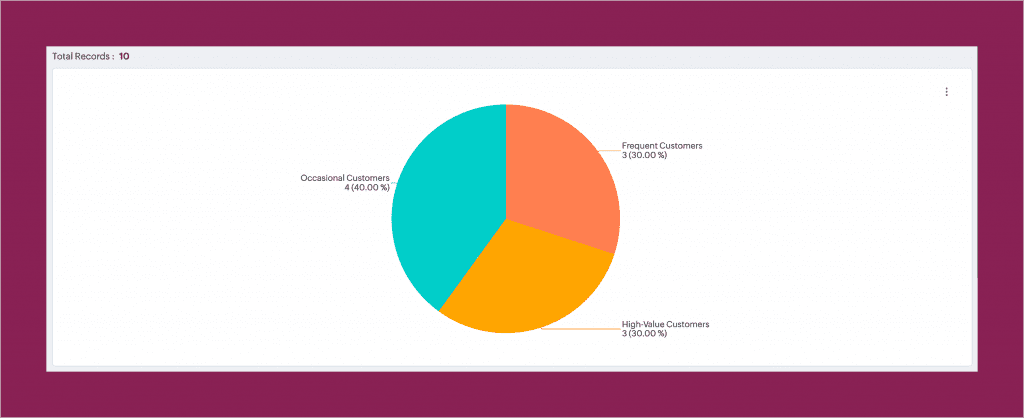
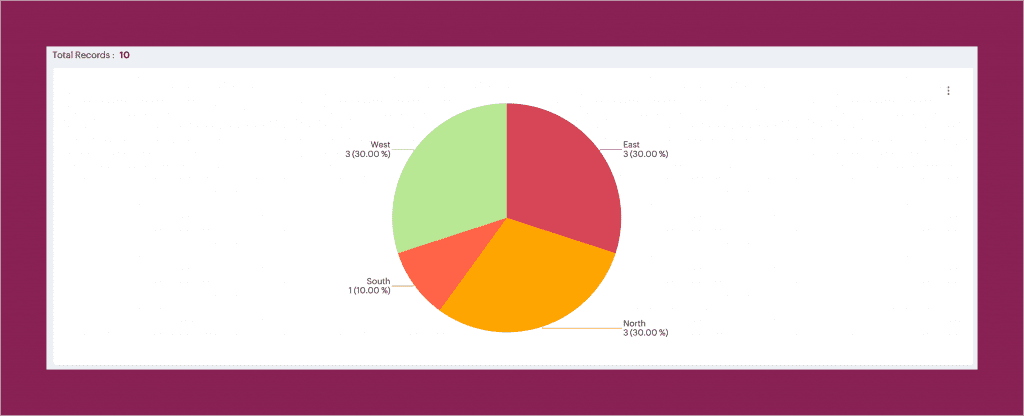
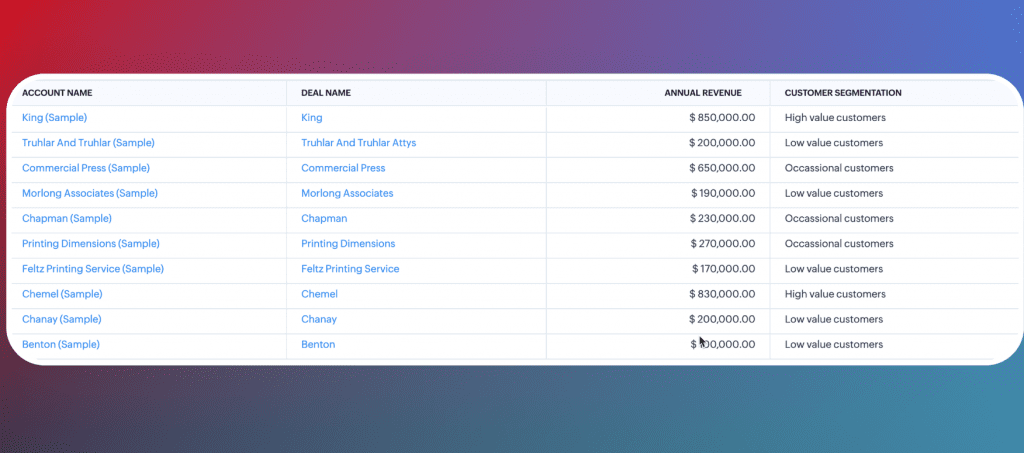
Zoho CRM introduces a powerful feature that allows you to categorize values in your reports using columns based on numbers or picklists. These options simplify analysis, precisely segment data, and turn information into actionable insights to optimize your operations.
Number-Based Columns: Group numerical ranges into custom categories, such as classifying customers by revenue.
(image vía zoho)
(image vía zoho)
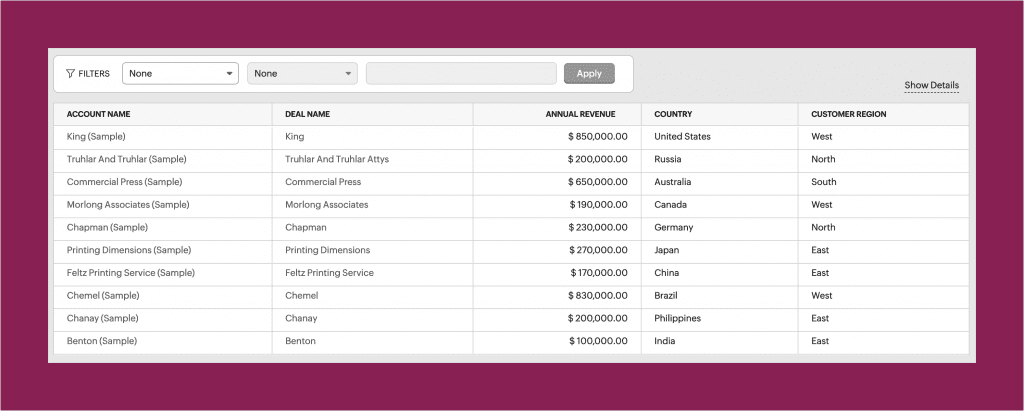
Picklist-Based Columns: Organize dropdown values into meaningful categories, such as grouping countries into regions.
(image vía zoho)
(image vía zoho)
Benefits of Categorization in Reports
Custom Category Definition: Tailor categories to your business’s specific needs, enabling precise data segmentation.
Turning Data into Actionable Insights: Transform scattered data into meaningful segments that your business can effectively address.
Trend and Anomaly Detection: By grouping data, identify well-performing segments, those needing attention, or invalid information.
Implementing Categorical Columns
To add a categorical column to your reports, follow these steps:
Select the report and click on “Edit.”
Click on the “+” icon to add a new categorical column.
Choose the source column whose values you want to categorize and assign a name to the new column.
Create the categories by adding names and defining the ranges or values for each category.
Considerations and Limits
Number-Based Columns: You can add up to 10 categories, plus the minimum and maximum categories defined by the system. A maximum of two categorical columns is allowed in row and column groups.
Picklist-Based Columns: Up to 10 categories can be added, with a maximum of 20 values per category. As with numerical columns, a maximum of two categorical columns is allowed in row and column groups.
This functionality is now available to all Zoho CRM users.
Webinars on Zoho CRM for Everyone, Analytics, and CRM
Meetup online Zoho CRM for Everyone – Zoho España
Zoho CRM Webinar: Streamline Frequent Processes with Kiosk Studio
In this edition of Implementation of the Month, we highlight a comprehensive solution designed by the InterConnecta team for a retail chain facing significant operational challenges. Manual processes and fragmented tools hindered inventory management, prolonged transaction times, and complicated dispatch coordination from multiple warehouses, impacting the customer experience.
Challenge: The company faced multiple obstacles in its operational processes:
Fragmented sales processes: The sales team used different platforms for invoicing, inventory management, and product dispatch. This extended transactions to up to 15 minutes, creating bottlenecks at points of sale and frustrating customers.
Dispatch logistics difficulties: Coordinating shipments from multiple warehouses was a manual and error-prone process, affecting the ability to meet delivery times and customer satisfaction.
Complex inventory management: Products with serial numbers required precise control, but the lack of adequate tools increased errors and complicated traceability.
Manual application of discounts and promotions: The lack of automation in this area limited the effectiveness of marketing campaigns and caused frequent billing errors.
Solution: InterConnecta developed and implemented Inter Retail, a custom application that integrated Zoho CRM, Zoho Inventory, and Zoho WorkDrive into a unified ecosystem. This allowed the company to centralize and automate its processes, achieving significant operational improvements.
The main features of this implementation include:
Automation of the sales process, from order generation to dispatch.
Efficient multi-warehouse dispatch management, allowing coordination of immediate or scheduled shipments.
Serial number scanning for faster and more accurate product control.
Centralized document management through Zoho WorkDrive for quick storage and access to invoices, warranties, and electronic signatures.
Automation of discounts and promotions with direct, error-free application at the end of transactions.
Benefits: The implementation of Inter Retail, generated a significant impact on both operational efficiency and the customer experience. Key results include:
Reduction in sales time: Transactions were reduced from 15 minutes to just 1-2 minutes, saving 85% of the time spent on each process.
Optimization of inventory management: Precise control through serial number scanning improved product traceability and minimized the possibility of errors.
Improvement in customer experience: By reducing wait times and eliminating billing errors, customers enjoyed a faster and more reliable shopping experience.
Increased team productivity: Process automation allowed staff to focus on higher-value activities, increasing overall efficiency.
Logistical flexibility: Multi-warehouse integration improved dispatch coordination, enabling the company to meet tighter delivery times.
This implementation marked a turning point in the operations of the retail chain. With faster processes, optimized inventory management, and a centralized workflow, the company overcame its operational challenges and strengthened its position in a competitive market.
The integration of Zoho CRM, Inventory, and WorkDrive proved to be a key solution in transforming manual and fragmented processes into an agile, reliable, and efficient operation. This case reaffirms how a well-executed technological strategy can significantly boost productivity and enhance the customer experience.
Is your company facing a challenge that seeks to be overcome through the implementation of custom solutions? We’re here to help you turn those challenges into opportunities. Contact us today!
Efficient communication is the heart of any successful team. However, keeping up with conversations, coordinating tasks, and avoiding misunderstandings can become a daily challenge. This is where Zoho Cliq steps in with its artificial intelligence (AI) integration, offering practical solutions that make work simpler and more efficient.
At InterConnecta, we believe in maximizing the potential of technological tools to optimize team performance. Today, we want to share how Zoho Cliq’s AI features can transform the way your company collaborates and makes decisions.
Smart Productivity: Beyond Simple Communication Talking about smart productivity is much more than just optimizing time. It’s about using advanced technology to improve the quality of our interactions and decisions. Zoho Cliq, by integrating AI-based tools, redefines workflows, allowing teams to focus on what truly matters: results. Here are some of the features that make Cliq an essential tool for any modern team.
AI Features in Zoho Cliq That Redefine Productivity
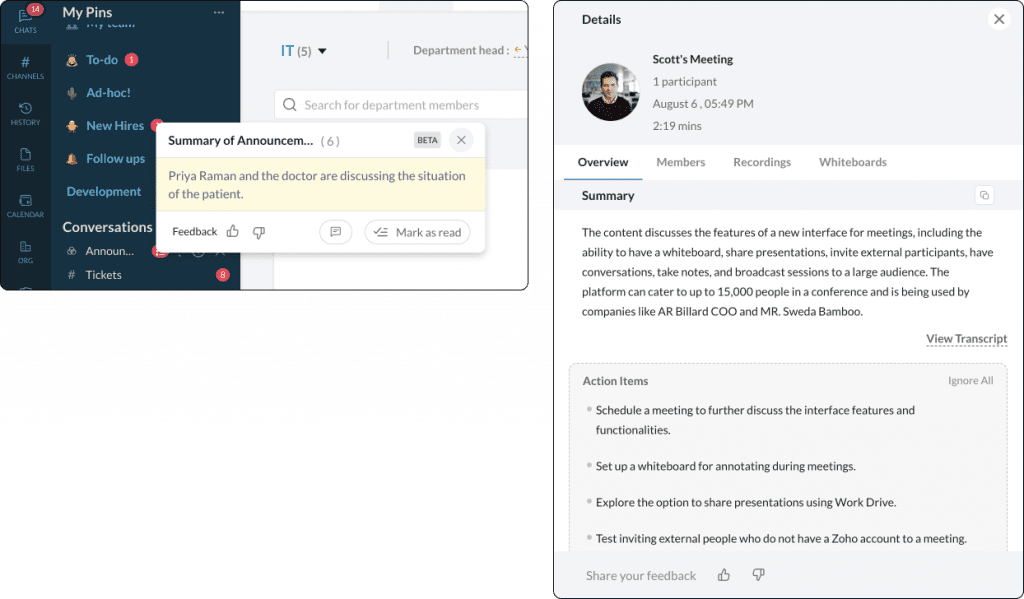
Automatic Summaries: Catching Up Has Never Been Easier Have you ever opened a group chat after several hours to find a flood of messages? With Zoho Cliq, you no longer need to read everything. Its automatic summary feature condenses lengthy conversations into key points, helping you quickly get back on track. This also applies to meetings, where AI summaries provide a precise breakdown of what was discussed.
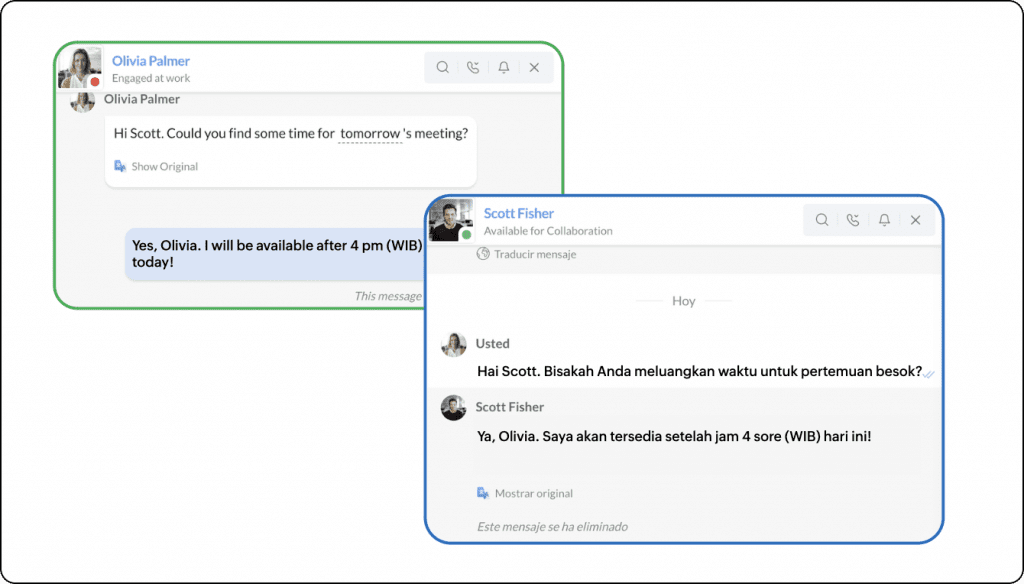
Real-Time Translation: Goodbye Language Barriers Globalization connects us with teams and clients from different countries. Zoho Cliq integrates ZIA, its artificial intelligence, to translate messages into the language you need in seconds. This feature not only saves time but also prevents misunderstandings caused by language barriers.
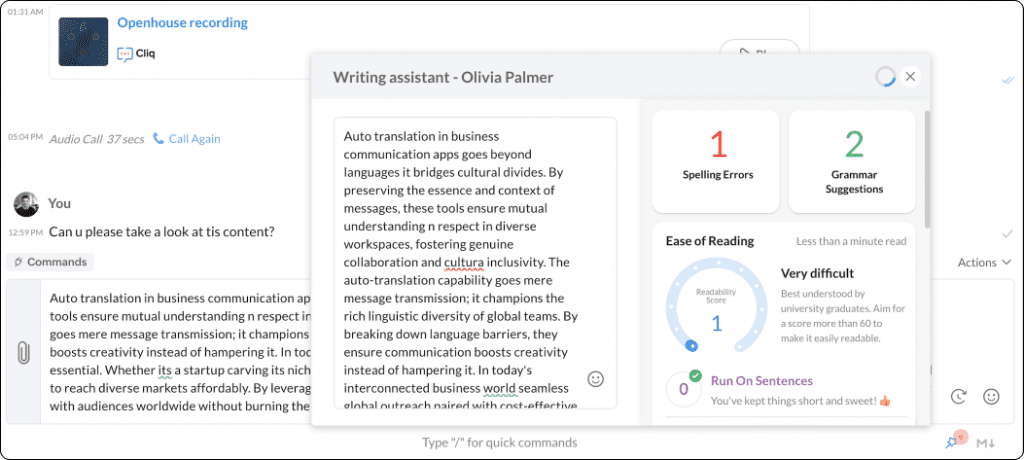
Writing Assistant: Clear and Effective Messages Clarity in communication is key. Cliq’s writing assistant not only corrects grammatical errors but also suggests adjustments to ensure your message’s tone is professional and appropriate for the context. It’s like having a personal editor in your pocket.
Boost Your Workflow with ChatGPT Zoho Cliq integrates with ChatGPT to offer advanced solutions, such as generating ideas, answering technical questions, summarizing conversations, or even designing simple images. This integration takes daily productivity to a whole new level, automating tasks that previously required more time and effort.
Smart Searches with OCR Searching for important information among messages or documents can be tedious. The search function based on optical character recognition (OCR) allows you to locate files, images, or relevant messages by simply entering a keyword. This makes accessing critical information faster and more efficient.
Channel Recommendations: Connection and Context Zoho Cliq learns from your activity to suggest channels that might interest you based on your interactions and preferences. This way, you never miss conversations or topics relevant to your work.
Automation with Custom Bots Thanks to Cliq’s development platform, you can design bots tailored to your business’s specific needs. From automatic reminders to data collection, custom bots eliminate repetitive tasks and allow teams to focus on what matters.
Contextual Reminders: Never Forget What’s Important When Cliq detects dates, times, or commitments in your messages, you can turn them into reminders with just a couple of clicks. This feature ensures you always stay on top of your tasks and events.
Transforming the Way We Work with Zoho Cliq At InterConnecta, we don’t just implement technological tools; we help companies get the most out of them. Zoho Cliq, with its AI-driven innovations, is a clear example of how technology can eliminate distractions and enhance collaborative work.
If you’re looking to take your team’s productivity to the next level, contact us. Our team of experts is ready to help you integrate Zoho Cliq and make the most of its features. Working better doesn’t have to be complicated, and with the right tools, the change starts today.
Today, technology and innovation are redefining processes in the renewable energy industry with the goal of creating a more sustainable future. One of the main challenges that companies in this sector face is how to efficiently manage their energy resources in real time without sacrificing productivity or increasing costs. Zoho, a leading technology solutions company, has launched its Zoho IoT platform to address this need.
This service allows organizations to leverage the power of the Internet of Things (IoT) to intelligently and automatically manage and optimize a variety of systems, from energy production to distribution.
IoT has become a fundamental ally in the digital transformation of companies. It enables the interconnection of devices, sensors, and systems to collect real-time data. This, in turn, enables predictive analysis, resource optimization, and better decision-making. The Zoho IoT platform stands out for its flexibility and adaptability to different industries and has been designed to address specific challenges.
One of the most innovative modules of Zoho IoT is the Energy Management Service (EMS),which is optimized for companies in the renewable energy sector. Below, we will explore the key functionalities of this service and how it can benefit organizations seeking to improve energy efficiency and reduce their environmental footprint.
What is Zoho IoT’s Energy Management Service?
Zoho IoT’s Energy Management Service (EMS) is an advanced tool that helps companies monitor, analyze, and optimize their energy consumption. In a context where energy resources are increasingly costly and sustainability is a priority, EMS allows companies to efficiently manage their resources, reduce waste, and optimize energy performance.
According to a study by McKinsey & Company, the potential energy savings through IoT technologies in energy companies can reach between 20% and 30%, representing a significant opportunity for those looking to innovate in their energy operations.
With Zoho IoT, companies can not only monitor energy usage in real time but also anticipate and solve problems before they become major obstacles. This ability to make proactive rather than reactive adjustments is essential in a sector like renewable energy, which constantly faces shifts in demand and variations in energy generation. Executives in this sector, therefore, find in Zoho’s EMS an ally for making informed decisions based on accurate, real-time data, thereby improving operational resilience and increasing profitability.
Key Functions of Zoho IoT’s Energy Management Service
Real-Time Monitoring
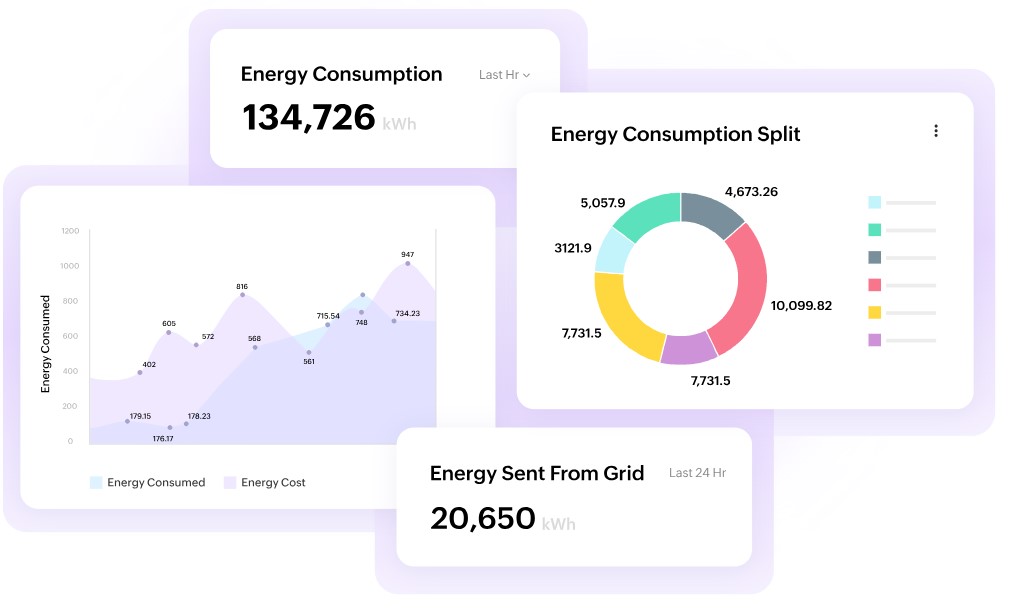
Zoho IoT’s EMS allows real-time monitoring of energy flows at every stage of the process. This is essential to detect anomalous consumption patterns, identify inefficiencies, and make real-time adjustments. This monitoring enables energy managers to obtain a clear and precise view of the status of each component, whether a turbine, a solar panel, or a storage battery.
With this continuous monitoring capability, the EMS not only reports on current energy use but also helps identify peak demand times, facilitating the implementation of strategies to reduce peak consumption.
Energy Optimization
One of the main benefits of Zoho’s EMS is its ability to analyze energy data and suggest improvements to optimize energy use. By accessing this data in real time, energy managers can reduce waste and improve operational efficiency. This energy optimization translates into a direct reduction in operating costs while contributing to meeting sustainability goals.
According to a report by the International Energy Agency (IEA), improvements in energy efficiency could reduce global carbon emissions by up to 40% by 2040. These improvements are especially relevant for companies that, in addition to being efficient, aim to comply with increasingly strict sustainability standards.
Smart Alerts and Preventive Maintenance
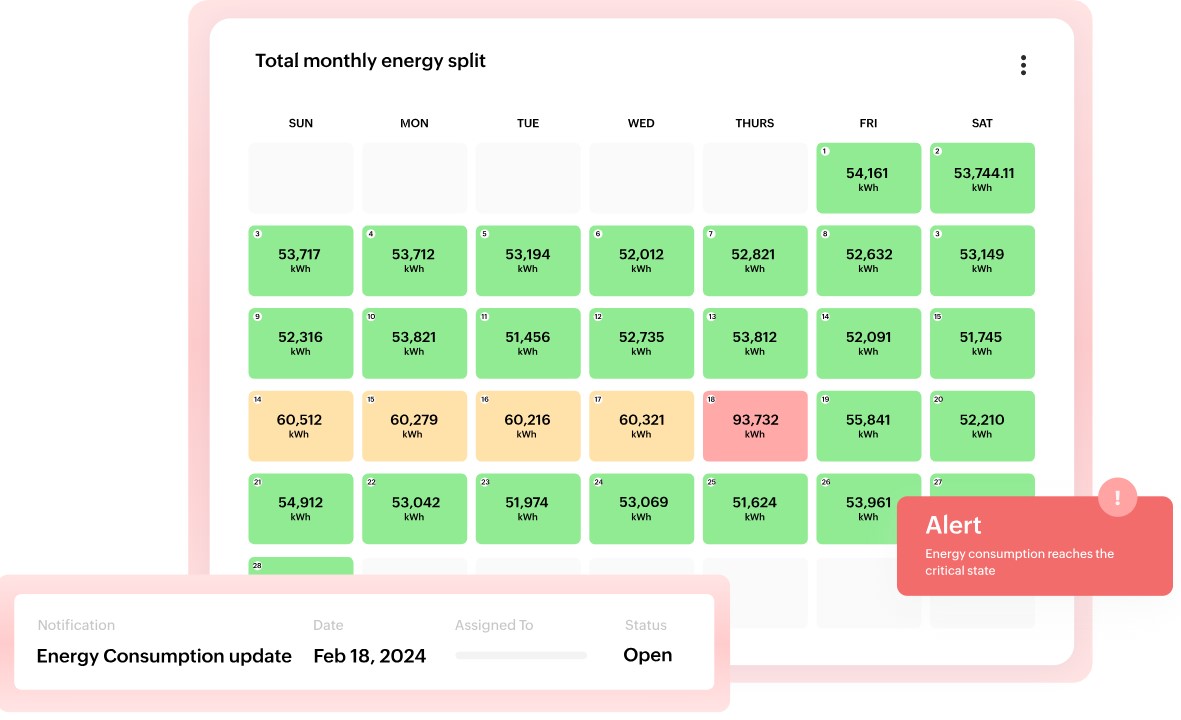
Zoho IoT’s EMS incorporates a smart alert system that notifies operators of any anomaly in energy consumption or potential equipment failures. Thanks to this system, companies can adopt a preventive maintenance approach, identifying and solving issues before they affect production or increase costs.
Failure prevention is particularly important in the renewable energy sector, where an interruption can lead to significant economic losses. Smart alerts also allow maintenance to be coordinated during periods of low energy demand, reducing downtime and improving overall system efficiency.
Compliance with International Standards
As environmental regulations become stricter, it is vital for renewable energy companies to comply with international standards of efficiency and sustainability. Zoho IoT’s EMS facilitates this compliance by providing detailed reports on energy usage, simplifying auditing and certification according to standards like ISO 50001. This standard is widely recognized and requires companies to establish systems and processes to improve energy efficiency, which not only optimizes resources but also builds trust among investors and customers.
Carbon Footprint Management
Reducing the carbon footprint is a priority in the renewable energy industry, and Zoho IoT’s EMS enables detailed tracking of carbon emissions. By analyzing energy data, companies can identify areas that generate higher emissions and develop effective strategies to mitigate them. This not only contributes to the environment but also enhances the company’s reputation in the market.
The renewable energy sector is at a critical point where efficiency, sustainability, and regulatory compliance are key to success. The Zoho IoT platform and specifically, the Energy Management Service, provide companies with the necessary tools to meet these challenges. With functionalities such as real-time monitoring, energy optimization, smart alerts, and carbon footprint management, Zoho IoT positions itself as an essential ally for companies looking to lead the shift towards a greener energy future.
Are you interested in optimizing your renewable energy business? Fill out our form, and one of our specialists will contact you to explore how Zoho IoT can boost efficiency in your operations.
Enhancement of self-service capabilities with AI-based Zia Answer Bot
Zia Answer Botnow offers greater accuracy that enhances self-service, allowing users to resolve queries independently. By utilizing the knowledge base (KB), it provides quick and accurate responses to agents and customers, thanks to its self-learning with available articles. It supports 13 languages, ensuring fast and effective assistance worldwide.
Zia Answer Bot for Customers
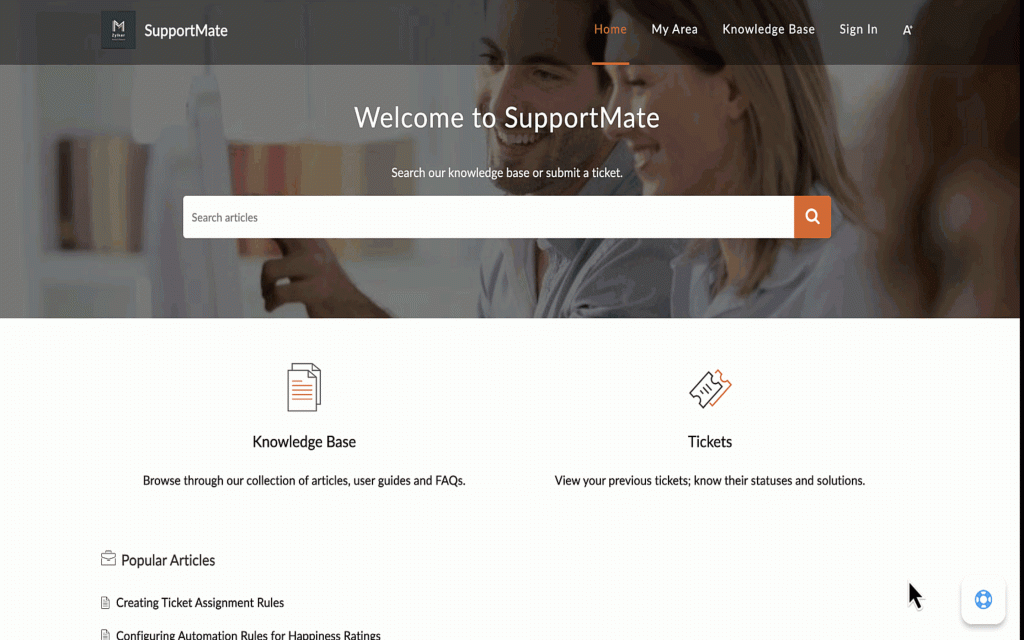
Now you can resolve your queries by accessing the resources available in the help center. With Zia Answer Bot, you will receive quick assistance and access relevant information without having to search through multiple articles.
(image vía zoho)
Zia Answer Bot for Agents
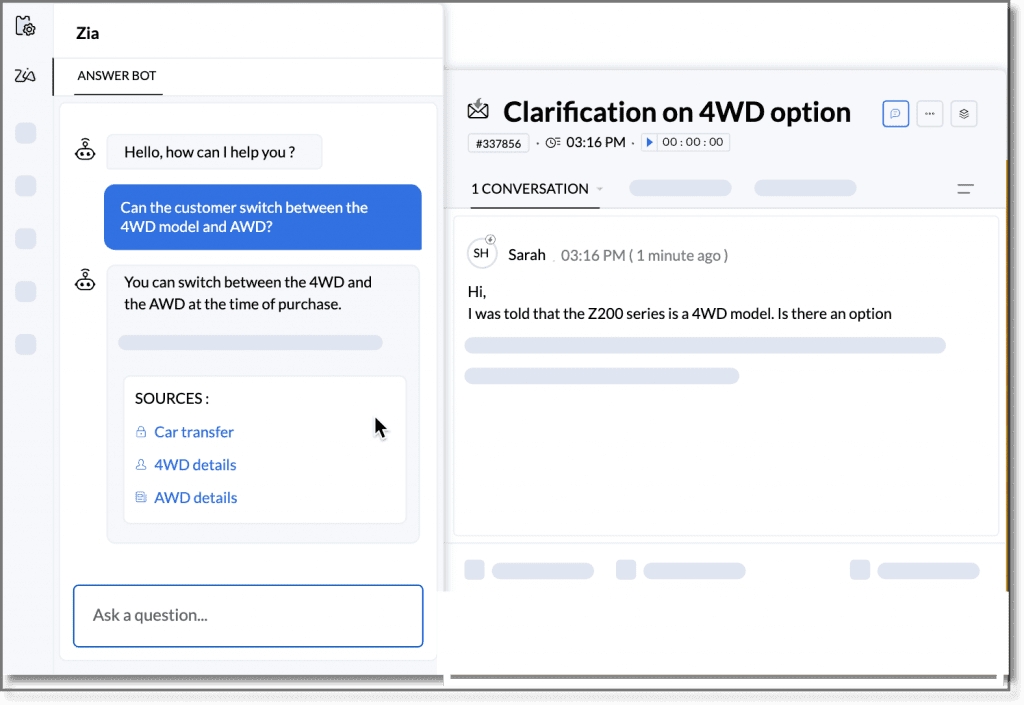
If you are a support agent handling multiple interactions, you can now use Zia Answer Bot to quickly access relevant knowledge base articles and learn the key steps to resolve queries without leaving the detailed view of the ticket.
(image vía zoho)
Training Zia Answer Bot
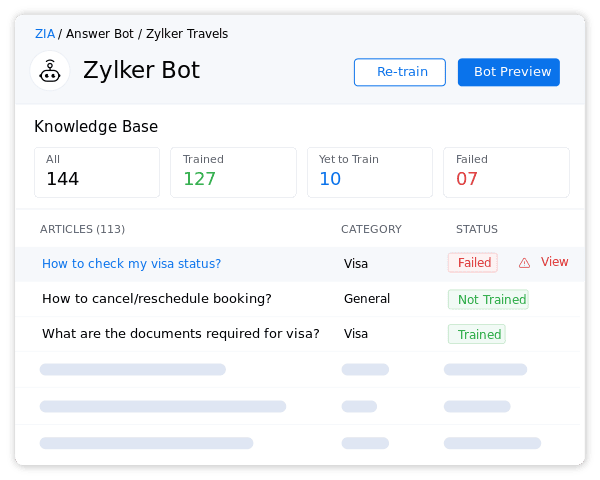
Once created and saved, Zia Answer Bot begins to train automatically with the available articles in the knowledge base. After the first training round, you can view the status, including how many articles it has trained, how many are pending, and if there were any failures in the process. Each time an article is created or updated, you have the option to manually retrain the bot, although the scheduler is set to do so every thirty minutes.
(image vía zoho)
Best Practices for Optimal Results
To achieve the best results with Zia Answer Bot, it is recommended to use clear and simple language, explaining technical terms when necessary. It’s important that the article is in one of the 13 languages supported by the bot and contains between 100 and 100,000 characters; ideally, each paragraph should not exceed 1,000 characters. Additionally, structuring the content with clear and concise titles and subtitles facilitates the bot’s comprehension. Keep articles updated and consider including frequently asked questions in help articles to effectively address the most common inquiries.
This feature is available for users in the U.S., AU, EU, and IN data centers.
Identify and prioritize profitable deals in Zoho CRM
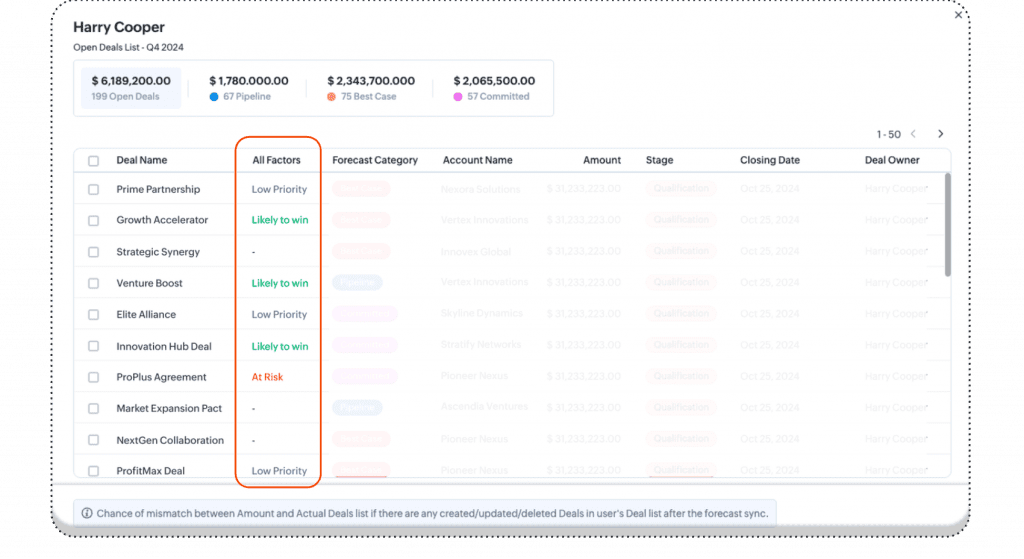
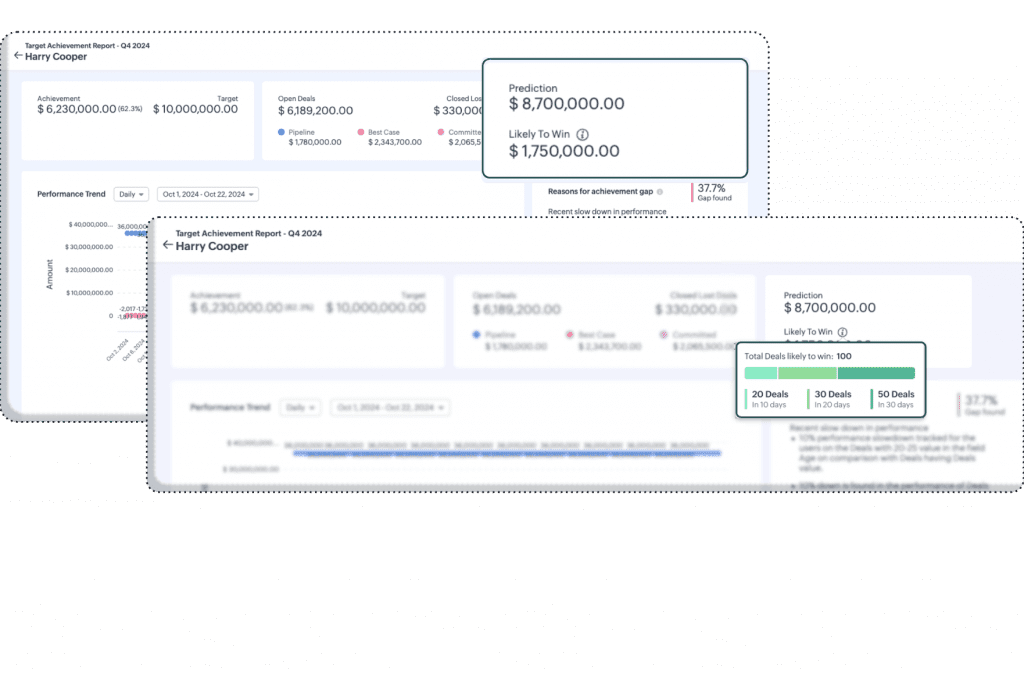
You can now view deals with success probability tags, such as “likely to win,” “at risk,” or “low priority.” This feature allows prioritization of deals with a higher chance of closing within the forecasted period, optimizing the sales strategy.
(image vía zoho)
(image vía zoho)
Expected Revenue Summary
Zoho CRM now provides a summary of potential revenue based on “likely to win” deals. Additionally, you can see how many deals are projected to close in the next 10, 20, or 30 days, giving a clearer view to anticipate income flows and make strategic adjustments.
These improvements are available for users of the Enterprise and Ultimate editions in all data centers, except the IN data center.
New PDF template customization features in Zoho Invoice
Zoho Invoice has added features that allow you to further customize the appearance and functionality of your invoices, optimizing the presentation of your documents and adapting to the specific needs of your business. Here are the main improvements:
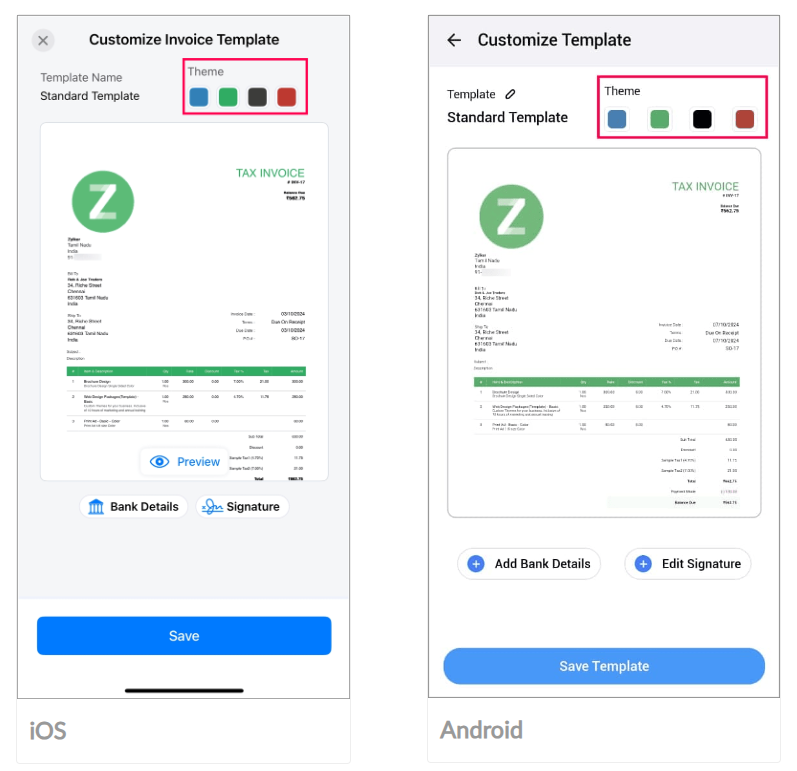
Change the Template Theme You can now modify the color of your invoice templates, choosing from four options that match your preferences. This allows your invoices to look more professional and distinctive.
(image vía zoho)
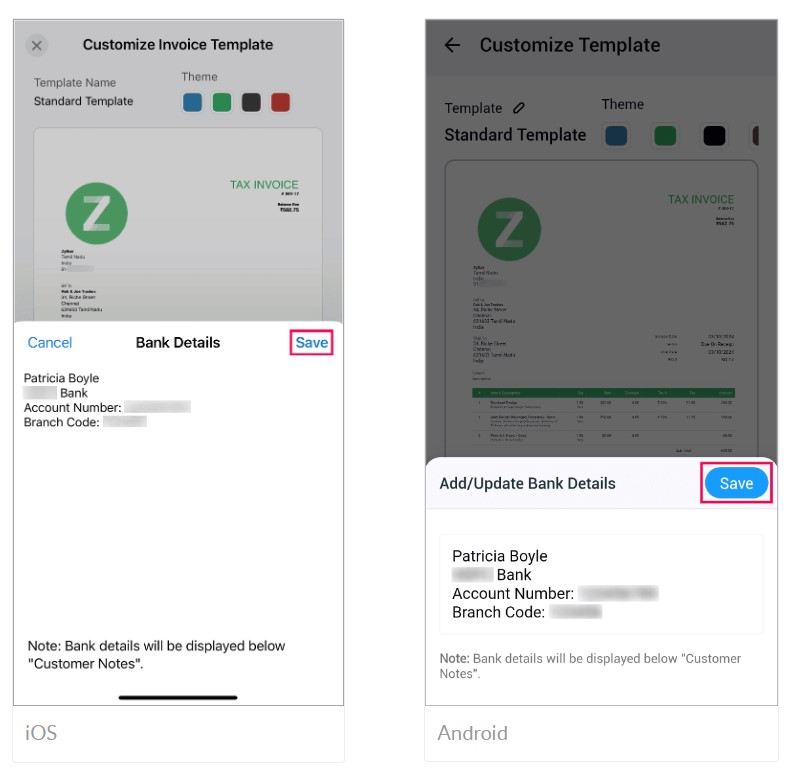
Add Bank Details You can include your bank details on invoices, making it easier for your customers to make payments and streamlining the collection process. These details will appear below the customer notes on the invoice.
(image vía zoho)
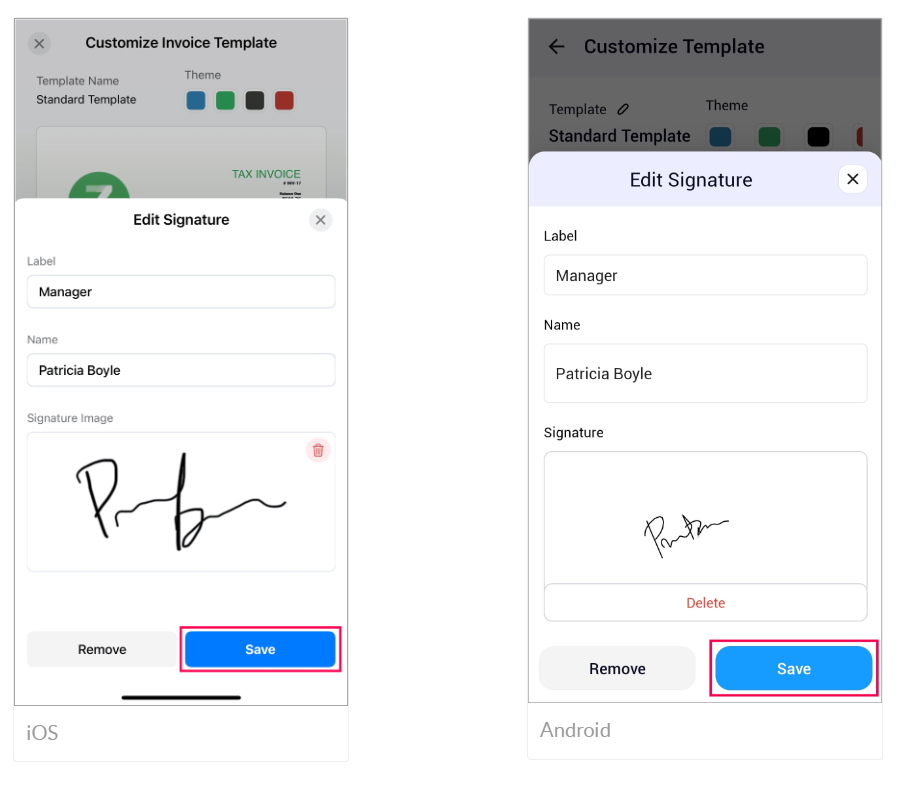
Add Your Signature You can now add your signature to transactions, enhancing document security and ensuring they are authorized by you. You can draw it or upload it from your device.
(image vía zoho)
Enable Modules According to Your Needs You have the option to activate the modules you will use in your business and deactivate those that are not necessary, increasing efficiency and optimizing operations by focusing only on what you need.
These improvements are available in the Zoho Invoice app for iOS and Android platforms. For more details, check the help documentation.
Field updates and improvements in Zoho Creator
Zoho Creator has implemented new functionalities to enhance the user experience and optimize application development. The main updates are detailed below:
JS Widgets API 2.1
You can now develop more powerful widgets with version 2.1 of the JavaScript API. This update includes support for Zoho Creator APIs v2 and v2.1, as well as the inclusion of meta and publishing APIs. It also allows the use of custom APIs in widgets, facilitating the creation of dynamic and responsive components.
Multiple Field Update in Deluge
A new task has been introduced in Deluge that allows multiple fields in a record to be updated with a single statement. This improves efficiency and reduces execution time by minimizing multiple calls in Deluge, optimizing application performance.
Improvements in Pages
Pages now offer advanced customization options for charts:
Date Grouping: You can group X-axis values by time ranges such as month, year, quarter, among others.
Y-axis Interval: It is possible to set specific intervals for Y-axis marks, improving data clarity.
Data Labels: You can now enable labels that permanently display Y-axis metrics on each section of the chart.
Theme Color: A custom theme color option has been added for charts via a color picker.
Drill Down: By clicking on the charts, you can configure the opening of detailed reports, providing deeper data analysis.
Filters: Admins can configure filters to allow users to adjust data visualization according to their specific needs.
Backup Improvements
Enhancements have been implemented for handling backups of large applications:
Backup File Structure: Data and files are now split into 256 MB zip files, making it easier to manage and download large volumes of information.
Backup Download: You can now download backups of up to 4 GB, surpassing the previous 1 GB limit, which improves scalability and reliability in data protection.
Enhanced Search in the Staging Environment Page
The search function in the Staging Environment page has been optimized, allowing you to filter and publish specific changes more efficiently. This update facilitates the management of components and modifications in the development environment.
These updates are available for versions C5 and C6 of Zoho Creator in all data centers. For more information, consult the help documentation.
Webinars on Expense, Marketing Automation, and Creator
Transform your expense and travel management with Zoho Expense
Personalize Customer Experiences with Zoho Marketing Automation
Domains, controls, and security in Zoho Creator using Zoho Directory
A major company in the renewable energy sector was facing critical challenges in commission management for its large sales team, which includes over 1,000 internal and external salespeople. The complexity of different compensation plans, deductions, and variable targets led to frequent errors in commission calculations, impacting operational efficiency, team morale, and payment accuracy. To address these issues and improve transparency in commission management, the company decided to implement the commission tool developed by InterConnecta.
Challenges The company’s sales team operated under diverse compensation structures, increasing the likelihood of errors in manual calculations. Additionally, the volume of data that had to be processed daily—such as sales, achieved targets, and project stages—was overwhelming for the finance team.
Key challenges included:
Complex manual calculations: Different compensation plans with bonuses and deductions led to errors.
Lack of automation: The absence of an automated process hindered workflow and increased the risk of human errors.
Limited visibility: Salespeople did not have real-time access to their commissions, which reduced trust in the system and affected motivation.
Regulatory compliance: Manual management of tax withholdings increased the risk of tax errors and penalties.
Solution InterConnecta implemented a customized solution through its commission management tool. This system was fully integrated with Zoho CRM and other key systems, automating calculations and improving payment accuracy.
Key features of the solution included:
Automation of complex calculations: Adapting to various compensation plans, the tool eliminated human errors, reducing processing time by 50%.
Real-time visibility: Salespeople gained immediate access to their commissions, which increased transparency and motivation.
Guaranteed regulatory compliance: Automation of tax withholdings and other deductions ensured compliance with local regulations.
The implementation of InterConnecta’s commission tool brought significant improvements to the company’s operations:
Reduction of calculation errors: Commission errors were virtually eliminated, enhancing accuracy and reducing disputes.
Timely and accurate payments: Automation ensured that all salespeople received their payments on time, improving team morale.
Faster, more efficient processes: Time spent on commission calculations was halved, allowing the finance team to focus on more strategic tasks.
More informed decision-making: The integration of financial and sales data enabled the company to make more precise, timely strategic decisions.
InterConnecta’s commission tool transformed the company’s commission management, optimizing processes, increasing transparency and team motivation, and ensuring compliance with tax regulations. This solution has enabled efficient and accurate commission management, contributing to the company’s sustainable growth in a highly competitive market.
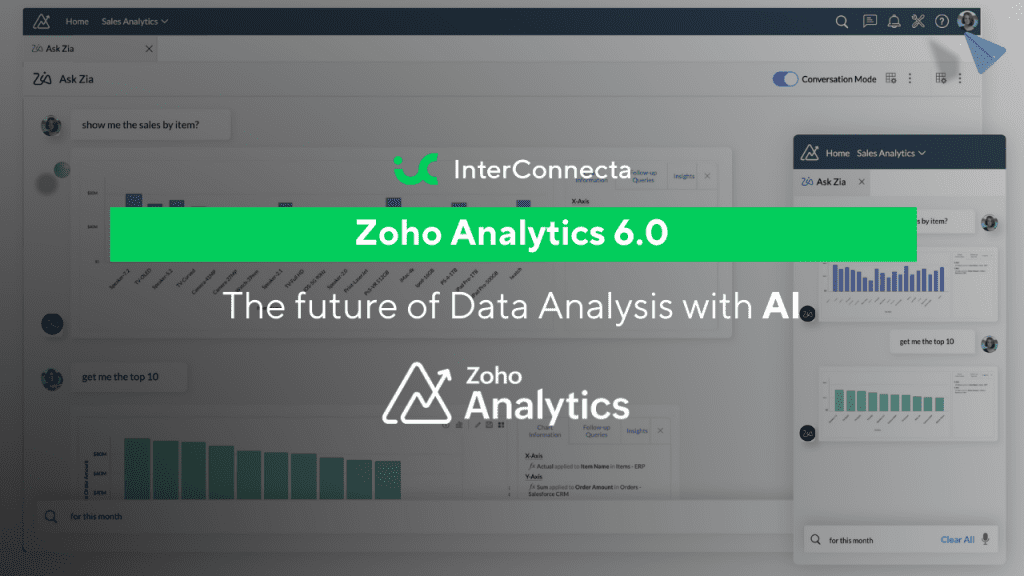
Zoho Analytics has launched its 6.0 version, incorporating significant advancements in Artificial Intelligence (AI) that will transform how companies analyze and understand their data. With new generative AI functions and predictive models, this update enhances the ability to make informed decisions quickly. But why is AI so relevant in this evolution?
Data analysis has become a challenge for companies struggling to extract value from the volume and complexity of the information they handle. Extracting useful insights from massive volumes of data in a timely manner is a challenge. Traditional tools require too much time and advanced technical skills, delaying strategic decisions.
Zoho Analytics version 6.0 introduces several AI-driven features that make data analysis more intuitive and powerful.
Here are the most important highlights:
Enhanced Ask Zia: Zia is the AI-based conversational assistant that allows users to ask questions about their data in natural language and receive immediate answers in the form of reports or graphs. In this version, Ask Zia has improved its understanding capabilities and is now available on external platforms like Microsoft Teams, facilitating team collaboration.
Expanded Zia Insights: In addition to offering automated data summaries, Zia can now create visual narratives explaining significant trends or changes. This ability turns raw data into comprehensible stories, helping users identify patterns or anomalies without having to interpret complex charts.
Predictive models and time series: The new predictive analysis capability allows for forecasting future outcomes based on historical data. Companies can create time series models that help predict fluctuations in sales, demand, or key metrics. Additionally, the system can detect anomalies in the data, automatically alerting about unusual events that may require attention.
Automation with AutoML: One of the most innovative features of this update is the inclusion of AutoML (Automated Machine Learning), which allows users to build predictive models without needing programming or data science knowledge. This democratizes access to advanced analytics and helps non-technical teams leverage machine learning to make informed decisions.
Multisource integration and data enrichment: The platform expands its ability to integrate data from multiple sources, both internal and external applications, and offers more accurate analytics. Zoho Analytics 6.0 also includes enhancements in data processing, allowing for automatic data enrichment, which helps improve insight quality without manual intervention.
Zoho Analytics 6.0 brings Artificial Intelligence to the heart of data analysis, offering intuitive tools that enable any company to enhance its decision-making process. With features ranging from predictive analytics to automation, this platform helps businesses navigate data complexity more efficiently.