Author: user

  • Zoho News Catch-up: Launch of Zoho Projects Plus, Improvements in CRM Forecasts, New features in Analytics dashboards, Update of the Desk app for Android, Webinars for Projects, Creator, and Workplace.


    Welcome to our catch-up, where you’ll be in the know of all the latest Zoho updates in one place!

    Zoho Projects Plus: project management and collaboration, all in one
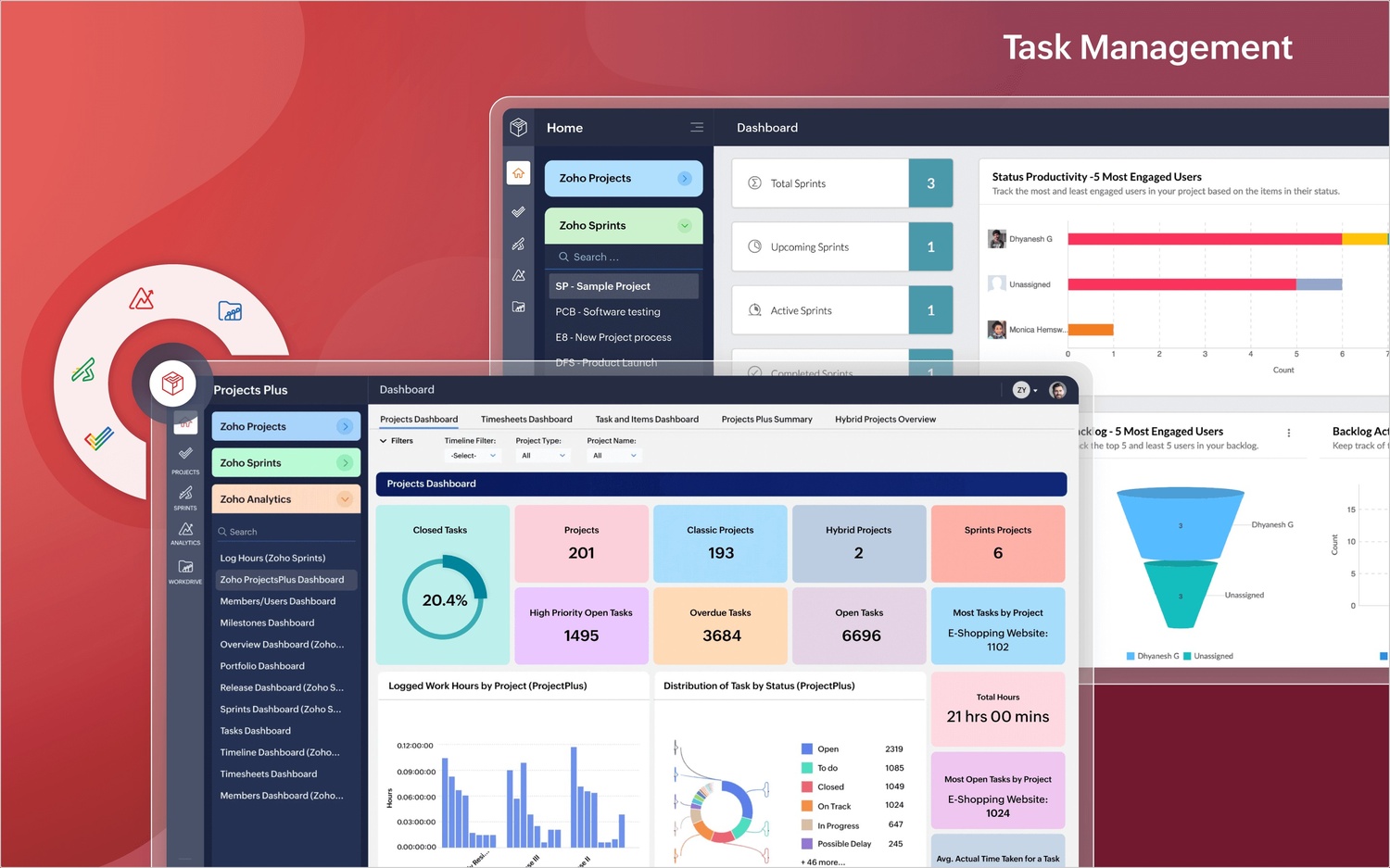
    Projects1
    (image vía zoho)

    A new edition for teams that want everything in one place

    Zoho has just introduced Zoho Projects Plus, a new plan that combines the advanced features of Zoho Projects with other key ecosystem apps such as Zoho Analytics, Zoho Desk, Zoho Sprints, Zoho Forms, and Zoho Meeting.

    This package was designed for teams seeking smoother collaboration, full visibility into performance, and integrated tools to make informed decisions, without leaving their work environment.

    What does Zoho Projects Plus include?

    • Task tracking with Sprints for teams that combine traditional and agile methodologies.
    • Advanced reporting with Zoho Analytics to gain personalized, real-time insights.
    • Smart forms with Zoho Forms that integrate with project workflows.
    • Centralized support with direct integration with Zoho Desk.
    • Integrated meetings via Zoho Meeting to keep communication clear in the same space.
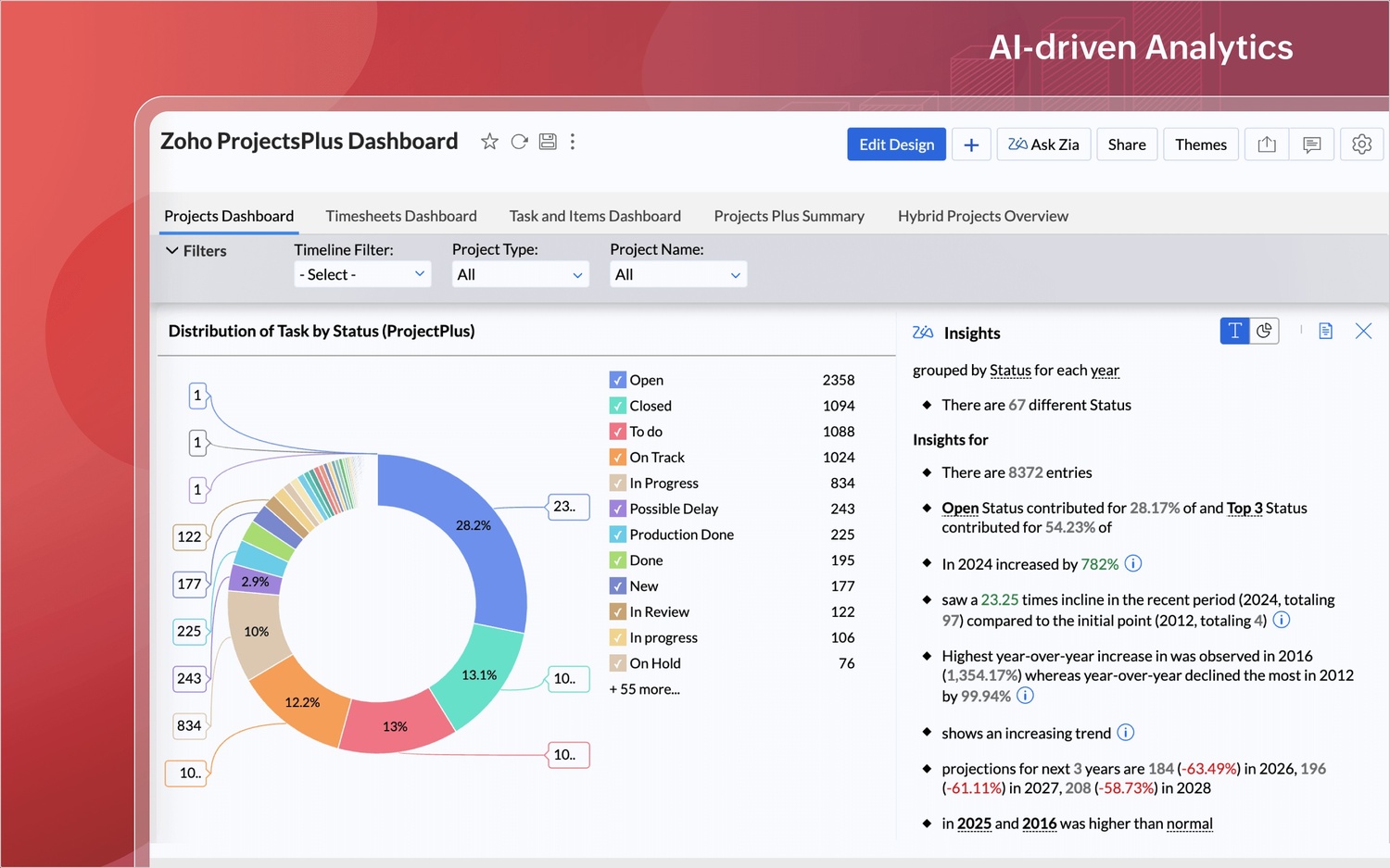
    Zoho Projects Plus interface

    (image vía zoho)

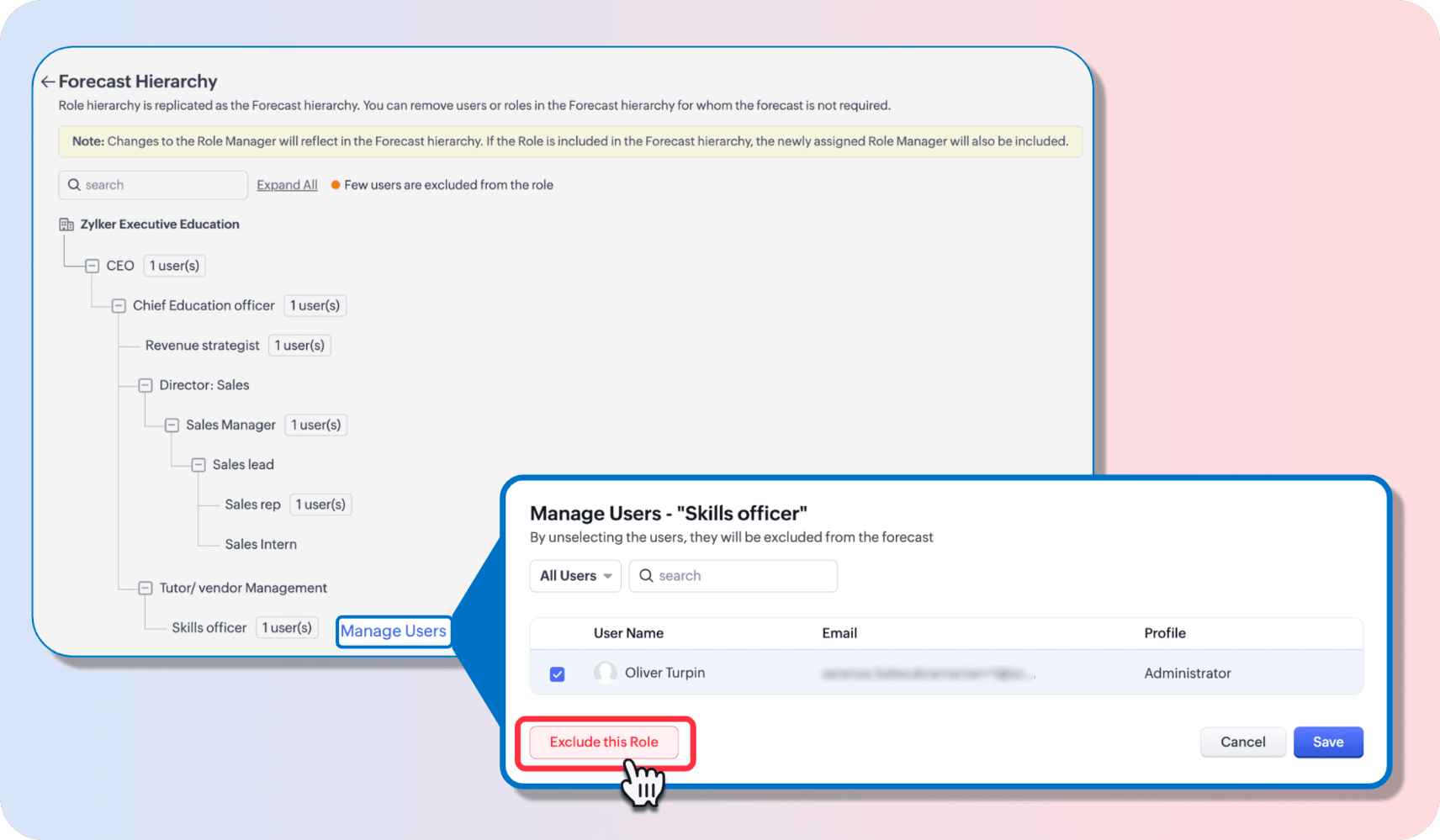
    Zoho CRM Forecasts update

    (image vía zoho)

    With this new plan, you can now centralize your operations, avoid tool duplication, and improve team productivity in every phase of the project.

    Improvements in Zoho CRM Forecasts: custom adjustments and user control

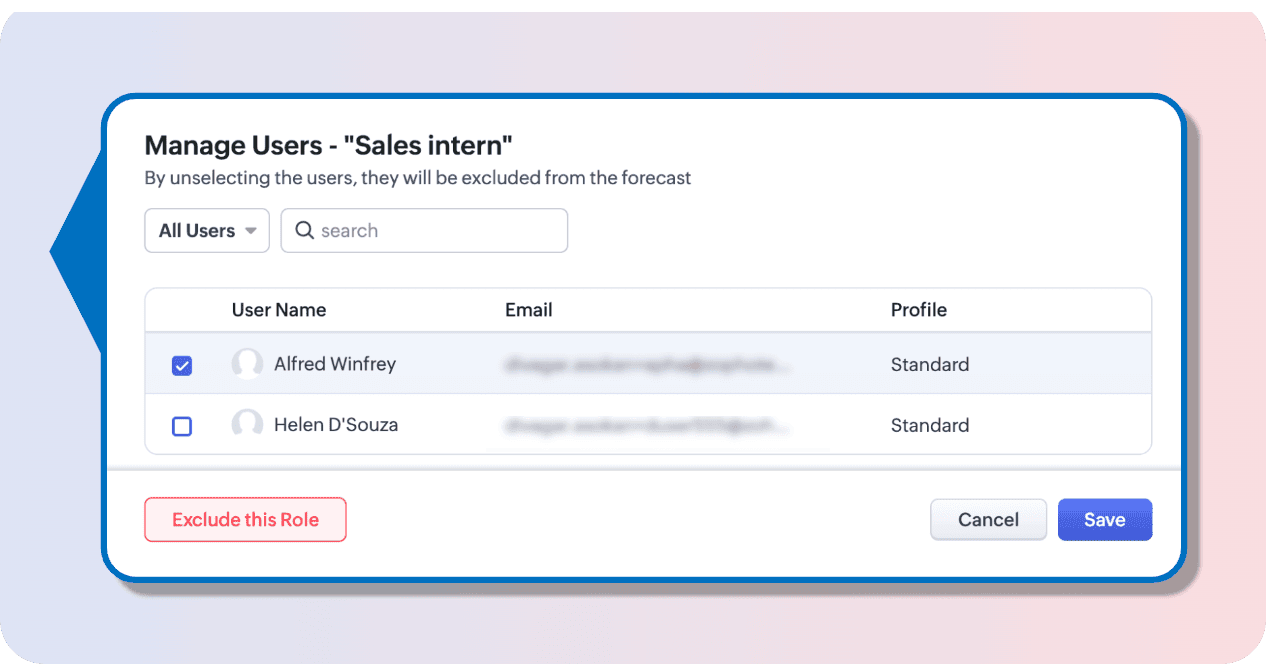
    You can now define who participates in forecasts, based on your organizational structure

    Zoho CRM introduces a key improvement in forecast management: it is now possible to customize the user hierarchy participating in reports, without having to modify the CRM’s overall hierarchy.

    This update allows you to better reflect how your sales team operates, assigning forecast roles to key users who, due to their position or responsibility, should be part of the analysis, regardless of their place in the formal hierarchy.
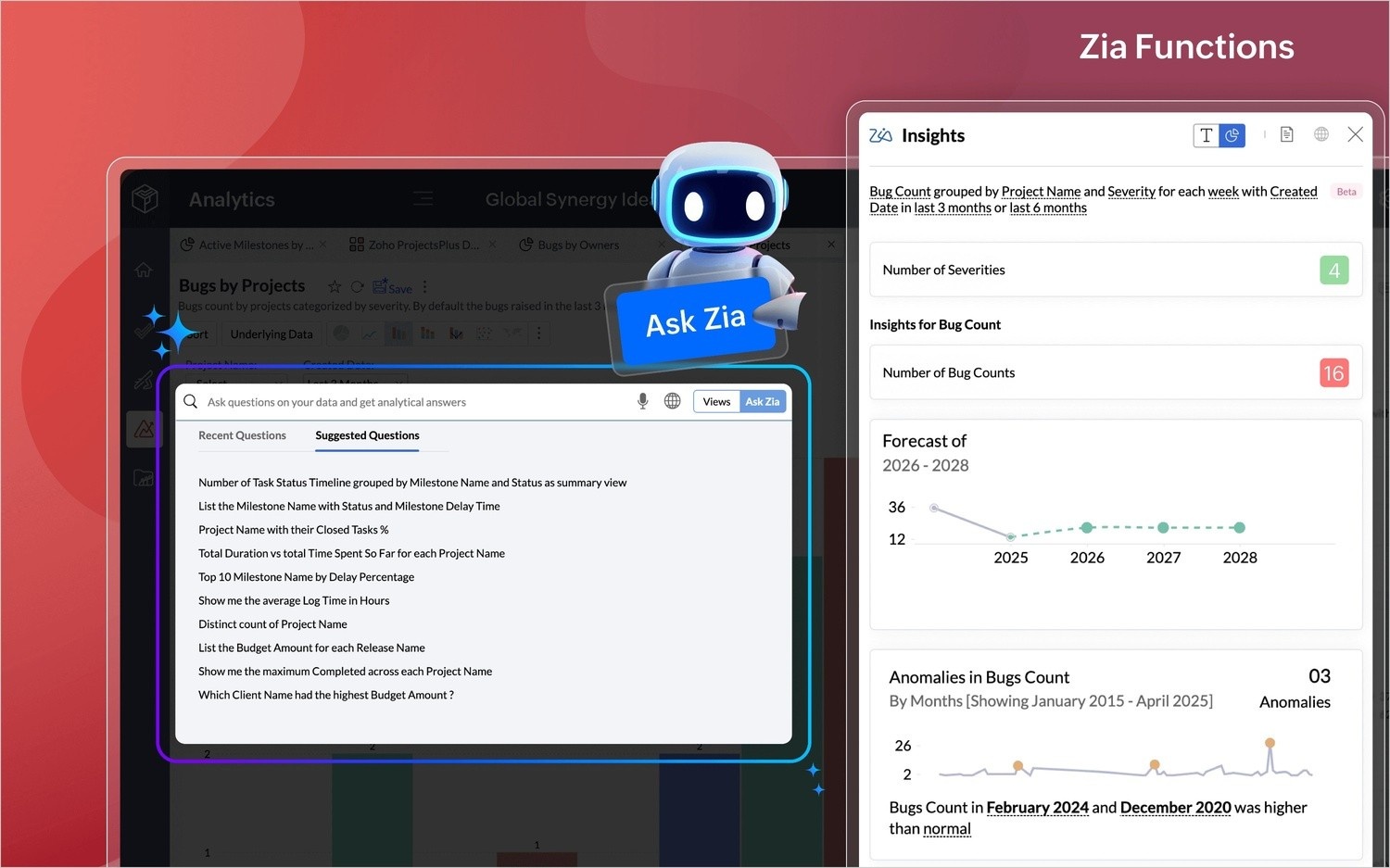
    Zoho Analytics pivot table improvements

    (image via zoho)

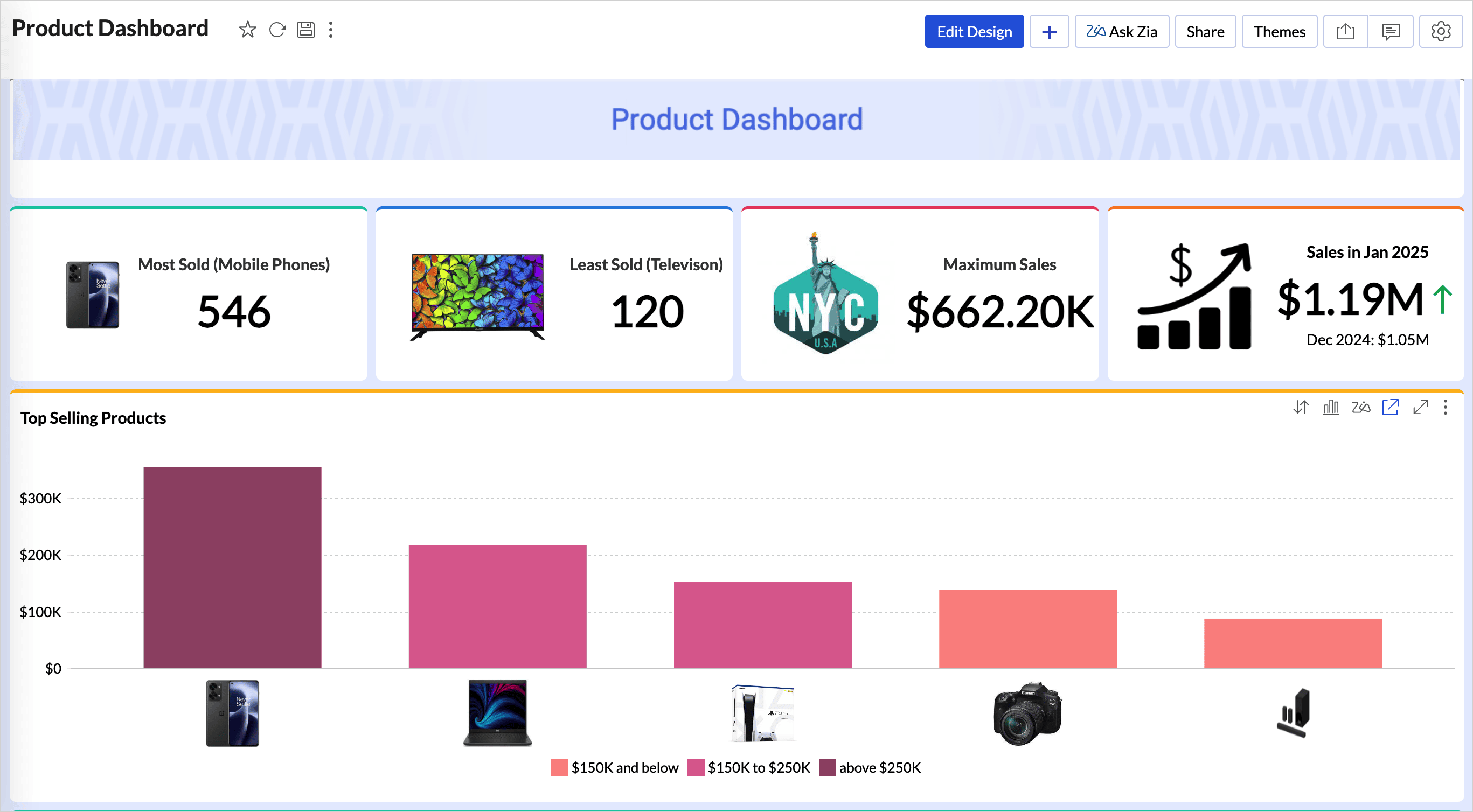
    Zoho Analytics dashboard enhancements

    (image via zoho)

    Manual adjustments for a more realistic forecast

    Another important feature is the ability to manually modify projected values, taking into account external factors such as seasonality, market changes, or ongoing business initiatives.

    With this option, team leaders and managers can more accurately adjust revenue forecasts, ensuring a view closer to the business reality.

    Both features are designed to offer greater flexibility and control over sales forecasting, improving decision-making at a strategic level.

    Available for all users in the Australia, Canada, and South Africa data centers. For other data centers, the update will be rolled out gradually.

    Zoho Analytics introduces enhancements in dashboards, pivot tables, and more

    You can now highlight key data with new layout and control options

    Zoho Analytics rolled out new features this month aimed at improving the visualization, organization, and customization of your reports. Among the most notable improvements are:

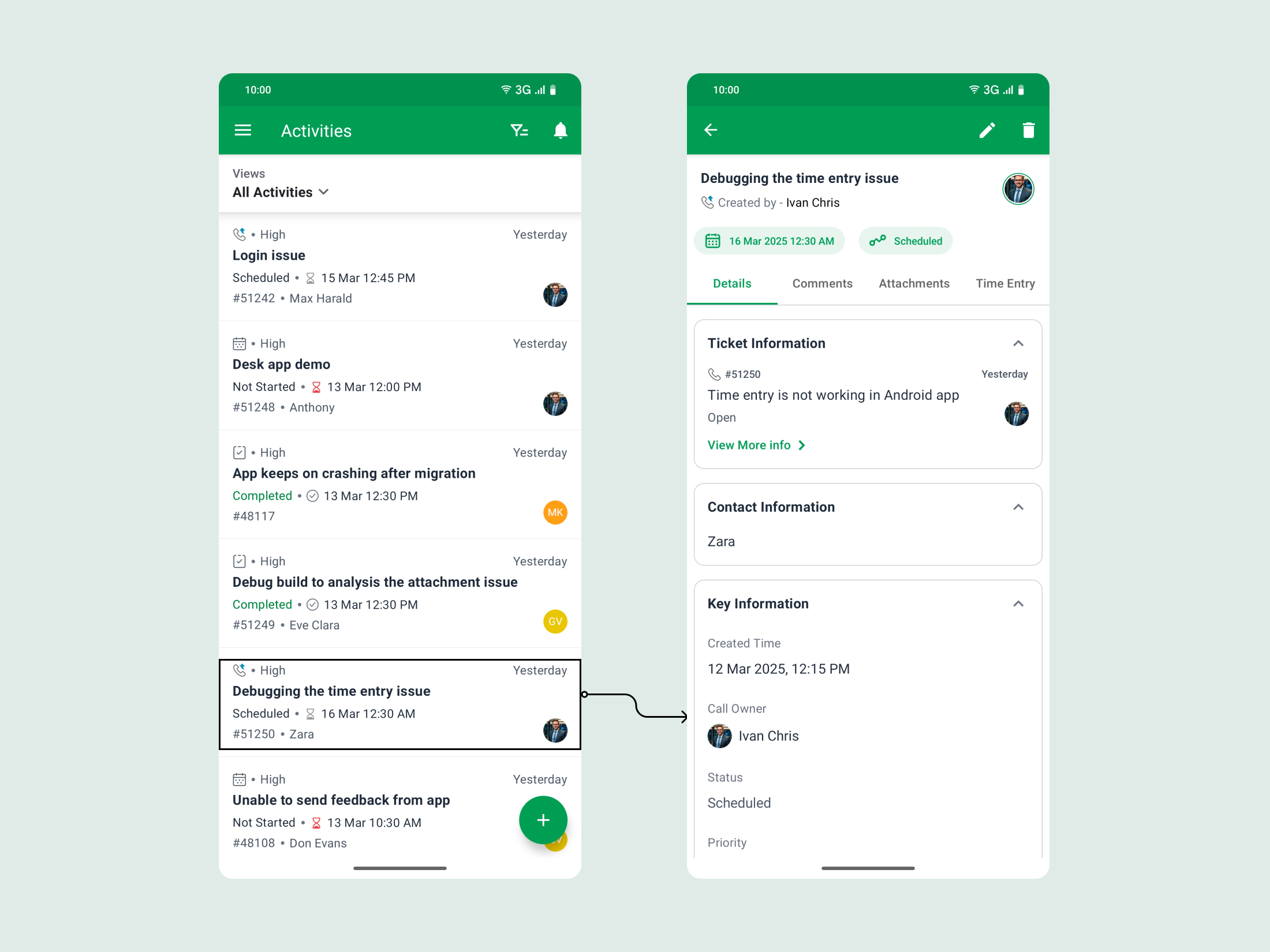
      Zoho Desk Android app activities module

      (image via zoho)

    • Highlighted blocks in dashboards: now you can showcase key metrics such as revenue, margin, or units sold within boxes with customizable borders, colors, and styles.
    • Zoho Desk task and call creation from mobile

      (image via zoho)

    • Visibility control in dashboards: decide who can see each chart, table, or component based on specific criteria. This allows you to tailor dashboard content according to the user’s profile.
    • Improvements in pivot tables: it’s now possible to keep header positions fixed while scrolling vertically, making it easier to analyze large data sets without losing context.
    • Zoho Desk mobile interface activity logging

      (image via zoho)

    • New functions for custom formulas: more complex mathematical and statistical operations have been added, so you can build metrics tailored to your business.
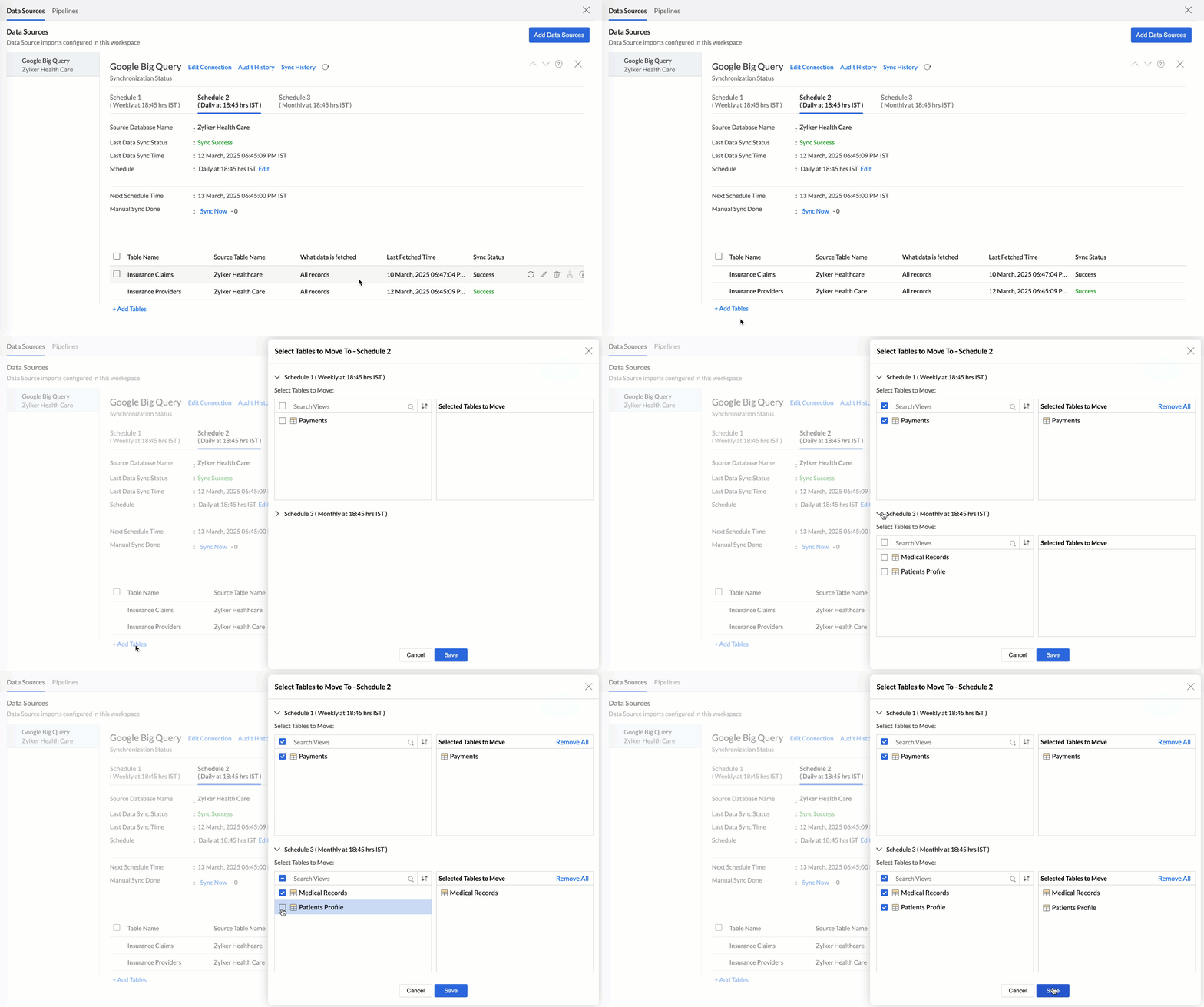
    These updates expand the customization capabilities of reports and reinforce the idea that every user can build visualizations suited to their needs, without relying on third parties.

    Desk updates its Android app: compatibility with the Activities module

    Manage calls, tasks, and events from your phone

    The latest version of the Zoho Desk app for Android now includes the Activities module, allowing agents to log and manage tasks, calls, and events directly from their mobile device.

    Webinars for Zoho Projects, Creator, and Workplace

    (image via zoho)

    With this update, you can now:

    • Create tasks or calls linked to tickets while on the go.
    • Check scheduled events to improve daily planning.
    • Access details of each activity without leaving the app.

    This addition improves the experience of support teams in the field or in hybrid settings, enabling more agile and complete management from anywhere.

    Webinars for Projects, Creator, Workplace

    Connections and Widgets in Zoho Projects


    Enhancing Your Dashboards with JavaScript widgets

    Zoho Workplace: a collaborative workspace in a hybrid world

    Do you want to add these new features to your Zoho system? Let’s work together!

    Learn more about our Zoho consulting services and contact us for a free consultation.


  • Zoho Creator + AI: the new, faster and smarter development team than ever before

    Developing internal applications, automating processes, or connecting systems no longer has to be a slow or expensive project. Zoho Creator, Zoho’s low-code platform, allows you to build custom business applications with very little programming. Now, with the arrival of artificial intelligence and the new CoCreator assistant, the development experience is completely transformed.

    CoCreator combines the power of natural language with Zia’s contextual intelligence to assist users in real time during app creation: from logic suggestions to automatic generation of forms and reports, all based on what the user needs to solve.(video via zoho)


    This evolution not only improves the developer experience, but also redefines how organizations design and scale their digital tools.

    CoCreator: AI-assisted real-time development

    CoCreator is an advanced feature within Zoho Creator that allows you to build applications by describing what you want to achieve in natural language. It is no longer necessary to have a deep understanding of the system’s structure or components: by simply explaining what you need, CoCreator generates forms, data tables, workflows, and more.


    (video via zoho)


    This is possible thanks to a deep understanding of the app’s context. Unlike other assistants, CoCreator does not offer generic answers. It suggests specific solutions based on existing components, previously defined workflows, and the user’s goals.


    Its key capabilities include:

    • Natural language understanding: users can write instructions like “create a form to register vacation requests with supervisor approval” and CoCreator translates it into a functional structure.
    • Contextual knowledge of the environment: the assistant recognizes modules that already exist in the app and adapts its responses to what’s already implemented, suggesting coherent and relevant next steps.
    • Continuous learning: the more it’s used, the more it understands the style, needs, and business logic behind each app.

    AI as a copilot for IT teams and business users

    Zoho Creator has taken a step further by integrating artificial intelligence across its development environment. In addition to CoCreator, the platform features tools powered by Zia, Zoho’s intelligent assistant:


    • Automatic component generation: creation of forms, workflows, and dashboards from simple descriptions.
      Smart code suggestions: contextual help while writing Deluge code or configuring logic flows.
    • Predictive analytics and smart visualizations: dashboards that reveal relevant patterns and generate alerts based on data trends.
    • User experience optimization: recommendations to improve the navigation and functionality of developed apps.

    Try Zoho Creator today and start building apps with artificial intelligence, no coding required.


    Try Zoho Creator for Free

    Discover More About AI in Zoho

    Since you’re exploring how AI enhances Zoho, here are more articles that might interest you:


    🌍 Zoho Connect & Zia: A Smarter, More Connected Workspace
    📢 AI in Zoho Cliq: The New Era of Business Communication
    📊 Zoho Analytics 6.0: The Future of AI-Driven Data Analysis
    🎯 Agile Customer Support with AI in Zoho Desk

  • Simplify, save, and grow: The real impact of consolidating your applications with Zoho One


    Many companies face the challenge of managing multiple applications for different functions such as sales, marketing, finance, and human resources, which can lead to high costs and fragmented processes. This is where Zoho One emerges as a comprehensive solution, offering a unified platform that promises to simplify operations and reduce costs. In this article, we will explore the cost and benefit differences between using multiple applications and choosing Zoho One.

    1. Licensing and subscription costs

    When a company uses multiple applications, each one typically requires an individual license or subscription. These costs can add up quickly, especially if tools for CRM, email marketing, project management, and more are needed. With Zoho One, businesses can access over 45 applications with a single subscription, potentially leading to significant savings on licensing costs.

    2. Integration and workflow

    Using multiple applications often means that data must be manually transferred between platforms, which can be error-prone and time-consuming. Zoho One offers seamless integration among its applications, enabling a more efficient workflow and reducing the need for manual intervention.

    3. Support and maintenance

    Managing multiple applications also means dealing with different support providers, which can complicate issue resolution. With Zoho One, businesses have a single point of contact for support, simplifying the maintenance and troubleshooting process.

    4. Scalability and flexibility

    Zoho One is highly scalable, allowing businesses to add or remove applications as their needs evolve, without complications. This provides a level of flexibility that is hard to achieve when managing multiple applications from different providers.

    5. Productivity benefits

    By consolidating applications into a single platform, Zoho One enables teams to work more collaboratively and efficiently. Real-time visibility into operations and the ability to automate routine tasks can significantly boost productivity.

    Choosing Zoho One over multiple applications can not only reduce costs but also enhance operational efficiency and productivity. For businesses looking to streamline their operations and maximize their resources, Zoho One offers a comprehensive solution worth considering.


    [Request a free trial here]


  • Zoho News Catch-up: Zoho announces ZIA Agents, CRM improvements, 2025 projection for Creator, new Screening Bot for Recruit, and webinars on SalesIQ, One, and Bookings

    Welcome to our catch-up, where you’ll be in the know of all the latest Zoho updates in one place!

    Zoho announces the new ZIA Agents, digital employees that work for you and boost your productivity.


    Zoho has expanded its artificial intelligence platform with the launch of Zia Agents, an innovative solution that enables companies to create and deploy intelligent, autonomous digital assistants across their organization. These agents are designed to automate complex tasks, enhance productivity, and provide accurate responses in various business scenarios.


    Key Components of Zia Agents:

    • Agent Studio: A no-code or low-code development tool that simplifies the creation of custom agents tailored to each company’s specific needs. Users can access a wide range of pre-existing skills, Zoho ecosystem tools, and language models to build their agents.
    • Agent Marketplace: A marketplace where Zoho developers and partners can share and distribute their created agents, fostering collaboration and allowing businesses to efficiently implement customized solutions.

    Zia Agents aren't limited to Zoho apps

    (image via zoho)


    Zia Agent Studio helps

    (image via zoho)


    Practical Use Cases for Zia Agents:

    • Project Management: An agent that monitors project progress, sends deadline reminders, and suggests resource reassignments to ensure timely delivery.
    • Competitor Analysis: An agent that gathers and analyzes competitor information, providing regular reports on their activities and market positioning.
    • Marketing Campaign Optimization: An agent that evaluates campaign performance in real time and suggests adjustments to maximize ROI.
    • Regulatory Compliance Assistant: An agent that monitors industry regulations, ensuring that all company operations comply with current legal requirements.
    • Training Coordinator: An agent that identifies employee training needs and organizes appropriate training sessions.


    Tips for Maximizing Zia Agents:

    • Define Clear Objectives: Before implementing an agent, establish the specific tasks to be automated and the expected outcomes.
    • Integration with Existing Applications: Ensure seamless integration of agents with your company’s current tools and systems for a smooth transition.
    • Continuous Monitoring and Improvement: Regularly assess agent performance and make necessary adjustments to optimize their efficiency.


    At InterConnecta, we are developing our own custom agents designed to address specific challenges and enhance the operational efficiency of our clients. These agents will be available soon, offering tailored solutions to meet the unique needs of each organization!


    CRM introduces improvements in the product configurator and guided CPQ sales.


    Zoho CRM has enhanced its CPQ module with new features to improve product configuration and the guided selling process. Here are the key updates:


    • Multi-selection in actions: You can now select multiple records at once in the actions panel, making configuration easier.

    (image via zoho)

    • Duplicate check: A new option has been added to prevent the duplication of mandatory or suggested products in quotes.

    (image via zoho)

    • Guided selling in custom modules: You can now include custom modules alongside inventory modules in guided selling flows.

    (image via zoho)

    • Better management of lookup fields: If multiple lookup fields exist in a subform, each will display its own access to guided selling.

    (image via zoho)


    These improvements are already available in data centers in Australia, Japan, and China and will be rolled out to other centers in the coming days.


    Learn about the projected launch of Zoho Creator for 2025.

    Zoho Creator has outlined its roadmap for the first half of 2025, introducing a series of features designed to enhance user experience and anticipate future needs. Here are some of the upcoming updates:

    • Dashboards in pages: Integrate visually appealing dashboards into your pages for better information presentation.
    • Visual workflow builder: A new drag-and-drop workflow builder simplifies process automation.
    • Mobile app metrics: Gain detailed insights into user engagement and performance in your mobile applications.
    • Enhanced audit logging: Track all user actions comprehensively for better governance.
    • Improvements in payment gateways: Manage payment gateways and their authorizations from a centralized space.
    • Environment support for custom APIs: Thoroughly test your custom APIs before live deployment.
    • And much more.


    Additionally, the Zoho Creator Launchpad page has been launched, allowing you to experience firsthand the AI-powered capabilities integrated into the platform.


    These initiatives highlight Zoho Creator’s commitment to providing advanced tools that drive efficiency and innovation in application development.


    Screening Bot for automating candidate pre-selection in Recruit.

    Zoho Recruit has introduced the Screening Bot, a tool designed to streamline candidate selection by automating the pre-screening process.


    (image via zoho)


    (image via zoho)
     

    Key Benefits:

    • Automated evaluations: Candidates can now complete assessments directly from the job portal after applying.
    • Smart filtering: Set key questions to automatically qualify or discard candidates based on their responses.
    • Customizable process: Configure welcome messages, adjust result visibility, and allow candidates to add notes.
    • Email integration: Send assessments via email using predefined templates for easier management.


    (image via zoho)


    This new feature speeds up the hiring process, helping recruiters focus on the most suitable candidates from the very first interaction.


    Webinars on Sales IQ, One, and Bookings.

    Sell Smarter with Zoho SalesIQ

    Redefining business communication with Zoho Cliq in Zoho One

    Zoho Bookings & Zoho Contracts for Financial services

    Do you want to add these new features to your Zoho system? Let’s work together! Learn more about our Zoho consulting services and contact us for a free consultation.

  • Implementation of the month: Customer Portal – A new self-management experience

    In the constant pursuit of improving the customer experience and optimizing service management, the Customer Portal was implemented exclusively for InterConnecta clients and partners. This portal provides immediate access to invoices, support tickets, project management, and key resources, all in one place.


    Challenge

    Before implementing a Customer Portal, many companies face the following issues:

    • Difficulty in centralizing billing information, tickets, and projects in one place.
    • Lack of quick access to documentation and technical guides for autonomous issue resolution.
    • Unstructured support request processes, leading to delays in incident resolution.
    • Need for a system that allows better tracking of team interactions with contracted services.


    Solution

    To overcome these challenges, a Customer Portal was developed with the following features:

    • Intuitive Dashboard: Provides a quick overview of open invoices, pending tickets, active projects, and the most active team members.
    • Quick Navigation Menu: Direct access to Home, Support, Analytics, Billing, and Projects.
    • Ticket Manager: Allows users to create support requests in two categories—Incident Request and Project Request—with detailed forms for better management.
    • Integrated Knowledge Base: Provides documentation, tutorials, and explanatory videos on available tools and solutions.
    • Intelligent Virtual Assistant (Tami): Available 24/7 to answer questions and facilitate portal navigation.
    • Apps Hub: A space where users can discover additional tools to optimize their business management.


    Benefits

    Implementing a Customer Portal for your clients will bring significant improvements in service and support management:

    • Greater user autonomy: Clients can access key information and resolve inquiries without direct support contact.
    • Reduced response times: Thanks to ticket categorization and Tami’s availability, resolution times have been optimized.
    • Centralized information: Everything needed for service management, from invoices to ongoing projects, is in one place.
    • Better tracking and control: Users can clearly view the status of their tickets, service usage, and available resources.
    • Access to tools and training: Through the Knowledge Base and Apps Hub, clients can enhance their Zoho experience at no additional cost.


    The Customer Portal has become a key tool for self-management and optimization of Zoho usage. With this implementation, users gain more efficient access to services, support, and resources, giving them full control of their experience in a simple and effective way.


    If your company uses Zoho and you want to offer a Customer Portal for your clients to have centralized access to billing, support, and projects, we can help you implement it! Contact us to learn how to integrate this solution into your business and enhance your customers’ experience.


    Contact us here

  • How to gain AI Insights on users in Sprints with Zoho Sheet view

    Would you like a clear, real-time view of your team’s performance? Understanding how your team members contribute can make a difference in efficiency and achieving organizational goals. Zoho Sprints has integrated Zia, Zoho’s AI assistant, into the user sheet view of the workspace, providing detailed analytics on user activity and performance.

    Accessing the Sheet View with Zia

    To take advantage of this feature, follow these steps:

    1. Navigate to the Settings section in Zoho Sprints.

    2. Select “Workspace Users” under the User Management category.

    3. In the top dropdown menu, choose “Sheet View.”

    In this view, you’ll find a complete list of all users in a spreadsheet format. You can navigate using the keyboard, edit permitted values, and use autofill by dragging cells. To access the sheet menu and toolbar, click on the expanded view. Zia is available in the right panel to provide detailed insights.

    Business Use Cases

    Here are some ways an IT organization can use Zia in Zoho Sprints to gain AI-powered insights:

    1. Monitoring Users by Geographic Location

    (image via zoho)

    Zia provides a graphical representation of the user distribution across different locations in your organization.

    • To obtain this insight, select all fields in the “Geographic Location” column and click on Zia.

    • This helps you understand your user base, evaluate remote work options, and plan location-specific events.

    2. Identifying Skill Distribution

    (image via zoho)

    Understanding the skill distribution among users is crucial for optimizing resource allocation and identifying skill gaps.

    • This is particularly useful when planning hiring strategies across various teams.

    • To visualize this data, select all fields in the “Skill Set” column and click Zia.

    3. Analyzing Users by Profiles and Roles

    Zia tracks the number of users across different profiles and roles, displaying the data in pie chart segments.

    • This helps you analyze role diversification and the ratio of users in various profiles.

    • To access this insight, select all fields in the “Roles” or “Profiles” columns and click Zia.

    Similarly, you can analyze all user-related fields using Zia’s AI capabilities to gain real-time insights. This feature empowers you to make data-driven decisions based on accurate insights about your team’s composition and performance.


    Try Zoho Sprints for free today and take advantage of Zia’s intelligent analytics to optimize your team’s management. Start making a difference now!

    Discover More About AI in Zoho

    Since you’re exploring how AI enhances Zoho, here are more articles that might interest you:

    💡 Optimize Form Creation with AI in Zoho Forms
    🌍 Zoho Connect & Zia: A Smarter, More Connected Workspace
    📢 AI in Zoho Cliq: The New Era of Business Communication
    📊 Zoho Analytics 6.0: The Future of AI-Driven Data Analysis
    🎯 Agile Customer Support with AI in Zoho Desk

  • Zoho News Catch-up: New ‘Queries’ feature in CRM and improvements in WhatsApp Business integration, News in Desk, Social Toolkit in Zoho Social, updates in Analytics and Creator, CRM, Desk, and FSM Webinars

    Welcome to our catch-up, where you’ll be in the know of all the latest Zoho updates in one place!


    CRM improves access to dynamic data with ‘Queries’ and updates in the integration with WhatsApp Business


    Now you can dynamically access relevant data directly from Zoho CRM and third-party services. With “Queries,” you get the information you need without complications. Here are some of its key features:

      • Dynamically query data: Retrieve information from CRM or external services and present it your way. For example, display only the closed deals of a contact on a canvas.
      • Easy configuration: Write queries tailored to your business needs and associate them with relevant CRM functions like Canvas or Kiosk.
      • Advanced integration: Use COQL, REST API, and more to build your queries. Soon, sources like GraphQL and cloud databases will be added.
      • Variables and serializers: Customize your responses using dynamic variables and JavaScript to efficiently process data.


    Query components:

    Query: This is the core of the function, where you define what data is needed and how it should be retrieved. Queries allow you to specify criteria and conditions to filter the desired information.

    (image vía zoho)


    Source: Refers to the origin of the data being queried. It can be Zoho CRM or third-party services, providing flexibility in data integration.

    (image vía zoho)


    Variables: These are dynamic elements within a query that allow searches to be customized and adapted according to different parameters or specific conditions.

    (image vía zoho)


    Serializer: This component transforms retrieved data into a structured and readable format, making it easier to use and present in different applications or interfaces.

    (image via Zoho)


    Schema: Defines the structure and organization of the data within the query, ensuring that the information is presented in a coherent and understandable manner.

    (image via Zoho)


    Queries allow users to access their data directly in Zoho CRM. They can be associated with Canvas to display responses such as “field name and value” or lists. In Kiosk Studio, queries are used in screens or criteria components, improving data visibility and control.


    Availability

    The “Queries” feature is available in the Enterprise/Zoho One and Ultimate/CRM Plus editions, and will soon be available in the Professional edition. Try it out and save time!

    Zoho has introduced updates to the WhatsApp for Business integration in CRM, designed to provide more context and clarity to your business communications.


    Here are the improvements:

      • Manual chat initiation: You can now start conversations with your leads and customers directly from Zoho CRM. This new feature allows you to send message templates manually, giving you more control over your interactions.

    (image via Zoho)


      • Threaded replies: Keep your conversations organized with threaded replies. This feature lets you respond to specific messages, ensuring clear and contextual communication with your customers.

    (image via Zoho)


      • Audio preview: No need to download audio files to listen to them. With the new audio preview feature, you can play voice messages directly within Zoho CRM, saving time and maintaining privacy.


    These updates are designed to enhance the convenience and efficiency of your business messaging. We’d love to hear your feedback on these features!


    Calculate costs and metrics with formula fields in Desk

    You can now calculate service costs, ticket age, and other metrics in Zoho Desk with Formula Fields, available in early access.

    (image via Zoho)


    What are Formula Fields?

    They are custom fields that allow automatic calculations by combining functions, operators, and system data. You can use them for:

    • Numerical calculations: service costs, refunds, expenses.
    • Dates: time elapsed since a ticket was created, SLA expirations.
    • Dynamic text: personalized messages based on values from other fields.


    Benefits for your support team

    • Fewer manual errors: automate cost or key date calculations.
    • Time savings: avoid repetitive calculations.
    • Real-time data: automatic updates for quick decision-making.


    Use cases

    • Calculate production costs in manufacturing.
    • Determine the total price of a product with taxes and discounts.
    • Set the expiration date of a warranty.

    This new field helps you optimize processes and improve accuracy in Zoho Desk.


    Zoho Social introduces the new Social Toolkit to enhance your presence on Social Media


    Zoho has launched the Social Toolkit, a comprehensive dashboard designed to enhance social media presence. This tool allows users to create engaging profiles and share content that captures their audience’s attention. Available to everyone online, the Social Toolkit offers key features such as:

      • Instagram Grid Builder: Plan your Instagram grid by splitting images into sections for a visually appealing design.

    (image via Zoho)


      • Instagram Regram: Easily repost content from other users, giving proper credit, to expand your reach.

    (image via Zoho)


      • Campaign URL Builder: Create customized URLs for marketing campaigns, enabling effective performance tracking.

    (image via Zoho)


    The Social Toolkit is designed for content creators, marketers, and anyone looking to improve their Instagram feed—and it’s completely free!


    Latest features and improvements in Zoho Analytics

    Zoho Analytics has introduced a series of updates that enhance data analysis, making it more powerful and interactive. Key new features include:


      • Expanded Database Support: Four new databases—MS Access, OLEDB, Presto, and Trino—are now integrated, enabling real-time connectivity for actionable insights.
      • Integration with Zoho Writer: Turn your data into stunning visuals with the Zoho Analytics extension for Zoho Writer, making it easy to create impactful infographics directly within your documents.

    (image via Zoho)


      • Enhanced Sankey Chart Interaction: Click on any data point to track the entire flow, improving data navigation and understanding.

    (image via Zoho)


      • New Modules/Fields: Added fields include Account Contact Roles and Opportunity Splits in Salesforce, as well as MRR in Zoho Books.
      • Improvements in Code Studio: Admins now have access to Code Studio, providing greater control and customization.
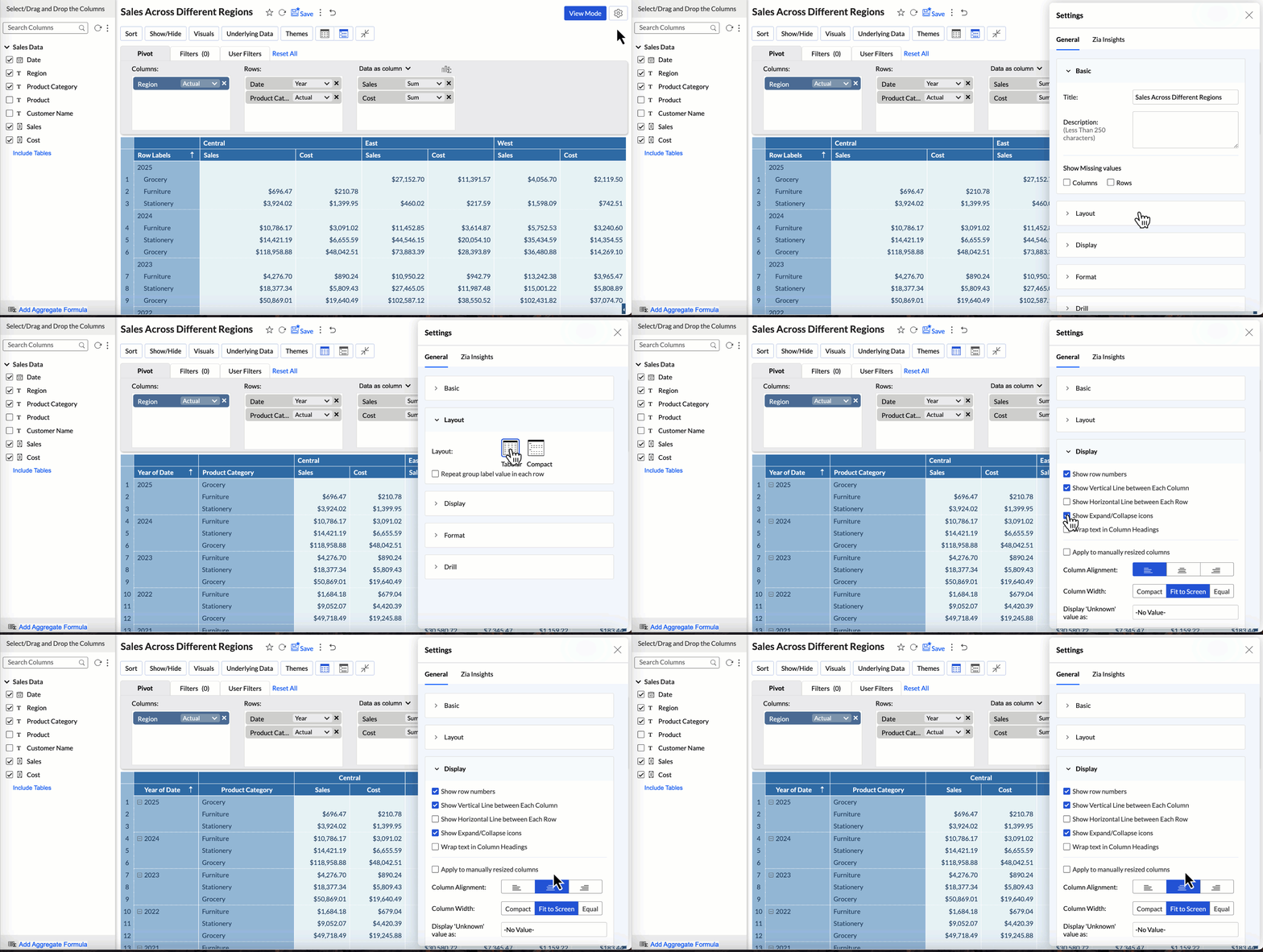
      • Tabular View: Wrap & Clip Text: Manage long headers with options to improve readability or maintain a compact layout.

    (image via Zoho)


    These updates are designed to boost efficiency and clarity in data management.


    Zoho Creator: Mandatory verification of custom domains in the portal

    Starting February 10, 2025, Zoho will require verification of all custom domains used in portals. This change aims to enhance security and ensure a safe user experience. Unverified domains will have restricted access, preventing users from logging in.


    What you need to do:

    Verify your custom domains as soon as possible to avoid disruptions.
    ✔ Emails with detailed instructions will be sent to affected users, including super admins and customer portal admins.
    ✔ Follow the guidelines in the emails or visit the “Verify Custom Portal Domain” help page for assistance.


    Zoho encourages users to verify all unverified domains to ensure smooth operations. For further support, users are advised to contact Zoho support.


    Webinars on CRM, Desk and FSM

    Setup assistants in CRM for simplified record creation

    Master Ticket Management with Blueprint

    Zoho FSM Product Demo Webinar

    Do you want to add these new features to your Zoho system? Let’s work together! Learn more about our Zoho consulting services and contact us for a free consultation.

  • Implementation of the month: Optimization of home delivery service with Zoho FSM integrated into Zoho CRM and Desk

    A leading company in solar panel installation, with over 3,000 employees and a support team of more than 20 people, was facing challenges in managing technical visits and home maintenance. With a fleet of more than 50 service brigades and over 1,000 work orders per month, the lack of a unified system for managing visits and invoicing led to inefficiencies, errors, and high operational costs.


    Challenges:
    • Lack of integration between ticket management and work order systems.
    • Dispersed and duplicated information, affecting efficiency and accuracy.
    • Delays in customer service due to lack of real-time data access.
    • High operational costs due to manual processes.
    • Inefficient allocation of technical resources due to the absence of a unified calendar.
    • Lack of visibility into service orders and multiple visits.


    Solution

    To overcome these challenges, the company implemented Zoho FSM, integrated with Zoho CRM and Zoho Desk, optimizing technical support management through:

    • Integration with Zoho CRM, Zoho Desk, and Zoho Books, streamlining service order creation and invoicing.
    • Automated resource allocation via a centralized calendar.
    • Mobile application allowing technicians to access key information, even offline.
    • Centralized data, enabling dispatchers and technicians to manage the entire service cycle on a single platform.
    • Service order generation from Zoho Desk, reducing response times.
    • Automated reports and dashboards for real-time monitoring.


    What is Zoho FSM?

    Zoho FSM (Field Service Management) is an application designed to manage and optimize field technical services. It enables task scheduling, resource allocation, equipment tracking, inventory management, invoicing, and report automation. It is ideal for maintenance, installation, and technical support companies, improving operational efficiency, reducing errors, and optimizing response times.


    Benefits

    Since implementing Zoho FSM, the company has achieved:

    30% increase in revenue in the first month, optimizing cash flow.
    Greater operational efficiency, reducing administrative times.
    Error reduction, eliminating manual tasks in order management.
    Improved customer experience, with faster response times.
    Better inventory control, ensuring accurate invoicing of spare parts and materials.
    More transparency and visibility, optimizing field team management.


    The implementation of Zoho FSM enabled the company to efficiently manage its technical service operations, optimizing every stage of the process and significantly reducing operational costs. The solution provided greater autonomy to teams and improved accuracy and transparency in home service management.


    Contact us to optimize your business with Zoho!


    Contact Us Here

  • How AI in Zoho Forms is transforming form creation

    In an environment where digital transformation is key to success, Zoho is at the forefront by integrating artificial intelligence (AI) into all its applications. This innovation not only optimizes business operations but also redefines how organizations manage their processes. At InterConnecta, we are excited to showcase how AI in Zoho Forms is revolutionizing form creation and management, enabling businesses to be more efficient and quickly adapt to market demands.


    Innovation in form creation

    Form creation is no longer a tedious task thanks to the introduction of AI in Zoho Forms. This new functionality automates the form-building process, making it a seamless and efficient experience. With AI’s assistance, form assembly happens almost automatically, allowing businesses to focus on what truly matters.


    Speed and efficiency: from minutes to seconds

    For companies managing multiple forms, the traditional manual setup method can be a challenge. AI in Zoho Forms changes the game by enabling users to create fully functional forms in seconds with just a simple command. This shift not only enhances productivity but also allows organizations to respond swiftly to their operational needs.


    Describe your needs selectedImg

    (image vía zoho)

    and watch your form get generated

    selectedImg

    (image vía zoho)


    Customization without compromise

    A common concern with automation is the potential loss of control. However, AI in Zoho Forms strikes the perfect balance between automation and customization. While AI handles the heavy lifting, users retain full control to refine and adjust every detail, ensuring the final product perfectly aligns with specific requirements.


    Benefits for everyone

    Whether you’re a business owner, an HR professional, or a marketing specialist, AI helps you save time, reduce effort, and deliver impactful results. Imagine launching a flash sale with an order form ready instantly or streamlining customer engagement with minimal effort. The possibilities are endless.


    Leverage the power of AI

    At InterConnecta, we are committed to leveraging innovative solutions like AI in Zoho Forms to optimize our clients’ project management processes. Experience the power of AI today and see how your next form is just one command away.


    Try Zoho forms for free

    Discover how AI in Zoho Forms can transform your form management. Take advantage of the free trial to explore its advanced features and optimize your processes. Start today!

  • Zoho News Catch-up: Improvements from the last quarter in CRM, New Zoho RPA, Dynamic pre-fill in Forms, Updates in Creator, Webinars for Books, Cliq, and Creator

    Welcome to our catch-up, where you’ll be in the know of all the latest Zoho updates in one place!


    CRM update for the last quarter of 2024

    The latest Zoho CRM update for 2024 introduced key features to optimize productivity, enhance user experience, and strengthen business operations.

    Here’s a summary of the main highlights—are you going to miss them?


    User Experience Enhancements:

    • Canvas for Forms: Complete form customization with a focus on essential fields and branding.

    • Enhanced Wizards: Automatic generation of screens and summary views to review data before creating records.

    • Optimized Portals: Record sharing based on criteria to improve the self-service experience.


    (image vía zoho)


    Process Management and Automation:

    • Kiosk Studio: Greater flexibility with new screen sizes, additional fields, and advanced actions (e.g., lead conversion).

    • On-Demand Scripts: Execute Client Scripts from anywhere using shortcuts or command palettes.


    (image vía zoho)


    More Accurate Data and Improved Deduplication:

    • Advanced Validation Rules: Real-time validation and alerts for data review.

    • Enhanced Deduplication: Duplicate checks for leads and contacts.


    (image vía zoho)


    Organization and Prioritization:

    • Multiple Kanban Views: Smooth transitions between categorizations according to the sales process.

    • Improved Forecasts: Labels like “Likely to Win” or “At Risk” to prioritize deals.


    (image vía zoho)


    Analytics and Reporting:

    • Advanced Filters: Inclusion of operators like “Include All” or “Exclude All” and cross-module filters.

    • Improved Dashboards: Customizable numerical formats, recovery of deleted elements, and Zia’s analysis suggestions.

    • Optimized Reports: New categorical columns based on numbers and picklists for data segmentation.


    (image vía zoho)


    Communication and Collaboration:

    • Integration with Teams and Google Chat: Improved coordination with notifications and record sharing.

    • Centralized Email: Synchronization of communications across multiple customized addresses.


    (image vía zoho)


    New Tools for Developers:

    • Revamped IDE: Improved code editor with autocomplete, change tracking, and previous versions.

    • Dynamic Queries: Retrieve data from multiple modules or external applications for Canvas or Kiosk Studio.


    Efficient Data Management:

    • Bulk Updates in Subforms: Option to add multiple rows in a single action.

    • Static Subforms: Standardize data with predefined fields and values.


    (image vía zoho)


    Personalization and Localization:

    • Expanded Translation: Inclusion of more languages for labels, fields, and modules.


    Other Highlights:

    • Mass Lead Conversion: Selection of essential fields during conversion.

    • Enhanced Sandbox: Conflict resolution and dependency management in test configurations.


    These updates strengthen Zoho CRM’s functionality, helping businesses work more efficiently and deliver better customer experiences! Learn more here.


    New Zoho RPA for creating software bots for high-volume automation

    Zoho has launched Zoho RPA, a robotic process automation solution designed to optimize repetitive, high-volume tasks within organizations.


    With Zoho RPA, you can now connect cloud applications with legacy systems, even those without APIs, facilitating manual task automation and freeing employees to focus on strategic initiatives.


    (image vía zoho)


    Advantages of Zoho RPA

    • Non-Intrusive Integration: Automate processes without changing existing systems.
    • Cross-Platform Compatibility: Bots interact with web, legacy, and non-API applications.
    • Ease of Use: Includes a recorder and intuitive environment to design flows without technical expertise.
    • Compliance and Auditing: Logs actions, facilitates audits, and ensures traceability.


    Key Features of Zoho RPA

    • Windows Automation: Manage tasks in applications like Outlook and custom software.
    • Web Automation: Complete forms, extract data, and navigate websites.
    • Excel Automation: Perform data entry, formatting, and report generation.
    • File Management: Automate tasks like moving, copying, and renaming documents.
    • Cloud Integrations: Connect with over 900 apps to automate processes across departments.


    Captura tus interacciones y conviértelas en flujos de trabajo

    (image vía zoho) 


    To get started with Zoho RPA, create an account, access the dashboard, install the Zoho RPA agent, and follow the setup instructions for your automations. Learn more here.


    Dynamic pre-filling in Zoho Forms with webhooks

    Zoho Forms has introduced Dynamic Prefill functionality via Webhooks, allowing forms to auto-fill fields with real-time data from external services.


    How Does It Work?

    1. The user accesses the form and completes a specific search field.
    2. The form sends a request to an external service using a webhook, including the value entered in the search field.
    3. The external service processes the request and returns the corresponding data.
    4. The form fields are automatically filled with the received information, which the user can review and adjust as needed.


    (image vía zoho)


    Benefits:

    • Time Savings: Reduces the need for manual data entry, speeding up the form-filling process.
    • Increased Accuracy: Minimizes human errors by using pre-existing, verified data.
    • Personalized Experience: Offers users tailored forms with relevant information, enhancing interaction.


    What’s new in Creator: performance, design, and user experience improvements

    Zoho Creator has announced a series of updates scheduled for December 2024, aimed at improving the development experience and platform functionality. Below are the main highlights:


    AI Assistance in Deluge

    Zia, Zoho’s smart assistant, will be integrated directly into the Deluge editor. Zia will assist developers in generating and optimizing scripts based on specific application needs, analyzing existing data to provide contextualized and improved code.


    (image via Zoho)


    Real-Time Error Messages in the Deluge Editor

    The Deluge editor will detect coding errors as you write, displaying intuitive real-time messages. This functionality will help identify and fix issues more efficiently during development.


    QR and Barcode Generator

    An integrated tool will be added to create QR codes and barcodes based on data entered in fields. For example, in an inventory management system, codes can be automatically generated for each product based on its ID or serial number, facilitating tracking and access to information.


    Expandable Text Fields in Reports

    To improve readability, rich text and multiline fields in reports will be expandable. Users will see a content preview with the option to “Show More” to expand the full text or “Show Less” to collapse it, keeping reports organized and easy to navigate.


    (image via Zoho)


    Customization in Report Exports

    Advanced options will allow users to customize data exports, choosing how subform fields and composite fields are exported. This will improve the organization and readability of exported data, presenting it in a more structured and easy-to-analyze manner.


    Localization Expansion

    Five new languages (Indonesian, Thai, Vietnamese, Hungarian, and Dutch) will be added to localization options in the editing mode and admin panel. Additionally, support for all regional variants of Spanish will be provided, enabling users to interact with Zoho Creator in their preferred language.


    Webinars on Books, Cliq, and Creator

    Transform your finances with the power of Zoho Books

    Exploring Zoho Cliq’s 2024 highlights

    Product Release Updates – Creator

    Do you want to add these new features to your Zoho system? Let’s work together! Learn more about our Zoho consulting services and contact us for a free consultation.

This site is registered on wpml.org as a development site. Switch to a production site key to remove this banner.