With the help of an AI-based ecosystem and Zoho, a healthcare organization managed to replace targeted manual processes, eliminate errors, and provide 24/7 service to improve operational efficiency and customer experience.
The adoption of AI is no longer a future option, but a present necessity. A clear example of this is the case of a company that succeeded in transforming targeted processes to realize savings and a positive one-year ROI through an AI-ready strategic roadmap.
When processes couldn’t keep up This company sells medical equipment. Delivery and payment occurs after clients meet specific medical and regulatory requirements and go through a rigorous verification process for insurance authorization.
The requirements and procedures from insurance providers vary and all customer data, including medical data, must be validated. The key pain points include:
Error-prone manual processes that result in incorrectly entered or incomplete data delaying delivery and payment
A processing time that limits growth
Inconsistent client experience that lowers satisfaction and retention
The intelligence that changed the game The solution came with an AI-based redesign of the company’s operations. With InterConnecta’s help, a strategic roadmap and baseline analysis led to an intelligent ecosystem to identify and implement AI agents to automate processes related to client engagement, administration, and verification.
What changed?
An AI agent capable of conversing naturally, asking dynamic questions, and helping clients and facilitating the data entry process for other AI agents to conduct supervised verification and validation of applications in a secure and compliance-ready environment
Document processing system with computer vision, extracting relevant information from forms and structured data
Automated workflows within Zoho CRM, managing everything from the lead to the quote and monthly equipment restocking
Predictive AI models that detect sales opportunities and optimize communication with clients
Operations shifted from reactive to proactive, with decisions based on accurate information and reduced manual intervention in repetitive tasks.
As a result
60% reduction in processing time for routine documentation, measured in hours
40% fewer errors thanks to automatic document interpretation
45% improvement in client satisfaction
A positive first year ROI from the monthly savings
Industry Benchmarks
The industry shows similar outcomes from AI implementation in administrative processes for the healthcare and insurance sectors:
Processing efficiency: Research shows AI can reduce claims processing costs by up to 40% and cut processing times by 60% using automated systems (McKinsey Insurance AI Study).
Error reduction: Studies indicate AI-powered claims management reduces manual errors by 90% through robotic process automation, with administrative staff focusing only on cases requiring human review (McKinsey Healthcare Automation Study). Research found 40% higher quality results in administrative documentation and processing tasks (BCG Administrative AI Study).
Financial impact: Case studies show that operating expenses for claims processing can be reduced by 30% through AI automation, while customer satisfaction scores increased 36 percentage points (McKinsey Claims Management Study). 64% of surveyed organizations implementing administrative AI see measurable positive ROI (BCG Healthcare Survey).
Sources: McKinsey Insurance AI Studies, McKinsey Healthcare Automation Research, BCG-Harvard Business School Study, BCG Administrative AI Research
Beyond automation: a vision for continuous evolution
This transformation wasn’t a one-time change—it marked the beginning of a long-term strategy.
A strategic vision and roadmap to deploy AI solutions is anchored on a validated operational baseline and realistic cash flow and cost savings results, building on a tiered approach to incrementally facilitate implementation and adoption.
It started with a controlled pilot, to validate the impact of AI agents on repetitive and standardized tasks. Next are the broader stages, tackling more complex processes like multi-step authorizations and validations and exceptions.
This approach allowed for an intentional implementation for the organization to move forward with confidence, introducing technology without disrupting the stability of its teams or critical business flows.
A shift that also shows in the numbers
From the beginning, this initiative was designed to deliver real impact.
It combined existing resources with new AI capabilities, mitigating risk and accelerating results. Fewer administrative errors and faster processing times increased productivity. More agile processes improve both customer experience and operational profitability.
The future is already operating
This case demonstrates that applying AI for structured and repetitive processes is not only possible, but transformative. It successfully combined technology, regulatory compliance, and customer experience in a single solution.Can you imagine what a solution like this could do for your organization?
Zoho introduces MCP (Model Context Protocol), a technology that connects AI models like GPT or Claude with your Zoho data and processes so you can work directly in natural language.
With Zoho MCP, apps stop being simple tools and become intelligent agents that understand your context and execute real actions without you having to switch windows or fill out forms.
In addition, this new feature comes with improvements to Zoho’s AI ecosystem:
Zia LLM, proprietary language model.
Zia LLM is the new language model fully developed by Zoho, optimized to understand the context of your business data and respond accurately, securely, and personally. It’s designed to integrate natively with Zoho applications, enabling more natural interactions and results tailored to each organization’s specific needs.
Zia Agents, over 25 ready-to-use agents.
Zoho adds an initial catalog of over 25 pre-configured AI agents ready to perform specialized tasks. These agents can automate sales, customer service, marketing, data analysis processes, and more, drastically reducing setup time and accelerating the adoption of intelligent solutions in your company.
Zia Agent Studio, no-code agent builder.
Zia Agent Studio allows any user, with no programming knowledge, to create and customize AI agents that interact with business data and processes. Its intuitive interface makes it easy to define tasks, rules, and workflows so agents act autonomously and aligned with business needs, all in a visual, user-friendly environment.
Zoho MCP Server, allowing external agents to perform tasks within Zoho.
With Zoho MCP Server, you can connect agents developed outside the Zoho ecosystem to execute actions directly in the suite’s applications. This opens the door to advanced integrations, cross-platform collaboration, and hybrid workflows, always ensuring security, permission control, and traceability of every action performed by external agents.
This combination enables process automation, operational scaling, and more agile, autonomous work.
SalesIQ Nova ’25: over 25 new features with AI and live chat
The latest version of Zoho SalesIQ, Nova ’25, brings a series of improvements designed to help you connect better with prospects and customers, optimize your flows, and gain speed in every interaction.
Main new features:
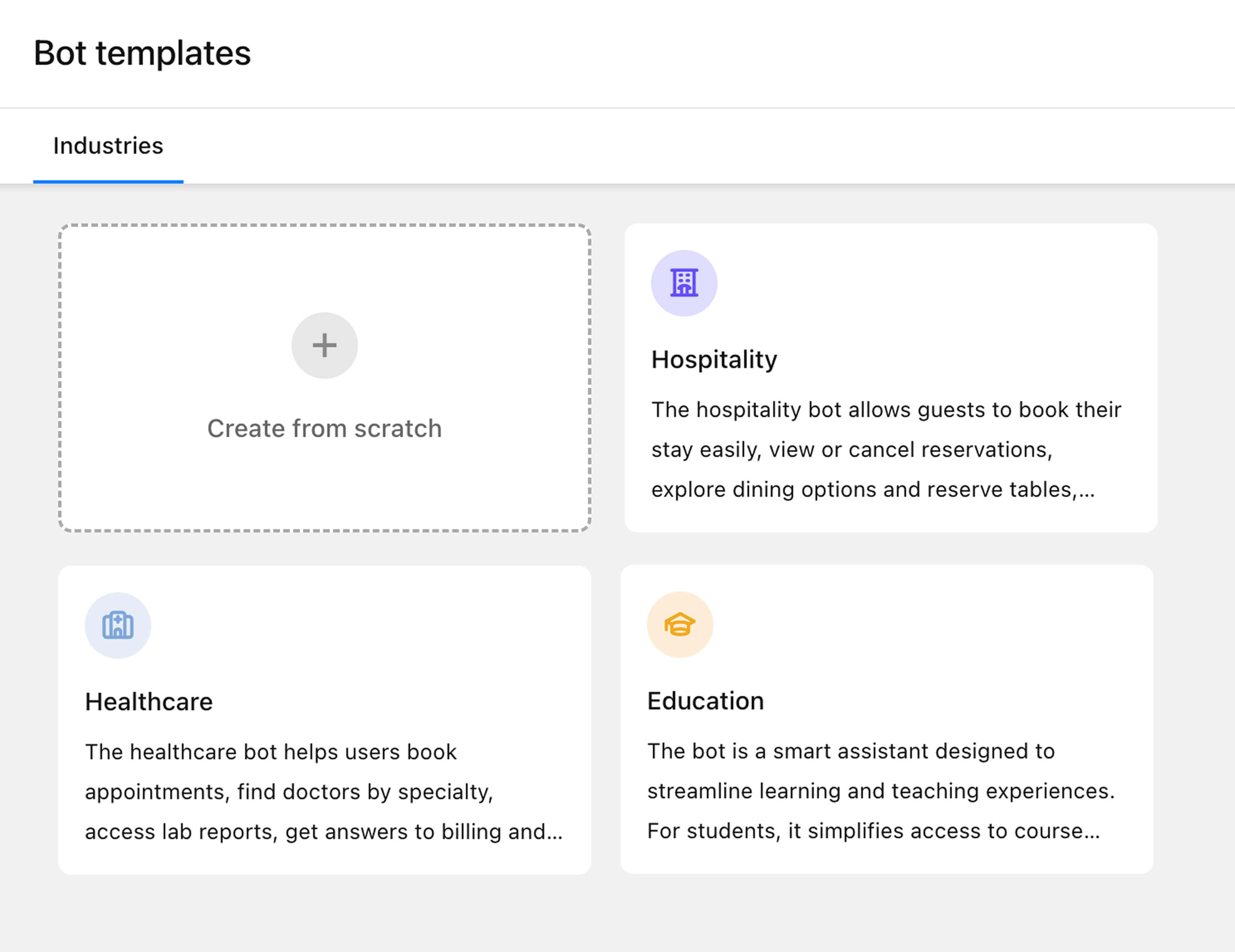
Revamped Zobot: quickly create bots with predefined templates, import/export flows, and optimize with interaction reports.
Smarter Answer Bot: thanks to Zia GenAI, it generates clear, natural responses based on your knowledge base and FAQs.
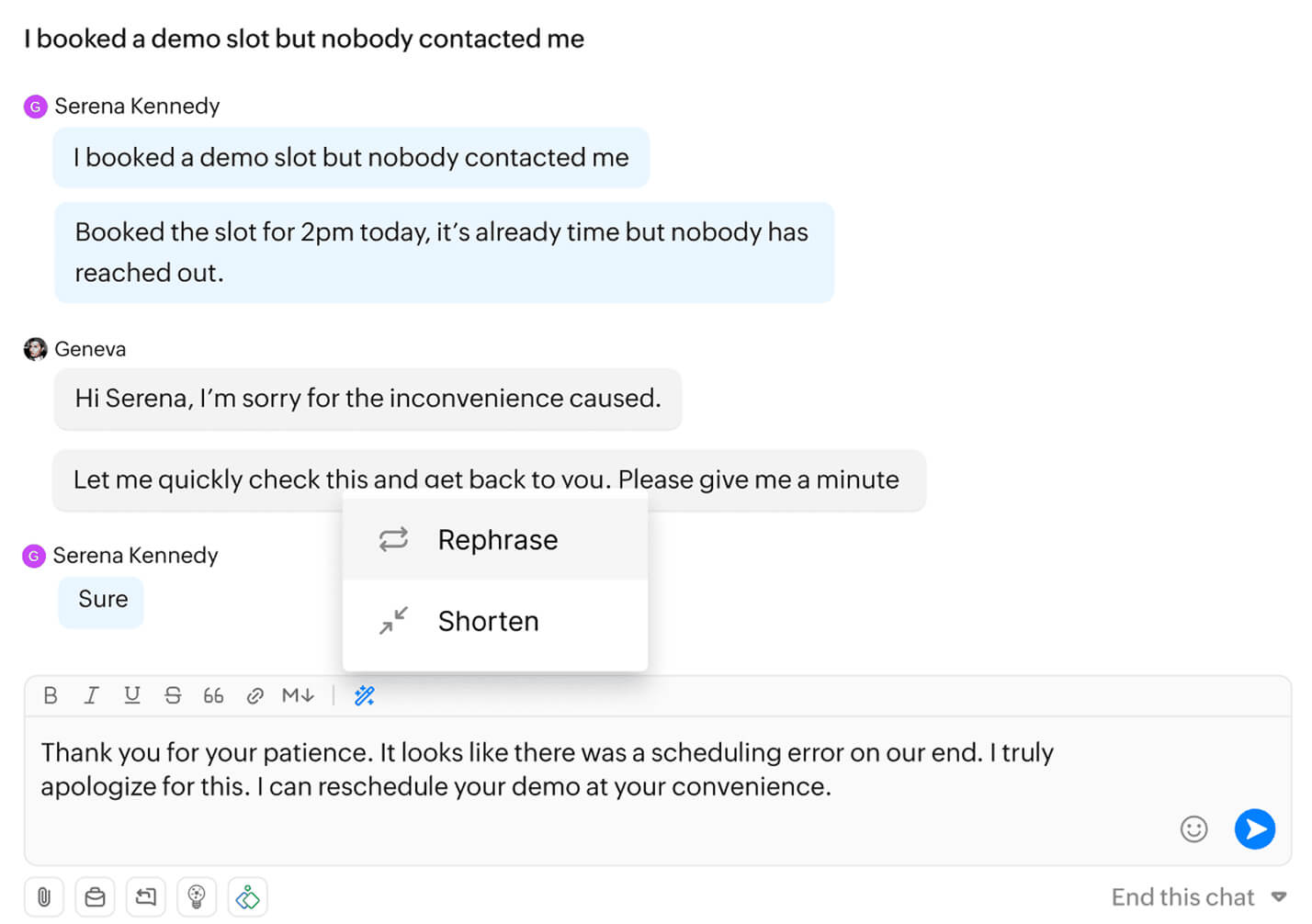
AI Assistants: write perfect messages, get automatic chat/call summaries, and integrate a ChatGPT assistant for more contextual responses.
(image via zoho)
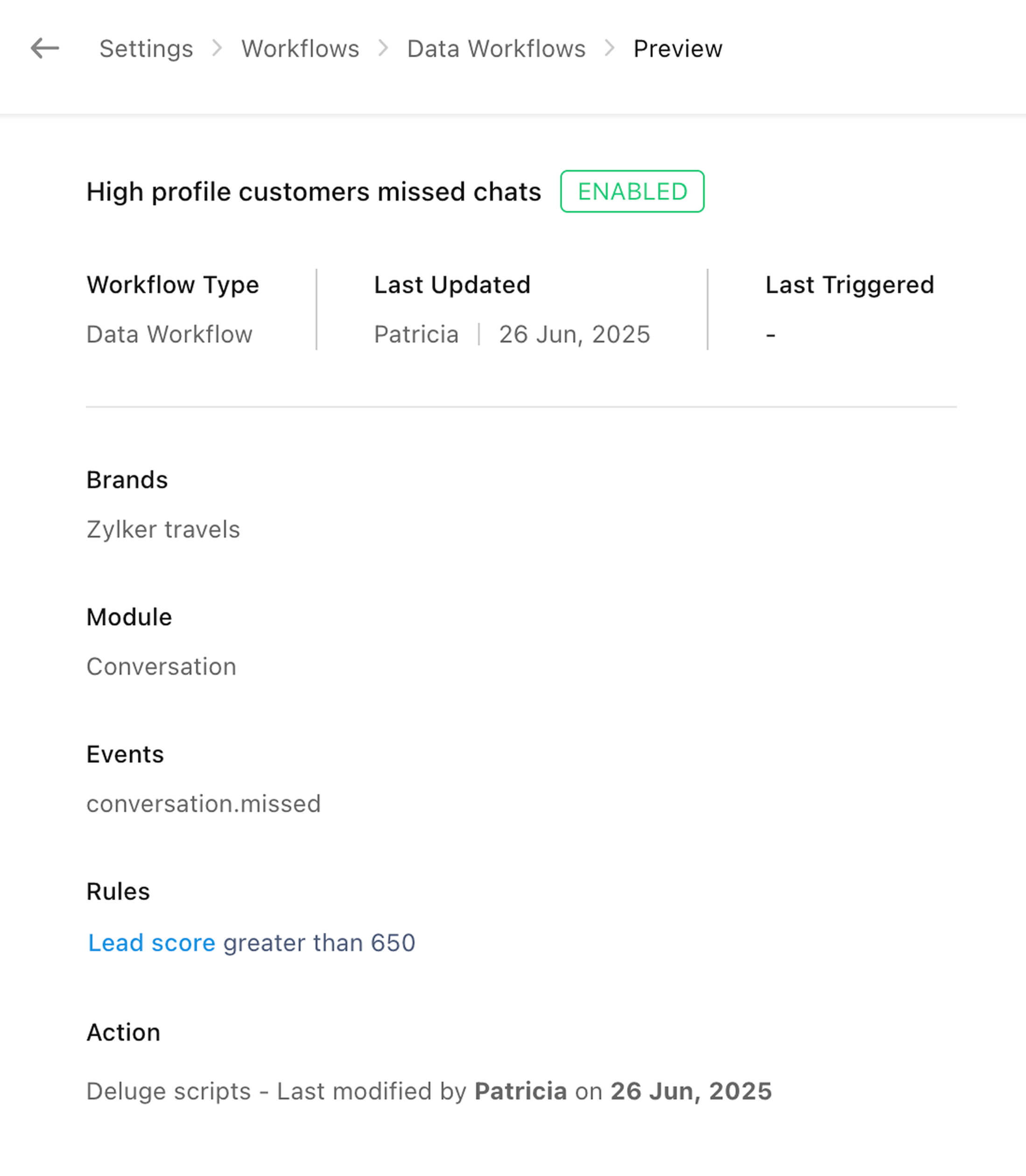
Flow automation: set up automatic actions based on key events, such as instant notifications when a lead reaches a certain score.
(image via zoho)
Improved messaging channels:
Manage multiple WhatsApp Business accounts.
Receive Instagram story replies in your dashboard.
Send personalized bulk messages and schedule appointments from messaging channels.
Filter inappropriate language with Profanity Management.
In-app voice calls: integrate voice calls directly into your mobile app for a frictionless experience.
Advanced access control: assign permissions by profile for greater security.
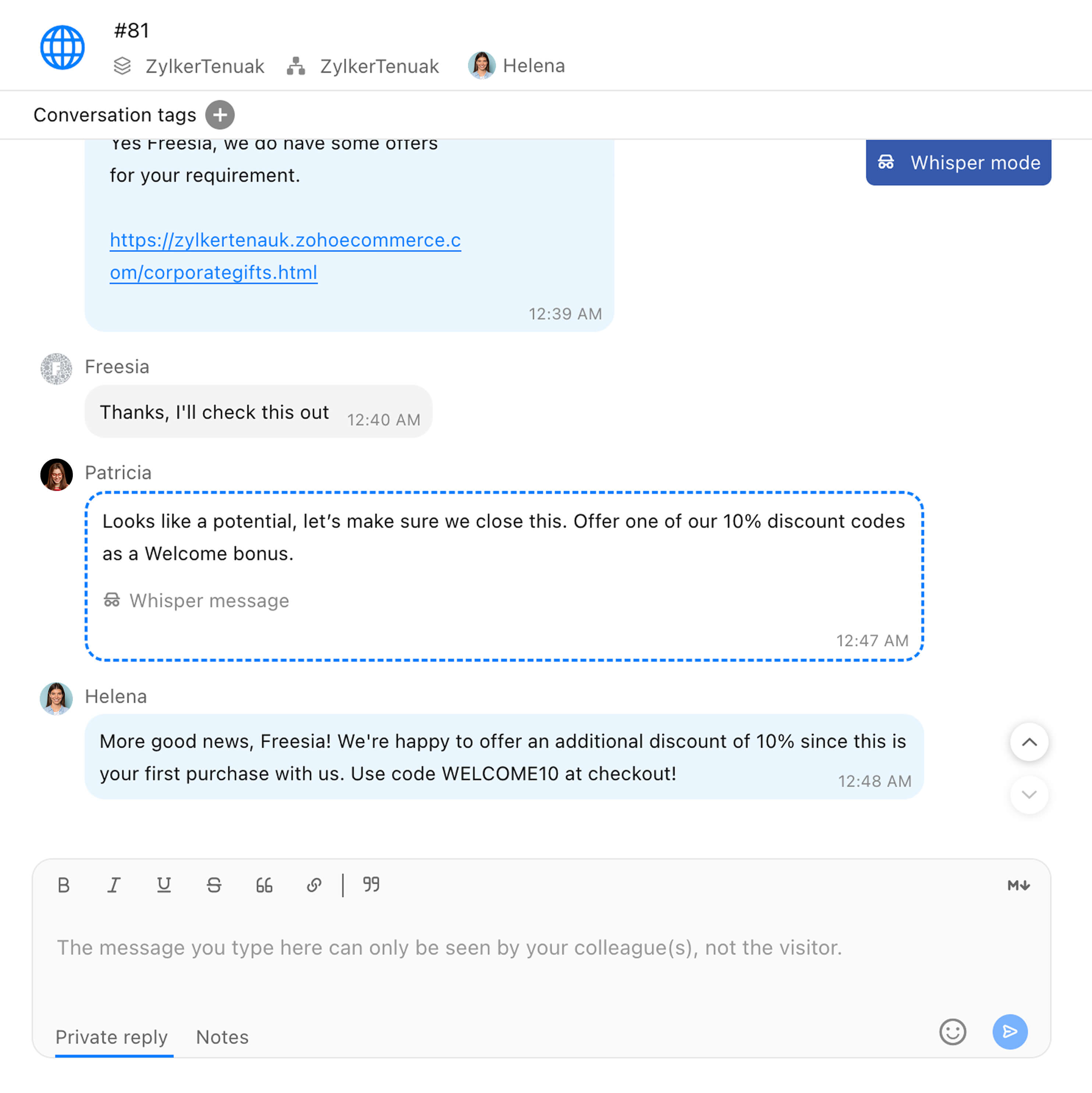
Whisper chat: guide your agents in real time without the customer noticing.
(image via zoho)
New integrations: connect with Bigin to unify sales data and with Zoho Lens for remote assistance with augmented reality.
Agent mobile app improvements: multimedia editing, WhatsApp templates, chat tagging, automatic summaries, and call management.
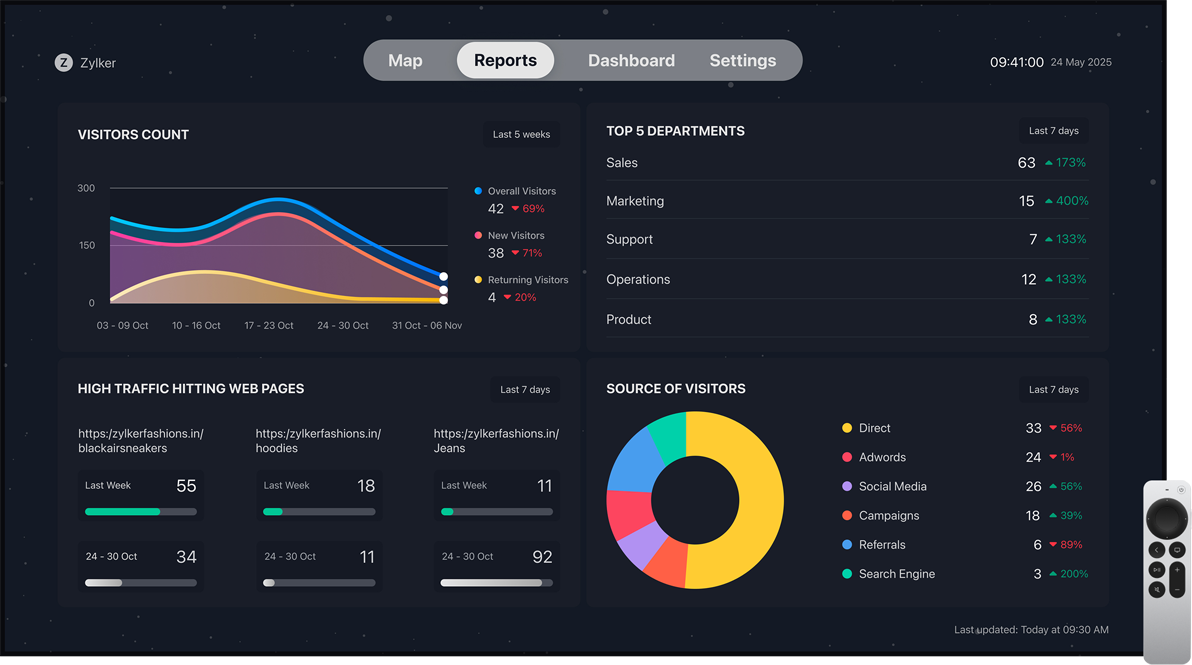
TV display: now also on Android TV, showing key real-time metrics for meetings or monitoring.
(image via zoho)
With Nova ’25, you simplify processes, automate interactions, and take your service to the next level.
Busy? Delegate your signature in Zoho Sign without delays
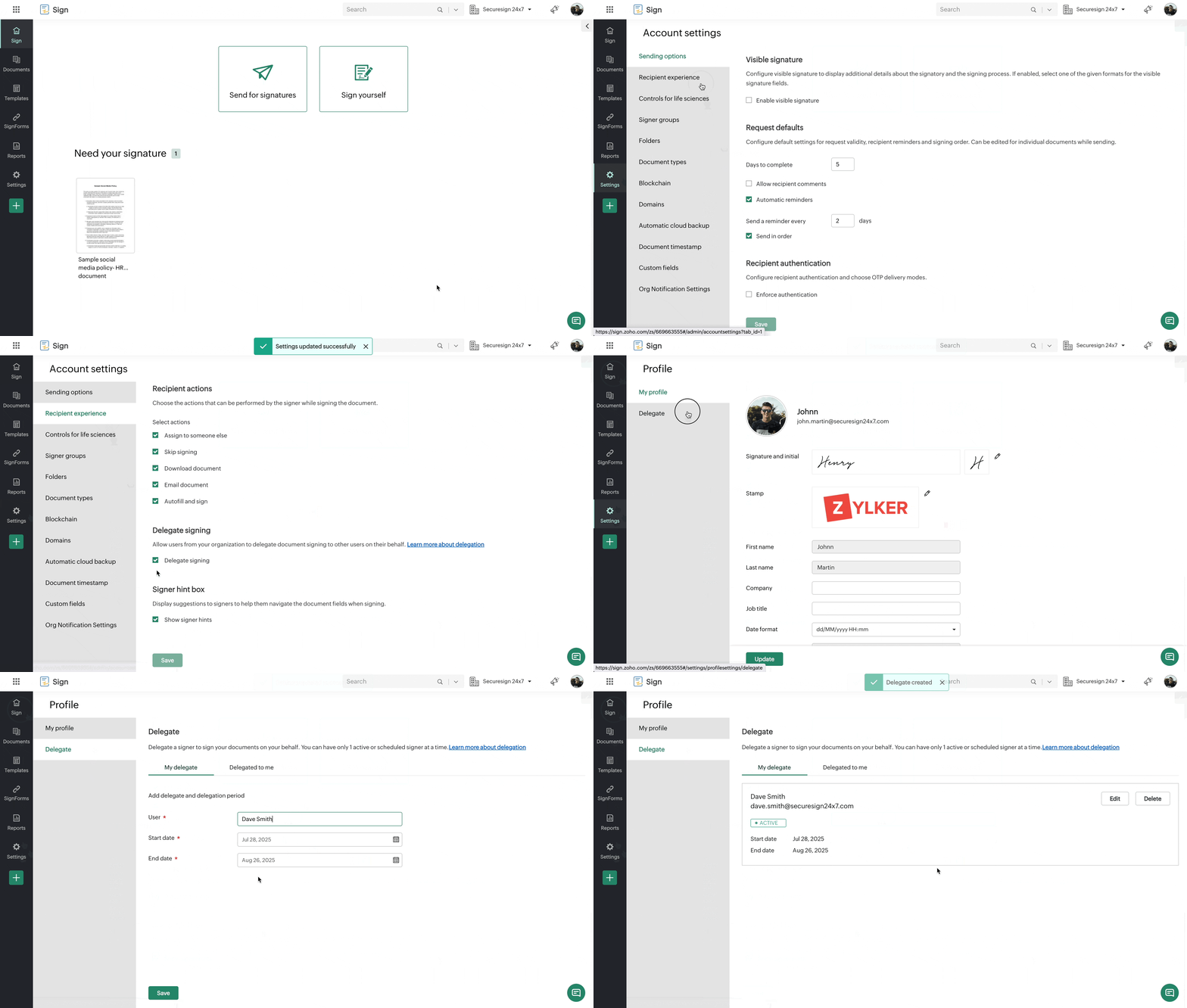
You can now authorize someone else to sign documents on your behalf when you’re unavailable, whether you’re in meetings, on vacation, or juggling multiple tasks at once.
(image via zoho)
With this improvement:
Avoid delays and bottlenecks in your workflows.
Maintain process continuity regardless of your availability.
Gain flexibility to delegate at key moments.
You just need to set up a delegate and Zoho Sign will take care of the rest.
Zoho Projects Q2 2025: more collaboration, automation, and integration with Jira
In the second quarter, Zoho Projects has introduced enhancements focused on collaboration, customization, and automation to make project management more agile and flexible.
Q2 highlights:
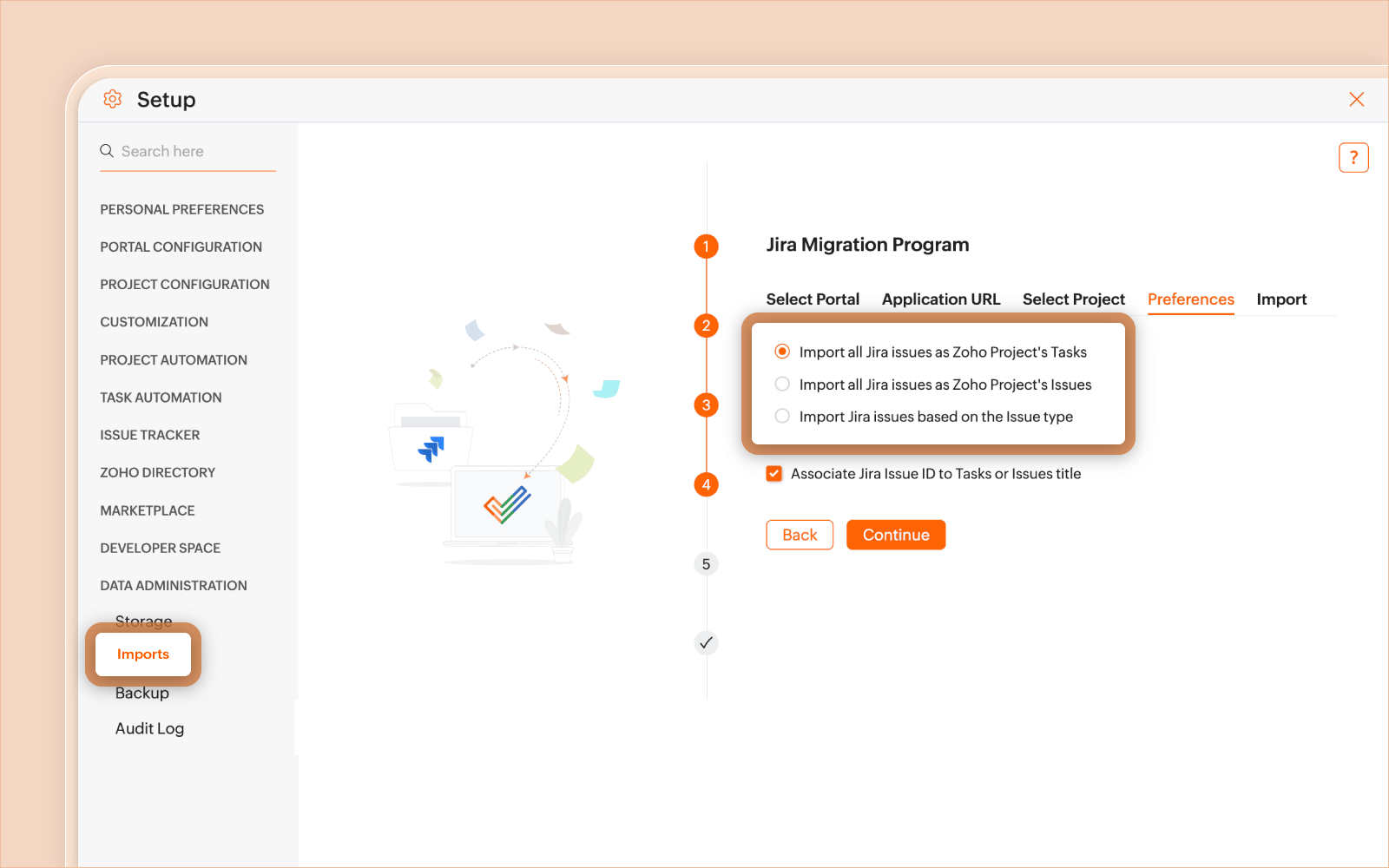
Import from JIRA: bring bugs from Jira Cloud or Server and turn them into tasks to manage without interruptions.
(image via zoho)
Scheduled task export: set up automatic daily, weekly, or monthly exports, applying specific views, formats, and filters.
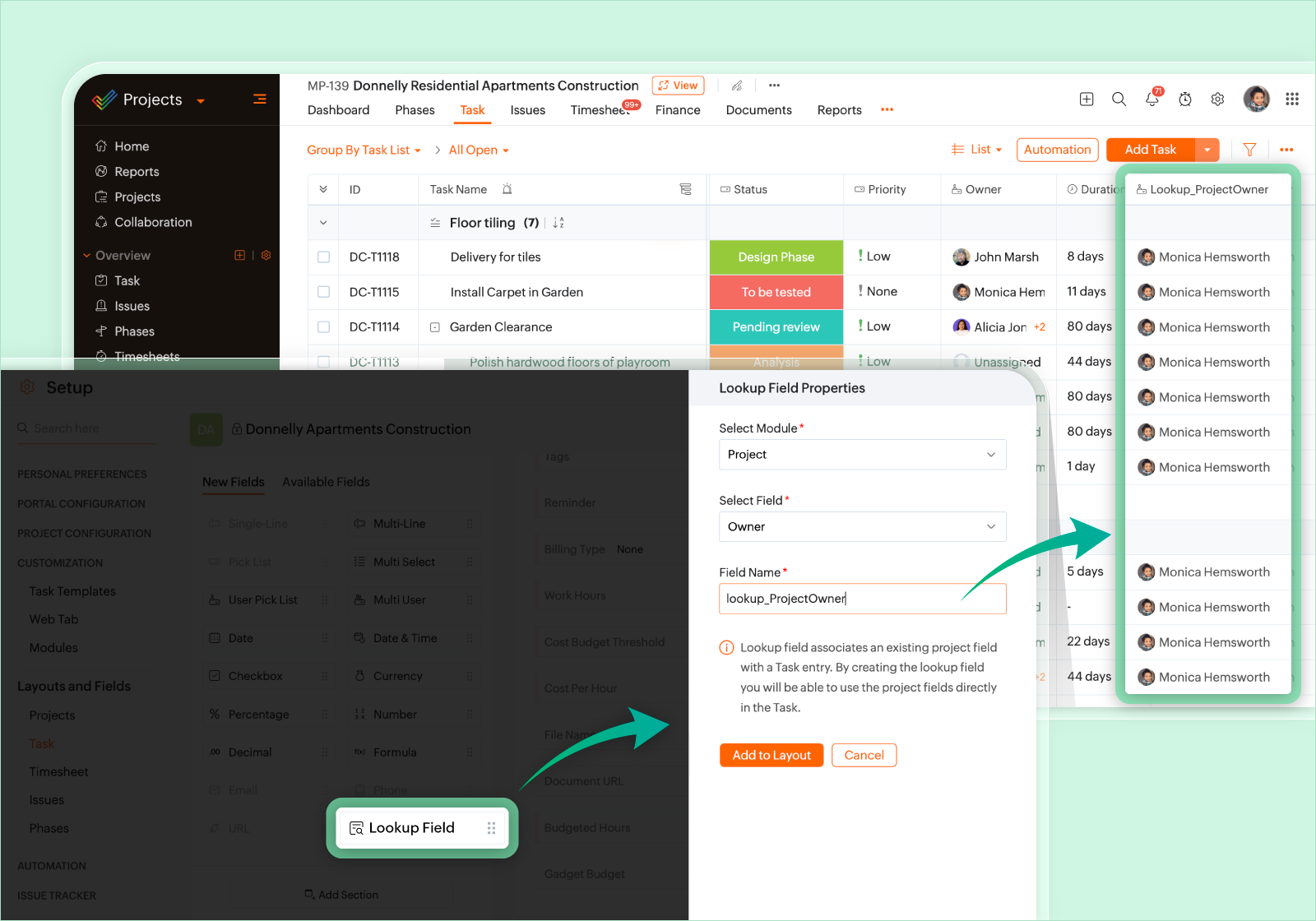
Search field in task layouts: link project module fields to tasks, both default and custom.
(image via zoho)
Relative date range in custom views: filter by dynamic dates in addition to fixed dates for more flexible criteria.
“Client Company” is now “Customers”: a clearer and more specific name for this module.
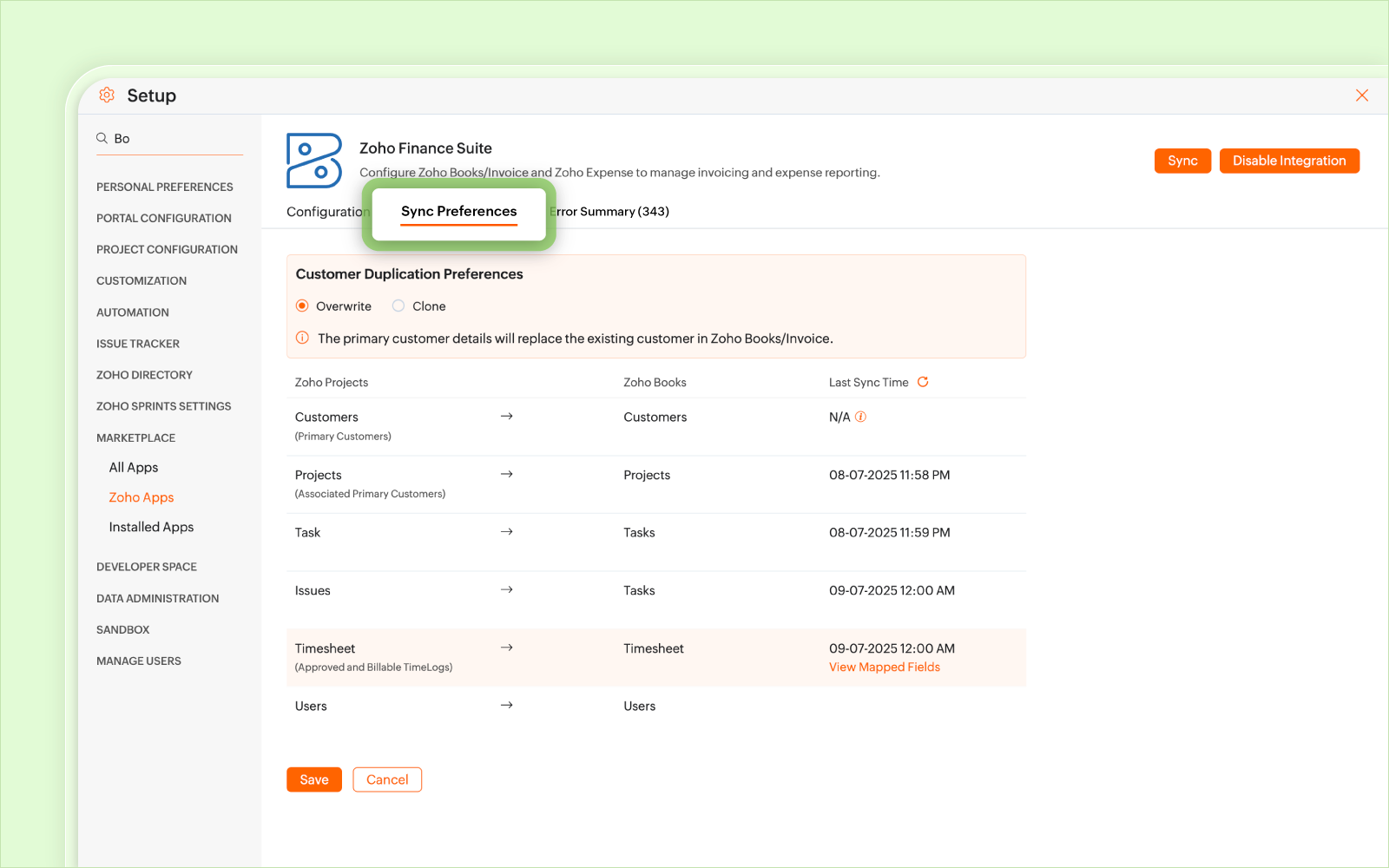
Improved sync preferences with Zoho Books and Invoice: view sync details in projects, tasks, issues, timesheets, and users.
(image via zoho)
Task assignment from the Workload Report: reassign existing tasks to new owners directly from the workload timeline.
Color palette for statuses: visually categorize progress with more color options.
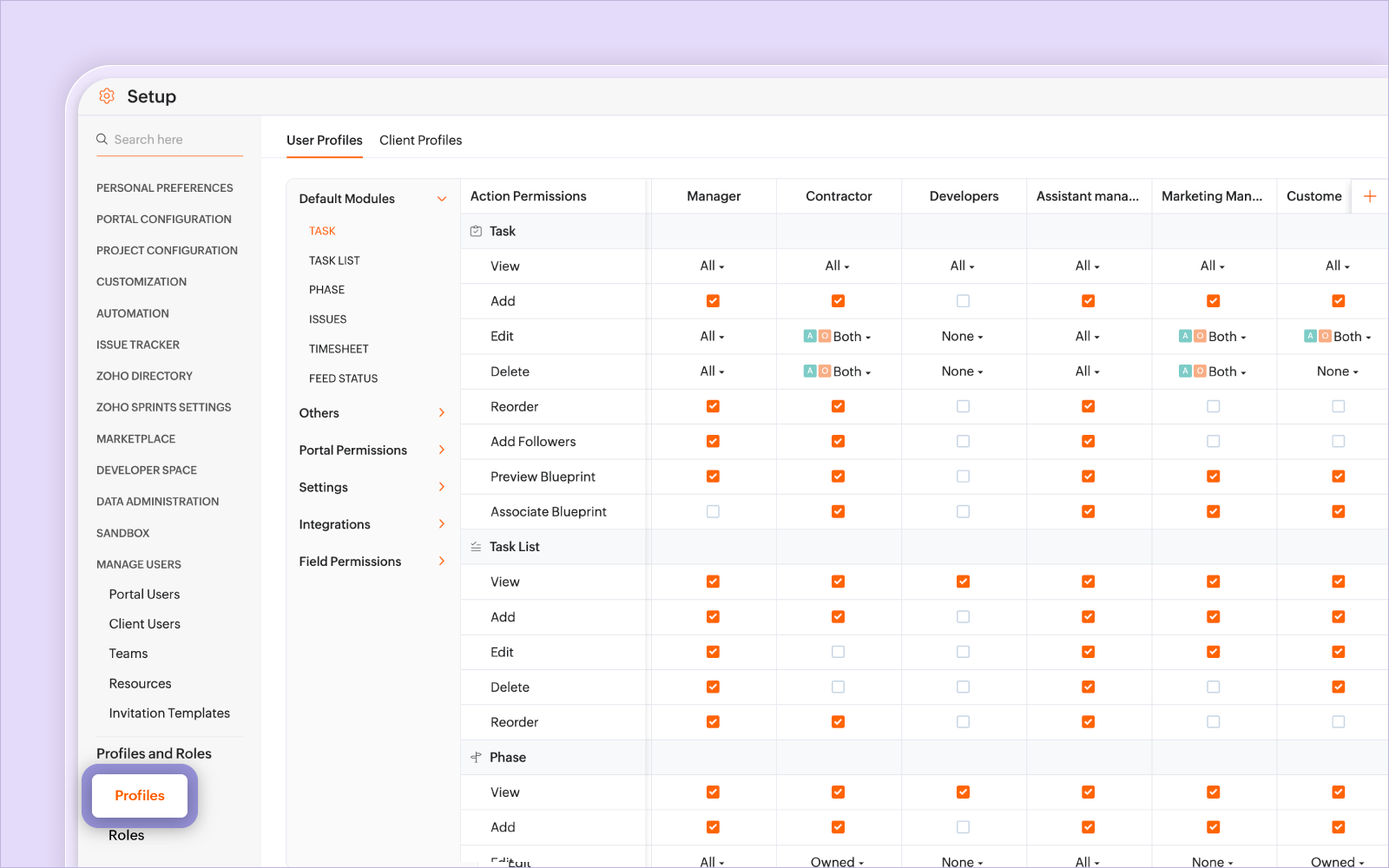
New profile-based permissions design: a clearer interface to grant detailed permissions in modules, fields, integrations, and settings.
(image via zoho)
These updates are just the beginning: Zoho Projects will continue improving and adjusting features based on user feedback.
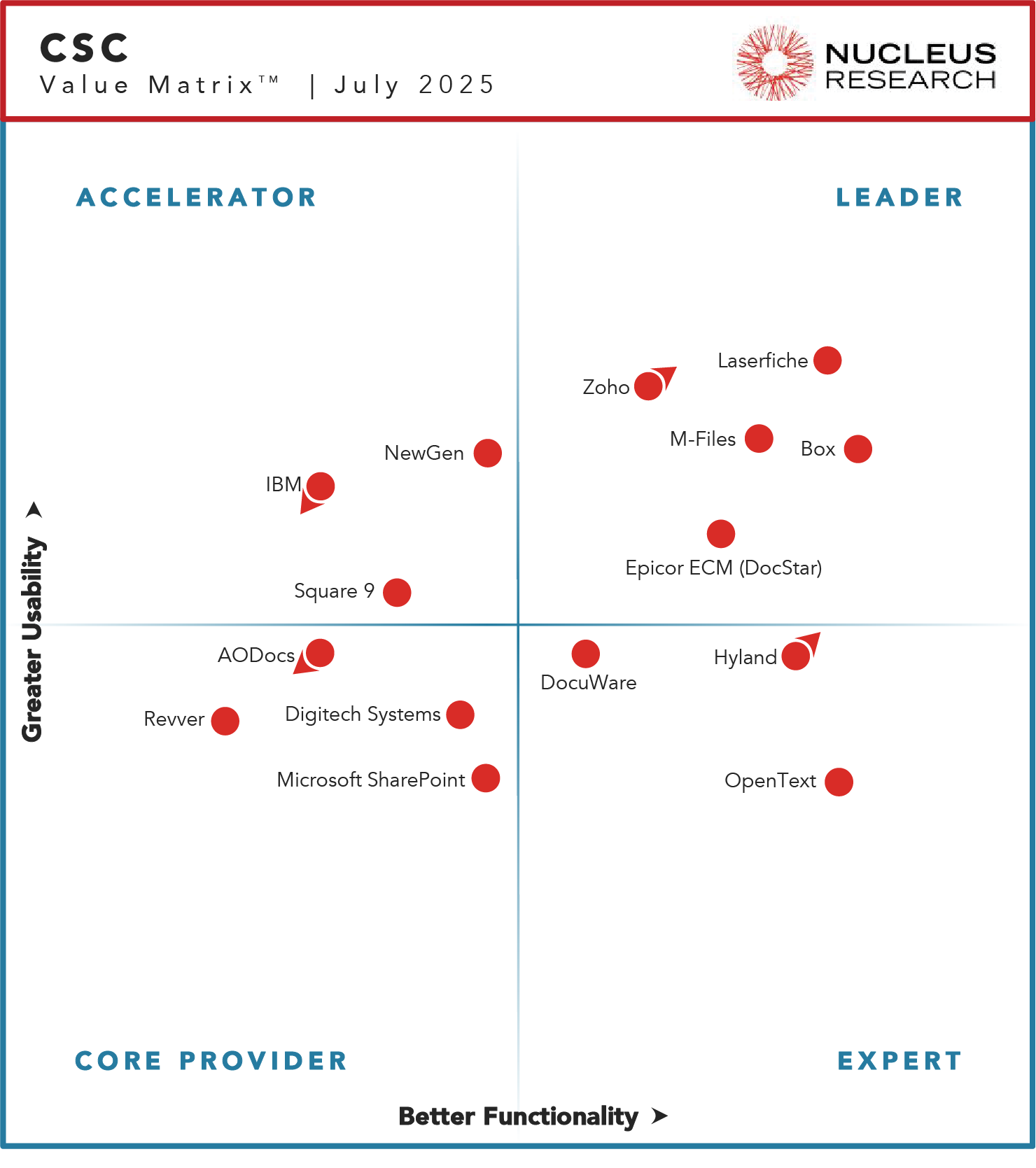
Zoho WorkDrive recognized as “Leader” in 2025 by Nucleus Research
For the third consecutive year, Zoho WorkDrive has been named a Leader in the Nucleus Research Technology Value Matrix for Content Services and Collaboration. This recognition reaffirms its ability to deliver high functionality, intuitive usability, and AI-driven innovation, helping businesses streamline workflows, improve collaboration, and maximize ROI.
(image via zoho)
Key updates with WorkDrive 5.0:
Workflow Builder: automate reviews, approvals, data collection, and contract management.
DLP Policies: protect sensitive data by blocking unauthorized use.
Restricted access folders: control who can see what content.
Watermarks: protect intellectual property and reinforce branding.
Internal AI: content and image generation with maximum privacy.
Enhanced Zia: automatic summaries and comment translation into 57 languages.
Deep integration with Zoho CRM: centralized storage and secure collaboration on projects.
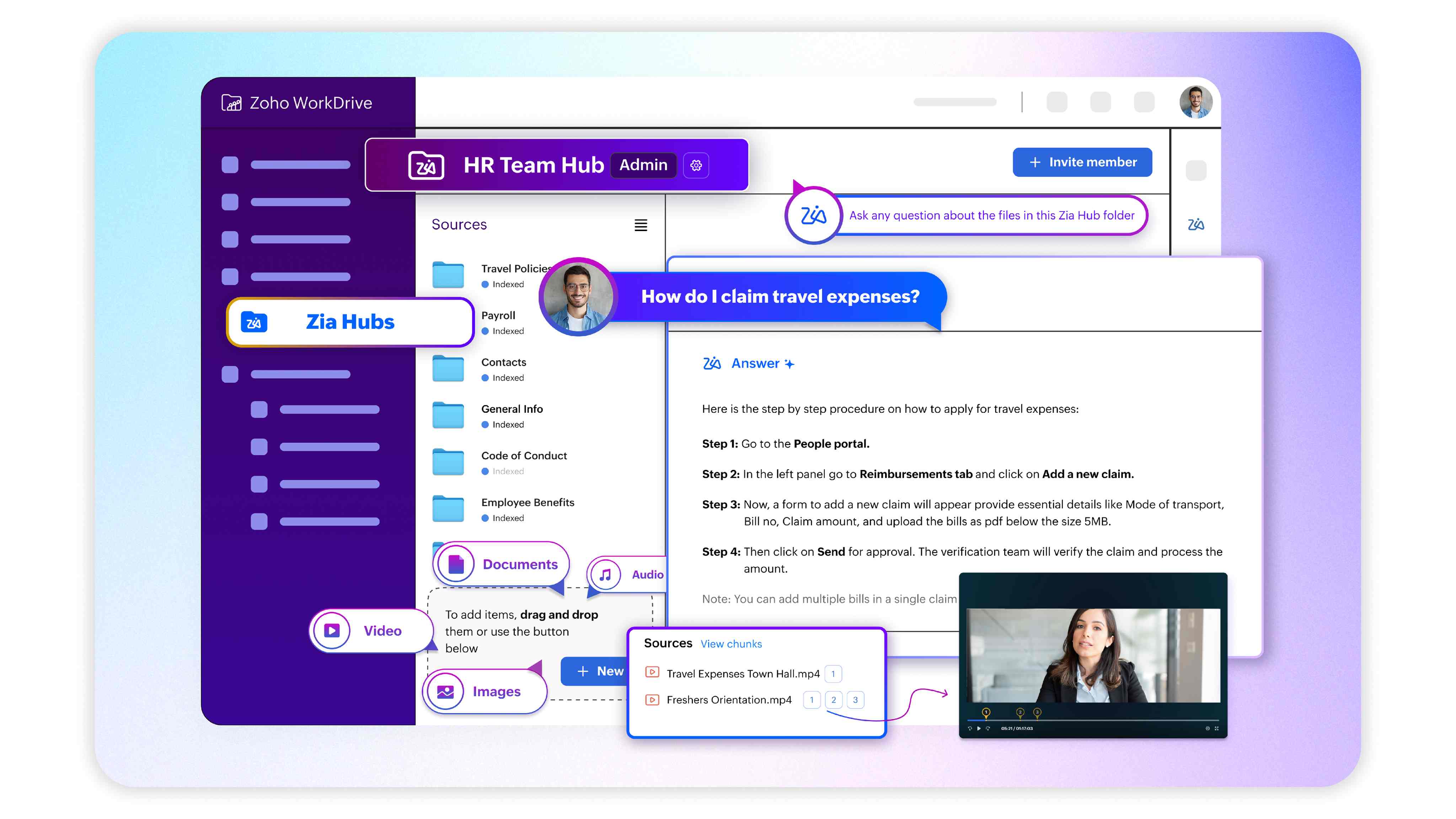
Zia Hubs(beta): AI-powered content hubs to extract context and insights from unstructured data.
With over 900,000 businesses trusting the platform, WorkDrive stands out as a secure, scalable solution ready for digital transformation.
Webinars on Creator, AI, and CRM
Create low-code AI-based applications with CoCreator
Every day, companies generate massive amounts of information: emails, documents, spreadsheets, meeting recordings, presentations… and often, all this content ends up scattered across different folders and platforms. The result? Valuable data goes unused, and decisions are made with incomplete information.
According to IDC, 80% of business data is unstructured, meaning it’s not organized in a way that can be easily analyzed. And most of it is text-based: from a client email to the transcript of a corporate video.
To tackle this challenge, Zoho has launched Zia Hubs in WorkDrive, an AI-powered solution that unifies, organizes, and analyzes your company’s content so you can find what you need in seconds and make better-informed decisions.
(imagen via zoho)
What is Zia Hubs and how does It work?
Zia Hubs creates smart spaces within WorkDrive that group and organize content related to each project or work area. But its value goes far beyond simple file organization:
Integrates scattered information from different apps and platforms into a single dashboard.
Keeps your files in their original locations, avoiding workflow disruptions.
Analyzes unstructured content (text, audio, video) to find and connect key information.
Provides unified and accurate searches to locate documents, data, or relevant conversations.
With Zia Hubs, it doesn’t matter if the information is in a Word document, an email thread, or a meeting recording—the AI will find it for you.
Practical use cases across departments
Sales: retrieve historical sales figures, comparisons with targets, or competitor data without digging through multiple folders.
Support: access technical documentation, past meeting recordings, or any related resource during a call—all in one place.
Internal Meetings: instantly find details discussed months ago by automatically searching through audio and video transcripts.
More than a tool—a new approach
Zia Hubs doesn’t just save time: it creates a living knowledge ecosystem within your company. This means every query, every search, and every analysis becomes an opportunity to uncover connections that previously went unnoticed.
And this is only the beginning. Zoho is already working on new features that will further enhance Zia Hubs’ capabilities, taking intelligent content management to the next level.
In short: if your company wants to fully leverage its unstructured data and reduce the time lost searching for information, Zia Hubs is the answer.
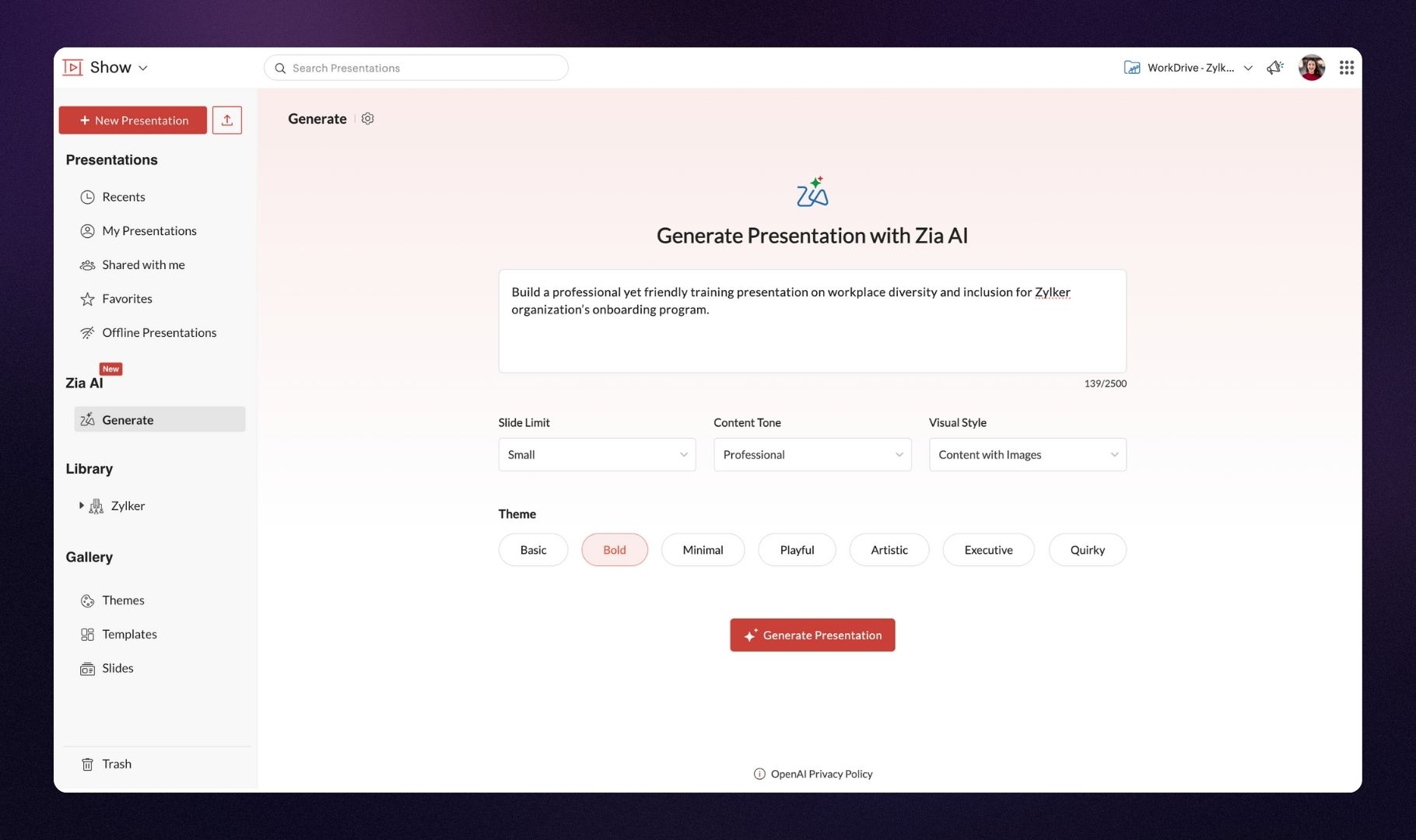
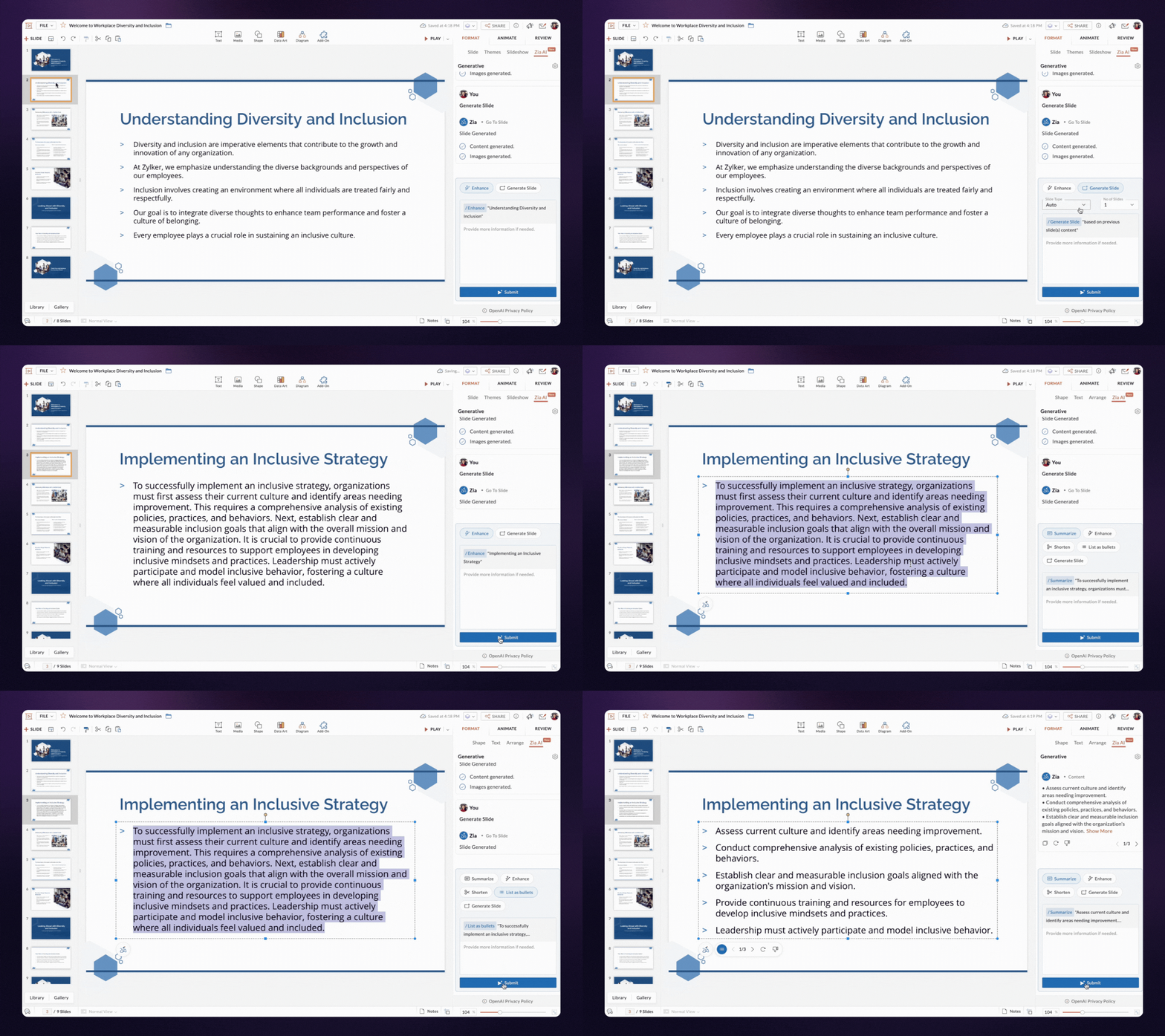
Artificial intelligence has arrived in Zoho Show to help you create presentations faster and more effectively. With Zia, you can now generate slides, content, and images in seconds, enhance text, and summarize information without losing the focus of your message. It doesn’t replace your work—it enhances it.
Generate presentations in seconds
Zia can create complete presentations from scratch based on your visual style and the tone of the content you choose. You’ll get a solid foundation to build upon.
(image via Zoho)
Easily add new slides
Already have a presentation in progress? You can ask Zia to generate new slides that integrate perfectly with your existing content.
(image via Zoho)
Automatically create content and images
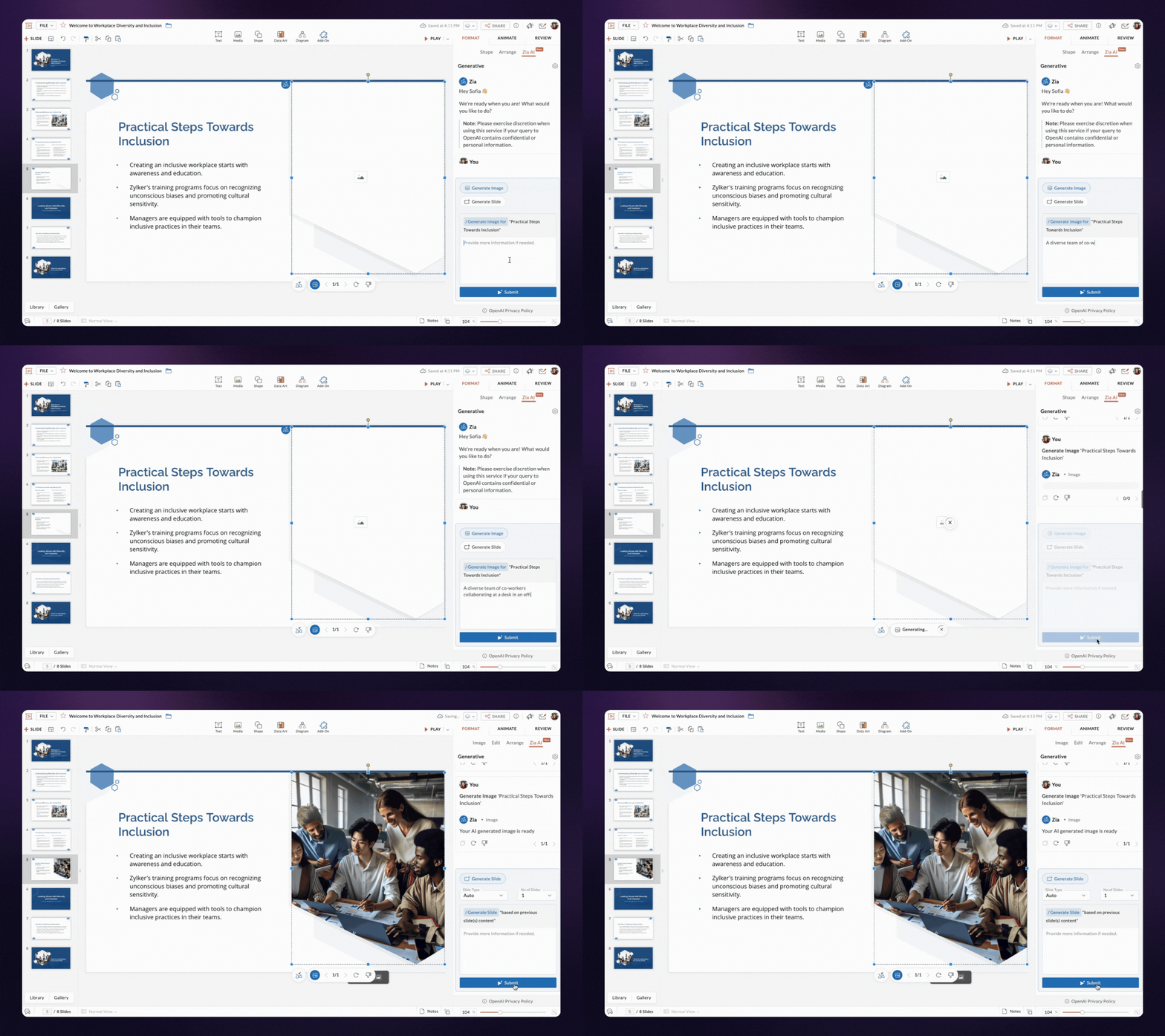
Zia generates text and images for each slide based only on the title. All content automatically adapts to your presentation’s design, reducing manual work.
(image via Zoho)
Enhance, summarize, and organize your content
Is your text unclear or too long? Zia can refine it, summarize it, or turn it into bullet points to make it easier to read and visualize.
More features on the way
Zia’s capabilities will continue to grow, and will soon also be available in the Zoho Show mobile app for Android and iOS.
Start creating more effective presentations today with the help of artificial intelligence!
By Rocío Caillava – Digital Marketing Manager, InterConnecta
Over the past year, I spoke with companies looking to implement Artificial Intelligence in their operations. Some were already using Zoho. Others were looking for a tool to centralize their business. But they all shared the same concern:
“Where do I start? 🤔 ”
And, above all:
“How do I know I won’t waste time and resources on something that doesn’t connect to my operation?”
This article was born from those conversations. It’s not meant to be a product catalog. It’s a roadmap based on real experience, to help you make strategic decisions about AI in your company.
The goal is not to “have AI.” It’s to make it work.
Most companies that fail to implement AI do so for one simple reason: they start with the tool and not with the structure.
Adding a conversational assistant, automating a specific task, or using prompts with ChatGPT doesn’t transform the operation.
AI without context is just another app.
Think of AI as infrastructure, not an accessory
My first suggestion is this: don’t think of AI as a layer on top of what you have, but as part of the system. And that requires answering uncomfortable questions:
How is your data organized?
How integrated are your apps?
Do your processes have clear, traceable rules?
Who defines what actions an AI can take at each stage?
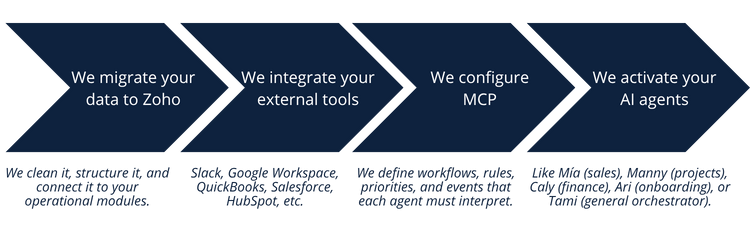
These are the questions that enable real implementation. And they’re the ones we solve at InterConnecta with something called MCP.
MCP: the real enabler of operational AI
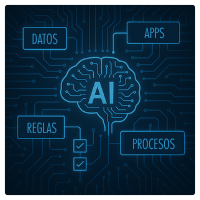
MCP is a context protocol. It allows your AI agents not only to respond… but to understand your business.
We designed it so your assistants can: ✔ access the right data ✔ understand workflows ✔ apply business rules ✔ make decisions ✔ and execute tasks in your real systems (Zoho and others)
In other words: MCP turns your AI assistants into virtual employees.
How we implement it (if you’re already using Zoho or about to)
Here’s the full process, which we’ve validated with companies across multiple industries:
Tip for those evaluating platforms
Invest in a solid foundation like Zoho.
Why?
It’s affordable in terms of cost and scalability
It has over 100 million users worldwide
It’s been awarded by Gartner as a leader in CRM and productivity
It’s modular, open, and perfectly integrable with AI
Includes MCP (Model Context Protocol) — the architecture that connects data, processes, and decisions to enable real AI –Learn more at Zoho MCP
Once this approach is implemented, the impact becomes visible within a few weeks:
✔ Already have some level of digitalization ✔ Have Zoho or another CRM implemented ✔ Looking to scale without operational friction ✔ Open to rethinking processes to automate with AI
And, above all: ✔ An operation ready to scale without growing the human structure
Is this for all companies?
Not necessarily. This model has greater impact in companies that:
✔ Already have some level of digitalization ✔ Have Zoho or another CRM implemented ✔ Looking to scale without operational friction ✔ Open to rethinking processes to automate with AI
If you feel identified, you’re probably at the right time to move forward.
And what if I still don’t know if I’m ready?
That’s an excellent starting point.
My recommendation is this: Don’t start with a demo. Start by understanding your own ecosystem. I suggest a free evaluation where we analyze:
Thanks for reading! I’m convinced that artificial intelligence is not about tools, but about systems that think and act with purpose. That’s what we’re building at InterConnecta.
And if you’d like to explore how to apply it to your specific case, I’m available.
Rocío Caillava Digital Marketing Manager, InterConnecta
Zoho CRM continues to evolve to provide smarter, more integrated, and flexible tools to sales teams. Below we share the most notable new features released for the second quarter of 2025.
Sales Force Automation
Zoho CRM for Everyone: total collaboration in sales
Zoho CRM has launched CRM for Everyone, an initiative that extends collaborative capabilities beyond the sales team. Now, areas such as marketing, support, legal, finance, or procurement can seamlessly integrate into sales processes, fostering alignment and business opportunity closures. This update centralizes tools and workflows to improve cooperation among various teams involved in business deals.
(image via zoho)
(image via zoho)
Advanced customization in quotes with CPQ enhancements
The Configuration, Pricing, and Quoting (CPQ) engine in Zoho CRM receives significant improvements. It’s now possible to work with dynamic actions in the Product Configurator, allowing the selection of multiple base products to calculate quantities and individual values.
(image via zoho)
Additionally, a feature is introduced to clone pricing rules and configurations, making it easier to create quote variants without starting from scratch, speeding up processes and reducing errors.
(image via zoho)
Organize your notes with rich text
Notes in Zoho CRM are evolving, now featuring support for rich text. This enables the inclusion of formats like bold, italics, underline, lists, colors, hyperlinks, and even emojis, making captured information clearer and more structured. It’s an ideal feature for keeping internal communication organized and facilitating team collaboration.
(image via zoho)
Artificial Intelligence
Zoho launches its own LLM to power Zia
Zoho introduces its own language model (LLM), now powering AI features in Zoho CRM. This internal LLM enhances tools like Smart Prompts, helping draft emails, summarize notes, or extract specific data—all within a secure environment that maintains high privacy and compliance standards.
Users can choose to use the fully integrated Zia LLM within the Zoho ecosystem or connect their own OpenAI keys if they prefer working with external tools.
(image via zoho)
More accurate churn prediction with usage data
The Churn Prediction feature in Zia takes a step further by allowing the inclusion of product or service usage data. Now, it’s possible to feed Zia with information from APIs, URLs, or files, stored in custom modules. This helps detect behavior patterns indicating churn risk, providing more precise analysis and more effective preventive strategies.
(image via zoho)
User Experience
Canvas introduces Flex for adaptable views
Canvas, Zoho CRM’s visual design tool, introduces the new Flex component, offering greater control over data layout within custom views. Flex allows the design to adapt to different screen sizes and rearrange fields horizontally and vertically, optimizing visualization and usability across devices and resolutions.
Wizards with sections for better data collection
Zoho CRM wizards can now be divided into independent sections, grouping related fields to improve clarity and navigation in complex forms. This simplifies information gathering and reduces the risk of errors when entering data.
Omnichannel Engagement
Email features now available in more editions
Zoho CRM expands access to email features that were previously limited to the Professional edition and now also includes them in the Standard edition:
Email integration with POP3, IMAP, or Gmail.
MailMagnet, which centralizes incoming email notifications.
Email sharing, allowing you to set rules for sharing messages among team members.
Zoho Mail add-on user management, to control access and back up accounts.
Linking emails to deals, connecting messages with specific deals for better tracking.
Thread view in Case emails
Now, from the Cases module, you can view the entire email threadexchanged with customers without needing to navigate through different records. This makes it easier to follow conversations and context when managing incidents or requests.
(image via zoho)
Lead nurturing with greater control
Cadences in Zoho CRM are strengthened with new possibilities:
Define specific conditions to exclude leads from a nurturing flow.
Choose whether to completely restart a cadence or continue from where it was interrupted, depending on your sales strategy.
These improvements help personalize communication and tailor it to each lead’s behavior.
Autoresponders discontinued
Zoho CRM announces that autoresponders will be discontinued on September 30, 2025. From that date, new ones cannot be created. Zoho recommends migrating to cadences, which offer more powerful automation, tracking, and multichannel capabilities.
Developer Space
Client Scripts now linked to custom buttons
Client Scriptslets you run custom logic inside Zoho CRM in response to user actions. Now, these scripts can be triggered from custom buttons, opening possibilities like:
Adding bulk notes from list view.
Importing data from Zoho Sheet to subforms.
Sending mass emails to specific contact groups.
This makes it possible to customize processes without leaving the CRM environment.
Data Management
Migration improvements to protect your data
Data migration in Zoho CRM incorporates important advances:
Upsert operation, to update existing records without overwriting recent information.
Insert resolutions, which let you define whether data applies only to untouched records or to all records.
Omitted attachment uploads, preventing the need to repeat complete migrations for files that exceed size limits.
These improvements reduce risks and time associated with complex migration processes.
(image via zoho)
Broader translation coverage
Zoho CRM expands the translatable elements within the platform. It’s now possible to translate:
Web tabs
Layouts
Sections
Wizards and their screens
This offers businesses more flexibility to adapt Zoho CRM to the language and context of each team or region.
With these updates, Zoho CRM continues to establish itself as a robust, flexible solution aligned with today’s business needs. Don’t miss exploring these features to maximize your sales processes!
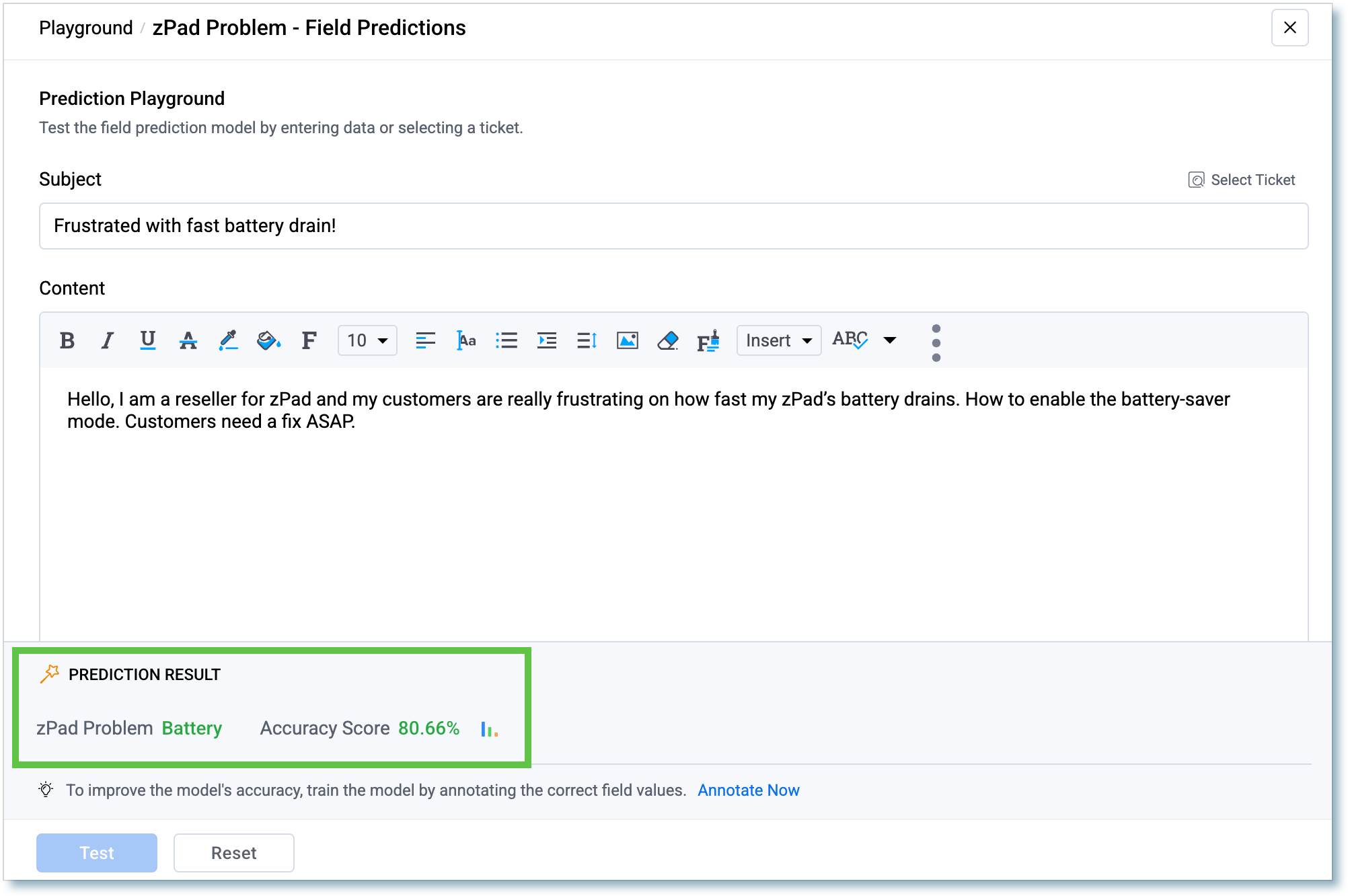
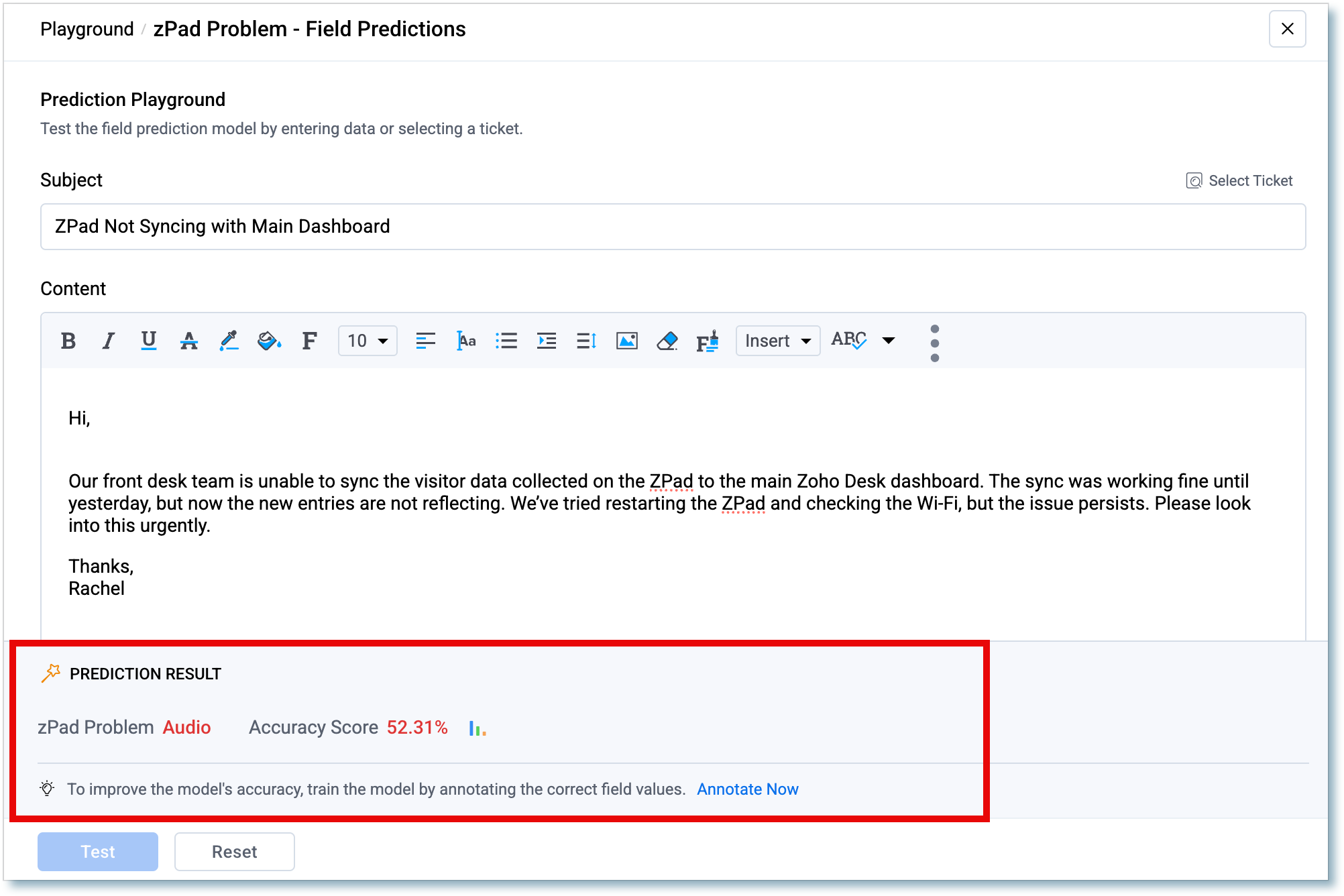
New Playground in Desk to test and fine-tune prediction accuracy
Zoho introduces Playground, a testing environment specifically designed to evaluate and improve the accuracy of predictions generated by Zia, the platform’s intelligent assistant.
With Playground you can:
Run predictions on real tickets or custom text to simulate real scenarios.
View predicted values along with a confidence score, making it easier to evaluate prediction accuracy.
Detect and correct incorrect predictions, thanks to the option to annotate data for system feedback.
Prepare data that can later be used to retrain Zia and optimize prediction performance.
Playground enables instant analysis of real cases, whether evaluating existing tickets or manually entering text to get immediate predictions.
If Zia fails or predicts with low confidence, it shows red alerts, helping companies adjust data and improve accuracy in real time.
(image via zoho)
(image via zoho)
Available in the U.S., India, Australia, and the EU.
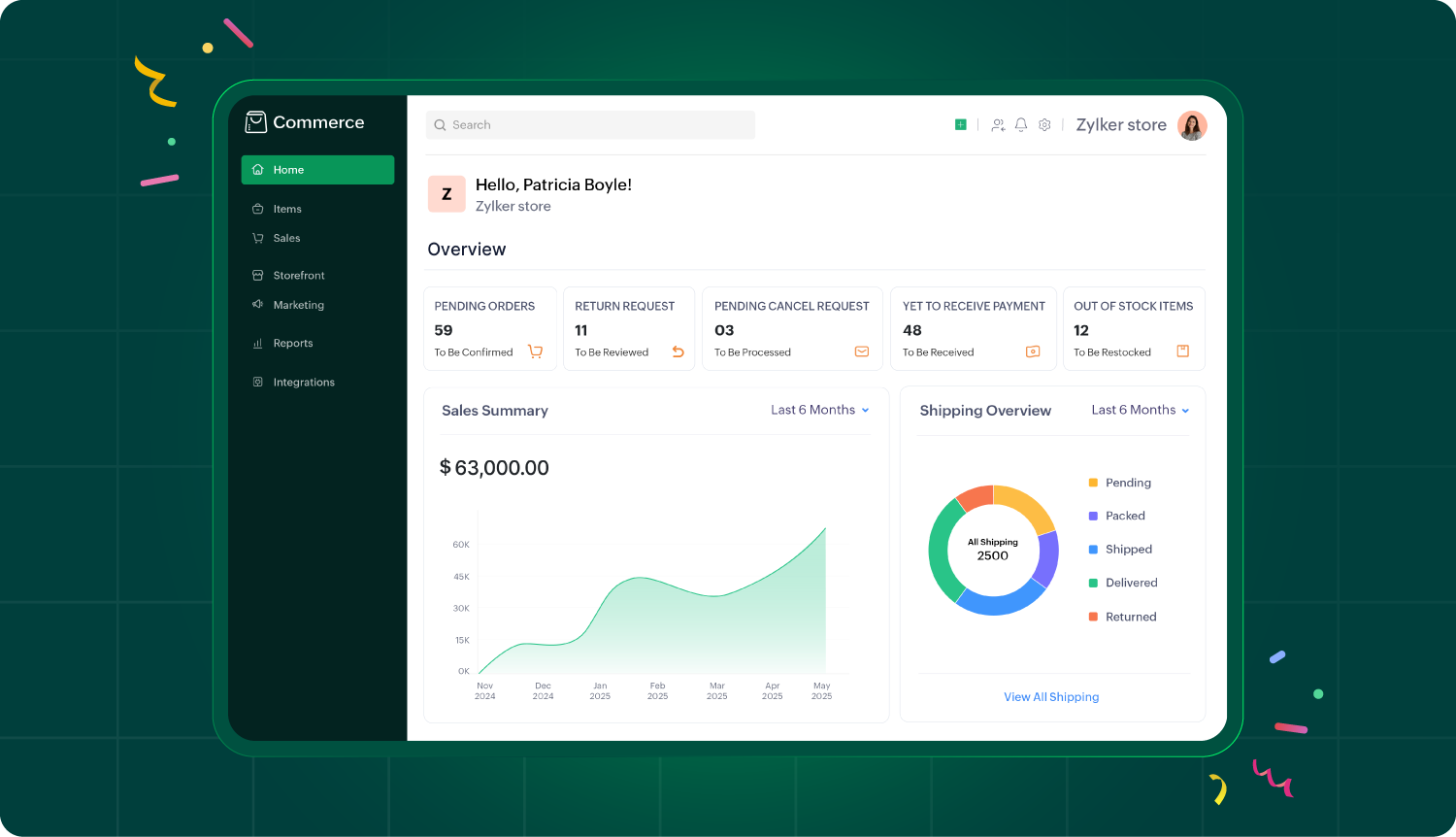
Zoho Commerce 2.0: Revamped design, mobile management, and service offerings
Zoho launches Commerce 2.0, a revamped version that redefines the experience of managing online businesses, especially designed for small and medium-sized businesses.
Main new features:
Completely redesigned interface With a cleaner and more modern design, Zoho Commerce 2.0 makes it easier to navigate and simplifies store management.
(image via zoho)
Advanced tools to boost sales
Abandoned cart recovery
Wishlists
Loyalty programs
Workflow automation
Smart and segmented coupons
Mobile management New Android and iOS apps let you manage orders, shipping, and returns from anywhere.
Beyond physical products Zoho Commerce 2.0 now enables the sale of services, ideal for coaches, consultants, designers, and digital creators.
More customer interaction
Image-based reviews
WhatsApp integration
“Buy Again” and “Save for Later” options
Global reach with local focus Fast, optimized, multilingual sites, with over 15 mobile-friendly themes to operate globally and serve local markets.
Smarter analytics and reporting Includes detailed reports like coupon-based sales analysis, activity logs and audits, plus flexibility in taxes, shipping, and returns.
Zoho Commerce 2.0 aims to help entrepreneurs build faster, sell smarter, and manage more efficiently, taking their digital businesses to the next level.
More security in Analytics: User access now by invitation only
Zoho Analytics introduces a new invite-only access model, designed to enhance security and give organizations greater control when adding users.
What’s changing?
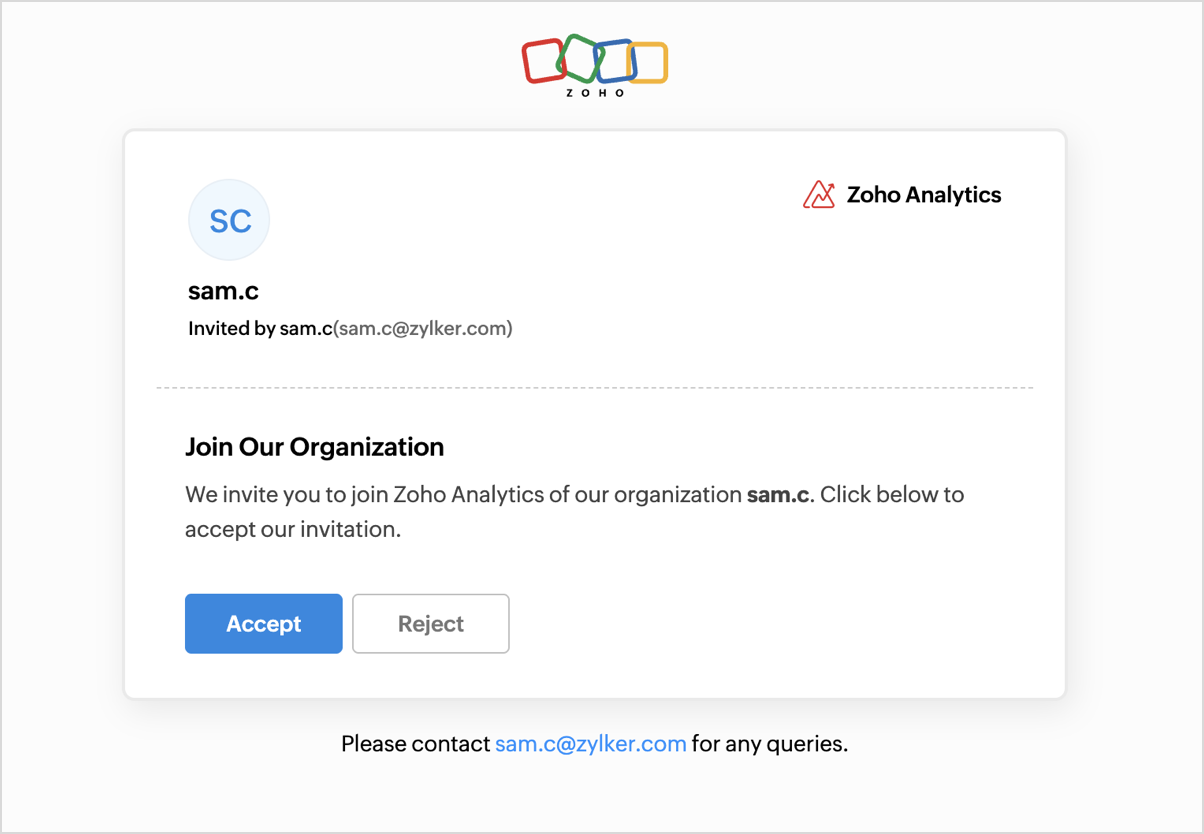
Mandatory invitations: Now, when users are added (either from the organization settings, workspaces, groups, or while sharing views), they’ll receive an email invitation and must accept it before accessing the organization or shared resources.
How it works based on user type:
Current Zoho Analytics users:
Receive the invitation by email and notification within the app.
Must accept or decline it to join.
(image via zoho)
Zoho users who don’t yet use Zoho Analytics:
Receive an email invitation.
Must accept it to gain access to the organization.
(image via zoho)
New users without a Zoho account:
Receive the invitation via email.
Must sign up and accept the invitation to join the organization.
(image via zoho)
Tracking and considerations:
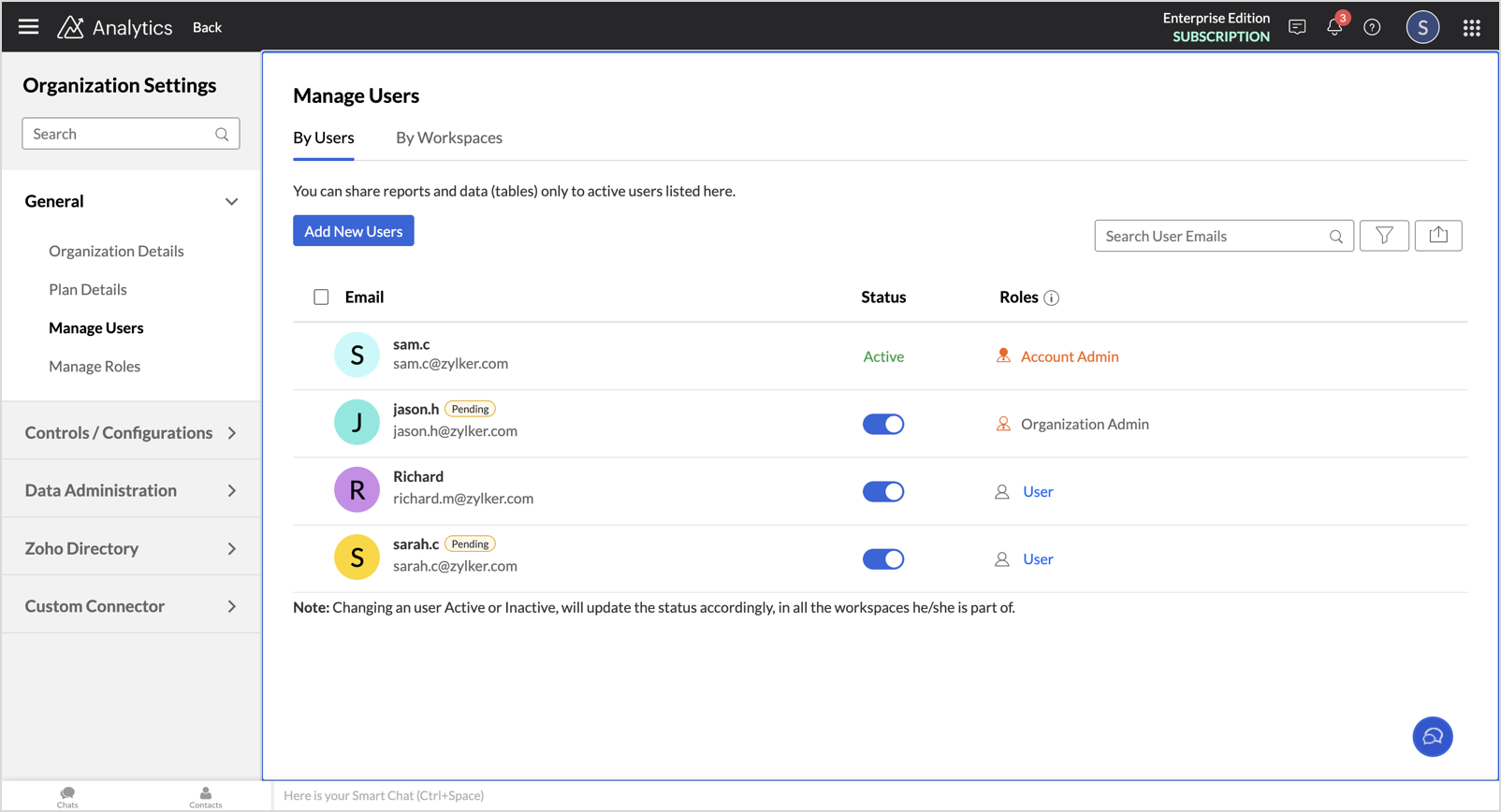
Admins can see the status of each invitation with a Pending tag next to the user’s name until they accept or reject it.
The invitation link is valid for 7 days; after that period, it must be resent.
Users previously added, who never completed registration in Zoho, must be invited again to gain access under this new system.
(image via zoho)
This update will roll out gradually for all Zoho Analytics users in the coming weeks.
New Zoho Translate app: text, voice, and image translation with total privacy
Zoho introduces Zoho Translate, its new translation app designed to break language barriers without compromising user privacy.
Main features:
Text, audio, and image translation Translate content in more than 60 languages, whether typing, speaking, or scanning documents or printed text with your mobile camera. Ideal for reading articles, understanding menus, or interpreting documents in real time.
(image via zoho)
Real-time conversations Enables fluid dialogues in different languages, transcribing and translating voice messages instantly, perfect for traveling, working in global teams, or chatting with people who speak other languages.
(image via zoho)
Translation playback Listen to translations to improve your pronunciation and communicate with greater confidence.
Privacy as a priority Zoho Translate is developed with models that ensure maximum security and control over your data, without compromising your privacy.
You can also save frequent translations, access your history, export translated content, and share feedback to improve the app.
Zoho Translate is available free on iPhone, iPad, Mac, Android, and web browsers, including Ulaa.
Explore Zoho Translate and connect with the world in any language!
Webinars on Creator, AI in the workplace, and Commerce
Creator Tech Connect 2025: “Building Data Relationships with Subforms”
AI at Work | Zoholics USA 2025
Introducing Zoho Commerce 2.0 | Reimagined, Rebuilt, and Reintroduced
Has it ever happened to you that you want to generate charts and reports, but the process turns out to be too complex or takes more time than you have available? Whether you’ve never created data visualizations or you already have experience but are looking for a faster way, this article is for you.
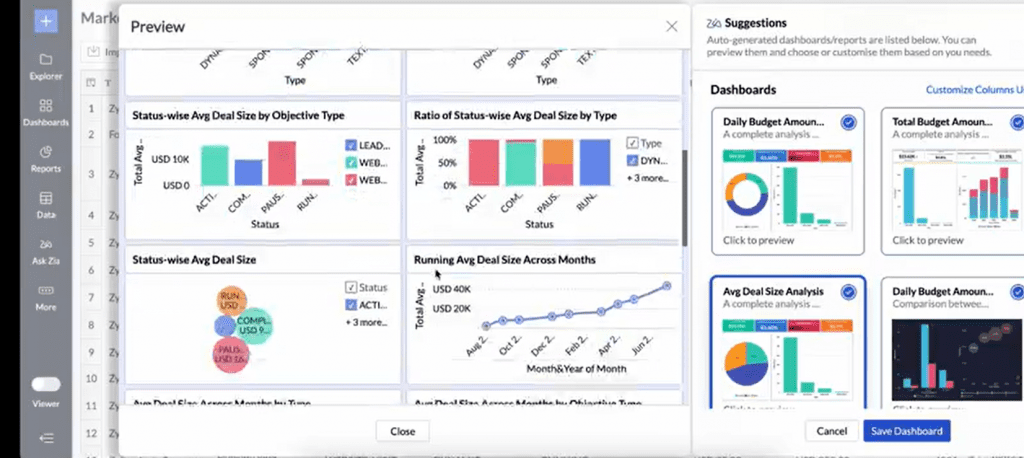
Here we explore some of the artificial intelligence-based tools offered by Zoho Analytics, designed so you can create data visualizations simply and quickly.
Generate reports by chatting with Zia
Imagine you need a report for an urgent meeting and you don’t have time to build it from scratch. With Ask Zia, you don’t need to be a data expert: just type or say in plain language what information you’re looking for. Zia understands your questions and creates charts, tables, or dashboards in a matter of seconds.
Companies around the world are already leveraging this feature to save hours of work and achieve impactful presentations. It’s an easy way to transform simple questions into visualizations that impress clients, partners, or colleagues.
(image via zoho)
Zia recommends the ideal chart based on your data
Often, one of the challenges in creating reports is choosing the right type of chart. Not all data looks good in any format. This is where Zia Suggestions makes the difference.
Zia analyzes the structure and nature of your data to suggest the best type of visualization: bars, lines, pie, maps, among many other options. Additionally, it tells you how to arrange columns and metrics so the information is displayed clearly and effectively. This reduces the margin of error and ensures your reports are more precise and attractive.
(image via zoho)
Discover key insights instantly
Building charts is just the first step. What’s truly valuable is understanding what the data means. With Zia Insights, you can access automatic analyses that highlight patterns, trends, and important relationships.
Instead of spending hours reviewing tables or searching for conclusions, Zia provides you with summaries in clear text and complementary visualizations. This makes it easier to share findings with colleagues or executives and make informed decisions faster. It also includes diagnostic features that explain why certain key indicators have changed, so you can act on the real causes.
Let Zia analyze your data for you
You might have a dataset but not know where to start. Or perhaps you’re not even sure what reports you need to generate. For those cases, Zoho Analytics offers automatic analysis.
You just have to upload your data file and, if you want, select specific columns. Zia analyzes the information, detects patterns, and automatically creates interactive reports and dashboards in less than a minute. It’s a perfect solution for those without technical experience, but also for experts who want to speed up their work.
(image vía zoho)
Use ready-made reports for more than 100 cloud apps
If you work with tools like CRM, digital marketing, finance, or sales, you know your data is often scattered across different platforms. Zoho Analytics offers pre-built reports and dashboards for more than 100 business cloud applications.
You only need to connect your app — like Zoho CRM, Google Ads, Shopify, QuickBooks, among many others — and Zoho Analytics will automatically generate ready-to-use dashboards. This saves you the time of creating reports from scratch and lets you start analyzing your data as soon as you connect your sources.
Stay ahead with AI predictions
Today, businesses can’t settle for just looking at the past: they need to foresee the future. Zoho Analytics’ AI-powered predictions allow you to anticipate trends and make strategic decisions.
By simply defining the period you want to forecast, Zia applies the most suitable statistical model to your data. You can forecast, for example, sales for the coming months, your website traffic, or cost trends. For more technical users, there are advanced models like ARIMA, ETS, or regression techniques, offering flexibility for those who want to dive deeper into the analysis.
Clean and transform data with Zoho DataPrep
One of the biggest challenges in analytics is working with messy or scattered data. Zoho DataPrep, integrated into Zoho Analytics (available in Premium and Enterprise plans), makes this task easier thanks to over 250 transformations and artificial intelligence algorithms.
With this tool, you can fix errors, unify formats, merge data from different sources, and prepare all your information for advanced analyses. This saves you hours of manual work and ensures your data is reliable and consistent.
Zoho Analytics and its artificial intelligence,Zia, simplify data analysis and the creation of visualizations, helping you save time and make decisions with greater confidence.
Try it free for 15 days and discover how it can transform the way you work with data.
An end-to-end digitalization model that increased lead conversion by 30%, reduced commercial response times by 40%, and centralized the student experience with Zoho CRM, Desk, Marketing Automation, and WhatsApp solutions.
A Latin American university, founded almost 20 years ago, with 2 campuses in Peru, more than500 students and an academic offering of 8 undergraduate programs in fields such as Accounting, Law, Engineering, Business Administration, and Health Sciences, transformed its student recruitment and service process through the implementation of Zoho CRM, Zoho Desk, Zoho Marketing Automation and a WhatsApp chatbot.
Thanks to this comprehensive solution, the management of leads was centralized, commercial follow-up was optimized, mass communication with students was automated, and the support experience for current students was significantly improved.
A recruitment process without traceability, a marketing strategy without analysis or control, and student service without structure
Before the implementation, the university managed its prospective and current students through various disconnected channels, with scattered information and no traceability.
The sales team did not have a system to structurally accompany prospects from the first contact to enrollment, and the support area lacked a formal platform to resolve inquiries from enrolled students.
There was also no tool to manage different campaigns or execute marketing strategies with dynamic segmentation, nor metrics to help understand which actions worked best and which needed adjustments.
Additionally, web forms were not integrated with the management system, making it difficult to immediately convert prospects.
Zoho CRM, Desk, Marketing Automation and WhatsApp: an integrated solution for recruitment, support and communication
Zoho CRM was implemented as the central platform for lead management, Zoho Desk for servicing current students, and Zoho Marketing Automation as the main tool for executing email marketing campaigns.
Mass communications to students are carried out mainly via email, but are strategically complemented with WhatsApp, sending personalized reminders to those who have not opened the emails or have not completed an expected action.
Additionally, WhatsApp also operates as an automated channel through a chatbot, which intelligently classifies whether the contact is a potential student or a current student, collects the necessary data for identification, and automatically routes them to CRM or Desk as appropriate.
Thanks to this integration, the institution managed to unify its communication channels, improve the response rate, and provide a more consistent and effective experience at every stage of the student journey.
Zoho CRM: Student recruitment with traceability and automation
The CRM enabled the establishment of a digital flow for converting leads into enrolled students:
Data centralization: All lead information coming from forms, WhatsApp, Facebook (including Facebook Ads forms), and referrals is automatically captured in the “Potential Clients” module.
Guided follow-up: Leads progress automatically through stages such as “Qualified Contacts” and “Sales Stages,” with real-time visibility for coordinators.
Task automation: The system assigns leads by program (undergraduate/postgraduate), sends automated welcome messages, and alerts users about pending tasks.
Activity management: Each record stores calls, emails, messages, visits, and tasks, consolidating a 360° view of the lead.
Zoho Desk: Professionalized student support
Post-enrollment management was organized and optimized using Zoho Desk:
Automated ticketing: Student inquiries arrive from the institutional chatbot, classified by type and priority.
Automatic ticket assignment: Cases are automatically assigned to available agents, according to rules configured by type of inquiry or channel of origin.
SLA and alerts: Maximum response times were defined, and alerts notify supervisors when a ticket has not been addressed within the expected timeframe.
CRM integration: Advisors can view the complete history of the student, including their commercial journey.
Transition to sales: If a student submits an admission-related inquiry by mistake, the ticket is automatically transferred to the sales team in CRM.
Monitoring and metrics: The system enables measuring response times, workloads per advisor, and ticket resolution efficiency.
Zoho Marketing Automation: Scalable, segmented, and automated communication
Zoho Marketing Automation enabled the automation of segmented email campaigns and maintained effective communication throughout the entire admission process.
Automated email marketing: Personalized campaigns were designed by student stage, automatically sent at key moments in the journey.
Dynamic segmentation: Lists are updated in real time based on program, lead status, or previous behavior (opens, clicks, etc.).
Integrated forms: Forms manageable from Marketing Automation were created for publication on web pages, directly connected to the CRM to generate leads.
WhatsApp reinforcement: Automated WhatsApp reminders were sent to those who did not open emails, improving the response rate.
Results analysis: The platform allows measurement of opens, clicks, conversions, and performance by campaign, facilitating data-driven decision-making.
WhatsApp Chatbot: A single conversational entry point
Intelligent flow: The chatbot collects user data, identifies whether they are a student or a prospect, and requests the necessary information for system registration.
Automatic lead creation: If the user is interested in undergraduate or postgraduate programs, a lead is created in Zoho CRM.
Automatic ticket creation: If the user is a student, a ticket is created in Zoho Desk.
Campaign reinforcement: It is also used to send automated reminders from Marketing Automation, based on unopened email campaigns.
Multichannel capability: The chatbot operates not only on WhatsApp but also on Facebook and other social networks.
24/7 availability: It offers immediate and personalized attention at any time.
Results achieved after implementing the Zoho ecosystem
📈 +30% in the conversion rate from leads to enrolled students
⏱️ 40% reduction in commercial response times
🤖 90% automation of initial contacts via WhatsApp
📊 Full traceability of the student lifecycle
✅ Significant improvement in user experience, both in admissions and support
The institution consolidated its recruitment and support process with a fully integrated Zoho solution. The coordinated use of Zoho CRM, Zoho Desk, Marketing Automation and WhatsApp made it possible to digitize key processes, optimize team productivity and provide more personalized, efficient and measurable service. This transformation represents an exemplary case of institutional modernization in the education sector.
If you’re looking to implement a similar solution or want to optimize your institution’s or company’s processes, our team can help you. Contact us and discover how Zoho can transform your operations end to end.
Tami, the unified AI agent for business intelligence and automation, connects systems, automates tasks, and smoothly scales operations. It’s not just another bot or one-off solution: it’s the flagship tool in our suite of AI agents, designed to coordinate workflows, interpret real-time data, and deliver tangible value in every interaction.
The challenge: disconnected systems, scattered data, slow decisions
Modern companies operate with multiple tools: CRM, support systems, collaboration platforms, HR software, and more. Each serves its purpose, but they’re rarely connected seamlessly, causing bottlenecks, duplicated tasks, and lack of visibility for decision-making.
Tami was created to solve that problem. It’s a smart agent that acts as a central brain, connecting data, people, and processes to achieve more synchronized, automated, and effective operations.
What does Tami do?
Tami interprets, executes, and coordinates. That means:
Detects what the customer or team needs right now
Activates the necessary agents or tools depending on the process
Assesses the impact of each action, delivering metrics and insights for continuous improvement
Instead of multiple chats or open windows, Tami offers a single conversational interface where you can:
Raise a ticket
Request a report
Coordinate tasks between teams
Automate workflows across CRM, Desk, Projects, Finance, Human Resources, Documentation, and more
Integrations that enable results
Tami connects natively with tools like:
OpenAI • Zoom • Zoho CRM • Zoho Desk • Zoho Projects • Zoho People • Zoho Analytics • Zoho WorkDrive • Salesforce • MS Teams • GitHub • QuickBooks, and many more.
This allows it to act as a connector of systems and workflows, eliminating friction between platforms and centralizing decision-making.
Skills that make the difference
Tami combines intelligence, action, and context to turn automation into real results.
Connects and interprets real-time data without moving it from one app to another
Activates and coordinates smart agents such as:
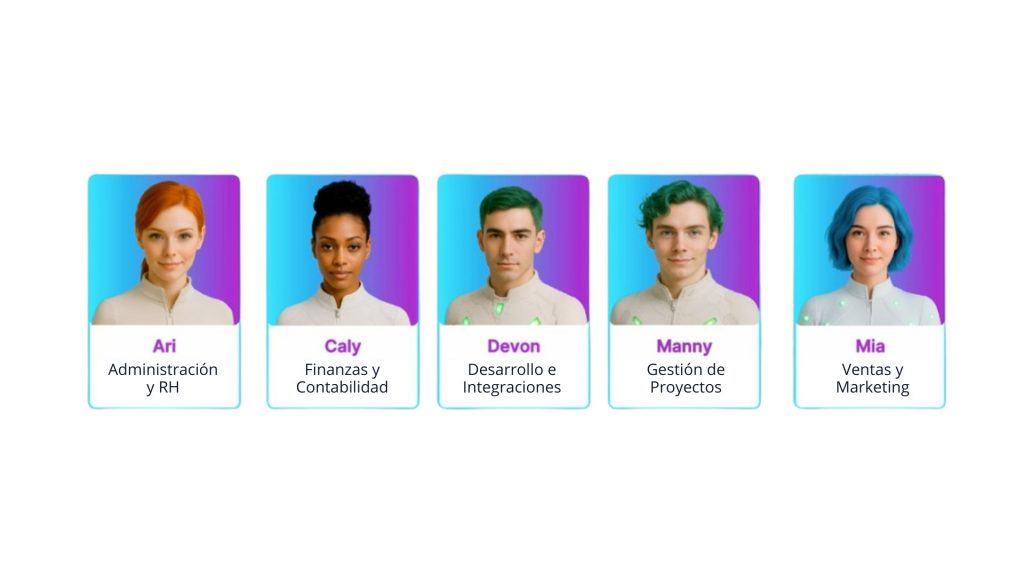
ARI (training and user follow-up)
CALY (smart financial management)
DEVON (support for development teams)
MANNY (technical support automation)
MIA (sales summaries and analysis)
Coordinates tasks end to end without human intervention
Detects patterns, suggests solutions, and adapts based on results
Learns from every interaction and continuously improves
An agile and strategic model
Tami doesn’t need long implementations or complex technical dependencies. Its rollout is based on three clear phases:
🔹 Discovery Analyzes your processes, detects bottlenecks, and finds improvement opportunities.
🔹 Configuration Connects your tools, activates the necessary agents, and defines initial workflows.
🔹 Optimization Adjusts based on results and scales the solution into new areas or business models.
What makes Tami unique?
Tami does not replace your current tools; it enhances them. It becomes:
Your operational control center
Your manager of specialized agents for each need
Your solution for executing end-to-end tasks from a single interface
Your source of actionable and repeatable results
Your platform for scaling solutions by industry, team, or client type
Real use cases
Each case shows how Tami keeps your operations coordinated, seamless, and always moving forward.
“Tami summarizes meetings and updates the CRM” → MIA activated “Tami manages onboarding and sends legal documents” → ARI activated “Tami detects sprint blockers and assigns new tasks” → MANNY activated “Tami explains the latest commit and updates technical documentation” → DEVON activated “Tami compares budgets and triggers alerts for variances” → CALY activated
Measurable results for your business
✔ 40% less operational response time ✔ 70% of repetitive tasks automated ✔ Lower workload for support, sales, and project teams ✔ Faster decision-making
A product designed to scale: Tami learns from your operation, identifies repeatable processes, and lets you turn them into packaged solutions. From a single need, you can evolve into a full suite of business agents.
If you believe your operation could benefit from a more connected and intelligent management approach, you can explore how Tami works in your own environment.
Finding the ideal candidate takes time. Reviewing hundreds of resumes, comparing profiles, following up, and making objective decisions can become a long and exhausting process. But what if you could rely on artificial intelligence to simplify everything without compromising quality or judgment? In Zoho Recruit, this is already a reality thanks to the integration with Zia, Zoho’s intelligent assistant.
What exactly does AI do in Zoho Recruit?
Zia, Zoho’s AI assistant, does not replace the recruiter—it enhances them. It is designed to understand what each vacancy requires, thoroughly analyze applicant profiles, and offer helpful recommendations at every stage of the process.
Here are some tasks Zia can already help you with in Zoho Recruit:
1. Instantly post job openings
With AI Assist, drafting job postings is no longer a slow task. You can generate complete descriptions in seconds by simply entering a few key details or writing a custom request. Once ready, you can publish them to multiple job boards from a single place, streamlining the entire process without compromising content quality.
2. Automatic resume filtering
Zia analyzes the key data from each resume and compares it to the job requirements. It detects relevant skills, experience, education, and other factors that influence selection, eliminating unsuitable profiles from the start. This significantly reduces the time spent on repetitive tasks.
3. Smart candidate suggestions
When you post a job or add a new vacancy, Zia reviews your database and suggests candidates who could be a good match—even if they didn’t apply directly. These recommendations are based on real matches between the profile and the vacancy, not just on keywords.
(imagen via zoho)
4. Match scoring
One of the most valuable features: each candidate receives a score reflecting how well they fit the position. This score considers multiple factors, from technical skills to prior experience and cultural fit, helping to prioritize interviews objectively.
(image via zoho)
5. Success predictions
Beyond identifying who fits the role, Zia can also help you estimate who is most likely to advance in the process or even stay with the company. This enables more strategic hiring decisions.
Real benefits for your team
The implementation of AI in recruitment processes not only speeds things up but also improves decision quality. By automating more operational work, recruiters can focus on what really matters: getting to know candidates, evaluating their potential, and strengthening relationships with hiring teams.
Additionally, by eliminating unconscious biases and applying consistent criteria, a fairer and more data-driven selection process is achieved.
A help, not a replacement
Zia does not replace human judgment—it supports it with useful, organized, and contextualized information. Its integration within Zoho Recruit is a demonstration of how artificial intelligence can naturally integrate into the daily operations of any HR team, without requiring advanced technical knowledge.
Artificial intelligence in recruitment is no longer a promise for the future. With Zoho Recruit, you can start taking advantage of it today to make your processes simpler, faster, and more effective.
Want to explore how this technology can be adapted to your organization? Write to us and we’ll help you evaluate it with no obligation.