We live in an era where data has become one of the most valuable assets for any company. That’s why choosing a technological tool no longer depends solely on its features, but also on the trust it provides when handling information.
Zoho CRM
combines both qualities: efficiency and security, in a solution that optimizes investment without sacrificing quality.
More than 130 million users worldwide trust Zoho CRM to manage their businesses, strengthen customer relationships, and make strategic decisions based on real data. With a focus on reliability, transparency, and information control, Zoho CRM has established itself as a solid option for organizations seeking to grow sustainably while protecting their data.
Beyond price: real and sustainable value
Although many associate Zoho CRM with its excellent cost-benefit ratio, its value goes far beyond price.
The platform integrates powerful automation, analytics, and customer management tools within an intuitive interface that easily adapts to each company’s growth pace. But one of the most distinguishing factors — and often overlooked — is its ongoing commitment to business data security and privacy.
Security with international backing
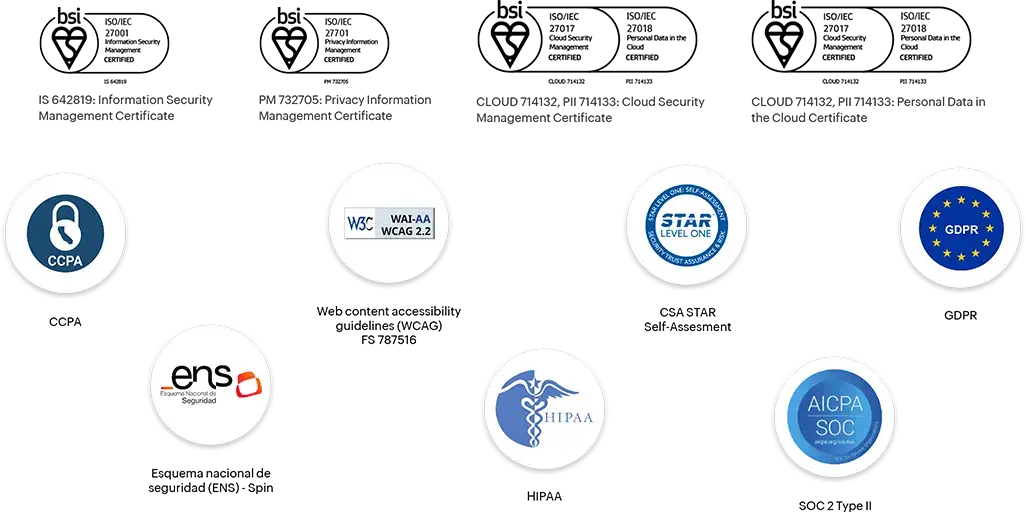
Zoho CRM has been globally recognized for its high standards in data protection. Here are its most important certifications and compliances:
ISO 27001 – Information security.
ISO 27017 – Cloud service security.
ISO 27018 – Personal data protection in public cloud.
ISO 27701 – Privacy management system (PIMS).
SOC 2 Type I and II – System reliability and integrity.
PCI DSS – Payment information security.
CSA STAR Level 2 – Best practices in cloud security.
HIPAA Compliance – Compliance for the healthcare sector.
GDPR Compliance – EU data protection.
CCPA Compliance – Consumer privacy (California).
Zoho CRM security certifications and accreditations
One of the biggest differences between Zoho CRM and other platforms is its firm stance on privacy: it does not sell, share, or monetize user data.
This means no ads, trackers, or intermediaries. Just transparent management focused on protection and ethical use of information.
Thanks to this policy, Zoho CRM becomes an ideal solution for companies that value confidentiality and want to maintain full control over their data, especially in sensitive sectors like finance, healthcare, or technology.
Smart investment with real impact
Choosing Zoho CRM is not just about reducing costs, but about strategic investment.
With competitive pricing, secure architecture, and seamless integration with other business applications, companies achieve efficiency and digitalization levels comparable to much more expensive solutions. The result is clear: higher productivity, fewer risks, and a more profitable tech investment.
Zoho CRM proves that a tool can be affordable, powerful, and secure at the same time. For organizations seeking to optimize their investment without sacrificing quality or trust, Zoho CRM is not just an affordable alternative: it’s a smart and sustainable decision.
In the midst of its expansion across Puerto Rico and Latin America, a leading company in the solar industry sought a way to grow without letting agility outpace consistency — how to maintain its technical and commercial excellence while scaling teams and entering new markets.
The constant growth of its workforce — engineers, technicians, advisors, and leaders — revealed the need for a training model that would go beyond traditional methods. The company aimed for an approach that aligned learning with business strategy, capable of measuring the impact of training on productivity and the overall customer experience.
When growth demands a new way to manage knowledge
The rapid expansion of the business exposed a growing challenge: training was fragmented, reliant on in-person sessions, and lacked visibility into its real impact. Traditional learning processes were no longer sufficient to keep up with the pace of new hires and to ensure operational consistency across teams in multiple regions.
The organization needed to evolve toward a model capable of centralizing knowledge, reducing onboarding time, and providing a continuous learning experience — measurable and fully aligned with strategic objectives.
How a digital ecosystem unified training and enhanced talent intelligence
With the support of IC Academy, the company implemented a corporate In-House Learning Platform that centralized all knowledge management within a unified digital ecosystem.
Each employee now follows personalized learning paths according to their role — from installers to managers — with automated assessments, internal certifications, and real-time performance dashboards to track talent development across the organization.
How digital learning created efficiency and competitive advantage
The In-House Academy 360° became a strategic driver for organizational development. By centralizing knowledge management, the company standardized critical processes, streamlined employee onboarding, and strengthened a culture of continuous learning.
Through analytics and automation, the company reduced operational workload and gained a complete view of the learning impact on business performance. Moreover, the shift to digital training reduced the need for in-person sessions, saving time and resources without compromising technical depth or educational quality.
“Our academy stopped being a course repository and became a living platform for growth and efficiency.”
— Organizational Development Manager, Puerto Rico
Conclusion
The In-House Academy 360° enabled the organization to consolidate its knowledge, strengthen internal training, and make learning a continuous process with a tangible impact on operations.
More than just a tool, it became a new way of working — one that drives growth, innovation, and people development.
Would you like to implement a similar model in your organization?
Talk to an InterConnecta specialist.
Zoho Analytics introduces key new features in its Q3 2025 update. These enhancements are designed to empower decision-making, optimize data preparation, and deliver an even more integrated analytics experience.
Ask Zia is now a comprehensive conversational agent
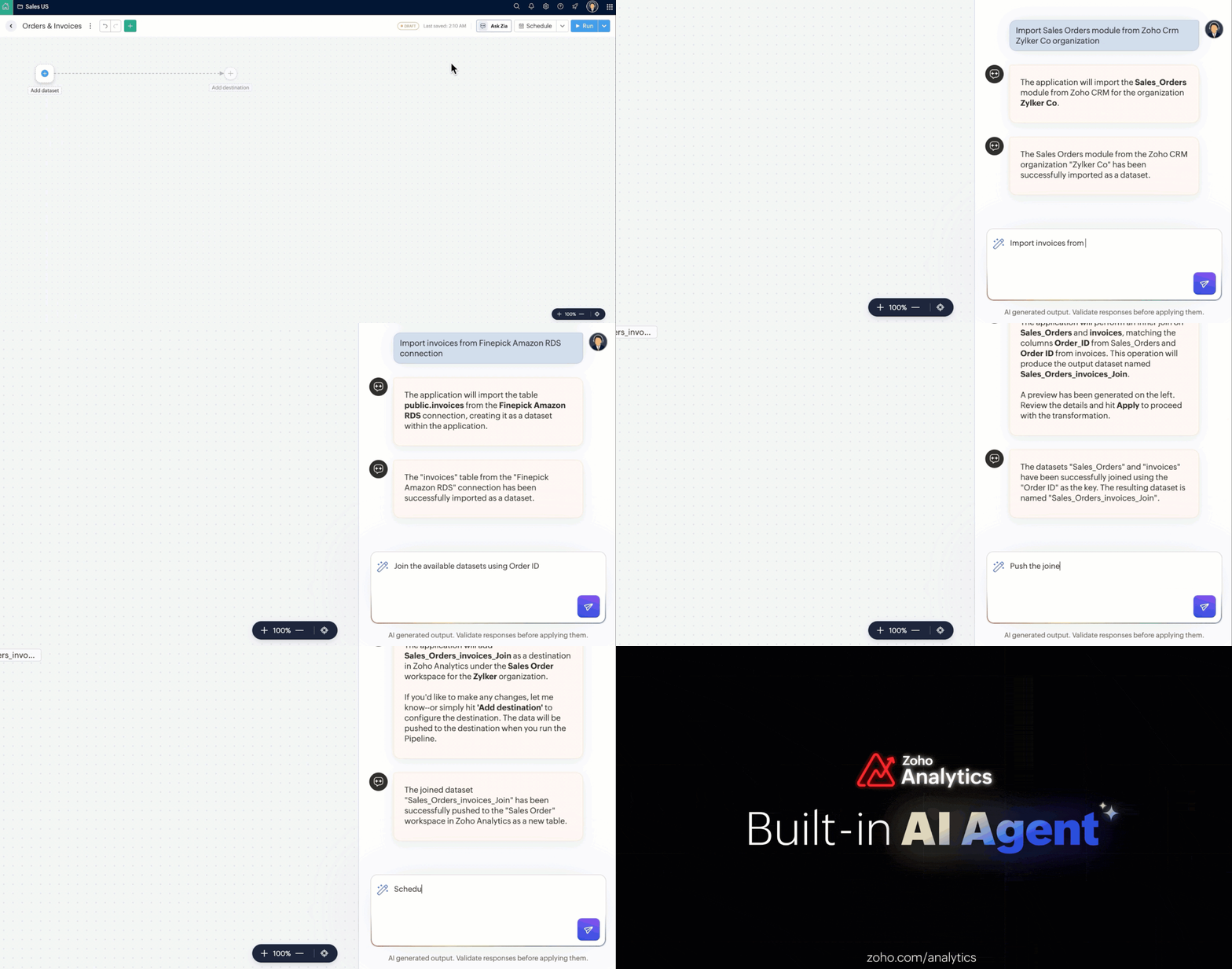
Ask Zia is now a more powerful analytics assistant: it enables you to build and automate data pipelines, generate smart visualizations, and offer suggestions based on automatic diagnostics—all through natural language, with no need for coding. It can now be embedded in other environments and supports advanced customization via the new MCP Server.
(image via Zoho)
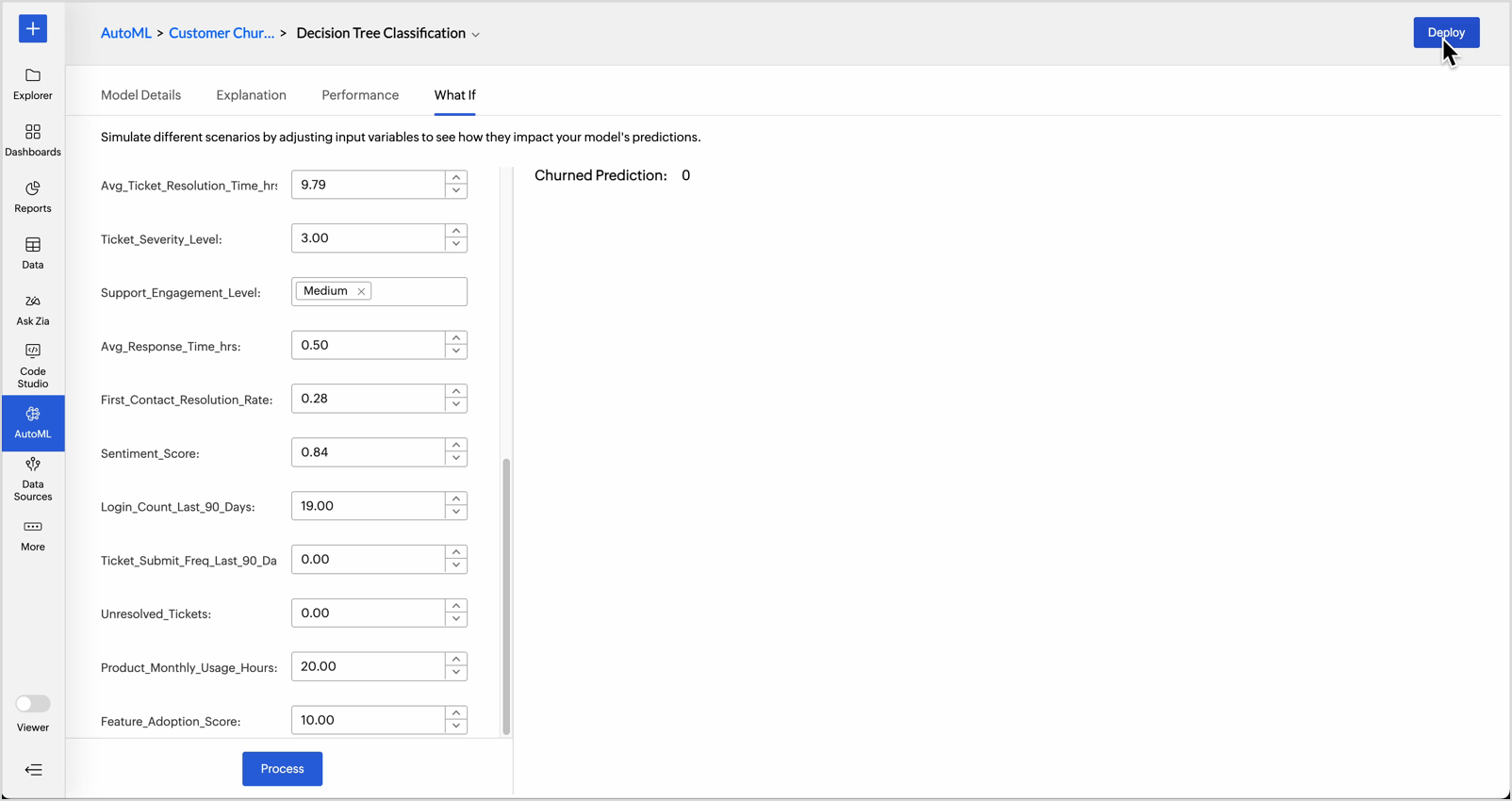
What-if simulations in AutoML
You can now test different scenarios by adjusting key variables and see how they impact the model results—without needing to retrain it. A key tool for anticipating critical decisions with greater accuracy.
(image via Zoho)
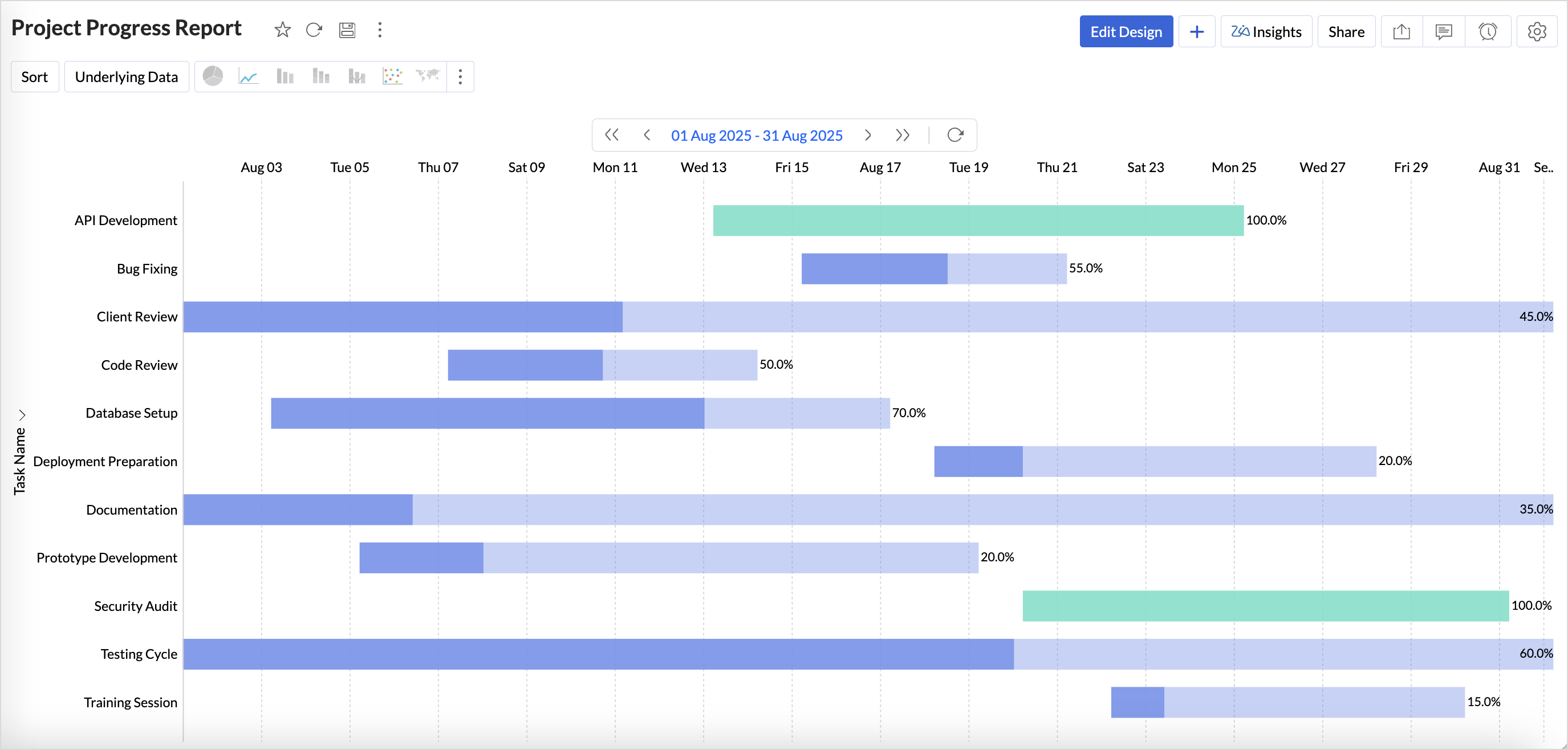
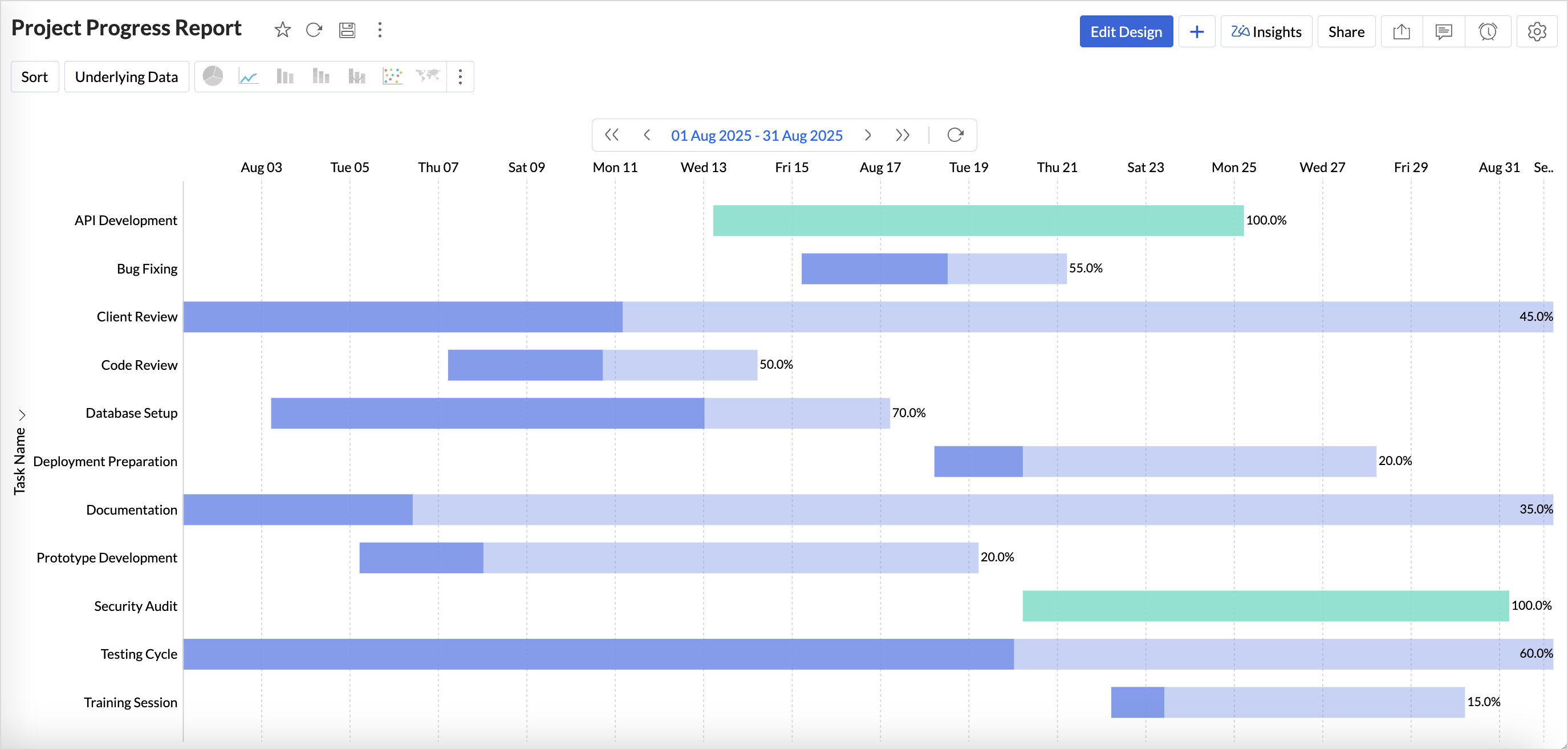
New visualization type: Gantt chart
Ideal for monitoring project progress, this visualization clearly displays tasks, dependencies, and progress in a visual way. Includes status-based customization and enhanced aesthetics.
(image via Zoho)
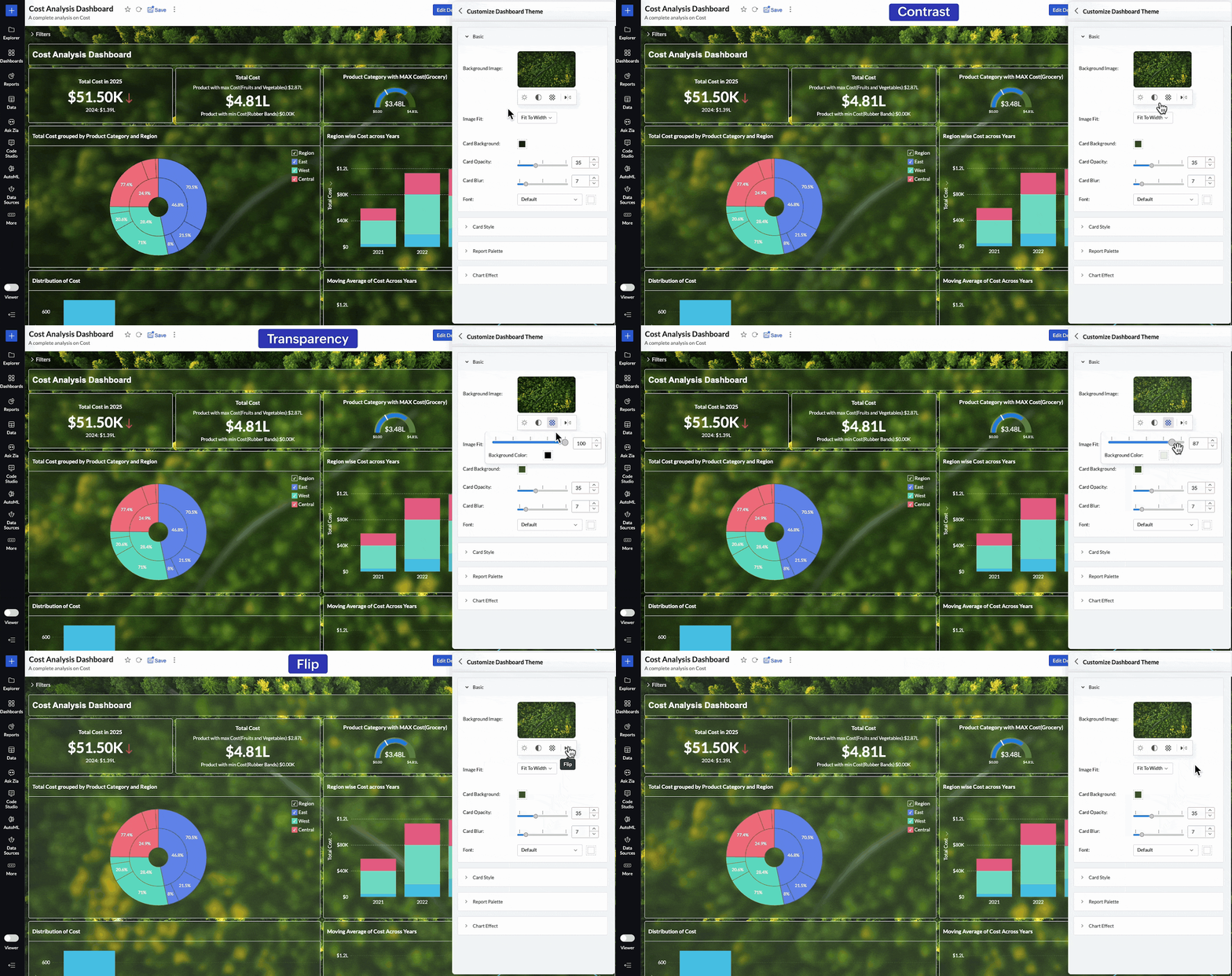
More personalized dashboards
You can now adjust background images in dashboards—control brightness, contrast, opacity, and orientation to match your organization’s visual identity.
(image via Zoho)
Access control via invitations
User management improves with a new invitation-based model. You can invite collaborators from general settings, the workspace, or directly when sharing a report.
Increased data connectivity
Zoho Databridge now supports a wider range of file types, including Excel, JSON, and statistical formats.
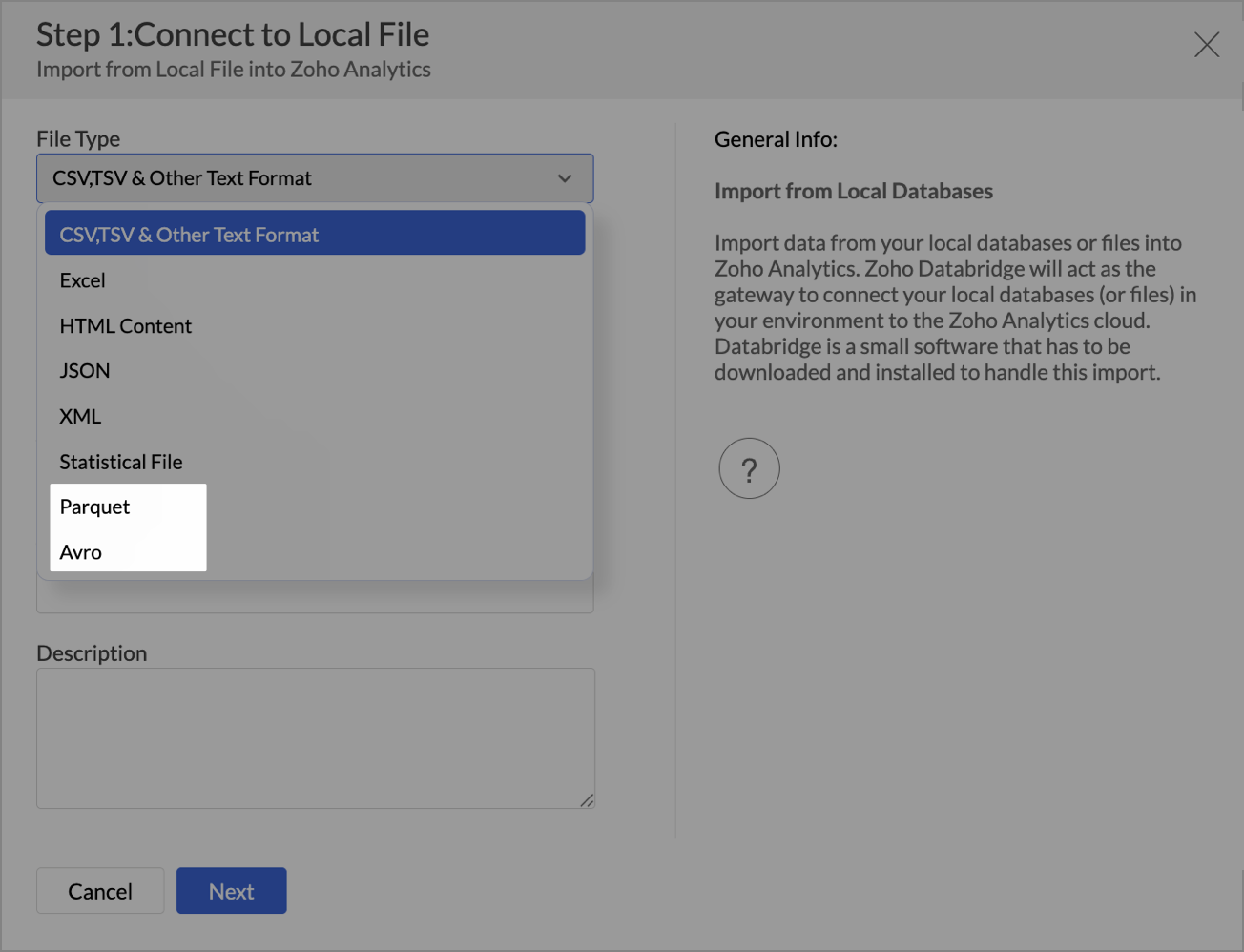
It adds compatibility with Parquet and Avro files.
For more complex environments, it now supports NoSQL databases like Apache Cassandra, simplifying the analysis of hierarchical structures.
Mobile app with access traceability
From the Zoho Analytics app, you can now see which users have viewed specific reports and dashboards. A key improvement for traceability, security, and usage control.
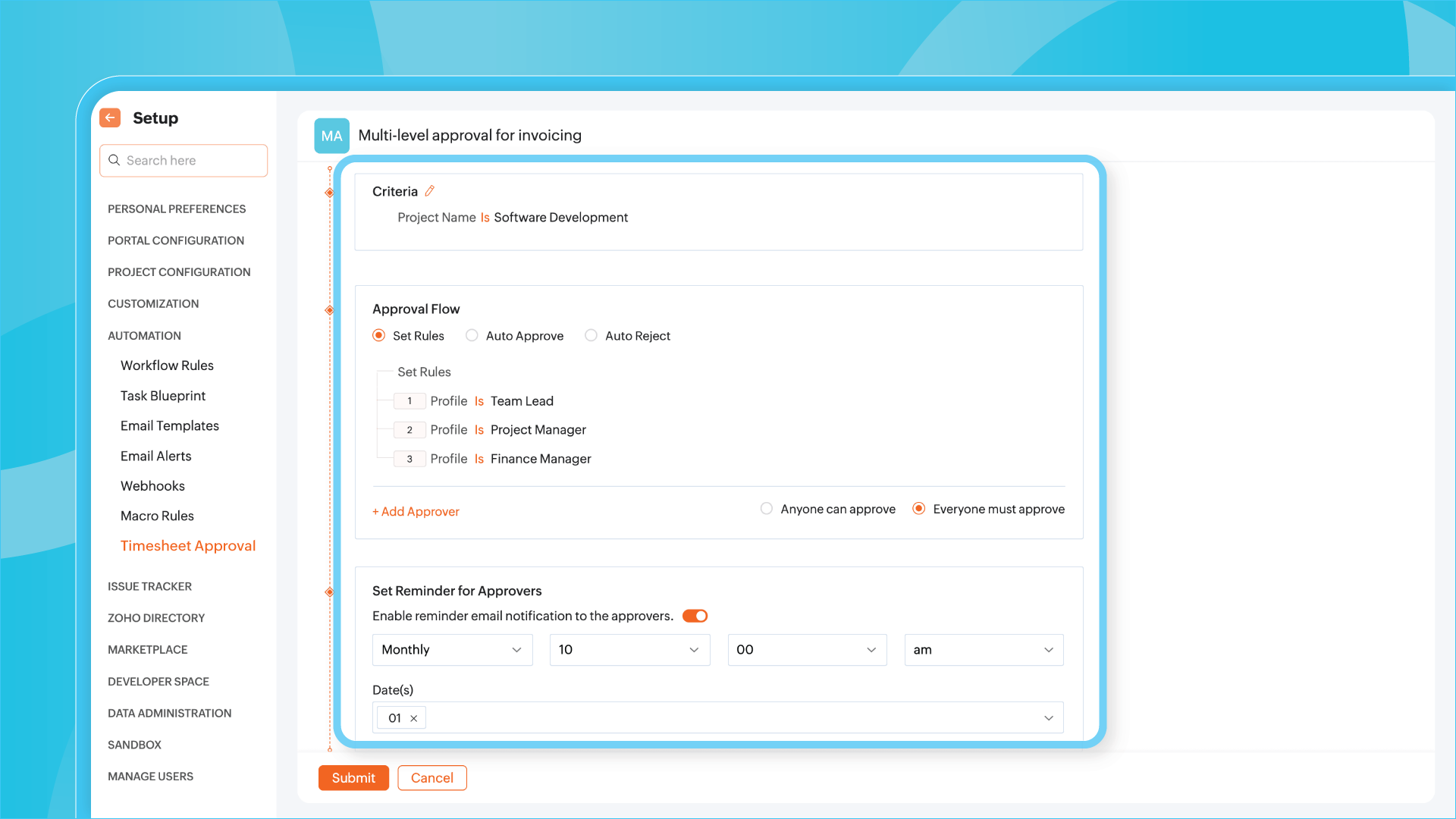
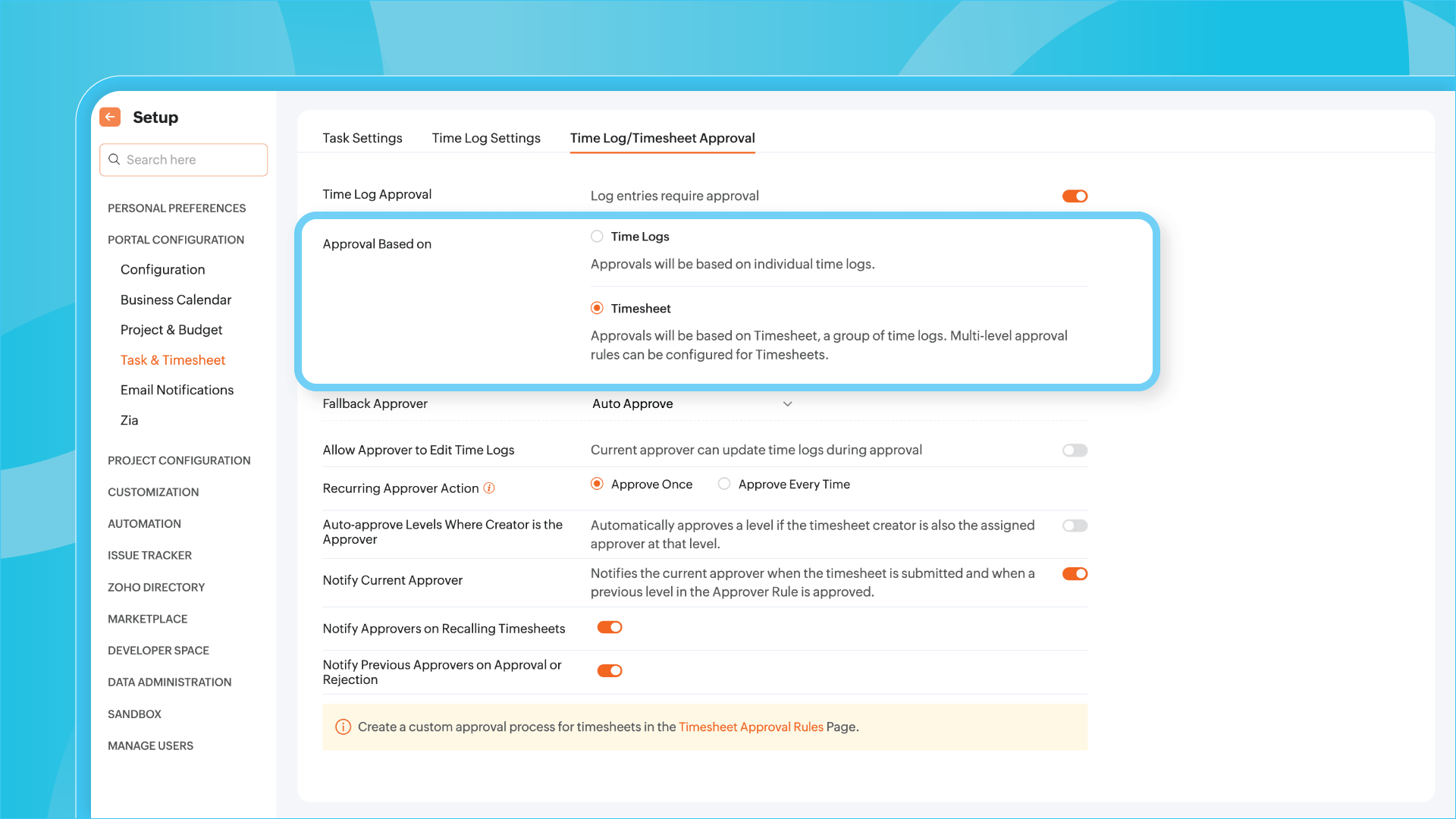
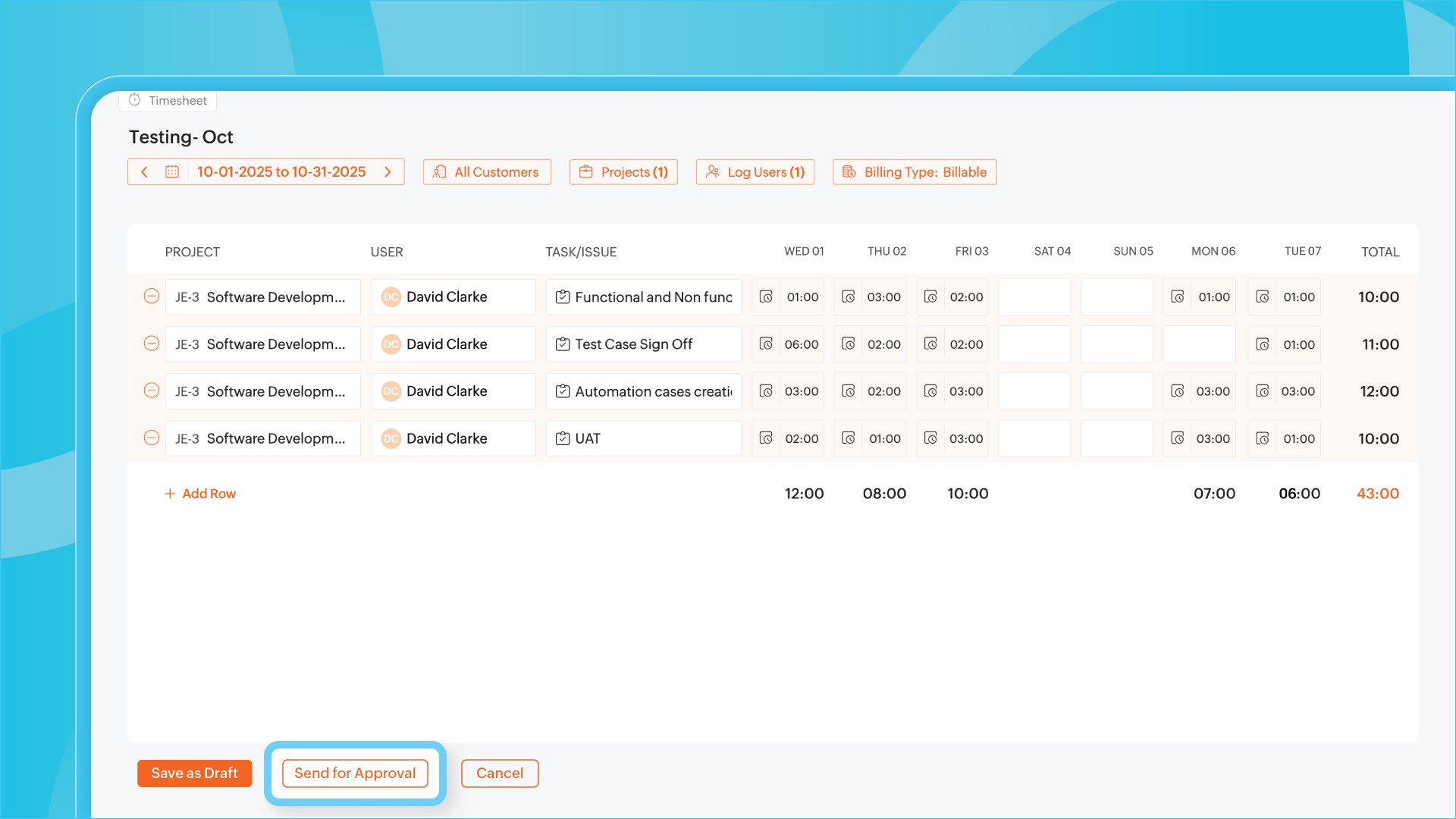
Effortless timesheet approvals: new multilevel rules in Zoho Projects
Zoho Projects introduces a key enhancement for teams managing time and complex projects: you can now configure multilevel approval flows for timesheets, offering greater control and flexibility in validating logged work.
(image via Zoho)
Automate validations based on your own rules
You can set specific conditions for each approval level—for example, a timesheet may need to be reviewed first by a team leader, then by a department manager. This logic can be applied by project, employee, or even number of hours worked.
(image via Zoho)
Dynamic and customizable flows
The new flows let you define automated actions depending on the outcome of each approval stage: whether it’s approved, rejected, or a revision is requested, the system responds accordingly. You can also apply different rules to different projects without duplicating configurations.
Visibility and traceability at all times
Each approver will receive notifications as needed, and the approval history will be recorded for auditing and tracking. This ensures transparency without adding friction to the process.
(image via Zoho)
Zoho CRM extends timeline: now supports API updates and module uploads
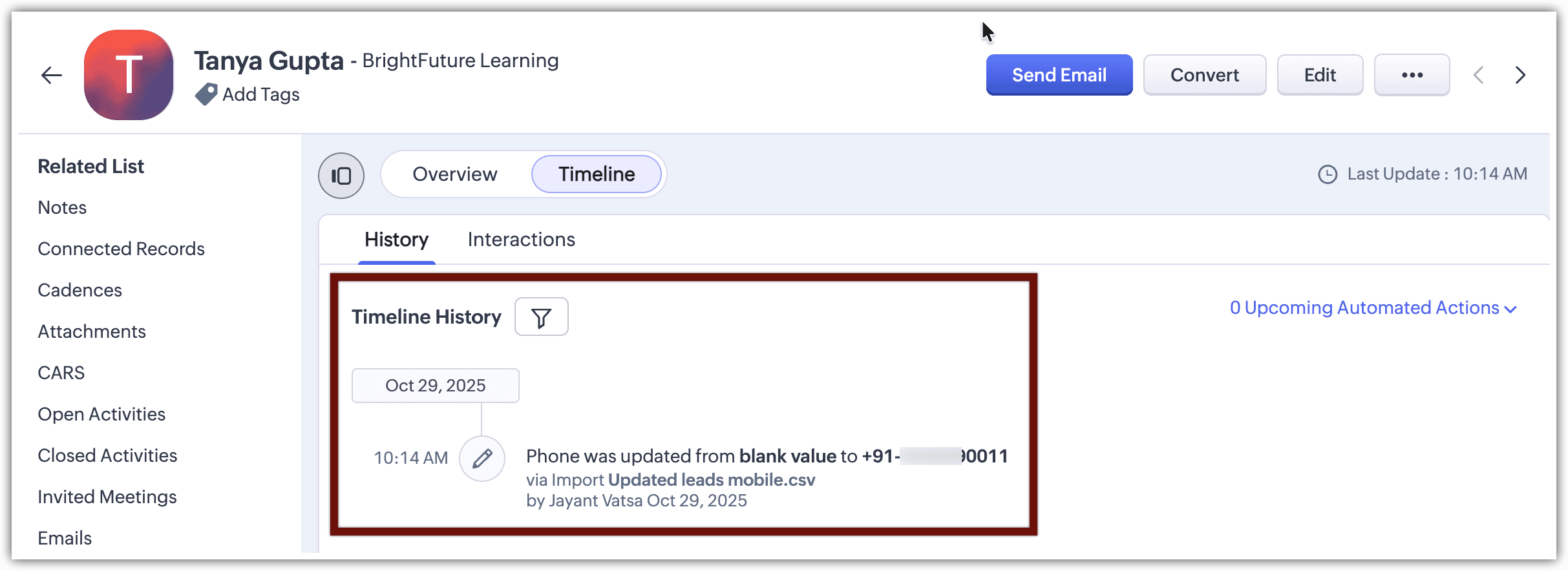
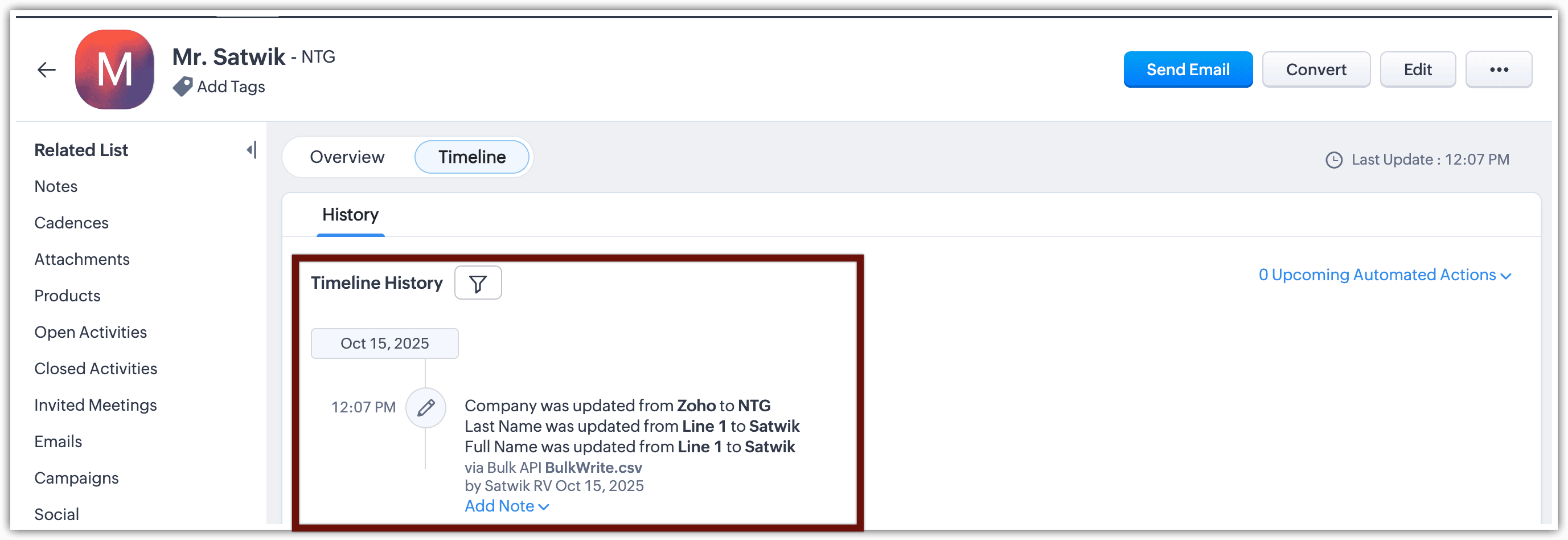
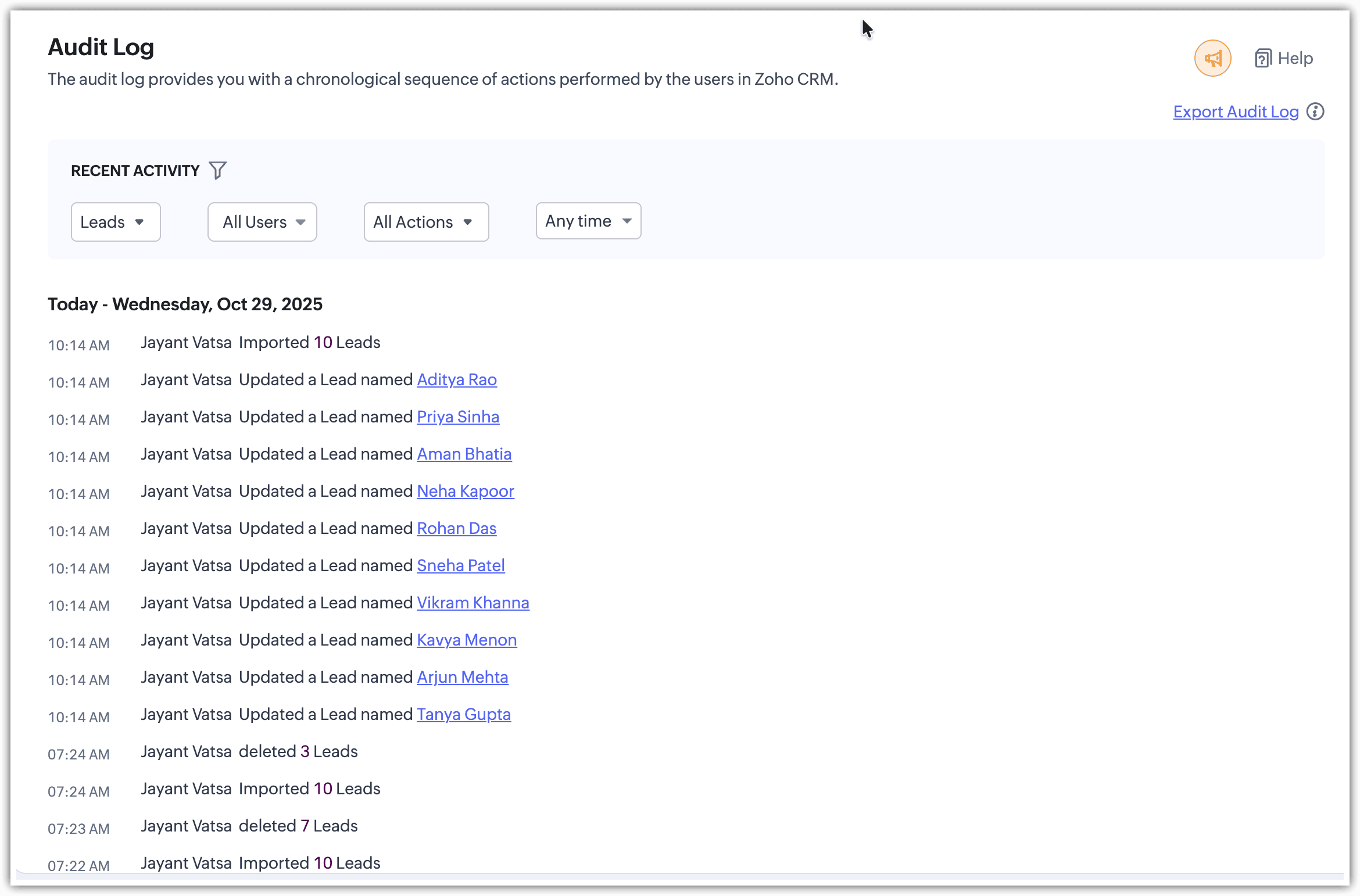
The timeline feature in Zoho CRM is now more powerful than ever. This tool, which allows you to track every change made to a record, now also includes updates made via API and bulk data imports.
Greater traceability, even in automated processes
With this enhancement, you can monitor timeline changes from the following sources:
– API updates (including Bulk Write API)
– Bulk record imports from other modules
This allows full visibility of changes, regardless of whether they were manual or automated.
(image via Zoho)
(image via Zoho)
(image via Zoho)
(image via Zoho)
(image via Zoho)
Available in custom modules
This feature is available in both standard and custom modules. Each entry in the timeline clearly shows the source of the change, helping you understand the data flow in complex environments.
Write clearer recruitment notes with Zia AI in Zoho Recruit
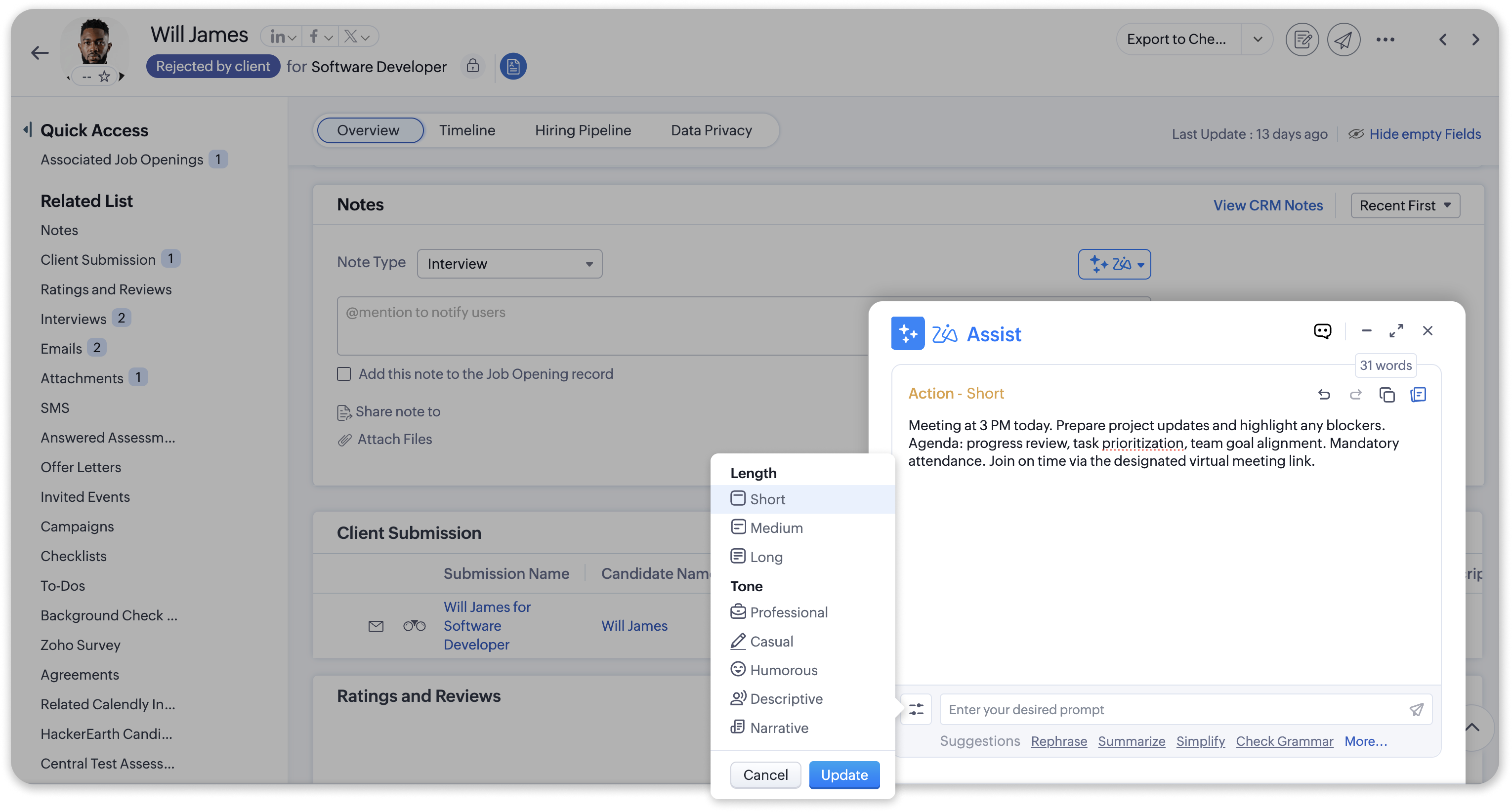
Zoho Recruit enhances its notes functionality with the integration of Zia AI Assist, allowing hiring teams to generate clearer, more professional, and non-redundant comments.
Polished notes in less time
Zia is now available when creating notes on any record—candidates, job openings, or clients. Simply enter key ideas, and Zia transforms them into a coherent, professional text ready to save or share.
(image via Zoho)
New command: Remove redundancy
A new option has been added specifically for notes: “Remove redundancy.” This feature cleans up the text when there are repetitive or similar comments, keeping only the relevant information.
Practical applications in the workflow
– After interviews: turn scattered thoughts into a clear, professional summary.
– In meetings with clients: generate structured and understandable notes.
– For internal updates: transform bullet points or rough notes into consistent, collaborative text.
Zoho Desk now allows data export with advanced and fully customizable options
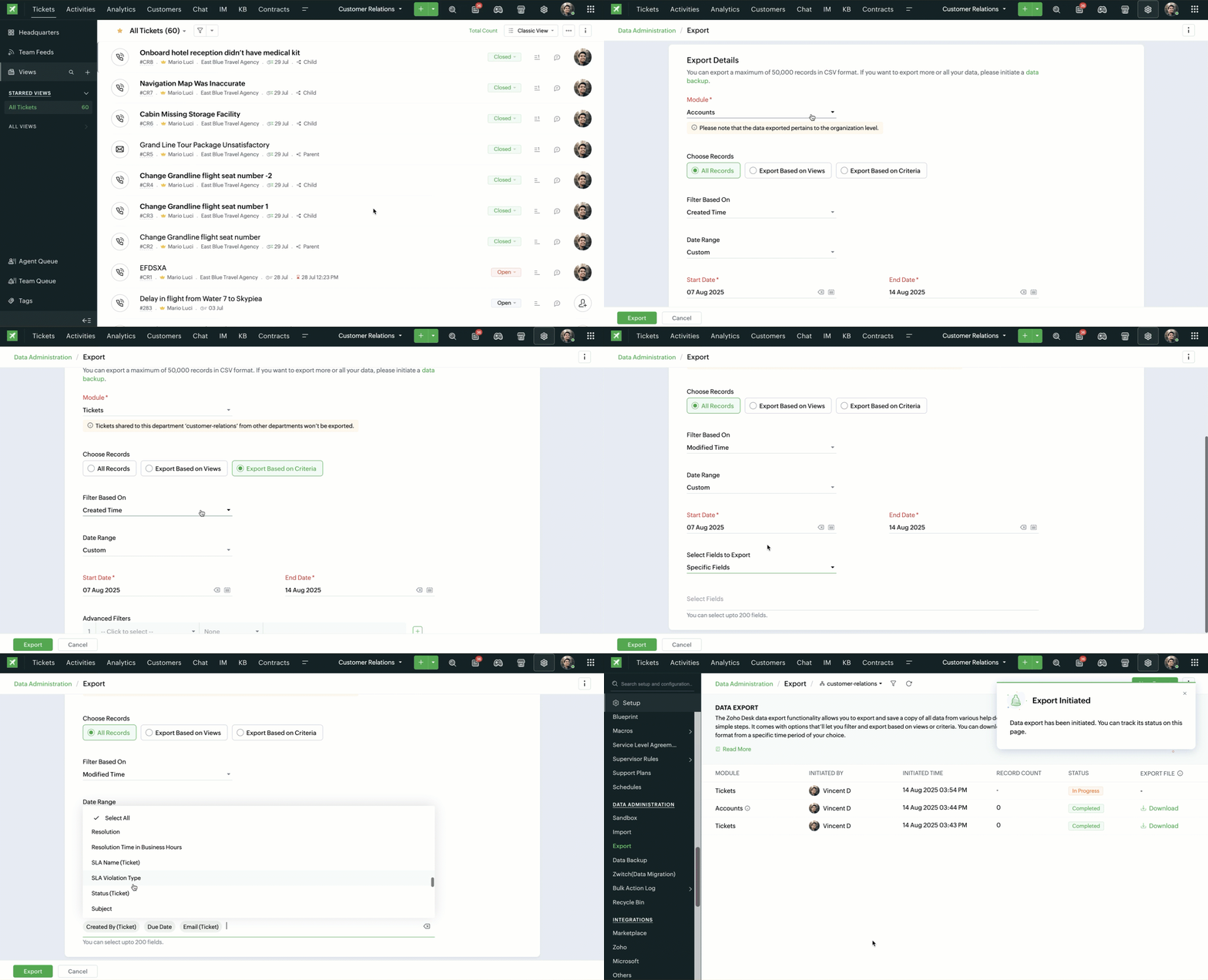
Zoho Desk introduces a completely redesigned export interface that incorporates advanced features for more precise, efficient, and user-tailored data extractions. This enhancement is ideal for users needing backups, migrations, or specific analyses.
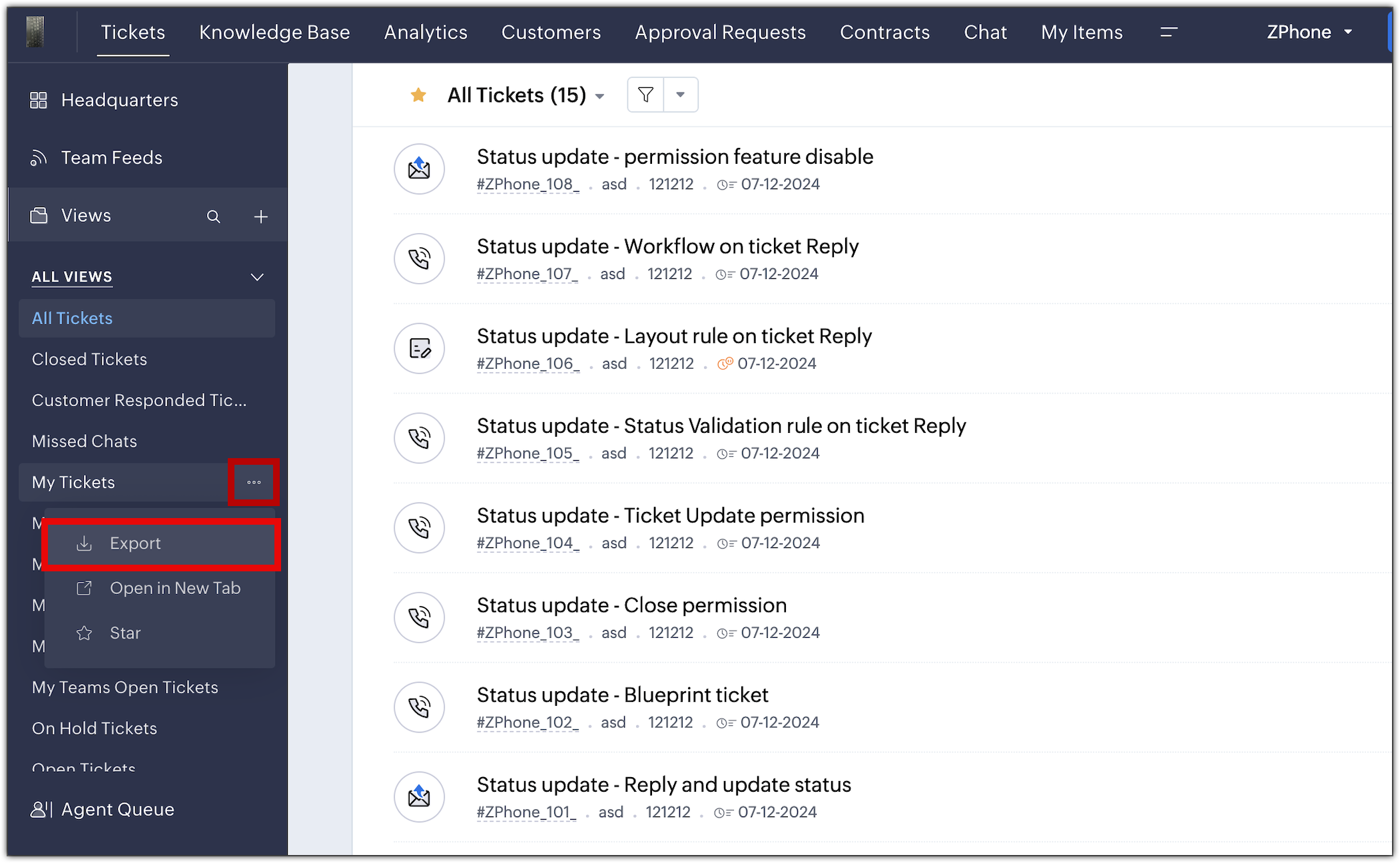
(image via Zoho)
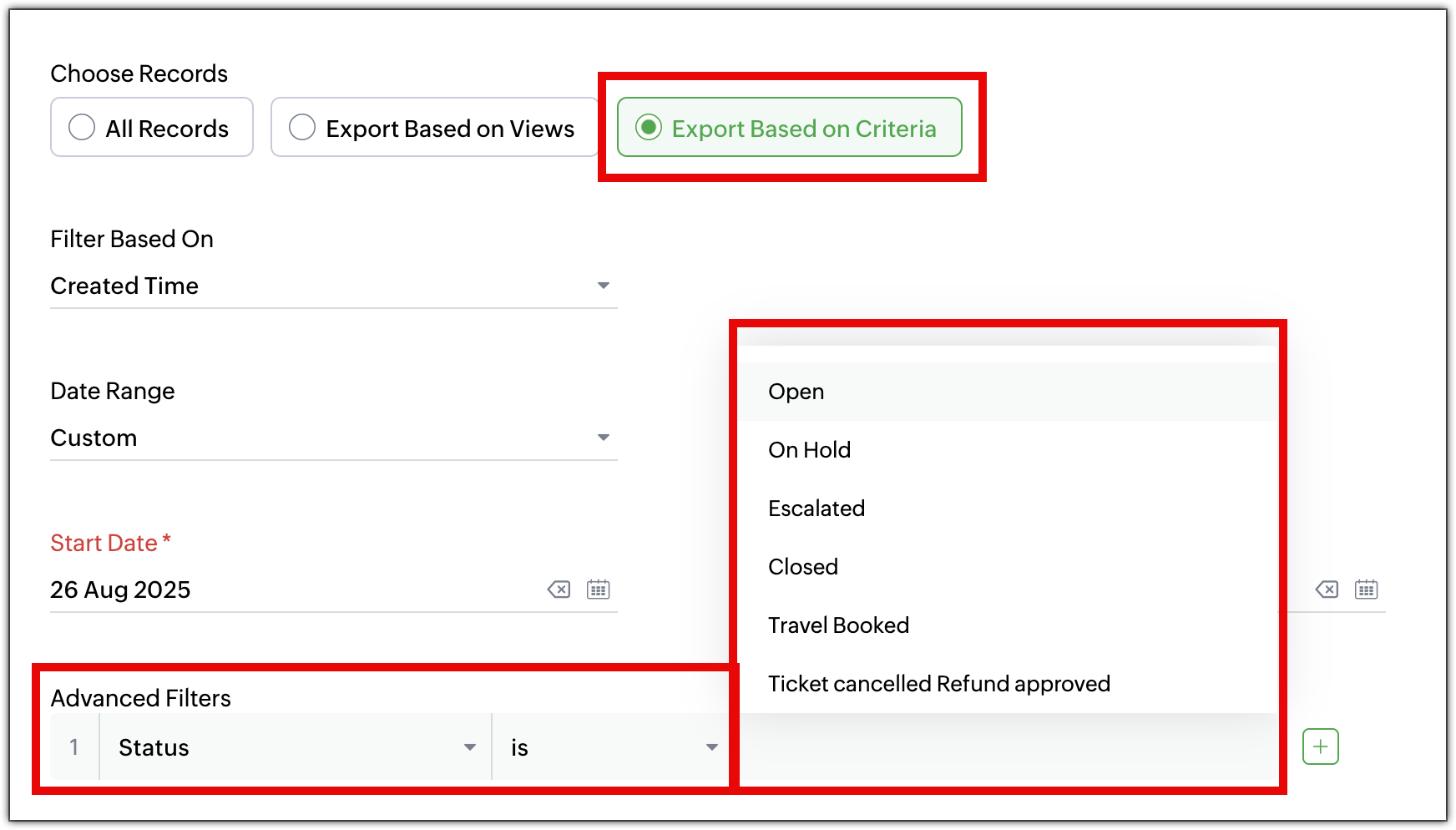
●Export records based on custom criteria: No need to export an entire module anymore. You can now define specific criteria such as high-priority tickets from last month or recently onboarded agents.
(image via Zoho)
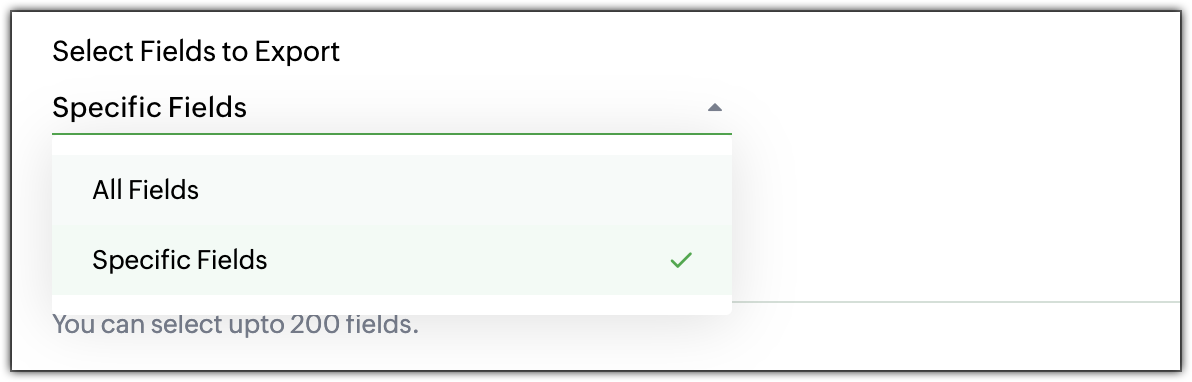
●Select specific fields: Export only the fields you need. Choose all fields, specific ones, or exclude some—even if they belong to different layouts.
(image via Zoho)
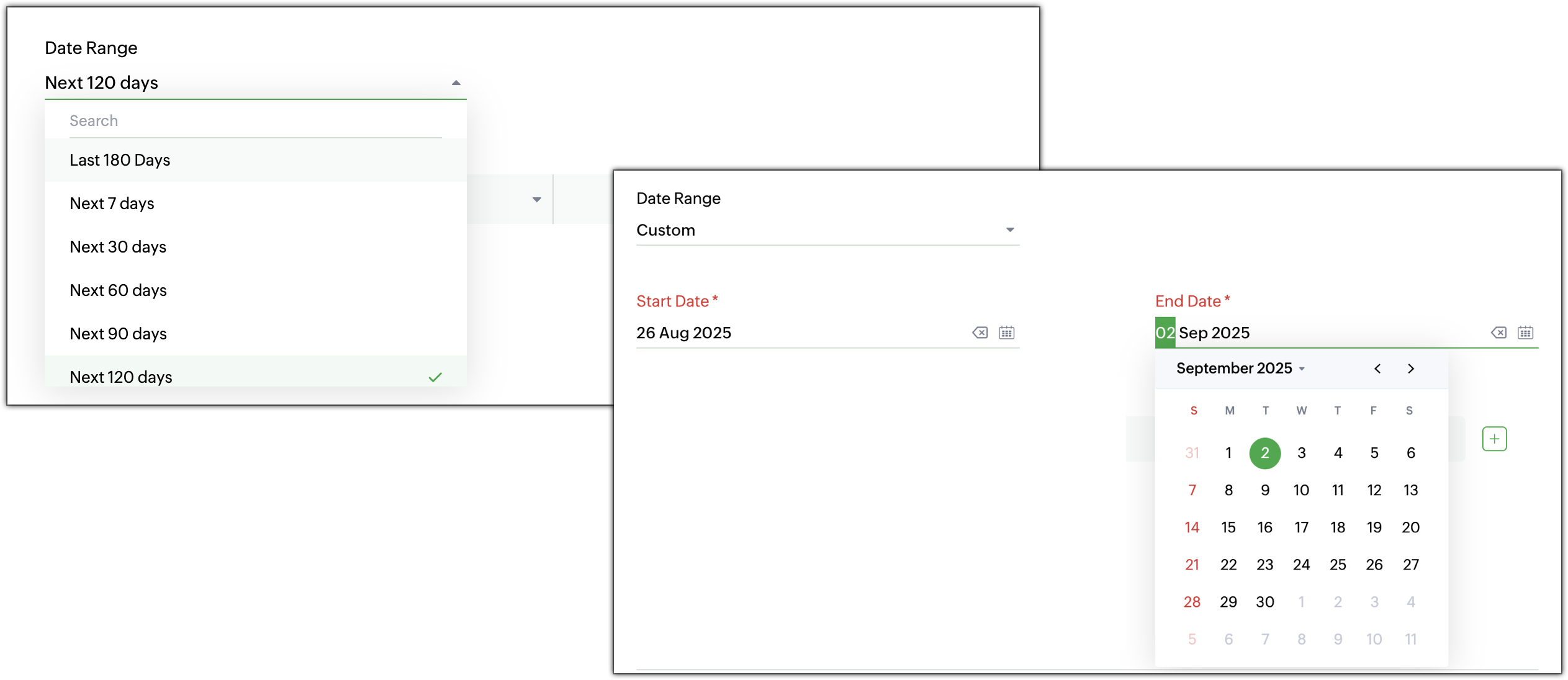
●Date and time filters: Filter by creation, modification, closure, or resolution date. Choose from predefined or custom ranges depending on your analysis needs.
(image via Zoho)
●Export from list views: Export directly from standard or custom views in the module without having to reconfigure filters.
(image via Zoho)
●Higher export limit: The limit has increased from 3,000 to 50,000 records per export. For larger volumes, you can use Zoho Desk’s backup feature.
●Redesigned export history page: You can now view details like number of records, export time, and download links in a cleaner and more intuitive interface.
(image via Zoho)
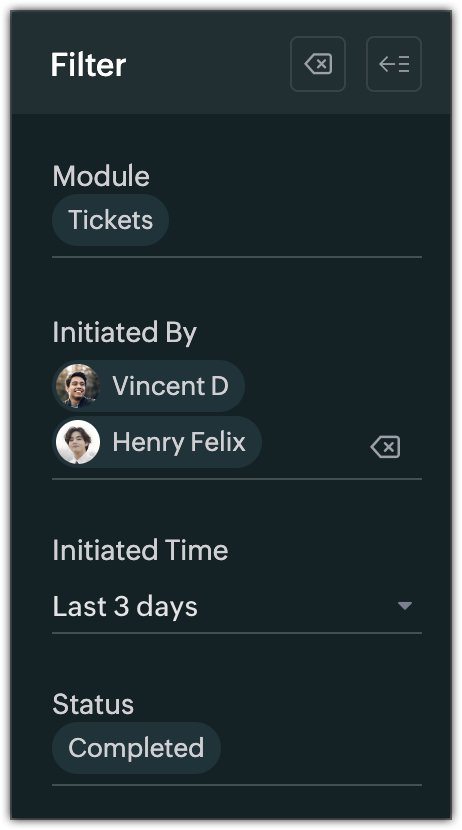
●Export history filters: Find previous exports by applying filters by module, user, date, or status (In Progress, Completed, or Failed).
(image via Zoho)
Webinars on CRM, IOT and Desk
Custom Artificial Intelligence in Zoho CRM
Introduction to Zoho IOT
Response Bots and Generative Artificial Intelligence in Zoho Desk
Want to add these new features to your Zoho system? Let’s work together!
A leading company in the solar sector faced a growing challenge: its call center was overwhelmed. Twenty-five agents were handling over 12,000 monthly inquiries related to sales, technical support, and field visits. The challenge was not only to respond faster but to transform customer service into a true competitive advantage.
InterConnecta implemented an intelligent automation solution that integrated WhatsApp, OpenAI, Zoho CRM, and Zoho Desk into a unified, AI-powered service flow.
Main Results
85% fewer manual tasks
USD 74,000 in annual savings
118% return on investment (ROI) in the first year
5.5 months payback period
Customer Challenge
The company’s accelerated growth had fragmented service processes: sales, support, and after-sales operated without traceability or centralized communication.
25 agents processing over 12,000 monthly interactions, mostly manually.
35% of opportunities were lost outside business hours.
The average cost per manual interaction reached USD 4.50.
Management needed a comprehensive solution capable of offering immediate 24/7 support, reducing the operational load, and maintaining service quality without increasing headcount.
Implemented Solution
InterConnecta designed an Intelligent Automation architecture with four main components:
WhatsApp AI Automation (OpenAI + Zoho SalesIQ): a 24/7 conversational channel with automatic request classification.
Zoho Customer Relationship Management (CRM): automated creation and tracking of leads and opportunities.
Zoho Desk: real-time ticket management with full traceability.
InterConnecta AI Layer: natural language processing (NLP) models trained with FAQs, catalogs, and service policies.
The AI agent automatically classifies each conversation (sales, support, billing, or appointments) and, when appropriate, transfers the case to the assigned staff with all necessary context for immediate follow-up without loss of information.
Impact and Results
Operational Efficiency
Metric
Before
After
Improvement
Average response time
2 min 45 s
9 s
↓ 94%
Manual interactions
12,000 / month
1,800 / month
↓ 85%
Cost per interaction
USD 4.50
USD 0.65
↓ 86%
Annual operating cost
USD 135,000
USD 61,000
Savings ≈ USD 74,000
Productivity
Sales agents manage three times more leads per day.
The technical team reduced incident classification time by 60%.
Field visits are scheduled automatically, with 30% fewer cancellations.
Return on Investment (ROI)
Concept
Value
Initial investment (implementation + licenses)
USD 34,000
Direct annual savings
USD 74,000
Estimated ROI (1st year)
118%
Payback
5.5 months
Assumptions: calculations are based on stable monthly volume. Savings reflect only direct support costs (labor + cost per interaction) and do not include additional gains from productivity or cross-selling.
Intangible Benefits
Net Promoter Score (NPS): increased from 72 to 91 points in the first six months.
Proven scalability up to 50,000 monthly inquiries without expanding the team.
Knowledge base that evolves continuously thanks to AI learning.
Conclusion
The WhatsApp AI Automation + Zoho solution developed by InterConnecta turned this solar company’s customer service operation into a model of efficiency, profitability, and sustainable growth. Rather than replacing people, intelligent automation enhances their capabilities, speeds up response times, and multiplies the value the team generates every day.
Would you like to know how automation can improve customer service in your company?
Zoho CRM gets a revamp with AI, WhatsApp in Cadences, export improvements, and the new CommandCenter 2.0
Zoho released its Q3 update for CRM 2025 with significant improvements to optimize workflows, automations, and user experience.
1. CommandCenter 2.0
Redesigned interface and more intuitive controls.
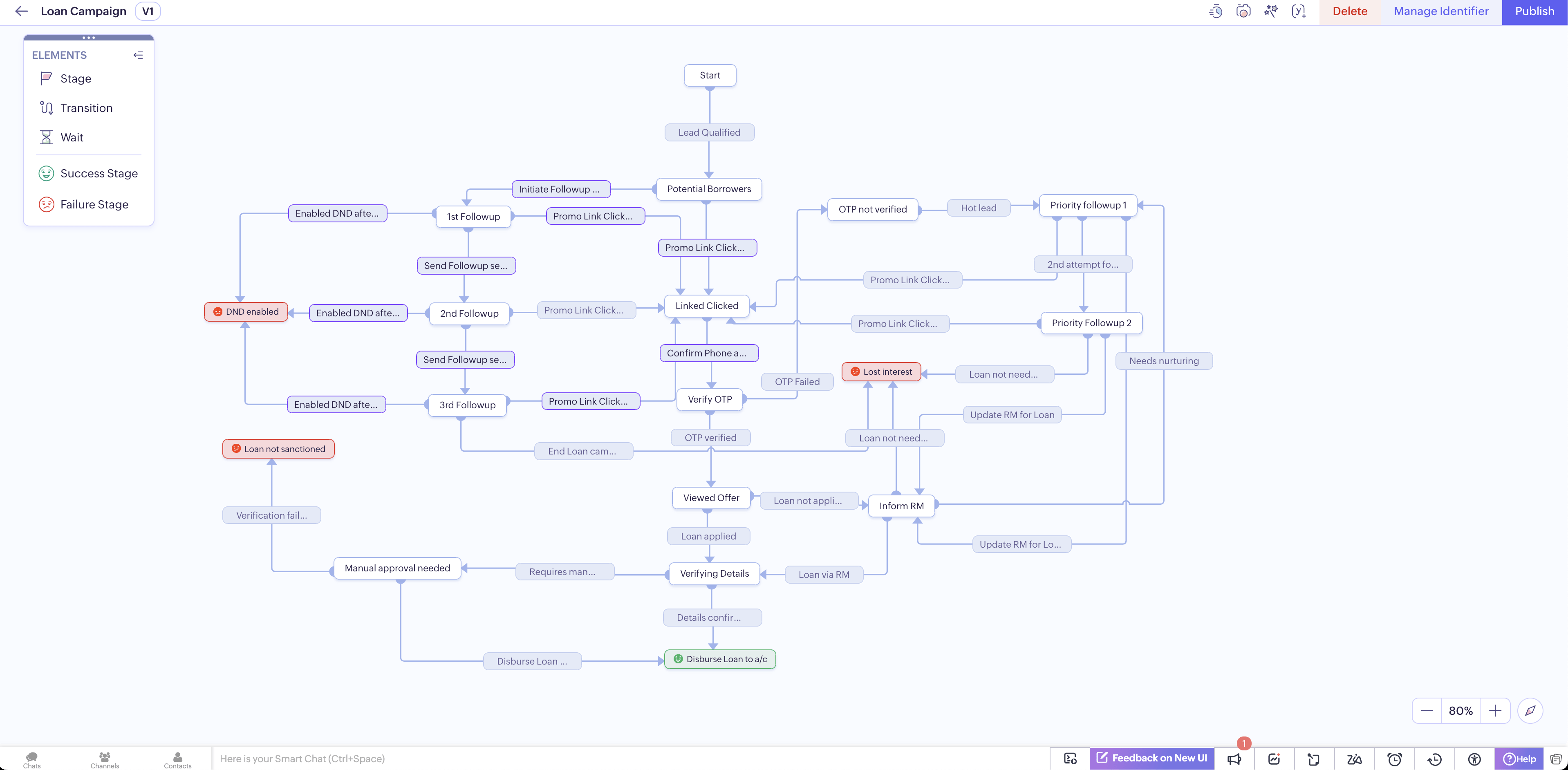
“Stages” (formerly “states”) are no longer limited to a module; you can move records between stages using signals that capture events from various sources.
(image via Zoho)
Identifiers allow dynamic linking of records throughout the customer journey.
Transitions based on SLAs, retroactive actions, and clear goal definitions for each journey.
“End stages” can be tagged with sentiment (positive, negative, neutral) for additional context.
2. Canvas Improvements
New grid component for automatically aligning data without needing to drag manually.
Ability to define breakpoints for adapting layout to different screen sizes.
Set Tab focus direction in custom views to navigate fields logically.
3. Cadences with WhatsApp support and new limits
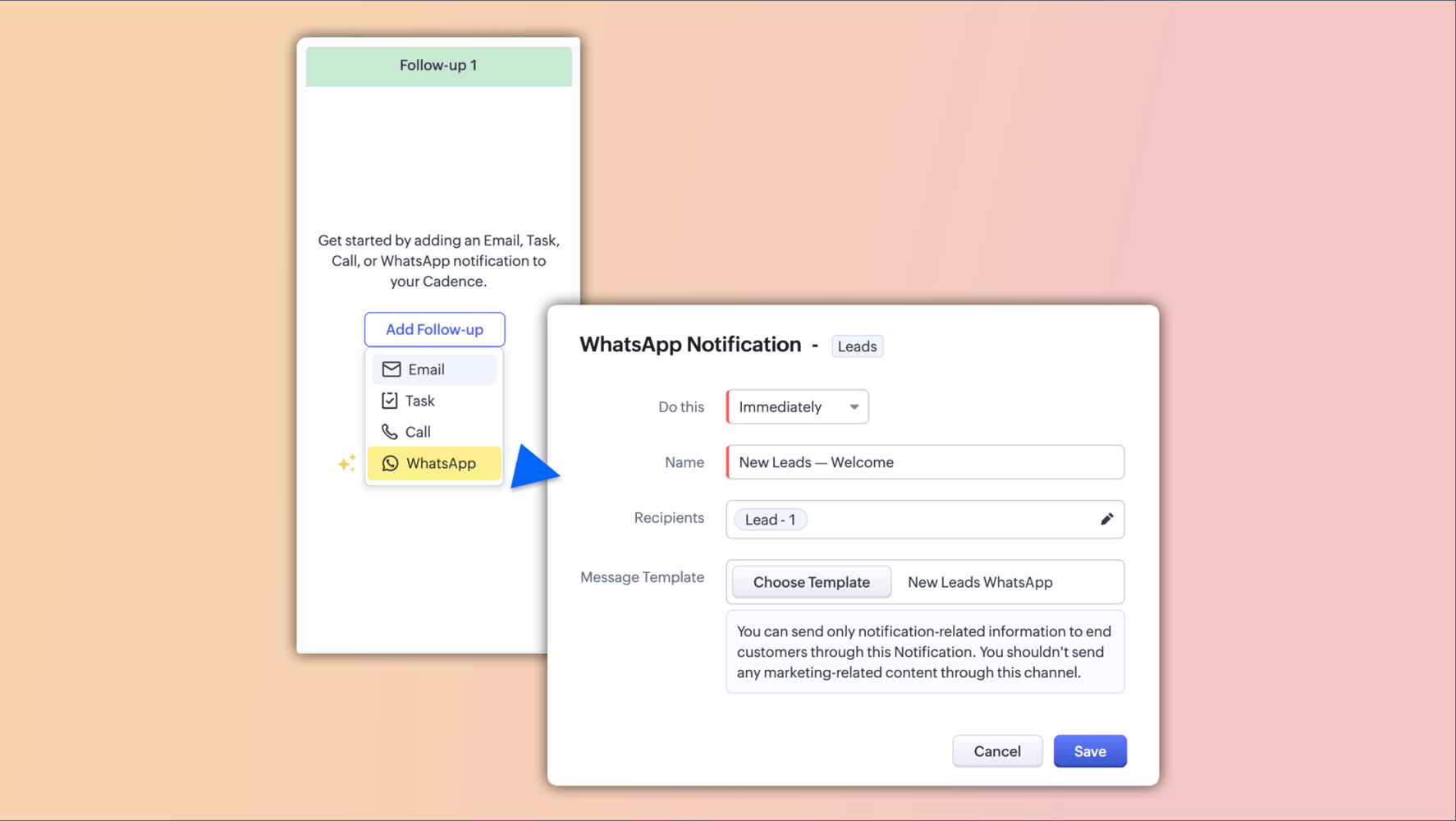
You can now include WhatsApp follow-up steps within your cadences.
(image via Zoho)
(image via Zoho)
Automatic control of record progression or exit depending on whether the message was delivered or failed.
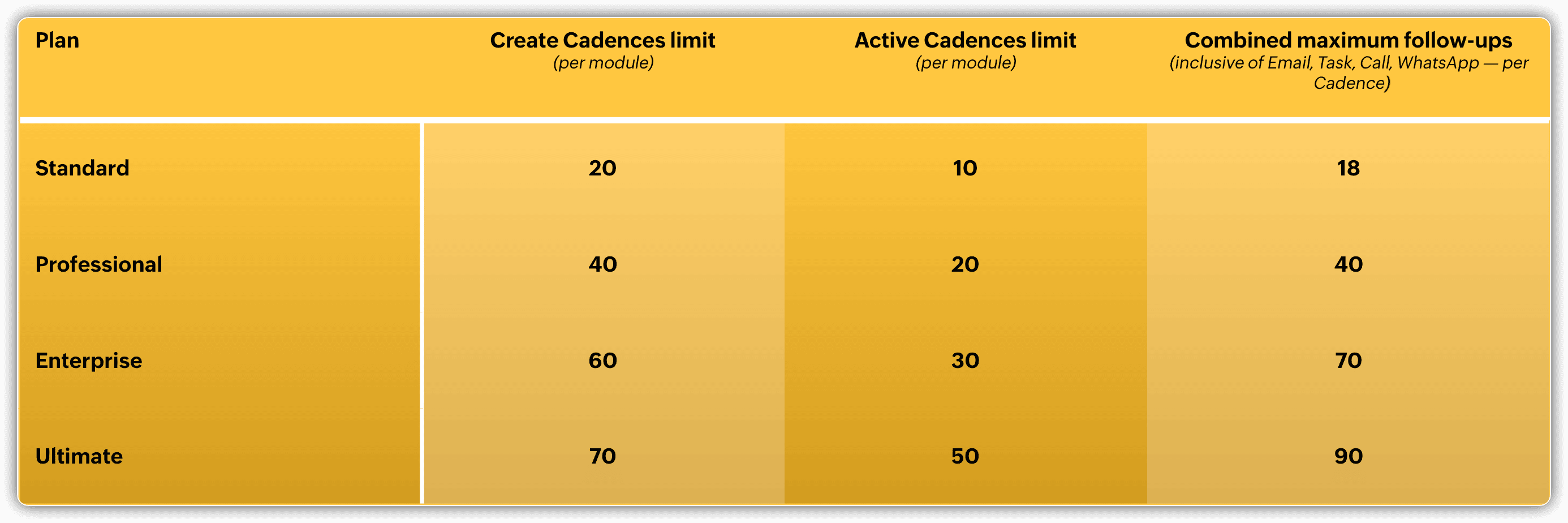
New follow-up limits: no more per-type limits, now a more flexible overall total.
4. Scoring and prioritization with enhanced AI
Unified experience for setting up manual and automated (Zia) scoring rules in one place.
New parameters: intent signals, sentiment, and emotion — integrating Voice of the Customer (VoC) factors.
Different score types: lead health, engagement, attributes, conversions.
5. Redesigned Calendars
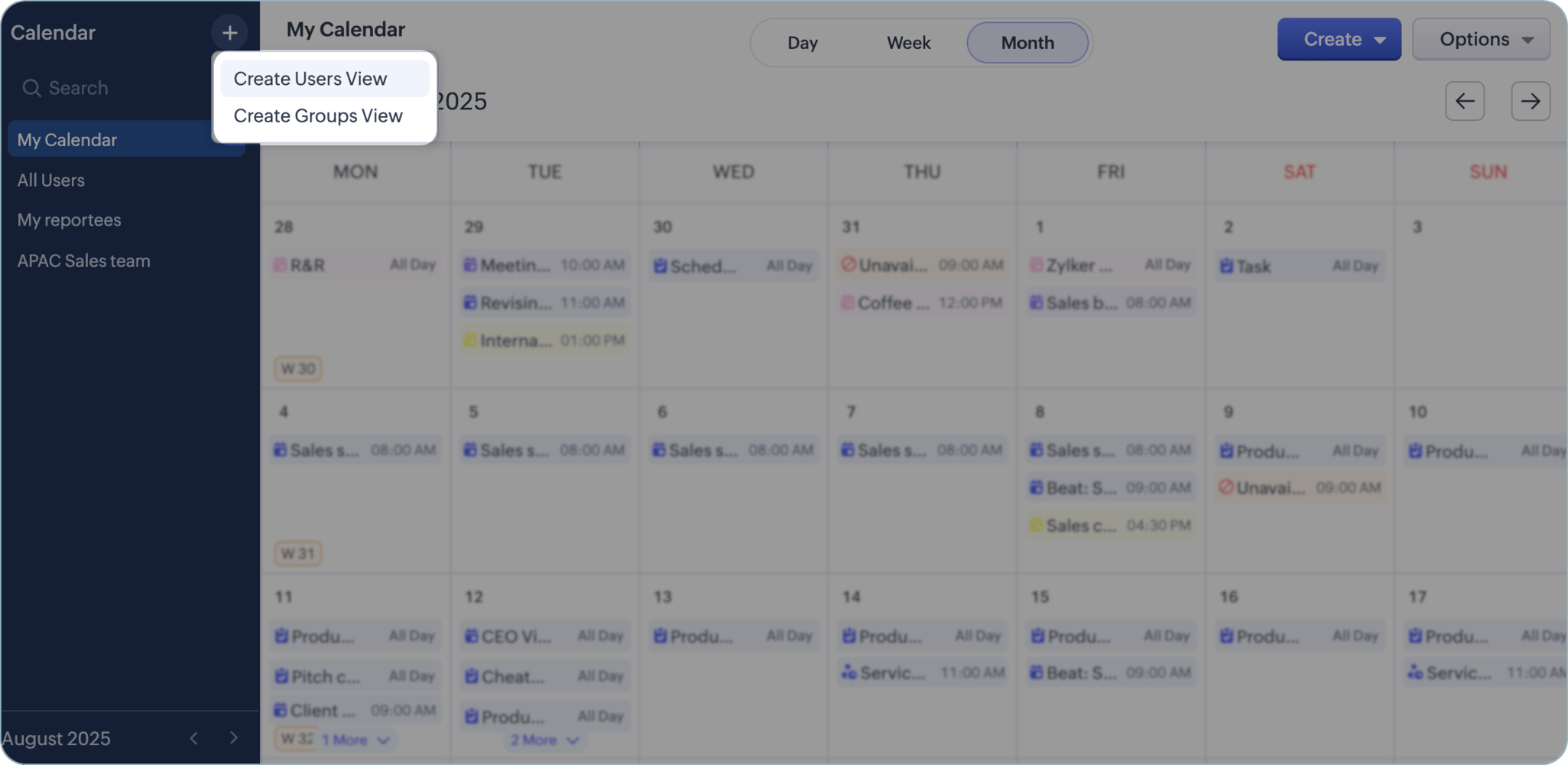
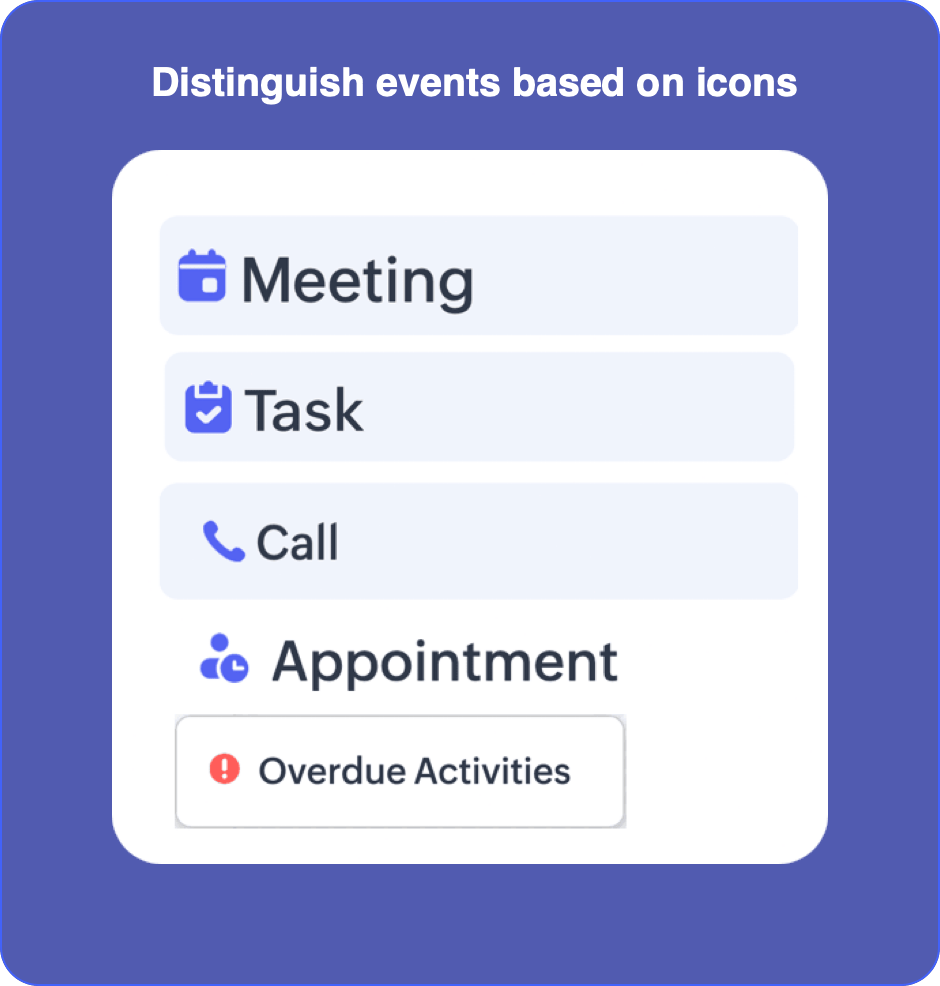
Individual and group views, distinctive icons for activity types, clearer organization.
(image via Zoho)
(image via Zoho)
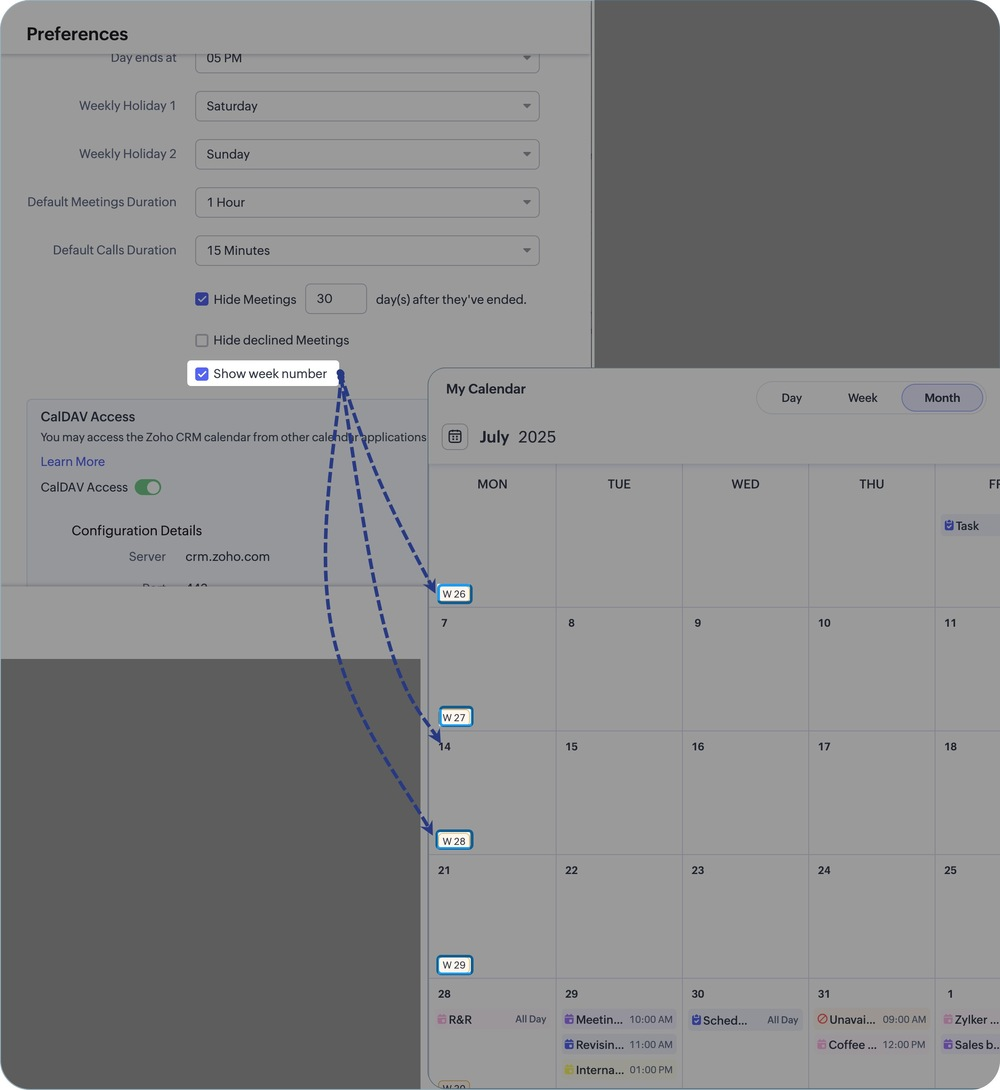
Week labels, simplified views when many activities are present, and integrated search.
(image via Zoho)
6. More Controlled Exports
Export available in XLSX (up to 50,000 records) in addition to CSV.
Ability to choose character encoding in CSV.
Option to exclude record ID or select specific records when exporting.
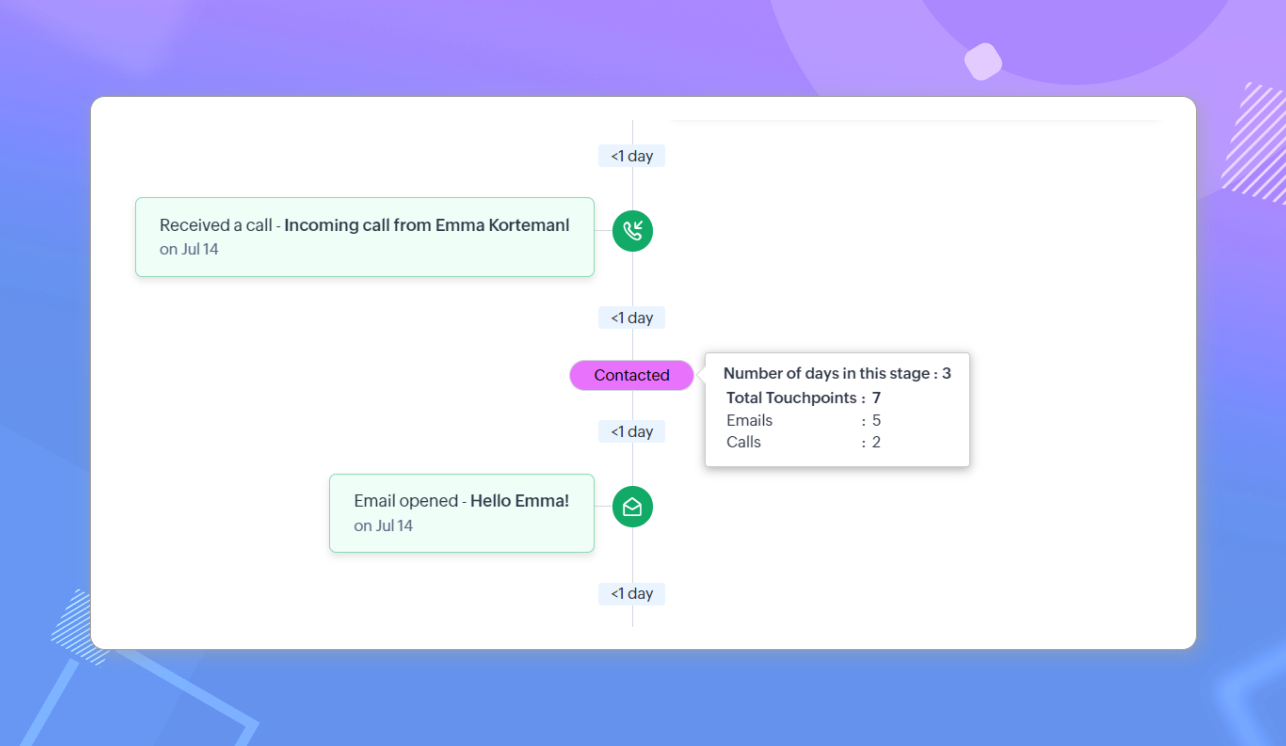
7. Visibility Control for Interactions / Timeline
You can now define by profile who can view interaction history and activities.
(image via Zoho)
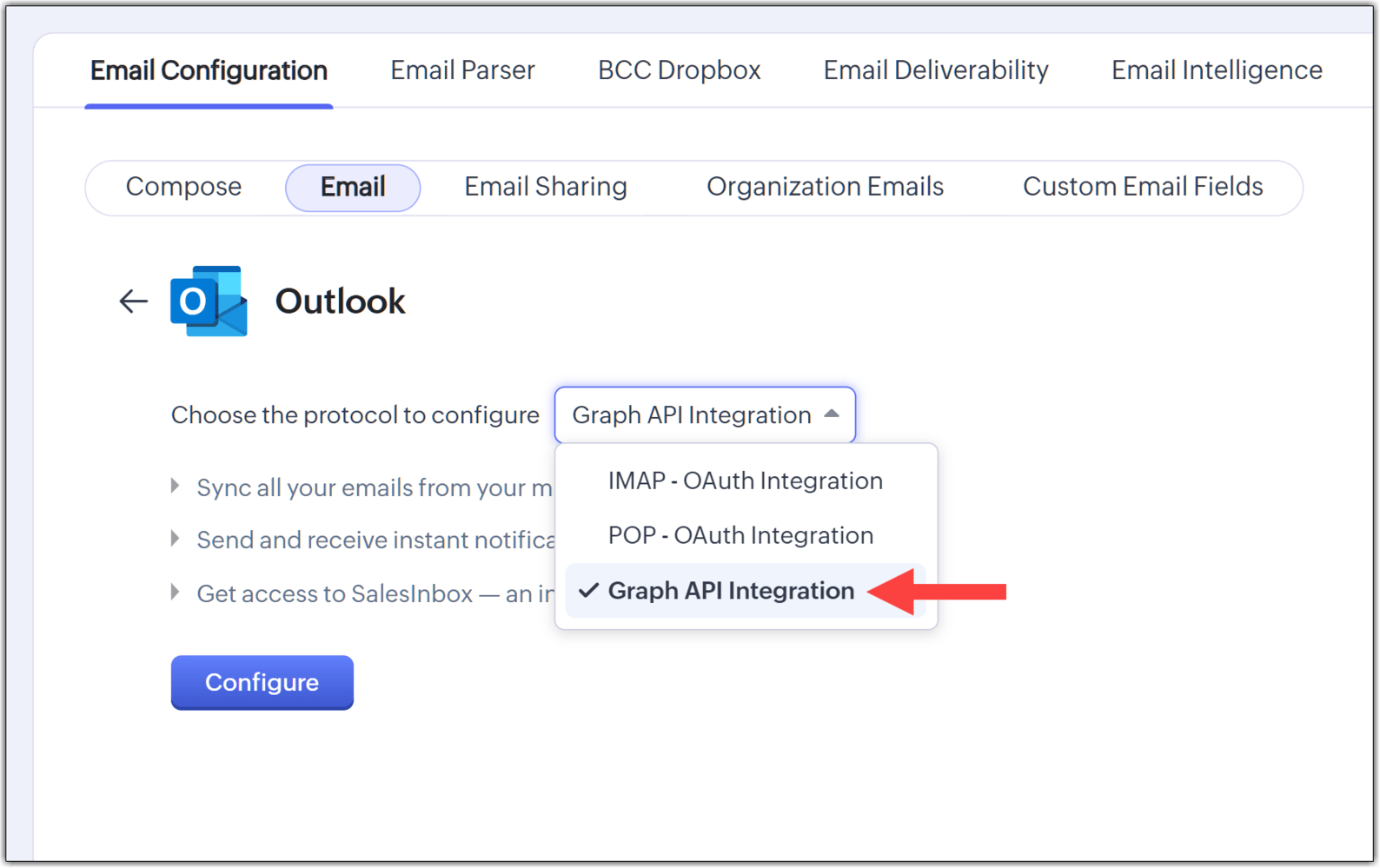
8. Integration with Outlook / Office 365 via Graph API
New integration based on Microsoft Graph API, more secure and future-ready.
Maintains compatibility with IMAP/POP, but designed for a more modern ecosystem.
(image via Zoho)
User-based calendars, issue rules, and automation improvements in Zoho Projects Q3 2025 update
Zoho Projects highlights its most important updates from Q3 — don’t miss them!
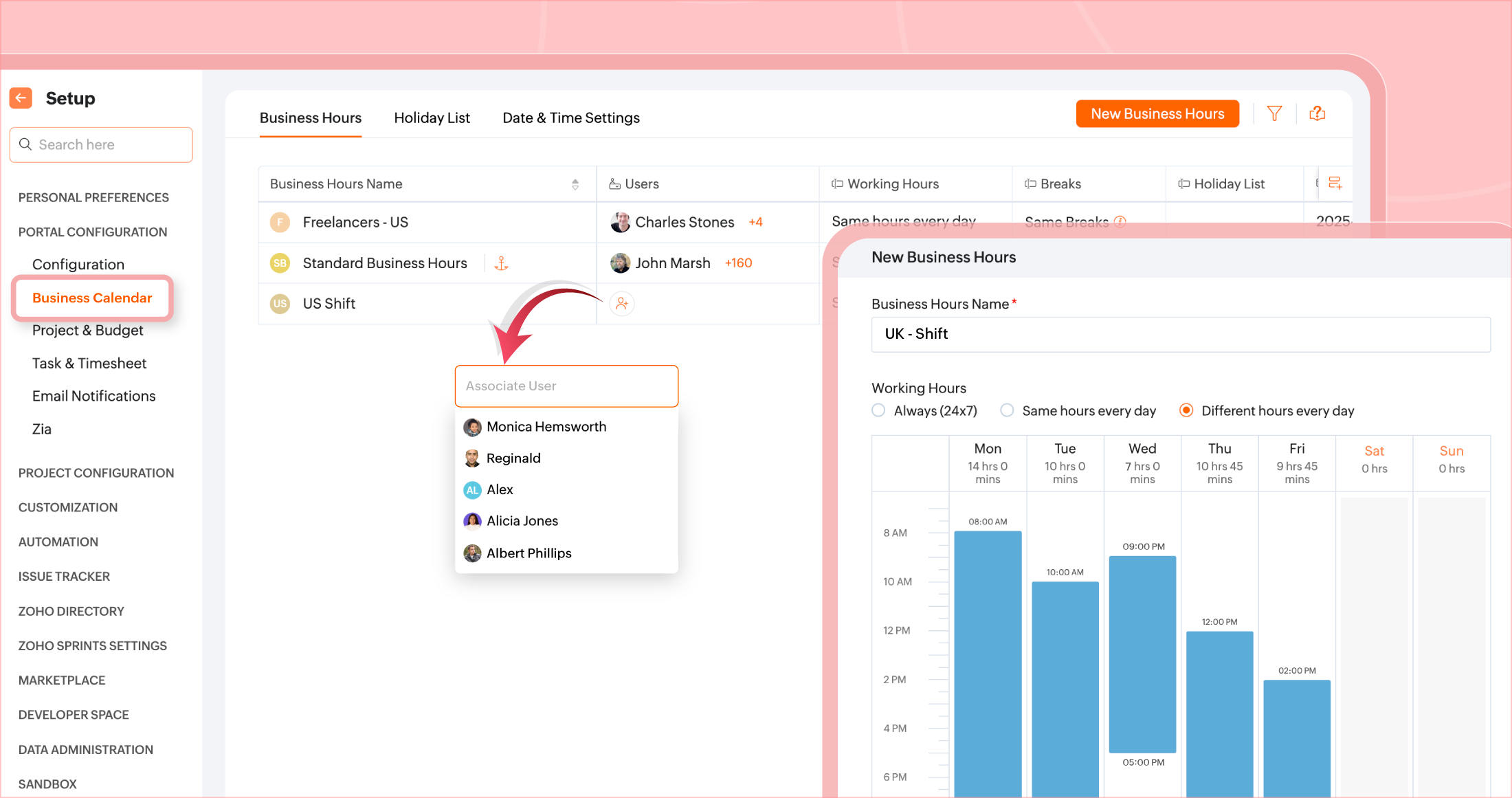
User‑based Calendar Different business calendars can be set for each user depending on their location. Additionally, each user can configure their break hours for better time management.
(image via Zoho)
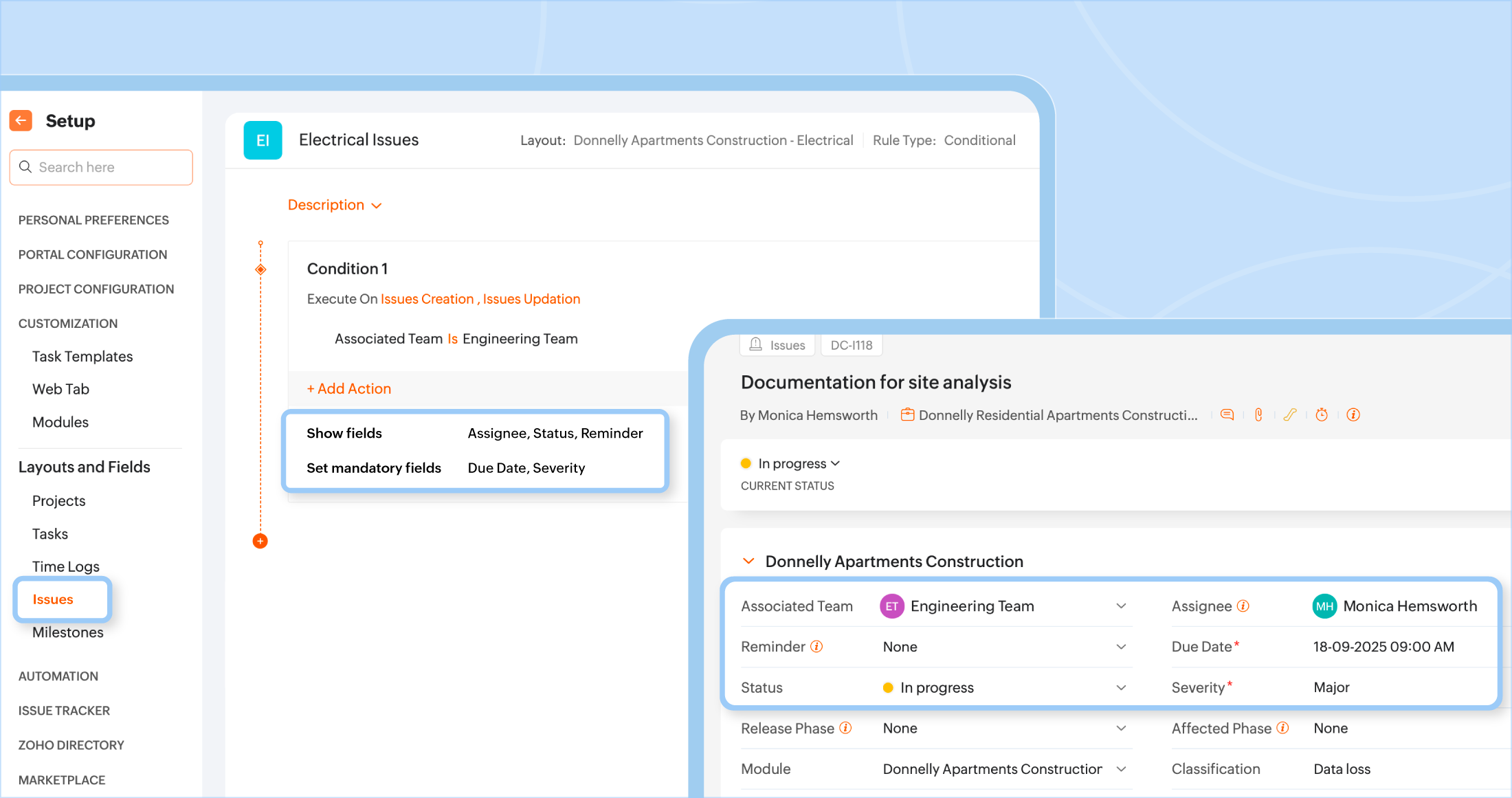
Layout Rules for issues Issue fields can now be shown or hidden based on conditions tied to other field values. This allows for more dynamic and relevant interfaces.
(image via Zoho)
Quarter Day Time Off New option to request time off in quarter-day increments (first, second, third, or fourth quarter).
Recycle Bin for all modules Projects, tasks, issues, milestones, templates, task lists, etc. can be moved to trash and recovered within 30 days.
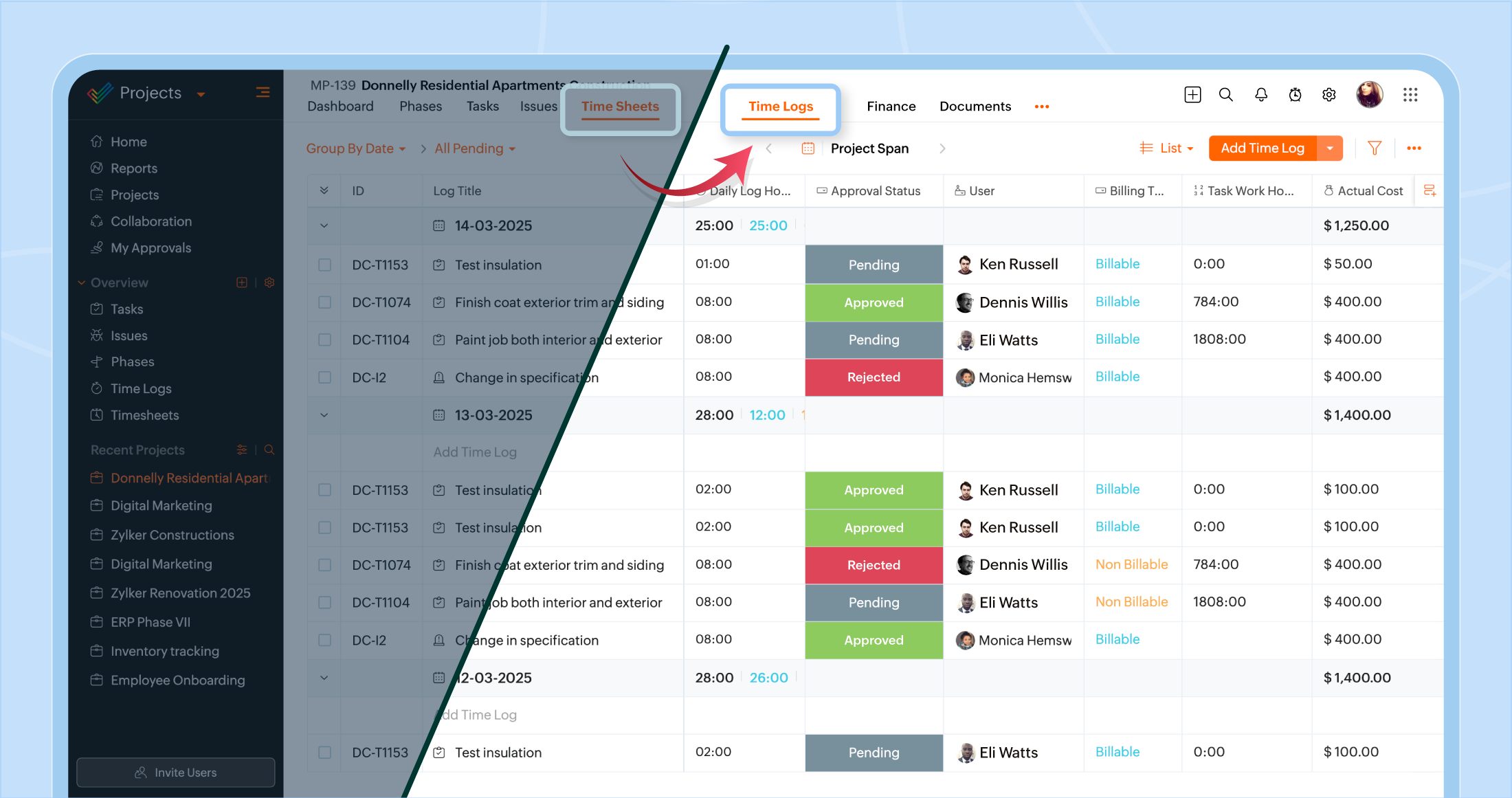
Specific filters in Time Logs The time sheets module (now renamed Time Logs) allows filtering entries by task, issue, or general logs.
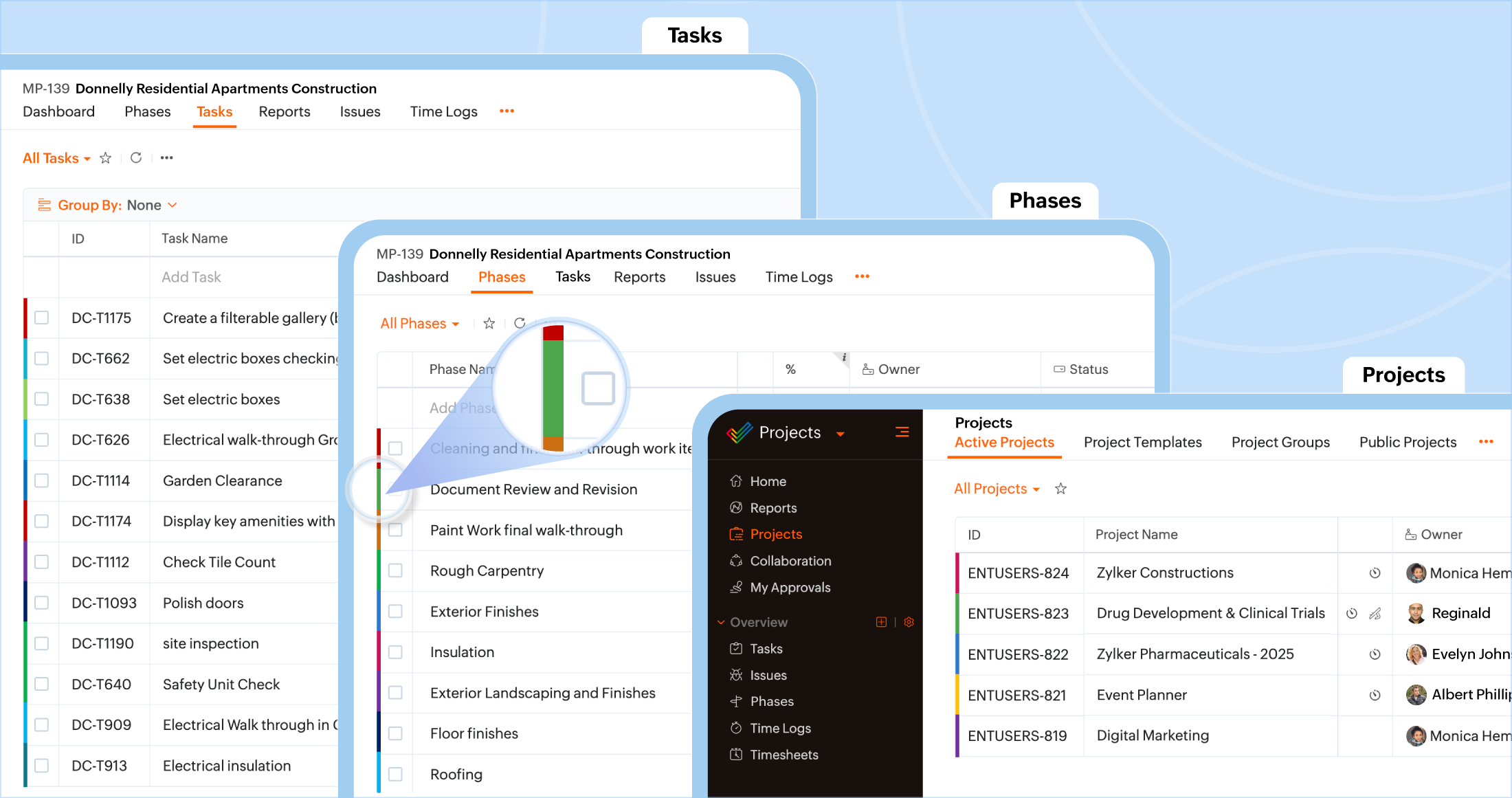
Color coding by module Different colors can be assigned to each module (Projects, Tasks, Phases, Task Lists) for quicker visual identification.
(image via Zoho)
Export of Issues and Phases Project issues and phases can now be exported manually or on a schedule based on custom intervals.
Renaming: Timesheets → Time Logs The functionality remains the same, only the name has changed. Tracks hours worked on tasks or issues during the day.
(image via Zoho)
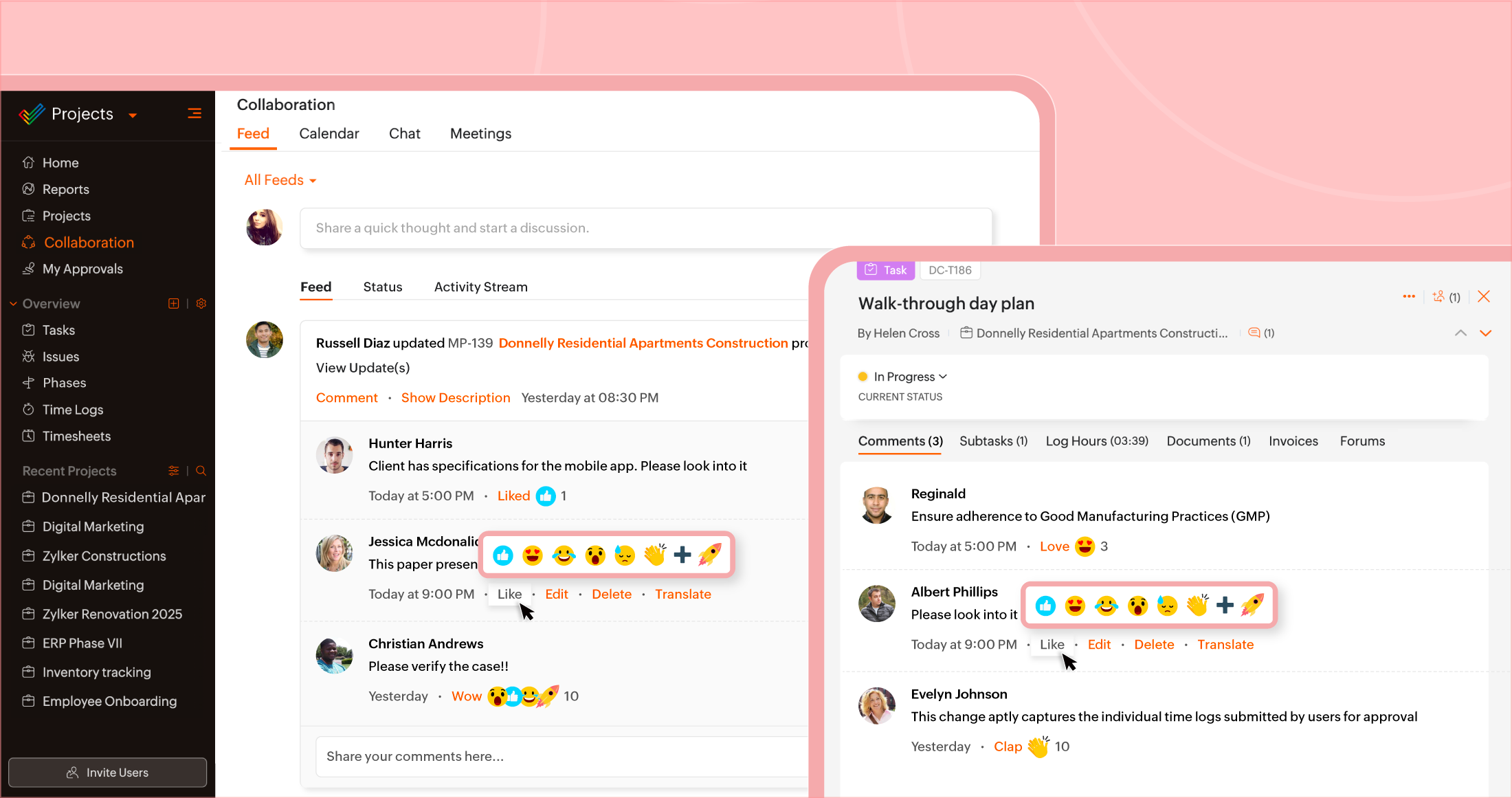
Comment Reactions Comments now support emoji reactions (like thumbs up, surprise, etc.) to express yourself without needing to type a reply.
(image via Zoho)
Task Grouping Tasks can now be grouped using default or custom fields to display more organized and filtered structures.
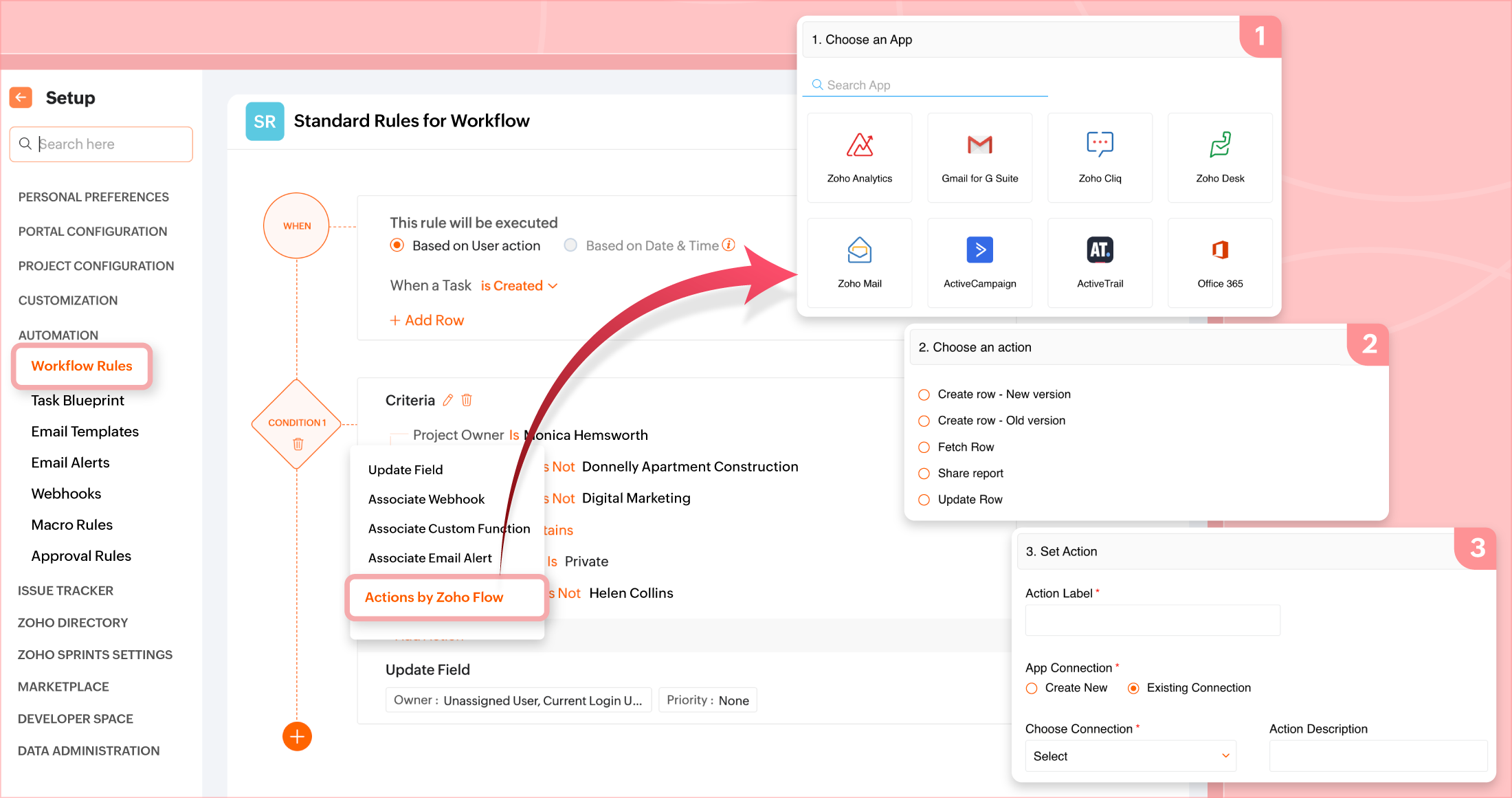
Integration with Zoho Flow Workflow rules or blueprints can now include Zoho Flow actions to connect tasks/projects with external apps and automate more complex processes.
(image via Zoho)
Reusable task lists in project templates You can now add task lists from an existing project directly to the template of another project.
Long URL field In addition to the short URL field, a long URL field is now supported (up to 1000 characters), and short URLs can be converted to long ones.
Zoho FSM and Zoho CRM: key integration to connect field and sales teams seamlessly
Zoho has announced a direct integration between Zoho FSM (Field Service Management) and Zoho CRM, designed to close the gap between sales and field service teams, enhancing the customer experience holistically.
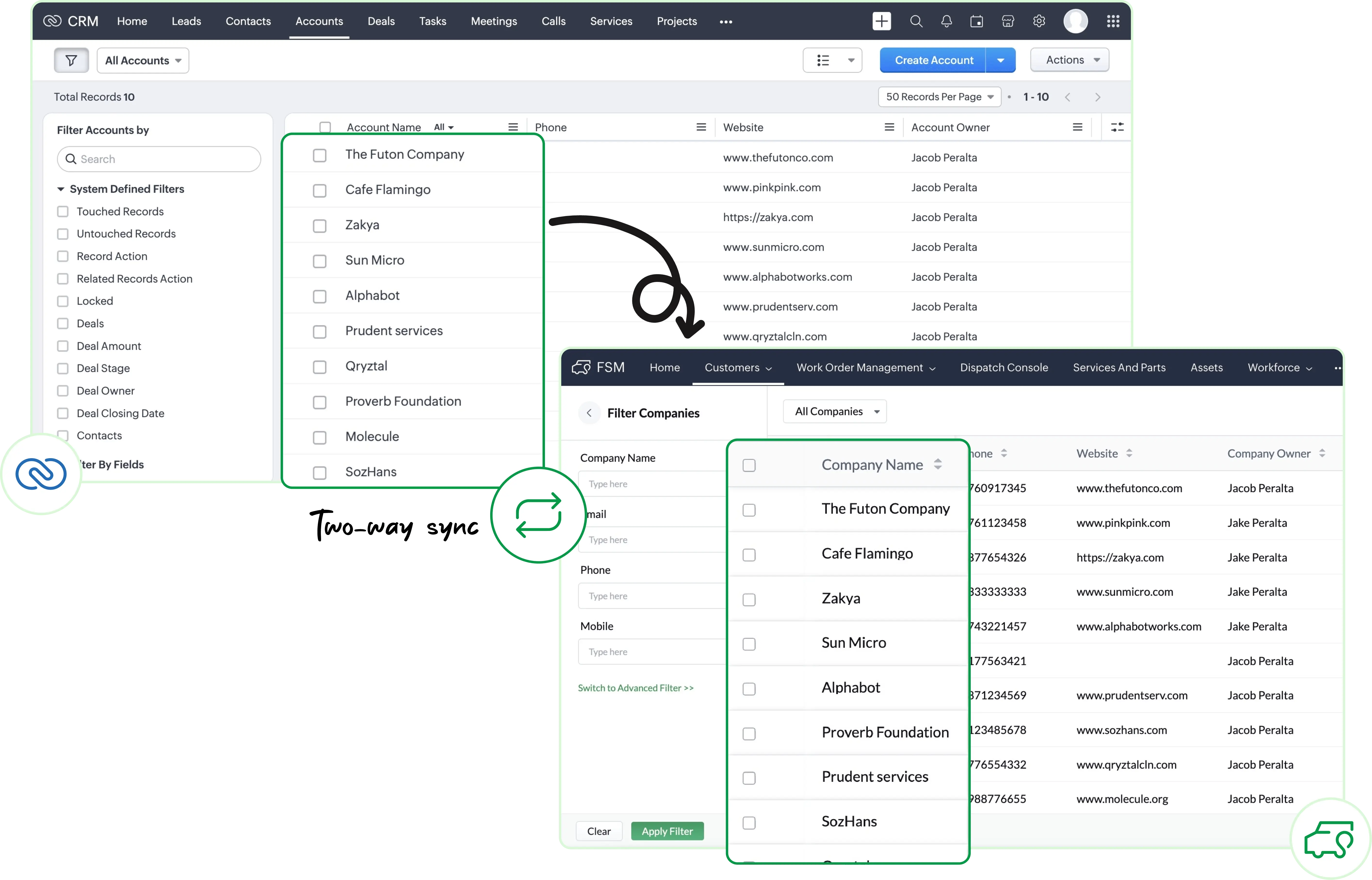
Key data synchronization Accounts, Contacts, and Products modules are automatically synced between CRM and FSM, eliminating duplicate work and ensuring consistency.
Access service history from CRM You can now view service requests, work orders, estimates, and scheduled appointments directly in Zoho CRM, linked to each customer. This gives sales teams full visibility into post-sale support status.
(image via Zoho)
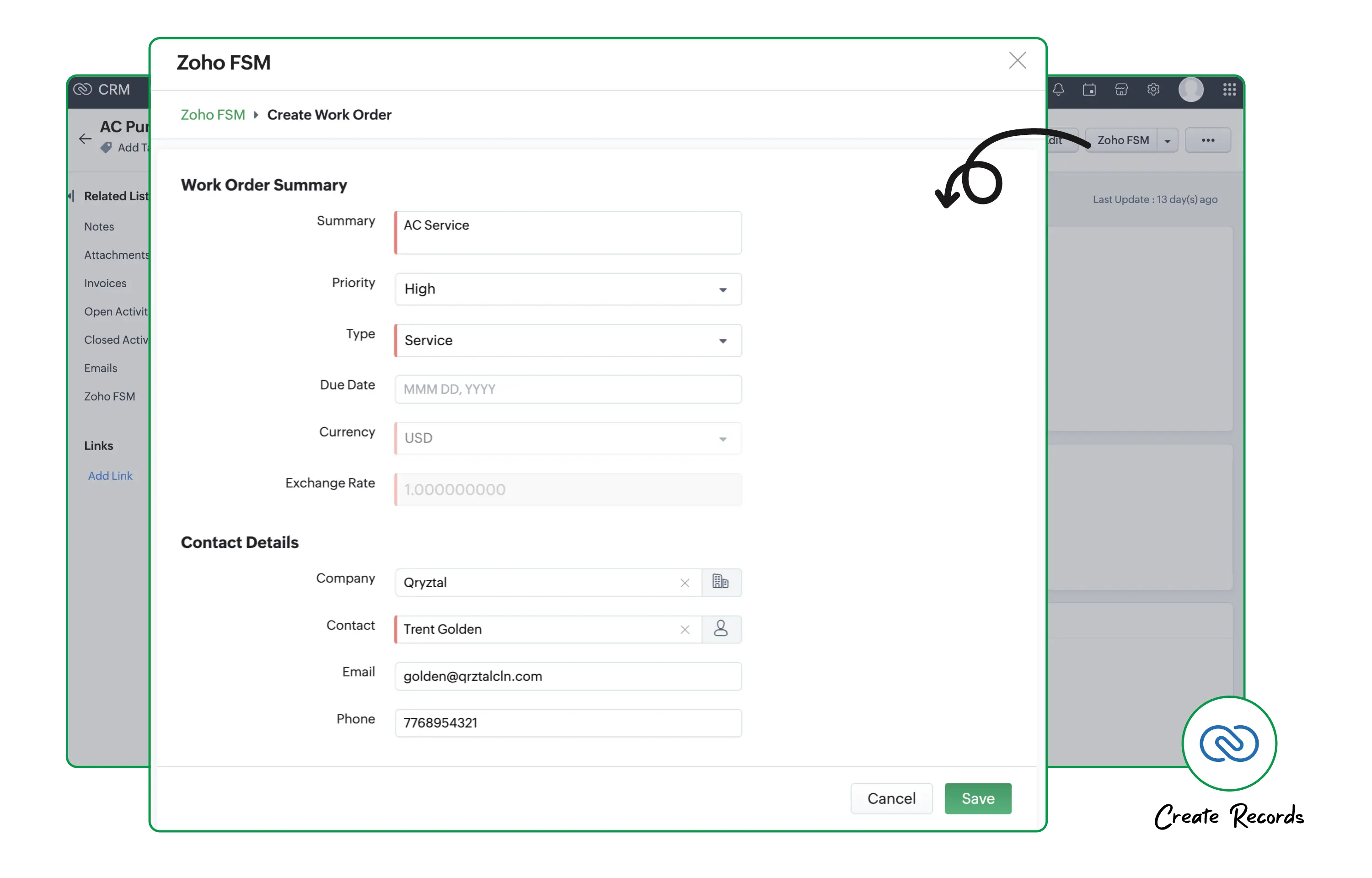
Seamless conversion between modules Deals in CRM can be easily converted into service records in FSM — from requests to work orders. You can also convert products into assets, allowing you to track them via FSM’s maintenance module.
Actions from one place From within CRM, you can not only view but also create new FSM records related to a customer, without leaving the sales environment.
(image via Zoho)
A more integrated customer experience With this integration, sales teams have access to service status, and technicians are aware of the customer’s previous context — enabling a more collaborative and personalized approach.
New billing, reconciliation, and reporting features arrive in October to Zoho Books
Zoho Books launched key new features this month to enhance the accounting, visual, and operational experience:
Support for Apple devices Full support for iOS 26, iPadOS 26, macOS 26, and watchOS 26.
WebForms You can now create web forms connected to custom modules to collect information from internal or external users.
Payment statuses New statuses added: Draft, Paid, and Cancelled — visible in views, searches, and reports.
Invoice cancellation and correction (France edition) Allows you to void erroneous invoices and automatically generate new ones.
Graphical report display Available in Australia and Europe instances.
Bank integration (UK) Direct feeds via Token.io, with no limit on PayPal accounts.
Cloning custom reports Duplicate and edit existing reports easily.
PDF file name customization Define prefixes, suffixes, and dynamic variables in file names.
Zoho Inventory improvements (add-on) More complete bulk update, replenishment preferences, visible bin stock, fast serial entry, and more.
Useful extras Attach files to custom modules, location lookup fields, image fields, and new limits on check payments (UK).
Audio call support in the classic widget ends in December 2025 in Zoho SalesIQ
Zoho announced that as of December 31, 2025, support for audio calls in the old Live Chat widget will be discontinued.
This is a mandatory action for those still using the older version of the widget, as after this date, the voice call functionality will no longer be available.
It is recommended to upgrade to the new SalesIQ Live Chat widget to continue using audio calls and avoid interruptions to that support channel.
Webinars on Desk, CRM and Books
Widget communication in Zoho Desk
How to use email APIs in Zoho CRM
Introduction to Zoho Extensions: Webhooks in Zoho Books
SalesIQ adds AI filters to transform your customers’ experience
Have you ever wondered if your bot can read between the lines? That is, tell the difference between someone just asking for business hours, someone ready to buy, or a customer on the verge of frustration? With most bots, the answer is no. Everyone gets the same automated reply, regardless of context. But that’s changing.
At InterConnecta, we’re sharing one of the most powerful new features in Zoho SalesIQ:the new routing system with artificial intelligence filters. Thanks to this update, bots can now detectsentiments, intentions, and key topics in real time. The result? More human interactions, more accurate responses, and most importantly, an experience that makes a lasting impression.
The power behind the change: AI-based routing
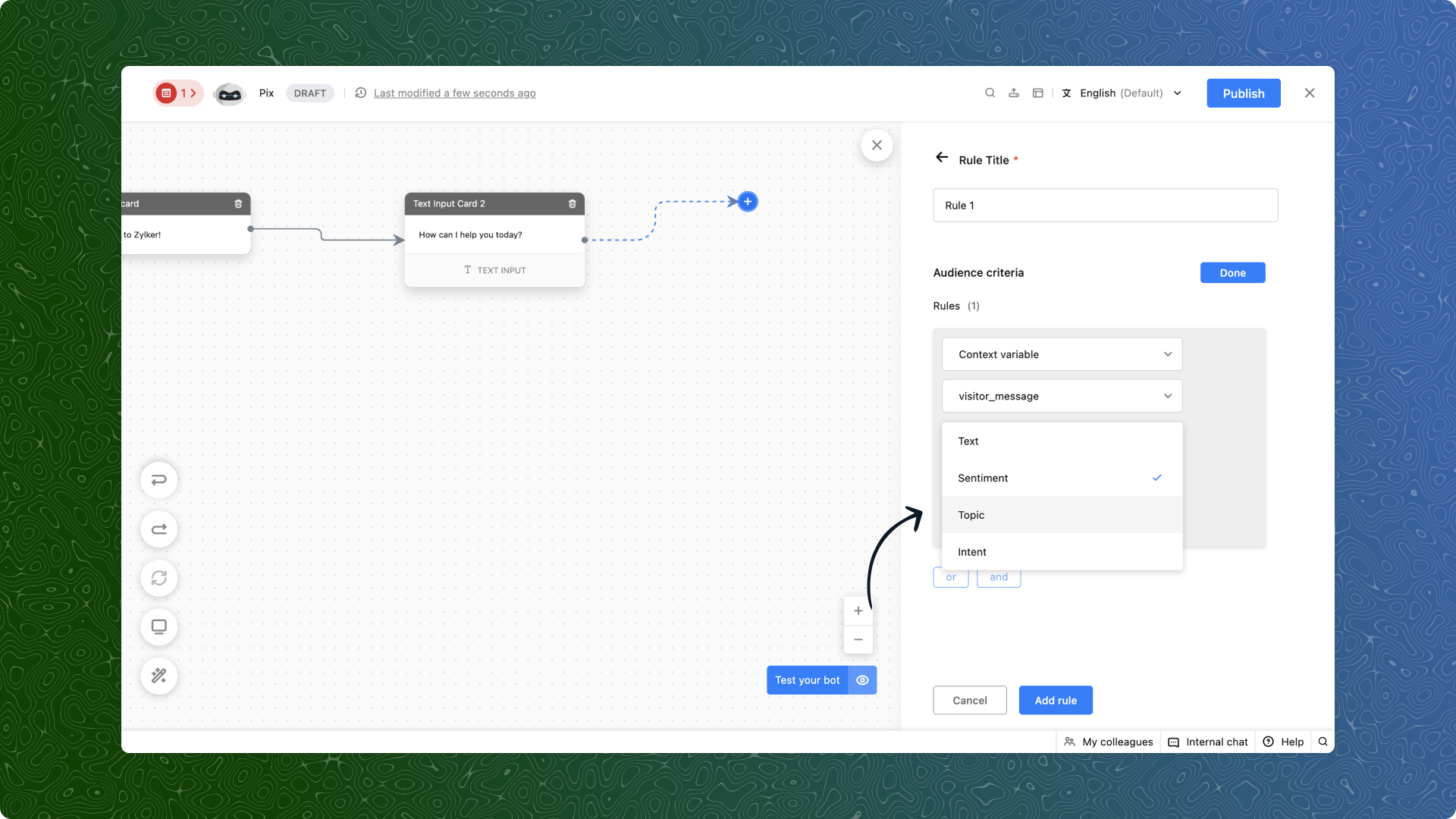
SalesIQ already offered the ability to route chats based on user-defined criteria. But now, that capability is enhanced with AI filters that enable smarter decisions, such as:
Sentiment: Is the customer upset, satisfied, or just curious? Now you can detect it automatically and respond accordingly.
Intention: Are they trying to buy, cancel, or report an issue? AI picks it up and directs the chat to the right team.
Topic: Define keywords like products or locations, and your bot will know how to steer the conversation properly.
(image via Zoho)
What does this look like in action?
E-commerce
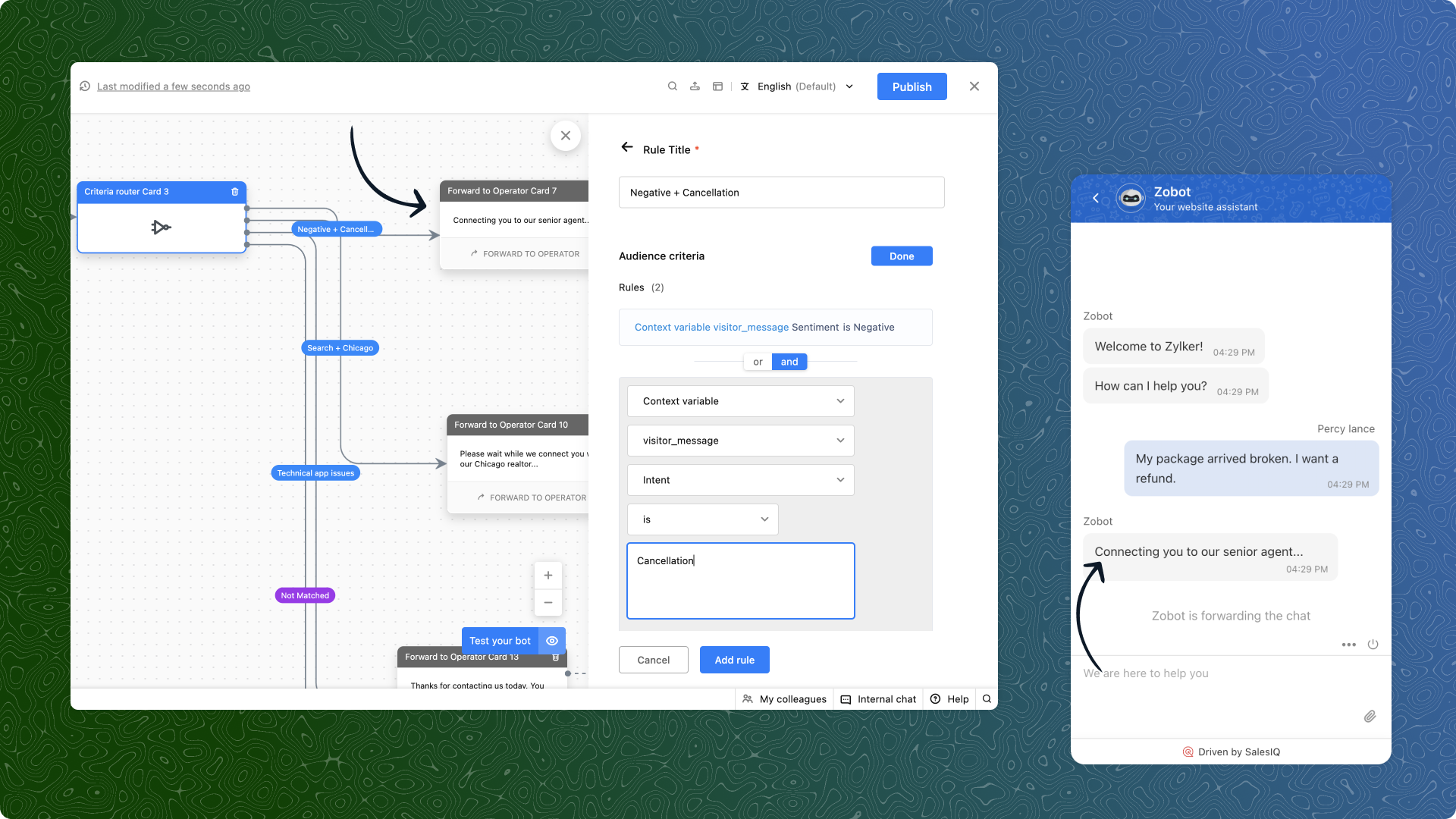
“My order arrived broken. I demand a refund.” AI detects a negative sentiment and a refund intention. The bot avoids generic responses and immediately routes the chat to the advanced support team.
(image via Zoho)
Real estate
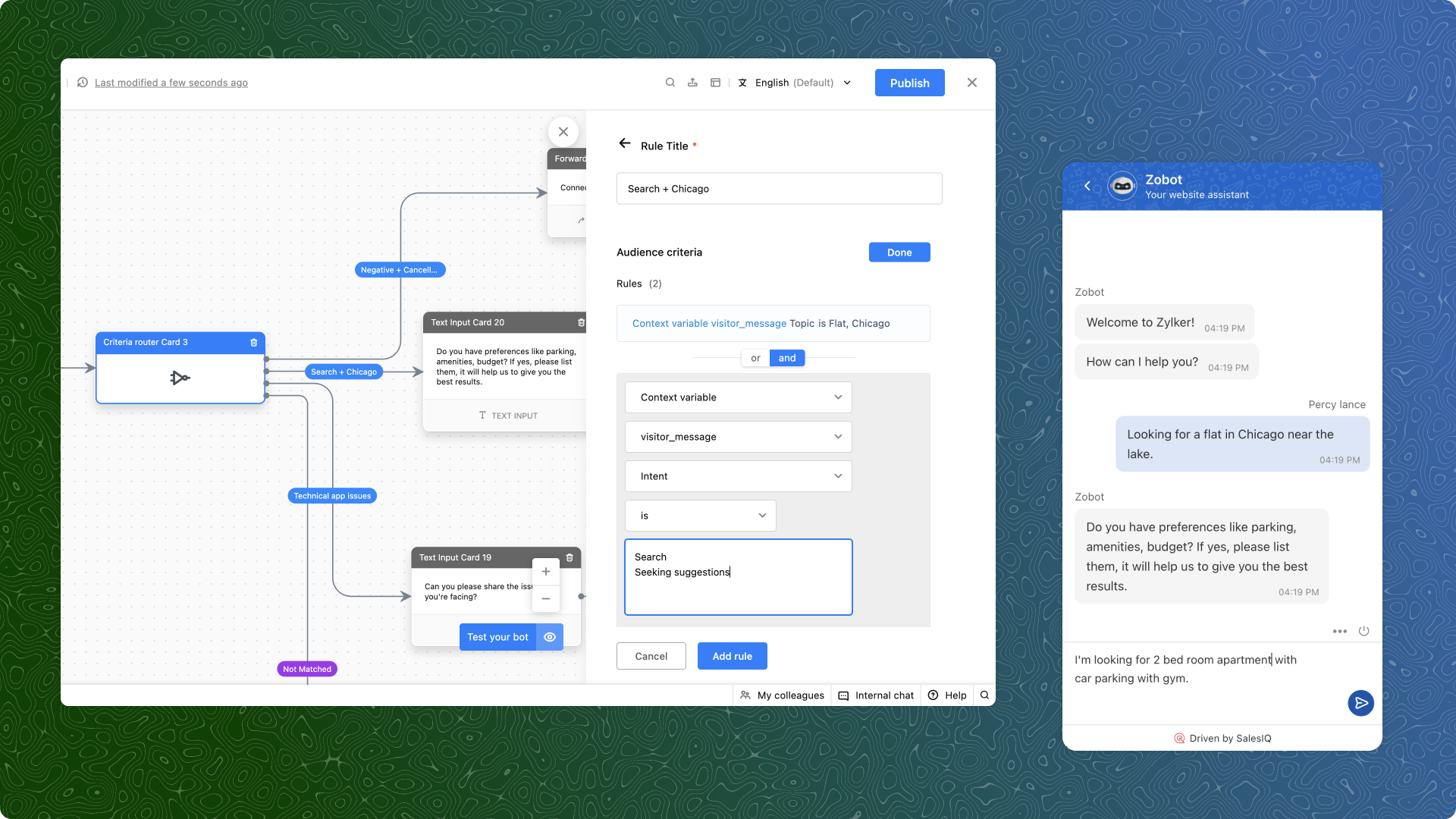
“I’m looking for a two-bedroom apartment in Chicago.” Topics and search intent are detected. The user is directly connected to an advisor who handles properties in that area.
(image via Zoho)
Technical support
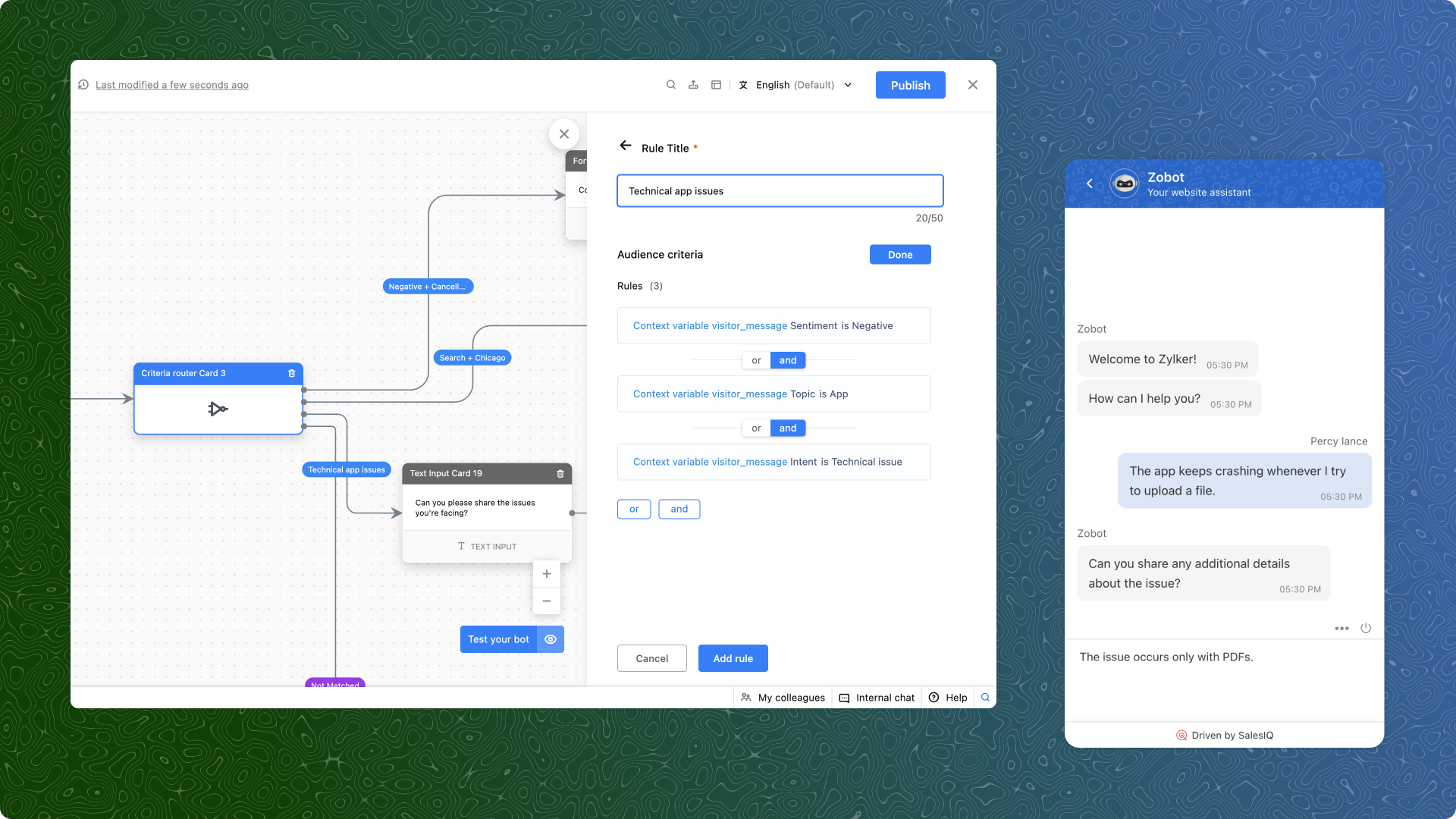
“The app crashes every time I try to upload a file.” Here, a negative sentiment, a technical intention, and the app topic all come into play. The bot bypasses general support and redirects to the specialized support team.
(image via Zoho)
What do you need to get started?
Use context variables: Capture the user’s message, store it as a variable in the bot, and use it for criteria-based routing.
Prioritize your rules: If multiple rules are met, the first one applies. So order your criteria from highest to lowest priority.
Test and refine: Start with common scenarios in your business, analyze the results, and optimize as needed.
Available only on the Enterprise plan
An important note: this feature is only available for SalesIQ Enterprise plan users. And yes, it also works in multiple languages.
Ready to try it? At InterConnecta we can help you set it up and customize it for your industry.
The recent price increase in Salesforce has left many companies with a key question: is it still worth paying so much for a CRM? For organizations looking to optimize resources without sacrificing productivity, this increase becomes a burden that directly impacts profitability.
The good news is that there is a more affordable, comprehensive, and internationally recognized alternative: Zoho CRM. With this platform, companies can save up to 50% in licensing costs, gain operational simplicity, and access an ecosystem of applications covering sales, marketing, support, finance, and operations.
The real impact of Salesforce’s price increase
When an essential tool like a CRM increases its fees, the consequences are felt at different levels of the organization:
Operating budget: more resources allocated to maintaining the platform, less investment in new initiatives.
Limited growth: high costs make it difficult to add users, modules, or integrations.
Internal motivation: teams feel restricted when technology becomes a financial burden instead of a productivity enabler.
In this context, more and more companies are looking for alternatives that combine innovation, security, and competitive pricing.
Zoho CRM: award-winning innovation and transparent costs
Zoho CRM is not only more affordable, it is also backed by international awards that recognize it as a leader in its category:
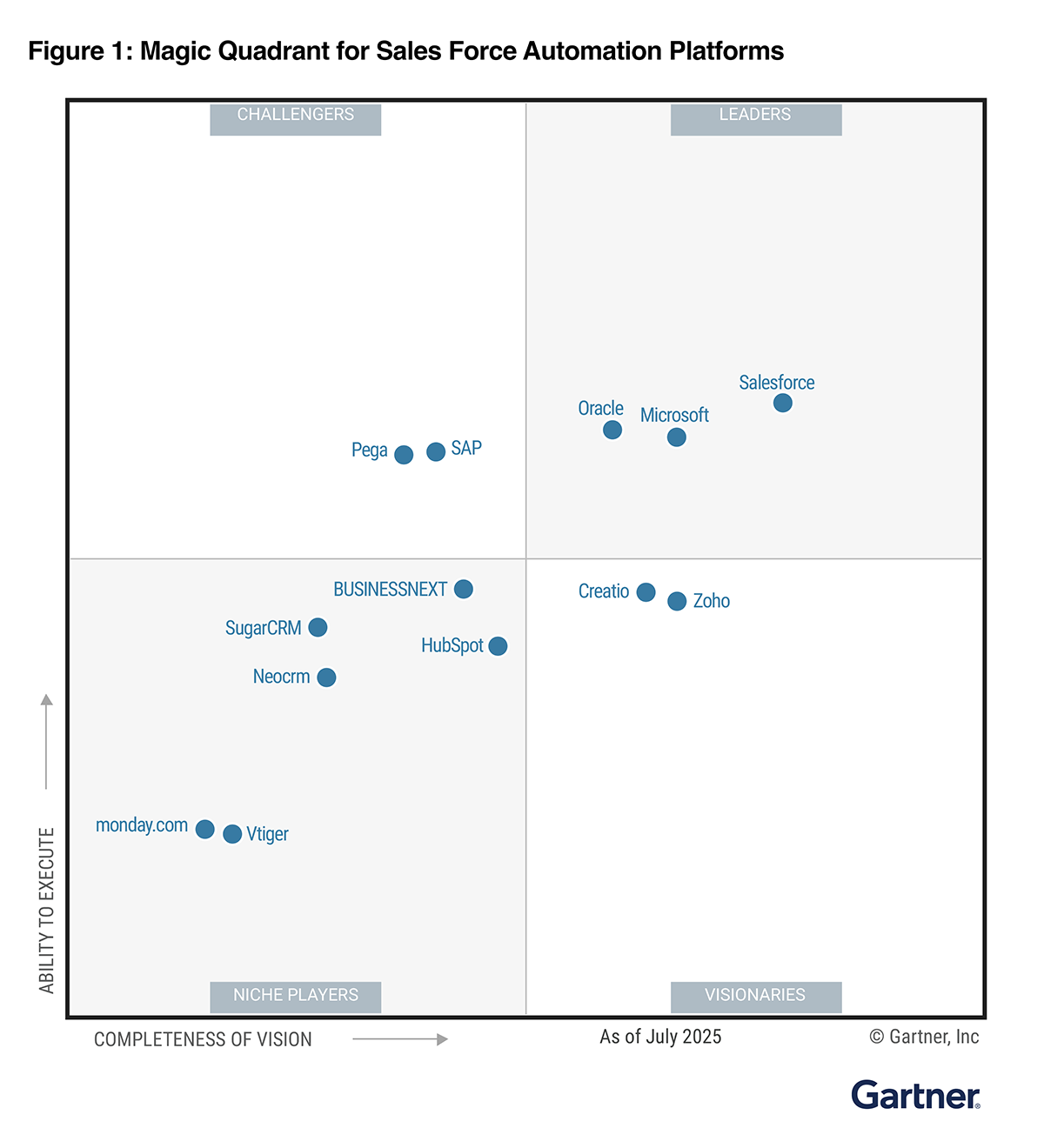
Visionary in Gartner’s 2024 Magic Quadrant™ for sales force automation platforms.
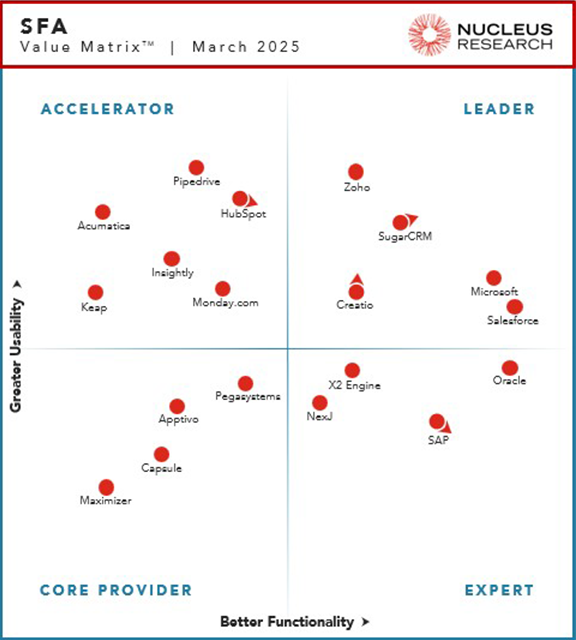
Nucleus Research 2024 – Leader in the SFA Technology Value Matrix.
Gartner Peer Insights Customers’ Choice 2023 in lead management.
TrustRadius Top Rated CRM 2023, based on customer satisfaction.
These recognitions confirm that Zoho CRM offers a far better cost-benefit ratio than Salesforce, without sacrificing innovation or scalability.
Security and privacy as core pillars
Zoho has made security and privacy a priority from the beginning. The platform is backed by international certifications such as:
ISO/IEC 27001 – Information security management.
ISO/IEC 27701 – Information privacy.
ISO/IEC 27017 and 27018 – Cloud security and personal data protection.
SOC 2 Type II, GDPR, and HIPAA – Global compliance standards.
This ensures that companies not only gain access to a more affordable CRM, but also a reliable solution to protect sensitive information.
How to migrate from Salesforce to Zoho CRM: a practical guide
Migrating a CRM doesn’t have to be traumatic. With the right plan, the transition is secure, agile, and can become the perfect opportunity to optimize data and processes.
1. Initial audit and planning
Modules used in Salesforce (Accounts, Contacts, Opportunities, Cases, etc.) are analyzed.
Dependencies such as workflows, triggers, or external integrations are identified.
A mapping document is created to define how each element will be transferred to Zoho CRM.
💡 Example: a company with more than 200 fields in Salesforce reduced that number to less than 120 during migration, eliminating obsolete data and simplifying processes.
2. Data cleanup and preparation
Duplicate records are removed.
Unused fields are cleaned up.
Date, currency, and text formats are standardized.
This ensures that the data migrated to Zoho is consistent and easy to use from day one.
3. Zoho CRM setup
Modules and fields are customized according to business needs.
Picklists, module relationships, and user permissions are configured.
The flexibility of Zoho is leveraged to optimize processes that were more rigid in Salesforce.
4. Data migration
A test migration (e.g., 50 records) is conducted to validate correct data import.
Then a full migration is carried out in logical order: Accounts → Contacts → Opportunities → Activities → Attachments.
Relationship preservation is ensured (e.g., an account linked to its contacts and opportunities).
5. Rebuilding automations and integrations
Approval flows, alerts, and lead assignments are recreated in Zoho Blueprints and workflow rules.
Costly external integrations are replaced by native Zoho One apps (e.g., Zoho Desk for support, Zoho Sign for digital signatures).
Custom functions in Apex are translated into Deluge, Zoho’s scripting language, reducing complexity.
6. Validation and testing
Record counts between Salesforce and Zoho are compared.
Real-case tests are conducted to confirm that automations work correctly.
Key users test the system before the full rollout.
7. Training and ongoing support
Teams are trained on using Zoho CRM.
Close support is provided during the first weeks, ensuring a smooth transition.
Conclusion: turning the price increase into an opportunity
The increase in Salesforce licenses doesn’t have to be an unavoidable burden. Zoho CRM is a more affordable, award-winning, and secure alternative that allows you to maintain — and even boost — productivity while significantly reducing costs.
At InterConnecta, we help organizations migrate from Salesforce to Zoho CRM strategically, ensuring continuity, security, and alignment with their business goals.
Are you paying too much for Salesforce or another CRM? Schedule a consultation with our experts and discover how easy it can be to migrate to Zoho CRM and take a step toward a more profitable and efficient future.
In many organizations, large volumes of documents must be read and processed manually by human teams. This repetitive work is not only slow and costly but also prone to errors. Whether it’s validating identity documents, extracting invoice data, or processing customer forms, the time invested can become a bottleneck in operations. OCR (Optical Character Recognition) technology integrates with Zoho solutions to automate data extraction and validation from images or scanned documents, streamlining critical processes and significantly reducing operational workload. Furthermore, by combining OCR with automation and intelligent workflows, solutions can be created that transform not only internal operations but also the customer experience.
Case 1: Reducing Manual Work in Document Reading
In this scenario, a company processed large amounts of documents daily sent by clients and suppliers: IDs, invoices, contracts, purchase orders, among others. Previously, this process required several people to manually read and enter data into the system, with the resulting margin of error and time consumption.
Solution with OCR + Zoho Creator Through Zoho Creator, a custom OCR model was trained to automatically detect and extract key fields from the documents: name, document number, date, amount, etc. Files were uploaded via forms or synced folders, and the extracted data was automatically validated before being integrated into the Zoho CRM system.
In cases where documents were unreadable or incomplete, the system generated automatic alerts for manual review. This workflow significantly reduced the need for human intervention in reading and transcription tasks.
Expected Results
Up to 60% reduction in manual work for reading and entering documents.
Fewer transcription errors and faster processing speed.
Staff available for higher value-added tasks.
Case 2: Automatic Document Validation for Onboarding via WhatsApp
In another case, a company needed to optimize the customer onboarding process. Users shared their documents via WhatsApp (ID cards, receipts, etc.), but manual verification slowed service activation and created operational bottlenecks.
Solution with OCR Zoho RPA A WhatsApp channel was integrated with Zoho RPA to automatically receive images sent by customers. Through an OCR model, the solution extracts key data and compares it with existing records in Zoho CRM. Additionally, automatic validations were implemented with Zoho RPA to ensure the documents were readable, valid, and that the data matched the prospect’s information.
When the documents meet the requirements, the process continues automatically until the customer’s registration is complete. If inconsistencies are found, the system responds to the user requesting a new image or additional documentation, all without the need for direct human intervention.
Expected Results
Up to 65% reduction in onboarding time
Improved customer experience by enabling smooth interaction through their favorite channel.
Reduction of errors and fraud thanks to automatic validations.
Technical Considerations
To ensure the success of these implementations, it is important to consider several key factors:
Document Quality: Blurry images, poor lighting, or pictures taken from awkward angles can reduce OCR accuracy.
Privacy and Security: Since documents contain sensitive information, strict access, storage, and encryption policies must be applied.
OCR Model Training: An effective model requires real examples of the documents to be processed, ideally with format and structure variations.
Licensing: Some advanced OCR features require specific plans. It is recommended to evaluate this at the beginning of the project.
Zoho Tools That Make It Possible
These solutions are primarily based on Zoho Creator and Zoho RPA.
Zoho Creator allows for training custom OCR models, building automated workflows, and connecting extracted data with other systems.
Zoho RPA extends these capabilities to high-volume processes through bots that capture documents, perform OCR, and complete tasks without human intervention.
Both tools can be natively integrated with other Zoho modules such as CRM, WorkDrive, Forms, or Flow, creating a fully automated, secure, and scalable ecosystem. Implementing OCR with Zoho tools transforms slow, repetitive processes into automated, reliable, and scalable workflows. From reducing internal operational workload to significantly improving the customer experience, this technology opens the door to a new way of working: more efficient, more accurate, and fully connected.
Do you want to implement a similar solution in your organization?
At InterConnecta, we design and implement customized solutions with Zoho OCR, Creator, and RPA to make your processes more agile, secure, and scalable.
Exporting data is now easier and more flexible: discover the new options in Zoho CRM
Zoho CRM introduces improvements to the Export feature, giving you more control and simplicity when working with your data.
What’s new in exports:
XLSX format: In addition to the classic CSV, you can now export in XLSX, making it easier to analyze data directly in Excel. While CSV supports up to 200,000 records, the new format allows you to export up to 50,000 with greater compatibility for spreadsheet users.
(image via zoho)
Field selection: If you don’t need certain data, such as the record ID, you can now easily exclude them when generating the file. This results in a cleaner output tailored to what you actually want to share or analyze.
(image via zoho)
CSV character set: When exporting in CSV, you can choose the character set to ensure all information — including names or texts in other languages — is properly encoded.
(image via zoho)
Direct export: No need to go to Settings → Data Administration. Now you can export from the same module, in a pop-up window that lets you choose format and options without interrupting your workflow.
(image via zoho)
Selected records: From list view, you can select up to 500 specific records and export them immediately. Ideal for working with filters or specific customer segments without exporting the entire module.
(image via zoho)
These improvements make information management faster, more practical, and tailored to your business needs.
Zoho Analytics gets a revamp with more powerful visualizations and key improvements this September
The latest Zoho Analytics update brings improvements that make working with data more visual, flexible, and secure. From project management to dashboard customization, you now have more tools to gain valuable insights and align them with your brand.
Main new features:
New Gantt chart Visualize tasks and deadlines in real time, identify delays, and customize views with styles, colors, and flexible date ranges.
(image via zoho)
More supported databases
Cassandra: import data from this large-scale NoSQL database.
SAP HANA and ClickHouse in the cloud: connect directly without the need for local servers.
Snowflake: new authentication options with OAuth and private key for greater security.
Support for new file formats You can now import Parquet and Avro, optimized for big data. Large file uploads (over 100 MB) have also been expanded for formats like Excel, JSON, XML, HTML, and statistical files.
(image via zoho)
Improved user management A new invite-based system has been introduced, providing more control over who accesses your reports and dashboards.
Advanced dashboard customization Adjust brightness, contrast, transparency, or even flip background images to create visually impactful dashboards aligned with your brand.
(image via zoho)
Smart relationships between tables New automatic suggestions simplify data modeling by recommending connections based on metadata.
Updated white label experience
More modern and consistent UI for White Label implementations.
New white label guide with best practices and examples for maximum customization.
Greater control on mobile devices Admins can now view access logs in the Mobile BI app, offering more visibility into how reports are consumed on smartphones.
These updates make Zoho Analytics more connected, customizable, and intelligent, allowing you not only to analyze data, but also to deliver safer, more engaging analytics experiences aligned with your organization.
Say goodbye to spam in your forms with the arrival of reCAPTCHA v3 in Zoho Forms
Unlike traditional CAPTCHAs, reCAPTCHA v3 works invisibly, with no checkboxes or challenges that interrupt the user.
It analyzes the behavior of the person filling out the form and assigns a score between 0.0 and 1.0.
A score close to 1.0 suggests it’s likely a human; closer to 0.0, likely a bot.
You define the minimum acceptable threshold (e.g., 0.5) and decide what to do with submissions that don’t meet it.
Control options for suspicious submissions:
Block the response and show a custom error message.
Add a second verification using Zoho Forms’ built-in CAPTCHA.
(image via zoho)
Key benefits:
Fewer spam entries without friction for real users.
Greater control by defining your own security criteria.
Smoother and more professional form experience.
With this update, you get an ideal balance between protection and usability, adjusting the security level according to the volume and sensitivity of your forms.
Zoho Books gets updated with new features in billing, reports, and more – September 2025
Zoho Books continues to evolve to offer a more connected and efficient accounting experience. This month brings new integrations, specialized reports, and key improvements that simplify financial and inventory management.
EmaraTax (UAE & USA): file VAT directly from Zoho Books.
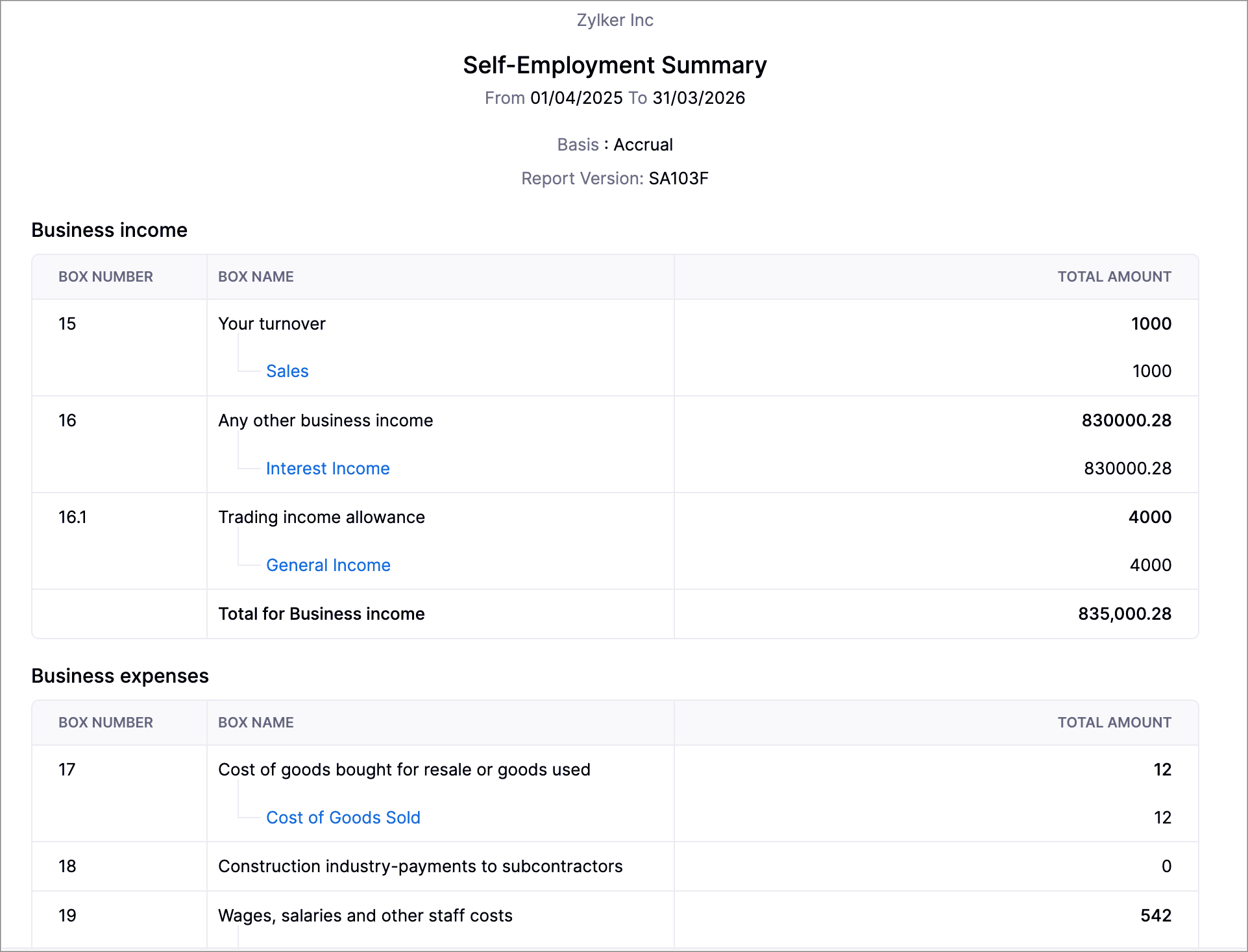
Self-employed report (UK): generate SA103F/SA103S formats for HMRC.
(image via zoho)
New PayNow method (Singapore): fast payments with QR via Stripe.
Journal credits: apply credits to invoices and receipts in different locations.
Inventory reports: summaries and adjustment details, with advanced filters.
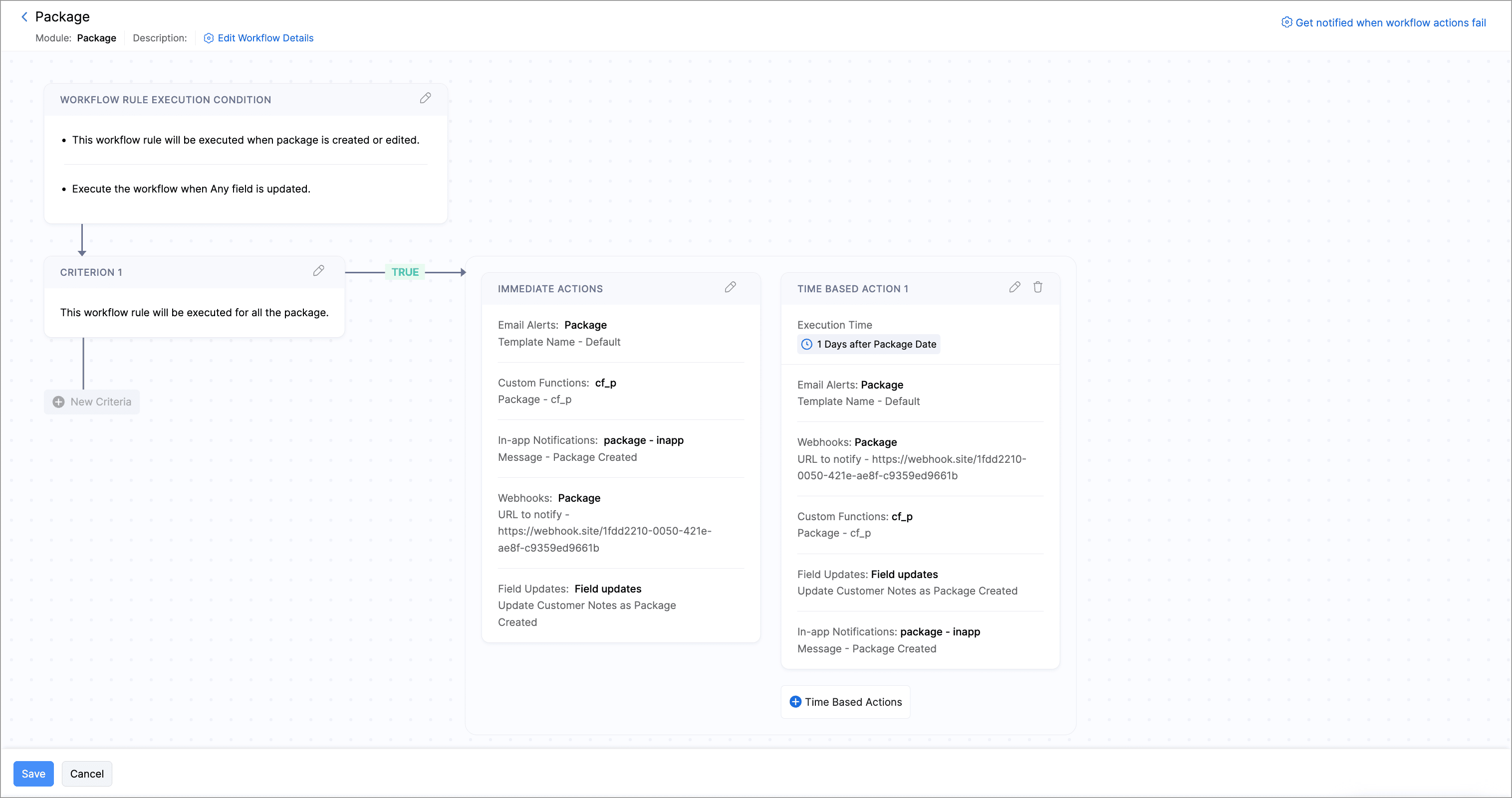
Zoho Inventory: automated workflows, pick list reports, and more customization options in shipments and packages.
(image via zoho)
Additional improvements: new statuses, columns, and notifications (including WhatsApp for purchase orders).
Webinars on CRM, Desk, and Cliq
AI in Zoho CRM – Generative AI
AI in Zoho Desk – Using AI to predict and detect problems
From metrics to meaningful communication in Zoho Cliq
What happens when a construction project is delayed or goes over budget? The consequences can be serious. That’s why solid planning is not enough—you need real-time information and predictive analytics. With the latest features in Zoho Projects Plus, you can now harness the full power of artificial intelligence and Zia to make faster, smarter, data-driven decisions.
Make better decisions with AI
The new analytics capabilities in Zoho Projects Plus allow you to:
Predictive analytics: anticipate delays and obstacles by analyzing historical data to forecast your projects’ behavior.
What-if analysis: evaluate how changes in conditions—like weather, workforce, or costs—could impact your project results.
Automated analytics: use generative AI, machine learning, and natural language processing to turn large volumes of raw data into actionable insights.
Anomaly detection: identify deviations in time, resources, or budget and understand their root causes.
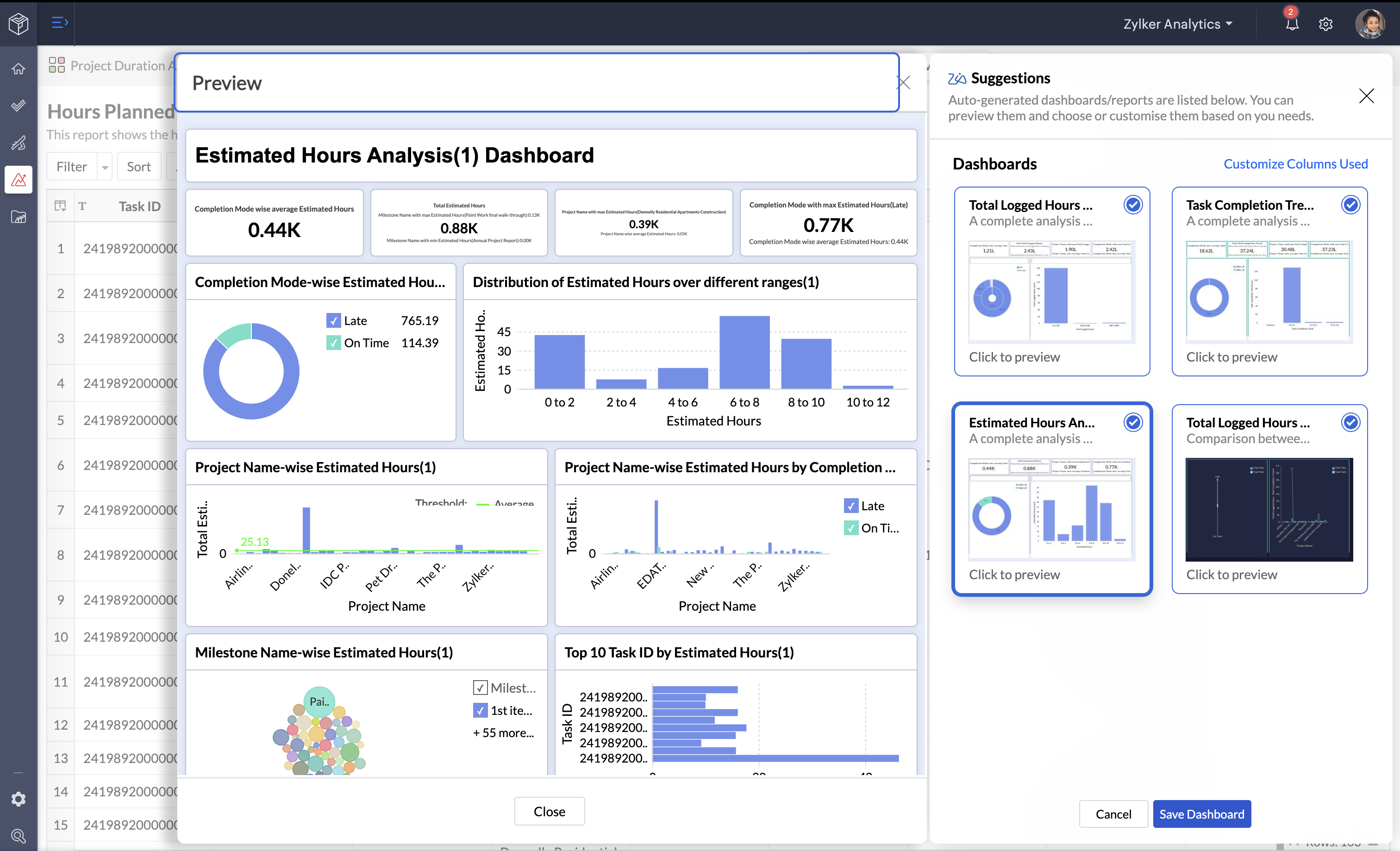
(image via Zoho)
What is Zoho Projects Plus?
Zoho Projects Plus is a unified solution that combines project management tools with advanced analytics and artificial intelligence capabilities. This edition includes key applications such as:
Zoho Projects: for task planning, milestone tracking, team collaboration, and budget control.
Zoho Analytics: to create dashboards, visualize metrics, run predictive analysis, and use conversational AI with Ask Zia.
Zoho WorkDrive: to store, share, and collaborate on project documents in a secure, centralized environment.
This integration allows data to flow automatically between tools, providing a complete view of each project’s status and speeding up decision-making.
A platform that combines management and analytics
Zoho Projects Plus merges project planning with advanced analytics in a single platform. You can import data, generate interactive dashboards, and visualize key metrics. Plus, with Ask Zia, the conversational AI assistant, you can get answers and reports instantly—just by asking.
And if you’re using other project management tools, Zoho offers a fast and seamless migration process so you can start benefiting from these capabilities right away.
This site is registered on wpml.org as a development site. Switch to a production site key to remove this banner.