Welcome to WordPress. This is your first post. Edit or delete it, then start writing!
Author: user
-
How we turned a chatbot into a generator of business opportunities
TAMI’s redesign: from answering questions to capturing qualified leads and connecting conversation with the CRM.
Many companies already have a chatbot.
The problem: it’s disconnected from the CRM. It doesn’t capture structured data. It doesn’t understand full context. And every time you need a change, you depend on a developer.
The result is a chat that answers questions but doesn’t impact sales or service.
The difference between an isolated bot and an assistant that generates opportunities comes down to five questions:
1. Does it understand the full context of the conversation?2. Does it capture leads with name, email, phone, and context — directly in the CRM?3. Does it work equally well on web and WhatsApp?4. Can it escalate to a human without losing information?5. Can your team manage it without depending on developers?That’s what we built with TAMI — a conversational assistant designed for companies that need to:
- Answer frequent inquiries
- Provide status updates for orders, services, or projects
- Capture qualified leads
- Schedule appointments or meetings
- Route conversations to the right team
Without making the solution hard to maintain.
The Shift: Simplicity and Control
We migrated to a more stable architecture that leverages the platform’s native capabilities.
What changed:
- Conversational context is managed automatically
- Flows are easier to modify
- The team regained control over changes and improvements
- Less technical dependency for day-to-day operations
Less technical complexity. More operational control. Much easier to govern.
Where the Real Value Is: Conversation That Generates Pipeline
An isolated chatbot has limited impact.
The real leap happens when the conversation generates qualified leads in your CRM.
That’s why we added the “Talk to a specialist” flow.
When the assistant detects the conversation requires attention:Asks for nameAsks for emailRequests phone numberCollects a description of the requestThe result:- Your team receives leads with full context
- The conversation history is available
- The conversation can continue on WhatsApp or web without friction
- The assistant moved from an experiment to a pipeline generator
That information is automatically saved as a Lead in the CRM.
No external forms. No copy and paste. No losing the context of what the customer explained.What Changed in Practice
For the business:
- Less technical dependency — The team can make adjustments without developers
- Better lead quality — Each lead arrives with full conversational context
- Greater continuity — Conversations flow across channels without losing information
- Scalable operations — The architecture grows without becoming ungovernable
For your team:
- They receive better-qualified leads
- With the full conversation history
- They can follow up with context from the first touchpoint
- The assistant does the upfront qualification work
Why This Matters for Your Company
Most bots fail in three critical areas:
- They don’t understand full context — Each interaction is independent
- They don’t capture structured data — Information gets lost
- They aren’t integrated with the CRM — They don’t generate real opportunities
The result: a chat that entertains but doesn’t convert.
A well-designed assistant, on the other hand:
- Provides status updates for orders, services, or projects
- Guides the customer to the right solution
- Captures opportunities with full context
- Schedules appointments or meetings
- Routes to the right team without losing information
- And does it on web and WhatsApp under the same logic.
Start Small. Build on Solid Foundations.
We didn’t start by automating everything.
We began with a clear flow, a specific intent, and a targeted integration.
We tested. Adjusted. Simplified.
Then we expanded.Scaling is much easier when the foundation is well designed.
The Key Learning
When you build on solid foundations — instead of accumulating technical complexity — AI stops being a project and becomes an operational capability.
Conversation is not the end.
It’s the gateway to:- Structured data
- Leads with context
- Better-informed teams
- More efficient processes
Technology wasn’t the most important part.
The decision to simplify was.Would This Solution Be Useful for You?
If your company:
- Receives constant inquiries via web or WhatsApp
- Needs to capture leads with real context
- Wants its assistant connected to the CRM
- Is looking to reduce technical dependency in daily operations
- Or needs to automatically provide order or service status updates
This model is replicable.
Start small.
Connect conversation and CRM.
Scale once the value is proven.If you’d like to explore how to apply this pattern in your operation, let’s talk.
-
Implementation of the month: Integrating a healthcare clearinghouse with Zoho – Transforming medical billing operations

When billing is mission-critical, disconnected systems are not an option.
A healthcare services company ran its entire operation on Zoho One, while medical plan billing had to be handled in Proclaim—a mandatory platform used to submit claims under strict validation criteria.
Both systems worked properly. The problem was they didn’t work together.
And in medical billing, disconnection doesn’t just create friction. It creates financial risk.
The challenge: isolated systems in a process that allows no errors
Without integration between Zoho and Proclaim:
Information had to be validated manually before every submission.Billing rules depended on individual user knowledge.There were no automated preventive validations.Every inconsistency increased the risk of rejection.The impact was immediate:
Claims rejectedInternal reworkDelayed paymentsPressure on cash flowScaling operations meant increasing complexity and operational risk.
The real issue wasn’t technical—it was strategic: there was no mechanism to ensure information was correct before it entered the billing system.
The solution: preventive control with AI integrated into Zoho
The first step wasn’t connecting systems. It was ensuring information was correct internally.
An advanced automation layer powered by AI was implemented, incorporating automated document reading (OCR) as part of the validation process. Before any submission, the system:- Analyzes the recorded information
- Extracts relevant data from documents and forms
- Validates critical fields based on billing rules
- Detects inconsistencies in real time
- Standardizes criteria that previously depended on the user
The system doesn’t just process data. It validates it before it leaves the internal environment.Previously, the team reviewed each case manually. Now, automation only allows the process to move forward when the information meets the defined criteria.Structured Zoho + Proclaim integration
With information already validated internally, the integration with Proclaim happens within a controlled, defined workflow.
InterConnecta designed a direct connection between Zoho and Proclaim that enables:
Automatic transfer of previously verified informationEliminating exports and manual uploadsFull traceability for every submissionControl over which data is transmitted and whenThe process now follows a clear logic:
Validate → Confirm → Integrate → SubmitInformation doesn’t move without controls. It isn’t transmitted without prior validation. The result is billing that is more predictable, more auditable, and ready to scale without increasing operational risk.
Results
More control. Less friction. More stable revenue.
After implementation:
✔ Up to 35% fewer errors and rejections✔ Up to 30% fewer administrative rework cycles✔ ~20% faster claim preparation and submission✔ Greater control and traceability in every transaction✔ More predictable cash flow✔ A technology foundation ready for growthWhat used to depend on manual reviews now runs on clear rules and automated validations.
HIPAA compliant
In healthcare, efficiency without compliance isn’t enough. This solution was designed with the core principles of HIPAA in mind for handling protected health information (PHI).
For an integration like this to meet HIPAA requirements, it must ensure:
- Protection of data in transit and at rest
- Role-based access control
- Logging and traceability of access and transactions
- A secure architecture within the Zoho ecosystem
- Auditable processes
- Minimization of sensitive data exposure
- Internal validations before sharing information with third parties
Zoho provides capabilities aligned with regulated environments, and the implemented architecture maintains that same level of protection. Data remains within a controlled environment. Every access is logged. Every transaction is traceable. Security is built in by design.
Does your billing process validate before submitting?
First validate. Then integrate. Then scale.→ Request a strategy session with our team
Let’s design an intelligent and secure automation for your healthcare operation.
-
Zoho News Catch-Up: New Workqueue view and spam detection in CRM, Analytics optimizes dashboards with Zia, Desk improves scheduled responses, Books strengthens banking with AI, SalesIQ reinforces access control and Webinars on CRM, Books, and Creator
Welcome to our update, where you’ll find the latest news from Zoho all in one place!
- New Workqueue View in Zoho CRM and Webform Spam Detection to Protect Your Data Quality
- Zoho Analytics Introduces Improvements in Dashboards, Performance, and AI-Assisted Analytics with Zia
- Scheduled Replies in Zoho Desk to Automate Communications at Key Ticket Moments
- Zoho Books Updates Online Banking for Reconciliation and Financial Control
- Smarter Access Control: Roles vs. Responsibility-Based Profiles in Zoho SalesIQ
- Webinars on Zoho CRM, Books, and Creator
New Workqueue View in Zoho CRM and Webform Spam Detection to Protect Your Data Quality
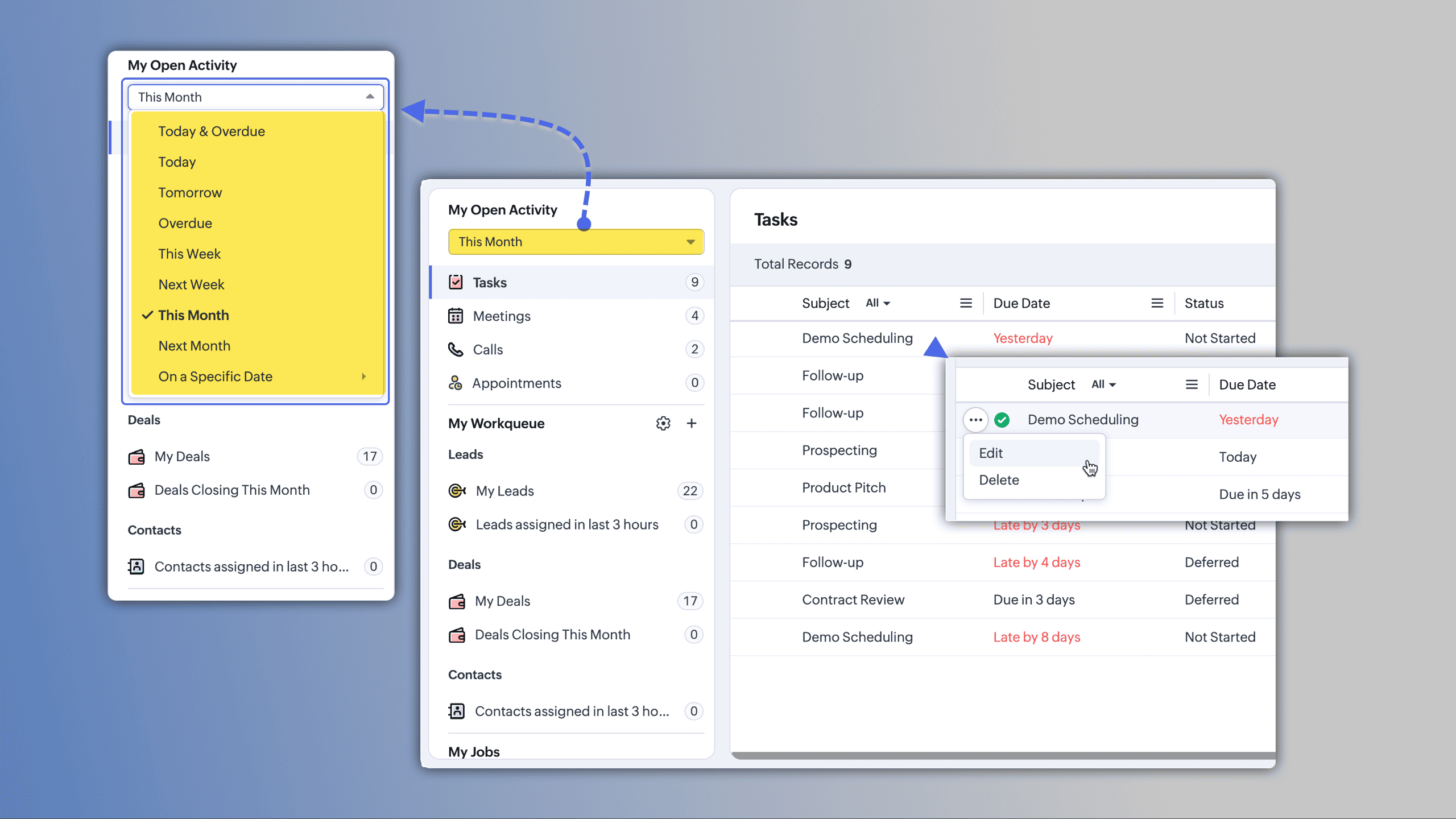
Workqueue is now available in Zoho CRM as an all-in-one view designed to help you manage daily activities with greater focus and prioritization.
My Activities: focus and prioritization
View all your scheduled and overdue activities in one place, with color-based priority indicators.
You can complete tasks and execute actions directly from this view.
(image via Zoho)
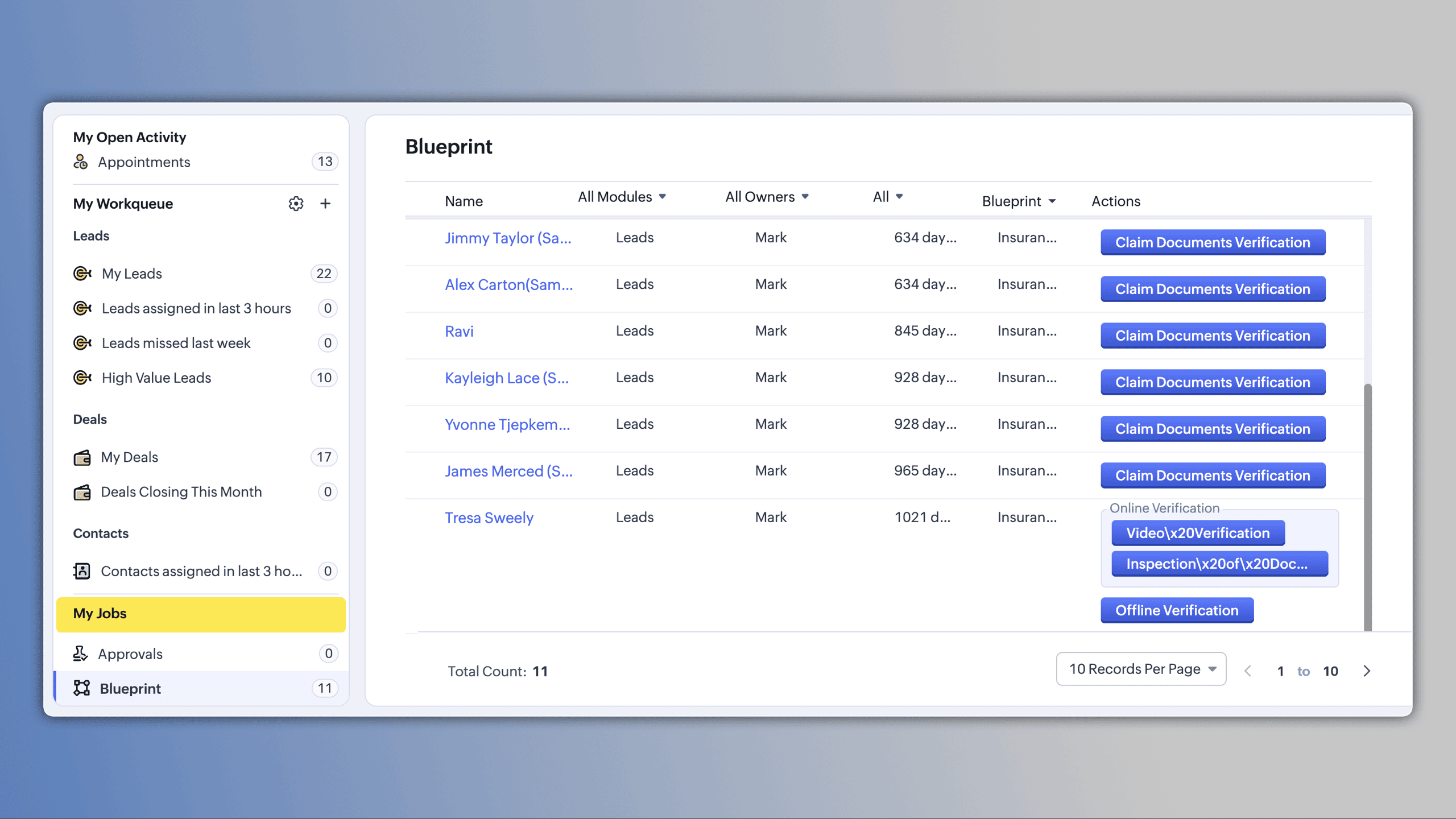
My Jobs: centralized approvals
Manage approval processes, workflows, and validations from a single space.
Requests can be approved, delegated, or rejected with one click.(image via Zoho)
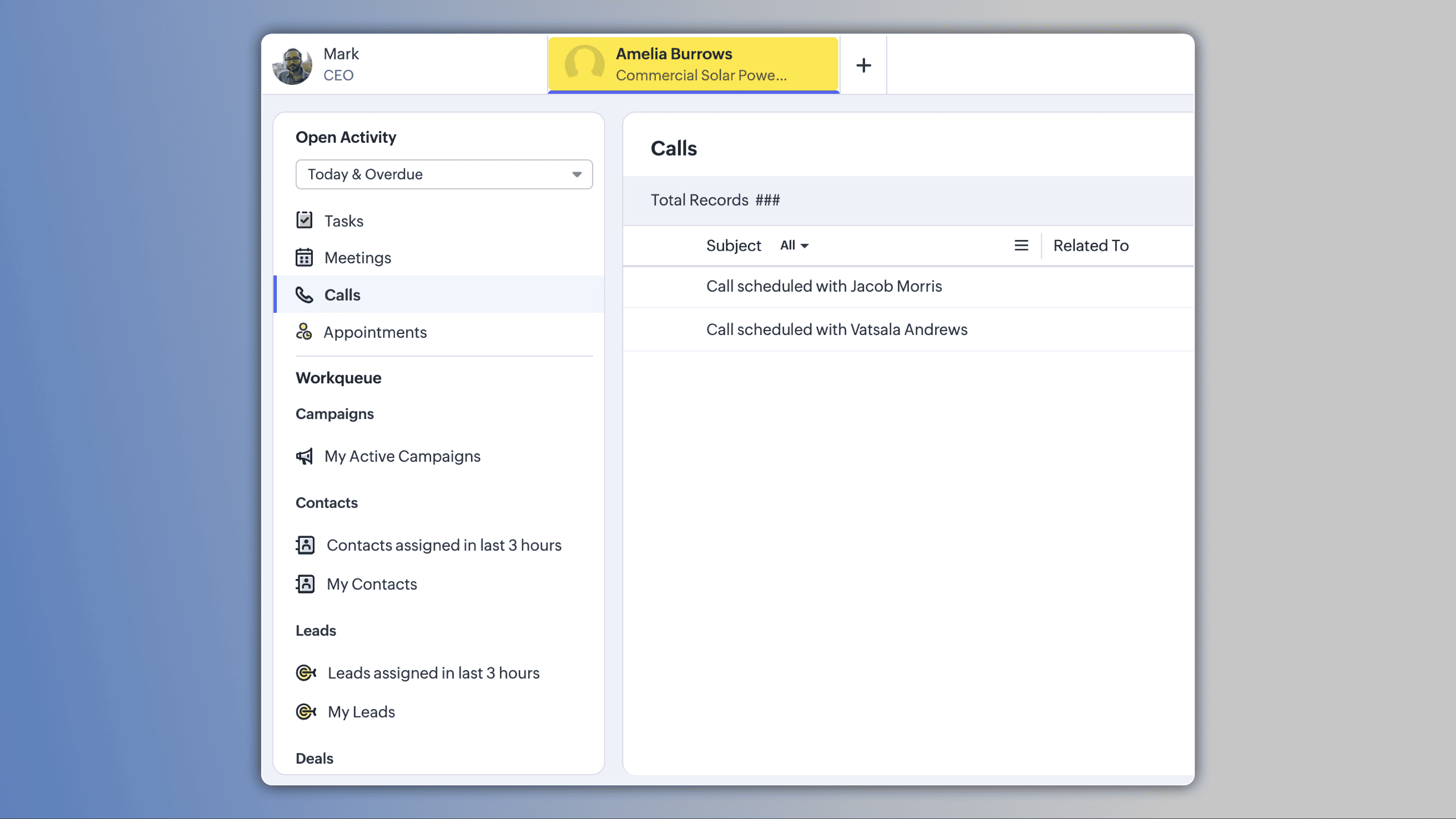
My Work Queues: personalized views
Create queues tailored to your needs by importing views, applying date filters, or defining specific criteria.
Records are automatically organized by ownership and visibility, and you can create activities directly from the queue.(image via Zoho)
Manager View
Users managing teams can access a dedicated view to monitor team work queues in real time.(image via Zoho)
How to access
In Zoho CRM, navigate to the Activities module and enable the Workqueue view to begin managing your daily work from a single dashboard.Webform Spam Detection: Additional Protection for Your Data Quality
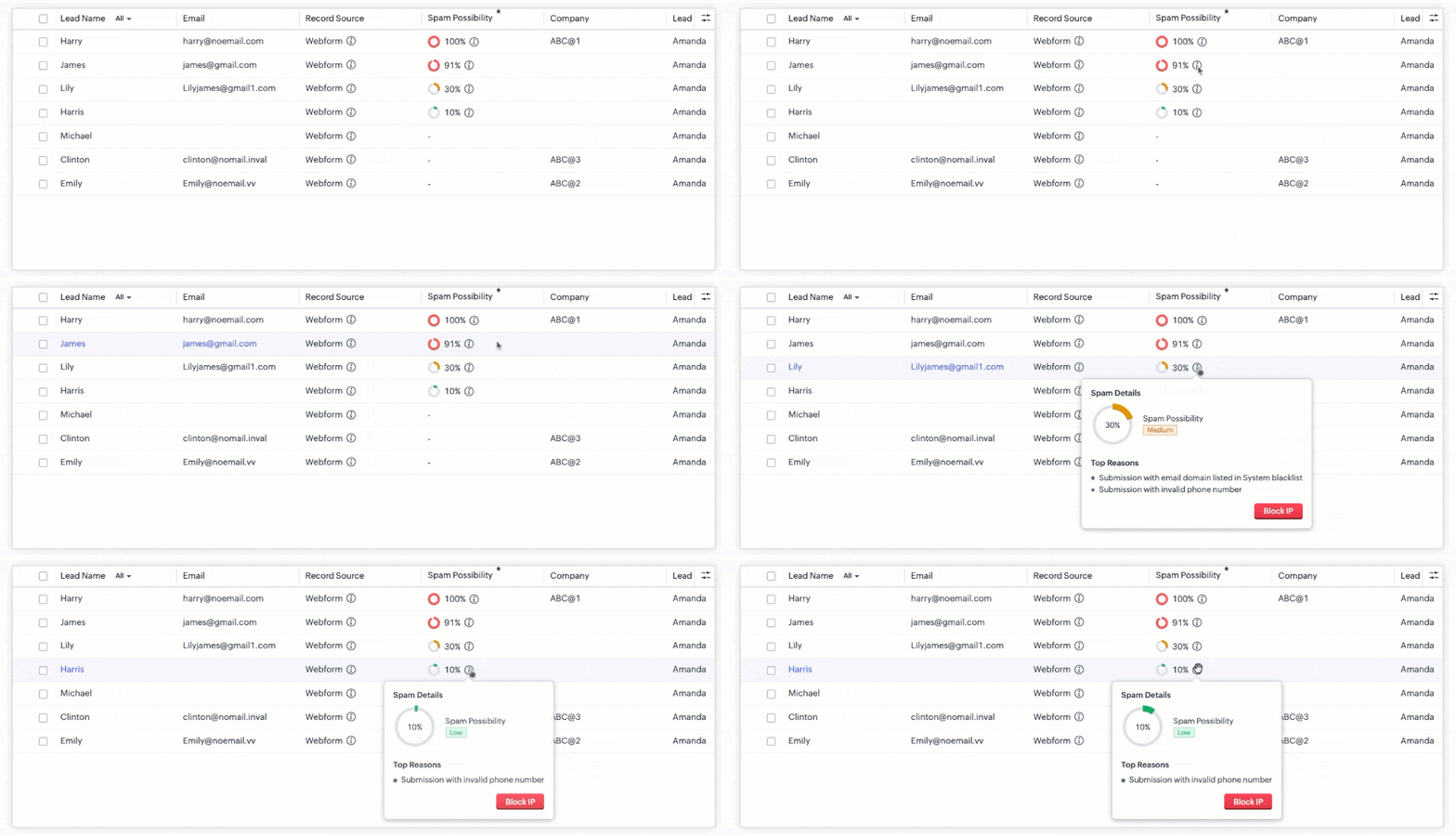
Zoho CRM now includes spam detection for webforms, adding an extra validation layer to protect the quality of incoming data.
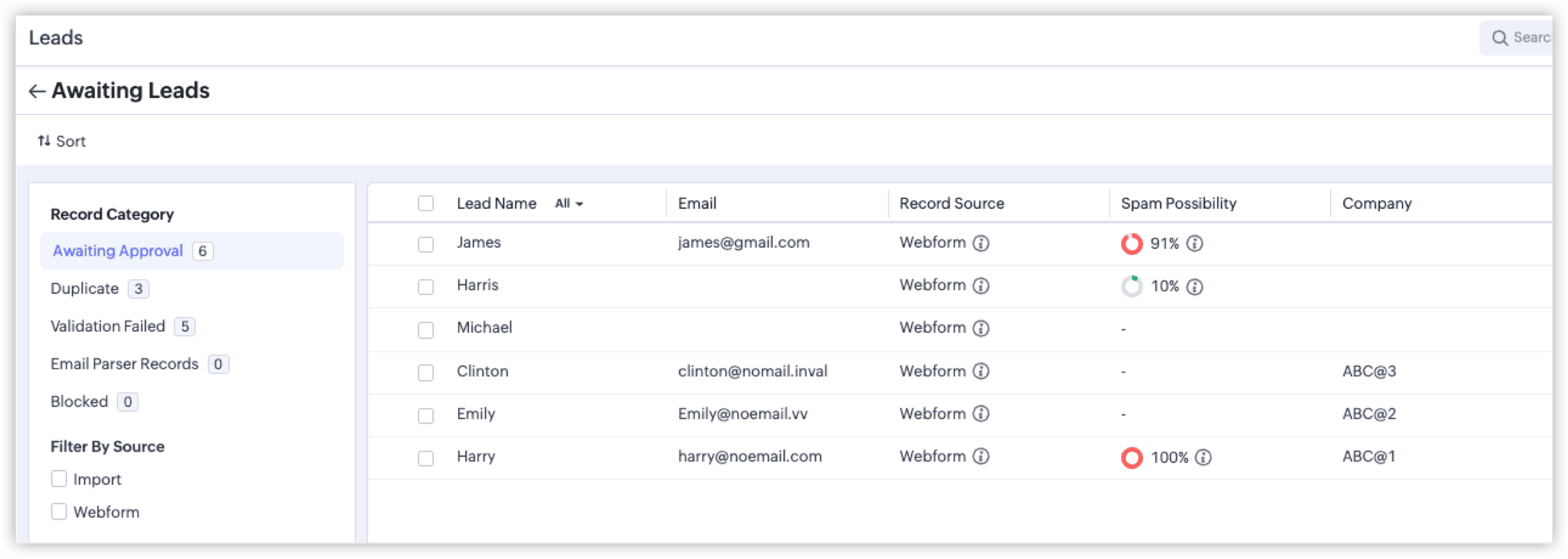
Smart evaluation with spam probability scoring
Each submission receives a final spam probability score based on multiple signals detected during the process.
Instead of binary validation, you receive a more granular risk analysis.(image via Zoho)
Identification of common spam patterns
- • Submissions from bots or automated crawlers
- • Invalid or inconsistent phone numbers
- • Invalid email addresses
- • Other patterns associated with non-legitimate records
Color indicators based on severity level
Records are classified using colors that represent the severity of spam probability, allowing faster review.(image via Zoho)
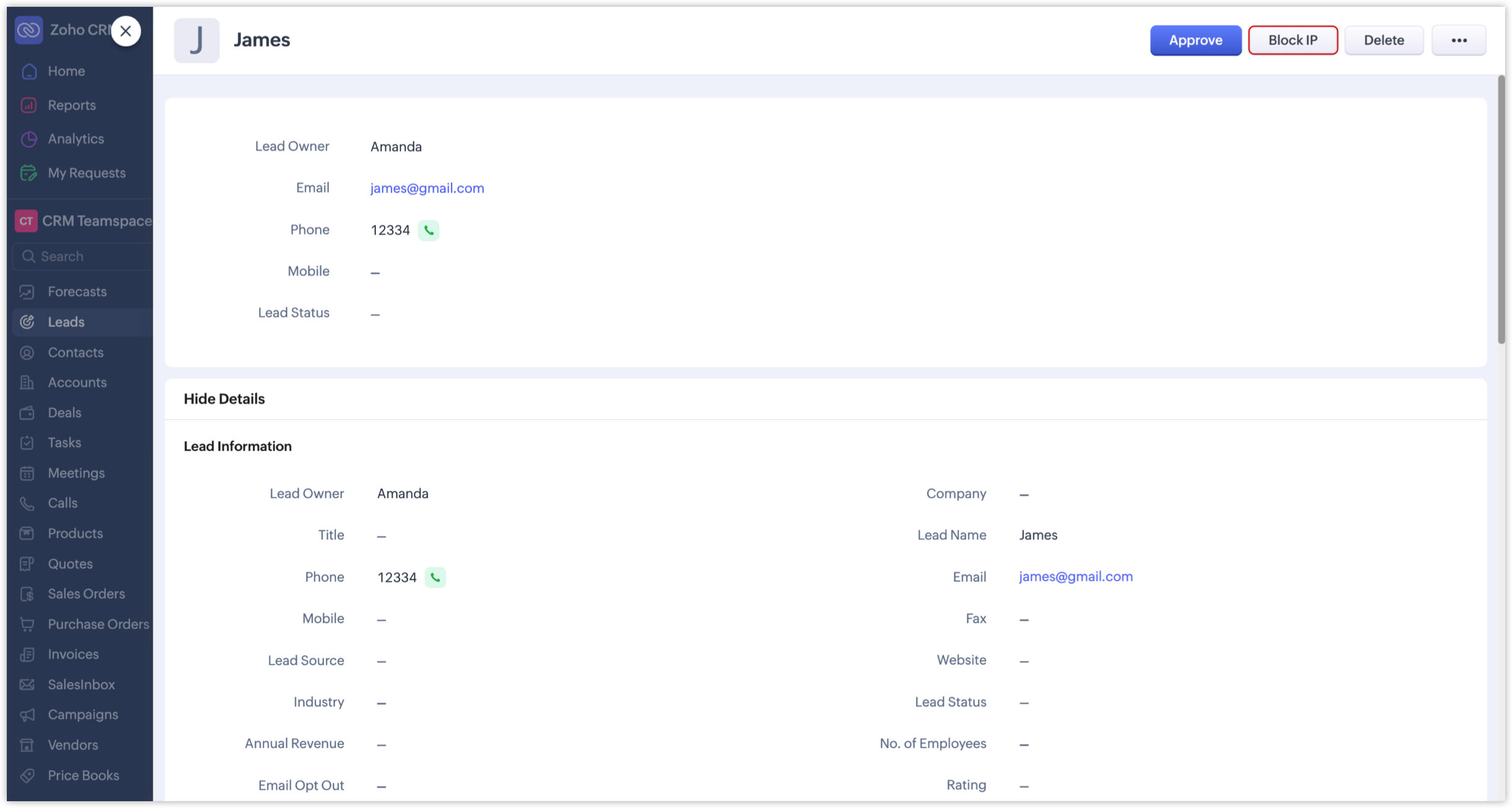
Optional IP address blocking
You can block IP addresses associated with suspicious submissions to prevent future entries from those sources.(image via Zoho)
How to enable spam detection
- • Go to Setup in Zoho CRM
- • Navigate to Channels > Webforms
- • Edit the relevant form
- • Enable the spam detection option
Impact on data governance
Spam scoring, visual classification, and optional IP blocking strengthen control over data capture.
This protects automations and ensures business decisions are based on reliable data.Zoho Analytics Introduces Improvements in Dashboards, Performance, and AI-Assisted Analytics with Zia
Zoho Analytics adds improvements focused on optimizing workspace performance, simplifying view organization, and expanding AI-assisted analysis capabilities. These updates help you work with large data volumes more efficiently and in a more structured way.
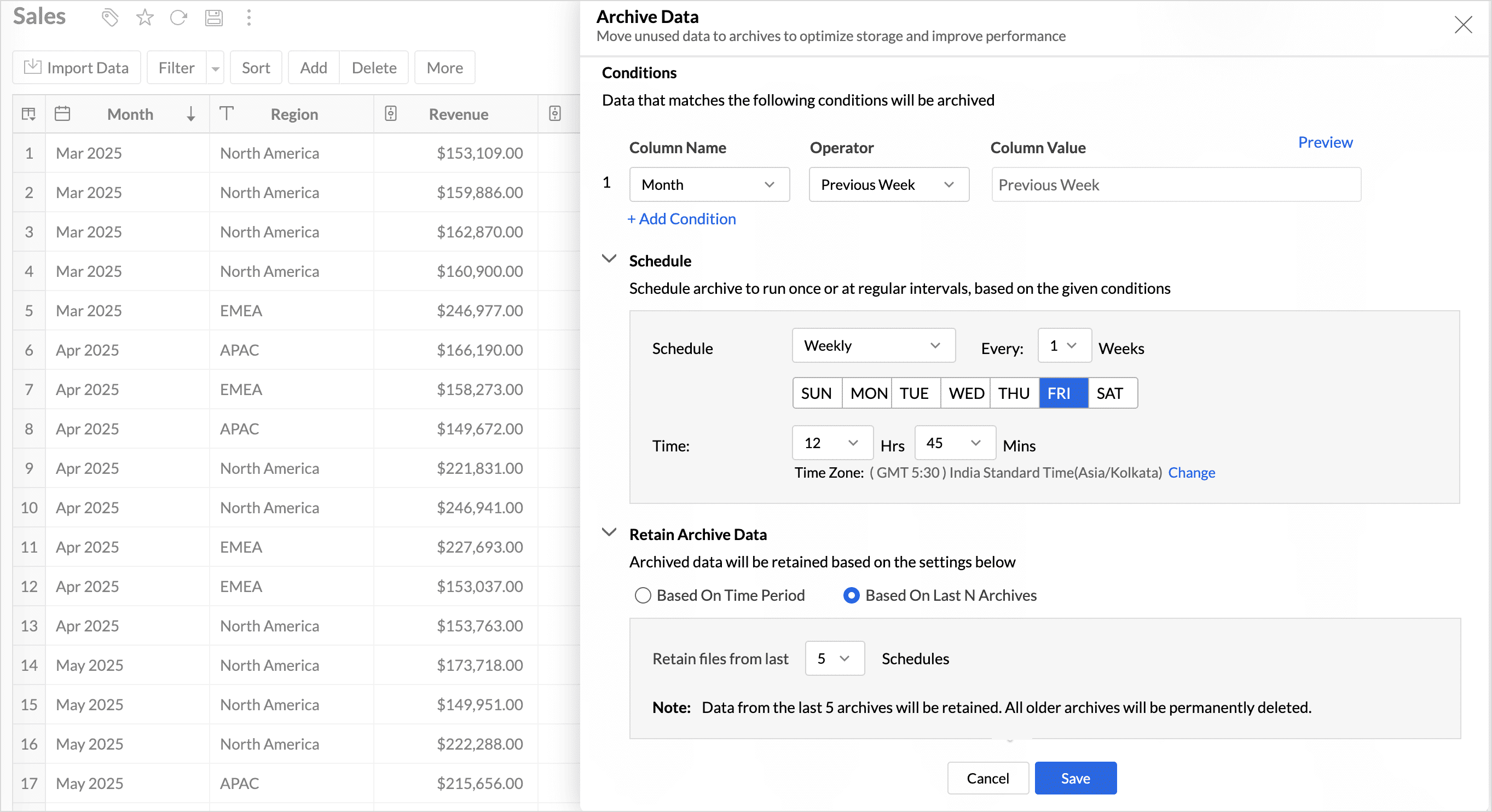
Archive Data: performance optimization for historical data
Archive Data is introduced as a capability that lets you move older or less-used records out of active tables.This enables you to:
- • Reduce query load on historical data
- • Improve the speed of report and dashboard generation
- • Optimize storage management without deleting information
By separating active data from archived data, workspace performance improves significantly in high-volume environments.
(image via Zoho)
Advanced organization with tags
You can now organize dashboards and reports using tags within the workspace.This helps you:
- • Group views by team, project, or use case
- • Filter and quickly locate relevant reports
Tags improve collaborative management of analytics assets.
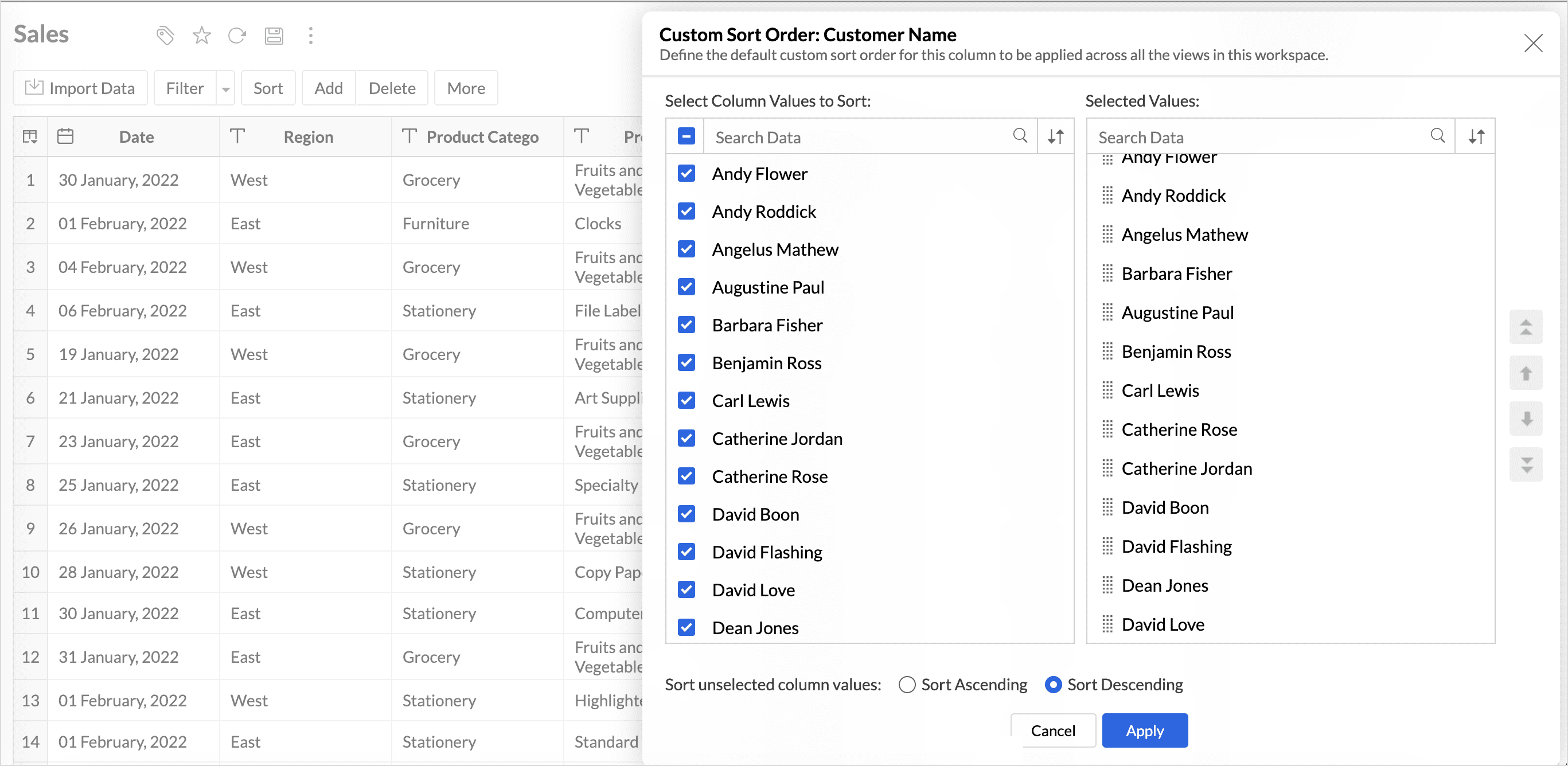
Global Custom Sort at the workspace level
Global Custom Sort lets you define a custom order for text-based values at the workspace level.(image via Zoho)
This helps you avoid configuring sorting manually in each individual report and ensures consistency across dashboards.
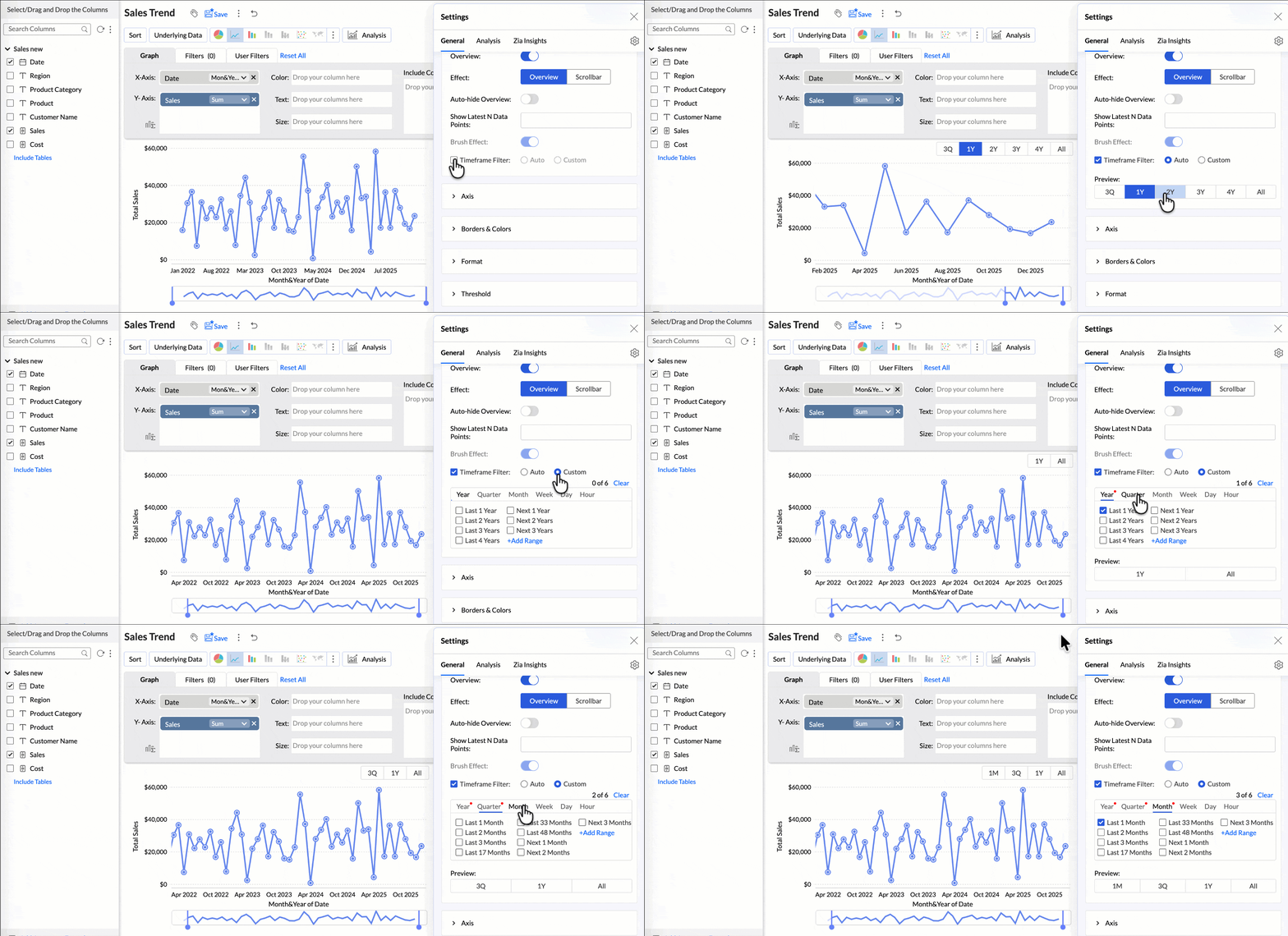
Flexible period selection in charts
Overview charts now let you select specific time periods to analyze relevant trends without including unnecessary data. This supports more focused, contextual analysis.(image via Zoho)
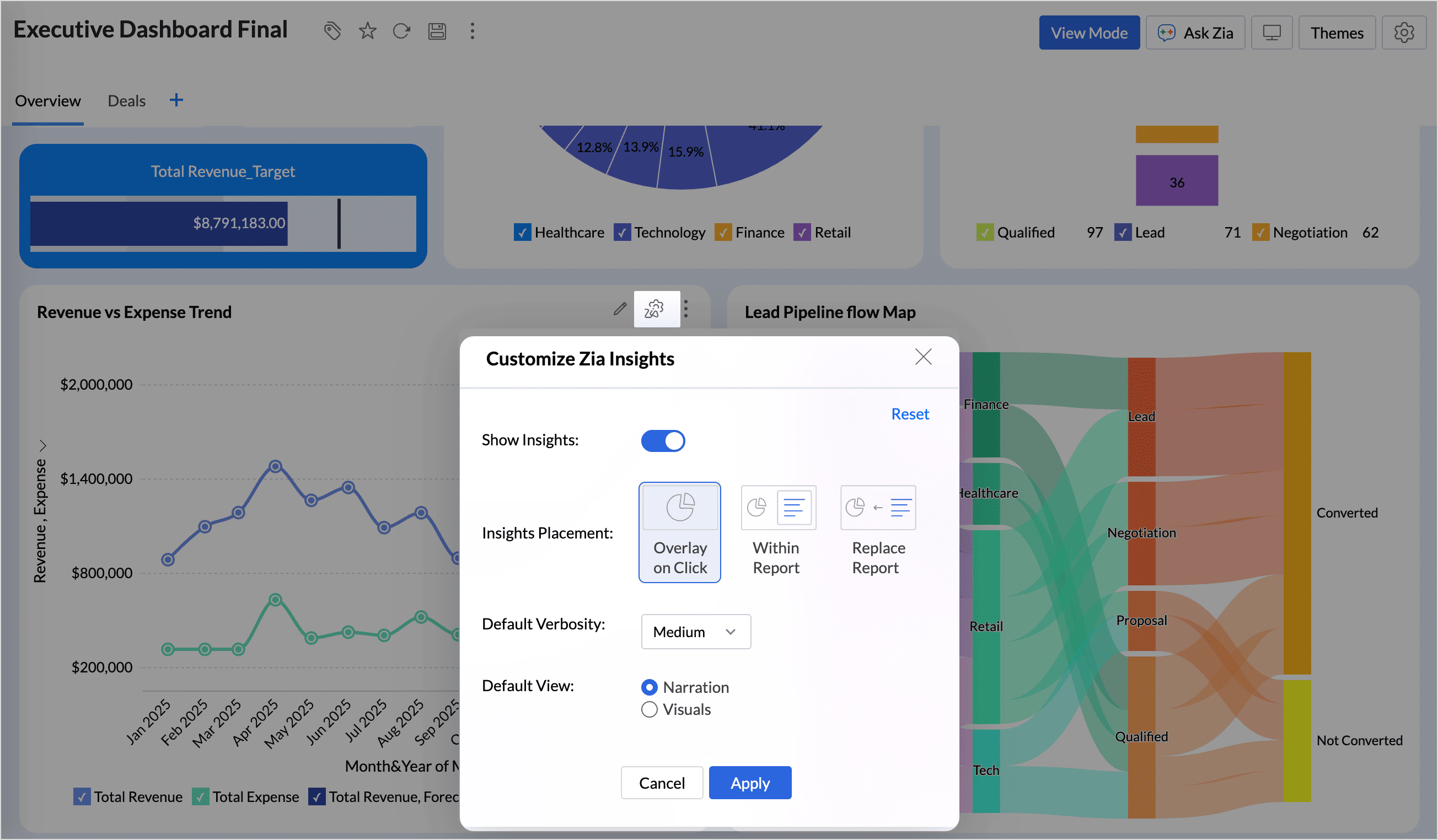
Zia Insights: more display flexibility
You can now choose how Zia Insights appear in your dashboards using three options:- • Overlay
- • Within Report
- • Replace Report
(image via Zoho)
This flexibility helps you add AI-generated insights without disrupting the dashboard’s visual structure.
Image size control in dashboards
New options are available to resize images within dashboards:- • Original
- • Fit to width
- • Contain
- • Stretch
This improves visual presentation and layout balance.
Tabular View with more control
Tabular View now allows you to:- • Access all linked tables through lookup columns within filter criteria
- • Customize join paths between tables to avoid ambiguous connections
This improves accuracy in tabular analysis and sharing filtered views.
New enterprise connectors
Zoho Analytics adds new connectors:- • Zoho FSM, to analyze field service operations
- • Adobe Commerce (Magento), for ecommerce metrics with prebuilt dashboards
These connectors expand data consolidation in a centralized analytics environment.
Scheduled Replies in Zoho Desk to Automate Communications at Key Ticket Moments
Zoho Desk now lets you manage scheduled replies more structurally, giving you greater control over automated communications that will be sent at a specific point in the ticket lifecycle.
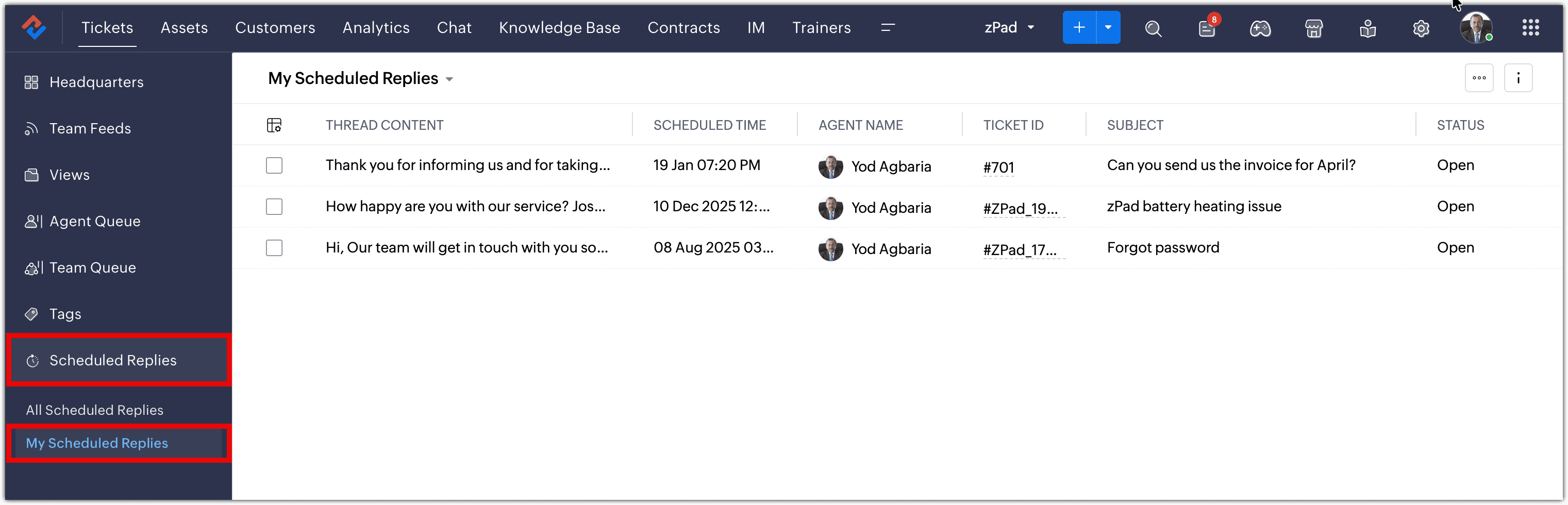
Scheduled replies view and categories
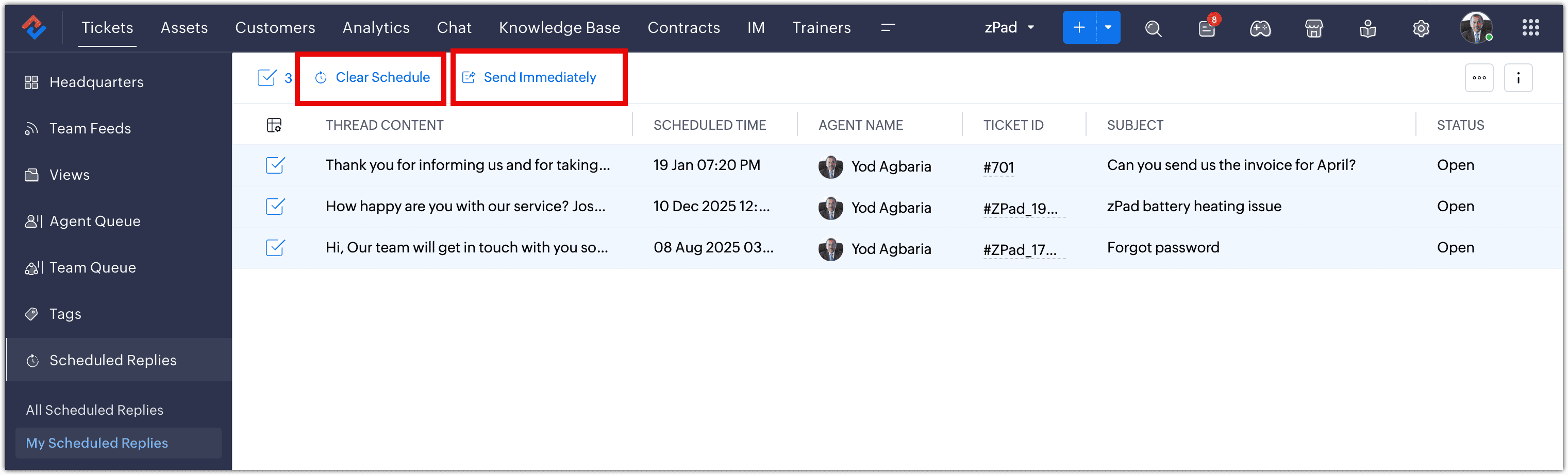
A dedicated scheduled replies view is introduced, where you can see all messages pending delivery.
Within this view, replies are organized into categories:- • All Scheduled Replies
- • My Scheduled Replies
(image via Zoho)
Table view for greater operational control
Scheduled replies are presented in a tabular view, allowing you to review key information such as:- • Related ticket
- • Scheduled send time
- • Reply status
- • Assigned agent
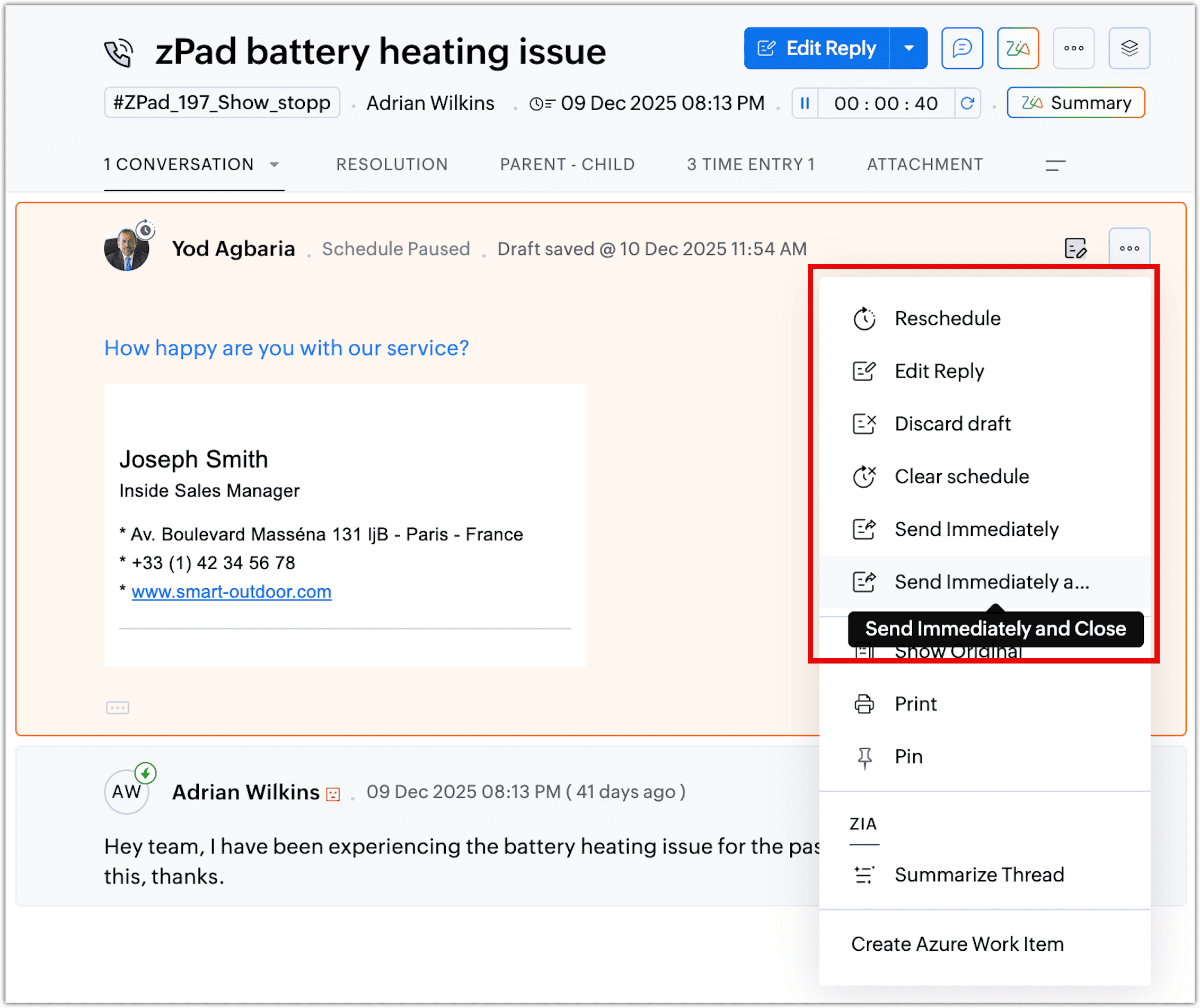
From this table you can take key actions such as jumping to the related thread, sending immediately, rescheduling, clearing the schedule and saving as a draft, or sending and closing the ticket.
(image via Zoho)
These options help you adjust communications based on how the case evolves.
Actions available for scheduled replies
From the table view you can take individual actions such as:- • Edit content before it is sent
- • Reschedule the date or time
- • Cancel the scheduled reply
This helps you adapt communications based on the ticket’s real-time progress.
(image via Zoho)
Zoho Books Updates Online Banking for Reconciliation and Financial Control
Zoho Books adds improvements in the Banking module focused on optimizing reconciliation, automating categorization, and expanding bank feed flexibility. An AI agent and new capabilities are introduced to support higher volume with more control.
AI agent for reconciliationAn AI agent is introduced to assist with bank reconciliation. It uses field prediction to suggest categories, accounts, and vendors based on history or bank statement context.
Automatic field predictionAI suggests values such as categories, accounts, and vendors, reducing manual data entry and speeding up reconciliation.
Centralized bank rulesYou can create a rule once and apply it across multiple banks, accounts, or cards to keep categorization consistent without duplicating configuration.
Quick Categorize for bulk categorizationCategorize up to 50 bank transactions at once in a spreadsheet-like view. It includes filters for deposits, withdrawals, or date range, grouping by payee or date, and the option to merge multiple transactions into a single entry.
Improved Undeposited FundsSelect specific payments from Undeposited Funds when recording deposits. The system automatically calculates the total and keeps references to the included payments. A currency filter is included.
Reconciliation Status Report exportable to CSVThe reconciliation status report can now be exported in CSV format in addition to PDF, supporting analysis and customization.
Corporate card reconciliationSupport is added to reconcile corporate cards. Cards configured in Zoho Expense appear in Zoho Books for reconciliation. A filter helps identify transactions matched in Zoho Expense that are still pending in Zoho Books.
More flexible bank feedsBank feeds can be retrieved for up to one year via Plaid (subject to availability). Integration is expanded with Syncfy for accounts in Mexico. Support is added for MT940 and expanded PDF support for banks in the US, Canada, and Mexico. Running balance is added in bank statements to help detect discrepancies.
User-level bank account segmentation (coming soon)User-level segmentation is announced to restrict access to specific bank accounts, strengthening control and security.
Smarter Access Control: Roles vs. Responsibility-Based Profiles in Zoho SalesIQ
SalesIQ introduces a more structured approach to access management, clearly differentiating between role-based access and responsibility-based profiles. This update helps align permissions with your organizational structure and with the real functions each user performs.
Before: fixed access through predefined roles
Previously, access management relied mainly on predefined roles tied to organizational hierarchy. This meant permissions were strongly linked to a user’s position, with less flexibility to adapt access based on specific responsibilities.Now: responsibility-based profiles
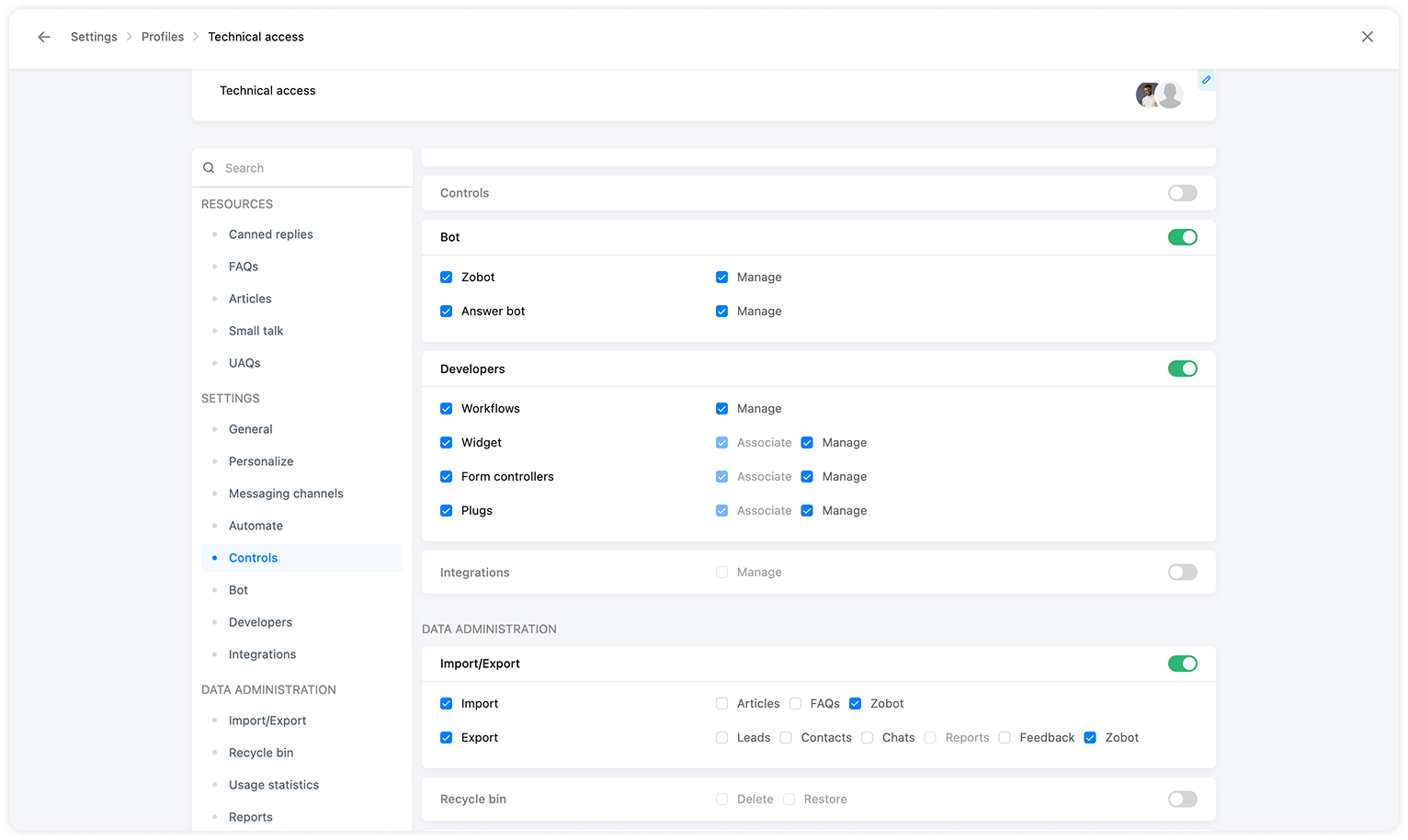
With a responsibility-based model, you can define permissions based on what each user needs to do in the system, regardless of where they sit in the hierarchy.Profiles allow you to:
- • Configure permissions to create, edit, and delete records
- • Define access to specific modules
- • Control specific features within each module
- • Adjust permissions as responsibilities change, without modifying the hierarchy
(image via Zoho)
This approach clearly separates visibility and action: the role defines what information you can see, while the responsibility-based profile defines what you can do with that information.
The result is a more precise setup aligned with each team’s real functions and stronger control over system security.
Webinars on Zoho CRM, Books, and Creator
Learn How to Implement Zoho CRM in SMBs
Demystifying Reporting and Analytics with Zoho Books
Creator Tech Connect 2026: “Environments in Zoho Creator”
Want to implement these updates in your Zoho environment?
Learn more about our Zoho consulting services and schedule a conversation with our team.
-
Implementation of the Month: Inventory governance and financial valuation with automation and artificial intelligence
At InterConnecta, one of the challenges we address most frequently in mid-sized and large enterprises is
inventory management and valuation.Inventory often represents one of the most significant assets on the balance sheet, but also one of the most
vulnerable when operations grow, become decentralized, and accumulate manual processes.In scenarios such as financing, auditing, company sales, or generational transitions, this weakness stops
being operational and becomes a direct financial risk.The starting point: partial visibility and high financial risk
In this implementation, the initial challenge was clear:
Lack of complete inventory traceability
Across warehouses and points of consumption, making it difficult to obtain a reliable view of actual movement.Recurring manual adjustments
That impacted valuation and forced reactive accounting corrections.Dependence on static reports
To respond to audits or financial inquiries, increasing response times and internal friction.The impacts were consistent with what we see across many organizations:
Between 5% and 12% of inventory incorrectly valued.Up to 20% of working capital immobilized.Audit processes up to 50% longer.Potential loss of 5% to 15% of company value in investment or sale scenarios.The problem was not the system. It was the absence of continuous inventory governance.
The solution: from operational control to intelligent inventory governance
The implementation was designed around three integrated layers:
1) Solid transactional foundation
Zoho Inventory as the core system to ensure consistent, traceable, and auditable records.2) Advanced analytics
Zoho Analytics as the executive control layer, enabling:- Real consumption analysis
- Deviation identification
- Turnover and obsolescence control
- Audit and finance support
3) Operational artificial intelligence agent
AI agent developed by InterConnecta that allows direct interaction with inventory via
WhatsApp, without friction or reliance on manual reports.What AI agents do in this implementation
Users can:
Check available stock by product and warehouse in seconds.Review historical transactions without involving the finance team.Detect operational inconsistencies before they impact valuation.Identify anomalous consumption patterns.Obtain immediate answers to questions that previously required manual analysis.Inventory stops being a “debatable number” and becomes an asset supervised in real time.
Results achieved
After the implementation:
- 30% to 60% reduction in operational errors.
- Reduced need for reactive accounting adjustments.
- Greater confidence from auditors, banks, and investors.
- Inventory valuation that is consistent, explainable, and defensible.
Conclusion
This implementation demonstrates that the right combination of automation, advanced analytics, and applied
artificial intelligence transforms inventory from a recurring risk into a
financial competitive advantage.At InterConnecta, we design these solutions not only to operate better, but to protect and maximize the
company’s real value.Would you like to implement a similar model in your organization?
Speak with an InterConnecta specialist. -
Zoho News Catch-Up: CRM improves communication, Recruit adds candidate blocking, Analytics expands capabilities, Sheet enhances collaboration, and Zoho Mail updates the calendar, Webinars on IOT, Creator, and One
Welcome to our update, where you’ll find the latest news from Zoho all in one place!
- Clearer and more consistent emails in Zoho CRM
- More control in talent selection: candidate blocking in Zoho Recruit
- Zoho Analytics expands analysis and connectivity capabilities
- Zoho Sheet enhances data entry and collaboration
- Zoho Mail for Android improves calendar management
- Webinars on IoT, Creator, and Zoho One
Clearer and more consistent emails in Zoho CRM: new font types and default replies
Zoho CRM expands the email editor options, allowing you to customize the format of emails sent from the platform and maintain clearer and more consistent communication with clients and contacts.
New font types and sizes when composing emails
You can now select different fonts and adjust their size directly when composing an email in Zoho CRM, helping present messages in a more organized manner aligned with your organization’s communication style.(image via Zoho)
(image via Zoho)
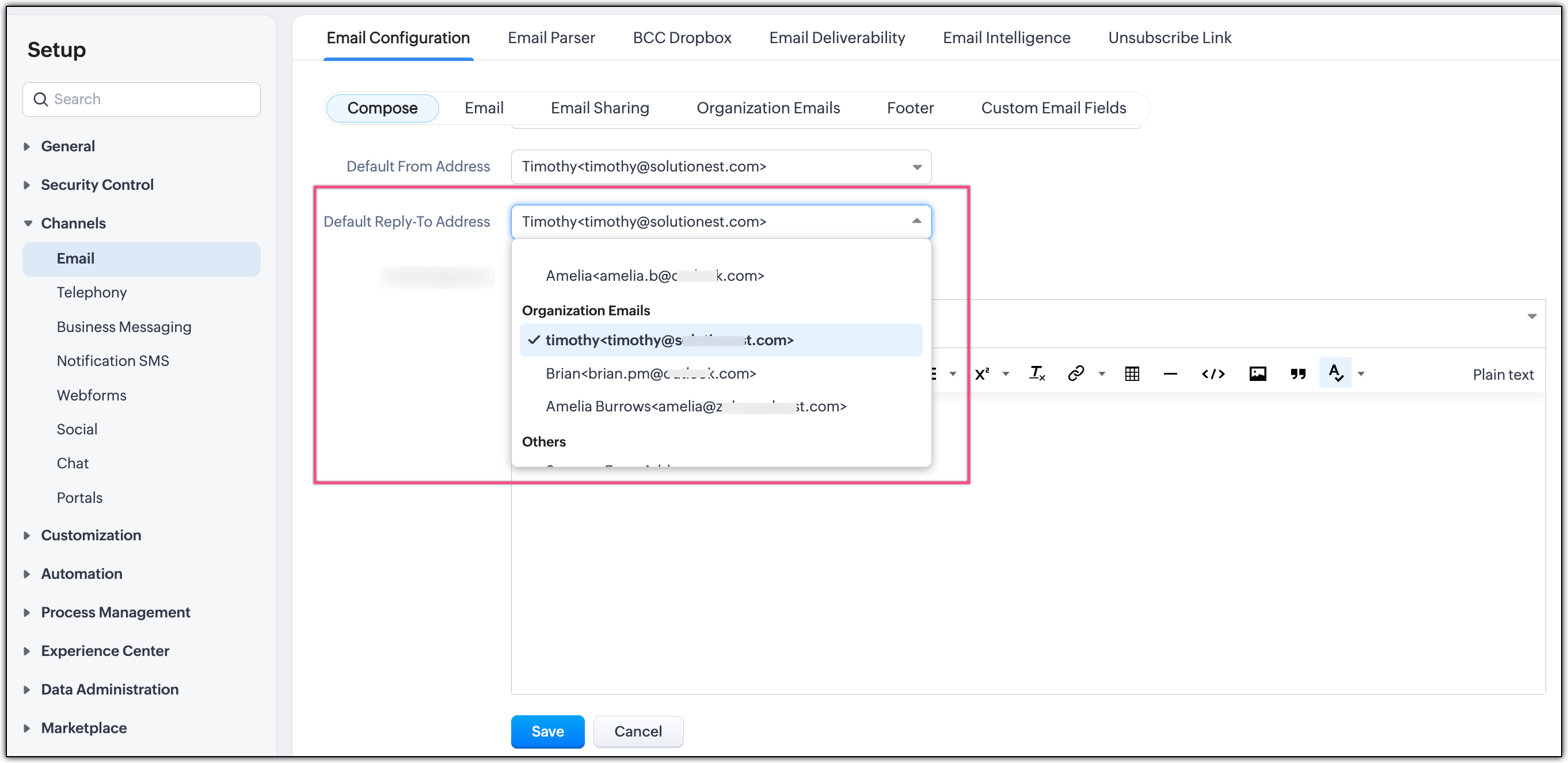
Default reply configuration
Zoho CRM now includes the option to set default replies when responding to emails. This feature is useful in recurring conversations, as it allows reuse of base texts without having to rewrite them from scratch.(image via Zoho)
Integrated formatting in CRM workflow
The new formatting and reply options are available within the regular email composition process, with no extra steps, making them easier to adopt and helping maintain consistency in communications managed through Zoho CRM.More control in talent selection: you can now block candidates in Zoho Recruit
Zoho Recruit introduces a new feature that lets you block candidates directly from the platform, preventing certain profiles from being considered in future recruitment processes.
Account-level candidate blocking
You can now mark a candidate as blocked, preventing them from being added or considered in new hiring processes within the Zoho Recruit account. This action applies globally and not just to a specific vacancy.(image via Zoho)
Automatic prevention in new processes
Once blocked, the system prevents the candidate from being reused in new offers or recruitment flows, helping reduce operational errors and maintain consistency in the criteria defined by the recruitment team.Controlled management from the candidate profile
Blocking is managed directly from the candidate’s record, maintaining history without deleting prior information and allowing traceability of decisions made.How to block a candidate
Path: Candidates / Applications → Details → More options (⋯) → Block Candidate
When blocking, you can add comments to document the context. These comments are saved as Notes and are visible under the Candidate Blocked tag.How to unblock a candidate
Path: Candidates / Applications → Details → Unblock / Revert → Unblock(image via Zoho)
Availability: Candidates and Applications modules; Free, Standard, Professional, and Enterprise plans; Staffing Agency and Corporate HR editions.
Zoho Analytics ends the year with new analysis and connectivity capabilities
Zoho Analytics introduces a set of updates aimed at expanding its analytical capabilities, improving data connectivity, and strengthening export and extensibility options on the platform.
Automatic analysis of multiple related tables
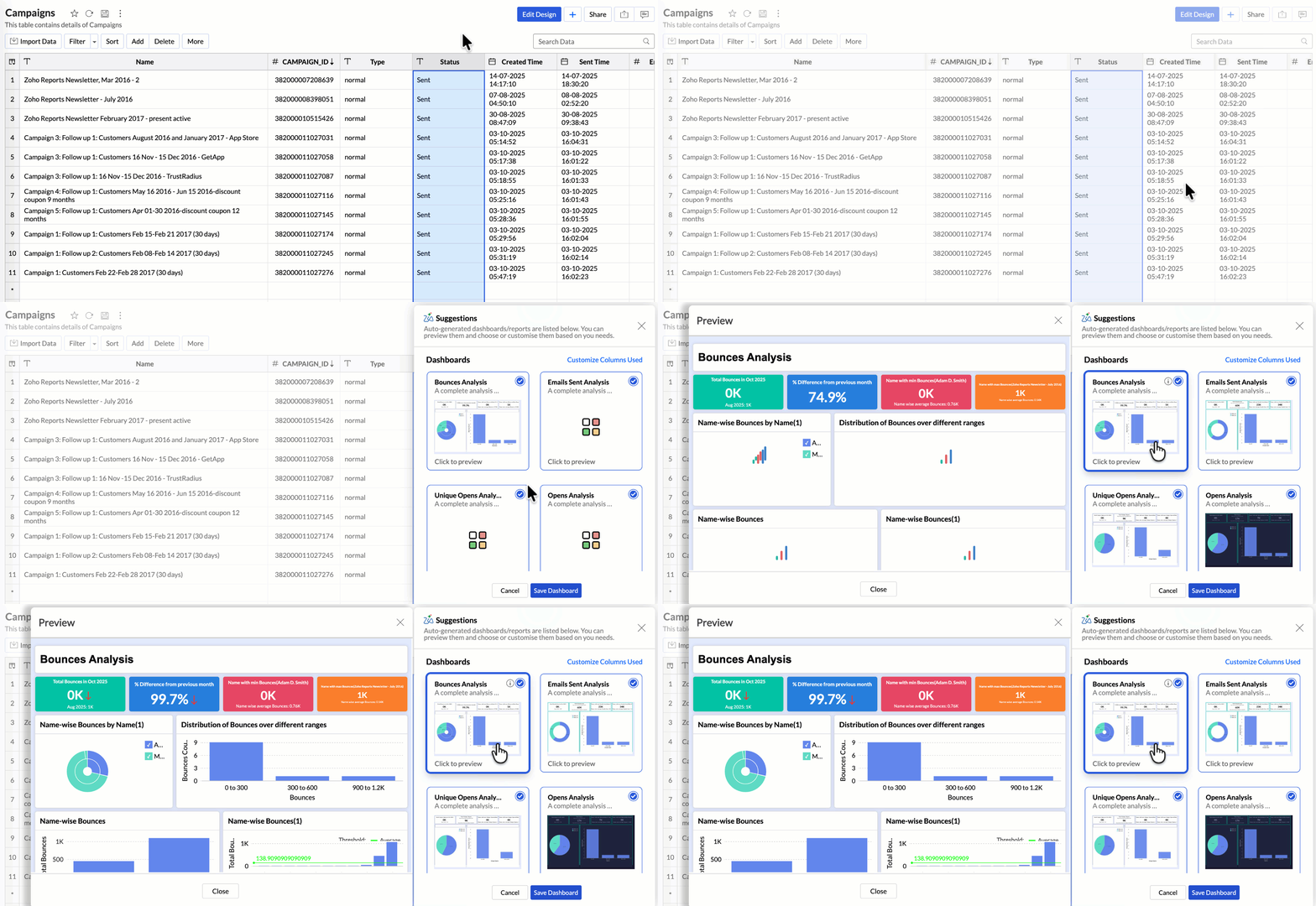
Zoho Analytics now allows you to automatically analyze data from multiple related tables, reducing the need for manual configurations when creating reports and dashboards.(image via Zoho)
Updates in Zia and integrated LLMs
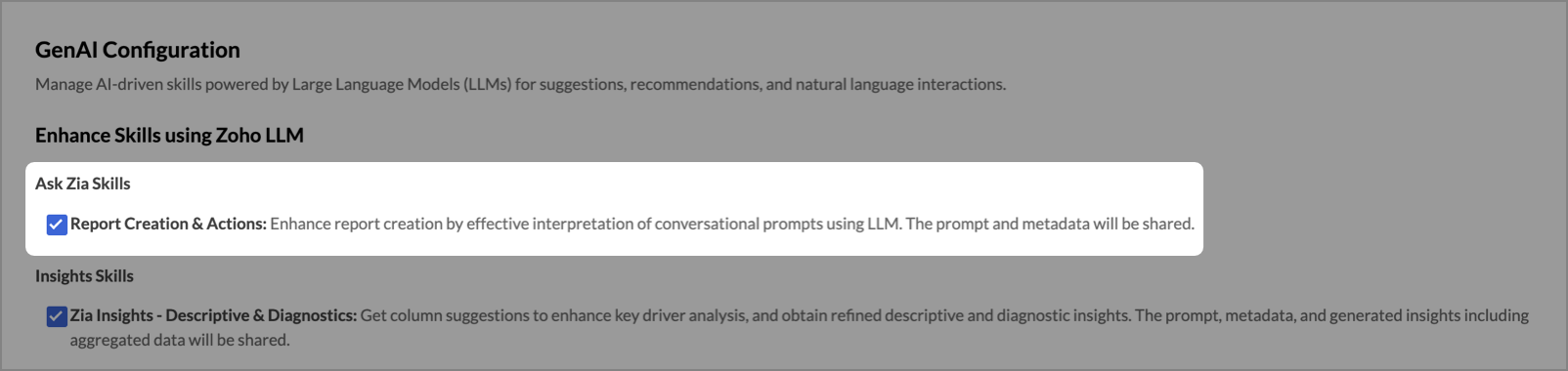
Improvements are added to Zia and the use of language models (LLM), allowing natural language queries to explore data, generate visualizations, and gain insights directly from the platform.(image via Zoho)
Improved PDF export
The visual quality and structure of reports and dashboards exported in PDF format have been optimized for external distribution.New data connectors
Zoho Analytics expands its catalog of connectors, making integration with new data sources easier.Improvements in MCP server extensibility
Updates are added to provide greater flexibility to customize and extend Zoho Analytics capabilities.Data connectivity via Live Connect
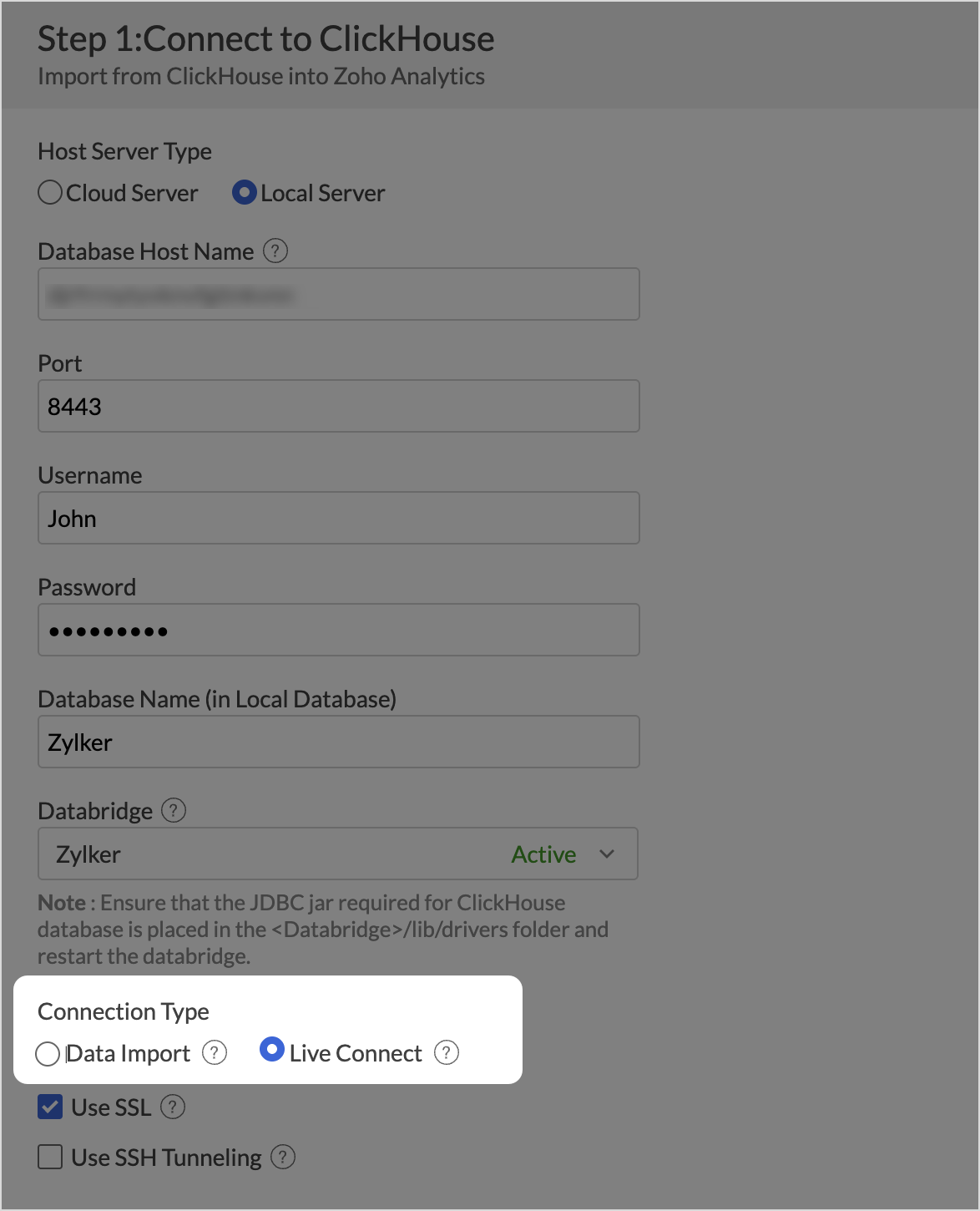
New connections with Databricks (on-premise and cloud servers) and ClickHouse (on-premise servers) via Live Connect.(image via Zoho)
Zoho Sheet evolves: simpler data entry and enhanced collaboration
Zoho Sheet introduces improvements aimed at simplifying data capture and strengthening collaborative work on shared sheets.
Multi-select picklists
You can now select multiple values in a single cell using picklists, displayed as customizable chips.Integrated webforms
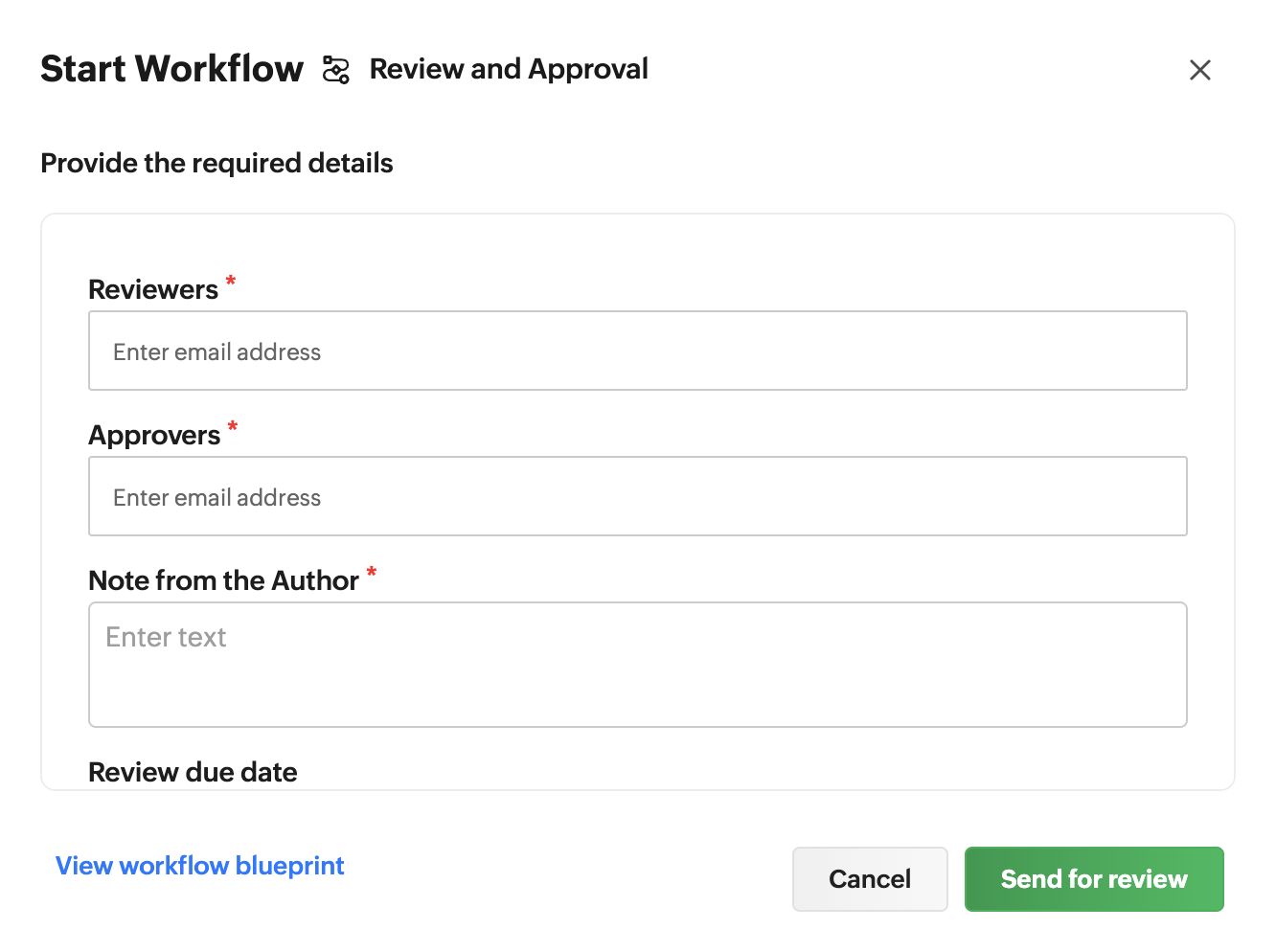
Drag & drop designed forms whose responses are automatically synced with the corresponding sheet.Collaborative workflows
Workflows to assign reviewers, track progress, and complete processes directly from the spreadsheet.(image via Zoho)
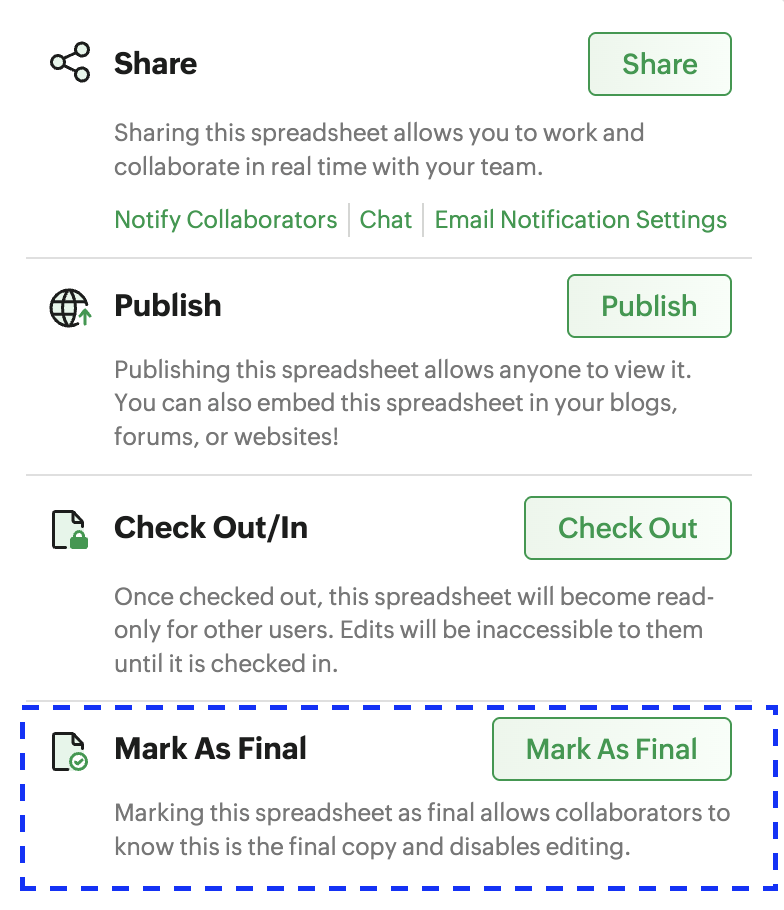
“Mark as Final” option
Allows you to mark a sheet as final to lock editing and prevent accidental changes.(image via Zoho)
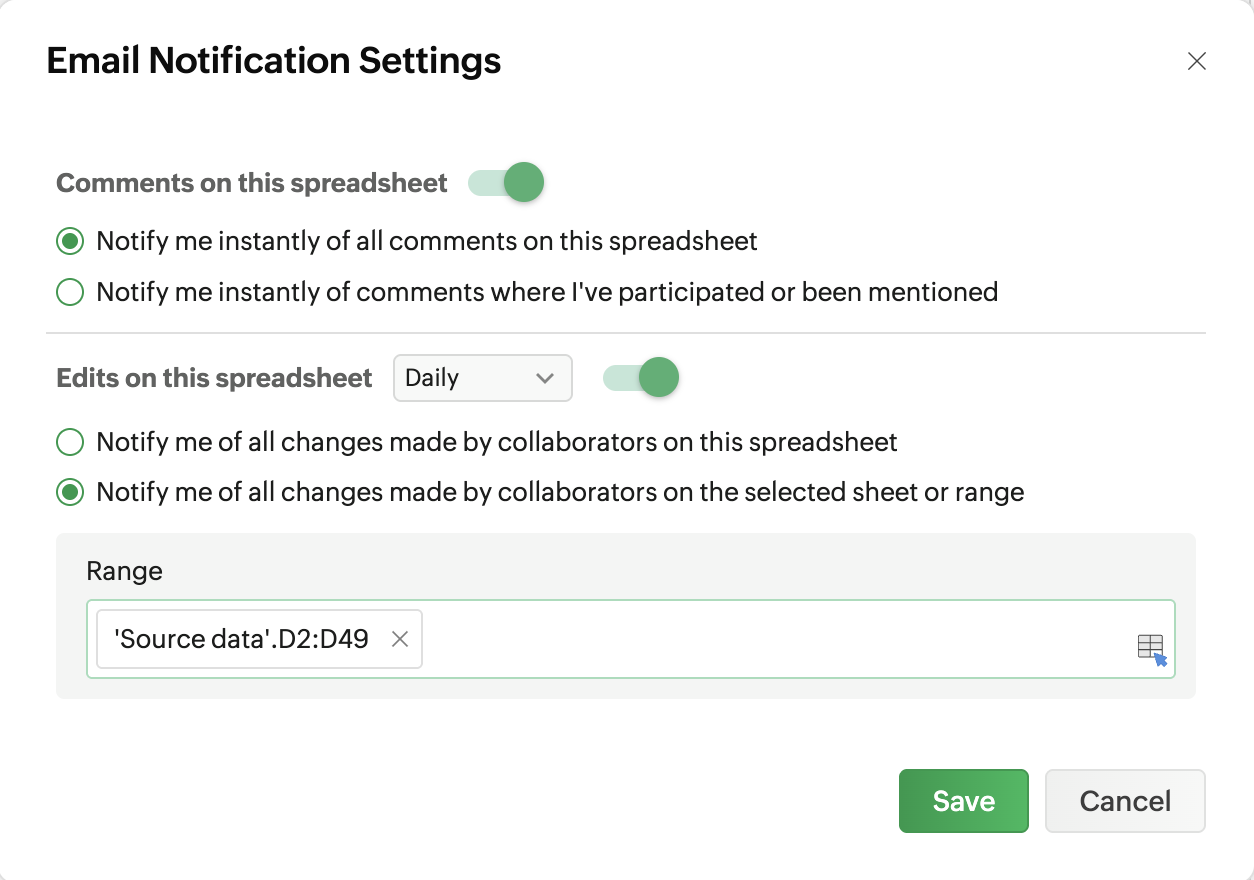
Email notifications on changes
You can now receive email alerts for any modification made in the sheet.(image via Zoho)
Expanded limits
Up to 10 million cells, 262,000 rows, 2,048 columns, and imported files up to 50 MB.Zoho Mail for Android brings key calendar improvements
Zoho Mail updates its Android app with calendar improvements that make it easier to manage events and schedule meetings directly from your phone.
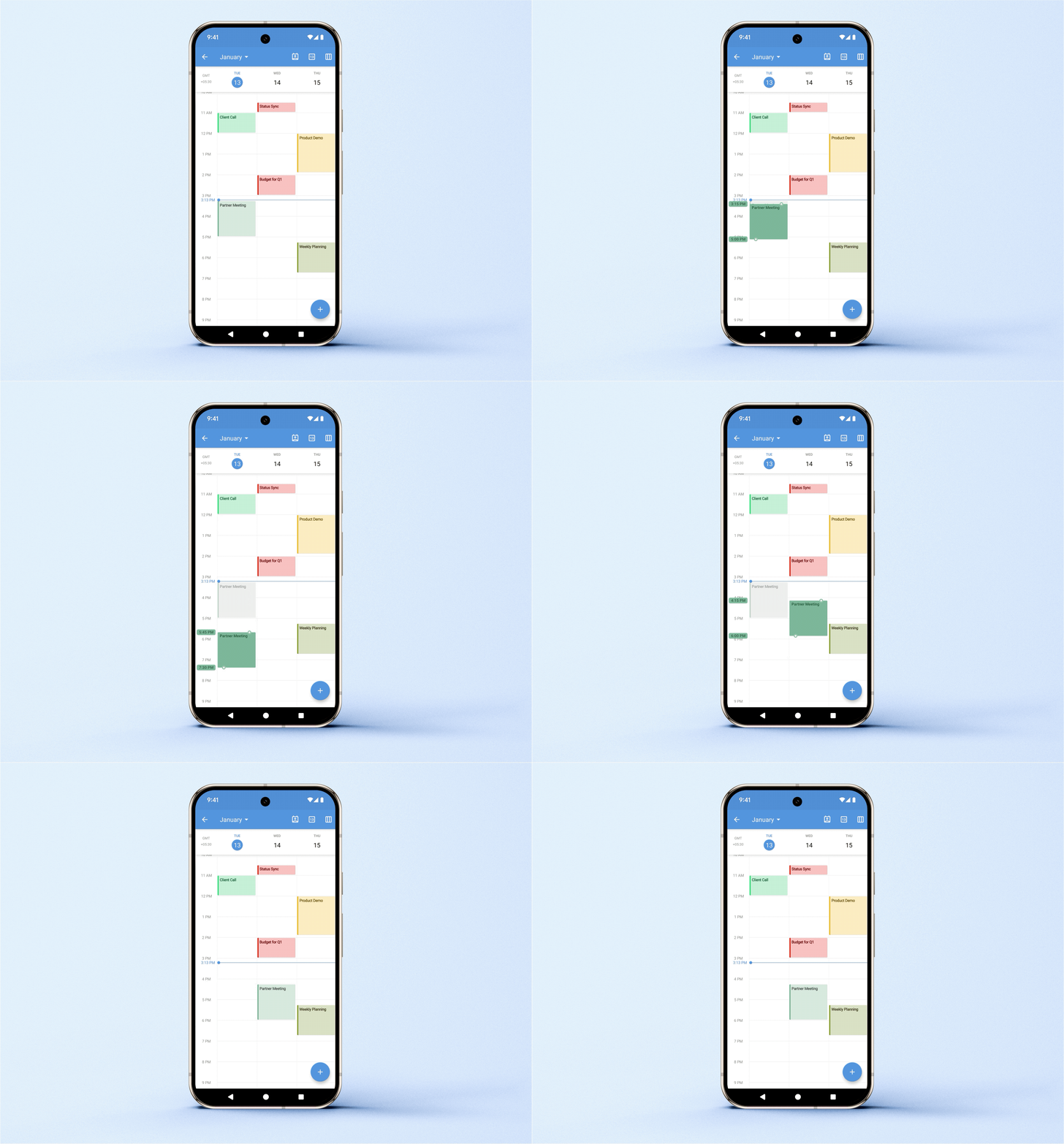
Quick event rescheduling
You can now change the date and time of an event by dragging it directly on the calendar, without manually editing it.(image via Zoho)
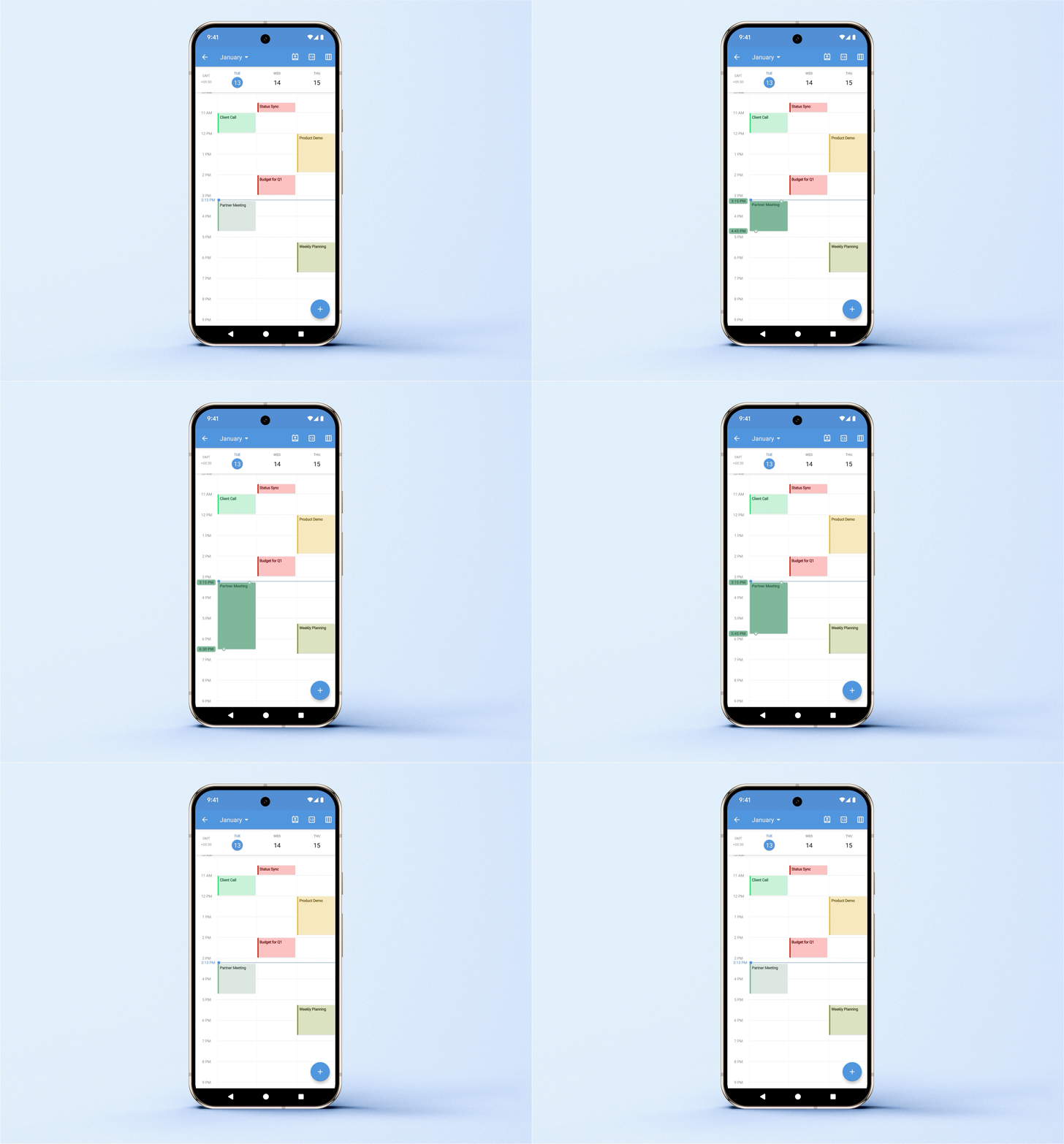
Dynamic duration adjustment
You can lengthen or shorten the duration of events by dragging the top or bottom handles, with immediate update in calendar view.(image via Zoho)
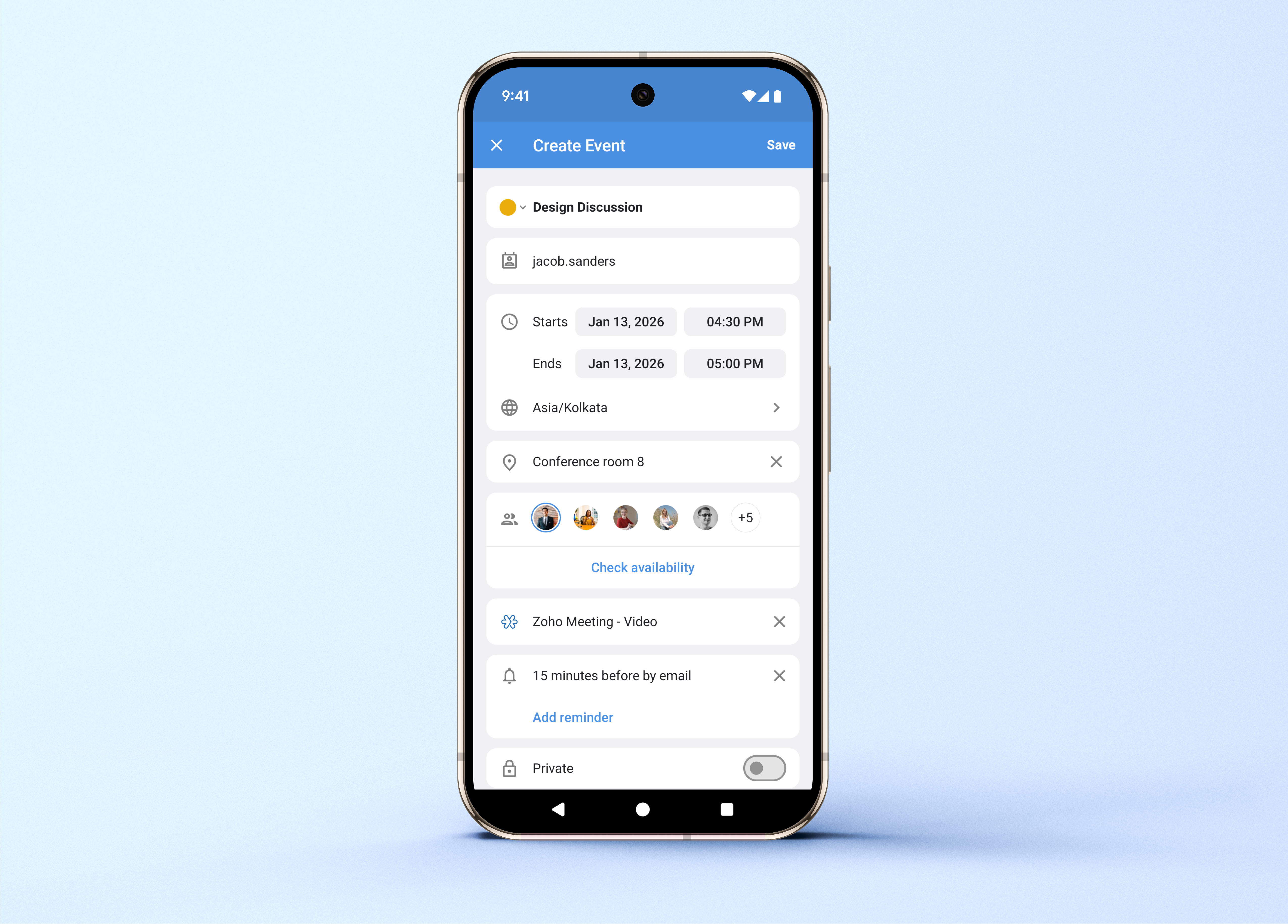
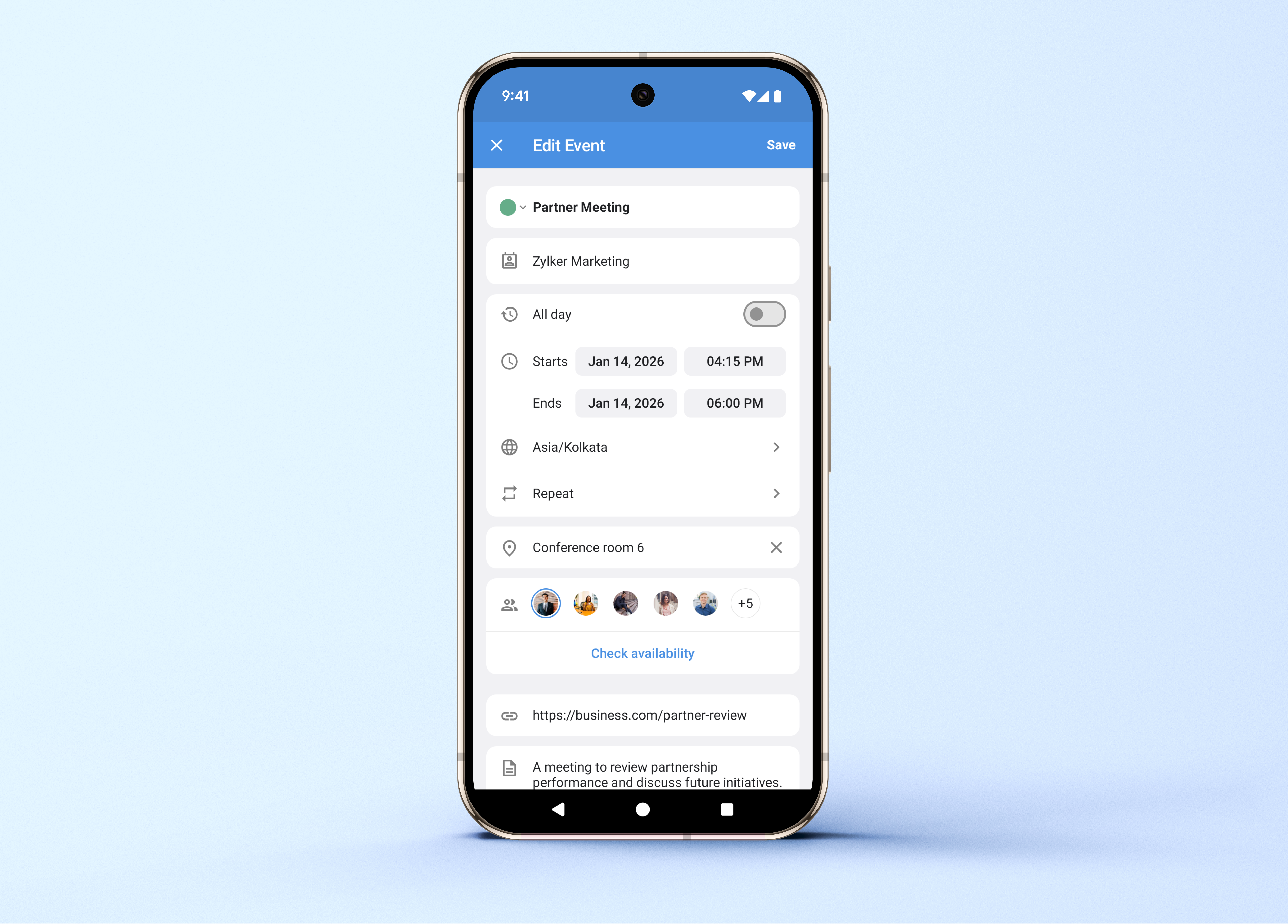
Optimized interface for creating and editing events
The event creation and editing screen is optimized, allowing you to mark events as private, check participant availability, assign colors, and select time zones.
(image via Zoho)
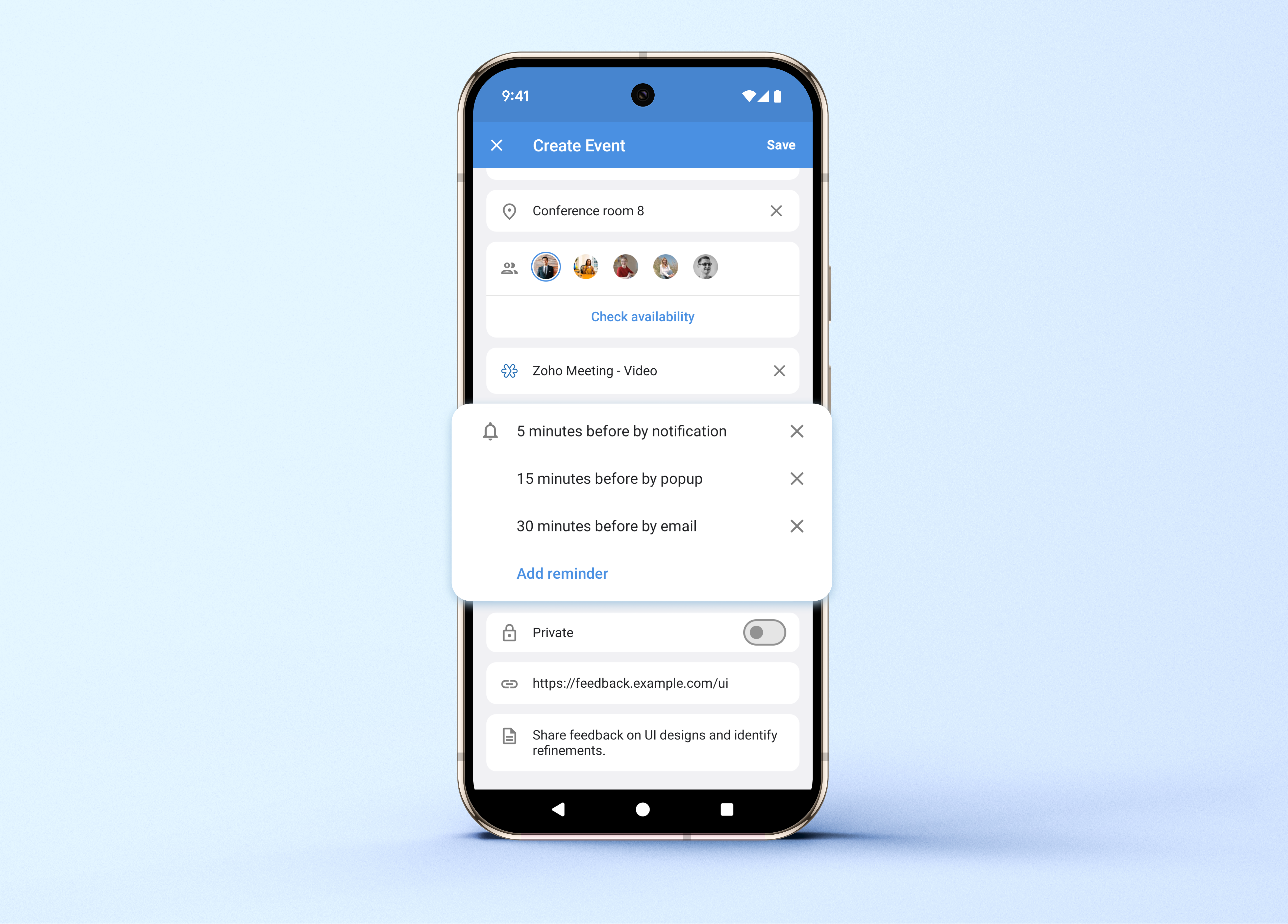
Video conferencing integration
When creating events, you can add Zoho Meeting, Zoom, or Microsoft Teams meetings as the conferencing platform.Multiple reminders and custom recurrences
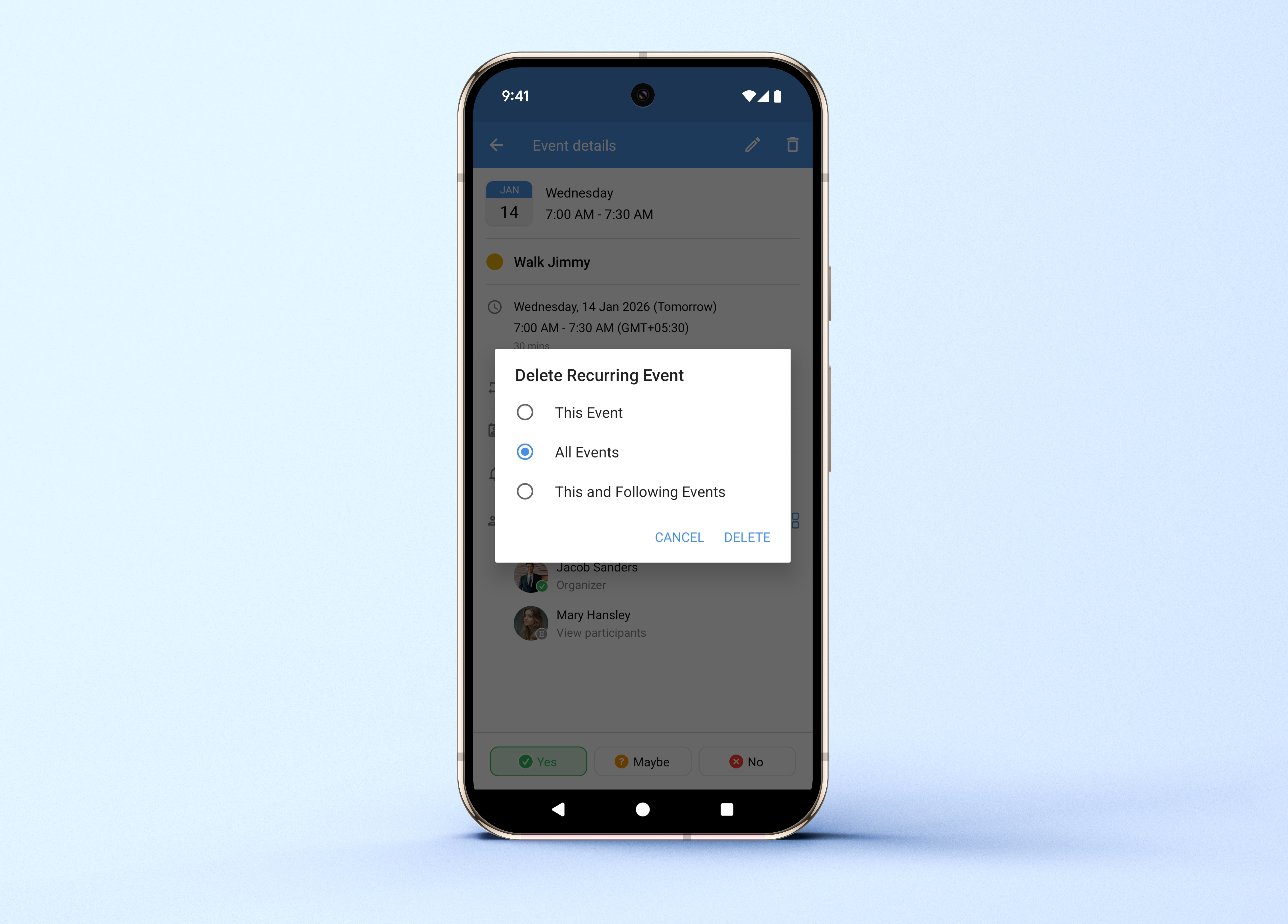
You can now set more than one reminder per event, define custom recurrence patterns, and delete a single occurrence or all future ones without affecting past ones.
(image via Zoho)
Webinars on IoT, Creator, and Zoho One
Zoho IoT | Part 4: Advanced customization
Creator 2026 Learning Table Series: Business development focused on decision-making and approval-based processes
Zoho One | Eliminating data silos for greater AI capabilities
Want to implement these new features in your Zoho environment?
Learn more about our Zoho consulting services and contact us for a consultation.
-
AI for recruiters: turning interviews into useful and comparable information
In the daily work of HR and recruitment teams, where multiple interviews are conducted and numerous profiles are
evaluated, having clear and actionable information from each conversation significantly improves the quality of
decision-making.From recorded interviews to structured information
In many hiring processes, interviews are recorded as audio files, personal notes, or subjective impressions that
are difficult to share. This often leads to information loss, inconsistent evaluation criteria among interviewers,
and greater effort when reviewing candidates.With Zoho’s AI Interview Insights, recorded interviews are automatically transformed into accurate transcriptions
and clear summaries, enabling a more objective and consistent review of each profile. As a result, teams can reduce
time spent on administrative tasks and focus on what truly matters: skills, experience, and organizational fit.How it works with the support of ZIA
This functionality is powered by ZIA, Zoho’s artificial intelligence, which analyzes interviews and presents the
information in a clear and structured way to support the daily work of HR teams.1. ZIA processes the interview recordingOnce a one-way (recorded) interview is submitted, ZIA automatically starts the analysis:
- Converts audio into text using speech-to-text processing
- Splits the transcription into question-and-answer segments
- Generates a concise summary for each response
- Highlights key talking points for faster review
No additional action is required: the analysis begins as soon as the recording is available.
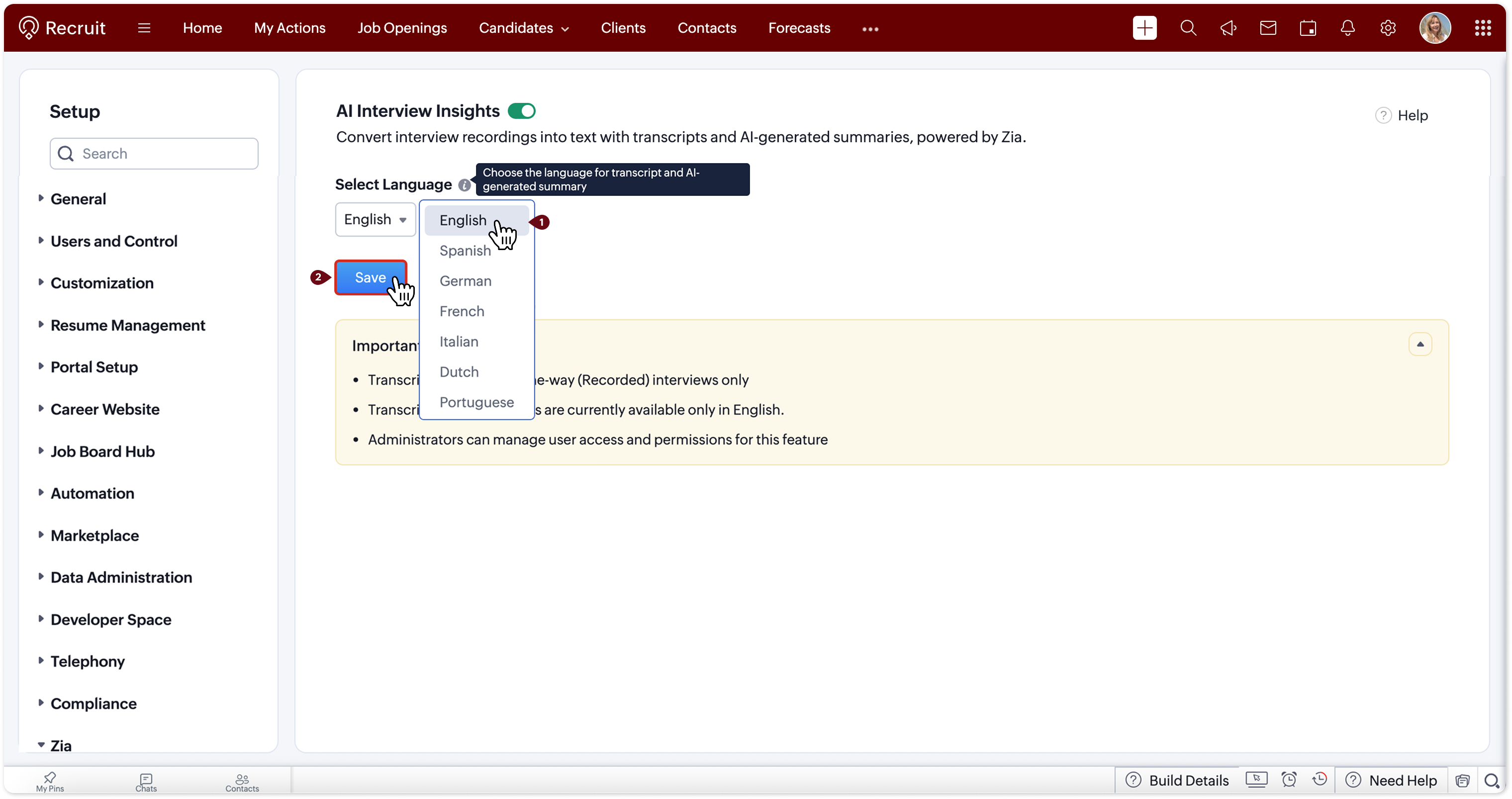
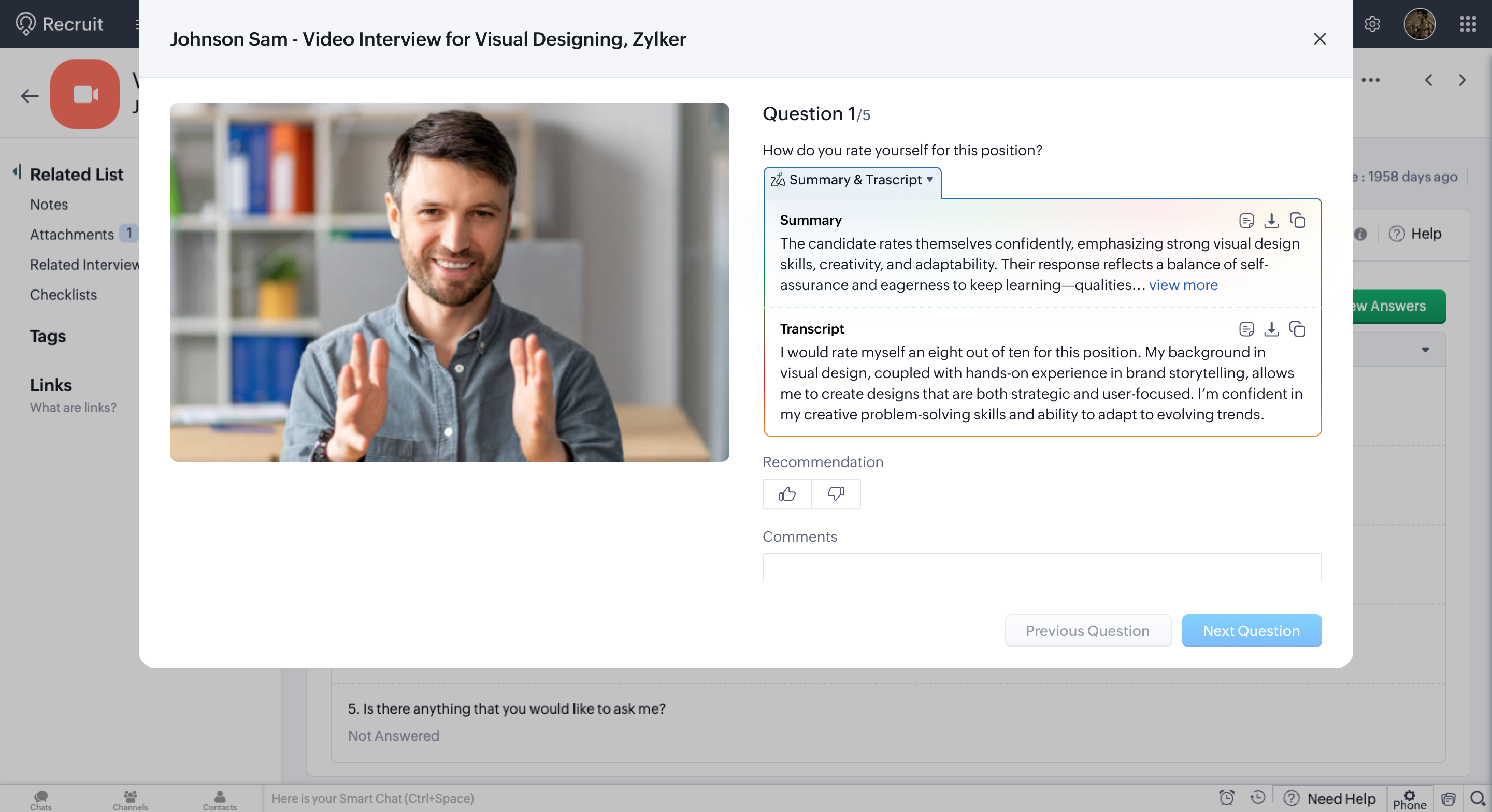
2. Activating AI Interview InsightsFrom Configuration > ZIA > AI Interview Insights, the team can enable the feature and select the preferred
language for transcriptions and AI-generated summaries.
Image via Zoho
3. All the information in one place
Within the Interviews module, when opening an interview and accessing the Evaluation tab, recruiters find:
- The full transcription
- AI-generated summaries for each response
- An optimized view that keeps the transcription visible as a reference
Image via Zoho
This makes it possible to quickly review strengths, areas for improvement, or follow-up points without having to
replay the recording, saving time and improving the quality of the analysis.Comparing profiles with greater clarity and less bias
One of the main challenges in recruitment is maintaining consistent criteria across interviews and interviewers.
With structured and comparable information, teams can:- Evaluate candidates using the same parameters
- Identify patterns, strengths, and opportunities for improvement
- Reduce reliance on individual perceptions or scattered notes
The result is a more objective, traceable, and business-aligned selection process.
Greater efficiency for HR teams
Automating interview transcription and analysis enables efficiency gains, especially in high-volume recruitment
processes. This translates into:- Fewer manual tasks
- Faster decision-making
- Improved collaboration between recruiters and hiring managers
Information remains clearly organized and accessible for everyone involved in the process.
Would you like to apply this capability to your recruitment process?
Discover how ZIA and Zoho solutions can help you optimize interviews and make better hiring decisions. -
Implementation of the Month: How a solar company transformed its commercial traceability through the integration of FortiVoice + Zoho
In the daily operations of a solar company, phone calls are the first bridge with the customer: key information is shared, technical visits are coordinated, and the customer experience is defined from the very beginning. However, this process only works when there is clarity about who called, what was communicated, and how each interaction unfolded.
For this company in the sector, that level of visibility was not guaranteed. The lack of traceability raised internal doubts, customer complaints, and difficulties ensuring that each stage of the sales process was properly fulfilled.
In response to this situation, they decided to integrate their telephony system with their Zoho ecosystem, creating a more organized, auditable, and reliable communication flow.
When operations require total visibility into every customer contact
As the company grew, it became clear that call management was not keeping pace with the business. The lack of traceability created concrete operational gaps:
Lack of evidence about the initial contact
There was no verifiable record of calls, responses, or communicated content, making it difficult to validate contact attempts in the face of customer complaints.Calls and recordings without native integration
FortiVoice operated in isolation and recordings were not automatically linked to leads, contacts, or accounts in Zoho CRM.Low visibility in the key verification call
Agents did not have a centralized view of the customer’s history or context when coordinating technical visits.The result was a slower operation, with recurring complaints and difficulties ensuring consistency in customer service.
How a unified ecosystem elevated commercial traceability
InterConnecta developed a comprehensive solution that connected FortiVoice + Zoho CRM + Zoho WorkDrive, creating an automated, structured, and fully auditable system.
Automatic call logging (CDR Module)
All calls are automatically recorded in Zoho CRM with status, result, PBX, duration, and technical metadata, linked to the corresponding lead or customer.Automatic customer identification
The system recognizes the incoming number and determines whether it belongs to a new or existing customer, creating temporary records monitored for 30 days.Centralized recordings in Zoho WorkDrive
Calls are converted to MP3 and stored automatically, becoming available for audits and quality control.Smart result classification
Calls are categorized based on their outcome, making it easier to analyze, measure performance, and detect risks.Unified communication panel in CRM
Teams access a complete call history, recordings, and customer context from a single panel.Impact: more control, less friction, and a strengthened operation
- Total traceability of all communications.
- Concrete evidence for complaints, reducing customer disputes.
- Greater operational efficiency of the sales and call center team.
- Continuous quality control through audits based on real recordings.
Conclusion
The integration of FortiVoice, Zoho CRM, and Zoho WorkDrive allowed the solar company to professionalize its communication management, consolidating a more efficient, auditable, and customer-experience-oriented commercial process.
More than a technological improvement, this implementation became a strategic capability to ensure consistency in service and strengthen customer trust from the very first contact.
Would you like to implement a similar model in your organization?
Talk to an InterConnecta specialist. -
Artificial Intelligence applied to analytics: the new dashboard generator from Zoho Analytics
The adoption of more agile analytics models has become a decisive factor for organizations looking to strengthen their forecasting capabilities and support decisions with reliable information. In this context, Zoho Analytics introduces a new AI-powered dashboard generator, designed to simplify the creation of executive panels and expand access to analytics within business teams.
The solution reduces technical complexity, speeds up the reading of indicators, and improves the availability of visual insights, allowing different departments to work with structured information without relying on extensive analytical processes.
A generation model focused on analytical efficiency
The generator integrates a flow designed to transform data into strategic visualizations quickly and consistently. The process is structured in four stages:
- Direct data upload by dragging and dropping files like CSVs without additional configurations.
- Automatic content analysis, identifying relevant metrics, relationships, and patterns.
- Smart visualization selection aligned with the nature of the dataset.
- Dashboard customization and operational use, with options to download, adjust, or integrate into existing workflows.
This approach minimizes preparation time, ensures consistency, and enables functional executive dashboards from the start.
Main differentiators of the tool
The generator includes features that promote analytical adoption in organizations of all sizes:
- Full accessibility: available for free and without usage restrictions.
- Operational speed: dashboards generated in under a minute.
- Technical independence: no need for advanced data preparation or BI expertise.
- Smart assistance powered by Zia: prioritizes metrics and structures visualizations automatically.
These features enable analytics to become a natural part of daily operations, eliminating common frictions found in more complex tools.
AI embedded in the Zoho Analytics platform
The new generator is integrated into an ecosystem with advanced Artificial Intelligence capabilities that enhance analytical depth and usage scenarios:
Automated narrative insights that synthesize key findings and provide immediate context.Integrated predictive models to anticipate changes in commercial, financial, or operational indicators.Anomaly detection that alerts on unusual behavior or data deviations.Natural language conversational assistant to query data and generate visualizations through direct questions.Smart recommendation of metrics and charts tailored to the dataset and user behavior.These functions consolidate a coherent, flexible platform ready to support organizations in their evolution toward more accessible and strategic analytics.
A significant contribution to business decision-making
The new generator enhances organizations’ ability to work with data in an agile, performance-oriented way. It facilitates the monitoring of key indicators, reduces operational frictions, and enables strategic decisions based on clear and consistent visualizations.
With these features, Zoho Analytics strengthens an analytical ecosystem that not only simplifies data access but also helps build a more informed and resilient organizational culture.
Try the dashboard generator
Experience firsthand how the new AI-powered dashboard generator works.
-
Zoho News Catch-Up: CRM adds Query Workbench, FSM integrates telephony, Desk revamps imports, Analytics expands capabilities, Zoho One enhances security, Webinars on AI in Zoho, Creator, and Books
Welcome to our update, where you’ll stay informed about the latest Zoho news all in one place!
- Zoho CRM: New Query Workbench to explore your data with greater precision
- Zoho FSM: New Telephony to manage calls without switching tabs
- Enhanced data import in Zoho Desk: new interface, updated field mapping and more
- New capabilities to expand connectivity, visualization, and efficiency in Zoho Analytics
- Zoho One adds new security features for stronger, more controlled protection
- Webinars on AI in Zoho, Creator, and Books
Zoho CRM: New Query Workbench to explore your data with greater precision
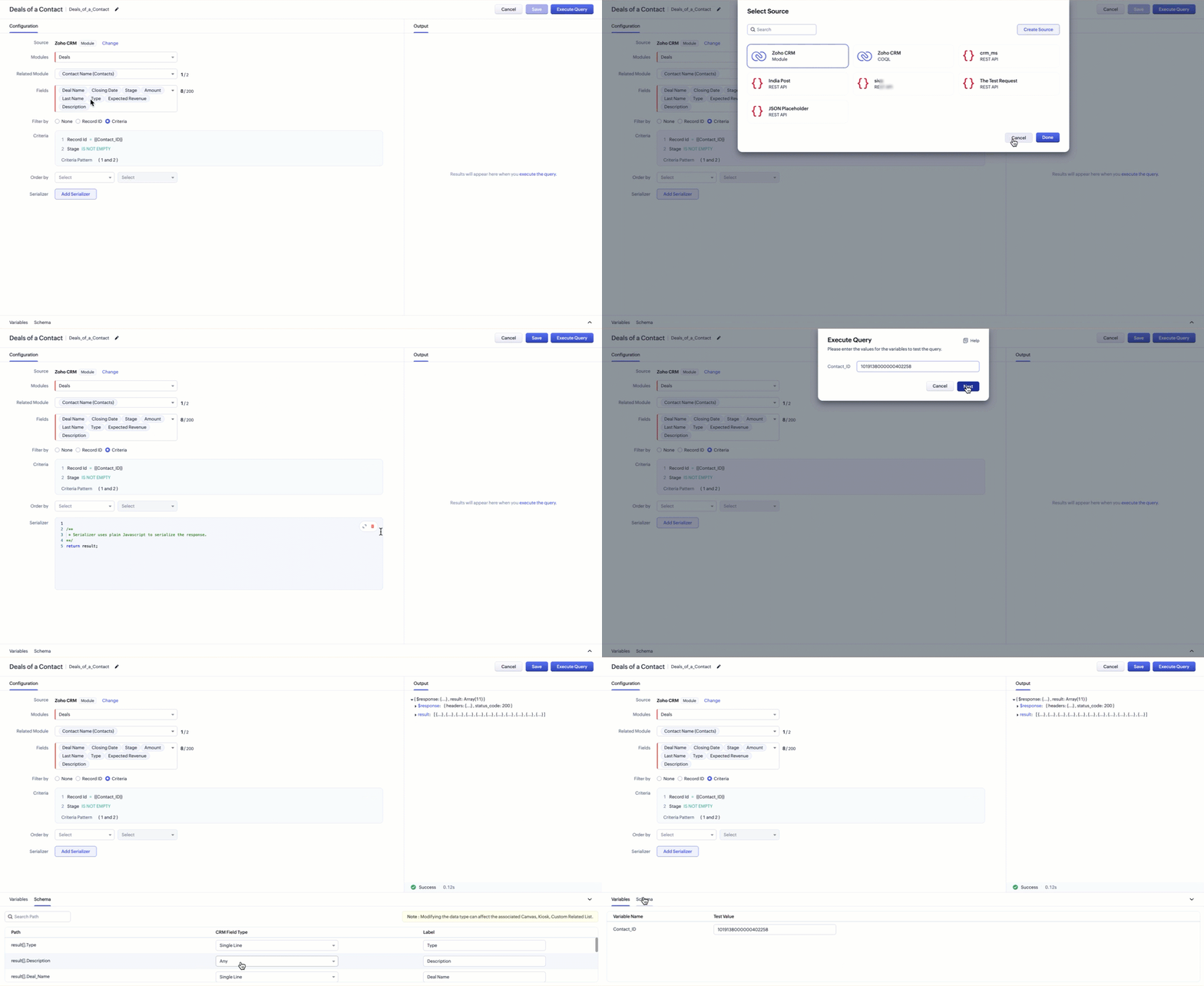
Zoho CRM introduces Query Workbench, a new space designed to help you work with queries inside CRM in a more organized and transparent way. This tool centralizes query execution and testing, allowing you to validate results without relying on external environments.
(image via Zoho)
Key highlights from Zoho:
- A dedicated environment to execute queries related to your CRM data.
- Instant visualization of results to review and adjust your queries.
- A simplified interface that facilitates analysis—especially useful for audits and exploratory work.
With this launch, Zoho CRM provides a more controlled and accessible space for managing your queries, helping you better understand the information stored within your modules.
What’s next?
Zoho says this is only the first phase of the Workbench. Future updates include:- Expanded sources: support to connect beyond CRM modules, including external databases (SQL, MySQL, etc.) and cloud data services like Amazon and Google Cloud.
- Other enhancements: reorganized tabs for clearer navigation, schema comparison, and compatibility with new field types such as lookup and URL (allowing you to open related records or websites directly from custom related lists).
Zoho FSM: New Telephony to manage calls without switching tabs
Zoho FSM introduces Telephony, an update that integrates call management directly inside the platform. With this enhancement, your team can communicate with customers without switching apps, keeping every interaction tightly integrated with your service workflow.
Configure telephony according to your needs
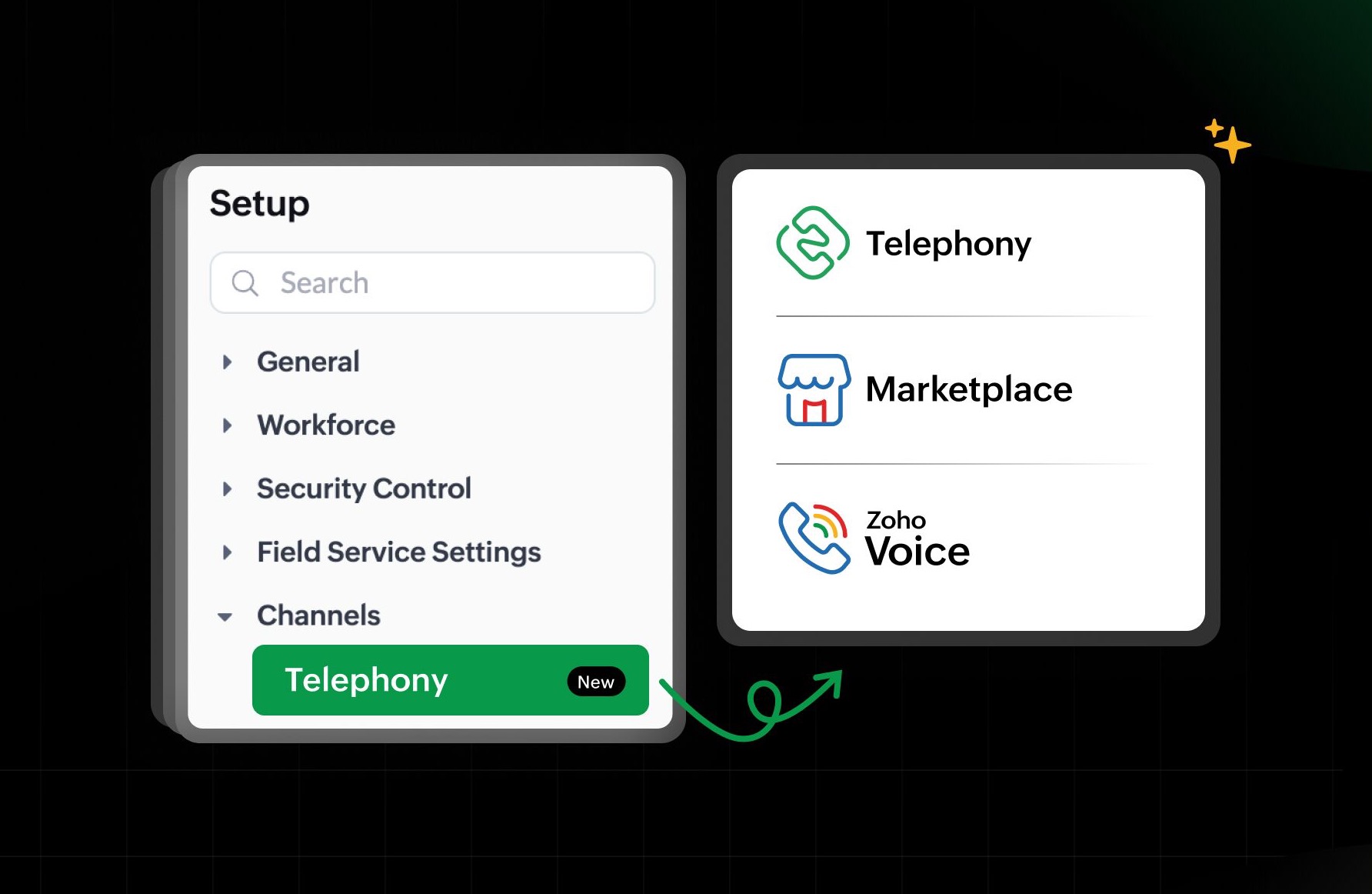
Zoho offers three ways to enable telephony in FSM:- Zoho’s built-in phone system: a native solution powered by Twilio.
- Integration with Zoho Voice: connect FSM with Zoho’s internal telephony system.
- Telephony Marketplace: link FSM with your cloud telephony provider in one click.
(image via Zoho)
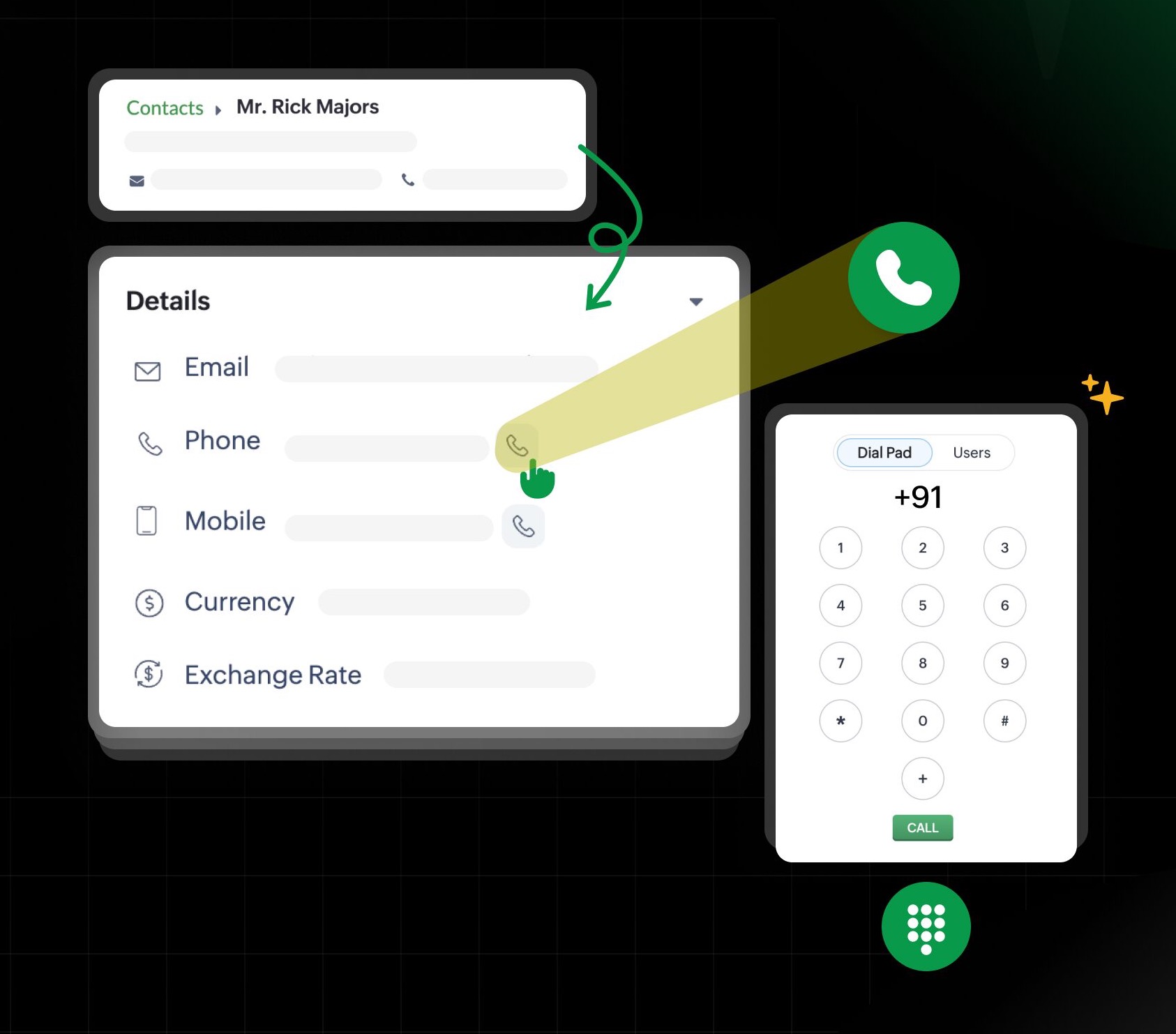
Making calls has never been easier
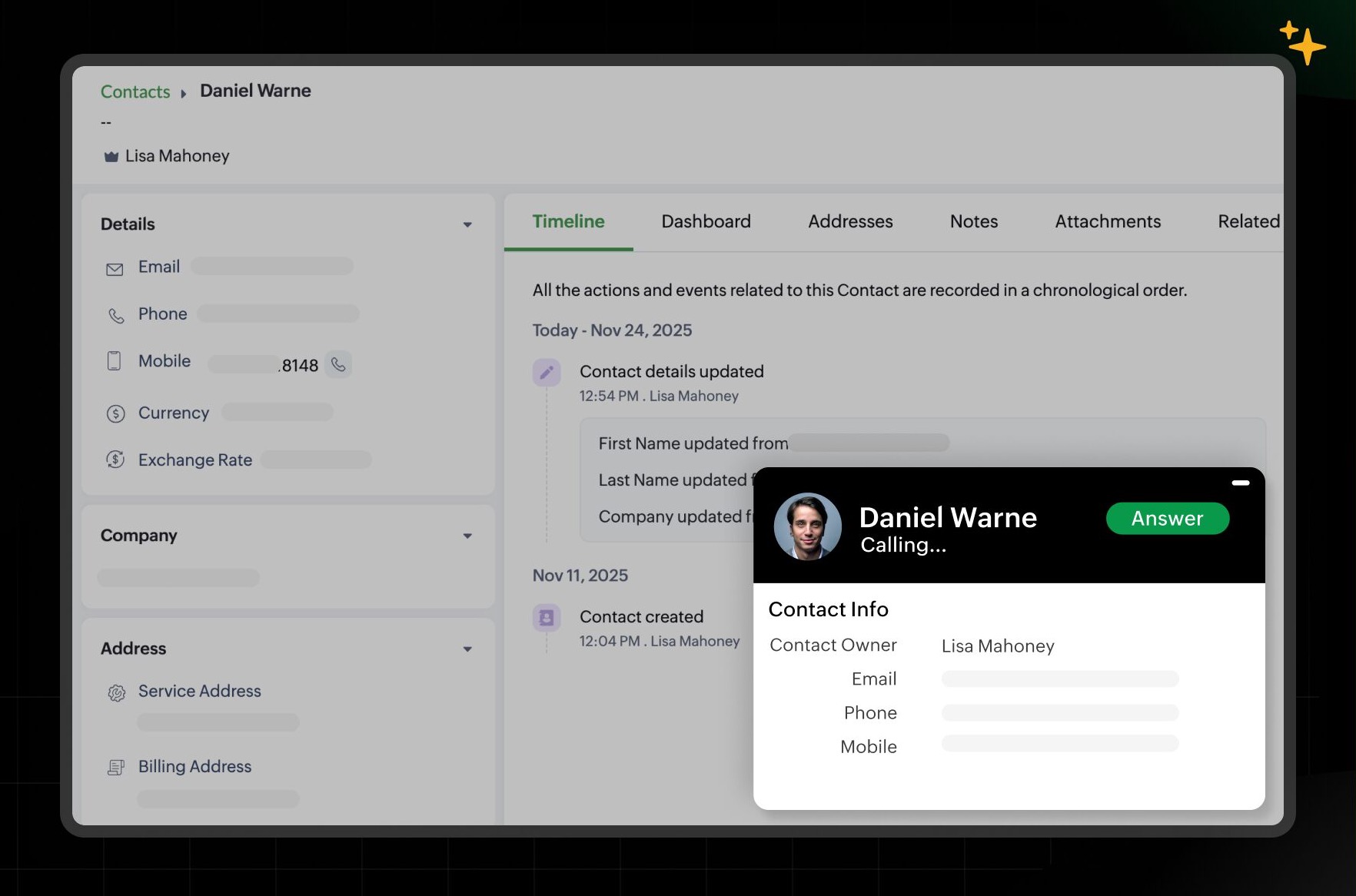
You can initiate calls from key modules such as Contacts, Companies, Requests, Estimates, Work Orders, and Service Appointments. Just click the call icon or use the integrated dialer at the bottom toolbar.(image via Zoho)
Never miss an incoming call
Incoming calls appear as pop-ups inside FSM. Everything is logged in the new Calls module, where you can review past interactions, recordings, voicemails, and more.(image via Zoho)
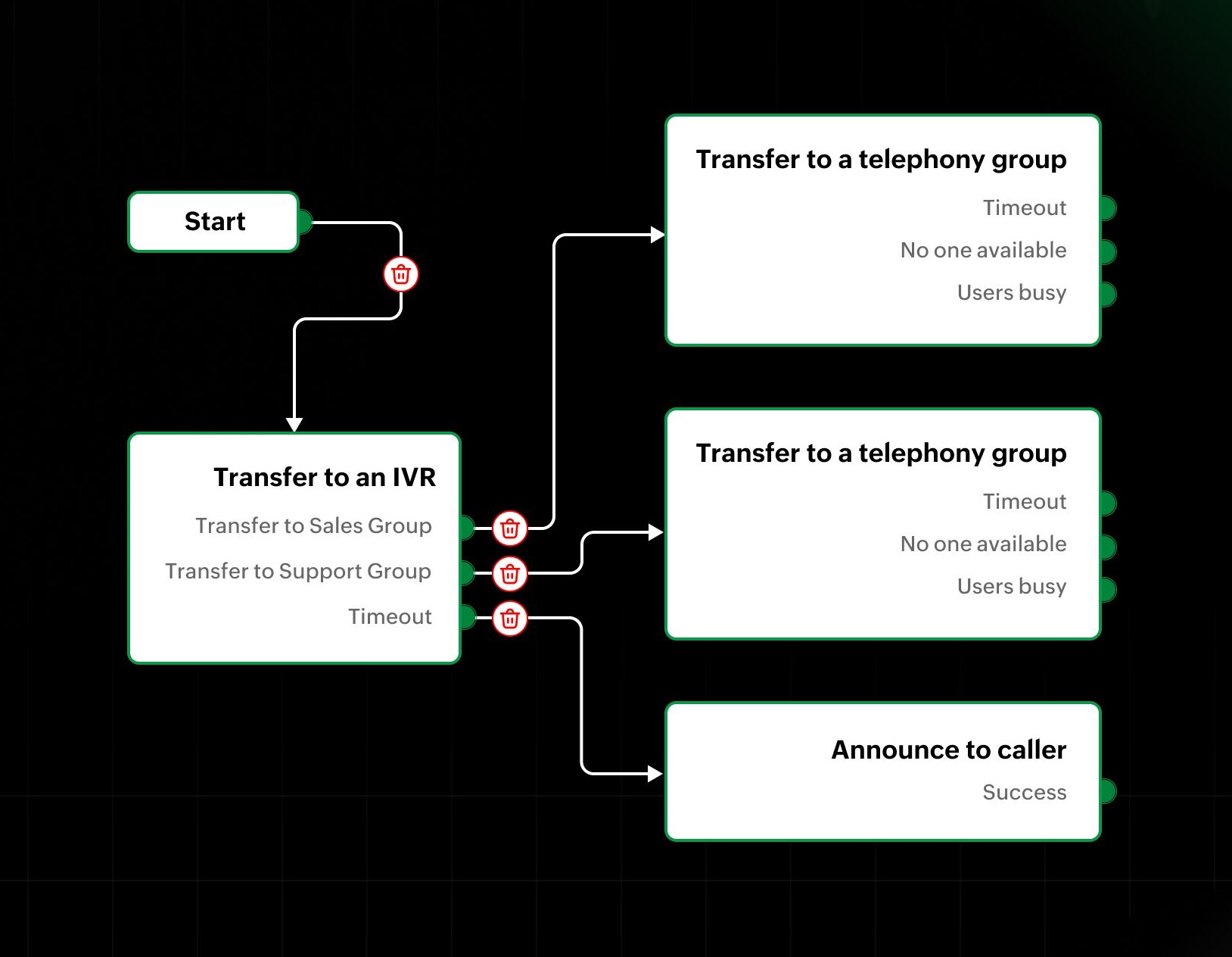
Automate with intelligent call flows
Integrated telephony allows you to define automatic routing for incoming calls. You can configure states such as:- Transfer to a user
- Transfer to a telephony group
- Transfer to an IVR
- Play a message to the caller
- Send to voicemail
(image via Zoho)
A more integrated communication experience
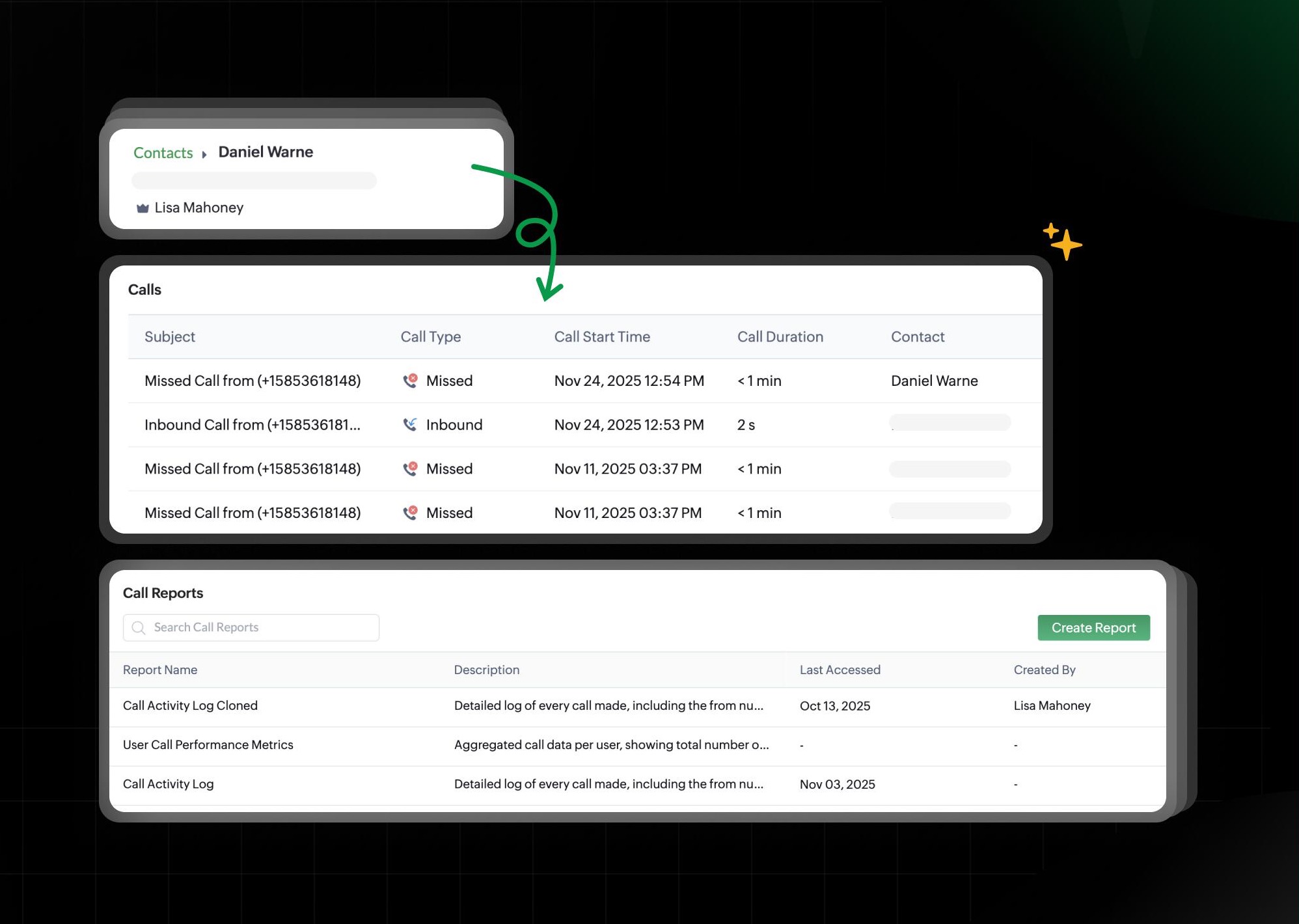
Enabling Telephony adds new capabilities that improve traceability and organization:- Calls module under the Customers section for reviewing interactions.
- Related list for Channels in Contacts, Companies, and modules such as Requests, Estimates, Work Orders, and Appointments.
- Creation and customization of call records with Module Builder support.
- Automation available for the Calls module, just like any other system module.
- New call reports to analyze performance and activity.
(image via Zoho)
Telephony is available in the Professional edition and currently supported in the U.S., India, EU, Australia, and Canada. Admin permissions are required for setup.
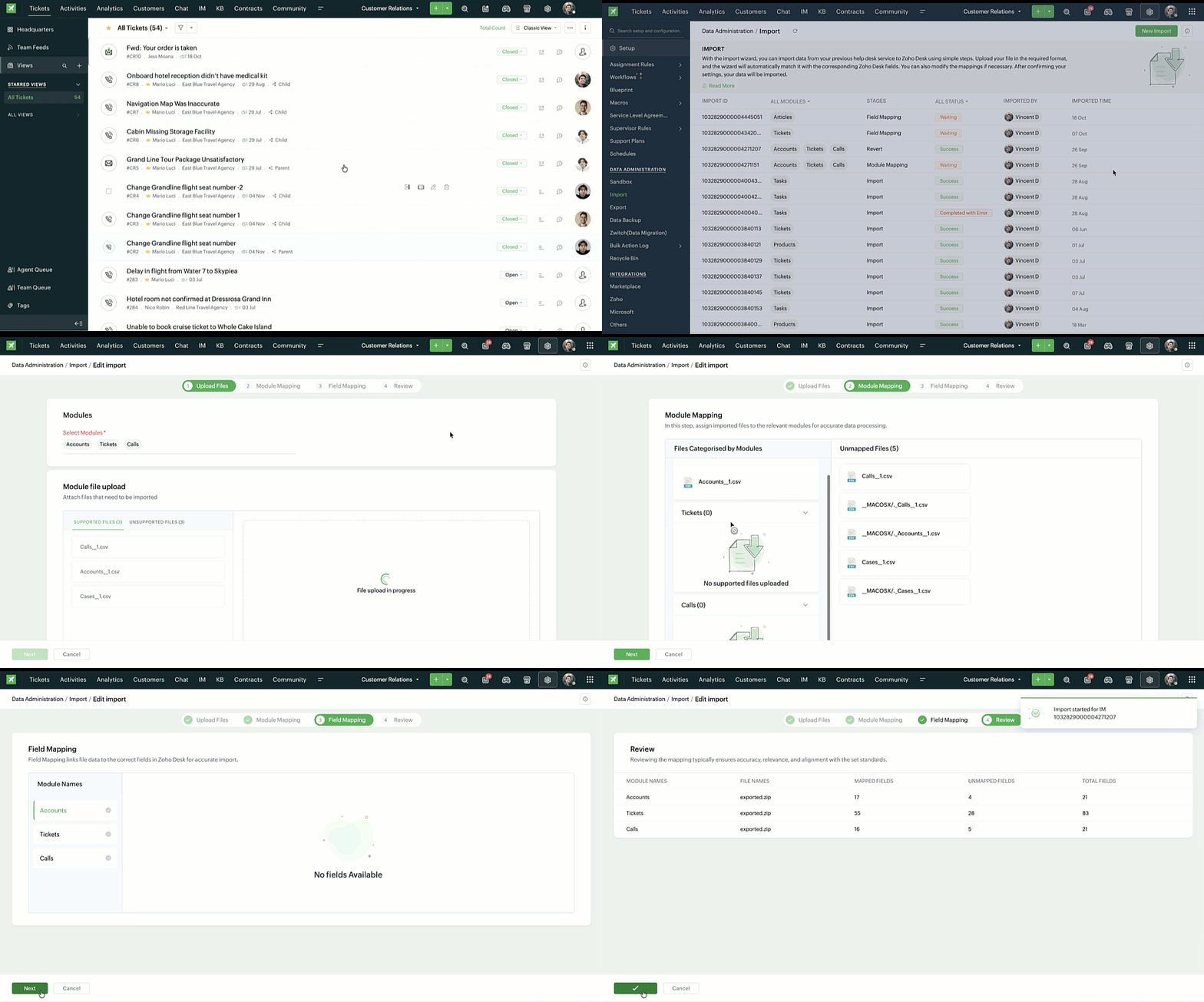
Enhanced data import in Zoho Desk: new interface, updated field mapping and more
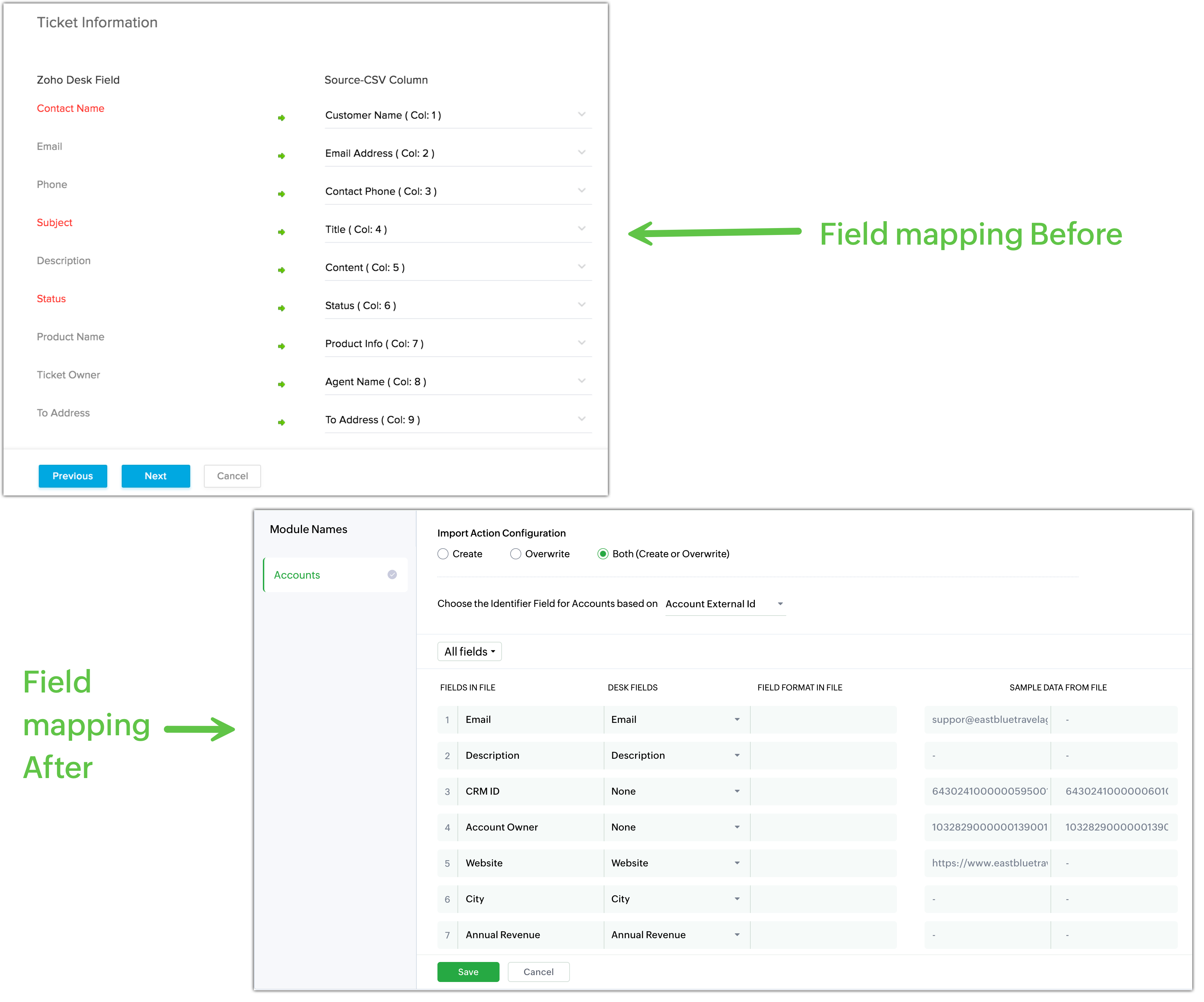
Zoho Desk has completely redesigned its data import process to ensure accurate alignment of file columns and system fields before loading information. The new interface guides users step by step and makes it easier to validate details at each stage.
Main improvements
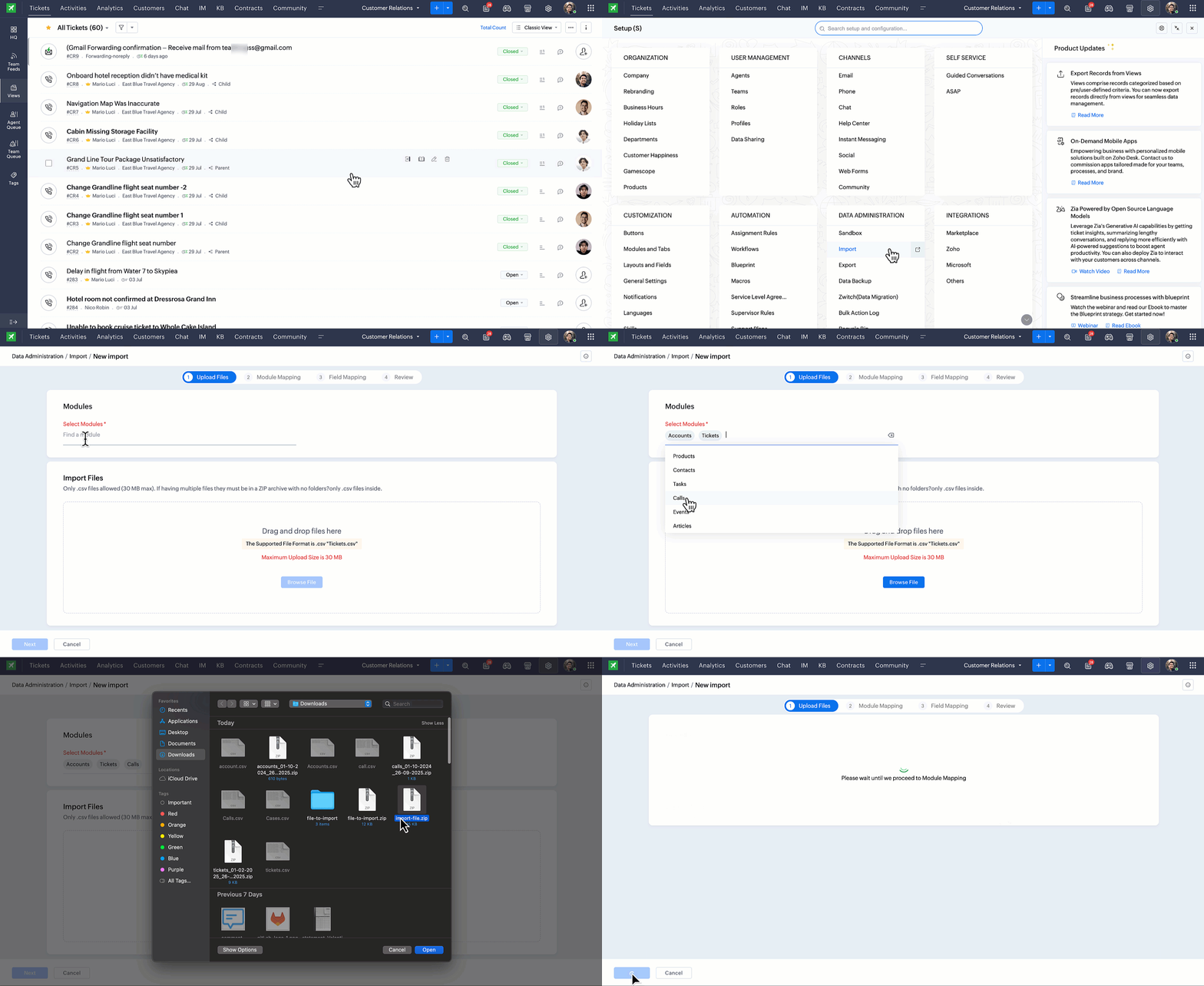
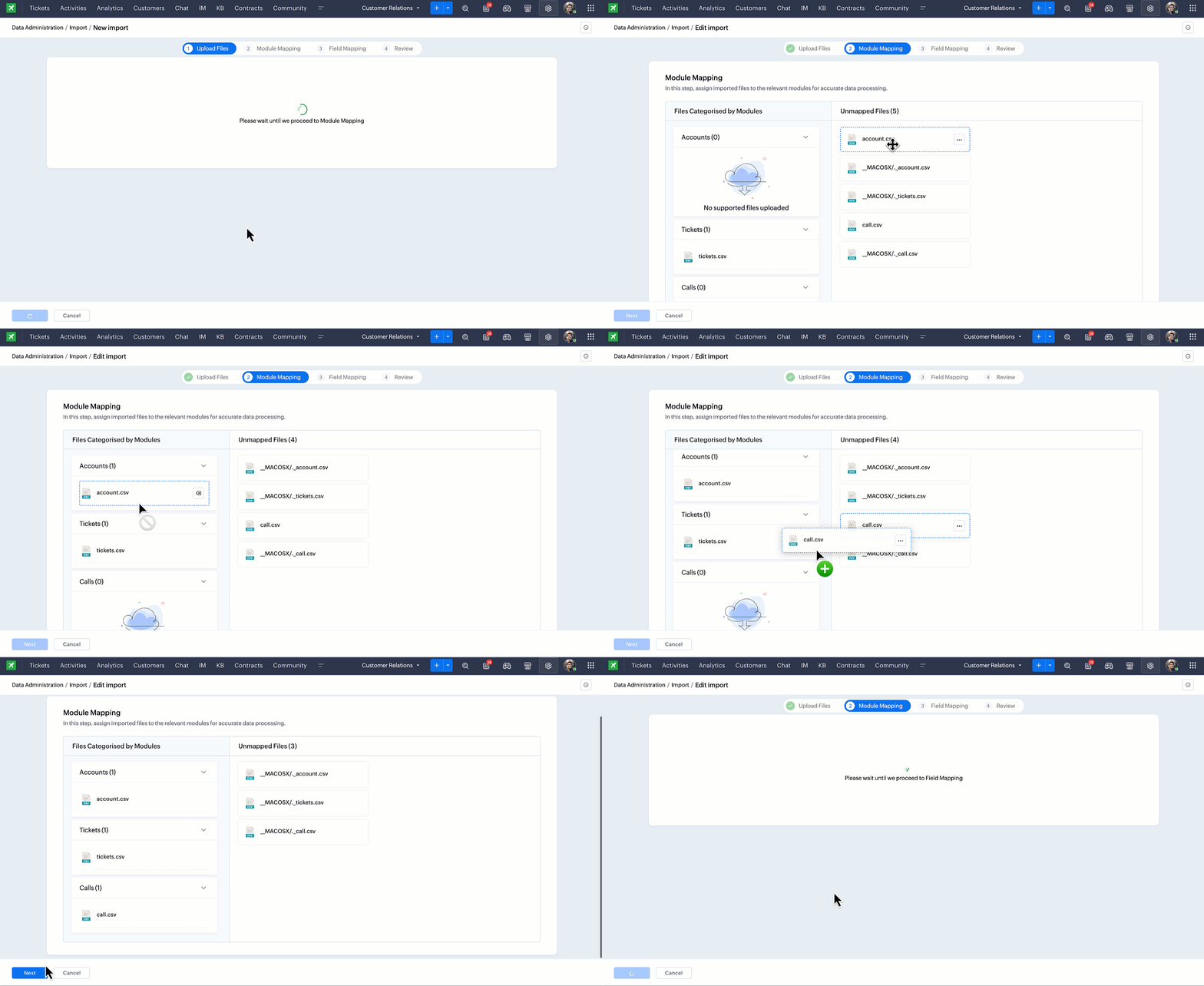
Simplified import steps: a clearer flow from module selection to final mapping, with improved instructions at every stage.
(image via Zoho)
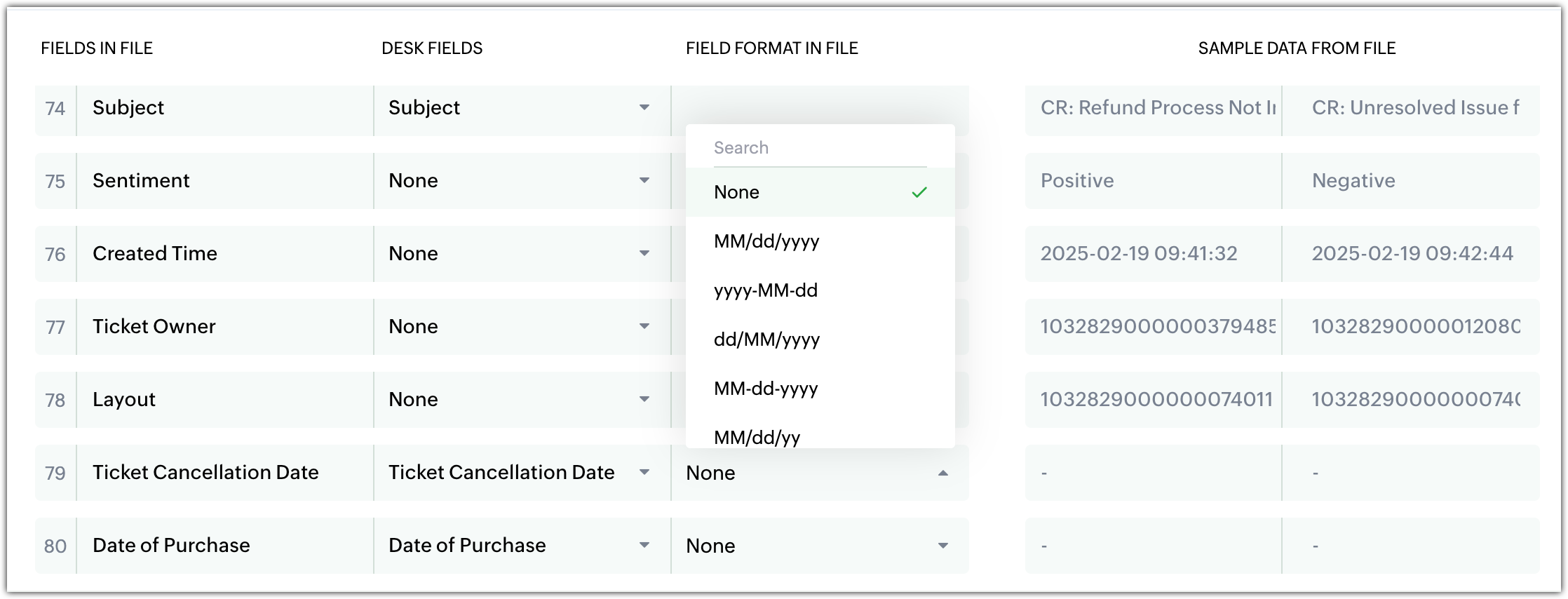
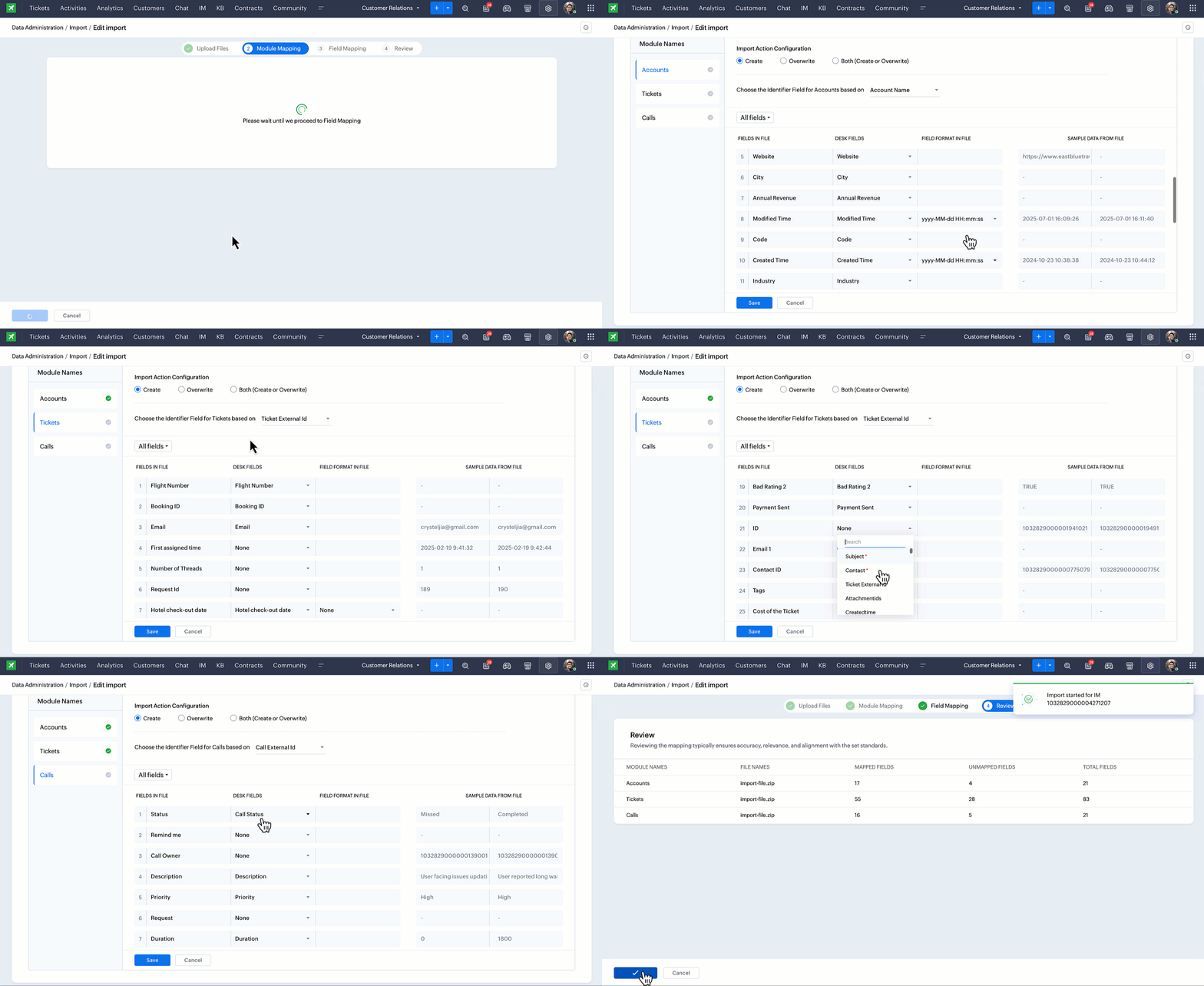
More detailed mapping:
- File field view (columns from uploaded file).
- Desk field view (destination field).
- Field format options (especially dates and times).
- Sample data to verify each match.
(image via Zoho)
(image via Zoho)
(image via Zoho)
(image via Zoho)
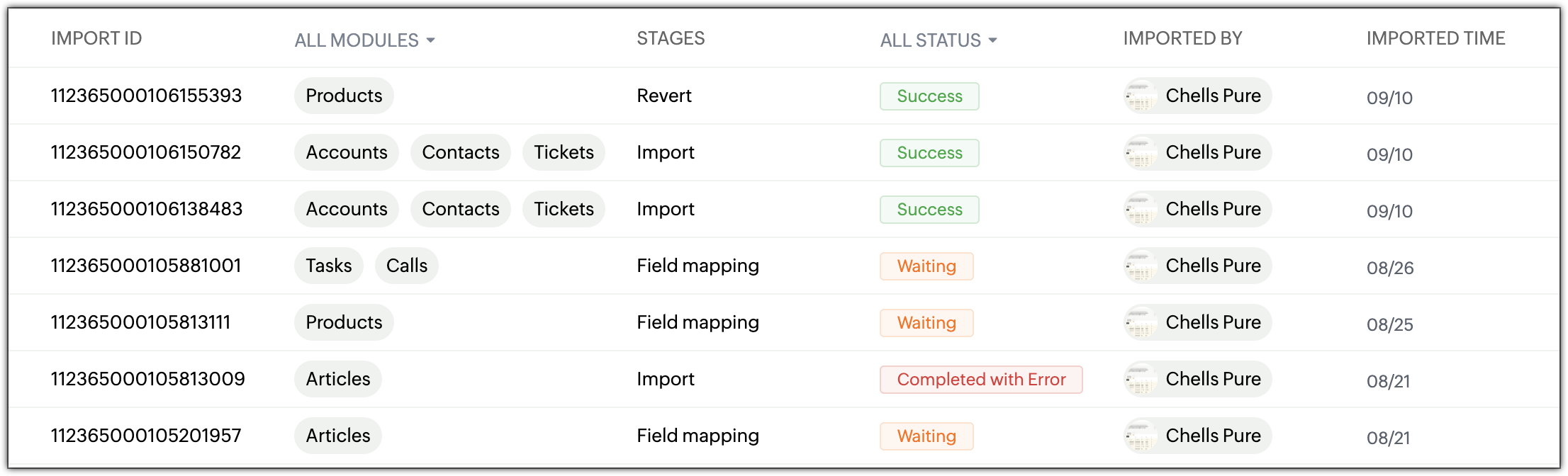
Centralized history
The new Import History page displays:- Import ID, module, and stage.
- Status (In progress, Success, Error, On hold).
- User who performed the import, plus date/time.
(image via Zoho)
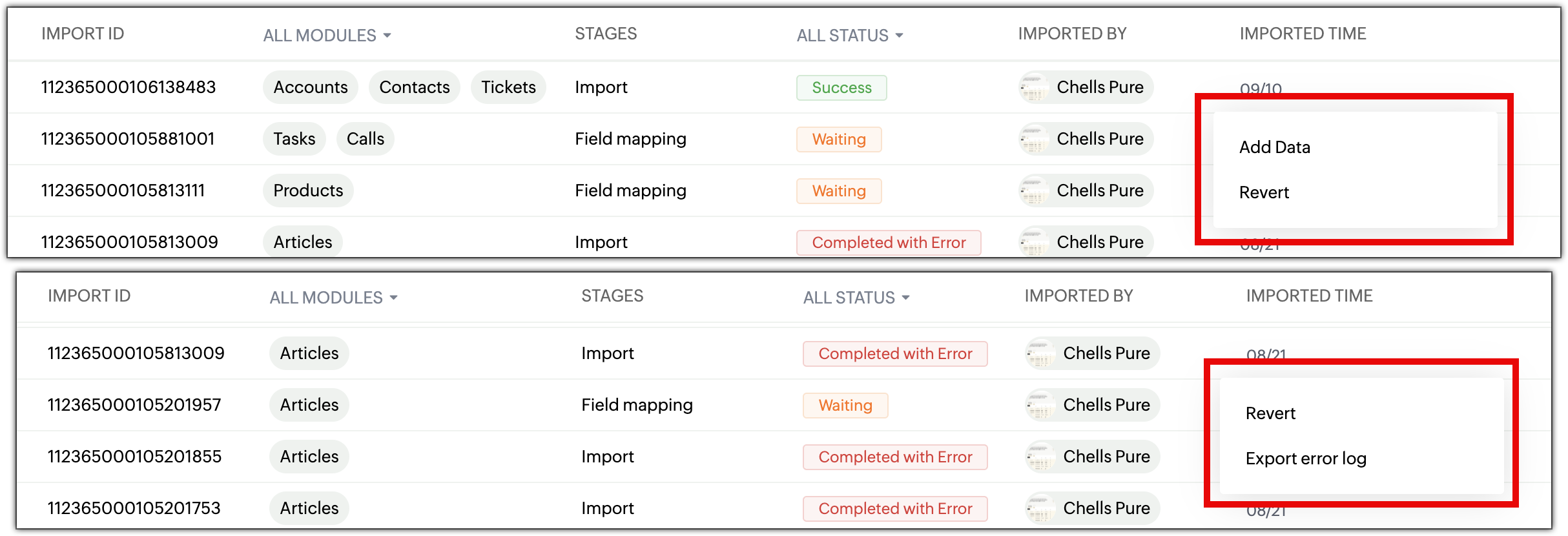
New capabilities
Add data to existing imports: append new records using the same configuration without repeating the process.
(image via Zoho)
Revert imports: undo the last import with a single click.
(image via Zoho)
Detailed error logs: full breakdown of failed rows, enabling corrections and faster re-imports.
(image via Zoho)
Key notes
- You can add data only if the original import was successful.
- Mapping cannot be modified when adding new data.
- Unsupported files (.xls, .pdf, etc.) are automatically rejected.
- The new interface is available across all data centers.
New capabilities to expand connectivity, visualization, and efficiency in Zoho Analytics
Zoho Analytics introduces an update that enhances accessibility, expands data integration, improves analytical precision, and offers a clearer, more efficient experience. These updates strengthen business analytics and accelerate work with large datasets.
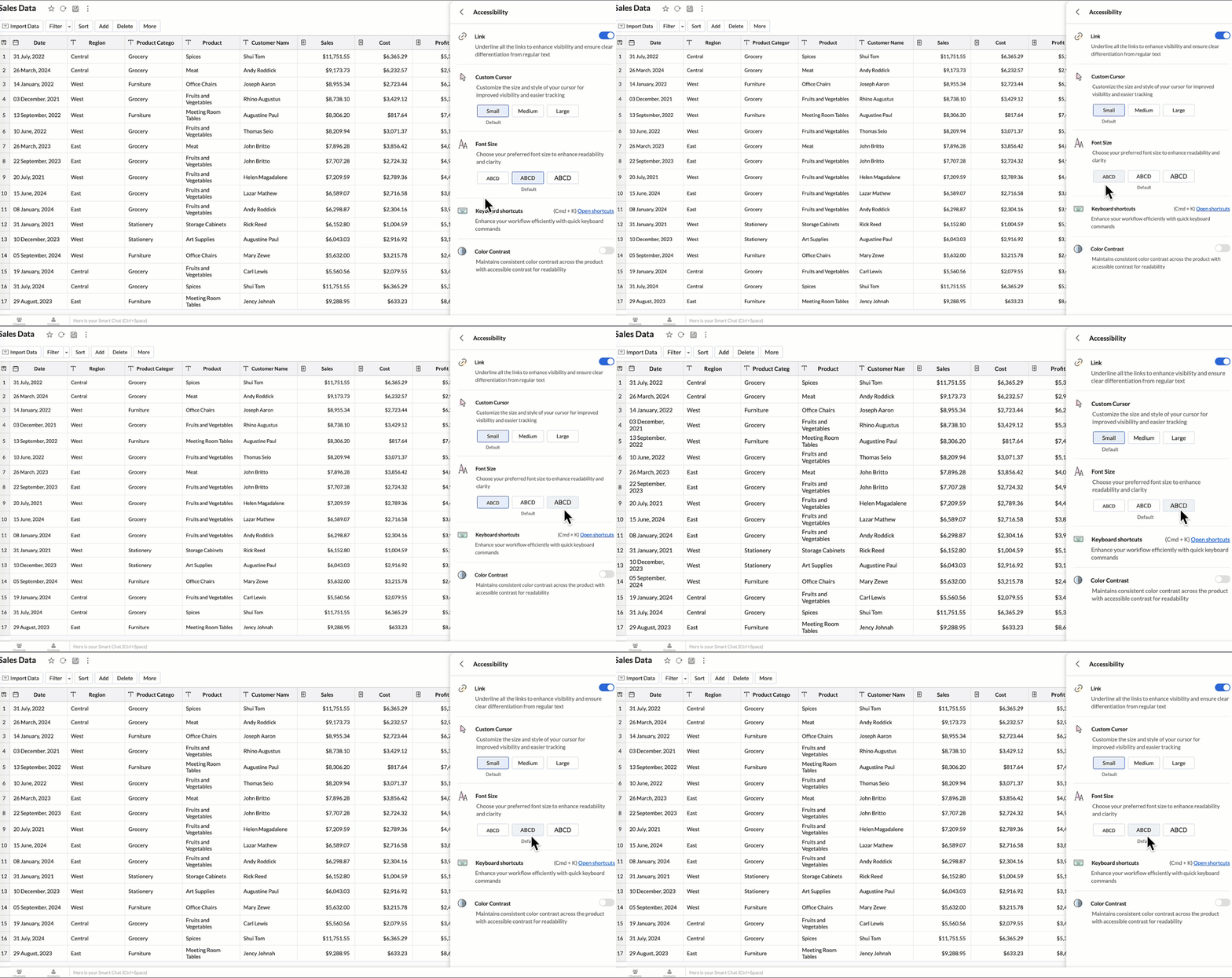
Accessibility
Zoho adds a new accessibility section that allows users to customize the interface to their needs:- Highlight links for clearer visibility.
- Adjustable cursor size (small, medium, large).
- Global font size adjustment.
- High-contrast mode for improved readability.
- Full list of keyboard shortcuts for faster navigation.
(image via Zoho)
New data connectors
New native integrations expand the analytics ecosystem:- Qntrl: analyze workflows, approvals, and operational efficiency.
- Asana: track tasks, projects, deadlines, and team performance.
- Zoho Community Spaces: insights into engagement, content, and community growth.
- Zoho Finance (new modules): expanded detail for financial reporting across the suite.
Data sync and Live Connect
Improvements aimed at faster loads and greater accuracy:- Incremental sync from other workspaces: adds only new or modified data.
- Incremental sync in custom queries: speeds up complex imports.
- Live Connect query tables – Athena: real-time analytics using tables prepared directly in Athena.
Developer Center updates
Capabilities for developers are expanded:- New SDK with Ruby support for native integrations and automations.
- JS API: programmatically switch tabs to build more dynamic embedded dashboards.
Maps and geographic analysis
Spatial analysis is strengthened with new functions:- Access individual layers, fix unresolved locations, and use layered maps as filters.
- Improved map tooltips, removing lat/long and showing clearer contextual data.
Reports and visualization
Enhancements that make data exploration more intuitive:- Drill-down available in public views and embedded views—not just shared reports.
- Widgets now support info icons and tooltips for added context.
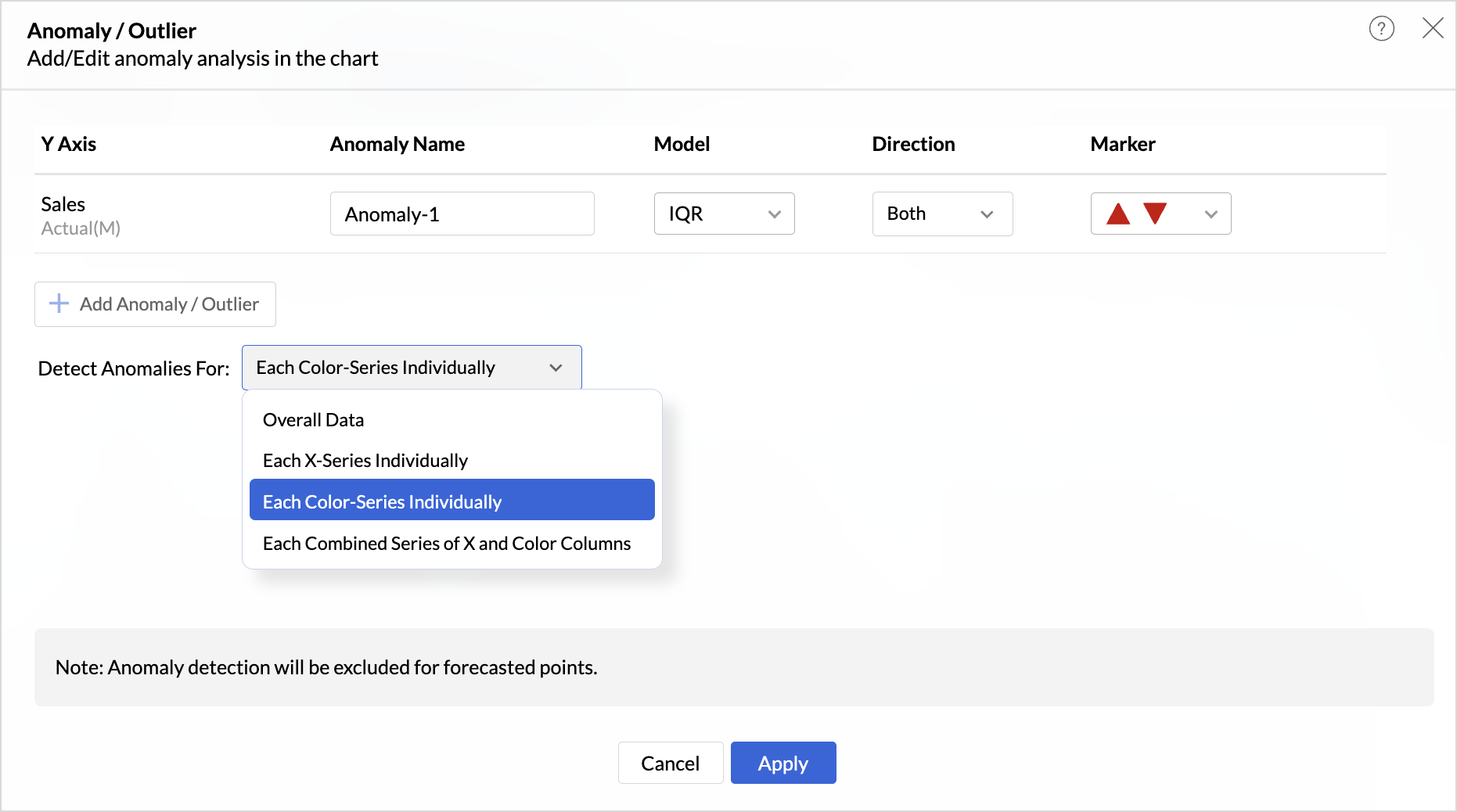
- Anomaly detection for dimensional fields with multiple modes (X-series, color, combined).
(image via Zoho)
New “Group Sort” option to sort complete groups dynamically without relying on hierarchy.
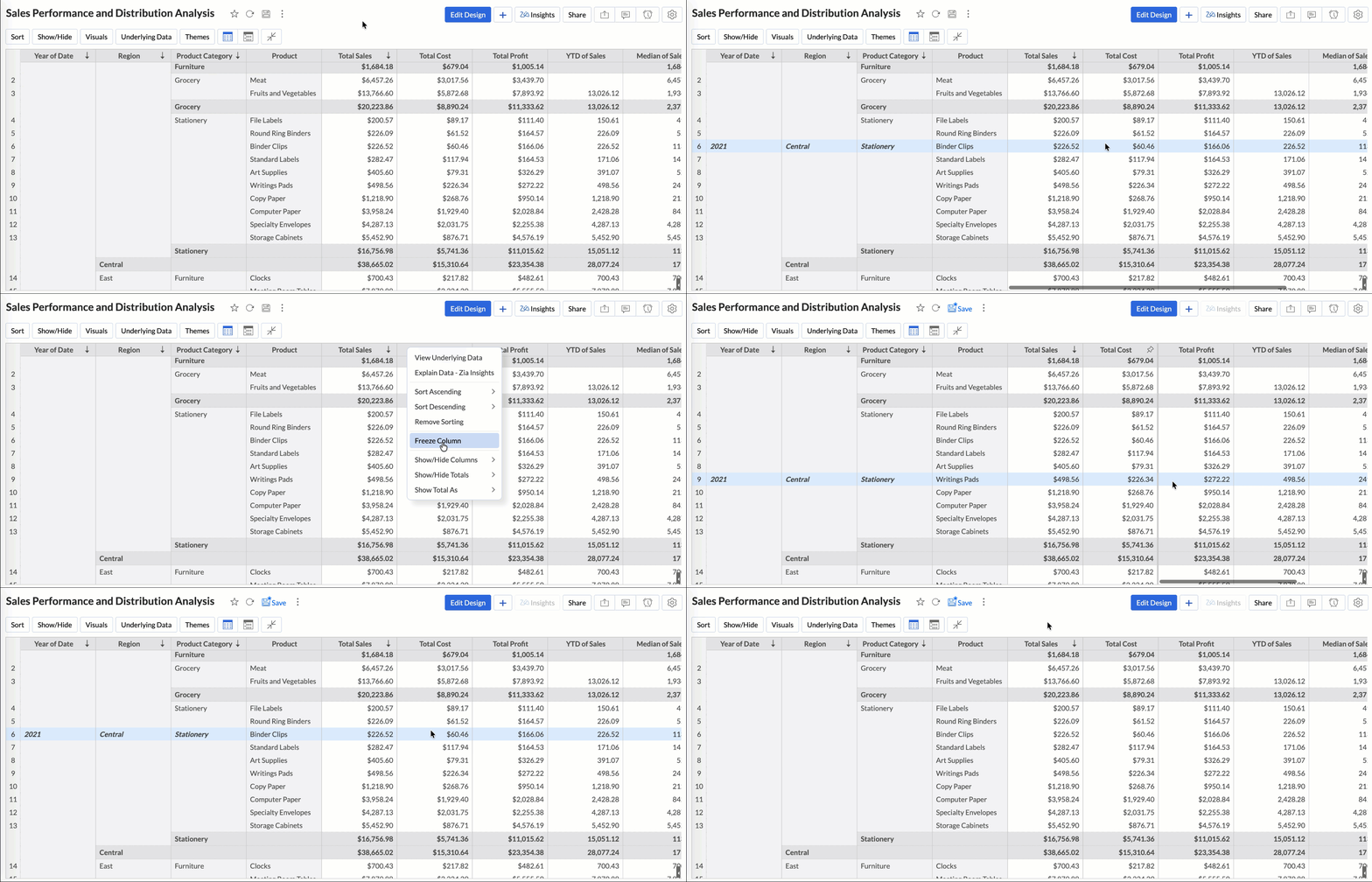
Column freezing available in pivot and summary views for easier comparisons.
(image via Zoho)
Fiscal year settings per report, aligning each report with your organization’s financial calendar.
Dynamic thresholds based on variables, responsive to user filters.
Variable suggestions based on data type to avoid incorrect setups.AI and machine learning
Internal improvements boost predictive capability:- AutoML now runs on 128 GB servers (U.S. Data Center), enabling much larger training datasets.
Zia Insights
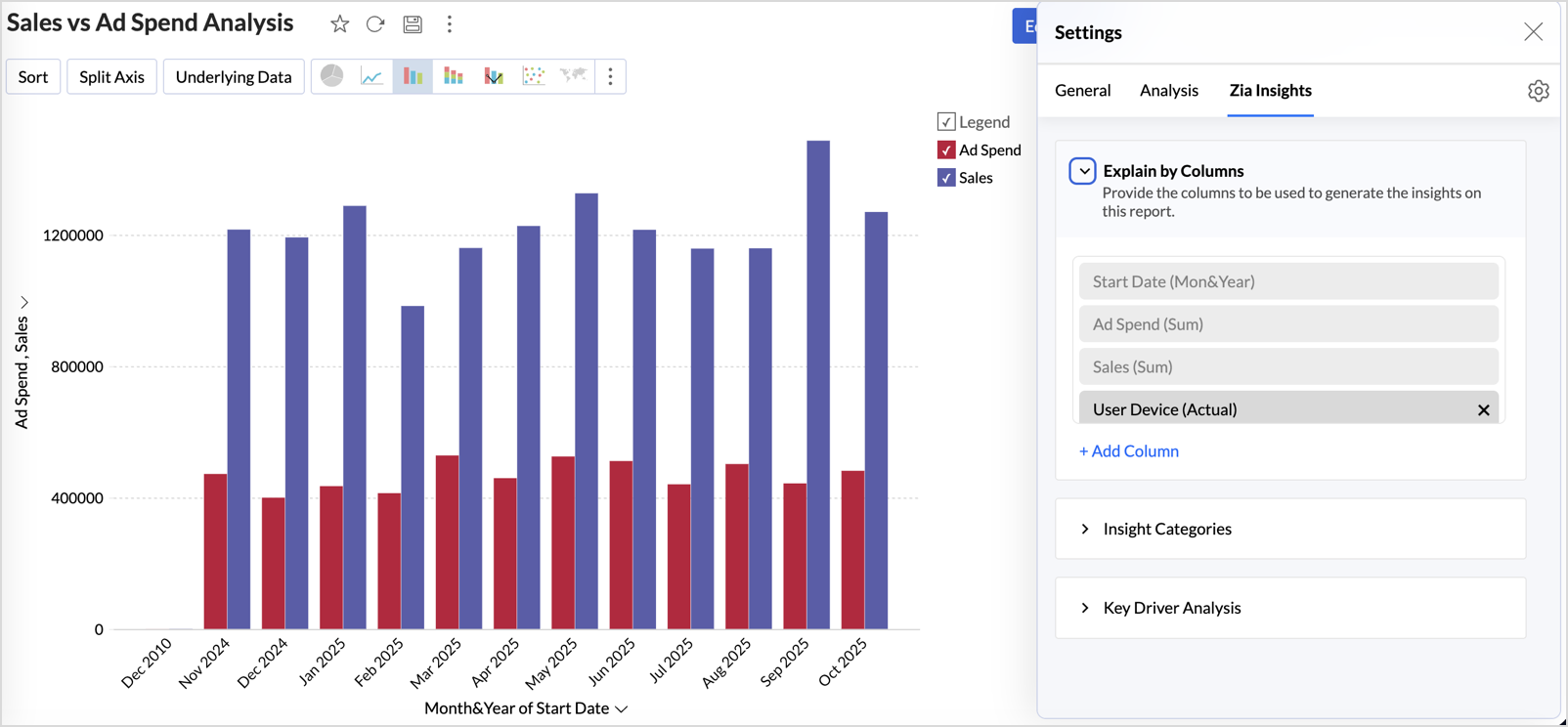
Enhanced assisted analytics and diagnostics:- Advanced customization: select metrics, dimensions, and insight types (contribution, time series, comparisons).
- Diagnostic insights for multiple time-series analyses, including anomalies, period changes, and early/late trend evaluation.
(image via Zoho)
Other updates
- Audit logs for white-label users: all admin actions are now recorded for greater security.
- New language support: Zoho Analytics now supports 29 international languages and 11 Indian languages.
Zoho One adds new security features for stronger, more controlled protection
(image via Zoho)
Zoho One introduces a suite of advanced tools that strengthen data security, improve risk detection, and give organizations greater control over access, identities, and devices.
BYOK: Bring Your Own Key
You can provide your own encryption key to protect data stored in Zoho. This gives you complete control over encryption and enhances protection of your most sensitive information.Audit Logs: the breadcrumb trail
Expanded logging of administrative and user activity makes it easier to track key actions, supporting internal audits, incident analysis, and compliance.Anomaly Watch: beyond basic monitoring
Detects unusual behavior in real time, such as unexpected access locations or abnormal activity, helping stop threats before they escalate.Conditional Access: your intelligent gatekeeper
Define access rules based on context—location, device, risk level, or network type. Access is only granted when conditions set by the organization are met.Customizable Identity Providers (IDP): sign in your way
Zoho One now supports more external identity providers, allowing organizations to choose how authentication and login processes are managed.RADIUS (Wi-Fi authentication)
Integration with RADIUS allows Zoho One authentication to be connected to corporate Wi-Fi networks, centralizing access control and enforcing consistent security policies.Webinars on AI in Zoho, Creator, and Books
AI in Action by Rajendran Dandapani – Zoholics India 2025
Quick Update Session on Creator
Discover the Power of Customization in Zoho Books
Would you like to add these new features to your Zoho system? Let’s work together! Learn more about our Zoho consulting services and contact us for a free consultation.